Grand Theft Auto cheat users have discovered that even the people selling ways around the rules struggle to follow some basic security ones. According to breach notification site Have I Been Pwned, the operators of Atlas Menu, a cheat service for Grand Theft Auto V and Counter-Strike 2, suffered a data breach in May that exposed information belonging to tens of thousands of users after an attacker allegedly gained access to the service's systems and dumped its database online. The breach exposed 64,000 unique email addresses, according to HIBP. The leaked data also included usernames, IP addresses, support tickets, and passwords stored as bcrypt hashes. The individual who claimed responsibility for the breach published the stolen database to a public GitHub repository, claiming to have gained access to "all Atlas systems" before extracting customer records, support conversations, menu license keys, signup dates, and Rockstar Games account identifiers. The data, reviewed by The Register, also appears to include lists of thousands of banned users, administrator logs, and other internal records. Posts discussing the breach on Reddit suggest this was not Atlas Menu's first security incident, but users said the latest leak appears to contain significantly more sensitive information than previous disclosures. Anyone signing up for a GTA cheat service probably wasn't expecting privacy guarantees. Even so, having your email address leaked is one thing. Having support tickets, account identifiers, and purchase records dumped onto GitHub is another. The Atlas breach comes weeks after Rockstar Games was pulled into a separate data leak claimed by ShinyHunters. In that case, the extortion crew alleged it had accessed Rockstar data through cloud cost-monitoring platform Anodot and threatened to publish the information unless its demands were met. Atlas users now have their own security headache to deal with. Whether they're more concerned about the leaked database or the screenshot-spying allegation will likely depend on what they were doing while the software was running. ®
Whether you’re planning a once-in-a-lifetime trip or just hoping to catch a match while it’s in your city, the 2026 FIFA World Cup is already driving a surge in ticket searches, travel bookings, and last-minute plans.
But where there’s high demand and big money, scammers aren’t far behind.
New McAfee Research Finds a Gap Between Awareness and Risk
New research from McAfee shows that while most fans are aware of World Cup-related scams, many are still willing to take risks to secure tickets.
In fact, 40% say they would consider buying from an unofficial source if they can’t get tickets through the official FIFA site, as many expect tickets to sell out and hope to find affordable resale options.
That tension is what makes events like the World Cup especially vulnerable for scams.
With limited ticket availability, rising prices, and the pressure to act quickly, even informed fans can find themselves making decisions they normally wouldn’t, like buying tickets from a reseller on TikTok.
And scammers are counting on it.
Survey takeaways:
76% of fans are interested in getting World Cup tickets
35% have already started searching online
43% are willing to spend over $500 on tickets
66% say they’re aware of World Cup-related scams
66% say they’re concerned about being scammed
40% would consider buying tickets from unofficial sources
The Most Common World Cup Scams to Watch For
Below is a comprehensive breakdown of the most common scams tied to major global sporting events like the World Cup, including how they work and what to look for.
McAfee’s Scam Detector,Safe Browsingtools, VPN, and Password Manager work together to help you spot scamslike these as they happen by flagging suspicious messages, blocking risky websites, and helping you make safer decisions before you click, pay, or share information.
Scam Type
What It Is
How It Works
Red Flags
Fake Ticket Resale Scam
Fraudulent tickets sold through unofficial sites or individuals
Scammers create fake listings or duplicate real tickets and sell them to multiple buyers
Prices far below or above market, refusal to use official transfer systems, pressure to act fast
Social Media Ticket Scam
Tickets sold through platforms like Instagram, Facebook, TikTok, or X
Fake or hacked accounts post “last-minute” ticket offers and move conversations to DMs
Urgent language (“only 2 left”), new or suspicious profiles, requests to pay outside the platform
Duplicate QR Code Scam
One legitimate ticket is resold multiple times
Multiple buyers receive the same QR code, but only the first scan works
Screenshots instead of official transfers, identical tickets sold repeatedly
Fake Ticket Website Scam
Websites designed to look like official ticket platforms
Victims enter payment info or purchase tickets that don’t exist
Slightly misspelled URLs, unfamiliar domains, lack of official branding verification
Travel & Accommodation Scam
Fake hotels, rentals, or travel packages
Listings appear legitimate but either don’t exist or are already booked
Prices that seem unusually low, requests for upfront payment, lack of verified reviews
Booking Impersonation Scam
Fraudsters pose as airlines, hotels, or booking platforms
Victims receive messages about “issues” with bookings and are asked to click links or provide info
Unexpected messages, requests for login or payment details, links that don’t match official sites
Public Wi-Fi & Phishing Scam
Data theft through unsecured networks while traveling
Scammers intercept data or create fake login portals on public Wi-Fi
Open networks with no password, login pages asking for unnecessary information
Fake Giveaway Scam
Promotions claiming free tickets or VIP access
Victims are asked to enter personal data, click links, or pay “processing fees”
“You’ve won” messages you didn’t enter, requests for payment to claim prizes
Betting & Prediction Scam
Fake betting tips or “guaranteed wins” tied to matches
Scammers sell fake predictions or direct users to malicious betting sites
Claims of guaranteed outcomes, requests for upfront payment, unfamiliar platforms
Merchandise Scam
Counterfeit World Cup gear sold online
Buyers receive low-quality or no product at all
Unverified sellers, poor site quality, deals that seem too good to be true
How AI is Making These Scams More Convincing
Unfortunately, with the continued improvement of AI, these scams are becoming more convincing.
AI tools allow scammers to create:
More realistic websites and messages
Personalized outreach that feels legitimate
Fake endorsements, images, or promotions
That means traditional advice like “look for typos” is no longer enough on its own.
Today’s scams often look polished, professional, and believable.
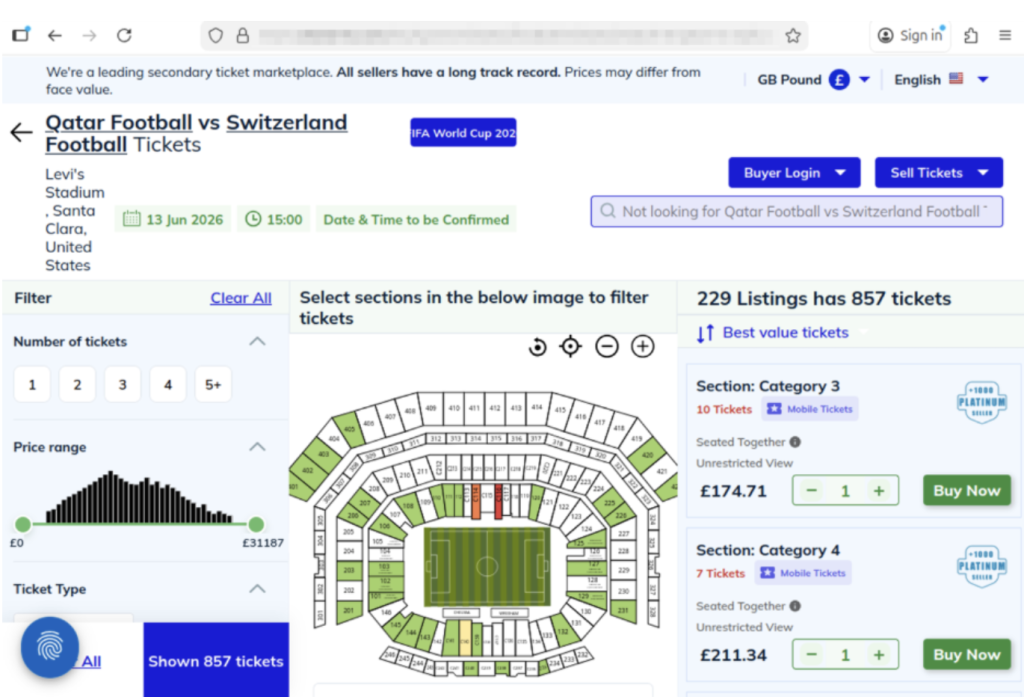
The website above shows a scam operation detected by McAfee Labs. It has incredibly realistic seat-selection options and ticket-buying features. But it’s fake.Here you can see just how realistic the website looks. But these tickets are not actually for sale.
What “Official” Actually Means (and Why It Matters)
Use strong passwords and enable two-factor authentication. Consider a password manager like McAfee’s.
Verify before you buy
If something feels off, pause and check before sending money
What to Do If You Think You’ve Been Scammed
If you think you may have purchased a fraudulent ticket, clicked a suspicious link, or shared information with a scammer, acting quickly can help limit the impact.
Immediate steps to take
Stop communication immediately Do not send additional money or information, even if the sender claims you need to “complete” a transaction. It’s also a good idea to take screenshots of messages in case the scammer disappears.
Contact your bank or payment provider Report the transaction as soon as possible. Many institutions can help reverse charges or flag fraudulent activity if caught early.
Secure your accounts Change passwords for any accounts that may be affected, especially email, banking, and ticketing platforms. Our password manager and free password generator help create unique passwords every time.
Enable two-factor authentication (2FA) Adding an extra layer of security can help prevent unauthorized access, even if your password was exposed.
Scan your device for threats If you clicked a suspicious link or downloaded a file, run a security scan to check for malware or malicious software. Check out our free security scan.
Monitor for unusual activity Keep an eye on financial accounts, email logins, and any services tied to your personal information. Our free WebAdvisor helps protect you from malware and phishing attempts while you surf.
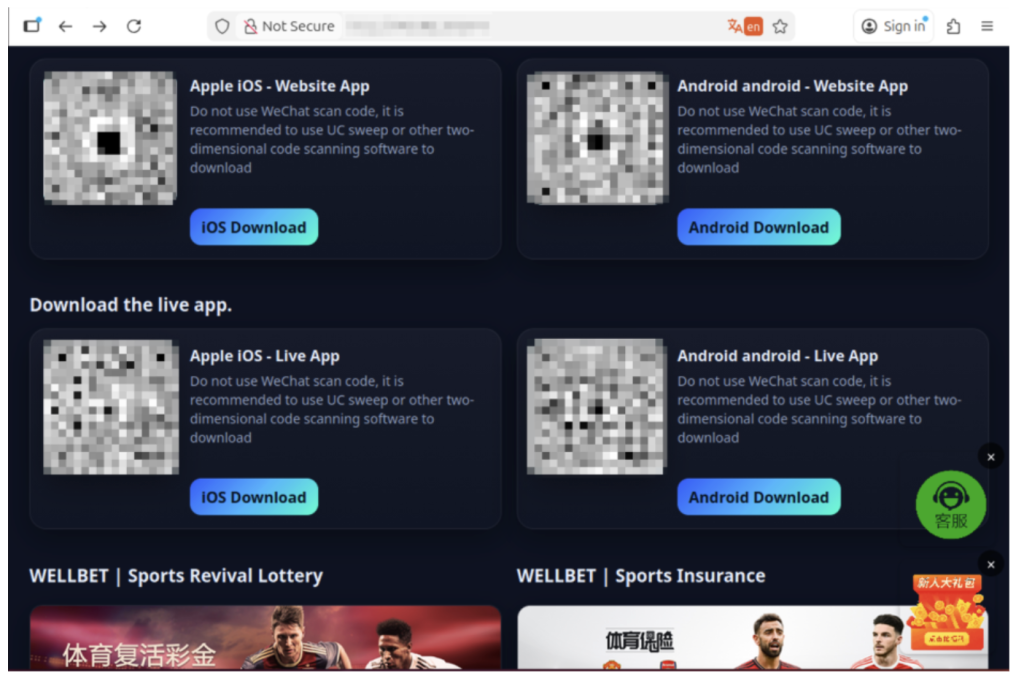
The image above shows malicious apps masquerading as sports betting sites or promising unique World Cup coverage. But when users download, their devices are infected.
How McAfee Helps You Spot Scams in the Moment
McAfee offers more than traditional antivirus, combining multiple layers of digital protection in one app to help you stay safer while searching, clicking, and buying online.
Scam Detector helps flag suspicious texts, emails, and videos automatically, so you can spot a scam before it hits you and your wallet
Safe Browsing tools help block risky websites, alert you to phishing attempts, and guide you away from malicious links
VPN helps keep your connection private on public Wi-Fi, protecting your personal and payment information
Password Manager helps create and store strong, unique passwords to reduce the risk of account takeover
Identity Monitoring and Alerts notify you if your personal information appears where it shouldn’t, so you can quickly take steps to fix it
Personal info removal helps find and remove your personal info from data broker sites and close out old forgotten accounts
The World Cup isn’t just another event, it’s a moment when millions of people are making fast decisions involving real money, travel plans, and personal information.
What McAfee’s research makes clear is that the biggest risk isn’t a lack of awareness. Most fans already know scams exist. The risk is what happens next.
When tickets are scarce, prices are high, and the pressure to act is real, even informed consumers may take chances they normally wouldn’t. That’s where scammers succeed: not by tricking people who aren’t paying attention, but by catching people in moments of urgency.
As demand continues to build toward the tournament, more fans will be searching, comparing, and purchasing online.
The takeaway is simple: Staying safe isn’t just about knowing scams exist. It’s about slowing down, verifying before you buy, and using tools that help you make informed decisions in the moment.
*McAfee is not affiliated with or endorsed by FIFA.
Announcing the new integration between Cisco Secure Access and Microsoft Purview designed to provide unified DLP based on Purview policies that can be enforced locally and in the cloud within Cisco Secure Access.
The integration between Cisco Secure Access and Island enterprise browser improves the user experience while reducing risk by connecting and protecting user access to private applications from unmanaged devices.
Cisco is bringing more detailed visibility into Splunk across Cisco Firewall and Isovalent, helping teams act across hybrid environments with greater speed and confidence.
Password manager Dashlane has disabled a number of user accounts as a precaution amid a spate of brute force attacks. It didn't specify the scale of the attack, although scores of users have queried the reason for receiving emails informing them of account suspensions. “Your account has been temporarily suspended for security reasons as someone has attempted to register a new device and didn't enter the correct token after several tries,” the emails read, along with instructions to contact customer support to restore access. The attacks began on Sunday afternoon and the Dashlane team said it had finished investigating the matter later that evening, restoring all affected user accounts in the process, according to its status page. In a copy-paste statement sent to a number of users via social media, Dashlane also confirmed there was no compromise of internal systems. Dashlane posted an update to its status page on Monday morning, repeating the same statement from a day earlier, but changing the incident status from "resolved" to "monitoring." Several users reported unauthorized login attempt notifications from various countries - the common culprits being Korea and Russia. Dashlane did not specify whether any attempts on customer accounts were successful. Dashlane’s interventions involved suspending accounts and its two-factor authentication (2FA) service. Some users reported trying to access Dashlane’s 2FA one-time passcodes, but when entering them, all that returned was an error. Some criticised the company for a lack of public comms about the attacks. Aside from the direct account suspension emails and some replies to users on social media, Dashlane has not disclosed the attack through any high-visibility channels. Users also queried whether the initial account suspension emails were a phishing attempt. But the emails showed no hallmarks of phishing as they contained no suspicious links, no attachments and were sent from a real Dashlane domain. However, the nature of the message and the fact that the emails contained an old Dashlane logo only exacerbated some customers’ fears. The Register has contacted Dashlane for more information. ®
Announcing the new integration between Cisco Secure Access and Microsoft Edge for Business, designed to enhance enterprise browser security and protect an organization’s applications and data.
A single npm user on Thursday published 14 malicious packages within a four-hour window, all mimicking popular OpenSearch, Elasticsearch, DevOps, and environment-configuration libraries, according to Microsoft. It’s the latest in a seemingly never-ending string of supply chain attacks targeting developer tools, and stealing cloud credentials and CI/CD pipeline secrets in its wake. Using a newly created maintainer alias, vpmdhaj (a39155771@gmail[.]com), the threat actor published 14 packages impersonating legitimate libraries from the @opensearch and @elastic ecosystems and targeting Amazon Web Services, HashiCorp Vault, GitHub Actions, and the npm registry itself. This suggests that the attacker “likely chose a developer audience to have AWS and Elastic cloud credentials in their environments,” Microsoft warned in a Thursday blog. All of the malicious packages include the same install-time stager and the same Bun-compiled, second-stage payload: a 195 KB credential harvester purpose-built for cloud and CI/CD environments. Plus, as we’ve seen with all of the other open source supply chain attacks of late, after stealing tokens and other secrets, the attacker can move laterally across cloud environments, steal additional sensitive data, and push even more poisoned updates to packages owned by hijacked maintainer identities, thus expanding the attack beyond the initial 14. All of the malicious libraries have since been removed, and Microsoft published a list of all 14 in its blog. Give that a read to help identify systems that installed or built affected package versions on or after May 28. Be sure to also rotate an AWS IAM/STS, HashiCorp Vault, npm publish, and GitHub Actions tokens that may have been exposed. To trick users into installing these developer tools and search engines, the attacker used typosquatting - naming a package one or two letters off from the legitimate one - or lookalike naming (such as opensearch-setup-tool, opensearch-config-utility, and elastic-opensearch-helper) to impersonate well-known libraries. In addition to this social engineering technique, used to drive installs through users’ typing mistakes or trust, the attacker also used two other techniques to make the supply chain attack more believable. This includes spoofing upstream metadata. “Every unscoped package sets its package.json homepage, repository, and bugs fields to the legitimate github.com/opensearch-project/opensearch-js project,” Microsoft’s threat hunters explained. And finally, they inflated version numbers, so the phony “releases” jump straight to 1.0.7265, 1.0.9108, or 2.1.9201 to indicate a mature release history. After tricking users into installing the npm packages - all 14 are listed in the blog, so give that a read - the credential-stealing payloads automatically execute through preinstall hooks as soon as the victim runs npm install. For this, the attacker used one of two stagers. The Gen-1 stager uses install, preinstall, and postinstall hooks that all invoke preinstall.js, and then collects a ton of host information including hostname, platform, arch, Node version, USER/USERNAME, cwd, INIT_CWD, npm_package_name, npm_package_version. It then base64-encodes the JSON, and POSTs it to the actor’s command-and-control server, which then serves a second-stage payload, written to payload.bin in the package install directory. “The package’s index.js re-launches the same payload.bin on every subsequent require() of the module – a quiet persistence mechanism that survives across CI build stages and developer rebuild loops,” according to Microsoft. The later Gen-2 stager replaces the install-time C2 roundtrip with a stealthier loader that checks whether bun is already present on the host. If not, it downloads the legitimate Bun runtime v1.3.13, and then executes the second-stage payload, which sets to work stealing credentials across AWS, HashiCorp Vault, npm, GitHub Actions, and other CI/CD environments.®
The website, which compares human beings to extraterrestrials, touts arrest numbers from the Trump administration’s sweeping immigration crackdown. But some of its details are really out there.
There's a huge hole and no one is patching it thus far. A critical, remote code execution (RCE) bug in Gogs, a popular open-source self-hosted Git service, can be exploited by any authenticated user - no special privileges required - on a default installation to fully compromise vulnerable servers, steal credentials and multi-factor authentication secrets, or even modify code in hosted repositories in a wide-reaching supply-chain attack. A security researcher reported the 9.4-rated flaw to project maintainers in mid-March. It still doesn’t have a patch. It does, however, have a public Metasploit module - so we’d expect reports of in-the-wild exploitation to start very soon. The vulnerability affects all supported platforms, including Windows, Linux, and macOS, and installation methods, according to Rapid7 researcher Jonah Burgess, who found and reported the bug to Gogs maintainers via GitHub (GHSA-qf6p-p7ww-cwr9) on March 17. After they initially acknowledged that they received the report on March 28, Burgess says he never heard back from the Gogs team - not when he asked them for a status update, nor when he reminded them of the vulnerability disclosure date and asked if they wanted an extension to fix the flaw before its release. “We have not received any further communication from Gogs, and the GHSA has remained unanswered since March 28,” Burgess told The Register. “Because there is currently no official patch, our team submitted a pull request with a suggested fix today [Friday], which is currently awaiting review. At this time, we have no evidence suggesting that this vulnerability is being exploited in the wild.” Gogs sponsor DigitalOcean also did not respond to The Register’s inquiries, including when the security issue would receive a patch. The vulnerability stems from an argument injection flaw in Gogs’ pull request merge flow, specifically the Merge() function in internal/database/pull.go. If a Gogs repo owner or admin enables "Rebase before merging" and a user opens a pull request, the PR's base branch name gets passed directly to a git rebase command without a -- separator to mark the end of command options. Gogs also fails to properly sanitize the input. This means an attacker can create a malicious branch (such as --exec=touch${IFS}/tmp/rce_proof), and Git treats it as an --exec flag, not a branch name, and executes the payload. For Windows installations, the payload delivery method is slightly different, and Burgess developed an exploit module to auto-implement a cross-platform approach. Until the maintainers fix the flaw, Burgess suggests Gogs’ users take the following precautions to mitigate the issue. First, and most importantly, restrict user registration (DISABLE_REGISTRATION = true in app.ini) to prevent untrusted users from creating accounts. Restricting repository creation (MAX_CREATION_LIMIT = 0 in app.ini) to prevent users from creating their own repos also blocks the easiest attack path - creating a new repo with rebase enabled - but it won’t prevent exploitation by users with write access to existing repositories. Finally, audit rebase merge settings, and disable “Rebase before merging" under Settings > Advanced. “Note that this is not an effective defense against a malicious user who owns or has admin access to a repo, since they can re-enable rebase at will,” the threat hunter warns. “There is no global or organization-level setting to restrict this.” ®
Dutch police say they dismantled a large botnet this week comprising at least 17 million infected devices. After being tipped off by a researcher at the Netherlands' National Cyber Security Centre (NCSC-NL), police began an investigation, which resulted in the discovery of 200 servers underpinning the botnet's infrastructure located in the country. Cybercrime specialists at The Hague Police Unit seized a number of servers from a hosting provider for further analysis, and the provider then shut down the botnet after realizing it was being used for "criminal purposes." Botnets can be used for various types of cybercrime, but officials did not say how this botnet in particular was used. Police merely stated the general types of abuse, which include phishing, launching DDoS attacks, and online fraud. Neither the police nor the NCSC-NL revealed the botnet's name – an oddity for takedowns of this kind – and also did not detail exactly what devices were enrolled in it. However, both organizations' announcements identified poorly secured consumer-grade kit such as routers, mobile devices, and IoT hardware as common examples. Both also advised users to stop relying on default passwords for new hardware, avoid installing apps from unofficial sources, and keep software up to date. Botnets and proxies on the rise Just before the police announced the botnet takedown, NCSC-NL published a blog highlighting a rise in residential proxy networks used for malicious purposes, calling it a "worrying trend." Botnets and residential proxy networks are often mentioned in the same breath, since both require enrolling legitimate devices into a broader network, although they are typically used for different purposes. Botnets are almost exclusively malicious, with only a few benign exceptions. Folding@home, a voluntary distributed computing project, is possibly the closest clean-living comparison. Residential proxy networks are different. They're legal, and you can find large operators advertising their services on the open web, usually promoting privacy benefits, although experts agree that these networks are a problem, and are more often abused than used for good. Willingly or not – often the latter – consumers have their IP addresses enrolled into these networks, which are also used by cybercriminals to hide the true source of malicious traffic, complicating cyber incident response. These proxies can be used for DDoS attacks, similar to how botnets rely on compromised devices, as well as other trickery such as phishing, brute-force attacks, bypassing impossible travel checks, and malware distribution, among others. "The misuse of residential proxies makes it more difficult to map digital threats and attacks," NCSC-NL wrote. "As the scale of digital attacks increases, the resilience of organizations can come under pressure. "Additionally, the devices of unsuspecting users can become part of such proxy networks, often without their knowledge. In this way, consumers are unknowingly part of cybercrime." Dutch cyberattack reports hit nine-year low On Thursday, shortly after the police announced the botnet takedown and concerns about the rise of residential proxy networks, NCSC-NL published its annual Cybercrime Monitor report, which revealed cyberattacks on Dutch companies had fallen to the lowest level in nine years. According to 2024 data, the most recent available, just four percent of organizations reported an external cyberattack compared to 11 percent in 2016. The report noted the downward trend was noticeable across all company sizes. Phishing and spoofing were by far the most common types of attack, with 23 percent of organizations experiencing this to some degree. At the other end of the scale, attacks involving DDoS, data breaches, business email compromise fraud, and ransomware were each reported by around one percent of organizations. NCSC-NL linked the improvements to wider adoption of multi-factor authentication (MFA). It said the technology is effectively universal across larger organizations, with 87 percent implementing it in 2025, up from 71 percent in 2017. For smaller organizations, the uptake was even more pronounced, more than doubling to 79 percent from 29 percent eight years prior. ®
The Jacksonville Jaguars recently released a viral schedule announcement video that appeared to show their star quarterback chopping off his signature long blond hair. The clip spread quickly online, pulling in nearly 4 million views on X and triggering reactions from fans, friends, and even Lawrence’s grandmother.
The catch? It wasn’t real.
The team later confirmed the moment was partially staged, partially AI-generated and part of the joke. Even Lawrence admitted the fake looked convincing.
And that’s exactly the problem.
What started as a harmless sports prank is also a reminder of how realistic AI-generated videos have become and how easily scammers can use the same technology to fool people online.
Why Deepfake Scams Are Growing Fast
Deepfake scams use artificial intelligence to clone someone’s face, voice, or likeness to create fake videos, ads, phone calls, or social media posts that appear real.
And increasingly, scammers are using celebrities, influencers, athletes, and trusted public figures to do it.
72% of Americans say they’ve seen fake celebrity or influencer endorsements online
39% say they’ve clicked on one
1 in 10 victims lost money or personal data
Average losses reached $525 per person
Why does it work? Because scammers know familiarity lowers our guard.
When people see a recognizable face, whether it’s Trevor Lawrence, Taylor Swift, Tom Hanks, or a favorite influencer, they’re more likely to trust what they’re seeing before stopping to question it.
From Funny Sports Videos to Real Financial Scams
The Jaguars video was meant as entertainment.
But scammers are already using the same technology for fraud.
McAfee researchers recently identified a growing wave of celebrity deepfake scams involving fake giveaways, investment schemes, romance scams, and fraudulent ads.
Some recent examples include:
Fake videos of TV personalities promoting “miracle” products
Usernames with extra characters or copied profile photos
Requests for money or personal data
Especially through DMs, crypto links, gift cards, or wire transfers
How McAfee Helps Protect You
AI scams are evolving fast, but layered protection can help you stay ahead of them.
McAfee’s Scam Detector, included in all core McAfee plans, can help identify suspicious links, messages, videos, and deepfake-related scams across texts, email, and social platforms before you click.
Additional protections like Web Protection and Identity Monitoring can also help reduce your risk if scammers attempt to steal your credentials or personal information.
Other Scam News This Week
Charter Confirms Data Breach
Charter Communications confirmed a data breach tied to a third-party vendor, exposing customer information. Whenever breaches like this happen, scammers often follow up with phishing emails and fake customer support calls pretending to help affected users.
7-Eleven Data Breach Reports Surface
Reports surrounding a potential 7-Eleven data breach are circulating online. Consumers should stay alert for fake password reset emails, loyalty account phishing attempts, and scam texts impersonating retailers.
‘Tom Selleck’ Celebrity Scam Highlights Rise of AI Impersonation Fraud
A tragic case tied to an alleged Tom Selleck impersonation scam is drawing attention to the growing threat of celebrity AI fraud. Experts warn that scammers are increasingly using fake celebrity profiles, AI-generated messages, cloned voices, and deepfake videos to build trust with victims online, especially older adults.
The case underscores how emotionally manipulative and financially devastating these scams can become.
Hackers Are Exploiting AI Chatbot “Personalities”
Researchers told The Verge that attackers are beginning to manipulate chatbot behavior and personalities to trick users into unsafe actions, highlighting growing concerns around AI trust and social engineering.
Fake Inheritance Email Scams Are Getting More Convincing
A phishing scam making headlines this week uses fake inheritance notices and “unclaimed estate” emails to pressure victims into sharing personal information.
Unlike older scam emails full of spelling mistakes, newer versions look polished and professional, often using legal-sounding language, fake reference numbers, and urgent 48-hour deadlines designed to trigger panic before people stop to verify the message.
McAfee Safety Tips This Week
The next deepfake won’t always look fake. That’s what makes these scams dangerous.
Here are some practical, go-to tips
Pause before clicking celebrity endorsements or viral videos
Verify accounts through official sources before trusting promotions
Never send money or personal data based on social media messages alone
Be skeptical of urgency, especially “limited time” threats
Use AI-powered scam protection tools to help identify suspicious content before you engage
Getting the location of troops at war might be as easy as buying the data from a legitimate business. America’s foreign adversaries have exploited commercial geolocation data tied to US troops, the Pentagon admits, using it to target or surveil US personnel in the Middle East. Despite that, the Defense Department hasn’t exactly moved fast to secure the information, elected officials say. Senator Ron Wyden (D-OR), Representative Pat Harrigan (R-NC), and a dozen other Congress critters sent a letter to DoD CIO Kirsten Davies on Thursday, demanding a change in smartphone security posture among US military branches. Included in the letter is what lawmakers describe as the first public confirmation that commercial location data has been used to target or surveil American troops in active war zones. The information was shared with Wyden’s office in April. The reason for the delay in publishing the information, Wyden’s team told The Register, was due to “markings that restricted public release,” which Wyden reportedly pushed back on, leading to Thursday’s letter and the attached responses [PDF] from the DoD confirming info purchased from commercial data brokers was used to target troops. “USCENTCOM [US Central Command] has received multiple threat reports concerning adversary exploitation of commercial location data to target or surveil US personnel in theater,” the DoD’s responses from April indicate. As for how exactly data brokers got access to the data that allowed adversaries to locate troops and their movements, they got it from the same sources as anyone else buying data from a commercial broker: Smartphone advertising profiles. According to the DoD responses included in Wyden’s letter, not only are US military personnel allowed to use personal devices within operational areas, there’s no actual policy that requires servicemembers to turn off geolocation capabilities on their devices when located in active war zones. “USCENTCOM's geolocation risk guidance directs personnel to disable geolocation functionality when not needed; periodically review device and application privacy settings; and limit public sharing of information,” the DoD said last month, while simultaneously admitting that such guidance doesn’t always fully disable geolocation on smartphones. In addition to personally-owned devices, the DoD’s own issued smartphones don’t disable advertising profiles, either. “The Personalized Advertising setting is disabled by group policy on the Mobile Device Management Server,” the DoD told Wyden’s team. “However, Ad Targeting Information is not disabled and can be edited by a user.” That’s not the most straightforward answer, and, when we asked Wyden’s team what it thought of the response, it agreed with our assessment that the Pentagon’s MDM disables the serving of personal ads to users, but doesn’t stop the transmission of device advertising IDs or other associated data. The DoD noted in the response that it’s in the process of migrating to a new MDM solution that allows location services to be completely disabled on government-issued devices and was targeting a completion date of early May, though it’s not clear whether the process has been finished yet. The Pentagon declined to answer any of our questions, only saying it would respond to Wyden, not us. It’s also not clear how effective that MDM migration will be, as the DoD appears to be phasing out government-issued devices in favor of a broader BYOD policy in at least one branch. According to a US Army press release from earlier this month, the branch is targeting the end of this month for the return of Army-managed work smartphones, as “the primary and preferred method for connectivity is the Bring Your Own Device, or BYOD, program.” CENTCOM has reportedly strengthened its geolocation controls in its area of operations; whether the average soldier, sailor, airman, and Marine is complying isn’t indicated. They’ve known about this for how long?! Failure to prevent the exposure of sensitive location data of military assets could be forgivable if it were a new problem, but according to Wyden’s letter, it’s not: The Pentagon likely knew about the issue for a decade. According to the letter, government contractors briefed military leadership about the ease of tracking smartphones owned by military members way back in 2016. “DoD officials have not treated this counterintelligence and force protection threat as a five-alarm fire,” the letter asserts, adding that the Pentagon “has known about this threat for over a decade, yet have failed to take meaningful steps to protect our men and women in uniform.” It’s not like there haven’t been plenty of examples of sloppy location data management compromising military operations, either. Data culled from workout tracking app Strava has been used to identify the workout routes of US military personnel jogging on base - and reveal the location of French President Emmanuel Macron thanks to his bodyguards’ sloppy security practices - and social media has also been flagged as an OPSEC disaster waiting to happen. Despite all those examples and briefings going back a decade, the problem has continued right up to the latest operations in Iran. “That foreign adversaries are still able to buy location data collected from the phones of U.S. personnel serving in military hotspots is a direct result of DoD leadership’s failure to prioritize this threat and implement commonsense cyber defenses,” the letter charges. Whether anything will be done about it remains to be seen. ®
The ongoing saga of Microsoft versus Nightmare Eclipse (aka Chaotic Eclipse), the disgruntled bug hunter with a deep understanding of Windows and an even deeper grudge against Microsoft, reached a fever pitch, with the researcher, who has thus far released six Windows zero-days, promising a “bone shattering” drop on July 14. Microsoft, for its part, finally responded to the security researcher and their weaponized Windows flaws with a blog post on (un)coordinated vulnerability disclosure about the now-public bugs: RedSun, UnDefend, BlueHammer, YellowKey, GreenPlasma, and MiniPlasma. Redmond says that none of these were reported via its official channels prior to being made public. Attackers began hammering three of the six - BlueHammer, RedSun, and UnDefend - soon after Nightmare published working proof-of-concept exploit code for each on now-banned GitHub (owned by Microsoft) and GitLab accounts. YellowKey, GreenPlasma, and MiniPlasma still don’t have fixes, and Microsoft has deemed “exploitation more likely” for YellowKey, aka CVE-2026-45585, citing a working POC. “We remain firmly opposed to these actions, and any disclosure outside proper coordination that could harm our customers and the digital ecosystem,” Microsoft wrote in a Wednesday blog, and then seemingly threatened legal action against Nightmare: “Uncoordinated disclosures that put proof-of-concept code for unpatched vulnerabilities into the hands of bad actors are never justifiable and have real-world consequences. Our security teams across the company work tirelessly tracking threat actors who look for weaknesses just like these to attack Microsoft and our customers. Our Digital Crimes Unit will continue bringing cases against these actors and those that enable their criminal activity – coordinating as needed with law enforcement around the world.” Microsoft did not respond to The Register’s questions, including whether its legal team planned to sue Nightmare, whether the zero-day researcher is a current or former employee, and whether Microsoft axed Nightmare’s MSRC account, meaning that the bug hunter can’t disclose vulnerabilities to the Windows giant. Nightmare, in their latest anti-Microsoft missive, claims Microsoft did just that. “When I actively asked you to communicate with me, you refused, humiliated me and made sure to insult me in front of people,” they wrote on Saturday. “You defame me in public with your CVE-2026-45585 advisory even though you literally deleted the Microsoft account I used to report bugs to you with and I got zero pennies from doing so and I still happily did like an idiot.” Nightmare also noted that “Microsoft still has chains in my hands,” preventing them from releasing “documents” yet, or anytime in June, and then warned: “Mark this date July 14th, I will make sure your bones are shattered that day.” Regardless of what does or does not happen on July 14, Nightmare has already caused chaos - and real enterprise-level damage, as systems engineer Muhammad Qasim Shahzad said on LinkedIn. “One person caused more enterprise-level damage in six weeks than most APT groups cause in a year,” Shahzad wrote. “The gap between disclosure and weaponization is now measured in hours, not days. Your patching window is shrinking fast.” Zero Day Initiative’s bug hunter-in-chief Dustin Childs, who previously spent about seven years working for Microsoft security and has decades of experience on both sides of the coordinated vulnerability disclosure (CVD) process, told The Register that Microsoft could have handled this better. And he wondered what happened between the two parties to get to this point. “CVD is a two-way street,” he said. “The vendor has some responsibility as well, so to go out publicly stating this person violated CVD without showing any of the correspondence seems bold.” Microsoft could also improve its communications to customers on “what the real risks from these bugs are and how they can defend themselves,” Childs added. “That clear direction seems to be missing.” Microsoft's 'dumpster fire' Luta Security founder and CEO Katie Moussouris, who pioneered Microsoft’s bug bounty program despite execs vowing never to pay researchers for bugs, said Redmond’s response to Nightmare sends “mixed messages.” “It confusingly claims their program ‘ensures researchers are compensated and publicly acknowledged’ in a statement answering a researcher who says he got neither,” Moussouris told The Register. “The language choices are also not deescalating. Microsoft invoked the outdated term ‘responsible disclosure,’ which I retired years ago at Microsoft because it was subjective and judgy.” This phrase, Moussouris added, “got in the way of coordination” when the two sides disagreed about how to best protect end users. “The mention of the Digital Crimes Unit in a post discussing vulnerability disclosure makes the post vaguely threatening, which seems intentional, but then they wrap up the post saying they welcome reports regardless of disclosure history,” she said. “No one except the parties involved can know for sure what happened between this researcher and Microsoft. Whatever the facts, it's hard to imagine why Microsoft would not try to deescalate, if for no other reason than avoiding the chilling effect on other researchers.” Security sleuth Kevin Beaumont, in his blog on the ongoing Microsoft-Nightmare Eclipse saga, called it a "dumpster fire of [Microsoft’s] own making.” Beaumont also used to work at Microsoft, and he noted that the Windows company previously hired a hacker called SandboxEscaper after she published zero-day POC exploits for Microsoft products - something that Redmond’s blog now describes as criminal. “If Microsoft’s tactic is to try to criminalise not following often arbitrary ‘responsible disclosure’ frameworks, good luck defending that in court - because there’s a whole clown car of prior decision making within Microsoft and facts which would emerge in that process,” Beaumont said. To be clear: neither Beaumont nor the researchers that The Reg spoke to support Nightmare’s zero-day antics. Childs called the “July 14” post “troubling” and Moussouris said the date plus “incendiary language … doesn't help organizations trying to make sense of the technical risk.” 'David and Goliath dynamic' Moussouris did add that this latest missive, taken in context with the earlier blog posts, “paint[s] a picture of someone who believes they have been pushed to this extreme. It is the sound of someone who believes every legitimate channel was closed to them: GitHub account deleted, payments withheld, credit stripped, then publicly accused of violating CVD after Microsoft cut off their ability to coordinate. The researcher's grievances are serious and specific.” Ultimately, “the bugs are Microsoft's,” Moussouris said. “They wrote the code and they own the risk to customers. Often researchers who previously work with a vendor respond in the extreme only when they feel there is no other choice. The power they hold is not at all proportionate to the vendor. This is a David and Goliath dynamic we don't like to see play out, especially since it’s users who lose when coordination negotiations fail." While it’s a very extreme - perhaps the most extreme - example of coordinated disclosure gone wrong, it’s not an isolated problem. Researchers have been complaining about CVD, and specifically Redmond’s bug disclosure habits, for years. “While some companies have improved, Microsoft has not,” Childs said. “If anything, they are seen as difficult to work with, especially if your bug is Moderate instead of Critical. I’ve had researchers tell me that they stopped looking at Microsoft altogether because they were too difficult to work with.” Plus, these types of disagreements between researchers and bug bounty programs will likely increase, as AI-assisted bug reports become the norm and vulnerabilities skyrocket. “We as an industry need to take a breath, remember there are real people involved, and that poor interactions could lead to real customer risk,” Childs said. “Real-world impact is lost far too often when disclosure goes wrong.” ®
The US military has long known that cheap fixes could stop location data from exposing its troops. It adopted almost none—and now says adversaries are using the data to target soldiers during a war.
Your Windows PC or Mac already includes built-in security features, and that’s a good thing. These tools provide an important first layer of protection against malware and other common threats users encounter every day.
But today, staying safe online is about much more than blocking viruses.
Scam texts arrive daily. Phishing emails imitate trusted brands. Fake websites are designed to steal passwords and payment information. Personal details can appear on data broker sites. AI Deepfakes are more convincing than ever. And most households use multiple devices, from laptops and phones to tablets and Chromebooks.
That’s why McAfee+ Advanced combines device security with scam protection, identity monitoring, personal info removal, web protection, and secure VPN to help protect the many parts of your digital life.
Let’s break down what built-in security does, and what McAfee does differently:
What Built-In Security Does Well
Both Windows 11 and macOS include a range of built-in security features designed to help protect your device. Depending on your operating system and the apps you use, these may include:
Malware detection and removal
Firewalls
Browser warnings about suspicious websites
Password management tools
Privacy and app permission controls
Together, these features provide an important first layer of protection and help many users stay safer online.
Why Many People Want More Than Basic Device Protection
Built-in security tools are primarily focused on protecting the device itself. However, today’s online threats often target something even more valuable: your identity, your money, and your personal information.
Recent McAfee research found that Americans receive an average of 14 scam messages every day, and more than three in four have encountered an online scam.
Threats now commonly include:
Scam texts pretending to be banks, toll agencies, and delivery companies
Fake job offers via text, email, or social media
Phishing emails
QR code scams
AI-generated voice and video impersonations
Identity theft via smishing and quishing, including hijacking entire social profiles
Exposure of personal information on data broker sites
These risks can follow you across all your devices, not just the computer sitting on your desk.
Built-In Security vs. McAfee Protection
Here are the key differences between built-in security alone, vs additional protection like McAfee.
Built-In Security Has
McAfee+ Advanced Adds
Detecting viruses and malware
Scam protection for suspicious texts, emails, links, QR codes, and deepfakes
Basic privacy controls
Secure VPN to protect your connection on public Wi-Fi
Saving passwords
Password manager with unique password generation and storage.
Warning about some risky websites
Web Protection to help block dangerous sites before they load
Security on one device
Antivirus coverage across your PCs, Macs, phones, and tablets
Doesn’t have this support
Identity monitoring, so you know when your SSN and other info is exposed. Plus personal info removal, so your old data isn’t left spread out across the web.
Why McAfee Stands Out: Speed and Comprehensive Protection
Unlike the old stereotype that stronger protection means a slower computer, independent testing shows McAfee is also the lightest on performance.
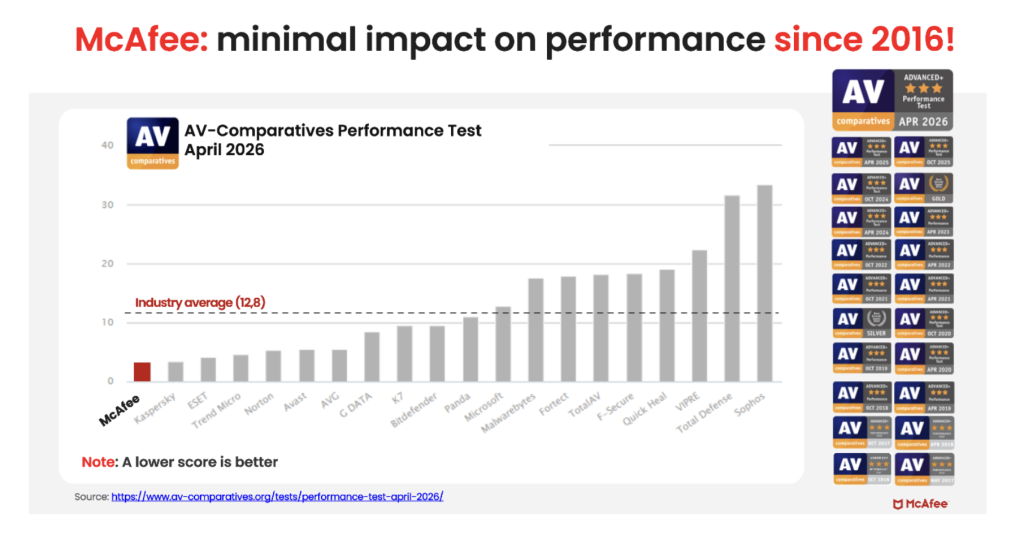
In the latest AV-Comparatives PC Performance Test, McAfee Total Protection posted the lowest system impact score of all 20 products tested: just 3.3, compared with the industry average of 12.8.
It also earned the highest possible rating, ADVANCED+. That means McAfee is not just adding more layers of protection. It is doing so while staying out of your way.
For consumers looking for security that goes beyond basic antivirus to help protect against scams, identity theft, privacy risks, and threats across all their devices, that combination is hard to ignore.
Protection Across All Your Devices
Most people no longer rely on a single computer. A typical household may use:
Windows PCs
Macs
iPhones
Android phones
Tablets
Chromebooks
Managing security separately on every device can be difficult. McAfee+ Advanced is designed to provide coverage across your devices under one subscription, helping simplify online protection for individuals and families.
How McAfee+ Advanced Goes Beyond Built-In Security
With McAfee+ Advanced, multiple layers work together before any damage is done:
Scam Detector flags suspicious texts, emails, links, QR codes, and even deepfake videos before you engage
Secure VPN keeps your data private, especially on public Wi-Fi
Web Protection helps block risky sites, even if you do accidentally click helps block risky sites, even if you do accidentally click
Password Manager doesn’t just help you make unique, strong passwords, it keeps them stored and organized for you
Online Account Cleanup assists in taking down your old, forgotten accounts across the web
Social Privacy Manager helps you monitor and changeprivacy settings across your social platforms in just a few clicks
Together, these protections are designed to address the broader range of online risks people face every day.
So, Do Windows PCs and Macs Need Antivirus Software?
Built-in security tools provide an important starting point, but with scam attempts becoming more convincing and personal information more widely exposed, many people need a more comprehensive approach to staying safe online.
McAfee+ Advanced combines device security, scam protection, identity monitoring, privacy tools, and VPN coverage to help you browse, bank, shop, and connect with greater confidence.

 Login
Login


 Scam Type