Reading view

Are Your World Cup Tickets Legit? 40% of Fans May Risk Unofficial Sellers

Whether you’re planning a once-in-a-lifetime trip or just hoping to catch a match while it’s in your city, the 2026 FIFA World Cup is already driving a surge in ticket searches, travel bookings, and last-minute plans. 

But where there’s high demand and big money, scammers aren’t far behind. 

The World Cup is one of those events where excitement and cost collide,” says Abhishek Karnik, Head of Threat Research at McAfee. “Tickets have been expensive, and for many people, especially families or fans traveling, the costs add up quickly between tickets, flights, hotels, and everything else that comes with attending.”

When prices feel out of reach, people naturally start looking for better deals or cheaper options. That is where things can get tricky. If someone suddenly offers what feels like a great price compared to everything else out there, it can feel like a rare opportunity worth jumping on. Scammers understand that.” 

Let’s break down the new McAfee research, what scams to watch for, and how McAfee’s tools help you stay safe.

New McAfee Research Finds a Gap Between Awareness and Risk 

New research from McAfee shows that while most fans are aware of World Cup-related scams, many are still willing to take risks to secure tickets.  

In fact, 40% say they would consider buying from an unofficial source if they can’t get tickets through the official FIFA site, as many expect tickets to sell out and hope to find affordable resale options. 

That tension is what makes events like the World Cup especially vulnerable for scams. 

With limited ticket availability, rising prices, and the pressure to act quickly, even informed fans can find themselves making decisions they normally wouldn’t, like buying tickets from a reseller on TikTok.  

And scammers are counting on it. 

Survey takeaways: 

  • 76% of fans are interested in getting World Cup tickets 
  • 35% have already started searching online 
  • 43% are willing to spend over $500 on tickets 
  • 66% say they’re aware of World Cup-related scams 
  • 66% say they’re concerned about being scammed 
  • 40% would consider buying tickets from unofficial sources 

The Most Common World Cup Scams to Watch For 

Usually, it is not just one thing that gives a scam away,” Karnik says. “It is when a few warning signs start adding up at once, pressure to act quickly, prices that feel unusually low, or details that seem slightly off.” 

“One of the biggest is urgency around pricing. If someone is pushing a deal that feels dramatically cheaper than similar tickets, claiming prices are about to go up, or creating pressure to buy immediately, that is worth paying attention to. Creating artificial urgency around a ‘great deal’ is one of the easiest ways scammers get people excited enough to move quickly.”

Below is a comprehensive breakdown of the most common scams tied to major global sporting events like the World Cup, including how they work and what to look for. 

McAfee’s Scam Detector,  Safe Browsing tools, VPN, and Password Manager work together to help you spot scams like these as they happen by flagging suspicious messages, blocking risky websites, and helping you make safer decisions before you click, pay, or share information. 

 ⚽ Scam Type    What It Is    How It Works    Red Flags 
Fake Ticket Resale Scam  Fraudulent tickets sold through unofficial sites or individuals  Scammers create fake listings or duplicate real tickets and sell them to multiple buyers  Prices far below or above market, refusal to use official transfer systems, pressure to act fast 
Social Media Ticket Scam  Tickets sold through platforms like Instagram, Facebook, TikTok, or X  Fake or hacked accounts post “last-minute” ticket offers and move conversations to DMs  Urgent language (“only 2 left”), new or suspicious profiles, requests to pay outside the platform 
Duplicate QR Code Scam  One legitimate ticket is resold multiple times  Multiple buyers receive the same QR code, but only the first scan works  Screenshots instead of official transfers, identical tickets sold repeatedly 
Fake Ticket Website Scam  Websites designed to look like official ticket platforms  Victims enter payment info or purchase tickets that don’t exist  Slightly misspelled URLs, unfamiliar domains, lack of official branding verification 
Travel & Accommodation Scam  Fake hotels, rentals, or travel packages  Listings appear legitimate but either don’t exist or are already booked  Prices that seem unusually low, requests for upfront payment, lack of verified reviews 
Booking Impersonation Scam  Fraudsters pose as airlines, hotels, or booking platforms  Victims receive messages about “issues” with bookings and are asked to click links or provide info  Unexpected messages, requests for login or payment details, links that don’t match official sites 
Public Wi-Fi & Phishing Scam  Data theft through unsecured networks while traveling  Scammers intercept data or create fake login portals on public Wi-Fi  Open networks with no password, login pages asking for unnecessary information 
Fake Giveaway Scam  Promotions claiming free tickets or VIP access  Victims are asked to enter personal data, click links, or pay “processing fees”  “You’ve won” messages you didn’t enter, requests for payment to claim prizes 
Betting & Prediction Scam  Fake betting tips or “guaranteed wins” tied to matches  Scammers sell fake predictions or direct users to malicious betting sites  Claims of guaranteed outcomes, requests for upfront payment, unfamiliar platforms 
Merchandise Scam  Counterfeit World Cup gear sold online  Buyers receive low-quality or no product at all  Unverified sellers, poor site quality, deals that seem too good to be true 

How AI is Making These Scams More Convincing

Unfortunately, with the continued improvement of AI, these scams are becoming more convincing. 

AI tools allow scammers to create: 

  • More realistic websites and messages 
  • Personalized outreach that feels legitimate 
  • Fake endorsements, images, or promotions 

That means traditional advice like “look for typos” is no longer enough on its own. 

Today’s scams often look polished, professional, and believable. 

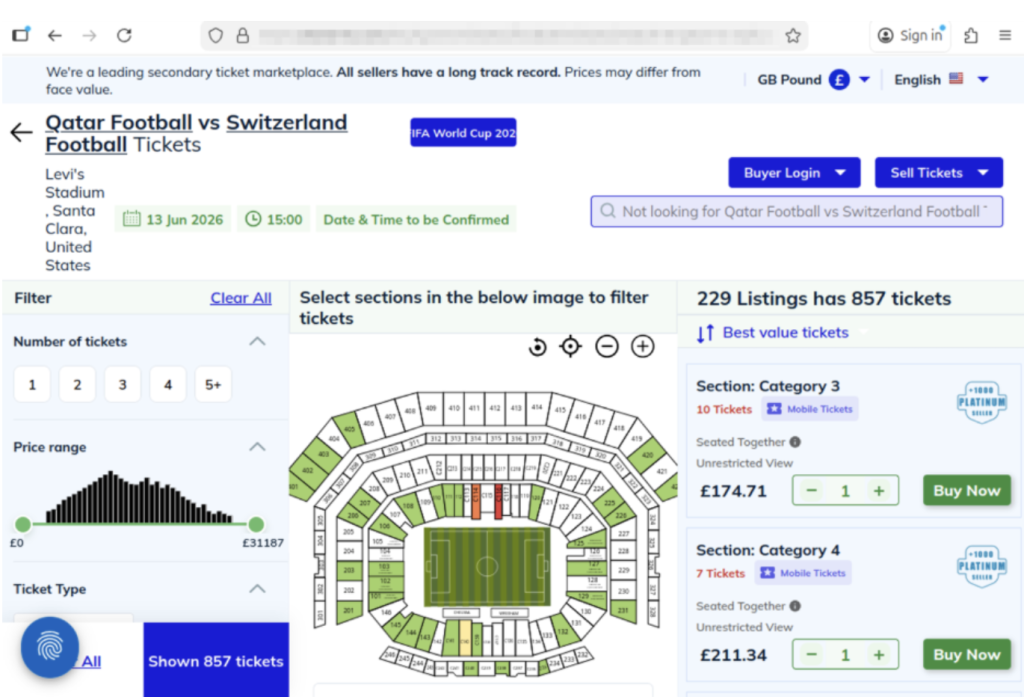
The website shows a scam operation detected by McAfee Labs. It has incredibly realistic seat-selection options and ticket-buying features. But it’s fake.
The website above shows a scam operation detected by McAfee Labs. It has incredibly realistic seat-selection options and ticket-buying features. But it’s fake.
Here you can see just how realistic the website looks. But these tickets are not actually for sale.

What “Official” Actually Means (and Why It Matters) 

For the World Cup, official ticket sales happen through designated FIFA sales phases and platforms. 

Buying outside those channels increases the risk of: 

  • Invalid or duplicate tickets 
  • Inflated pricing without guarantees 
  • No recourse if something goes wrong 

Even if a ticket looks legitimate, it may be: 

  • Sold to multiple buyers 
  • Already voided 
  • Rejected at the gate

When in doubt, go directly to the official FIFA website instead of clicking links from messages or ads. You can also visit their comprehensive FAQ section for all your ticket and event questions. 

How to Stay Safe When Buying Tickets or Traveling 

Here are practical steps fans can take to reduce risk: 

Safety Check  What To Do 
Buy from official sources  Use FIFA’s official ticket platform whenever possible 
Avoid clicking links in messages  Navigate directly to official websites instead. McAfee’s Safe Browing tools help prevent you from opening malicious links. 
Be cautious with resale offers  Verify platforms and avoid direct peer-to-peer payments 
Check QR codes before you scan them  You can check for QR code scams on-demand with Scam Detector 
Don’t pay with untraceable methods  Avoid wire transfers, gift cards, or crypto-only payments 
Double-check URLs  Look for misspellings or unusual domains 
Use secure connections  Avoid making purchases on public Wi-Fi, or use a VPN like McAfee’s. 
Protect your accounts  Use strong passwords and enable two-factor authentication. Consider a password manager like McAfee’s.  
Verify before you buy  If something feels off, pause and check before sending money 

What to Do If You Think You’ve Been Scammed 

If you think you may have purchased a fraudulent ticket, clicked a suspicious link, or shared information with a scammer, acting quickly can help limit the impact. 

Immediate steps to take 

Stop communication immediately
Do not send additional money or information, even if the sender claims you need to “complete” a transaction. It’s also a good idea to take screenshots of messages in case the scammer disappears. 

Contact your bank or payment provider
Report the transaction as soon as possible. Many institutions can help reverse charges or flag fraudulent activity if caught early. 

Secure your accounts
Change passwords for any accounts that may be affected, especially email, banking, and ticketing platforms. Our password manager and free password generator help create unique passwords every time.  

Enable two-factor authentication (2FA)
Adding an extra layer of security can help prevent unauthorized access, even if your password was exposed. 

Scan your device for threats
If you clicked a suspicious link or downloaded a file, run a security scan to check for malware or malicious software. Check out our free security scan. 

Monitor for unusual activity
Keep an eye on financial accounts, email logins, and any services tied to your personal information. Our free WebAdvisor helps protect you from malware and phishing attempts while you surf. 
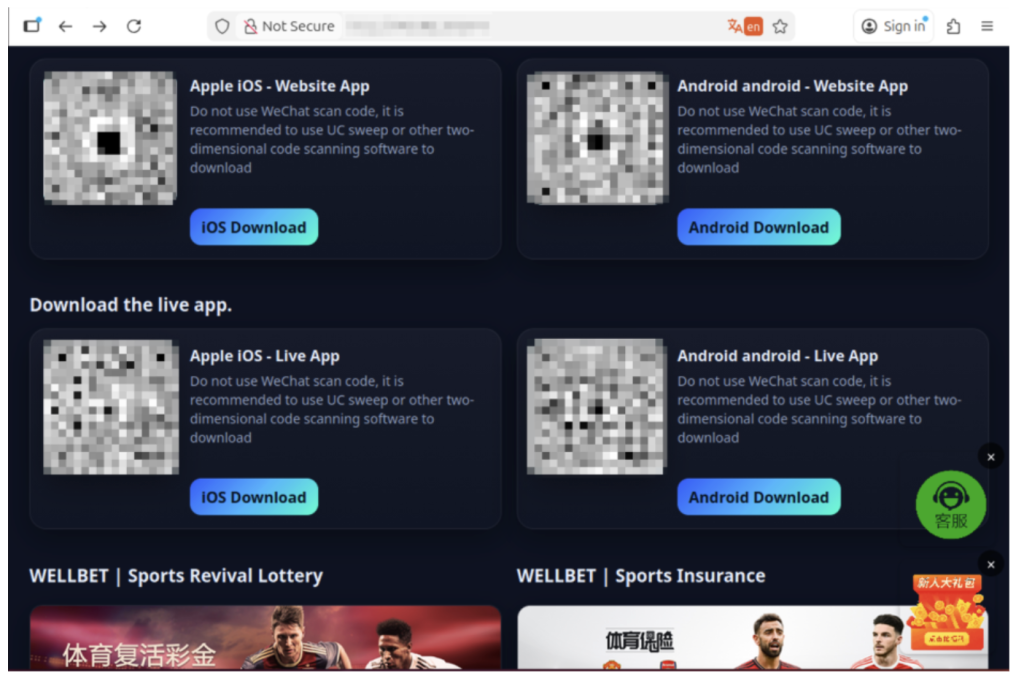
The image above shows malicious apps masquerading as sports betting sites or promising unique World Cup coverage. But when users download, their devices are infected.

How McAfee Helps You Spot Scams in the Moment 

McAfee offers more than traditional antivirus, combining multiple layers of digital protection in one app to help you stay safer while searching, clicking, and buying online. 

Scam Detector helps flag suspicious texts, emails, and videos automatically, so you can spot a scam before it hits you and your wallet 

Safe Browsing tools help block risky websites, alert you to phishing attempts, and guide you away from malicious links 

VPN helps keep your connection private on public Wi-Fi, protecting your personal and payment information 

Password Manager helps create and store strong, unique passwords to reduce the risk of account takeover 

Identity Monitoring and Alerts notify you if your personal information appears where it shouldn’t, so you can quickly take steps to fix it 

Personal info removal helps find and remove your personal info from data broker sites and close out old forgotten accounts 

Device and Account Security helps protect the devices and accounts you use every day 

Final Thoughts 

The World Cup isn’t just another event, it’s a moment when millions of people are making fast decisions involving real money, travel plans, and personal information. 

What McAfee’s research makes clear is that the biggest risk isn’t a lack of awareness. Most fans already know scams exist. The risk is what happens next. 

When prices feel out of reach, people naturally start looking for better deals or cheaper options. That is where things can get tricky. If someone suddenly offers what feels like a great price compared to everything else out there, it can feel like a rare opportunity worth jumping on,” Karnik says. “Scammers understand that.”

“If somebody claims they have hard-to-get tickets at an unusually good price, especially for a popular match, people may feel pressure to act quickly before the opportunity disappears.” 

As demand continues to build toward the tournament, more fans will be searching, comparing, and purchasing online.  

The takeaway is simple: Staying safe isn’t just about knowing scams exist. It’s about slowing down, verifying before you buy, and using tools that help you make informed decisions in the moment. 

*McAfee is not affiliated with or endorsed by FIFA. 

The post Are Your World Cup Tickets Legit? 40% of Fans May Risk Unofficial Sellers appeared first on McAfee Blog.

  •  

1 in 3 Targeted by Travel Scams and Rising Costs are Making it Worse

You’re comparing airfare on your phone, watching prices climb by the hour, when a deal pops up that feels just good enough to grab. The timer’s ticking. The price looks right. You don’t want to miss it. 

You’re comparing airfare on your phone, watching prices climb by the hour, when a deal pops up that feels just good enough to grab. The timer’s ticking. The price looks right. You don’t want to miss it. 

That moment, when you’re rushing to lock something in, is exactly where scams thrive. 

New McAfee research shows that more than 1 in 3 Americans have encountered a travel-related cyberthreat, and 41% of those impacted lost money, often exceeding $500. 

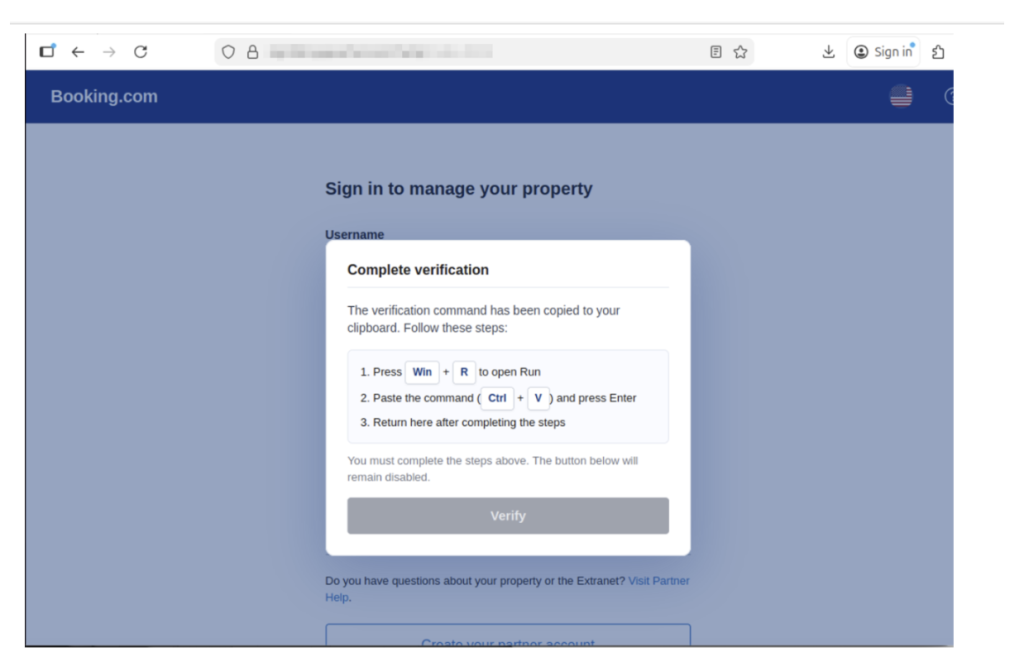
This shows a screenshot of a fake Booking.com website detected by McAfee that was attempting to trick users into running malicious script/code

At the same time, rising travel costs and time pressure are pushing people to make faster, riskier decisions. Those are the exact conditions scammers rely on. 

That’s where protection has to show up earlier. 

McAfee’s Scam Detector lets you check suspicious links, messages, and booking sites before you click, so you can pause and verify instead of giving scammers the edge. 

Travel Scams, Red Flags, and How McAfee Protects You 

Travel Scam Type  Key Red Flags  How McAfee Helps 
Fake travel deals  Prices far below market, pressure to “book now,” sites you’ve never heard of  Scam Detector flags suspicious links and explains why they’re risky, so you can avoid fake deals before you book 
Fake booking confirmations  Unexpected messages about bookings you didn’t make, mismatched sender details  Scam Detector analyzes messages before you engage, helping you avoid fake confirmations 
Fake airline/hotel websites  Slight URL changes, poor design, being pushed to pay immediately or off-platform  Safe Browsing helps block risky sites before you enter payment details, reducing the chance of fraud 
Payment requests outside platforms  Asked to pay via wire transfer, crypto, or direct payment instead of official platforms  Scam Detector flags suspicious payment requests, helping you avoid sending money to scammers 
QR code scams  QR codes posted in public with no clear source or context  Scam Detector checks QR links before they open, so you don’t land on malicious sites 
Customer service impersonation  Calls or messages asking for login credentials or payment info  Scam Detector detects deepfake AI audio impersonation attempts, helping you avoid sharing sensitive information 
AI-generated listings  Photos that look overly polished, details that don’t quite match up  Scam Detector identifies suspicious content patterns, helping you spot listings that aren’t real 
Public Wi-Fi attacks  Open networks with no password or security prompts  VPN helps protect your data on public networks, keeping your personal information private 

The Findings From Our 2026 Travel Research 

McAfee Labs found that many travel scams work because they look familiar and spread fast.  

TripAdvisor was the most commonly impersonated travel app, cloned at roughly three times the rate of other major platforms like Kayak, Expedia, and Booking.com.  

In some cases, thousands of scam detections traced back to just a handful of fake apps, showing how quickly a convincing scam can take off when travelers are racing to book. 

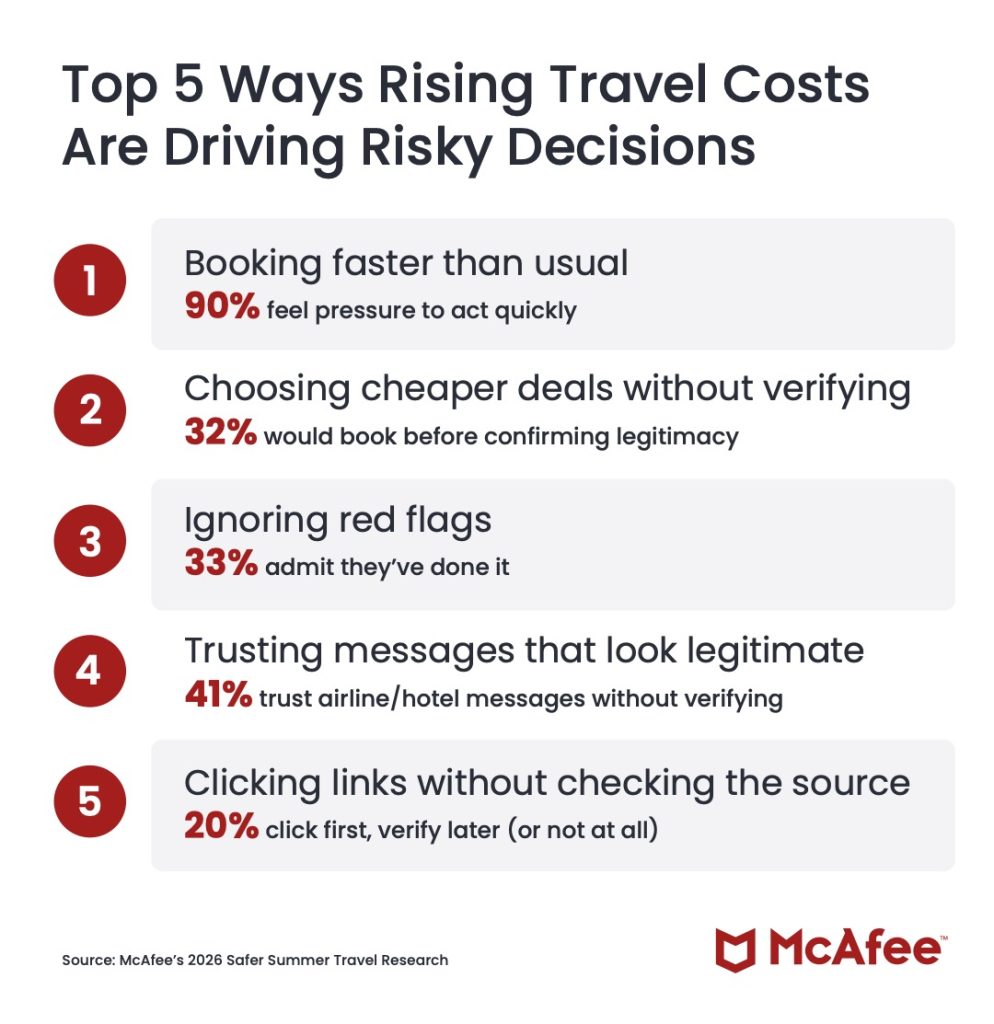
Top 5 Ways Rising Travel Costs Are Driving Risky Decisions 

Our 2026 travel survey shows how rising prices and lastminute pressure are changing traveler behavior, often in ways scammers exploit. 

1. Booking faster than usual
90% feel pressure to act quickly  

2. Choosing cheaper deals without verifying
32% would book before confirming legitimacy  

3. Ignoring red flags
33% admit they’ve done it  

4. Trusting messages that look legitimate
41% trust airline/hotel messages without verifying  

5. Clicking links without checking the source
20% click first, verify later (or not at all)  

Top 5 Ways Costs Drive Risk

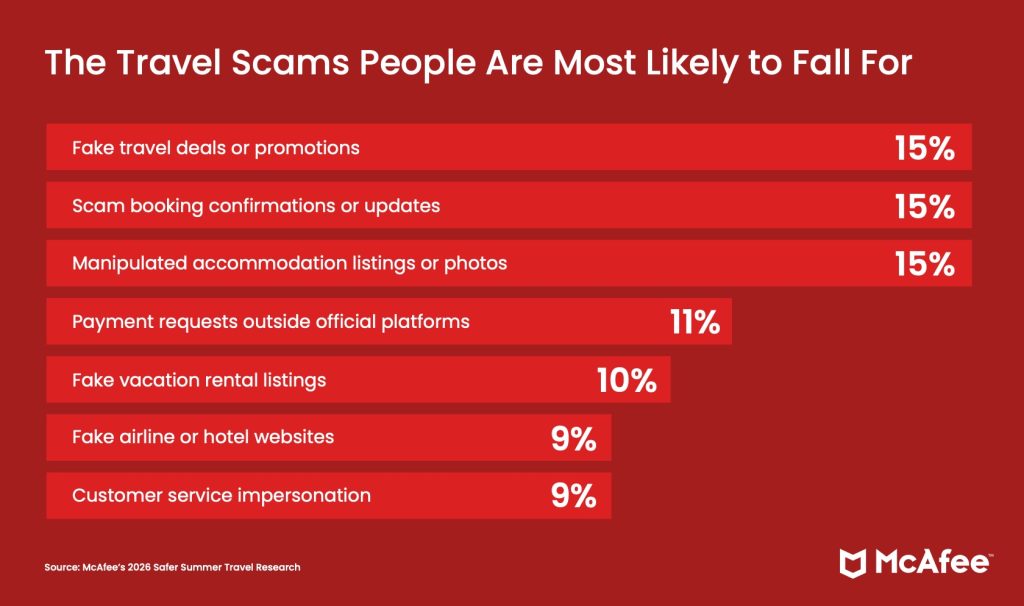
The Travel Scams People Are Most Likely to Fall For

According to our consumer survey findings, those who reported falling for a travel scam said these were the methods scammers used to trick them:

1. Fake travel deals or promotions (15%)

2. Scam booking confirmations or updates (15%)

3. Manipulated accommodation listings or photos (15%)

4. Payment requests outside official platforms (11%)

5. Fake vacation rental listings (10%)

6. Fake airline or hotel websites (9%)

7. Customer service impersonation (9%)

The Travel Scams People Are Most Likely to Fall For

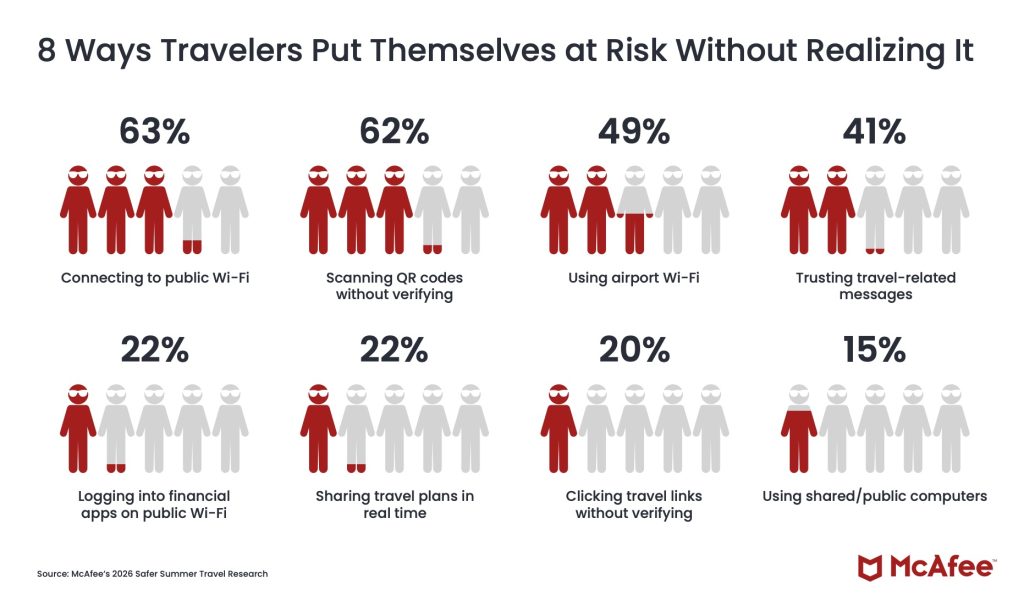
8 Ways Travelers Put Themselves at Risk Without Realizing It

These common traveler behaviors are popular avenues for criminals to steal your information, data, and money.

1. Connecting to public Wi-Fi (63%)  

2. Scanning QR codes without verifying (62%)  

3. Using airport Wi-Fi (49%)  

4. Trusting travel-related messages (41%)  

5. Logging into financial apps on public Wi-Fi (22%)  

6. Sharing travel plans in real time (22%)  

7. Clicking travel links without verifying (20%)  

8. Using shared/public computers (15%)  

8 Ways Travelers Put Themselves at Risk Without Realizing It

How McAfee Protects You Before, During, and After Your Trip 

As prices rise and decisions happen in real time, it’s easy to prioritize convenience over caution. But that’s exactly the moment when small checks matter most. 

Stage of Travel  What’s Happening  How McAfee Helps 
Before You Book  Comparing deals, clicking promotions, booking flights and hotels under time pressure  Scam Detector checks links, messages, and booking sites before you click, helping you avoid fake deals and scam listings 
During Your Trip  Connecting to public Wi-Fi, scanning QR codes, receiving travel updates and alerts  VPN helps secure your connection on public Wi-Fi, while Scam Detector flags suspicious messages and unsafe links in real time 
After Your Trip  Accounts remain active, travel data stored across platforms, potential exposure from breaches  Identity Monitoring alerts you if your personal information appears online, helping you act quickly before damage spreads 

With McAfee+ Advanced, multiple layers work together so you’re not left figuring it out after the damage is done.  

Spend more time on your vacation, and less time worrying about scammers who want your vacation fund. 

The post 1 in 3 Targeted by Travel Scams and Rising Costs are Making it Worse appeared first on McAfee Blog.

  •  

McAfee Ranks #1 in AV-Comparatives PC Performance Test — Again

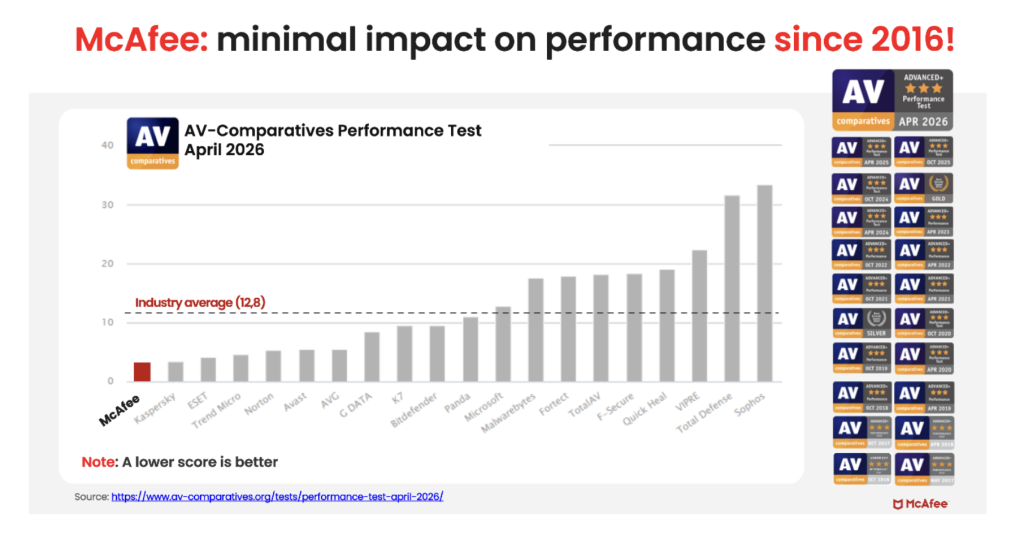
McAfee Total Protection just took first place in the latest AV-Comparatives PC Performance Test, the gold standard for measuring how much (or how little) security software slows down your computer.  

With an overall impact score of 3.3 out of a possible 100, McAfee outperformed all 19 other security products tested and earned the highest possible rating: 3 Stars ADVANCED+. 

The industry average? 12.8. McAfee came in nearly 4x lower than that. The lower the impact score, the less the software gets in your way 

What Is the AV-Comparatives PC Performance Test? 

AV-Comparatives is an independent cybersecurity testing lab that has been rigorously evaluating security software since 1999. Unlike a review written by a single journalist or a score based on a company’s own claims, AV-Comparatives tests are: 

  • Independent: delivers unbiased, datadriven evaluations of security products  
  • Standardized: every product is tested under the same conditions 
  • Widely trusted: regularly cited in product roundups, expert reviews, and buying guides that shape how consumers choose security software 

The PC Performance Test specifically measures how much a security product impacts your computer’s everyday speed. Testing is conducted on a real Windows 11 machine (Intel Core i3, 8GB RAM, SSD) with all default settings enabled and an active internet connection. That’s the same setup millions of everyday users have at home. 

AV-Comparatives evaluates real-world tasks including: 

  • Copying and moving files 
  • Installing and launching apps 
  • Downloading files from the web 
  • Browsing websites 

The lower the impact score, the less the software gets in your way.

What McAfee’s Score Actually Means 

McAfee Total Protection scored 3.3the lowest impact score of all 20 products tested, and well below the industry average of 12.8. 

Here’s a simple way to think about it: if the average security product takes a measurable toll on your machine while it works in the background, McAfee barely registers. You get full, always-on protection without the sluggishness that frustrates so many users. 

This result earned McAfee the ADVANCED+ rating, the highest tier AV-Comparatives awards, reserved for products that deliver top-tier performance with minimal system impact. 

Why “Lightweight” Protection Matters More Than You Think 

There’s a common misconception that stronger protection means a heavier, slower product. McAfee’s results prove otherwise. 

When your security software is slow, you notice it: 

  • Apps take longer to open 
  • Downloads feel sluggish 
  • Your machine lags during everyday tasks 
  • You’re tempted to disable protection to get your speed back, leaving yourself exposed 

A lightweight product means protection that works quietly in the background, without making you choose between safety and performance. That’s the promise behind McAfee’s result, and it’s now independently verified. 

AV-Comparatives Test Results


First Place, But Not for the First Time 

This isn’t a one-off result. McAfee has earned the ADVANCED+ rating consistently across multiple rounds of AV-Comparatives testing, demonstrating that this level of performance isn’t luck. It’s the result of deliberate, sustained engineering. 

Independent, repeatable results like these are what separate marketing claims from proven performance. 

With McAfee, you get award-winning protection and award-winning performance, so your devices stay secure without slowing you down. 

Which McAfee Plans Include This Protection? 

The same AI-powered threat protection validated in this test is built into every major McAfee plan: 

  • McAfee+ Premium 
  • McAfee+ Advanced 
  • McAfee+ Ultimate 
  • McAfee Total Protection 
  • McAfee LiveSafe 

Whether you’re protecting one device or an entire household, you’re getting the same industry-leading, independently verified performance under the hood. 

Ready to get protection that doesn’t slow you down? Explore McAfee+ Plans → 

The post McAfee Ranks #1 in AV-Comparatives PC Performance Test — Again appeared first on McAfee Blog.

  •  

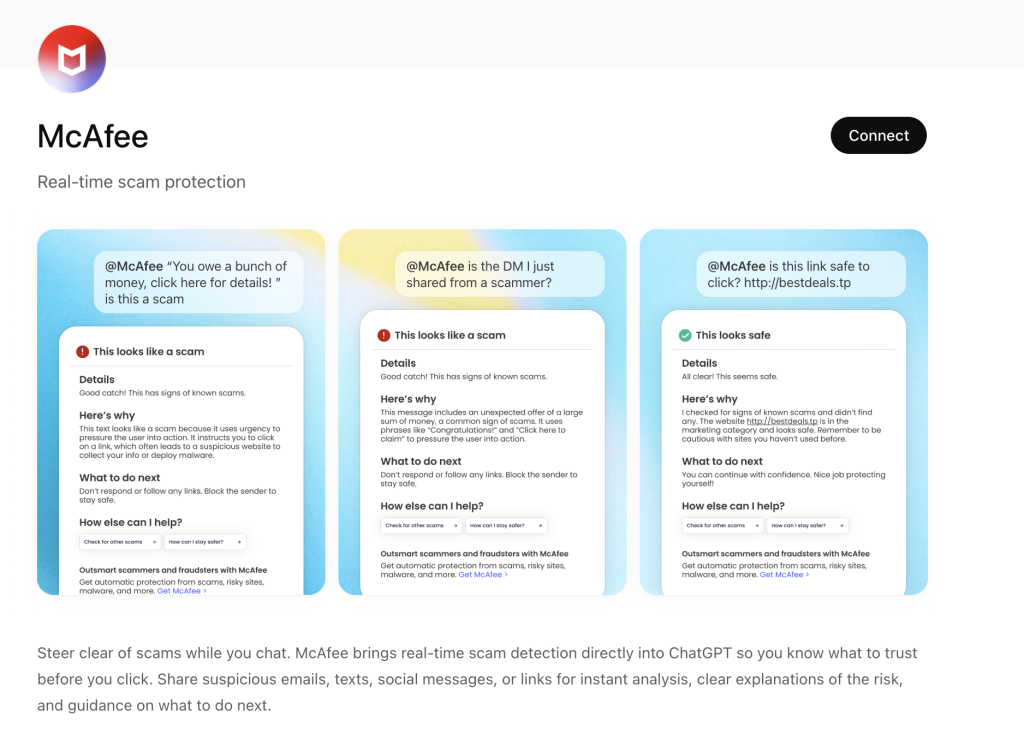
Now Available: Use ChatGPT with McAfee to Spot Scams Faster

Scam messages are getting smarter and faster. 

According to McAfee’s 2026 State of the Scamiverse report, Americans now spend 114 hours a year trying to figure out what’s real and what’s fake online. That’s nearly three full workweeks lost to second-guessing messages, alerts, and links. 

And when scams do succeed, they move quickly. The typical scam unfolds in about 38 minutes, leaving little room for hesitation. 

That creates a gap: People want to check before they act, but the tools haven’t always met them in that moment. 

ChatGPT + McAfee is designed to close that gap, bringing scam detection directly to a platform people are already using to ask questions and make decisions. 

And it’s available to anyone. You don’t have to be a McAfee subscriber. 

This isn’t just detection. It’s guidance in the exact moment you’re deciding what to do.  

Instead of guessing, you can paste a message or drop in a screenshot and get a clear explanation of what’s riskyand what to do nextpowered by McAfee’s threat intelligence. 

What You Can Do with ChatGPT + McAfee 

With this integration, checking something suspicious becomes as simple as asking a question. 

Paste a message. Drop in a link. Upload a screenshot. 

McAfee analyzes it and explains what’s going on clearly and in context. 

Here’s how it works: 

Feature  What it does  How it protects you 
Link safety check  Paste a suspicious URL and get a reputational analysis based on McAfee threat intelligence  Scam links are often designed to look legitimate. A quick check helps avoid phishing and malware 
Message analysis  Submit texts, emails, or social messages for evaluation  Many scams now rely on urgency and tone. Analysis helps surface subtle red flags 
Screenshot uploads  Upload screenshots of messages, emails, or posts for review  Scams don’t always come as clean text. This makes it easier to check what you’re actually seeing 
Clear explanations  Get a breakdown of why something is flagged as risky or safe  Not just a warning—an explanation that helps you recognize patterns next time 
Guided next steps  Receive recommendations on what to do next  Helps prevent escalation, especially in moments of uncertainty 

It’s a quick, accessible way to get answers in the moment. But it’s just one part of a broader system designed to protect you more comprehensively. 

Add the app to your ChatGPT account here. 

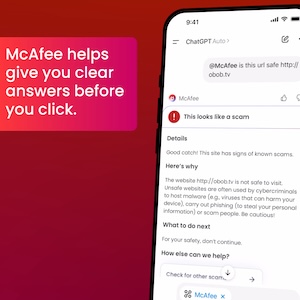
McAfee's ChatGPT extension
McAfee’s ChatGPT extension

Built on McAfee’s Threat Intelligence 

Behind the scenes, ChatGPT + McAfee is powered by the same intelligence that fuels McAfee’s broader scam protection ecosystem. 

When you submit something for review: 

  • Links are checked against known threat signals  
  • Messages are analyzed for scam patterns and language cues  
  • Results are translated into clear, human-readable explanations  

The goal isn’t just to flag risk. It’s to help you understand it. 

A New Way to Stay Ahead of Scams 

Scams aren’t slowing down. If anything, they’re becoming more convincing, more personalized, and harder to detect. 

That’s where ChatGPT + McAfee comes in. But this is only one part of a much bigger system designed to protect you before, during, and after a scam attempt. 

With McAfee+ Advanced, multiple layers work together so you’re not left figuring it out after the damage is done: 

  • Identity Monitoring alerts you if your personal info shows up where it should not, so you can act fast  
  • Personal Data Cleanup helps remove your information from sites selling it. 
  • Scam Detector flags suspicious texts, emails, links, QR codes, and even deepfake videos before you engage  
  • Safe Browsing helps block risky sites, even if you do accidentally click  
  • Device Security helps detect malicious apps or downloads  
  • Secure VPN keeps your data private, especially on public Wi-Fi    

The ChatGPT experience gives you a fast, intuitive way to check something in the moment. 

McAfee+ Advanced makes sure you’re protected across everything else.

The post Now Available: Use ChatGPT with McAfee to Spot Scams Faster appeared first on McAfee Blog.

  •  

Why Hackers Are Collecting Data They Can’t Read Yet. And How to Stay Safe

Co-Authored by Luiz Parente 

Your data might be safe today. But that doesn’t mean it’s safe forever. 

A growing number of sophisticated actors are collecting encrypted data now, with the goal of decrypting it later, when more powerful technology becomes available. 

This strategy is known as Harvest Now, Decrypt Later (HNDL). And it’s not a future problem. It’s already happening, according to research from our McAfee VPN team. 

For everyday people, that means private messages, financial records, and sensitive documents could be exposed years from now if protections don’t evolve today. 

That’s why security teams, including McAfee’s VPN engineers, are already working on ways to strengthen encryption for both today and what comes next. 

What “Harvest Now, Decrypt Later” Means 

At its core, HNDL is simple: Attackers collect encrypted data now, store it, and wait until they have the tools to unlock it later. 

Even though today’s encryption is incredibly strong, the strategy doesn’t rely on breaking it today. It relies on patience.  

A Simple Way to Think About It 

You put valuable belongings and documents in a safe at home that’s locked and secured. This works at preventing crimes of opportunity. But let’s say there’s a thief who steals the entire safe, knowing they have tools they can use later to access what’s inside. They wait, and once the tools are available, they break into your safe and access everything inside. 

That’s one way to think of HNDL. The safe is the encryption. The quantum computing is the tool they can use later.  

But in real life, you’d probably notice if your safe is gone. In the case of HNDL, if you’re not monitoring your data, you may not even notice encrypted information has been stolen to be decrypted.  

Key Terms Explained 

Term  What it means 
Encryption  Scrambling data so others can’t read it 
Quantum computing  A new type of computing that can break some encryption 
HNDL  A strategy to collect encrypted data now and decrypt it later 

Why This Matters Right Now 

This isn’t about whether your data is valuable today. It’s about whether it might be valuable later. 

Data with a long shelf life is especially at risk, including: 

  • Financial records  
  • Medical information  
  • Private messages  
  • Legal or identity documents  

Even something that feels low-stakes today could become sensitive in the future. 

And because the collection phase is already happening, the risk isn’t hypothetical. It’s already in motion. 

How This Affects VPNs (and what doesn’t change) 

VPNs remain one of the most effective ways to protect your data today. That hasn’t changed. 

But HNDL introduces a new layer of complexity. 

  • What’s still strong: The encryption that protects your data in transit remains highly resilient.  
  • Where the risk is: The “handshake” process (how a secure connection is established) is more vulnerable to future quantum attacks.  

In simple terms: Your data is well protected today, but parts of how that protection is set up may need to evolve for the future. 

What Quantum Computing Changes 

Traditional computers process information in a linear way. 

Quantum computers work differently. They can solve certain types of problems much faster, including the kinds of mathematical challenges that protect today’s encryption. 

That’s why attackers are willing to wait. 

Once quantum computing reaches a certain level, it could unlock data that was previously considered secure. 

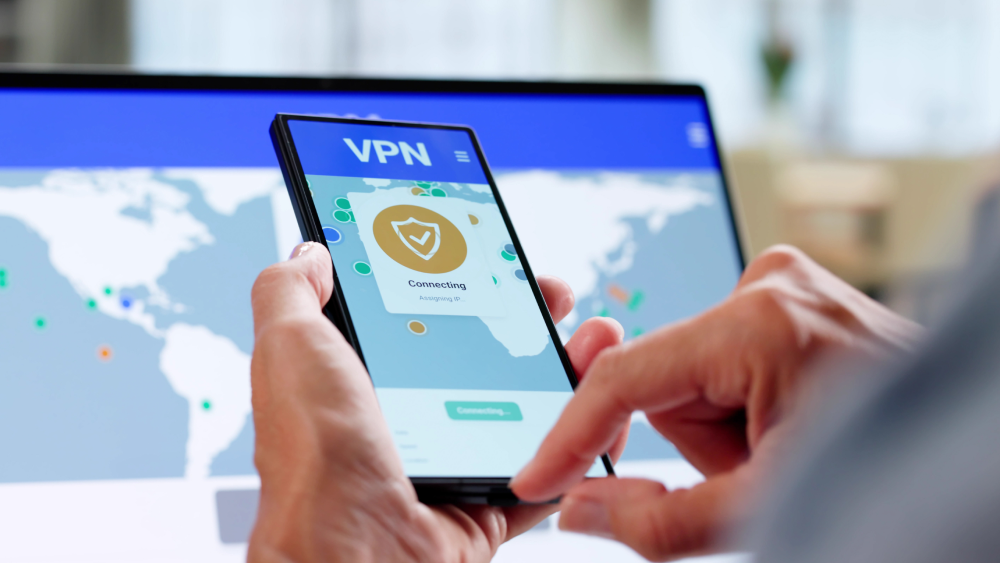
Image shows a phone connecting to VPN

What McAfee’s VPN Team is Working On 

McAfee’s VPN team is already preparing for this shift. 

  • Evaluating quantum-safe encryption approaches  
  • Exploring hybrid models that protect both now and long-term  
  • Building toward a more resilient VPN experience  

This work builds on a broader privacy-by-design approach, where systems are designed to minimize risk from the start, not react after the fact. 

Because with HNDL, waiting isn’t an option. 

What You Can Do Now 

You don’t need to wait for quantum computing to take steps today. 

  • Use a trusted VPN to encrypt your connection  
  • Be mindful of long-term sensitive data you share online  
  • Avoid unsecured public Wi-Fi when possible  
  • Keep your apps and devices updated  

These steps help protect your data now while the industry builds toward future-ready security. 

How McAfee Helps Protect You 

McAfee+ Advanced gives you multiple layers working together so you are not left figuring it out after the damage is done:  

  • Identity Monitoring alerts you if your personal info shows up where it should not, so you can act fast 
  • Personal Data Cleanup helps remove your information from data broker sites, making you harder to target in the first place 
  • Scam Detector flags suspicious texts, emails, links, and even deepfake videos before you engage 
  • Safe Browsing helps block risky sites if you do click 
  • Device Security helps detect malicious apps or downloads 
  • Secure VPN keeps your data private, especially on public Wi-Fi   

Frequently Asked Questions (FAQs) 

FAQ 
Q: Is my data safe right now?  

A: In most cases, yes—today’s encryption is extremely strong and is designed to protect your data from current threats. If you’re using trusted security tools like a VPN, safe browsing protections, and device security, your data is actively protected while it’s in transit and in use. However, no system is risk-free. Data exposed through phishing, weak passwords, breaches, or unsecured networks may still be vulnerable. And with “Harvest Now, Decrypt Later,” even properly encrypted data could be collected today and targeted for decryption in the future. 

Q: What is quantum-safe encryption? 

A: Quantum-safe (or post-quantum) encryption refers to new types of cryptography designed to remain secure even against future quantum computers. Today’s encryption relies on math problems that are extremely difficult for classical computers to solve, but quantum computers could eventually solve some of them much faster. Quantum-safe approaches use different mathematical foundations that are believed to resist those capabilities. In practice, many companies are moving toward hybrid encryption, combining today’s proven methods with newer quantum-resistant techniques to protect data both now and long-term. 

Q: Should I still use a VPN? 

A: Yes. A VPN remains one of the most effective ways to protect your data today, especially on public or unsecured networks. It encrypts your internet traffic and helps prevent interception by hackers, internet providers, or other third parties. While VPN protocols are evolving to address future quantum risks, they still provide strong, essential protection against today’s threats. 

Q: When will this become a real threat? 

A: The risk unfolds in two phases. The collection phase is already happening today, where sophisticated actors gather encrypted data and store it. The decryption phase depends on when quantum computing advances far enough to break certain types of encryption, which could take years but is actively progressing. This means data with a long lifespan, such as financial records, personal communications, and sensitive documents, is most at risk because it only needs to remain valuable until those capabilities exist. 

The post Why Hackers Are Collecting Data They Can’t Read Yet. And How to Stay Safe appeared first on McAfee Blog.

  •  

McAfee’s Scam Detector Named Webby Awards Finalist for AI Innovation

We’re excited to share that McAfee’s Scam Detector has been named a finalist in the 2026 Webby Awards. 

Recognized in the AI Experiences & Applications – Consumer Application category and named a Webby Honoree for Best Use of AI & Machine Learning, Scam Detector is being acknowledged for its effectiveness as an AI-driven consumer tool. 

This recognition of Scam Detector validates something key in research findings. According to McAfee’s 2026 State of the Scamiverse report, Americans now spend 114 hours a year trying to decide what’s real and what’s fake online. 

Scam Detector was built with this era of uncertainty in mind, designed to help people cut through confusion and identify scams as they appear. The Webby recognition reinforces to us that McAfee’s Scam Detector is doing exactly that. 

What Are the Webby Awards? 

The Webby Awards are presented by the International Academy of Digital Arts & Sciences and recognize excellence across the internet, including apps, software, AI, and digital experiences. 

Each year, thousands of entries are evaluated, with finalists representing the top work in their category globally. 

In addition to judged awards, the Webby Awards include a People’s Voice Award, which is decided by public vote. 

How McAfee’s Scam Detector Uses AI to Stop Scams 

Scam Detector is designed to help people identify scams where they’re most likely to happen, always ready to help you spot what’s real and what’s not when you least expect it. 

It uses AI to analyze and flag suspicious: 

  • Text messages and emails  
  • Links and websites  
  • QR codes  
  • Social media messages  
  • AI-generated and deepfake content  

Beyond detection, Scam Detector explains why something was flagged as risky. That transparency helps show how decisions are made, so people can quickly understand the risk and feel more confident trusting what’s flagged.

As scams become more personalized and harder to detect, this combination of automatic detection and clear guidance is critical to preventing financial loss and identity theft. 

Vote for McAfee’s Scam Detector 

Scam Detector is eligible for the Webby People’s Voice Award, which is decided by public vote. 

If you would like to support McAfee’s Scam Detector, you can vote here: https://vote.webbyawards.com/PublicVoting#/2026/ai/ai-experiences-applications/consumer-application 

Voting is open through Thursday, April 16 at 11:59 pm PDT. 

Winners will be announced on April 21, 2026. 

And a big thank you to the McAfee teams who brought Scam Detector to life and who continuously improve how Scam Detector identifies new threats and adapts to the evolving world of AI-driven scams. 

The post McAfee’s Scam Detector Named Webby Awards Finalist for AI Innovation appeared first on McAfee Blog.

  •  

McAfee’s “Keep It Real” Campaign Named Shorty Awards Finalist

We’re proud to share that McAfee’s “Keep It Real” campaign has been named a finalist in the 2026 Shorty Awards Social Good Campaign category. 

This category recognizes work that doesn’t just perform, it matters: campaigns that raise awareness, inspire action, and make a real-world impact. 

That’s exactly what “Keep It Real” set out to do. 

Because behind every scam statistic is a person who thought they were making the right call. And too often, what follows isn’t just financial loss. It’s embarrassment, silence, and stigma. 

We wanted to change that. 

The campaign launched alongside McAfee Scam Detector to address a growing reality: scams powered by AI are becoming harder to recognize and easier to fall for. 

“Keep It Real” paired real survivor stories with AI-driven protection to show how scams actually happen and how people can stop them in the moment. 

The goal was simple: 

  • Normalize the experience  
  • Remove shame around being scammed 
  • Help more people recognize scams faster  

Because when people feel safe talking about scams, they’re more likely to spot them and stop them. 

What Are the Shorty Awards? 

The Shorty Awards honor the best work in social media, digital campaigns, and online storytelling across brands, creators, and organizations. 

Now in their 18th year, the awards recognize campaigns that combine creativity, impact, and real-world relevance. Finalists are selected alongside leading global brands and judged on both industry evaluation and public voting. 

How McAfee’s Scam Detector Fits In 

McAfee’s Scam Detector is designed to help people identify scams across everyday digital moments. 

It uses AI to fight AI by flagging suspicious: 

  • Text messages and emails  
  • QR codes and links  
  • Social media messages  
  • AI-generated and deepfake content  

By combining automatic detection with clear guidance, Scam Detector helps people better understand what they’re seeing and decide what to trust. 

Real Stories Behind the Campaign 

A core part of “Keep It Real” was giving space to people who experienced scams to share what happened, in their own words. 

These stories helped show that scams can happen to anyone and played a key role in breaking the stigma around being targeted. 


This recognition reflects the work across McAfee teams who built and brought this campaign to life, including product, engineering, research, creative, and communications. 

It also reflects the individuals who chose to share their real scam stories to help others recognize scams, stay safer, and end the shame and stigma around being scammed. 

Support the Campaign 

The Shorty Awards include a public voting component. 

If you’d like to support the campaign, you can vote here:
https://shortyawards.com/18th/keep-it-real-mcafees-ai-scam-media-relations-campaign 

Voting is open through April 8, and you can vote once per day. 

Examples of real messages sent in response to our campaign.

The post McAfee’s “Keep It Real” Campaign Named Shorty Awards Finalist appeared first on McAfee Blog.

  •  

Operation NoVoice: Android Malware Found in 50+ Apps Can Hijack Devices

McAfee’s mobile research team has uncovered a large-scale Android malware campaign we’re tracking as Operation NoVoice.

The campaign was distributed through more than 50 apps previously available on Google Play, disguised as everyday tools like cleaners, games, and photo utilities. Together, the apps were downloaded more than 2.3 million times, though it’s unclear how many devices may have been impacted.

If the attack succeeds, the malware can gain deep control of a device, allowing attackers to inject malicious code into apps as they are opened and access sensitive data.

However, the most serious impact depends on the device. 

On older or unpatched Android devices, the malware can install a highly persistent form of infection that may survive a standard factory reset. Newer Android devices with up-to-date security protections are not vulnerable to the root exploit observed in this campaign, though they may still be exposed to other types of malicious activity from these apps.

In other words, on vulnerable devices, the malware can behave like a kind of digital “zombie,” continuing to operate in the background even after a reset.

Want the full technical breakdown? Dive into the McAfee Labs research here. 

We break down what you need to know below: 

How “Operation NoVoice” Works 

Operation NoVoice is what security experts call a rootkit malware attack. 

rootkit is a type of malware designed to gain deep, privileged control of a device while hiding its presence from the user and the operating system’s normal security tools. 

Breaking the term down: 

  • “Root” refers to the highest level of access on a system (administrator-level control). 
  • “Kit” refers to a collection of tools used by an attacker to maintain that control. 

Put simply, a rootkit allows attackers to operate underneath the normal apps and security protections on a phone, giving them powerful control while staying difficult to detect.

In the case of Operation NoVoice, the attack unfolds in several steps. 

1) A normal-looking app starts the attack

The campaign began with apps that appeared harmless on the Google Play Store. These apps advertised themselves as tools like phone cleaners, puzzle games, or gallery utilities. 

When a user downloaded and opened one of these apps, it appeared to work normally. There are no obvious signs to the user that anything is wrong. 

2) The malware quietly checks the device

Behind the scenes, the app contacts a remote server controlled by the attackers. 

The server collects information about the device, things like its hardware, operating system version, and security patch level. Based on that information, the attackers send back custom exploit code designed for that specific device.

3) The attack gains deep system access

If the exploit succeeds, the malware gains root-level access to the device.

At that point, the attackers can install additional malicious components and modify parts of the Android operating system itself. 

4) Every app on the phone can be affected

Once the rootkit is installed, it modifies a core Android system library that every app relies on. 

This allows attacker-controlled code to run inside any app the user opens. 

That means the attackers could potentially access data from messaging apps, financial apps, or social media apps without the user noticing. 

5) The malware can remain even after a reset

Operation NoVoice also includes persistence mechanisms designed to keep the malware active. 

In some cases, the infection could survive a standard factory reset, because the malicious components modify parts of the system software that resets typically do not replace.

Fully removing the infection may require reinstalling the device’s firmware, something most users cannot easily do themselves.

*To be clear, these apps have been removed from Google Play and are no longer available for download. 

Why The Name “Operation NoVoice” 

The name Operation NoVoice comes from a hidden component inside the malware itself. 

Researchers discovered a resource labeled “novioce” embedded in one of the attack’s later stages. The file contains a silent audio track that plays at zero volume. 

This may seem strange, but it serves a purpose. 

By continuously playing silent audio in the background, the malware can keep a foreground service running without drawing attention. This allows the malicious code to remain active while appearing harmless to the operating system. 

The researchers believe the name “novioce” is likely a misspelling of “no voice,” referring to the silent audio trick used to keep the malware running. 

How To Stay Safe from Malware Disguised as Apps 

Operation NoVoice highlights an important reality: even apps that appear legitimate can sometimes hide malicious behavior. 

Fortunately, there are several steps users can take to reduce their risk. 

Be cautious with unfamiliar apps 

Even if an app appears on the Google Play Store, it’s still important to review: 

  • the developer’s name 
  • the number of downloads 
  • recent user reviews (check for negative reviews) 

Apps with very few reviews, vague descriptions, or suspicious developer accounts can sometimes be part of malware campaigns. And exercise even greater caution with apps promoted through advertisements or that create a a sense of urgency.  

Keep your phone updated 

Many attacks rely on exploiting known vulnerabilities in older versions of Android. 

Installing system updates and security patches helps reduce the chance that these exploits will work.

Remove apps you don’t recognize 

If you notice apps on your device that you don’t remember installing, review them carefully and remove anything suspicious. 

Keeping your phone’s app list clean reduces the potential attack surface. 

Use mobile security protection 

Mobile security software can help detect suspicious behavior and block known malware. 

For example, McAfee Mobile Security detects this threat as Android/NoVoice and can warn users if a malicious app is identified.  

McAfee offers more than traditional antivirus, combining multiple layers of digital protection in one app  

What Operation NoVoice Tells Us About the Future of Mobile Threats 

Operation NoVoice highlights how mobile malware is evolving. Instead of obvious malicious apps, attackers are increasingly hiding their operations inside ordinary-looking tools distributed through legitimate app stores.

What makes this campaign particularly concerning isn’t just the number of downloads or the technical complexity. It’s the way the malware combines several advanced techniques, device-specific exploits, modular plugins, and deep system persistence, into a single attack chain.

That approach allows attackers to quietly turn an everyday app download into long-term control of a device.

That’s why keeping devices updated, reviewing apps carefully, and using mobile security protection are becoming increasingly important. As Operation NoVoice shows, today’s malware isn’t just trying to get onto devices; it’s trying to stay there. 

The post Operation NoVoice: Android Malware Found in 50+ Apps Can Hijack Devices appeared first on McAfee Blog.
  •  

McAfee Wins 3 Major AV-TEST Awards for 2025 Security Performance

McAfee Total Protection has been recognized with three major honors in the AV-TEST Best Awards 2025, receiving awards for Best Performance, Best Advanced Protection, and Best Usability. 

Among consumer security products, McAfee was the only solution to receive both the Best Performance and Best Advanced Protection awards, highlighting its ability to deliver strong security while keeping everyday devices running smoothly. 

The awards are issued by AV-TEST, an independent cybersecurity research institute that evaluates security products through thousands of lab tests each year. 

Together, these recognitions reinforce what matters most for people using security software every day: protection that works quietly in the background without slowing down your system or interrupting your workflow. 

How Big is an AV-TEST Award? 

Pretty big! The AV-TEST Awards recognize security products that deliver consistently strong results across independent testing throughout the year. 

To qualify, products must demonstrate exceptional performance across multiple categories, including protection against modern threats, system performance impact, and usability. 

In the 2025 test cycle, McAfee Total Protection earned recognition in three key areas. 

Best Performance Award 

Security software needs to protect your system without slowing it down. 

In AV-TEST’s Windows performance testing, researchers measure how much a security solution impacts system resources during everyday tasks such as launching applications, installing programs, browsing the web, and copying files. 

McAfee Total Protection earned the Best Performance Award for maintaining strong protection while keeping system impact minimal. 

For users, that means protection that runs efficiently in the background so your PC stays responsive while you work, stream, or game. 

Best Advanced Protection Award 

Modern cyberattacks rarely rely on a single tactic. Today’s threats often combine multiple techniques, including ransomware, infostealers, and other advanced attack methods. 

To evaluate how well security products handle these complex threats, AV-TEST runs Advanced Threat Protection (ATP) tests, which simulate real-world attacks using the latest techniques. 

In the 2025 testing cycle, McAfee Total Protection delivered consistently strong results across these real-world attack scenarios, earning the Best Advanced Protection Award for consumer users. 

These results demonstrate how multiple protection layers inside the product work together to detect and stop threats, even if an attack attempts to bypass initial defenses. 

Best Usability Award 

Strong security should also be easy to live with. 

In AV-TEST’s usability tests, researchers evaluate how accurately a product distinguishes between legitimate files and malicious ones, while monitoring for false alarms. 

McAfee Total Protection earned the Best Usability Award for its accurate threat detection and low rate of false positives. 

That means fewer unnecessary alerts and interruptions, while still maintaining strong protection against real threats. 

Recognition from AV-TEST 

According to AV-TEST’s testing team, McAfee stood out across multiple categories in the 2025 evaluation. 

“The team of the AV-TEST Institute is delighted to present McAfee with three of the highly coveted trophies. The manufacturer received recognition for its consistently efficient use of system resources, clear distinction between benign and malicious files, and strong results in Advanced Threat Protection testing.”
— Marcel Wabersky, Lead Mobile & Network Testing, AV-TEST 

What is the AV-TEST Institute 

Independent testing plays an important role in helping consumers evaluate cybersecurity tools. 

The AV-TEST Institute is an independent IT security research organization based in Germany and operating for more than 20 years. The institute runs one of the world’s largest testing laboratories dedicated to cybersecurity products. 

From its headquarters in Magdeburg, Germany, AV-TEST researchers analyze new malware, study emerging attack techniques, and conduct large-scale comparative testing of security software used by both consumers and businesses. 

These tests are designed to be standardized, transparent, and repeatable, allowing security products to be evaluated under the same conditions across multiple vendors. 

The AV-TEST Best Awards recognize products that deliver consistently strong results across a full year of testing. Because the awards are based on sustained performance rather than a single test cycle, they are widely used as an indicator of long-term security reliability. 

For McAfee users, these awards reinforce the goal behind McAfee Total Protection: delivering powerful protection that stays fast, accurate, and easy to use. 

Frequently Asked Questions  

FAQ 
Q: What are the AV-TEST Best Awards?  

A: The AV-TEST Best Awards are annual honors given by the independent cybersecurity testing institute AV-TEST. The awards recognize security products that deliver consistently strong results across a full year of testing in areas such as protection, performance, and usability. 

Q: What awards did McAfee win in the AV-TEST Awards 2025?  

A: McAfee Total Protection received three AV-TEST Best Awards for 2025: Best PerformanceBest Advanced Protection, and Best Usability. McAfee was also the only consumer security product to receive both the Best Performance and Best Advanced Protection awards in the 2025 evaluation. 

Q: What does the AV-TEST Best Performance award mean?  

A: The AV-TEST Best Performance award recognizes security software that provides strong protection while using minimal system resources. AV-TEST measures how security products affect everyday activities such as launching programs, installing applications, browsing the web, and copying files. 

Q: What is Advanced Threat Protection (ATP) testing?  

A: Advanced Threat Protection (ATP) testing simulates real-world cyberattacks using techniques such as ransomware and infostealer malware. AV-TEST runs these scenarios to evaluate how well security products detect and stop attacks at multiple stages of an infection attempt. 

Q: What does the AV-TEST Best Usability award measure?  

A: The AV-TEST Best Usability award evaluates how accurately security software distinguishes between safe files and malicious threats. Products that score well demonstrate strong detection capabilities while minimizing false alarms and unnecessary alerts. 

Q: Why do independent cybersecurity tests matter?  

A: Independent cybersecurity testing organizations like AV-TEST evaluate security products using standardized and transparent testing methods. These tests help consumers compare protection tools based on measurable results rather than marketing claims. 


The post McAfee Wins 3 Major AV-TEST Awards for 2025 Security Performance appeared first on McAfee Blog.
  •  

1 in 7 Lose Money to Romance Scams. Spot the Red Flags:

“I signed up for an app because it felt like the only realistic way to meet people as a working single mom.” 

Jules, a healthcare professional in her 40s, turned to online dating while balancing work, school, and raising her child after the pandemic. Then she met “Andy.” 

He seemed like a great guy. He knew her area and even shared pictures of himself at restaurants, wineries, and neighborhood spots Jules recognized. Their early conversations felt ordinary and he seemed invested in her life and well-being. 

“He didn’t ask for money right away; he built trust first,” she said. “So when the investment came up, it didn’t feel risky. It felt like help.” 

Andy claimed he was successful in cryptocurrency and said he could show her how to pay down debt, get ahead financially, and finally have some breathing room. Jules decided, cautiously, to try it. And because the accounts appeared to show gains, and she was even able to withdraw small amounts of money, Jules believed the opportunity was real. 

But the crypto app wasn’t real. And neither was Andy. 

One day, weeks later, the account was suddenly frozen. A message popped up saying the only way to access her funds would be through a $25,000 “tax payment”. She paid the “tax,” worried about losing her investments. But the account immediately froze again, this time facing the claim of money laundering. 

That’s when she realized something wasn’t right. And Andy suddenly disappeared. 

By the time Jules realized it was a scam, she had lost more than $80,000. Jules said $25,000 of that was borrowed from her elderly mother.  

“The financial loss was devastating, but the emotional toll was worse. I felt ashamed and completely alone.”  

New research: Romance scams climb ahead of Valentine’s Day 

Jules isn’t alone. Unfortunately, this type of long-con romance scam is increasingly common. And AI-powered tools are only helping scammers increase their attack volume. 

According to McAfee’s 2026 Valentine’s Day research, 1 in 7 American adults (15%) say they have lost money to an online dating or romance scam.  

The cost of losses varied widely between age groups. American adults between ages 35 to 44 were among the most likely to report higher losses, over $5,000, while younger Gen Z victims reported smaller losses under $500.  

Of the people who’ve lost money to an online dating scam, just 1 in 4 (24%) were able to recover all their money. 

Exposure is widespread even when money is not lost. More than half of Americans say they have been asked to send money or share financial information by a potential romantic partner, often through payment apps, wire transfers, gift cards, QR codes, or cryptocurrency. 

McAfee Labs data reinforces what consumers are experiencing. During the peak dating season leading into Valentine’s Day, Labs blocked hundreds of thousands of romance-related malicious URLs and observed surging activity tied to fake profiles, cloned dating apps, and AI-driven chat behavior. In fact, Labs reported significant AI chat bot spam, with some users receiving more than 60 messages in 12 hours, even without a profile photo. 

At the same time, fewer scams relied on obvious malicious links, suggesting scammers are shifting toward persuasion and relationship-building instead. 

The research at a glance: Fast facts 

  • 47% of American adults have used an online platform to meet a romantic partner 
  • 35% have encountered fake profiles or AI-generated images while dating online 
  • 1 in 4 say they discovered they were interacting with a fake profile or AI bot 
  • 22% say they have been a victim of catfishing 
  • 53% have been asked to send money or financial info by a romantic interest
  • Payment apps are the most common path for money requests, especially among adults under 35 
  • 32% believe it is possible to develop romantic feelings toward an AI bot 
  • 9% say they have personally experienced romantic feelings for an AI chatbot 
  • Men are significantly more likely than women to encounter romance scams weekly 
  • Nearly everyone who experienced a romance scam says it had a lasting emotional impact 

How romance scams typically unfold 

While scams can take many forms, most follow a familiar pattern. Understanding the progression can help people recognize risk earlier. 

Stage  The Red Flags / How it Unfolds What the scammer wants  What to do instead 
1) The hook   A friendly DM, a “wrong number” text, a dating match, a comment reply, a follow request  A response. Any response.  Don’t move fast. Keep the convo on-platform. Don’t give out your number. 
2) Love bombing  Daily messages, fast intimacy, mirroring your interests, “I’ve never felt this way”  Trust and routine  Slow it down. Ask for a real-time video call and a specific, verifiable detail. 
3) Private channels  “Let’s talk on WhatsApp/Telegram/Signal.” “Don’t tell anyone yet.”  Control and privacy  If someone pushes you off-platform quickly, treat it as a red flag. 
4) Building credibility  A “job” story (military, oil rig, entrepreneur), polished photos, voice notes, even AI-assisted video  Believability  Verify independently. Reverse image search photos. Watch for inconsistencies. 
5) A financial request  A “small” emergency, a plane ticket, a crypto opportunity, “help me unlock my account,” gift cards, payment app request  Money or financial access  Never send money to someone you haven’t met. Never share financial info or account details. 
6) Escalation  “I need a verification code.” “Can you receive money for me?” “Open an account.” “Co-sign.”  Identity theft, account takeover, new credit  Never share MFA codes. Don’t open accounts for anyone. Lock credit if you’ve shared info. 
7) Ghosting  Ghosting, deleted accounts, new persona, rinse-and-repeat  Exit before consequences hit them  Preserve evidence, report, and secure your accounts immediately. 

Key point: the scariest scams may never send you a sketchy link. They may only send convincing words, and the pressure to act. 

Watch out for AI. 

AI reduces the “tells” that used to give scammers away. Deepfake audio and video can make someone appear real-time credible. Bot-driven chat can sound polished, attentive, and emotionally responsive. 

People who discovered they were dealing with a bot or fake profile said the biggest clues were: 

  • Responses felt scripted or repetitive (52%) 
  • They replied instantly and flawlessly (41%) 
  • Photos looked unnatural or AI-generated (38%) 
  • They avoided voice/video calls (32%) 
  • They made unusual requests early (26%) 

The important point is: a smooth conversation is not proof of authenticity. It may be proof of automation. 

What to do if you think you’re involved in a romance scam 

If you’re reading this and feeling that slow stomach-drop of recognition, the priority is to protect yourself before the situation escalates. 

1) Stop sending money and stop sharing information 

No more payments. No more screenshots. No more “verification” codes. No more personal details. 

If you’ve already shared sensitive info, don’t panic, but act quickly. 

2) Document everything 

Take screenshots. Save usernames, phone numbers, email addresses, payment handles, transaction confirmations, and any images they sent. If the account disappears, this may be all you have. 

3) Lock down your accounts 

  • Change passwords for email, banking, and the platform where you met them 
  • Turn on multi-factor authentication (MFA) everywhere 
  • If you reused passwords anywhere, change those too 

4) Check your financial exposure 

Romance scams often lead to identity misuse: new accounts, fraudulent applications, or attempts to access your credit. 

If you’ve shared identifying details (full name, address, DOB, SSN, photos of documents), consider a protective step that blocks new credit from being opened in your name. McAfee’s Credit Monitoring and Identity Monitoring can help regain security. 

5) Reduce your public data footprint 

Scammers don’t just use what you tell them. They use what they can look up. 

Your phone number, address, relatives, old accounts, and leaked details can be stitched together to make impersonation easier and manipulation more convincing. 

Unfriend the scammer on social platforms and tighten your account privacy. Consider options like McAfee’s Personal Data Cleanup  

6) Report it 

Report the account on the platform or app where you met. In the U.S., you can also report romance scams to the FTC. 

If you sent money, notify your bank/payment provider immediately. 

The takeaway:  

Romance scams work because they feel real. They exploit trust, vulnerability, and the very human desire for connection, especially in digital spaces where so much of our social and romantic lives now take place.

If you recognize pieces of your own experience in Jules’s story or the research here, you are not alone, and you have nothing to be ashamed of. These scams are designed to be convincing, and anyone can be targeted. 

Protections like McAfee’s Scam Detector are built to catch risky messages across text, email, and social channels, adding an extra layer of defense while you focus on building genuine connections. 

Awareness, support, and protection go a long way, and help is available when you need it. 

The post 1 in 7 Lose Money to Romance Scams. Spot the Red Flags: appeared first on McAfee Blog.

  •  

Filing Taxes? Why Identity Protection Matters More Than Ever This Season

Couple looking at computers

Tax season creates a rare and dangerous overlap: Americans are sharing their most sensitive personal information at the exact moment scammers are most alert. 

W-2s arrive. Payroll portals light up. Refund notifications start circulating. Messages from employers, tax services, and government agencies suddenly feel routine… expected, even. 

That’s the opening scammers wait for. 

According to McAfee’s 2025 tax season researchnearly half (48%) of Americans say they or someone they know has received a message falsely claiming to be from the IRS or a state tax authority. Those messages arrive via email, text, phone calls, social media, and increasingly through channels that don’t look suspicious at all. 

And when they work, the consequences can be severe. 

This tax season, the biggest risk isn’t just clicking the wrong link. It’s how easily personal information can be weaponized once it’s exposed, and how quickly identity theft and credit damage can follow.  

How tax-related identity theft happens 

Rather than a single “step-by-step” scam, tax fraud usually unfolds as a chain reaction once personal information is exposed. 

Here’s how the risk typically escalates: 

1) Information enters circulation 

W-2s, tax forms, and payroll data are shared across email, HR portals, cloud storage, and tax software accounts. Even legitimate workflows expand the attack surface. 

2) Scammers impersonate trusted entities 

Using stolen or scraped data, criminals pose as: 

  • The IRS or state tax agencies 
  • Payroll departments 
  • Tax preparation services like TurboTax or H&R Block 

In McAfee’s research: 

  • 48% encountered fake IRS messages
  • 33% saw impersonation of tax preparation services
  • 35% were baited with fake refund messages containing malicious prompts

3) Victims are pressured to “fix” a problem 

Messages claim a refund was rejected, taxes are overdue, or identity verification is required. The urgency is the point. 

4) Personal or financial data is harvested 

Once victims respond, scammers collect SSNs, bank details, credit card numbers, or authentication codes, often without ever sending a malicious link. 

5) Identity theft follows 

Refund fraud, unauthorized credit applications, and account takeovers often happen weeks or months later, when victims least expect it. 

This is why tax scams are so damaging: the real fallout often shows up long after filing season ends. 

How to protect yourself before you file 

Tax season rewards preparation. These steps help reduce risk before problems start. 

  1. File early if possible: Filing sooner reduces the window scammers have to submit fraudulent returns in your name. 
  2. Treat tax-related messages with skepticism: Unexpected messages asking for documents, payment, or verification should be independently confirmed through official channels. 
  3. Monitor your credit and identity: Identity theft often surfaces as unauthorized accounts or sudden credit changes. Regular monitoring helps catch issues early. 
  4. Reduce your online data footprint: Scammers often source contact details and background information from data broker sites. Limiting what’s publicly available reduces targeting. 
  5. Avoid clicking on tax-related links: Type official URLs directly into your browser instead of clicking links in messages or ads. 

credit lock and online account cleanup

Why McAfee+ Advanced is built for tax-season identity risk 

Tax scams expose a broader truth: protecting yourself today means limiting both exposure and impact. 

That’s why McAfee+ Advanced now includes expanded identity and financial protection officially rolling out to users today, designed for high-risk moments like tax season. 

Automatic personal info removal 

McAfee+ Advanced helps automatically locate and remove your personal information from high-risk data broker sites that publish phone numbers, addresses, and emails scammers rely on. 

Reducing this exposure makes it harder for criminals to impersonate you or target you during tax season. 

Credit monitoring with one-click credit lock 

If personal information is compromised, speed matters. 

McAfee+ Advanced includes credit monitoring and a one-click credit lock experience, making it easier to prevent unauthorized accounts from being opened in your name, a common escalation after tax-related identity theft. 

Scam Detector, included across all McAfee+ core plans 

In addition to identity and credit protections, all McAfee+ plans include Scam Detector, which helps flag suspicious texts, emails, links, and websites. That includes tax-related scam attempts that surface during filing season. 

Protection that lasts beyond tax season 

Tax scams may peak during filing season, but identity risk doesn’t follow a calendar. The same tools that help protect your W-2 and tax information also help reduce exposure to data breaches, account takeovers, and everyday fraud throughout the year. 

McAfee+ Advanced is designed for that reality; protecting your personal information, finances, and digital life not just during tax season, but year-round. 

The post Filing Taxes? Why Identity Protection Matters More Than Ever This Season appeared first on McAfee Blog.
  •  

How McAfee’s Scam Detector Checks QR Codes and Social Messages

QR Scan Example

Scams don’t always arrive with obvious warning signs. 

They show up as QR codes on parking meters. As casual DMs that start with “Hey.” As social messages that feel routine enough to respond to without thinking twice. 

That shift has created a new burden for consumers. According to McAfee’s 2026 State of the Scamiverse reportAmericans now spend 114 hours a year trying to figure out what’s real and what’s fake online. That is nearly three full workweeks lost to second-guessing messages, alerts, links, and notifications. 

McAfee’s upgraded Scam Detector is designed to meet people in those exact moments, with enhancements rolling out across core McAfee plans beginning in February. 

The latest improvements add instant QR code scam checks and smarter social messaging protection, making it easier to spot scams before they escalate. 

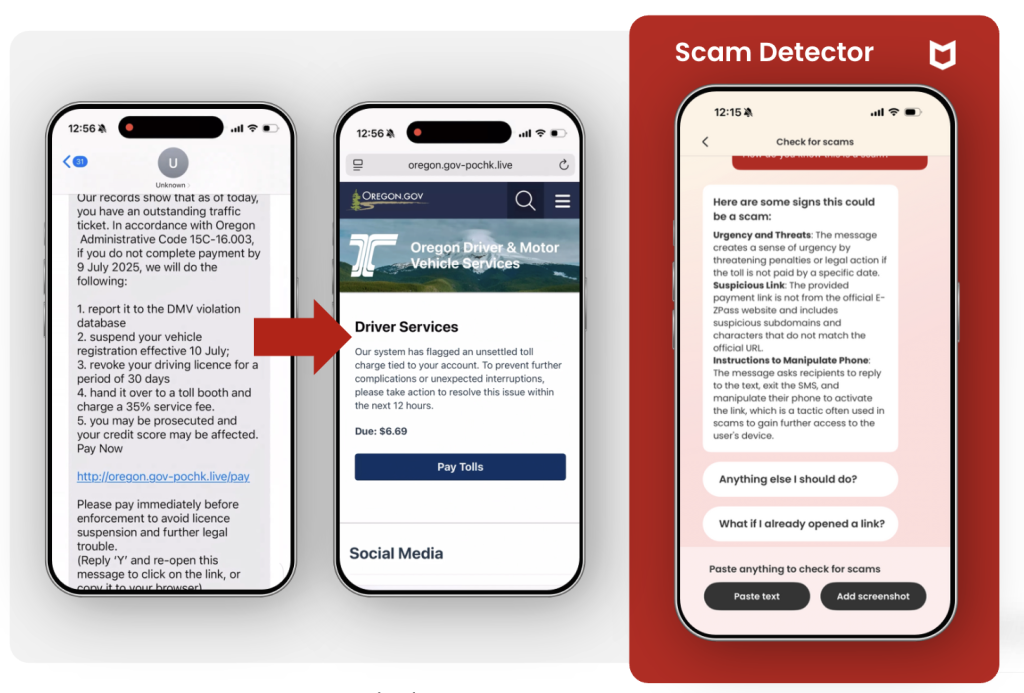
Figure 1: An example of a suspicious text being flagged by McAfee’s Scam Detector 

Figure 1: An example of a suspicious text being flagged by McAfee’s Scam Detector 

What’s new in McAfee’s Scam Detector 

Scams now move quickly across platforms and formats, often escalating in minutes once someone engages. Among people who were harmed by a scam, the typical scam unfolded in about 38 minutes. 

That speed leaves little room for hesitation. Scam protection has to work in real time, not after the damage is done. 

McAfee’s latest Scam Detector upgrades are designed around that reality, adding: 

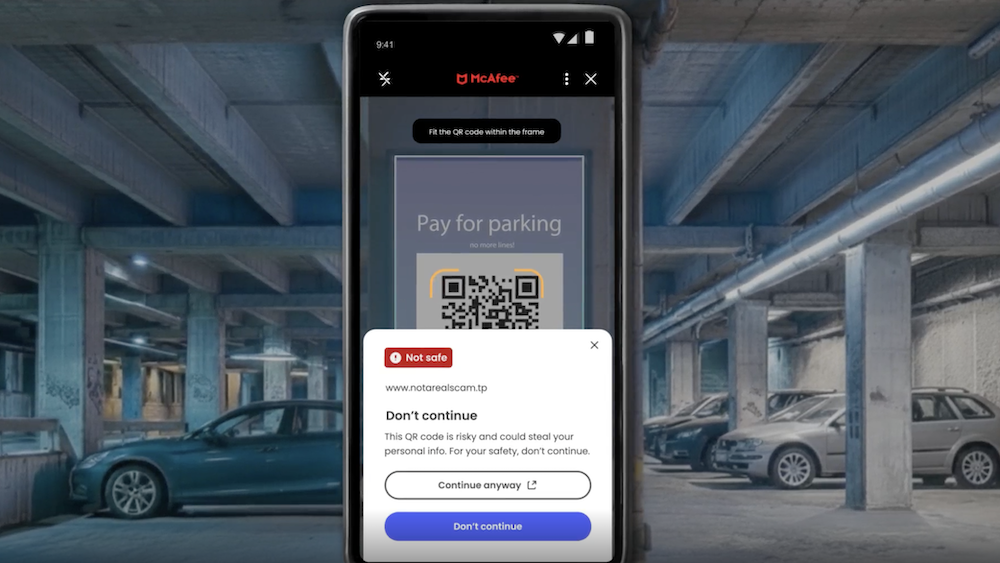
  • Instant QR code safety checks, so users can assess risk before tapping 
  • Smarter social messaging protection, with clearer warnings for suspicious texts, emails, and DMs, even when no link is present 

These Scam Detector upgrades will begin rolling out in February across all core McAfee plans, bringing real-time protection to the moments where scams escalate fastest. 

QR codes, quishing, and why instant scans are needed 

QR codes were designed for convenience. That is exactly why scammers use them. 

Cybercriminals increasingly hide malicious links behind QR codes placed on menus, parking meters, packages, posters, and public signage. People scan quickly, often without stopping to evaluate where the code leads. 

McAfee research shows how common this risk has become: 

  • 68% of people scanned a QR code in the past three months 
  • 18% landed on a suspicious or unsafe page after scanning 
  • Among those who did, more than half took risky actions such as entering personal information, installing an app, or connecting a digital wallet 

QR Scan Example

Figure 2. A still from a demo video, showing a risky QR code being blocked by McAfee’s Scam Detector 

Social media scams and the rise of linkless messages 

Phishing is no longer confined to emails with obvious red flags. 

Scams now arrive through WhatsApp, Instagram, Messenger, Telegram, and other social platforms, often starting as vague or friendly messages designed to lower suspicion rather than trigger alarm. 

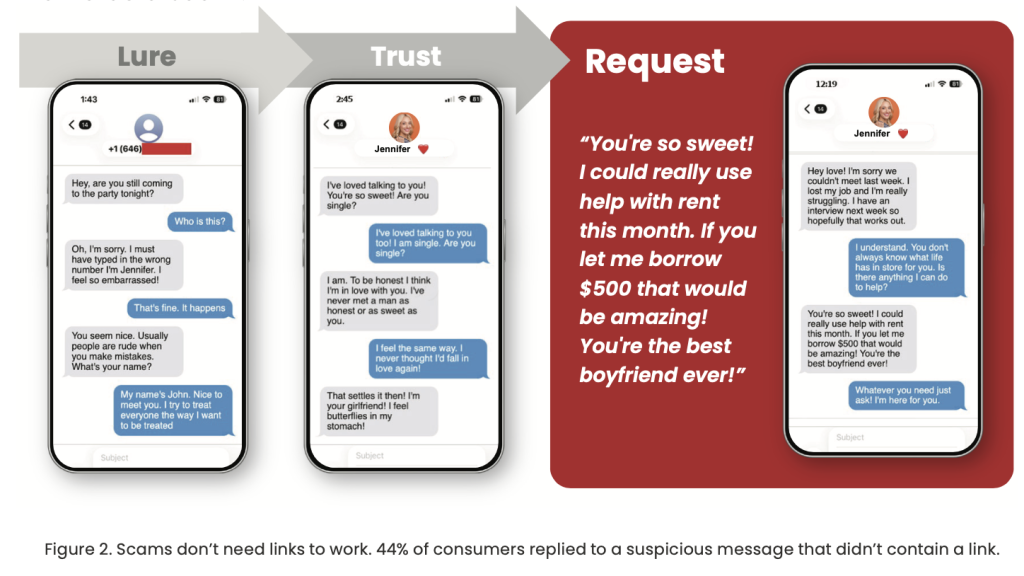
McAfee’s research highlights a key shift: more than one in four suspicious social messages contain no link at all, and 44% of Americans say they have replied to a suspicious DM with no link. 

These messages rely on familiarity and momentum. A short greeting. A warning about an account issue. A promise of easy money. By the time a request or link appears, the conversation already feels normal. 

And the economic impact of these scams is significant. According to the FTC, social media scams drove $1.9 billion in reported losses in 2024, making social platforms one of the top channels for fraud and identity theft. 

That’s why McAfee’s Scam Detector includes smarter social messaging protection, delivering clearer warnings for suspicious texts, emails, and DMs, even those without risky links, across popular platforms. The focus is on identifying suspicious patterns and behavior, not just URLs. 

Users can take a quick screenshot of their social media content on social media, and McAfee’s Scam Detector will analyze the message for suspicious activity. 

Get protection that works before scams escalate 

The stakes are high: 

  • One in three Americans has lost money to a scam 
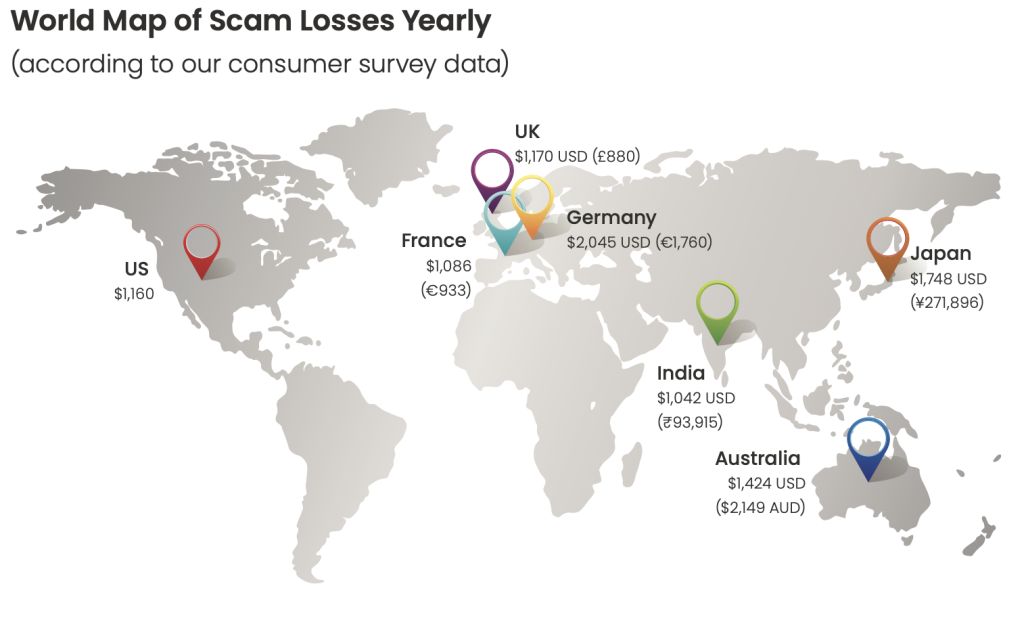
  • Among those who lost money, the average loss was $1,160 
  • 15% of scam victims fall for another scam within a year 

Scams are not just increasing in volume. They are becoming more personal, more believable, and easier to scale using AI. 

McAfee’s upgraded Scam Detector is designed to stay ahead of those shifts, offering real-time guidance when it matters most, whether that’s a suspicious QR code, a vague DM, or a message that feels just normal enough to trust. 

The enhanced Scam Detector, including instant QR code checks and smarter social messaging protection, will begin rolling out in February across all core McAfee plans. 

The post How McAfee’s Scam Detector Checks QR Codes and Social Messages appeared first on McAfee Blog.
  •  

McAfee Report: In the AI Slop Era, Americans Spend Weeks Each Year Questioning What’s Real

Merriam-Webster’s word of 2025 was “slop.” Specifically, AI slop. 

Low-effort, AI-generated content now fills social feeds, inboxes, and message threads. Much of it is harmless. Some of it is entertaining. But its growing presence is changing what people expect to see online.

McAfee’s 2026 State of the Scamiverse report shows that scammers are increasingly using the same AI tools and techniques to make fraud feel familiar and convincing. Phishing sites look more legitimate. Messages sound more natural. Conversations unfold in ways that feel routine instead of suspicious.

According to McAfee’s consumer survey, Americans now spend an average of 114 hours a year trying to determine whether the messages they receive are real or scams. That’s nearly three full workweeks lost not to fraud itself, but to hesitation and doubt.

As AI-generated content becomes more common, the traditional signals people relied on to spot scams, such as strange links and awkward grammar, are fading. That shift does not mean everything online is dangerous. It means it takes more effort to tell what is real from what is malicious.

The result is growing uncertainty. And a rising cost in time, attention, and confidence.

The average American receives 14 scam messages a day 

Scams are no longer occasional interruptions. They are a constant background noise. 

According to the report, Americans receive an average of 14 scam messages per day across text, email, and social media.  

Many of these messages do not look suspicious at first glance. They resemble routine interactions people are conditioned to respond to. 

  • Delivery notices 
  • Account verification requests 
  • Subscription renewals  
  • Job outreach 
  • Bank alerts 
  • Charity appeals 

And with the use of AI tools, scammers are churning out these scam messages and making them look extremely realistic.

That strategy is working. One in three Americans says they feel less confident spotting scams than they did a year ago.  


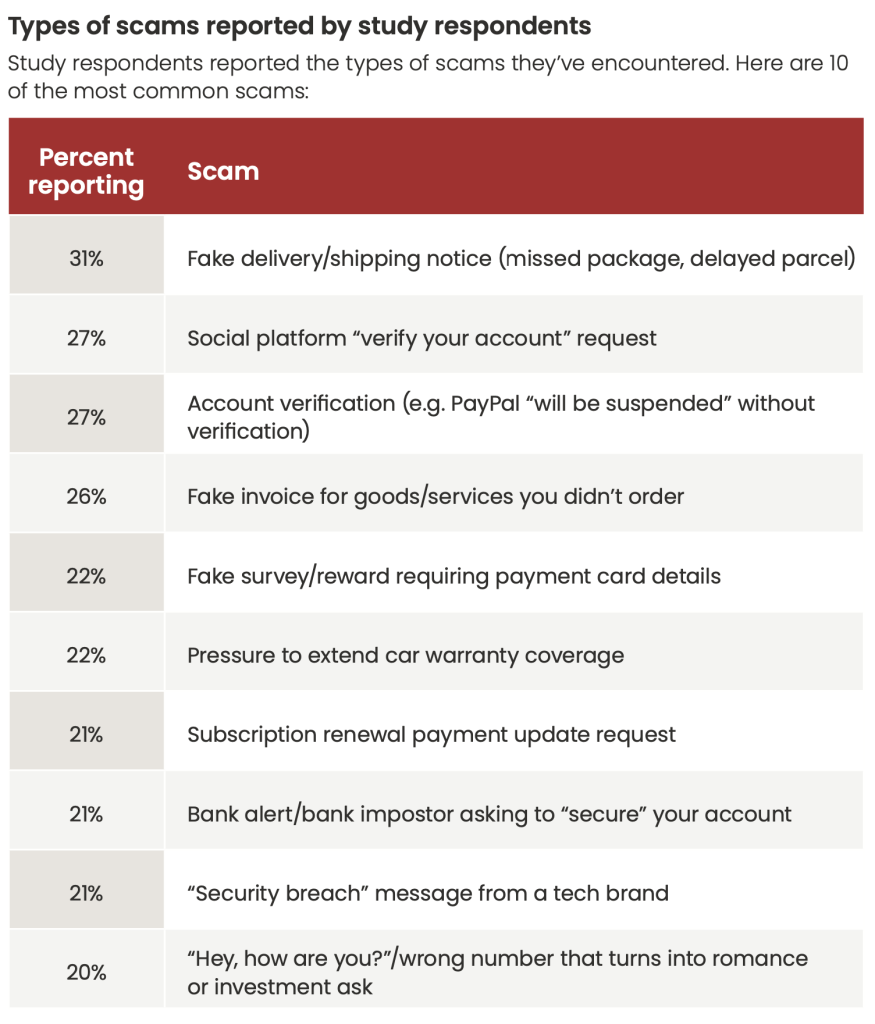
scam statsFigure 1. Types of scams reported in our consumer survey. 

Most scams move fast, and many are over in minutes 

The popular image of scams often involves long email threads or elaborate schemes. In reality, many modern scams unfold quickly. 

Among Americans who were harmed by a scam, the typical scam played out in about 38 minutes 

That speed matters. It leaves little time for reflection, verification, or second opinions. Once a person engages, scammers often escalate immediately. 

Still, some scammers play the long game with realistic romance or friendship scams that turn into crypto pitches or urgent requests for financial support. Often these scams start with no link at all, but just a familiar DM.

In fact, the report found that more than one in four suspicious social messages contain no link at all, removing one of the most familiar warning signs of a scam.  And 44% of people say they have replied to a suspicious direct message without a link 

Linkless DM scams seek to build trust before asking victims for money.

The cost is not just money. It is time and attention. 

Financial losses from scams remain significant. One in three Americans report losing money to a scam. Among those who lost money, the average loss was $1,160 

But the report argues that focusing only on dollar amounts understates the broader impact: scams also cost time, attention, and emotional energy. 

People are forced to second-guess everyday digital interactions. Opening a message. Answering a call. Scanning a QR code. Responding to a notification. That time adds up. 

And who doesn’t know that sinking feeling when you realize a message you opened or a link you clicked wasn’t legitimate?

map of annual scam losses globally 2025

Figure 3. World Map of Average Scam Losses. 

Why AI slop makes scams harder to spot 

The rise of AI-generated content has changed the baseline of what people expect online. It’s now an everyday part of life.

According to the report, Americans say they see an average of three deepfakes per day 

Most are not scams. But that familiarity has consequences. 

When AI-generated content becomes normal, it becomes harder to recognize when the same tools are being used maliciously. The report found that more than one in three Americans do not feel confident identifying deepfake scams, and one in ten say they have already experienced a voice-clone scam. Voice clone scams often feature AI deepfake audio of public figures, or even people you know, requesting urgent financial support and compromising information.

These AI-generated scams also come in the form of phony customer support outreach, fake job opportunities and interviews, and illegitimate investment pitches.

Account takeovers are becoming routine 

Scams do not always end with an immediate financial loss. Many are designed to gain long-term access to accounts. 

The report found that 55% of Americans say a social media account was compromised in the past year 

Once an account is taken over, scammers can impersonate trusted contacts, spread malicious links, or harvest additional personal information. The damage often extends well beyond the original interaction. 

What not to do in 2026Scams are blending into everyday digital life 

What stands out most in the 2026 report is how thoroughly scams have blended into normal online routines. 

Scammers are embedding fraud into the same systems people rely on to work, communicate, and manage their lives. 

  • Cloud storage alerts (such as Google Drive or iCloud notices) warning that storage is full or access will be restricted unless action is taken, pushing users toward fake login pages.
  • Shared document notifications that appear to come from coworkers or collaborators, prompting recipients to open files or sign in to view a document that does not exist.
  • Payment confirmations that claim a charge has gone through, pressuring people to click or reply quickly to dispute a transaction they do not recognize.
  • Verification codes sent unexpectedly, often as part of account takeover attempts designed to trick people into sharing one-time passwords.
  • Customer support messages that impersonate trusted brands, offering help with an issue the recipient never reported.

Cloud scam Example

Figure 4: Example of a cloud scam message. 

The Key Takeaway

Not all AI-generated content is a scam. Much of what people encounter online every day is harmless, forgettable, or even entertaining. But the rapid growth of AI slop is creating a different kind of risk.

Constant exposure to synthetic images, videos, and messages is wearing down people’s ability to tell what is real and what is manipulated. The State of the Scamiverse report shows that consumers are already struggling with that distinction, and the data suggests the consequences are compounding. As digital noise increases, so does fatigue. And fatigue is exactly what scammers exploit.

FTC data shows losses from scams continuing to climb, and McAfee Labs is tracking a rise in fraud that blends seamlessly into everyday digital routines. Cloud storage warnings, shared document notifications, payment confirmations, verification codes, and customer support messages are increasingly being mimicked or abused by scammers because they look normal and demand quick action.

The danger of the AI slop era is not that everything online is fake. The danger is that people are being forced to question everything. That constant doubt slows judgment, erodes confidence, and creates openings for fraud to scale.

In 2026, the cost of scams is no longer measured only in dollars lost. It is measured in time, attention, and trust, and those losses are still growing.

Learn more and read the full report here.

FAQ: Understanding the AI Slop Era and Modern Scams 

Q: What is AI slop?  

A: The term refers to the flood of low-quality, AI-generated content now common online. While much of it is harmless, constant exposure can make it harder to identify when similar technology is used for scams.   

Q: How much time do Americans lose to scams?  

A: Americans spend 114 hours a year determining whether digital messages and alerts are real or fraudulent. That is nearly three workweeks.   

Q: How fast do scams happen today?  

A: Among people harmed by scams, the typical scam unfolds in about 38 minutes from first interaction to harm.   

Q: How common are deepfake scams?  

A: Americans report seeing three deepfakes per day on average, and one in ten say they have experienced a voice-clone scam.   


The post McAfee Report: In the AI Slop Era, Americans Spend Weeks Each Year Questioning What’s Real appeared first on McAfee Blog.

  •  

McAfee and Pat McAfee Turn a Name Mix-Up Into a Push for Online Safety

Pat McAfee

If a message popped up in your feed tomorrow promising a cash refund, a surprise giveaway, or a limited-time crypto opportunity, would you pause long enough to question it? 

That split second matters more than ever.

Most modern scams don’t rely on panic or obvious red flags. They rely on familiarity. On things that feel normal. On moments that seem too small to question. 

And those moments are exactly what scammers exploit. 

Why Today’s Scams Are So Easy to Fall For 

There was a time when spotting a scam was relatively straightforward. The emails were badly written. The websites looked rushed. The warnings were obvious. 

Scammers don’t just rely on obvious spam or panic-driven messages. Instead, many now use: 

  • Friendly, natural language 
  • Faces of celebrities and figures you trust 
  • Messages that arrive through trusted apps 
  • Conversations that unfold gradually 
  • Requests that feel routine instead of suspicious 

McAfee’s Celebrity Deepfake Deception research shows how common and convincing these scams have become: 72% of Americans say they’ve seen a fake or AI-generated celebrity endorsement, and 39% say they’ve clicked on one that turned out to be fraudulent. When scam content shows up in the same feeds, apps, and formats people use every day, it feels normal. 

That’s the danger zone. It’s also why McAfee chose to use a familiar, culturally recognizable moment to talk about a much bigger issue.

Why McAfee Partnered with Pat McAfee 

Whether you’ve been saying mack-uh-fee or mick-affy, the long-running name mix-up is harmless in everyday conversation. 

Online, though, small moments of confusion can have outsized consequences. 

Scammers rely on quick assumptions: that a familiar name means legitimacy, that a recognizable face means trust, that a message arriving in the right place must be real. They move fast, hoping people act before stopping to verify 

Pat McAfee knows firsthand how scammers exploit familiarity and trust. 

In recent months, fake social media giveaways promising cash and prizes have circulated using Pat’s likeness, and even a fraudulent “American Heart Association fundraiser” made the rounds, falsely claiming he was collecting donations. 

Pat wants his fans to know: if you ever see a giveaway, fundraiser, or message claiming to be from him, double-check it on his official channels first. If it feels off, it probably is. 

Unfortunately, these scams work because people trust Pat. Scammers exploit that trust to lower people’s guard and make fraudulent requests feel legitimate. 

It’s the same tactic used across countless impersonation scams today: borrow the authority of a familiar face, add a sense of urgency, and move fast before anyone stops to verify, “is this legit?” We’ve seen it happen with Taylor Swift, Tom Hanks, Al Roker, Brad Pitt, and numerous others. 

Remember, no legitimate giveaway will ask for payment, banking details, login credentials, or account access. And no nonprofit fundraiser tied to a celebrity should ever come from a personal message or unfamiliar social account. 

Watch: Pat McAfee Explains How McAfee Is More Than an Antivirus 

In the video below, Pat McAfee playfully demonstrates how easily familiar moments online can turn into risk, and why digital safety today can’t rely on perfect judgment alone. 


How to Protect Yourself Right Now 

You don’t have to stop using your favorite platforms. But you do have to change how you verify online threats. 

Before You Trust Any Urgent Message or Offer: 

  • Be skeptical of sudden financial opportunities 
  • Assume giveaways that require payment or credentials are scams 
  • Never connect accounts, wallets, or payment methods from social links 
  • Verify claims on official websites, not just inside apps 
  • Be cautious of messages that replace clear context with urgency 

If a video or message feels real but the request feels extreme, that’s a red flag. 

McAfee offers more than traditional antivirus, combining multiple layers of digital protection in one app 

Final Takeaway 

If a scam looks obvious, most people won’t fall for it. 

But modern scams don’t look obvious. They look familiar. They use your favorite faces. They look normal. They look safe. And that’s where people get hurt. 

Staying safe now means slowing down, verifying independently, and having protection work quietly in the background while you stay focused on what you actually came online to do. 

McAfee’s built-in Scam Detector, included in all core plans, automatically detects scams across text, email, and video, blocks dangerous sites, and identifies deepfakes, stopping harm before it happens. 

And because today’s risks aren’t just about what you click, a VPN and Personal Data Cleanup add additional layers of defense by helping protect your connection and limit how much personal information is available to be exploited in the first place. 

Ready to get Pat’s Picks? Learn more here. 

FAQs 

For clarity, and because these questions come up often, here’s the straightforward explanation: 

Q: Is Pat McAfee the founder of McAfee antivirus?
A: No. Pat McAfee is not associated with the founding or leadership of McAfee. McAfee was founded by John McAfee and operates independently. 
Q: Are Pat McAfee and McAfee the same company?
A: No. Pat McAfee is a sports media personality. McAfee is a cybersecurity company. They are separate entities. 
Q: Why does McAfee work with Pat McAfee?
A: McAfee partnered with Pat McAfee to raise awareness about online scams, impersonation fraud, and digital safety using culturally relevant examples. 


The post McAfee and Pat McAfee Turn a Name Mix-Up Into a Push for Online Safety appeared first on McAfee Blog.
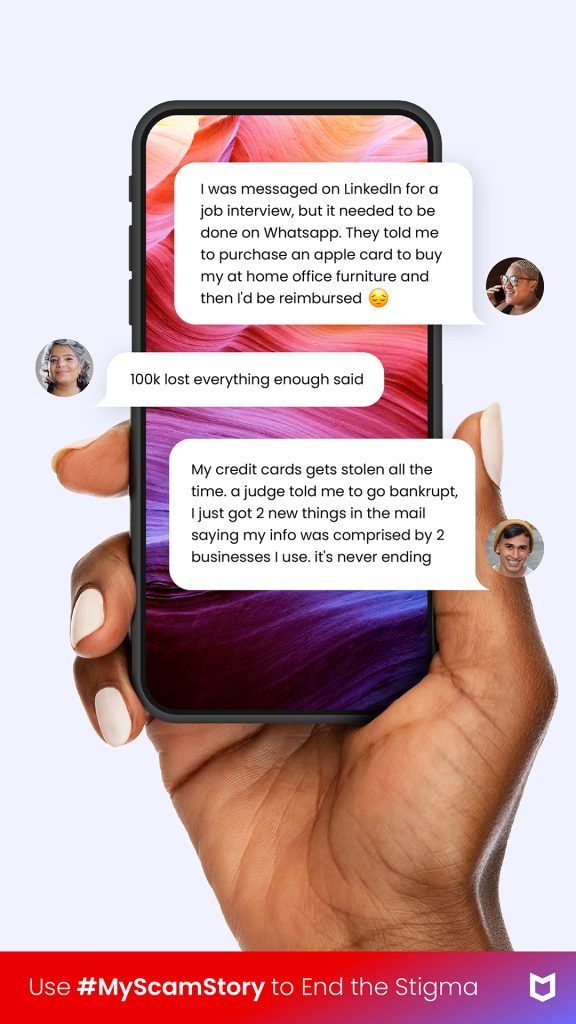
  •  

McAfee’s Scam Detector Earns Third Major Award Within Months of Launch

McAfee Scam Detector

McAfee’s Scam Detector has been named a Winner of the 2026 BIG Innovation Awards, presented by the Business Intelligence Group, marking the third major industry award the product has earned since launching just months ago. 

The recognition underscores a growing consensus across independent judges: as scams become more sophisticated and AI-driven, consumers need protection that works automatically, explains risks clearly, and helps stop harm before it happens. 

Big Innovation Award 2026

What Is the BIG Innovation Award? 

The BIG Innovation Awards recognize products and organizations that deliver measurable innovation with real-world impact. The program focuses not only on technical advancement, but on how solutions improve everyday life for individuals and households. 

For consumer cybersecurity products like Scam Detector, that means being evaluated on: 

  • Real-world relevance 
  • Ease of use for non-experts 
  • Societal impact 
  • Demonstrated adoption and need 

The award highlights Scam Detector’s role in helping people stay safer online as scams grow more sophisticated, more personal, and increasingly powered by AI.  

Why Scam Detector Stands Out 

According to feedback from the BIG Innovation Awards judging panel, Scam Detector was recognized for: 

Strong real-world relevance: Scams are now an everyday risk, not a niche technical issue 

Clear consumer value: Protection that runs automatically in the background without requiring expert knowledge

AI used responsibly: Applying advanced models to reduce harm, not increase it

Early impact: Rapid adoption, with more than one million users in its first months 

Judges also noted the importance of Scam Detector’s educational alerts, which don’t just block threats, but explain why something is risky, helping people build confidence over time. 

Using AI to Fight AI-Driven Scams 

Scam Detector is McAfee’s AI-powered protection designed to detect scams across text, email, and video, block dangerous links, and identify deepfakes, before harm occurs. 

As scammers increasingly use generative AI to impersonate people, brands, and institutions, protection needs to operate at the same speed and scale. Scam Detector is built to do exactly that, quietly working in the background while users go about their day. 

Scam Detector is included with all core McAfee plans and is available across mobile, PC, and web. 

In Good Company: Consumer Innovation Across Industries 

McAfee was recognized alongside other consumer-facing innovators whose products directly serve individuals and households. Fellow 2026 BIG Innovation Award winners include: 

Capital One Auto – Chat Concierge: A consumer-facing service designed to help car buyers and owners navigate financing and ownership decisions. 

Starkey – Omega AI Hearing Aid: A wearable hearing aid that integrates AI assistance, health monitoring, and real-time translation. 

Phonak – Virto R Infinio: Custom-fit hearing aids designed to deliver personalized hearing solutions for individual users. 

EZVIZ – 9c Dual 4G Series Camera: A smart home security camera built for personal and household use. 

Sinomax USA: Consumer mattresses and comfort products focused on everyday home use. 

beyoutica 1905: A wellness product designed for health- and lifestyle-focused consumers. 

Wheels – Pool CheckOut: A consumer-oriented solution designed to simplify vehicle service and checkout experiences. 

Together, these winners reflect how innovation increasingly shows up in tools people rely on at home, in their cars, and on their phones. 

Scam Detector Awards and Industry Recognition 

Since launch, McAfee’s Scam Detector has earned recognition across multiple independent award programs, each highlighting a different dimension of its impact: 

2026 BIG Innovation Awards

Winner and Top 10 Innovator – Large Business, recognizing real-world consumer impact and responsible AI use. 

2026 Big Innovation Award

2025 A.I. Awards

Winner, Best Use of AI in Cybersecurityhonoring Scam Detector’s automated scam detection and deepfake identification. 
The AI Awards - Winner 2025

2025 Tech Ascension Awards 

Winner, Best AI/ML Powered Cybersecurity Solution, recognizing real-time protection across text, email, and video. 
Tech Ascension Awards

Together, these awards reinforce a consistent message from independent judges: consumer cybersecurity works best when advanced technology is paired with clarity, usability, and trust. 

What Is McAfee’s Scam Detector? 

McAfee’s Scam Detector is an AI-powered scam protection feature designed to spot and stop scams across text messages, emails, and videos. Built in response to the rapid rise of AI-generated fraud, Scam Detector automatically analyzes suspicious content, blocks dangerous links, and identifies deepfakes, while explaining why something was flagged so users can make more confident decisions online. 

What Scam Detector Does 

Detects text message scams across popular apps and messaging platforms 

Flags phishing and suspicious emails with clear explanations, helping users learn what to watch for

Identifies AI-generated or manipulated audio in videos, including potential deepfakes

Offers on-demand scam checks, allowing users to upload a message, link, or screenshot for analysis

Runs primarily on-device, helping protect user privacy without sending personal content to the cloud 

Scam Detector is designed to work quietly in the background, providing protection without requiring constant decisions or technical expertise. Scam Detector is included at no extra cost with all core McAfee consumer plans. Learn more here. 

The post McAfee’s Scam Detector Earns Third Major Award Within Months of Launch appeared first on McAfee Blog.

  •  

McAfee Earns 29th Consecutive AAA Rating From SE Labs

McAfee earns AAA rating from SE Labs

McAfee has once again earned the highest possible AAA rating from SE Labs, marking the 29th consecutive time our consumer protection has received this top-tier recognition. 

In SE Labs’ latest Q4 Home Anti-Malware Test, McAfee Total Protection achieved 100% protection with zero false positives, reinforcing a streak that has remained unbroken since December 2018. 

SE Labs AAA Security Evaluation EPS Protection Home December 2025

What the SE Labs AAA Rating Measures 

SE Labs is an independent, UK-based security testing organization known for evaluating products against real-world threats, not just controlled lab samples. Its test results are therefore referenced and trusted by numerous journalists and product reviewers alike.  

Their Home Anti-Malware tests simulate the types of attacks people actually face, including: 

  • Email-based threats 
  • Malicious websites 
  • Targeted attacks designed to appear relevant or trustworthy 
  • Common malware encountered during everyday online activity 

To earn an AAA rating, products must demonstrate: 

  • Strong threat detection 
  • Effective prevention before harm occurs 
  • Minimal false positives that disrupt normal use 

Why This Recognition Matters for Consumers 

For people choosing security software, independent testing helps answer a simple question: Does this protection actually work when it matters? SE Labs’ results show that McAfee continues to block threats accurately, without over-flagging safe activity. 

Independent recognition like this reinforces McAfee’s ongoing commitment to consumer-first security that is tested, proven, and trusted over time. 

Learn more about McAfee’s core protection plans and how we can help keep you safe online. And find the full SE Labs report here. 

The post McAfee Earns 29th Consecutive AAA Rating From SE Labs appeared first on McAfee Blog.
  •  

McAfee Named ADVANCED+ in Real-World Protection — What That Means for You

When it comes to online safety, independent testing matters. And in the latest AV-Comparatives Real-World Protection Test, McAfee earned the highest possible rating, ADVANCED+, with a 99.5% protection rate. It’s the kind of recognition that helps shoppers understand which tools truly hold up in real-life conditions, not just in controlled lab environments.

For anyone navigating today’s mix of emails, downloads, suspicious links, and AI-driven scams, independent results like these are a clear signal: strong protection still makes a real difference.

What Is the AV-Comparatives Real-World Protection Test?

The Real-World Protection Test is an independent evaluation run by AV-Comparatives, a trusted third-party security testing lab. The test measures how well antivirus and online protection tools block real threats that people encounter every day, including dangerous URLs, malicious downloads, phishing pages, and harmful files attempting to run on a device.

This type of testing is widely cited by major tech publications and review sites because it reflects actual user behavior rather than controlled lab simulations.

Why This Recognition Matters

According to AV-Comparatives, their Real-World Protection Test is designed to measure how security products perform in situations people face every day: clicking a link, opening a file, visiting a site for the first time.

It’s one of the most widely cited sources in tech journalism and consumer product reviews, and it often shapes how online shoppers evaluate cybersecurity tools.

Here’s why tests like these are used in tech reviews, buying guides, and search engine rankings:

  • They compare multiple brands under the same conditions
  • They use real-world threats, not theoretical malware
  • They measure false positives, which impact everyday usability
  • They influence third-party reviews and product roundups
  • They help shoppers choose trustworthy protection without guesswork

McAfee has earned an ADVANCED+ rating in all tests since June 2022, demonstrating our consistency and reliability in the moments that matter most: when a threat appears disguised as something routine.

About the AV-Comparatives Real-World Protection Test

The latest evaluation included 19 consumer security products, each tested across the full attack chain, from the moment a malicious URL is accessed to the instant a dangerous file tries to execute.

Unlike benchmark tests that focus on one part of the process, this assessment mirrors real user behavior. AV-Comparatives notes that the methodology is meant to be “as realistic as possible,” and the results often reveal meaningful differences in both protection and false positives.

With this round of testing, McAfee maintains its cycle of highest ratings in every Real-World Protection Test, while several well-known competitors were downgraded due to high false-positive counts.

What This Means for Everyday Users

A high protection score matters most when you’re simply going about your day — shopping, banking, downloading a file, or clicking a link you think is safe. Independent recognition signals three core things:

1. Trustworthy Protection

Strong results indicate that advanced threats, misleading links, and malicious downloads are blocked before they can cause harm.

2. Fewer False Alarms

With only four false positives out of nearly 500 samples, McAfee flagged less than 1% of clean files incorrectly. For context: the industry average in this test was 10 false positives, and one competitor even misidentified 75, meaning it labeled nearly 16% of harmless activity as a threat.

The takeaway is simple: strong protection shouldn’t get in your way, and these results show it doesn’t.

3. Innovation That Keeps Pace With Scammers

Criminals now use AI to make fake emails, websites, and support messages look real. Testing that mirrors those real-world conditions helps consumers see which tools stay ahead of that curve.

A Note on McAfee Protection Tools

McAfee’s threat protection, the same technology validated in this test, is built into McAfee+ Premium, McAfee+ Advanced, McAfee+ Ultimate, McAfee Total Protection, and McAfee LiveSafe.

McAfee’s built-in Scam Detector, included in all core plans, automatically detects scams across text, email, and video, blocks dangerous links, and identifies deepfakes—stopping harm before it happens.

The post McAfee Named ADVANCED+ in Real-World Protection — What That Means for You appeared first on McAfee Blog.
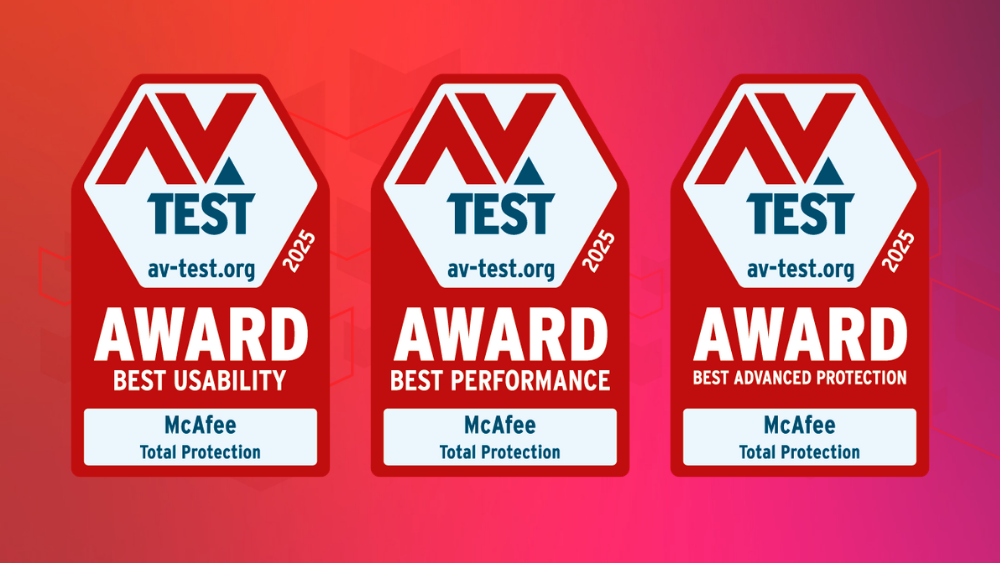
  •  

Holiday Shopping 2025: US Fact Sheet 

The holidays are supposed to be about joy and generosity — but this year, they’re also peak season for AI-powered scams. New research from McAfee, a global leader in online protection, shows how fraudsters are using artificial intelligence to create more convincing lures — from deepfake endorsements to cloned delivery messages — as Americans head online to shop.

US – Holiday Shopping 2025 Fact Sheet 

The post Holiday Shopping 2025: US Fact Sheet  appeared first on McAfee Blog.
  •  

McAfee Wins “Best Use of AI in Cybersecurity” for Scam Detector

Graphic announcing that McAfee has won the 2025 Best Use of AI in Cybersecurity Award for McAfee Scam Detector. The image shows a crystal trophy labeled 'The A.I. Awards Winner 2025' on a red gradient background with McAfee’s logo and text celebrating the honor

We’re proud to share that McAfee has won “Best Use of AI in Cybersecurity” at The 2025 A.I. Awards for our groundbreaking work on McAfee’s Scam Detector, which automatically identifies risky texts and emails, and also includes the world’s first automated deepfake detection. 

Scams Are Growing 

Online scams have reached an all-time high, with 1 in 3 Americans reporting they’ve fallen victim, losing an average of $1,500 each. From fake job offers and text messages to AI-generated deepfakes, these threats are evolving faster than ever. 

Using Good AI to Fight Bad AI 

That’s where McAfee’s Scam Detector comes in. Using advanced artificial intelligence, it automatically detects scams across text, email, and video, blocks dangerous links, and identifies deepfakes, stopping harm before it happens. 

Scam Detector is also included with every core McAfee plan, and is available on PC, mobile, and web. In just its first few months, Scam Detector crossed the million-user milestone, underscoring the urgent need for smarter, faster protection in the AI-powered world. 

Industry Recognition 

As one of the judges, Rakesh Datta, noted: 

“McAfee’s Scam Detector is leading the fight against digital deception, harnessing advanced AI to identify scams, deepfakes, and fraud in real time. By combining exceptional accuracy with proactive protection, it restores confidence and redefines trust in the modern digital era. The A.I. Awards is proud to recognize McAfee’s innovation in safeguarding users worldwide.” 

This recognition highlights McAfee’s commitment to building responsible, consumer-first AI that empowers people to live safer, more confident lives on and offline. 

Looking Ahead 

We’re honored to be recognized alongside other global innovators, and we’re even more motivated to keep pushing forward, creating technology that helps people stay one step ahead of online threats. 

Check out all The 2025 A.I. Awards winners and learn more about McAfee Scam Detector. 

The post McAfee Wins “Best Use of AI in Cybersecurity” for Scam Detector appeared first on McAfee Blog.

  •  

McAfee Again Certified as “TOP PRODUCT” by AV-TEST

McAfee Total Protection has once again been named a TOP PRODUCT by the independent test lab AV-TEST, earning perfect scores in all three categories for the July–August 2025 test cycle.

This marks the 31st consecutive TOP PRODUCT certification for McAfee since June 2020, proof that our consumer protection consistently meets the highest independent standards.

While many security tools can slow your computer or trigger false alarms, McAfee keeps impact minimal and alerts meaningful, giving you reliable protection without getting in your way.

What the Scores Mean for You

  • Protection efficacy (100%): Stops the latest and most dangerous threats, including zero-day attacks and widespread malware, before they can infect your PC.
  • Performance impact (below industry average): Runs quietly in the background so your computer stays fast while you work, stream, and game. Many of our competitors’ security tools can slow things down, but McAfee keeps impact minimal.
  • Usability (no false positives): Alerts you only when it matters, avoiding annoying or confusing warnings about safe files and programs.

Together, these results mean you’re getting lab-verified security that beats industry averages and stays ahead of major competitors, without sacrificing speed or ease of use.

You can read the full AV-TEST report here.

The post McAfee Again Certified as “TOP PRODUCT” by AV-TEST appeared first on McAfee Blog.
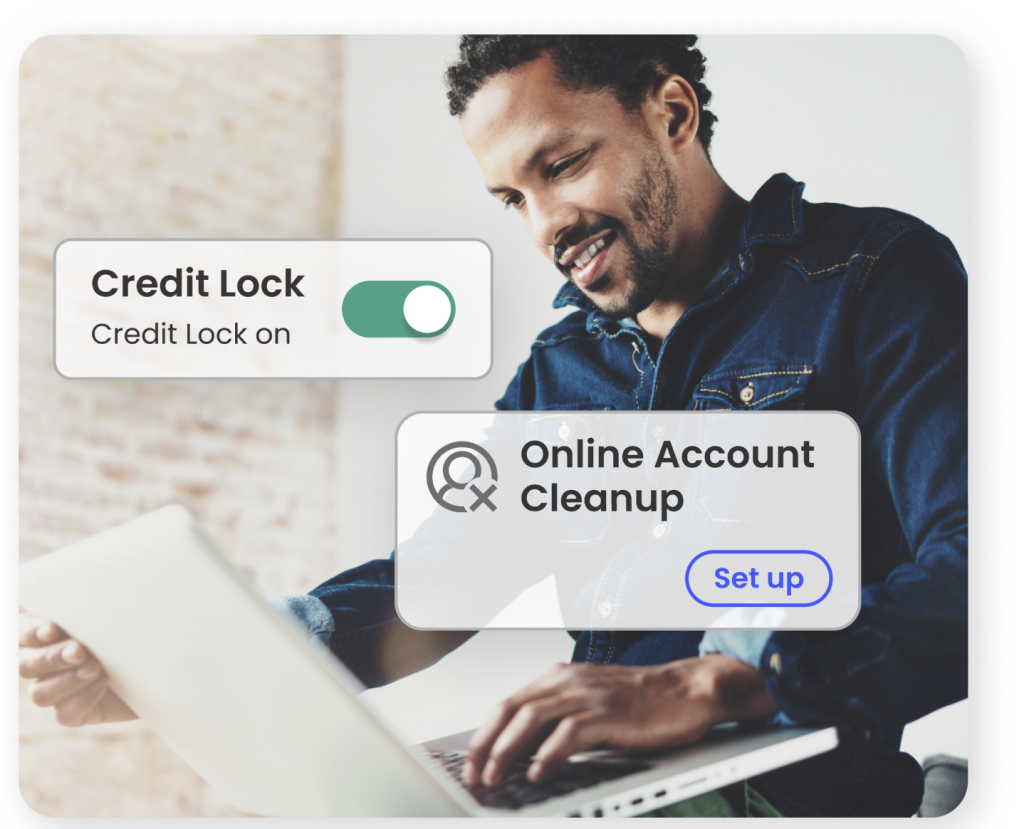
  •  
❌