The exploit, dubbed CopyFail and tracked as CVE-2026-31431, allows hackers to take over PCs and data center servers. The Linux vulnerabilities have been patched—but many machines remain at risk.
You’re scrolling through Facebook or TikTok and see it.
A flash sale from a brand you recognize. A limited-time investment opportunity. A job posting that promises quick money.
The ad has comments. The account looks polished. Maybe someone you follow even liked it.
So you click.
From there, things move fast. You’re pushed to act quickly, enter your information, or send payment before the “deal” disappears. And just like that, the money is gone or your account is compromised.
This isn’t an edge case anymore. According to new FTC data, nearly 30% of people who reported losing money to a scam in 2025 said it started on social media, with total losses hitting $2.1 billion.
That’s why McAfee+ Advanced includes comprehensive protection designed to help you spot and stop scams at every step, including McAfee’s Scam Detector, which flags suspicious links and messages and explains why they may be risky, along with identity and privacy tools that help protect your information if a scam slips through.
How Social Media Ad Scams Work
A social media ad scam is when scammers use paid ads, fake profiles, or hijacked accounts on platforms like Facebook, Instagram, or TikTok to promote fake products, services, or investment opportunities in order to steal money or personal information.
Step
What happens
What to do
How McAfee helps
1
You see an ad, post, or DM promoting a deal, job, or investment
Don’t engage immediately, even if it looks legitimate
Scam Detector flags suspicious links and messages before you interact
2
The ad links to a website or moves you into DMs
Avoid clicking unfamiliar links or continuing off-platform
Safe Browsing helps block risky or newly created websites
3
You’re pressured to act quickly or “secure your spot”
Slow down and verify the company independently
Scam Detector explains urgency tactics and why they’re risky
4
You’re asked to pay, share login info, or download something
Never send money or credentials based on a social media interaction
Identity Monitoring helps protect your personal data if exposed
5
The product never arrives, the investment disappears, or your account is compromised
Report the scam and secure your accounts immediately
Personal Data Cleanup and monitoring help reduce ongoing exposure
Red Flags To Watch For
Deals that feel unusually cheap or urgent
Ads linking to unfamiliar or slightly misspelled websites
Requests to move conversations off-platform quickly
Payment requests via apps, crypto, or wire transfer
Accounts with limited history or inconsistent engagement
And that is the first part of This Week in Scams! This Friday we’re taking a different format to talk about this new FTC data and all that it reveals.
Let’s keep digging in:
FTC Report: Social Media Scams Are Now The Most Costly Fraud Channel
New data from the FTC shows just how dominant social media has become in the scam landscape.
Social media scams drove $2.1 billion in reported losses in 2025
Losses have increased eightfold since 2020
Investment scams alone accounted for $1.1 billion of those losses
Where Scams Are Happening And What’s Changing
Category
What to know
Most common scams
Shopping scams lead, with over 40% of victims reporting purchases from social media ads that never arrived
Most costly scams
Investment scams drive the biggest losses, often starting with ads or group chats showing fake success
What’s changing
Scammers are using platform tools like ads, targeting, and profile data to reach people more precisely than ever
OpenAI is rolling out Advanced Account Security for people concerned that their ChatGPT or Codex accounts could be potential targets of phishing attacks.
The war in Iran has drawn attention to arrests in the United Arab Emirates over online content, but the legal framework behind that enforcement has existed for years.
AI agents may soon be buying your stuff for you. The FIDO Alliance has teamed up with Google and Mastercard to try to ensure that shopping in the near future isn't a complete disaster.
A 31-year-old engineer and self-described indie game developer is suspected of firing shots at the annual event attended by President Donald Trump, high-profile media figures, and US government officials.
Plus: Spy firms tap into a global telecom weakness to track targets, 500,000 UK health records go up for sale on Alibaba, Apple patches a revealing notification bug, and more.
A new scam making the rounds takes a familiar delivery trick and upgrades it with hyper‑realistic messaging and a QR code that looks safe to scan.
But don’t be fooled.
It’s the same delivery scam playbook scammers have relied on for years, just repackaged with better design and more convincing details.
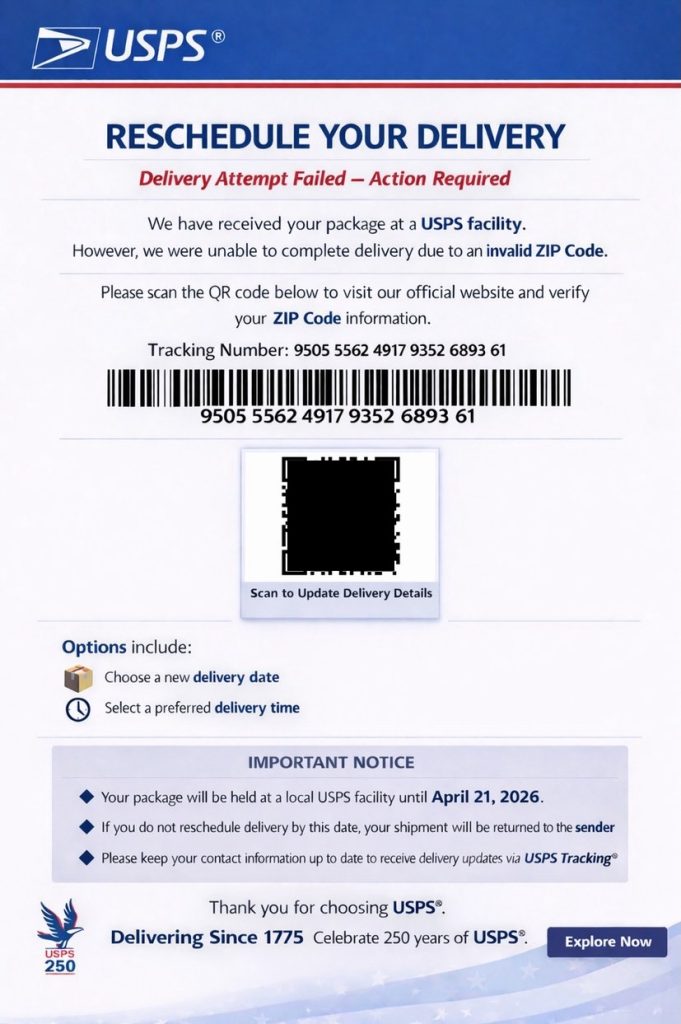
You get a message with a notice that looks something like this, a real message received by our team and tested against McAfee’s Scam Detector.
This is an example of the scam message we received, impersonating the USPS.
That added layer of realism is what makes this version more dangerous. But it doesn’t hold up under scrutiny. McAfee’s Scam Detector flagged both the suspicious language and the QR code in this message before any interaction.
If you receive something like this, pause. Do not scan the code.
You can also protect yourself with McAfee’s Scam Detector, which flags suspicious links and messages, including delivery scams and QR‑based attacks, and explains why they may be risky.
What is the USPS QR Code Scam and How Does it Work?
The USPS QR code scam is a phishing attempt where scammers impersonate postal services and use QR codes instead of clickable links to direct victims to malicious websites.
Once scanned, the QR code can lead to a fake USPS page that asks for payment, login credentials, or personal information.
How the scam works
Step
What happens
The red flags
What to do
How McAfee helps
1
You receive a text about a delivery issue or missed package
Requests for small “redelivery” or “processing” fees are not normal
Exit immediately and do not submit anything
Scam Detector explains why the page is risky, and Identity Monitoring supports you when if your info gets out.
What To Do If You Get This Message
Do not scan the QR code
Go directly to the official USPS website to check tracking
Delete the message
Report it as spam
Monitor your accounts if you interacted with it
And that, my friends, is scam number one in this week’s This Week in Scams.
Let’s get into what else is on our radar.
A Major Health Data Breach Exposes 500,000 Records
A massive health data incident is raising new concerns about how sensitive information is handled and shared.
According to reporting from the Associated Press, data tied to 500,000 participants in a major U.K. health research project was found listed for sale online. The dataset included biological and health-related information, though it did not contain direct identifiers like names or contact details.
Access to the data had been granted to research institutions, but that access has since been revoked. Authorities say no purchases were made, and the listing has been removed.
Still, the situation highlights a growing reality: once data is accessed or shared, control over it becomes harder to guarantee.
What This Breach Says About Data Privacy
Scams are no longer isolated events. They are layered.
A data breach does not just stay a breach. It becomes fuel for future scams. Exposed information can be used to make phishing messages more convincing, personalize attacks, and build trust with targets.
That is why detection alone is not enough anymore. Protection has to account for both incoming threats and what happens when data is already out there.
How McAfee Protects You In A World of Scams and Data Breaches
McAfee+ Advanced gives you multiple layers working together so you are not left figuring it out after the damage is done:
Identity Monitoring alerts you if your personal info shows up where it should not, so you can act fast
Personal Data Cleanup helps remove your information from data broker sites, making you harder to target in the first place
Scam Detector flags suspicious texts, emails, links, and even deepfake videos before you engage
Safe Browsing helps block risky sites if you do click
A US surveillance program that lets the FBI view Americans’ communications without a warrant is up for renewal. A new bill aims to address mounting lawmaker concerns—with smoke and mirrors.
Researchers have finally cracked Fast16, mysterious code capable of silently tampering with calculation and simulation software. It was created in 2005—and likely deployed by the US or an ally.
One group of hackers used AI for everything from vibe coding their malware to creating fake company websites—and stole as much as $12 million in three months.
The Firefox team doesn’t think emerging AI capabilities will upend cybersecurity long term, but they warn that software developers are likely in for a rocky transition.
A lawsuit from the Consumer Federation of America accuses Meta of misleading consumers about its efforts to combat scams advertisements on its platforms.
Your data might be safe today. But that doesn’t mean it’s safe forever.
A growing number of sophisticated actors are collecting encrypted data now, with the goal of decrypting it later, when more powerful technology becomes available.
This strategy is known as Harvest Now, Decrypt Later (HNDL). And it’s not a future problem. It’s already happening, according to research from our McAfee VPN team.
For everyday people, that means private messages, financial records, and sensitive documents could be exposed years from now if protections don’t evolve today.
That’s why security teams, including McAfee’s VPN engineers, are already working on ways to strengthen encryption for both today and what comes next.
What “Harvest Now, Decrypt Later” Means
At its core, HNDL is simple: Attackers collect encrypted data now, store it, and wait until they have the tools to unlock it later.
Even though today’s encryption is incredibly strong, the strategy doesn’t rely on breaking it today. It relies on patience.
A Simple Way to Think About It
You put valuable belongings and documents in a safe at home that’s locked and secured. This works at preventing crimes of opportunity. But let’s say there’s a thief who steals the entire safe, knowing they have tools they can use later to access what’s inside. They wait, and once the tools are available, they break into your safe and access everything inside.
That’s one way to think of HNDL. The safe is the encryption. The quantum computing is the tool they can use later.
But in real life, you’d probably notice if your safe is gone. In the case of HNDL, if you’re not monitoring your data, you may not even notice encrypted information has been stolen to be decrypted.
Key Terms Explained
Term
What it means
Encryption
Scrambling data so others can’t read it
Quantum computing
A new type of computing that can break some encryption
HNDL
A strategy to collect encrypted data now and decrypt it later
Why This Matters Right Now
This isn’t about whether your data is valuable today. It’s about whether it might be valuable later.
Data with a long shelf life is especially at risk, including:
Financial records
Medical information
Private messages
Legal or identity documents
Even something that feels low-stakes today could become sensitive in the future.
And because the collection phase is already happening, the risk isn’t hypothetical. It’s already in motion.
How This Affects VPNs (and what doesn’t change)
VPNs remain one of the most effective ways to protect your data today. That hasn’t changed.
But HNDL introduces a new layer of complexity.
What’s still strong: The encryption that protects your data in transit remains highly resilient.
Where the risk is: The “handshake” process (how a secure connection is established) is more vulnerable to future quantum attacks.
In simple terms: Your data is well protected today, but parts of how that protection is set up may need to evolve for the future.
What Quantum Computing Changes
Traditional computers process information in a linear way.
Quantum computers work differently. They can solve certain types of problems much faster, including the kinds of mathematical challenges that protect today’s encryption.
That’s why attackers are willing to wait.
Once quantum computing reaches a certain level, it could unlock data that was previously considered secure.
What McAfee’s VPN Team is Working On
McAfee’s VPN team is already preparing for this shift.
Evaluating quantum-safe encryption approaches
Exploring hybrid models that protect both now and long-term
Building toward a more resilient VPN experience
This work builds on a broader privacy-by-design approach, where systems are designed to minimize risk from the start, not react after the fact.
Because with HNDL, waiting isn’t an option.
What You Can Do Now
You don’t need to wait for quantum computing to take steps today.
Use a trusted VPN to encrypt your connection
Be mindful of long-term sensitive data you share online
Avoid unsecured public Wi-Fi when possible
Keep your apps and devices updated
These steps help protect your data now while the industry builds toward future-ready security.
How McAfee Helps Protect You
McAfee+ Advanced gives you multiple layers working together so you are not left figuring it out after the damage is done:
Identity Monitoring alerts you if your personal info shows up where it should not, so you can act fast
Personal Data Cleanup helps remove your information from data broker sites, making you harder to target in the first place
Scam Detector flags suspicious texts, emails, links, and even deepfake videos before you engage
Safe Browsing helps block risky sites if you do click
Secure VPN keeps your data private, especially on public Wi-Fi
Frequently Asked Questions (FAQs)
FAQ
Q: Is my data safe right now?
A: In most cases, yes—today’s encryption is extremely strong and is designed to protect your data from current threats. If you’re using trusted security tools like a VPN, safe browsing protections, and device security, your data is actively protected while it’s in transit and in use. However, no system is risk-free. Data exposed through phishing, weak passwords, breaches, or unsecured networks may still be vulnerable. And with “Harvest Now, Decrypt Later,” even properly encrypted data could be collected today and targeted for decryption in the future.
Q: What is quantum-safe encryption?
A: Quantum-safe (or post-quantum) encryption refers to new types of cryptography designed to remain secure even against future quantum computers. Today’s encryption relies on math problems that are extremely difficult for classical computers to solve, but quantum computers could eventually solve some of them much faster. Quantum-safe approaches use different mathematical foundations that are believed to resist those capabilities. In practice, many companies are moving toward hybrid encryption, combining today’s proven methods with newer quantum-resistant techniques to protect data both now and long-term.
Q: Should I still use a VPN?
A: Yes. A VPN remains one of the most effective ways to protect your data today, especially on public or unsecured networks. It encrypts your internet traffic and helps prevent interception by hackers, internet providers, or other third parties. While VPN protocols are evolving to address future quantum risks, they still provide strong, essential protection against today’s threats.
Q: When will this become a real threat?
A: The risk unfolds in two phases. The collection phase is already happening today, where sophisticated actors gather encrypted data and store it. The decryption phase depends on when quantum computing advances far enough to break certain types of encryption, which could take years but is actively progressing. This means data with a long lifespan, such as financial records, personal communications, and sensitive documents, is most at risk because it only needs to remain valuable until those capabilities exist.
Years before the figure skater became an Olympic superstar, a Chinese operative tried to stalk her father and monitored other US residents deemed dissidents against China. And that’s just the beginning.
You open your inbox and see it: Your cloud storage is full.
There’s a warning about photos being deleted, your account being suspended, or a renewal failing. There’s a button to “fix it now.” Or a warning to “act today.”
It looks routine. Maybe even urgent enough to click.
That’s exactly the point.
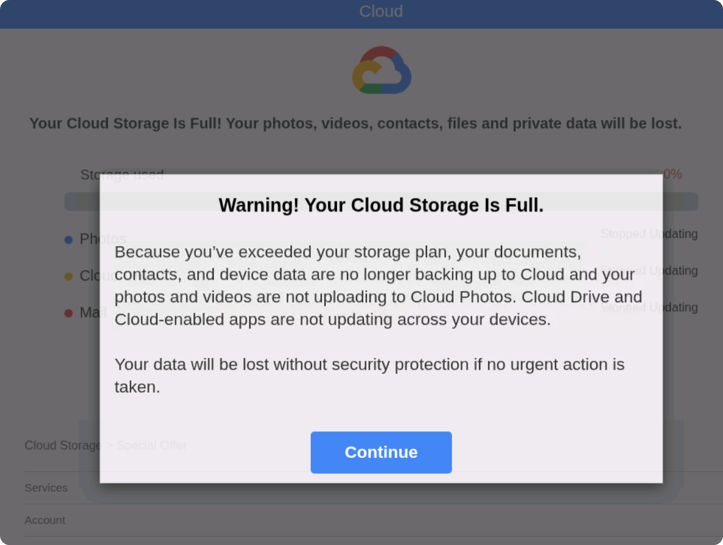
An example of a cloud storage scam detected by McAfee.
Cloud storage scams are making headlines again, building on patterns we flagged earlier this year in our State of the Scamiverse research.
These emails have circulated steadily since 2025, often impersonating trusted brands like Apple, Microsoft, and Google. Many are timed to moments when people are already thinking about storage, backups, or subscriptions.
The safest move is simple: pause and don’t click. If there’s a real issue, go directly to your account through the official app or website.
You can also protect yourself with McAfee’s Scam Detector, which flags suspicious links and messages, including cloud storage scams, and explains why they may be risky.
What Is A Cloud Storage Scam And How Does It Work?
Cloud storage scams are phishing attacks designed to trick you into believing there’s an issue with your account so you’ll click a malicious link.
They often look like this, and include 3 key red flags:
Messages that create urgency like “act now or lose your data”
Generic greetings instead of your name
Links that don’t match the official domain
How the scam works (step-by-step)
Step
What happens
What to do
How McAfee helps
1. You receive a message
Email or text claims your storage is full or your account has an issue
Don’t click links directly from the message
Scam Detector flags suspicious messages before you interact
2. Urgency is introduced
Warning that files or photos will be deleted if you don’t act
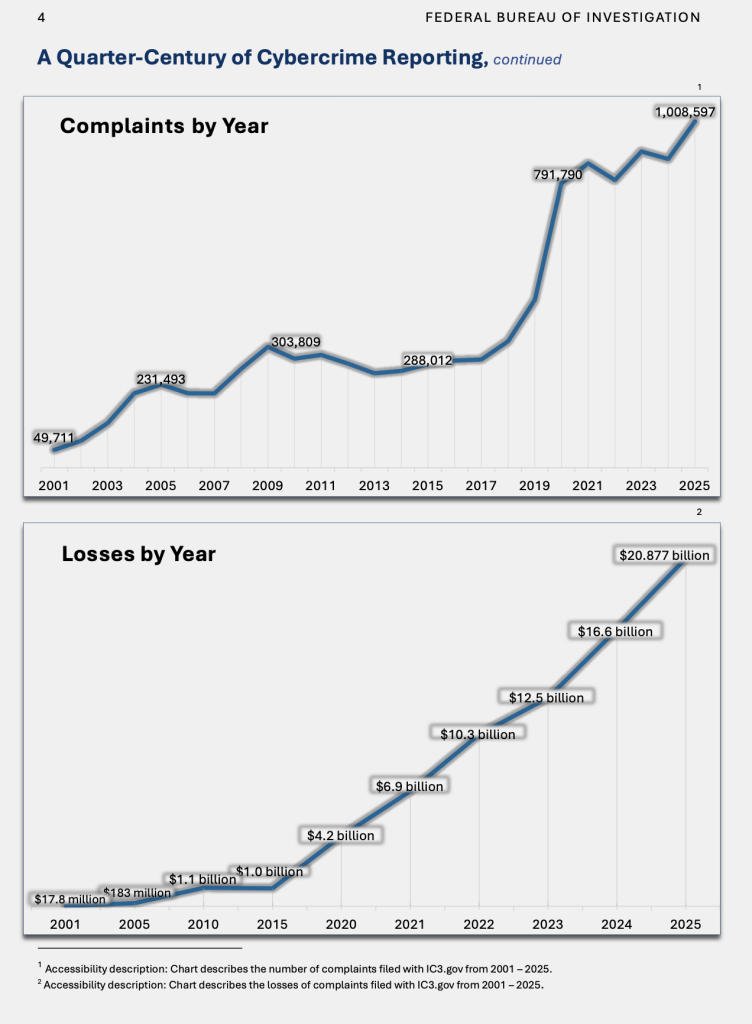
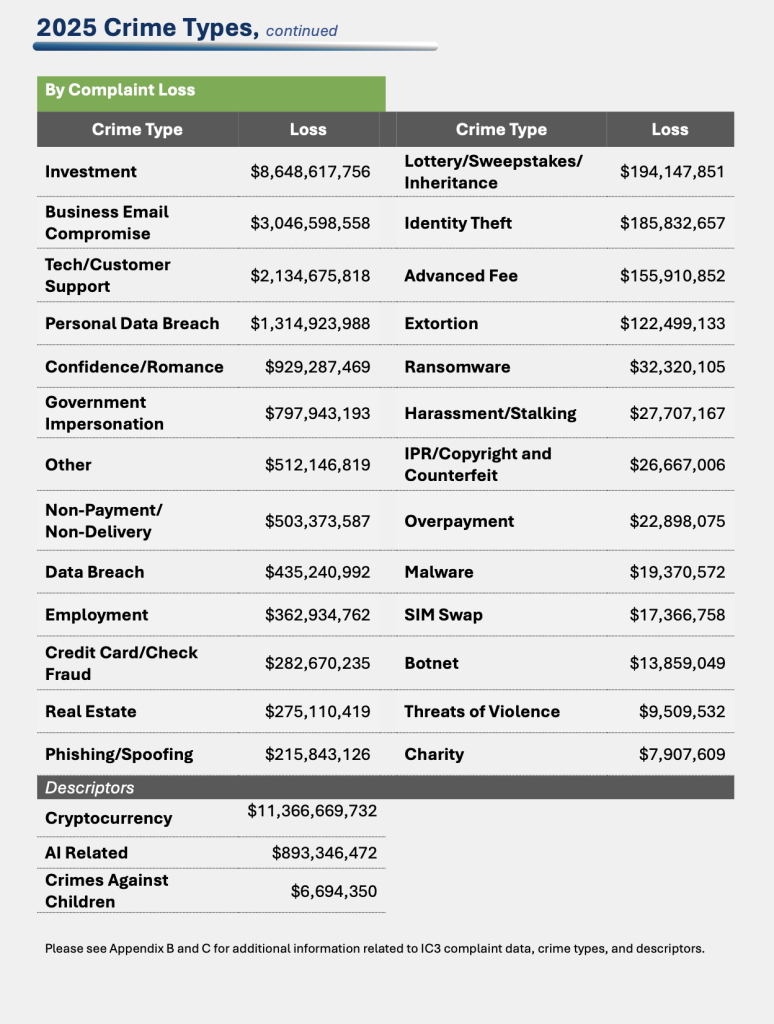
Investment-related fraud topped the charts, with over $8.5 billion lost to investment cybercrime in 2025. And that’s just losses that were reported. Not everyone reports when they were scammed. (Image Courtesy FBI)
This is where layered protection matters. It’s not just about catching one bad link. It’s about recognizing patterns across messages, platforms, and moments when something feels slightly off.
How McAfee Protects You From Scams and Cyber Threats
McAfee+ Advanced gives you multiple layers working together so you are not left figuring it out after the damage is done:
Identity Monitoring alerts you if your personal info shows up where it should not, so you can act fast
Personal Data Cleanup helps remove your information from data broker sites, making you harder to target in the first place
Scam Detector flags suspicious texts, emails, links, and even deepfake videos before you engage
Safe Browsing helps block risky sites if you do click
Available for free to any company that wants to use it, the “completely anonymous” app puts the pressure on porn sites and social media platforms to start blocking access by minors.
An analysis by WIRED and Indicator found nearly 90 schools and 600 students around the world impacted by AI-generated deepfake nude images—and the problem shows no signs of going away.
 Login
Login