Reading view

Are Your World Cup Tickets Legit? 40% of Fans May Risk Unofficial Sellers

Whether you’re planning a once-in-a-lifetime trip or just hoping to catch a match while it’s in your city, the 2026 FIFA World Cup is already driving a surge in ticket searches, travel bookings, and last-minute plans. 

But where there’s high demand and big money, scammers aren’t far behind. 

Let’s break down the new McAfee research, what scams to watch for, and how McAfee’s tools help you stay safe.

New McAfee Research Finds a Gap Between Awareness and Risk 

New research from McAfee shows that while most fans are aware of World Cup-related scams, many are still willing to take risks to secure tickets.  

In fact, 40% say they would consider buying from an unofficial source if they can’t get tickets through the official FIFA site, as many expect tickets to sell out and hope to find affordable resale options. 

That tension is what makes events like the World Cup especially vulnerable for scams. 

With limited ticket availability, rising prices, and the pressure to act quickly, even informed fans can find themselves making decisions they normally wouldn’t, like buying tickets from a reseller on TikTok.  

And scammers are counting on it. 

Survey takeaways: 

  • 76% of fans are interested in getting World Cup tickets 
  • 35% have already started searching online 
  • 43% are willing to spend over $500 on tickets 
  • 66% say they’re aware of World Cup-related scams 
  • 66% say they’re concerned about being scammed 
  • 40% would consider buying tickets from unofficial sources 

The Most Common World Cup Scams to Watch For 

Below is a comprehensive breakdown of the most common scams tied to major global sporting events like the World Cup, including how they work and what to look for. 

McAfee’s Scam Detector,  Safe Browsing tools, VPN, and Password Manager work together to help you spot scams like these as they happen by flagging suspicious messages, blocking risky websites, and helping you make safer decisions before you click, pay, or share information. 

 ⚽ Scam Type    What It Is    How It Works    Red Flags 
Fake Ticket Resale Scam  Fraudulent tickets sold through unofficial sites or individuals  Scammers create fake listings or duplicate real tickets and sell them to multiple buyers  Prices far below or above market, refusal to use official transfer systems, pressure to act fast 
Social Media Ticket Scam  Tickets sold through platforms like Instagram, Facebook, TikTok, or X  Fake or hacked accounts post “last-minute” ticket offers and move conversations to DMs  Urgent language (“only 2 left”), new or suspicious profiles, requests to pay outside the platform 
Duplicate QR Code Scam  One legitimate ticket is resold multiple times  Multiple buyers receive the same QR code, but only the first scan works  Screenshots instead of official transfers, identical tickets sold repeatedly 
Fake Ticket Website Scam  Websites designed to look like official ticket platforms  Victims enter payment info or purchase tickets that don’t exist  Slightly misspelled URLs, unfamiliar domains, lack of official branding verification 
Travel & Accommodation Scam  Fake hotels, rentals, or travel packages  Listings appear legitimate but either don’t exist or are already booked  Prices that seem unusually low, requests for upfront payment, lack of verified reviews 
Booking Impersonation Scam  Fraudsters pose as airlines, hotels, or booking platforms  Victims receive messages about “issues” with bookings and are asked to click links or provide info  Unexpected messages, requests for login or payment details, links that don’t match official sites 
Public Wi-Fi & Phishing Scam  Data theft through unsecured networks while traveling  Scammers intercept data or create fake login portals on public Wi-Fi  Open networks with no password, login pages asking for unnecessary information 
Fake Giveaway Scam  Promotions claiming free tickets or VIP access  Victims are asked to enter personal data, click links, or pay “processing fees”  “You’ve won” messages you didn’t enter, requests for payment to claim prizes 
Betting & Prediction Scam  Fake betting tips or “guaranteed wins” tied to matches  Scammers sell fake predictions or direct users to malicious betting sites  Claims of guaranteed outcomes, requests for upfront payment, unfamiliar platforms 
Merchandise Scam  Counterfeit World Cup gear sold online  Buyers receive low-quality or no product at all  Unverified sellers, poor site quality, deals that seem too good to be true 

How AI is Making These Scams More Convincing

Unfortunately, with the continued improvement of AI, these scams are becoming more convincing. 

AI tools allow scammers to create: 

  • More realistic websites and messages 
  • Personalized outreach that feels legitimate 
  • Fake endorsements, images, or promotions 

That means traditional advice like “look for typos” is no longer enough on its own. 

Today’s scams often look polished, professional, and believable. 

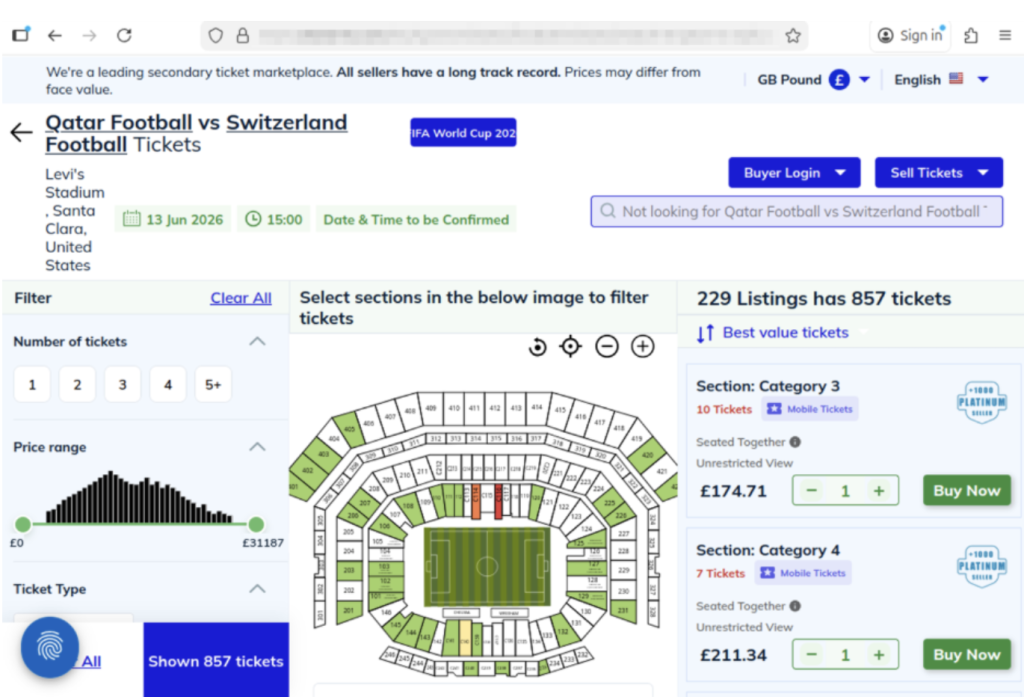
The website shows a scam operation detected by McAfee Labs. It has incredibly realistic seat-selection options and ticket-buying features. But it’s fake.
The website above shows a scam operation detected by McAfee Labs. It has incredibly realistic seat-selection options and ticket-buying features. But it’s fake.
Here you can see just how realistic the website looks. But these tickets are not actually for sale.

What “Official” Actually Means (and Why It Matters) 

For the World Cup, official ticket sales happen through designated FIFA sales phases and platforms. 

Buying outside those channels increases the risk of: 

  • Invalid or duplicate tickets 
  • Inflated pricing without guarantees 
  • No recourse if something goes wrong 

Even if a ticket looks legitimate, it may be: 

  • Sold to multiple buyers 
  • Already voided 
  • Rejected at the gate

When in doubt, go directly to the official FIFA website instead of clicking links from messages or ads. You can also visit their comprehensive FAQ section for all your ticket and event questions. 

How to Stay Safe When Buying Tickets or Traveling 

Here are practical steps fans can take to reduce risk: 

Safety Check  What To Do 
Buy from official sources  Use FIFA’s official ticket platform whenever possible 
Avoid clicking links in messages  Navigate directly to official websites instead. McAfee’s Safe Browing tools help prevent you from opening malicious links. 
Be cautious with resale offers  Verify platforms and avoid direct peer-to-peer payments 
Check QR codes before you scan them  You can check for QR code scams on-demand with Scam Detector 
Don’t pay with untraceable methods  Avoid wire transfers, gift cards, or crypto-only payments 
Double-check URLs  Look for misspellings or unusual domains 
Use secure connections  Avoid making purchases on public Wi-Fi, or use a VPN like McAfee’s. 
Protect your accounts  Use strong passwords and enable two-factor authentication. Consider a password manager like McAfee’s.  
Verify before you buy  If something feels off, pause and check before sending money 

What to Do If You Think You’ve Been Scammed 

If you think you may have purchased a fraudulent ticket, clicked a suspicious link, or shared information with a scammer, acting quickly can help limit the impact. 

Immediate steps to take 

Stop communication immediately
Do not send additional money or information, even if the sender claims you need to “complete” a transaction. It’s also a good idea to take screenshots of messages in case the scammer disappears. 

Contact your bank or payment provider
Report the transaction as soon as possible. Many institutions can help reverse charges or flag fraudulent activity if caught early. 

Secure your accounts
Change passwords for any accounts that may be affected, especially email, banking, and ticketing platforms. Our password manager and free password generator help create unique passwords every time.  

Enable two-factor authentication (2FA)
Adding an extra layer of security can help prevent unauthorized access, even if your password was exposed. 

Scan your device for threats
If you clicked a suspicious link or downloaded a file, run a security scan to check for malware or malicious software. Check out our free security scan. 

Monitor for unusual activity
Keep an eye on financial accounts, email logins, and any services tied to your personal information. Our free WebAdvisor helps protect you from malware and phishing attempts while you surf. 
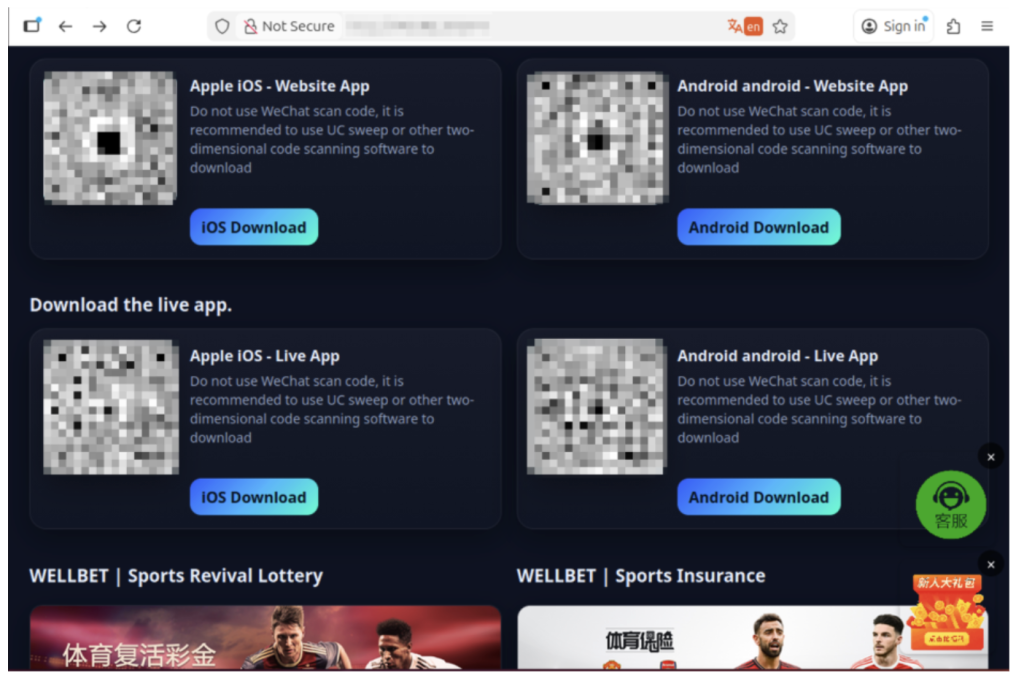
The image above shows malicious apps masquerading as sports betting sites or promising unique World Cup coverage. But when users download, their devices are infected.

How McAfee Helps You Spot Scams in the Moment 

McAfee offers more than traditional antivirus, combining multiple layers of digital protection in one app to help you stay safer while searching, clicking, and buying online. 

Scam Detector helps flag suspicious texts, emails, and videos automatically, so you can spot a scam before it hits you and your wallet 

Safe Browsing tools help block risky websites, alert you to phishing attempts, and guide you away from malicious links 

VPN helps keep your connection private on public Wi-Fi, protecting your personal and payment information 

Password Manager helps create and store strong, unique passwords to reduce the risk of account takeover 

Identity Monitoring and Alerts notify you if your personal information appears where it shouldn’t, so you can quickly take steps to fix it 

Personal info removal helps find and remove your personal info from data broker sites and close out old forgotten accounts 

Device and Account Security helps protect the devices and accounts you use every day 

Final Thoughts 

The World Cup isn’t just another event, it’s a moment when millions of people are making fast decisions involving real money, travel plans, and personal information. 

What McAfee’s research makes clear is that the biggest risk isn’t a lack of awareness. Most fans already know scams exist. The risk is what happens next. 

When tickets are scarce, prices are high, and the pressure to act is real, even informed consumers may take chances they normally wouldn’t. That’s where scammers succeed: not by tricking people who aren’t paying attention, but by catching people in moments of urgency. 

As demand continues to build toward the tournament, more fans will be searching, comparing, and purchasing online.  

The takeaway is simple: Staying safe isn’t just about knowing scams exist. It’s about slowing down, verifying before you buy, and using tools that help you make informed decisions in the moment. 

*McAfee is not affiliated with or endorsed by FIFA. 

The post Are Your World Cup Tickets Legit? 40% of Fans May Risk Unofficial Sellers appeared first on McAfee Blog.

  •  

Trevor Lawrence’s Viral “Haircut” is a Lesson in Deepfakes: This Week in Scams

Trevor Lawrence didn’t actually cut his hair. 

But millions of people thought he did. 

The Jacksonville Jaguars recently released a viral schedule announcement video that appeared to show their star quarterback chopping off his signature long blond hair. The clip spread quickly online, pulling in nearly 4 million views on X and triggering reactions from fans, friends, and even Lawrence’s grandmother. 

The catch? It wasn’t real. 

The team later confirmed the moment was partially staged, partially AI-generated and part of the joke. Even Lawrence admitted the fake looked convincing. 

And that’s exactly the problem. 

What started as a harmless sports prank is also a reminder of how realistic AI-generated videos have become and how easily scammers can use the same technology to fool people online. 

Why Deepfake Scams Are Growing Fast 

Deepfake scams use artificial intelligence to clone someone’s face, voice, or likeness to create fake videos, ads, phone calls, or social media posts that appear real. 

And increasingly, scammers are using celebrities, influencers, athletes, and trusted public figures to do it. 

According to McAfee research: 

  • 72% of Americans say they’ve seen fake celebrity or influencer endorsements online 
  • 39% say they’ve clicked on one 
  • 1 in 10 victims lost money or personal data 
  • Average losses reached $525 per person 

Why does it work? Because scammers know familiarity lowers our guard. 

When people see a recognizable face, whether it’s Trevor Lawrence, Taylor Swift, Tom Hanks, or a favorite influencer, they’re more likely to trust what they’re seeing before stopping to question it. 

From Funny Sports Videos to Real Financial Scams 

The Jaguars video was meant as entertainment. 

But scammers are already using the same technology for fraud. 

McAfee researchers recently identified a growing wave of celebrity deepfake scams involving fake giveaways, investment schemes, romance scams, and fraudulent ads. 

Some recent examples include: 

  • Fake videos of TV personalities promoting “miracle” products 
  • AI-generated celebrity investment ads pushing crypto scams 
  • Romance scammers using deepfake video calls to impersonate celebrities 
  • Fake emergency videos designed to create panic and urgency 

In one high-profile case, a woman reportedly lost nearly $900,000 to scammers impersonating Brad Pitt using AI-generated images and messages. 

The technology is getting good enough that “seeing is believing” no longer applies online. 

How to Spot a Deepfake Scam 

Here are some of the biggest red flags to watch for: 

Red Flag  What to Watch For 
Emotional urgency  “Act now,” “limited time,” or panic-driven messaging 
Too-good-to-be-true offers  Free giveaways, investment promises, miracle products 
Slightly unnatural video details  Off-sync lips, robotic speech, strange blinking, awkward lighting 
Fake verified-looking accounts  Usernames with extra characters or copied profile photos 
Requests for money or personal data  Especially through DMs, crypto links, gift cards, or wire transfers 

How McAfee Helps Protect You 

AI scams are evolving fast, but layered protection can help you stay ahead of them. 

McAfee’s Scam Detector, included in all core McAfee plans, can help identify suspicious links, messages, videos, and deepfake-related scams across texts, email, and social platforms before you click. 

Additional protections like Web Protection and Identity Monitoring can also help reduce your risk if scammers attempt to steal your credentials or personal information. 

Other Scam News This Week 

Charter Confirms Data Breach 

Charter Communications confirmed a data breach tied to a third-party vendor, exposing customer information. Whenever breaches like this happen, scammers often follow up with phishing emails and fake customer support calls pretending to help affected users. 

7-Eleven Data Breach Reports Surface 

Reports surrounding a potential 7-Eleven data breach are circulating online. Consumers should stay alert for fake password reset emails, loyalty account phishing attempts, and scam texts impersonating retailers. 

‘Tom Selleck’ Celebrity Scam Highlights Rise of AI Impersonation Fraud 

A tragic case tied to an alleged Tom Selleck impersonation scam is drawing attention to the growing threat of celebrity AI fraud. Experts warn that scammers are increasingly using fake celebrity profiles, AI-generated messages, cloned voices, and deepfake videos to build trust with victims online, especially older adults.  

The case underscores how emotionally manipulative and financially devastating these scams can become. 

Hackers Are Exploiting AI Chatbot “Personalities” 

Researchers told The Verge that attackers are beginning to manipulate chatbot behavior and personalities to trick users into unsafe actions, highlighting growing concerns around AI trust and social engineering. 

Fake Inheritance Email Scams Are Getting More Convincing 

A phishing scam making headlines this week uses fake inheritance notices and “unclaimed estate” emails to pressure victims into sharing personal information. 

Unlike older scam emails full of spelling mistakes, newer versions look polished and professional, often using legal-sounding language, fake reference numbers, and urgent 48-hour deadlines designed to trigger panic before people stop to verify the message. 

McAfee Safety Tips This Week 

The next deepfake won’t always look fake. That’s what makes these scams dangerous. 

Here are some practical, go-to tips  

  • Pause before clicking celebrity endorsements or viral videos 
  • Verify accounts through official sources before trusting promotions 
  • Never send money or personal data based on social media messages alone 
  • Be skeptical of urgency, especially “limited time” threats 
  • Use AI-powered scam protection tools to help identify suspicious content before you engage 

And we’ll be back next week with more.

The post Trevor Lawrence’s Viral “Haircut” is a Lesson in Deepfakes: This Week in Scams appeared first on McAfee Blog.

  •  

Do Windows PCs and Macs Need Antivirus Software? How McAfee Goes Beyond Built-In Security

Couple looking at computers

Your Windows PC or Mac already includes built-in security features, and that’s a good thing. These tools provide an important first layer of protection against malware and other common threats users encounter every day. 

But today, staying safe online is about much more than blocking viruses.  

Scam texts arrive daily. Phishing emails imitate trusted brands. Fake websites are designed to steal passwords and payment information. Personal details can appear on data broker sites. AI Deepfakes are more convincing than ever. And most households use multiple devices, from laptops and phones to tablets and Chromebooks. 

That’s why McAfee+ Advanced combines device security with scam protection, identity monitoring, personal info removal, web protection, and secure VPN to help protect the many parts of your digital life. 

Let’s break down what built-in security does, and what McAfee does differently: 

What Built-In Security Does Well 

Both Windows 11 and macOS include a range of built-in security features designed to help protect your device. Depending on your operating system and the apps you use, these may include: 

  • Malware detection and removal  
  • Firewalls  
  • Browser warnings about suspicious websites  
  • Password management tools  
  • Privacy and app permission controls  

Together, these features provide an important first layer of protection and help many users stay safer online.  

Why Many People Want More Than Basic Device Protection 

Built-in security tools are primarily focused on protecting the device itself. However, today’s online threats often target something even more valuable: your identity, your money, and your personal information. 

Recent McAfee research found that Americans receive an average of 14 scam messages every day, and more than three in four have encountered an online scam. 

Threats now commonly include: 

  • Scam texts pretending to be banks, toll agencies, and delivery companies  
  • Fake job offers via text, email, or social media 
  • Phishing emails  
  • QR code scams  
  • AI-generated voice and video impersonations  
  • Identity theft via smishing and quishing, including hijacking entire social profiles 
  • Exposure of personal information on data broker sites  

These risks can follow you across all your devices, not just the computer sitting on your desk. 

Built-In Security vs. McAfee Protection 

Here are the key differences between built-in security alone, vs additional protection like McAfee.  

Built-In Security Has  McAfee+ Advanced Adds 
Detecting viruses and malware  Scam protection for suspicious texts, emails, links, QR codes, and deepfakes 
Basic privacy controls  Secure VPN to protect your connection on public Wi-Fi 
Saving passwords  Password manager with unique password generation and storage. 
Warning about some risky websites  Web Protection to help block dangerous sites before they load 
Security on one device  Antivirus coverage across your PCs, Macs, phones, and tablets 
Doesn’t have this support  Identity monitoring, so you know when your SSN and other info is exposed. Plus personal info removal, so your old data isn’t left spread out across the web. 

Why McAfee Stands Out: Speed and Comprehensive Protection 

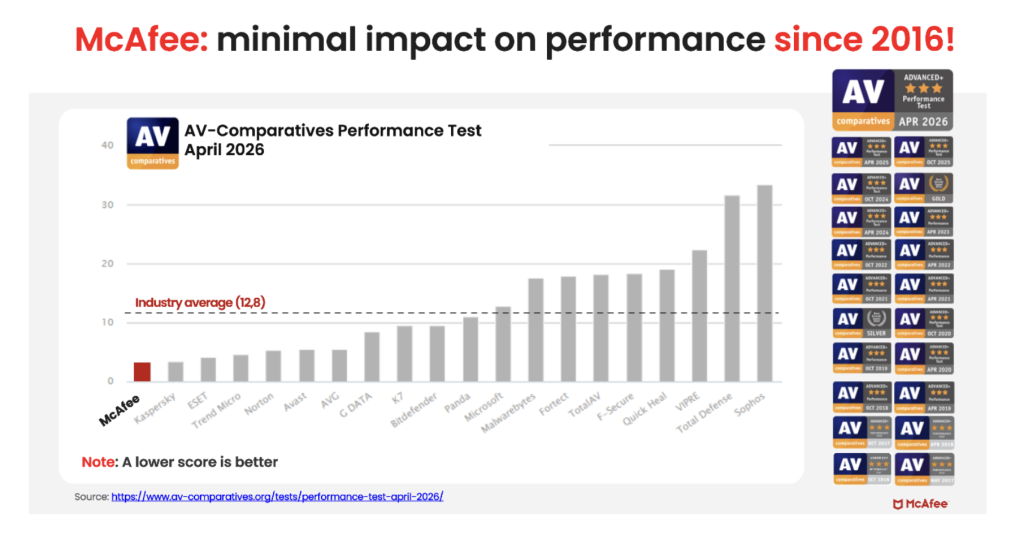
Unlike the old stereotype that stronger protection means a slower computer, independent testing shows McAfee is also the lightest on performance.  

In the latest AV-Comparatives PC Performance Test, McAfee Total Protection posted the lowest system impact score of all 20 products tested: just 3.3, compared with the industry average of 12.8.  

It also earned the highest possible rating, ADVANCED+. That means McAfee is not just adding more layers of protection. It is doing so while staying out of your way. 

For consumers looking for security that goes beyond basic antivirus to help protect against scams, identity theft, privacy risks, and threats across all their devices, that combination is hard to ignore. 

Protection Across All Your Devices 

Most people no longer rely on a single computer. A typical household may use: 

  • Windows PCs  
  • Macs  
  • iPhones  
  • Android phones  
  • Tablets  
  • Chromebooks

Managing security separately on every device can be difficult. McAfee+ Advanced is designed to provide coverage across your devices under one subscription, helping simplify online protection for individuals and families. 

How McAfee+ Advanced Goes Beyond Built-In Security 

With McAfee+ Advanced, multiple layers work together before any damage is done:  

  • Scam Detector flags suspicious texts, emails, links, QR codes, and even deepfake videos before you engage 
  • Secure VPN keeps your data private, especially on public Wi-Fi  
  • Web Protection helps block risky sites, even if you do accidentally click  helps block risky sites, even if you do accidentally click   
  • Password Manager doesn’t just help you make unique, strong passwords, it keeps them stored and organized for you
  • Device Security helps detect malicious apps or downloads   
  • Identity Monitoring alerts you if your personal info shows up where it should not, so you can act fast   
  • Personal Data Cleanup helps remove your information from sites selling it. 
  • Online Account Cleanup assists in taking down your old, forgotten accounts across the web 
  • Social Privacy Manager helps you monitor and change privacy settings across your social platforms in just a few clicks 

Together, these protections are designed to address the broader range of online risks people face every day. 

So, Do Windows PCs and Macs Need Antivirus Software? 

Built-in security tools provide an important starting point, but with scam attempts becoming more convincing and personal information more widely exposed, many people need a more comprehensive approach to staying safe online. 

McAfee+ Advanced combines device security, scam protection, identity monitoring, privacy tools, and VPN coverage to help you browse, bank, shop, and connect with greater confidence. 

The post Do Windows PCs and Macs Need Antivirus Software? How McAfee Goes Beyond Built-In Security appeared first on McAfee Blog.

  •  

How Scammers Used Deepfake Video to Dupe a Company Out of Millions

It’s the video call that cost $25 million.

According to reports from Hong Kong police in February, a finance worker at a multinational company joined a video conference call with the company’s chief financial officer. On the call, the CFO directed the finance worker to transfer more than $25 million in funds to several bank accounts.

The finance worker reportedly had reservations about the request, thinking that the CFO looked “a little off.” The finance worker then reportedly turned to the other participants on the call for confirmation. They all agreed to the request. With that, the transfers went through. More than $25 million in funds were moved out of the company. Right into the hands of fraudsters.

As it turns out, the CFO on the worker’s call was a video deepfake. Along with everyone else.

Hong Kong’s public broadcaster, RTHK, quoted senior police superintendent Baron Chan as saying that AI deepfake technology was used to dupe the worker.

“[The fraudster] invited the informant [worker] to a video conference that would have many participants. Because the people in the video conference looked like the real people, the informant … made 15 transactions as instructed to five local bank accounts, which came to a total of HK$200 million,” he said.

Fraudsters now use AI deepfakes to pull off corporate scams

Businesses now face an altogether new security threat: video deepfakes. In real time, scammers can pose as company officers, vendors, partners, and so on. Put plainly, we live in a time where the person on the other end of that video call might be a fake.

Scammers face several challenges before they can pull off a deepfake attack. The primary challenge they have is obtaining source material. To create a deepfake, they need images, video, and audio of the person they want to impersonate. Consider, though, that some company officials have relatively high profiles. They speak at conferences, hold webinars, and participate in earnings calls. Throw in a few photos and videos lifted from the target’s social media accounts, and scammers have the source material they need to create a deepfake.

The next challenge … scammers need a good story, one with emotional levers they can pull and coerce a victim to act. In the case of the Hong Kong scam, the deepfakes plied their victim with a mix of urgency and authority. The “CTO” wanted to move money and move that money immediately. With the other deepfakes on the call concurring with the CTO, the victim did as asked. In all, it was a classic case of a hand-picked victim subjected to a classic execution of social engineering.

Understandably, this story drew major coverage given the use of deepfakes and the haul they brought in. Moreover, the fact that the fraudsters orchestrated not just one but a host of deepfakes makes it that much more newsworthy. In light of this, companies and their employees have a new threat to look out for. And, better yet, prepare themselves for deepfakes.

Preventing corporate AI deepfake scams

While AI deepfakes hopping onto video conference calls certainly marks new territory in security, several long-standing measures for preventing corporate fraud remain the same. Additionally, some new preventive measures are called for.

Look for the signs of AI deepfakes

Earlier, we mentioned how the victim in the Hong Kong attack mentioned that the CFO looked “a little off” on the video call. AI deepfakes, while convincing, sometimes have the tell-tale markers of a fake.

However, that’s changing. Quickly. As the tools for creating deepfakes continually improve, deepfakes become increasingly difficult to spot.

Earlier generations of deepfake tools had difficulty tracking excessive head movement, like when the deepfake turned for a profile shot. Further, earlier tools required users to keep their hands off their faces. Placing a hand on the chin or over the mouth would break up the face of the deepfake. Another marker of earlier deepfake tools can be found in the eyes. They often had a glassy look, like they weren’t catching the light right. The same went for skin tones and lighting.

So yes, a deepfake might look “a little off.” Consider that a huge red flag. Yet don’t entirely count on this method of detection. As AI deepfake tools evolve, they’re able to remove such blemishes from the video.

Confirm, confirm, and confirm

Any time that sensitive info or sums of money are involved, get confirmation of the request. Place a phone call to the person after receiving the request to ensure it’s indeed legitimate. Better yet, meet the individual in person if possible. In all, contact them outside the email, message, or call that initially made the request to ensure you’re not dealing with an imposter.

In the wake of targeted attacks on key stakeholders, some organizations have restructured how they handle requests for data, funds, and other sensitive information. They require two or three people to fulfill such a request. This makes it tougher for scammers to run their cons. For starters, they have the burden of targeting two or more people. Then they face the further burden of convincing them all. This oversight gives companies a chance to fully validate requests, and potentially catch “urgent” bogus requests from scammers.

Fraudsters do their research — keep your guard up

Fraudsters select their victims carefully in these targeted attacks. They hunt down employees with access to info and funds, and then do their research on them. Using public records, data broker sites, “people finder” sites, and info from social media, fraudsters collect intel on their marks. Armed with that, they can pepper their conversations with references that sound more informed, more personal, and thus more convincing. Just because what’s being said feels or sounds somewhat familiar doesn’t always mean it’s coming from a trustworthy source.

Clean up your online presence

With that, employees can reduce the amount of personal info others can find online. Features likeMcAfee Personal Data Cleanup can help remove personal info from some of the riskiest data broker sites out there. I also keep tabs on those sites if more personal info appears on them later. Additionally, employees can set their social media profiles to private by limiting access to “friends and family only,” which denies fraudsters another avenue of info gathering. Using our Social Privacy Manager can make that even easier. With just a few clicks, it can adjust more than 100 privacy settings across their social media accounts, making them more private.

Defense against AI deepfake attacks

Moving forward, we can expect to see more of these corporate AI deepfake attacks. On all manner of scales. The availability and power of AI tools make it likely. However, as with many forms of targeted attacks, there’s something both fishy and uncanny about them. As we’ve seen, the employee targeted in the Hong Kong attack held suspicions … something was wrong about that call. Yet, who would expect a video conference call full of AI deepfakes? With this attack, companies should consider that such calls fall within the realm of possibility today.

As AI detection technologies evolve, companies will have additional tools to prevent these attacks. Yet the human factor remains an essential element of defense. These are scams, pure and simple. And scams have signs. Fraudsters use all kinds of social engineering tricks to get their victims to act. They’ll impose themselves as authority figures. They’ll add elements of urgency to their requests. And they’ll use people’s personal info in ways to make themselves appear familiar and trustworthy.

This is where we stand today: a basic understanding of AI deepfake technology, what it’s capable of, and the tricks that fraudsters can play with it can bolster a company’s defense against AI deepfake attacks. Indeed, they’re within the realm of possibility today. And a prepared workforce can help stop them in their tracks before they can do any harm.

The post How Scammers Used Deepfake Video to Dupe a Company Out of Millions appeared first on McAfee Blog.

  •  

How Romance Scammers are Using Deepfakes to Swindle Victims

Romance scammers now use face-swapping tech in video chats, all to swindle love-seekers online.

It’s finally come to pass. We indeed live in a time where that person on the other end of a video call might be an absolute imposter. The way they look and the way they sound, all a lie.

A recent article in WIRED shows just how this new form of romance scam works. With a laptop or a couple of smartphones, the cons transform their looks and voices entirely with stock-and-trade AI tools. In real time, they become someone else entirely, with AI mirroring every expression they make as they chat on a video call. It all appears quite real.

Yet a deepfake it is.

Deep feelings and deepfakes fire up AI romance scams

Chilling as this striking new form of attack sounds, you can protect yourself. In fact, many of the same tried-and-true means of avoiding a romance scam still apply.

Even when scammers use real-time deepfakes, the heart of these romance scams remains the same. It plays out like a script. And when you know the script, you can spot the scammer following it.

Romance scams play out a bit like this …

The scammer contacts a love-seeker online, often through direct messages on social media or via text or messaging apps. Sometimes the message is targeted and personalized. In other cases, the scammer might start things off with a simple “hi.” Either way, the scammer aims to kick off a conversation. A long one in which the scammer builds trust with a victim over time.

Days, weeks, and even months pass as the scammer woos their victim. Patiently, they wait for the right moment to pounce by finally asking the victim for money. Maybe it’s gift cards. Maybe it’s prepaid debit cards. A wire transfer, perhaps. Almost always, it’s a form of payment that’s tricky, if not impossible, to recover after victims realize they’ve been scammed. Scammers have even asked for cryptocurrency in some cases.

The reasons for requesting money vary. The scammer might say it’s for a plane ticket to come visit or simply a few bucks to help them in a pinch. Other scammers heap on yet more elaborate lies. Some pose as members of the military stationed in a remote overseas location. They’ll say they want some extra money for a video game console or other creature comfort. Some scammers brazenly claim they’re a doctor working in a remote village and need money for medicine. The list goes on.

As outlandish as the stories and requests might be, victims fall for them. After all, the scammer has been fawning over the victim for some time by that point. The victim truly feels like they’re truly in love with someone who truly loves them. They’ll do anything for their love interest, who turns out to be a scammer and, one day, disappears entirely.

That’s how a romance scam plays out. And it happens often enough. According to the Federal Bureau of Investigation’s 2023 Internet Crime Report, losses to reported cases of romance scams topped more than $650 million.

How not to fall deeply for a deepfake online

Scammers have ready access to deepfake tools, ones that make them look and sound convincingly real. Moreover, these deepfake tools continually improve. With each generation of deepfakes, they become increasingly difficult to detect.

As a result, we can’t take things at face value. Everything we see and hear online requires scrutiny. And scrutiny is what it takes to protect yourself from deepfake romance scams.

Watch the person’s movements on the call

Less sophisticated deepfake tools struggle to track body movement. As such, scammers do their best to hold their heads steady and avoid turning around. Otherwise, that kind of movement ruins the deepfake effect. It’s quite obvious when it happens. With that, see if you can get a suspected deepfake to move around, stand up, turn for a sideways profile, or place their hands on their face. Lesser deepfakes will reveal themselves when they do.

Talk with trusted friends or family members

Beyond keeping a sharp eye out for glitches, you have another detection tool at your disposal — friends and family. When a new relationship starts heating up, share the news with some trusted people in your life. Talk about your interactions with the person, even share a message they’ve sent or two. Victims often miss or overlook inconsistencies in a romance scammer’s stories, particularly as the supposed relationships develop.

Friends and family can help you spot those inconsistencies. They can also point out when parts of the relationship start to sound sketchy. Given the way that scammers pull all kinds of strings on their victims, this can help clear up any clouded judgment.

When a stranger you’ve only met online brings up money, consider it a scam

Money talk is an immediate sign of a scam. The moment a person you’ve never met in person asks for money, put an end to the conversation. Whether they ask for bank transfers, cryptocurrency, money orders, or gift cards, say no.

End the conversation

You might say no, and the scammer might back off — only to bring up the topic of money again later. This is a signal to end the conversation. That persistence is a sure sign of a scam. Recognize that ending an online relationship might be far easier said than done, as the saying goes. Scammers worm their way into the lives of their victims. A budding friendship or romance might be at stake, at least that’s what a scammer wants you to think. They deal in emotional blackmail to get what they want. Tough as it is, end the relationship.

How to make it tougher for a romance scammer to target you

Scammers have to track you down in some way or other. And they have plenty of online resources to do it. Some romance scammers take an extra step. They profile their potential victims before contacting them. With the info they’ve gathered online, they can fine-tune their approach.

For example, we’ve seen cases where scammers target widowers with bogus profile pics that share similarities with the widower’s deceased spouse.

While you can’t keep a scammer from reaching out to you, you can make it tougher for them to find you and use your own info against you.

Make your social media more private

Our new McAfee Social Privacy Manager personalizes your privacy based on your preferences. It does the heavy lifting by adjusting more than 100 privacy settings across your social media accounts in only a few clicks. This makes sure that your personal info is only visible to the people you want to share it with. It also keeps it out of search engines, where the public can see it. Including scammers.

Watch what you post on public forums

As with social media, scammers harvest info from online forums dedicated to sports, hobbies, interests, and the like. If possible, use a screen name on these sites so that your profile doesn’t immediately identify you. Likewise, keep your personal details to yourself. When posted on a public forum, it becomes a matter of public record. Anyone, including scammers, can find it.

Remove your info from data brokers that sell it

McAfee Personal Data Cleanup helps you remove your personal info from many of the riskiest data broker sites out there. That includes your contact info. Running it regularly can keep your name and info off these sites, even as data brokers collect and post new info. Depending on your plan, it can send requests to remove your data automatically.

The post How Romance Scammers are Using Deepfakes to Swindle Victims appeared first on McAfee Blog.
  •  

Netherlands Seizes 800 Servers, Arrests 2 for Aiding Cyberattacks

Authorities in the Netherlands have arrested the co-owners of two related Internet hosting companies for operating IT infrastructure used by Russia to carry out cyberattacks, influence operations and disinformation campaigns inside the European Union. The two men were the focus of a 2025 KrebsOnSecurity story about how their hosting companies had assumed control over the technical infrastructure of Stark Industries Solutions, an Internet service provider sanctioned last year by the EU as a frequent staging ground for cyber mischief from Russia’s intelligence agencies.

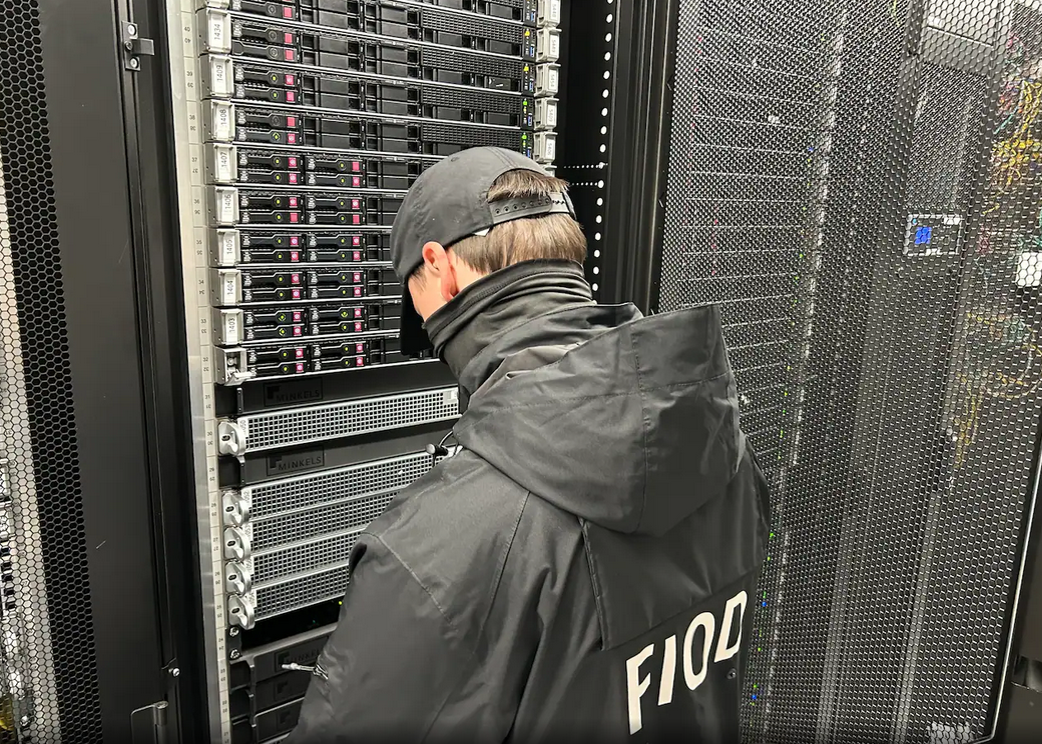
An investigator with the Tax Intelligence and Investigation Service (FIOD), the Dutch financial crimes agency, during the raid. Image: FIOD.

The Dutch daily news outlet de Volkskrant reports that the Dutch financial crime agency FIOD on May 18 arrested a 57-year-old from Amsterdam and a 39-year-old from The Hague, charging them with violating sanctions law by directly or indirectly making economic resources available to EU-sanctioned entities.

The Dutch investigation focuses on Stark Industries, a sprawling hosting provider that materialized just two weeks before Russia invaded Ukraine. As detailed in this May 2024 deep-dive, Stark quickly became the source of massive distributed denial-of-service (DDoS) attacks against European targets, and emerged as a top supplier of proxy and anonymity services that showed up time and again in cyberattacks linked to Russia-backed hacking groups.

That report identified two Moldovan brothers — Ivan and Yuri Neculiti and their company PQHosting — who were providing one of Stark’s two main conduits to the larger Internet. In May 2025, the EU sanctioned PQHosting and the Neculiti brothers for aiding Russia’s hybrid warfare efforts. But as KrebsOnSecurity observed in September 2025, those sanctions failed to target Stark’s remaining connection to the Internet — an Internet service provider based in the Netherlands called MIRhosting.

MIRhosting is operated by Andrey Nesterenko, a 39-year-old Russian native who runs the business out of the Netherlands.  News that PQHosting and the Neculiti brothers were about to be sanctioned by the EU leaked in the media nearly two weeks before the sanctions were announced last year. During that time, the Stark network assets were transferred from PQHosting to a new entity called the[.]hosting, under the control of the Dutch entity WorkTitans BV.

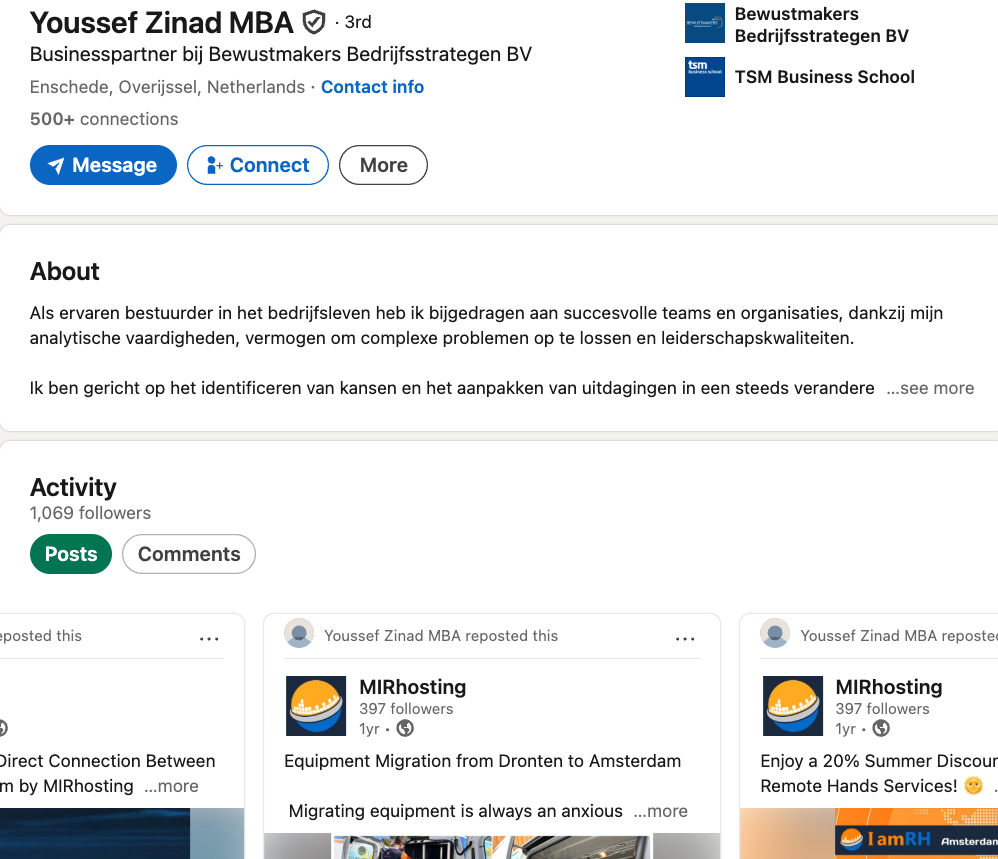
And as our September 2025 report showed, WorkTitans was controlled by Nesterenko and a 57-year-old from Amsterdam named Youssef Zinad. On top of that, WorkTitans was getting connectivity to the larger Internet solely through MIRhosting, where Zinad had worked previously.

On May 18, Dutch financial crime investigators arrested Nesterenko and Zinad, and searched three businesses in Enschede and Almere and two data centers in Dronten and Schiphol-Rijk. A statement from the Dutch authorities said they also seized laptops, telephones and more than 800 servers.

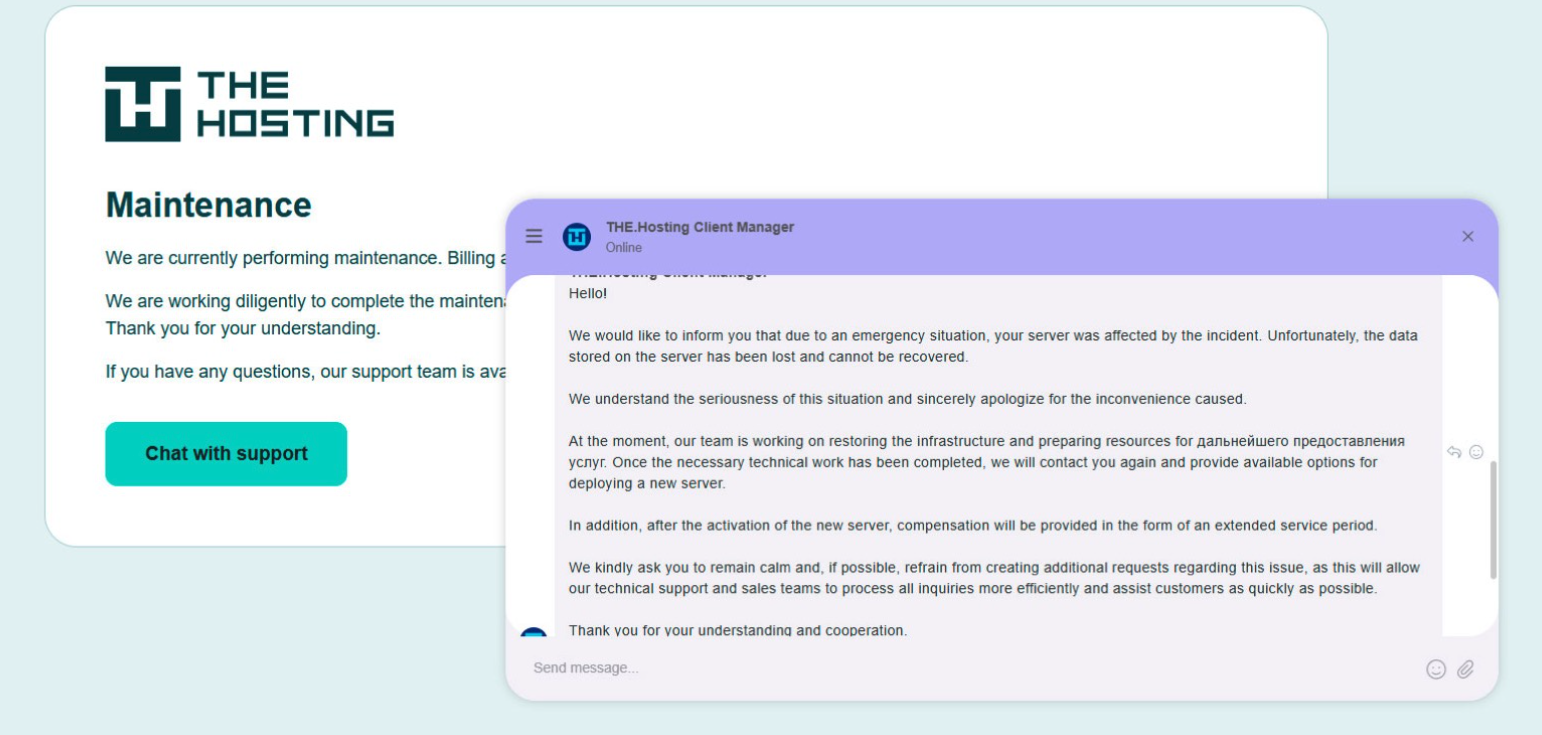
A message to the-hosting customers immediately after 800 of its servers were seized by Dutch authorities. The message says that unfortunately data stored on the server has been lost and cannot be recovered.

De Volkskrant said it reviewed data showing WorkTitans and MIRhosting were the most-used networks in pro-Russian attacks on Danish government bodies between November 13 and 19, 2025, the week of Denmark’s municipal elections.

The publication wrote that prior to Nesterenko’s arrest, the MIRhosting founder denied that he knew his servers had been misused by pro-Russian cybercriminals. “He said he had ended all services with the Neculiti brothers when the EU sanctions came into force in May 2025,” and the he “reserved all rights to take action against ‘harmful and incorrect publications,” de Volkskrant wrote.

MIRhosting released a statement saying it has initiated an internal investigation into the alleged facts concerning the elections in Denmark, and that it has temporarily paused services to WorkTitans as a precautionary measure while the matter is being reviewed further.

“Based on our preliminary findings, there are no indications that the services over which we exercise control were actually used to influence the Danish elections,” the statement reads. “No anomalies or spikes were observed in our network traffic during the period mentioned in the publication; had large-scale DDoS attacks occurred, such activity would have been evident. Furthermore, prior to the media publication, we had not received any complaints, abuse reports, or official requests regarding suspicious activities or misuse of our network. Meanwhile, our regular operational activities continue, and our service to our other clients remains fully intact.”

Born in Nizhny Novgorod, Russia, Mr. Nesterenko grew up as a piano prodigy who performed publicly at a young age. In 2004, Nesterenko founded MIRhosting’s parent Innovation IT Solutions Corp., which has the notable distinction of being the company responsible for hosting stopgeorgia[.]ru, a hacktivist website for organizing cyberattacks against Georgia that appeared at the same time Russian forces invaded the former Soviet nation in 2008. That conflict was thought to be the first war ever fought in which a notable cyberattack and an actual military engagement happened simultaneously.

Responding to questions shared via email, Nesterenko said MIRhosting does not support cybercrime, sanctions evasion, or illegal activity, and that the allegations and arrest by Dutch authorities have been extremely harmful to him and his company.

“The transition to the.hosting was not intended to evade sanctions,” Nesterenko wrote. “The hardware and customer portfolio had already been transferred to WorkTitans before the sanctions appeared. Closing or damaging a legitimate Dutch infrastructure company will not stop cybercrime, but it will harm many people who have done nothing wrong.”

Far less is public about the 57-year-old Zinad, who reportedly has been keeping a low profile since our story last year. De Volkskrant reported that Zinad blocked access to his LinkedIn account, had gone months without responding to emails, WhatsApp messages and phone calls, and told a colleague that illness was forcing him to lead a somewhat more reclusive life.

Mr. Zinad’s now-defunct LinkedIn profile. It was full of posts for MIRhosting’s services.

Mr. Nesterenko claims Zinad was never an employee of MIRhosting.

“He helped me and MIRhosting with certain business tasks under a normal business-to-business arrangement between companies,” Nesterenko explained.

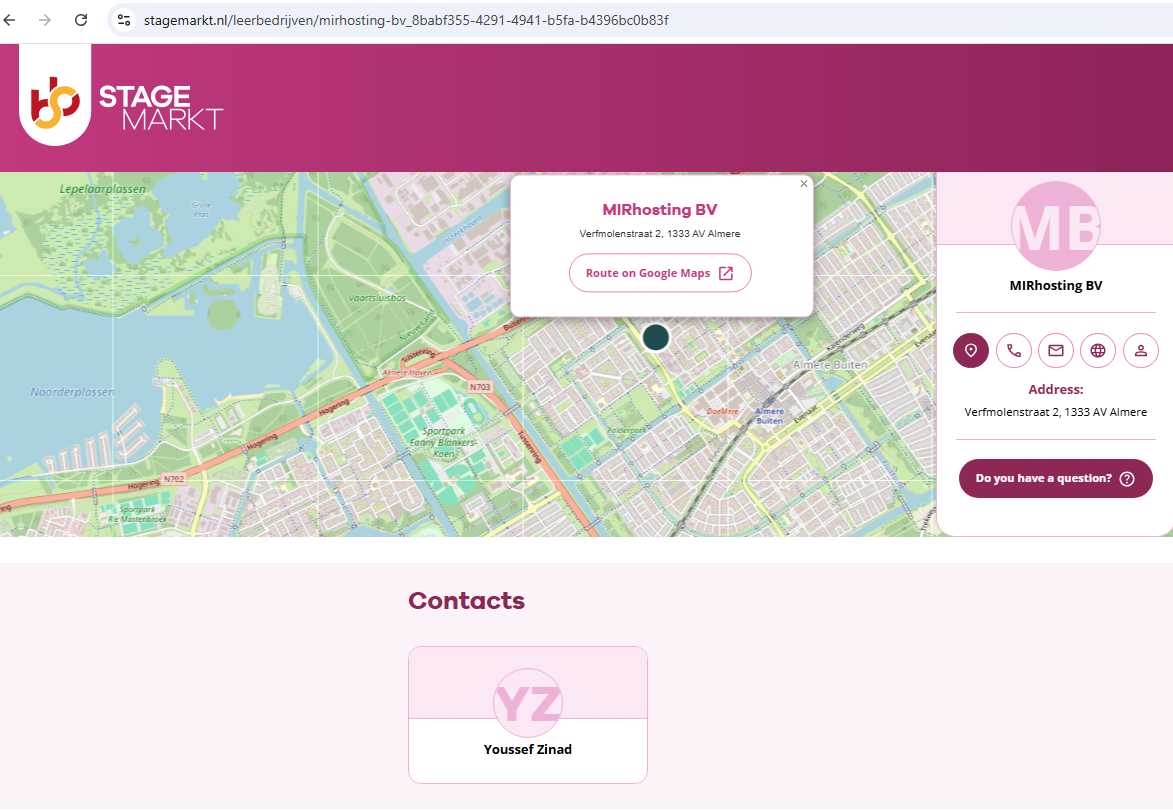
However, in previous emails to KrebsOnSecurity, Nesterenko carbon copied Mr. Zinad (who had a @mirhosting.com email), explaining that he was part of the company’s legal team. Also, the Dutch website stagemarkt[.]nl lists Youssef Zinad as an official contact for MIRhosting’s offices in Almere.

Mr. Zinad has never responded to requests for comment. Nor did de Volkskrant have any luck tracking him down. The publication said it repeatedly asked Mr. Zinad (referred to here as simply “Z”), but he reportedly avoided every form of contact.

“‘I am unavailable but will respond to your message as soon as possible,’ reads an automated reply on WhatsApp on 2 October 2025,” de Volkskrant reported. “It is the only response de Volkskrant would receive in months. He did not pick up his phone and did not call back. When an acquaintance asked him via LinkedIn to contact the reporter, he blocked access to his LinkedIn page. At an address in Almere where Z.’s personal limited company is registered, no one was present in April. The corner house’s blinds were drawn, and a pile of rubbish bags lay outside next to a container, as if someone had recently left. A neighbour said he knew the man but did not know where he was staying. Z. was later arrested at a residence in Amsterdam.”

  •  

5 Scams to Watch for This Memorial Day Weekend

Memorial Day weekend officially kicks off summer, and for millions of Americans, that means road trips, flights, cookouts, and a little online shopping for the deals. 

Unfortunately, scammers know this. They count on the fact that you’re distracted, you’re moving fast, and you’re probably connected to a network you don’t own. 

Here are five scams surging this holiday weekend, what they look like, and how to stay ahead of them.

1. Fake Travel Alerts from “Your Bank” or Hotel

You’re packing your bag when a text arrives: “Unusual activity detected on your account. Verify now to avoid suspension.”  

It looks like it’s from your bank, or maybe your hotel loyalty program. There’s a link. There’s urgency. And that’s exactly the point. 

These are brand impersonation scams, and they’re a dominant tactic year-round, but they spike around travel holidays when people are actively monitoring reservations and accounts.  

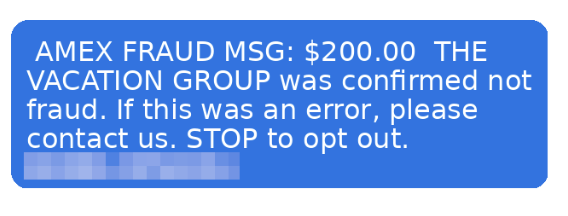
Example of a fraudulent AMEX message.

According to McAfee research, trusted brands like banks, airlines, and hotels are among the most commonly impersonated, and email scams impersonating retail and financial brands have surged up to 85% as major holidays approach. 

The message will typically ask you to click a link and “confirm your details” to secure your account or honor a reservation. That link leads to a convincing-looking fake site designed to capture your login credentials, payment info, or both. 

How to Avoid Travel Alert Scams:  

  • Don’t click links in unsolicited texts or emails.  
  • Go directly to the company’s app or website by typing the URL yourself.  
  • Remember: pressure is a tactic, not customer service.  

McAfee’s Scam Detector can flag suspicious messages before you interact with them, whether they come via text, email, or social media. 

2. Fake Memorial Day Weekend “Deals”

Memorial Day is one of the biggest shopping weekends of the year. Scammers treat it like an open invitation. 

Fraudulent retailers flood social feeds with too-good-to-be-true deals on everything from patio furniture to electronics, often impersonating legitimate brands with copycat websites and paid ads. 

According to McAfee’s holiday shopping research, 91% of shoppers see ads from unfamiliar retailers, 37% say they might buy from a brand they don’t recognize, and a full 40% of consumers have abandoned a purchase out of fear that the deal wasn’t real. 

The most impersonated brands in McAfee’s research span luxury labels (Coach, Dior, Gucci) to mainstream favorites (Apple, Samsung, Nintendo, Disney), exactly the kind of items that show up in “blowout sale” ads. Fake storefronts have grown significantly, with technology URL scams rising nearly 50%. 

Once shoppers enter their payment details on a fraudulent site, that information goes directly to criminals. The average scam loss during the holiday shopping period runs around $840 per victim. 

How to Avoid Shopping Scams:  

  • Type retailer URLs directly into your browser instead of clicking through ads or social posts.  
  • Look for HTTPS and double-check the domain carefully before entering any payment info.  
  • If a deal looks unbelievably good, verify it on the retailer’s official app before buying.  

McAfee’s Web Protection blocks malicious and suspicious sites before they load, including fake checkout pages. 

3. QR Code Scams at Gas Stations and Travel Stops

If you’re road-tripping this weekend, you may scan a QR code somewhere. It could be at the gas pump, a rest stop, a parking meter, or a roadside attraction. Scammers know this too. 

Criminals increasingly place fake QR codes over legitimate ones on gas station pumps, parking kiosks, and public signs. When you scan, you’re redirected to a convincing-looking payment or login page that captures your financial information. This is known as “quishing” or phishing via QR code. 

McAfee research shows just how widespread this risk has become: 68% of people scanned a QR code in the past three months, and 18% ended up on a suspicious or unsafe page after scanning. Among those who did, more than half took a risky action like entering personal information, installing an app, or connecting a digital wallet. 

How to Avoid Sketchy QR Codes:   

  • Before scanning any QR code in public, look closely at the sticker or sign.  
  • If it looks like it’s been placed over something else, skip it.  
  • If you do scan, check the URL before proceeding.  

McAfee’s Scam Detector now includes instant QR code safety checks that assess risk before you tap, so you’re not flying blind at the gas pump. 

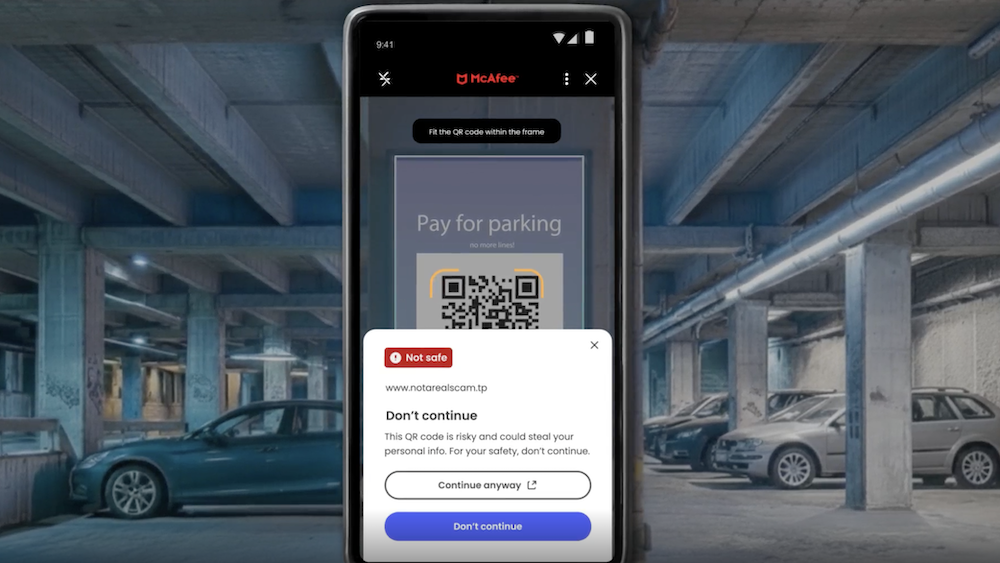
QR Scan Example
This shows how McAfee blocks unsafe QR codes.

4. Public Wi-Fi Traps at Airports, Hotels, and Coffee Shops

Whether you’re waiting at the airport or grabbing coffee before hitting the highway, free Wi-Fi can feel like a gift. But not every “free Wi-Fi” network is what it appears to be. 

Hackers set up what are called “evil twin” networks, hotspots with names designed to look exactly like the legitimate network at the airport, hotel, or café you’re in.  

The moment you connect, they can use tools called packet sniffers to capture the data you send and receive: passwords, banking credentials, credit card numbers, email logins.  

According to McAfee’s travel research, 63% of travelers connect to public Wi-Fi, and 49% use airport Wi-Fi, making these among the riskiest behaviors travelers engage in without realizing it. 

Some of these fake networks go further, presenting a phony login screen that captures your username and password for popular services like Google or Apple before you even realize you’ve been compromised. 

How to Avoid Malicious Wi-Fi : 

  • Always confirm the exact Wi-Fi network name with staff before connecting.  
  • Turn off auto-join for Wi-Fi on your devices.  
  • And most importantly: use a VPN.  

A VPN creates an encrypted tunnel for your internet traffic, so even if a hacker intercepts it, they’ll only see scrambled data. McAfee’s VPN is included in McAfee+ plans and automatically connects when you join public Wi-Fi, exactly the protection you want when you’re traveling and connecting everywhere.

5. Toll Road and Parking Text Scams (Expect a Surge After the Weekend)

You may have seen these already: a text that says you owe an unpaid toll or parking fee, with a link to pay before penalties kick in. These scams have been circulating for a while, and there’s a good chance Memorial Day weekend is about to make them worse. 

Scammers track news cycles and know that millions of Americans will be driving this weekend, many of them through toll roads and unfamiliar areas.  

That means they can blast out fake “unpaid toll” texts after the holiday and a significant percentage of recipients will think: “Actually, I did drive somewhere new this weekend.” That uncertainty is exactly what they’re counting on. 

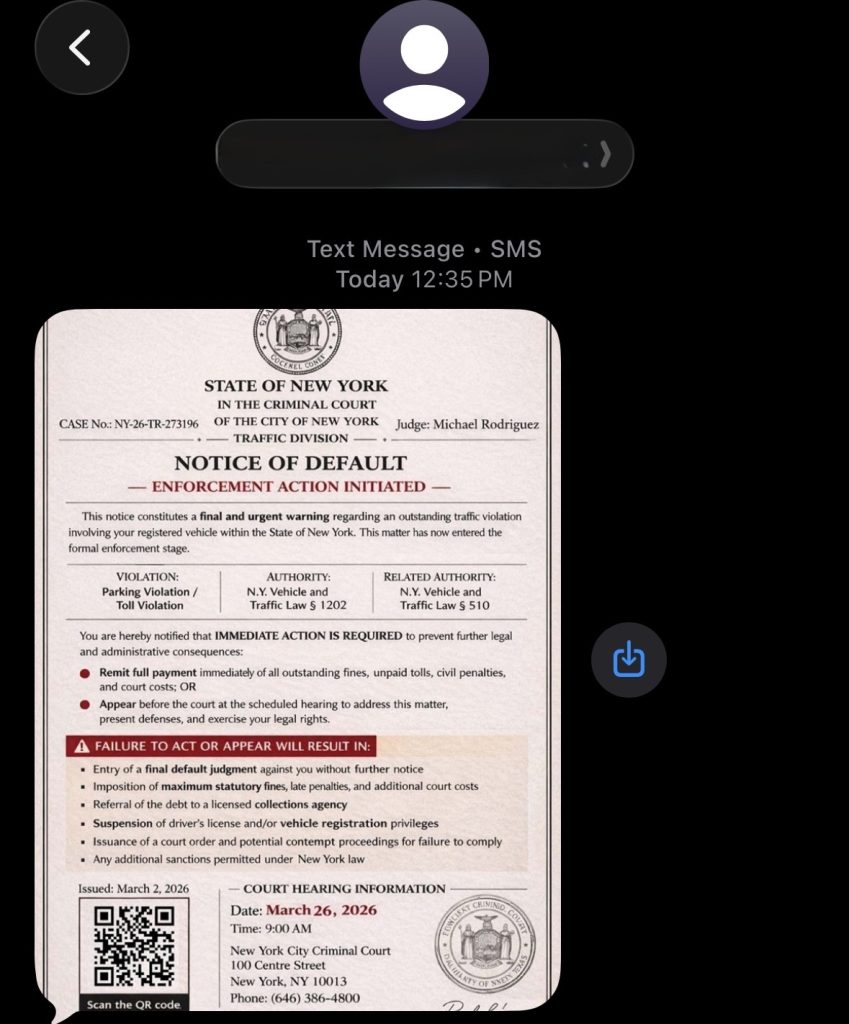
Fake court notices threatening parking and toll violations have been making the rounds this spring.

These texts typically impersonate EZPass, SunPass, or state transportation departments and create urgency around a small fee to avoid larger fines. The link leads to a fake payment page designed to steal your credit card details. 

How to Avoid Toll Scams:   

  • Don’t click links in unsolicited toll or parking texts.  
  • If you think the charge might be legitimate, go directly to your state’s official toll authority website and look up your account there.  
  • Real toll agencies will not threaten immediate penalties over text with a payment link.  
  • If you receive one of these texts after this weekend, treat it as suspicious by default. 

Have a Safe Memorial Day Weekend 

Scammers don’t take holidays. If anything, long weekends are peak season. The good news: a little awareness goes a long way. Slow down before you click, verify before you scan, and protect your connection before you log on. 

McAfee+ Advanced comes with layered protection across all the moments where scams are most likely to strike, from the gas station to the hotel lobby to your inbox.  

Stay safe out there. 

The post 5 Scams to Watch for This Memorial Day Weekend appeared first on McAfee Blog.
  •  

Alleged Kimwolf Botmaster ‘Dort’ Arrested, Charged in U.S. and Canada

Canadian authorities on Wednesday arrested a 23-year-old Ottawa man on suspicion of building and operating Kimwolf, a fast spreading Internet-of-Things botnet that enslaved millions of devices for use in a series of massive distributed denial-of-service (DDoS) attacks over the past six months. KrebsOnSecurity publicly named the suspect in February 2026 after the accused launched a volley of DDoS, doxing and swatting campaigns against this author and a security researcher. He now faces criminal hacking charges in both Canada and the United States.

A criminal complaint unsealed today in an Alaska district court charges Jacob Butler, a.k.a. “Dort,” of Ottawa, Canada with operating the Kimwolf DDoS botnet. A statement from the Department of Justice says the complaint against Butler was unsealed following the defendant’s arrest in Canada by the Ontario Provincial Police pursuant to a U.S. extradition warrant. Butler is currently in Canadian custody awaiting an initial court hearing scheduled for early next week.

The government said Kimwolf targeted infected devices which were traditionally “firewalled” from the rest of the internet, such as digital photo frames and web cameras. The infected systems were then rented to other cybercriminals, or forced to participate in record-smashing DDoS attacks, as well as assaults that affected Internet address ranges for the Department of Defense. Consequently, the DoD’s Defense Criminal Investigative Service is investigating the case, with assistance from the FBI field office in Anchorage.

“KimWolf was tied to DDoS attacks which were measured at nearly 30 Terabits per second, a record in recorded DDoS attack volume,” the Justice Department statement reads. “These attacks resulted in financial losses which, for some victims, exceeded one million dollars. The KimWolf botnet is alleged to have issued over 25,000 attack commands.”

On March 19, U.S. authorities joined international law enforcement partners in seizing the technical infrastructure for Kimwolf and three other large DDoS botnets — named Aisuru, JackSkid and Mossad — that were all competing for the same pool of vulnerable devices.

On February 28, KrebsOnSecurity identified Butler as the Kimwolf botmaster after digging through his various email addresses, registrations on the cybercrime forums, and posts to public Telegram and Discord servers. However, Dort continued to threaten and harass researchers who helped track down his real-life identity and dramatically slow the spread of his botnet.

Dort claimed responsibility for at least two swatting attacks targeting the founder of Synthient, a security startup that helped to secure a widespread critical security weakness that Kimwolf was using to spread faster and more effectively than any other IoT botnet out there. Synthient was among many technology companies thanked by the Justice Department today, and Synthient’s founder Ben Brundage told KrebsOnSecurity he’s relieved Butler is in custody.

“Hopefully this will end the harassment,” Brundage said.

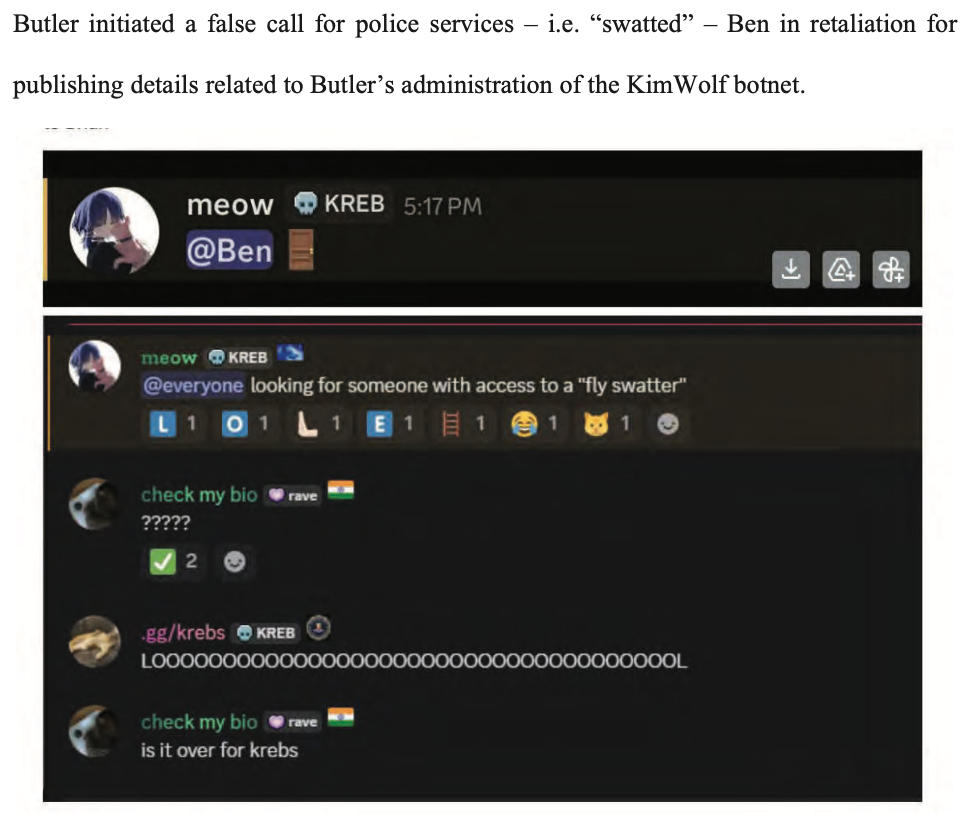
An excerpt from the criminal complaint against Butler, detailing how he ordered a swatting attack against Ben Brundage, the founder of the security firm Synthient.

The government says investigators connected Butler to the administration of the KimWolf botnet through IP address, online account information, transaction records, and online messaging application records obtained through the issuance of legal process. The criminal complaint against Butler (PDF) shows he did little to separate his real-life and cybercriminal identities (something we demonstrated in our February unmasking of Dort).

In April, the Justice Department joined authorities across Europe in seizing domain names tied to nearly four-dozen DDoS-for-hire services, although because of a bureaucratic mix-up the list of seized domains has remain sealed until today. The DOJ said at least one of those services collaborated with Butler’s Kimwolf botnet.

A statement from the Ontario Provincial Police said a search warrant was executed on March 19 at Butler’s address in Ottawa, where they seized multiple devices. As a result of that investigation, Butler was arrested and charged this week with unauthorized user of computer; possession of device to obtain unauthorized use of computer system or to commit mischief; and mischief in relation to computer data. He is scheduled to remain in custody until a hearing on May 26.

In the United States, Butler is facing one count of aiding and abetting computer intrusion. If extradited, tried and convicted in a U.S. court, Butler could face up to 10 years in prison, although that maximum sentence would likely be heavily tempered by considerations in the U.S. Sentencing Guidelines, which make allowances for mitigating factors such as youth, lack of criminal history and level of cooperation with investigators.

  •  
❌