FreshRSS

🔒
❌ Secure Planet Training Courses Updated For 2019 - Click Here
There are new available articles, click to refresh the page.
☐ ☆ ✇ WeLiveSecurity

Drowning in spam or scam emails? Here’s probably why

— January 27th 2026 at 10:00
Has your inbox recently been deluged with unwanted and even outright malicious messages? Here are 10 possible reasons – and how to stem the tide.
☐ ☆ ✇ /r/netsec - Information Security News & Discussion

Blind Boolean-Based Prompt Injection

By: /u/-rootcauz- — January 26th 2026 at 14:15

I had an idea for leaking a system prompt against a LLM powered classifying system that is constrained to give static responses. The attacker uses a prompt injection to update the response logic and signal true/false responses to attacker prompts. I haven't seen other research on this technique so I'm calling it blind boolean-based prompt injection (BBPI) unless anyone can share research that predates it. There is an accompanying GitHub link in the post if you want to experiment with it locally.

submitted by /u/-rootcauz-
[link] [comments]
☐ ☆ ✇ /r/netsec - Information Security News & Discussion

[Research] Analysis of 74,636 AI Agent Interactions: 37.8% Contained Attack Attempts - New "Inter-Agent Attack" Category Emerges

By: /u/cyberamyntas — January 28th 2026 at 06:30

We've been running inference-time threat detection across 38 production AI agent deployments. Here's what Week 3 of 2026 looked like with on-device detections.

Key Findings

  1. 28,194 threats detected across 74,636 interactions (37.8% attack rate)
  2. Inter-Agent Attacks emerged as a new category (3.4% of threats) - agents sending poisoned messages to other agents
  3. Data exfiltration leads at 19.2% - primarily targeting system prompts and RAG context
  4. Jailbreaks detected with 96.3% confidence - patterns are now well-established

Attack Technique Breakdown

  1. Instruction Override: 9.7%
  2. Tool/Command Injection: 8.2%
  3. RAG Poisoning: 8.1% (trending up)
  4. System Prompt Extraction: 7.7%

The inter-agent attack vector is particularly concerning given the MCP ecosystem growth. We're seeing goal hijacking, constraint removal, and recursive propagation attempts.

Full report with methodology: https://raxe.ai/threat-intelligence

Github: https://github.com/raxe-ai/raxe-ce is free for the community to use

Happy to answer questions about detection approaches

submitted by /u/cyberamyntas
[link] [comments]
☐ ☆ ✇ /r/netsec - Information Security News & Discussion

Corrupting the Hive Mind: Persistence Through Forgotten Windows Internals

By: /u/bouncyhat — January 28th 2026 at 03:54

Dropping a link to our blog post about our tool Swarmer, a windows persistence tool for abusing mandatory user profiles. Essentially you copy the current user's registry hive and modify it to add a new registry key to run on startup. Because the new hive isn't loaded until the next time the user logs in, EDR never sees any actual registry writes.

submitted by /u/bouncyhat
[link] [comments]
☐ ☆ ✇ McAfee Blogs

How McAfee’s Scam Detector Checks QR Codes and Social Messages

By: Brooke Seipel — January 27th 2026 at 13:50
QR Scan Example

Scams don’t always arrive with obvious warning signs. 

They show up as QR codes on parking meters. As casual DMs that start with “Hey.” As social messages that feel routine enough to respond to without thinking twice. 

That shift has created a new burden for consumers. According to McAfee’s 2026 State of the Scamiverse reportAmericans now spend 114 hours a year trying to figure out what’s real and what’s fake online. That is nearly three full workweeks lost to second-guessing messages, alerts, links, and notifications. 

McAfee’s upgraded Scam Detector is designed to meet people in those exact moments, with enhancements rolling out across core McAfee plans beginning in February. 

The latest improvements add instant QR code scam checks and smarter social messaging protection, making it easier to spot scams before they escalate. 

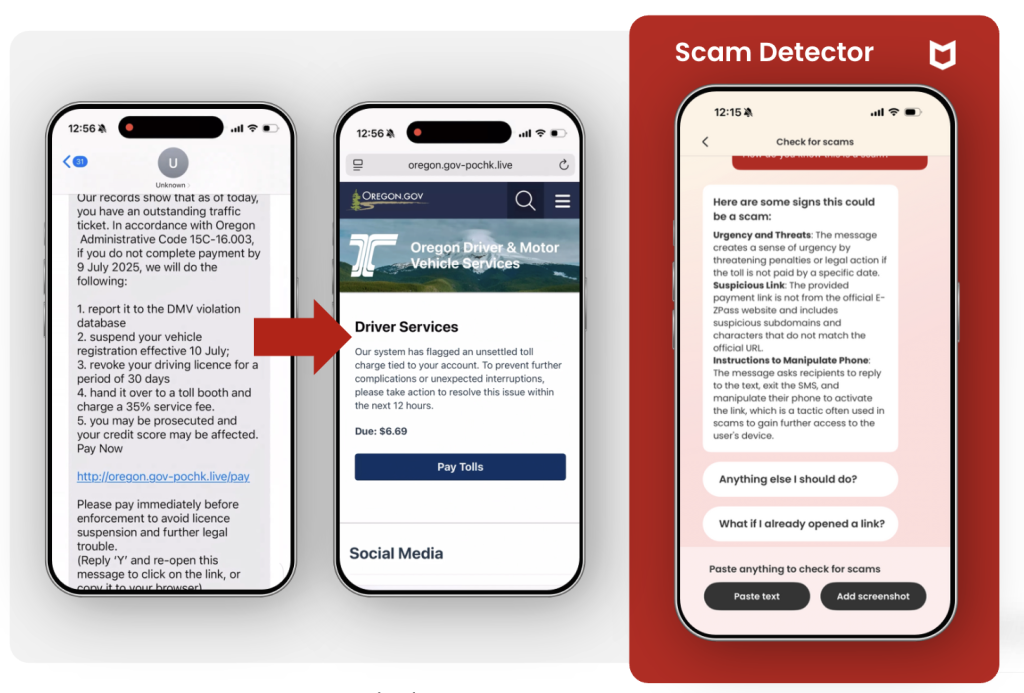
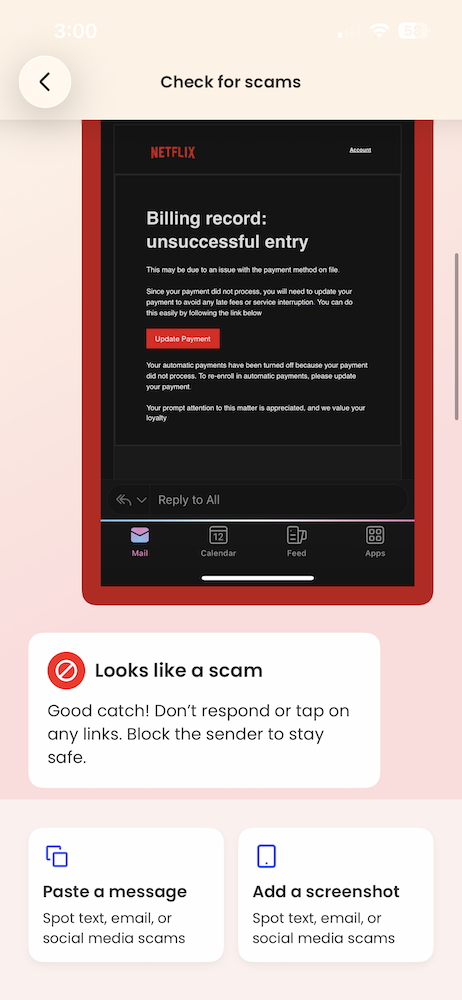
Figure 1: An example of a suspicious text being flagged by McAfee’s Scam Detector 

Figure 1: An example of a suspicious text being flagged by McAfee’s Scam Detector 

What’s new in McAfee’s Scam Detector 

Scams now move quickly across platforms and formats, often escalating in minutes once someone engages. Among people who were harmed by a scam, the typical scam unfolded in about 38 minutes. 

That speed leaves little room for hesitation. Scam protection has to work in real time, not after the damage is done. 

McAfee’s latest Scam Detector upgrades are designed around that reality, adding: 

  • Instant QR code safety checks, so users can assess risk before tapping 
  • Smarter social messaging protection, with clearer warnings for suspicious texts, emails, and DMs, even when no link is present 

These Scam Detector upgrades will begin rolling out in February across all core McAfee plans, bringing real-time protection to the moments where scams escalate fastest. 

QR codes, quishing, and why instant scans are needed 

QR codes were designed for convenience. That is exactly why scammers use them. 

Cybercriminals increasingly hide malicious links behind QR codes placed on menus, parking meters, packages, posters, and public signage. People scan quickly, often without stopping to evaluate where the code leads. 

McAfee research shows how common this risk has become: 

  • 68% of people scanned a QR code in the past three months 
  • 18% landed on a suspicious or unsafe page after scanning 
  • Among those who did, more than half took risky actions such as entering personal information, installing an app, or connecting a digital wallet 

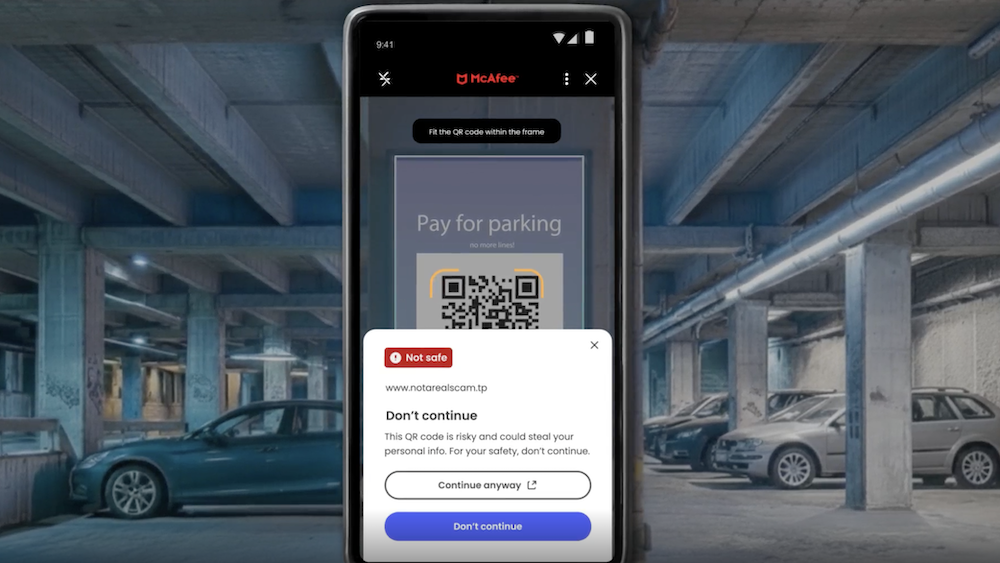
QR Scan Example

Figure 2. A still from a demo video, showing a risky QR code being blocked by McAfee’s Scam Detector 

Social media scams and the rise of linkless messages 

Phishing is no longer confined to emails with obvious red flags. 

Scams now arrive through WhatsApp, Instagram, Messenger, Telegram, and other social platforms, often starting as vague or friendly messages designed to lower suspicion rather than trigger alarm. 

McAfee’s research highlights a key shift: more than one in four suspicious social messages contain no link at all, and 44% of Americans say they have replied to a suspicious DM with no link. 

These messages rely on familiarity and momentum. A short greeting. A warning about an account issue. A promise of easy money. By the time a request or link appears, the conversation already feels normal. 

And the economic impact of these scams is significant. According to the FTC, social media scams drove $1.9 billion in reported losses in 2024, making social platforms one of the top channels for fraud and identity theft. 

That’s why McAfee’s Scam Detector includes smarter social messaging protection, delivering clearer warnings for suspicious texts, emails, and DMs, even those without risky links, across popular platforms. The focus is on identifying suspicious patterns and behavior, not just URLs. 

Users can take a quick screenshot of their social media content on social media, and McAfee’s Scam Detector will analyze the message for suspicious activity. 

Get protection that works before scams escalate 

The stakes are high: 

  • One in three Americans has lost money to a scam 
  • Among those who lost money, the average loss was $1,160 
  • 15% of scam victims fall for another scam within a year 

Scams are not just increasing in volume. They are becoming more personal, more believable, and easier to scale using AI. 

McAfee’s upgraded Scam Detector is designed to stay ahead of those shifts, offering real-time guidance when it matters most, whether that’s a suspicious QR code, a vague DM, or a message that feels just normal enough to trust. 

The enhanced Scam Detector, including instant QR code checks and smarter social messaging protection, will begin rolling out in February across all core McAfee plans. 

The post How McAfee’s Scam Detector Checks QR Codes and Social Messages appeared first on McAfee Blog.

☐ ☆ ✇ McAfee Blogs

McAfee Report: In the AI Slop Era, Americans Spend Weeks Each Year Questioning What’s Real

By: Brooke Seipel — January 27th 2026 at 13:45

Merriam-Webster’s word of 2025 was “slop.” Specifically, AI slop. 

Low-effort, AI-generated content now fills social feeds, inboxes, and message threads. Much of it is harmless. Some of it is entertaining. But its growing presence is changing what people expect to see online.

McAfee’s 2026 State of the Scamiverse report shows that scammers are increasingly using the same AI tools and techniques to make fraud feel familiar and convincing. Phishing sites look more legitimate. Messages sound more natural. Conversations unfold in ways that feel routine instead of suspicious.

According to McAfee’s consumer survey, Americans now spend an average of 114 hours a year trying to determine whether the messages they receive are real or scams. That’s nearly three full workweeks lost not to fraud itself, but to hesitation and doubt.

As AI-generated content becomes more common, the traditional signals people relied on to spot scams, such as strange links and awkward grammar, are fading. That shift does not mean everything online is dangerous. It means it takes more effort to tell what is real from what is malicious.

The result is growing uncertainty. And a rising cost in time, attention, and confidence.

The average American receives 14 scam messages a day 

Scams are no longer occasional interruptions. They are a constant background noise. 

According to the report, Americans receive an average of 14 scam messages per day across text, email, and social media.  

Many of these messages do not look suspicious at first glance. They resemble routine interactions people are conditioned to respond to. 

  • Delivery notices 
  • Account verification requests 
  • Subscription renewals  
  • Job outreach 
  • Bank alerts 
  • Charity appeals 

And with the use of AI tools, scammers are churning out these scam messages and making them look extremely realistic.

That strategy is working. One in three Americans says they feel less confident spotting scams than they did a year ago.  


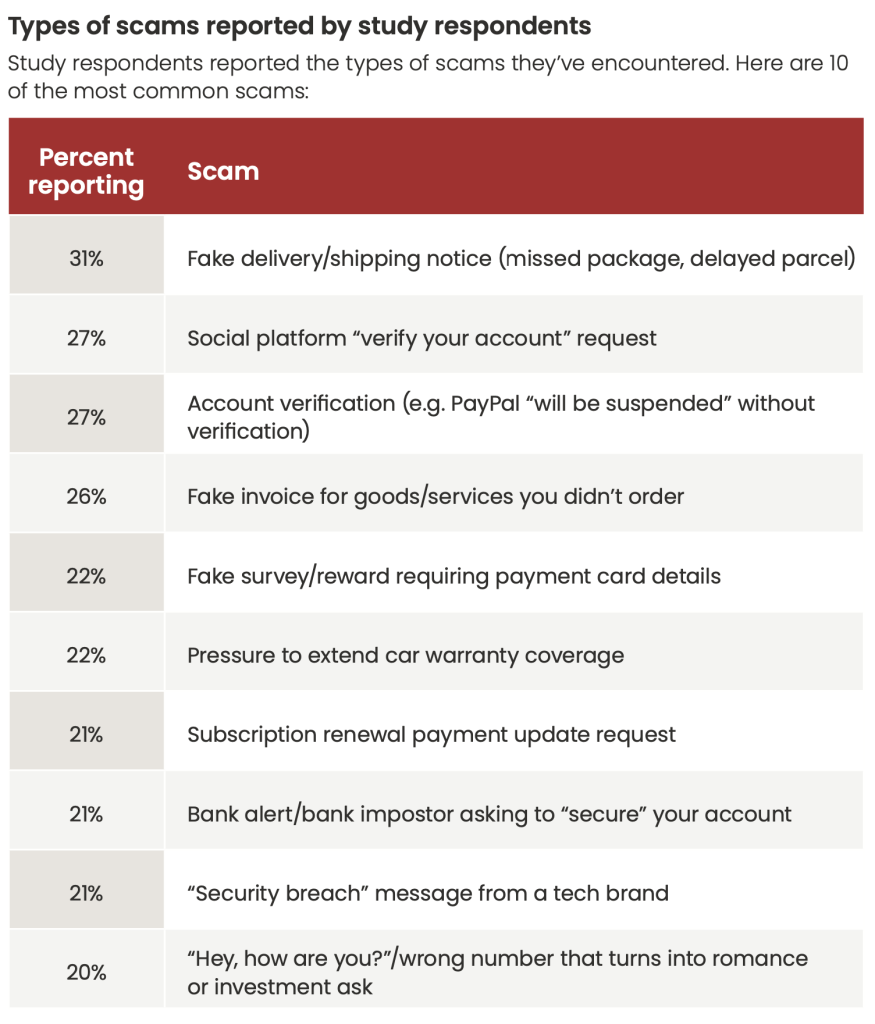
scam statsFigure 1. Types of scams reported in our consumer survey. 

Most scams move fast, and many are over in minutes 

The popular image of scams often involves long email threads or elaborate schemes. In reality, many modern scams unfold quickly. 

Among Americans who were harmed by a scam, the typical scam played out in about 38 minutes 

That speed matters. It leaves little time for reflection, verification, or second opinions. Once a person engages, scammers often escalate immediately. 

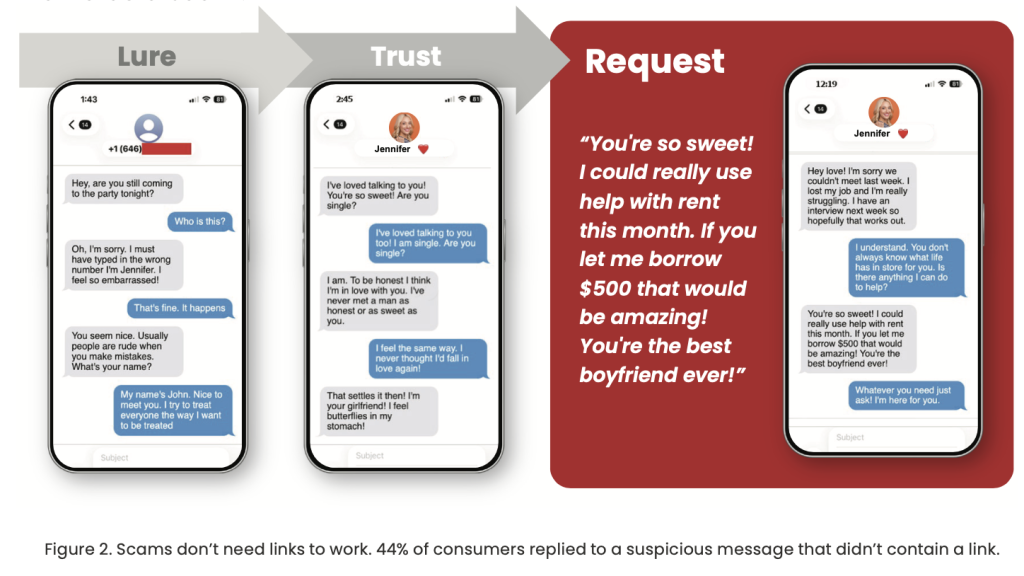
Still, some scammers play the long game with realistic romance or friendship scams that turn into crypto pitches or urgent requests for financial support. Often these scams start with no link at all, but just a familiar DM.

In fact, the report found that more than one in four suspicious social messages contain no link at all, removing one of the most familiar warning signs of a scam.  And 44% of people say they have replied to a suspicious direct message without a link 

Linkless DM scams seek to build trust before asking victims for money.

The cost is not just money. It is time and attention. 

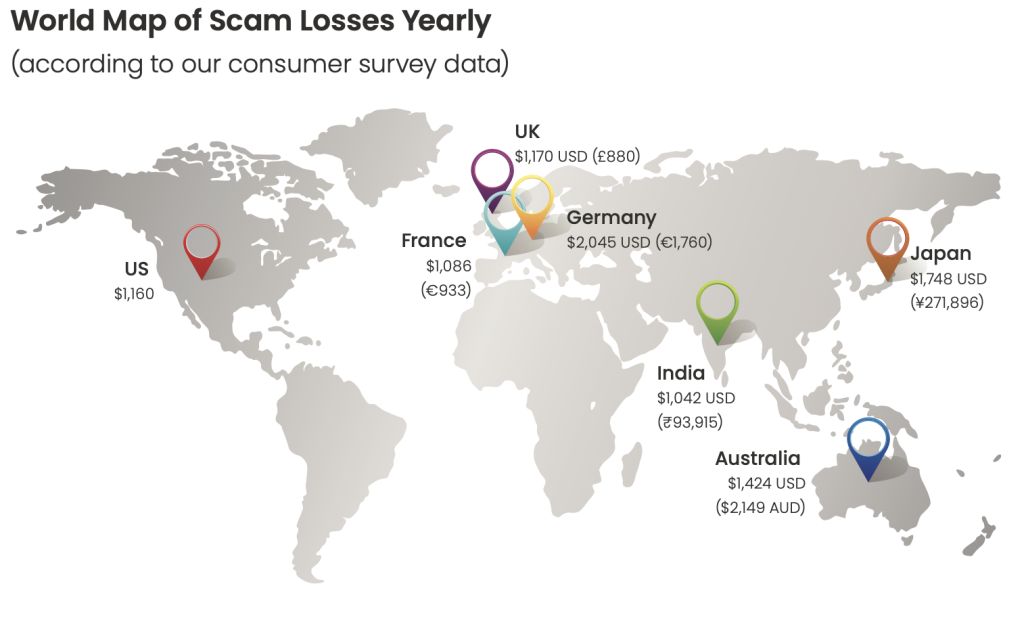
Financial losses from scams remain significant. One in three Americans report losing money to a scam. Among those who lost money, the average loss was $1,160 

But the report argues that focusing only on dollar amounts understates the broader impact: scams also cost time, attention, and emotional energy. 

People are forced to second-guess everyday digital interactions. Opening a message. Answering a call. Scanning a QR code. Responding to a notification. That time adds up. 

And who doesn’t know that sinking feeling when you realize a message you opened or a link you clicked wasn’t legitimate?

map of annual scam losses globally 2025

Figure 3. World Map of Average Scam Losses. 

Why AI slop makes scams harder to spot 

The rise of AI-generated content has changed the baseline of what people expect online. It’s now an everyday part of life.

According to the report, Americans say they see an average of three deepfakes per day 

Most are not scams. But that familiarity has consequences. 

When AI-generated content becomes normal, it becomes harder to recognize when the same tools are being used maliciously. The report found that more than one in three Americans do not feel confident identifying deepfake scams, and one in ten say they have already experienced a voice-clone scam. Voice clone scams often feature AI deepfake audio of public figures, or even people you know, requesting urgent financial support and compromising information.

These AI-generated scams also come in the form of phony customer support outreach, fake job opportunities and interviews, and illegitimate investment pitches.

Account takeovers are becoming routine 

Scams do not always end with an immediate financial loss. Many are designed to gain long-term access to accounts. 

The report found that 55% of Americans say a social media account was compromised in the past year 

Once an account is taken over, scammers can impersonate trusted contacts, spread malicious links, or harvest additional personal information. The damage often extends well beyond the original interaction. 

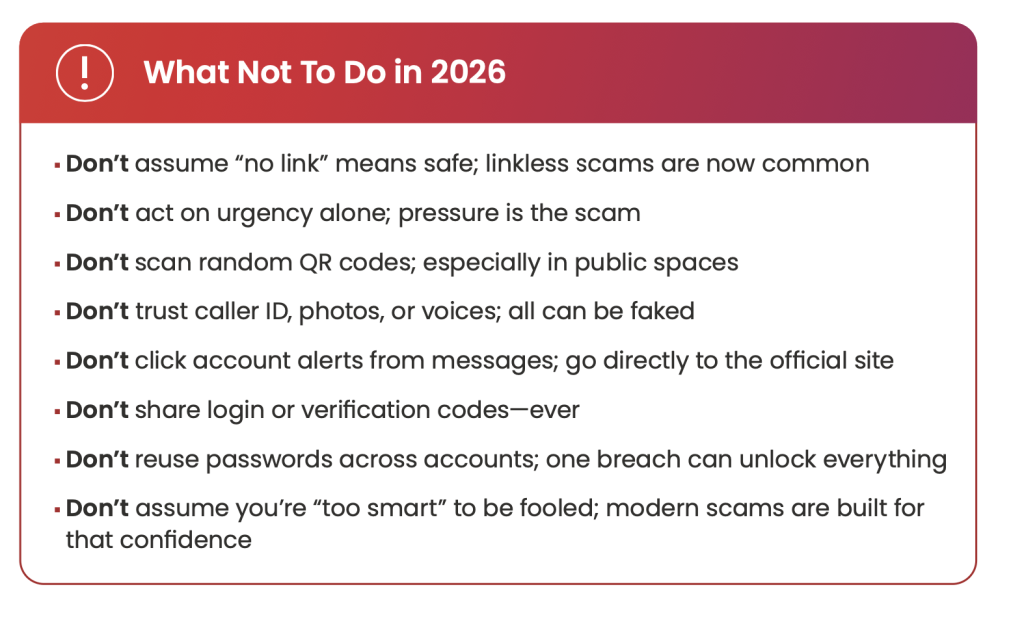
What not to do in 2026Scams are blending into everyday digital life 

What stands out most in the 2026 report is how thoroughly scams have blended into normal online routines. 

Scammers are embedding fraud into the same systems people rely on to work, communicate, and manage their lives. 

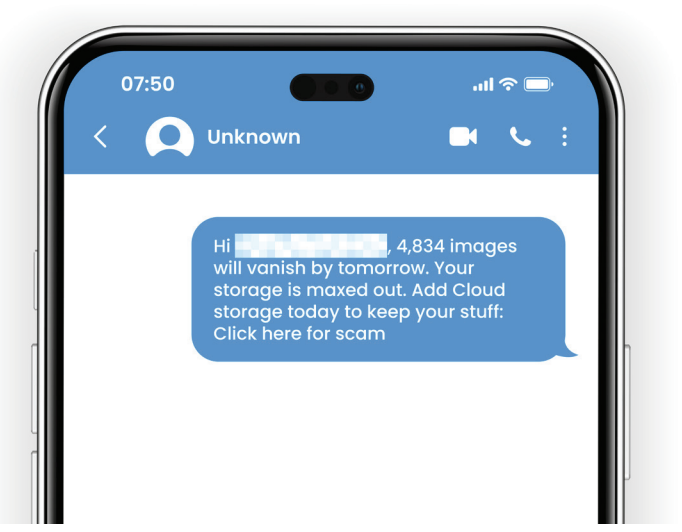
  • Cloud storage alerts (such as Google Drive or iCloud notices) warning that storage is full or access will be restricted unless action is taken, pushing users toward fake login pages.
  • Shared document notifications that appear to come from coworkers or collaborators, prompting recipients to open files or sign in to view a document that does not exist.
  • Payment confirmations that claim a charge has gone through, pressuring people to click or reply quickly to dispute a transaction they do not recognize.
  • Verification codes sent unexpectedly, often as part of account takeover attempts designed to trick people into sharing one-time passwords.
  • Customer support messages that impersonate trusted brands, offering help with an issue the recipient never reported.

Cloud scam Example

Figure 4: Example of a cloud scam message. 

The Key Takeaway

Not all AI-generated content is a scam. Much of what people encounter online every day is harmless, forgettable, or even entertaining. But the rapid growth of AI slop is creating a different kind of risk.

Constant exposure to synthetic images, videos, and messages is wearing down people’s ability to tell what is real and what is manipulated. The State of the Scamiverse report shows that consumers are already struggling with that distinction, and the data suggests the consequences are compounding. As digital noise increases, so does fatigue. And fatigue is exactly what scammers exploit.

FTC data shows losses from scams continuing to climb, and McAfee Labs is tracking a rise in fraud that blends seamlessly into everyday digital routines. Cloud storage warnings, shared document notifications, payment confirmations, verification codes, and customer support messages are increasingly being mimicked or abused by scammers because they look normal and demand quick action.

The danger of the AI slop era is not that everything online is fake. The danger is that people are being forced to question everything. That constant doubt slows judgment, erodes confidence, and creates openings for fraud to scale.

In 2026, the cost of scams is no longer measured only in dollars lost. It is measured in time, attention, and trust, and those losses are still growing.

Learn more and read the full report here.

FAQ: Understanding the AI Slop Era and Modern Scams 

Q: What is AI slop?  

A: The term refers to the flood of low-quality, AI-generated content now common online. While much of it is harmless, constant exposure can make it harder to identify when similar technology is used for scams.   

Q: How much time do Americans lose to scams?  

A: Americans spend 114 hours a year determining whether digital messages and alerts are real or fraudulent. That is nearly three workweeks.   

Q: How fast do scams happen today?  

A: Among people harmed by scams, the typical scam unfolds in about 38 minutes from first interaction to harm.   

Q: How common are deepfake scams?  

A: Americans report seeing three deepfakes per day on average, and one in ten say they have experienced a voice-clone scam.   


The post McAfee Report: In the AI Slop Era, Americans Spend Weeks Each Year Questioning What’s Real appeared first on McAfee Blog.

☐ ☆ ✇ /r/netsec - Information Security News & Discussion

Why code indexing matters for AI security tools

By: /u/Same-Cauliflower-830 — January 27th 2026 at 18:53

AI coding tools figured out that AST-level understanding isn't enough. Copilot, Cursor, and others use semantic indexing through IDE integrations or GitHub's stack graphs because they precise accurate code navigation across files.

Most AI security tools haven't made the same shift. They feed LLMs ASTs or taint traces and expect them to find broken access control. But a missing authorization check doesn't show up in a taint trace because there's nothing to trace.

submitted by /u/Same-Cauliflower-830
[link] [comments]
☐ ☆ ✇ /r/netsec - Information Security News & Discussion

One-Click Hack Against Popular Video Platform

By: /u/derp6996 — January 27th 2026 at 17:21

Team82 uncovered a new vulnerability in the IDIS Cloud Manager (ICM) viewer; an attacker could develop an exploit whereby if a user clicks on an untrusted link, the attack would execute on the machine hosting the ICM Viewer.

submitted by /u/derp6996
[link] [comments]
☐ ☆ ✇ /r/netsec - Information Security News & Discussion

Audited hypervisor kernel escapes in regulated environments — Ring 0 is the real attack surface

By: /u/NTCTech — January 27th 2026 at 17:00

I've been auditing hypervisor kernel security in several regulated environments recently, focusing on post-compromise survivability rather than initial breach prevention.

One pattern keeps showing up: most hardening guidance focuses on management planes and guest OSes, but real-world escape chains increasingly pivot through the host kernel (Ring 0).

From recent CVEs (ESXi heap overflows, vmx_exit handler bugs, etc.), three primitives appear consistently in successful guest → host escapes:

  1. Unsigned drivers / DKOM
    If an attacker can load a third-party module, they often bypass scheduler controls entirely. Many environments still relax signature enforcement for compatibility with legacy agents, which effectively enables kernel write primitives.

  2. Memory corruption vs. KASLR
    KASLR is widely relied on, but without strict kernel lockdown, leaking the kernel base address is often trivial via side channels. Once offsets are known, KASLR loses most of its defensive value.

  3. Kernel write primitives
    HVCI/VBS or equivalent kernel integrity enforcement introduces measurable performance overhead (we saw ~12–18% CPU impact in some workloads), but appears to be one of the few effective controls against kernel write primitives once shared memory is compromised.

I’m curious what others are seeing in production:

  • Are you enforcing strict kernel lockdown / signed modules on hypervisors?
  • Are driver compatibility or performance constraints forcing exceptions?
  • Have you observed real-world guest → host escapes that weren’t rooted in kernel memory corruption or unsigned drivers?

Looking to compare field experiences rather than promote any particular stack.

submitted by /u/NTCTech
[link] [comments]
☐ ☆ ✇ WIRED

Revealed: Leaked Chats Expose the Daily Life of a Scam Compound’s Enslaved Workforce

By: Andy Greenberg, Lily Hay Newman, Matt Burgess — January 27th 2026 at 11:00
A whistleblower trapped inside a “pig butchering” scam compound gave WIRED a vast trove of its internal materials—including 4,200 pages of messages that lay out its operations in unprecedented detail.
☐ ☆ ✇ WIRED

He Leaked the Secrets of a Southeast Asian Scam Compound. Then He Had to Get Out Alive

By: Andy Greenberg — January 27th 2026 at 11:00
A source trapped inside an industrial-scale scamming operation contacted me, determined to expose his captors’ crimes—and then escape. This is his story.
☐ ☆ ✇ WIRED

Judge Delays Minnesota ICE Decision While Weighing Whether State Is Being Illegally Punished

By: Dell Cameron — January 26th 2026 at 22:39
A federal judge ordered a new briefing due Wednesday on whether DHS is using armed raids to pressure Minnesota into abandoning its sanctuary policies, leaving ICE operations in place for now.
☐ ☆ ✇ WIRED

Deepfake ‘Nudify’ Technology Is Getting Darker—and More Dangerous

By: Matt Burgess — January 26th 2026 at 11:30
Sexual deepfakes continue to get more sophisticated, capable, easy to access, and perilous for millions of women who are abused with the technology.
☐ ☆ ✇ Krebs on Security

Who Operates the Badbox 2.0 Botnet?

By: BrianKrebs — January 26th 2026 at 16:11

The cybercriminals in control of Kimwolf — a disruptive botnet that has infected more than 2 million devices — recently shared a screenshot indicating they’d compromised the control panel for Badbox 2.0, a vast China-based botnet powered by malicious software that comes pre-installed on many Android TV streaming boxes. Both the FBI and Google say they are hunting for the people behind Badbox 2.0, and thanks to bragging by the Kimwolf botmasters we may now have a much clearer idea about that.

Our first story of 2026, The Kimwolf Botnet is Stalking Your Local Network, detailed the unique and highly invasive methods Kimwolf uses to spread. The story warned that the vast majority of Kimwolf infected systems were unofficial Android TV boxes that are typically marketed as a way to watch unlimited (pirated) movie and TV streaming services for a one-time fee.

Our January 8 story, Who Benefitted from the Aisuru and Kimwolf Botnets?, cited multiple sources saying the current administrators of Kimwolf went by the nicknames “Dort” and “Snow.” Earlier this month, a close former associate of Dort and Snow shared what they said was a screenshot the Kimwolf botmasters had taken while logged in to the Badbox 2.0 botnet control panel.

That screenshot, a portion of which is shown below, shows seven authorized users of the control panel, including one that doesn’t quite match the others: According to my source, the account “ABCD” (the one that is logged in and listed in the top right of the screenshot) belongs to Dort, who somehow figured out how to add their email address as a valid user of the Badbox 2.0 botnet.
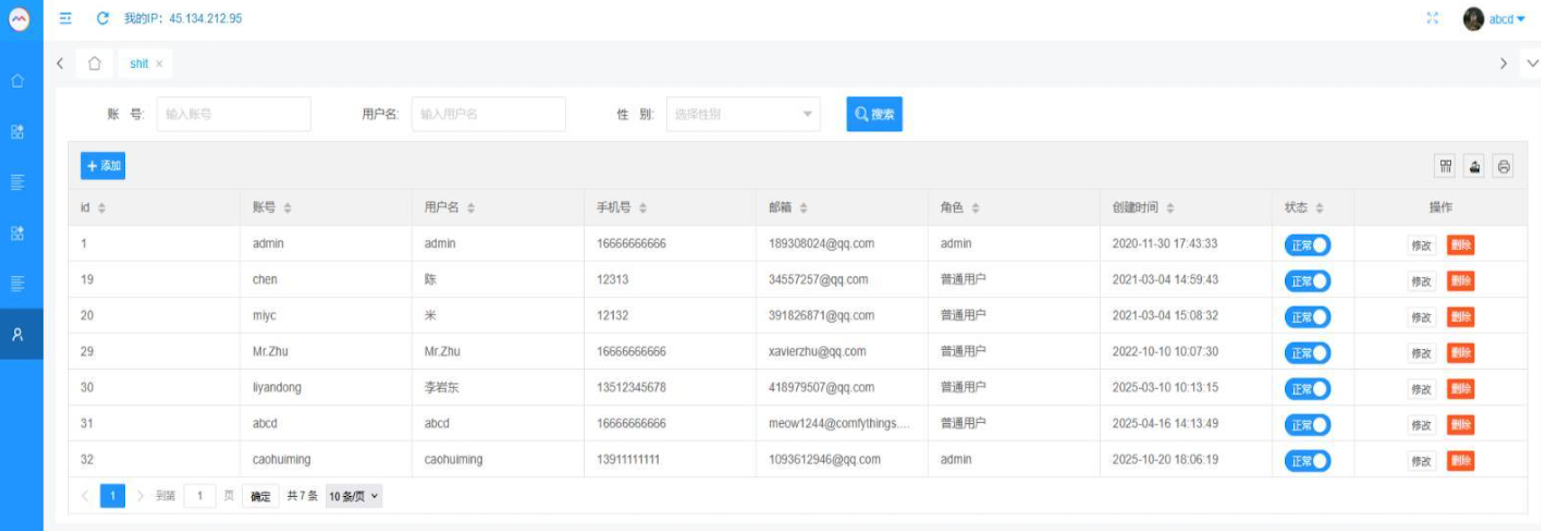
The control panel for the Badbox 2.0 botnet lists seven authorized users and their email addresses. Click to enlarge.

Badbox has a storied history that well predates Kimwolf’s rise in October 2025. In July 2025, Google filed a “John Doe” lawsuit (PDF) against 25 unidentified defendants accused of operating Badbox 2.0, which Google described as a botnet of over ten million unsanctioned Android streaming devices engaged in advertising fraud. Google said Badbox 2.0, in addition to compromising multiple types of devices prior to purchase, also can infect devices by requiring the download of malicious apps from unofficial marketplaces.

Google’s lawsuit came on the heels of a June 2025 advisory from the Federal Bureau of Investigation (FBI), which warned that cyber criminals were gaining unauthorized access to home networks by either configuring the products with malware prior to the user’s purchase, or infecting the device as it downloads required applications that contain backdoors — usually during the set-up process.

The FBI said Badbox 2.0 was discovered after the original Badbox campaign was disrupted in 2024. The original Badbox was identified in 2023, and primarily consisted of Android operating system devices (TV boxes) that were compromised with backdoor malware prior to purchase.

KrebsOnSecurity was initially skeptical of the claim that the Kimwolf botmasters had hacked the Badbox 2.0 botnet. That is, until we began digging into the history of the qq.com email addresses in the screenshot above.

CATHEAD

An online search for the address 34557257@qq.com (pictured in the screenshot above as the user “Chen“) shows it is listed as a point of contact for a number of China-based technology companies, including:

Beijing Hong Dake Wang Science & Technology Co Ltd.
Beijing Hengchuang Vision Mobile Media Technology Co. Ltd.
Moxin Beijing Science and Technology Co. Ltd.

The website for Beijing Hong Dake Wang Science is asmeisvip[.]net, a domain that was flagged in a March 2025 report by HUMAN Security as one of several dozen sites tied to the distribution and management of the Badbox 2.0 botnet. Ditto for moyix[.]com, a domain associated with Beijing Hengchuang Vision Mobile.

A search at the breach tracking service Constella Intelligence finds 34557257@qq.com at one point used the password “cdh76111.” Pivoting on that password in Constella shows it is known to have been used by just two other email accounts: daihaic@gmail.com and cathead@gmail.com.

Constella found cathead@gmail.com registered an account at jd.com (China’s largest online retailer) in 2021 under the name “陈代海,” which translates to “Chen Daihai.” According to DomainTools.com, the name Chen Daihai is present in the original registration records (2008) for moyix[.]com, along with the email address cathead@astrolink[.]cn.

Incidentally, astrolink[.]cn also is among the Badbox 2.0 domains identified in HUMAN Security’s 2025 report. DomainTools finds cathead@astrolink[.]cn was used to register more than a dozen domains, including vmud[.]net, yet another Badbox 2.0 domain tagged by HUMAN Security.

XAVIER

A cached copy of astrolink[.]cn preserved at archive.org shows the website belongs to a mobile app development company whose full name is Beijing Astrolink Wireless Digital Technology Co. Ltd. The archived website reveals a “Contact Us” page that lists a Chen Daihai as part of the company’s technology department. The other person featured on that contact page is Zhu Zhiyu, and their email address is listed as xavier@astrolink[.]cn.
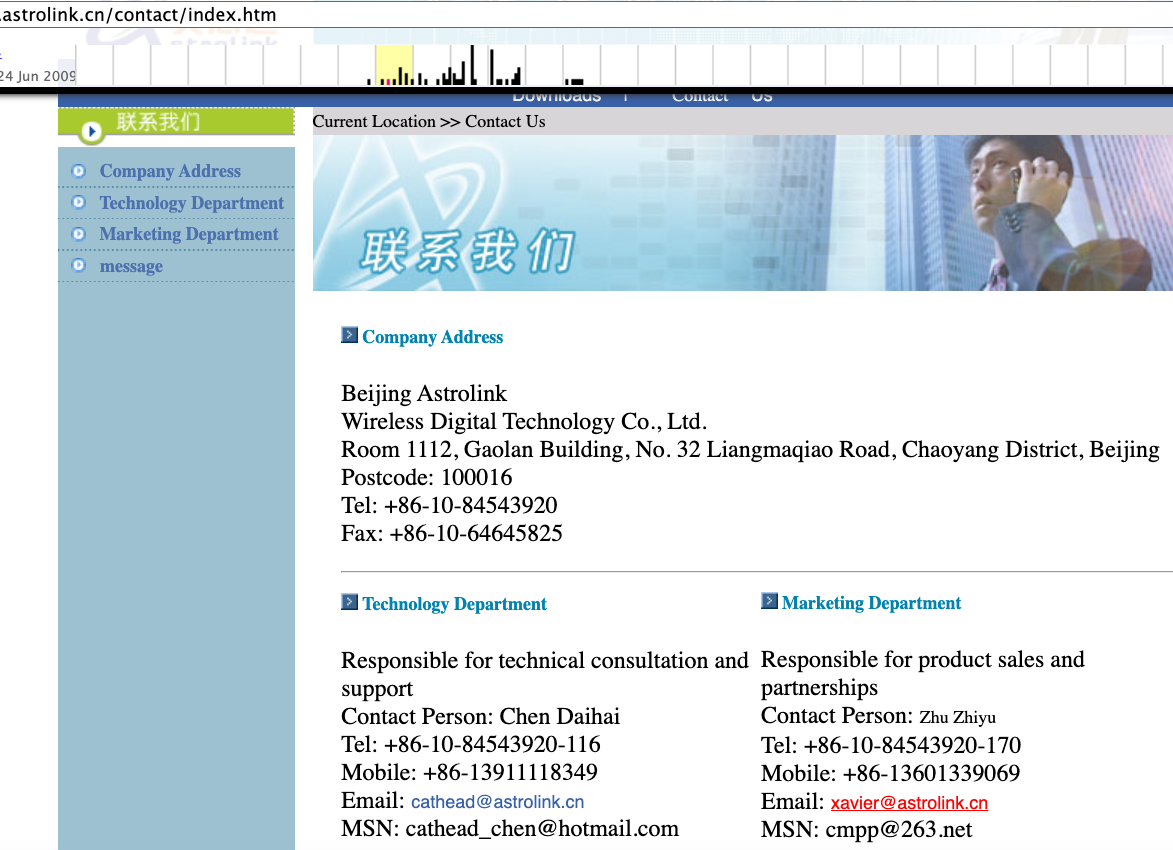
A Google-translated version of Astrolink’s website, circa 2009. Image: archive.org.

Astute readers will notice that the user Mr.Zhu in the Badbox 2.0 panel used the email address xavierzhu@qq.com. Searching this address in Constella reveals a jd.com account registered in the name of Zhu Zhiyu. A rather unique password used by this account matches the password used by the address xavierzhu@gmail.com, which DomainTools finds was the original registrant of astrolink[.]cn.

ADMIN

The very first account listed in the Badbox 2.0 panel — “admin,” registered in November 2020 — used the email address 189308024@qq.com. DomainTools shows this email is found in the 2022 registration records for the domain guilincloud[.]cn, which includes the registrant name “Huang Guilin.”

Constella finds 189308024@qq.com is associated with the China phone number 18681627767. The open-source intelligence platform osint.industries reveals this phone number is connected to a Microsoft profile created in 2014 under the name Guilin Huang (桂林 黄). The cyber intelligence platform Spycloud says that phone number was used in 2017 to create an account at the Chinese social media platform Weibo under the username “h_guilin.”
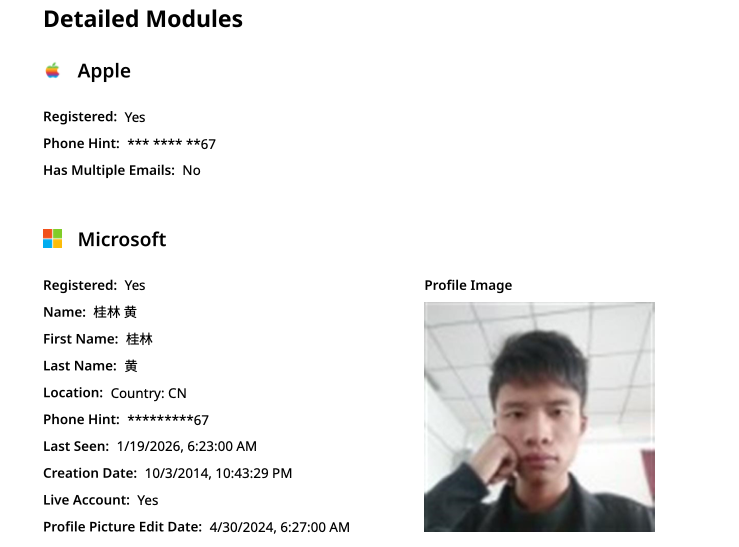
The public information attached to Guilin Huang’s Microsoft account, according to the breach tracking service osintindustries.com.

The remaining three users and corresponding qq.com email addresses were all connected to individuals in China. However, none of them (nor Mr. Huang) had any apparent connection to the entities created and operated by Chen Daihai and Zhu Zhiyu — or to any corporate entities for that matter. Also, none of these individuals responded to requests for comment.

The mind map below includes search pivots on the email addresses, company names and phone numbers that suggest a connection between Chen Daihai, Zhu Zhiyu, and Badbox 2.0.
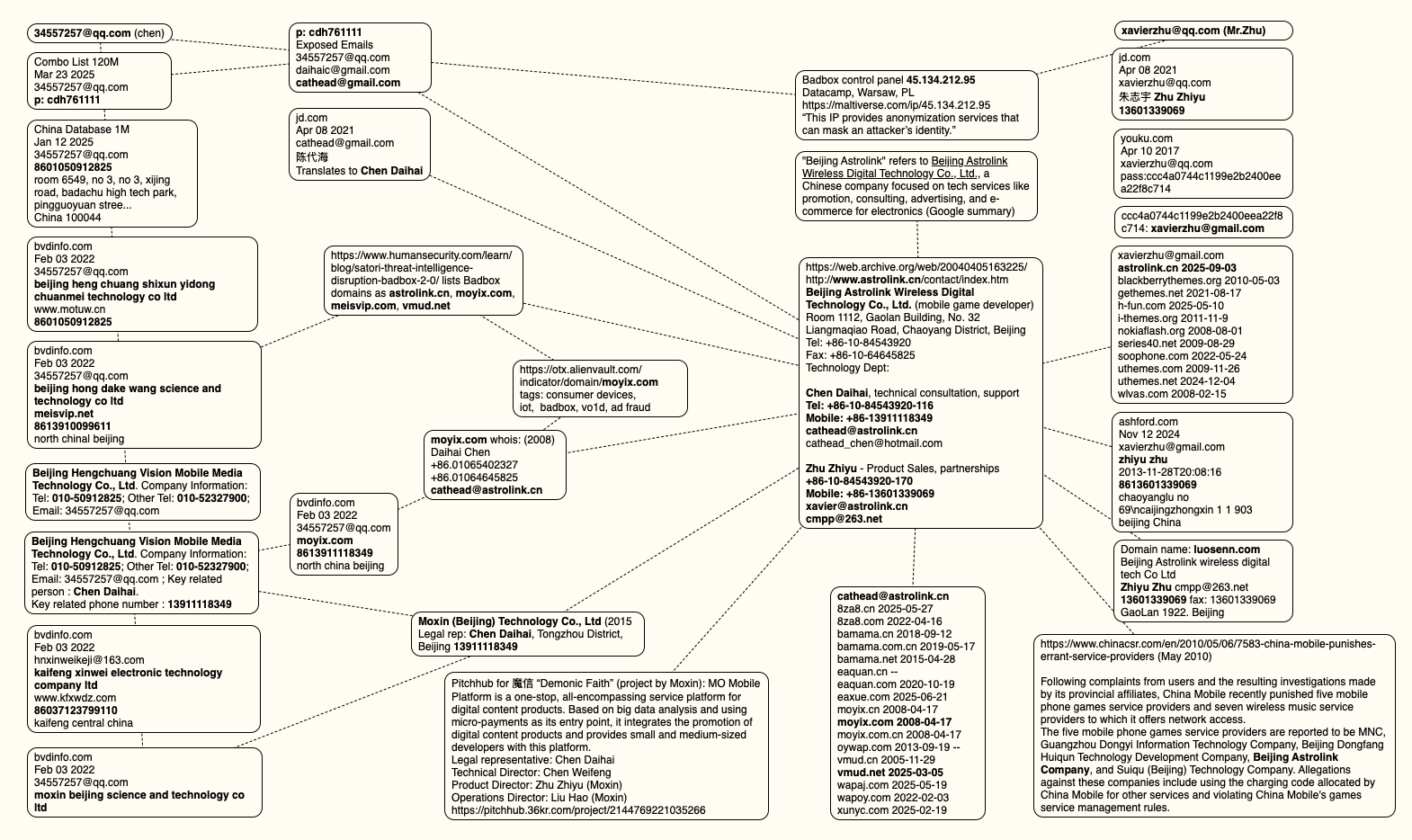
This mind map includes search pivots on the email addresses, company names and phone numbers that appear to connect Chen Daihai and Zhu Zhiyu to Badbox 2.0. Click to enlarge.

UNAUTHORIZED ACCESS

The idea that the Kimwolf botmasters could have direct access to the Badbox 2.0 botnet is a big deal, but explaining exactly why that is requires some background on how Kimwolf spreads to new devices. The botmasters figured out they could trick residential proxy services into relaying malicious commands to vulnerable devices behind the firewall on the unsuspecting user’s local network.

The vulnerable systems sought out by Kimwolf are primarily Internet of Things (IoT) devices like unsanctioned Android TV boxes and digital photo frames that have no discernible security or authentication built-in. Put simply, if you can communicate with these devices, you can compromise them with a single command.

Our January 2 story featured research from the proxy-tracking firm Synthient, which alerted 11 different residential proxy providers that their proxy endpoints were vulnerable to being abused for this kind of local network probing and exploitation.

Most of those vulnerable proxy providers have since taken steps to prevent customers from going upstream into the local networks of residential proxy endpoints, and it appeared that Kimwolf would no longer be able to quickly spread to millions of devices simply by exploiting some residential proxy provider.

However, the source of that Badbox 2.0 screenshot said the Kimwolf botmasters had an ace up their sleeve the whole time: Secret access to the Badbox 2.0 botnet control panel.

“Dort has gotten unauthorized access,” the source said. “So, what happened is normal proxy providers patched this. But Badbox doesn’t sell proxies by itself, so it’s not patched. And as long as Dort has access to Badbox, they would be able to load” the Kimwolf malware directly onto TV boxes associated with Badbox 2.0.

The source said it isn’t clear how Dort gained access to the Badbox botnet panel. But it’s unlikely that Dort’s existing account will persist for much longer: All of our notifications to the qq.com email addresses listed in the control panel screenshot received a copy of that image, as well as questions about the apparently rogue ABCD account.


☐ ☆ ✇ Security – Cisco Blog

Privacy and Data Governance — Keys to Innovation and Trust in the AI Era

By: Harvey Jang — January 26th 2026 at 12:45
Cisco 2026 Data and Privacy Benchmark Study shares insights into how privacy unlocks competitive advantage for business growth and builds trust in AI era.
☐ ☆ ✇ /r/netsec - Information Security News & Discussion

"Open sesame": Critical vulnerabilities in dormakaba physical access control system enable unlocking arbitrary doors

By: /u/0x9000 — January 26th 2026 at 10:51

Multiple critical flaws (20 CVEs!) in dormakaba physical access control system exos 9300 & access manager & registration unit (pin pad) allow attackers with network access to open arbitrary doors, reconfigure connected controllers and peripherals without prior authentication, and much more. Seems some systems are also reachable over the internet due to misconfigurations.

"According to the manufacturer, several thousand customers were affected, a small proportion of whom operate in environments with high security requirements" (critical infrastructure).

submitted by /u/0x9000
[link] [comments]
☐ ☆ ✇ /r/netsec - Information Security News & Discussion

/r/netsec's Q1 2026 Information Security Hiring Thread

By: /u/netsec_burn — January 26th 2026 at 01:29

Overview

If you have open positions at your company for information security professionals and would like to hire from the /r/netsec user base, please leave a comment detailing any open job listings at your company.

We would also like to encourage you to post internship positions as well. Many of our readers are currently in school or are just finishing their education.

Please reserve top level comments for those posting open positions.

Rules & Guidelines

Include the company name in the post. If you want to be topsykret, go recruit elsewhere. Include the geographic location of the position along with the availability of relocation assistance or remote work.

  • If you are a third party recruiter, you must disclose this in your posting.
  • Please be thorough and upfront with the position details.
  • Use of non-hr'd (realistic) requirements is encouraged.
  • While it's fine to link to the position on your companies website, provide the important details in the comment.
  • Mention if applicants should apply officially through HR, or directly through you.
  • Please clearly list citizenship, visa, and security clearance requirements.

You can see an example of acceptable posts by perusing past hiring threads.

Feedback

Feedback and suggestions are welcome, but please don't hijack this thread (use moderator mail instead.)

submitted by /u/netsec_burn
[link] [comments]
☐ ☆ ✇ /r/netsec - Information Security News & Discussion

Husn Canaries - Defense-in-Depth for AI Coding Assistant Governance

By: /u/0xRaindrop — January 25th 2026 at 07:35

Your proprietary code is flowing into Frontier AI models in the Cloud undetected. Husn Canaries allow you to receive instant alerts when Claude, ChatGPT, Copilot, Gemini, or any AI coding assistant analyzes your code. Know exactly when your intellectual property is exposed, whether by your team, contractors, or attackers.

submitted by /u/0xRaindrop
[link] [comments]
☐ ☆ ✇ WIRED

The Instant Smear Campaign Against Border Patrol Shooting Victim Alex Pretti

By: David Gilbert — January 25th 2026 at 00:37
Within minutes of the shooting, the Trump administration and right-wing influencers began disparaging the man shot by a federal immigration officer on Saturday in Minneapolis.
☐ ☆ ✇ WIRED

ICE Asks Companies About ‘Ad Tech and Big Data’ Tools It Could Use in Investigations

By: Caroline Haskins — January 24th 2026 at 22:14
A new federal filing from ICE demonstrates how commercial tools are increasingly being considered by the government for law enforcement and surveillance.
☐ ☆ ✇ WIRED

DOGE May Have Misused Social Security Data, DOJ Admits

By: Maddy Varner, Andy Greenberg, Andrew Couts — January 24th 2026 at 11:30
Plus: The FAA blocks drones over DHS operations, Microsoft admits it hands over Bitlocker encryption keys to the cops, and more.
☐ ☆ ✇ /r/netsec - Information Security News & Discussion

Prompt injection is No 1 Security threat for most systems.

By: /u/Suchitra_idumina — January 24th 2026 at 10:17

It's shown that the LLM (Specially agentic systems) can be used as an attack surface to perform vast number of attacks.

If the agent have access to terminal (Nearly all Coding tools have access to it), an attacker can use it for RCE. If it have access to the database, the attacker can retrieve/alter data.

submitted by /u/Suchitra_idumina
[link] [comments]
☐ ☆ ✇ McAfee Blogs

This Week in Scams: Netflix Phishing and QR Code Espionage

By: Brooke Seipel — January 23rd 2026 at 13:00
Couple watching Netflix

This week in scams, attackers are leaning hard on familiar brands, everyday tools, and routine behavior to trigger fast, unthinking reactions. From fake Netflix billing alerts to malicious browser extensions and QR code phishing tied to foreign espionage, the common thread is trust being weaponized at exactly the right moment. 

Every week, this roundup breaks down the scam and cybersecurity stories making news and explains how they actually work, so readers can better recognize risk and avoid being manipulated. 

Let’s get into it. 

Netflix Billing Emails Are Back… And Still Catching People Off Guard 

The big picture: Subscription phishing is resurging, with scammers impersonating Netflix and using fake billing failures to push victims into handing over payment details. 

What happened: Multiple Netflix impersonation emails circulated again this month, warning recipients that a payment failed and urging them to “update payment” to avoid service interruption. The messages closely mirror Netflix’s real branding and include polished formatting, official-looking language, and even PDF attachments designed to feel like legitimate billing notices. 

What makes these scams effective is timing. Victims often receive them while actively reviewing subscriptions, updating payment methods, or considering canceling services. That context lowers skepticism just enough for a quick click before slowing down to verify. 

McAfee’s Scam Detector flagged the messages (which one of our own employees received this week) as phishing, confirming they were designed to steal payment information rather than resolve a real billing issue. 

Example of McAfee detecting the Netflix phishing scam

Red flags to watch for: 

  • Unexpected billing problems paired with urgent calls to act 
  • Payment requests delivered by email instead of inside the app 
  • Attachments or buttons asking you to “fix” account issues 
  • Sender addresses that don’t match official Netflix domains 

How this scam works: This is classic brand impersonation phishing. Scammers don’t need to hack Netflix itself. They rely on people recognizing the logo, trusting the message, and reacting emotionally to the idea of losing access. The attachment and clean design help bypass instinctive spam filters in the brain, even when technical filters catch it later. 

Netflix has warned customers about these scams and offers advice on its site if you encounter one.

What to do instead: If you get a billing alert, don’t click. Open the Netflix app or manually type the site address to check your account. If there’s no issue there, the email wasn’t real. 

Fake Ad Blocker Crashes Browsers to Push “Fix It” Malware 

The big picture: Attackers are exploiting browser crashes themselves as a social engineering tool, turning technical disruption into a pathway for malware installation. 

What happened: Researchers reported a malvertising campaign promoting a fake ad-blocking browser extension called “NexShield,” which falsely claimed to be created by the developer of a well-known, legitimate ad blocker. Once installed, the extension intentionally overwhelmed the browser, causing freezes, crashes, and system instability. 

After restart, victims were shown fake security warnings instructing them to “fix” the problem by running commands on their own computer. Following those instructions triggered the download of a remote access tool capable of spying, executing commands, and installing additional malware. The reporting was first detailed by Bleeping Computer, with technical analysis from security researchers. 

Red flags to watch for: 

  • Browser extensions promising performance boosts or “ultimate” protection 
  • Crashes immediately after installing a new extension 
  • Pop-ups instructing you to run commands manually 
  • “Security fixes” that require copying and pasting code 

How this scam works: This is a variant of ClickFix attacks. Instead of faking a problem, attackers cause a real one, then position themselves as the solution. The crash creates urgency and confusion, making people more likely to follow instructions they’d normally question. It turns frustration into compliance. 

FBI Warns QR Code Phishing Is Being Used for Cyber Espionage 

The big picture: QR codes are being used as stealth phishing tools, with highly targeted attacks tied to foreign intelligence operations. 

What happened: The Federal Bureau of Investigation issued a warning about QR code phishing, or “quishing,” campaigns linked to a North Korean government-backed hacking group. According to reporting by Fox News, attackers sent emails containing QR codes that redirected victims to fake login pages or malware-hosting sites. 

In some cases, simply visiting the site allowed attackers to collect device data, location details, and system information, even if no credentials were entered. These campaigns are highly targeted, often aimed at professionals in policy, research, and technology sectors. 

Red flags to watch for: 

  • QR codes sent by email or messaging apps 
  • QR codes leading to login pages for work tools or cloud services 
  • Messages that feel personalized but unexpected 
  • Requests to scan instead of click 

How this scam works: QR codes hide the destination URL, removing the visual cues people rely on to judge safety. Because scanning feels faster and more “passive” than clicking a link, people often skip verification entirely. That moment of trust is what attackers exploit. 

Read our ultimate guide to “quishing” and how to spot and avoid QR code scams here. 

McAfee’s Safety Tips for This Week 

  • Verify inside official apps. Billing or security issues should be confirmed directly in the app or website you normally use, not through email links or QR codes. 
  • Treat extensions like software installs. Only install browser extensions from trusted publishers you already know, and remove anything that causes instability. 
  • Slow down with QR codes. If a QR code leads to a login page or download, close it and navigate manually instead. 
  • Watch for urgency + familiarity. Scammers increasingly rely on brands, tools, and behaviors you already trust to short-circuit caution. 

McAfee will be back next week with another roundup of the scams making headlines and the practical steps you can take to stay safer online. 

The post This Week in Scams: Netflix Phishing and QR Code Espionage appeared first on McAfee Blog.

☐ ☆ ✇ WeLiveSecurity

ESET Research: Sandworm behind cyberattack on Poland’s power grid in late 2025

— January 23rd 2026 at 16:58
The attack involved data-wiping malware that ESET researchers have now analyzed and named DynoWiper
☐ ☆ ✇ WIRED

US Judge Rules ICE Raids Require Judicial Warrants, Contradicting Secret ICE Memo

By: Dell Cameron, Matt Giles — January 23rd 2026 at 22:24
The ruling in federal court in Minnesota lands as Immigration and Customs Enforcement faces scrutiny over an internal memo claiming judge-signed warrants aren’t needed to enter homes without consent.
☐ ☆ ✇ /r/netsec - Information Security News & Discussion

Correctly interpreting DMARC, SPF, and DKIM enforcement in DNS security

By: /u/Odd_Woodpecker_6286 — January 23rd 2026 at 22:01

Technical article examining common DNS/email authentication misinterpretations (DMARC, SPF, DKIM), with real-world examples from large operators and government domains.

submitted by /u/Odd_Woodpecker_6286
[link] [comments]
☐ ☆ ✇ /r/netsec - Information Security News & Discussion

Y2K38 as a security risk for vulnerable systems today. Not in 12 years, but right now.

By: /u/JollyCartoonist3702 — January 23rd 2026 at 19:14

I believe Y2K38 isn’t a future problem, it’s exploitable today in any vulnerable system synchronizing time in a way that can be exploitable by an attacker.

Bitsight published an overview of the Year 2038 problem and its security impact: https://www.bitsight.com/blog/what-is-y2k38-problem (Full disclosure: I’m the author)

Many 32-bit systems accept externally influenced time (NTP, GPS, RTC sync, management APIs).

Forcing time near / past the overflow boundary can break authentication, cert validation, logging, TTLs, replay protection.

Embedded / OT / IoT devices are especially exposed:

Long-lived, rarely patched 32-bit Linux / RTOS is common Often internet-reachable Failures range from silent logic errors to crashes.

This makes Y2K38 less a “future date bug” and more a latent vulnerability class affecting real systems today.

I'm interested in how others are:

Treating this issue. Have you heard about it before? Are you (or did you) testing for Y2K38 exposure, in your code and in your installed infrastructure and its dependencies? How do you treat time handling in threat models for embedded / OT environments / critical infrastructure?

If you are interested in time security and want to know more or share your experiences, there is. Time Security SIG over at FIRST that you can consider joining.

submitted by /u/JollyCartoonist3702
[link] [comments]
☐ ☆ ✇ WIRED

CBP Wants AI-Powered ‘Quantum Sensors’ for Finding Fentanyl in Cars

By: Caroline Haskins — January 23rd 2026 at 17:08
US Customs and Border Protection is paying General Dynamics to create prototype “quantum sensors,” to be used with an AI database to detect fentanyl and other narcotics.
☐ ☆ ✇ Security – Cisco Blog

Introducing Intent-Based Policy Management for Cisco Hybrid Mesh Firewall

By: Murali Rathinasamy — January 22nd 2026 at 13:00
Hybrid Mesh Firewall introduces intent-based policy management across multi-vendor firewalls through Cisco Security Cloud Control with Mesh Policy Engine.
☐ ☆ ✇ /r/netsec - Information Security News & Discussion

Syd - Air-Gapped Red and blueteam

By: /u/Glass-Ant-6041 — January 23rd 2026 at 13:49

Hey everyone,

I’m an independent developer and for the past few months I’ve been working on a tool called Syd. Before I invest more time and money into it, I’m trying to get honest feedback from people who actually work in security.

Syd is a fully local, offline AI assistant for penetration testing and security analysis. The easiest way to explain it is “ChatGPT for pentesting”, but with some important differences. All data stays on your machine, there are no cloud calls or APIs involved, and it’s built specifically around security tooling and workflows rather than being a general-purpose chatbot. The whole point is being able to analyse client data that simply cannot leave the network.

Right now Syd works with BloodHound, Nmap, and I’m close to finishing Volatility 3 support.

With BloodHound, you upload the JSON export and Syd parses it into a large set of structured facts automatically. You can then ask questions in plain English like what the shortest path to Domain Admin is, which users have DCSync rights, or which computers have unconstrained delegation. The answers are based directly on the data and include actual paths, users, and attack chains rather than generic explanations.

With Nmap, you upload the XML output and Syd analyses services, versions, exposed attack surface and misconfigurations. You can ask things like what the most critical issues are, which Windows servers expose SMB, or which hosts are running outdated SSH. The output is prioritised and includes CVE context and realistic next steps.

I’m currently finishing off Volatility 3 integration. The idea here is one-click memory analysis using a fixed set of plugins depending on the OS. You can then ask practical questions such as whether there are signs of malware, what processes look suspicious, or what network connections existed. It’s not trying to replace DFIR tooling, just make memory analysis more approachable and faster to reason about.

The value, as I see it, differs slightly depending on who you are. For consultants, it means analysing client data without uploading anything to third-party AI services, speeding up report writing, and giving junior testers a way to ask “why is this vulnerable?” without constantly interrupting seniors. For red teams, it helps quickly identify attack paths during engagements and works in restricted or air-gapped environments with no concerns about data being reused for training. For blue teams, it helps with triage and investigation by allowing natural language questions over logs and memory without needing to be an expert in every tool.

One thing I’ve been careful about is hallucination. Syd has a validation layer that blocks answers if they reference data that doesn’t exist in the input. If it tries to invent IPs, PIDs, users, or hosts, the response is rejected with an explanation. I’m trying to avoid the confident-but-wrong problem as much as possible.

I’m also considering adding support for other tools, but only if there’s real demand. Things like Burp Suite exports, Nuclei scans, Nessus or OpenVAS reports, WPScan, SQLMap, Metasploit workspaces, and possibly C2 logs. I don’t want to bolt everything on just for the sake of it.

The reason I’m posting here is that I genuinely need validation. I’ve been working on this solo for months with no sales and very little interest, and I’m at a crossroads. I need to know whether people would actually use something like this in real workflows, which tools would matter most to integrate next, and whether anyone would realistically pay for it. I’m also unsure what pricing model would even make sense, whether that’s one-time, subscription, or free for personal use with paid commercial licensing.

Technically, it runs on Windows, macOS and Linux. It uses a local Qwen 2.5 14B model, runs as a Python desktop app, has zero telemetry and no network dependencies. Sixteen gigabytes of RAM is recommended and a GPU helps but isn’t required.

I can share screenshots or record a walkthrough showing real BloodHound and Nmap workflows if there’s interest.

I’ll be honest, this has been a grind. I believe in the idea of a privacy-first, local assistant for security work, but I need to know if there’s actually a market for it or if the industry is happy using cloud AI tools despite the data risks, sticking to fully manual analysis, or relying on scripts and frameworks without LLMs.

Syd is not an automated scanner, not a cloud SaaS, not a ChatGPT wrapper, and not an attempt to replace pentesters. It’s meant to be an assistant, nothing more.

If this sounds useful, I’m happy to share a demo or collaborate with others. I’d really appreciate any honest feedback, positive or negative.

Thanks for reading.

sydsec.co.uk

https://www.youtube.com/@SydSecurity

[info@sydsec.co.uk](mailto:info@sydsec.co.uk)

submitted by /u/Glass-Ant-6041
[link] [comments]
☐ ☆ ✇ WIRED

149 Million Usernames and Passwords Exposed by Unsecured Database

By: Lily Hay Newman — January 23rd 2026 at 11:00
This “dream wish list for criminals” includes millions of Gmail, Facebook, banking logins, and more. The researcher who discovered it suspects they were collected using infostealing malware.
☐ ☆ ✇ McAfee Blogs

Today’s Microsoft Outage Explained and Why it Triggers a Scam Playbook

By: Brooke Seipel — January 23rd 2026 at 00:24

Microsoft users across the U.S. experienced widespread disruptions Thursday after a technical failure prevented people from sending or receiving email through Outlook, a core service within Microsoft 365. 

The outage occurred during U.S. business hours and quickly affected schools, government offices, and companies that rely on Outlook for daily operations. Microsoft confirmed the issue publicly and said it was working to restore service. There is no indication the disruption was caused by a cyberattack, according to company statements.

Still, McAfee warns in these situations to be wary of phishing attempts as scammers latch onto these outages to take advantage of innocent users. 

“Outages like this create uncertainty, and scammers move fast to take advantage of it,” said Steve Grobman, McAfee’s Chief Technology Officer. “When people can’t get into email or the tools they use every day, it’s easy to assume something is wrong with your account — and that’s exactly the moment attackers look for.”

“Fake alerts start circulating that look like they’re coming from the real company, with logos and urgent language telling you to reset a password or verify your information,” Grobman added. “Some push fake support numbers or messages claiming they can restore access. If you’re impacted, slow down, go straight to the official source for updates, and don’t share passwords, verification codes, or payment details in response to an unexpected message.”

“Tools that can spot suspicious links and fake login pages help reduce risk — especially when people are trying to get back online quickly,” Grobman said.

Here, we break down what happened and why outages are prime time for scammers.

What happened to Microsoft Outlook? 

A Microsoft infrastructure failure disrupted email delivery. 

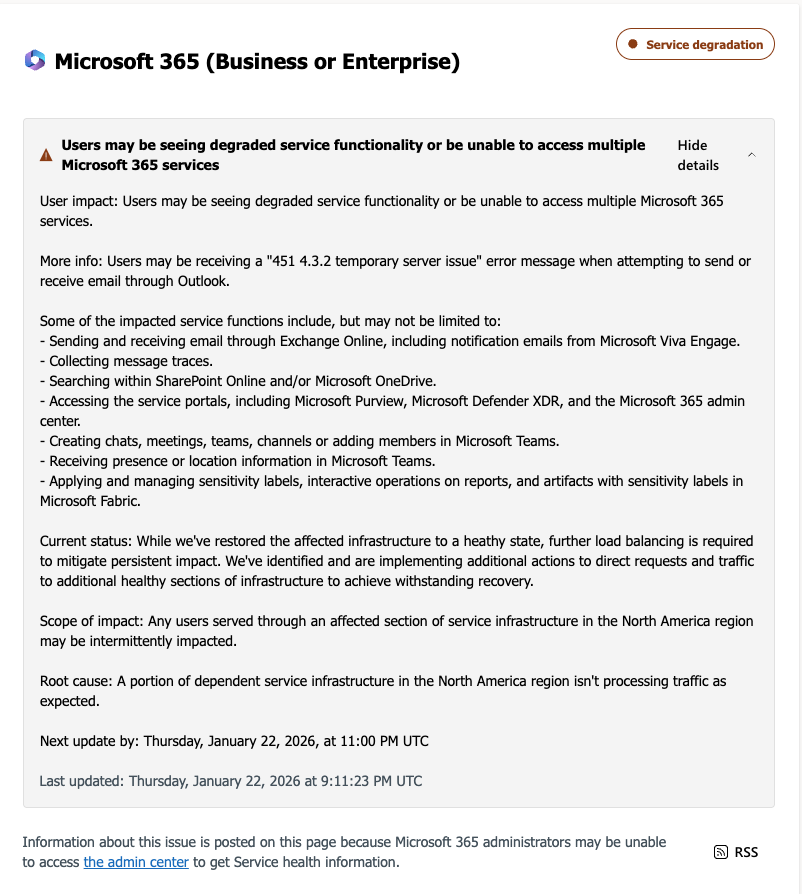
Microsoft said the outage was caused by a portion of its North American service infrastructure that was failing to properly handle traffic. Users attempting to send or receive email encountered a “451 4.3.2 temporary server issue” error message.

Microsoft also warned that related services, including OneDrive search and SharePoint Online, could experience slowdowns or intermittent failures during the incident.

When did the Microsoft outage happen? 

The disruption unfolded over several hours on Thursday afternoon (ET). 

Based on timelines reported by CNBC and live coverage from Tom’s Guide, the outage progressed as follows: 

Around 2:00 p.m. ET: User reports spike across Microsoft services, especially Outlook, according to Down Detector data cited by Tom’s Guide.

2:37 p.m. ET: Microsoft confirms it is investigating an Outlook email issue, per CNBC.

3:17 p.m. ET: Microsoft says it identified misrouted traffic tied to infrastructure problems in North America, CNBC reports.

4:14 p.m. ET: The company announces affected infrastructure has been restored and traffic is being redirected to recover service.

Tom’s Guide reported that while outage reports declined after Microsoft’s fix, some users continued to experience intermittent access issues as systems rebalanced. 

Was this a hack or cyberattack? 

No. Microsoft says the outage was caused by technical infrastructure issues. 

According to CNBC, Microsoft has not indicated that the outage was the result of hacking, ransomware, or any external attack. Instead, the company attributed the disruption to internal infrastructure handling errors, similar to a previous Outlook outage last July that lasted more than 21 hours. 

Message from Microsoft

A message sent by Microsoft about the server issue.

Why outages  cause widespread disruption 

Modern work depends on shared cloud infrastructure. 

That sudden loss of access often leaves users unsure whether: 

  • Their account has been compromised 
  • Their data is at risk 
  • They need to take immediate action 

That uncertainty is exactly what scammers look for. 

How scammers exploit big tech outages

They impersonate the company and trick users into signing in again. 

After major outages involving Microsoft, Google, or Amazon Web Services, security researchers, including McAfee, have observed scam campaigns emerge within hours. 

These scams typically work by: 

Impersonating Microsoft using logos, branding, and language copied from real outage notices 

Sending fake “service restoration” emails or texts claiming users must re-authenticate 

Linking to realistic login pages designed to steal Microsoft usernames and passwords 

Posing as IT support or Microsoft support and directing users to fake phone numbers 

Once credentials are stolen, attackers can access email accounts, reset passwords on other services, or launch further phishing attacks from a trusted address. 

How to stay safe during a Microsoft outage 

Outages are confusing. Scammers rely on urgency and familiarity. 

To reduce risk: 

  • Do not click links in emails or texts about outages or “account recovery.” 
  • Go directly to official sources, such as Microsoft’s status page or verified social accounts. 
  • Never re-enter your password through links sent during an outage. 
  • Ignore urgent fixes that ask for downloads, payments, or credentials. 

If you already clicked or entered information: 

  • Change your Microsoft password immediately 
  • Update passwords anywhere you reused it 
  • Turn on or refresh two-factor authentication 
  • Review recent account activity 
  • Run a trusted security scan to remove malicious software (check out our free trial) 

How McAfee can help 

Using advanced artificial intelligence, McAfee’s built-in Scam Detector automatically detects scams across text, email, and video, blocks dangerous links, and identifies deepfakes, helping stop harm before it happens. 

McAfee’s identity protection tools also monitor for signs your personal information may be exposed and guide you through recovery if scammers gain access. 

FAQ 

Q: Is Microsoft Outlook still down?
A: Microsoft said Thursday afternoon that it had restored affected infrastructure and was redirecting traffic to recover service, according to CNBC. Some users may still experience intermittent issues. 
Q: Was the Microsoft outage caused by hackers?
A: No. Microsoft has not reported any cyberattack or data breach related to the outage, per CNBC. 
Q: Can scammers really use outages to steal accounts?
A: Yes. During major outages, scammers often impersonate companies like Microsoft and trick users into signing in again on fake websites. 
Q: Should I reset my password after an outage?
A: Only if you clicked a suspicious link or entered your credentials somewhere outside Microsoft’s official site. Otherwise, resetting passwords isn’t necessary. 


The post Today’s Microsoft Outage Explained and Why it Triggers a Scam Playbook appeared first on McAfee Blog.

☐ ☆ ✇ WeLiveSecurity

Common Apple Pay scams, and how to stay safe

— January 22nd 2026 at 10:00
Here’s how the most common scams targeting Apple Pay users work and what you can do to stay one step ahead
☐ ☆ ✇ Krebs on Security

Kimwolf Botnet Lurking in Corporate, Govt. Networks

By: BrianKrebs — January 20th 2026 at 18:19

A new Internet-of-Things (IoT) botnet called Kimwolf has spread to more than 2 million devices, forcing infected systems to participate in massive distributed denial-of-service (DDoS) attacks and to relay other malicious and abusive Internet traffic. Kimwolf’s ability to scan the local networks of compromised systems for other IoT devices to infect makes it a sobering threat to organizations, and new research reveals Kimwolf is surprisingly prevalent in government and corporate networks.

Image: Shutterstock, @Elzicon.

Kimwolf grew rapidly in the waning months of 2025 by tricking various “residential proxy” services into relaying malicious commands to devices on the local networks of those proxy endpoints. Residential proxies are sold as a way to anonymize and localize one’s Web traffic to a specific region, and the biggest of these services allow customers to route their Internet activity through devices in virtually any country or city around the globe.

The malware that turns one’s Internet connection into a proxy node is often quietly bundled with various mobile apps and games, and it typically forces the infected device to relay malicious and abusive traffic — including ad fraud, account takeover attempts, and mass content-scraping.

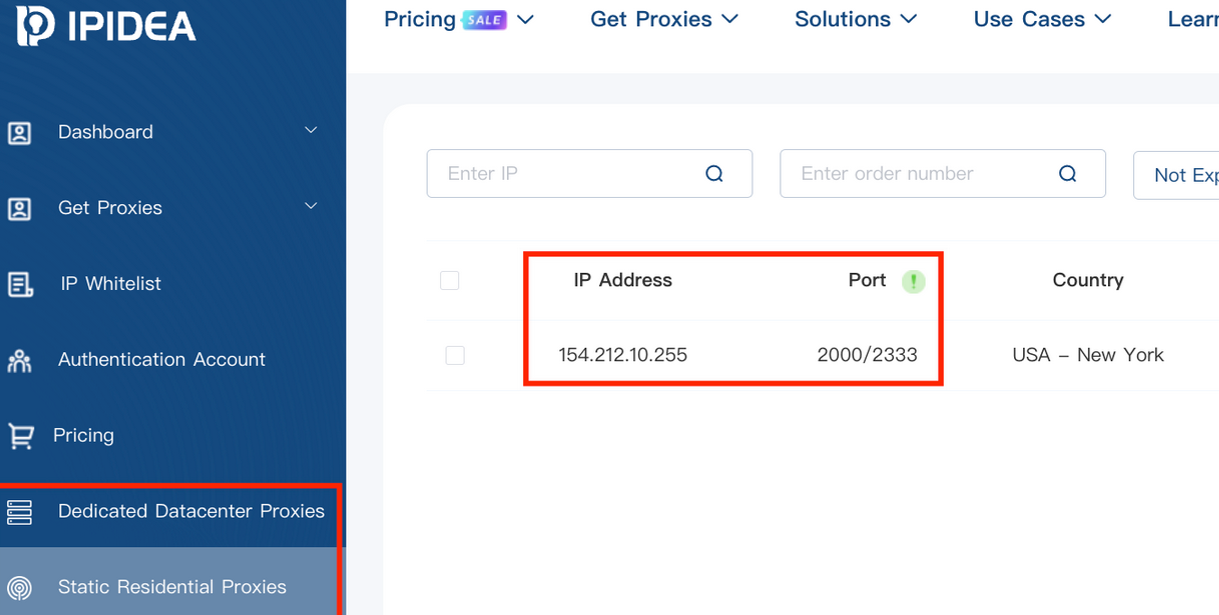
Kimwolf mainly targeted proxies from IPIDEA, a Chinese service that has millions of proxy endpoints for rent on any given week. The Kimwolf operators discovered they could forward malicious commands to the internal networks of IPIDEA proxy endpoints, and then programmatically scan for and infect other vulnerable devices on each endpoint’s local network.

Most of the systems compromised through Kimwolf’s local network scanning have been unofficial Android TV streaming boxes. These are typically Android Open Source Project devices — not Android TV OS devices or Play Protect certified Android devices — and they are generally marketed as a way to watch unlimited (read:pirated) video content from popular subscription streaming services for a one-time fee.

However, a great many of these TV boxes ship to consumers with residential proxy software pre-installed. What’s more, they have no real security or authentication built-in: If you can communicate directly with the TV box, you can also easily compromise it with malware.

While IPIDEA and other affected proxy providers recently have taken steps to block threats like Kimwolf from going upstream into their endpoints (reportedly with varying degrees of success), the Kimwolf malware remains on millions of infected devices.

A screenshot of IPIDEA’s proxy service.

Kimwolf’s close association with residential proxy networks and compromised Android TV boxes might suggest we’d find relatively few infections on corporate networks. However, the security firm Infoblox said a recent review of its customer traffic found nearly 25 percent of them made a query to a Kimwolf-related domain name since October 1, 2025, when the botnet first showed signs of life.

Infoblox found the affected customers are based all over the world and in a wide range of industry verticals, from education and healthcare to government and finance.

“To be clear, this suggests that nearly 25% of customers had at least one device that was an endpoint in a residential proxy service targeted by Kimwolf operators,” Infoblox explained. “Such a device, maybe a phone or a laptop, was essentially co-opted by the threat actor to probe the local network for vulnerable devices. A query means a scan was made, not that new devices were compromised. Lateral movement would fail if there were no vulnerable devices to be found or if the DNS resolution was blocked.”

Synthient, a startup that tracks proxy services and was the first to disclose on January 2 the unique methods Kimwolf uses to spread, found proxy endpoints from IPIDEA were present in alarming numbers at government and academic institutions worldwide. Synthient said it spied at least 33,000 affected Internet addresses at universities and colleges, and nearly 8,000 IPIDEA proxies within various U.S. and foreign government networks.

The top 50 domain names sought out by users of IPIDEA’s residential proxy service, according to Synthient.

In a webinar on January 16, experts at the proxy tracking service Spur profiled Internet addresses associated with IPIDEA and 10 other proxy services that were thought to be vulnerable to Kimwolf’s tricks. Spur found residential proxies in nearly 300 government owned and operated networks, 318 utility companies, 166 healthcare companies or hospitals, and 141 companies in banking and finance.

“I looked at the 298 [government] owned and operated [networks], and so many of them were DoD [U.S. Department of Defense], which is kind of terrifying that DoD has IPIDEA and these other proxy services located inside of it,” Spur Co-Founder Riley Kilmer said. “I don’t know how these enterprises have these networks set up. It could be that [infected devices] are segregated on the network, that even if you had local access it doesn’t really mean much. However, it’s something to be aware of. If a device goes in, anything that device has access to the proxy would have access to.”

Kilmer said Kimwolf demonstrates how a single residential proxy infection can quickly lead to bigger problems for organizations that are harboring unsecured devices behind their firewalls, noting that proxy services present a potentially simple way for attackers to probe other devices on the local network of a targeted organization.

“If you know you have [proxy] infections that are located in a company, you can chose that [network] to come out of and then locally pivot,” Kilmer said. “If you have an idea of where to start or look, now you have a foothold in a company or an enterprise based on just that.”

This is the third story in our series on the Kimwolf botnet. Next week, we’ll shed light on the myriad China-based individuals and companies connected to the Badbox 2.0 botnet, the collective name given to a vast number of Android TV streaming box models that ship with no discernible security or authentication built-in, and with residential proxy malware pre-installed.

Further reading:

The Kimwolf Botnet is Stalking Your Local Network

Who Benefitted from the Aisuru and Kimwolf Botnets?

A Broken System Fueling Botnets (Synthient).

☐ ☆ ✇ WIRED

ICE Agents Are ‘Doxing’ Themselves

By: Maddy Varner — January 22nd 2026 at 17:42
The alleged risks of being publicly identified have not stopped DHS  and ICE employees from creating profiles on LinkedIn, even as Kristi Noem threatens to treat revealing agents’ identities as a crime.
☐ ☆ ✇ McAfee Blogs

Didn’t Request an Instagram Password Reset? Here’s What to Do

By: Brooke Seipel — January 21st 2026 at 23:27

If you recently received an unexpected email from Instagram asking you to reset your password, you are not alone. Over the past several days, thousands of users reported receiving legitimate password reset emails they did not request. 

The sudden wave of messages led to widespread confusion and concern about whether Instagram had suffered a data breach. Instagram and its parent company Meta deny that a breach occurred, stating instead that they fixed an issue that allowed an external party to trigger password reset emails for some users. 

While the exact source of the activity remains disputed, the situation highlights a broader and more important issue. Password reset emails, even when legitimate, are often the first signal users get that their information may be exposed, reused, or being targeted by attackers. 

Here is what we know so far and what this incident reveals about how password compromises really happen. 

Was Instagram Hacked? 

Instagram says no. 

In statements reported by the BBC and BleepingComputer, Meta said it resolved a problem that allowed an external party to request password reset emails on behalf of users. The company maintains there was no breach of its systems and that accounts remain secure. 

At the same time, cybersecurity researchers and firms, including Malwarebytes, have warned about a dataset circulating on hacking forums that allegedly contains information linked to more than 17 million Instagram accounts. According to reporting, that data may include usernames, email addresses, phone numbers, locations, and account IDs, but not passwords. 

Some researchers believe the dataset may be a compilation of older scraped data rather than evidence of a new breach. Others say the timing of the password reset emails and the appearance of the data raises unresolved questions. 

What matters for users is this: regardless of whether this was a new breach, old scraped data, or a technical abuse of password reset systems, attackers routinely use exposed personal information to launch phishing, account takeover attempts, and social engineering attacks. 

What Counts as a Data Breach and What Does Not 

A true data breach occurs when attackers gain unauthorized access to internal systems and steal protected data such as passwords, financial information, or private communications. 

In many cases, personal data is also exposed through: 

  • API scraping of publicly accessible information 
  • Older leaks that are resold or repackaged 
  • Credential stuffing using passwords stolen from unrelated sites 
  • Abuse of account recovery or password reset features 

That distinction matters because even when passwords are not leaked, exposed personal data can still be weaponized. Names, emails, phone numbers, and locations are often enough for scammers to craft convincing phishing messages that appear legitimate. 

Why You Might Receive a Password Reset Email You Did Not Request 

There are several common reasons this happens, and none of them require your Instagram password to be stolen. 

  • Someone may be testing whether your email address is linked to an account. 
  • Attackers may be attempting credential stuffing using passwords from past breaches. 
  • Your information may appear in older datasets that are being reused or resold. 
  • A platform bug or abuse of recovery systems may trigger reset emails at scale. 

Scammers often use these moments to send fake follow-up emails that look nearly identical to legitimate ones. That is why security experts consistently recommend going directly to the app or official website rather than clicking links in unexpected messages. 

What to Do If You Received an Instagram Password Reset Email 

If you did not request the reset:  

  1. Do not click links in the email. 
  2. Open the Instagram app or visit the official site directly to review security settings.  
  3. Check recent login activity and remove any unfamiliar sessions. 
  4. Enable two-factor authentication (2FA) if it is not already turned on. 

If you decide to change your password, make sure the new one is unique and not used anywhere else. 

Meta/IG Accounts Center Screenshot

Click “Review Settings” to enable 2FA in your Account Center

How to enable multi-factor authentication for Instagram 

  1. Click More in the bottom left, then click Settings. 
  2. Click See more in Accounts Center, then click Password and Security. 
  3. Click Two-factor (2FA) authentication, then select an account. 
  4. Choose the security method you want to add and follow the on-screen instructions. 

When you set up two-factor authentication on Instagram, you’ll be asked to choose one of three security methods: an authentication app, text message, or WhatsApp. 

And here’s a link to the company’s full walkthrough: https://help.instagram.com/566810106808145 

How to Manage Passwords the Right Way 

Remembering dozens of unique, strong passwords is not realistic for most people. That is why password managers exist. 

A password manager can: 

  • Generate strong, unique passwords for every account 
  • Store them securely so you do not need to remember them 
  • Alert you if your credentials appear in known breaches 
  • Reduce the risk of account takeover from reused passwords 

Using a password manager removes the pressure to reuse passwords and helps close one of the most common doors attackers walk through.  

McAfee’s password manager helps you secure your accounts by generating complex passwords, storing them and auto-filling your info for faster logins across devices. It’s secure and, best of all, you only have to remember a single password. 

FAQ: Instagram Password Reset Emails and Account Safety 

Was my Instagram password stolen?
There is no evidence that passwords were leaked in this incident. 
Should I reset my password anyway?
If you are unsure or reuse passwords elsewhere, resetting it directly in the app is a smart precaution. 
Are the emails real or phishing?
Some emails were legitimate, but scammers often mimic them. Always go directly to the app or website. 
Why is password reuse dangerous?
Because a breach on one site can expose all accounts that share the same password. 


The post Didn’t Request an Instagram Password Reset? Here’s What to Do appeared first on McAfee Blog.

☐ ☆ ✇ /r/netsec - Information Security News & Discussion

[FREE DATASET] 67K+ domains with technology fingerprints

By: /u/Upper-Character-6743 — January 22nd 2026 at 04:48

This dataset contains information on what technologies were found on domains during a web crawl in December 2025. The technologies were fingerprinted by what was detected in the HTTP responses.

A few common use cases for this type of data

  • You're a developer who had built a particular solution for a client, and you want to replicate your success by finding more leads based on that client's profile. For example, find me all electrical wholesalers using WordPress that have a `.com.au` domain.
  • You're performing market research and you want to see who is already paying for your competitors. For example, find me all companies using my competitors product who are also paying for enterprise technologies (indicates high technology expenditure).
  • You're a security researcher who is evaluating the impact of your findings. For example, give me all sites running a particular version of a WordPress plugin.

The 67K domain dataset can be found here: https://www.dropbox.com/scl/fi/d4l0gby5b5wqxn52k556z/sample_dec_2025.zip?rlkey=zfqwxtyh4j0ki2acxv014ibnr&e=1&st=xdcahaqm&dl=0

Preview for what's here: https://pastebin.com/9zXxZRiz

The full 5M+ domains can be purchased for 99 USD at: https://versiondb.io/

VersionDB's WordPress catalogue can be found here: https://versiondb.io/technologies/wordpress/

Enjoy!

submitted by /u/Upper-Character-6743
[link] [comments]
☐ ☆ ✇ /r/netsec - Information Security News & Discussion

Third-party identity verification provider breach exposes government ID images (Total Wireless / Veriff)

By: /u/Bp121687 — January 21st 2026 at 19:15

Regulatory disclosure filed with the Maine Attorney General describing a third-party identity verification system breach.

submitted by /u/Bp121687
[link] [comments]
☐ ☆ ✇ /r/netsec - Information Security News & Discussion

When the Lab Door Stays Open: Exposed Training Apps Exploited for Fortune 500 Cloud Breaches

By: /u/Street-Plum7312 — January 21st 2026 at 18:08

From misconfigured cloud environments to wormable crypto-miners; how vulnerable “test” and “demo” environments turned into an entry point to leading security vendors’ and fortune 500 companies.

submitted by /u/Street-Plum7312
[link] [comments]
☐ ☆ ✇ WIRED

Surveillance and ICE Are Driving Patients Away From Medical Care, Report Warns

By: Dell Cameron — January 21st 2026 at 18:04
A new EPIC report says data brokers, ad-tech surveillance, and ICE enforcement are among the factors leading to a “health privacy crisis” that is eroding trust and deterring people from seeking care.
❌