Some internet connectivity is returning in Iran after nearly 90 days offline, web monitoring groups say. But it isn’t clear if the reconnection is permanent.
As Americans stew over the looming risk of job-stealing AI and data centers in their back yards, the feds are raising the alarm about a new category of threat, documents obtained by WIRED show.
Authorities in the Netherlands have arrested the co-owners of two related Internet hosting companies for operating IT infrastructure used by Russia to carry out cyberattacks, influence operations and disinformation campaigns inside the European Union. The two men were the focus of a 2025 KrebsOnSecurity story about how their hosting companies had assumed control over the technical infrastructure of Stark Industries Solutions, an Internet service provider sanctioned last year by the EU as a frequent staging ground for cyber mischief from Russia’s intelligence agencies.
An investigator with the Tax Intelligence and Investigation Service (FIOD), the Dutch financial crimes agency, during the raid. Image: FIOD.
The Dutch daily news outlet de Volkskrantreports that the Dutch financial crime agency FIOD on May 18 arrested a 57-year-old from Amsterdam and a 39-year-old from The Hague, charging them with violating sanctions law by directly or indirectly making economic resources available to EU-sanctioned entities.
The Dutch investigation focuses on Stark Industries, a sprawling hosting provider that materialized just two weeks before Russia invaded Ukraine. As detailed in this May 2024 deep-dive, Stark quickly became the source of massive distributed denial-of-service (DDoS) attacks against European targets, and emerged as a top supplier of proxy and anonymity services that showed up time and again in cyberattacks linked to Russia-backed hacking groups.
That report identified two Moldovan brothers — Ivan and Yuri Neculiti and their company PQHosting — who were providing one of Stark’s two main conduits to the larger Internet. In May 2025, the EU sanctioned PQHosting and the Neculiti brothers for aiding Russia’s hybrid warfare efforts. But as KrebsOnSecurity observed in September 2025, those sanctions failed to target Stark’s remaining connection to the Internet — an Internet service provider based in the Netherlands called MIRhosting.
MIRhosting is operated by Andrey Nesterenko, a 39-year-old Russian native who runs the business out of the Netherlands. News that PQHosting and the Neculiti brothers were about to be sanctioned by the EU leaked in the media nearly two weeks before the sanctions were announced last year. During that time, the Stark network assets were transferred from PQHosting to a new entity called the[.]hosting, under the control of the Dutch entity WorkTitans BV.
And as our September 2025 report showed, WorkTitans was controlled by Nesterenko and a 57-year-old from Amsterdam named Youssef Zinad. On top of that, WorkTitans was getting connectivity to the larger Internet solely through MIRhosting, where Zinad had worked previously.
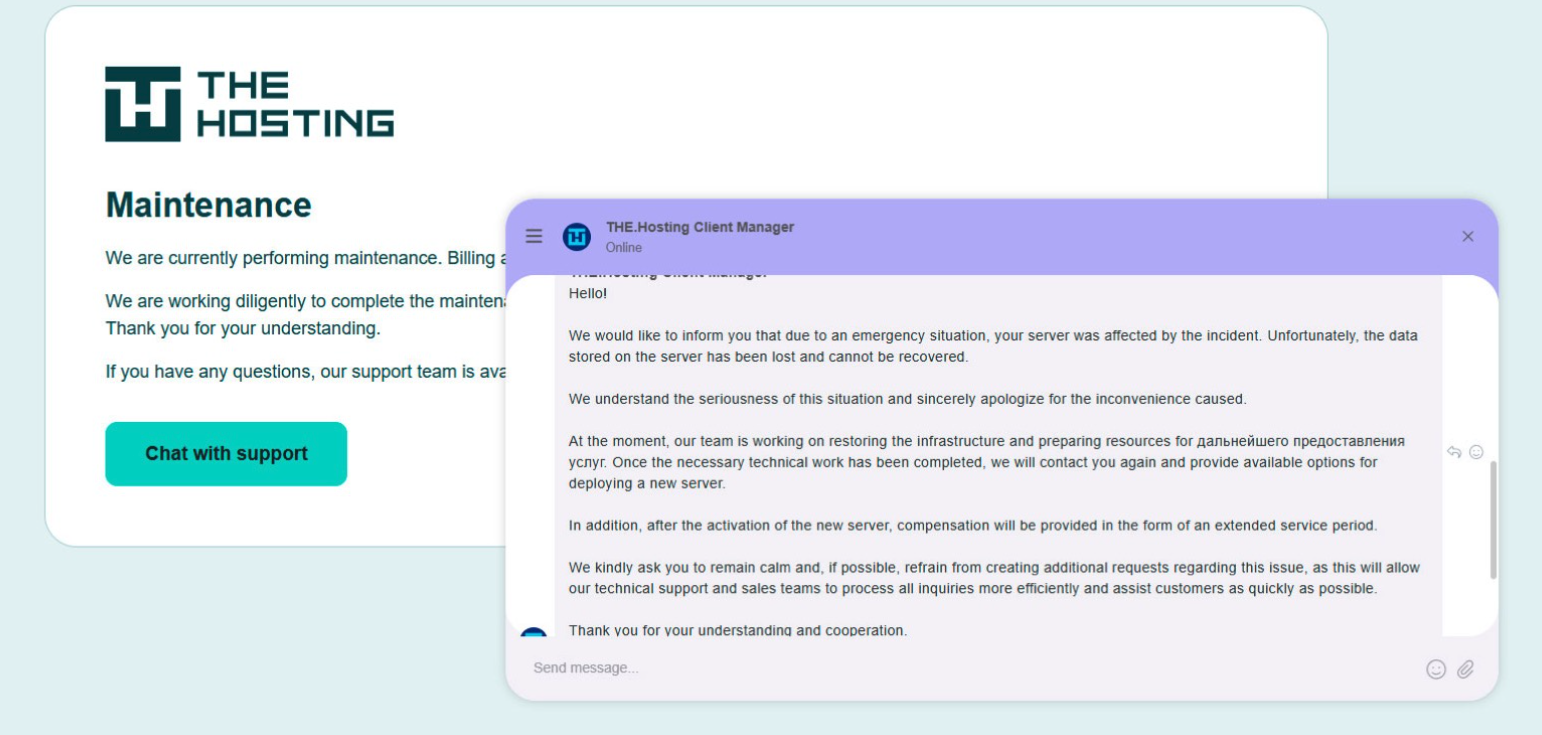
On May 18, Dutch financial crime investigators arrested Nesterenko and Zinad, and searched three businesses in Enschede and Almere and two data centers in Dronten and Schiphol-Rijk. A statement from the Dutch authorities said they also seized laptops, telephones and more than 800 servers.
A message to the-hosting customers immediately after 800 of its servers were seized by Dutch authorities. The message says that unfortunately data stored on the server has been lost and cannot be recovered.
De Volkskrant said it reviewed data showing WorkTitans and MIRhosting were the most-used networks in pro-Russian attacks on Danish government bodies between November 13 and 19, 2025, the week of Denmark’s municipal elections.
The publication wrote that prior to Nesterenko’s arrest, the MIRhosting founder denied that he knew his servers had been misused by pro-Russian cybercriminals. “He said he had ended all services with the Neculiti brothers when the EU sanctions came into force in May 2025,” and the he “reserved all rights to take action against ‘harmful and incorrect publications,” de Volkskrant wrote.
MIRhosting released a statement saying it has initiated an internal investigation into the alleged facts concerning the elections in Denmark, and that it has temporarily paused services to WorkTitans as a precautionary measure while the matter is being reviewed further.
“Based on our preliminary findings, there are no indications that the services over which we exercise control were actually used to influence the Danish elections,” the statement reads. “No anomalies or spikes were observed in our network traffic during the period mentioned in the publication; had large-scale DDoS attacks occurred, such activity would have been evident. Furthermore, prior to the media publication, we had not received any complaints, abuse reports, or official requests regarding suspicious activities or misuse of our network. Meanwhile, our regular operational activities continue, and our service to our other clients remains fully intact.”
Born in Nizhny Novgorod, Russia, Mr. Nesterenko grew up as a piano prodigy who performed publicly at a young age. In 2004, Nesterenko founded MIRhosting’s parent Innovation IT Solutions Corp., which has the notable distinction of being the company responsible for hosting stopgeorgia[.]ru, a hacktivist website for organizing cyberattacks against Georgia that appeared at the same time Russian forces invaded the former Soviet nation in 2008. That conflict was thought to be the first war ever fought in which a notable cyberattack and an actual military engagement happened simultaneously.
Responding to questions shared via email, Nesterenko said MIRhosting does not support cybercrime, sanctions evasion, or illegal activity, and that the allegations and arrest by Dutch authorities have been extremely harmful to him and his company.
“The transition to the.hosting was not intended to evade sanctions,” Nesterenko wrote. “The hardware and customer portfolio had already been transferred to WorkTitans before the sanctions appeared. Closing or damaging a legitimate Dutch infrastructure company will not stop cybercrime, but it will harm many people who have done nothing wrong.”
Far less is public about the 57-year-old Zinad, who reportedly has been keeping a low profile since our story last year. De Volkskrant reported that Zinad blocked access to his LinkedIn account, had gone months without responding to emails, WhatsApp messages and phone calls, and told a colleague that illness was forcing him to lead a somewhat more reclusive life.
Mr. Zinad’s now-defunct LinkedIn profile. It was full of posts for MIRhosting’s services.
Mr. Nesterenko claims Zinad was never an employee of MIRhosting.
“He helped me and MIRhosting with certain business tasks under a normal business-to-business arrangement between companies,” Nesterenko explained.
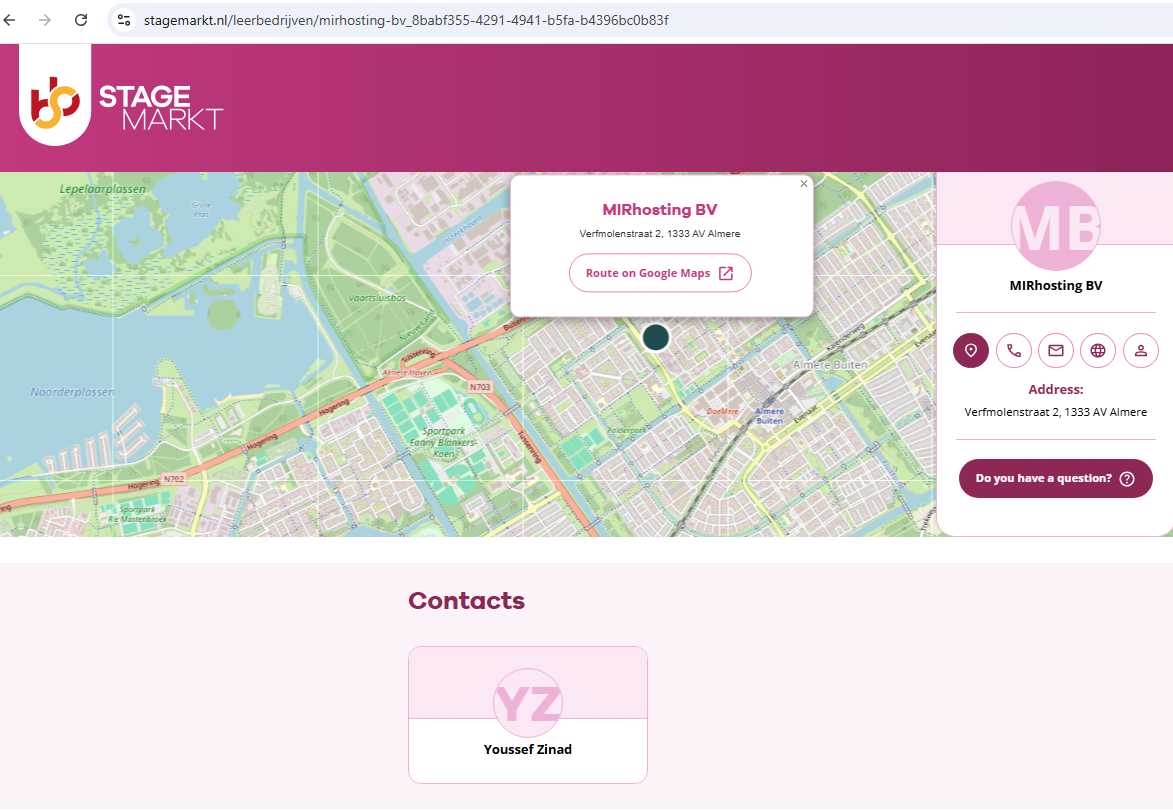
However, in previous emails to KrebsOnSecurity, Nesterenko carbon copied Mr. Zinad (who had a @mirhosting.com email), explaining that he was part of the company’s legal team. Also, the Dutch website stagemarkt[.]nl lists Youssef Zinad as an official contact for MIRhosting’s offices in Almere.
Mr. Zinad has never responded to requests for comment. Nor did de Volkskrant have any luck tracking him down. The publication said it repeatedly asked Mr. Zinad (referred to here as simply “Z”), but he reportedly avoided every form of contact.
“‘I am unavailable but will respond to your message as soon as possible,’ reads an automated reply on WhatsApp on 2 October 2025,” de Volkskrant reported. “It is the only response de Volkskrant would receive in months. He did not pick up his phone and did not call back. When an acquaintance asked him via LinkedIn to contact the reporter, he blocked access to his LinkedIn page. At an address in Almere where Z.’s personal limited company is registered, no one was present in April. The corner house’s blinds were drawn, and a pile of rubbish bags lay outside next to a container, as if someone had recently left. A neighbour said he knew the man but did not know where he was staying. Z. was later arrested at a residence in Amsterdam.”
Plus: Google publishes a live exploit for an unpatched flaw, the feds arrest two men accused of creating thousands of nonconsensual deepfake nudes, and more.
Memorial Day weekend officially kicks off summer, and for millions of Americans, that means road trips, flights, cookouts, and a little online shopping for the deals.
Unfortunately, scammers know this. They count on the fact that you’re distracted, you’re moving fast, and you’re probably connected to a network you don’t own.
Here are five scams surging this holiday weekend, what they look like, and how to stay ahead of them.
1. Fake Travel Alerts from “Your Bank” or Hotel
You’re packing your bag when a text arrives: “Unusual activity detected on your account. Verify now to avoid suspension.”
It looks like it’s from your bank, or maybe your hotel loyalty program. There’s a link. There’s urgency. And that’s exactly the point.
These are brand impersonation scams, and they’re a dominant tactic year-round, but they spike around travel holidays when people are actively monitoring reservations and accounts.
Example of a fraudulent AMEX message.
According to McAfee research, trusted brands like banks, airlines, and hotels are among the most commonly impersonated, and email scams impersonating retail and financial brands have surged up to 85% as major holidays approach.
The message will typically ask you to click a link and “confirm your details” to secure your account or honor a reservation. That link leads to a convincing-looking fake site designed to capture your login credentials, payment info, or both.
How to Avoid Travel Alert Scams:
Don’t click links in unsolicited texts or emails.
Go directly to the company’s app or website by typing the URL yourself.
Remember: pressure is a tactic, not customer service.
McAfee’s Scam Detector can flag suspicious messages before you interact with them, whether they come via text, email, or social media.
2. Fake Memorial Day Weekend “Deals”
Memorial Day is one of the biggest shopping weekends of the year. Scammers treat it like an open invitation.
Fraudulent retailers flood social feeds with too-good-to-be-true deals on everything from patio furniture to electronics, often impersonating legitimate brands with copycat websites and paid ads.
According to McAfee’s holiday shopping research, 91% of shoppers see ads from unfamiliar retailers, 37% say they might buy from a brand they don’t recognize, and a full 40% of consumers have abandoned a purchase out of fear that the deal wasn’t real.
The most impersonated brands in McAfee’s research span luxury labels (Coach, Dior, Gucci) to mainstream favorites (Apple, Samsung, Nintendo, Disney), exactly the kind of items that show up in “blowout sale” ads. Fake storefronts have grown significantly, with technology URL scams rising nearly 50%.
Once shoppers enter their payment details on a fraudulent site, that information goes directly to criminals. The average scam loss during the holiday shopping period runs around $840 per victim.
How to Avoid Shopping Scams:
Type retailer URLs directly into your browser instead of clicking through ads or social posts.
Look for HTTPS and double-check the domain carefully before entering any payment info.
If a deal looks unbelievably good, verify it on the retailer’s official app before buying.
McAfee’s Web Protection blocks malicious and suspicious sites before they load, including fake checkout pages.
3. QR Code Scams at Gas Stations and Travel Stops
If you’re road-tripping this weekend, you may scan a QR code somewhere. It could be at the gas pump, a rest stop, a parking meter, or a roadside attraction. Scammers know this too.
Criminals increasingly place fake QR codes over legitimate ones on gas station pumps, parking kiosks, and public signs. When you scan, you’re redirected to a convincing-looking payment or login page that captures your financial information. This is known as “quishing” or phishing via QR code.
McAfee research shows just how widespread this risk has become: 68% of people scanned a QR code in the past three months, and 18% ended up on a suspicious or unsafe page after scanning. Among those who did, more than half took a risky action like entering personal information, installing an app, or connecting a digital wallet.
How to Avoid Sketchy QR Codes:
Before scanning any QR code in public, look closely at the sticker or sign.
If it looks like it’s been placed over something else, skip it.
If you do scan, check the URL before proceeding.
McAfee’s Scam Detector now includes instant QR code safety checks that assess risk before you tap, so you’re not flying blind at the gas pump.
This shows how McAfee blocks unsafe QR codes.
4. Public Wi-Fi Traps at Airports, Hotels, and Coffee Shops
Whether you’re waiting at the airport or grabbing coffee before hitting the highway, free Wi-Fi can feel like a gift. But not every “free Wi-Fi” network is what it appears to be.
Hackers set up what are called “evil twin” networks, hotspots with names designed to look exactly like the legitimate network at the airport, hotel, or café you’re in.
The moment you connect, they can use tools called packet sniffers to capture the data you send and receive: passwords, banking credentials, credit card numbers, email logins.
According to McAfee’s travel research, 63% of travelers connect to public Wi-Fi, and 49% use airport Wi-Fi, making these among the riskiest behaviors travelers engage in without realizing it.
Some of these fake networks go further, presenting a phony login screen that captures your username and password for popular services like Google or Apple before you even realize you’ve been compromised.
How to Avoid Malicious Wi-Fi :
Always confirm the exact Wi-Fi network name with staff before connecting.
Turn off auto-join for Wi-Fi on your devices.
And most importantly: use a VPN.
A VPN creates an encrypted tunnel for your internet traffic, so even if a hacker intercepts it, they’ll only see scrambled data. McAfee’s VPN is included in McAfee+ plans and automatically connects when you join public Wi-Fi, exactly the protection you want when you’re traveling and connecting everywhere.
5. Toll Road and Parking Text Scams (Expect a Surge After the Weekend)
You may have seen these already: a text that says you owe an unpaid toll or parking fee, with a link to pay before penalties kick in. These scams have been circulating for a while, and there’s a good chance Memorial Day weekend is about to make them worse.
Scammers track news cycles and know that millions of Americans will be driving this weekend, many of them through toll roads and unfamiliar areas.
That means they can blast out fake “unpaid toll” texts after the holiday and a significant percentage of recipients will think: “Actually, I did drive somewhere new this weekend.” That uncertainty is exactly what they’re counting on.
Fake court notices threatening parking and toll violations have been making the rounds this spring.
These texts typically impersonate EZPass, SunPass, or state transportation departments and create urgency around a small fee to avoid larger fines. The link leads to a fake payment page designed to steal your credit card details.
How to Avoid Toll Scams:
Don’t click links in unsolicited toll or parking texts.
If you think the charge might be legitimate, go directly to your state’s official toll authority website and look up your account there.
Real toll agencies will not threaten immediate penalties over text with a payment link.
If you receive one of these texts after this weekend, treat it as suspicious by default.
Have a Safe Memorial Day Weekend
Scammers don’t take holidays. If anything, long weekends are peak season. The good news: a little awareness goes a long way. Slow down before you click, verify before you scan, and protect your connection before you log on.
McAfee+ Advanced comes with layered protection across all the moments where scams are most likely to strike, from the gas station to the hotel lobby to your inbox.
Canadian authorities on Wednesday arrested a 23-year-old Ottawa man on suspicion of building and operating Kimwolf, a fast spreading Internet-of-Things botnet that enslaved millions of devices for use in a series of massive distributed denial-of-service (DDoS) attacks over the past six months. KrebsOnSecurity publicly named the suspect in February 2026 after the accused launched a volley of DDoS, doxing and swatting campaigns against this author and a security researcher. He now faces criminal hacking charges in both Canada and the United States.
A criminal complaint unsealed today in an Alaska district court charges Jacob Butler, a.k.a. “Dort,” of Ottawa, Canada with operating the Kimwolf DDoS botnet. A statement from the Department of Justice says the complaint against Butler was unsealed following the defendant’s arrest in Canada by the Ontario Provincial Police pursuant to a U.S. extradition warrant. Butler is currently in Canadian custody awaiting an initial court hearing scheduled for early next week.
The government said Kimwolf targeted infected devices which were traditionally “firewalled” from the rest of the internet, such as digital photo frames and web cameras. The infected systems were then rented to other cybercriminals, or forced to participate in record-smashing DDoS attacks, as well as assaults that affected Internet address ranges for the Department of Defense. Consequently, the DoD’s Defense Criminal Investigative Service is investigating the case, with assistance from the FBI field office in Anchorage.
“KimWolf was tied to DDoS attacks which were measured at nearly 30 Terabits per second, a record in recorded DDoS attack volume,” the Justice Department statement reads. “These attacks resulted in financial losses which, for some victims, exceeded one million dollars. The KimWolf botnet is alleged to have issued over 25,000 attack commands.”
On March 19, U.S. authorities joined international law enforcement partners in seizing the technical infrastructure for Kimwolf and three other large DDoS botnets — named Aisuru, JackSkid and Mossad — that were all competing for the same pool of vulnerable devices.
On February 28, KrebsOnSecurity identified Butler as the Kimwolf botmaster after digging through his various email addresses, registrations on the cybercrime forums, and posts to public Telegram and Discord servers. However, Dort continued to threaten and harass researchers who helped track down his real-life identity and dramatically slow the spread of his botnet.
Dort claimed responsibility for at least two swatting attacks targeting the founder of Synthient, a security startup that helped to secure a widespread critical security weakness that Kimwolf was using to spread faster and more effectively than any other IoT botnet out there. Synthient was among many technology companies thanked by the Justice Department today, and Synthient’s founder Ben Brundage told KrebsOnSecurity he’s relieved Butler is in custody.
“Hopefully this will end the harassment,” Brundage said.
An excerpt from the criminal complaint against Butler, detailing how he ordered a swatting attack against Ben Brundage, the founder of the security firm Synthient.
The government says investigators connected Butler to the administration of the KimWolf botnet through IP address, online account information, transaction records, and online messaging application records obtained through the issuance of legal process. The criminal complaint against Butler (PDF) shows he did little to separate his real-life and cybercriminal identities (something we demonstrated in our February unmasking of Dort).
In April, the Justice Department joined authorities across Europe in seizing domain names tied to nearly four-dozen DDoS-for-hire services, although because of a bureaucratic mix-up the list of seized domains has remain sealed until today. The DOJ said at least one of those services collaborated with Butler’s Kimwolf botnet.
A statement from the Ontario Provincial Police said a search warrant was executed on March 19 at Butler’s address in Ottawa, where they seized multiple devices. As a result of that investigation, Butler was arrested and charged this week with unauthorized user of computer; possession of device to obtain unauthorized use of computer system or to commit mischief; and mischief in relation to computer data. He is scheduled to remain in custody until a hearing on May 26.
In the United States, Butler is facing one count of aiding and abetting computer intrusion. If extradited, tried and convicted in a U.S. court, Butler could face up to 10 years in prison, although that maximum sentence would likely be heavily tempered by considerations in the U.S. Sentencing Guidelines, which make allowances for mitigating factors such as youth, lack of criminal history and level of cooperation with investigators.
Three firms will pay nearly $1 million for selling “Active Listening” technology that they claimed tapped people’s phones for advertising. The FTC alleges the “tech” was just pricey email lists.
GitHub is just the latest victim of TeamPCP, a gang that has carried out a spree of software supply chain attacks that has impacted hundreds of organizations.
One line tucked into a federal highway bill would strip funds from cities and states unless they kill their automated plate tracking programs—effectively banning the tech for all but toll collection.
A new study finds AI companies, defense firms, and dating apps are among 38 data collectors allegedly using manipulative design to confuse users while collecting their data.
You’re comparing airfare on your phone, watching prices climb by the hour, when a deal pops up that feels just good enough to grab. The timer’s ticking. The price looks right. You don’t want to miss it.
You’re comparing airfare on your phone, watching prices climb by the hour, when a deal pops up that feels just good enough to grab. The timer’s ticking. The price looks right. You don’t want to miss it.
That moment, when you’re rushing to lock something in, is exactly where scams thrive.
New McAfee research shows that more than 1 in 3 Americans have encountered a travel-related cyberthreat, and 41% of those impacted lost money, often exceeding $500.
This shows a screenshot of a fake Booking.com website detected by McAfee that was attempting to trick users into running malicious script/code
At the same time, rising travel costs and time pressure are pushing people to make faster, riskier decisions. Those arethe exact conditions scammers rely on.
That’s where protection has toshow up earlier.
McAfee’s Scam Detector lets you check suspicious links, messages, and booking sites before you click, so you can pause and verify instead of giving scammers the edge.
Travel Scams, Red Flags, and How McAfee Protects You
Travel Scam Type
Key Red Flags
How McAfee Helps
Fake travel deals
Prices far below market, pressure to “book now,” sites you’ve never heard of
Scam Detector flags suspicious links and explains why they’re risky, so you can avoid fake deals before you book
Fake booking confirmations
Unexpected messages about bookings you didn’t make, mismatched sender details
Scam Detector analyzes messages before you engage, helping you avoid fake confirmations
Fake airline/hotel websites
Slight URL changes, poor design, being pushed to pay immediately or off-platform
Safe Browsing helps block risky sites before you enter payment details, reducing the chance of fraud
Payment requests outside platforms
Asked to pay via wire transfer, crypto, or direct payment instead of official platforms
Scam Detector flags suspicious payment requests, helping you avoid sending money to scammers
QR code scams
QR codes posted in public with no clear source or context
Scam Detector checks QR links before they open, so you don’t land on malicious sites
Customer service impersonation
Calls or messages asking for login credentials or payment info
Scam Detector detects deepfake AI audio impersonation attempts, helping you avoid sharing sensitive information
AI-generated listings
Photos that look overly polished, details that don’t quite match up
Scam Detector identifies suspicious content patterns, helping you spot listings that aren’t real
Public Wi-Fi attacks
Open networks with no password or security prompts
VPN helps protect your data on public networks, keeping your personal information private
The Findings From Our 2026 Travel Research
McAfee Labs found that many travel scams work because they look familiar and spread fast.
TripAdvisor was the most commonly impersonated travel app, cloned at roughly three times the rate of other major platforms like Kayak, Expedia, and Booking.com.
In some cases, thousands of scam detections traced back to just a handful of fake apps, showing how quickly a convincing scam can take off when travelers are racing to book.
Top 5 Ways Rising Travel Costs Are Driving Risky Decisions
Our 2026 travel survey shows how rising prices and last‑minute pressure are changing traveler behavior, often in ways scammers exploit.
1. Booking faster than usual 90% feel pressure to act quickly
2. Choosing cheaper deals without verifying 32% would book before confirming legitimacy
3. Ignoring red flags 33% admit they’ve done it
4. Trusting messages that look legitimate 41% trust airline/hotel messages without verifying
5. Clicking links without checking the source 20% click first, verify later (or not at all)
The Travel Scams People Are Most Likely to Fall For
According to our consumer survey findings, those who reported falling for a travel scam said these were the methods scammers used to trick them:
1. Fake travel deals or promotions (15%)
2. Scam booking confirmations or updates (15%)
3. Manipulated accommodation listings or photos (15%)
4. Payment requests outside official platforms (11%)
5. Fake vacation rental listings (10%)
6. Fake airline or hotel websites (9%)
7. Customer service impersonation (9%)
8 Ways Travelers Put Themselves at Risk Without Realizing It
These common traveler behaviors are popular avenues for criminals to steal your information, data, and money.
1. Connecting to public Wi-Fi (63%)
2. Scanning QR codes without verifying (62%)
3. Using airport Wi-Fi (49%)
4. Trusting travel-related messages (41%)
5. Logging into financial apps on public Wi-Fi (22%)
6. Sharing travel plans in real time (22%)
7. Clicking travel links without verifying (20%)
8. Using shared/public computers (15%)
How McAfee Protects You Before, During, and After Your Trip
As prices rise and decisions happen in real time, it’s easy to prioritize convenience over caution. But that’s exactly the moment when small checks matter most.
Stage of Travel
What’s Happening
How McAfee Helps
Before You Book
Comparing deals, clicking promotions, booking flights and hotels under time pressure
Scam Detector checks links, messages, and booking sites before you click, helping you avoid fake deals and scam listings
During Your Trip
Connecting to public Wi-Fi, scanning QR codes, receiving travel updates and alerts
VPN helps secure your connection on public Wi-Fi, while Scam Detector flags suspicious messages and unsafe links in real time
After Your Trip
Accounts remain active, travel data stored across platforms, potential exposure from breaches
Identity Monitoring alerts you if your personal information appears online, helping you act quickly before damage spreads
With McAfee+ Advanced, multiple layers work together so you’re not left figuring it out after the damage is done.
Spend more time on your vacation, and less time worrying about scammers who want your vacation fund.
Starting May 19, tech platforms in the US will have to comply with the Take It Down Act. Here’s how more than a dozen major platforms are handling takedown demands for your nonconsensual nudes.
McAfee Total Protection just took first place in the latest AV-Comparatives PC Performance Test, the gold standard for measuring how much (or how little) security software slows down your computer.
With an overall impact score of 3.3 out of a possible 100, McAfee outperformed all 19 other security products tested and earned the highest possible rating: 3 Stars ADVANCED+.
The industry average? 12.8. McAfee came in nearly 4x lower than that. The lower the impact score, the less the software gets in your way
What Is the AV-Comparatives PC Performance Test?
AV-Comparatives is an independent cybersecurity testing lab that has been rigorously evaluating security software since 1999. Unlike a review written by a single journalist or a score based on a company’s own claims, AV-Comparatives tests are:
Independent: delivers unbiased, data‑driven evaluations of security products
Standardized: every product is tested under the same conditions
Widely trusted: regularly cited in product roundups, expert reviews, and buying guides that shape how consumers choose security software
The PC Performance Test specifically measures how much a security product impacts your computer’s everyday speed. Testing is conducted on a real Windows 11 machine (Intel Core i3, 8GB RAM, SSD) with all default settings enabled and an active internet connection. That’s the same setup millions of everyday users have at home.
The lower the impact score, the less the software gets in your way.
What McAfee’s Score Actually Means
McAfee Total Protection scored 3.3, the lowest impact score of all 20 products tested, and well below the industry average of 12.8.
Here’s a simple way to think about it: if the average security product takes a measurable toll on your machine while it works in the background, McAfee barely registers. You get full, always-on protection without the sluggishness that frustrates so many users.
This result earned McAfee the ADVANCED+ rating, the highest tier AV-Comparatives awards, reserved for products that deliver top-tier performance with minimal system impact.
Why “Lightweight” Protection Matters More Than You Think
There’s a common misconception that stronger protection means a heavier, slower product. McAfee’s results prove otherwise.
When your security software is slow, you notice it:
Apps take longer to open
Downloads feel sluggish
Your machine lags during everyday tasks
You’re tempted to disable protection to get your speed back, leaving yourself exposed
A lightweight product means protection that works quietly in the background, without making you choose between safety and performance. That’s the promise behind McAfee’s result, and it’s now independently verified.
AV-Comparatives Test Results
First Place, But Not for the First Time
This isn’t a one-off result. McAfee has earned the ADVANCED+ rating consistently across multiple rounds of AV-Comparatives testing, demonstrating that this level of performance isn’t luck. It’s the result of deliberate, sustained engineering.
Independent, repeatable results like these are what separate marketing claims from proven performance.
With McAfee, you get award-winning protection and award-winning performance, so your devices stay secure without slowing you down.
Which McAfee Plans Include This Protection?
The same AI-powered threat protection validated in this test is built into every major McAfee plan:
McAfee+ Premium
McAfee+ Advanced
McAfee+ Ultimate
McAfee Total Protection
McAfee LiveSafe
Whether you’re protecting one device or an entire household, you’re getting the same industry-leading, independently verified performance under the hood.
David Norman, a former Phoenix police officer who’s described himself as “a fucking savage,” now runs a company that provided training to Homeland Security’s Special Response Teams.
Plus: Instructure’s Canvas ransomware debacle comes to a close, an alleged dark net market kingpin gets arrested, OpenAI workers fall victim to a supply chain attack, and more.
A text that looks like it came straight from a courthouse is making the rounds across the U.S. And yes, I got it too.
First things first, that’s a scam. And to be clear: DON’T SCAN THAT QR CODE.
It’s the same playbook as last year’s toll road scams, just dressed up with a little more authority and a lot more pressure.
Before doing anything, our team ran it through McAfee’s Scam Detector. It immediately flagged the message as suspicious, and that’s exactly the kind of moment this tool is built for. When something feels just real enough to second guess, it gives you a clear signal before you click, scan, or spiral.
The text claims you’ve missed a payment, violated a law, or have some kind of outstanding “case.” It then pushes you to scan a QR code or click a link to resolve it quickly.
From there, one of two things usually happens:
You’re taken to a fake payment page designed to steal your money, or
You’re prompted to download something that gives scammers access to your device or data
Either way, the goal is the same: get you to act fast before you have time to question it.
Here’s the scam text I got in California. You’ll notice it looks exactly like the others across the country.
The red flags in this message
Urgent, threatening language about fines, penalties, or legal action
Vague accusations with no real details about what you supposedly did
Official-looking formatting like case numbers, clerk signatures, and judge names
Copy-paste consistency across states: McAfee employees in New York and California received nearly identical messages with the same names
There are reports of this scam popping up nationwide, but the rule is simple: law enforcement does not text you to demand payment or resolve legal issues.
What to do if you scanned the QR code
First, don’t panic. Then:
Do not pay anything or enter personal information
Do not delete apps you were told to install (this can make it harder to detect what happened)
Run a device scan using a trusted security tool like McAfee’s free antivirus
Keep an eye on your financial accounts and logins for unusual activity
And that, my friends, is scam number one in this week’s This Week in Scams (new format, we’re experimenting a little).
Let’s get into what else is on our radar.
Deepfake Celebrity Ads Are Targeting Seniors on Social Media. Here’s What a New Study Found.
If you saw our story last year about Al Roker speaking out after scammers used an AI-generated version of him to promote a fake hypertension cure, or the shocking case of a French woman who lost nearly $900,000 to fraudsters posing as Brad Pitt, you already know just how convincing celebrity deepfake scams have become.
Now, new reporting suggests these scams are reaching older adults at enormous scale.
According to a new study from the Center for Countering Digital Hate, just 30 of the most active scam advertisers on Facebook generated an estimated 215 million ad impressions over the past year. Nearly 73% of those impressions were shown to adults over 65.
The fake ads used AI-generated versions of well-known figures including Donald Trump, Joe Biden, Oprah Winfrey, Steve Harvey, and Brad Pitt to promote fake government benefits, miracle health products, and bogus financial offers.
These are some of the AI-generated and photoshopped images used by scammers last year to convince a woman she was dating Brad Pitt.
What McAfee’s Data Says About Celebrity Deepfake Scams
72% of Americans have seen a fake celebrity or influencer endorsement online
39% have clicked on one of these ads or posts
1 in 10 lost money or personal information
Average losses reached $525 per victim
The celebrities most commonly exploited in the U.S. included Taylor Swift, Scarlett Johansson, Jenna Ortega, and Sydney Sweeney, while Brad Pitt also ranked prominently on the global list.
When a familiar face appears in your social feed, whether it is Al Roker recommending a health product or Brad Pitt asking for help, your guard naturally drops.
And AI is making these fakes harder to detect.
McAfee’s 2026 State of the Scamiverse found that Americans now encounter an average of three deepfakes every day, yet more than one in three say they are not confident they can identify one.
In other words, scammers are weaponizing the faces people know best to make fraud feel familiar.
How to Spot a Deepfake on Social Media
Celebrity deepfakes are designed to look convincing, but there are still clues that something is off. If you see a video of Oprah Winfrey, Al Roker, or Brad Pitt promoting a miracle cure, government benefit, or investment opportunity, pause before you click.
Here are some of the biggest red flags to watch for:
Red Flag
What to Look For
Too-good-to-be-true offers
The video promises free grocery money, secret Medicare benefits, guaranteed investment returns, or miracle health cures.
Out-of-character endorsements
A celebrity appears to promote a random supplement, financial opportunity, or government program that seems unrelated to their normal work.
Robotic or unnatural voice
The speech sounds overly smooth, lacks natural pauses, or has strange pacing and tone.
Lip-sync issues
The celebrity’s mouth movements do not perfectly match the words being spoken.
Unnatural facial expressions
Blinking, smiling, and head movements appear stiff, overly polished, or slightly off.
Urgent language
The ad pressures you to “Act now,” “Claim your benefits today,” or “Limited spots available.”
Suspicious links
Clicking leads to a website you do not recognize or that does not match the company or organization being referenced.
No confirmation elsewhere
Trusted news outlets and the celebrity’s verified accounts do not mention the same announcement or offer.
When in doubt, go directly to the celebrity’s verified social account or search trusted news sources to confirm the information. And if something feels off, trust your instincts. In the age of AI, seeing is no longer believing.
How McAfee Helps You Stay Ahead of These Scams
McAfee+ Advanced gives you multiple layers working together so you’re not left figuring it out in the moment:
Scam Detector flags suspicious texts, emails, links, and even deepfake videos before you engage
Safe Browsing helps block risky sites if you do click or scan
Device Security helps detect and remove malicious apps or downloads
Identity Monitoring alerts you if your personal info shows up where it shouldn’t, so you can act fast
Personal Data Cleanup helps remove your information from data broker sites, making you a harder target in the first place
Secure VPN keeps your data private, especially on public Wi-Fi
Safety tips to carry into next week
Slow down when a message creates urgency. That’s the hook
Don’t scan QR codes or click links from unexpected texts
Go directly to official websites instead of using links sent to you
Use tools that flag scams in real time so you don’t have to guess
Don’t trust celebrity endorsements posted to social media unless they come directly from a celebrity’s official page
The reality is, these scams are designed to look normal. You shouldn’t have to be an expert to spot them. That’s why McAfee’s here to help.
We’ll be back next week with more scams making headlines.
A bustling underground ecosystem is providing criminals with the tools to unlock iPhones—and wage phishing attacks against their contacts to access bank accounts and more.
 Login
Login