The US military has long known that cheap fixes could stop location data from exposing its troops. It adopted almost none—and now says adversaries are using the data to target soldiers during a war.
Your Windows PC or Mac already includes built-in security features, and that’s a good thing. These tools provide an important first layer of protection against malware and other common threats users encounter every day.
But today, staying safe online is about much more than blocking viruses.
Scam texts arrive daily. Phishing emails imitate trusted brands. Fake websites are designed to steal passwords and payment information. Personal details can appear on data broker sites. AI Deepfakes are more convincing than ever. And most households use multiple devices, from laptops and phones to tablets and Chromebooks.
That’s why McAfee+ Advanced combines device security with scam protection, identity monitoring, personal info removal, web protection, and secure VPN to help protect the many parts of your digital life.
Let’s break down what built-in security does, and what McAfee does differently:
What Built-In Security Does Well
Both Windows 11 and macOS include a range of built-in security features designed to help protect your device. Depending on your operating system and the apps you use, these may include:
Malware detection and removal
Firewalls
Browser warnings about suspicious websites
Password management tools
Privacy and app permission controls
Together, these features provide an important first layer of protection and help many users stay safer online.
Why Many People Want More Than Basic Device Protection
Built-in security tools are primarily focused on protecting the device itself. However, today’s online threats often target something even more valuable: your identity, your money, and your personal information.
Recent McAfee research found that Americans receive an average of 14 scam messages every day, and more than three in four have encountered an online scam.
Threats now commonly include:
Scam texts pretending to be banks, toll agencies, and delivery companies
Fake job offers via text, email, or social media
Phishing emails
QR code scams
AI-generated voice and video impersonations
Identity theft via smishing and quishing, including hijacking entire social profiles
Exposure of personal information on data broker sites
These risks can follow you across all your devices, not just the computer sitting on your desk.
Built-In Security vs. McAfee Protection
Here are the key differences between built-in security alone, vs additional protection like McAfee.
Built-In Security Has
McAfee+ Advanced Adds
Detecting viruses and malware
Scam protection for suspicious texts, emails, links, QR codes, and deepfakes
Basic privacy controls
Secure VPN to protect your connection on public Wi-Fi
Saving passwords
Password manager with unique password generation and storage.
Warning about some risky websites
Web Protection to help block dangerous sites before they load
Security on one device
Antivirus coverage across your PCs, Macs, phones, and tablets
Doesn’t have this support
Identity monitoring, so you know when your SSN and other info is exposed. Plus personal info removal, so your old data isn’t left spread out across the web.
Why McAfee Stands Out: Speed and Comprehensive Protection
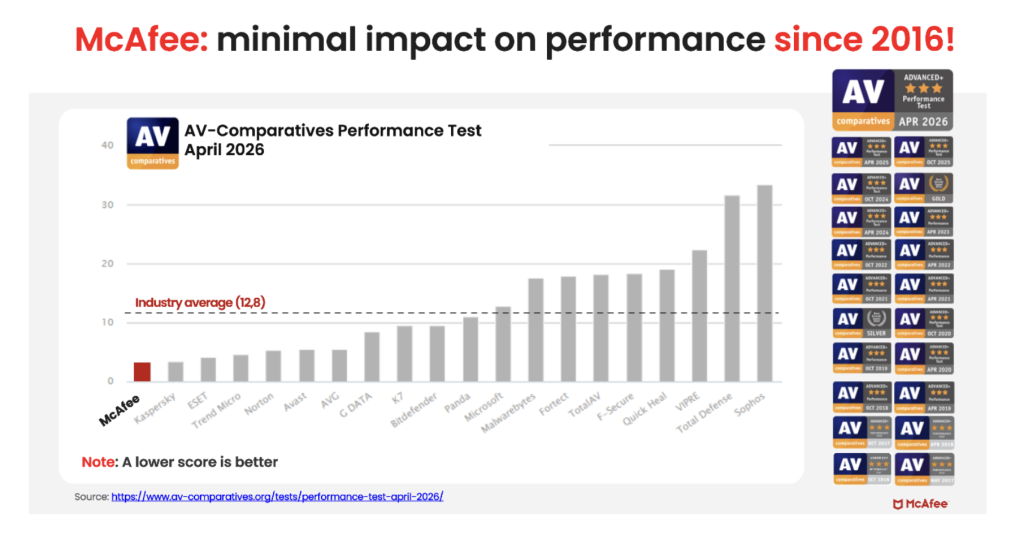
Unlike the old stereotype that stronger protection means a slower computer, independent testing shows McAfee is also the lightest on performance.
In the latest AV-Comparatives PC Performance Test, McAfee Total Protection posted the lowest system impact score of all 20 products tested: just 3.3, compared with the industry average of 12.8.
It also earned the highest possible rating, ADVANCED+. That means McAfee is not just adding more layers of protection. It is doing so while staying out of your way.
For consumers looking for security that goes beyond basic antivirus to help protect against scams, identity theft, privacy risks, and threats across all their devices, that combination is hard to ignore.
Protection Across All Your Devices
Most people no longer rely on a single computer. A typical household may use:
Windows PCs
Macs
iPhones
Android phones
Tablets
Chromebooks
Managing security separately on every device can be difficult. McAfee+ Advanced is designed to provide coverage across your devices under one subscription, helping simplify online protection for individuals and families.
How McAfee+ Advanced Goes Beyond Built-In Security
With McAfee+ Advanced, multiple layers work together before any damage is done:
Scam Detector flags suspicious texts, emails, links, QR codes, and even deepfake videos before you engage
Secure VPN keeps your data private, especially on public Wi-Fi
Web Protection helps block risky sites, even if you do accidentally click helps block risky sites, even if you do accidentally click
Password Manager doesn’t just help you make unique, strong passwords, it keeps them stored and organized for you
Online Account Cleanup assists in taking down your old, forgotten accounts across the web
Social Privacy Manager helps you monitor and changeprivacy settings across your social platforms in just a few clicks
Together, these protections are designed to address the broader range of online risks people face every day.
So, Do Windows PCs and Macs Need Antivirus Software?
Built-in security tools provide an important starting point, but with scam attempts becoming more convincing and personal information more widely exposed, many people need a more comprehensive approach to staying safe online.
McAfee+ Advanced combines device security, scam protection, identity monitoring, privacy tools, and VPN coverage to help you browse, bank, shop, and connect with greater confidence.
PWNED Welcome, once again, to PWNED, the weekly column where we cover high-security hijinks that are at least partially the victim’s fault. This week, we have a trio of tales that involve incredibly unprofessional behavior, inappropriate use of corporate resources, and outright theft, all dealt with by IT. Have a story about someone leaving a gaping hole in their network? Share it with us at pwned@sitpub.com. Anonymity is available upon request. Our trilogy of tech exposure comes courtesy of Zach Lewis, the current CIO and CISO at the University of Health Sciences and Pharmacy in St. Louis. Before his current role, Lewis worked for various other companies in IT roles and he has some tea to spill. At one job, Lewis was working as a sysadmin when the CEO asked for help recovering photos he had accidentally deleted from a company file share. The files were accessible to anyone at the organization, and Lewis searched archived copies in Google Picasa to restore them. Unfortunately, the pictures the CEO was missing included many that were very much NSFW. “So I was called in to sit down with him and look at it. And we're just like I restore everything. We start clicking images to make sure everything's there, just doing a random subset check,” Lewis said. “And, uh, just some pornography comes up and he's sitting right next to me. I mean, right next to me, he's just like, oh yeah, that's just some of my porn.” When he was done restoring the photos, Lewis left the room. It was clear the boss had no shame and no problem with IT seeing his explicit images or with storing them where any employee could download them. They were even mixed in with official photos and family pictures. However, knowing this was bad policy and could probably lead to a lawsuit, Lewis approached human resources and told them about the problem. The HR representative instructed him to delete all the smut from the network, even though it belonged to the big boss. He did that, and fortunately, did not face any repercussions at work for deleting the big man’s cheeky pictures. He wore a top hat In another instance, Lewis was asked to look at a coworker’s computer when the employee thought he had gotten a virus on his laptop. However, the colleague cautioned IT not to look through his files. After a little while, Lewis noticed a folder filled with other subfolders that were festooned with adult images, both of naked women and of the employee himself without clothes on. All of the photos had appropriately descriptive file names too. Perhaps most embarrassing of all for the coworker is that Lewis saw his semi-naked pictures. To be fair, he was dressed in the images, as he was wearing a top hat – but nothing else. The problem, Lewis notes, is that employees treat their work computers as if they are home computers and do not think about the implications of having personal images on something that belongs to a corporation. He suggests setting a firm policy against this kind of thing and educating workers about the policy. When workers inevitably violate the policy, it’s time for a gentle reminder. “A policy is just, you know, paper, right? It's hard to enforce that,” Lewis said. “You can talk to the user in this instance. In this most recent instance with this guy in the top hat, it was ‘hey, these are company resources’ when I gave the computer back to him.” Kids’ YouTube upload exposed a potential thief In another gig, Lewis worked at a university. When one athletics coach quit, he was supposed to leave his school-issued iPad on his desk. But when the IT department came to collect the equipment, this tablet was missing. No one could find the missing iPad, but a month later, someone uploaded a new video to the school’s YouTube channel. The video featured a different coach's kids and appeared to have been uploaded from his house. Apparently, the other coach had allegedly snatched the iPad off of the first coach’s desk and given it to his kids. The kids then used the iPad to film a funny home video and upload it to YouTube, not realizing that it was connected to the school’s official YouTube account. Lewis notified HR, who called the apparent thief in. At first, he denied that the children in the video were his offspring. However, the HR agent then showed him a photo of him and his kids on social media together and he admitted, okay, he was their dad. The coach then said he didn’t know how the iPad got into his house. But he grabbed it and returned it to IT. There are a lot of problems with the iPad situation from a security perspective. First, the iPad that wasn’t turned over clearly was not locked to the point where someone else couldn’t get into it. It had access to the school’s YouTube account, so any thief could add their own content to it and it may have even had PII (personally identifiable information) about some student athletes. Bottom line: make sure departing employees hand over equipment directly to IT. Don’t let them just leave equipment on a desk. And make sure even tablets require biometric access. ®
The FBI is warning unsuspecting lawyers that their firms continue to be an active target for members of a longstanding extortion crew. Silent Ransom Group has been operating since 2022, by the FBI’s reckoning, and its latest message [PDF] about the gang comes almost exactly a year after its last. The group is still targeting US law firms and their staff, and the criminals are pretending to be company IT staff. It also warned last year that the callback phishing specialists had started physically walking into the law firms’ offices when remote social engineering attempts go south. The FBI’s latest advisory reaffirms these findings, with fresh attacks reported in Spring 2026. Law firms should be locking up their USB ports because the extortion crew is still sending members to plug in their thumb drives into the computers, for when they can’t convince employees to surrender remote access. In these scenarios, they rock up to the victim they’ve tried to phish and socially engineer from behind a phone or computer screen, continue the facade of being a company IT rep, and then claim they need to image the person's device or create a backup file to assess the damage of their own phishing email. What they’re actually doing is copying important files onto said thumb drive, which SRG will later use to extort the law firm. The FBI didn’t say exactly how many of these in-person callouts SRG has made, but it was evidently enough to include in a fresh advisory on the group’s methods and tactics. According to the advisory, these attacks were first reported in Spring 2026. SRG in brief SRG’s target industries used to be broader than just legal. The hack-and-leak group has been known to target organizations operating in various industries, but the legal sector has remained a common theme since 2023. The FBI said in its advisory on the group last year that it believes SRG consistently targets US law firms “likely due to the highly sensitive nature of legal industry data.” When they’re not sending crooks into office blocks, SRG’s primary goal is to achieve their aims through callback phishing. Using SMS messages or emails, group members would single out employees at target companies, asking them to call a number while impersonating real IT staff. If the staffer fell for the scheme, they’d call up, and the SRG IT imposter would attempt to convince them to grant access to a remote desktop session, during which they would elevate their privileges and set about stealing data to use as extortion leverage. In some cases, SRG will run WinSCP or a disguised version of Rclone to scoop up files of interest. In others, they are known to share those documents using internal file-sharing platforms such as Google Drive or Microsoft OneDrive. Before the callback phishing methodology, the group would send emails claiming that a fake subscription had been authorized that would charge small sums to the target’s account each month. The email included a phone number to call in order to cancel the subscription, and once on the call, the crooks would convince the target to install remote access software, and rinse-repeat the data theft playbook. SRG is not known for using ransomware, but it operates a data leak site (DLS) just like any other extortion crew and charges victims to return the data they stole, threatening to leak it online if they refuse to pay. Recent alleged victims of the group have included law giant Jones Day, the legal eagles favored by US president Donald Trump during both his election campaigns. SRG listed Jones Day on its DLS, and the law firm confirmed a “cyber phishing incident” in April, but did not name SRG as the culprits. Your country needs you The FBI pleaded with the public to send it any evidence of SRG in action to aid future investigations. Of particular use would be phone numbers used to contact the crooks, copies of the phone call transcripts and phishing emails, cryptocurrency wallet information, and identifying information of the individuals who step foot in office buildings. As for how to prevent attacks from SRG or others adopting similar methods, the FBI recommended that organizations disallow connecting external drives to company-issued devices, especially those that store confidential or otherwise sensitive information. Verifying the credentials of each person walking into the building wouldn’t hurt, either. The usual advice applies for the group’s remote attacks: limiting access to sensitive data from less-secure networks and requiring phishing-resistant MFA for as many services as possible. The FBI also recommends blocking port 22 access, which would prevent encrypted remote access, and investing in robust staff training programs so they know not to let outsiders plug hardware into their machines. ®
India's Computer Emergency Response Team (CERT-In) says defenders should endevor to patch or mitigate exploited n-day vulnerabilities within 12 hours as the cybercrime landscape continues its AI-ification. The organization's recommended half-day window applies only to bugs that affect internet-facing or "crown jewel" systems and are known to be exploited. In these cases, CERT-In told defenders to "patch, mitigate, or remove exposure within 12 hours where feasible." For other flaws, such as a standard critical vulnerability (CVSS 9.0 or higher) affecting an internal system, or a known exploited bug affecting an internal system, defenders can enjoy a much more leisurely 24-hour window. The revised suggestions come as part of a new guide released by CERT-In this week to help infosec pros better protect against AI-assisted cyberattacks. "AI-assisted cyber exploitation reduces the time required for adversaries to identify, weaponize, and exploit vulnerabilities, exposed services, weak identities, insecure APIs, and misconfigured systems," CERT-In's report reads. "As organizations become increasingly dependent on interconnected digital infrastructure, cloud ecosystems, software supply chains, operational technologies, and AI-enabled platforms, the potential impact of AI-enabled cyber threats continues to increase across sectors." CERT-In's report follows a trail of news stories in 2026 that all suggest AI is becoming an increasingly important part of cybersecurity for both attackers and defenders. The field of agentic AI has especially matured rapidly in the past year. Consumer-grade tools like OpenClaw have made it easier for non-technical users to experiment with autonomous tech, raising its profile and awareness of its capabilities. Agents are equipped with all the necessary permissions to make significant system changes, but as global intelligence agencies recently highlighted, their behavior can at times be unexpected, and they're also prone to mischief. Security pros are starting to see the potential for AI agents in their workflows, but for attackers, the technology represents an opportunity to hasten all parts of their process, from recon and exploitation to privilege escalation and data theft. CERT-In cited agentic AI as one of the core concerns behind the report's recommendations, and because of the disparate supply chains on which organizations are increasingly reliant, any vulnerability can lead to cascading damage on interconnected systems. Beyond agentic AI, the launches of frontier models such as Anthropic's Mythos and OpenAI's GPT-5.5, two certified cyber workhorses, threaten to empower attackers further with capabilities to uncover and exploit critical vulnerabilities at pace. A 12-hour window: Is it feasible? Any cybersecurity practitioner will attest to the onerous nature of the patching process, and how it's not as easy as clicking "Update," which is why a 12-hour patch window might seem initially unrealistic to some. Urgent warnings and demands for immediate patching are routinely delivered alongside critical vulnerability disclosures, but these fail to account for the downtime required to apply patches, or the testing required to prove that by applying them, everything else won't break. Microsoft has had its fair share of these cases, for example, and many readers will have borne the brunt. CISA's Known Exploited Vulnerabilities catalog is another prominent resource that sets patching deadlines, albeit only for federal agencies, but these are typically set at two to three weeks, or a number of days for the most serious vulnerabilities. The cybersecurity pros who spoke to The Register, weighing in on the CERT-In recommendations, agreed that 12 hours is far too short a window to properly test and deploy a patch, although they said the organization was on to something with its approach. Dray Agha, senior manager of security operations at Huntress, said that CERT-In’s recommendation to "patch, mitigate, or remove exposure within 12 hours where feasible" was solid advice, largely because of the caveat that it doesn’t necessitate a full patch within that time. "By explicitly encouraging temporary mitigations, such as isolation, access restriction, or disablement until a patch is ready, this turns the patching deadline into a highly feasible and necessary containment strategy," Agha told The Register. "And this corroborates the guidance we dispense at Huntress for critical threats: we often advise our community to deploy temporary mitigations to 'get them out of trouble' as soon as humanly possible, and then come up with a more coordinated strategy for patching that respects the business's need to function in its enterprises." Agha added that AI-assisted cyberattacks are seen every day in the wild, compressing the time taken to exploit vulnerabilities, meaning defenders must adapt to this new reality. In the pre-AI days, a 12-hour window to mitigate or patch a known exploited vulnerability was seen as excessively tight, but increased availability of advanced tooling and automation is reshaping the demands of vulnerability management. "Defenders must fundamentally reshape their operations to focus on quicker mitigations – prior to AI, at Huntress, we have seen vulnerabilities exploited within a handful of hours, let alone a full 12 hours," said Agha. He said the 12-hour guideline is less about an arbitrary clock, more about "forcing a necessary readjustment in how organizations drive their security approaches to be beyond compliance and move to a continuous defensive posture. "And this will involve the enterprise functions of the business being a part of the security posture – not just IT, thank you very much – as the consequences of AI-driven exploitation mean faster, higher impact cascading negatives on a targeted business; much better to proactively defend than reactively recover." ®
A security researcher found a foolproof way to guarantee tech conferences accept his speaker submissions: hack their systems. CVE-2026-41241 is a stored cross-site scripting (XSS) vulnerability in pretalx, a popular open source tool that conference organizers use to manage speaker submissions and schedules, that could allow attackers to effectively take over an organizer's session. Any user controlling searchable fields – including submission titles, speaker display names, and user names or email addresses – could inject arbitrary HTML or JavaScript. When an organizer's search query matched the malicious record, the payload would execute in the organizer interface. "Once triggered, the injected script executed in the context of the pretalx organiser interface and could read the page's [Cross-Site Request Forgery] CSRF token, submit authenticated requests on the victim's behalf (including requests modifying data due to access to the CSRF token), or exfiltrate data visible to the victim," according to pretalx's security advisory. Project maintainers patched the flaw in April, and it has been fixed in pretalx 2026.1.0. Elad Meged, founding engineer and security researcher at AI penetration-testing and offensive-security startup Novee, found and disclosed the flaw when he was preparing conference speaker submissions. He noticed the exact same call for proposals (CFP) submission form appearing underneath all of these different hacker conferences and academic symposiums' logos. 'One codebase serving them all' While the events are unique, with different parent companies and organizers, "underneath, it is one codebase serving them all," Meged said in research published on Wednesday and shared in advance with The Register. Meged then used the flaw to auto-apply for 40 conferences - and got accepted to present his proposed talk, "Securing Modern Web Apps," at every single one of them. While Meged did submit real entries, he did not submit a live exploit payload into the conference systems. The Novee team validated all of their findings on a local instance. They didn't do any testing on pretalx.com or a third-party-hosted instance. "The goal was to validate the vulnerable workflow in the exact real-world setup while avoiding unnecessary harm," Meged told The Register. "So, we used realistic, normal-looking talk submissions and then validated exploitability through controlled, version-specific testing." Some of the events that use pretalx-based CFP infrastructure include OffensiveCon, TROOPERS, FOSDEM, HEXACON, and Recon, he told us, stressing that this does not mean any of these conferences were actively exploited or compromised. For any conferences that used pretalx for talk submissions, but weren't accepting submissions at the time, Meged followed up with them via responsible disclosure. And yes, Meged admits that he could have had more fun with the talk title, but he wanted to make it "intentionally boring and plausible," to blend in with other proposals. "I agree something outrageous would have been funnier, but it would also have been less responsible," he said. Human led, AI agent assist Meged described the research as "human-led vulnerability research, agent-assisted at internet scale." Once they understood the type of vulnerability, any "capable web security researcher" could reproduce the exploit, he said, adding "this would not require nation-state-level skill." Scaling the attack, reliably reproducing it, and adjusting the attack chain to each real-world pretalx deployment, however, benefited from an agentic AI assist – and this wasn't "a one-off script or a prank CFP submission," he told us. "Different pretalx versions, deployment choices, and enabled features can change the behavior," Meged said. "Something that works on one instance may fail on another or require a different validation path." Plus, some conferences use hosted infrastructure, while others run their own self-hosted instances. So the security shop built an agentic fingerprinting and validation system to scan the internet for public-facing, vulnerable systems, learn as much as possible about the version and configuration, and find the best way to exploit them. 'This type of work does not scale manually' "This type of work does not scale manually," Meged said. "A human can find the core idea, understand the primitive, and make the responsible disclosure decisions. But mapping internet-wide exposure, fingerprinting many deployments, comparing versions, modeling behavior, adjusting validation logic, and organizing disclosure steps is exactly where AI agents become useful. The agents helped with discovery, fingerprinting, version comparison, environment modeling, controlled validation, note-taking, and disclosure workflow management." After finding and fingerprinting public pretalx deployments, and identifying version-specific behavior, the agents selected the best non-destructive validation path for each one. While there's no indication that attackers found and exploited the security issue before Novee's team, it's serious in that it could have granted organizer-level access to the conference call-for-proposal and scheduling system - these typically contain speaker identities, submissions, acceptance decisions, and private communications between conference organizers and speakers. Gaining access to this type of information could have allowed for targeted phishing or other trust-based attacks impersonating a well-known industry event. "With organizer-level access, an attacker could potentially read or modify submissions, interfere with the review process, impersonate conference staff, alter CFP data, or communicate with speakers and submitters from a trusted conference context," Meged said. "The most realistic abuse case is targeted phishing or lateral movement through trust. If a speaker, sponsor, reviewer, or attendee receives a link or request from what appears to be a legitimate conference system, they are much more likely to trust it," he added. "So the story is not just: Someone could get a fake talk accepted. The bigger risk is that a trusted conference platform could become a launchpad for attacks against the entire event ecosystem." Tobias Kunze, a developer who created pretalx, told The Register that Meged reported 11 security findings on April 14, he assessed all of these and classed one as a serious vulnerability and five as non-vulnerability bugs – but with fixes – and five more as non-critical or intended behavior. "Contact with Elad was very positive and professional," Kunze told us. "We discussed the severity and impact of his findings, and it was as good a report as a small open source project like pretalx can hope to receive." ®
Some internet connectivity is returning in Iran after nearly 90 days offline, web monitoring groups say. But it isn’t clear if the reconnection is permanent.
National security and digital forensics experts have called foul on Nigel Farage's "disturbing" and unsubstantiated claim that Russia was behind the leak of a story about the UK politician receiving a £5 million gift from a crypto billionaire. Sources inside Farage's right-wing Reform UK told the Mail on Sunday that the party leader believes Russian spies hacked his phone and relayed details about Christopher Harborne's gift, a matter of which only four people were aware. Farage was said to have engaged outside "counter-espionage experts" to perform a technical analysis of his device – analysis that was said to point to Russia. According to Peter Sommer, professor of digital forensics at Birmingham City University, whichever outfit was entrusted to carry out this work would have been looking for two different types of markers to prove Russia was involved. These would be either the phishing message Farage clicked on that allowed Russia to access his private communications or the malware code an attacker used to exfiltrate them. "It's obviously trivial to disguise the source of an email, so that doesn't help," Sommer told The Register. "And the second thing is if you're talking about looking for hacking codes, hackers, whether they are juveniles or people in major SIGINT systems, are likely to be stealing from each other, so there's nothing unique about a code that would say where it comes from." Sommer also highlighted that advanced intelligence powers have tools at their disposal to obfuscate the source of malicious code. The CIA's leaked Marble Framework supposedly had the ability to translate malicious code into any language, including those used by its chief adversaries. "Now, absent from that, how on Earth do you determine that this is a Russian hack?" Sommer asked. Neither Farage nor Reform UK has spoken officially on the alleged Russian phone hack. They have not specified which experts on whose conclusions they used to make the claims, they have not stated what evidence pointed to Russia's involvement, and they have not committed to making this forensic assessment available for public scrutiny. Opening up the data for verification was one of the core issues raised by Ciaran Martin, founding chief executive of the UK's National Cyber Security Centre (NCSC), who labeled Farage's claims "disturbing" and "without any merit." Speaking to The Guardian, Martin said that not only is the lack of clear evidence concerning, but also if Russia was behind the hack-and-leak operation, a deliberate attempt at destabilizing a foreign democracy, then it would have significant consequences for the UK's Russia policy. "An aspiring prime minister has essentially claimed that Russia has launched an unprecedentedly aggressive intervention – a malicious intervention – in British politics, and he's not produced a shred of evidence to support that claim," Martin said. "It is a very, very serious thing to allege. It would be a national security issue," he added. "If it is true, the government should be in emergency session in COBR right now, considering their response to the most serious Russian intervention in internal British affairs for years." He said the claims published by the Mail on Sunday, at present, are unsubstantiated, and if true, in normal circumstances, this would prompt a formal government response. The Reg understands that the NCSC has not been engaged by Farage or Reform UK over the matter. The National Crime Agency did not respond to questions regarding its involvement and the Metropolitan Police Service declined to comment. Reform UK did not respond to our requests for more information, nor did Nigel Farage's office. What exactly did Reform UK claim? According to sources who spoke to the Mail on Sunday, Russian spies hacked Farage's phone, ascertained details about Harborne's £5 million donation to the party leader, and leaked it to The Guardian, which first reported the story. The Guardian said at the weekend that Farage is now under "mounting pressure" to prove his claim about the Russian phone hack. There is no indication the Graun 's reporting was connected to any illegal activity or Russian spies, but Farage is implying so, telling the Mail on Sunday: "This shocking revelation brings into question The Guardian’s judgment and whether Reform can cooperate with them in future." According to the analysis of Farage's phone, carried out by the unidentified counter-espionage experts, the findings were "almost certainly linked to Moscow," the Reform UK source said. They also claimed that spear-phishing tactics were used to compromise his phone, email, and bank accounts. "It bore all the sophisticated hallmarks of a nation-state actor using destabilization techniques in the run-up to this month's local elections," the source added. Farage said: "These actions by Russia are deeply concerning and highlight the threat they pose to British security." Regarding the motive for such an attack, Reform UK believes its leader angered Russian president Vladimir Putin by previously expressing support for NATO. He has said in the past that UK forces should shoot down Russian aircraft if they enter NATO airspace, and joined controversial calls for Ukraine to be admitted to the military alliance. The party also said that Harborne may be a target for the Russian regime because he joined former prime minister Boris Johnson on a trip to Ukraine in 2022, designed to showcase the impact of Russia's invasion earlier that year. ®
Cisco's 2026 Segmentation Report analyzes 400 failed segmentation projects and identifies four distinct patterns of failure — and what teams can do about them
As Americans stew over the looming risk of job-stealing AI and data centers in their back yards, the feds are raising the alarm about a new category of threat, documents obtained by WIRED show.
Anthropic has revealed its intention to one day release models that match the performance of its Mythos bug-finding AI to the public, once it can make them safe. In case you came in late, in early April Anthropic announced it had developed a model called Mythos that is so good at finding security vulnerabilities in programming code that the company decided to offer it only to select entities because allowing unfettered access would mean cybercriminals could quickly discover and exploit software flaws. That access program is called “Project Glasswing” and participants report it quickly finds many bugs but few that humans couldn’t find given enough time and resources. Those with access to Mythos have also sometimes said the quantity of bugs it finds somewhat overwhelms their ability to patch them all. The mere existence of Mythos has sparked a little panic – Japan’s government ordered a sweeping security review and Indian authorities demanded a patching spree at financial institutions – plus a general realization that even lesser AI models are also decent bug-finders, meaning cyber-defenders must now expect attackers will weaponize more flaws, more often. No company—including Anthropic—has developed safeguards strong enough to prevent such models from being misused Anthropic last week published an “initial update” on Project Glasswing that in its second-to-last paragraph reveals the company’s next step will see it “… work with critical partners – including US and allied governments – to expand Project Glasswing to additional partners. And in the near future, once we’ve developed the far stronger safeguards we need, we look forward to making Mythos-class models available through a general release.” The company didn’t explain what it means by “near future” and admits that “At present, no company—including Anthropic—has developed safeguards strong enough to prevent such models from being misused and potentially causing severe harm.” Further illustration of that assertion can be found earlier in the company’s post, which reveals that Anthropic has used Mythos to scan more than 1,000 open-source projects that it says “collectively underpin much of the internet – and much of our own infrastructure.” To date, Mythos has found an estimated 6,202 high-or-critical-severity vulnerabilities in these projects – and 23,019 flaws in all. The post reveals that when Mythos finds a flaw, Anthropic and its pals in the security community reproduce the issue that Mythos has found and “re-assess its severity.” “Once we’ve confirmed that a vulnerability is real, we check for whether there are already fixes in place, and write a detailed report to the software’s maintainers,” Anthropic explains. “We take considerable care here: on top of the regular challenges of maintaining open-source software, maintainers have been facing a deluge of low-quality, AI-generated bug reports. Indeed, several maintainers have told us they’re currently severely capacity constrained, and some have even asked us to slow down our rate of disclosures because they need more time to design patches.” 1,752 of the high-or-critical-rated vulnerabilities Mythos found in FOSS have gone through that process and 90.6 percent (1,587) proved to be valid flaws. Of those, 62.4 percent (1,094) “were confirmed as either high-or-critical-severity,” the post states. One of the critical flaws impacted the wolfSSL cryptography library used by billions of devices worldwide. “Mythos Preview constructed an exploit that would let an attacker forge certificates that would (for instance) allow them to host a fake website for a bank or email provider,” Anthropic wrote. “The website would look perfectly legitimate to an end user, despite being controlled by the attacker.” Thankfully, developers have already patched wolfSSL, and Anthropic said it will deliver a full technical analysis “in the coming weeks.” Keep an eye out for CVE-2026-5194 to learn more about this one. Mythos is adding to an already overloaded security ecosystem “75 of the 530 high-or-critical-severity bugs we’ve reported have now been patched, and 65 of those have been given public advisories,” the post states, then explains that low fix rate by revealing Anthropic is “still early in the 90-day window that’s set out in our Coordinated Vulnerability Disclosure policy: we expect many more patches to land soon.” The company thinks it is also “likely to be undercounting patches because some vulnerabilities are patched without a public advisory.” Lastly, the flood of bugs Mythos found “is adding to an already overloaded security ecosystem.” Anthropic’s suggestion for security teams struggling to develop fixes for bugs AI discovered is, unsurprisingly, more AI such as skills that improve its Claude model’s ability to help developers. ®
OPINION Dirty Frag, Copy Fail, and Fragnesia are less a random cluster of Linux bugs and more the public unveiling of how AI tools can pry open security holes with just a prompt or two. What they also have in common is their shared abuse of a core kernel abstraction: The page cache. What does this mean for you and me? Is this the rainstorm before a downpour of killer Linux security problems, or is this just a shower? It depends on who you ask. Whatever else may be true, these problems must be addressed. As Igor Seletskiy, CEO of CloudLinux, said: "The real story here is that we typically see one or two kernel-level LPE (Linux privilege escalations) vulnerabilities that affect multiple distros/versions per year. And now we see two such vulnerabilities one week apart. We should expect this trend to continue for quite a few months, meaning companies might have to reboot servers weekly." Ouch! But is this the start of a trend? Linus Torvalds, who knows a thing or two about Linux, said at Open Source Summit North America in Minneapolis that until recently, the kernel community would quietly notify distributions about a bug and ask them to upgrade without detailing the vulnerability, and "most of the time, nobody would figure out what happened." That was then. This is now. With AI‑accelerated analysis, he recalled that "last week, we fixed the bug; within three hours, there was a blog post about the implications of that bug fix, because security people love getting attention." As a result of this kind of thing, Torvalds has changed how the Linux security community will deal with AI-discovered security holes. "AI-detected bugs are pretty much by definition not secret, and treating them on some private list is a waste of time for everybody involved – and only makes that duplication worse because the reporters can't even see each other's reports." In addition, Torvalds added, in the case of AI-discovered bugs, you need to keep in mind that just "because you found it with AI, 100 other people also found it with AI." That means we're going to hear a lot more about Linux security problems. But are they getting worse? I asked Greg Kroah-Hartman, the Linux stable kernel maintainer, and he told me: "Maybe? It's hard to tell; the 'recent' ones really are very minor, as the number of systems that have 'untrusted users' is not common anymore. I don't see any real uptick in our actual bug fixes that I can tell." He continued: "We fix bugs like that on a daily basis, it's just the rise of people wanting to 'name a bug' and release a public exploit seems to be all the rage at the moment." An important point that Chris Wright, Red Hat's CTO, made at Red Hat Summit, the week before, is that in "security, all things aren't created equal. There will always be a spectrum of vulnerabilities that will surface. Some of those will be really critical and we will need to respond very quickly, so that becomes a clear priority. Others will have a longer tail of lower severity." Torvalds also added at Open Source Summit that just because you read stories about Linux and AI-discovered bugs, you shouldn't think the same thing isn't happening to proprietary software, such as Windows. "If you think that AI can't reverse engineer closed source, you're in for a surprise." In fact, he warned, "closed source is even worse in this respect, because the AI can't help you fix those problems, but the AI sure can help find those problems in the first place." He also discouraged security researchers from publishing working exploits: "When it comes to things that really are security issues, you may not want to make the exploit public… Don't be that guy who then crows about it publicly and says, 'Look, I could bring down this big company.'" Following on this theme, Christopher "CRob" Robinson, chief security architect for the Open Source Software Foundation (OpenSSF), told The Register that thanks to AI, "roughly 30 percent of reported Linux security bugs were duplicates. That's going to be another problem in this AI age, where everybody's a researcher, right, with a $20 cloud code account." That, in turn, will burden already overworked maintainers with yet more patches to deal with. Linux, Torvalds added, is something that its maintainers can handle. Smaller open source projects, however, are all too likely to be overwhelmed. The real problem, according to what the Google Threat Intelligence Group has discovered, is that the mean time to exploit (TTE) for vulnerabilities has continually decreased "from 63 days in 2018 to -1 day in 2024 and further downward to an estimated -7 days in 2025. A negative number indicates that exploitation of a vulnerability, on average, occurred before a patch was released." So what does this mean? Yes, we're going to see a lot more security vulnerabilities showing up in Linux and other open source projects. Yes, some of them will be serious, and all too many will have exploits out before the patches arrive. It's not, however, that Linux has suddenly become less secure. It's that AI eyes are much better at detecting bugs than human eyes have ever been. We will catch up, and AI can help with that, too. In the meantime, system administrators and developers will have to be more security-conscious than ever before. As Wright told The Reg, it's high time we switched from using SELinux in permissive to restrictive mode. Enforcing strict security is a pain, but what's even more of a pain is having to rebuild your containers and servers after a serious attack gets through. ®
Plus: Google publishes a live exploit for an unpatched flaw, the feds arrest two men accused of creating thousands of nonconsensual deepfake nudes, and more.
A malware-spreading scumbag swimming through GitHub pushed malicious commits to more than 5,500 repositories on Monday as part of an automated campaign called Megalodon. Similar to the earlier TeamPCP attacks that poisoned about 3,800 GitHub repositories, this new campaign has so far infected 5,561 repos with CI/CD credential-stealing malware, according to SafeDep researchers, who uncovered the predatory commits and published a full list of the compromised repositories. If a repository owner merges the commit, the malware executes inside their CI/CD pipeline and propagates further, Ox Security lead researcher Moshe Siman Tov Bustan said in a Thursday blog post. Megalodon steals AWS secret keys and Google Cloud access tokens. It also queries AWS, Google Cloud Platform, and Azure metadata for instance role credentials, reads SSH private keys, Docker and Kubernetes configurations, Vault tokens, Terraform credentials, and scans source code for more than 30 secret regex patterns. Then it exfiltrates GitHub tokens, including secrets used to authenticate with cloud providers, thus allowing attackers to impersonate developers’ cloud identities, along with Bitbucket tokens. In other words: consider ALL of your CI/CD variables pwned. "We’ve entered a new supply chain attack era, and TeamPCP compromising GitHub was only the beginning,” Bustan told The Register. “What’s coming next is an endless wave, a tsunami of cyber attacks on developers worldwide.” Plus, he added, hacking GitHub “compromises the security of every company with a private repository hosted on the platform.” This new wave of supply chain attacks hitting developers’ environments won’t stop until “companies like npm and GitHub take serious action against the spread of malicious code on their servers,” Bustan said. He noted npm’s statement on X saying it “invalidated npm granular access tokens with write access that bypass 2FA” to prevent additional supply-chain attacks like Mini Shai Hulud. “That could help a little with account hijacking, but it doesn’t solve the actual problem,” Bustan said. “Malicious code is still reaching their servers, and nothing is stopping it before it does.” npm … but not TeamPCP SafeDep spotted Megalodon hidden inside a legitimate package: Tiledesk, an open source live chat and chatbot platform. The attacker backdoored versions 2.18.6 (May 19) through 2.18.12 (May 21), and the same npm maintainer published the last clean version, 2.18.5, before unknowingly publishing these newer compromised versions. “The attacker never touched the npm account,” the open source supply-chain security startup researchers said. “They compromised the GitHub repository, and the maintainer published from the poisoned source without realizing it.” While publishing malicious packages on npm is a TeamPCP signature move, Bustan said there’s no threat-intel or code-analysis evidence that connects Megalodon to the crew behind the Trivy, Checkmarx, and other recent supply-chain attacks. “Our best guess now is that it's a different threat actor copying their behavior and style, but not much of the code itself,” he told us. And despite TeamPCP open sourcing its Shai-Hulud worm and announcing a supply-chain attack competition on BreachForums, Ox doesn’t believe Megalodon is a contest entry. “We have indications that they are not participating in the TeamPCP contest due to the contest having a specific rule to add a public encryption key that the actor behind the malware could match with his private key to prove his involvement,” Bustan said. Who is built-bot? SafeDep’s threat hunters traced the malicious commit (acac5a9) to an author “build-bot,” connected to the email address build-system[@]noreply.dev with the message “ci: add build optimization step.” The author name and noreply email mimic automated CI commits, and there’s no GitHub account linked to the author and committer user fields. “Someone pushed the commit to master with no PR and no merge commit, using a compromised PAT or deploy key,” according to the researchers. They searched GitHub for other commits authored by the same email address and found 2,878 results, plus a second email, ci-bot@automated.dev, with an additional 2,841 commits. All landed May 18 during a six-hour window (11:36 to 17:48 UTC) and targeted 5,561 repositories. This includes nine compromised Tiledesk repositories: tiledesk-server, tiledesk-dashboard, tiledesk-telegram-connector, tiledesk-llm, tiledesk-docker-proxy, tiledesk-community-app, tiledesk-campaign-dashboard, tiledesk-helpcenter-template, and tiledesk-ai. Others include Black-Iron-Project with eight compromised repos, WISE-Community, and hundreds of smaller repositories. ®
Discover how Cisco is evolving its vulnerability disclosure practices. We are leveraging AI to prioritize high-risk security issues, helping customers focus on critical patching and remediation efforts.
Memorial Day weekend officially kicks off summer, and for millions of Americans, that means road trips, flights, cookouts, and a little online shopping for the deals.
Unfortunately, scammers know this. They count on the fact that you’re distracted, you’re moving fast, and you’re probably connected to a network you don’t own.
Here are five scams surging this holiday weekend, what they look like, and how to stay ahead of them.
1. Fake Travel Alerts from “Your Bank” or Hotel
You’re packing your bag when a text arrives: “Unusual activity detected on your account. Verify now to avoid suspension.”
It looks like it’s from your bank, or maybe your hotel loyalty program. There’s a link. There’s urgency. And that’s exactly the point.
These are brand impersonation scams, and they’re a dominant tactic year-round, but they spike around travel holidays when people are actively monitoring reservations and accounts.
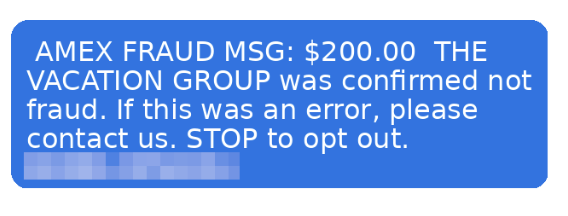
Example of a fraudulent AMEX message.
According to McAfee research, trusted brands like banks, airlines, and hotels are among the most commonly impersonated, and email scams impersonating retail and financial brands have surged up to 85% as major holidays approach.
The message will typically ask you to click a link and “confirm your details” to secure your account or honor a reservation. That link leads to a convincing-looking fake site designed to capture your login credentials, payment info, or both.
How to Avoid Travel Alert Scams:
Don’t click links in unsolicited texts or emails.
Go directly to the company’s app or website by typing the URL yourself.
Remember: pressure is a tactic, not customer service.
McAfee’s Scam Detector can flag suspicious messages before you interact with them, whether they come via text, email, or social media.
2. Fake Memorial Day Weekend “Deals”
Memorial Day is one of the biggest shopping weekends of the year. Scammers treat it like an open invitation.
Fraudulent retailers flood social feeds with too-good-to-be-true deals on everything from patio furniture to electronics, often impersonating legitimate brands with copycat websites and paid ads.
According to McAfee’s holiday shopping research, 91% of shoppers see ads from unfamiliar retailers, 37% say they might buy from a brand they don’t recognize, and a full 40% of consumers have abandoned a purchase out of fear that the deal wasn’t real.
The most impersonated brands in McAfee’s research span luxury labels (Coach, Dior, Gucci) to mainstream favorites (Apple, Samsung, Nintendo, Disney), exactly the kind of items that show up in “blowout sale” ads. Fake storefronts have grown significantly, with technology URL scams rising nearly 50%.
Once shoppers enter their payment details on a fraudulent site, that information goes directly to criminals. The average scam loss during the holiday shopping period runs around $840 per victim.
How to Avoid Shopping Scams:
Type retailer URLs directly into your browser instead of clicking through ads or social posts.
Look for HTTPS and double-check the domain carefully before entering any payment info.
If a deal looks unbelievably good, verify it on the retailer’s official app before buying.
McAfee’s Web Protection blocks malicious and suspicious sites before they load, including fake checkout pages.
3. QR Code Scams at Gas Stations and Travel Stops
If you’re road-tripping this weekend, you may scan a QR code somewhere. It could be at the gas pump, a rest stop, a parking meter, or a roadside attraction. Scammers know this too.
Criminals increasingly place fake QR codes over legitimate ones on gas station pumps, parking kiosks, and public signs. When you scan, you’re redirected to a convincing-looking payment or login page that captures your financial information. This is known as “quishing” or phishing via QR code.
McAfee research shows just how widespread this risk has become: 68% of people scanned a QR code in the past three months, and 18% ended up on a suspicious or unsafe page after scanning. Among those who did, more than half took a risky action like entering personal information, installing an app, or connecting a digital wallet.
How to Avoid Sketchy QR Codes:
Before scanning any QR code in public, look closely at the sticker or sign.
If it looks like it’s been placed over something else, skip it.
If you do scan, check the URL before proceeding.
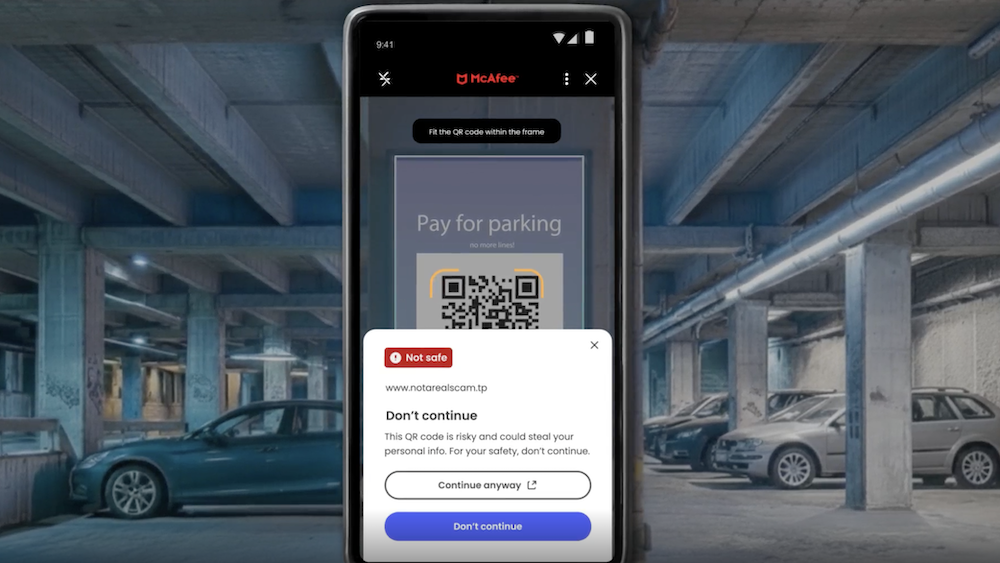
McAfee’s Scam Detector now includes instant QR code safety checks that assess risk before you tap, so you’re not flying blind at the gas pump.
This shows how McAfee blocks unsafe QR codes.
4. Public Wi-Fi Traps at Airports, Hotels, and Coffee Shops
Whether you’re waiting at the airport or grabbing coffee before hitting the highway, free Wi-Fi can feel like a gift. But not every “free Wi-Fi” network is what it appears to be.
Hackers set up what are called “evil twin” networks, hotspots with names designed to look exactly like the legitimate network at the airport, hotel, or café you’re in.
The moment you connect, they can use tools called packet sniffers to capture the data you send and receive: passwords, banking credentials, credit card numbers, email logins.
According to McAfee’s travel research, 63% of travelers connect to public Wi-Fi, and 49% use airport Wi-Fi, making these among the riskiest behaviors travelers engage in without realizing it.
Some of these fake networks go further, presenting a phony login screen that captures your username and password for popular services like Google or Apple before you even realize you’ve been compromised.
How to Avoid Malicious Wi-Fi :
Always confirm the exact Wi-Fi network name with staff before connecting.
Turn off auto-join for Wi-Fi on your devices.
And most importantly: use a VPN.
A VPN creates an encrypted tunnel for your internet traffic, so even if a hacker intercepts it, they’ll only see scrambled data. McAfee’s VPN is included in McAfee+ plans and automatically connects when you join public Wi-Fi, exactly the protection you want when you’re traveling and connecting everywhere.
5. Toll Road and Parking Text Scams (Expect a Surge After the Weekend)
You may have seen these already: a text that says you owe an unpaid toll or parking fee, with a link to pay before penalties kick in. These scams have been circulating for a while, and there’s a good chance Memorial Day weekend is about to make them worse.
Scammers track news cycles and know that millions of Americans will be driving this weekend, many of them through toll roads and unfamiliar areas.
That means they can blast out fake “unpaid toll” texts after the holiday and a significant percentage of recipients will think: “Actually, I did drive somewhere new this weekend.” That uncertainty is exactly what they’re counting on.
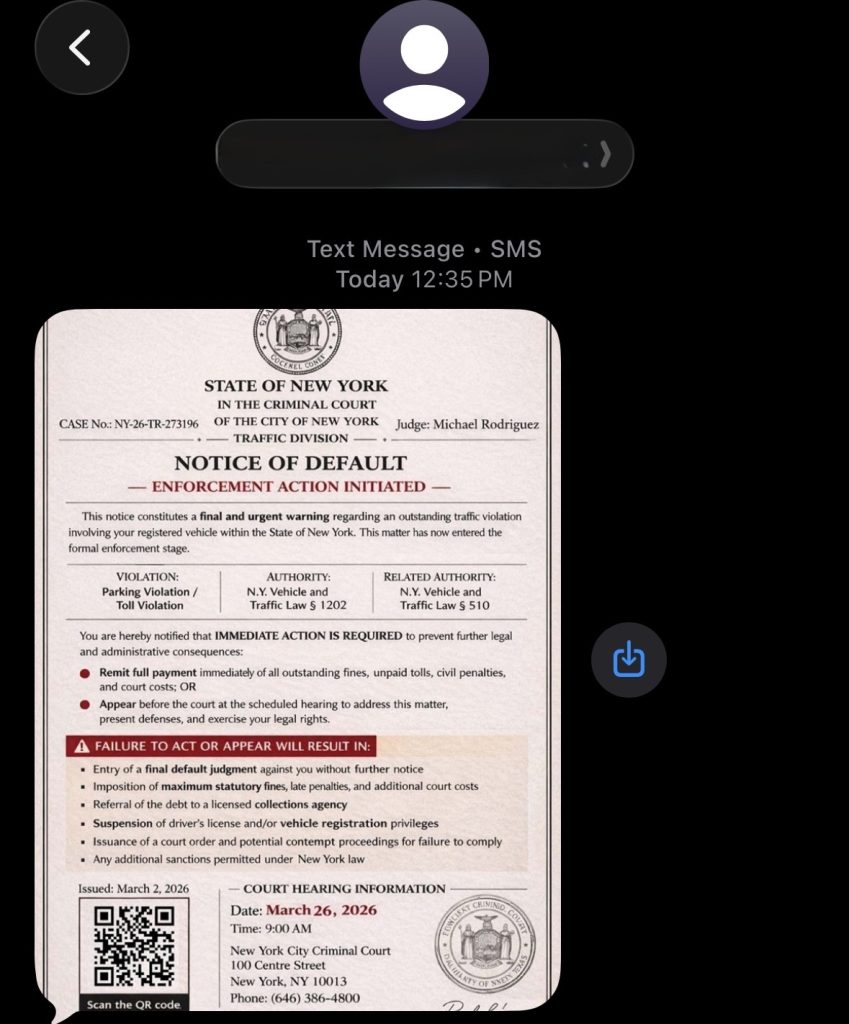
Fake court notices threatening parking and toll violations have been making the rounds this spring.
These texts typically impersonate EZPass, SunPass, or state transportation departments and create urgency around a small fee to avoid larger fines. The link leads to a fake payment page designed to steal your credit card details.
How to Avoid Toll Scams:
Don’t click links in unsolicited toll or parking texts.
If you think the charge might be legitimate, go directly to your state’s official toll authority website and look up your account there.
Real toll agencies will not threaten immediate penalties over text with a payment link.
If you receive one of these texts after this weekend, treat it as suspicious by default.
Have a Safe Memorial Day Weekend
Scammers don’t take holidays. If anything, long weekends are peak season. The good news: a little awareness goes a long way. Slow down before you click, verify before you scan, and protect your connection before you log on.
McAfee+ Advanced comes with layered protection across all the moments where scams are most likely to strike, from the gas station to the hotel lobby to your inbox.
The US President’s oft-maligned Trump Mobile venture may be facing another setback after a security buff claims he discovered a now-plugged website vulnerability that he says was leaking what could be tens of thousands of suckers' customers' details. The individual behind the discovery, who goes by "Louis," says he's a self-taught tech tinkerer and described himself as "just a nerd between jobs with too much time on my hands." He reckons the website’s data could be scooped up with a simple POST request. “It wasn't SQL. That wouldn't be as bad,” he told The Register. “It was a really simple HTTP request. POST, and then just asking for the info I wanted, basically.” More than 27,000 people who ordered from Trump Mobile, the President’s all-American smartphone and cell service brand, had their data flimsily secured online, Louis claimed. Louis, a long-serving IT professional who refuses to be called a security researcher, said the types of data he was able to gather included: first and last names, primary addresses, secondary addresses, email addresses, phone numbers, customer/account numbers, "enrollment ID" (pre-order number), and whether the order was placed by phone or online. “I discovered it first by looking into the site to see if I could find how many orders there actually were, and noticing some API endpoints,” he added. “I tried a couple of basic commands, and then it started showing whatever data I wanted. “It was as easy as going to the website and writing a very simple HTTP POST request into the console.” The website flaw only allowed him to return ten customer records at a time, he said, but these records all contained a customer number, which Louis used to loop through them all. In the space of an hour, the method allowed him to access the records of around 5,000 Trump Mobile customers, he claimed. After confirming the issue was valid and that all the data his script scooped up was deleted, Louis tried to disclose his findings to Trump Mobile, and anyone else who could take action, but received no response, although someone appears to have fixed the issue. The Register also tried contacting Trump Mobile but similarly received nothing in return. Out of options for disclosure, Louis decided to go public, informing two prominent YouTube creators and known orderers of the Trump T1 phone, Stephen “Coffeezilla” Findeisen and Charles “penguinz0” White Jr., whose respective videos covering his findings have jointly gathered millions of views. Trump T1 begins shipping Trump Mobile’s flagship device, the T1 Android smartphone with the gold-colored casing, began showing up at pre-order customers’ doors this week, after originally being slated for an August 2025 release. The brand’s entire schtick since first being announced in June 2025, around the time of a significant escalation in US-China trade war conflict, was that everything was going to be “Made in America.” Early renders of the proposed T1 showed what appeared to be an iPhone-like device – gold-colored, of course – but those who received their orders this week confirm it is just a reskinned HTC U-24 Pro, a mid-range Android from the Taiwanese tech biz which first hit the market in June 2024. The American flag embossed on the back of the device also only has 11 stripes instead of 13, although all the stars are present and accounted for, at least. When the President’s sons launched the Trump Mobile Brand last year, they promised the devices would be manufactured in America, although the company soon dropped this from its marketing. The T1 comes loaded with 512GB of storage, a 120Hz display, a Snapdragon 7 chip, and, of course, Truth Social pre-installed. Customers can order now to lock in what the company calls promotional pricing, picking up the T1 for $499. It is not clear what this may rise to in the future. You can pick up a standard HTC U-24 Pro 512GB model for roughly the same price, depending on the retailer. ®

 Login
Login