Russia's domestic spy agency says it has uncovered a sprawling foreign espionage operation that allegedly turned the smartphones of senior Russian officials into pocket-sized surveillance devices, though it has so far offered little in the way of evidence. In a statement Tuesday, the Federal Security Service (FSB) claimed foreign intelligence agencies implanted malware on the mobile devices of high-ranking Russian officials, allowing operators to steal data, intercept conversations, and secretly activate microphones and cameras to monitor targets and their surroundings. “This software is used to steal existing data, eavesdrop on ongoing conversations, and conduct covert acoustic and video monitoring of the environment near electronic devices, all aimed at obtaining sensitive information,” the FSB said. The agency said it had opened a criminal investigation into illegal access to computer information and the distribution of malicious software. It did not identify the alleged intelligence service responsible, disclose how many officials were affected, name the malware involved, or provide any technical indicators that would allow independent verification of the claims. As things stand, the FSB has revealed the accusation but not the proof. However, the notion that foreign intelligence agencies might target the phones of senior Russian officials is hardly farfetched. State-backed mobile surveillance campaigns have become a routine feature of modern espionage, and Moscow has spent years accusing Western intelligence services of abusing consumer technology platforms for intelligence gathering. In 2023, the FSB claimed that thousands of iPhones had been compromised in a US National Security Agency spying operation. At the time, Russian security vendor Kaspersky disclosed what became known as “Operation Triangulation”, an iPhone surveillance campaign that infected devices through iMessage. Apple denied cooperating with any government, while Kaspersky stopped short of attributing the operation to the NSA. Moscow's spy agencies are hardly strangers to offensive cyber operations themselves. Last year, the FBI warned that hackers linked to the FSB's Center 16 were exploiting a years-old Cisco vulnerability to collect configuration files from thousands of network devices associated with critical infrastructure operators. So while the FSB's latest allegations may ultimately prove accurate, they lack the technical evidence security researchers would normally expect before accepting claims of a major cyber espionage campaign. ®
Cisco is moving to a scheduled, twice-monthly security release model to address AI-accelerated vulnerability discovery, providing customers with greater predictability and streamlined, systemic security updates.
Navigate the transition to quantum-safe security with Cisco’s Quantum Resilience Framework. We provide a clear path to protecting your network and data against future quantum threats through standardized, multi-layer resilience and clear roadmaps.
In the post-Mythos era, AI makes exploits faster than ever. Cisco builds security right into your network and infrastructure, helping your organization stay resilient even when threats move faster than human response.
Microsoft has moved to calm an increasingly noisy backlash from the security community after appearing to threaten legal action against a researcher who spent the past several weeks dumping Windows zero-days onto the internet. In a statement published on Monday, Redmond said it has "no intention to pursue action against individuals conducting or publishing security research”, a noticeably softer position than the one it adopted just days earlier when it condemned a string of public vulnerability disclosures and invoked its Digital Crimes Unit. The updated statement follows a public feud with a researcher known as Nightmare-Eclipse, who released multiple Windows zero-days along with proof-of-concept exploit code. Several of those vulnerabilities have since been exploited in the wild, turning what might have remained an obscure disclosure dispute into a much larger argument about how vendors handle security researchers. Last week, Microsoft described the publication of exploit code for unpatched flaws as "never justifiable" and warned it would work with law enforcement when criminal activity harmed customers. The statement triggered immediate criticism from parts of the security community, with researchers warning that the language risked creating a chilling effect around vulnerability research. Former Microsoft employee and security researcher Kevin Beaumont described the company's position as a "dumpster fire of its own making," while Luta Security founder Katie Moussouris, who created Microsoft's bug bounty program, told The Register the response sent mixed messages. She questioned Microsoft's decision to tout researcher compensation and recognition while responding to a researcher who claims he received neither, and argued that references to the Digital Crimes Unit made the post feel "vaguely threatening." She added that, regardless of the specifics of the dispute, Microsoft risked creating a chilling effect on other researchers considering whether to report vulnerabilities. What’s more, if Microsoft's goal was to isolate Nightmare-Eclipse, that may not be going entirely to plan. The researcher claimed over the weekend that other researchers had begun handing over vulnerabilities following Microsoft's response, including an alleged flaw dubbed "Bitskrieg" that breaks Secure Boot trust guarantees and bypasses BitLocker. Nightmare-Ecipse said the bug will be released “sometime in June”. Against that backdrop, Microsoft's Monday message read more like damage control than deterrence. "We have no intention to pursue action against individuals conducting or publishing their security research," Microsoft said, adding that legal referrals would be reserved for people engaging in malicious activity that causes harm to customers. The company also acknowledged that "some interactions have fallen short" and said it was working to learn from feedback. Notably, Microsoft stopped well short of conceding any of Nightmare-Eclipse's specific allegations. The researcher had accused Microsoft of deleting accounts used for vulnerability reporting, refusing to pay bounties, and mishandling communications through the Microsoft Security Response Center. The company has not publicly addressed those claims directly. Nobody should mistake Monday's statement for a sudden conversion to the church of full disclosure. Microsoft remains firmly of the view that researchers should report vulnerabilities privately, give vendors time to fix them, and avoid dropping working exploit code onto the internet for everyone else to play with. The problem for Redmond was that the argument had drifted well beyond the actions of one researcher. What began as a dispute over a string of Windows zero-day releases was rapidly turning into a debate about Microsoft's relationship with the security community and whether the company was comfortable invoking lawyers when that relationship soured. The updated statement looks very much like an attempt to slam the brakes on that narrative. ®
Identity in Cloud Control provides visibility, ability to take action on human, non-human, and AI agent identities, and powers identity-driven AgenticOps with AI Canvas.
McAfee Labs has discovered a massive, ongoing malware campaign called WeedHack that disguises itself as free Minecraft mods and game clients to infect players’ computers. Since January 2026, it has logged more than 116,000 victim infections, averaging 2,000 to 3,000 new hits every single day.
What makes WeedHack different from most malware is how cheap and easy it is to use.
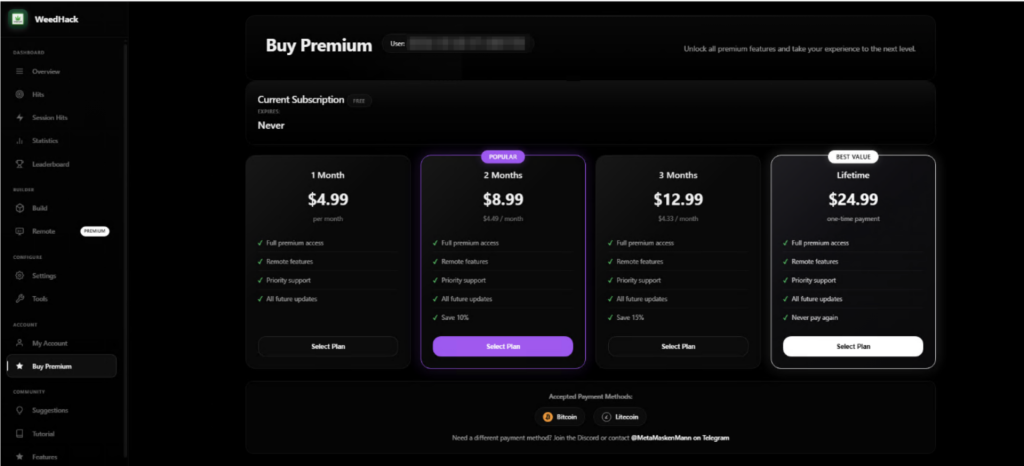
Typically, a hacker would pay hundreds of dollars per month to access attack tools through underground criminal networks. WeedHack offers a free version to anyone with a Discord account and an internet connection. A premium upgrade, which includes the ability to secretly watch victims through their own webcam, starts at just $5 a month.
This low barrier has attracted a younger crowd of would-be attackers, many of them appear to be teenagers or young adults. Our researchers were startled to discover teens using these tools not just for financial theft, but to harass and bully their peers, a pattern we’ve documented and that makes this campaign especially concerning.
The good news for McAfee users: Web Protection actively blocks the sites distributing WeedHack, and Threat Explainer tells you exactly why a flagged file is dangerous, so you’re never left guessing.
Key Facts at a Glance
What
Details
Campaign name
WeedHack
Active since
January 2026
Total victims logged
116,464+
New infections per day
~2,000–3,000
Malicious files discovered
3,820+ unique files
Malicious download URLs
240+
Free tier available?
Yes. Anyone can sign up
Premium price
Starting at $5/month; $24.99 lifetime
Who is being targeted
Minecraft players worldwide
Most affected country
United States, followed by Germany, India, the UK, Italy, and others
What attackers can access
Once installed, it can steal passwords, hijack accounts, and, for paying customers, it can give the attacker live access to the victim’s screen, webcam, and files.
The financial impact
It can steal Discord tokens, crypto wallet credentials, Minecraft account credentials.
Hackers will hold your information for ransom, requiring a large payment in exchange for your data.
WeedHack is a Malware-as-a-Service (MaaS) campaign, meaning it’s a criminal business that sells hacking tools to customers, the same way a legitimate software company sells subscriptions.
The “product” is malware that gets secretly installed on a victim’s computer when they download what they think is a Minecraft mod or client. Once installed, it can steal passwords, hijack accounts, and, for paying customers, it can give the attacker live access to the victim’s screen, webcam, and files.
The campaign operates a polished, professional-looking dashboard hosted openly on the internet (not the dark web). That dashboard lets customers track their victims, download stolen data, and launch remote access features, all from a browser.
What it looks like to buy a subscription from WeedHack.
The Cyberbullying Problem
One of the most disturbing findings from our investigation is how WeedHack is being used.
While monitoring the campaign’s Telegram channel, which had over850 members during the time of our research, we observed that many customers appear to be teenagers and young adults, and a significant portion are using the remote access tools not for financial gain, but to harass and intimidate other players.
We observed attackers recording victims through their webcams without consent and sharing those recordings in the Telegram channel as trophies. Others used knowledge of victims’ IP addresses and system access to threaten them.
It’s important to note that, at the current time of publishing, the Telegram channel has been taken down, and no replacement channel has appeared. McAfee is continuing to monitor any new channels that may be established by the threat actors for further communication.
Still, what we observed is a form of cyberbullying with unusually invasive tools behind it. If you or your child has been contacted by someone online claiming they have hacked your computer, have your webcam footage, or know your IP address, take it seriously.
What to do if this happens:
Do not follow the attacker’s instructions, it makes things worse
Tell a trusted adult immediately (parent, guardian, school counselor)
Contact your local law enforcement, this may constitute criminal conduct.
Do not engage with the attacker or attempt to negotiate
The Telegram channel uncovered by McAfee.
How Do People Get Infected?
WeedHack spreads in two main ways, and the campaign even provides its customers with step-by-step tutorials on how to carry out both.
1. Fake YouTube Videos
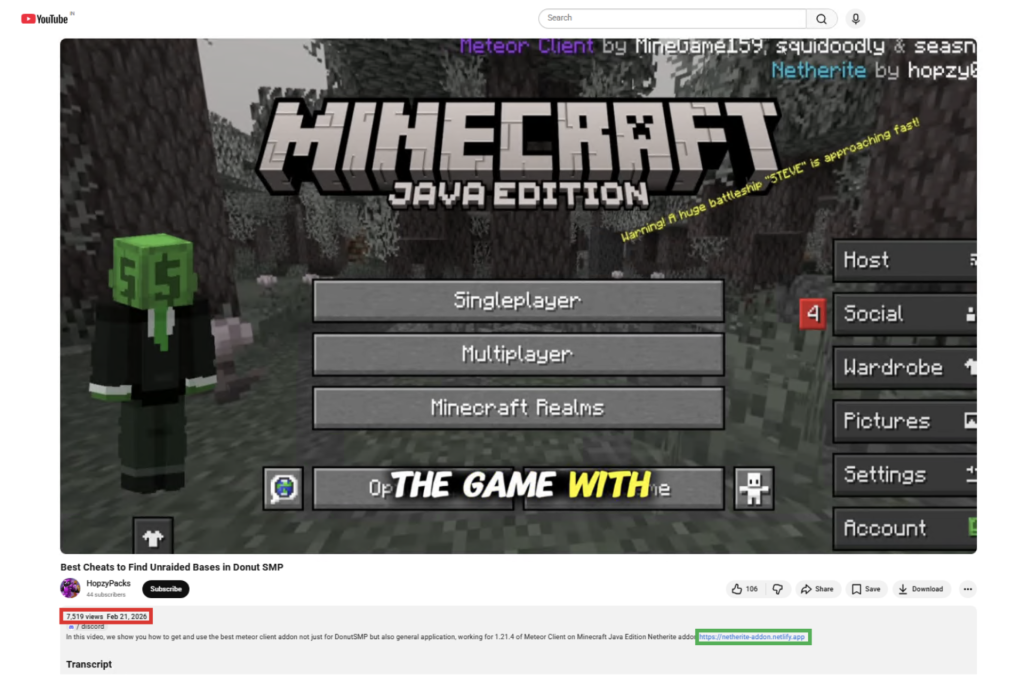
Attackers create convincing YouTube videos reviewing or demonstrating Minecraft clients and mods.
The videos are well-produced, some include voiceover narration, and link to malicious download sites in the description and comments.
One video McAfee identified had over 7,500 views before being flagged. Comments are also sometimes planted by the attackers claiming the files are safe.
2. Fake Mod Websites
WeedHack instructs customers to build convincing-looking websites that mimic official Minecraft mod pages. These sites are deliberately designed to show up high in search engine results for popular mod names, a tactic called SEO poisoning.
Some fake sites include fake security warnings, Discord links, and GitHub references to appear legitimate. In one case, a site warned players to “only download from us,” while actively distributing malware.
Minecraft clients and mods specifically targeted include: Meteor Client, Radium Client, Wurst Client, LiquidBounce, Impact Client, Future Client, and others.
An example of a video hiding a malicious link in the description.
What Happens When You’re Infected?
Infection happens in four stages that happen silently in the background after a victim opens the downloaded file.
Stage 1 – First Contact: The malicious file launches quietly (without showing a console window), connects to a hidden network, and phones home to receive further instructions. It uses a sophisticated technique involving the Ethereum blockchain to locate its command server in a way that’s difficult to block or take down.
Stage 2 – Taking Hold: The malware disables Windows Defender protections, gathers detailed information about the victim’s computer (processor, graphics card, RAM, operating system), and takes a screenshot of their screen. It then steals Discord tokens and browser passwords and cookies. For McAfee users, this is where Web Protection would prevent users from visiting the site, and where our Antivirus would prevent any downloaded malware from taking hold.
Stage 3 – Digging In: The malware installs itself so that it automatically restarts every time the victim logs into their computer. It sets up a hidden scheduled task that runs continuously, even at the highest system privileges.
Stage 4 – Full Access: For premium customers, an additional component is installed that connects the attacker to the victim’s computer in real time. This includes live screen sharing with keyboard and mouse control, webcam access, keylogging (recording every keystroke), a reverse shell (full command-line access to the computer), and the ability to upload or download any files.
A separate component specifically hunts for Telegram credentials and cryptocurrency wallets, sending that data to a different server every five minutes.
Minecraft’s mod ecosystem is enormous and largely unregulated. Kids routinely search YouTube and Google for performance-boosting clients, cosmetic mods, and gameplay cheats, exactly the kinds of things WeedHack exploits.
Here’s a practical guide for families:
Red Flag
Safe Practice
The mod isn’t on the developer’s official website
Only download from CurseForge, Modrinth, or the mod’s verified GitHub
A site or video tells you to disable your antivirus to run the file
Never disable antivirus for a game mod. Legitimate mods don’t ask you to
A site you’ve never heard of claims to be the “only official” source
If you can’t verify the site is official, don’t download from it
Download links are in YouTube comment sections
Treat comment section links as a red flag, always
Your antivirus flags a file as malware, but they try to tell you to ignore it, it’s a “false alarm”
Use McAfee’s Threat Explainer to find out why this is malicious. Don’t disable antivirus
One of the best ways parents can protect their families is with McAfee’s award-winning antivirus and Web Protection, which are specifically designed to detect threats like WeedHack and help block malicious downloads before a device can be compromised.
Are McAfee Users Protected?
McAfee has been actively tracking WeedHack samples and detects this threat under the following signatures:
Trojan:Win/Weedhack.AA through Trojan:Win/Weedhack.AE
McAfee provides multiple layers of protection against threats like WeedHack.
Web Protection helps block access to malicious websites distributing infected Minecraft mods, stopping the threat before a file is ever downloaded.
Award-winning antivirus detects and blocks malware if a malicious file does make it onto your device.
Threat Explainer shows exactly why a file was flagged, helping users understand what happened and avoid similar scams in the future.
Together, these protections help proactively block risky downloads, reactively stop malware, and explain what to watch for next.
McAfee Labs continues to monitor WeedHack and will update coverage as new samples and domains are identified. For the full technical report including indicators of compromise, see the McAfee Labs analysis.
Key Terms Explained
Term
What it means
Malware-as-a-Service (MaaS)
A criminal business model where hackers sell or rent attack tools to other people, just like a software subscription
RAT (Remote Access Trojan)
Malware that gives an attacker remote control over a victim’s device — screen, files, camera, and more
Infostealer
Malware designed to silently collect and transmit passwords, cookies, and account credentials
SEO Poisoning
Manipulating search engine results so a malicious website appears near the top when someone searches for a legitimate product
Minecraft Client/Mod
Third-party software that modifies or enhances the Minecraft game experience. Legitimate ones are common; WeedHack fakes them
Minecraft Session ID
A token that proves you’re logged into Minecraft. Stealing it lets an attacker take over your account without your password
Keylogger
Software that secretly records every key a person types — including passwords, messages, and search queries
Reverse Shell
A connection from the victim’s computer back to the attacker that gives the attacker full command-line control
EtherHiding
A technique that hides a malware’s server address inside the Ethereum blockchain, making it very difficult to block
Discord Token
A credential that lets someone access your Discord account. Stealing it gives attackers full access without needing your password
Minecraft is a 2011 sandbox game developed and published by Mojang Studios. It is the best-selling video game in the world and has sold over 350 million copies worldwide. Its popularity has spanned over a decade due to its versatile gameplay, offering multiple game modes, including one of the most memorable Story Mode in gaming history.
It allows players to create and host multiplayer servers with a variety of gameplay options and offers a wide range of custom launchers, game mods, and cheats to choose from.
Its massive popularity and widespread use of third-party tools have also given rise to a dark side of the Minecraft ecosystem, which is filled with Remote Access Trojans (RATs), credential stealers, keyloggers and other malware threats.
McAfee Labs has recently uncovered a colossal Minecraft-focused Malware-as-a-Service (MaaS) campaign named ‘Weedhack’, that allows threat actors to remotely access and manipulate the victims’ screen, webcam and file system through a dashboard hosted on the clear net, making it easily accessible to anyone with a Discord account and an internet connection.
Key Findings
‘Weedhack’ has been active since January 2026 and masquerades as genuine Minecraft clients and mods to infect users.
We’ve discovered over 3820 unique malicious JAR files that are part of this attack and over 240 URLs responsible for distributing this malware.
This campaign utilizes SEO poisoning and YouTube to generate traffic to these malicious URLs. We also found two YouTube channels and multiple videos that demonstrate Minecraft Mods and Clients and redirect viewers to these URLs.
The campaign has accumulated a total of 116,464 hits, averaging approximately 2000 to 3,000 hits per day.
The campaign provides an enterprise-grade dashboard that allows customers to view stolen credentials and system information, download the payload, configure notifications, access tutorials, and remotely monitor their victims.
This campaign deploys EtherHiding, a technique that uses Ethereum blockchain to fetch its latest C2 domain. The responses are RSA-signed and verified before execution, helping protect the network from campaign takeover attempts.
We’ve uncovered 10 domains that host the next stage payloads and host the malware dashboard for the Weedhack campaign.
We’ve identified 11 domains that hosted similar MaaS campaigns in the past, orchestrated by the same threat actor.
We’ve unearthed the threat actor’s Telegram account and uncovered a Telegram channel for customers, with over 850 members, as of writing this blog.
This campaign offers two service tiers: free and premium.
The free tier includes a comprehensive infostealer capable of targeting Minecraft session IDs and four Minecraft launchers, collecting system information, and stealing cookies and passwords from 36 different browsers. It also targets 56 browser-based crypto wallets and 12 desktop crypto wallets, along with Discord, Steam, and Telegram credentials. It can search for files using 24 different keywords and includes screenshot capture capabilities.
For premium users, with subscriptions starting at $5 per month, it offers additional remote-access capabilities such as webcam access, keylogging, reverse shell execution, screen sharing with keyboard and mouse access, and file management features for uploading and downloading files.
While monitoring the Telegram channel, we found that WeedHack malware is a major catalyst for cyberbullying. Many of its customers appear to be teenagers and young adults and are using remote access capabilities to threaten, harass and monitor their victims, which are around the same age.
The Police Service of Northern Ireland (PSNI) is warning the public to be wary of scammers spoofing its switchboard number in an attempt to profit by calling marks from a "trustworthy" number. A member of the public reported an attempted scam on Monday afternoon. A phone call came in from what appeared to be the PSNI’s switchboard number, and the caller pretended to be a member of the force inquiring about a case in which the recipient was involved. “The caller told the person there was an investigation linked to their name involving money transfers to narcotic-related countries and was subsequently asked to provide information about their bank cards,” said the PSNI’s Inspector Walker. We don’t have any expert criminals here at The Register, but we think it would be pretty sage advice for someone looking to increasingly pass as a police representative not to be so stupid as to ask for gift cards as “part of the investigation process.” “The caller then asked them to purchase gift cards and send across the codes for those, stating that this was part of the investigation process and that the money would be returned to them,” Inspector Walker added. “This made the reporting party suspicious, however, and thankfully, the victim didn’t share any of their personal or bank details with the caller, who they then blocked.” Officials confirmed to The Register that the police’s number was spoofed, and this case was not instigated by a real member of the switchboard team. Spoofing the switchboard’s phone number marked “a very concerning situation,” Walker said, urging the public to remain vigilant to similar calls. The PSNI is continuing to make follow-up enquiries about the report, but has not yet detained any individual in connection with the attempted fraud. Anyone who falls victim to digital fraud in the UK should contact the police, their bank, and Action Fraud, all of which can offer the necessary assistance. “Our advice is that you should never disclose your personal or financial details over the phone, in person, or by email, to someone you don't know,” said Walker. “Guarding your personal and banking details is essential.” The attempted scam is the second disclosed by the PSNI in as many days. On Monday, it warned of a separate case involving an elderly woman being defrauded of a sum north of £250,000 ($336,000) after being targeted by individuals operating a fake cryptocurrency scheme. “After initially sending a relatively small amount, the woman then ‘invested’ larger amounts on a number of occasions after the criminals convinced her that she needed to send more in order to get her initial investment back,” said Detective Inspector Moffett, of the PSNI’s Serious Crime Branch. “After she unknowingly downloaded malware at their instruction, they were able to gain control of her electronic devices and, we believe, transfer further sums from her account.” Cryptocurrency investment scams are among the most pervasive in the world, with figures from the US suggesting the problem is growing increasingly severe. According to the FBI’s annual digital crimes report, it received 48 percent more complaints about crypto investment scams last year than it did the year before, with losses also rising 25 percent. Much of this pain was shouldered by those aged 60 and over, the agency added. ®
The right-wing think tank is actively pushing “civil terrorism”—increasing penalties for minor crimes committed while people engage in constitutionally protected free speech.
Security researchers on Monday found dozens of Red Hat npm package releases infected with the Mini Shai-Hulud worm that TeamPCP cybercriminals recently open-sourced. The new supply chain attack hit at least 32 npm package releases published under the Red Hat Cloud Services namespace, according to security researchers from Google-owned Wiz, who traced the malware to one Red Hat employee’s compromised GitHub account. They said the affected packages are downloaded around 80,000 times a week. “The compromised account pushed malicious orphan commits to two RedHatInsights repositories, bypassing code review,” the threat hunters said in a Monday blog. “This happened across two waves of activity.” Wiz considers this a “live threat,” and says its researchers are actively monitoring it for any new developments. Socket, meanwhile, counted 95 affected package versions as of 11:00:22 UTC. The supply-chain security shop continues to monitor the ongoing attack and update the artifacts list – so be sure to check it out, and if your organization or any development pipelines have installed one of the poisoned versions, assume compromise and immediately rotate credentials. The compromised versions execute a hidden payload through a preinstall hook so that the malware automatically runs during the npm install process – before a developer imports or uses the package. “Based on Socket’s analysis, the payload is designed to collect GitHub Actions secrets, npm tokens, cloud credentials, Kubernetes and Vault material, SSH keys, Git credentials, and other sensitive files,” Socket’s research team wrote on Monday. “It also includes encrypted exfiltration logic and GitHub-based fallback mechanisms, indicating that the attacker was not only attempting to steal credentials, but also potentially enable further supply chain propagation.” A Red Hat spokesperson told The Register that the IBM-owned software firm is aware of the reports. “We immediately initiated an investigation and removed the packages from the npm registry,” the spokesperson said. “The packages are strictly limited to internal development, and the malicious code was never published for customer consumption via the console.redhat.com system. While our investigation is ongoing, we have not identified any impact to customer or partner environments or Red Hat production systems.” Both security firms say the malware resembles the Mini Shai-Hulud worm – but because TeamPCP open sourced the credential-stealing tool, it’s tough to say whether TeamPCP or a copycat crew is responsible for the latest developer-targeting supply chain infection. According to Wiz, the modifications look “largely cosmetic, with references to the Dune universe replaced by Greek mythology themes (i.e ‘spartan’), while the underlying functionality and tradecraft remain substantially similar.” One of the notable changes, the security sleuths said, is that the new variant adds data collectors for Google Cloud Platform and Microsoft Azure identities, and this new capability snarfs up all the identities that the infected machine has access to, as opposed to just stealing secrets from the cloud environments. This suggests “an increased attacker focus on gaining and leveraging access to the cloud itself,” Wiz warns. This variant also creates repositories containing the description “Miasma: The Spreading Blight.” And unlike earlier variants of the self-spreading worm that copied themselves, this one generates a uniquely encrypted payload for each infection, which makes hash-based indicators-of-compromise useful only for a specific package version. ®
The biggest threat to America’s midterm elections in November likely isn’t foreign attackers hacking US voting machines. Phishing and election-official impersonation are the bigger risks, according to Check Point, which documented more than 5,000 election-themed domains registered between April and May. These domains can be used by attackers for phishing, impersonation, fraud, misinformation, or influence activity, especially when coupled with about 17,000 exposed credentials associated with fundraising orgs, political parties, and government-related services also spotted by the security shop’s intelligence arm in May. "Election-related domains and leaked credentials represent two sides of the same problem: infrastructure and access," Danielle Hess, a cyber threat intelligence analyst at Check Point Software, told The Register. "A rise in election-themed domains not only creates more potential infrastructure that could be abused for phishing or impersonation, but also reflects a growing election-related ecosystem with more organizations, accounts, and users that can be targeted," Hess said. "When combined with a large pool of exposed credentials, attackers have more opportunities to conduct convincing and scalable election-related operations." Plus, AI gives phishing, impersonation, election misinformation and other scam operations a massive boost, making them faster, cheaper, and easier to scale. The uptick in election-related threats follows the Trump administration’s efforts to gut America’s lead cyber-defense agency and decimate its efforts to combat election-related fraud, while slashing its budget and workforce, and cutting all federal funding for the Elections Infrastructure Information Sharing and Analysis Center (EI-ISAC). According to a Monday report, Check Point has been monitoring registered domains and documented about 1,300 containing the keyword “election” and 2,957 containing “vote” in January. Three months later, between April 13 and May 14, about 1,140 newly registered domains contained the word "election," while the number containing "vote" had climbed to about 4,010. While simply registering a domain doesn’t guarantee it will be used for malicious purposes, such domains are often used for phishing pages that impersonate voter info sites or candidates themselves, and campaign donation scams, and misinformation sites designed to look like official election communications. Along these lines, the security shop documented thousands of leaked credentials in May linked to fundraising and political party websites including about 9,500 ActBlue.com (Democrats’ fundraising site) compromised credentials, 6,500 leaked WinRed.com (Republican fundraising) credentials, plus 600 from the official Republican gop.com website, 130 from democrats.org, and 150 leaked usa.gov citizen services’ site credentials. Hess told us that "it's important to note that the credential statistics reflect credentials identified on Check Point's External Risk Management (ERM) platform as of May 2026 and are not limited to credentials that were necessarily stolen or leaked during May 2026 itself." As the reports point out, the credential leaks aren't limited to one political party or specific campaigns. “Individual political campaign domains showed little to no observed credential exposure across a sample of swing-state candidates from both major political parties, reinforcing that current exposure is concentrated in centralized platforms rather than campaign-specific infrastructure,” according to the report. “A single campaign domain stood out as an exception, with around 90 leaked credentials identified,” the report continued. "The campaign domain referenced was associated with candidate Tom Kean," Hess said, referring to Rep. Tom Kean Jr. (R-NJ). "However, it's important to note the credentials were identified within infostealer malware logs, which typically reflect opportunistic compromise rather than deliberate targeting of a specific campaign. While not indicative of direct targeting, the presence of these credentials may still pose a security risk if associated accounts remain active or reused.” In addition to the political org-related credential exposure, voter information is also appearing across dark web forums ahead of the November midterms. This includes a January 30 BreachForums post advertising data - being given away for free - tied to the Fremont County, Colorado election division. The data dump included names, email addresses, IP address data, and election-related portal submission information. On April 26, the threat hunters spotted a post on criminal forum Spear[.]cx, claiming to offer a multi-state US voter database covering more than two dozen states and Washington, DC. ®
Grand Theft Auto cheat users have discovered that even the people selling ways around the rules struggle to follow some basic security ones. According to breach notification site Have I Been Pwned, the operators of Atlas Menu, a cheat service for Grand Theft Auto V and Counter-Strike 2, suffered a data breach in May that exposed information belonging to tens of thousands of users after an attacker allegedly gained access to the service's systems and dumped its database online. The breach exposed 64,000 unique email addresses, according to HIBP. The leaked data also included usernames, IP addresses, support tickets, and passwords stored as bcrypt hashes. The individual who claimed responsibility for the breach published the stolen database to a public GitHub repository, claiming to have gained access to "all Atlas systems" before extracting customer records, support conversations, menu license keys, signup dates, and Rockstar Games account identifiers. The data, reviewed by The Register, also appears to include lists of thousands of banned users, administrator logs, and other internal records. Posts discussing the breach on Reddit suggest this was not Atlas Menu's first security incident, but users said the latest leak appears to contain significantly more sensitive information than previous disclosures. Anyone signing up for a GTA cheat service probably wasn't expecting privacy guarantees. Even so, having your email address leaked is one thing. Having support tickets, account identifiers, and purchase records dumped onto GitHub is another. The Atlas breach comes weeks after Rockstar Games was pulled into a separate data leak claimed by ShinyHunters. In that case, the extortion crew alleged it had accessed Rockstar data through cloud cost-monitoring platform Anodot and threatened to publish the information unless its demands were met. Atlas users now have their own security headache to deal with. Whether they're more concerned about the leaked database or the screenshot-spying allegation will likely depend on what they were doing while the software was running. ®
Whether you’re planning a once-in-a-lifetime trip or just hoping to catch a match while it’s in your city, the 2026 FIFA World Cup is already driving a surge in ticket searches, travel bookings, and last-minute plans.
But where there’s high demand and big money, scammers aren’t far behind.
New McAfee Research Finds a Gap Between Awareness and Risk
New research from McAfee shows that while most fans are aware of World Cup-related scams, many are still willing to take risks to secure tickets.
In fact, 40% say they would consider buying from an unofficial source if they can’t get tickets through the official FIFA site, as many expect tickets to sell out and hope to find affordable resale options.
That tension is what makes events like the World Cup especially vulnerable for scams.
With limited ticket availability, rising prices, and the pressure to act quickly, even informed fans can find themselves making decisions they normally wouldn’t, like buying tickets from a reseller on TikTok.
And scammers are counting on it.
Survey takeaways:
76% of fans are interested in getting World Cup tickets
35% have already started searching online
43% are willing to spend over $500 on tickets
66% say they’re aware of World Cup-related scams
66% say they’re concerned about being scammed
40% would consider buying tickets from unofficial sources
The Most Common World Cup Scams to Watch For
Below is a comprehensive breakdown of the most common scams tied to major global sporting events like the World Cup, including how they work and what to look for.
McAfee’s Scam Detector,Safe Browsingtools, VPN, and Password Manager work together to help you spot scamslike these as they happen by flagging suspicious messages, blocking risky websites, and helping you make safer decisions before you click, pay, or share information.
Scam Type
What It Is
How It Works
Red Flags
Fake Ticket Resale Scam
Fraudulent tickets sold through unofficial sites or individuals
Scammers create fake listings or duplicate real tickets and sell them to multiple buyers
Prices far below or above market, refusal to use official transfer systems, pressure to act fast
Social Media Ticket Scam
Tickets sold through platforms like Instagram, Facebook, TikTok, or X
Fake or hacked accounts post “last-minute” ticket offers and move conversations to DMs
Urgent language (“only 2 left”), new or suspicious profiles, requests to pay outside the platform
Duplicate QR Code Scam
One legitimate ticket is resold multiple times
Multiple buyers receive the same QR code, but only the first scan works
Screenshots instead of official transfers, identical tickets sold repeatedly
Fake Ticket Website Scam
Websites designed to look like official ticket platforms
Victims enter payment info or purchase tickets that don’t exist
Slightly misspelled URLs, unfamiliar domains, lack of official branding verification
Travel & Accommodation Scam
Fake hotels, rentals, or travel packages
Listings appear legitimate but either don’t exist or are already booked
Prices that seem unusually low, requests for upfront payment, lack of verified reviews
Booking Impersonation Scam
Fraudsters pose as airlines, hotels, or booking platforms
Victims receive messages about “issues” with bookings and are asked to click links or provide info
Unexpected messages, requests for login or payment details, links that don’t match official sites
Public Wi-Fi & Phishing Scam
Data theft through unsecured networks while traveling
Scammers intercept data or create fake login portals on public Wi-Fi
Open networks with no password, login pages asking for unnecessary information
Fake Giveaway Scam
Promotions claiming free tickets or VIP access
Victims are asked to enter personal data, click links, or pay “processing fees”
“You’ve won” messages you didn’t enter, requests for payment to claim prizes
Betting & Prediction Scam
Fake betting tips or “guaranteed wins” tied to matches
Scammers sell fake predictions or direct users to malicious betting sites
Claims of guaranteed outcomes, requests for upfront payment, unfamiliar platforms
Merchandise Scam
Counterfeit World Cup gear sold online
Buyers receive low-quality or no product at all
Unverified sellers, poor site quality, deals that seem too good to be true
How AI is Making These Scams More Convincing
Unfortunately, with the continued improvement of AI, these scams are becoming more convincing.
AI tools allow scammers to create:
More realistic websites and messages
Personalized outreach that feels legitimate
Fake endorsements, images, or promotions
That means traditional advice like “look for typos” is no longer enough on its own.
Today’s scams often look polished, professional, and believable.
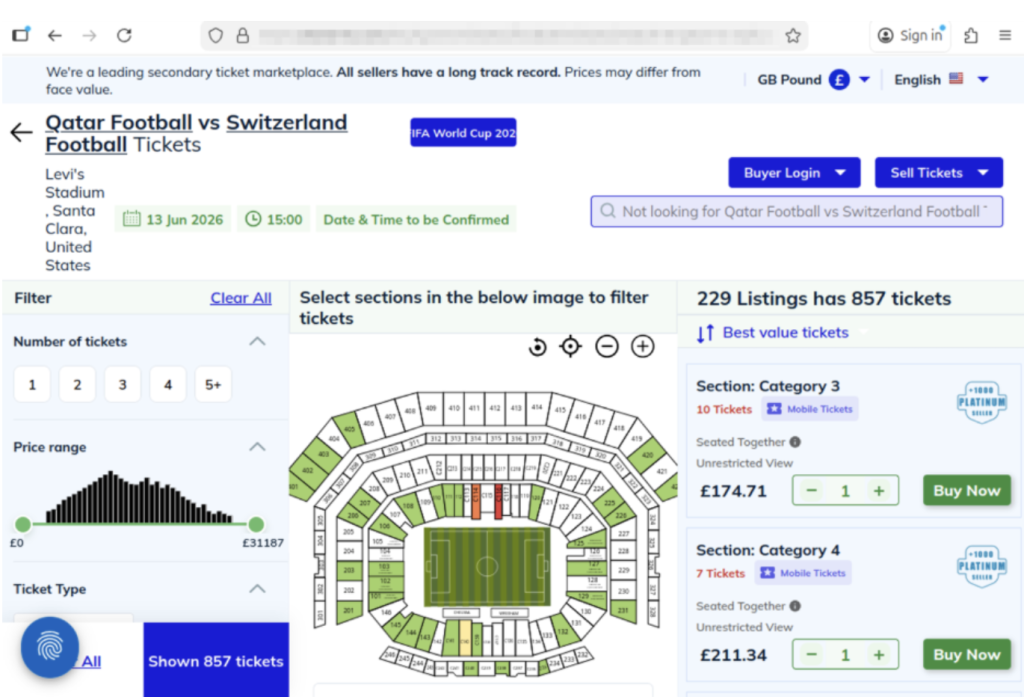
The website above shows a scam operation detected by McAfee Labs. It has incredibly realistic seat-selection options and ticket-buying features. But it’s fake.Here you can see just how realistic the website looks. But these tickets are not actually for sale.
What “Official” Actually Means (and Why It Matters)
Use strong passwords and enable two-factor authentication. Consider a password manager like McAfee’s.
Verify before you buy
If something feels off, pause and check before sending money
What to Do If You Think You’ve Been Scammed
If you think you may have purchased a fraudulent ticket, clicked a suspicious link, or shared information with a scammer, acting quickly can help limit the impact.
Immediate steps to take
Stop communication immediately Do not send additional money or information, even if the sender claims you need to “complete” a transaction. It’s also a good idea to take screenshots of messages in case the scammer disappears.
Contact your bank or payment provider Report the transaction as soon as possible. Many institutions can help reverse charges or flag fraudulent activity if caught early.
Secure your accounts Change passwords for any accounts that may be affected, especially email, banking, and ticketing platforms. Our password manager and free password generator help create unique passwords every time.
Enable two-factor authentication (2FA) Adding an extra layer of security can help prevent unauthorized access, even if your password was exposed.
Scan your device for threats If you clicked a suspicious link or downloaded a file, run a security scan to check for malware or malicious software. Check out our free security scan.
Monitor for unusual activity Keep an eye on financial accounts, email logins, and any services tied to your personal information. Our free WebAdvisor helps protect you from malware and phishing attempts while you surf.
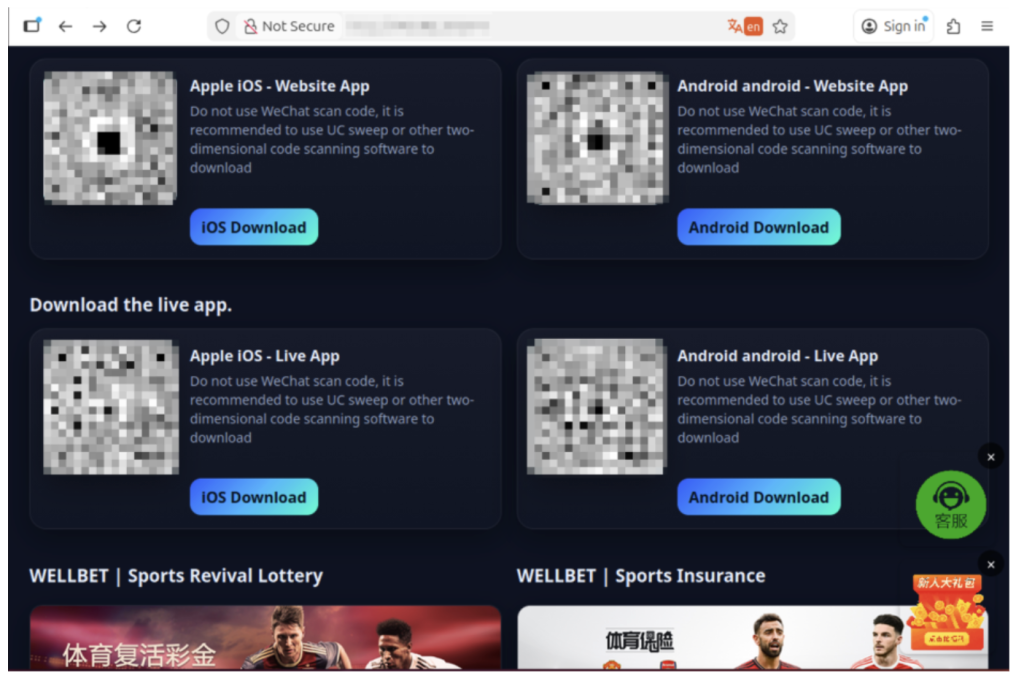
The image above shows malicious apps masquerading as sports betting sites or promising unique World Cup coverage. But when users download, their devices are infected.
How McAfee Helps You Spot Scams in the Moment
McAfee offers more than traditional antivirus, combining multiple layers of digital protection in one app to help you stay safer while searching, clicking, and buying online.
Scam Detector helps flag suspicious texts, emails, and videos automatically, so you can spot a scam before it hits you and your wallet
Safe Browsing tools help block risky websites, alert you to phishing attempts, and guide you away from malicious links
VPN helps keep your connection private on public Wi-Fi, protecting your personal and payment information
Password Manager helps create and store strong, unique passwords to reduce the risk of account takeover
Identity Monitoring and Alerts notify you if your personal information appears where it shouldn’t, so you can quickly take steps to fix it
Personal info removal helps find and remove your personal info from data broker sites and close out old forgotten accounts
The World Cup isn’t just another event, it’s a moment when millions of people are making fast decisions involving real money, travel plans, and personal information.
What McAfee’s research makes clear is that the biggest risk isn’t a lack of awareness. Most fans already know scams exist. The risk is what happens next.
When tickets are scarce, prices are high, and the pressure to act is real, even informed consumers may take chances they normally wouldn’t. That’s where scammers succeed: not by tricking people who aren’t paying attention, but by catching people in moments of urgency.
As demand continues to build toward the tournament, more fans will be searching, comparing, and purchasing online.
The takeaway is simple: Staying safe isn’t just about knowing scams exist. It’s about slowing down, verifying before you buy, and using tools that help you make informed decisions in the moment.
*McAfee is not affiliated with or endorsed by FIFA.
Announcing the new integration between Cisco Secure Access and Microsoft Purview designed to provide unified DLP based on Purview policies that can be enforced locally and in the cloud within Cisco Secure Access.
The integration between Cisco Secure Access and Island enterprise browser improves the user experience while reducing risk by connecting and protecting user access to private applications from unmanaged devices.
Cisco is bringing more detailed visibility into Splunk across Cisco Firewall and Isovalent, helping teams act across hybrid environments with greater speed and confidence.
Password manager Dashlane has disabled a number of user accounts as a precaution amid a spate of brute force attacks. It didn't specify the scale of the attack, although scores of users have queried the reason for receiving emails informing them of account suspensions. “Your account has been temporarily suspended for security reasons as someone has attempted to register a new device and didn't enter the correct token after several tries,” the emails read, along with instructions to contact customer support to restore access. The attacks began on Sunday afternoon and the Dashlane team said it had finished investigating the matter later that evening, restoring all affected user accounts in the process, according to its status page. In a copy-paste statement sent to a number of users via social media, Dashlane also confirmed there was no compromise of internal systems. Dashlane posted an update to its status page on Monday morning, repeating the same statement from a day earlier, but changing the incident status from "resolved" to "monitoring." Several users reported unauthorized login attempt notifications from various countries - the common culprits being Korea and Russia. Dashlane did not specify whether any attempts on customer accounts were successful. Dashlane’s interventions involved suspending accounts and its two-factor authentication (2FA) service. Some users reported trying to access Dashlane’s 2FA one-time passcodes, but when entering them, all that returned was an error. Some criticised the company for a lack of public comms about the attacks. Aside from the direct account suspension emails and some replies to users on social media, Dashlane has not disclosed the attack through any high-visibility channels. Users also queried whether the initial account suspension emails were a phishing attempt. But the emails showed no hallmarks of phishing as they contained no suspicious links, no attachments and were sent from a real Dashlane domain. However, the nature of the message and the fact that the emails contained an old Dashlane logo only exacerbated some customers’ fears. The Register has contacted Dashlane for more information. ®

 Login
Login






 Safe Practice







 Scam Type