Reading view

Weekly Update 487

Weekly Update 487

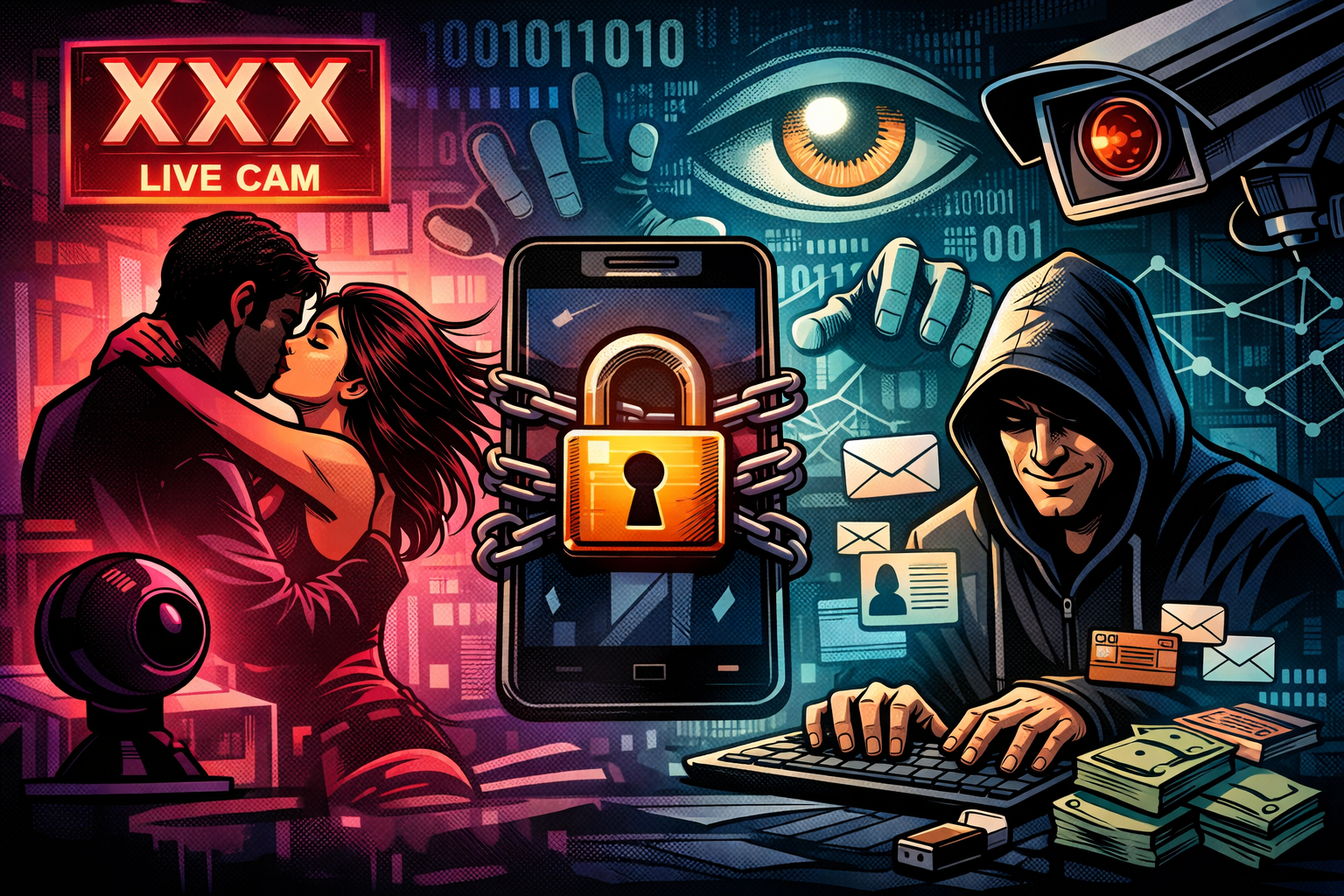
I thought Scott would cop it first when he posted about what his solar system really cost him last year. "You're so gonna get that stupid AI-slop response from some people", I joked. But no, he got other stupid responses instead! And I got the AI-slop responses! Draw your own conclusions on those comments, but I find it fascinating that the one thing people would take away from a thoughtful blog post I spent many hours writing to explain how much work I put into privacy is that the illustration was computer-generated. That such feedback aligns with the political leanings of folks on Mastodon is also fascinating, and probably something I should have seen coming. But hey, there's nothing new about folks popping their heads up to make inane comments where none were needed, and I have a special blog post for just such occasions: If You Don't Want Guitar Lessons, Stop Following Me.

Weekly Update 487
Weekly Update 487
Weekly Update 487
Weekly Update 487
  •  

Weekly Update 486

Weekly Update 486

I’m in Oslo! Flighty is telling me I’ve flown in or out of here 43 times since a visit in 2014 set me on a new path professionally and, many years later, personally. It’s special here, like a second home that just feels… right. This week, the business end of things is about the WhiteDate data breach. Seeking a partner along common racial lines isn’t unusual, but… well… WhiteDate is anything but usual. And, just for fun, see if you can pick the thing that garnered the most negative feedback about that blog post this week, I’ll feature the discussion in the next vid.

Weekly Update 486
Weekly Update 486
Weekly Update 486
Weekly Update 486
  •  

Who Decides Who Doesn’t Deserve Privacy?

Who Decides Who Doesn’t Deserve Privacy?

Remember the Ashley Madison data breach? That was now more than a decade ago, yet it arguably remains the single most noteworthy data breach of all time. There are many reasons for this accolade, but chief among them is that by virtue of the site being expressly designed to facilitate extramarital affairs, there was massive social stigma attached to it. As a result, we saw some pretty crazy stuff:

  1. Various websites were stood up to publicly disclose the presence of people in the data and out them as “cheaters”
  2. Churches trawled through the data and contacted the spouses of exposed parishioners
  3. The media outed noteworthy individuals they searched for in the breach
  4. A radio station back home in Australia encouraged listeners to dial in to check if their spouse was in the data

Arguably, we now live in a more privacy-conscious era, one full of acronyms such as GDPR and CCPA, among others, in different parts of the world. The right to be forgotten, the right to erasure, and, indeed, privacy as a fundamental human right feature very differently in 2026 than they did in 2015. But arguably, even back then, the impact of outing someone as a member of the site should have been obvious. It was certainly obvious to me, which is why I introduced the concept of a sensitive data breach before the data even went public. HIBP wouldn’t show results for this breach publicly because I was concerned about the impact on people being outed. My worst fear was a spouse coming home to find someone having taken their own life, an HIBP search result on the screen in front of their lifeless body.

People died as a result of the breach. Marriages ended and lives were turned upside down. People lost their jobs. The human toll of the breach was profound. The decision I made after witnessing this was that if a breach was likely to have serious personal or social consequences for people in there, it would be flagged as sensitive and not publicly searchable.

The public doxing of members of the service was often justified on a moral basis: “adultery is bad, they deserve to be outed”. But there are two massive problems with this attitude, and I’ll begin with the purpose for which accounts were sometimes made:

An email address appearing in that breach implied that the person was there to have an extramarital affair because that was literally the catch-phrase of the service: “Life is short, have an affair”. But the reality was that people were members of the service for many, many different reasons. Have a read of my post titled Here’s What Ashley Madison Members Have Told Me and you’ll begin to understand how much more nuanced the situation was:

  1. Single people had joined the service, and later married before the breach occurred
  2. People who were worried about a cheating spouse joined the service in order to try to catch them
  3. Accounts were made with some people’s names and email addresses without their consent (there are many “Barrack Obamas” in the data)

So, should everyone with an email address on Ashley Madison be considered an adulterer? Clearly, no, that completely misses the nuances of what an email address in a data breach really means. But what about the people who were there to have an affair? Well, that brings us to the second problem:

Our own personal belief systems are not a valid basis for outing people publicly because their belief systems differ. I used more generic terms than “extramarital affair” or “cheating” because there are many other data breaches that are flagged as sensitive in HIBP for the very same reason. Fur Affinity, for example: there is a social stigma around furries and outing someone as a member of that community could have negative consequences for them. Rosebutt Board is another example: anal fisting is evidently something a bunch of people are into, and equally, I’m sure there are many who take a moral objection to it. And finally, to get to the catalyst for this post, WhiteDate: the website that is ostensibly designed for white people to date other white people. Flagging that as sensitive resulted in some unsavoury commentary being directed at me:

U are a Nazi end of story

— 𝔗𝔥𝔢ℑ𝔡𝔦𝔬𝔱 (@fuckelonsob) January 6, 2026

Now, I emphasised “ostensibly” because the more you dig into this breach, the more you find tones of white supremacy and other behaviours that definitely don’t align with my personal value system. That societal view doesn’t sit well with me, and I think I’m safe in saying it wouldn’t sit well with most people. Would someone being outed as a member of that service be likely to result in “serious personal or social consequences”? Yes, and you can see that in the messaging from the same account:

Context matters. U are literally shielding Nazi hate mongering scoundrels. We can't doxx white supremacists?

If ISIS had a dating site & it got breached, would you protect it out of fear of doxxing? No.

Every database leaked is sensitive in a way.

— 𝔗𝔥𝔢ℑ𝔡𝔦𝔬𝔱 (@fuckelonsob) January 6, 2026

This behaviour is precisely what I don’t want HIBP being used for: as a weapon to attack people solely on the basis of their email address being affiliated with a website that has had a data breach.

Imagine, for a moment, if ISIS did have a dating site and it was breached, should it be flagged as sensitive? Contrary to the comment about "every database leaked is sensitive", there is a clear legal definition for sensitive personal information and it includes:

personal data revealing racial or ethnic origin, political opinions, religious or philosophical beliefs;
trade-union membership;
genetic data, biometric data processed solely to identify a human being;
health-related data;
data concerning a person’s sex life or sexual orientation.

An ISIS dating website breach would tick many of the boxes above and would therefore constitute a sensitive data breach. That's not an endorsement of what they stand for; it's simply a data-processing decision. But there may be a nuance in there which I didn't see present in the WhiteDate data - what if it contained illegal activity? (Sidenote: for the most part, HIBP is used by people in Western Europe, North America and Australasia, so when I say "illegal", I'm looking at it through that lens. Clearly, there are parts of the world where our "illegal" is their "normal", which further complicates how I run a service accessible from every corner of the world.) I had another example recently that went well beyond moral contention and deep into the realm of illegality:

New sensitive breach: "AI girlfriend" site Muah[.]ai had 1.9M email addresses breached last month. Data included AI prompts describing desired images, many sexual in nature and many describing child exploitation. 24% were already in @haveibeenpwned. More: https://t.co/NTXeQZFr2x

— Have I Been Pwned (@haveibeenpwned) October 8, 2024

Of all the different things people can disagree on when it comes to our moral compasses, paedophilia is where we unanimously draw the line. But I still flagged it as sensitive because of the reasons outlined above. Many people using the service were just lonely guys trying to create an AI girlfriend with no prompts around age. There would be email addresses in there that weren’t entered by the rightful owner. And then, there are cases like this:

That's a firstname.lastname Gmail address. Drop it into Outlook and it automatically matches the owner. It has his name, his job title, the company he works for and his professional photo, all matched to that AI prompt. pic.twitter.com/wpXQMBLf3B

— Troy Hunt (@troyhunt) October 9, 2024

I sat there with my wife, looking at the LinkedIn profile that used the same email address as the person who posted that comment. We looked at his photo and at the veneer of professionalism that surrounded him on that site, knowing what he had written in that prompt above. It was repulsive. Further, beyond being solely an affront to our morals, it was clearly illegal. So, I had many conversations with law enforcement agencies around the world and ensured they had access to the data. Involving law enforcement where data sets contain illegal activity is absolutely the right approach here, but equally, not being the vehicle for implying someone’s affiliation or beliefs and doxing them publicly without due process is also absolutely the right approach.

I understand the gut reaction that flagging a breach like WhiteDate as sensitive protects people whom most of us do not like. But a dozen years of running this service have caused me to consider individual privacy and rights literally hundreds of times, and these conclusions aren’t arrived at hastily. Imagine for a moment, the possible ramifications for HIBP if the service were used to publicly shame someone as a "Nazi" and that, in turn, had serious real-world consequences for them. Whether that implication was right or not, there are potentially serious ramifications for us that could well leave us unable to operate at all. And, as the Ashley Madison examples show, there are also potentially life-threatening outcomes for individuals.

I don't particularly care about one random, anonymous X account making poorly thought-out statements, but the same sentiment has been expressed after loading previous similar breaches, and it deserves a blog post. Equally, I've written before about why all the other data breaches are publicly searchable and again, that conclusion is not arrived at lightly.

I’ll finish with a note about privacy that relates to my earlier comment about it being a human right. It's literally a human right under Article 12 of the Universal Declaration of Human Rights:

No one shall be subjected to arbitrary interference with his privacy, family, home or correspondence, nor to attacks upon his honour and reputation. Everyone has the right to the protection of the law against such interference or attacks.

Breaches with legally defined sensitive data will continue to be flagged as sensitive, and breaches with illegal data will continue to be forwarded to law enforcement agencies.

  •  

Weekly Update 485

Weekly Update 485

15 mins and 40 seconds. That's how long it took to troubleshoot the first tech problem of 2026, and that's how far you'll need to skip through this video to hear the audio at normal volume. The problem Scott and I had is analogous to the troubleshooting so many of us do in our roles day in and day out:

  1. This should work fine
  2. It doesn't work, and I don't know why
  3. I did something that seems unrelate,d and now it works
  4. I still don't know why

Anyway, I've cleaned up the audio-only version for the podcast, but I can't change the YouTube version once it's streamed, so apologies, just pump your volume up for the first quarter hour. And Happy New Year!

Weekly Update 485
Weekly Update 485
Weekly Update 485
Weekly Update 485
  •  

Why your organization needs a Cisco Talos Incident Response Retainer

Every day, new ransomware and data breaches dominate the headlines, reminding us that it’s a matter of when, not if, your organization may be next. Having a well-prepared response plan and a team of forensic professionals ready to act at a moment’s notice can mean a world of difference between swift incident recovery or a […]
  •  

Weekly Update 483

Weekly Update 483

Building out an IoT environment is a little like the old Maslow's Hierarchy of Needs. All the stuff on the top is only any good if all the stuff on the bottom is good, starting with power. This week, I couldn't even get that right, but thankfully, sparky to rescue and ensuite underfloor heating disconnected, and we now have reliable power again. On top of that is the layer that has increasingly been my nemesis - the network. Two days after recording, I've just spent the better part of the entire day making a much more concerted effort to adjust channel and power settings on APs, lock clients that don't move to the APs that make the most sense, and generally just screw around with it until stuff worked. And then I turned off a circuit, turned it back on again, and all hell broke loose 😭

Weekly Update 483
Weekly Update 483
Weekly Update 483
Weekly Update 483

References

  1. Sponsored by: 1Password Extended Access Management: Secure every sign-in for every app on every device.
  •  

Weekly Update 482

Weekly Update 482

Perhaps it's just the time of year where we all start to wind down a bit, or maybe I'm just tired after another massive 12 months, but this week's vid is way late. Ok, going away to the place that had just been breached (ironic!) didn't help, but I think in general the pace we've maintained this year just needs to come back a bit. That said, I'll try to get this week's and next week's out on time, then it's off on travels for the next four weeks after that. Stay tuned for more IoT problems in a few days from now 🤦‍♂️

Weekly Update 482
Weekly Update 482
Weekly Update 482
Weekly Update 482

References

  1. Sponsored by: Malwarebytes Browser Guard blocks phishing, ads, scams, and trackers for safer, faster browsing
  2. Spicers Retreats suffered a data breach they attributed back to an attack on the Mews reservation platform (timely, given we had a getaway booked there only a couple of days later)
  3. We worked through 630 million more passwords provided by the FBI (that includes 46 million we've never seen before)
  4. Hmmm... spam to a Qantas-only email address, wonder where that might have come from? (this should be impossible because there's an injunction in place 🤦‍♂️)
  •  

Processing 630 Million More Pwned Passwords, Courtesy of the FBI

Processing 630 Million More Pwned Passwords, Courtesy of the FBI

The sheer scope of cybercrime can be hard to fathom, even when you live and breathe it every day. It's not just the volume of data, but also the extent to which it replicates across criminal actors seeking to abuse it for their own gain, and to our detriment.

We were reminded of this recently when the FBI reached out and asked if they could send us 630 million more passwords. For the last four years, they've been sending over passwords found during the course of their investigations in the hope that we can help organisations block them from future use. Back then, we were supporting 1.26 billion searches of the service each month. Now, it's... more:

Just as it's hard to wrap your head around the scale of cybercrime, I find it hard to grasp that number fully. On average, that service is hit nearly 7 thousand times per second, and at peak, it's many times more than that. Every one of those requests is a chance to stop an account takeover. But the real scale goes well beyond the API itself. Because the data model is open source and freely available, many organisations use the Pwned Passwords Downloader to take the entire corpus offline and query it directly within their own applications. That tool alone calls the API around a million times during download, but the resulting data is then queried… well, who knows how many times after that. Pretty cool, right?

This latest corpus of data came to us as a result of the FBI seizing multiple devices belonging to a suspect. The data appeared to have originated from both the open web and Tor-based marketplaces, Telegram channels and infostealer malware families. We hadn't seen about 7.4% of them in HIBP before, which might sound small, but that's 46 million vulnerable passwords we weren't giving people using the service the opportunity to block. So, we've added those and bumped the prevalence count on the other 584 million we already had.

We're thrilled to be able to provide this service to the community for free and want to also quickly thank Cloudflare for their support in providing us with the infrastructure to make this possible. Thanks to their edge caching tech, all those passwords are queryable from a location just a handful of milliseconds away from wherever you are on the globe.

If you're hitting the API, then all the data is already searchable for you. If you're downloading it all offline, go and grab the latest data now. Either way, go forth and put it to good use and help make a cybercriminal's day just that much harder 😊

  •  

Weekly Update 481

Weekly Update 481

Twelve years (and one day) since launching Have I Been Pwned, it's now a service that Charlotte and I live and breathe every day. From the first thing every morning to the last thing each day, from holidays to birthdays, in sickness and in heal... wait a minute - did we marry each other or a data breach service?! We decided to do a 12th-birthday special together today to give everyone a bit more insight into what she does and what life is like running this service. It's a different weekly vid, and we really hope you enjoy watching it 😊

Weekly Update 481
Weekly Update 481
Weekly Update 481
Weekly Update 481

References

  1. Sponsored by: Report URI: Guarding you from rogue JavaScript! Don’t get pwned; get real-time alerts & prevent breaches #SecureYourSite
  2. Just because a "fake" email address is in HIBP, it doesn't mean HIBP isn't accurately indexing data breaches (if it looks like an email address, it's an email address)
  •  

Why Does Have I Been Pwned Contain "Fake" Email Addresses?

Why Does Have I Been Pwned Contain "Fake" Email Addresses?

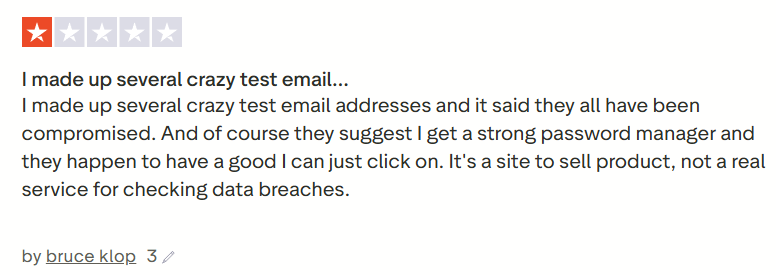
Normally, when someone sends feedback like this, I ignore it, but it happens often enough that it deserves an explainer, because the answer is really, really simple. So simple, in fact, that it should be evident to the likes of Bruce, who decided his misunderstanding deserved a 1-star Trustpilot review yesterday:

Why Does Have I Been Pwned Contain "Fake" Email Addresses?

Now, frankly, Trustpilot is a pretty questionable source of real-world, quality reviews anyway, but the same feedback has come through other channels enough times that let's just sort this out once and for all. It all begins with one simple question:

What is an Email Address?

You think you know - and Bruce thinks he knows - but you might both be wrong. To explain the answer to the question, we need to start with how HIBP ingests data, and that really is pretty simple: someone sends us a breach (which is typically just text files of data), and we run the open source Email Address Extractor tool over it, which then dumps all the unique addresses into a file. That file is then uploaded into the system, where the addresses are then searchable.

The logic for how we extract addresses is all in that Github repository, but in simple terms, it boils down to this:

  1. There must be an @ symbol
  2. There can be up to 64 characters before it (the alias)
  3. There can be up to 255 characters after it (the domain)
  4. The domain must contain a period
  5. The domain must also have a valid TLD
  6. A few other little criteria that are all documented in the public repo

That is all! We can't then tell if there's an actual mailbox behind the address, as that would require massive per-address processing, for example, sending an email to each one and seeing if it bounces. Can you imagine doing that 7 billion times?! That's the number of unique addresses in HIBP, and clearly, it's impossible. So, that means all the following were parsed as being valid and loaded into HIBP (deep links to the search result):

  1. test@example.com
  2. _test@google.com
  3. fuckingwasteoftime@foo.com

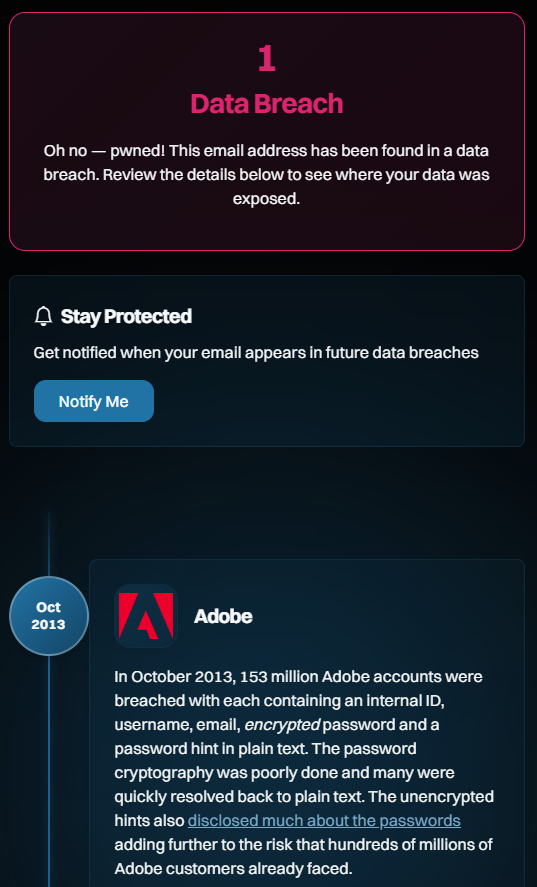
I particularly like that last one, as it feels like a sentiment Bruce would express. It's also a great example as it's clearly not "real"; the alias is a bit of a giveaway, as is the domain ("foo" is commonly used as a placeholder, similar to how we might also use "bar", or combine them as "foo bar"). But if you follow the link and see the breach it was exposed in, you'll see a very familiar name:

Why Does Have I Been Pwned Contain "Fake" Email Addresses?

Which brings us to the next question:

How Do "Fake" Email Addresses End up in Real Websites?

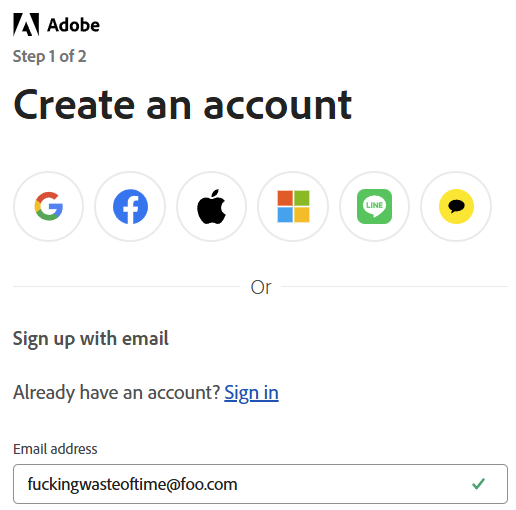
This is also going to seem profoundly simple when you see it. Here goes:

Why Does Have I Been Pwned Contain "Fake" Email Addresses?

Any questions, Bruce? This is just as easily explainable as why we considered it a valid address and ingested it into HIBP: the email address has a valid structure. That is all. That's how it got into Adobe, and that's how it then flowed through into HIBP.

Ah, but shouldn't Adobe verify the address? I mean, shouldn't they send an email to the address along the lines of "Hey, are you sure you want to sign up for this service?" Yes, they should, but here's the kicker: that doesn't stop the email address from being added to their database in the first place! The way this normally works (and this is what we do with HIBP when you sign up for the free notification service) is you enter the email address, the system generates a random token, and then the two are saved together in the database. A link with the token is then emailed to the address and used to verify the user if they then follow that link. And if they don't follow that link? We delete the email address if it hasn't been verified within a few days, but evidently, Adobe doesn't. Most services don't, so here we are.

How Can I Be Really Sure Actual Fake Addresses Aren't in HIBP?

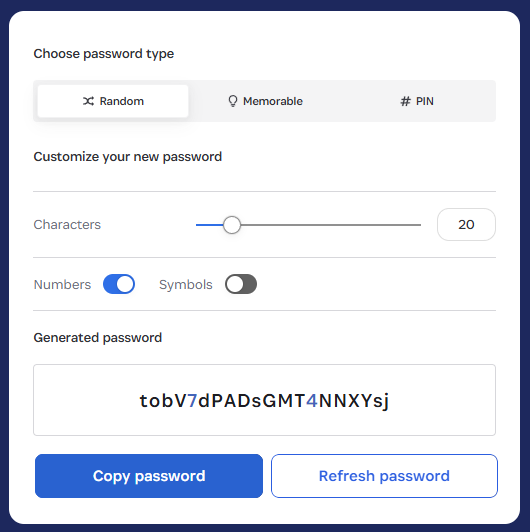
This is also going to seem profoundly obvious, but genuinely random email addresses (not "thisisfuckinguseless@") won't show up in HIBP. Want to test the theory? Try 1Password's generator (yes, Bruce, they also sponsor HIBP):

Why Does Have I Been Pwned Contain "Fake" Email Addresses?

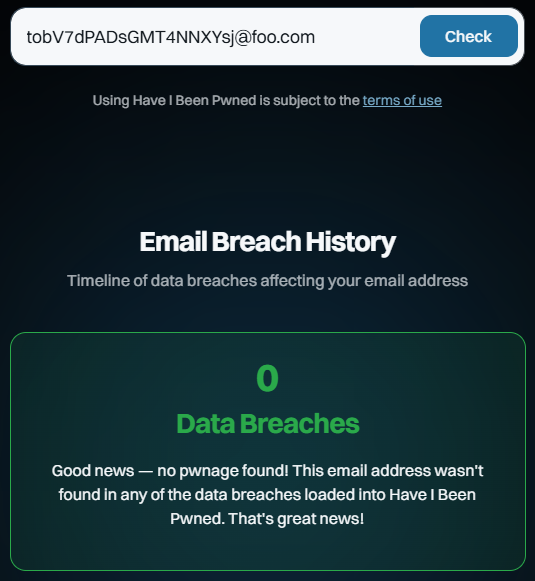
Now, whack that on the foo.com domain and do a search:

Why Does Have I Been Pwned Contain "Fake" Email Addresses?

Huh, would you look at that? And you can keep doing that over and over again. You’ll get the same result because they are fabricated addresses that no one else has created or entered into a website that was subsequently breached, ipso facto proving they cannot appear in the dataset.

Conclusion

Today is HIBP's 12th birthday, and I've taken particular issue with Bruce's review because it calls into question the integrity with which I run this service. This is now the 218th blog post I've written about HIBP, and over the last dozen years, I've detailed everything from the architecture to the ethical considerations to how I verify breaches. It's hard to imagine being any more transparent about how this service runs, and per the above, it's very simple to disprove the Bruces of the world. If you've read this far and have an accurate, fact-based review you'd like to leave, that'd be awesome 😊

  •  

Weekly Update 480

Weekly Update 480

Well, I now have the answer to how Snapchat does age verification for under-16s: they give an underage kid the ability to change their date of birth, then do a facial scan to verify. The facial scan (a third party tells me...) allows someone well under 16 to pass it easily. So, is that control "reasonable"? I guess that will depend on whether this case is an outlier or a much more common scenario, and a sample set of one isn't particularly scientific. Either way, I expect that what we're seeing is representative of a pretty obvious problem: privacy-preserving age verification is very unlikely to be reliable. It will inevitably result in letting too many young kids through, whilst blocking too many people of legitimate age. Or we end up with people needing to start uploading formal age-verification documents, which creates a whole new problem. Absolutely none of this should come as any surprise whatsoever!

Weekly Update 480
Weekly Update 480
Weekly Update 480
Weekly Update 480

References

  1. Sponsored by: Report URI: Guarding you from rogue JavaScript! Don’t get pwned; get real-time alerts & prevent breaches #SecureYourSite
  2. This week, it's all about Australia's social media ban for under 16s (link to the thread that sparked all the debate)
  3. I wrote about "sharenting" back in 2020 (lots in there about protecting kids online whilst also making appropriate use of technology)
  4. Our eSafety Commissioner has an FAQ on what the ban means (lot of use of the word "reasonable" in there)
  •  

How To Protect Yourself from Black Friday and Cyber Monday AI Scams 

It usually starts with something small.

You’re scrolling TikTok or Instagram, half-paying attention, when a Black Friday ad pops up. It looks like the brand you love—same logo, same photos, same “limited-time deal” language you’ve seen in real promos. The link takes you to a site that looks identical to the real one. The checkout page works. The confirmation email looks legit.

Then the payment clears, and the merchant name on your bank statement doesn’t match the store at all.

That moment, wait, what did I just buy from?, is becoming the defining holiday-shopping scam of 2025.

This year, fake ads and cloned storefronts aren’t sketchy one-offs or typo-filled red flags. They’re polished. They’re identical. And increasingly, they’re powered by AI.

McAfee’s 2025 holiday research found that nearly half of Americans (46%) have already encountered AI-altered or AI-generated scams while shopping. And with 96% of people planning to shop online, many doing so daily, scammers know this is peak opportunity.

Here’s how fraudsters are blending into the busiest shopping season of the year, what the data shows, and how to stay one step ahead.

Why Scammers Are So Effective Right Now

A perfect storm is happening:

People are shopping more often.
Nearly half of U.S. adults expect to shop online daily or multiple times per day during the holidays.

People are rushed.
From early Black Friday “price drop” alerts to Cyber Monday countdowns, shoppers don’t slow down to verify what they’re seeing.

AI makes scam content nearly flawless.
McAfee found technology email scams surging ~85%, retail email scams rising ~50%, and fraudulent URLs climbing across the board—from counterfeit Apple support pages to fake Costco refund portals.

Holiday deals are already rolling out—and so are the scams.

McAfee’s 2025 holiday research shows major spikes in email scams (~50% increase), technology scams (~85% increase), and fake storefronts that mimic trusted retailers. AI tools are making these scams faster, more realistic, and harder to spot.

It’s not that shoppers suddenly got careless.

It’s that scammers suddenly got good.

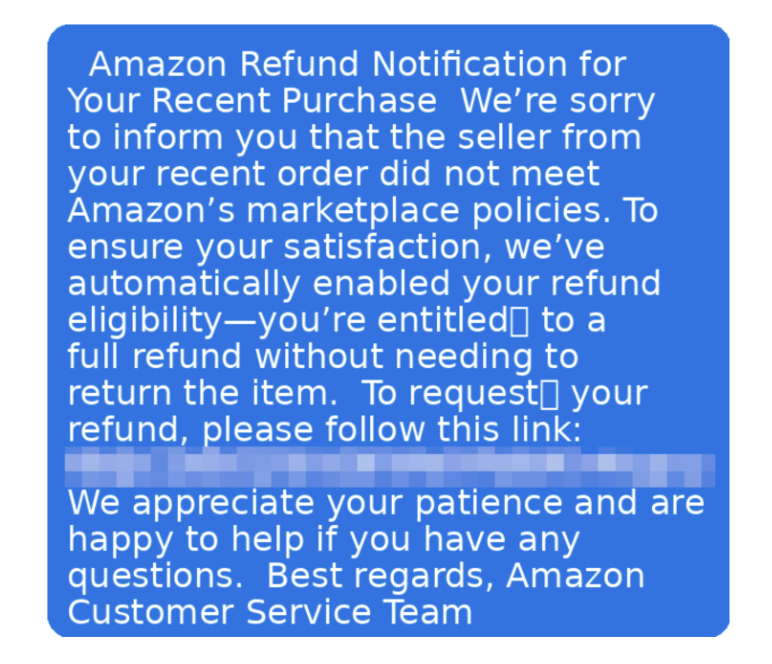
This shows a SMishing text from a fake Amazon. Companies won't text you like this.
This shows a SMishing text from a fake Amazon. Companies won’t text you like this.

The 2025 Scams Hitting Shoppers the Hardest

1. Fake Retail Sites & “Deal” Pages That Look Real

This is the big one, and it’s getting cleaner every year.

Scammers lift entire storefronts:

  • Logos
  • Product photos
  • Sale graphics
  • Checkout flows
  • Even fake customer service pages

The only giveaway? A URL that’s juuust slightly off—“target-sale.com” instead of “target.com,” or a link ending in “.shop” or “.store” rather than a brand’s normal domain.

Once you enter your payment info, it goes directly into a database that criminals resell or use to make purchases.

How to spot and avoid this scam: Skip the ad. Type the retailer’s name into your browser yourself. If it’s a real deal, you’ll find it on their actual site.

2. TikTok, Instagram & Social Video Scams

Short-form videos are now a prime scam vehicle.

Scammers steal influencer footage, use AI voice clones, or generate deepfake “promo” videos with celebrities offering huge holiday discounts. When someone clicks the link, it leads straight to a counterfeit store.

According to McAfee:

  • 46% have encountered fake influencer/celebrity endorsements
  • Younger shoppers (18–34) see them most
  • Many appear during holiday-sale cycles on TikTok Shop and Instagram Shopping
  • US – Holiday Shopping 2025 fact…

How to spot and avoid this scam: Check the creator’s account history. Real brands don’t drop one-off promo videos from accounts you’ve never seen before. Same as our initial advice, skip the ad entirely and go directly to the official brand website rather than clicking any links.

3. Delivery & Shipping Text Scams

The classic delivery scam is back, with McAfee researchers finding dozens of examples of fake messages attempting to scam holiday shoppers.

You’ll receive a text saying a package can’t be delivered or that a small fee is needed to confirm your address.

McAfee found that 43% of people have encountered fake delivery notifications, and many victims say they entered credit card information thinking they were resolving a legitimate issue.

How to spot and avoid this scam: UPS, USPS, and FedEx will never send a clickable payment link in a text. If you’re wondering about a specific delivery, go directly to the site you ordered it from, or your original receipt in your email to find your tracking information.

4. Account Verification & Gift Card Scams

These hit during the weeks leading up to the holidays.

Messages claim:

  • Your Amazon account is locked
  • Your Apple ID has “suspicious activity”
  • Your loyalty points are expiring
  • You must verify your payment information
  • You must pay a fee or gift card to resolve an issue

How to spot and avoid this scam:
No legitimate company will ever resolve account issues through gift cards or text-confirmation codes.

How AI Is Supercharging These Scams

Not long ago, scam emails had broken English and pixelated logos.

Now scammers use generative AI to:

  • Clone real brand websites
  • Rewrite perfect phishing emails
  • Fake customer service chatbots
  • Produce Hyper-real video ads
  • Replicate influencer voices
  • Generate thousands of unique scam texts instantly

And people are noticing.

57% of shoppers say they’re more concerned about AI scams this year than last.

Yet 38% believe they can spot scams—even though 22% have fallen for one.

Confidence ≠ protection.

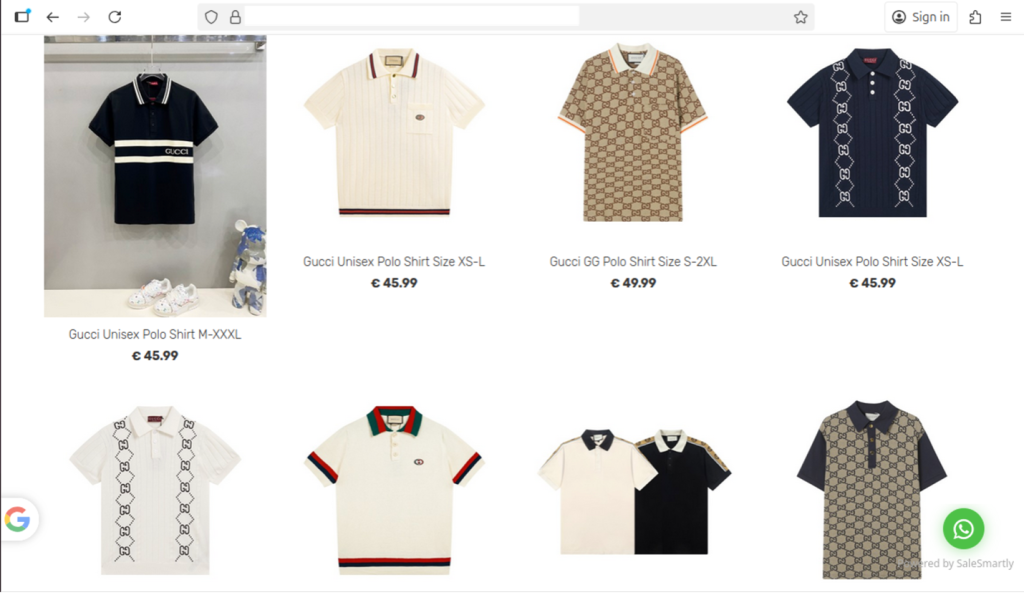
Fake designer websites like this page for Gucci shirts are deceptive and look close to the real thing.

What to Do if You Think You’ve Encountered a Scam

If something feels off—a message, a link, a charge on your bank statement—don’t panic. Most holiday scams rely on speed and confusion. Slowing down and taking a few simple steps can keep a bad situation from turning into real damage.

1. Stop engaging immediately

Close the tab, delete the message, and don’t click anything else.
Scammers often stack multiple pop-ups or redirects to pressure you into acting fast.

2. Don’t enter any additional information

If you started typing in a password or card number but didn’t hit “submit,” back out.
If you did enter details, move to the next steps right away.

3. Change your passwords (starting with the affected account)

Use a strong, unique password—especially for accounts tied to:

  • email
  • shopping apps
  • banking
  • cloud storage

A reused password is how one compromised login unlocks everything else. McAfee offers a password manager to help you make and store strong, unique passwords.

4. Check your bank or credit card for unexpected charges

Fraud usually starts small: $1–$5 “test” charges, odd merchant names, or tiny withdrawals.
If you see anything suspicious, contact your bank and request:

  • a card replacement
  • a fraud alert
  • a temporary account freeze, if necessary

5. Run a security scan on your device

Some fake sites drop malware or spyware quietly in the background.
A quick scan can detect:

  • malicious downloads
  • browser hijackers
  • unsafe extensions
  • keyloggers

McAfee offers a free antivirus trial that you can use to scan your device and check for compromises.

6. Report the scam

Reporting helps stop other shoppers from being targeted.
You can report scams to:

  • the retailer being impersonated
  • the platform where you saw the ad (TikTok, Instagram, Facebook)
  • your national fraud reporting center

7. Let technology help you clean up

McAfee can automatically detect whether the link, message, or site you interacted with is malicious—and alert you if your information may have been exposed.
Tools like:

can help contain an issue before it turns into identity theft.

We offer a free antivirus trial to help protect your devices.

Need a Gift for the Practical Person in Your Life? Consider Giving Them Scam Protection

There’s always someone on your holiday list who doesn’t want more stuff, they want something useful. The friend who loves a clean inbox. The sibling who’s constantly traveling. The parent who keeps forwarding you suspicious texts asking, “Is this real?”

For them, security might actually be the most thoughtful gift you can give this year.

Online safety tools aren’t flashy, but they are the thing people reach for the moment they click the wrong link, lose a password, or get a sketchy delivery text. And with scams more believable than ever, digital protection has quietly become a new “practical essential,” like a good VPN or a reliable password manager.

Gifting McAfee means giving someone:

Scam protection that works quietly in the background
Scam Detector flags dangerous messages, deepfake-style content, and fake shopping sites before they ever interact with them.

Identity & financial monitoring
A huge help for anyone who’s been burned by fraud in the past — or is tired of checking bank statements manually.

Password security that doesn’t require them to remember anything
Perfect for the person who uses the same password everywhere (and you know exactly who I mean).

Device protection for laptops, phones, and tablets
Which is especially relevant for people shopping, traveling, or working remotely through the holiday season.

It’s practical. It’s protective. And unlike most presents, it’s something they’ll use all year.

The post How To Protect Yourself from Black Friday and Cyber Monday AI Scams  appeared first on McAfee Blog.

  •  

Weekly Update 479

Weekly Update 479

I gave up on the IoT water meter reader. Being technical and thinking you can solve everything with technology is both a blessing and a curse; dogged persistence has given me the life I have today, but it has also burned serious amounts of time because I never want to let a problem go unsolved. But sometimes, common sense and the ROI of my time have to prevail, so I packed up all the gear and went back to processing data breaches. If you happen to solve this problem in a way that doesn't require any more time investment on my end, I'd love to hear it 😊

Weekly Update 479
Weekly Update 479
Weekly Update 479
Weekly Update 479

References

  1. Sponsored by: 1Password Extended Access Management: Secure every sign-in for every app on every device
  2. We've had a massive month on HIBP (20M+ visits is a solid number!)
  •  

How Agentic AI Will Be Weaponized for Social Engineering Attacks

We’re standing at the threshold of a new era in cybersecurity threats. While most consumers are still getting familiar with ChatGPT and basic AI chatbots, cybercriminals are already moving to the next frontier: Agentic AI. Unlike the AI tools you may have tried that simply respond to your questions, these new systems can think, plan, and act independently, making them the perfect digital accomplices for sophisticated scammers. The next evolution of cybercrime is here, and it’s learning to think for itself.

The threat is already here and growing rapidly. According to McAfee’s latest State of the Scamiverse report, the average American sees more than 14 scams every day, including an average of 3 deepfake videos. Even more concerning, detected deepfakes surged tenfold globally in the past year, with North America alone experiencing a 1,740% increase.

At McAfee, we’re seeing early warning signs of this shift, and we believe every consumer needs to understand what’s coming. The good news? By learning about these emerging threats now, you can protect yourself before they become widespread.

A Real-World Example: How Anthropic’s Claude AI Was Used for Espionage

A new case disclosed by Anthropic, first reported by Axios, marks a turning point: a Chinese state-sponsored group used the company’s Claude Code agent to automate the majority of an espionage campaign across nearly thirty organizations. Attackers allegedly bypassed guardrails through jailbreaking techniques, fed the model fragmented tasks, and convinced it that it was conducting defensive security tests. Once operational, the agent performed reconnaissance, wrote exploit code, harvested credentials, identified high-value databases, created backdoors, and generated documentation of the intrusion. In all, they completed 80–90% of the work without any human involvement.

This is the first publicly documented case of an AI agent running a large-scale intrusion with minimal human direction. It validates our core warning: agentic AI dramatically lowers the barrier to sophisticated attacks and turns what was once weeks of human labor into minutes of autonomous execution. While this case targeted major companies and government entities, the same capabilities can, and likely will, be adapted for consumer-focused scams, identity theft, and social engineering campaigns.

Understanding AI: From Simple Tools to Autonomous Agents

Before we dive into the threats, let’s break down what we’re actually talking about when we discuss AI and its evolution:

Traditional AI: The Helper

The AI most people know today works like a very sophisticated search engine or writing assistant. You ask it a question, it gives you an answer. You request help with a task, it provides suggestions. Think of ChatGPT, Google’s Gemini, or the AI features on your smartphone. They’re reactive tools that respond to your input but don’t take independent action.

Generative AI: The Creator

Generative AI, which powers many current scams, can create content like emails, images, or even fake videos (deepfakes). This technology has already made scams more convincing by cloning real human voices and eliminating telltale signs like poor grammar and obvious language errors.

The impact is already visible in the data. McAfee Labs found that for just $5 and 10 minutes of setup time, scammers can create powerful, realistic-looking deepfake video and audio scams using readily available tools. What once required experts weeks to produce can now be achieved for less than the cost of a latte—and in less time than it takes to drink it.

Agentic AI: The Independent Actor

Agentic AI represents a fundamental leap forward. These systems can think, make decisions, learn from mistakes, and work together to solve tough problems, just like a team of human experts. Unlike previous AI that waits for your commands, agentic AI can set its own goals, make plans to achieve them, and adapt when circumstances change

Key Characteristics of Agentic AI:

  • Autonomous operation: Works without constant human guidance from a cybercriminal
  • Goal-oriented behavior: Actively pursues specific objectives without requiring regular input.
  • Adaptive learning: Improves performance based on experience through previous attempts.
  • Multi-step planning: Can execute complex, long-term strategies based on the requirements of the criminal.
  • Environmental awareness: Understands and responds to changing conditions online.

Gartner predicts that by 2028, a third of our interactions with AI will shift from simply typing commands to fully engaging with autonomous agents that can act on their own goals and intentions. Unfortunately, cybercriminals won’t be far behind in exploiting these capabilities.

The Scammer’s Apprentice: How Agentic AI Becomes the Perfect Criminal Assistant

Think of agentic AI as giving scammers their own team of tireless, intelligent apprentices that never sleep, never make mistakes, and get better at their job every day. Here’s how this digital apprenticeship makes scams exponentially more dangerous.

Traditional scammers spend hours manually researching targets, scrolling through social media profiles, and piecing together personal information. Agentic AI recon agents operate persistently and autonomously, self-prompting questions like “What data do I need to identify a weak point in this organization?” and then collecting it from social media, breach data, exposed APIs and cloud misconfigurations.

What The Scammer’s Apprentice Can Do

  • Continuous surveillance: Monitors your social media posts, job changes, and online activity 24/7.
  • Pattern recognition: Identifies your routines, interests, and vulnerabilities from scattered digital breadcrumbs.
  • Relationship mapping: Understands your connections, colleagues, and family relationships.
  • Behavioral analysis: Learns from your communication style, preferred platforms, and response patterns.

Unlike traditional phishing that uses static messages, agentic AI can dynamically update or alter their approach based on a recipient’s response, location, holidays, events, or the target’s interests, marking a significant shift from static attacks to highly adaptive and real-time social engineering threats.

An agentic AI scammer targeting you might start with a LinkedIn message about a job opportunity. If you don’t respond, it switches to an email about a package delivery. If that fails, it tries a text message about suspicious account activity. Each attempt uses lessons learned from your previous reactions, becoming more convincing with every interaction.

AI-generated phishing emails achieve a 54% click-through rate compared to just 12% for their human-crafted counterparts. With agentic AI, scammers can create messages that don’t just look professional, they sound exactly like the people and organizations you trust.

The technology is already sophisticated enough to fool even cautious consumers. As McAfee’s latest research shows, social media users shared over 500,000 deepfakes in 2023 alone. The tools have become so accessible that scammers can now create convincing real-time avatars for video calls, allowing them to impersonate anyone from your boss to your bank representative during live conversations.

Advanced Impersonation Capabilities:

  • Voice cloning: Create phone calls that sound exactly like your boss, family member, senator, or bank representative
  • Writing style mimicry: Craft emails that perfectly match your company’s communication style.
  • Visual deepfakes: Generate fake video calls for “face-to-face” verification.
  • Context awareness: Reference specific projects, recent conversations, or personal details

Perhaps most concerning is agentic AI’s ability to learn and improve. As the AI interacts with more victims over time, it gathers data on what types of messages or approaches work best for certain demographics, adapting itself and refining future campaigns to make each subsequent attack more powerful, convincing, and effective. This means that every failed scam attempt makes the AI smarter for its next victim. Understanding how agentic AI will transform specific types of scams helps us prepare for what’s coming. Here are the most concerning developments:

Multi-Stage Campaign Orchestration

Agentic AI can potentially orchestrate complex multi-stage social engineering attacks, leveraging data from one interaction to drive the next one. Instead of simple one-and-done phishing emails, expect sophisticated campaigns that unfold over weeks or months.

Automated Spear Phishing at Scale

Traditional spear phishing required manual research and customization for each target. In the new world order, malicious AI agents will autonomously harvest data from social media profiles, craft phishing messages, and tailor them to individual targets without human intervention. This means cybercriminals can now launch thousands of highly personalized attacks simultaneously, each one crafted specifically for its intended victim.

Real-Time Adaptive Attacks

When a target hesitates or questions an initial approach, agents adjust their tactics immediately based on the response. This continuous refinement makes each interaction more convincing than the last, wearing down even skeptical targets through persistence and learning. Traditional red flags like “This seems suspicious” or “Let me verify this” no longer end the attack, they just trigger the AI to try a different approach.

Cross-Platform Coordination

These autonomous systems now independently launch coordinated phishing campaigns across multiple channels simultaneously, operating with an efficiency human attackers cannot match. An agentic AI scammer might contact you via email, text message, phone call, and social media—all as part of a coordinated campaign designed to overwhelm your defenses.

How to Protect Yourself in the Age of Agentic AI Scams

The rise of agentic AI scams requires a fundamental shift in how we think about cybersecurity. Traditional advice like “watch for poor grammar” no longer applies. Here’s what you need to know to protect yourself:

  • The Golden Rule: Never act on urgent requests without independent verification, no matter how convincing they seem.
  • Use different communication channels: If someone emails you, call them back using a number you look up independently
  • Verify through trusted contacts: When your “boss” asks for something unusual, confirm with colleagues or HR
  • Check official websites: Go directly to company websites rather than clicking links in messages
  • Trust your instincts: If something feels off, it probably is—even if you can’t identify exactly why

Understanding a New Era of Red Flags

Since agentic AI eliminates traditional warning signs, focus on these behavioral red flags:

High-Priority Warning Signs:

Emotional urgency: Messages designed to make you panic, feel guilty, or act without thinking

Requests for unusual actions: Being asked to do something outside normal procedures

Isolation tactics: Instructions not to tell anyone else or to handle something “confidentially”

Multiple contact attempts: Being contacted through several channels about the same issue

Perfect personalization: Messages that seem to know too much about your specific situation

How McAfee Fights AI with AI: Your Defense Against Agentic Threats

At McAfee, we understand that fighting AI-powered attacks requires AI-powered defenses. Our security solutions are designed to detect and stop sophisticated scams before they reach you. McAfee’s Scam Detector provides lightning-fast alerts, automatically spotting scams and blocking risky links even if you click them, with all-in-one protection that keeps you safer across text, email, and video. Our AI analyzes incoming messages using advanced pattern recognition that can identify AI-generated content, even when it’s grammatically perfect and highly personalized.

Scam Detector keeps you safer across text, email, and video, providing comprehensive coverage against multi-channel agentic AI campaigns. Beyond analyzing message content, our system evaluates sender behavior patterns, communication timing, and request characteristics that may indicate AI-generated scams. Just as agentic AI attacks learn and evolve, our detection systems continuously improve their ability to identify new threat patterns.

Protecting yourself from agentic AI scams requires combining smart technology with informed human judgment. Security experts believe it’s highly likely that bad actors have already begun weaponizing agentic AI, and the sooner organizations and individuals can build up defenses, train awareness, and invest in stronger security controls, the better they will be equipped to outpace AI-powered adversaries.

We’re entering an era of AI versus AI, where the speed and sophistication of both attacks and defenses will continue to escalate. According to IBM’s 2025 Threat Intelligence Index, threat actors are pursuing bigger, broader campaigns than in the past, partly due to adopting generative AI tools that help them carry out more attacks in less time.

Hope in Human + AI Collaboration

While the threat landscape is evolving rapidly, the combination of human intelligence and AI-powered security tools gives us powerful advantages. Humans excel at recognizing context, understanding emotional manipulation, and making nuanced judgments that AI still struggles with. When combined with AI’s ability to process vast amounts of data and detect subtle patterns, this creates a formidable defense.

Staying Human in an AI World

The rise of agentic AI represents both a significant threat and an opportunity. While cybercriminals will certainly exploit these technologies to create more sophisticated scams, we’re not defenseless. By understanding how these systems work, recognizing the new threat landscape, and combining human wisdom with AI-powered protection tools like McAfee‘s Scam Detector, we can stay ahead of the threats.

The key insight is that while AI can mimic human communication and behavior with unprecedented accuracy, it still relies on exploiting fundamental human psychology—our desire to help, our fear of consequences, and our tendency to trust. By developing better awareness of these psychological vulnerabilities and implementing verification protocols that don’t depend on technological red flags, we can maintain our security even as the threats become more sophisticated.

Remember: in the age of agentic AI, the most important security tool you have is still your human judgment. Trust your instincts, verify before you act, and never let urgency override prudence, no matter how convincing the request might seem.

The post How Agentic AI Will Be Weaponized for Social Engineering Attacks appeared first on McAfee Blog.

  •  

Weekly Update 478

Weekly Update 478

This week, it was an absolute privilege to be at Europol in The Hague, speaking about cyber offenders and at the InterCOP conference and spending time with some of the folks involved in the Operation Endgame actions. The latter in particular gave me a new sense of just how much coordination is involved in this sort of operation, all the way down to some of the messaging in the videos they've since released. I've seen some social commentary on these already, check them out and see what you think, especially as it relates to the psyops those videos play a role in.

Weekly Update 478
Weekly Update 478
Weekly Update 478
Weekly Update 478

References

  1. Sponsored by: Malwarebytes Browser Guard blocks phishing, ads, scams, and trackers for safer, faster browsing
  2. Operation Endgame saw a significant amount of criminal infrastructure taken down by Europol and friends (it's now the third "season" of Endgame that has ended up in HIBP)
  •  

Weekly Update 477

Weekly Update 477

What. A. Week. It wasn't just the preceding weeks of technical pain as we tried to work out how to get this data loaded, it was all the subsequent queries we had to deal with too. Some of them are totally understandable, whilst others just resulted in endless facepalms 🤦‍♂️ But we got there in the end with the worst of it just being a 24-hour period where we ended up on a SpamCop block list, for reasons I still don't understand. We are still on the very tail end of sending individual notifications, so there may be more to update in the next vid, but at least that one will be from home with sunshine, good coffee and a slower pace 😊

Weekly Update 477
Weekly Update 477
Weekly Update 477
Weekly Update 477

References

  1. Sponsored by: Report URI: Guarding you from rogue JavaScript! Don’t get pwned; get real-time alerts & prevent breaches #SecureYourSite
  2. Our largest corpus of data ever added to HIBP went live (1.3B passwords and 2B email addresses 🫨)
  3. Belgium was super pretty and a nice interlude between Norway and the Netherlands (including some time with our friends at the Centre for Cybersecurity Belgium)
  •  

2 Billion Email Addresses Were Exposed, and We Indexed Them All in Have I Been Pwned

2 Billion Email Addresses Were Exposed, and We Indexed Them All in Have I Been Pwned

I hate hyperbolic news headlines about data breaches, but for the "2 Billion Email Addresses" headline to be hyperbolic, it'd need to be exaggerated or overstated - and it isn't. It's rounded up from the more precise number of 1,957,476,021 unique email addresses, but other than that, it's exactly what it sounds like. Oh - and 1.3 billion unique passwords, 625 million of which we'd never seen before either. It's the most extensive corpus of data we've ever processed, by a significant margin.

Edit: Just to be crystal clear about the origin of the data and the role of Synthient (who you’ll read about in the next paragraph): this data came from numerous locations where cybercriminals had published it. Synthient (run by Ben during his final year of college) indexed that data and provided it to Have I Been Pwned solely for the purpose of notifying victims. He’s the good guy shining a light on the bad guys, so keep that in mind as you read on. (Some of the feedback Ben has received is exactly what I foreshadowed in the final paragraph of this post.)


A couple of weeks ago, I wrote about the 183M unique email addresses that Synthient had indexed in their threat intelligence platform and then shared with us. I explained that this was only part of the corpus of data they'd indexed, and that it didn't include the credential stuffing records. Stealer log data is obtained by malware running on infected machines. In contrast, credential stuffing lists usually originate from other data breaches where email addresses and passwords are exposed. They're then bundled up, sold, redistributed, and ultimately used to log in to victims' accounts. Not just the accounts they were initially breached from, either, because people reuse the same password over and over again, the data from one breach is frequently usable on completely unrelated sites. A breach of a forum to comment on cats often exposes data that can then be used to log in to the victim's shopping, social media and even email accounts. In that regard, credential stuffing data becomes "the keys to the castle".

Let me run through how we verified the data, what you can do about it and for the tech folks, some of the hoops we had to jump through to make processing this volume of data possible.

Data Verification

The first person whose data I verified was easy - me 😔 An old email address I've had since the 90s has been in credential stuffing lists before, so it wasn't too much of a surprise. Furthermore, I found a password associated with my address, which I'd definitely used many eons ago, and it was about as terrible as you'd expect from that era. However, none of the other passwords associated with my address were familiar. They certainly looked like passwords that other people might have feasibly used, but I'm pretty sure they weren't mine. One was even just an IP address from Perth on the other side of the country, which is both infeasible as a password I would have used, yet eerily close to home. I mean, of all the places in the world an IP address could have appeared from, it had to be somewhere in my own country I've been many times before...

Moving on to HIBP subscribers, I reached out to a handful and asked for support verifying the data. I chose a mix of subscribers with many who'd never been involved in any data breach we'd ever seen before; my experience above suggested that there's recycled data in there, and we had previously verified that when investigating those other incidents. However, is the all-new stuff legitimate? The very first response I received was exactly what I was looking for:

#1 is an old password that I don't use anymore. #2 is a more recent password. Thanks for the heads up, I've gone and changed the password for every critical account that used either one. 

Perfectly illustrating most people's behaviour with passwords, #2 referred to above was just #1 with two exclamation marks at the end!! (Incidentally, these were simple six and eight-character passwords, and neither of them was in Pwned Passwords either.) He had three passwords in total, which also means one of them, like with my data, was not familiar. However, the most important thing here is that this example perfectly illustrates why we put the effort into processing data like this: #2 was a real, live password that this guy was actively using, and it was sitting right next to his email address, being passed around among criminals. However, through this effort, that credential pair has now become useless, which is precisely what we're aiming for with this exercise, just a couple of billion times over.

The second respondent only had one password against their address:

Yes that was a password I used for many years for what I would call throw away or unimportant accounts between 20 and 10 years ago

That was also only eight characters, but this time, we'd seen it in Pwned Passwords many times before. And the observation about the password's age was consistent with my own records, so there's definitely some pretty old data in there.

The following response was not at all surprising:

I am familiar with that password... I used it almost 10 years ago... and cannot recall the last time I used it.

That was on a corporate account, too, and the owner of the address duly forwarded my email to the cybersecurity team for further investigation. The single password associated with this lady's email address had a massive nine characters, and also hadn't previously appeared in Pwned Passwords.

Next up was a respondent who replied inline to my questions, so I'll list them below with the corresponding answers:

Is this familiar? Yes  
Have you ever used it in the past? Yes and is still on some accounts I do not use any longer.
And if so, how long ago? Unfortunately, it is still on some active accounts that I have just made a list of to change or close immediately.

This individual's eight-character password with uppercase, lowercase, numbers and a "special" character also wasn't in Pwned Passwords. Similarly, as with the earlier response, that password was still in active use, posing a real risk to the owner. It would pass most password complexity criteria and slip through any service using Pwned Passwords to block bad ones, so again, this highlights why it was so important for us to process the data.

The next person had three different passwords against rows with their email address, and they came back with a now common response:

Yes, these are familiar, last used 10 years ago

We'd actually seen all three of them in Pwned Passwords before, many times each. Another respondent with precisely the kind of gamer-like passwords you'd expect a kid to use (one of which we hadn't seen before), also confirmed (I think?) their use:

maybe when i was a kid lol

Responses that weren't an emphatic "yes, that's my data" were scarce. The two passwords against one person's name were both in Pwned Passwords (albeit only once each), yet it's entirely possible that neither of them had been used by this specific individual before. It's also possible they'd forgotten a password they'd used more than a decade ago, or it may have even been automatically assigned to them by the service that was subsequently breached. Put it down as a statistical anomaly, but I thought it was worth mentioning to highlight that being in this data set isn't a guarantee of a genuine password of yours being exposed. If your email address is found in this corpus then that's real, of course, so there must be some truth in the data, but it's a reminder that when data is aggregated from so many different sources over such a long period of time, there's going to be some inconsistencies.

Searching Pwned Passwords

As a brief recap, we load passwords into the service we call Pwned Passwords. When we do so, there is absolutely no association between the password and the email address it appeared next to. This is for both your protection and ours; can you imagine if HIBP was pwned? It's not beyond the realm of possibility, and the impact of exposing billions of credential pairs that can immediately unlock an untold number of accounts would be catastrophic. It's highly risky, and completely unnecessary when you can search for standalone passwords anyway without creating the risk of it being linked back to someone.

Think about it: if you have a password of "Fido123!" and you find it's been previously exposed (which it has), it doesn't matter if it was exposed against your email address or someone else's; it's still a bad password because it's named after your dog followed by a very predictable pattern. If you have a genuinely strong password and it's in Pwned Passwords, then you can walk away with some confidence that it really was yours. Either way, you shouldn't ever use that password again anywhere, and Pwned Passwords has done its job.

Checking the service is easy, anonymous and depending on your level of technical comfort, can be done in several different ways. Here's a copy and paste from the last Synthient blog post:

  1. Use the Pwned Passwords search page. Passwords are protected with an anonymity model, so we never see them (it's processed in the browser itself), but if you're wary, just check old ones you may suspect.
  2. Use the k-anonymity API. This is what drives the page in the previous point, and if you're handy with writing code, this is an easy approach and gives you complete confidence in the anonymity aspect.
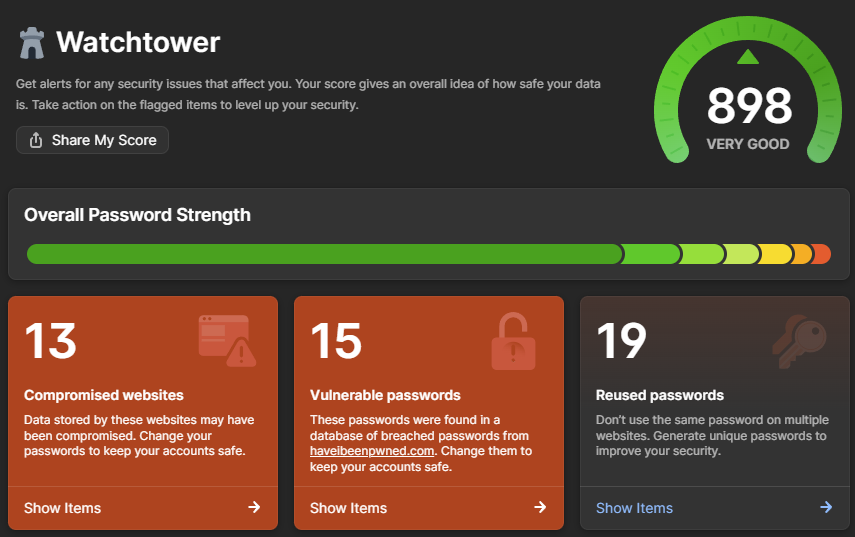
  3. Use 1Password's Watchtower. The password manager has a built-in checker that uses the abovementioned API and can check all the passwords in your vault. (Disclosure: 1Password is a regular sponsor of this blog, and has product placement on HIBP.)
2 Billion Email Addresses Were Exposed, and We Indexed Them All in Have I Been Pwned

My vested interest in 1Password aside, Watchtower is the easiest, fastest way to understand your potential exposure in this incident. And in case you're wondering why I have so many vulnerable and reused passwords, it's a combination of the test accounts I've saved over the years and the 4-digit PINs some services force you to use. Would you believe that every single 4-digit number ever has been pwned?! (If you're interested, the ABC has a fantastic infographic using a heatmap based on HIBP data that shows some very predictable patterns for 4-digit PINs.)

This Is Not a Gmail Breach

It pains me to say it, but I have to, given the way the stealer logs made ridiculous, completely false headlines a couple of weeks ago:

This story has suddenly gained *way* more traction in recent hours, and something I thought was obvious needs clarifying: this *is not* a Gmail leak, it simply has the credentials of victims infected with malware, and Gmail is the dominant email provider: https://t.co/S75hF4T1es

— Troy Hunt (@troyhunt) October 27, 2025

There are 32 million different email domains in this latest corpus, of which gmail.com is one. It is, of course, the largest and has 394 million unique email addresses on it. In other words, 80% of the data in this corpus has absolutely nothing to do with Gmail, and the 20% of Gmail addresses have absolutely nothing to do with any sort of security vulnerability on Google's behalf. There - now let reporting sanity prevail!

The Technical Bits

I wanted to add this just to highlight how painful it has been to deal with this data. This corpus is nearly 3 times the size of the previous largest breach we'd loaded, and HIBP is many times larger than it was in 2019 when we loaded the Collection #1 data. Taking 2 billion records and adding the ones we hadn't already seen in the existing 15 billion corpus, whilst not adversely impacting the live system serving millions of visitors a day, was very non-trivial. Managing the nuances of SQL Server indexes such that we could optimise both inserts and queries is not my idea of fun, and it's been a pretty hard couple of weeks if I'm honest. It's also been a very expensive period as we turned the cloud up to 11 (we run on Azure SQL Hyperscale, which we maxed out at 80 cores for almost two weeks).

A simple example of the challenge is that after loading all the email addresses up into a staging table, we needed to create SHA1 hashes of each. Normally, that would involve something to the effect of "update table set column = sha1(email)" and you're done. That crashed completely, so we ended up doing "insert into new table select email, sha1(email)". But on other occasions the breach load required us to do updates on other columns (with no hash creation), which, on mulitple occasions, we had to kill after a day or more of execution with no end in sight. So, we ended up batching in loops (usually 1M records at a time), reporting on progress along the way so we had some idea of when it would actually finish. It was a painful process of trial, waiting ages, error then taking a completely different approach.

Notifying our subscribers is another problem. We have 5.9 million of them, and 2.9 million are in this data 🫨 Simply sending that many emails at once is hard. It's not so much hard in terms of firing them off, rather it's hard in terms of not ending up on a reputation naughty list or having mail throttled by the receiving server. That's happened many times in the past when loading large, albeit much smaller corpuses; Gmail, for example, suddenly sees a massive spike and slows down the delivery to inboxes. Not such a biggy for sending breach notices, but a major problem for people trying to sign into their dashboard who can no longer receive the email with the "magic" link.

What we've done to address that for this incident is to slow down the delivery of emails for the individual breach notification. Whilst I'd originally intended to send the emails at a constant rate over the period of a week, someone listening to me on my Friday live stream had a much better suggestion:

the strategy I've found to best work with large email delivery is to look at the average number of emails you've sent over the last 30 days each time you want to ramp up, and then increase that volume by around 50% per day until you've worked your way through the queue

Which makes a lot of sense, and stacked up as I did more research (thanks Joe!). So, here's what our planned delivery schedule now looks like:

2 Billion Email Addresses Were Exposed, and We Indexed Them All in Have I Been Pwned

That's broken down by hour, increasing in volume by 1.015 times per hour, such that the emails are spread out in a similar, gradually increasing cadence. On a daily basis, that works out at a 45% increase in each 24-hour period, within Joe's suggested 50% threshold. Plus, we obviously have all the other mechanisms such as a dedicated IP, properly configured DKIM, DMARC and SPF, only emailing double-opted-in subscribers and spam-friendly message body construction. So, it could be days before you receive a notification, or just run a haveibeenpwned.com search on demand if you're impatient.

We've sent all the domain notification emails instantly because, by definition, they're going to a very wide range of different mail servers; it's just the individual ones we're drop-feeding.

Lastly, if you've integrated Pwned Passwords into your service, you'll now see noticeably larger response sizes. The numbers I mentioned in the opening paragraph increase the size of each hash range by an average of about 50%, which will push responses from about 26kb to 40kb. That's when brotli compressed, so obviously, make sure you're making requests that make the most of the compression.

Conclusion

This data is now searchable in HIBP as the Synthient Credential Stuffing Threat Data. It's an entirely separate corpus from that previous Synthient data I mentioned earlier; they're discrete datasets with some crossover, but obviously, this one is significantly larger. And, of course, all the passwords are now searchable per the Pwned Passwords guidance above.

If I could close with one request: this was an extremely laborious, time-consuming and expensive exercise for us to complete. We've done our best to verify the integrity of the data and make it searchable in a practical way while remaining as privacy-centric as possible. Sending as many notifications as we have will inevitably lead to a barrage of responses from people wanting access to complete rows of data, grilling us on precisely where it was obtained from or, believe it or not, outright abusing us. Not doing those things would be awesome, and I suggest instead putting the energy into getting a password manager, making passwords strong and unique (or even better, using passkeys where available), and turning on multi-factor auth. That would be an awesome outcome for all 😊

Edit: I've closed off comments on this blog post. As you'll see below, there was a constant stream of questions that have already been answered in the post itself, plus some comments that were starting to verge on precisely what I predicted in the last para above. Reading, responding and engaging is time-consuming and at this point, all the answers are already here both above and below this edit in the comments.

  •  

How to Protect Your Digital Identity

People under 60 are losing it online. And by it, I mean money, due to digital identity theft.

In its simplest form, your digital identity consists of a set of attributes that can be traced back to you and your identity. That can range from photos you post online to online shopping accounts, email accounts, telephone numbers, bank accounts, and your tax ID.

In this way, your digital identity is like dozens upon dozens of puzzle pieces made up of different accounts, ID numbers, and so forth. When put together, they create a picture of you. And that’s why those little puzzle pieces of your identity are such attractive targets for hackers. If they get the right combination of them, you can end up a victim of theft or fraud.

In this article, we’ll look into the kinds of information that include your digital identity, tactics to protect you from identity theft, signs that your identity has been stolen, and the steps to take to reclaim your identity.

What is digital identity?

Your digital identity is much more comprehensive than a simple username or password. Think of it as your complete digital existence, a unique combination of your information, behaviors, and digital traces that collectively represent who you are online. Unlike a single account that you create for one website, your digital identity encompasses every piece of data connected to you across the entire digital landscape.

Information that comprises your digital identity

  • Personal identifiers: The foundation of your digital identity includes personal data such as your full name, address, phone numbers, Social Security number, and date of birth. These are the pieces hackers need to impersonate you for financial gain, making you a prime target for identity theft.
  • Digital identifiers: Your usernames, email addresses, and social media handles create your online presence. These identifiers link your various accounts together, so when one gets breached, criminals can often trace their way to your other accounts.
  • Authentication factors: Your passwords, security questions, passkeys, and multi-factor authentication (MFA) settings are the locks that protect your digital doors. When these are weak or reused across multiple accounts, you’re essentially giving criminals a universal key to your digital life.
  • Device and network data: Your computer’s IP address, device fingerprints, browser settings, and network connections help legitimate services recognize you, but they also help criminals track your movements online and potentially hijack your sessions or attack you. Your phone’s unique device ID and browser’s specific settings and installed plugins also contribute to your digital identity.
  • Behavioral signals: Beyond personal data, your digital identity extends to your behavioral patterns, such as the websites you visit, shopping and banking habits, the times you’re typically online, and even how you type or move your mouse. Each day you access healthcare portals or interact with government services online, you add data that creates a picture of who you are.
  • Biometric information: Your facial recognition data and fingerprints also create a unique digital signature. While these enhance your security when used properly, they also represent permanent identifiers that can’t be changed if compromised. 
  • Linked accounts and services: Your banking, shopping, healthcare, and government service accounts all connect to your core identity. Each account holds pieces of your identity that criminals can exploit. The more accounts you have, the more entry points exist for potential breaches.

The more aware you are of what makes up your digital identity, the better equipped you’ll be to keep those puzzle pieces secure and out of the wrong hands.

Applications of digital identity

Your digital identity is constantly at work in ways you don’t notice. Every time you log in to your bank, check your medical records, book a flight, or shop online, your digital identity verifies who you are and grants access to the services you need. With that convenience comes responsibility: the more places your identity appears, the more important it becomes to protect it.

  • Banking and fintech: Your digital identity enables instant transfers, mobile check deposits, and personalized financial insights. While you gain convenience and speed, you’re sharing sensitive financial data and behavioral patterns online.
  • Healthcare portals: Patient portals use your digital identity to provide secure access to medical records, prescription refills, and telehealth appointments. You benefit from coordinated care and easy access to your health information, but medical data breaches can have lasting consequences. 
  • Government services: Digital identity streamlines tax filing, driver’s license renewals, and benefit applications through secure government portals. You save time and reduce paperwork, but government databases are high-value targets for cybercriminals.
  • Travel and transportation: Your digital identity powers everything from Transportation Security Administration (TSA) PreCheck to mobile boarding passes and hotel check-ins. This creates seamless travel experiences and reduces wait times, but travel data reveals your location patterns and personal habits.
  • E-commerce and shopping: Online retailers use your digital identity to offer one-click purchasing, personalized recommendations, and targeted promotions. You get convenience and a tailored shopping experience, but companies collect extensive data on your preferences and spending habits.
  • Social media and messaging platforms: Social networks leverage your digital identity to connect you with friends, share content, and build communities around shared interests. However, these platforms collect comprehensive data about your personal life and relationships.

People under 60 are major targets for fraud

Here’s what’s happening: People under 60 were twice as likely to report losing money to online scams, and more than four times more likely to report losing money to an investment scam, and the majority of those losses happened in scams involving some form of cryptocurrency investments.

It’s no surprise that younger adults get targeted this way. They’re far more likely than any other age group to use mobile apps for peer-to-peer payments, transferring money between accounts, depositing checks, and paying bills. In short, there’s a lot of money flowing through the palms of their hands thanks to their phones, as well as their computers.

Protecting yourself from hackers and fraud means safeguarding your digital identity. And that can feel like a significant task, given all the information your digital identity contains. It can be done, though, especially if you think about your identity like a puzzle. A piece here, another piece there, can complete the picture (or complete it just enough) to give a hacker what they need to separate you from your money. Thus, the way to stay safe is to keep those puzzle pieces out of other people’s hands.

Signs your identity has been stolen

As I mentioned, the quickest way to understand what’s happening with your identity is to check your credit report. Identity theft goes beyond money. Crooks will steal identities to rent apartments, access medical services, and even get jobs. Things like that can show up on a credit report, such as when an unknown address shows up in a list of your current and former residences or when a company you’ve never worked for shows up as an employer. If you spot anything strange, track it down right away. Many businesses have fraud departments with procedures in place that can help you clear your name if you find a charge or service wrongfully billed under your name.

Other signs are far more obvious. You may find collection agencies calling or even see tax notices appearing in your mailbox (yikes). Clearly, cases like those are telltale signs that something is really wrong. In that case, report it right away:

Likewise, many nations offer similar government services. A quick search will point you in the right direction.

Another step you can take is to ask each credit bureau to freeze your credit, which prevents crooks from using your personal information to open new lines of credit or accounts in your name. Fraud alerts offer another line of protection for you as well.

Ways to protect your digital identity from hackers and fraud

It’s actually not that tough. With a few new habits and a couple of apps to help you out, you can protect yourself from the headaches and flat-out pain of fraud. Here’s a list of straightforward things that you can get started on right away:

1. Start with the basics: security software

Protect yourself by protecting your stuff. Installing and using security software on your computers and phones can help prevent a range of attacks and keep you safer while you surf, bank, and shop online. I should emphasize it again: protect your phone. Only about half of people protect their phones even though they use them to hail rides, order food, send money to friends, and more. Going unprotected on your phone means you’re sending all that money on the internet in a way that’s far, far less safe than if you use online protection.

2. Create strong passwords

You hear this one all the time, and for good reason: strong, unique passwords offer one of your best defenses against hackers. Never reuse them (or slight alterations of them) across the different platforms and services you use. Don’t forget to update them regularly (at least every 60 days)! While that sounds like a lot of work, a password manager can keep on top of it all for you. If your platform or service supports two-factor authentication, enable it. It’s an additional layer of security that makes hacking more difficult for cybercriminals.

3. Keep up to date with your updates

Updates pop up on our phones and computers nearly every day. Resist the urge to put them off until later. In addition to improvements, updates often include important security fixes. So, when you receive an alert on your device, update the operating system or app. Think of it as adding another line of defense against hackers who are looking to exploit old flaws in your apps.

4. Think twice when you share

Social media is a common channel for hackers to harvest personal information because people sometimes share more than they should. With info like your birthday, the name of your first school, your mother’s maiden name, or even the make of your first car, they can answer common security questions that could hack into your accounts. Crank up the privacy settings on your accounts so only friends and family can see your posts—and realize the best defense here is not to post any potentially sensitive info in the first place. Also, steer clear of those “quizzes” that sometimes pop up in your social feeds. Those are other ways that hackers try to gain bits of info that can put your identity at risk.

5. Shred it

Even though so many of us have gone paperless with our bills, identity theft by digging through the trash or “dumpster diving” is still a thing. Items such as medical bills, tax documents, and checks may still arrive in your mailbox. You’ll want to dispose of them properly when you’re through with them.

First, invest in a paper shredder. Once you’ve deposited the check or paid the odd bill online, shred it so that any personal or account information on it can’t be read (and can be recycled securely).

Second, if you’re out of town for a bit, have a friend collect your mail or have the post office place a temporary hold on it. That’ll prevent thieves from lifting personal info right from your mailbox while you’re away.

6. Check your credit

Even if you don’t think there’s a problem, go ahead and check your credit. The issue is that someone could be charging expenses to your name without you even knowing it. Depending on where you live, different credit reporting agencies keep tabs on people’s credit. In the U.S., the big ones are Equifax, Experian, and TransUnion.

Also in the U.S., the Fair Credit Reporting Act requires these agencies to provide you with a free credit check at least once every 12 months. Canada, the UK, and other nations likewise offer ways to get a free credit report. Review your options; you may be surprised by what you find.

7. Audit your public profiles

Do an inventory of your online presence by searching for your name, email addresses, and phone numbers across major search engines and social platforms. Review what information appears publicly on your social media accounts, professional profiles, and any other online accounts. This is your chance to remove the information that’s not relevant to the account. The FTC recommends conducting these searches regularly to understand what personal information is visible to others online.

8. Remove old and unused accounts

Web technology changes so fast that some websites become outdated. If you have accounts on any such website, delete them, especially on platforms that may have obsolete security measures. This reduces the number of places where your personal information could be compromised. If you can’t remember all your accounts, check your email for old account creation confirmations. There might also be tools that identify forgotten accounts across various services.

9. Opt out of data brokers

Data brokers collect and sell your personal information to advertisers and other companies. You can opt out of major data brokers like Acxiom, LexisNexis, and Spokeo by visiting their websites and following their opt-out procedures. The FTC provides guidance on how consumers can limit data-broker activities, though this process requires ongoing effort as new brokers emerge.

10. Monitor data exposures

Set up Google Alerts for your name and other personal information to track when your data appears online. Consider using identity monitoring services that alert you to potential data breaches involving your information. Regularly check your credit reports and bank statements for unusual activity, as these can be early indicators that your digital footprint has been compromised.

Taking control of your digital footprint requires ongoing attention, but these steps significantly reduce your exposure to identity theft and online privacy violations. Start with the actions that feel most manageable, then gradually work through the complete checklist to build stronger protection for your online presence.

Final thoughts

Protecting your digital identity is an ongoing commitment that requires constant vigilance and smart habits. By regularly monitoring your credit reports, using strong authentication methods, maintaining your privacy on social media, keeping your software up to date, and responding promptly to any suspicious activity, you’re building a robust defense against identity theft. With consistency, these protective measures will become your second nature over time. 

Safeguarding your identity becomes even easier with the right tools. Consider exploring comprehensive digital identity protection services that monitor your personal information across multiple platforms and alert you to potential threats in real time. With the combination of vigilant habits and reliable protection tools, you can confidently continue with your digital activities knowing your identity is secure.

The post How to Protect Your Digital Identity appeared first on McAfee Blog.

  •  

From Cyberbullying to AI-Generated Content – McAfee’s Research Reveals the Shocking Risks

The landscape of online threats targeting children has evolved into a complex web of dangers that extend far beyond simple scams. New research from McAfee reveals that parents now rank cyberbullying as their single highest concern, with nearly one in four families (22%) reporting their child has already been targeted by some form of online threat. The risks spike dramatically during the middle school years and peak around age 13, precisely when children gain digital independence but may lack the knowledge and tools to protect themselves.

The findings paint a troubling picture of digital childhood, where traditional dangers like cyberbullying persist alongside emerging threats like AI-generated deepfakes, “nudify” technology, and sophisticated manipulation tactics that can devastate young people’s mental health and safety.

Cyberbullying is Parents’ Top Concern

Cyberbullying and harassment are devastating to young people’s digital experiences. The research shows that 43% of children who have encountered online threats experienced cyberbullying, making it the most common threat families face. The impact disproportionately affects girls, with more than half of targeted girls (51%) experiencing cyberbullying compared to 39% of boys.

The peak vulnerability occurs during early adolescence, with 62% of targeted girls and 52% of targeted boys aged 13-15 facing harassment online. For parents of teen daughters aged 13-15, cyberbullying ranks as the top concern for 17% of families, reflecting the real-world impact these digital attacks have on young people’s well-being.

AI-Generated Content Creates New Dangers

The emergence of AI-powered manipulation tools has introduced unprecedented risks to children’s online safety. Nearly one in five targeted kids (19%) have faced deepfake and “nudify” app misuse, with rates doubling to 38% among girls aged 13-15. These statistics become even more alarming when considering that 18% of parents overall list AI-generated deepfakes and nudify technology among their top three concerns, rising to one in three parents (33%) under age 35.

The broader landscape of AI-generated content exposure is widespread, with significant implications for how children understand truth and authenticity online. The research underscores the challenge parents face in preparing their children to navigate an environment where sophisticated forgeries can be created and distributed with relative ease.

“Today’s online threats aren’t abstract risks — families are facing them every day,” said Abhishek Karnik, head of threat research for McAfee. “Parents’ top concerns are the toll harmful content, particularly cyberbullying and AI-generated deepfakes, takes on their children’s mental health, self-image, and safety. That’s why it’s critical to pair AI-powered online protection with open, ongoing conversations about what kids encounter online. When children know how to recognize risks and misinformation and feel safe talking about these issues with loved ones, they’re better prepared to navigate the digital world with confidence.”

The Growing Confidence Gap

As digital threats become more sophisticated, parents find themselves increasingly outpaced by both technology and their children’s technical abilities. The research reveals that nearly half of parents (48%) admit their child knows more about technology than they do, while 42% say it’s challenging to keep up with the pace of evolving risks.

This knowledge disparity creates real vulnerabilities in family digital safety strategies. Only 34% of parents feel very confident their child can distinguish between real and fake content online, particularly when it comes to AI-generated material or misinformation. The confidence crisis deepens as children age and gain more independence online, precisely when threats become most complex and potentially harmful.

The monitoring habits of families reflect these growing challenges. While parents identify late at night (56%) and after school (41%) as the times when children face the greatest online risks, monitoring practices don’t align with these danger windows. Only about a third of parents (33%) check devices daily, and 41% review them weekly, creating significant gaps in oversight during high-risk periods.

Age-Related Patterns Reveal Critical Vulnerabilities

The research uncovers troubling patterns in how online safety behaviors change as children mature. While 95% of parents report discussing online safety with their children, the frequency and effectiveness of these conversations decline as kids enter their teen years. Regular safety discussions drop from 63% with younger children to just 54% with teenagers, even as threats become more severe and complex.

Daily device monitoring shows even sharper declines, plummeting to just 20% for boys aged 16-18 and dropping as low as 6-9% for girls aged 17-18. This reduction in oversight occurs precisely when older teens face heightened risks of blackmail, “scamtortion,” and other sophisticated threats. The research shows that more than half of targeted boys aged 16-18 (53%) have experienced threats to release fake or real content, representing one of the most psychologically damaging forms of online exploitation.

Gaming and Financial Exploitation

Online gaming platforms have become significant vectors for exploitation, particularly targeting boys. The research shows that 30% of children who have been targeted experienced online gaming scams or manipulation, with the rate climbing to 43% among targeted boys aged 13-15. These platforms often combine social interaction with financial incentives, creating opportunities for bad actors to manipulate young users through false friendships, fake rewards, and pressure tactics.

Real-World Consequences Extend Beyond Screens

The emotional and social impact of online threats creates lasting effects that extend well into children’s offline lives. Among families whose children have been targeted, the consequences reach far beyond momentary embarrassment or frustration. The research shows that 42% of affected families report their children experienced anxiety, felt unsafe, or were embarrassed after online incidents.

The social ramifications prove equally significant, with 37% of families dealing with issues that spilled over into school performance or friendships. Perhaps most concerning, 31% of affected children withdrew from technology altogether after negative experiences, potentially limiting their ability to develop healthy digital literacy skills and participate fully in an increasingly connected world.

The severity of these impacts has driven many families to seek professional support, with 26% requiring therapy or counseling to help their children cope with online harms. This statistic underscores that digital threats can create trauma requiring the same level of professional intervention as offline dangers.

Building Trust Through Technology Agreements

Creating a foundation for open dialogue about digital safety starts with establishing clear expectations and boundaries. McAfee’s Family Tech Pledge provides parents with a structured framework to initiate these crucial conversations with their children about responsible device use. Currently, few families have implemented formal agreements about technology use, representing a significant opportunity for improving digital safety through collaborative rule-setting.

A technology pledge serves as more than just a set of rules, it becomes a collaborative tool that helps parents and children discuss the reasoning behind safe online practices. By involving children in the creation of these agreements, families can address age-appropriate concerns while building trust and understanding. The process naturally opens doors to conversations about the threats identified in the research, from predators and cyberbullying to AI-generated content and manipulation attempts.

These agreements work best when they evolve alongside children’s digital maturity. What starts as basic screen time limits for younger children can expand to include discussions about social media interactions, sharing personal information, and recognizing suspicious content as they enter their teen years. The key is making the technology pledge a living document that adapts to new platforms, emerging threats, and changing family circumstances.

Advanced Protection Through AI-Powered Detection

While conversations and agreements form the foundation of digital safety, today’s threat landscape requires technological solutions that can keep pace with rapidly evolving risks. McAfee’s Scam Detector represents a crucial additional layer of defense, using artificial intelligence to identify and flag suspicious links, manipulated content, and potential threats before they can cause harm.

The tool’s AI-powered approach is particularly valuable given the research findings about manipulated media and deepfake content. With AI-generated content becoming weapons used against children, especially teenage girls, automated detection becomes essential for catching threats that might bypass both parental oversight and children’s developing digital literacy skills.

For parents who feel overwhelmed by the pace of technological change, 42% report struggling to keep up with the risk landscape, Scam Detector provides professional-grade protection without requiring extensive technical knowledge. It offers families a way to maintain security while fostering the trust and communication that the research shows is essential for long-term digital safety.

The technology is especially crucial during the high-risk periods identified in the research. Since 56% of parents recognize that late-night hours present the greatest danger, and monitoring naturally decreases during these times, automated protection tools can provide continuous vigilance when human oversight is most difficult to maintain.

A Path Forward for Families

The research reveals that addressing online threats requires a comprehensive approach combining technology, communication, and ongoing education. Parents need practical tools and strategies that can evolve with both the threat landscape and their children’s developing digital independence.

Effective protection starts with pairing parental controls with regular, judgment-free conversations about harmful content, coercion, and bullying, ensuring children know they can seek help without fear of punishment or restrictions. Teaching children to “trust but verify” by checking sources and asking for help when something feels suspicious becomes especially important as AI-generated content makes deception increasingly sophisticated.

Keeping devices secure with updated security settings and AI-powered protection tools like McAfee’s Scam Detector helps create multiple layers of defense against evolving threats. These technological safeguards work best when combined with family agreements that establish clear expectations for online behavior and regular check-ins that maintain open communication as children mature.

Research Methodology

This comprehensive analysis is based on an online survey conducted in August 2025 of approximately 4,300 parents or guardians of children under 18 across Australia, France, Germany, India, Japan, the United Kingdom, and the United States. The research provides crucial insights into the current state of children’s online safety and the challenges families face in protecting their digital natives from increasingly sophisticated threats.

The data reveals that today’s parents are navigating unprecedented challenges in protecting their children online, with peak vulnerability occurring during the middle school years when digital independence collides with developing judgment and incomplete knowledge of online risks. While the threats may be evolving and complex, the research shows that informed, proactive families who combine technology tools with open communication are better positioned to help their children develop the skills needed to safely navigate the digital world.

The post From Cyberbullying to AI-Generated Content – McAfee’s Research Reveals the Shocking Risks appeared first on McAfee Blog.

  •  

Cybersecurity Tips for Students Returning to School

Almost every teenager in the United States (approximately 96%) reports using the internet daily. As students prepare to return to school after the summer break, ensuring their cybersecurity practices are up to date is essential to protect personal information from increasingly sophisticated cyber threats. By teaching proactive cybersecurity measures, parents can empower their children to maintain a secure online presence, fostering a safer digital environment for the entire family.

Protecting Kids and Their Devices

According to research conducted at Baylor University, students are estimated to spend a substantial average of eight to ten hours daily engaged with smartphones or other forms of technology. These devices need to be safeguarded because they are integral to daily life, facilitating communication, learning, and productivity.

Here are essential steps to safeguard computers, cell phones, and tablets:

  • Update Software Regularly: Make it a habit to update all software promptly. Updates frequently contain crucial security patches that shield devices from potential cyber threats. Encourage your student to enable automatic updates whenever possible to stay protected against the latest vulnerabilities.
  • Use Holistic All-Around Online Protection: Install and activate reputable online protection software on all devices. This acts as a defense mechanism, detecting and neutralizing malicious software that could compromise personal information or disrupt device functionality.
  • Secure Your Network: Use a secure Wi-Fi network with encryption (such as WPA2) and change the default administrator passwords on your routers. Avoid accessing sensitive information or conducting financial transactions over public Wi-Fi. Consider using a Virtual Private Network (VPN) when connecting to public Wi-Fi networks to encrypt internet traffic and protect data from potential eavesdroppers.
  • Browse the Web safely: Our easy-to-use browser extension, called WebAdvisor, is designed to guide you when online so you can browse confidently knowing you’re safe from risky websites, scams, or other online threats.​

Using Complex Passwords

One study found that young students knew not to share their passwords with others, but only about 13% of them created very strong passwords. Creating a complex password is crucial because it acts as a barrier against unauthorized access to personal accounts and sensitive information.

  • Create Complex Passwords: Use passwords that are at least 12 characters long, include a mix of letters, numbers, and special characters, and don’t have any easily guessable information like birthdates or names. A password generator can suggest strong passwords for you.
  • Avoid Password Reuse: Emphasize the importance of using different passwords for different accounts. If one account is compromised, having unique passwords ensures that other accounts remain secure.
  • Consider Password Managers: Using a password manager can help students securely store and manage their passwords. This eliminates the need to remember multiple passwords while maintaining security.
  • Enable Multi-Factor Authentication (MFA): Enable multi-factor authentication for added security. This extra layer of protection requires a second form of verification (like a text message code or authentication app) in addition to a password, significantly reducing the risk of unauthorized access.

Being Cautious of Online Scams and Phishing Attempts

Phishing attacks are prevalent and can trick students into revealing sensitive information or downloading malware. These scams often mimic trusted sources like educational institutions or familiar online services, enticing recipients to click on malicious links or download attachments containing malware. Once engaged, these tactics exploit vulnerabilities to compromise devices, steal information, or gain unauthorized access to accounts, posing significant risks to personal and academic security.

  • Educate About Phishing: Teach students how to identify common phishing red flags, such as urgent requests for personal information or emails with grammatical errors and suspicious links.
  • Verify Sources: Always verify the legitimacy of emails, messages, or websites before clicking on links or providing personal information.
  • Report Suspicious Activity: Encourage students to report any suspicious emails or messages to their school’s IT department or a trusted authority figure.

To further enhance students’ defenses against phishing attacks, utilizing a scam protection tool can be invaluable. These tools are designed to automatically detect and alert users to potentially dangerous URLs embedded in texts, emails, or social media messages. Imagine receiving a suspicious link in what appears to be a package delivery notification or a bank alert—this tool’s AI technology swiftly identifies such threats and alerts you before you click, providing peace of mind against falling victim to phishing scams. As a proactive measure, it can even block access to risky websites if you inadvertently follow a scam link, effectively bolstering your defenses across various digital platforms.

Protecting Personal Information

A Pew Research Center survey found that the majority of U.S. teens use social media sites like TikTok (67%), Instagram (62%) and Snapchat (59%). Social media serves as a powerful tool for connecting, discovering, and exchanging information. However, oversharing can inadvertently expose us to threats posed by scammers, hackers, and data aggregators. To stay better protected on social media, consider these tips:

  • Limit Social Sharing: Advise students to refrain from disclosing sensitive details like home addresses, phone numbers, or upcoming travel plans. This proactive step minimizes the risk of such information falling into the wrong hands, ensuring personal safety and privacy.
  • Use Privacy Settings: Make full use of privacy controls available on social media platforms to specify who can view posts, access personal information, and contact you. Customizing these settings empowers users to manage their online presence effectively, but finding and adjusting privacy settings on social media accounts can often be a difficult task. McAfee’s Social Privacy Manager can help you adjust more than 100 privacy settings across your social media accounts in just a few clicks.

As students gear up for another school year, cybersecurity awareness should be a top priority. Staying vigilant and proactive is key to maintaining a secure digital environment for students at all educational levels. By implementing these cybersecurity tips, students can protect themselves against potential threats and focus more on their studies with peace of mind.

The post Cybersecurity Tips for Students Returning to School appeared first on McAfee Blog.

  •  
❌