Reading view

Tax Scams Hit Nearly 1 in 4 Adults. Spot the Red Flags
John C. isn’t the person you picture getting scammed. 

He’s 36. He’s tech-savvy. He’s a mechanical engineer leading a team at a national energy lab in Denver. And he told us his story for one reason: “Scammers will target anyone.” 

It began with a phone call from someone claiming to be the IRS. They said John had underpaid his taxes and needed to resolve it quickly. The caller sounded polished and convincing, so convincing that John didn’t stop to question it. 

“I thought maybe they sent back too much money [in my refund], and they needed it back,” he said. “I was just so busy and overwhelmed that I never really stopped to think about the situation.” 

A follow-up email arrived with IRS logos, clean formatting, and a big payment button. John was trying to move fast between classes as he finished up his PhD, and he wanted to correct the situation as quickly as possible. 

“I was like, let me just hurry up and do this, get it over with.” 

He clicked. He paid. But later, when he checked his statement, he saw the charge didn’t look like an IRS payment at all. In fact, it was an international charge. The whole thing was a scam. 

John said the scammer on the phone had appealed to his emotions and been incredibly convincing.  

“It was absolutely masterful,” John said. “I would give him an Oscar for it. 

And new McAfee research shows John isn’t alone, with nearly 1 in 4 (23%) US adults surveyed revealing they’ve lost money to a tax scam.  
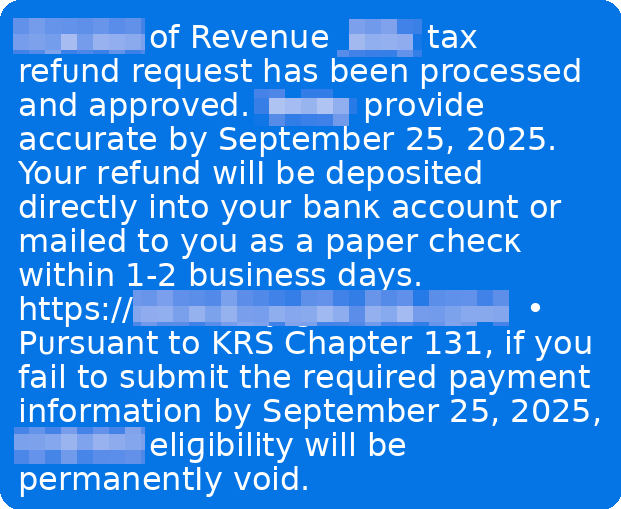
Example of a tax scam text message

Key findings from McAfee’s 2026 Tax Season Survey 

Here’s what our January 2026 survey of 3,008 U.S. adults found: 

The big picture: lots of worry, not enough confidence 

  • 82% of Americans say they’re concerned about tax fraud this season. 
  • 67% say they’re seeing the same or more tax scam messages than last year. 
  • 40% say tax scam messages are more sophisticated than last year. 
  • 84% are concerned about AI making tax scams more realistic. 
  • Only 29% say they’re very confident they could spot a deepfake tax scam. 

How often scams are reaching people 

  • 34% say they’ve been contacted by someone claiming to be the IRS or another tax authority (phone, text, or email). 
  • 38% say they’ve been asked to click a link or send payment related to a “tax issue.” 
  • Common asks include SSNs (15%), birth dates (11%), addresses (10%), “you owe back taxes” pressure (9%), and banking details (8%). 

Who is getting hit hardest 

  • Nearly 1 in 4 Americans (23%) say they’ve fallen for a tax scam. 
  • Young adults report the highest exposure: 42% of 18–24-year-olds say they’ve fallen for at least one tax scam. 
  • 11% of Americans report tax-related identity theft, rising to 17% among ages 25–34. 

The money is real 

  • Among people who say they’ve fallen for a tax scam, the average loss is $1,020. 
  • Separately, nearly 1 in 5 Americans say they’ve lost money to a tax scam. 

Tax filing is increasingly digital (and that changes the risk) 

  • 55% say they file taxes online (software or IRS Free File). 
  • 75% say they receive refunds or pay taxes electronically (direct deposit, cards, apps, EFTPS, etc.). 
  • 30% say they plan to use an AI tool (like ChatGPT) to help prepare taxes, especially younger adults. This is highly dangerous, even with platform security protections. For example, if an AI tool were compromised in a data breach, user messages with personal tax information (like social security numbers, home address, and more) could be made public.  

Tax Scams Now Hit Year-Round, McAfee Labs Finds 

In addition to our consumer survey findings, McAfee Labs analyzed malicious URLs, apps, texts, and emails in the months leading up to filing season. 

The major takeaway: tax scams don’t wait for April. 

Scam activity began climbing as early as November and has again continued building steadily into 2026. 

Between September 1, 2025, and February 19, 2026, McAfee Labs identified 1,468 malicious or suspicious tax-themed unique domains, an average of 43 new fake tax websites every day. 

In early November 2025 alone, the average number of new tax-themed malicious domains nearly doubled in just over a week. After a brief dip in late December, activity resumed climbing into February, a pattern we expect to intensify as the April filing deadline approaches. 
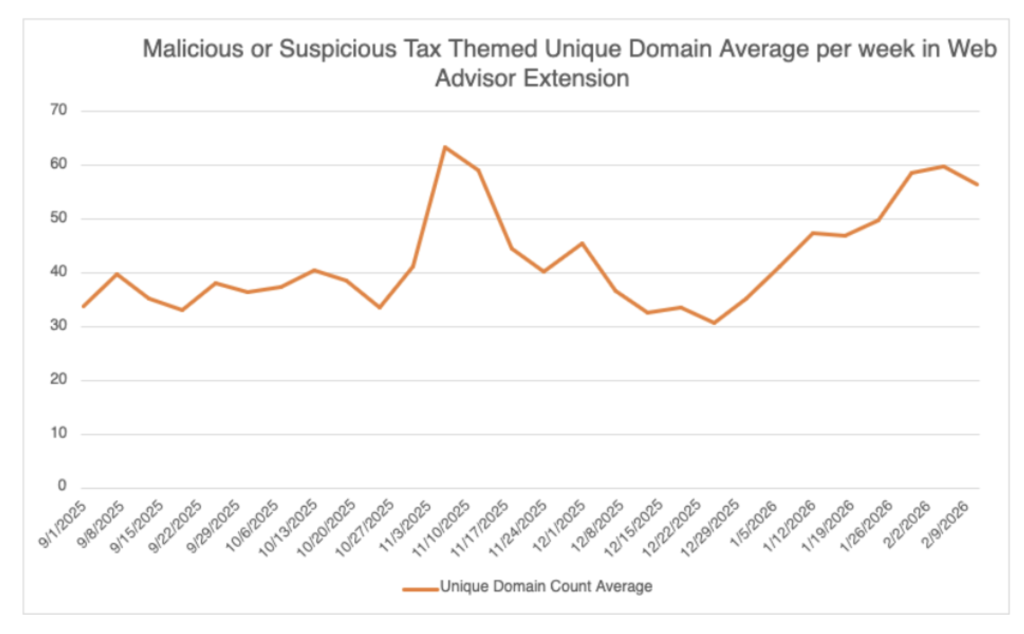
a chart showing the malicious domains blocked by McAfee's web advisor
A chart showing the unique, malicious domains detected by McAfee’s Web Advisor


Fake IRS Websites Are A Major Threat 

Scammers are rapidly creating lookalike IRS domains that mimic official government URLs.  

They use small changes, extra letters, added words, subtle misspellings, to trick taxpayers into believing they’re on a legitimate IRS site. 

Examples include domains that insert additional text around “irs.gov” or add misleading subdomains designed to pass a quick glance. 

These fake portals are used to: 

  • Steal login credentials 
  • Harvest Social Security numbers and tax IDs 
  • Capture payment details 
  • Charge bogus “processing fees” 

In some cases, these sites don’t just steal, they overcharge. 

McAfee Labs observed scam services offering to file for an EIN (Employer Identification Number), something the IRS provides for free, and charging as much as $319 for it. 
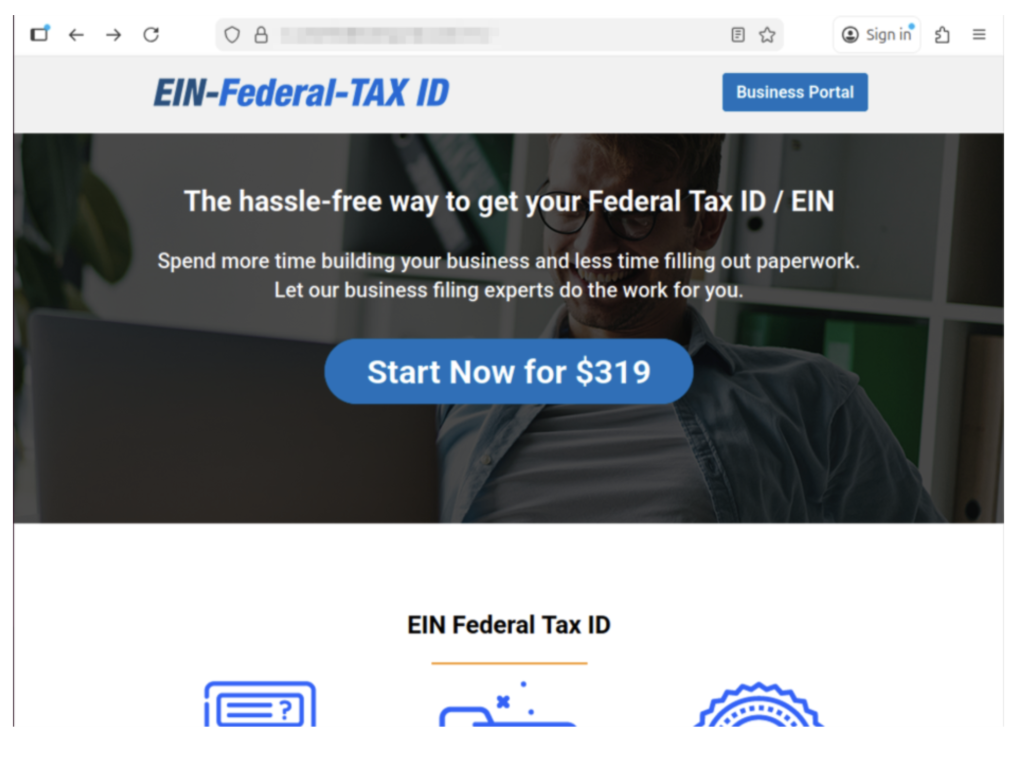
Example of a scam website we found charging for an EIN.

Example of a scam website we found charging for an EIN. 

The official IRS website explicitly warns: you never have to pay a fee to obtain an EIN. 

Other scam sites misuse legitimate policy terms, like the “Fresh Start Initiative,” to harvest personal data and enroll victims in aggressive robocall and marketing campaigns. 

Tax scams don’t always steal outright. Sometimes they monetize confusion. 
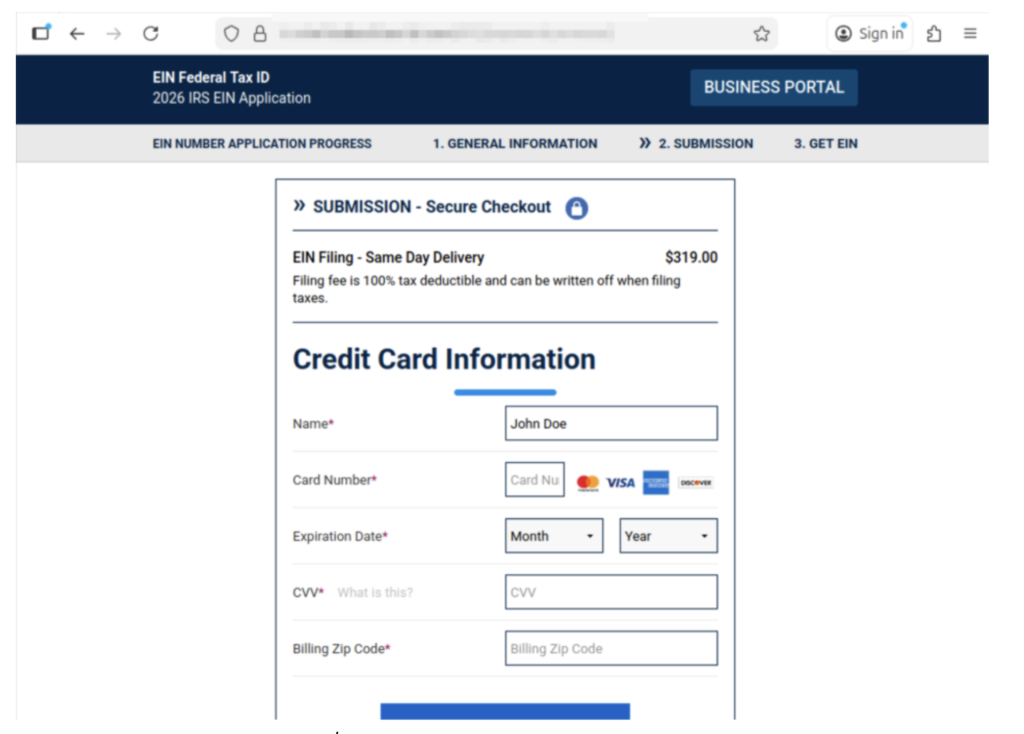
Here it shows them charging $319 for an EIN, and collecting their personal information.

How a Typical Tax Scam Unfolds 

Most tax scams aren’t one single message. They’re a sequence, designed to make you panic, click, and comply. 

Below is the common playbook, plus the red flags that show up repeatedly. 

*Note: Scammers may swap the details like AI voice, fake IRS videos, cloned websites, or impersonating tax software, but the pattern stays familiar. 

Step  What happens  Red flags you’ll see at this step  Red flags that are true every time  What to do instead 
1) The hook  You get a call, text, or email claiming there’s a tax issue (refund problem, underpayment, verification needed).  Message arrives out of nowhere, often during busy hours; “final notice” language; spoofed caller ID.  Unexpected contact + urgency.  Don’t engage. Pause. Go directly to IRS.gov or your tax provider’s official site (type it in). 
2) The authority move  They lean hard on being “the IRS” or “state tax authority,” sometimes with personal details.  They sound polished; may use AI voice cloning; may cite a “case number.” Fake or meaningless case numbers are very common.  They want you to trust the title, not verify the source.  Ask for written notice and time. Real tax issues can be verified through official channels. 
3) The link  They send a link to a “secure portal” or “refund page.”  Lookalike website, subtle misspellings, weird domain, shortened link, email button that says “Pay Now.”  They’re trying to pull you off official channels.  Never click the link. Navigate to the real site yourself. If unsure, delete it. 
4) The data grab  The site (or “agent”) asks for SSN, banking info, login credentials, or details from a prior return.  Requests that are broader than needed; “verify identity” prompts; form fields that feel too invasive.  They want sensitive info fast.  Stop. Don’t type anything. If you already did, assume it’s compromised and act quickly (see next section). 
5) The payment push  They demand payment to “avoid penalties,” “release your refund,” or “resolve a mistake.”  Gift cards, crypto, wire transfers, payment apps; pressure to pay today; threats.  Urgency + unusual payment method.  The IRS does not demand immediate payment via text/social, and doesn’t require gift cards or crypto. Verify independently. 
6) The escalation  If you hesitate, they intensify: threats, “law enforcement,” or AI video/audio that “proves” it’s real.  Deepfake IRS video, intimidating language, “you’ll be arrested,” “your license will be revoked.”  Fear is the product.  Hang up. Save evidence. Talk to a trusted person. Contact official support through verified numbers. 
7) The aftermath  You realize it was a scam—often after noticing a strange charge or login activity.  Charges from odd merchants; new accounts; IRS account alerts; failed tax filing due to “duplicate return.”  Shame keeps people quiet—scammers count on that.  Report it and protect your identity right away. You’re not alone, and it’s not your fault. 

Key point: A message can look “official” and still be fake. AI is making scam language smoother and scams more believable. The safest habit is simple: slow down, and verify using official sources you navigate to yourself. 

What to do if you’ve been involved in a tax scam 

First: take a breath. Scams are designed to trick you, especially when you’re overwhelmed, rushed, or just trying to fix a problem quickly. 

John said it plainly: “Don’t be embarrassed. It does happen. It’s common… they will target anyone.” 

And he’s right. The most important thing is what you do next. 

1) Stop the bleeding: cut off contact 

  • Stop replying 
  • Don’t click anything else 
  • Don’t send more information or money 

2) Capture proof (before it disappears) 

Take screenshots and save: 

  • Phone numbers, email addresses, usernames 
  • The message content 
  • Links (don’t click them, just copy) 
  • Payment receipts and transaction IDs 

3) Lock down your accounts (especially email) 

If a scammer gets into your email, they can reset passwords for everything else. 

Do this today: 

  • Change your email password first, then banking/tax accounts 
  • Turn on two-factor authentication (2FA) 
  • If you reused passwords anywhere, change those too 

Important: If you clicked a suspicious link, downloaded a file, or gave someone remote access to your computer, make sure you use a different, trusted device (like your phone or another computer) to change passwords. Why? If a scammer installed malware or has access to your computer, they may be able to see all of your brand-new passwords as you’re making them. 

Tip: A password manager like McAfee’s can help you create strong, unique passwords quickly, without having to memorize them all. 

4) Check for identity theft signals 

Tax scams often turn into identity theft. Watch for: 

  • IRS notices about a return you didn’t file 
  • Trouble e-filing because a return was already submitted 
  • Alerts about a new IRS online account you didn’t create 

If you suspect tax-related identity theft: 

  • Consider filing an IRS identity theft report (commonly done with IRS Form 14039, Identity Theft Affidavit). 
  • Create or log into your IRS account periodically to review account activity (John now does this every few months). 

McAfee’s Identity Monitoring can help restore your sense of security and privacy online.  

5) Report it (even if you feel weird about it) 

Reporting helps you and helps stop the next person from getting hit. 

Common reporting options include: 

  • FTC report: Report scams and identity theft at the FTC’s reporting site. 
  • IRS phishing email: If you received a scam email posing as the IRS, you can forward it to phishing@irs.gov. 
  • Your bank or card provider: If you paid, contact them immediately. Even if recovery isn’t guaranteed, speed matters. 

6) Clean up your digital footprint 

Scammers don’t just use what you give them. They also use what they can look up. 

Removing your personal details from risky data broker sites can reduce how easily scammers can target you again. Tools like Personal Data Cleanup can help you identify where your information is exposed and guide removal. 

7) Add protection for the next attempt 

Tax season scams often come in waves, especially if scammers think your info is “good.” 

Helpful layers include: 

  • Web protection to warn you about risky links and lookalike sites before you enter info – get our free WebAdvisor download here 
  • Scam detection that can flag suspicious messages 
  • Identity monitoring to alert you if key personal info shows up in risky places 
  • Run a free antivirus scan to check your device for malware or unwanted programs (especially if you clicked a link or downloaded anything) 

The key takeaway 

Tax season creates the perfect storm: time pressure, sensitive data, and a lot of official-looking communication. 

Our research shows most people are worried, and for good reason. Scammers are getting more convincing, and AI is raising the bar on what “real” looks and sounds like. 

“Tell your friends, tell your family,” John said. “Everyone I know at some point has heard this story, and it might just prevent someone from losing… thousands of dollars.” 

If you remember just three things this season, make them these: 

  1. Pause before you click. 
  2. Verify through official channels you navigate to yourself. 
  3. If something happens, act quickly, and don’t blame yourself. 

The post Tax Scams Hit Nearly 1 in 4 Adults. Spot the Red Flags appeared first on McAfee Blog.

  •  

This Week in Scams: AI Search Traps, a Fintech Breach, and a $12M Louvre Hustle

AI is supposed to make the internet easier. But right now, it’s also making scams easier. 

Every week, we round up the biggest scam and cybersecurity stories of the moment so you can recognize red flags, protect your accounts, and avoid the most common traps scammers are using. 

This week in scams, we’re talking AI-powered search scams, a major fintech data breach, and an unexpected ticket fraud scheme that allegedly cost the Louvre millions. 

Let’s jump in: 

Google AI Overviews Are Being Used to Scam People Out of Money 

Google Search doesn’t just show links anymore. Now, it often shows AI-generated summaries at the top of the page called AI Overviews, quick answers designed to save you time. 

But according to reporting from WIRED, scammers are finding ways to exploit these AI summaries by planting fake customer support phone numbers into search results. 

Here’s how the scam works: Someone searches for a bank, airline, or service provider, usually something like “Company name customer support number.” Then Google’s AI Overview pulls a phone number from somewhere online and displays it as if it’s legitimate. 

The problem? Sometimes that number doesn’t connect you to the company at all. 

Instead, it connects you to a scammer impersonating customer service, someone trained to sound helpful, calm, and official, while quietly steering you toward sharing payment information, account details, or verification codes. 

This isn’t just misinformation. It’s a direct path into fraud. 

Google told WIRED it’s working to strengthen anti-spam protections in AI Overviews, but also recommends users double-check customer support numbers through additional searches. 

Key red flags to watch for 

  • The AI Overview provides a phone number without clearly showing where it came from 
  • The “support agent” asks for payment information immediately 
  • The person asks for your login credentials, bank info, or verification codes 
  • The caller pressures you to act quickly (“your account will be frozen”) 
  • The number doesn’t match what’s listed on the company’s official website 

How to protect yourself 

If you’re looking for a customer support number, don’t rely on an AI summary. 

  • Go directly to the company’s official website and find their contact page 
  • Verify the phone number through multiple sources 
  • If the person on the phone asks for passwords or MFA codes, hang up immediately 
  • Treat any urgency or threats (“you must act now”) as a scam signal 

The big lesson: AI can summarize the internet, but it can’t always verify the truth. 

Data Breach Watch: Fintech Firm Figure Exposes Nearly 1 Million Accounts 

If you’ve applied for a loan, worked with a fintech service, or interacted with a home equity platform recently, this one is worth paying attention to. 

According to BleepingComputer, fintech company Figure Technology Solutions was breached in a social engineering attack, with hackers reportedly stealing personal data tied to nearly 967,200 accounts. 

The exposed data reportedly included names, email addresses, phone numbers, physical addresses, and dates of birth. And that’s exactly what scammers use to build believable impersonation attempts. 

Why this matters 

Even if you’ve never heard of Figure, data breaches like this can ripple outward fast. Once scammers have your email, phone number, and date of birth, they can launch more convincing scams like: 

  • Fake “account verification” calls 
  • Fraudulent loan or credit applications 
  • Phishing emails pretending to be financial institutions 
  • Identity theft attempts using your personal details 

And because this breach was reportedly caused by social engineering, it’s also a reminder that the weakest link in security isn’t always technology, it’s human trust. 

Key red flags to watch for after a breach 

  • Calls claiming your loan account needs immediate verification 
  • Emails asking you to “confirm your identity” using a link 
  • Messages that include personal details to sound legitimate 
  • Fake financial support agents asking for payment or login credentials

What to do right now 

  • Change passwords (especially if you reuse them across accounts) 
  • Turn on multi-factor authentication where possible 
  • Monitor your credit report for unusual activity 
  • Be skeptical of unexpected financial messages, even if they seem personalized 

After breaches like this, scammers often wait weeks or months before striking, because they know people stop paying attention.  

A Scam at the Louvre Allegedly Cost $12 Million 

Not every scam story is about malware or phishing links. Some are about old-fashioned fraud, executed at a scale that feels almost unbelievable. 

According to reporting from The New York Times, French investigators uncovered a ticket fraud scheme that may have cost the Louvre in Paris nearly $12 million over a decade. 

Officials say the suspected scam involved tour guides allegedly reusing tickets multiple times, bribes paid to museum employees, and tourist groups being split up to avoid additional fees. 

Last week, police reportedly arrested nine people in the case, including two museum employees. 

Investigators also believe similar fraud may have taken place at Versailles. 

The Takeaway

This wasn’t a one-time trick. Investigators believe the network may have been running for years, allegedly bringing in multiple tour groups per day. 

It’s a reminder that scammers don’t always need to “hack” a system. 

Sometimes, they just find a weak point, then repeat it until it becomes a business model. 

The bottom line: the Louvre story is dramatic, but the lesson is familiar. Scams thrive anywhere oversight is stretched thin, systems are overwhelmed, and people assume someone else is double-checking. 

Whether it’s a museum ticket scanner or an AI-generated search result, scammers will always look for the fastest path through the cracks. 

McAfee’s Safety Tips for This Week 

This week’s scam pattern is all about one theme: trust shortcuts. 

AI summaries that feel official. Phone numbers that look real. Support agents who sound convincing. Breach data that makes phishing more believable. 

The best defense is slowing down and verifying before you act. 

Here are the smartest moves to make right now: 

Don’t trust AI Overviews (or search snippets) for customer support phone numbers. Always verify through the company’s official website. 

Treat “customer service” calls with caution, especially if they ask for payment info, passwords, or MFA codes. 

Never share verification codes, even if someone claims they’re just “confirming your identity.” 

Watch for phishing attempts after major breaches. Scammers often use stolen data to make messages feel personal and urgent. 

Be suspicious of pressure tactics like “your account will be frozen” or “you must act immediately.” 

If you think your personal data may be exposed, monitor your credit and update your passwords now, not later. 

Use tools like McAfee Web Protection to avoid dangerous links, bad downloads, malicious websites, and more. 

We’ll be back next week with another roundup of the scams making headlines, and what you can do to stay ahead of them. 

The post This Week in Scams: AI Search Traps, a Fintech Breach, and a $12M Louvre Hustle appeared first on McAfee Blog.

  •  

Was My TikTok Hacked? How to Get Back Into Your Account and Lock Down Sessions

It usually starts with a small, uneasy moment. A notification you don’t recognize. A login code you didn’t request. A friend texting to ask why you just posted something… weird. 

If you’re staring at your phone wondering whether your TikTok account was hacked, you’re not alone, and you’re not being paranoid.  

Account takeovers often don’t look dramatic at first. They show up as subtle changes: a password that suddenly doesn’t work, a new device logged in overnight, or settings you swear you never touched. 

This guide walks you through exactly what to do if your TikTok account has been compromised: how to spot the warning signs, how to recover access if you’re locked out, and how to lock down active sessions so it doesn’t happen again.  

Signs Your TikTok Account May Be Compromised 

When someone else gets into your account, things usually start behaving in ways that don’t feel like you. Pay attention to changes like these: 

Profile or settings changes you didn’t make
Your display name, bio, password, linked email, phone number, or privacy settings look different, even though you never touched them. 

Content or activity you don’t recognize
Videos you didn’t post. Comments or DMs you didn’t send. New follows or likes that don’t match how you use the app. 

Login alerts that come out of nowhere
Notifications about a new device, verification codes you didn’t request, or emails confirming changes you didn’t initiate. 

Other warning signs include being locked out of your usual login method, missing recovery options, or friends telling you your account is sending strange messages. 

How to Regain Access to Your TikTok Account 

Speed matters here. The longer someone has access, the more they can change, or use your account to scam others. 

If you can still log in 

Secure the account immediately. 

  1. Change your password: Use the “Forgot password?” option if needed and choose a strong, unique password you haven’t used anywhere else. 
  2. Check your account details: Confirm the email address and phone number are yours. Remove anything you don’t recognize. 
  3. Look for unfamiliar devices or sessions: You’ll deal with this more thoroughly below, but flag anything that looks off. 

If you’re locked out 

Start TikTok’s recovery process right away. 

  1. On the login screen, tap “Report a problem” or visit the Help Center. 
  2. Be ready to prove ownership. That usually includes: 
  3. Your username 
  4. A previous email or phone number linked to the account 
  5. Devices you’ve used to log in before 
  6. Screenshots of changes, if you have them 

TikTok uses this information to verify that the account is yours and roll back unauthorized changes. 

Secure your email and phone, too 

This step is critical and often overlooked. 

  • Change the password on the email account linked to TikTok.  If someone controls your email, they can keep resetting your social accounts. 
  • Confirm your phone number is correct and remove any unfamiliar contact info. 

Once you regain access, clean up anything the attacker touched, delete suspicious posts, undo profile changes, and revoke access for any apps you don’t recognize. 

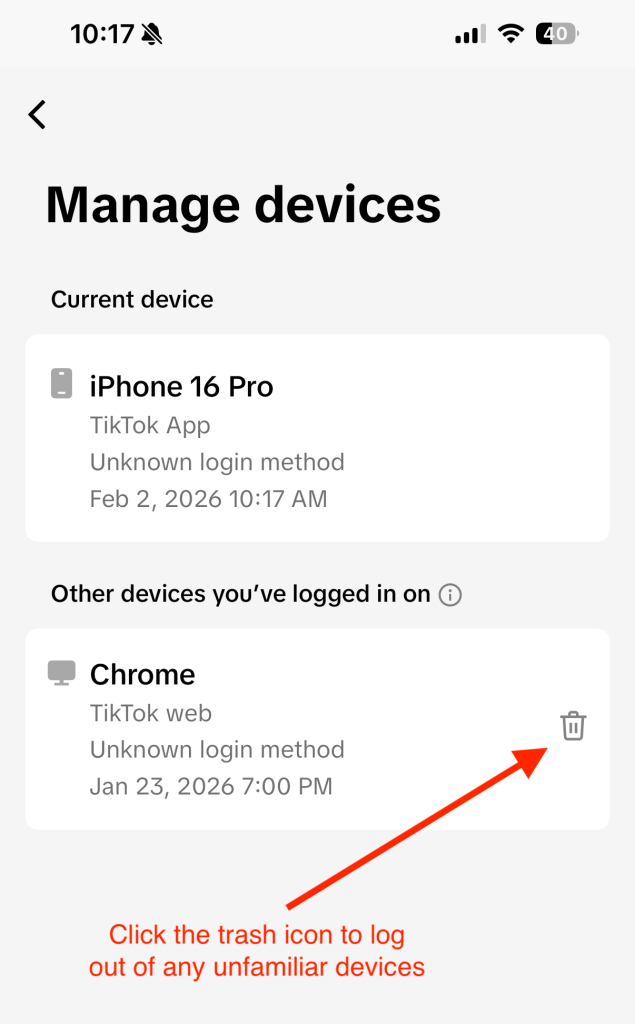
Figure 1: How to remove TikTok logins from other devices.

Figure 1: How to remove TikTok logins from other devices. 

Lock Down Sessions and Strengthen Your TikTok Security 

Getting back in is only half the job. The next step is making sure whoever got in can’t come back. 

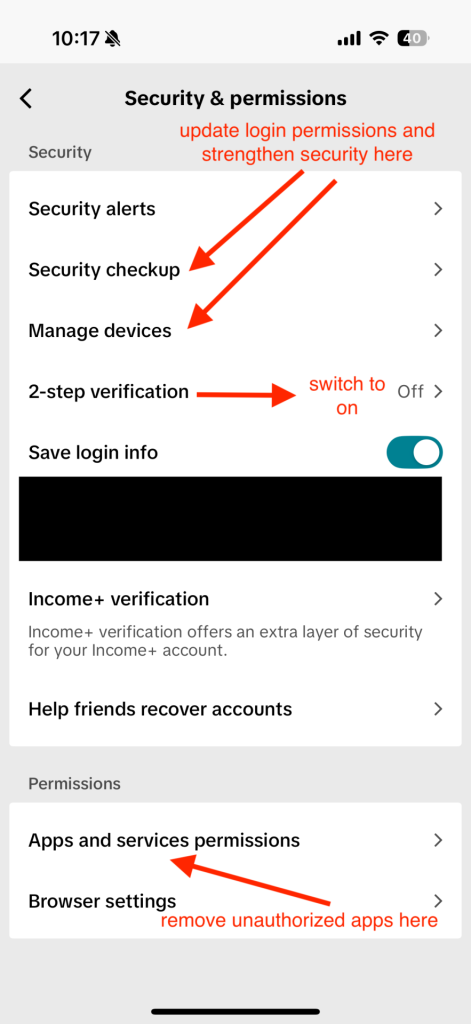
Turn on two-step verification 

In Settings & Privacy, enable two-factor verification (2FA) and choose your preferred method. An authenticator app offers the strongest protection, but SMS or email is still far better than nothing. 

Review active sessions and devices 

Head to Security and look for Manage devices or Active sessions. 

  • Remove any devices you don’t recognize. 
  • If available, use “Log out of all devices” to force everyone, including an attacker, out at once. 

Revoke third-party app access 

Check which apps or tools are connected to your TikTok account and remove anything you don’t use or trust. 

Use a strong, unique password 

Keep your app and phone updated 

Updates often include security fixes. Running outdated software makes it easier for attackers to exploit known issues. 

Be cautious with links and messages 

Unexpected DMs, “copyright warnings,” fake verification notices, or links asking you to log in again are common hacker tactics. When in doubt, don’t click, open the app directly instead. 

Figure 2: Where in “Security & permissions” to find security updates and 2FA.  

Figure 2: Where in “Security & permissions” to find security updates and 2FA. 

How to Report an Impersonation Account on TikTok 

Discovering a fake account that’s using your name, photos, or videos can feel like a second violation on top of having your account hacked.  

Luckily, TikTok has a way to flag these imposters, both from inside the app and, in some regions, through an official web form. 

  1. Open the impostor’s profile: Head to the account that’s pretending to be you. 
  2. Tap the share icon: On mobile, this is usually the arrow at  the top of the profile. 
  3. Select “Report”: Choose the option to report the account. 
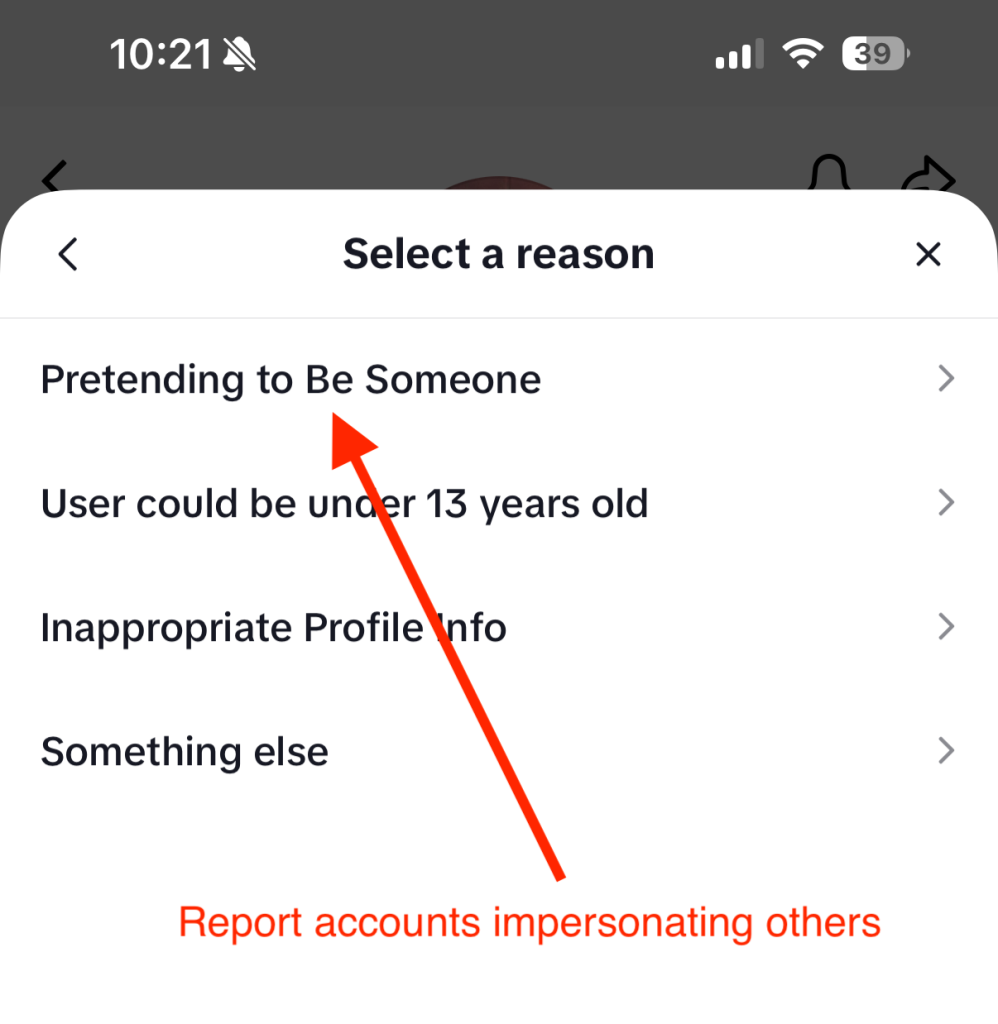
  4. Choose “Report account” → “Pretending to Be Someone”: That’s TikTok’s way of flagging impersonation specifically. 
  5. Indicate who is being impersonated: Select Me if it’s your identity, or Celebrity/Another person if it’s someone else. Then submit.  
Figure 3: A screenshot showing where in TikTok you report fake profiles.

Figure 3: A screenshot showing where in TikTok you report fake profiles. 

If you’re in the U.S. and the fake profile is doing real damage, for example, scamming your followers or using official business assets, TikTok also offers a dedicated impersonation report form online: 

  • Choose whether you’re reporting or appealing an impersonation. 
  • Enter your email and country. 
  • Upload valid ID or other proof that you’re who you say you are. 
  • Confirm the statements and submit the form.  

For accounts outside the U.S., the public Help Center form lets you select Report a potential violation → Account violation → Impersonation and walk through similar steps.


Frequently Asked Questions 

Q: How do I lock down sessions on TikTok?
A: Go to Settings & Privacy → Security, then open Manage devices or Active sessions. Remove unfamiliar devices, log out of all sessions if possible, change your password, and enable two-step verification. 
Q: Can I recover my account if the email and phone number were changed?
A: Yes. Start an account recovery request through TikTok support and provide proof of ownership, including previous contact details and device information. 
Q: What if I keep getting verification codes I didn’t request?
A: That’s a sign someone is trying to get in. Change your password immediately, enable two-step verification, and review active sessions. If it continues, contact TikTok support 
Q: Should I warn my followers?
A: If your account posted or messaged others without your permission, yes. Let people know your account was compromised so they don’t engage with scam links or requests. 


The post Was My TikTok Hacked? How to Get Back Into Your Account and Lock Down Sessions appeared first on McAfee Blog.
  •  

Buying Harry Styles Tickets? Avoid These Common Ticket Scams

concert crowd

As Harry Styles concert tickets go on sale for his first tour in years, cybersecurity experts warn that the same excitement driving ticket registrations and social chatter will also drive a spike in ticket scams across social media, email, and text messages. 

“When demand spikes around a major tour, ticket scams spike too,” said Abhishek Karnik, Head of Threat Research at McAfee. “We saw this during recent major ticket releases, including the Oasis reunion, when McAfee Labs identified more than 2,000 suspicious ticket listings online.” 

“Scammers take advantage of the urgency fans already feel, and the fear of missing out, inserting themselves into social posts, DMs, and text threads with offers that sound normal and believable,” Karnik added.

“Avoid interacting with unknown sellers, especially when offers are made over social media,” Karnik said. “Payments made via wire transfers, cryptocurrency, gift cards, or peer-to-peer platforms like Venmo or Zelle are often not recoverable, which is why it’s safer to buy directly from official ticketing sites or well known resale platforms.”

Where, When, and How to Get Harry Styles Tickets 

Styles announced Together, Together on January 22, marking his first tour since 2023. 

The residency-style run spans seven cities worldwide: Amsterdam, London, São Paulo, Mexico City, New York, Melbourne, and Sydney. Shows begin in May and continue through December. 

New York City is the only North American stop, making competition for tickets especially intense for U.S. fans. In fact, a record-breaking 11.5 million people have already registered for ticket information to attend the Madison Square Garden stop alone. For context, the capacity for that venue is just 19,500 people.  

According to The Hollywood Reporter, that means just 5% of people who signed up for U.S. tickets will be able to buy them when they go on sale this week.  

American Express access presale ticket sales are already live, and Ticketmaster is the primary platform handling official sales.  

The rest of the Together, Together tour tickets will be released in two stages:  

  1. General on sale for NYC dates August 26 – October 9 begins on Friday, January 30.  
  2. General on sale for October 10 – 31 begins Wednesday, February 4. 

That staggered release schedule matters. Multiple on-sale moments mean repeated waves of urgency, which scammers often mirror with fake “last chance” messages, counterfeit presale links, or impersonations of ticketing platforms and customer support. 

What do Harry Styles tickets cost right now 

Ticket prices range widely by seat location and package, with outlets reporting lower prices starting in the $100 range. However, premium seats climb past $1,000. According to Forbes, the average ticket price of his 2022 tour was $113. 

That context matters, because it helps fans recognize the biggest red flag in ticket fraud: a too-good-to-be-true price.  

If you are seeing “floor seats for $50” while reputable platforms are showing far higher prices for comparable sections, that is not a deal. It is a hook for a scammer. 

How ticket scams work 

Ticket scams rarely start with “Buy my fake ticket.” They start with the conditions that make people easy to rush: too much noise, too many messages, and too little time to verify what’s real. 

McAfee’s State of the Scamiverse survey of 7,500 consumers found people now receive 14 scam messages per day on average, and spend a “time tax” of 114 hours a year sorting real from fake. In that environment, criminals don’t need you to be careless. They just need you to be busy. And major ticket drops create the perfect opening: high demand, fast-moving queues, and price shock that makes a “good deal” feel like something you have to grab immediately. 

What’s changed is that scams don’t even need a link anymore. The report found more than 1 in 4 people (26%) say suspicious social messages now arrive without a URL, and 44% admit they reply to those linkless DMs anyway, often triggering the next step of the scam. That’s the blueprint behind many ticket scams today: a believable message, a quick pivot to payment, and pressure to move fast before you can verify. 

Below are among the most common ticket-scam patterns to watch for, and exactly how they play out. 

Ticket fraud 

Ticket fraud is when someone advertises tickets, takes payment, and delivers nothing, or delivers tickets that do not work at the door. This includes fake screenshots, fake confirmation emails, and counterfeit QR codes. 

How it plays out: 

  • A seller claims they “cannot make the show.” 
  • They ask you to pay quickly to “hold” the tickets. 
  • They send a screenshot of a ticket or order email. 
  • The tickets never arrive, or the QR code fails when scanned. 

Resale duplication scams 

resale duplication scam happens when the scammer sells the same ticket to multiple buyers. Sometimes the scammer has one legitimate ticket and sells it repeatedly. Sometimes they have none and simply reuse the same screenshot. 

How it plays out: 

  • You receive something that looks real. 
  • Multiple people show up with the same ticket. 
  • Only the first scan gets in. 

Phishing scams 

phishing scam is a message designed to trick you into clicking a link or sharing personal information. Ticket phishing often pretends to be from Ticketmaster, a venue, a presale program, or customer support. 

How it plays out: 

  • “Your tickets are on hold, confirm within 10 minutes.” 
  • “Unusual activity detected. Verify your account.” 
  • “Your payment failed. Update billing.” 

Modern phishing messages can look polished and grammatically clean, which is why relying on spelling errors is no longer a reliable defense. 

Cloned ticket websites 

cloned ticket website is a fake site made to look like a legitimate seller. These sites are built to capture your payment info, personal data, or both. 

How it plays out: 

  • You click an ad or link from social media. 
  • The site looks legitimate, but the URL is slightly off. 
  • You “buy” tickets and either receive nothing or later see fraud on your card. 

Ticket transfer and account takeover scams 

ticket transfer scam exploits the fact that many tickets are digital and transferable. A related risk is account takeover, where scammers steal your ticketing login and transfer tickets out of your account. 

How it plays out: 

  • You get a message claiming your account needs verification. 
  • You enter credentials on a fake page. 
  • The attacker logs in and transfers tickets away. 

Fake customer support scams 

fake customer support scam is when scammers pose as a company’s help desk, often after you post publicly that you need help. 

How it plays out: 

  • You tweet, post, or comment about ticket issues. 
  • An “agent” messages you first. 
  • They ask for login details, a code, or payment to “unlock” tickets. 

A true scam story: Henry’s last-minute ticket scam 

Henry A. had been trying for weeks to score a ticket to see Tyler, the Creator in Dallas. Even without a confirmed seat, he headed to the venue hoping for a miracle. And that’s when the message came in, someone nearby claimed to have extra tickets.  

The seller said he was just outside too. The price? Reasonable enough. The tone? Casual and confident. All Henry had to do was send half the money to hold the tickets.  

Minutes later, he sent the full $280.  

“I was already in line—excited, hopeful, and just trying to get in. That made me an easy target.”  

The seller began stalling. Then came a screenshot—another buyer offering a higher price. He pressured Henry to pay more. When Henry refused, the seller blocked him. 

Just like that, the tickets were gone. So was the money. And Henry and his friend never made it into the show.  

“I sent $280 and got blocked. We never made it inside.”  

What makes Henry’s experience so common is not the platform. It is the pattern: 

  • A believable story 
  • A “reasonable” price 
  • A fast-moving negotiation 
  • A sudden change in terms 
  • Pressure, then disappearance 

How to spot a ticket scam fast 

Use these red flags as a reality filter: 

Red Flag  What It Looks Like in Real Life 
Price mismatch  Tickets priced far below or far above comparable listings on official or verified resale platforms. 
Urgency tactics  Messages pushing “last chance,” “only today,” or claiming someone else is about to buy. 
Unprotected payment requests  Asking for wire transfers, cryptocurrency, gift cards, or peer-to-peer payments to strangers. 
Off-platform pressure  Requests to move the transaction to text, DMs, or email instead of using an official site. 
Refusal to verify tickets  Sellers unwilling to use a verified resale platform or provide proof that can be independently confirmed. 
Suspicious links  Shortened URLs, unusual domains, or ticket links sent through direct messages. 

Safer ways to buy tickets 

If you want the simplest rule: buy through official ticketing and verified resale platforms that offer buyer protection. Scammers can create fake accounts anywhere, but they cannot easily bypass legitimate purchase protections. 

Practical steps: 

  1. Go direct: Type the official ticketing URL into your browser, do not follow random links. 
  2. Use protected payment: Credit cards generally offer stronger dispute options than unprotected transfers. 
  3. Avoid risky payment demands: Crypto, gift cards, and wires are common in fraud because they are hard to reverse. 
  4. Secure your accounts: Use strong passwords and enable two-factor authentication where available. 
  5. Pause before paying: Scammers depend on emotional momentum. 

How Scam Detector can help 

Tools like McAfee’s Scam Detector can act as a second set of eyes when messages or links are designed to rush you.  

Scam detection can help flag suspicious language patterns, risky links, and social engineering tactics before money leaves your account. 

The post Buying Harry Styles Tickets? Avoid These Common Ticket Scams appeared first on McAfee Blog.

  •  

Didn’t Request an Instagram Password Reset? Here’s What to Do

If you recently received an unexpected email from Instagram asking you to reset your password, you are not alone. Over the past several days, thousands of users reported receiving legitimate password reset emails they did not request. 

The sudden wave of messages led to widespread confusion and concern about whether Instagram had suffered a data breach. Instagram and its parent company Meta deny that a breach occurred, stating instead that they fixed an issue that allowed an external party to trigger password reset emails for some users. 

While the exact source of the activity remains disputed, the situation highlights a broader and more important issue. Password reset emails, even when legitimate, are often the first signal users get that their information may be exposed, reused, or being targeted by attackers. 

Here is what we know so far and what this incident reveals about how password compromises really happen. 

Was Instagram Hacked? 

Instagram says no. 

In statements reported by the BBC and BleepingComputer, Meta said it resolved a problem that allowed an external party to request password reset emails on behalf of users. The company maintains there was no breach of its systems and that accounts remain secure. 

At the same time, cybersecurity researchers and firms, including Malwarebytes, have warned about a dataset circulating on hacking forums that allegedly contains information linked to more than 17 million Instagram accounts. According to reporting, that data may include usernames, email addresses, phone numbers, locations, and account IDs, but not passwords. 

Some researchers believe the dataset may be a compilation of older scraped data rather than evidence of a new breach. Others say the timing of the password reset emails and the appearance of the data raises unresolved questions. 

What matters for users is this: regardless of whether this was a new breach, old scraped data, or a technical abuse of password reset systems, attackers routinely use exposed personal information to launch phishing, account takeover attempts, and social engineering attacks. 

What Counts as a Data Breach and What Does Not 

A true data breach occurs when attackers gain unauthorized access to internal systems and steal protected data such as passwords, financial information, or private communications. 

In many cases, personal data is also exposed through: 

  • API scraping of publicly accessible information 
  • Older leaks that are resold or repackaged 
  • Credential stuffing using passwords stolen from unrelated sites 
  • Abuse of account recovery or password reset features 

That distinction matters because even when passwords are not leaked, exposed personal data can still be weaponized. Names, emails, phone numbers, and locations are often enough for scammers to craft convincing phishing messages that appear legitimate. 

Why You Might Receive a Password Reset Email You Did Not Request 

There are several common reasons this happens, and none of them require your Instagram password to be stolen. 

  • Someone may be testing whether your email address is linked to an account. 
  • Attackers may be attempting credential stuffing using passwords from past breaches. 
  • Your information may appear in older datasets that are being reused or resold. 
  • A platform bug or abuse of recovery systems may trigger reset emails at scale. 

Scammers often use these moments to send fake follow-up emails that look nearly identical to legitimate ones. That is why security experts consistently recommend going directly to the app or official website rather than clicking links in unexpected messages. 

What to Do If You Received an Instagram Password Reset Email 

If you did not request the reset:  

  1. Do not click links in the email. 
  2. Open the Instagram app or visit the official site directly to review security settings.  
  3. Check recent login activity and remove any unfamiliar sessions. 
  4. Enable two-factor authentication (2FA) if it is not already turned on. 

If you decide to change your password, make sure the new one is unique and not used anywhere else. 

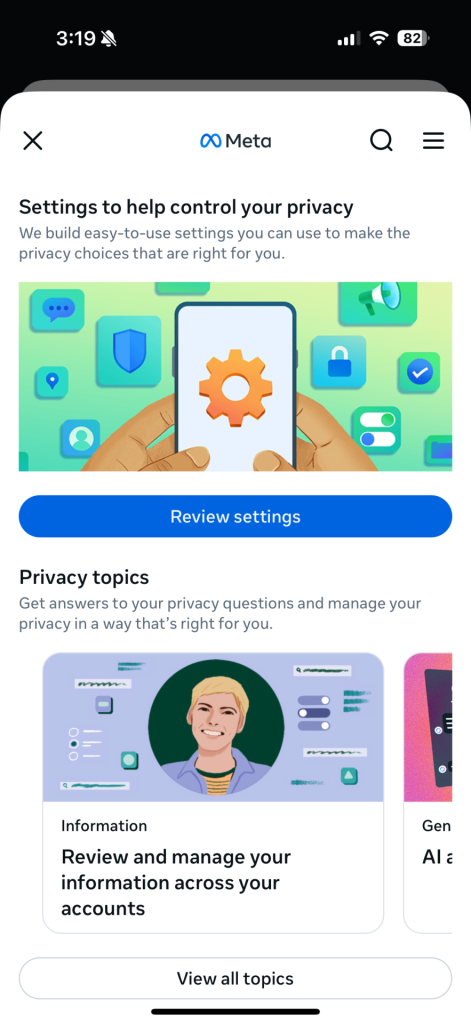
Meta/IG Accounts Center Screenshot

Click “Review Settings” to enable 2FA in your Account Center

How to enable multi-factor authentication for Instagram 

  1. Click More in the bottom left, then click Settings. 
  2. Click See more in Accounts Center, then click Password and Security. 
  3. Click Two-factor (2FA) authentication, then select an account. 
  4. Choose the security method you want to add and follow the on-screen instructions. 

When you set up two-factor authentication on Instagram, you’ll be asked to choose one of three security methods: an authentication app, text message, or WhatsApp. 

And here’s a link to the company’s full walkthrough: https://help.instagram.com/566810106808145 

How to Manage Passwords the Right Way 

Remembering dozens of unique, strong passwords is not realistic for most people. That is why password managers exist. 

A password manager can: 

  • Generate strong, unique passwords for every account 
  • Store them securely so you do not need to remember them 
  • Alert you if your credentials appear in known breaches 
  • Reduce the risk of account takeover from reused passwords 

Using a password manager removes the pressure to reuse passwords and helps close one of the most common doors attackers walk through.  

McAfee’s password manager helps you secure your accounts by generating complex passwords, storing them and auto-filling your info for faster logins across devices. It’s secure and, best of all, you only have to remember a single password. 

FAQ: Instagram Password Reset Emails and Account Safety 

Was my Instagram password stolen?
There is no evidence that passwords were leaked in this incident. 
Should I reset my password anyway?
If you are unsure or reuse passwords elsewhere, resetting it directly in the app is a smart precaution. 
Are the emails real or phishing?
Some emails were legitimate, but scammers often mimic them. Always go directly to the app or website. 
Why is password reuse dangerous?
Because a breach on one site can expose all accounts that share the same password. 


The post Didn’t Request an Instagram Password Reset? Here’s What to Do appeared first on McAfee Blog.

  •  

Blue Whale Challenge: What Parents Need to Know!

TikTok Challenge

Parents are waking up to this new online threat to their kids: ‘The Blue Whale Challenge’ which in extreme steps leads children to commit suicide. Fingers are flying fast on WhatsApp, Facebook and Twitter sharing ‘facts’ about the challenge, tips about mentoring kids, and opinions of experts that are adding to the confusion.

“What is the Blue Whale Challenge?”, “Is it a game or an app?”, “Where is it available?”,  “How can I know if my child is playing it?” These and similar questions are now circulating, understandably, as concerned parents are trying their best to get a grip on the issue.

The Facts First:

Alternate names: A Blue Whale/ A Quiet House/ A Silent House/ A Sea of Whales/ Wake Me Up at 4:20 am.

The background: The Blue Whale Challenge was developed by a Russian who is currently behind bars. The game had an app but now it has been removed. HOWEVER, if anyone has backed up data and saved the app, it may still be there on their devices. It may also be shared in unregulated groups.

The game: The game consists of a series of dares, and every time the player completes a challenge, a new one is assigned to him/her. This happens over a period of 50 days (According to some reports, this includes carving a Blue Whale on the hand). The last one is supposed to be one that is potentially life-threatening. Not only that, the participant has to livestream or share the suicide on Facebook.

The modus operandi: How does the moderator get the participants to accept and complete challenges? Simply by goading them on; shaming them or belittling them if they show hesitation. They already have the phone numbers and email addresses of the participants, so it’s easy for the moderator to contact the participants. The participants are also threatened not to keep records of any mails or messages or else their family member’s personal information would be hacked and made public.

Origin: There are contradictory reports about existence of an app and now it’s been removed from online stores. Social media and forums are recognized means which have helped proliferate the same.

What Can Parents Do?

This is not a case of malware or virus attacks. It is more related to human psychology and banks on the child’s naiveté, lack of self-esteem and acceptance to a group. Such games have existed and continue to exist and bans won’t prevent their creation. Just like there are fun challenges like the ice bucket challenge and the pink whale challenge, there are also potentially harmful ones that include taking selfies in front of running trains and other dangerous acts. Children by nature are adventurous and dares, no matter how small or big, could satisfy this need for excitement.

  1. Open Conversation: Like in the real world where you guide your child, likewise your child needs guidance in the online world too which can only be given by you until they attain maturity. Have regular and informal conversation so they share without the fear of being reprimanded. Encourage questions, address their curiosity and guide them in a friendly manner rather than leaving up to them to figure things on their own Also, its recommended to impart knowledge to break free from peer pressure and not be negative online. A strong, confident child will be able to make better decisions and this is the skill as parents you can teach your children.
  2. Stranger Danger: According to McAfee’s ‘Connected Family’ study in 2017, 49% of Indian parents are concerned about their child potentially interacting with a social predator or cybercriminal online. Education and open conversations within families are critical as kids are curious and give trust easily. Highlight incidents about how strangers try to earn trust falsely for their own agenda which can extend from cybercrime to physical theft when you are not home. Insist that they should avoid entering into any form of communication, sharing or confiding with strangers including calling, emailing, texting or meeting people they don’t know well in person.
  3. Balance: Set daily internet time when they can surf online and do school work. Also, make the rule -Absolutely NO devices go to bed with your child. If you notice your child is online more often than usual you should investigate.
  4. Monitor: Even if you are not a tech-savvy person, there is nothing like a parent’s concern to keep children on the right path. It’s suggested you use the parental control features available in reputed security software which makes it easy and simple to help keep your children safe online.
  5. Do your part: Discuss with your child about how to identify such online dangers and report it if they encounter any. It’s our duty to keep the ecosystem safe for everyone as we would expect from our neighbor.

Monitoring your child’s online experience until they get a sense of judgement is something I have always advocated for, and is now more important than ever. Do your part and help make the internet a safer place for everyone.

Final Thoughts

The Blue Whale Challenge is a grim reminder that not all online threats come in the form of a virus or malicious download. Sometimes, the real danger lies in manipulation, peer pressure, and psychological coercion. As parents, you cannot control every corner of the internet, but you can teach your children effective ways to navigate it.

Your role in your child’s life is more powerful than any app or algorithm. Open conversations, emotional support, clear digital boundaries, and active involvement in your child’s online activities constitute the strongest defense. When children feel heard, valued, and confident, they are far less likely to fall prey to harmful online challenges or strangers seeking to exploit them.

Parental guidance should also be supported by practical safeguards. Just as you lock your doors at night, your child’s digital world deserves protection too. Using trusted parental control tools can help you monitor their online activity, manage screen time, filter inappropriate content, and receive alerts about potential risks without invading your child’s sense of independence.

With the McAfee+ Family Plan, you are empowered with comprehensive parental controls, identity monitoring, and multi-device protection to help you support, guide, and protect your child as they grow in a connected world.

The post Blue Whale Challenge: What Parents Need to Know! appeared first on McAfee Blog.

  •  
❌