Reading view

This Week in Scams: Fake Brand Messages and Account Takeovers

This week in scams, social engineering sits at the center of several major headlines, from investment platform breaches to social media account takeovers and new warnings about AI-driven fraud.  

Every week, this roundup breaks down the scam and cybersecurity stories making news and explains how they actually work, so readers can better recognize risk and avoid being manipulated. 

Let’s get into it:  

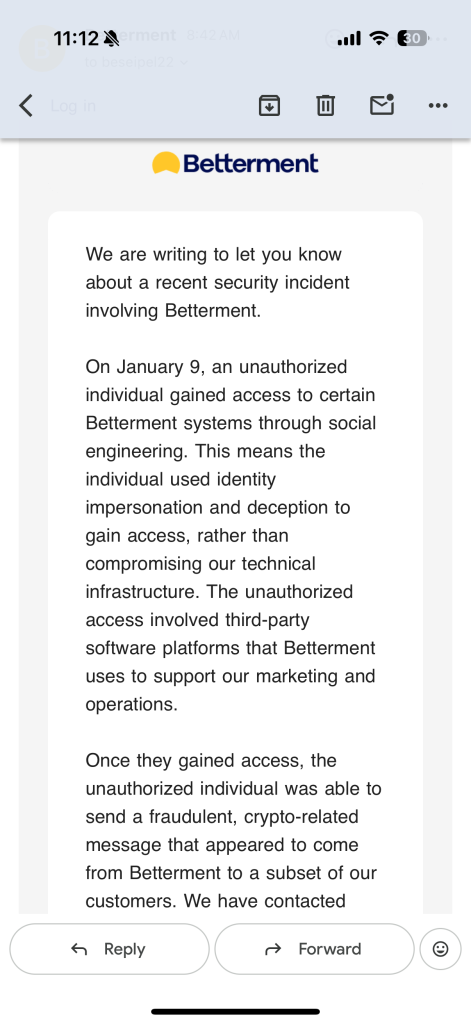
Betterment Warns Customers of Breach 

The big picture:
Attackers accessed third-party systems used by Betterment, then used the information they stole to impersonate the company, contact customers, and promise scam crypto investment opportunities with too-good-to-be-true returns. 

What happened: 

  • Attackers used social engineering to compromise third-party tools Betterment uses for marketing and operations, as reported by TechCrunch 
  • With access to internal systems, they sent messages to customers that appeared legitimate. 
  • The messages promised to triple crypto holdings if recipients sent $10,000 to a wallet controlled by the attackers, a classic “send money to get more back” lure, later detailed by The Verge. 
  • Betterment says no account logins or passwords were compromised, but personal data like names, contact details, and dates of birth were exposed, enough to make the messages feel real. 

Red flags to watch for: 

  • Promises of guaranteed or multiplied crypto returns 
  • Requests to send money first to “unlock” a benefit 
  • Messages tied to a breach but asking for immediate action outside the app 
An image of Betterment's email to customers.
An image of Betterment’s email to customers

How the breach happened: 

Social engineering is a type of scam that targets people rather than software or security systems. Instead of hacking code, scammers focus on tricking someone into giving them access 

Attackers research how a company operates, which tools it uses, and who is likely to have permissions. They then impersonate a trusted source, such as a vendor, coworker, or automated system, and send a realistic message asking for a routine action.  

That action might be approving a login, resetting credentials, sharing a file, or clicking a link. Once the person complies, the scammer gains legitimate access and can move through systems using real permissions. Social engineering works because it exploits trust, familiarity, and urgency, making normal workplace behavior the pathway to a breach. 

Social Engineering Scams Fueled by AI On the Rise 

Big picture:
Fraud is increasingly driven by impersonation, automation, and trust abuse rather than technical hacking, according to new industry forecasts. 

What happened:
A new Future of Fraud Forecast from Experian warns that fraudsters are rapidly weaponizing AI and identity manipulation. The report highlights agentic AI systems committing fraud autonomously, deepfake job candidates passing live interviews, cloned websites overwhelming takedown efforts, and emotionally intelligent bots running scams at scale. 

The scope of the problem is already visible. Federal Trade Commission data shows consumers lost more than $12.5 billion to fraud in 2024, while nearly 60% of companies reported rising fraud losses between 2024 and 2025. Experian’s forecast suggests these losses will accelerate as fraud becomes harder to attribute, trace, and interrupt. 

Red flags to watch: 

  • Requests or actions initiated without clear human ownership 
  • Identity verification steps that feel automated or unusually frictionless 
  • Transactions triggered by AI systems with unclear accountability 

Phishing Scam Locks Users Out of X Accounts 

Big picture: Officials are warning of increasing phishing attacks that steal X users’ accounts and then use their profile to sell crypto. 

What happened: The Better Business Bureau issued a warning about phishing messages targeting users on X, particularly accounts with large followings. Victims receive direct messages that appear to come from colleagues or professional contacts, often asking them to click a link to support a contest, event, or opportunity. 

Once the link is clicked, victims are locked out of their accounts. The compromised accounts are then used to promote cryptocurrency and other products, while automatically sending the same phishing message to additional contacts. 

Red flags to watch: 

  • Unsolicited direct messages containing links 
  • Requests framed as favors, votes, or professional support 
  • Sudden loss of account access after clicking a link 

How this happened and what to learn:
The scam relies on account impersonation and lateral spread. Instead of reaching strangers, attackers move through existing trust networks, using one compromised account to reach the next.  

The takeaway is that familiarity does not equal legitimacy. Even messages from known contacts should be treated with caution when links or logins are involved. 

McAfee’s Safety Tips for This Week 

  • Verify inside official apps or sites. If you get a security email, don’t click any links. Instead, open the official app or type the website address yourself for more information. 
  • Stay alert to trending scams. Weight-loss drug fraud like Ozempic offers is already surging in the new year, and awareness is your first defense. 

McAfee will be back next week with another roundup of the scams making headlines and the practical steps you can take to stay safer online. 

The post This Week in Scams: Fake Brand Messages and Account Takeovers appeared first on McAfee Blog.

  •  

McAfee’s Scam Detector Earns Third Major Award Within Months of Launch

McAfee Scam Detector

McAfee’s Scam Detector has been named a Winner of the 2026 BIG Innovation Awards, presented by the Business Intelligence Group, marking the third major industry award the product has earned since launching just months ago. 

The recognition underscores a growing consensus across independent judges: as scams become more sophisticated and AI-driven, consumers need protection that works automatically, explains risks clearly, and helps stop harm before it happens. 

Big Innovation Award 2026

What Is the BIG Innovation Award? 

The BIG Innovation Awards recognize products and organizations that deliver measurable innovation with real-world impact. The program focuses not only on technical advancement, but on how solutions improve everyday life for individuals and households. 

For consumer cybersecurity products like Scam Detector, that means being evaluated on: 

  • Real-world relevance 
  • Ease of use for non-experts 
  • Societal impact 
  • Demonstrated adoption and need 

The award highlights Scam Detector’s role in helping people stay safer online as scams grow more sophisticated, more personal, and increasingly powered by AI.  

Why Scam Detector Stands Out 

According to feedback from the BIG Innovation Awards judging panel, Scam Detector was recognized for: 

Strong real-world relevance: Scams are now an everyday risk, not a niche technical issue 

Clear consumer value: Protection that runs automatically in the background without requiring expert knowledge

AI used responsibly: Applying advanced models to reduce harm, not increase it

Early impact: Rapid adoption, with more than one million users in its first months 

Judges also noted the importance of Scam Detector’s educational alerts, which don’t just block threats, but explain why something is risky, helping people build confidence over time. 

Using AI to Fight AI-Driven Scams 

Scam Detector is McAfee’s AI-powered protection designed to detect scams across text, email, and video, block dangerous links, and identify deepfakes, before harm occurs. 

As scammers increasingly use generative AI to impersonate people, brands, and institutions, protection needs to operate at the same speed and scale. Scam Detector is built to do exactly that, quietly working in the background while users go about their day. 

Scam Detector is included with all core McAfee plans and is available across mobile, PC, and web. 

In Good Company: Consumer Innovation Across Industries 

McAfee was recognized alongside other consumer-facing innovators whose products directly serve individuals and households. Fellow 2026 BIG Innovation Award winners include: 

Capital One Auto – Chat Concierge: A consumer-facing service designed to help car buyers and owners navigate financing and ownership decisions. 

Starkey – Omega AI Hearing Aid: A wearable hearing aid that integrates AI assistance, health monitoring, and real-time translation. 

Phonak – Virto R Infinio: Custom-fit hearing aids designed to deliver personalized hearing solutions for individual users. 

EZVIZ – 9c Dual 4G Series Camera: A smart home security camera built for personal and household use. 

Sinomax USA: Consumer mattresses and comfort products focused on everyday home use. 

beyoutica 1905: A wellness product designed for health- and lifestyle-focused consumers. 

Wheels – Pool CheckOut: A consumer-oriented solution designed to simplify vehicle service and checkout experiences. 

Together, these winners reflect how innovation increasingly shows up in tools people rely on at home, in their cars, and on their phones. 

Scam Detector Awards and Industry Recognition 

Since launch, McAfee’s Scam Detector has earned recognition across multiple independent award programs, each highlighting a different dimension of its impact: 

2026 BIG Innovation Awards

Winner and Top 10 Innovator – Large Business, recognizing real-world consumer impact and responsible AI use. 

2026 Big Innovation Award

2025 A.I. Awards

Winner, Best Use of AI in Cybersecurityhonoring Scam Detector’s automated scam detection and deepfake identification. 
The AI Awards - Winner 2025

2025 Tech Ascension Awards 

Winner, Best AI/ML Powered Cybersecurity Solution, recognizing real-time protection across text, email, and video. 

Tech Ascension Awards

Together, these awards reinforce a consistent message from independent judges: consumer cybersecurity works best when advanced technology is paired with clarity, usability, and trust. 

What Is McAfee’s Scam Detector? 

McAfee’s Scam Detector is an AI-powered scam protection feature designed to spot and stop scams across text messages, emails, and videos. Built in response to the rapid rise of AI-generated fraud, Scam Detector automatically analyzes suspicious content, blocks dangerous links, and identifies deepfakes, while explaining why something was flagged so users can make more confident decisions online. 

What Scam Detector Does 

Detects text message scams across popular apps and messaging platforms 

Flags phishing and suspicious emails with clear explanations, helping users learn what to watch for

Identifies AI-generated or manipulated audio in videos, including potential deepfakes

Offers on-demand scam checks, allowing users to upload a message, link, or screenshot for analysis

Runs primarily on-device, helping protect user privacy without sending personal content to the cloud 

Scam Detector is designed to work quietly in the background, providing protection without requiring constant decisions or technical expertise. Scam Detector is included at no extra cost with all core McAfee consumer plans. Learn more here. 

The post McAfee’s Scam Detector Earns Third Major Award Within Months of Launch appeared first on McAfee Blog.

  •  

Google Ends Dark Web Report. What That Means and How to Stay Safe

Google has officially discontinued its Dark Web Report, the tool that alerted users when their personal information appeared in dark web breach databases. New scans stop on January 15, 2026, and on February 16, 2026, Google will permanently delete all data associated with the feature. 

This does not mean Google.com or Google Accounts are going away. It means Google is no longer scanning the dark web for leaked data tied to your account, and it is no longer storing or updating any breach information that was collected for the report. 

For people who relied on Google’s alerts, this change creates a real gap. After January 16, you will no longer get new notifications if your information shows up in breach databases. That is why it is worth taking a few minutes now to lock down the basics. 

According to reporting from TechCrunch, Google said it ended the service after concluding that it did not give users enough clarity about what to do once their data was found. 

That decision highlights a much larger shift in online security: Finding leaked data is no longer enough. Protecting identity is now the real challenge. 

What did Google’s Dark Web Report do? 

The Dark Web Report was a Google Account feature that searched known data breach dumps and dark web marketplaces for personal information tied to a user, such as email addresses, phone numbers, and other identifiers. 

If Google found a match, it sent an alert. 

What it did not do was show which accounts were at risk, whether financial or government ID data was involved, or how to prevent fraud from happening next. That gap is why some users said the tool fell short. 

What is the dark web, and why does  stolen data end up there? 

The internet has three layers: 

  1. The surface web is what search engines index. 
  2. The deep web includes anything behind a login, like email, banking, and medical portals. 
  3. The dark web is a hidden part of the deep web that is not indexed by search engines and is accessed through specialized networks or browsers like Tor. 

The dark web is where data from breaches is commonly sold, traded, and packaged for scams. When a company is hacked, stolen files often end up in dark web databases that include email addresses, passwords, Social Security numbers, bank details, and full identity profiles. 

Scammers use this data to commit account takeovers, financial fraud, tax fraud, and identity theft.  

Even without passwords, this personal information can be enough for scammers to target you with convincing phishing and social engineering scams.  

How to check if your personal information is on the dark web: 

Looking up an email address is no longer enough. Modern identity theft relies on things like Social Security numbers, government IDs, bank and credit card numbers, tax records, insurance data, usernames, and phone numbers. 

To understand whether any of that is exposed, people need to monitor the dark web for identity-level data, not just logins. 

Here is what that looks like in practice: 

  • Scan breach databases for government ID numbers and financial data 
  • Look for full identity profiles being sold or traded 
  • Match leaked records back to real people 

Tools like McAfee’s Identity Monitoring are designed to look for those types of data so you can act before fraud happens. 

Have 30 minutes right now? Do this: 

Been meaning to bolster your security? Here are three quick ways you can enhance your identity protection and reduce real-world damage in a breach: 

Freeze your credit

Estimated time: 10 minutes 

This is a powerful free protection option that many forget about. A credit freeze blocks anyone from opening new loans, credit cards, or accounts in your name, even if they have your Social Security number and full identity profile. 

You can do this for free with any of the major credit bureaus. If you do it with one, the others are notified. 

Why this matters: Most identity theft today is not account hacking. It is criminals opening accounts in your name. A credit freeze stops that cold. 


Set up fraud and login alerts on your financial accounts 

Estimated time: 10 minutes 

Go into your main bank and credit card apps and turn on: 

  • Login alerts
  • Transaction alerts
  • Password or profile change alerts
  • These are not the same as marketing notifications. They tell you when someone is trying to access or move money. 

You’ll find these somewhere under Settings>Alerts.

Why this matters: Identity thieves often test stolen data with small charges or login attempts before stealing larger amounts. These alerts are how you catch it early.

Lock down account recovery paths

Estimated time: 10 minutes 

This is one of the most overlooked vulnerabilities. 

Go into: 

  • Your email account 
  • Your Apple ID or Google account 

Check and update: 

  • Recovery email 
  • Recovery phone number 
  • Backup codes 
  • Trusted devices 

Remove anything you do not recognize. 

Why this matters: Even if you change your password, attackers can still take over accounts through recovery systems if those are compromised. This closes that back door. 


FAQ: 

Is Google deleting my Google Account data?
No. Google is only deleting the data it collected specifically for the Dark Web Report feature. Your Gmail, Drive, Photos, and other Google Account data are not affected. 
Is Google still protecting my account from hackers?
Yes. Google continues to offer security features like two-factor authentication, login alerts, and account recovery tools. What it removed is the dark web scanning and alert system tied to breach data. 
Does the dark web report website still exist?
No. After February 16, 2026, Google no longer operates or updates the Dark Web Report feature. There is no active scanning, no dashboard, and no stored breach data tied to it. 
Does this mean dark web monitoring is useless?
No. It means email-only monitoring is not enough. Criminals use far more than emails to commit fraud, which is why identity-level monitoring is now more important. 
What kind of information is most dangerous if it appears on the dark web?
Social Security numbers, government IDs, bank and credit card numbers, tax records, insurance IDs, usernames, and phone numbers are the data types most commonly used for identity theft and financial fraud. 
How can I check if my information is exposed right now?
You can use an identity monitoring service like McAfee that scans dark web sources for sensitive personal data, not just email addresses. That is how people can see whether their identity is being traded or abused today. 


The post Google Ends Dark Web Report. What That Means and How to Stay Safe appeared first on McAfee Blog.

  •  

This Week in Scams: Explaining the Fake Amazon Code Surge

blogging on social media

This week in scams, the biggest threats showed up as routine security messages, viral consumer “warnings,” and AI-generated content that blended seamlessly into platforms people already trust. 

Every week, we bring you a roundup of the scams making headlines, not just to track what’s happening, but to explain how these schemes work, why they’re spreading now, and what you can do to stay ahead of them.  

Here are scams in the news this week, and safety tips from our experts at McAfee: 

Amazon One-Time Passcode Scam: How Fake Security Calls Hijack Real Accounts 

Scammers are increasingly impersonating Amazon customer support to take over accounts using real one-time passcodes (OTPs), not fake links or malware. 

Here’s how the scam works in practice. 

What is the Amazon one-time passcode scam? 

Victims receive an unsolicited phone call from someone claiming to work for Amazon. The caller says suspicious activity has been detected on the account and may reference expensive purchases, often items like smartphones, to make the threat feel credible. 

The call usually comes from a spoofed number and the scammer may already know your name or phone number, which helps lower suspicion. 

How scammers use real Amazon security codes 

While speaking to you, the scammer attempts to access your Amazon account themselves by entering your phone number or email address on the login page and selecting “forgot password” or triggering a login from a new device. 

That action causes Amazon’s real security system to send a legitimate one-time passcode to your phone or email. 

If you read that code aloud or share it, the scammer can immediately: 

  • Complete the login process 
  • Change your account password 
  • Access saved payment methods 
  • Place fraudulent orders or lock you out of the account 

The scam works precisely because the code is real—and because it arrives while the caller is convincing you it’s part of a routine security check. 

Key red flags to watch for 

  • Unsolicited calls claiming to be from Amazon 
  • Requests to share a one-time passcode 
  • Pressure to act quickly “to secure your account” 

Important to remember: Amazon will never contact you first to ask for your password, verification codes, or security details. If you receive a one-time passcode you didn’t request, do not share it with anyone. 

AI Deepfake Scam on TikTok Uses Fake Princess to Steal Money 

A growing scam on TikTok shows how AI-generated deepfake videos are now being used not just for misinformation, but for direct financial fraud. 

This week, Spanish media and officials warned that scammers are circulating fake TikTok videos appearing to show Princess Leonor, the 20-year-old heir to Spain’s throne, offering financial assistance to users.  

According to The Guardian, the videos show an AI-generated version of Leonor promising payouts running into the thousands of dollars in exchange for a small upfront “fee.”  

Once victims send that initial payment, the scam doesn’t end. Fraudsters repeatedly demand additional fees before eventually disappearing. 

This case highlights how deepfakes are moving beyond novelty and into repeatable, high-reach fraud, where trust in familiar public figures is weaponized at scale. 

Viral Reddit “Whistleblower” Scam: When AI-Generated Posts Fool Millions 

A viral post on Reddit this week shows how AI-generated text can convincingly impersonate whistleblowers, and even mislead experienced journalists. 

The post claimed to come from an employee at a major food delivery company, alleging the firm was exploiting drivers and users through opaque AI systems. Written as a long, confessional screed, the author said he was drunk, using library Wi-Fi, and risking retaliation to expose the truth. 

The claims were believable in part because similar companies have faced real lawsuits in the past. The post rocketed to Reddit’s front page, collecting over 87,000 upvotes, and spread even further after being reposted on X, where it amassed tens of millions of impressions. 

As Platformer journalist Casey Newton later reported, the supposed whistleblower provided what appeared to be convincing evidence, including a photo of an employee badge and an 18-page internal document describing an AI-driven “desperation score” used to manage drivers. But during verification attempts, red flags emerged. The materials were ultimately traced back to an AI-generated hoax. 

Detection tools later confirmed that some of the images contained AI watermarks, but only after the post had already gone viral. 

Why AI-generated hoaxes like this are dangerous 

  • They mimic real whistleblower behavior and language 
  • They exploit existing public distrust of large platforms 
  • They can mislead journalists, not just casual readers 
  • Debunking often comes too late to stop spread 

This incident underscores a growing problem: AI-generated misinformation doesn’t need to steal money directly to cause harm. Sometimes, the damage is to trust itself — and by the time the truth surfaces, the narrative has already taken hold. 

McAfee’s Safety Tips for This Week 

As scams increasingly rely on a combination of realism and urgency, protecting yourself starts with slowing down and verifying before you act. 

If a message or video promises money or financial help: 

  • Be skeptical of any offer that requires an upfront “fee,” no matter how small. 
  • Remember that public figures, charities, and foundations do not distribute money through social media DMs or comment sections. 
  • If an offer claims to come from a well-known individual or organization, verify it through official websites or trusted news sources. 

When content appears viral or emotionally convincing: 

  • Pause before sharing or acting on posts framed as warnings, whistleblower revelations, or exposés. 
  • Look for confirmation from multiple reputable outlets — not just screenshots or reposts. 
  • Be cautious of long, detailed posts that feel personal or confessional but can’t be independently verified. 

When AI may be involved: 

  • Assume that realistic images, videos, and documents can be generated quickly and at scale. 
  • Don’t rely on appearance alone to determine authenticity, even high-quality content can be fake. 
  • Treat unsolicited financial requests, account actions, or “inside information” as red flags, regardless of how credible they seem. 

If you think you’ve engaged with a scam: 

  • Stop responding immediately. 
  • Secure your accounts by changing passwords and enabling multi-factor authentication. 
  • Monitor financial statements and account activity for unusual behavior. 

Final Takeaway 

The scams making headlines this week share a common theme: they don’t look like scams at first glance. Whether it’s an AI-generated video of a public figure or a viral post posing as a consumer warning, today’s fraud relies on familiarity, credibility, and trust. 

That’s why McAfee’s Scam Detector and Web Protection help detect scam messages, dangerous sites, and AI-generated deepfake videosalerting you before you interact or click. 

We’ll be back next week with another roundup of the scams worth watching, the stories behind them, and the steps you can take to stay one step ahead. 

The post This Week in Scams: Explaining the Fake Amazon Code Surge appeared first on McAfee Blog.

  •  
❌