Reading view

Do Windows PCs and Macs Need Antivirus Software? How McAfee Goes Beyond Built-In Security

Couple looking at computers

Your Windows PC or Mac already includes built-in security features, and that’s a good thing. These tools provide an important first layer of protection against malware and other common threats users encounter every day. 

But today, staying safe online is about much more than blocking viruses.  

Scam texts arrive daily. Phishing emails imitate trusted brands. Fake websites are designed to steal passwords and payment information. Personal details can appear on data broker sites. AI Deepfakes are more convincing than ever. And most households use multiple devices, from laptops and phones to tablets and Chromebooks. 

That’s why McAfee+ Advanced combines device security with scam protection, identity monitoring, personal info removal, web protection, and secure VPN to help protect the many parts of your digital life. 

Let’s break down what built-in security does, and what McAfee does differently: 

What Built-In Security Does Well 

Both Windows 11 and macOS include a range of built-in security features designed to help protect your device. Depending on your operating system and the apps you use, these may include: 

  • Malware detection and removal  
  • Firewalls  
  • Browser warnings about suspicious websites  
  • Password management tools  
  • Privacy and app permission controls  

Together, these features provide an important first layer of protection and help many users stay safer online.  

Why Many People Want More Than Basic Device Protection 

Built-in security tools are primarily focused on protecting the device itself. However, today’s online threats often target something even more valuable: your identity, your money, and your personal information. 

Recent McAfee research found that Americans receive an average of 14 scam messages every day, and more than three in four have encountered an online scam. 

Threats now commonly include: 

  • Scam texts pretending to be banks, toll agencies, and delivery companies  
  • Fake job offers via text, email, or social media 
  • Phishing emails  
  • QR code scams  
  • AI-generated voice and video impersonations  
  • Identity theft via smishing and quishing, including hijacking entire social profiles 
  • Exposure of personal information on data broker sites  

These risks can follow you across all your devices, not just the computer sitting on your desk. 

Built-In Security vs. McAfee Protection 

Here are the key differences between built-in security alone, vs additional protection like McAfee.  

Built-In Security Has  McAfee+ Advanced Adds 
Detecting viruses and malware  Scam protection for suspicious texts, emails, links, QR codes, and deepfakes 
Basic privacy controls  Secure VPN to protect your connection on public Wi-Fi 
Saving passwords  Password manager with unique password generation and storage. 
Warning about some risky websites  Web Protection to help block dangerous sites before they load 
Security on one device  Antivirus coverage across your PCs, Macs, phones, and tablets 
Doesn’t have this support  Identity monitoring, so you know when your SSN and other info is exposed. Plus personal info removal, so your old data isn’t left spread out across the web. 

Why McAfee Stands Out: Speed and Comprehensive Protection 

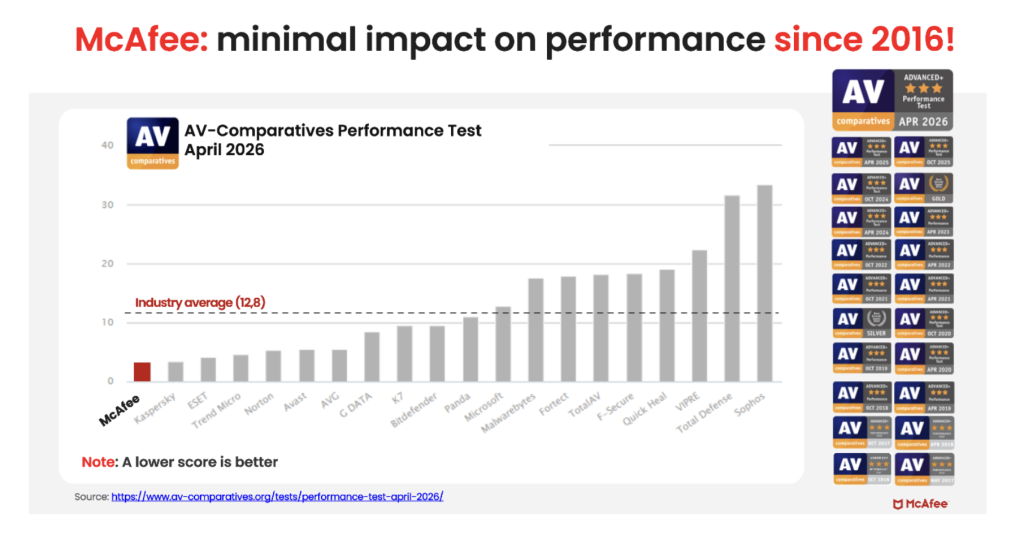
Unlike the old stereotype that stronger protection means a slower computer, independent testing shows McAfee is also the lightest on performance.  

In the latest AV-Comparatives PC Performance Test, McAfee Total Protection posted the lowest system impact score of all 20 products tested: just 3.3, compared with the industry average of 12.8.  

It also earned the highest possible rating, ADVANCED+. That means McAfee is not just adding more layers of protection. It is doing so while staying out of your way. 

For consumers looking for security that goes beyond basic antivirus to help protect against scams, identity theft, privacy risks, and threats across all their devices, that combination is hard to ignore. 

Protection Across All Your Devices 

Most people no longer rely on a single computer. A typical household may use: 

  • Windows PCs  
  • Macs  
  • iPhones  
  • Android phones  
  • Tablets  
  • Chromebooks

Managing security separately on every device can be difficult. McAfee+ Advanced is designed to provide coverage across your devices under one subscription, helping simplify online protection for individuals and families. 

How McAfee+ Advanced Goes Beyond Built-In Security 

With McAfee+ Advanced, multiple layers work together before any damage is done:  

  • Scam Detector flags suspicious texts, emails, links, QR codes, and even deepfake videos before you engage 
  • Secure VPN keeps your data private, especially on public Wi-Fi  
  • Web Protection helps block risky sites, even if you do accidentally click  helps block risky sites, even if you do accidentally click   
  • Password Manager doesn’t just help you make unique, strong passwords, it keeps them stored and organized for you
  • Device Security helps detect malicious apps or downloads   
  • Identity Monitoring alerts you if your personal info shows up where it should not, so you can act fast   
  • Personal Data Cleanup helps remove your information from sites selling it. 
  • Online Account Cleanup assists in taking down your old, forgotten accounts across the web 
  • Social Privacy Manager helps you monitor and change privacy settings across your social platforms in just a few clicks 

Together, these protections are designed to address the broader range of online risks people face every day. 

So, Do Windows PCs and Macs Need Antivirus Software? 

Built-in security tools provide an important starting point, but with scam attempts becoming more convincing and personal information more widely exposed, many people need a more comprehensive approach to staying safe online. 

McAfee+ Advanced combines device security, scam protection, identity monitoring, privacy tools, and VPN coverage to help you browse, bank, shop, and connect with greater confidence. 

The post Do Windows PCs and Macs Need Antivirus Software? How McAfee Goes Beyond Built-In Security appeared first on McAfee Blog.

  •  

How Scammers Used Deepfake Video to Dupe a Company Out of Millions

It’s the video call that cost $25 million.

According to reports from Hong Kong police in February, a finance worker at a multinational company joined a video conference call with the company’s chief financial officer. On the call, the CFO directed the finance worker to transfer more than $25 million in funds to several bank accounts.

The finance worker reportedly had reservations about the request, thinking that the CFO looked “a little off.” The finance worker then reportedly turned to the other participants on the call for confirmation. They all agreed to the request. With that, the transfers went through. More than $25 million in funds were moved out of the company. Right into the hands of fraudsters.

As it turns out, the CFO on the worker’s call was a video deepfake. Along with everyone else.

Hong Kong’s public broadcaster, RTHK, quoted senior police superintendent Baron Chan as saying that AI deepfake technology was used to dupe the worker.

“[The fraudster] invited the informant [worker] to a video conference that would have many participants. Because the people in the video conference looked like the real people, the informant … made 15 transactions as instructed to five local bank accounts, which came to a total of HK$200 million,” he said.

Fraudsters now use AI deepfakes to pull off corporate scams

Businesses now face an altogether new security threat: video deepfakes. In real time, scammers can pose as company officers, vendors, partners, and so on. Put plainly, we live in a time where the person on the other end of that video call might be a fake.

Scammers face several challenges before they can pull off a deepfake attack. The primary challenge they have is obtaining source material. To create a deepfake, they need images, video, and audio of the person they want to impersonate. Consider, though, that some company officials have relatively high profiles. They speak at conferences, hold webinars, and participate in earnings calls. Throw in a few photos and videos lifted from the target’s social media accounts, and scammers have the source material they need to create a deepfake.

The next challenge … scammers need a good story, one with emotional levers they can pull and coerce a victim to act. In the case of the Hong Kong scam, the deepfakes plied their victim with a mix of urgency and authority. The “CTO” wanted to move money and move that money immediately. With the other deepfakes on the call concurring with the CTO, the victim did as asked. In all, it was a classic case of a hand-picked victim subjected to a classic execution of social engineering.

Understandably, this story drew major coverage given the use of deepfakes and the haul they brought in. Moreover, the fact that the fraudsters orchestrated not just one but a host of deepfakes makes it that much more newsworthy. In light of this, companies and their employees have a new threat to look out for. And, better yet, prepare themselves for deepfakes.

Preventing corporate AI deepfake scams

While AI deepfakes hopping onto video conference calls certainly marks new territory in security, several long-standing measures for preventing corporate fraud remain the same. Additionally, some new preventive measures are called for.

Look for the signs of AI deepfakes

Earlier, we mentioned how the victim in the Hong Kong attack mentioned that the CFO looked “a little off” on the video call. AI deepfakes, while convincing, sometimes have the tell-tale markers of a fake.

However, that’s changing. Quickly. As the tools for creating deepfakes continually improve, deepfakes become increasingly difficult to spot.

Earlier generations of deepfake tools had difficulty tracking excessive head movement, like when the deepfake turned for a profile shot. Further, earlier tools required users to keep their hands off their faces. Placing a hand on the chin or over the mouth would break up the face of the deepfake. Another marker of earlier deepfake tools can be found in the eyes. They often had a glassy look, like they weren’t catching the light right. The same went for skin tones and lighting.

So yes, a deepfake might look “a little off.” Consider that a huge red flag. Yet don’t entirely count on this method of detection. As AI deepfake tools evolve, they’re able to remove such blemishes from the video.

Confirm, confirm, and confirm

Any time that sensitive info or sums of money are involved, get confirmation of the request. Place a phone call to the person after receiving the request to ensure it’s indeed legitimate. Better yet, meet the individual in person if possible. In all, contact them outside the email, message, or call that initially made the request to ensure you’re not dealing with an imposter.

In the wake of targeted attacks on key stakeholders, some organizations have restructured how they handle requests for data, funds, and other sensitive information. They require two or three people to fulfill such a request. This makes it tougher for scammers to run their cons. For starters, they have the burden of targeting two or more people. Then they face the further burden of convincing them all. This oversight gives companies a chance to fully validate requests, and potentially catch “urgent” bogus requests from scammers.

Fraudsters do their research — keep your guard up

Fraudsters select their victims carefully in these targeted attacks. They hunt down employees with access to info and funds, and then do their research on them. Using public records, data broker sites, “people finder” sites, and info from social media, fraudsters collect intel on their marks. Armed with that, they can pepper their conversations with references that sound more informed, more personal, and thus more convincing. Just because what’s being said feels or sounds somewhat familiar doesn’t always mean it’s coming from a trustworthy source.

Clean up your online presence

With that, employees can reduce the amount of personal info others can find online. Features likeMcAfee Personal Data Cleanup can help remove personal info from some of the riskiest data broker sites out there. I also keep tabs on those sites if more personal info appears on them later. Additionally, employees can set their social media profiles to private by limiting access to “friends and family only,” which denies fraudsters another avenue of info gathering. Using our Social Privacy Manager can make that even easier. With just a few clicks, it can adjust more than 100 privacy settings across their social media accounts, making them more private.

Defense against AI deepfake attacks

Moving forward, we can expect to see more of these corporate AI deepfake attacks. On all manner of scales. The availability and power of AI tools make it likely. However, as with many forms of targeted attacks, there’s something both fishy and uncanny about them. As we’ve seen, the employee targeted in the Hong Kong attack held suspicions … something was wrong about that call. Yet, who would expect a video conference call full of AI deepfakes? With this attack, companies should consider that such calls fall within the realm of possibility today.

As AI detection technologies evolve, companies will have additional tools to prevent these attacks. Yet the human factor remains an essential element of defense. These are scams, pure and simple. And scams have signs. Fraudsters use all kinds of social engineering tricks to get their victims to act. They’ll impose themselves as authority figures. They’ll add elements of urgency to their requests. And they’ll use people’s personal info in ways to make themselves appear familiar and trustworthy.

This is where we stand today: a basic understanding of AI deepfake technology, what it’s capable of, and the tricks that fraudsters can play with it can bolster a company’s defense against AI deepfake attacks. Indeed, they’re within the realm of possibility today. And a prepared workforce can help stop them in their tracks before they can do any harm.

The post How Scammers Used Deepfake Video to Dupe a Company Out of Millions appeared first on McAfee Blog.

  •  

How Romance Scammers are Using Deepfakes to Swindle Victims

Romance scammers now use face-swapping tech in video chats, all to swindle love-seekers online.

It’s finally come to pass. We indeed live in a time where that person on the other end of a video call might be an absolute imposter. The way they look and the way they sound, all a lie.

A recent article in WIRED shows just how this new form of romance scam works. With a laptop or a couple of smartphones, the cons transform their looks and voices entirely with stock-and-trade AI tools. In real time, they become someone else entirely, with AI mirroring every expression they make as they chat on a video call. It all appears quite real.

Yet a deepfake it is.

Deep feelings and deepfakes fire up AI romance scams

Chilling as this striking new form of attack sounds, you can protect yourself. In fact, many of the same tried-and-true means of avoiding a romance scam still apply.

Even when scammers use real-time deepfakes, the heart of these romance scams remains the same. It plays out like a script. And when you know the script, you can spot the scammer following it.

Romance scams play out a bit like this …

The scammer contacts a love-seeker online, often through direct messages on social media or via text or messaging apps. Sometimes the message is targeted and personalized. In other cases, the scammer might start things off with a simple “hi.” Either way, the scammer aims to kick off a conversation. A long one in which the scammer builds trust with a victim over time.

Days, weeks, and even months pass as the scammer woos their victim. Patiently, they wait for the right moment to pounce by finally asking the victim for money. Maybe it’s gift cards. Maybe it’s prepaid debit cards. A wire transfer, perhaps. Almost always, it’s a form of payment that’s tricky, if not impossible, to recover after victims realize they’ve been scammed. Scammers have even asked for cryptocurrency in some cases.

The reasons for requesting money vary. The scammer might say it’s for a plane ticket to come visit or simply a few bucks to help them in a pinch. Other scammers heap on yet more elaborate lies. Some pose as members of the military stationed in a remote overseas location. They’ll say they want some extra money for a video game console or other creature comfort. Some scammers brazenly claim they’re a doctor working in a remote village and need money for medicine. The list goes on.

As outlandish as the stories and requests might be, victims fall for them. After all, the scammer has been fawning over the victim for some time by that point. The victim truly feels like they’re truly in love with someone who truly loves them. They’ll do anything for their love interest, who turns out to be a scammer and, one day, disappears entirely.

That’s how a romance scam plays out. And it happens often enough. According to the Federal Bureau of Investigation’s 2023 Internet Crime Report, losses to reported cases of romance scams topped more than $650 million.

How not to fall deeply for a deepfake online

Scammers have ready access to deepfake tools, ones that make them look and sound convincingly real. Moreover, these deepfake tools continually improve. With each generation of deepfakes, they become increasingly difficult to detect.

As a result, we can’t take things at face value. Everything we see and hear online requires scrutiny. And scrutiny is what it takes to protect yourself from deepfake romance scams.

Watch the person’s movements on the call

Less sophisticated deepfake tools struggle to track body movement. As such, scammers do their best to hold their heads steady and avoid turning around. Otherwise, that kind of movement ruins the deepfake effect. It’s quite obvious when it happens. With that, see if you can get a suspected deepfake to move around, stand up, turn for a sideways profile, or place their hands on their face. Lesser deepfakes will reveal themselves when they do.

Talk with trusted friends or family members

Beyond keeping a sharp eye out for glitches, you have another detection tool at your disposal — friends and family. When a new relationship starts heating up, share the news with some trusted people in your life. Talk about your interactions with the person, even share a message they’ve sent or two. Victims often miss or overlook inconsistencies in a romance scammer’s stories, particularly as the supposed relationships develop.

Friends and family can help you spot those inconsistencies. They can also point out when parts of the relationship start to sound sketchy. Given the way that scammers pull all kinds of strings on their victims, this can help clear up any clouded judgment.

When a stranger you’ve only met online brings up money, consider it a scam

Money talk is an immediate sign of a scam. The moment a person you’ve never met in person asks for money, put an end to the conversation. Whether they ask for bank transfers, cryptocurrency, money orders, or gift cards, say no.

End the conversation

You might say no, and the scammer might back off — only to bring up the topic of money again later. This is a signal to end the conversation. That persistence is a sure sign of a scam. Recognize that ending an online relationship might be far easier said than done, as the saying goes. Scammers worm their way into the lives of their victims. A budding friendship or romance might be at stake, at least that’s what a scammer wants you to think. They deal in emotional blackmail to get what they want. Tough as it is, end the relationship.

How to make it tougher for a romance scammer to target you

Scammers have to track you down in some way or other. And they have plenty of online resources to do it. Some romance scammers take an extra step. They profile their potential victims before contacting them. With the info they’ve gathered online, they can fine-tune their approach.

For example, we’ve seen cases where scammers target widowers with bogus profile pics that share similarities with the widower’s deceased spouse.

While you can’t keep a scammer from reaching out to you, you can make it tougher for them to find you and use your own info against you.

Make your social media more private

Our new McAfee Social Privacy Manager personalizes your privacy based on your preferences. It does the heavy lifting by adjusting more than 100 privacy settings across your social media accounts in only a few clicks. This makes sure that your personal info is only visible to the people you want to share it with. It also keeps it out of search engines, where the public can see it. Including scammers.

Watch what you post on public forums

As with social media, scammers harvest info from online forums dedicated to sports, hobbies, interests, and the like. If possible, use a screen name on these sites so that your profile doesn’t immediately identify you. Likewise, keep your personal details to yourself. When posted on a public forum, it becomes a matter of public record. Anyone, including scammers, can find it.

Remove your info from data brokers that sell it

McAfee Personal Data Cleanup helps you remove your personal info from many of the riskiest data broker sites out there. That includes your contact info. Running it regularly can keep your name and info off these sites, even as data brokers collect and post new info. Depending on your plan, it can send requests to remove your data automatically.

The post How Romance Scammers are Using Deepfakes to Swindle Victims appeared first on McAfee Blog.

  •  
❌