 Login
Login



They came by phone, by text, by email, and they even weaseled their way into people’s love lives—an entire host of scams that we covered here in our blogs throughout the year.
Today, we look back, picking five noteworthy scams that firmly established new trends, along with one in particular that gives us a hint at the face of scams to come.
Let’s start it off with one scam that pinged plenty of phones over the spring and summer: those toll road texts.
It was the hot new scam of 2025 that increased by 900% in one year: the toll road scam.
There’s a good chance you got a few of these this year,scam texts that say you have an unpaid tab for tolls and that you need to pay right away. And as always, they come with a handy link where you can pay up and avoid that threat of a “late fee.”
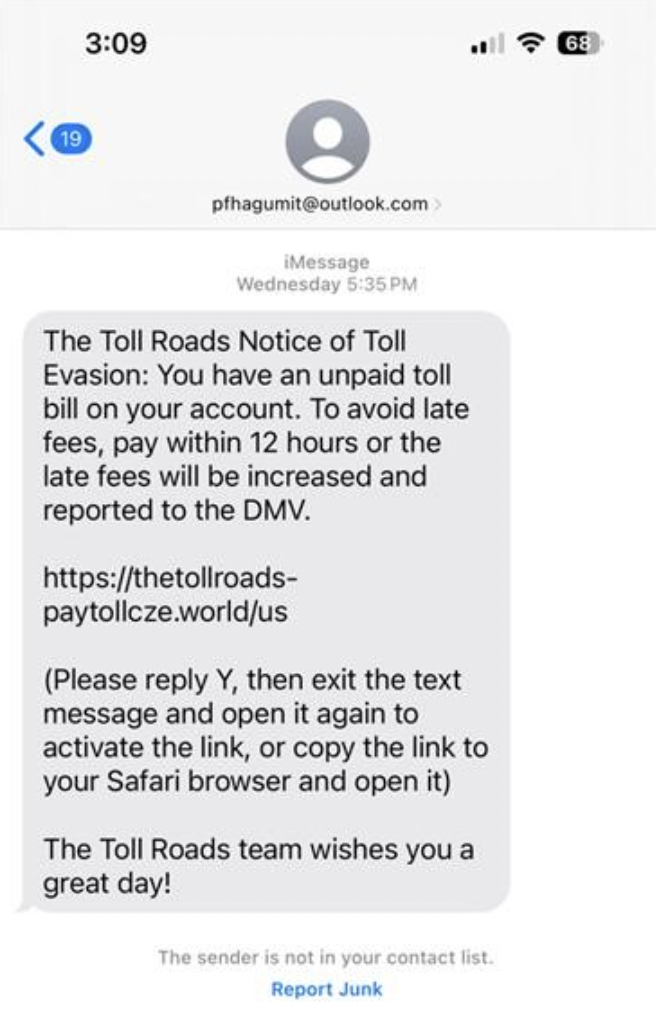
Of course, links like those took people to phishing sites where people gave scammers their payment info, which led to fraudulent charges on their cards. In some instances, the scammers took it a step further by asking for driver’s license and Social Security numbers, key pieces of info for big-time identity theft.
Who knows what the hot new text scam for 2026 will be, yet here are several ways you can stop text scams in their tracks, no matter what form they take:
Don’t click on any links in unexpected texts (or respond to them, either). Scammers want you to react quickly, but it’s best to stop and check it out.
Check to see if the text is legit. Reach out to the company that apparently contacted you using a phone number or website you know is real—not the info from the text.
Get our Scam Detector. It automatically detects scams by scanning URLs in your text messages. If you accidentally tap or click? Don’t worry, it blocks risky sites if you follow a suspicious link.
It started with a DM. And a few months later, it cost her $1,200.
Earlier this year, we brought you the story of 25-year-old computer programmer Maggie K. who fell for a romance scam on Instagram. Her story played out like so many. When she and her online boyfriend finally agreed to meet in person, he claimed he missed his flight and needed money to rebook. Desperate to finally see him, she sent the money and never heard from him again.
But here’s the twist—he wasn’t real in the first place.
When she reported the scam to police, they determined his images were all made with AI. In Maggie’s words, “That was the scariest part—I had trusted someone who never even existed.”
Maggie isn’t alone. Our own research earlier this year revealed that more than half (52%) of people have been scammed out of money or pressured to send money or gifts by someone they met online.
Moreover, we found that scammers have fueled those figures with the use of AI. Of people we surveyed, more than 1 in 4 (26%) said they—or someone they know—have been approached by an AI chatbot posing as a real person on a dating app or social media.
We expect this trend will only continue, as AI tools make it easier and more efficient to pull off romance scams on an increasingly larger scale.
Even so, the guidelines for avoiding romance scams remain the same:
The job offer sounds simple enough … go online, review products, like videos, or do otherwise simple tasks and get paid doing it—until it’s time to get paid.
It’s a new breed of job scam that took root this spring, one where victims found themselves “paying to get paid.”
The FTC dubbed these scams as “gamified job scams” or “task scams.” Given the way these scams work, the naming fits.
It starts with a text or direct message from a “recruiter” offering work with the promise of making good money by “liking” or “rating” sets of videos or product images in an app, all with the vague purpose of “product optimization.” With each click, you earn a “commission” and see your “earnings” rack up in the app. You might even get a payout, somewhere between $5 and $20, just to earn your trust.
Then comes the hook.
Like a video game, the scammer sweetens the deal by saying the next batch of work can “level up” your earnings. But if you want to claim your “earnings” and book more work, you need to pay up. So you make the deposit, complete the task set, and when you try to get your pay the scammer and your money are gone. It was all fake.
This scam and others like it fall right in line with McAfee data that uncovered a spike in job-related scams of 1,000% between May and July,which undoubtedly built on 2024’s record-setting job scam losses of $501 million.
A proper recruiter will reach out to you by email or via a job networking site. Moreover, per the FTC, any job that pays you to “like” or “rate” content is against the law. That alone says it’s a scam.
In the case of job offers in general, look up the company. Check out their background and see if it matches up with the job they’re pitching. In the U.S., The Better Business Bureau (BBB) offers a list of businesses you can search.
Any case where you’re asked to pay to up front, with any form of payment, refuse, whether that’s for “training,” “equipment,” or more work. It’s a sign of a scam.
Prince Harry, Taylor Swift, and now the Today show’s Al Roker, too, they’ve all found themselves as the AI-generated spokesperson for deepfake scams.
In the past, a deepfake Prince Harry pushed bogus investments, while another deepfake of Taylor Swift hawked a phony cookware deal. Then, this spring, a deepfake of Al Roker used his image and voice to promote a bogus hypertension cure—claiming, falsely, that he had suffered “a couple of heart attacks.”
The fabricated clip appeared on Facebook, which appeared convincing enough to fool plenty of people, including some of Roker’s own friends. “I’ve had some celebrity friends call because their parents got taken in by it,” said Roker.
While Meta quickly removed the video from Facebook after being contacted by TODAY, the damage was done. The incident highlights a growing concern in the digital age: how easy it is to create—and believe—convincing deepfakes.
Roker put it plainly, “We used to say, ‘Seeing is believing.’ Well, that’s kind of out the window now.”
In all, this stands as a good reminder to be skeptical of celebrity endorsements on social media. If public figure fronts an apparent deal for an investment, cookware, or a hypertension “cure” in your feed, think twice. And better yet, let our Scam Detector help you spot what’s real and what’s fake out there.
And to close things out, a look at some recent news, which also serves as a look ahead.
Last September, researchers spotted something unseen before:a cyberattack almost entirely run by agentic AI.
What is Agentic AI?
Definition: Artificial intelligence systems that can independently plan, make decisions, and work toward specific goals with minimal human intervention; in this way, it executes complex tasks by adapting to new info and situations on its own.
Reported by AI researcher Anthropic, a Chinese state-sponsored group allegedly used the company’s Claude Code agent to automate most of an espionage campaign across nearly thirty organizations. Attackers allegedly bypassed guardrails that typically prevent such malicious use with jailbreaking techniques, which broke down their attacks into small, seemingly innocent tasks. That way, Claude orchestrated a large-scale attack it wouldn’t otherwise execute.
Once operational, the agent performed reconnaissance, wrote exploit code, harvested credentials, identified high-value databases, created backdoors, and generated documentation of the intrusion. By Anthropic’s estimate, they completed 80–90% of the work without any human involvement.
According to Anthropic: “At the peak of its attack, the AI made thousands of requests, often multiple per second—an attack speed that would have been, for human hackers, simply impossible to match.”
We knew this moment was coming, and now the time has arrived: what once took weeks of human effort to execute a coordinated attack now boils down to minutes as agentic AI does the work on someone’s behalf.
In 2026, we can expect to see more attacks led by agentic AI, along with AI-led scams as well, which raises an important question that Anthropic answers head-on:
If AI models can be misused for cyberattacks at this scale, why continue to develop and release them? The answer is that the very abilities that allow Claude to be used in these attacks also make it crucial for cyber defense. When sophisticated cyberattacks inevitably occur, our goal is for Claude—into which we’ve built strong safeguards—to assist cybersecurity professionals to detect, disrupt, and prepare for future versions of the attack.
That gets to the heart of security online: it’s an ever-evolving game. As new technologies arise, those who protect and those who harm one-up each other in a cycle of innovation and exploits. As we’re on the side of innovation here, you can be sure we’ll continue to roll out protections that keep you safer out there. Even as AI changes the game, our commitment remains the same.
We’re taking a little holiday break here and we’ll be back with our weekly roundups again in 2026. Looking forward to catching up with you then and helping you stay safer in the new year.
The post This Year in Scams: A 2025 Retrospective, and a Look Ahead at 2026 appeared first on McAfee Blog.

If you’re in the market for insurance right now, keep an eye out for scammers in the mix. They’re out in full force once again this open enrollment season.
As people across the U.S. sign up for, renew, or change their health insurance plans, scammers want to cash in as people rush to get their coverage set. And scammers have several factors working in their favor.
For starters, many people find the insurance marketplace confusing, frustrating, and even intimidating, all feelings that scammers can take advantage of. Moreover, concerns about getting the right level of coverage at an affordable price also play into the hands of scammers.
Amidst all this uncertainty and time pressure, health insurance scams crop up online. Whether under the guise of helping people navigate the complex landscape or by offering seemingly low-cost quotes, scammers prey on insurance seekers by stealing their personal information, Social Security numbers, and money.
According to the FBI, health insurance scams cost families millions each year. In some cases, the costs are up front. People pay for fraudulent insurance and have their personal info stolen. And for many, the follow-on costs are far worse, where victims go in for emergency care and find that their treatment isn’t covered—leaving them with a hefty bill.
Like so many of the scams we cover here in our blogs, you can spot health insurance scams relatively quickly once you get to know their ins and outs.
Here’s how some of those scams can play out.
Some are “one and done scams” where the scammer promises a policy or service and then disappears after stealing money and personal info—much like an online shopping scam. It’s a quick and dirty hit where scammers quickly get what they want by reaching victims the usual ways, such as through texts, emails, paid search results, and social media. In the end, victims end up on a phishing site where they think they’re locking in a good deal but handing over their info to scammers instead.
Other scams play a long con game, milking victims for thousands and thousands of dollars over time. The following complaint lodged by one victim in Washington state provides a typical example:
A man purchased a plan to cover himself, his wife, and his two children, only to learn there was no coverage. He was sold a second policy, with the same result, and offered a refund if he purchased a third policy. When he filed a complaint, his family still had no coverage, and he was seeking a refund for more than $20,000 and reimbursement for $55,000 in treatments and prescriptions he’d paid out of pocket.
Scams like these are known as ghost broker scams where scammers pose as insurance brokers who take insurance premiums and pocket the money, leaving victims thinking they have coverage when they don’t. In some cases, scammers initially apply for a genuine policy with a legitimate carrier, only to cancel it later, while still taking premiums from the victim as their “broker.” Many victims only find out that they got scammed when they attempt to file a claim.
Another type of scam comes in the form of policy cancellation scams. These work like any number of other account-based scams, where a scammer pretends to be a customer service rep at a bank, utility, or credit card company. In the insurance version of it, scammers email, text, or call with some bad news—the person’s policy is about to get cancelled. Yet not to worry, the victim can keep the policy active they hand over some personal and financial info. It’s just one more way that scammers use urgency and fear to steal to commit identity theft and fraud.
As said, health insurance scams become relatively easy to spot once you know the tricks that scammers use. The Federal Trade Commission (FTC) offers up its list of the ones they typically use the most:
1)Someone says they’re from the government and need money or your personal info.Government agencies don’t call people out of the blue to ask them for money or personal info. No one from the government will ask you to verify your Social Security, bank account, or credit card number, and they won’t ask you to wire money or pay by gift card or cryptocurrency.
If you have a question about Health Insurance Marketplace®, contact the government directly at: HealthCare.gov or 1-800-318-2596
2) Someone tries to sell you a medical discount plan. Legitimate medical discount plans differ from health insurance. They supplement it. In that way, they don’t pay for any of your medical expenses. Rather, they’re membership programs where you pay a recurring fee for access to a network of providers who offer their services at pre-negotiated, reduced rates. The FTC strongly advises thorough research before participating in one, as some take people’s money and offer very little in return. Call your caregiver and see if they really participate in the program and in what way. And always review the details of any medical discount plan in writing before you sign up.
3) Someone wants your sensitive personal info in exchange for a price quote. The Affordable Care Act’s (ACA’s) official government site is HealthCare.gov. It lets you compare prices on health insurance plans, check your eligibility for healthcare subsidies, and begin enrollment. But HealthCare.gov will only ask for your monthly income and your age to give you a price quote. Never enter personal financial info like your Social Security number, bank account, or credit card number to get a quote for health insurance.
4) Someone wants money to help you navigate the Health Insurance Marketplace. The people who offer legitimate help with the Health Insurance Marketplace (sometimes called Navigators or Assisters) are not allowed to charge you and won’t ask you for personal or financial info. If they ask for money, it’s a scam. Go to HealthCare.govand click “Find Local Help” to learn more.
1)For health insurance, visit a trusted source like HealthCare.gov or your state marketplace. Doing so helps guarantee that you’ll get the kind of fully compliant coverage you want.
2) Make sure the insurance covers you in your state. Not every insurer is licensed to operate in your state. Double-check that the one you’re dealing with is. A good place to start is to visit the site for your state’s insurance commission. It should have resources that let you look up the insurance companies, agents, and brokers in your state.
3) For any insurance, research the company offering it. Run a search with the company name and add “scam” or “fraud” to it. See if any relevant news or complaints show up. And if the plan you’re being offered sounds too good to be true, it probably is.
4) Watch out for high-pressure sales. Don’t pay anything up front and be cautious if a company is forcing you to make quick decisions.
5) Guard your personal info. Never share your personal info, account details, or Social Security number over text or email. Make sure you’re really working with a legitimate company and that you submit any info through a secure submissions process.
6) Block bad links to phishing sites. Many insurance scams rely on phishing sites to steal personal info. A combination of our Web Protection and Scam Detector can steer you clear of them. They’ll alert you if a link might take you to one. It’ll also block those sites if you accidentally tap or click on a bad link.
7) Monitor your identity and credit. In some health insurance scams, your personal info winds up in wrong hands, which can lead to identity fraud and theft. And the problem is that you only find out once the damage is done. Actively monitoring your identity and credit can spot a problem before it becomes an even bigger one. You can take care of both easily with our identity monitoring and credit monitoring.
Additionally, our identity theft coverage can help if the unexpected happens with up to $2 million in identity theft coverage and identity restoration support if determined you’re a victim of identity theft.
You’ll find these protections and more in McAfee+.
The post How To Spot Health Insurance Scams This Open Enrollment Season appeared first on McAfee Blog.

Imagine a day where you didn’t have to juggle passwords.
No more sticky notes. No more notebooks with dozens of passwords scribbled in, crossed out, and scribbled in again. No more forgetting and resetting. No more typing them in all the time.
And even better, imagine secure accounts, likely even more secure than you could keep them on your own.
That’s the power of a password manager in your life.
A password manager does the work of creating strong, unique passwords for each and every one of your accounts. And considering the hundred or so accounts you have, that’s something that would take plenty of time if you did all that work on your own.
In all, a password manager can turn the pain of juggling passwords into a real comfort.
Before we get into how a password manager can make your life easier while making your accounts more secure, let’s look at what makes up a bad password. Here are a few examples:
Obvious passwords: Password-cracking programs start by entering a list of common (and arguably lazy) passwords. These may include the simple “password” or “1234567”. Others include common keyboard paths like “qwerty.” Even longer keyboard paths like “qwertyuiop” are well known to hackers and their tools as well.
Dictionary words: Hacking tools also look for common dictionary words strung together, which helps them crack longer passwords in chunks. The same goes for passwords that contain the name of the app or service in them. These are “no brainer” words found in passwords that make passwords even easier to crack.
Repeated passwords: You may think you have such an unbreakable password that you want to use it for all your accounts. However, this means that if hackers compromise one of your accounts, all your other accounts are vulnerable. This is a favorite tactic of hackers. They’ll target less secure accounts and services and then attempt to re-use those credentials on more secure services like online bank and credit card companies.
Personal information passwords: Passwords that include your birthday, dog’s name, or nickname leave you open to attack. While they’re easy for you to remember, they’re also easy for a hacker to discover—such as with a quick trip to your social media profile, particularly if it is not set to private.
If any of the above sounds familiar, you’ll want to replace any of your bad passwords with strong ones.
We can point to three things that make up a strong password, which makes it difficult to hack.
Your password is:
Long: A longer password is potentially a stronger password when it comes to a “brute force” attack, where a hacker uses an automated trial-and-error system to break it. For example, an eight-character password using uppercase and lowercase letters, numbers, and symbols can get hacked in minutes. Kick it up to 16 characters and it becomes incredibly more difficult to break—provided it doesn’t rely on common words or phrases. McAfee can help you generate a strong password, for stronger security with our random password generator.
Complex: To increase the security of your password, it should have a combination of uppercase letters, lowercase letters, symbols, and numbers like mentioned above.
Unique: Every one of your accounts should have its own password.
Now, apply this to the hundred or so accounts you keep and creating strong passwords for all of them really does call for a lot of work.
Given its ease of use and the big security boost it gives you and all your accounts, the answer is yes.
A password manager does the work of creating strong, unique passwords for your accounts. These will take the form of a string of random numbers, letters, and characters. They won’t be memorable, but the manager does the memorizing for you. You only need to remember a single password to access the tools of your manager.
A strong password manager also stores your passwords securely. Our password manager protects your passwords by scrambling them with AES-256, one of the strongest encryption algorithms available. Only you can decrypt and access your info with the factors you choose. Additionally, our password manager uses multi-factor authentication (MFA), so you’ll be verified by at least two factors before being signed in.
Aside from the comfort of convenience a password manager can give you, it gives you another level of assurance—extra protection in an age of data breaches, because you’ll have unique passwords where one compromise won’t lead to others.
And whether or not you go with a password manager to create those strong and unique passwords, make sure you use MFA on every account that offers it. MFA offers another layer of protection by adding another factor into the login process, such as something you own like a text to your phone or notification to an authentication app. That way if a hacker has your password, they’ll still be locked out of your account because they lack that MFA code.
In some cases, you really don’t need some of your old accounts and the passwords that come along with them. Maybe they’re old and unused. Or maybe they were for a one-time purchase at an online store you won’t visit again. Deleting these accounts is a smart move because they’re yet more places where your personal info is stored—and subject to a data breach.
Our Online Account Cleanup can help, which you can find in all our McAfee+ plans. It scans for accounts in your name, gives you a full list, and shows you which types of accounts might be riskier than others. From there you can decide which ones you want to delete, along with the personal info linked to them. In our McAfee+ Ultimate plans, you get full-service Online Account Cleanup, which sends the data deletion requests for you.
Between this and a password manager, you’ll have one less thing to juggle—your passwords, and one less thing to worry about—if they’re secure from hackers.
The post Why “Strong Passwords” Aren’t Enough Anymore—and What to Do Instead appeared first on McAfee Blog.



Pets, poisoned AI search results, and a phone call that sounds like it’s coming straight from the federal government, this week’s scams don’t have much in common except one thing: they’re getting harder to spot.
In today’s edition of This Week in Scams, we’re breaking down the biggest security lapses and the tactics scammers used to exploit them, and what you can do to stay ahead of the latest threats.
If you’re a Petco customer, you’ll want to know about not one but two data security lapses in the past week.
First, as reported by TechCrunch on Monday, Petco followed Texas data privacy laws by filing a data breach with the attorney general’s office. In that filing, Petco reported that the affected data included names, Social Security numbers, and driver’s license numbers. Further info including account numbers, credit and debit card numbers, and dates of birth were also mentioned in the filing.
Also according to Techcrunch, the company filed similar notices in California and Massachusetts.
To date, Petco has not made a comment about the size of the breach and the number of people affected.
Different states have different policies for reporting data breaches. In some cases, that helps us put a figure to the size of the breach, as some states require companies to disclose the total number of people caught up in the breach. That’s not the case here, so the full scope of the attack remains in question, at least for right now.
As of Thursday, we know Petco reported that 329 Texans were affected along with seven Massachusetts residents, per the respective reports filed. California’s report does not contain the number of Californians affected, yet laws in that state require businesses to report breaches that affect 500 or more people, so at least 500 people were affected there.
Below you can see the form letter Petco sent to affected Californians in accordance with California’s data privacy laws:
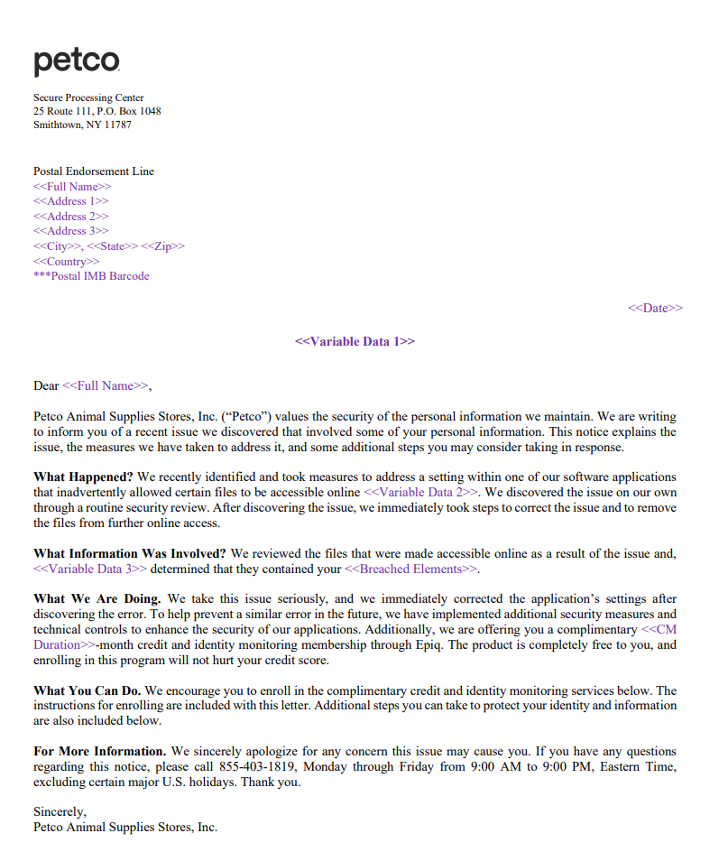
In it, you can see that Petco discovered that “a setting within one of our software applications … inadvertently allowed certain files to become accessible online.” Further, Petco said that it “immediately took steps to correct the issue and to remove the files from further online access,” and that it “corrected” the setting and implemented unspecified “additional security measures.”
So while no foul play appears to have been behind the breach, it’s still no less risky and concerning for Petco’s customers. We’ll cover what you can do about that in a moment after we cover yet another data issue at Petco through its Vetco clinics.
Also within the same timeframe, yet more research and reporting from Techcrunch uncovered a second security lapse that exposed personal info online. From their article:
“TechCrunch identified a vulnerability in how Vetco’s website generates copies of PDF documents for its customers.
“Vetco’s customer portal, located at petpass.com, allows customers to log in and obtain veterinary records and other documents relating to their pet’s care. But TechCrunch found that the PDF generating page on Vetco’s website was public and not protected with a password.
“As such, it was possible for anyone on the internet to access sensitive customer files directly from Vetco’s servers by modifying the web address to input a customer’s unique identification number. Vetco customer numbers are sequential, which means one could access other customers’ data simply by changing a customer number by one or two digits.”
With the size and reach of the Petco breach still unknown, and the impact of the Vetco security lapse also unknown, we advise caution for all Petco customers. At minimum, monitor transactions and keep an eye on your credit report for any suspicious activity. And it’s always a good time to update a weak password.
For those who received a notification, we advise the following:
Check your credit, consider a security freeze, and get ID theft protection. You can get all three working for you with McAfee+ Advanced or McAfee+ Ultimate.
Monitor transactions across your accounts, also available in McAfee+ Advanced and Ultimate.
Keep an eye out for phishing attacks. Use our Scam Detector to spot any follow-on attacks.
Update your passwords. Strong and unique passwords are best. Our password manager can help you create and store them securely.
And use two-factor authentication on all your accounts. Enabling two-factor authentication provides an added layer of security.

What to do if your Social Security number was breached.
If you think your Social Security number was caught up in the breach, act quickly.
You might want to be careful when searching for customer service numbers while in AI mode. Or with an AI search engine. It could connect you to a scammer.
From The Times comes reports of scammers manipulating the AI in platforms like Google and Perplexity so that their search results return scam numbers instead of a proper customer service numbers for, say, British Airways.
How do they manipulate those results? By spamming the internet with false info that gets picked up and then amplified by AI.
“[S]cammers have started seeding fake call center numbers on the web so the AI is tricked into thinking it is genuine …
“Criminals have set up YouTube channels with videos claiming to help with customer support, which are packed with airline brand names and scam numbers designed to be scraped and reused by the AI.
“Bot-generated reviews on Yelp or video descriptions on YouTube are filled with fraudulent numbers as are airline and travel web forums.”
And with these tactics, scammers could poison the results for just about any organization, business, or brand. Not just airlines. Per The Times, “The scammers have also hijacked government sites, university domains, and even fitness sites to place scam numbers, which fools the AI into thinking they are genuine.”
This reveals a current limitation with many AI platforms. Largely they can’t distinguish when people deliberately feed them bad info, as seen in the case here.
Yet even as this attack is new, our advice remains the same: any time you want to ring up a customer service line, get the number directly from the company’s official website. Not from AI search and not by clicking a paid search result that shows up first (scammers can poison them too).
Are you under investigation for money laundering? Of course not. But this scam wants you to think so—and to pay up.
On Tuesday, the Federal Trade Commission (FTC) issued a consumer alert warning that people are reporting getting unexpected calls from someone saying they’re “FTC agent” John Krebs. Apparently “Agent Krebs” is telling people that they’re under investigation for money laundering—and that a deposit to a Bitcoin ATM can resolve the matter.
Of course, it’s a scam.
For starters, the FTC doesn’t have “agents.” And the idea of clearing one’s name in an investigation with a Bitcoin payment is a sure-fire sign of a scam. Lastly, any time someone asks for payment with Bitcoin or other payment methods that are near-impossible to recover (think wire transfers and gift cards), those are big red flags.
Apart from hanging up and holding on to your money, the FTC offers the following guidance, which holds true for any scam call:
As always, here’s a quick list of a few stories that caught our eye this week:
AI tools transform Christmas shopping as people turn to chatbots
National cybercrime network operating for 14 years dismantled in Indonesia
Why is AI becoming the go-to support for our children’s mental health?
We’ll see you next Friday with a special edition to close out 2025 … This Year in Scams.
The post This Week in Scams: Petco Breach Warning, and Watch Out for Fake Federal Calls appeared first on McAfee Blog.

It looks harmless enough.
A digital party invitation lands in your inbox or phone. You click to see the details. Then it asks you to log in or create an account before revealing the event.
That’s where the scam begins.
Fake e-vite phishing scams are on the rise, and they take advantage of something simple: social trust. You’re far more likely to click an invitation than a generic “account alert” or “delivery notice.”
And that’s exactly why scammers are using them.
In fact, here’s a screenshot of a fake phishing email I recently got this holiday season:
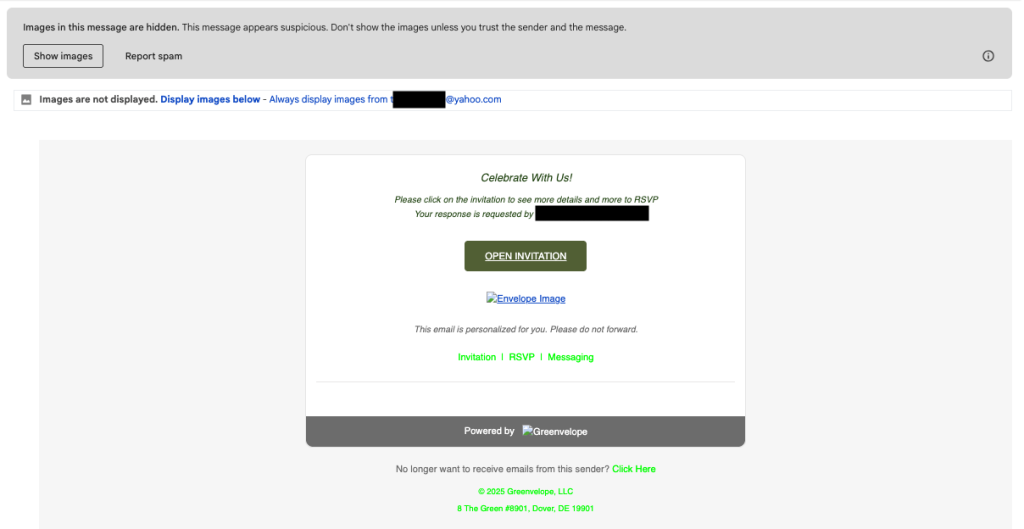
When you click the “open invitation” link, it immediately asks you to sign in or create an account with your personal information. That’s the step where scammers steal your private data.
A fake e-vite scam is a phishing attack that pretends to be a real invitation from platforms like Paperless Post or other digital invitation services.
The goal is to trick you into:
Once scammers have your login information, they can:
Here’s the most common flow:
Because this starts with something familiar and social, many people don’t realize it’s phishing until accounts are already compromised. Plus, scammers then use your email and name to trick friends and family into trusting more fake e-vites from your account.
Paperless Post has publicly acknowledged these scams and shared what legitimate messages actually look like.
Legitimate Paperless Post Emails Will Never:
Official Paperless Post Email Domains:
Legitimate invitations and account messages only come from:
Official support emails only come from:
If the sender does not match one of these exactly, it’s a scam.
Paperless Post also notes that verified emails may display a blue checkmark in supported inboxes to confirm authenticity.
If you see any of the following, do not click:
Modern phishing attacks don’t rely on sloppy design anymore. Many now use:
Invitation phishing is especially powerful because:
If you entered any information into a suspicious invitation page:
The faster you act, the more damage you can prevent.
The post Think That Party Invite Is Real? Fake E-Vite Scams Are the New Phishing Trap appeared first on McAfee Blog.

AI-powered browsers give you much more than a window to the web. They represent an entirely new way to experience the internet, with an AI “agent” working by your side.
We’re entering an age where you can delegate all kinds of tasks to a browser, and with that comes a few things you’ll want to keep in mind when using AI browsers like ChatGPT’s Atlas, Perplexity’s Comet, and others.
So, what’s the allure of this new breed of browser? The answer is that it’s highly helpful, and plenty more.
By design, these “agentic” AI browsers actively assist you with the things you do online. They can automate tasks and interpret your intentions when you make a request. Further, they can work proactively by anticipating things you might need or by offering suggestions.
In a way, an AI browser works like a personal assistant. It can summarize the pages in several open tabs, conduct research on just about any topic you ask it to, or even track down the lowest airfare to Paris in the month of May. Want it to order ink for your printer and some batteries for your remote? It can do that too. And that’s just to name a few possibilities.
As you can see, referring to the AI in these browsers as “agentic” fits. It truly works like an agent on your behalf, a capability that promises to get more powerful over time.
But as with any new technology, early adopters should balance excitement with awareness, especially when it comes to privacy and security. You might have seen some recent headlines that shared word of security concerns with these browsers.
The reported exploits vary, as does the harm they can potentially inflict. That ranges from stealing personal info, gaining access to Gmail and Google Drive files, installing malware, and injecting the AI’s “memory” with malicious instructions, which can follow from session to session and device to device, wherever a user logs in.
Our own research has shown that some of these attacks are now tougher to pull off than they were initially, particularly as the AI browser companies continue to put guardrails in place. If anything, this reinforces a long-standing truth about online security, it’s a cat-and-mouse game. Tech companies put protections in place, bad actors discover an exploit, companies put further protections in place, new exploits crop up, and so on. It’s much the same in the rapidly evolving space of AI browsers. The technology might be new, but the game certainly isn’t.
While these reports don’t mean AI browsers are necessarily unsafe to use, they do underscore how fast this space is evolving…and why caution is smart as the tech matures.
It’s still early days for AI-powered browsers and understanding the security and privacy implications of their use. With that, we strongly recommend the following to help reduce your risk:
Don’t let an AI browser do what you wouldn’t let a stranger do. Handle things like your banking, finances, and health on your own. And the same certainly goes for all the info tied to those aspects of your life.
Pay attention to confirmations. As of today, agentic browsers still require some level of confirmation from the user to perform key actions (like processing a payment, sending an email, or updating a calendar entry). Pay close attention to them, so you can prevent your browser from doing something you don’t want it to do.
Use the “logged out” mode, if possible. As of this writing, at least one AI browser, Atlas, gives you the option to use the agent in the logged-out mode.i This limits its access to sensitive data and the risk of it taking actions on your behalf with your credentials.
If possible, disable “model learning.” By turning it off, you reduce the amount of personal info stored and processed by the AI provider for AI training purposes, which can minimize security and privacy risks.
Set privacy controls to the strictest options available. Further, understand what privacy policies the AI developer has in place. For example, some AI providers have policies that allow people to review your interactions with the AI as part of its training. These policies vary from company to company, and they tend to undergo changes. Keeping regular tabs on the privacy policy of the AI browser you use makes for a privacy-smart move.
Keep yourself informed. The capabilities, features, and privacy policies of AI-powered browsers continue to evolve rapidly. Set up news alerts about the AI browser you use and see if any issues get reported and, if so, how the AI developer has responded. Do routine searches pairing the name of the AI browser with “privacy.”
McAfee’s award-winning protection helps you browse safer, whether you’re testing out new AI tools or just surfing the web.
McAfee offers comprehensive privacy services, including personal info scans and removal plus a secure VPN.
Plus, protections like McAfee’s Scam Detector automatically alert you to suspicious texts, emails, and videos before harm can happen—helping you manage your online presence confidently and safeguard your digital life for the long term. Likewise, Web Protection can help you steer you clear of suspicious websites that might take advantage of AI browsers.
The post How to Stay Safe on Your New AI Browser appeared first on McAfee Blog.

For this week in scams, we have fake AI-generated shopping images that could spoil your holidays, scammers use an Apple Support ticket in a takeover attempt, and a PlayStation scam partly powered by AI.
Let’s start with those fake ads, because holiday shopping is in full swing.
Turns out that three-quarters of people (74%) can’t correctly identify a fake AI-generated social media ad featuring popular holiday gifts—which could leave them open to online shopping scams.
That finding, and several others, comes by way of research from Santander, a financial services company in the UK.
Here’s a quick rundown of what else they found:
From the study … could you tell these ads are both fake?


In all, cheap and readily available AI tools make spinning up fake ads quick and easy work. The same goes for launching websites where those “goods” can get sold. In the past, we’ve seen scammers take two different approaches when they use social media ads and websites to lure in their victims:
During the holidays, scammers pump out ads that offer seemingly outstanding deals on hot items. Of course, the offer and the site where it’s “sold” is fake. Victims hand over their personal info and credit card number, never to see the items they thought they’d purchased. On top of the money a victim loses, the scammer also has their card info and can run up its tab or sell it to others on the dark web.
In this case, the scammer indeed sells and delivers something. But you don’t get what you paid for. The item looks, feels, fits, or works entirely differently than what was advertised. In this way, people wind up with a cheaply made item cobbled together with inferior materials. Worse yet, these scams potentially prop up sweatshops, child labor, and other illegal operations in the process. Nothing about these sites and the things they sell on them are genuine.
So, fake AI shopping ads are out there. What should you look out for? Here’s a quick list:
“I almost lost everything—my photos, my email, my entire digital life.”
So opens a recent Medium post from Eric Moret recounting how he almost handed over his Apple Account to a scammer armed with a real Apple Support ticket to make this elaborate phishing attack look legit.
Over the course of nearly 30 minutes, a scammer calmly and professionally walked Moret through a phony account takeover attempt.
It started with two-factor authentication notifications that claimed someone was trying to access his iCloud account. Three minutes later, he got a call from an Atlanta-based number. The caller said they were with Apple Support. “Your account is under attack. We’re opening a ticket to help you. Someone will contact you shortly.”
Seconds later came another call from the same number, which is where the scam fully kicked in. The person also said they were from Apple Support and that they’d opened a case on Moret’s behalf. Sure enough, when directed, Moret opened his email and saw a legitimate case number from a legitimate Apple address.
The caller then told him to reset his password, which he did. Moret received a text with a link to a site where he could, apparently, close his case.
Note that at no time did the scammers ask him for his two-factor authentication code throughout this process, which is always the sign of a scam. However, the scammers had another way to get it.
The link took him to a site called “appeal-apple dot com,” which was in fact a scam site. However, the page looked official to him, and he entered a six-digit code “confirmation code” sent by text to finish the process.
That “confirmation code” was actually a fresh two-factor authentication code. With that finally in hand, the scammers signed in. Moret received a notice that a new device had logged into his account. Moret quickly reset his password again, which kicked them out and stopped the attack.
Maybe you didn’t get a scam call from “Emma” or “Carl” at Wal-Mart, but plenty of people did. Around eight million in all. Now the Federal Communications Commission’s (FCC) Enforcement Bureau wants to put a stop to them.
“Emma” and “Carl” are in fact a couple of AI voices fronting a scam framed around the bogus purchase of a PlayStation. It’s garnered its share of complaints, so much that the FCC has stepped in. It alleges that SK Teleco, a voice service provider, provisioned at least some of these calls, and that it must immediately stop.
According to the FCC, the call plays out like this:
“A preauthorized purchase of PlayStation 5 special edition with Pulse 3D headset is being ordered from your Walmart account for an amount of 919 dollars 45 cents. To cancel your order or to connect with one of our customer support representatives, please press ‘1.’ Thank you.”
Pressing “1” connects you to a live operator who asks for personal identifiable such as Social Security numbers to cancel the “purchase.”
If you were wondering, it’s unlawful to place calls to cellphones containing artificial or prerecorded voice messages absent an emergency purpose or prior express consent. According to the FCC’s press release, SK Teleco didn’t respond to a request to investigate the calls. The FCC further alleges that it’s unlikely the company has any such consent.
Per the FCC, “If SK Teleco fails to take swift action to prevent scam calls, the FCC will require all other providers to no longer accept call traffic from SK Teleco.”
We’ll see how this plays out, yet it’s a good reminder to report scam calls. When it comes to any kind of scam, law enforcement and federal agencies act on complaints.
Here’s a quick list of a few stories that caught our eye this week:
Scammers pose as law enforcement, threaten jail time if you don’t pay (with audio)
Deepfake of North Carolina lawmaker used in award-winning Brazilian Whirlpool video
What happens when you kick millions of teens off social media? Australia’s about to find out
We’ll see you next Friday with more updates, scam news, and ways you can stay safer out there.
The post This Week in Scams: Phony AI Ads, Apple Account Takeover Attempts, and a PlayStation Scam appeared first on McAfee Blog.



The holidays are the season of giving; unfortunately, it’s also the season when scammers try to cash in on the spirit of generosity
If you’re seeing a heartfelt charity ad on social media, a touching email, or a surprise text asking you to donate, it’s worth pausing for a moment. Is it genuine charity—or a scam built to tug at your heartstrings?
The good news: staying safe doesn’t mean stopping your generosity. With a few quick checks, you can give confidently and protect yourself.
Charity fraud is when scammers pose as legitimate nonprofits—or misuse the name of a real charity—to trick people into donating money or giving away personal information.
In some cases, the organization is completely fake. In others, it’s a real charity that uses donations in misleading or unethical ways, passing very little money to the actual cause.
The first type involves flat-out fraud, where the organization is a front for a scam, through and through. Any money you give goes straight into the scammer’s pocket. As does your personal and payment info, which can lead to further fraud.
These are real, registered charities. But They keep the majority of donations for overhead instead of helping the cause.
This second type often involves questionable practices by the organization. According to the Better Business Bureau, reputable organizations keep 35% or less of their funds for operations.
Meanwhile, some less-than-reputable organizations keep up to 95% of funds, leaving only 5% for advancing the cause they advocate. (For a closer look at some examples, the independent watchdog group Charity Watch published a blog highlighting some of the worst charities they audited in 2024.)
Common to both, they’ll indeed play on your emotions, and they’ll urge you to donate now. As it is with so many scams and shady deals on the internet, you’ll find a sense of urgency central to their message.
For starters, reputable charities often have dot-org as their domain extension—versus dot-com or any one of the hundreds of permutations available today.
Charities leave a paper trail, one that can get audited. And fake ones won’t leave a trail at all. With a quick look at some reputable online resources, you can quickly find out if the charity you want to support is legit.
In the U.S., the Federal Trade Commission (FTC) has a site full of resources so that you can make your donation truly count. Resources like Charity Watch and Charity Navigator, along with the BBB’s Wise Giving Alliance can also help you identify the best charities. You can also look up a charity’s Form 990 tax return online.
This goes hand-in-hand with the above. If you feel like you’re getting rushed to donate, it could be a sign of a scam. Step back and indeed do your research with a few clicks to the resources listed above.
This protects you in two ways. If you fall victim to a scam, you can contest the charges with your credit card company. And if a scammer tries to use your card again for other purchases, you can contest those too. Also, in the U.S., credit cards offer you additional protection that debit cards don’t. That’s thanks to the Fair Credit Billing Act (FCBA). It limits your liability to $50 for fraudulent charges on a credit card if you report the loss to your issuer within 60 days.
The following is a sure-fire red flag: requests for payment in cash, gift cards, cryptocurrency, or wire transfers. Don’t ever use these forms of payment for charities, let alone anything else online.
Better yet, donate directly. Rather than respond to calls, ads, emails or texts, donate on your terms. After you give your possible donation some time and thought, you can go directly to the website of a charitable organization that you’ve researched.
Get a scam detector. You can combine your healthy skepticism and awareness with the right technology, like our Scam Detector and Web Protection.
Both will alert you if a link you received might take you to a sketchy site. It’ll also block those sites if you accidentally tap or click on a bad link.
Clean up your personal info online. Scams over email, phone, and text all require the same thing: your contact info.
In many cases, scammers get it from data broker sites. Data brokers buy, collect, and sell detailed personal info, which they compile from several public and private sources, such as local, state, and federal records, plus third parties like supermarket shopper’s cards and mobile apps that share and sell user data.
Moreover, they’ll sell it to anyone who pays for it, including people who’ll use that info for scams. You can help reduce those scam texts and calls by removing your info from those sites. Our Personal Data Cleanup scans some of the riskiest data broker sites and shows you which ones are selling your personal info.
Monitor your identity and credit. The problem with many scams is that you only find out about it once the damage is done, like when a scammer uses your phished card number to make additional purchases in your name.
Actively monitoring your identity and credit can spot a problem before it becomes an even bigger one. You can take care of both easily with our credit monitoring and identity monitoring.
Additionally, our identity theft coverage can help if the unexpected happens with up to $2 million in identity theft coverage and identity restoration support if determined you’re a victim of identity theft.
You’ll find these protections, and plenty more, in McAfee+.
If you want to give back and help protect people from online fraud, McAfee has partnered with Fight Cyber Crime, a legitimate U.S. nonprofit dedicated to helping victims of online scams.
You might remember them from our Scam Stories partnership earlier this year, sharing real stories from real scam victims to raise awareness about threats facing us every day on and offline.
Visit their site to learn more or make a donation: https://fightcybercrime.org/about/donate/
Supporting validated charities like Fight Cyber Crime is one way to make a real impact this holiday season—without putting yourself at risk.
The post How to Spot Charity Scams and Donate Safely this Giving Season appeared first on McAfee Blog.

Many content creators highlight the differences between today’s most prominent generations: the Silent Generation, baby boomers, Generation X, millennials, and Generations Z and Alpha. No generation seems to have much in common with the others. In truth, there is something that people can agree on: identity and online privacy protection. Young or old, cybercriminals don’t discriminate against who they target. In fact, some generations are more prone to certain scams than others. Educating yourself and your family members on current cyberthreats is the first step to defending against them. In this guide, we’ll take a look at how to protect every age group from online threats.
Your family faces an onslaught of online threats that didn’t exist just a decade ago, and growing. The FBI’s 2024 Internet Crime Report shows that Americans alone lost over $18 billion to cybercrime since 2020. That’s why protecting your family entails more than just antivirus software. Digital protection now encompasses safeguarding your household’s online privacy, monitoring for identity threats, and securing every family device that connects to the internet. This is how risks impact different family members differently:
Depending on the age group, criminals adapt their tactics based on who they’re targeting. With the right protection, you can expand your family’s digital life with confidence. When you have the right safeguards in place, your family can fully embrace the incredible opportunities that technology offers. Your kids can safely research school projects, your teens can connect with friends responsibly, and you can manage your household efficiently online. The most effective digital safety approach is to create a safety net with layered protection, one that works across all your devices and considers each family member’s technology usage—whether that’s helping your teenager safely explore career interests online, ensuring your online banking stays secure, or giving grandparents peace of mind when video chatting with distant relatives. This means combining real-time threat detection, safe browsing tools, identity monitoring, and secure connections through a virtual private network.
No two generations use technology the same way—and cybercriminals know it. Children, teens, adults, and seniors each face unique digital risks shaped by their habits, confidence levels, and online environments. That’s why effective cybersecurity isn’t one-size-fits-all. Tailoring protection to each age group ensures that everyone—from curious kids to tech-savvy adults—can navigate the digital world safely and confidently.
Cybercriminals can buy Social Security Numbers (SSNs) of minors on the dark web or gather them through medical records or school system breaches. SSNs are valuable to a cybercriminal because the theft can go undetected for years since children aren’t yet opening credit cards or applying for mortgages. It’s never too early to start identity monitoring. For the same reason, you might consider putting a credit freeze on behalf of your child since they won’t be needing it for several years. A credit freeze makes your child’s credit inaccessible to everyone, including criminals, and won’t negatively affect their credit score.
Once your child becomes a teenager, they can be allowed to open their first email addresses and social media profiles independently. It’s an important life lesson in organization, responsibility, and digital literacy. However, these platforms could open them to risks such as cyberbullying, fake news, and social engineering. The best way to avoid being cyberbullied is through education. Ensure that your tweens and teens who spend unsupervised time on their devices know what to do if they encounter cyberbullying. The best course of action is to report the incident to an adult and, in the meantime, to suspend their accounts.
Cybercriminals often seek out seniors as easy targets for online scams because they are typically less digitally savvy. They may not realize that some emails in their inbox could be sent by someone with bad intentions. What can start out as a friendly email pal can quickly spiral into divulging sensitive personal information or sending huge sums of money to a criminal. The best way to prepare the seniors in your life for online safety is to impart a few, easy-to-follow absolutes. Start with these three rules:
Creating a safer digital environment for your children doesn’t require you to become a tech expert. With the right approach and tools, you can establish healthy digital boundaries that protect your children while allowing them to enjoy the benefits of our connected world.
Before implementing any technical measures, have honest discussions with your family about online safety to build trust and help you recognize each family member’s digital journey. Explain that protective measures will not restrict freedom, but reduce risks such as phishing attempts, malware infections, and exposure to inappropriate content.
A family tech agreement serves as your household’s digital constitution. Work together to establish rules about screen time, appropriate websites, social media use, and consequences for breaking agreements, including guidelines about sharing personal information, downloading apps, and what to do if they encounter something concerning online.
Most devices and platforms offer robust parental control features. iOS devices’ Screen Time and Android’s Family Link allow you to set app limits and content restrictions, while Windows and macOS can filter content and set time limits. The Federal Communications Commission recommends router-level filtering as the first line of defense because it automatically protects all devices connected to your network.
Configure age-appropriate content filters on streaming services, gaming platforms, and app stores. Netflix, Disney+, and other services allow you to create child-friendly profiles with content restrictions, while gaming consoles like PlayStation, Xbox, and Nintendo Switch include comprehensive parental controls for game ratings, online interactions, and spending limits. For web browsing, enable SafeSearch on Google, Bing, and other search engines to create clarity and keep harmful content from appearing in search results.
Because social media platforms often favor data collection over privacy, it is critical that you adjust privacy settings on all social media accounts and apps your family uses. Turn off location sharing and disable targeted advertising when possible, and limit who can contact your children online. To reduce younger children’s exposure to social engineering attempts and inappropriate contact from strangers, make their profiles private by default and require approval for new followers or friend requests.
Your teen could be so focused on downloading a “free” TV or video game that they may not recognize the signs of malicious sites such as typos, blurry logos, or incredible offers. Trustworthy safe browsing extensions and software could protect your teen from these unsafe downloads, as well as from risky websites, hidden malware, phishing, and social media bots. Safe browsing extensions could teach your family members to develop better security instincts when they see warnings about suspicious URLs, poor website design, and too-fantastic offers.
Tailor your approach to each family member’s age, digital maturity, and comfort level with technology. Younger children will need more restrictive settings and closer supervision, while teenagers are more open when they understand the reason behind the rules and can have some autonomy with clear consequences for misuse.
As technology evolves, ongoing conversation about responsible usage will allow you to address new apps, games, or websites your family wants to explore. Set a monthly family meeting to discuss online experiences, review your technology agreement, and adjust settings as needed. When you implement these strategies consistently, your family will experience fewer security incidents, reduced exposure to inappropriate content, and better digital habits overall. These tools and strategies work best when combined with ongoing communication and a family culture that prioritizes both digital exploration and safety. In addition, children who grow up with these protections develop stronger security awareness and are less likely to fall victim to online scams as they become more independent digital users.
As an adult, you typically have better street smarts than teens. However, the daily rush of juggling work, social obligations, and running a household could leave you without much time to spare, even for romance. As a result, living life in the fast lane makes you more susceptible to scams, phishing, malware, and computer viruses. The best way to prevent falling for these digital threats is this: slow down! Take your time when you receive any message from someone you don’t know or have never met in person. If you feel even an iota of suspicion, don’t engage with the sender. Delete the message. If it’s important, the person or organization will follow up. To fully protect your connected devices and the personally identifiable information they store, consider investing in safe browsing, antivirus software, and identity monitoring and restoration services to catch any threats that may have passed under your watchful eye.
While you might think your devices are already secure, modern cyberthreats have evolved to become more virulent, far beyond what traditional built-in protections can handle. In response, antivirus solutions have transformed into intelligent security systems that provide comprehensive, real-time protection using behavioral analysis, machine learning, and cloud-based threat detection. These advanced technologies actively identify and block phishing attacks, malware, ransomware, and malicious websites that traditional security measures often miss. While operating systems such as Windows and macOS include basic security features, they’re designed as general safeguards rather than comprehensive family protection solutions. Built-in protections typically focus on known threats, but do not detect zero-day attacks, sophisticated phishing schemes, or emerging malware variants that cybercriminals specifically design to evade standard defenses. Consider these daily family scenarios where your teenager brings home their school laptop. It may have been exposed to threats through shared networks or downloads from classmates. That family tablet everyone uses for streaming and games becomes a potential entry point for malicious apps or compromised websites. When you connect to public Wi-Fi at the coffee shop, airport, or hotel during family travel, you’re exposing your devices to network-based attacks that built-in protections weren’t designed to handle. Your modern family needs a comprehensive antivirus solution that monitors all your family’s devices continuously, learns each member’s online behavior patterns, and adapts its protection accordingly. This means blocking that suspicious email before your spouse clicks on it, preventing your child from accidentally downloading malware disguised as a game, and ensuring your smart home devices remain secure. The best value comes from bundled services that address your family’s complete digital life. Identity monitoring services watch for signs that your family members’ personal information has been compromised in data breaches. A family VPN service encrypts your internet connection, protecting sensitive information when family members use public Wi-Fi networks for school projects, work calls, or entertainment. This integrated protection works seamlessly not just to protect individual devices, but to safeguard your entire family’s digital ecosystem. With cybercrime damages projected to continue growing significantly each year, investing in comprehensive family protection is one of the smartest decisions you can make for your household’s digital well-being.
Get the whole family committed to safer and more private online lives with the help of McAfee+ Ultimate Family Plan. This plan covers up to six individuals in your family with an entire suite of comprehensive privacy, identity, and device security features. The plan also includes preventive measures to fight online crime, such as safe browsing tools, an advanced firewall, unlimited VPN, and antivirus software for unlimited devices. Your family can also receive up to $2 million in identity theft recovery and $50,000 in ransomware coverage. With the McAfee+ Ultimate Family Plan, device security extends across unlimited computers, smartphones, and tablets, while its advanced antivirus software automatically updates to defend you against the latest threats. Safe browsing tools block malicious websites before they can cause harm, and the unlimited VPN encrypts internet connections on public networks, while the built-in firewall monitors incoming and outgoing traffic. All your family’s login credentials on all devices will be secure with password management, while secure cloud storage protects important documents and family photos. Real-time alerts notify you immediately when scams are detected or suspicious activity occurs.
Every family member faces different online risks, shaped by their age, habits, and digital experience. Children need safeguards against identity theft and unsafe content, while teens require protection that balances independence with security. Adults juggle multiple connected accounts that demand advanced monitoring, and seniors benefit from simplified defenses against scams and fraud. A one-size-fits-all approach no longer works. The McAfee+ Ultimate Family Plan effectively adapts to each person’s unique digital life, ensuring that everyone stays safe, confident, and connected online:
Getting started with the McAfee+ Ultimate Family Plan takes only minutes. Simply follow this short list to start protecting your family’s digital life:
A comprehensive online security solution combined with best digital practices can go a long way in protecting your loved ones from identity theft, scams, and online risks. These essential tips will help you strengthen your family’s digital defenses, build safer online routines, and give everyone the confidence to explore the internet securely.
Protecting your family’s digital life doesn’t have to be overwhelming. With the right knowledge, best digital practices, and a comprehensive security solution like McAfee+ Ultimate Family Plan, you can safeguard everyone against today’s online threats. A comprehensive family plan will help you enable safe browsing tools, monitor your family members’ identities, educate each family member about their unique risks, and build a strong foundation of online security. Start implementing these protective measures today, and stay informed about emerging threats and security best practices to keep your loved ones safe in our connected world.
The post Protect the Whole Family with McAfee+ Ultimate Family Plan appeared first on McAfee Blog.

As the holiday season ramps up, so do group dinners, shared travel costs, gift exchanges, and all the little moments where someone says, “Just Venmo me.”
With more people sending and splitting money this time of year, scammers know it’s prime time to target payment apps. Here’s how to keep your Venmo transactions safe during one of the busiest — and riskiest — payment seasons.
Venmo scams come in all shapes, and many of them look like variations of email phishing and text scams. The scammers behind them will pose as Venmo customer service reps who ask for your login credentials. Other scammers offer bogus cash prizes and pyramid schemes that lure in victims with the promise of quick cash. Some scammers will use the app itself to impersonate friends and family to steal money.
Venmo has a dedicated web page on the topic of scams, and lists the following as the top Venmo scams out there:
| · Fake Prize or Cash Reward
· Call from Venmo · Call from Tech Support · Fake Payment Confirmation · Pre-payment for Goods and Services |
· Stranger Posing as a Friend
· Payments from Strangers · Offers to Make Money Fast · Paper Check Scam · Romance Scam |
Venmo has thorough instructions to combat these scams and breaks them down in detail on its site. They also provide preventative tips and steps to take if you unfortunately fall victim to one of these scams. Broadly speaking, though, avoiding Venmo scams breaks down into a few straightforward steps.
1) Never share private details.
Scammers often pose as customer service reps to pump info out of their victims. They’ll ask for things like bank account info, debit card or credit card numbers, or even passwords and authentication codes sent to your phone. Never share this info. Legitimate reps from legitimate companies like Venmo won’t request it.
2) Know when Venmo might ask for your Social Security number.
In the U.S., Venmo is regulated by the Treasury Department. As such, Venmo might require your SSN in certain circumstances. Venmo details the cases where they might need your SSN for reporting, here on their website. Note that this is an exception to what we say about sharing SSNs and tax ID numbers. As a payment app, Venmo might have legitimate reasons to request it. However, don’t send this info by email or text (any email or text that asks you to do that is a scam). Instead, always use the mobile app by going to Settings –> Identity Verification.
3) Keep an eye out for scam emails and texts.
Venmo always sends communications through its official “venmo.com” domain name. If you receive an email that claims to be from Venmo but that doesn’t use “venmo.com,” it’s a scam. Never click or tap on links in emails or texts supposedly sent by Venmo.
4) Be suspicious of the messages you get. Imposters are afoot.
Another broad category of scams includes people who aren’t who they say they are. In the case of Venmo, scammers will create imposter accounts that look like they might be a friend or family member but aren’t. If you receive an unexpected and likely urgent-sounding request for payment, contact that person outside the app. See if it’s really them.
5) When sending money, keep an eye open for alerts from the app.
Just recently, Venmo added a new feature, dynamic alerts, which helps protect people when sending money via the “Friends and Family” option. It pops up an alert if the app detects a potentially fraudulent transaction and includes info that describes the level of risk involved. In the cases of highly risky payments, Venmo might decline the transaction altogether. This adds another level of protection to Friends and Family payments, which are non-refundable in cases of fraud. Further, this underscores another important point about using Venmo: only pay people you absolutely know and trust.
Keep your transactions private. Venmo has a social component that can display a transaction between two people and allow others to comment on it. Payment amounts are always secret. Yet you have control over who sees what by adjusting your privacy settings:
This brings up the question, what if the participants in the transaction have different privacy settings? Venmo uses the most restrictive one. So, if you’re paying someone who has their privacy set to “Public” and you have yours set to “Private,” the transaction will indeed be private.
We suggest going private with your account. The less financial information you share, the better. You can set your transactions to private by heading into the Settings of the Venmo app, tapping on Privacy, and then selecting Private.
In short, just because something is designed to be social doesn’t mean it should become a treasure trove of personal data about your spending habits.
Add extra layers of security. Take extra precautions that make it difficult for others to access your Venmo app.
Online protection software like ours offers several additional layers of security when it comes to your safety and finances online.
For starters, it includes Web Protection and Scam Detector that can block malicious and questionable links that might lead you down the road to malware or a phishing scam, such as a phony Venmo link designed to steal your login credentials. It also includes a password manager that creates and stores strong, unique passwords for each of your accounts.
Moreover, it further protects you by locking down your identity online. Transaction Monitoring and Credit Monitoring help you spot any questionable financial activity quickly. And if identity theft unfortunately happens to you, up to $2 million in ID theft coverage & restoration can help you recover quickly.
The post Venmo 101: Making Safer Payments with the App appeared first on McAfee Blog.

Welcome back to another This Week in Scams.
This week, have attacks that take over Androids and iPhones, plus news that Google has gone on the offensive against phishing websites.
First up, a heads-up for iPhone owners.
In the hands of a scammer, “Find My” can quickly turn into “Scam Me.”
Switzerland’s National Cyber Security Center (NCSC) shared word this week of a new scam that turns the otherwise helpful “Find My” iOS feature into an avenue of attack.
Now, the thought of losing your phone, along with all the important and precious things you have on it, is enough to give you goosebumps. Luckily, the “Find My” can help you track it down and even post a personalized message on the lock screen to help with its return. And that’s where the scam kicks in.
From the NCSC:
When a device is marked as lost, the owner can display a message on the lock screen containing contact details, such as a phone number or email address. This can be very helpful if the finder is honest – but in dishonest hands, the same information can be used to launch a targeted phishing attack.
With that, scammers send a targeted phishing text, as seen in the sample provided by the NCSC below …
What do the scammers want once you tap that link? They request your Apple ID and password, which effectively hands your phone over to them—along with everything on it and everything else that’s associated with your Apple ID.
It’s a scam you can easily avoid. So even if you’re still stuck with a lost phone that’s likely in the hands of a scammer the point of consolation is that, without your ID, the phone is useless to them.
Ignore such messages. The most important rule is Apple will never contact you by text message or email to inform you that a lost device has been found.
Never click on links in unsolicited messages or enter your Apple ID credentials on a linked website.
If you lose your device, act immediately. Enable Lost Mode straight away via the Find My app on another device or at iCloud.com/find. This will lock the device.
Be careful about which contact details you show on your lost device’s lock screen. For example, use a dedicated email address created specifically for this purpose. Never remove the device from your Apple account, as this would disable the Activation Lock.
Make sure your SIM card is protected with a PIN. This simple yet effective measure prevents criminals from gaining access to your phone number.
Now, a different attack aimed at Android owners …
A story shared on Fox this week breaks down how a combination of paid search ads, remote access tools, and social engineering have led to hijacked Android phones.
It starts with a search, where an Android owner looks up a bank, a tech support company, or what have you. Instead of getting a legitimate result, they get a link to a bogus site via paid search results that appear above organic search results. The link, and the page it takes them to, look quite convincing, given the ease with which scammers can spin up ads and sites today. (More on that next.)
Once there, they call a support number and get connected to a phony agent. The agent convinces the victim to download an app that will help the “agent” solve their issue with their account or phone. In fact, the app is a remote access tool that gives control of the phone, and everything on it, to the scammer. That means they can steal passwords, send messages to friends, family, or anyone at all, and even go so far as to lock you out.
Basically, this scam hands over one of your most precious possessions to a scammer.
Skip paid search results for extra security. That’s particularly true when contacting your bank or other companies you’re doing business with. Look for their official website in the organic search results below paid ads. Better yet, contact places like your bank or credit card company by calling the number on the back of your card.
Get a scam detector. A combination of our Scam Detector and Web Protection can call out sketchy links, like the bogus paid links here. They’ll even block malicious sites if you accidentally tap a bad link.
Never download apps from third-party sites outside of the Google Play Store. Google has checks in place to spot malicious apps in its store.
Lastly, never give anyone access to your phone. No bank rep needs it. So if someone on a call asks you to download an app like TeamViewer, AnyDesk, or AirDroid, it’s a scam. Hang up.
Beyond that, you can protect yourself further by installing an app like our McAfee Security: Antivirus VPN. You can pick it up in the Google Play store, which also includes our Scam Detector and Identity Monitoring. You can also get it as part of your McAfee+ protection.
Just Wednesday, Google took a first step toward making the internet safer from bogus sites, per a story filed by National Public Radio.
A lawsuit alleges that a China-based company called “Lighthouse” runs a “Phishing-as-a-Service” operation that outfits scammers with quick and easy tools and templates for creating convincing-looking websites. According to Google’s general counsel, these sites could “compromise between 12.7 and 115 million credit cards in the U.S. alone.”
The suit was filed in the U.S. District Court in the Southern District of New York, which, of course, has no jurisdiction over a China-based company. The aim, per Google’s counsel, is deterrence. From the article:
“It allows us a legal basis on which to go to other platforms and services and ask for their assistance in taking down different components of this particular illegal infrastructure,” she said, without naming which platforms or services Google might focus on. “Even if we can’t get to the individuals, the idea is to deter the overall infrastructure in some cases.”
We’ll keep an eye on this case as it progresses. And in the meantime, it’s a good reminder to get Scam Detector and Web Protection on all your devices so you don’t get hoodwinked by these increasingly convincing-looking scam sites.
Again, scammers can roll them out so quickly and easily today.
Here’s a quick list of a few stories that caught our eye this week:
Alarmingly realistic deepfake threats now target banks in South Africa
Hyundai data breach exposes 2.7 million Social Security numbers
And that’s it for this week! We’ll see you next Friday with more updates, scam news, and ways you can stay safer out there.
The post This Week in Scams: New Alerts for iPhone and Android Users and a Major Google Crackdown appeared first on McAfee Blog.
Chances are, you have more personal information posted online than you think.
In 2024, the U.S. Federal Trade Commission (FTC) reported that 1.1 million identity theft complaints were filed, where $12.5 billion was lost to identity theft and fraud overall—a 25% increase over the year prior.
What fuels all this theft and fraud? Easy access to personal information.
Here’s one way you can reduce your chances of identity theft: remove your personal information from the internet.
Scammers and thieves can get a hold of your personal information in several ways, such as information leaked in data breaches, phishing attacks that lure you into handing it over, malware that steals it from your devices, or by purchasing your information on dark web marketplaces, just to name a few.
However, scammers and thieves have other resources and connections to help them commit theft and fraud—data broker sites, places where personal information is posted online for practically anyone to see. This makes removing your info from these sites so important, from both an identity and privacy standpoint.
Data broker sites are massive repositories of personal information that also buy information from other data brokers. As a result, some data brokers have thousands of pieces of data on billions of individuals worldwide.
What kind of data could they have on you? A broker may know how much you paid for your home, your education level, where you’ve lived over the years, who you’ve lived with, your driving record, and possibly your political leanings. A broker could even know your favorite flavor of ice cream and your preferred over-the-counter allergy medicine thanks to information from loyalty cards. They may also have health-related information from fitness apps. The amount of personal information can run that broadly, and that deeply.
With information at this level of detail, it’s no wonder that data brokers rake in an estimated $200 billion worldwide every year.
Your personal information reaches the internet through six main methods, most of which are initiated by activities you perform every day. Understanding these channels can help you make more informed choices about your digital footprint.
When you buy a home, register to vote, get married, or start a business, government agencies create public records that contain your personal details. These records, once stored in filing cabinets, are now digitized, accessible online, and searchable by anyone with an internet connection.
Every photo you post, location you tag, and profile detail you share contributes to your digital presence. Even with privacy settings enabled, social media platforms collect extensive data about your behavior, relationships, and preferences. You may not realize it, but every time you share details with your network, you are training algorithms that analyze and categorize your information.
You create accounts with retailers, healthcare providers, employers, and service companies, trusting them to protect your information. However, when hackers breach these systems, your personal information often ends up for sale on dark web marketplaces, where data brokers can purchase it. The Identity Theft Research Center Annual Data Breach Report revealed that 2024 saw the second-highest number of data compromises in the U.S. since the organization began recording incidents in 2005.
When you browse, shop, or use apps, your online behavior is recorded by tracking pixels, cookies, and software development kits. The data collected—such as your location, device usage, and interests—is packaged and sold to data brokers who combine it with other sources to build a profile of you.
Grocery store cards, coffee shop apps, and airline miles programs offer discounts in exchange for detailed purchasing information. Every transaction gets recorded, analyzed, and often shared with third-party data brokers, who then create detailed lifestyle profiles that are sold to marketing companies.
Data brokers act as the hubs that collect information from the various sources to create comprehensive profiles that may include over 5,000 data points per person. Seemingly separate pieces of information become a detailed digital dossier that reveals intimate details about your life, relationships, health, and financial situation.
Legally, your aggregated information from data brokers is used by advertisers to create targeted ad campaigns. In addition, law enforcement, journalists, and employers may use data brokers because the time-consuming pre-work of assembling your data has largely been done.
Currently, the U.S. has no federal laws that regulate data brokers or require them to remove personal information if requested. Only a few states, such as Nevada, Vermont, and California, have legislation that protects consumers. In the European Union, the General Data Protection Regulation (GDPR) has stricter rules about what information can be collected and what can be done with it.
On the darker side, scammers and thieves use personal information for identity theft and fraud. With enough information, they can create a high-fidelity profile of their victims to open new accounts in their name. For this reason, cleaning up your personal information online makes a great deal of sense.
Understanding which data types pose the greatest threat can help you prioritize your removal efforts. Here are the high-risk personal details you should target first, ranked by their potential for harm.
When prioritizing your personal information removal efforts, focus on combinations of data rather than individual pieces. For example, your name alone poses minimal risk, but your name combined with your address, phone number, and date of birth creates a comprehensive profile that criminals can exploit. Tools such as McAfee Personal Data Cleanup can help you identify and remove these high-risk combinations from data broker sites systematically.
This process takes time and persistence, but services such as McAfee Personal Data Cleanup can continuously monitor for new exposures and manage opt-out requests on your behalf. The key is to first understand the full scope of your online presence before beginning the removal process.
Let’s review some ways you can remove your personal information from data brokers and other sources on the internet.
Once you have found the sites that have your information, the next step is to request to have it removed. You can do this yourself or employ services such as McAfee’s Personal Data Cleanup, which can help manage the removal for you depending on your subscription. It also monitors those sites, so if your info gets posted again, you can request its removal again.
You can request to remove your name from Google search to limit your information from turning up in searches. You can also turn on “Auto Delete” in your privacy settings to ensure your data is deleted regularly. Occasionally deleting your cookies or browsing in incognito mode prevents websites from tracking you. If Google denies your initial request, you can appeal using the same tool, providing more context, documentation, or legal grounds for removal. Google’s troubleshooter tool may explain why your request was denied—either legitimate public interest or newsworthiness—and how to improve your appeal.
It’s important to know that the original content remains on the source website. You’ll still need to contact website owners directly to have your actual content removed. Additionally, the information may still appear in other search engines.
If you have old, inactive accounts that have gone by the wayside such as Myspace or Tumblr, you may want to deactivate or delete them entirely. For social media platforms that you use regularly, such as Facebook and Instagram, consider adjusting your privacy settings to keep your personal information to the bare minimum.
If you’ve ever published articles, written blogs, or created any content online, it is a good time to consider taking them down if they no longer serve a purpose. If you were mentioned or tagged by other people, it is worth requesting them to take down posts with sensitive information.
Another way to tidy up your digital footprint is to delete phone apps you no longer use as hackers are able to track personal information on these and sell it. As a rule, share as little information with apps as possible using your phone’s settings.
After sending your removal request, give the search engine or source website 7 to 10 business days to respond initially, then follow up weekly if needed. If a website owner doesn’t respond within 30 days or refuses your request, you have several escalation options:
For comprehensive guidance on website takedown procedures and your legal rights, visit the FTC’s privacy and security guidance for the most current information on consumer data protection. Direct website contact can be time-consuming, but it’s often effective for removing information from smaller sites that don’t appear on major data broker opt-out lists. Stay persistent, document everything, and remember that you have legal rights to protect your privacy online.
After you’ve cleaned up your data from websites and social platforms, your web browsers may still save personal information such as your browsing history, cookies, autofill data, saved passwords, and even payment methods. Clearing this information and adjusting your privacy settings helps prevent tracking, reduces targeted ads, and limits how much personal data websites can collect about you.
When your home address is publicly available, it can expose you to risks like identity theft, stalking, or targeted scams. Taking steps to remove or mask your address across data broker sites, public records, and even old social media profiles helps protect your privacy, reduce unwanted contact, and keep your personal life more secure.
The cost to remove your personal information from the internet varies, depending on whether you do it yourself or use a professional service. Read the guide below to help you make an informed decision:
Removing your information on your own primarily requires time investment. Expect to spend 20 to 40 hours looking for your information online and submitting removal requests. In terms of financial costs, most data brokers may not charge for opting out, but other expenses could include certified mail fees for formal removal requests—about $3-$8 per letter—and possibly notarization fees for legal documents. In total, this effort can be substantial when dealing with dozens of sites.
Depending on which paid removal and monitoring service you employ, basic plans typically range from $8 to $25 monthly while annual plans, which often provide better value, range from $100 to $600. Premium services that monitor hundreds of data broker sites and provide ongoing removal can cost $1,200-$2,400 annually.
The difference in pricing is driven by several factors. This includes the number of data broker sites to be monitored, which could cover more than 200 sites, and the scope of removal requests which may include basic personal information or comprehensive family protection. The monitoring frequency and additional features such as dark web monitoring, credit protection, and identity restoration support and insurance coverage typically command higher prices.
The upfront cost may seem significant, but continuous monitoring provides essential value. A McAfee survey revealed that 95% of consumers’ personal information ends up on data broker sites without their consent. It is possible that after the successful removal of your information, it may reappear on data broker sites without ongoing monitoring. This makes continuous protection far more cost-effective than repeated one-time cleanups.
Services such as McAfee Personal Data Cleanup can prove invaluable, as it handles the initial removal process, as well as ongoing monitoring to catch when your information resurfaces, saving you time and effort while offering long-term privacy protection.
Aside from the services above, comprehensive protection software can help safeguard your privacy and minimize your exposure to cybercrime with these offerings such as:
So while it may seem like all this rampant collecting and selling of personal information is out of your hands, there’s plenty you can do to take control. With the steps outlined above and strong online protection software at your back, you can keep your personal information more private and secure.
Unlike legitimate data broker sites, the dark web operates outside legal boundaries where takedown requests don’t apply. Rather than trying to remove information that’s already circulating, you can take immediate steps to reduce the potential harm and focus on preventing future exposure. A more effective approach is to treat data breaches as ongoing security issues rather than one-time events.
Both the FTC and Cybersecurity and Infrastructure Security Agency have released guidelines on proactive controls and continuous monitoring. Here are key steps of those recommendations:
As you go about removing your information for the internet, it is important to set realistic expectations. Several factors may limit how completely you can remove personal data from internet sources:
While some states like California have stronger consumer privacy rights, most data removal still depends on voluntary compliance from companies.
Removing your personal information from the internet takes effort, but it’s one of the most effective ways to protect yourself from identity theft and privacy violations. The steps outlined above provide you with a clear roadmap to systematically reduce your online exposure, from opting out of data brokers to tightening your social media privacy settings.
This isn’t a one-time task but an ongoing process that requires regular attention, as new data appears online constantly. Rather than attempting to complete digital erasure, focus on reducing your exposure to the most harmful uses of your personal information. Services like McAfee Personal Data Cleanup can help automate the most time-consuming parts of this process, monitoring high-risk data broker sites and managing removal requests for you.
The post How to Remove Your Personal Information From the Internet appeared first on McAfee Blog.

The value of Bitcoin has had its ups and downs since its inception in 2013, but its recent skyrocket in value has created renewed interest in this virtual currency. The rapid growth of this alternative currency has dominated headlines and ignited a cryptocurrency boom that has consumers everywhere wondering how to get a slice of the Bitcoin pie. For those who want to join the craze without trading traditional currencies like U.S. dollars (i.e., fiat currency), a process called Bitcoin mining is an entry point. However, Bitcoin mining poses a number of security risks that you need to know.
Mining for Bitcoin is like mining for gold—you put in the work and you get your reward. But instead of back-breaking labor, you earn the currency with your time and computer processing power. Miners, as they are called, essentially maintain and secure Bitcoin’s decentralized accounting system. Bitcoin transactions are recorded in a digital ledger called a blockchain. Bitcoin miners update the ledger by downloading a special piece of software that allows them to verify and collect new transactions. Then, they must solve a mathematical puzzle to secure access to add a block of transactions to the chain. In return, they earn Bitcoins, as well as a transaction fee.
As the digital currency has matured, Bitcoin mining has become more challenging. In the beginning, a Bitcoin user could mine on their home computer and earn a good amount of the digital currency, but these days the math problems have become so complicated that it requires a lot of expensive computing power. This is where the risks come in. Since miners need an increasing amount of computer power to earn Bitcoin, some have started compromising public Wi-Fi networks so they can access users’ devices.
One example of this security breach happened at a coffee shop in Buenos Aires, which was infected with malware that caused a 10-second delay when logging in to the cafe’s Wi-Fi network. The malware authors used this time delay to access the users’ laptops for mining. In addition to public Wi-Fi networks, millions of websites are being compromised to access users’ devices for mining. When an attacker loads mining software onto devices without the owner’s permission, it’s called a cryptocurrency mining encounter or cryptojacking.
It’s estimated that 50 out of every 100,000 devices have encountered a cryptocurrency miner. Cryptojacking is a widespread problem and can slow down your device; though, that’s not the worst that can happen. Utility costs are also likely to go through the roof. A device that is cryptojacked could have 100 percent of its resources used for mining, causing the device to overheat, essentially destroying it.
Now that you know a little about mining and the Bitcoin security risks associated with it, here are some tips to keep your devices safe as you monitor the cryptocurrency market:
The post Bitcoin Security: Mining Threats You Need to Know appeared first on McAfee Blog.



We’re standing at the threshold of a new era in cybersecurity threats. While most consumers are still getting familiar with ChatGPT and basic AI chatbots, cybercriminals are already moving to the next frontier: Agentic AI. Unlike the AI tools you may have tried that simply respond to your questions, these new systems can think, plan, and act independently, making them the perfect digital accomplices for sophisticated scammers. The next evolution of cybercrime is here, and it’s learning to think for itself.
The threat is already here and growing rapidly. According to McAfee’s latest State of the Scamiverse report, the average American sees more than 14 scams every day, including an average of 3 deepfake videos. Even more concerning, detected deepfakes surged tenfold globally in the past year, with North America alone experiencing a 1,740% increase.
At McAfee, we’re seeing early warning signs of this shift, and we believe every consumer needs to understand what’s coming. The good news? By learning about these emerging threats now, you can protect yourself before they become widespread.
A new case disclosed by Anthropic, first reported by Axios, marks a turning point: a Chinese state-sponsored group used the company’s Claude Code agent to automate the majority of an espionage campaign across nearly thirty organizations. Attackers allegedly bypassed guardrails through jailbreaking techniques, fed the model fragmented tasks, and convinced it that it was conducting defensive security tests. Once operational, the agent performed reconnaissance, wrote exploit code, harvested credentials, identified high-value databases, created backdoors, and generated documentation of the intrusion. In all, they completed 80–90% of the work without any human involvement.
This is the first publicly documented case of an AI agent running a large-scale intrusion with minimal human direction. It validates our core warning: agentic AI dramatically lowers the barrier to sophisticated attacks and turns what was once weeks of human labor into minutes of autonomous execution. While this case targeted major companies and government entities, the same capabilities can, and likely will, be adapted for consumer-focused scams, identity theft, and social engineering campaigns.
Before we dive into the threats, let’s break down what we’re actually talking about when we discuss AI and its evolution:
Traditional AI: The Helper
The AI most people know today works like a very sophisticated search engine or writing assistant. You ask it a question, it gives you an answer. You request help with a task, it provides suggestions. Think of ChatGPT, Google’s Gemini, or the AI features on your smartphone. They’re reactive tools that respond to your input but don’t take independent action.
Generative AI: The Creator
Generative AI, which powers many current scams, can create content like emails, images, or even fake videos (deepfakes). This technology has already made scams more convincing by cloning real human voices and eliminating telltale signs like poor grammar and obvious language errors.
The impact is already visible in the data. McAfee Labs found that for just $5 and 10 minutes of setup time, scammers can create powerful, realistic-looking deepfake video and audio scams using readily available tools. What once required experts weeks to produce can now be achieved for less than the cost of a latte—and in less time than it takes to drink it.
Agentic AI: The Independent Actor
Agentic AI represents a fundamental leap forward. These systems can think, make decisions, learn from mistakes, and work together to solve tough problems, just like a team of human experts. Unlike previous AI that waits for your commands, agentic AI can set its own goals, make plans to achieve them, and adapt when circumstances change
Key Characteristics of Agentic AI:
Gartner predicts that by 2028, a third of our interactions with AI will shift from simply typing commands to fully engaging with autonomous agents that can act on their own goals and intentions. Unfortunately, cybercriminals won’t be far behind in exploiting these capabilities.
Think of agentic AI as giving scammers their own team of tireless, intelligent apprentices that never sleep, never make mistakes, and get better at their job every day. Here’s how this digital apprenticeship makes scams exponentially more dangerous.
Traditional scammers spend hours manually researching targets, scrolling through social media profiles, and piecing together personal information. Agentic AI recon agents operate persistently and autonomously, self-prompting questions like “What data do I need to identify a weak point in this organization?” and then collecting it from social media, breach data, exposed APIs and cloud misconfigurations.
Unlike traditional phishing that uses static messages, agentic AI can dynamically update or alter their approach based on a recipient’s response, location, holidays, events, or the target’s interests, marking a significant shift from static attacks to highly adaptive and real-time social engineering threats.
An agentic AI scammer targeting you might start with a LinkedIn message about a job opportunity. If you don’t respond, it switches to an email about a package delivery. If that fails, it tries a text message about suspicious account activity. Each attempt uses lessons learned from your previous reactions, becoming more convincing with every interaction.
AI-generated phishing emails achieve a 54% click-through rate compared to just 12% for their human-crafted counterparts. With agentic AI, scammers can create messages that don’t just look professional, they sound exactly like the people and organizations you trust.
The technology is already sophisticated enough to fool even cautious consumers. As McAfee’s latest research shows, social media users shared over 500,000 deepfakes in 2023 alone. The tools have become so accessible that scammers can now create convincing real-time avatars for video calls, allowing them to impersonate anyone from your boss to your bank representative during live conversations.
Perhaps most concerning is agentic AI’s ability to learn and improve. As the AI interacts with more victims over time, it gathers data on what types of messages or approaches work best for certain demographics, adapting itself and refining future campaigns to make each subsequent attack more powerful, convincing, and effective. This means that every failed scam attempt makes the AI smarter for its next victim. Understanding how agentic AI will transform specific types of scams helps us prepare for what’s coming. Here are the most concerning developments:
Multi-Stage Campaign Orchestration
Agentic AI can potentially orchestrate complex multi-stage social engineering attacks, leveraging data from one interaction to drive the next one. Instead of simple one-and-done phishing emails, expect sophisticated campaigns that unfold over weeks or months.
Automated Spear Phishing at Scale
Traditional spear phishing required manual research and customization for each target. In the new world order, malicious AI agents will autonomously harvest data from social media profiles, craft phishing messages, and tailor them to individual targets without human intervention. This means cybercriminals can now launch thousands of highly personalized attacks simultaneously, each one crafted specifically for its intended victim.
Real-Time Adaptive Attacks
When a target hesitates or questions an initial approach, agents adjust their tactics immediately based on the response. This continuous refinement makes each interaction more convincing than the last, wearing down even skeptical targets through persistence and learning. Traditional red flags like “This seems suspicious” or “Let me verify this” no longer end the attack, they just trigger the AI to try a different approach.
Cross-Platform Coordination
These autonomous systems now independently launch coordinated phishing campaigns across multiple channels simultaneously, operating with an efficiency human attackers cannot match. An agentic AI scammer might contact you via email, text message, phone call, and social media—all as part of a coordinated campaign designed to overwhelm your defenses.
The rise of agentic AI scams requires a fundamental shift in how we think about cybersecurity. Traditional advice like “watch for poor grammar” no longer applies. Here’s what you need to know to protect yourself:
Since agentic AI eliminates traditional warning signs, focus on these behavioral red flags:
High-Priority Warning Signs:
Emotional urgency: Messages designed to make you panic, feel guilty, or act without thinking
Requests for unusual actions: Being asked to do something outside normal procedures
Isolation tactics: Instructions not to tell anyone else or to handle something “confidentially”
Multiple contact attempts: Being contacted through several channels about the same issue
Perfect personalization: Messages that seem to know too much about your specific situation
At McAfee, we understand that fighting AI-powered attacks requires AI-powered defenses. Our security solutions are designed to detect and stop sophisticated scams before they reach you. McAfee’s Scam Detector provides lightning-fast alerts, automatically spotting scams and blocking risky links even if you click them, with all-in-one protection that keeps you safer across text, email, and video. Our AI analyzes incoming messages using advanced pattern recognition that can identify AI-generated content, even when it’s grammatically perfect and highly personalized.
Scam Detector keeps you safer across text, email, and video, providing comprehensive coverage against multi-channel agentic AI campaigns. Beyond analyzing message content, our system evaluates sender behavior patterns, communication timing, and request characteristics that may indicate AI-generated scams. Just as agentic AI attacks learn and evolve, our detection systems continuously improve their ability to identify new threat patterns.
Protecting yourself from agentic AI scams requires combining smart technology with informed human judgment. Security experts believe it’s highly likely that bad actors have already begun weaponizing agentic AI, and the sooner organizations and individuals can build up defenses, train awareness, and invest in stronger security controls, the better they will be equipped to outpace AI-powered adversaries.
We’re entering an era of AI versus AI, where the speed and sophistication of both attacks and defenses will continue to escalate. According to IBM’s 2025 Threat Intelligence Index, threat actors are pursuing bigger, broader campaigns than in the past, partly due to adopting generative AI tools that help them carry out more attacks in less time.
While the threat landscape is evolving rapidly, the combination of human intelligence and AI-powered security tools gives us powerful advantages. Humans excel at recognizing context, understanding emotional manipulation, and making nuanced judgments that AI still struggles with. When combined with AI’s ability to process vast amounts of data and detect subtle patterns, this creates a formidable defense.
The rise of agentic AI represents both a significant threat and an opportunity. While cybercriminals will certainly exploit these technologies to create more sophisticated scams, we’re not defenseless. By understanding how these systems work, recognizing the new threat landscape, and combining human wisdom with AI-powered protection tools like McAfee‘s Scam Detector, we can stay ahead of the threats.
The key insight is that while AI can mimic human communication and behavior with unprecedented accuracy, it still relies on exploiting fundamental human psychology—our desire to help, our fear of consequences, and our tendency to trust. By developing better awareness of these psychological vulnerabilities and implementing verification protocols that don’t depend on technological red flags, we can maintain our security even as the threats become more sophisticated.
Remember: in the age of agentic AI, the most important security tool you have is still your human judgment. Trust your instincts, verify before you act, and never let urgency override prudence, no matter how convincing the request might seem.
The post How Agentic AI Will Be Weaponized for Social Engineering Attacks appeared first on McAfee Blog.



New online threats emerge every day, putting our personal information, money and devices at risk. In its 2024 Internet Crime Report, the Federal Bureau of Investigation reports that 859,532 complaints of suspected internet crime—including ransomware, viruses and malware, data breaches, denials of service, and other forms of cyberattack—resulted in losses of over $16 billion—a 33% increase from 2023.
That’s why it is essential to stay ahead of these threats. One way to combat these is by conducting virus scans using proven software tools that constantly monitor and check your devices while safeguarding your sensitive information. In this article, we’ll go through everything you need to know to run a scan effectively to keep your computers, phones and tablets in tip-top shape.
Whether you think you might have a virus on your computer or devices or just want to keep them running smoothly, it’s easy to do a virus scan.
Each antivirus program works a little differently, but in general the software will look for known malware with specific characteristics, as well as their variants that have a similar code base. Some antivirus software even checks for suspicious behavior. If the software comes across a dangerous program or piece of code, the antivirus software removes it. In some cases, a dangerous program can be replaced with a clean one from the manufacturer.
Before doing a virus scan, it is useful to know the telltale signs of viral presence in your device. Is your device acting sluggish or having a hard time booting up? Have you noticed missing files or a lack of storage space? Have you noticed emails or messages sent from your account that you did not write? Perhaps you’ve noticed changes to your browser homepage or settings? Maybe you’re seeing unexpected pop-up windows, or experiencing crashes and other program errors. These are just some signs that your device may have a virus, but don’t get too worried yet because many of these issues can be resolved with a virus scan.
Free virus scanner tools, both in web-based and downloadable formats, offer a convenient way to perform a one-time check for malware. They are most useful when you need a second opinion or are asking yourself, “do I have a virus?” after noticing something suspect.
However, it’s critical to be cautious. For one, cybercriminals often create fake “free” virus checker tools that are actually malware in disguise. If you opt for free scanning tools, it is best to lean on highly reputable cybersecurity brands. On your app store or browser, navigate to a proven online scanning tool with good reviews or a website whose URL starts with “https” to confirm you are in a secure location.
Secondly, free tools are frequently quite basic and perform only the minimum required service. If you choose to go this path, look for free trial versions that offer access to the full suite of premium features, including real-time protection, a firewall, and a VPN. This will give you a glimpse of a solution’s comprehensive, multi-layered security capability before you commit to a subscription.
If safeguarding all your computers and mobile devices individually sounds overwhelming, you can opt for comprehensive security products that protect computers, smartphones and tablets from a central, cloud-based hub, making virus prevention a breeze. Many of these modern antivirus solutions are powered by both local and cloud-based technologies to reduce the strain on your computer’s resources.
This guide will walk you through the simple steps to safely scan your computer using reliable online tools, helping you detect potential threats, and protect your personal data.
When selecting the right antivirus software, look beyond a basic virus scan and consider these key features:
The process of checking for viruses depends on the device type and its operating system. Generally, however, the virus scanner will display a “Scan” button to start the process of checking your system’s files and apps.
Here are more specific tips to help you scan your computers, phones and tablets:
If you use Windows 11, go into “Settings” and drill down to the “Privacy & Security > Windows Security > Virus & Threat Protection” tab, which will indicate if there are actions needed. This hands-off function is Microsoft’s own basic antivirus solution called Windows Defender. Built directly into the operating system and enabled by default, this solution provides a baseline of protection at no extra cost for casual Windows users. However, Microsoft is the first to admit that it lags behind specialized paid products in detecting the very latest zero-day threats.
Mac computers don’t have a built-in antivirus program, so you will have to download security software to do a virus scan. As mentioned, free antivirus applications are available online, but we recommend investing in trusted software that is proven to protect you from cyberthreats.
If you decide to invest in more robust antivirus software, running a scan is usually straightforward and intuitive. For more detailed instructions, we suggest searching the software’s help menu or going online and following their step-by-step instructions.
Smartphones and tablets are powerful devices that you likely use for nearly every online operation in your daily life from banking, emailing, messaging, connecting, and storing personal information. This opens your mobile device to getting infected through malicious apps, especially those downloaded from unofficial stores, phishing links sent via text or email, or by connecting to compromised wi-fi networks.
Regular virus scans with a mobile security software are crucial for protecting your devices. Be aware, however, that Android and IOS operating systems merit distinct solutions.
Antivirus products for Android devices abound due to this system’s open-source foundation. However, due to Apple’s strong security model, which includes app sandboxing, traditional viruses are rare on iPhones and iPads. However, these devices are not immune to all threats. You can still fall victim to phishing scams, insecure Wi-Fi networks, and malicious configuration profiles. Signs of a compromise can include unusual calendar events, frequent browser redirects, or unexpected pop-ups.
Apple devices, however, closed platform doesn’t easily accommodate third-party applications, especially unvetted ones. You will most likely find robust and verified antivirus scanning tools on Apple’s official app store.
Before you open any downloaded file or email attachment, it’s wise to check it for threats. To perform a targeted virus scan on a single file, simply right-click the file in Windows Explorer or macOS Finder and select the “Scan” option from the context menu to run the integrated virus checker on a suspicious item.
For an added layer of security, especially involving files from unknown sources, you can use a web-based file-checking service that scans for malware. These websites let you upload a file, which is then analyzed by multiple antivirus engines. Many security-conscious email clients also automatically scan incoming attachments, but a manual scan provides crucial, final-line defense before execution.
Once the scan is complete, the tool will display a report of any threats it found, including the name of the malware and the location of the infected file. If your antivirus software alerts you to a threat, don’t panic—it means the program is doing its job.
The first and most critical step is to follow the software’s instructions. It might direct you to quarantine the malicious file to isolate the file in a secure vault where it can no longer cause harm. You can then review the details of the threat provided by your virus scanner and choose to delete the file permanently, which is usually the safest option.
After the threat is handled, ensure your antivirus software and operating system are fully updated. Finally, run a new, full system virus scan to confirm that all traces of the infection have been eliminated. Regularly backing up your important data to an external drive or cloud service can also be a lifesaver in the event of a serious infection.
The most effective way to maintain your device’s security is to automate your defenses. A quality antivirus suite allows you to easily schedule a regular virus scan so you’re always protected without having to do it manually. A daily quick scan is a great habit for any user; it’s fast and checks the most vulnerable parts of your system. Most antivirus products regularly scan your computer or device in the background, so a manual scan is only needed if you notice something dubious, like crashes or excessive pop-ups. You can also set regular scans on your schedule, but a weekly full scan is ideal.
These days, it is essential to stay ahead of the wide variety of continuously evolving cyberthreats. Your first line of defense against these threats is to regularly conduct a virus scan. You can choose among the many free yet limited-time products or comprehensive, cloud-based solutions.
While many free versions legitimately perform their intended function, it’s critical to be cautious as these are more often baseline solutions while some are malware in disguise. They also lack the continuous, real-time protection necessary to block threats proactively.
A better option is to invest in verified, trustworthy, and all-in-one antivirus products like McAfee+ that, aside from its accurate virus scanning tool, also offers a firewall, a virtual private network, and identity protection. For complete peace of mind, upgrading to a paid solution like McAfee Total Protection is essential for proactively safeguarding your devices and data in real-time, 24/7.
The post How to Scan for Viruses and Confirm Your Device Is Safe appeared first on McAfee Blog.


When Grey’s Anatomy actor Chris Carmack and musician Erin Slaver tried to order custom patio cushions from what seemed like a trustworthy small business, they thought they were making a simple home upgrade.
But after clicking and paying through a special link, the cushions never arrived. Delays turned into excuses, messages went unanswered, and the seller’s account eventually disappeared—along with their money.
It was a scam. And like so many others, they were left frustrated, embarrassed, and unsure of what to do next.
Now, Chris and Erin are sharing their story—not just to warn others, but to help launch Scam Stories, a McAfee-led movement to end the stigma around being scammed, remind people that it can happen to anyone, and help keep everyone safer online.
Scammers win when we stay silent. At McAfee, we believe speaking out about your experience is a brave way to support your community and help others stay safe from scams.
Built-in partnership with FightCybercrime.org, the Scam Stories movement invites people to share their scam experiences, end the stigma around being scammed, and build a more informed, supportive community.
And Chris and Erin aren’t the only ones speaking up. Our campaign features stories from everyday people who’ve been scammed—and are now helping others by sharing what happened.
These scams happened fast—and could happen to anyone. Each one involved tactics that McAfee Scam Detector is designed to catch:
These stories are powerful reminders that scam prevention starts with awareness. And when people share what happened, it helps others recognize red flags and feel less alone.
FightCybercrime.org is a nonprofit dedicated to helping people recognize, report, and recover from cybercrime. Their tools, educational materials, and survivor support network make them an ideal partner in our mission.
Together with FightCybercrime.org, we’ll be expanding online safety education —and helping more people recover from scams with real support.
As part of our collaboration, McAfee is donating $50,000 worth of protection products to individuals going through FightCybercrime.org’s recovery programs and to the staff and volunteers who support them every day.
At McAfee, we believe that scam protection isn’t just about tools—it’s about empowering people with knowledge and support. And that starts by ending the stigma.
Scam Stories is here to change the narrative—from shame to strength. With help from public figures like Chris and Erin, and brave individuals across the country, we’re turning painful moments into teachable ones—and helping everyone stay safer online.
McAfee is collecting scam stories and encouraging people to share their experiences on social media using #MyScamStory and #KeepItReal.
Learn more and join the movement at www.mcafee.com/en-us/scam-stories.
No one should feel alone or ashamed after being scammed. And the more we talk about scams, the harder it is for scammers to succeed.
Scam Stories is here to change the narrative—from shame to strength.
The post Introducing Scam Stories: A McAfee Campaign to End Scam Stigma appeared first on McAfee Blog.


Cory considers himself pretty cautious. But like millions of people juggling packed schedules, one click on a hectic day proved costly.
The message looked legit. It said it was from his phone provider. It claimed someone was trying to access his account and urged him to verify via a link. He tapped. And just like that, his phone went dark.
“I was in the middle of a busy day and clicked without thinking. My phone stopped working almost immediately.”
What Cory didn’t know was that the message wasn’t from his real cell company—it was from a scammer. The link gave them everything they needed to hijack his phone number.
In minutes, someone walked into a brick-and-mortar phone store, bought a new device, and ported Cory’s number to it. That gave them access to two-factor authentication codes, texts, and more.
“Suddenly I couldn’t call, text, or access anything that used my phone number. It was terrifying.”
As a life coach, Cory communicates with clients constantly—often by text. The idea that someone could impersonate him wasn’t just inconvenient. It was threatening.
“I’m a life coach—I talk to clients all day. The thought that someone could impersonate me or access those conversations was awful.”
He had to print out directions just to get to a Verizon store and spent nearly six hours recovering his phone number. Though he reset passwords in time to avoid deeper harm, billing issues lingered for months.
“It was one click. That’s all it took. I’ll never forget how fast it happened.”
SIM swap scams—like the one Cory experienced—are rising. The scary part? They often start with a single click. That’s where McAfee’s Scam Detector can make all the difference.
If Cory had access to McAfee’s Scam Detector, here’s how it could have helped:
Cory’s story is a powerful reminder: even careful people can get caught. The right protection gives you time to pause—and tools to act.
To stay ahead of similar scams, here are four critical tips:
1. Never click links in texts from unknown numbers.
Even if it looks like it’s from your phone carrier. Always verify through official apps or websites.
2. Turn on multi-factor authentication using an app—not just SMS.
Scammers target phone numbers for a reason. Authenticator apps like Google Authenticator or Duo offer stronger security.
3. Use McAfee’s Scam Detector for real-time protection.
Whether it’s a text, email, or link, McAfee can spot scam language and risky behavior before you’re compromised.
4. Report suspicious texts and lock down your account.
Call your carrier immediately if your service cuts off suddenly or you see suspicious account changes.
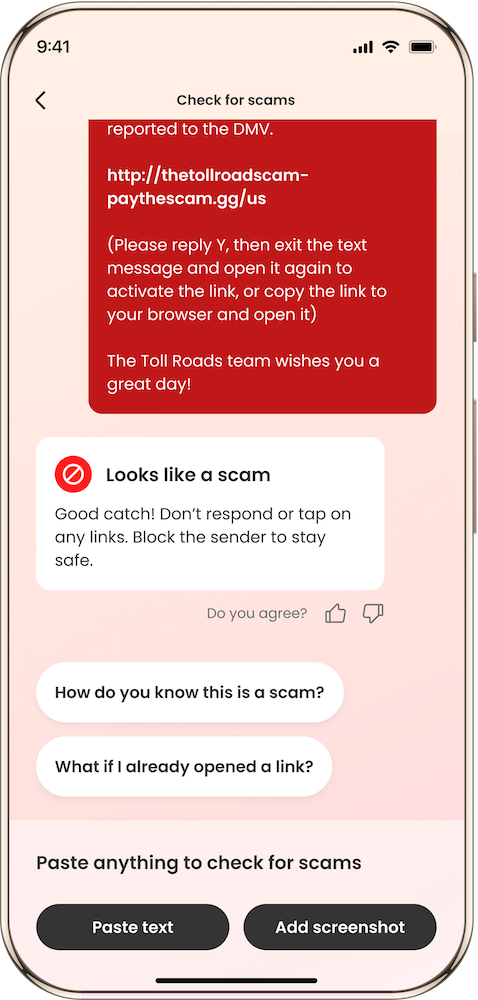
Cory’s quick click could have ended much worse. But what matters most is what happened after. He acted fast. He reset passwords. And now, he speaks out to help others recognize the signs.
“Slow down. Trust your gut. It’s okay to pause and double-check—even when you’re in a hurry.”
Scammers count on your rush. Slowing down—and having the right tools—can make all the difference.
If you’ve experienced a scam, your story can help others avoid the same fate. You’re not alone.
Visit our Scam Stories hub to read more scam stories or share your own.
The post Cory’s Scam Story: A Fake Text Nearly Took His Identity appeared first on McAfee Blog.

Brittany C., a dedicated teacher, had been planning a special night for months. After saving up steadily, she landed four prized tickets to Taylor Swift’s Eras Tour for her and her closest friends.
But days before the show, she logged into her account—and the tickets were gone.
“I’d been saving for months. I was so excited—and then I logged in and the tickets were just… gone. It felt like someone reached through the screen and took that night away from me.”
Like many of us, Brittany had received plenty of “your data was part of a breach” emails over the years. But she never expected what happened next.
A few days before the tickets disappeared, she had clicked on what she now realizes was a suspicious link. “I clicked one weird link. Nothing happened at the time, so I didn’t think twice,” she said. But that link was the scammer’s way in.
Using her reused password and without two-factor authentication on her account, the attacker was able to log in and transfer the tickets out—all without Brittany’s knowledge.
The emotional toll hit fast. “The stress was overwhelming,” she says. “Friends had made travel plans, taken time off. I felt like I’d let everyone down.”
After a long back and forth with the online ticket sales platform, Brittany managed to recover the tickets. But the damage was done. The experience reshaped how she thinks about online safety.
“You can be careful and still get caught. I’m only human—and that’s exactly what scammers count on.”
Brittany’s experience is a textbook example of how a small slip can spiral into a high-stakes scam. McAfee’s Scam Detector is designed to catch those mistakes before they snowball.
If she had McAfee’s Scam Detector, here’s how it could have helped:
With Scam Detector watching her back, Brittany could have known that the link was dangerous before clicking—and avoided the gut-wrenching scramble to reclaim her tickets.
Here are four essential tips to help protect your digital accounts and event tickets:
1. Never reuse passwords.
Use a password manager to create strong, unique passwords for each account—especially ticketing and banking platforms.
2. Always turn on two-factor authentication.
It’s one of the easiest ways to block unauthorized logins—even if someone has your password.
3. Think before you click.
If a message or link seems off, don’t open it. Use McAfee’s Quick Check to scan suspicious links before interacting.
4. Use scam detection software for extra protection.
Tools like McAfee’s Scam Detector offer real-time alerts and background scanning to help prevent phishing, credential theft, and social engineering attacks.
Scams can happen to anyone—even people who do everything right. Brittany’s story is a reminder that vigilance matters, but so does visibility.
By telling your story, you’re helping others spot the signs of scams and take steps to protect themselves.
At McAfee, we believe there’s no shame in being scammed—only power in sharing.
Visit our scam stories hub to read more real scam stories or share your own to help end scam stigma.
The post Brittany’s Scam Story: Eras Tour Chaos appeared first on McAfee Blog.

Henry A. had been trying for weeks to score a ticket to see Tyler, the Creator in Dallas. Even without a confirmed seat, he headed to the venue hoping for a miracle. And that’s when the message came in—someone nearby claimed to have extra tickets.
The seller said he was just outside too. The price? Reasonable enough. The tone? Casual and confident. All Henry had to do was send half the money to hold the tickets.
Minutes later, he sent the full $280.
“I was already in line—excited, hopeful, and just trying to get in. That made me an easy target.”
At first, the offer felt legitimate. The seller even said his girlfriend was wary of strangers, which seemed believable. But after Henry sent the full amount, the conversation took a turn.
“He said his girlfriend didn’t trust me, then suddenly wanted full payment. Then it was someone else offering more. That’s when I knew.”
The seller began stalling. Then came a screenshot—another buyer offering a higher price. He pressured Henry to pay more. When Henry refused, the seller blocked him.
Just like that, the tickets were gone. So was the money. And Henry and his friend never made it into the show.
“I sent $280 and got blocked. We never made it inside.”
It wasn’t just the lost money—it was the emotional rollercoaster. The disappointment. The feeling of being tricked right at the door.
Scams like Henry’s are becoming more common—especially around live events. That’s why McAfee’s Scam Detector is built to flag shady behavior before it costs you.
If Henry had been using McAfee’s Scam Detector, here’s how it could’ve helped:
“If I’d had something flagging the account or even the language in the messages, it might’ve stopped me in time.”
Want to protect yourself from last-minute ticket scams? Follow these smart tips:
1. Don’t pay up front without protection.
Always use secure payment methods that offer fraud protection—never cash apps or peer-to-peer services for strangers.
2. Use scam detection tools before sending money.
Paste messages or links into McAfee’s Quick Check to analyze them for red flags.
3. Watch for changing terms or pressure tactics.
If someone shifts the deal mid-conversation, it’s a red flag. Real sellers don’t change the price last minute or ask for more money after payment.
4. Trust your instincts—and the tech.
Scammers rely on urgency and excitement. Having McAfee Scam Detector on your phone adds a digital gut check when your real one is clouded.
Henry is already spreading the word on social media, warning other fans about concert scams. Now we’re helping amplify his voice—because awareness is one of the most powerful forms of protection.
“I’m already trying to warn others on social media. Concert scams are real—and they’re getting more common.”
Have a scam story of your own? Don’t keep it to yourself. By sharing what happened, you can help someone else avoid the same fate.
Visit our scam stories hub to read more or share your experience. Together, we can end scam stigma and stop scammers in their tracks.
The post Henry’s Scam Story: The Social Media Con appeared first on McAfee Blog.

Bradley K. was a brand-new dad, sleep-deprived and juggling life with a newborn, when he received a phone call that would change everything. The caller claimed to be from the IRS and said Bradley owed back taxes. If he didn’t pay immediately, they warned, he could be arrested.
Unfortunately, it was a tax scam—and one that cost him $800 and left him shaken for months.
Like many Americans, Bradley had just filed his taxes. When the call came through, it seemed believable. The caller knew personal information, spoke with a local accent, and used aggressive tactics to demand fast action.
“I had just filed my taxes, so when they told me there was a problem, it didn’t seem completely far-fetched.”
Under pressure and running on little sleep, Bradley didn’t stop to verify. He didn’t call his dad—who also happened to be his accountant. Instead, he sent $800 and unknowingly gave scammers access to his bank account.
“I was running on barely any sleep with a newborn, and I wasn’t thinking as clearly as I normally would have.”
It wasn’t until days later that a friend told him the truth: the IRS never calls demanding immediate payment. By then, it was too late. The money was gone, and Bradley was left feeling embarrassed and anxious.
“Even now, almost a year later, I’m constantly on edge, making sure nothing else has been stolen.”
Bradley’s experience is exactly why we created McAfee’s Scam Detector—a smart, AI-powered tool that identifies scams across email, text, and even video.
If Bradley had received a scam follow-up message or email while using McAfee’s Scam Detector, the tool could have flagged it automatically—before he ever opened it. He could have also used the Quick Check feature to paste in the message or phone transcript and receive an instant scam analysis.
Key features that could have protected Bradley:
Best of all? McAfee’s Scam Detector is included at no extra cost with McAfee core plans.
Here’s how to avoid tax scams like the one that targeted Bradley:
1) Know the IRS will never call you to demand payment.
If someone says you owe money and threatens arrest, it’s a scam. The IRS contacts people by mail first.
2) Use McAfee’s Scam Detector for real-time protection.
Scan any suspicious email, text, or message using Quick Check before clicking or responding.
3) Always take a pause before acting.
Scammers rely on urgency. Take a breath, verify the claim independently, and talk to someone you trust.
4) Keep scam protection up to date.
Enable scam alerts across your devices to stay one step ahead. McAfee Scam Detector works across smartphones, laptops, and tablets.
Bradley’s story is just one of thousands. But too often, people stay silent out of shame or embarrassment. That silence helps scammers win.
At McAfee, we believe in highlighting real scam stories—not to scare people but to empower them. These aren’t victims. They’re survivors.
Have a story of your own? You’re not alone—and your experience could help someone else.
Visit our Scam Stories Hub to share your story and help stop scams in their tracks.
The post Bradley’s Scam Story: New Dad vs Fake IRS Call appeared first on McAfee Blog.


Job scams are on the rise. And asking the right questions can help steer you clear of them.
That rise in job scams is steep, according to the U.S. Federal Trade Commission (FTC). Recent data shows that reported losses have grown five times over between 2020 and 2024. In 2024 alone, reported losses hit half a billion dollars, with unreported losses undoubtedly pushing actual losses yet higher.
Last week, we covered how “pay to get paid” scams account for a big chunk of online job scams. Here, we’ll cover a couple more that we’ve seen circulating on social media and via texts—and how some pointed questions can help you avoid them.
Some job scammers pose as recruiters from job agencies who reach potential victims the same way legitimate agencies do—by email, text, and networking sites. Sometimes this leaves people with their guard down because it’s not unheard of at all to get contacted this way, “out of the blue” so to speak.
Yet one of the quickest ways to spot a scammer is when the “recruiter” asks to pay a fee for the matchmaking, particularly if they ask for it up front. Legitimate headhunters, temp agencies, and staffing agencies typically get paid by the company or business that ultimately does the hiring. Job candidates don’t pay a thing.
Another form of scam occurs during the “onboarding” process of the job. The scammer happily welcomes the victim to the company and then informs them that they’ll need to take some online training and perhaps buy a computer or other office equipment. Of course, the scammer asks the victim to pay for all of it—leaving the victim out of hundreds of dollars and the scammer with their payment info.
One way you can spot a job scam is to press for answers. Asking pointed questions about a company and the job it’s offering, just as you would in any real interview, can reveal gaps in a scammer’s story. In effect, scammers are putting on an acting job, and some don’t thoroughly prepare for their role. They don’t think through the details, hoping that victims will be happy enough about a job prospect to ask too many questions.
If the hiring process moves quicker than expected or details about a job seem light, it’s indeed time to ask questions. Here are a few you can keep handy when you start to wonder if you have a scam on your hands …
This is a great place to start. Legitimate employers write up job listings that they post on their website and job sites. In those descriptions, the work and everything it entails gets spelled out to the letter. A real employer should be able to provide you with a job description or at least cover it clearly over the course of a conversation.
This one can trip up a scammer quickly. A scammer might avoid giving a physical address. Likewise, they might offer up a fake one. Either a non-answer or a lie can readily call out a scam by following up the question with a web search for a physical address. (Resources like the Better Business Bureau can also help you research a company and its track record.)
Asking about co-workers, bosses, reporting structures and the like can also help sniff out a scam. Real employers, once again, will have ready answers here. They might even start dropping names and details about people’s tenure and background. Meanwhile, this is one more place where scammers might tip their hand because they haven’t made up those details.
This question alone can offer a telltale sign. Many job scams move through the hiring process at relative breakneck speed—skipping past the usual interview loops and callbacks that many legitimate jobs have. Scammers want to turn over their victims quickly, so they’ll make the “hiring process” quick as well. If it feels like you’re blazing through the steps, it could be a scam.
Every business has a story, even if it’s still in its startup days. Anyone in a recruiting or hiring position will have a good handle on this question, as they will on any follow-up questions about the company’s mission or goals. Again, vagueness in response to these kinds of questions could be a sign of a scam.
Whether it’s through social media sites like Facebook, Instagram, and the like, scammers often reach out through direct messages. Recruiters stick to legitimate business networking sites like LinkedIn. Companies maintain established accounts on recruiting platforms that people know and trust, so view any contact outside of them as suspicious.
Scammers use the “hiring process” to trick people into providing their personal info with malicious links. Web protection, included in our plans, can steer you clear of them. Likewise, our Scam Detector scans URLs in your text messages and alerts you if they’re sketchy. If you accidentally click a bad link, both web and text scam protection will block a risky site.
Many scammers get your contact info from data broker sites. McAfee’s Personal Data Cleanup scans some of the riskiest data broker sites, shows you which ones are selling your personal info, and, depending on your plan, can help you remove it. Our Social Privacy Manager lowers your public profile lower still. It helps you adjust more than 100 privacy settings across your social media accounts in just a few clicks, so your personal info is only visible to the people you want to share it with.
The post Interviewing for a Job? Spot a Scam with These Questions appeared first on McAfee Blog.



As Tax Day looms and last-minute taxpayers feel the pressure, a surge of IRS scams is on the rise.
Research by our McAfee Labs team projects a fresh wave of sophisticated tax scams as the stress of peak filing season sets in, with bogus text messages leading the way.
Nearly half of taxpayers complete their taxes between mid-March and April 15, which gives scammers ample opportunity to cash in as people rush their filings with the IRS.
Based on our data from 2024, here’s what we can expect in the coming days:
In addition to posing as the IRS, scammers will pose as tax prep and tax software companies as well. Just as in years past, taxpayers can further expect scams built around quick refunds and easy filing solutions that are actually fronts for scams. Yet whatever guise scammers put on, their aim remains the same. They want to dupe taxpayers out of their personal and financial info.
Tax season is high season for scammers because so much personal info gets gathered and shared online. With that, many taxpayers have their guard down. They expect to see messages, ads, and so forth about their taxes, which can make them more willing to share some of their most personal info. That’s where scammers step in. They want to:
Looking at this list, you can see what makes tax scams so damaging. Many of them target our most precious of personal info—our Social Security Numbers (SSNs).
A stolen SSN opens the door to some of the most painful forms of identity theft, like imposter fraud, insurance fraud, employment fraud, and more. These follow-on attacks can cause great harm to a victim’s finances and reputation in ways that can take months, or even years, to repair.
In effect, tax scams deliver a one-two punch.
It begins by baiting the victim with a phony message from a scammer posing as the IRS, a tax prep business, or a tax software company. That might come by email, a direct message on social media, or even in paid search results.
Largely, scammers bait victims with texts. Mobile attacks indeed dominate the preferred contact method, just as we called out. Here, scammers often use link shorteners to disguise fraudulent links. (You’ve likely seen plenty of link shorteners like bit.ly and goo.gl. They make it easier to share long addresses, but the flipside is that there’s no quick way to tell where they really take you.)
In some cases, scammers attempt to trick taxpayers by weaving “irs.gov” into the web address. Below you can see one example, where the domain isn’t “irs.gov.” It’s actually “entes-tax[dot]com,” which leads to a scam site.
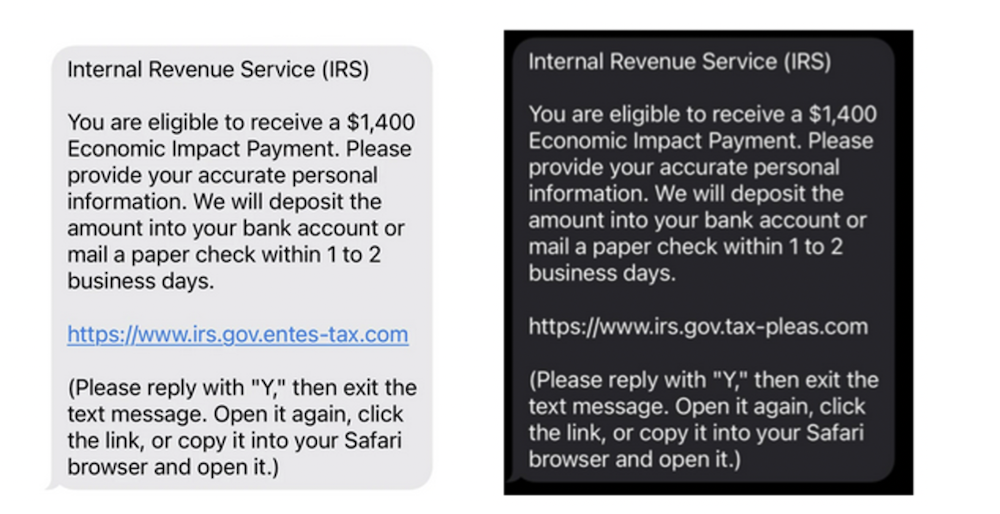
Scam texts that weave “irs.gov” into a malicious link
As for the text itself, scammers send urgent-sounding messages about tax returns like, “Your refund is on hold, contact the IRS immediately.” Other scammers use fear, leveling threats like jail time for non-payment. In other cases, scammers threaten to revoke things like driver’s licenses and business licenses, or even immigration status. According to the IRS, these are common signs of a scam. The IRS never uses threats or tactics like these to resolve tax issues.
The second punch comes by clicking the link in these messages, which leads to IRS copycat scam sites. And they can look convincing. The most sophisticated of them mirror the look and feel of the official IRS website and use URLs that look “close enough” to an IRS URL, which can trick anyone who doesn’t examine them closely.
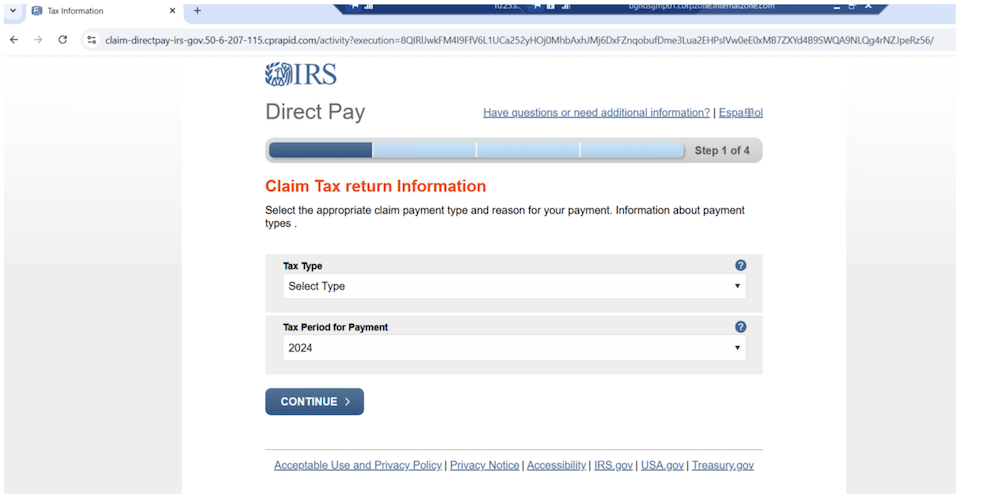
Example of a fake IRS claim website
And that’s where the damage gets done. Under the false pretense of receiving a refund or making a payment, the scammers collect that precious personal info we talked about, which can cause short- and long-term fallout for victims.
The same approach works for scammers who pose as tax prep services and tax software companies. The texts and websites look different, yet they’re still part of a scheme for collecting the same types of personal and financial info.
Clever as these scams are, you can avoid them. The first step is awareness. By reading this article and sharing it with others, you spread the word about these scams and just how rampant they are.
From there, you can take several more steps that can keep you far safer during tax time:
The post Your Phone Is the #1 Target in a New Wave of IRS Scams, McAfee Finds appeared first on McAfee Blog.

Al Roker never had a heart attack. He doesn’t have hypertension. But if you watched a recent deepfake video of him that spread across Facebook, you might think otherwise.
In a recent segment on NBC’s TODAY, Roker revealed that a fake AI-generated video was using his image and voice to promote a bogus hypertension cure—claiming, falsely, that he had suffered “a couple of heart attacks.”
“A friend of mine sent me a link and said, ‘Is this real?'” Roker told investigative correspondent Vicky Nguyen. “And I clicked on it, and all of a sudden, I see and hear myself talking about having a couple of heart attacks. I don’t have hypertension!”
The fabricated clip looked and sounded convincing enough to fool friends and family—including some of Roker’s celebrity peers. “It looks like me! I mean, I can tell that it’s not me, but to the casual viewer, Al Roker’s touting this hypertension cure… I’ve had some celebrity friends call because their parents got taken in by it.”
While Meta quickly removed the video from Facebook after being contacted by TODAY, the damage was done. The incident highlights a growing concern in the digital age: how easy it is to create—and believe—convincing deepfakes.
“We used to say, ‘Seeing is believing.’ Well, that’s kind of out the window now,” Roker said.
Al Roker isn’t the first public figure to be targeted by deepfake scams. Taylor Swift was recently featured in an AI-generated video promoting fake bakeware sales. Tom Hanks has spoken out about a fake dental plan ad that used his image without permission. Oprah, Brad Pitt, and others have faced similar exploitation.
These scams don’t just confuse viewers—they can defraud them. Criminals use the trust people place in familiar faces to promote fake products, lure them into shady investments, or steal their personal information.
“It’s frightening,” Roker told his co-anchors Craig Melvin and Dylan Dreyer. Craig added: “What’s scary is that if this is where the technology is now, then five years from now…”
Nguyen demonstrated just how simple it is to create a fake using free online tools, and brought in BrandShield CEO Yoav Keren to underscore the point: “I think this is becoming one of the biggest problems worldwide online,” Keren said. “I don’t think that the average consumer understands…and you’re starting to see more of these videos out there.”
According to McAfee’s State of the Scamiverse report, the average American sees 2.6 deepfake videos per day, with Gen Z seeing up to 3.5 daily. These scams are designed to be believable—because the technology makes it possible to copy someone’s voice, mannerisms, and expressions with frightening accuracy.
And it doesn’t just affect celebrities:
While the technology behind deepfakes is advancing, there are still ways to spot—and stop—them:
And most importantly, be skeptical of celebrity endorsements on social media. If it seems out of character or too good to be true, it probably is.
McAfee’s Deepfake Detector, powered by AMD’s Neural Processing Unit (NPU) in the new Ryzen AI 300 Series processors, identifies manipulated audio and video in real time—giving users a critical edge in spotting fakes.
This technology runs locally on your device for faster, private detection—and peace of mind.
Al Roker’s experience shows just how personal—and persuasive—deepfake scams have become. They blur the line between truth and fiction, targeting your trust in the people you admire.
With McAfee, you can fight back.
The post ‘Seeing is Believing is Out the Window’: What to Learn From the Al Roker AI Deepfake Scam appeared first on McAfee Blog.


The collapse of genetic testing giant 23andMe has raised serious privacy concerns for millions of people who shared their DNA with the company. Once valued at $6 billion, the company has filed for bankruptcy and is now selling off assets—including, potentially, your genetic data.
If you’ve ever used 23andMe to explore your ancestry or health traits, now is the time to take action.
Here’s what’s going on, what it means for your data, how to delete your account, and steps you can take to better protect your online privacy going forward.
23andMe, once a pioneer in at-home genetic testing, has fallen into financial distress after a series of challenges, including a massive data breach in 2023 that exposed personal information of nearly 7 million users, according to TechCrunch. The company’s value plummeted by more than 99%, leading to mass board resignations and a March 2024 bankruptcy filing.
Now, as 23andMe prepares to sell off its assets under court supervision, its massive database of customer DNA—reportedly from more than 15 million users—is on the table. Despite the company’s assurances that its privacy policy remains in effect, experts and privacy advocates warn that your sensitive genetic data could end up in the hands of third parties, including pharmaceutical companies or even law enforcement agencies.
If you used 23andMe, yes.
Genetic data is some of the most personal information you can share. It can reveal details about your ancestry, health risks, and even family secrets. With 23andMe not covered by HIPAA (the federal health privacy law), your DNA data isn’t protected the way medical records at a doctor’s office would be, The Harvard Gazette reports.
Although 23andMe claims it won’t share individual-level data without consent, it does reserve the right to sell or transfer personal information as part of a bankruptcy or acquisition. That means your data could be bought by another company—one with different privacy practices or intentions.
California residents, in particular, have the legal right to delete their data under the Genetic Information Privacy Act (GIPA) and the California Consumer Privacy Act (CCPA).
If you’re ready to take action, here’s how to delete your genetic data and revoke research permissions through your 23andMe account:
Your DNA isn’t the only personal data at risk. From email addresses and home addresses to phone numbers and even shopping habits, data brokers are collecting and selling your information online—often without your knowledge or consent.
That’s why it’s critical to take control of your digital footprint. All McAfee+ plans provide the ability to scan the web for details of your personal information. McAfee’s Online Account Cleanup scans for accounts you no longer use and helps you delete them, along with your personal info. McAfee’s Personal Data Cleanup, takes this a step further, by scanning data broker sites for your personal information, and requesting the removal of you details from those sites.
Combined, these tools can give you back control over your privacy. All our McAfee+ plans include scans to find your accounts and direct you on how to remove your data.
Bottom Line: If you’ve ever used 23andMe, your genetic data could be at risk of being transferred or sold. Take action now by deleting your account and revoking permissions. And to keep the rest of your personal data protected, use tools like McAfee+ to keep your personal data safe online.
The post How to Delete Your Data from 23andMe and Protect Your Privacy appeared first on McAfee Blog.
One month into his second term, President Trump’s actions to shrink the government through mass layoffs, firings and withholding funds allocated by Congress have thrown federal cybersecurity and consumer protection programs into disarray. At the same time, agencies are battling an ongoing effort by the world’s richest man to wrest control over their networks and data.

Image: Shutterstock. Greg Meland.
The Trump administration has fired at least 130 employees at the federal government’s foremost cybersecurity body — the Cybersecurity and Infrastructure Security Agency (CISA). Those dismissals reportedly included CISA staff dedicated to securing U.S. elections, and fighting misinformation and foreign influence operations.
Earlier this week, technologists with Elon Musk’s Department of Government Efficiency (DOGE) arrived at CISA and gained access to the agency’s email and networked files. Those DOGE staffers include Edward “Big Balls” Coristine, a 19-year-old former denizen of the “Com,” an archipelago of Discord and Telegram chat channels that function as a kind of distributed cybercriminal social network.
The investigative journalist Jacob Silverman writes that Coristine is the grandson of Valery Martynov, a KGB double agent who spied for the United States. Silverman recounted how Martynov’s wife Natalya Martynova moved to the United States with her two children after her husband’s death.
“Her son became a Virginia police officer who sometimes posts comments on blogs about his historically famous father,” Silverman wrote. “Her daughter became a financial professional who married Charles Coristine, the proprietor of LesserEvil, a snack company. Among their children is a 19-year-old young man named Edward Coristine, who currently wields an unknown amount of power and authority over the inner-workings of our federal government.”
Another member of DOGE is Christopher Stanley, formerly senior director for security engineering at X and principal security engineer at Musk’s SpaceX. Stanley, 33, had a brush with celebrity on Twitter in 2015 when he leaked the user database for the DDoS-for-hire service LizardStresser, and soon faced threats of physical violence against his family.
My 2015 story on that leak did not name Stanley, but he exposed himself as the source by posting a video about it on his Youtube channel. A review of domain names registered by Stanley shows he went by the nickname “enKrypt,” and was the former owner of a pirated software and hacking forum called error33[.]net, as well as theC0re, a video game cheating community.
DOGE has been steadily gaining sensitive network access to federal agencies that hold a staggering amount of personal and financial information on Americans, including the Social Security Administration (SSA), the Department of Homeland Security, the Office of Personnel Management (OPM), and the Treasury Department.
Most recently, DOGE has sought broad access to systems at the Internal Revenue Service that contain the personal tax information on millions of Americans, including how much individuals earn and owe, property information, and even details related to child custody agreements. The New York Times reported Friday that the IRS had reached an agreement whereby a single DOGE employee — 25-year-old Gavin Kliger — will be allowed to see only anonymized taxpayer information.
The rapidity with which DOGE has rifled through one federal database after another in the name of unearthing “massive fraud” by government agencies has alarmed many security experts, who warned that DOGE’s actions bypassed essential safeguards and security measures.
“The most alarming aspect isn’t just the access being granted,” wrote Bruce Schneier and Davi Ottenheimer, referring to DOGE as a national cyberattack. “It’s the systematic dismantling of security measures that would detect and prevent misuse—including standard incident response protocols, auditing, and change-tracking mechanisms—by removing the career officials in charge of those security measures and replacing them with inexperienced operators.”
Jacob Williams is a former hacker with the U.S. National Security Agency who now works as managing director of the cybersecurity firm Hunter Labs. Williams kicked a virtual hornet’s nest last week when he posted on LinkedIn that the network incursions by DOGE were “a bigger threat to U.S. federal government information systems than China.”
Williams said while he doesn’t believe anyone at DOGE would intentionally harm the integrity and availability of these systems, it’s widely reported (and not denied) that DOGE introduced code changes into multiple federal IT systems. These code changes, he maintained, are not following the normal process for vetting and review given to federal government IT systems.
“For those thinking ‘I’m glad they aren’t following the normal federal government IT processes, those are too burdensome’ I get where you’re coming from,” Williams wrote. “But another name for ‘red tape’ are ‘controls.’ If you’re comfortable bypassing controls for the advancement of your agenda, I have questions – mostly about whether you do this in your day job too. Please tag your employer letting them know your position when you comment that controls aren’t important (doubly so if you work in cybersecurity). All satire aside, if you’re comfortable abandoning controls for expediency, I implore you to decide where the line is that you won’t cross in that regard.”
The DOGE website’s “wall of receipts” boasts that Musk and his team have saved the federal government more than $55 billion through staff reductions, lease cancellations and terminated contracts. But a team of reporters at The New York Times found the math that could back up those checks is marred with accounting errors, incorrect assumptions, outdated data and other mistakes.
For example, DOGE claimed it saved $8 billion in one contract, when the total amount was actually $8 million, The Times found.
“Some contracts the group claims credit for were double- or triple-counted,” reads a Times story with six bylines. “Another initially contained an error that inflated the totals by billions of dollars. While the DOGE team has surely cut some number of billions of dollars, its slapdash accounting adds to a pattern of recklessness by the group, which has recently gained access to sensitive government payment systems.”
So far, the DOGE website does not inspire confidence: We learned last week that the doge.gov administrators somehow left their database wide open, allowing someone to publish messages that ridiculed the site’s insecurity.
A screenshot of the DOGE website after it was defaced with the message: “These ‘experts’ left their database open – roro”
Trump’s efforts to grab federal agencies by their data has seen him replace career civil servants who refused to allow DOGE access to agency networks. CNN reports that Michelle King, acting commissioner of the Social Security Administration for more than 30 years, was shown the door after she denied DOGE access to sensitive information.
King was replaced by Leland Dudek, formerly a senior advisor in the SSA’s Office of Program Integrity. This week, Dudek posted a now-deleted message on LinkedIn acknowledging he had been placed on administrative leave for cooperating with DOGE.
“I confess,” Dudek wrote. “I bullied agency executives, shared executive contact information, and circumvented the chain of command to connect DOGE with the people who get stuff done. I confess. I asked where the fat was and is in our contracts so we can make the right tough choices.”
Dudek’s message on LinkedIn.
According to Wired, the National Institute of Standards and Technology (NIST) was also bracing this week for roughly 500 staffers to be fired, which could have serious impacts on NIST’s cybersecurity standards and software vulnerability tracking work.
“And cuts last week at the US Digital Service included the cybersecurity lead for the central Veterans Affairs portal, VA.gov, potentially leaving VA systems and data more vulnerable without someone in his role,” Wired’s Andy Greenberg and Lily Hay Newman wrote.
NextGov reports that Trump named the Department of Defense’s new chief information security officer: Katie Arrington, a former South Carolina state lawmaker who helped steer Pentagon cybersecurity contracting policy before being put on leave amid accusations that she disclosed classified data from a military intelligence agency.
NextGov notes that the National Security Agency suspended her clearance in 2021, although the exact reasons that led to the suspension and her subsequent leave were classified. Arrington argued that the suspension was a politically motivated effort to silence her.
Trump also appointed the former chief operating officer of the Republican National Committee as the new head of the Office of National Cyber Director. Sean Cairncross, who has no formal experience in technology or security, will be responsible for coordinating national cybersecurity policy, advising the president on cyber threats, and ensuring a unified federal response to emerging cyber-risks, Politico writes.
DarkReading reports that Cairncross would share responsibility for advising the president on cyber matters, along with the director of cyber at the White House National Security Council (NSC) — a group that advises the president on all matters security related, and not just cyber.
The president also ordered staffers at the Consumer Financial Protection Bureau (CFPB) to stop most work. Created by Congress in 2011 to be a clearinghouse of consumer complaints, the CFPB has sued some of the nation’s largest financial institutions for violating consumer protection laws.
The CFPB says its actions have put nearly $18 billion back in Americans’ pockets in the form of monetary compensation or canceled debts, and imposed $4 billion in civil money penalties against violators. The CFPB’s homepage has featured a “404: Page not found” error for weeks now.
Trump has appointed Russell Vought, the architect of the conservative policy playbook Project 2025, to be the CFPB’s acting director. Vought has publicly favored abolishing the agency, as has Elon Musk, whose efforts to remake X into a payments platform would otherwise be regulated by the CFPB.
The New York Times recently published a useful graphic showing all of the government staffing changes, including the firing of several top officials, affecting agencies with federal investigations into or regulatory battles with Musk’s companies. Democrats on the House Judiciary Committee also have released a comprehensive account (PDF) of Musk’s various conflicts of interest.
Image: nytimes.com
As the Times notes, Musk and his companies have repeatedly failed to comply with federal reporting protocols aimed at protecting state secrets, and these failures have prompted at least three federal reviews. Those include an inquiry launched last year by the Defense Department’s Office of Inspector General. Four days after taking office, Trump fired the DoD inspector general along with 17 other inspectors general.
The Trump administration also shifted the enforcement priorities of the U.S. Securities and Exchange Commission (SEC) away from prosecuting misconduct in the cryptocurrency sector, reassigning lawyers and renaming the unit to focus more on “cyber and emerging technologies.”
Reuters reports that the former SEC chair Gary Gensler made fighting misconduct in a sector he termed the “wild west” a priority for the agency, targeting not only cryptocurrency fraudsters but also the large firms that facilitate trading such as Coinbase.
On Friday, Coinbase said the SEC planned to withdraw its lawsuit against the crypto exchange. Also on Friday, the cryptocurrency exchange Bybit announced on X that a cybersecurity breach led to the theft of more than $1.4 billion worth of cryptocurrencies — making it the largest crypto heist ever.
On Feb. 10, Trump ordered executive branch agencies to stop enforcing the U.S. Foreign Corrupt Practices Act, which froze foreign bribery investigations, and even allows for “remedial actions” of past enforcement actions deemed “inappropriate.”
Trump’s action also disbanded the Kleptocracy Asset Recovery Initiative and KleptoCapture Task Force — units which proved their value in corruption cases and in seizing the assets of sanctioned Russian oligarchs — and diverted resources away from investigating white-collar crime.
That’s according to the independent Organized Crime and Corruption Reporting Project (OCCRP), an investigative journalism outlet that until very recently was funded in part by the U.S. Agency for International Development (USAID).
The OCCRP lost nearly a third of its funding and was forced to lay off 43 reporters and staff after Trump moved to shutter USAID and freeze its spending. NBC News reports the Trump administration plans to gut the agency and leave fewer than 300 staffers on the job out of the current 8,000 direct hires and contractors.
The Global Investigative Journalism Network wrote this week that the sudden hold on USAID foreign assistance funding has frozen an estimated $268 million in agreed grants for independent media and the free flow of information in more than 30 countries — including several under repressive regimes.
Elon Musk has called USAID “a criminal organization” without evidence, and promoted fringe theories on his social media platform X that the agency operated without oversight and was rife with fraud. Just months before the election, USAID’s Office of Inspector General announced an investigation into USAID’s oversight of Starlink satellite terminals provided to the government of Ukraine.
KrebsOnSecurity this week heard from a trusted source that all outgoing email from USAID now carries a notation of “sensitive but unclassified,” a designation that experts say could make it more difficult for journalists and others to obtain USAID email records under the Freedom of Information Act (FOIA). On Feb. 20, Fedscoop reported also hearing the same thing from multiple sources, noting that the added message cannot be seen by senders until after the email is sent.
On Feb. 18, Trump issued an executive order declaring that only the U.S. attorney general and the president can provide authoritative interpretations of the law for the executive branch, and that this authority extends to independent agencies operating under the executive branch.
Trump is arguing that Article II, Clause 1 of the Constitution vests this power with the president. However, jurist.org writes that Article II does not expressly state the president or any other person in the executive branch has the power to interpret laws.
“The article states that the president is required to ‘take care that the laws be faithfully executed,'” Juris noted. “Jurisdiction to interpret laws and determine constitutionality belongs to the judicial branch under Article III. The framers of the Constitution designed the separation of duties to prevent any single branch of government from becoming too powerful.”
The executive order requires all agencies to submit to “performance standards and management objectives” to be established by the White House Office of Management and Budget, and to report periodically to the president.
Those performance metrics are already being requested: Employees at multiple federal agencies on Saturday reported receiving an email from the Office of Personnel Management ordering them to reply with a set of bullet points justifying their work for the past week.
“Please reply to this email with approx. 5 bullets of what you accomplished last week and cc your manager,” the notice read. “Please do not send any classified information, links, or attachments. Deadline is this Monday at 11:59 p.m. EST.”
An email sent by the OPM to more than two million federal employees late in the afternoon EST on Saturday, Feb. 22.
In a social media post Saturday, Musk said the directive came at the behest of President Trump, and that failure to respond would be taken as a resignation. Meanwhile, Bloomberg writes the Department of Justice has been urging employees to hold off replying out of concern doing so could trigger ethics violations. The National Treasury Employees Union also is advising its employees not to respond.
A legal battle over Trump’s latest executive order is bound to join more than 70 other lawsuits currently underway to halt the administration’s efforts to massively reduce the size of the federal workforce through layoffs, firings and attrition.
On Feb. 15, the president posted on social media, “He who saves his Country does not violate any Law,” citing a quote often attributed to the French dictator Napoleon Bonaparte. Four days later, Trump referred to himself as “the king” on social media, while the White House nonchalantly posted an illustration of him wearing a crown.
Trump has been publicly musing about running for an unconstitutional third-term in office, a statement that some of his supporters dismiss as Trump just trying to rile his liberal critics. However, just days after Trump began his second term, Rep. Andy Ogles (R-Tenn.) introduced a bill to amend the Constitution so that Trump — and any other future president — can be elected to serve a third term.
This week at the Conservative Political Action Conference (CPAC), Rep. Ogles reportedly led a group of Trump supporters calling itself the “Third Term Project,” which is trying to gain support for the bill from GOP lawmakers. The event featured images of Trump depicted as Caesar.

A banner at the CPAC conference this week in support of The Third Term Project, a group of conservatives trying to gain support for a bill to amend the Constitution and allow Trump to run for a third term.
Russia continues to be among the world’s top exporters of cybercrime, narcotics, money laundering, human trafficking, disinformation, war and death, and yet the Trump administration has suddenly broken with the Western world in normalizing relations with Moscow.
This week President Trump stunned U.S. allies by repeating Kremlin talking points that Ukraine is somehow responsible for Russia’s invasion, and that Ukrainian President Volodymyr Zelensky is a “dictator.” The president repeated these lies even as his administration is demanding that Zelensky give the United States half of his country’s mineral wealth in exchange for a promise that Russia will cease its territorial aggression there.
President Trump’s servility toward an actual dictator — Russian President Vladimir Putin — does not bode well for efforts to improve the cybersecurity of U.S. federal IT networks, or the private sector systems on which the government is largely reliant. In addition, this administration’s baffling moves to alienate, antagonize and sideline our closest allies could make it more difficult for the United States to secure their ongoing cooperation in cybercrime investigations.
It’s also startling how closely DOGE’s approach so far hews to tactics typically employed by ransomware gangs: A group of 20-somethings with names like “Big Balls” shows up on a weekend and gains access to your servers, deletes data, locks out key staff, takes your website down, and prevents you from serving customers.
When the federal executive starts imitating ransomware playbooks against its own agencies while Congress largely gazes on in either bewilderment or amusement, we’re in four-alarm fire territory. At least in theory, one can negotiate with ransomware purveyors.

It started with a DM.
For five months, 25-year-old computer programmer Maggie K. exchanged daily messages with the man she met on Instagram, convinced she had found something real.
When it was finally time to meet in person, he never showed. Instead, he claimed he missed his flight and needed money to rebook. Desperate to finally see him, she sent the cash.
Then, silence. His accounts vanished. He hadn’t just ghosted her—he had never existed at all.
“I ignored my gut feeling… I sent him $1,200. Then he disappeared,” Maggie told McAfee, hoping that her story would educate others. “When I reported the scam, the police told me his images were AI-generated. He wasn’t even a real person. That was the scariest part – I had trusted someone who never even existed.”
These scams work because they prey on trust and emotions. And they aren’t just targeting the naïve; anyone, even tech professionals as Maggie’s case shows, can be fooled.
McAfee’s latest research reveals more than half (52%) of people have been scammed out of money or pressured to send money or gifts by someone they met online.
And romance scams aren’t just happening in dating apps anymore. Social media, messaging platforms and AI chatbots are fuelling an explosion of online romance fraud.
McAfee’s findings highlight a staggering rise in:
With 62% of people saying they’ve used dating apps, social media, or messaging platforms to connect with potential partners, scammers have a bigger pool of victims than ever before.
Younger users are the most active online daters, with 31% of 18-24-year-olds currently using online dating platforms. Tinder is the most popular dating app overall (46%), with its highest engagement among 18-24-year-olds (73%). Just over 40% of respondents said they use Instagram, 29% use Snapchat and 25% use TikTok to meet potential partners. But these platforms also present new risks, as fake apps designed to steal personal information lurk in app stores.
McAfee researchers found nearly 11,000 attempts to download fraudulent dating apps in recent months. The most impersonated?
Downloading a fake app could expose your login credentials, financial information or even install malware onto your device.
And once money is lost, its rarely recovered, as scammers use cryptocurrency, untraceable gift cards and offshore accounts to move stolen funds.
McAfee researchers urge anyone looking for love online to stay vigilant by following these critical safety measures:
1) Watch for “love bombing.” Scammers overwhelm victims with affection early on to gain trust.
2) Verify their identity. Use reverse image searches and insist on live video calls which AI-generated scammers avoid.
3) Never send money. No real partner will pressure you for financial help—especially when you’ve never met.
4) Be wary of celebrity DMs. If a famous figure suddenly messages you, it’s likely a scam.
5) Avoid suspicious links. McAfee blocked over 321,000 fraudulent dating sites—avoid clicking on unknown links or apps.
6) Use online protection tools. Tools like McAfee+ can detect and block suspicious messages, phishing attempts, and AI-generated fraud in real time. McAfee+ offers maximum identity, privacy, and device protection to detect and prevent fraudulent activity before it causes harm.
The post AI chatbots are becoming romance scammers—and 1 in 3 people admit they could fall for one appeared first on McAfee Blog.

Beyoncé has officially announced her Cowboy Carter world tour, and the excitement is through the roof! With her last tour selling out in record time, fans know they need to act fast to secure their tickets. Unfortunately, that urgency is exactly what scammers prey on.
In 2022 alone, Americans lost nearly $8.8 billion to fraud, and ticket scams are one of the most common ways scammers cash in on eager fans. But don’t worry—we’ve got you covered. Before you rush to buy tickets to Beyoncé’s latest tour, here’s how to spot and avoid ticket scams so you don’t get left outside the stadium with nothing but regret.
Ticket scams come in different forms, but the most common ones include:
Scammers know how to create a sense of urgency, often advertising tickets to sold-out events at too-good-to-be-true prices. If you’re desperate to see Beyoncé, it’s easy to get caught up in the rush—but staying cautious can save you from getting scammed.
The best way to avoid being scammed is to buy only from reputable sources like official ticketing platforms (Ticketmaster, Live Nation, AXS) or directly from the event’s website. However, if you’re looking elsewhere, be on the lookout for these red flags:
When an event sells out, scammers flood social media with offers. Platforms like Facebook Marketplace, Instagram, and Craigslist are filled with fake ticket sellers. If you didn’t get tickets during the official sale, be cautious about where you’re looking.
Pro Tip: Follow Beyoncé’s official social media pages and event organizers for updates. Sometimes, extra dates or official resale opportunities become available.
Scammers often advertise tickets below face value to lure in victims. While real fans sometimes sell their tickets at a discount, it’s a huge red flag if the price is way lower than expected.
Pro Tip: If you’re buying from an individual, check their profile carefully. Look for signs of a fake account, such as recently created pages or multiple listings in different cities.
Some scammers go the extra mile, creating entire websites that mimic real ticket platforms. These fake sites not only sell counterfeit tickets but may also steal your credit card information.
Pro Tip: Always type in the official ticketing site’s URL manually or search for it on Google. Avoid clicking links from unknown sources, and double-check that the site uses “HTTPS” and has no misspellings in the URL.
Even if you get a real ticket, that doesn’t mean it’s yours alone. Some scammers sell the same ticket to multiple people, leading to chaos when multiple buyers show up at the event.
Pro Tip: Only buy from platforms that offer verified resale tickets with guarantees, like StubHub, SeatGeek, or VividSeats.
Some scammers sell general admission tickets as if they were premium seats. You may think you’re getting front-row access, only to find out you overpaid for a standing-room ticket.
Pro Tip: Always confirm the seat location with the seller. Many venues have seating charts available online, so check before purchasing.
Scammers hack into Ticketmaster accounts and transfer tickets to themselves, effectively locking the rightful owner out of their seats. Victims often receive a flood of emails, including notifications of ticket transfers they never authorized. By the time they realize what’s happened, their tickets are gone, likely resold by the scammer.
Pro Tip: To prevent this, ensure your Ticketmaster account is secure by using a strong password, enabling two-factor authentication, and being wary of suspicious login attempts or phishing emails.
To make sure you don’t fall victim to a ticket scam, follow these golden rules:
 Buy from official sources – Beyoncé’s official website, Ticketmaster, and AXS are your safest bets.
Use a credit card – If something goes wrong, you can dispute the charge.
Be wary of social media sellers – If you’re buying from a stranger, research their profile and history first.
Check the URL – Make sure you’re on the real ticketing website before purchasing.
Avoid high-pressure sales tactics – Scammers want you to act fast—don’t fall for it!
Beyond ticket scams, cybercriminals also use major events like Beyoncé’s tour to spread malware and phishing attacks. McAfee’s comprehensive online protection can help keep your devices and personal information safe by blocking malicious websites, preventing identity theft, and alerting you to potential fraud.
Beyoncé’s Cowboy Carter tour is one of the most anticipated events of the year, and everyone wants to be part of the experience. But scammers know this too, and they’re out in full force. By staying smart, sticking to verified ticket sources, and being wary of deals that seem too good to be true, you can avoid scams and secure your spot at one of the biggest concerts of 2025.
Stay safe, Beyhive—and get ready to enjoy the show!
The post Buying Tickets for Beyoncé’s Cowboy Carter Tour? Don’t Let Scammers Ruin Your Experience appeared first on McAfee Blog.

The rise of AI-driven cyber threats has introduced a new level of sophistication to phishing scams, particularly those targeting Gmail users.
Criminals are using artificial intelligence to create eerily realistic impersonations of Google support representatives, Forbes recently reported. These scams don’t just rely on misleading emails; they also include convincing phone calls that appear to come from legitimate sources.
If you receive a call claiming to be from Google support, just hang up—this could be an AI-driven scam designed to trick you into handing over your Gmail credentials.
Here’s everything you need to know about the scam and how to protect yourself:
Hackers have devised a multi-step approach to trick users into handing over their Gmail credentials. Here’s how the scam unfolds:
The attack often begins with a phone call from what appears to be an official Google support number. The caller, using AI-generated voice technology, convincingly mimics a real Google representative. Their tone is professional, and the caller ID may even display “Google Support,” making it difficult to immediately recognize the scam.
Once engaged, the scammer informs the victim that suspicious activity has been detected on their Gmail account. They may claim that an unauthorized login attempt has occurred, or that their account is at risk of being locked. The goal is to create a sense of urgency, pressuring the victim to act quickly without thinking critically.
To appear credible, the scammer sends an email that looks almost identical to a real Google security notification. The email may include official-looking branding and a request to verify the user’s identity by entering a code. The email is designed to look so authentic that even tech-savvy individuals can be fooled.
If the victim enters the verification code, they inadvertently grant the attacker full access to their Gmail account. Since the scammer now controls the two-factor authentication process, they can lock the real user out, change passwords, and exploit the account for further attacks, including identity theft, financial fraud, or spreading phishing emails to others.
This scam is particularly dangerous because it combines multiple layers of deception, making it difficult to spot. Unlike standard phishing emails that may contain poor grammar or suspicious links, AI-enhanced scams:
To protect yourself from AI-powered scams, follow these essential security measures:
1. Be Skeptical of Unsolicited Calls from “Google”
Google does not randomly call users about security issues. If you receive such a call, hang up immediately and report the incident through Google’s official support channels.
2. Verify Security Alerts Directly in Your Account
If you receive a message stating that your account has been compromised, do not click any links or follow instructions from the email. Instead, go directly to your Google account’s security settings and review recent activity.
3. Never Share Verification Codes
Google will never ask you to provide a security code over the phone. If someone requests this information, it is a scam.
4. Enable Strong Authentication Methods
5. Regularly Monitor Your Account Activity
Check the “Security” section of your Google account to review login activity. If you see any unrecognized sign-ins, take immediate action by changing your password and logging out of all devices.
6. Use a Password Manager
A password manager helps create and store strong, unique passwords for each of your accounts. This ensures that even if one password is compromised, other accounts remain secure.
If you believe your account has been compromised, take these steps immediately:
As AI technology advances, cybercriminals will continue to find new ways to exploit users. By staying informed and implementing strong security practices, you can reduce the risk of falling victim to these sophisticated scams.
At McAfee, we are dedicated to helping you protect your digital identity. Stay proactive, stay secure, and always verify before you trust.
For more cybersecurity insights and protection tools, check out McAfee+.
The post How to Make Sure Your Gmail Account is Protected in Light of Recent AI Scams appeared first on McAfee Blog.

The artificial intelligence arms race has a new disruptor—DeepSeek, a Chinese AI startup that has quickly gained traction for its advanced language models.
Positioned as a low-cost alternative to industry giants like OpenAI and Meta, DeepSeek has drawn attention for its rapid growth, affordability, and potential to reshape the AI landscape.
But as the buzz around its capabilities grows, so do concerns about data privacy, cybersecurity, and the implications of feeding personal information into AI tools with uncertain oversight.
DeepSeek’s AI models, including its latest version, DeepSeek-V3, claim to rival the most sophisticated AI systems developed in the U.S.—but at a fraction of the cost.
According to reports, training its latest model required just $6 million in computing power, compared to the billions spent by its American counterparts. This affordability has allowed DeepSeek to climb the ranks, with its AI assistant even surpassing ChatGPT as the top free app on Apple’s U.S. App Store.
What makes DeepSeek’s rise even more surprising is how abruptly it entered the AI race. The company originally launched as a hedge fund before pivoting to artificial intelligence—an unusual shift that has fueled speculation about how it managed to develop such advanced models so quickly. Unlike other AI startups that spent years in research and development, DeepSeek seemed to emerge overnight with capabilities on par with OpenAI and Meta.
However, DeepSeek’s meteoric rise has sparked skepticism. Some analysts and AI experts question whether its success is truly due to breakthrough efficiency or if it has leveraged external resources—potentially including restricted U.S. AI technology. OpenAI has even accused DeepSeek of improperly using its proprietary tech, a claim that, if proven, could have major legal and ethical ramifications.
One of the biggest concerns surrounding DeepSeek isn’t just how it handles user data—it’s that it reportedly failed to secure it altogether.
According to The Register, security researchers at Wiz discovered that DeepSeek left a database completely exposed, with no password protection, allowing public access to millions of chat logs, API keys, backend data, and operational details.
This means that conversations with DeepSeek’s chatbot, including potentially sensitive information, were openly available to anyone on the internet. Worse still, the exposure reportedly could have allowed attackers to escalate privileges and gain deeper access into DeepSeek’s infrastructure. While the issue has since been fixed, the incident highlights a glaring oversight: even the most advanced AI models are only as trustworthy as the security behind them.
Here’s why caution is warranted:
DeepSeek specifically states in its terms of service that it collects, stores, and has permission to share just about all the data you provide while using the service.
Figure 1. Screenshot of DeepSeek Privacy Policy shared on LinkedIn
It specifically notes collecting your profile information, credit card details, and any files or data shared in chats. What’s more, that data isn’t stored in the United States, which has strict data privacy regulations. DeepSeek is a Chinese company with limited required protections for U.S. consumers and their personal data.
If you’re using AI tools—whether it’s ChatGPT, DeepSeek, or any other chatbot—it’s crucial to take steps to protect your information:
As AI chatbots like DeepSeek gain popularity, safeguarding your personal data is more critical than ever. With McAfee’s advanced security solutions, including identity protection and AI-powered threat detection, you can browse, chat, and interact online with greater confidence—because in the age of AI, privacy is power.
The post Explaining DeepSeek: The AI Disruptor That’s Raising Red Flags for Privacy and Security appeared first on McAfee Blog.

Identity theft is a growing concern, and Data Privacy Week serves as an important reminder to safeguard your personal information. In today’s digital age, scammers have more tools than ever to steal your identity, often with just a few key details—like your Social Security number, bank account information, or home address.
Unfortunately, identity theft claims have surged in recent years, jumping from approximately 650,000 in 2019 to over a million in 2023, according to the Federal Trade Commission (FTC). This trend underscores the urgent need for stronger personal data protection habits.
So, how do scammers pull it off, and how can you protect yourself from becoming a victim?
How Do Scammers Steal Your Identity?
Scammers are resourceful, and there are multiple ways they can access your personal information. The theft can happen both in the physical and digital realms.
When scammers steal your identity, they often leave behind a trail of unusual activity that you can detect. Here are some common signs that could indicate identity theft:
If you suspect that your identity has been stolen, time is of the essence. Here’s what you need to do:
While you can’t completely eliminate the risk of identity theft, there are several steps you can take to protect yourself:
Identity theft can be a stressful and overwhelming experience, but by acting quickly and taking proactive steps to protect your personal information, you can minimize the damage and reclaim your identity.
The post How Scammers Steal Your Identity and What You Can Do About It appeared first on McAfee Blog.

 FreshRSS