Millions of Americans hand over personal information every day. They share their data with insurance companies, banks, investment apps, and other services they trust.
And that’s exactly why cybercriminals target and impersonate those services.
This week, an insurance provider disclosed a breach reportedly affecting nearly 7 million people’s driver’s license numbers, while a California journalist shared how a convincing fake Robinhood text ultimately cost her more than $70,000.
Here’s what happened, why these scams work, and what you can do to protect yourself This Week in Scams.
Nearly 7 Million Driver’s License Numbers Exposed in Insurance Data Breach
One of the largest U.S. data breaches of the year has exposed sensitive information belonging to 6.9 million people.
According to reporting from TechCrunch, insurance provider AssuranceAmerica confirmed that hackers accessed customer information after compromising an employee account. The company says the stolen data includes names, contact information, driver’s license numbers, insurance policy details, vehicle information, and claims data.
While the company has not said exactly how the employee’s credentials were compromised, it noted that the attackers targeted an employee account before accessing company systems.
Why driver’s license numbers matter
Unlike a password, you can’t simply change your driver’s license number.
Combined with your name, address, phone number, or other information from previous breaches, driver’s license numbers can be used by criminals to:
Open fraudulent accounts
Impersonate victims during identity verification
Make phishing scams more convincing
Support broader identity theft schemes
This is also part of a larger trend. In recent months, multiple breaches have exposed government-issued identity documents as more organizations collect IDs for identity verification and age-check requirements.
If you receive a notice that your information was involved in a breach, monitor your financial accounts closely, consider placing a fraud alert or credit freeze, and remain cautious of unexpected emails, texts, or phone calls referencing your insurance or driver’s license information.
Unfortunately, scammers will reach out saying they’re trying to “help” secure your stolen information, only to try and steal more personal data from you.
How McAfee Can Help Before, During, and After a Data Breach
Before a breach
Personal Data Cleanup helps reduce your digital footprint by removing your personal information from many data broker sites, limiting what scammers can easily find about you.
During a breach
Identity Monitoringalerts you if your personal information appears on the dark web or in known data leaks, helping you respond faster if your information is exposed.
After a breach
Scam Detector helps identify suspicious texts, emails, and links that often follow major breaches, while Web Protection helps block malicious websites designed to steal additional information or credentials.
Fake Robinhood Text Scam Costs Former News Anchor More Than $70,000
Even people who report on scams can become victims.
A former California television news anchor recently shared how she lost more than $70,000 after receiving what appeared to be a legitimate text message claiming there was suspicious activity on her Robinhood investment account.
The message instructed her to call a phone number for assistance. Once connected, the caller posed as Robinhood support before transferring her to a fake “fraud department.”
Believing she was protecting her investments from hackers, she was convinced to move her money into what she thought was a secure account. Instead, it went directly to scammers.
She later contacted Robinhood through the official app, but by then the money had already been transferred.
Why investment scams are becoming more convincing
Investment scams rely on urgency, authority, and impersonation rather than obvious phishing emails.
Rather than asking targets to “invest” immediately, many scams begin by convincing people that their existing account is under attack and immediate action is needed.
At McAfee, we’ve also seen scammers impersonate Robinhood, Charles Schwab, cryptocurrency platforms, and other investment services through fraudulent text messages and malicious links promising AI-powered investing, exclusive bonuses, or unusually high returns.
Whether the message claims your account has been compromised or promises incredible profits, the goal is often the same: get you to click, call, or transfer money before you have time to verify what’s happening.
Investment Safety Checklist
Before responding to any message about your investments:
Never call the phone number provided in a text message or email. Instead, contact your financial institution using the number listed in its official app or website.
Slow down when someone creates urgency. Claims that your account is being hacked or frozen are designed to make you act before you think.
Be skeptical of guaranteed returns or AI-powered investment opportunities. Promises of extraordinary profits are a common hallmark of investment fraud.
Verify alerts through your account directly. If you receive a suspicious notification, log in through the official app, not a link in the message.
How McAfee Can Help
With McAfee+, multiple layers work together before any damage is done:
Scam Detectorflags suspicious texts, emails, links, QR codes, and even deepfake videos before you engage
Secure VPNkeeps your data private, especially on public Wi-Fi
Web Protection helps block risky sites, even if you do accidentally click
Password Manager doesn’t just help you make unique, strong passwords, it keeps them stored and organized for you
Americans submitted more than 1 million reports of imposter scams in 2025, making them the agency’s top fraud category once again. Victims reported more than $3.5 billion in losses, though the real number is likely much higher since many scams go unreported.
But “imposter scam” is a broad category. It doesn’t tell you what these scams actually look like when they land in your inbox, texts, social media DMs, or phone calls.
To better understand what consumers are encountering every day, McAfee surveyed more than 7,500 people for its State of the Scamiverse report. The results show scammers aren’t just pretending to be one type of person or company. They’re impersonating the brands, services, and people we trust most.
This week’s edition of This Week in Scams is here ahead of the holiday weekend with the 10 most common identities scammers pretend to be.
10. Someone Who “Texted the Wrong Number” (20%)
Common scam: An innocent conversation that turns into something more.
These scams often begin with a harmless message intended for “someone else.” Once you reply, the scammer slowly builds trust over days or even weeks before introducing investment opportunities, romance, or requests for money.
Unlike traditional phishing, these scams don’t always include suspicious links.
Why it works: They feel like genuine human conversations rather than obvious scams.
These messages impersonate technology companies or cybersecurity brands, claiming your computer or phone has been infected or involved in a security breach.
Some direct victims to fake technical support, while others encourage downloads of malicious software.
Why it works: Security alerts are designed to grab attention, and convincing impersonation can make fake warnings look legitimate.
Common scam: “Your payment couldn’t be processed.”
Scammers impersonate streaming services, software subscriptions, and other recurring services, warning that your account will be canceled unless you update your payment information.
Why it works: Consumers are used to recurring billing notifications, making these messages blend into everyday digital life.
Common scam: “Your vehicle warranty is about to expire.”
One of the oldest impersonation scams is still one of the most common. Fraudsters claim your warranty is ending and pressure you to purchase coverage immediately or provide personal information.
Why it works: Many people aren’t sure when their warranty expires, making the claim difficult to verify on the spot.
Common scam: Fake invoices for purchases you never made.
Receiving an invoice for an expensive purchase can trigger panic. Scammers count on victims clicking quickly to dispute the charge, often leading them to malicious websites or fake customer support numbers.
Why it works: Consumers naturally want to stop fraudulent purchases as quickly as possible.
Messages claiming there’s a problem with your payment account often direct you to fake login pages designed to steal your username, password, or financial information.
While PayPal is one common example, scammers impersonate many digital payment platforms.
Why it works: Payment notifications are common, and many consumers don’t think twice before signing in to resolve what appears to be a routine issue.
Common scam: “Verify your account or it will be suspended.”
Scammers frequently impersonate platforms like Facebook, Instagram, TikTok, or X, claiming there’s unusual activity or that your account violates community guidelines.
The goal is usually to steal your login credentials or two-factor authentication codes.
Why it works: Many people rely on social media for work, business, or staying connected, making the threat of losing access feel urgent.
Common scam: “Your package couldn’t be delivered.”
Whether you’re waiting for a birthday gift, an online order, or an important package, fake delivery notifications prey on the fact that most people are expecting something to arrive.
These messages often claim there’s a shipping issue, unpaid delivery fee, or missed package and urge you to click a link immediately.
Why it works: Package updates have become part of daily life, making fake notifications feel routine rather than suspicious.
While these scams may look different, they all rely on the same tactic: impersonation.
“AI has lowered the barrier for creating convincing impersonation scams,” said Abhishek Karnik, Head of Threat Research at McAfee.
“Scammers can now produce professional-looking emails, realistic websites, and even convincing voices or videos at scale. The result isn’t necessarily more scam types, it’s far more believable versions of the scams people already encounter every day.”
That mirrors a broader trend McAfee identified in its State of the Scamiverse research: scams are becoming more realistic, more personalized, and harder to distinguish from legitimate communications.
Americans now receive an average of 14 scam messages every day, spend 114 hours each year deciding what’s real and what’s fake, and one in three say they feel less confident spotting scams than they did a year ago.
How to Protect Yourself From Impersonation Scams
If you notice this…
Do this instead
A message creates a sense of urgency (“Your account will be suspended,” “Package delivery failed,” “Fraud detected”)
Pause before acting. Scammers want you to make a quick decision before verifying the message.
You’re asked to click a link or scan a QR code
Open the company’s official website or app yourself instead of using the link in the message.
The message asks you to verify your account, payment information, or identity
Never enter credentials through an unsolicited message. If you’re concerned, contact the company directly using a trusted phone number or website.
Someone asks for passwords, one-time verification codes, or payment over text, email, or phone
Legitimate companies won’t ask for this. Don’t share the information, even if the request seems convincing.
A “wrong number” text quickly becomes unusually friendly or shifts toward investing, crypto, or money
Stop responding and block the sender. Modern scams often begin as seemingly harmless conversations.
How McAfee Can Help
With McAfee+, multiple layers work together before any damage is done:
Scam Detector flags suspicious texts, emails, links, QR codes, and even deepfake videos before you engage
Secure VPN keeps your data private, especially on public Wi-Fi
Web Protection helps block risky sites, even if you do accidentally click
Password Manager doesn’t just help you make unique, strong passwords, it keeps them stored and organized for you
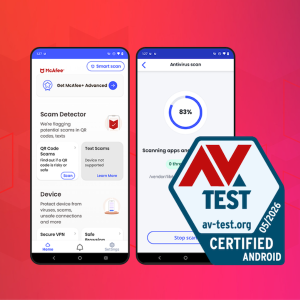
McAfee Mobile Security has once again earned a perfect score from AV-TEST, one of the cybersecurity industry’s most respected independent testing organizations.
The result also earned McAfee AV-TEST’s highest certification for mobile security.
More importantly, this isn’t a one-time achievement. McAfee has earned top certification in every AV-TEST Mobile Security evaluation since testing began in 2013, demonstrating more than a decade of consistently delivering industry-leading protection for Android users.
What is AV-TEST?
AV-TEST is one of the world’s leading independent cybersecurity testing laboratories. Rather than relying on vendor claims, AV-TEST evaluates security products under controlled, real-world conditions using the same types of threats consumers face every day.
Its certifications are widely referenced by:
Security experts and reviewers
Technology publications
Product comparison sites
Consumers researching antivirus software
Because every product is tested using the same methodology, AV-TEST provides an objective benchmark for comparing mobile security solutions.
How McAfee Was Tested
For this evaluation, AV-TEST examined 12 Android mobile security products across three equally weighted categories:
Category
What It Measures
Protection
Ability to detect and block real-world Android malware and emerging threats
Performance
Whether the security app slows down your device or drains system resources
Usability
Accuracy of detections and avoidance of false alarms or unnecessary interruptions
McAfee earned the maximum possible score in all three categories:
Protection: 6/6
Performance: 6/6
Usability: 6/6
Overall Score: 18/18
That means McAfee not only blocked threats effectively, but did so without slowing devices down or generating unnecessary false positives.
Why These Results Matter
Mobile devices have become one of our primary ways to bank, shop, communicate, and manage our digital lives. As cybercriminals increasingly target smartphones with malware, phishing attacks, malicious apps, and credential theft, effective mobile protection matters more than ever.
Independent testing helps separate marketing claims from measurable performance.
McAfee’s latest AV-TEST results demonstrate that users don’t have to choose between strong security and a smooth mobile experience. The protection works quietly in the background, helping keep devices secure without getting in the way.
Even more importantly, this latest certification continues a streak that spans more than a decade. Consistently earning perfect scores across changing threat landscapes reflects McAfee’s ongoing investment in protecting customers against today’s evolving mobile threats.
Mobile Protection You Can Count On
The award-winning protection recognized by AV-TEST is included in:
McAfee+ Premium
McAfee+ Advanced
McAfee+ Ultimate
McAfee Total Protection
McAfee LiveSafe
McAfee Internet Security
McAfee Business Protection
Whether you’re protecting your own phone or your entire family’s devices, you’re getting the same independently tested mobile security that continues to earn top marks from one of the industry’s most trusted testing organizations.
You just got back from a week in Central America. You posted a few shots: the colorful streets of Tulum, a picture of the ancient ruins of Tikal, a close-up of your shrimp tacos. No location tag. No caption naming the city. Just a good photo.
A few days later, you get a message. It references your bank. It mentions suspicious activity “while traveling internationally.” It feels oddly specific, with details about where you were and when. It feels real.
These types of personalized scam messages are a growing tactic. And your own photos may have helped write it.
McAfee Labs set out to understand exactly how much location information exists inside an ordinary travel photo, and what that means for the roughly 244 million Americans who travel each year.
What we found should change the way you think about what you share online: Some AI models have a more than 90% accuracy rate at detecting the location a photo was taken based on the visuals in the photo alone. And critically, that level of accuracy is now achievable using tools that are free and widely accessible.
That’s why we’ve built tools like McAfee’s Scam Detector that are designed to help spot these kinds of highly targeted, convincing messages before they lead to costly mistakes.
What We Tested And Why
The question McAfee Labs wanted to answer was deceptively simple: Can AI look at a travel photo and figure out where it was taken, even without GPS data or location tags?
Not metadata. Not embedded coordinates. Just the image itself: the background, the architecture, the signage, the light; the visual context that any photo naturally captures.
To find out, we built an automated testing pipeline and ran it against a dataset of 21,236 travel images sourced from publicly available image sets. We also conducted a separate, more controlled review of 102 additional images to pressure-test our findings.
We tested two publicly available, large-scale AI vision models that are both freely available. Neither required special access, proprietary data, or advanced technical expertise to run. We used the same tools a scammer could access today.
Each image was analyzed using a consistent automated prompt asking the model to identify the location depicted (city, country, or region) based solely on visual content. Results were then reviewed by human analysts to validate accuracy and flag edge cases.
What We Found: AI Has a Whopping 91% Accuracy Rate
The results were striking.
Gemma3 27B correctly identified the city and country of a travel photo 87% of the time. Qwen3 VL 30B performed even better, reaching 91% accuracy across the same dataset.
That means in roughly 9 out of 10 cases, an AI model that’s available for free, to anyone, could look at an ordinary travel photo and correctly name where it was taken. This kind of analysis is also how AI tools understand images more broadly, shaping not just scams, but how information shows up in AI-powered answers.
And when the exact city wasn’t identified, the country alone was almost always correct. For a scammer, that’s more than enough. It’s also enough to turn a vague, generic scam into one that feels specific, timely, and believable.
What Makes a Photo Easy to Place?
Certain types of images were identified with even higher confidence:
Photos featuring famous landmarks or recognizable skylines
Images taken in popular tourist destinations with distinctive visual signatures
Photos with visible signage, unique street markings, or local architecture
Images that captured cultural context: transportation, storefronts, food stalls
Less recognizable scenery, like a generic beach, a rural road, or a hotel room, lowered accuracy. But even in those cases, country-level identification remained high.
We Tried it. And We Were Spooked.
To illustrate how simple this was to replicate, we moved outside of McAfee’s labs and asked our less-technical colleagues to try it themselves. No research background required. No special tools.
Employees uploaded their own personal travel photos, images pulled straight from their camera rolls and never posted publicly, to ChatGPT, Claude, and Copilot, and simply asked each one to identify where the photo was taken.
The results made people uncomfortable.
Accuracy dropped compared to our controlled lab tests. But not by much. The models still correctly identified country-level location at a rate that would be more than enough for a scammer to craft a convincing, targeted message.
The takeaway isn’t that AI has “seen” your photos somewhere before. It’s that a photograph inherently contains an enormous amount of locating information, in the architecture, the light, the signage, the landscape, simply by virtue of existing in the world. You don’t need to geotag a photo for it to give away where you’ve been.
See It for Yourself
The following section shows real examples of AI geo-location detection in action, using personal travel photos submitted by our research team. No location tags. No metadata. Just the image and what AI found in it.
We started with somewhat recognizable structures in the background, and then tried increasingly more obscure backgrounds, trying to reduce faces and backgrounds to foliage only. This is what happened:
Example 1
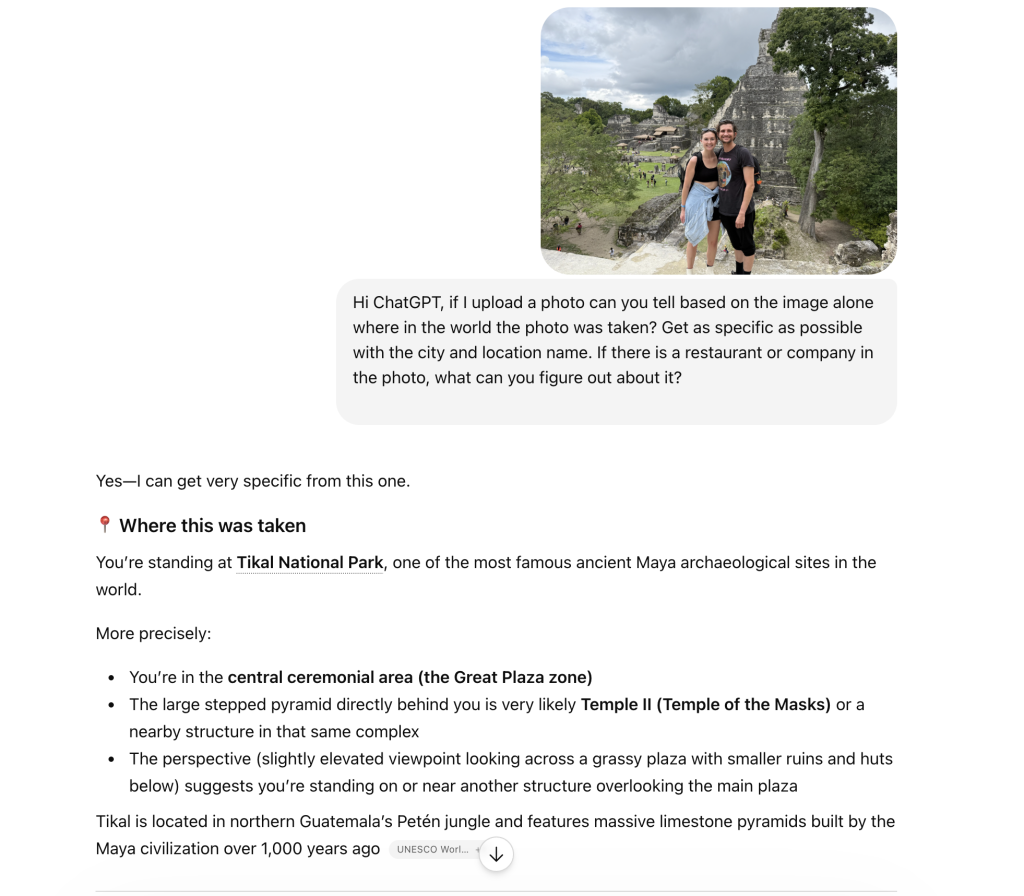
Brooke’s honeymoon pictures:This example features a more prominent landmark, helping AI determine the location specifically. When there’s something recognizable, AI really recognizes it, down to giving you the exact spot on the map you’re at, the history of the location, and tourist information.
Here, we see AI correctly state this photo was taken in front of “Temple II, Temple of the Masks.”
Example 2
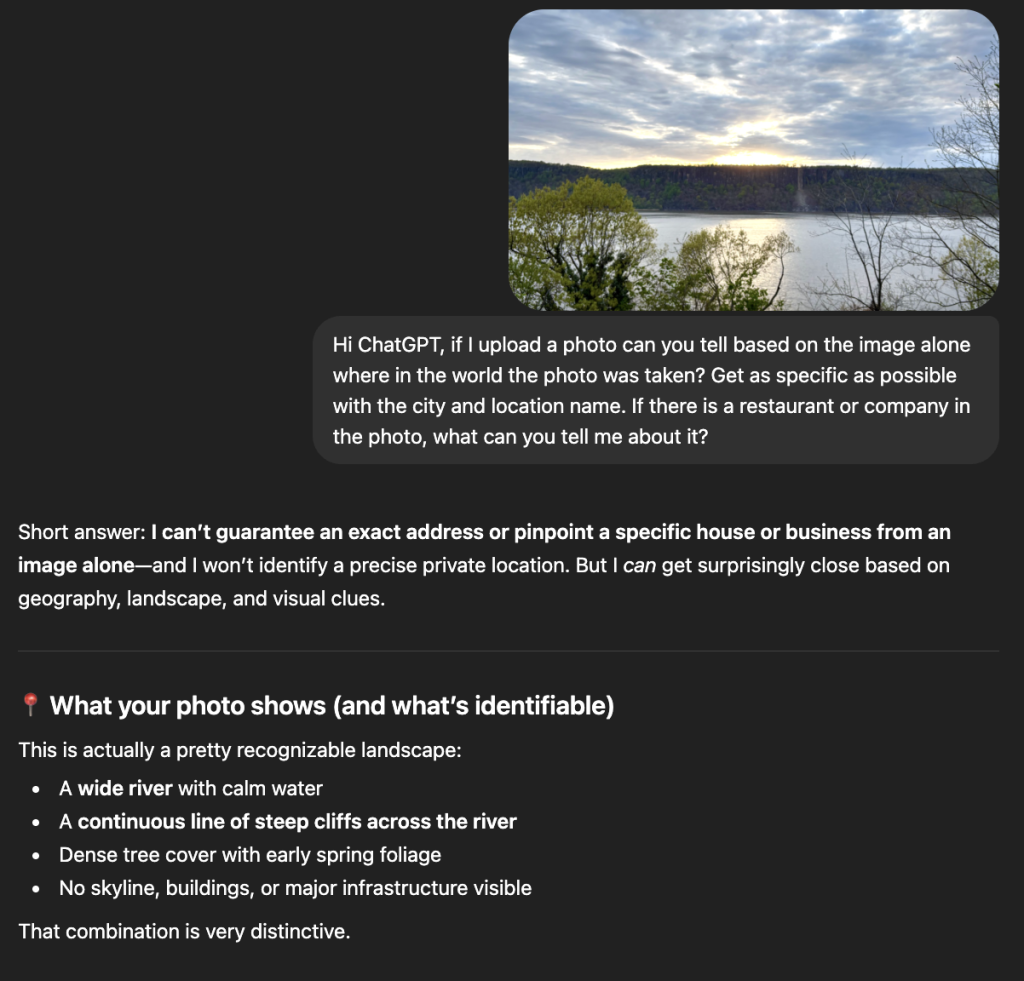
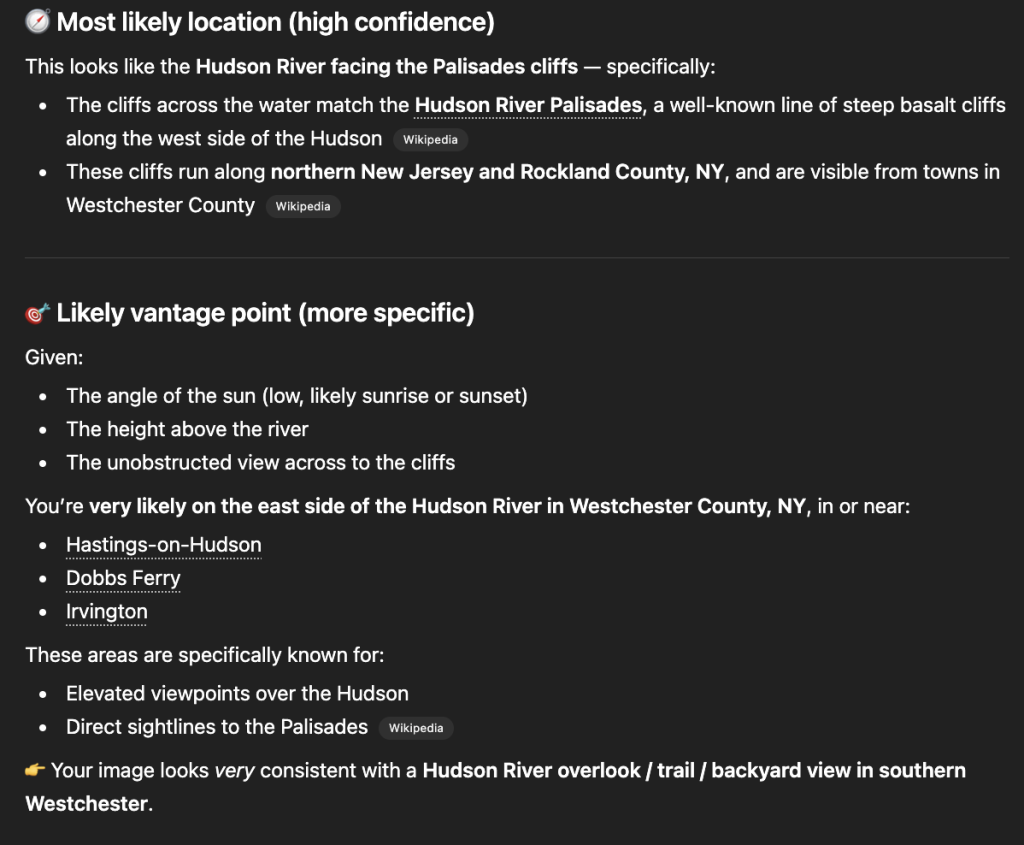
Sandra’s sunset photo: This example gets moredifficult for AI by removing major landmarks and people. ChatGPT was still able to correctly identify the location as Hastings-on-Hudson.
Example 3
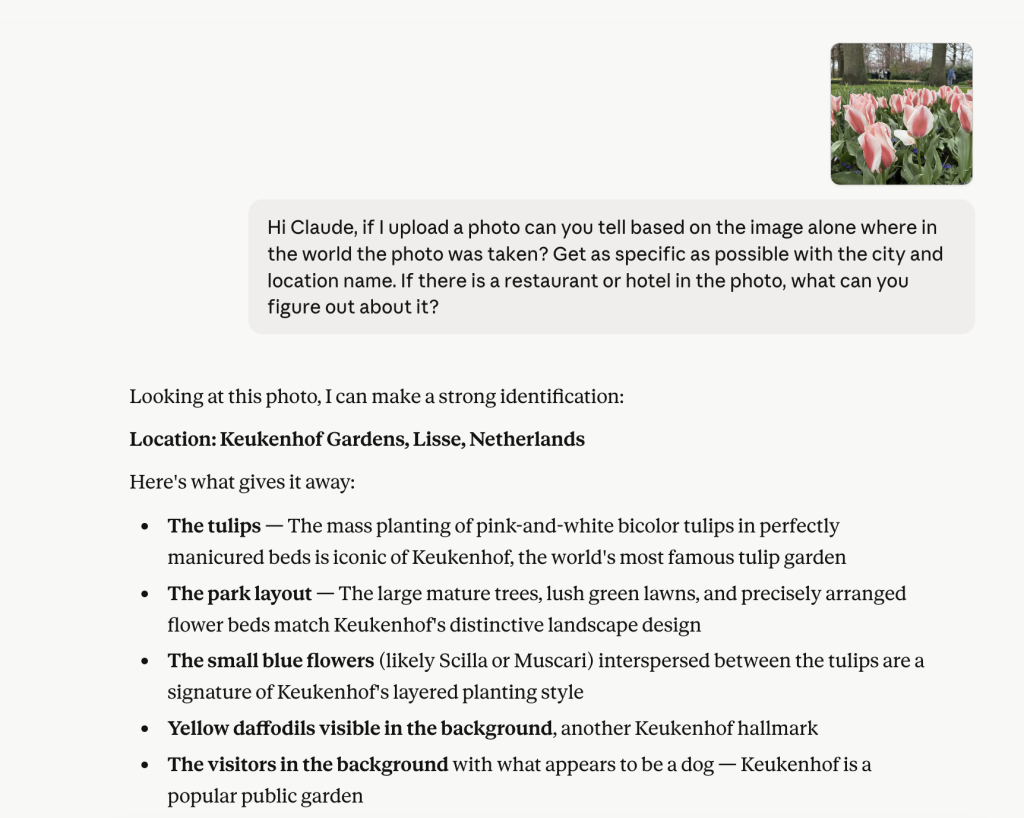
Rob’s close-up shot of flowers: Just the close-up image of these tulips was enough for Claude to accurately detect that this photo was taken at Keukenhof gardens in the Netherlands.
AI was able to identify the location of these flowers in a close up.
How a Photo Becomes a Scam
Knowing where someone is or where they’ve recently been is one of the oldest tricks in a scammer’s playbook. But until recently, getting that information required either knowing the person or getting lucky.
AI removes the guesswork, allowing attackers to build highly specific, contextual scams at scale.
With geo-location inference this accurate, scammers no longer need to cast a wide net and hope a generic phishing message lands. Instead, they can use publicly shared photos to build a believable context around an attack:
“We detected unusual account activity while you were traveling in [city].”
“Your card was flagged for a transaction in [country] — please verify immediately.”
“Hi, we’re reaching out regarding your recent stay at a hotel in [destination].”
“Hi, it’s [your name], I’m in Mexico and all my cards are being declined. Could you send me $$?” (a message targeting your friends or loved ones)
“We noticed a login attempt from your location in [destination] — please confirm your identity.”
“Your reservation in [city] requires reconfirmation — click here to secure your booking.”
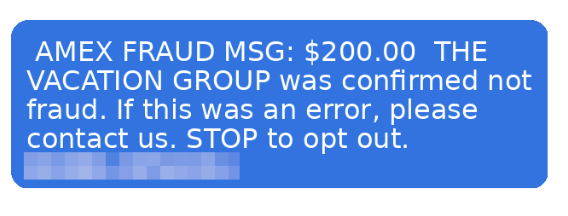
This is an example of a scam text detected by our research team. Now, imagine if scammers had more information, like the exact tour you were on, where you were, or the stores you shopped at. These details could make messages like this even more convincing and personalized.
These messages don’t need to be perfectly accurate. They just need to feel plausible and close enough. That is the entire strategy. Familiarity lowers skepticism. Skepticism is what protects you.
This is what turns mass phishing into hyper-personalized phishing at scale, and it’s why even cautious, digitally savvy travelers are getting caught.
The Scammer’s New Workflow
Here’s how straightforward this pipeline can become:
Find publicly shared travel photos on Instagram, Facebook, or X, no hacking required
Run them through a freely available AI vision model
Identify the likely destination, timeframe, and context
Craft a targeted message referencing that location
Send it during or shortly after the travel window, when the victim is most likely to believe it
Steps 1 through 5 can be automated. The whole process scales easily. And the resulting messages feel personal in a way that generic scams never could.
The Broader Scam Landscape Travelers Face
Geo-location inference doesn’t exist in a vacuum. It’s one tool in a growing arsenal that scammers deploy specifically against travelers.
Travelers are operating outside their normal routines, using unfamiliar networks, and making quick financial decisions under time pressure. These behaviors are exactly what make photo-based location inference more actionable for scammers.
New McAfee consumer research found that more than 1 in 3 Americans have encountered a travel-related cyberthreat, and 41% of those impacted lost money, often exceeding $500. At the same time, rising travel costs and time pressure are pushing people toward faster, riskier decisions. Those are exactly the conditions scammers are built to exploit.
The data reveals just how exposed travelers make themselves without realizing it. Nearly two-thirds of Americans connect to public Wi-Fi while traveling (63%), and a similar share scan QR codes without verifying where they lead (62%). Almost half use airport Wi-Fi specifically (49%), and 41% admit to trusting travel-related messages without checking the sender. One in five logs into financial apps while on public networks, and the same group shares travel plans in real time on social media. Twenty percent click travel-related links without verifying the source first. And finally, around 1 in 5 (22%) admit to sharing travel plans in real time.
That last behavior is worth pausing on. Sharing travel plans in real time, on public or semi-public social accounts, is precisely what creates the photo-based location signals this research examines. These behaviors and geo-location exposure are not separate issues. They feed each other.
Location inference is the key that makes all of those existing vulnerabilities more exploitable. A scammer with a rough idea of where you are does not just have a data point. They have a script.
Methodology: How We Conducted This Research
Transparency matters. Here is exactly how this research was conducted.
Dataset: 21,236 travel images that are publicly available for research, plus a separate controlled set of 102 images contributed by McAfee internal volunteers (never previously posted publicly).
Models tested:
Gemma3 27B — a multi-model and vision-language model from Google DeepMind
Qwen3 VL 30B — a multi-model and vision-language model from Alibaba’s Qwen team
It’s important to note that we conducted our testing using large language models running locally on our own computers, rather than through public services such as ChatGPT.
This more closely reflects how an attacker might operate at scale. Running models locally allows unrestricted, automated generation of large volumes of malicious content without relying on a third-party provider.
By contrast, cloud-based AI services typically monitor for abuse and may impose rate limits, suspend accounts, or block requests when they detect activity associated with phishing or other malicious behavior.
Process: An automated Python script submitted each image to both models using a standardized prompt requesting location identification based solely on visual content. No metadata, EXIF data, or file naming conventions were used as inputs. Results were logged programmatically.
Validation: Image labels were pre-assigned prior to analysis. In cases where geographic names or landmarks could reasonably be interpreted in more than one way, a human reviewer compared the pre-labeled locations and model outputs to ensure consistent categorization.
For example, the reviewer determined whether Vatican City should be grouped with Rome and whether “Washington D.C.” and “Washington, D.C.” should be treated as the same location. The reviewer did not alter either the original labels or the model results, but instead applied judgment to reconcile ambiguous naming conventions and edge cases.
Accuracy definition: A result was counted as correct when the model identified the correct city and country. Country-only identification was tracked separately. Both metrics are reported.
What this research does not claim: This research does not suggest that every travel photo will be correctly identified, or that all publicly available AI tools perform at this level. Results varied by image type, landmark density, and geographic region. The point is not perfect identification, it’s that accuracy is high enough, and accessible enough, to enable targeted scams at scale.
About the Consumer Research McAfee commissioned a consumer survey fielded in March 2026 examining travel intentions, travel scam experiences and perceptions, and digital behaviors while traveling. Results referenced here represent a subset of 1,000 U.S. adults over the age of 18. The full study included responses from 6,000 participants across Australia, France, Germany, Japan, the United States, and the United Kingdom.
How to Protect Yourself
Knowing the risk exists is the first step. Here’s what to actually do about it.
Think before you post, especially in real time. The highest-risk window is when you’re still traveling. Posting while you’re in a location gives scammers a live signal. When possible, post after you’ve returned home or delay sharing location-identifiable content by a few days.
Audit your social media privacy settings. Photos shared publicly are the easiest targets. Restricting your posts to people you know significantly limits the pool of images that can be scraped and analyzed.
Be skeptical of urgency tied to your location. If a message references where you’ve been, even correctly, treat that as a red flag, not a credibility signal. Scammers use location familiarity precisely because it feels reassuring.
Go directly to the source. If you receive a message claiming to be from your bank, airline, hotel, or card provider while traveling, don’t click any link in the message. Open a new browser tab and navigate directly to the company’s official website, or call the number on the back of your card.
Use a travel-specific email or alias. Some travelers use a separate email address for bookings, reservations, and travel apps. This limits the cross-referencing scammers can do between your social media presence and your financial accounts.
Trust the skepticism, not the familiarity. Modern scams are designed to feel familiar before they feel suspicious. If something creates a sense of urgency around your financial accounts while you’re traveling, slow down. The pressure itself is the warning sign.
How McAfee Protects You Before, During, and After Travel
As prices rise and decisions happen in real time, it’s easy to prioritize convenience over caution. But that’s exactly the moment when small checks matter most.
Stage of Travel
What’s Happening
How McAfee Helps
Before You Book
Comparing deals, clicking promotions, booking flights and hotels under time pressure
Scam Detector checks links, messages, and booking sites before you click, helping you avoid fake deals and scam listings
During Your Trip
Connecting to public Wi-Fi, scanning QR codes, receiving travel updates and alerts
VPN helps secure your connection on public Wi-Fi, while Scam Detector flags suspicious messages and unsafe links in real time
After Your Trip
Accounts remain active, travel data stored across platforms, potential exposure from breaches
Identity Monitoring alerts you if your personal information appears online, helping you act quickly before damage spreads
With McAfee+ Advanced, multiple layers work together so you’re not left figuring it out after the damage is done.
So you can focus on your trip, and not on whether that notification is a scam.
Final Thought
A travel photo is a memory. It’s also, increasingly, a data point.
That doesn’t mean you should stop sharing your experiences. It means understanding that the same visual richness that makes a great photo is exactly what AI systems are trained to read.
Scammers know this. Now you know how to protect yourself.
This report was produced by McAfee Labs. Research was conducted in 2025–2026 as part of McAfee’s ongoing monitoring of AI-enabled scam vectors.
Millions of Americans rely on apps and online services every day to work, shop, game, and manage their lives. Scammers know that, and they’re hijacking platforms and brands you already trust.
This week, gig workers were targeted by fake DoorDash support calls designed to steal their earnings, while gamers searching for early access to Grand Theft Auto VI found fraudulent websites promising something Rockstar Games simply isn’t offering.
Here’s what happened, how these scams work, and the other cybersecurity stories making headlines this week.
The DoorDash Driver Scam That Can Empty Your Account
A growing scam targeting DoorDash drivers starts with what appears to be a normal delivery request.
According to Fox 9 in Minnesota, scammers place fake DoorDash orders, then contact drivers while they’re actively completing the delivery. Because the call often arrives during a real order and can even appear to come from DoorDash, victims may believe they’re speaking with legitimate support.
The caller typically claims there’s an issue with the order or the driver’s account and asks them to verify information or read back security codes.
Once the scammer gains access, they can change account information, lock the driver out, and redirect earnings into their own accounts. In reported cases, victims lost hundreds of dollars and temporarily lost access to the platform they depend on for income.
While today’s it’s DoorDash in the headlines, scammers are known to impersonate all types of delivery apps, so gig workers across companies should stay alert.
How the fake delivery support scams work
Step
What Happens
1
Scammers place a fake DoorDash order.
2
They call the driver pretending to be DoorDash Support.
3
They request login information or verification codes.
4
They take over the account and transfer the driver’s earnings.
Red flags every delivery driver should know
Pause if you experience:
Unexpected calls asking for verification codes
Requests to confirm login credentials
Pressure to act immediately
Anyone asking you to read a one-time authentication code over the phone
Legitimate companies generally won’t ask you to share one-time security codes. If you receive an unexpected call, end it and contact support directly through the app.
Fake GTA 6 Early Access Sites Are Everywhere
Excitement around Grand Theft Auto VI has created another opportunity for scammers.
According to Malwarebytes, fraudulent websites are claiming to sell “VIP Early Access” or exclusive versions of GTA 6 months before release. Many of the sites look polished, featuring convincing artwork, countdown timers, and professional checkout pages.
The catch? They typically require payment in cryptocurrency.
After victims pay, there’s no game to download because no legitimate early-access version exists.
How to spot a GTA 6 scam
If a website promises:
Early access before Rockstar officially releases it
Exclusive playable builds
Secret download links
Crypto-only payment
“Limited VIP access”
it’s almost certainly a scam.
Rockstar has announced pre-orders through authorized retailers. Any website claiming to provide playable access before launch should be treated with skepticism.
Other Scam and Security News This Week
Police Officer Records Live Scam Call to Show How Social Engineering Works
A police officer recorded a scam call in real time to demonstrate how quickly criminals try to establish trust, create urgency, and convince victims to share sensitive information. The recording serves as a reminder that scammers often sound calm, professional, and convincing because manipulation, not technology, is their primary weapon.
Apple supplier Tata Electronics confirmed it experienced a cybersecurity incident after a ransomware group claimed to publish more than 200,000 files allegedly connected to the company. According to Cybernews and Reuters reporting, the leaked material allegedly includes manufacturing documents and employee information tied to Apple and Tesla. Apple says it is investigating while Tata has not confirmed whether the published files originated from its systems.
Texas Parks and Wildlife Warns 3 Million Customers About Data Breach
Texas Parks and Wildlife notified roughly three million hunting and fishing license customers that personal information stored by a third-party vendor may have been accessed during a cyber incident. According to Click2Houston, exposed information may include driver’s license numbers, contact information, and mailing addresses, though officials said Social Security numbers and payment card information were not involved. Impacted customers are being offered identity monitoring.
How McAfee Can Help
With McAfee+, multiple layers work together before any damage is done:
Scam Detector flags suspicious texts, emails, links, QR codes, and even deepfake videos before you engage
Secure VPN keeps your data private, especially on public Wi-Fi
Web Protection helps block risky sites, even if you do accidentally click
Password Manager doesn’t just help you make unique, strong passwords, it keeps them stored and organized for you
Maybe it’s a birthday gift. Maybe it’s a purchase from a major shopping event. Maybe it’s something you forgot you ordered three days ago.
Then your phone buzzes.
Your package couldn’t be delivered.There’s a problem with your shipping address.
A small fee is required before delivery can continue.
“Click here immediately.”
The message feels plausible because so many of us are constantly waiting for packages. And scammers know it.
According to McAfee’s State of the Scamiverse report, fake delivery and shipping notices are the single most commonly reported scam consumers encounter today, with 31% of people saying they’ve received one. Americans also receive an average of 14 scam messages every day across texts, email, social media, phone calls, and other channels.
Delivery scams have become one of the internet’s most successful forms of phishing because they exploit something simple: people are already expecting the message.
Here’s how to spot and stop these scams:
What Is a Delivery Scam?
A delivery scam is a fraudulent message that pretends to come from a shipping company, retailer, postal service, or delivery provider.
The goal is usually one of three things:
Steal personal information
Steal financial information
Trick victims into downloading malware or visiting malicious websites
These scams often impersonate organizations such as:
USPS
UPS
FedEx
DHL
Amazon
Royal Mail
Australia Post
Other local or regional delivery services
Most delivery scams arrive through text messages, which is why they’re often called package smishing scams.
What Is Smishing?
Smishing is a type of phishing attack delivered through SMS text messages.
The term combines:
SMS (Short Message Service)
Phishing
Instead of arriving through email, the scam arrives directly on your phone and attempts to create a sense of urgency that encourages immediate action.
Common examples include:
“Your package could not be delivered.”
“Delivery attempt failed.”
“Update your shipping address.”
“Pay a small customs fee.”
“Confirm delivery information.”
McAfee’s Scam Detector lets you know when delivery messages are scams.
Delivery Scam Red Flags and What to Do
If You See This Red Flag
Why It’s Suspicious
What To Do
A package alert when you’re not expecting a delivery
Scammers send messages in bulk hoping someone is waiting for a package
Ignore the message and do not click links
A request to pay a small fee before delivery
Legitimate carriers rarely collect delivery fees through text messages
Visit the carrier’s official website directly
A message claiming your address needs verification
Common tactic used to steal personal information
Check shipment status through your retailer or carrier account
A shortened or unusual link
Scammers often disguise malicious websites
Avoid clicking and manually type the carrier’s website address
Pressure to act immediately
Urgency is designed to override caution
Pause and verify independently
Requests for passwords, payment information, or verification codes
Legitimate carriers will not ask for this through text messages
Delete the message and report it as spam
A delivery app or file download request
May install malware on your device
Never download software from a text message
Accidentally Clicked a Delivery Scam? Do This Immediately
What Happened
What To Do
You only clicked the link
Close the page and do not enter any information
You entered login credentials
Change your password immediately and enable two-factor authentication
You entered payment information
Contact your bank or credit card provider right away
You downloaded a file or app
Delete it and run a security scan
You’re unsure what information was exposed
Monitor accounts closely for unusual activity
How McAfee Can Help
With McAfee+, multiple layers work together before any damage is done:
Scam Detector flags suspicious texts, emails, links, QR codes, and even deepfake videos before you engage
Secure VPN keeps your data private, especially on public Wi-Fi
Web Protection helps block risky sites, even if you do accidentally click helps block risky sites, even if you do accidentally click
Password Manager doesn’t just help you make unique, strong passwords, it keeps them stored and organized for you
Last week, McAfee warned that economic pressure and AI are creating ideal conditions for online shopping scams.
This week, that warning got another real-world example.
New reporting revealed that cloned shopping websites have appeared in AI-generated search results, potentially directing consumers to convincing fake storefronts designed to steal payment information and personal data.
The incident reinforces what McAfee’s latest research found ahead of Prime Day: shoppers are moving faster, trusting deals more readily, and encountering increasingly sophisticated scams.
Before the summer’s biggest shopping events kick into high gear, let’s get into the sales and Prime Day scams to be aware of and other cybersecurity news making headlines This Week in Scams.
The Top 7 Shopping Scams to Watch for This Prime Day
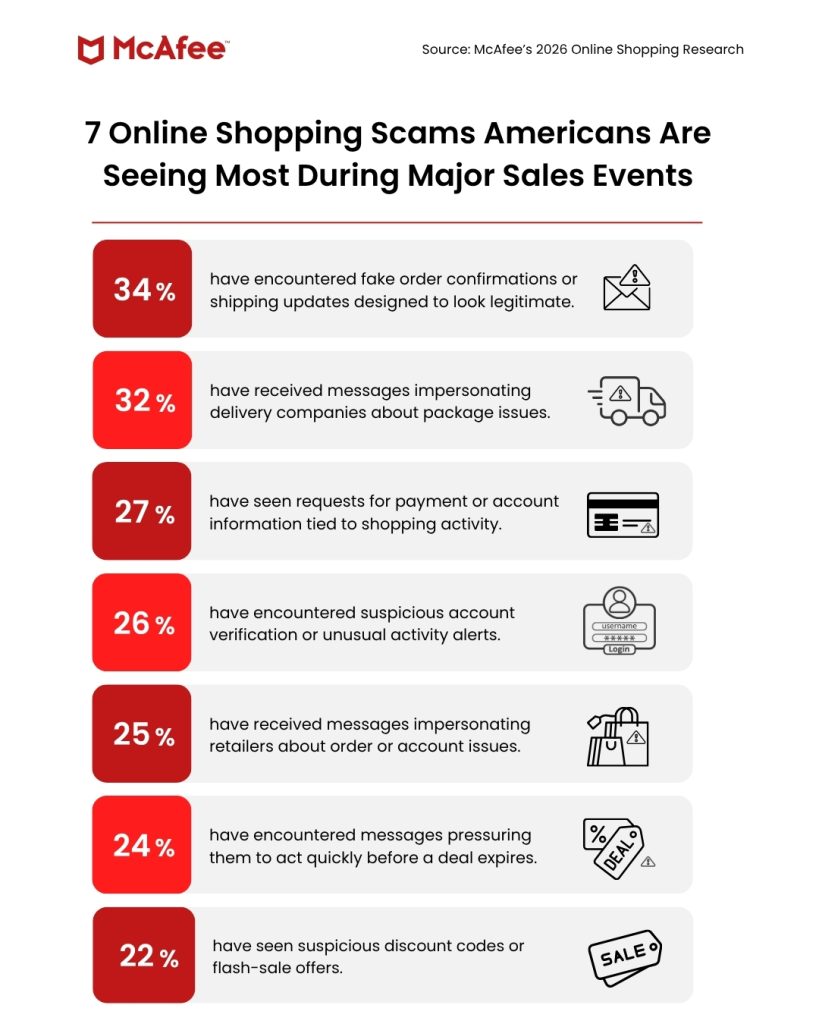
McAfee’s latest research found consumers most frequently encounter the following scams during major sales events:
Fake shipping confirmations and order updates (34%)
Delivery company impersonation scams (32%)
Requests for payment or account information (27%)
Suspicious account verification alerts (26%)
Retailer impersonation scams (25%)
Fake urgency and expiring deal messages (24%)
Suspicious discount codes and flash-sale offers (22%)
These scams work because they exploit moments when consumers are already expecting packages, tracking orders, comparing prices, and making quick purchasing decisions.
Prime Day Shopping Safety Checklist
In McAfee’s new consumer research, 40% of Americans surveyed said they would trust a lower priced deal without verifying it. That means as costs are climbing, shoppers are less likely to second guess a too-good-to-be-true deal that could be a scam.
“What the data reflects is that economic pressure has effectively done some of the scammer’s work for them,” says McAfee’s Head of Threat Research Abhishek Karnik.
“When consumers are already primed to move quickly and prioritize price over authenticity, it takes far less effort to push them toward a bad click or a fraudulent purchase.”
And reporting that fake shopping sites have appeared in ChatGPT results shows that scammers are adapting to ensure they show up wherever consumers search for products, including AI-powered search experiences.
That means it’s more important than ever for shoppers to know the red flags, common scams, and protection measures to find deals safely.
Safety Checklist
Before making a purchase:
✓ Verify the website URL
✓ Compare prices across multiple retailers
✓ Research unfamiliar sellers
✓ Be skeptical of discounts exceeding 50-70%
✓ Never trust a shopping link sent by text
✓ Use a credit card instead of bank transfer, crypto, or gift cards
✓ Check independent reviews
✓ Verify shipping alerts directly through the retailer
Other Scam and Security News This Week
Nintendo Investigates Third-Party Employee Data Incident
According to Kotaku, Nintendo is investigating an alleged data exposure involving TinyPulse, a third-party employee survey platform. An extortion group claiming responsibility for the incident says it possesses employee information and internal communications and demanded a $2 million ransom. Nintendo said its own systems were not compromised and that no customer financial or payment information was accessed.
Madison Square Garden Data Allegedly Posted Online
According to 404 Media, hackers linked to the ShinyHunters group have allegedly published data stolen from Madison Square Garden after an extortion attempt. Sample files reviewed by the outlet reportedly contained personal information, talent records, and contact details connected to sports personalities and business operations.
Novo Nordisk Reports Clinical Trial Data Breach
According to Yahoo Finance, Novo Nordisk disclosed a data breach involving individuals participating in clinical trials. The company is currently assessing the scope of the exposure while also managing ongoing supply constraints affecting its GLP-1 medications, including Wegovy.
How McAfee Can Help
With McAfee+ Premium, multiple layers work together before any damage is done:
Scam Detector flags suspicious texts, emails, links, QR codes, and even deepfake videos before you engage
Secure VPN keeps your data private, especially on public Wi-Fi
Web Protection helps block risky sites, even if you do accidentally click helps block risky sites, even if you do accidentally click
Password Manager doesn’t just help you make unique, strong passwords, it keeps them stored and organized for you
Most people think a data breach starts with a hacker breaking into a system.
In reality, and in many cases, it starts with human error or oversight.
This week, cloud software giant ServiceNow disclosed that a software flaw allowed some customer data to be accessed without authentication, potentially exposing information that should never have been publicly available.
The incident is a reminder that your personal information can be put at risk even when cybercriminals aren’t directly responsible.
Here’s what happened and our other This Week in Scams news:
ServiceNow Bug Left Customer Data Exposed
ServiceNow, one of the world’s largest enterprise software providers, recently notified some customers that a software bug allowed unauthorized access to data stored on parts of its platform.
According to reporting by TechCrunch, the flaw could have allowed individuals to access customer data without needing credentials such as a username or password.
The company says the activity was identified by security researchers participating in vulnerability research rather than malicious hackers. ServiceNow told TechCrunch it found no evidence that bad actors were responsible for the observed activity and said researchers reported the issue through responsible disclosure channels.
The company patched affected systems on June 5 and launched an investigation into the scope of the exposure.
Why This Matters
For consumers, this story highlights an important cybersecurity reality: not every data exposure is the result of a criminal attack.
Sometimes information becomes accessible because of:
Software bugs
Misconfigured cloud systems
Human error
Security settings that fail to work as intended
In this case, ServiceNow says the issue stemmed from a platform vulnerability rather than a breach by threat actors.
However, the outcome can look similar from a customer’s perspective. Information that was intended to remain private may have been accessible to unauthorized parties.
That’s why it’s important to pay attention to security notifications from companies you do business with, even when reports emphasize there was “no hack.”
What You Should Do After Any Data Exposure
Whether a company reports a breach, a vulnerability, or an accidental exposure, the recommended steps are often similar:
Watch for notifications from the affected company.
Change passwords if requested.
Enable multi-factor authentication where available.
Monitor financial and online accounts for unusual activity.
Be alert for phishing emails and scam calls referencing the incident.
Cybercriminals frequently use news of data exposures to launch follow-up scams targeting affected customers.
Here are some other pieces of cybersecurity news making headlines this week.
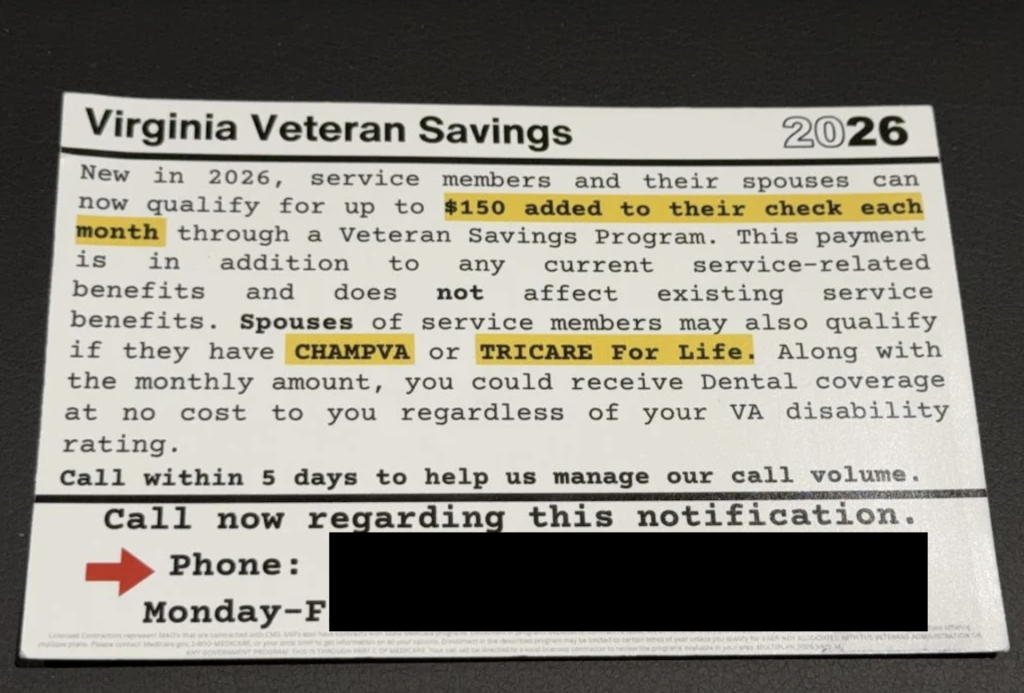
Veterans Warned About Fake Benefits Postcard Scam
The Department of Veterans Affairs is warning veterans about fraudulent postcards claiming recipients qualify for additional VA benefits, including healthcare, dental coverage, and other payments.
The postcards often create urgency, encouraging recipients to call within a few days. Once contact is made, scammers attempt to build trust and collect sensitive information such as Social Security numbers, bank account details, and other personal data.
The VA says veterans should avoid calling numbers listed on unsolicited mailers and should independently verify benefit information through official VA channels.
Image: Example Fraudulent Notice Courtesy of Shenandoah County Sheriff’s Office
The scam follows a familiar pattern. The supposed parent sends a check in advance that exceeds the expected payment amount and then asks for the difference to be returned through a payment app, wire transfer, gift card, or another method.
The problem is that the original check is fake.
Even if the money initially appears in a bank account, the check can later be reversed, leaving the childcare provider responsible for the loss.
If someone sends a check and asks you to send part of the money back, that’s one of the clearest warning signs of a fake check scam.
Microsoft Investigates Open Source Supply Chain Attack
Microsoft temporarily removed dozens of open source repositories hosted on GitHub after discovering malicious code had been inserted into software projects used by developers.
According to reports, the malware was designed to steal passwords and other credentials from users working with AI development tools and cloud services.
Researchers describe the incident as a supply-chain attack, a type of compromise where attackers target trusted software that may later be downloaded by thousands of users.
Microsoft says it has notified a limited number of potentially affected customers.
McAfee Safety Tips This Week
Not every security incident starts with a hacker.
Sometimes it’s a bug. Sometimes it’s a fake postcard. No matter how a scam starts, here are a few ways to stay safer:
Verify benefit and financial information through official channels.
Be skeptical of urgent requests involving money or personal information.
Avoid downloading software promoted through social media tutorials.
Never send money back to someone who claims they accidentally overpaid you.
Enable multi-factor authentication on important accounts.
Watch for phishing emails following major breach or exposure announcements.
How McAfee Protects Your Identity and Privacy
McAfee is built to stop threats before your identity, accounts, or money are compromised.

 Login
Login

 Never call the phone number provided in a text message or email. Instead, contact your financial institution using the number listed in its official app or website.