❌

Reading view

Cleverbridge Data Breach: What to Do If You Got a Letter From Cyberscout

Cleverbridge, a company that runs online checkout and payments for many software sellers, says a third party copied payment card data stored on its platform after it detected unauthorized activity on Nov. 4, 2026. Cleverbridge’s clients include Red Hat, Sony, and SUSE. The breach was on Cleverbridge’s platform, not those companies’ own systems, and Cleverbridge hasn’t said which sellers’ customers were affected.

Notices began going out Nov. 20 through TransUnion’s Cyberscout. A notice seen by BleepingComputer lists card numbers, expiration dates, and CVV/CVC security codes. Those three details are what most online checkouts ask for, so if you got a notice, the best way to protect yourself is to get a new card number immediately.

What Happened in the Cleverbridge Data Breach?

Cleverbridge detected unauthorized activity on its platform on Nov. 4, 2026, and took affected systems offline. Its status page shows the platform was back up by 14:25 UTC that day. A later investigation found that payment card data had been copied. On Nov. 20, 16 days after detection, TransUnion’s Cyberscout began sending notices to affected people on Cleverbridge’s behalf.

Cleverbridge says it wasn’t a ransomware attack and no systems were encrypted. It notified data protection authorities, card networks, and payment partners, and is working with a police cybercrime unit, according to The Register.

Why Did Cleverbridge Have CVV Codes?

Card industry security rules (PCI DSS) generally don’t allow businesses to keep CVV codes after a payment is authorized. As of publication, Cleverbridge’s incident page doesn’t explain why CVV data was on its platform.

What Was Stolen, and Was My CVV Taken?

According to the notices, card numbers, expiration dates, and CVV/CVC codes were copied. Cleverbridge’s own incident page says CVV data was included “in a minority of cases,” so not every affected card may include the CVV.

Reports differ on contact details. The notice BleepingComputer saw says no names, contact details, or billing details were copied. The customer email quoted by The Register lists “contact details” alongside the card data. Cleverbridge tells people to check their individual notice for specifics.

What Can Criminals Do With a Stolen Card Number and CVV?

A card number, expiration date, and CVV together can let someone make online and phone purchases without the physical card. This is called card-not-present fraud, and it’s how someone can use your credit card without having the card itself.

Some checkouts also ask for a name or billing ZIP code, which could block some purchases if that data wasn’t taken. Many sites don’t ask for either, though, so a stolen number and CVV can still feed common credit card scams.

Is the Cleverbridge Breach Letter From Cyberscout Real?

Real notices are going out, but that doesn’t mean every message about the breach is real. Cleverbridge says it hired TransUnion’s Cyberscout to send its notices, so a real notice may come from Cyberscout rather than from Cleverbridge directly.

Scammers copy real breach notices, so treat any message about the breach as a possible phishing email. Check before you act:

  • Compare the details with Cleverbridge’s incident page.
  • Don’t click links or call numbers in a message you didn’t expect. Go to your card issuer’s app or the number on your card.
  • Cleverbridge says it will never ask for card details, passwords, or security codes by email, phone, or text. So, anyone who does is not Cleverbridge.
  • Never share a one-time code with someone who contacts you about the breach.

Cleverbridge says it’s offering credit or identity monitoring “where available,” with sign-up steps in each notice. The Register reports the offer is 24 months of credit monitoring and fraud assistance. Sign up only through the code in your notice. Credit monitoring watches your credit file. It won’t stop charges on a card that’s already been copied, so you should still prioritize replacing your card.

What to Do If Your Card Was in the Cleverbridge Breach

Start with your card issuer. A new card number protects you even if you haven’t seen any fraud yet.

  1. Ask for a new card number. Call the number on the back of your card or use your issuer’s app. Replacing the card voids the stolen number and CVV.
  2. Turn on transaction alerts. Alerts in your bank or card app flag charges as they happen.
  3. Check your recent statements. Dispute any charge you don’t recognize, including small ones.
  4. Update saved cards. When the new card arrives, update subscriptions and saved checkouts, including the software you bought through Cleverbridge.
  5. Watch for follow-up scams. Expect calls, texts, and emails that mention the breach. Contact your bank only through its app or the number on your card.
  6. Keep records. Save your notice, statements, and any messages about the breach in case you need to dispute charges.

Didn’t get a notice but see a Cleverbridge charge? Check your statements anyway. If your card is misused, here’s where to get help.

Will You Have to Pay for Fraudulent Charges?

Usually not, if you report it quickly. When only your card number is stolen and not the card itself, you aren’t responsible for charges you didn’t authorize on a credit card, according to the FTC. For debit cards, the FTC says you’re covered if you report unauthorized charges within 60 days after your statement is sent.

Debit card fraud can take money from your bank account until the dispute is resolved, so report it right away. Major card networks also have their own zero-liability policies, which have conditions. Check your card agreement for the terms that apply to you.

How to Report Credit Card Fraud

If you find charges you didn’t make, report them in this order:

  • Your card issuer: Call the number on your card to dispute charges and freeze or replace the card.
  • FTC: File a report at ReportFraud.ftc.gov.
  • FBI Internet Crime Complaint Center: Report phishing or scam contact tied to the breach at ic3.gov.
  • Local police: File a report if you lost money and your bank asks for one.

Cleverbridge hasn’t said how many cards were copied or whether all notices have gone out. If you got a notice, ask your issuer for a new card number. If you’ve only seen Cleverbridge on your statement, turn on transaction alerts, watch your statements, and ask your issuer about a replacement if anything looks off. Once the old number is closed, the copied card information can no longer be used for new purchases, even if it’s sold or shared later.

FAQ

Why Is Cleverbridge on My Card Statement?

Cleverbridge is a real e-commerce and payment company that software and online-service businesses use to sell products, process payments, and manage subscriptions. Because it often handles the sale on the seller’s behalf, the name Cleverbridge or Cleverbridge Inc. can show up on your card statement instead of the brand you bought from. That’s why some people are getting breach notices from a company they don’t recognize.

What Companies Use Cleverbridge?

Cleverbridge processes payments for many software and online-service businesses, including Sony, Red Hat, and SUSE. It hasn’t said which sellers’ customers were affected by this breach.

How Can I Check If My Card Was in the Cleverbridge Breach?

Cleverbridge says affected people are getting individual notices, sent by Cyberscout starting Nov. 20, 2026. If you didn’t get one but bought software online with a card that shows Cleverbridge charges, watch your statements and consider asking your issuer for a new card number if anything looks off. 

The post Cleverbridge Data Breach: What to Do If You Got a Letter From Cyberscout appeared first on McAfee Blog.

  •  

Holiday Shopping Scam Reports Surge 91% as McAfee Warns of 12 Scams of Christmas

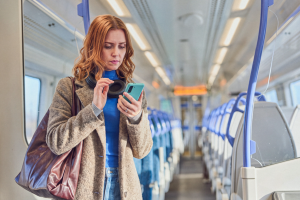
Woman on metro looking at phone

Finding the perfect holiday gift is one thing. Finding it at the right price is another.

And with shoppers searching for deals on everything from the latest gadgets to this year’s must-have toys, scammers have plenty of opportunities to get their attention.

New McAfee research reveals a sharp increase in Americans reporting holiday shopping scams. 42% say they’ve fallen for a holiday shopping scam, up from 22% last year. That’s a 91% year-over-year increase.

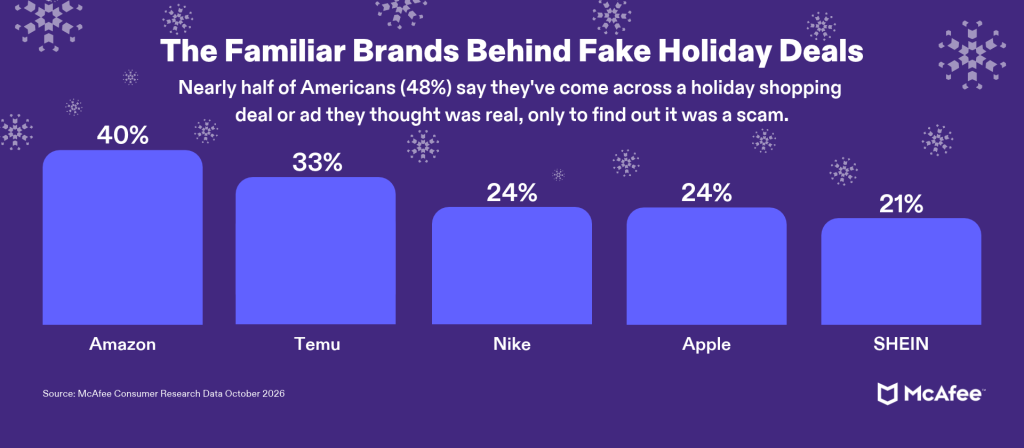
At the same time, shoppers are becoming less confident in their ability to recognize fraud. Just 75% of Americans say they can spot an online scam, down from 90% in 2025. Nearly half (48%) say they’ve encountered a holiday deal or advertisement they initially trusted, only to discover it was a scam.

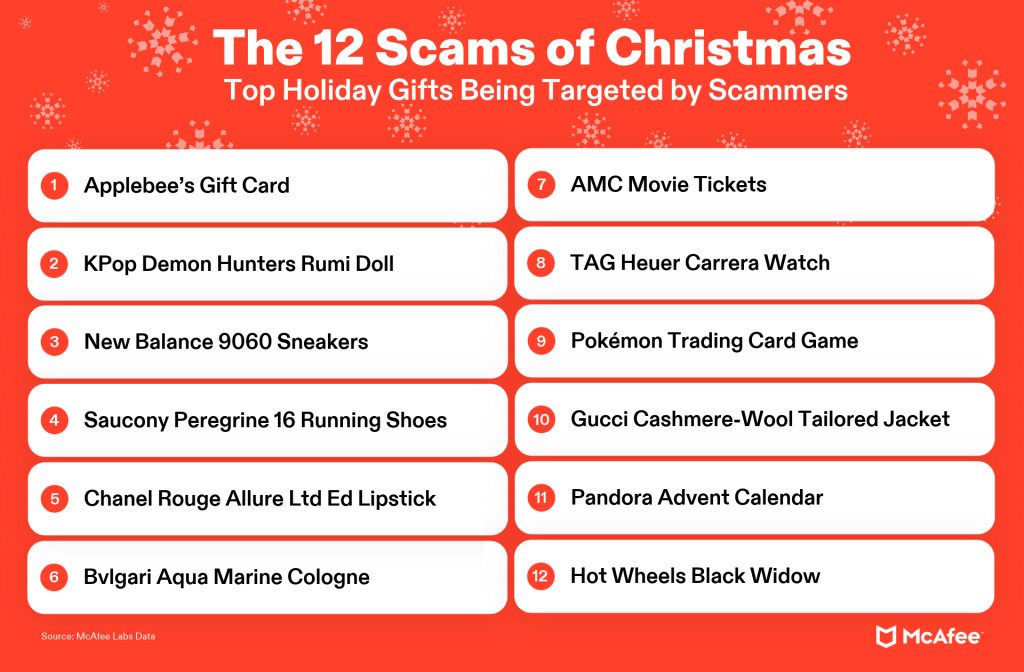
To understand how shoppers are being targeted, McAfee Labs investigated searches for this year’s most popular holiday gifts, identifying products associated with suspicious websites and potentially fraudulent offers. The findings reveal the 12 Scams of Christmas, including popular toys, sneakers, collectibles and gift cards. These are popular  gifts where shoppers searching for a deal are more at risk of running into a scam.

In some cases, suspicious activity appeared less than a minute after a search.

Purple McAfee bar chart titled "The Familiar Brands Behind Fake Holiday Deals." Among brands associated with fake holiday shopping deals encountered by survey respondents, Amazon leads at 40%, followed by Temu at 33%, Nike and Apple at 24% each, and SHEIN at 21%. The infographic also states that 48% of Americans have encountered a holiday shopping deal or ad they believed was real but later discovered was a scam. Source: McAfee Consumer Research, October 2026.
Scammers are exploiting familiar retail brands to lure holiday shoppers. McAfee’s October 2026 consumer research found that 48% of Americans have encountered a holiday deal or advertisement they initially believed was legitimate, only to discover it was a scam. Amazon, Temu, Nike, Apple, and SHEIN were among the brands most frequently associated with these deceptive offers.

Which Brands Are Being Impersonated in Holiday Shopping Scams

From familiar shopping destinations like Amazon and Temu to sought-after brands like Nike and Apple, scammers use recognizable names to make fraudulent offers appear legitimate.

An Amazon scam, for example, might involve a fake shopping website that looks like the real retailer but is designed to collect payment information instead of fulfilling an order.

When asked which brands they recalled seeing impersonated in suspicious or fraudulent holiday shopping deals, Americans most frequently identified Amazon (40%), Temu (33%), Nike and Apple (24% each), followed by eBay and SHEIN (21% each).

These findings don’t mean the brands themselves are unsafe. Scammers borrow familiar names, logos and product images to make an unfamiliar offer appear trustworthy.

Nearly one-third of Americans (30%) say a retailer appearing to be a recognizable brand could cause them to overlook signs of a potential scam, while 26% say positive customer reviews could have the same effect.

Clothing, shoes and sneakers were the most commonly reported category in Americans’ most recent holiday shopping scams involving financial loss (20%), followed by smartphones and tablets (11%) and gaming consoles and video games (10%). Gift cards, jewelry and watches, toys and collectibles, and headphones and other electronics each accounted for 8%.

To be clear, these figures reflect reported losses, not evidence that the products themselves are unsafe.

Red McAfee infographic titled "The 12 Scams of Christmas: Top Holiday Gifts Being Targeted by Scammers." The 12 listed products are Applebee's gift cards, KPop Demon Hunters Rumi dolls, New Balance 9060 sneakers, Saucony Peregrine 16 running shoes, Chanel Rouge Allure limited-edition lipstick, Bvlgari Aqua Marine cologne, AMC movie tickets, TAG Heuer Carrera watches, Pokémon Trading Card Game products, Gucci cashmere-wool tailored jackets, Pandora advent calendars, and Hot Wheels Black Widow. Source: McAfee Labs Data.
From collectible toys and sneakers to luxury goods and gift cards, scammers are targeting some of the season’s most sought-after gifts. McAfee Labs identified 12 holiday products appearing in scam activity, highlighting how fraudsters capitalize on popular shopping trends and consumer demand.

The 12 Scams of Christmas: Which Holiday Gifts Are Scammers Targeting?

Every holiday season brings a new list of must-have gifts. But searching for the perfect present can also lead shoppers to suspicious websites and fraudulent offers.

McAfee Labs analyzed online searches for popular holiday gifts and identified the 12 Scams of Christmas, products that, by no fault of their own, were associated with some of the highest rates of suspicious or malicious website activity following a search.

  1. Applebee’s Gift Card
  2. KPop Demon Hunters Rumi Doll
  3. New Balance 9060 Sneakers
  4. Saucony Peregrine 16 Running Shoes
  5. Chanel Rouge Allure 88 Rose Mystery Lipstick
  6. Bvlgari Aqva Marine Cologne
  7. AMC Movie Tickets
  8. TAG Heuer Carrera Watch
  9. Pokémon Trading Card Game
  10. Gucci Cashmere-Wool Blend Tailored Jacket
  11. Pandora Advent Calendar
  12. Hot Wheels Black Widow

These products aren’t inherently dangerous. The risk comes from fraudulent sellers and suspicious websites using popular gifts to attract shoppers.

“Scammers know which gifts people want, and they use that demand to put convincing fake offers in front of shoppers,” says McAfee Threat Researcher Charles McFarland.

“Whether it’s a hard-to-find collectible or a discounted pair of sneakers, shoppers should take a moment to verify who they’re buying from before entering payment information.”

How Quickly Can Holiday Shopping Searches Lead to Fake Websites?

McAfee Labs found that suspicious or malicious activity could follow searches for popular gifts in a matter of seconds.

For searches involving AMC Theatres, the median time to detected suspicious activity was just 13 seconds, compared with approximately 22 seconds for Applebee’s and 1 minute and 18 seconds for Pandora.

Researchers also uncovered suspicious shopping sites offering sought-after products, including KPop Demon Hunters dolls, popular sneakers and Pokémon trading cards.

Parody Pokémon trading card titled "Mona Pika," depicting Pikachu as Leonardo da Vinci's Mona Lisa. Pikachu has yellow ears with black tips, red cheeks, long dark hair, and folded hands, posed against a Renaissance landscape. The card features 60 HP, a lightning-type symbol, and a fictional move called "Pika-Portrait."
Meet Mona Pika, a playful mashup of Pokémon’s Pikachu and Leonardo da Vinci’s Mona Lisa. The parody trading card puts a Renaissance twist on the beloved character.

One unusual finding involved the Mona Pika, an unofficial, fan-made Pokémon card featuring Pikachu styled after the Mona Lisa. Searches for this collectible were particularly prominent in the Pokémon research, illustrating how niche collectibles and viral products can attract online attention.

The card itself is not necessarily fraudulent, but shoppers looking for rare or unofficial merchandise should verify sellers before purchasing.

Why Holiday Shopping Deals Can Be Too Good to Be True

Finding a bargain is part of the holiday shopping experience, especially during major sales events like Black Friday and Cyber Monday. But the same discounts that make these events appealing can also make fraudulent offers harder to resist.

McAfee’s research suggests that when shoppers think they’ve found a particularly good deal, they may be more willing to overlook the warning signs.

68% of Americans report engaging in at least one potentially risky shopping behavior to secure a better holiday deal.

Nearly one-quarter (23%) purchased from a website they weren’t entirely sure was legitimate, while 22% bought from an unfamiliar retailer. Another 21% purchased from sellers with limited or no reviews, and the same percentage shared personal information to claim a discount.

Nearly one-third of Americans (31%) admit they’ve ignored a scam warning sign because they didn’t want to miss out on a deal. Among those shoppers, the most commonly ignored red flag was an unusually low price (47%), followed by unfamiliar sellers and questionable reviews (37% each).

AI can make these offers more convincing. According to McAfee’s research, 74% of Americans are more concerned about AI-generated scams than they were a year ago, while 70% believe AI-generated holiday scams can appear convincing.

Scammers can use AI to create realistic product images, polished advertisements and messages that imitate legitimate businesses. But the underlying tactics remain familiar: impersonating trusted retailers, offering attractive deals and pressuring shoppers to act quickly.

What Are the Most Common Holiday Shopping Scams?

McAfee found that Americans most frequently encountered suspicious messages involving gift cards or prize offers (49%), package delivery problems (42%) and limited-time deals (32%). Account verification alerts and order confirmations or shipping updates each appeared in 30% of reported experiences, followed by refund notifications at 27%.

Many rely on phishing, a tactic where scammers impersonate trusted businesses to trick people into clicking dangerous links, sharing personal information or making payments.

A shopper expecting a package might receive a text claiming their delivery address needs updating. Someone searching for a popular gift might encounter an advertisement promising an unusually large discount. Both can lead to fraudulent websites designed to collect payment information or steal personal details.

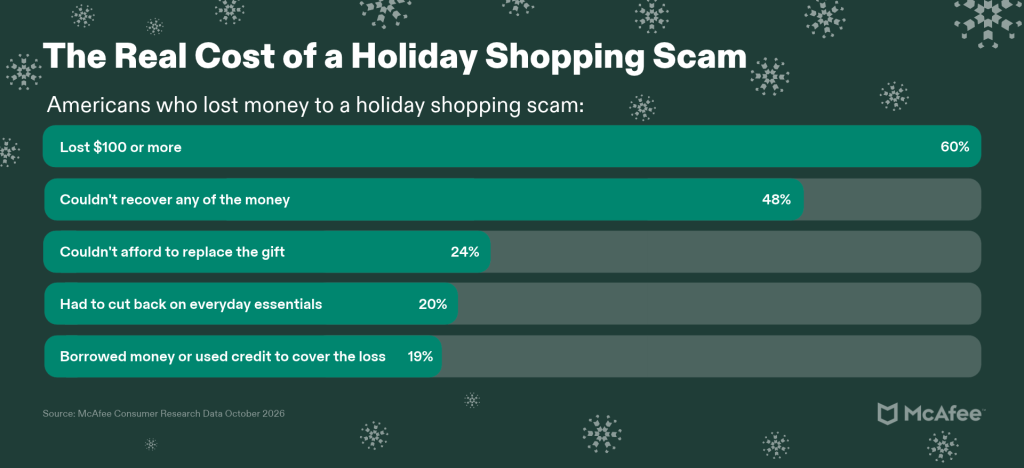
Dark green McAfee infographic titled "The Real Cost of a Holiday Shopping Scam." A horizontal bar chart shows the financial impact on Americans who lost money to holiday shopping scams: 60% lost $100 or more, 48% couldn't recover any money, 24% couldn't afford to replace the gift, 20% had to cut back on everyday essentials, and 19% borrowed money or used credit to cover the loss. Source: McAfee Consumer Research, October 2026.
Holiday shopping scams can have consequences that extend well beyond a lost purchase. According to McAfee’s October 2026 consumer research, 60% of Americans who lost money to a holiday shopping scam lost at least $100, while nearly half (48%) were unable to recover any of their money. For some victims, the financial fallout meant cutting back on everyday essentials or borrowing money to cover their losses.

How Much Money Do People Lose to Holiday Shopping Scams?

For many shoppers, the consequences extend well beyond missing out on a gift.

Among Americans who reported losing money to a holiday shopping scam, 60% lost $100 or more, 30% lost at least $250 and 13% lost $500 or more. Nearly half (48%) were unable to recover any of the money they lost.

The financial consequences can extend beyond the original purchase. Among Americans who experienced a holiday shopping scam, 31% had to spend additional money replacing a gift, while 24% couldn’t afford to replace it.

Another 20% reported cutting back on everyday essentials, and 19% borrowed money or used credit to cover the loss.

How to Avoid Holiday Shopping Scams and Fake Shopping Websites

Avoiding holiday scams doesn’t mean giving up online shopping or missing out on good deals. A few practical habits can help shoppers recognize suspicious offers before making a purchase.

  1. Check the seller, not just the brand. Before buying, check the web address for misspellings, look for clear contact and return information, and research unfamiliar sellers. If you’re unsure, visit the brand’s official website directly rather than following an ad or unfamiliar link.
  2. Compare prices before buying. If a popular gift is dramatically cheaper than everywhere else, investigate the offer before entering payment information.
  3. Don’t let urgency make the decision. Countdown timers, limited-stock warnings and expiring deals can encourage rushed purchases.
  4. Verify unexpected messages. Check delivery notifications, refunds and account alerts through official websites or apps rather than clicking unsolicited links.
  5. Protect your accounts and payments. Use unique passwords, enable multifactor authentication and choose payment methods with fraud protections.

Key Takeaway

Holiday shopping scams are getting harder to recognize, but a good deal shouldn’t require taking a gamble. Verify unfamiliar sellers, check offers directly with retailers and think twice before sharing payment information.

McAfee can help with those checks. McAfee’s new all-in-one experience brings together tools like Scam Detector and web protection, with proactive alerts and clear, easy-to-understand guidance to help you spot potential scams and know what to do next.

Scam Detector helps identify suspicious messages and links, while Web Protection helps block dangerous websites. And when new devices are unwrapped, Device Security helps protect them against malware and other online threats.

About the Research

McAfee 2026 Consumer Holiday Shopping Research

McAfee’s holiday shopping research was conducted in October 2026 among 6,000 adults across the United States, United Kingdom, France, Germany, Japan and Australia, including 1,000 U.S. respondents. Year-over-year comparisons are based on a separate McAfee survey conducted in August 2025. The surveys used different research providers and sample sizes.

McAfee Labs Global Holiday Shopping Research

McAfee Labs analyzed online scam activity across popular holiday gift categories, identifying fraudulent shopping sites, brands being impersonated and how quickly suspicious or malicious activity could appear following searches for popular gifts.

Final Labs methodology and product rankings pending confirmation.

Frequently Asked Questions About Holiday Shopping Scams

Q: How can I tell if a shopping website is safe or a scam?

Look closely at the website’s address, especially for misspellings or unusual variations of familiar retailer names. Check for clear contact information, return policies and independent customer reviews. Be wary of unusually low prices or sellers pushing you to pay through gift cards, wire transfers or cryptocurrency. And remember, a padlock icon doesn’t guarantee a website is legitimate.

Q: Can you get scammed on Amazon?

Yes. While Amazon is a legitimate retailer, scammers can impersonate the company through fake websites, fraudulent messages and package delivery alerts. Scams can also involve dishonest third-party sellers. If you receive an unexpected message about an order, payment or delivery, check your account directly through the Amazon app or official website rather than clicking the link.

Q: How do I report a scam website?

In the U.S., you can report suspected scam websites to the Federal Trade Commission at ReportFraud.ftc.gov. You can also report phishing websites through Google Safe Browsing. If the site is impersonating a familiar retailer, consider reporting it to that company, too.

Q: What should I do if I’ve been scammed online?

Act quickly. Contact your bank or payment provider if you’ve shared payment information or sent money. Change any passwords that may have been compromised, watch your accounts for suspicious activity and report the incident to the FTC. If you downloaded anything suspicious, run a security scan on your device.

Q: Can I get my money back after an online shopping scam?

It depends on how you paid. Credit card purchases may offer stronger dispute protections, while money sent through gift cards, wire transfers or cryptocurrency can be harder to recover. Contact your bank or payment provider as soon as possible to ask about reversing or disputing the transaction. Keep receipts, messages and other records that could support your claim.

The post Holiday Shopping Scam Reports Surge 91% as McAfee Warns of 12 Scams of Christmas appeared first on McAfee Blog.

  •  

Visa, Mastercard, and JPMorgan Chase Bank Data Breach: How to Protect Your Accounts

A ransomware group called n0n has leaked customer data tied to Visa, Mastercard, and JPMorgan Chase after attacking outside companies that provide services to them. All three companies have confirmed security incidents at third-party providers, and none has reported that card numbers, passwords, or Social Security numbers were taken. JPMorgan Chase said in a Nov. 19 statement on X that attackers accessed marketing data held by its vendors, which may include some customer names and email addresses, and that it will contact affected customers directly. The bigger risk from this bank data breach is what comes next: phishing emails that use your real name and card program to pass as a genuine breach notice.

Key takeaways

  • Visa, Mastercard, and JPMorgan Chase each say the leaked data came from outside providers, not their own systems.
  • No company has reported that card numbers were exposed. Visa and Mastercard say their payment networks weren’t affected.
  • Chase says it will contact affected customers directly where appropriate and offer complimentary credit monitoring.
  • Expect fake “breach notice” emails and texts. Check any message about this leak in your bank’s app or website, not through a link.

What Happened in the Visa, Mastercard, and JPMorgan Chase Data Leak?

The n0n ransomware group listed the three companies on its dark web leak site, set a 48-hour deadline, and then published data it claims to have stolen. The timeline so far:

  • Nov. 16, 2026: n0n listed Visa, Mastercard, and JPMorgan Chase on its leak site with a 48-hour countdown, according to leak-site tracker data reviewed by Ostorlab.
  • Nov. 17, 2026: Cybernews reported the Visa and JPMorgan Chase listings. A Visa spokesperson told Cybernews the incident involved a third-party service provider in Asia Pacific and that “Visa’s systems were not involved and were not impacted.”
  • Nov. 19, 2026: n0n published data it says came from Visa, JPMorgan Chase, and Mastercard. The Wall Street Journal, citing threat-intelligence firm SOCRadar, reported that n0n claimed responsibility, according to Investing.com. Mastercard and JPMorgan Chase confirmed third-party incidents the same day.

None of the three companies has named the vendor that was breached. n0n emerged in September 2026 and steals data and threatens to leak it unless a ransom is paid.

Was Chase Hacked?

Chase says the data breach hit its vendors, not its own systems. JPMorgan Chase said outside companies that provide services to the bank were hit by a cyberattack, and that attackers accessed “certain marketing data held by those vendors, which may include some customer names and email addresses.” The bank also said there is no disruption to its services, and that the leak isn’t connected to the service problems some Chase customers had earlier the same week.

Cybernews researchers who reviewed the leaked files reported a more detailed picture than the bank’s statement. They found about 16,000 customer email addresses, some with phone numbers or Chase account identifiers, plus more than 100 employee email addresses. The records appear tied to the bank’s invitation-only Reserve credit card program. Chase hasn’t confirmed those details.

Chase says breach notices are coming. The bank said that “where appropriate, we will contact affected customers directly and offer support, including complimentary credit monitoring.” As of Nov. 19, Chase hadn’t said when those notices will go out or whether they’ll arrive by email or mail. Scammers know notices are expected, so treat any message related to the breach as unverified until you’ve confirmed it in the Chase app or at chase.com.

What Data Was Exposed, and Were Credit Card Numbers Stolen?

None of the three companies has reported that card numbers were exposed. Here is what leaked from each company according to Cybernews security researchers:

Company What leaked
JPMorgan Chase About 16,000 customer email addresses, some phone numbers and account identifiers, linked to the Reserve card program
Visa More than 6,000 premium Visa customers, mostly in Asia-Pacific dining and loyalty programs: names, email addresses, phone numbers, messaging apps used, and restaurant booking dates and locations
Mastercard About 2,000 entries, poorly formatted; researchers said it may be test data


No card numbers were reported in this leak, so based on what’s known now, canceling your card isn’t necessary. The data that leaked is contact and program information, which is what scammers use to make a fake call or email sound real. If you’re worried about fraud on a card, learn how to spot credit card scams and watch your statements.

What Is a Third-Party Data Breach?

A third-party data breach happens when attackers break into a vendor that holds a company’s customer data, such as a marketing, analytics, or loyalty-program provider, rather than the company’s own systems. It matters because your information can be exposed by a business you’ve never heard of, and you may not learn about it until the company you do business with tells you.

How to Tell If Your Information Was in the Leak

Watch for a notice from Chase, and confirm it in the Chase app or at chase.com rather than through a link in the message. No company has published a lookup tool for this leak. Visa and Mastercard haven’t said publicly whether they’ll notify affected cardholders.

Watch for Phishing Emails That Use Your Leaked Details

A name, email address, and card program are enough for a scammer to write an email that looks like it came from your bank. Scam messages are already a daily problem: Americans receive an average of 14 scam messages a day, according to McAfee’s 2026 State of the Scamiverse report (January 2026).

Signs that a “breach” message is a scam:

Red flag Why it matters
A link to “verify your account” or “confirm your identity” Fake login pages steal your username and password.
A sender address or link that’s close to, but not exactly, chase.com, visa.com, or mastercard.com Look-alike domains are built to pass a quick glance.
A request for your full card number, PIN, or a one-time code Banks don’t need these to tell you about a breach. A one-time code lets someone into your account.
An offer of “breach compensation” or a refund that needs your details No settlement or payout has been announced for this leak.
A caller who says they’re from a Visa, Mastercard, or Chase fraud team and pushes you to act now Scammers spoof caller ID. Hang up and call the number on the back of your card.


What to Do After a Bank Data Breach

  1. Ignore links in breach-related emails and texts. Open your bank’s app or type its web address yourself, so you don’t land on a fake page.
  2. Turn on transaction alerts for your cards. Alerts show you a charge as it happens, not weeks later on a statement.
  3. Review recent statements. Report any charge you don’t recognize to your card issuer, which can block the card and dispute the charge.
  4. Change any reused password and turn on multi-factor authentication. If a scammer gets one password, they’ll likely try it on your other accounts.
  5. Be wary of calls claiming to be from Visa, Mastercard, or Chase. Hang up and call the number on the back of your card.

For a longer checklist, see how to limit the fallout from a data breach.

What to Do If You Already Clicked a Link or Shared Information

Scammers move fast once they have a login or a code, so take these steps as soon as you can.

  • If you entered a password: Change it from the official app or website, sign out of other sessions, and turn on multi-factor authentication.
  • If you shared a card number, PIN, or one-time code: Call the number on the back of your card and ask the issuer to lock or replace it.
  • If you sent money: Contact your bank or payment app immediately and ask whether the payment can be stopped or reversed.
  • If you’re offered credit monitoring: Enroll only through instructions you’ve confirmed in the Chase app or at chase.com.
  • If someone opens accounts in your name: Report it and get a recovery plan at IdentityTheft.gov.
  • Keep records: Save the message, sender address, phone numbers, and any transaction details.

How to Report It

  • Phishing emails pretending to be Chase: Forward them to phishing@chase.com, as Chase recommends.
  • Scam texts: Forward them to 7726 (SPAM) to report them to your mobile carrier.
  • Fraud or a scam attempt: Report it to the FTC at ReportFraud.ftc.gov.
  • Money lost to a scam: File a complaint with the FBI’s Internet Crime Complaint Center at ic3.gov, and contact local police.

Card numbers weren’t reported in this leak, so the bigger risk is a message that uses your real name, email address, and card program to look like it came from your bank. Until Chase’s notices go out, treat every email, text, or call about this breach as unverified. Check it in your bank’s app or by calling the number on the back of your card, never through a link or phone number the message gives you.

FAQs

What is a Third-Party Data Breach?

A third-party data breach happens when attackers break into a vendor that holds a company’s customer data, such as a marketing, analytics, or loyalty-program provider, rather than the company’s own systems. It matters because your information can be exposed by a business you’ve never heard of, and you may not learn about it until the company you do business with tells you.

How to Tell If Your Information Was In the Chase Leak?

Watch for a notice from Chase, and confirm it in the Chase app or at chase.com rather than through a link in the message. No company has published a lookup tool for this leak. Visa and Mastercard haven’t said publicly whether they’ll notify affected cardholders.

Was my credit card information leaked in the JPMorgan Chase breach?

According to JPMorgan Chase, Visa, and Mastercard, no credit card information was leaked in this incident.

The post Visa, Mastercard, and JPMorgan Chase Bank Data Breach: How to Protect Your Accounts appeared first on McAfee Blog.

  •  

Prevent Location-Based Services from Putting You at Risk

woman's phone with location tracking apps

Location-based technologies are a great help to us, giving us convenient access to many routine services, from food delivery apps to fitness trackers, while providing safety features such as child-tracking tools.

However, they can also expose sensitive information about your daily life if your settings aren’t properly managed, potentially revealing detailed information about your daily routines and movements. Someone giving you unwanted attention may be able to find your exact location every time you check in on your smartphone. If you’re not careful, they can expose where you live, who you meet, and when you’re most vulnerable.

In this article, we will dive deeper into the legitimate uses of location-based services, how criminals are abusing this technology to harm you and other consumers, and what the government is doing to protect you. You will also learn concrete steps you can take to ensure you use these location-based services safely.

Key Takeaways

  • Location data brokers have been collecting and selling your movement histories without meaningful consent, creating detailed profiles of your destinations and daily routines.
  • Recent data breaches and law enforcement actions show that even anonymized location data can be linked to individuals, revealing visits to medical facilities, places of worship, and other sensitive locations.
  • GPS interference is no longer theoretical. It’s affecting commercial aviation, maritime navigation, and critical infrastructure worldwide.
  • New regulations are emerging, but protecting your location privacy still requires proactive steps on your part, starting with adjusting app permissions, disabling ad tracking, and being more selective about what you share.

The Convenience of Location-Based Services

Location-based technologies are apps or systems that use your real-time or historical whereabouts to provide a service. Some of the more popular location-based services are maps and navigation, ride-hailing, and food delivery, but the technology is also applied to social check-ins, nearby friends features, targeted ads, geofenced coupons, and fitness tracking. These services pinpoint your location by combining GPS satellites, cell tower triangulation, Wi-Fi access point mapping, Bluetooth beacons, and IP address geolocation.

Typically, location data collection begins with an app feed combined with identifiers such as device IDs, ad IDs, and sometimes emails or phone numbers. The result is a detailed map of your life that you never authorized anyone to create. It is repackaged into audience segments and movement patterns, then sold to advertisers and analytics firms. Persistence Market Research notes that demand for precise location data incentivizes aggressive data collection without your knowledge.

Professional services and consulting firm Ernst & Young notes that phone apps and telecom carriers supply much of the location data sold to third parties. This prompted the Federal Communications Commission (FCC) to propose hundreds of millions of dollars in fines for the carriers’ continued abuses. The data is even sold to some government agencies, including those involved in homeland security, federal investigations, anti-drug enforcement, and taxation.

Balancing Convenience and Risk

Location services aren’t inherently evil. Many provide genuine benefits that make our lives easier and safer. The challenge is understanding when location access is worth the risk and when it’s unnecessary exposure.

Legitimate Benefits

One of the most common and useful applications of location services is navigation and traffic routing, which help millions of people get where they need to go efficiently every day. Meanwhile, emergency services use automatic location for 911 calls, potentially saving lives when seconds count. Fraud detection systems also use location to spot suspicious banking logins. Lost-device recovery features can help you find a stolen phone. Limited family location sharing can help parents track their kids or check on elderly relatives.

Research notes that GPS modernization and geospatial accuracy upgrades can improve precision for agriculture, construction, and autonomous systems when implemented safely. These are real benefits that many individuals and businesses rely on.

Incidents Where Location Data Put People at Risk

While location tracking conveniences abound, so do the risks. They’re happening right now and affecting millions of people worldwide.

The Gravy Analytics / Venntel Enforcement and Breach

In 2024, the Federal Trade Commission (FTC) banned data brokers Venntel and its parent, Gravy Analytics, from selling consumers’ precise location information after finding they unlawfully tracked and sold people’s visits to medical clinics, places of worship, protests, and more, sometimes to federal law-enforcement customers.

The following year, a data breach at Gravy involving more than 30 million location data points linked location histories to personal information, demonstrating that even anonymized data, given the high volume and precision of location records, can make it possible to identify individuals and track their daily routines.

Everyday Harms: Stalking, Harassment, and Domestic Abuse

Beyond infrastructure risks, location sharing can be weaponized on a deeply personal level. Advocacy groups and digital safety guides describe how abusers use phone-based location sharing, tools like Find My, and car-tracking apps to stalk partners and family members, sometimes even after restraining orders are in place. Even journalists, activists, and high-risk users must treat their location data as highly sensitive, as digital surveillance can reveal their movements.

GPS Interference, National Security, Flight Safety Concerns

GPS jamming and spoofing are now routine tactics in global conflict zones, affecting flights near major airports worldwide. The European Union Aviation Safety Agency reported roughly 6,000 spoofing incidents in 2025, and reports also indicated that more than 700 daily flights in Gulf air corridors experienced suspected GPS interference in March 2026. Long-haul carriers flying from Europe to Asia and the Middle East now frequently encounter GPS radio-frequency interference along affected routes.

Concrete Safety Steps for Using Location-Based Services

You don’t have to give up location services entirely. You just need to be smarter about how and when you share your whereabouts.

Follow NSA-Level Basics for Location Privacy

The National Security Agency advisory recommends that iPhone and Android users limit location tracking by taking these steps:

  • Restrict app permissions: When using a location-based app, set its access to “While Using the App” whenever possible. Deny location access entirely for apps that don’t truly need it. Go through your phone’s settings now and review which apps have “Always” access. Make this a monthly habit.
  • Disable advertising tracking: On iOS, turn off “Allow Apps to Track” in Privacy & Security settings and limit ad personalization. On Android, reset or delete your advertising ID regularly, ideally weekly.
  • Disable location services when not needed: For sensitive activities or high-risk situations, consider turning off your cellular and Wi-Fi radios and disabling location services completely.

They’re basic privacy hygiene practices that take only a few minutes but dramatically reduce your exposure.

Limit the Silent Location Trail Across Devices

High-risk users and privacy-conscious individuals should consider all three categories of location surveillance: visual surveillance via cameras, internet-based surveillance via IP addresses and logins, and device-based surveillance via GPS and Bluetooth beacons.

Turn off Wi-Fi, Bluetooth, and location when you are not using them. Use a media access control (MAC) address randomization to help prevent Wi-Fi networks from recognizing and tracking your device over time, or a virtual private network (VPN) to mask your IP address and encrypt your internet traffic to reduce online location tracking.

For especially sensitive locations, leave your devices at home if possible. This might sound extreme, but for journalists covering protests, activists organizing, or survivors of domestic abuse, these precautions can be life-saving.

Safer Use of Social, Fitness, and Find My Features

  • For social media: Turn off default geotagging on the platforms you use and avoid posting your location in real time. Share photos after you’ve left a place. That vacation photo looks just as good when you post it after returning home.
  • For fitness and sports apps: Many fitness apps let you create privacy zones around your home and workplace. For instance, you can hide or randomize the start and end points of your running, hiking, or cycling routes. You can also avoid public leaderboards that reveal home and work patterns.
  • For family location tools: Use them intentionally, with clear boundaries. Regularly review who can see your location, and disable sharing when relationships change. Location sharing should be mutual and temporary, not permanent and one-sided.

Talk with Your Family about Location Sharing

Have an open, honest conversation with your family and decide who can see whose location, such as parents monitoring their children’s location. Also determine the instances when location must never be shared, such as at home, at school, at medical appointments, at therapy, and at places of worship. Make it mutual and consensual, not surveillance.

What To Do After a Location Data Breach

If a cybercriminal has enough location data points to build your profile, that data can be linked to your personal information, such as your name, address, phone number, and even your email account. These details could be used in account takeover or phishing attempts. If you learn that your location data has been compromised, take these steps:

  • Monitor for unusual logins or recovery attempts on your accounts and update passwords that might have been exposed.
  • Turn off your location tracker and adjust your routines, especially if you’re at higher risk for domestic abuse or are a public figure.
  • Consider credit freezes and fraud alerts if other personal data was involved.

Don’t panic, but do take it seriously. Location breaches can have delayed consequences, so stay vigilant for several months after learning of the exposure.

Seek the Help of Trusted Security Solutions

A reliable, comprehensive security solution goes beyond traditional antivirus. It can block malicious websites, phishing pages, and scam apps that attempt to harvest your location data. Services such as McAfee+ provide privacy and identity monitoring that alerts you if your data appears in breaches similar to the Gravy Analytics leak. It also offers device-level protections and parental control tools to help your family manage app permissions, screen time, and risky features on your children’s devices.

Develop Longer-Term Habits

Aside from reviewing app permissions monthly, delete apps you no longer use. Each unused app is another potential tracker and a breach risk. Avoid connecting every new gadget, such as a car, TV, or smart appliance, to your account without considering what location or usage data it collects.

Think of this as location hygiene. Just as you wouldn’t leave your front door unlocked, don’t leave your location data exposed.

Regulatory and Legal Context

Regulators are finally waking up to the dangers of unchecked location tracking, but the changes are uneven and incomplete.

More Regulation and Government Response

The FTC’s actions against X-Mode Social, InMarket, Venntel, and Gravy mark the first time the agency has outright banned companies from selling precise location data. In its orders, the commission required these companies to delete improperly collected data, implement sensitive-data programs, and stop tracking people near sensitive locations without explicit consent. U.S. senators have also urged the Pentagon to assess GPS risks to critical infrastructure, highlighting how a GPS failure could disrupt transportation, power grids, and emergency services.

These actions show that the government recognizes the danger of location surveillance and creates important precedents. However, they are still largely reactive, punishing bad actors after harm has been done, rather than preventive.

Your Rights as a Consumer

Many privacy laws give users the right to request access to their data, request deletion, and opt out of sale. The Electronic Frontier Foundation and consumer rights groups recommend using these rights to request deletion of your location history from data brokers when possible.

Exercising these rights takes some effort. You need to identify which companies have your data, find their contact information, submit requests, and follow up. It’s not easy, but it’s worth doing for the companies you’re most concerned about.

Final Thoughts

Following major breaches and misuse of consumer location data, regulators are cracking down on brokers, and companies are being forced to respect boundaries to help you reclaim control over one of your most sensitive digital assets.

Your phone may track where you go, but you can decide which apps get that access and when. Data brokers may profit from your movements, but you can cut off their access. Location breaches may expose millions, but you can strengthen your security layers to reduce unnecessary data collection.

Applying these practical safeguards will fit easily into your daily routine. All you need is fifteen minutes today to review your phone’s location permissions, and a monthly habit of checking which apps still need access. On social media, think twice before sharing your location in real time. These small choices add up to meaningful protection.

When you combine smart location habits with security tools that catch threats you might miss, such as McAfee+, you create layers of defense that make you a much harder target.

The post Prevent Location-Based Services from Putting You at Risk appeared first on McAfee Blog.

  •  

Revenge Posts on Social Media Could Land You in Jail

blogging on social media

People worldwide are posting more personal content than ever before, and AI tools make it frighteningly easy to fabricate damaging images in minutes.

When you are caught in a moment of anger, it can be easy to compose a revenge post against someone containing abusive language, their personal details, or an intimate photo. But with one click, you could face years in federal prison.

Lawyers and law enforcement officials warn that even revenge posts, fake profiles, or reposted content meant as jokes can lead to criminal charges, civil lawsuits, job loss, and permanent online reputational damage.

If you’ve ever been in a situation where you almost posted content that could harm another person, keep reading this guide to understand where the legal boundary lies and why revenge posts aren’t worth it.

Key Takeaways

  • Revenge posts are serious crimes. Sharing intimate images without consent, creating fake profiles of another person, or posting AI-generated explicit content that harms another person can result in prison and substantial fines.
  • Fake doesn’t mean safe. AI-generated and deepfake images are now explicitly criminalized in many regions, closing a loophole that abusers tried to exploit.
  • Even if criminal charges don’t stick, victims can pursue civil lawsuits that result in six- or seven-figure judgments.
  • Laws are evolving rapidly. Governments worldwide are toughening penalties and expanding definitions to cover new forms of digital abuse.
  • If you’re a target of revenge posts, you have support from social media platforms and law enforcement, as well as legal recourse.

The Full Spectrum of Revenge Posts

When you hear the term revenge post, you might picture an ex-partner sharing your intimate photos after a breakup. That’s certainly part of it, but the reality is far broader and more complex.

A revenge post is a broad, informal umbrella term for digital content shared online with the intent to punish, embarrass, intimidate, harass, or harm another person’s reputation, privacy, safety, or emotional well-being.

It can take many forms. Cyberstalking, which uses digital platforms to repeatedly harass or threaten individuals, often overlaps with revenge posting. These posts can include non-consensual intimate images or videos, commonly called revenge porn or non-consensual pornography, and they also encompass AI-generated or photoshopped explicit images, even when the depicted scenario never actually occurred. Even text-only posts accompanied by threats or abuse can cross legal lines and result in serious criminal charges.

Fake profiles, sometimes called catfishing, are frequently used to post defamatory or humiliating content in someone else’s name. Doxxing, which exposes an individual’s personal information such as home addresses or employers to incite abuse, often appears alongside these other tactics.

Criminal and Civil Consequences

Because of overlapping offenses, revenge posts are treated not as a single crime but as a cluster of crimes, each carrying its own penalties. Criminal charges often fall under state revenge porn statutes that address non-consensual pornography or image-based abuse, which involves sharing someone’s explicit images without consent.

Cyberstalking and harassment charges frequently apply, especially when threats or repeated behavior are involved. In some cases, creating fake accounts and posting as someone else can trigger identity theft and impersonation charges.

Nearly every jurisdiction in the United States has criminalized revenge porn, with federal penalties and severe sentences when minors are involved.

On the civil side, claims may include defamation, intentional infliction of emotional distress, invasion of privacy, and violations of state-specific privacy statutes. Juries are increasingly willing to award substantial verdicts in social media harm cases, with some reaching into the millions of dollars.

Groups That Are Most at Risk

A large-scale survey of 16,000 individuals across 10 countries found that victims of revenge posting are often women and marginalized people targeted by ex-partners, acquaintances, or online trolls. Young adults and teens are particularly vulnerable because of heavy social media use and practices such as sexting, yet they’re often least aware of the legal consequences and removal options available to them.

If you are a parent, educator, concerned citizen, or young adult, understanding these risk factors can help you recognize warning signs early. It can also help you prevent harm, educate, and provide accessible support to address this crisis.

The “But It’s True” Defense Doesn’t Work

In many jurisdictions, the First Amendment and similar free speech protections allow you to publish truthful information and express opinions, even if they’re embarrassing or unkind to someone else.

However, this protection has critical limits. It doesn’t extend to defamation, which involves knowingly posting false statements that harm someone’s reputation. It also doesn’t protect you when you share non-consensual explicit images or engage in certain forms of threats and harassment. Truth is not a blanket shield when you’re violating someone’s privacy or engaging in abusive behavior.

Revenge Posts Can Lead to Prison Time

A number of individuals have successfully filed federal civil and criminal lawsuits against people who created fake profiles and posted damaging content. Let’s take a look at real cases to make the stakes crystal clear.

16 Years of Torment, Nine Years in Prison

In July 2025, James Florence Jr. of Massachusetts was sentenced to nine years in federal prison, plus 10 years of supervised release, for cyberstalking more than a dozen women over 16 years.

The scale of his campaign included more than 60 fake accounts across nearly 30 platforms, thousands of fake, AI-generated, and photoshopped explicit images, and systematic doxxing that exposed victims’ home addresses, workplaces, and personal details. Florence also actively encouraged others to contact and humiliate his victims.

This kind of systematic harassment makes it nearly impossible for victims to escape and significantly easier for abusers to amplify harm. Common tactics include creating multiple fake accounts that impersonate the victim and tagging the victim’s real accounts so their friends and family see them. This case illustrates that long-term, multi-platform revenge posting is a serious federal crime that can result in nearly a decade behind bars.

Ohio’s First AI Revenge Porn Conviction

In early 2026, James Strahler of Ohio was convicted of posting AI-generated sexual content featuring women and children he knew. Strahler’s phone contained more than 3,000 fake pornographic images, which he shared online and used to send harassment messages demanding more content. He pled guilty to cyberstalking, producing obscene visual representations of child sexual abuse, and publishing digital forgeries.

Federal Cyberstalking: Revenge Porn Plus Threats

In May 2020, a man from Hawaii was charged with federal cyberstalking for systematically harassing a former intimate partner. He disseminated sexual images of her across multiple websites and social media platforms, shared her personal address and phone number, accessed her social media accounts without authorization to distribute images to her friends and family, and sent repeated death threats and degrading insults via email and text messages.

This case demonstrates that combining revenge posts with threats and doxxing significantly increases legal exposure and can even move cases from state to federal jurisdiction, where penalties can be more severe.

AI Amplifies the Threat

We can’t talk about revenge posts in 2026 without addressing the elephant in the room: artificial intelligence.

Minutes to Create, Years to Recover From

AI technology has made it possible to produce believable explicit images from a single fully clothed photograph. Victims can find themselves depicted in scenarios that never happened, engaging in acts they never performed. Yet the images look real enough to fool casual observers and can spread virally before being debunked.

This is why laws and platforms are scrambling to keep up. Sharing, liking, or even downloading and possessing AI-generated abuse content without reporting it can be legally risky in some jurisdictions, potentially implicating you as a party to distribution.

Laws Are Getting Tougher

If you think revenge posting is becoming easier to get away with, think again. Laws around the world are rapidly evolving to close loopholes and increase penalties.

U.S. State And Federal Laws

In the United States, all 50 states and the District of Columbia have enacted laws criminalizing non-consensual pornography or image-based sexual abuse. Misdemeanors carry 6 to 12 months in jail and fines, while felonies carry several years of imprisonment and tens of thousands of dollars in fines for cases involving profit motives, minors, or repeat offenses.

In May 2025, the signing of the Take It Down Act into law made it a federal crime to knowingly publish or threaten to publish intimate images without consent, whether they are real, edited, or AI-generated deepfakes. Violations involving adults carry up to two years in federal prison, while violations targeting minors can result in up to three years behind bars, plus substantial fines and property forfeiture.

The Act also gives victims powerful tools to get content removed from platforms within 48 hours. It closes a legal loophole in which generating, possessing, or sharing fake explicit images of real people without their consent is treated with the same serious penalties as authentic images.

Global Response to Revenge Posting

In early 2026, the U.K. government announced that social media firms must remove non-consensual intimate images, including AI-generated deepfakes, within 48 hours or face steep fines and have their services blocked entirely in the country. This signals growing worldwide pressure on platforms to act faster and more decisively to protect users.

Other countries and regions such as Australia, Canada, the European Union, Israel, and Singapore have also adopted major legislation. Meanwhile, the United Nations Office on Drugs and Crime has developed a global framework to prevent and combat revenge posts.

Platforms Are Finally Taking Responsibility

For years, social media and content-sharing platforms took a less active stance on revenge posts. That’s changing, driven by new laws and public pressure.

Takedown Requirements Are Getting Stricter

Major platforms such as Facebook, Instagram, X (formerly Twitter), and TikTok now explicitly ban non-consensual intimate images, impersonation, fake profiles, and doxxing. Many of them cooperate with law enforcement investigations and have developed specialized teams to handle these reports.

Platforms that fail to remove reported non-consensual intimate images within 48 hours and fail to take reasonable steps to prevent the same content from being re-uploaded will face enforcement action by the Federal Trade Commission, and violations will be treated as deceptive or unfair practices under consumer protection law.

New Detection Tools Offer Hope

Platforms and safety organizations increasingly use hashing technology and AI-based matching systems to detect and block known non-consensual intimate images. These tools generate a unique digital fingerprint, or hash value, for reported content, enabling platforms to identify and prevent reuploads across participating services. This shifts the burden from victims, who previously had to constantly monitor the internet for their own images and file repeated reports, to platforms and automated systems that can act preemptively.

How Not to Go to Jail

Now let’s talk about prevention and protection. Whether you’re trying to avoid making a devastating mistake in anger or need to protect yourself and your family from being targeted, this section provides you with actionable steps.

Think Twice or Thrice Before You Post

Rejection hurts, and sometimes we want to express those strong emotions. Before you share anything damaging about someone else online, run through this checklist:

  • Does it include sexual content or nudity? Even if you created the content together or the person gave it to you willingly, sharing it without consent is illegal in the U.S. and many countries worldwide.
  • Could it be false or misleading? Posting false information that harms someone’s reputation can expose you to defamation lawsuits. Even if you delete it or claim you were just joking, the damage may already be done and liability may be established.
  • Does it expose their private contact info or address? Doxxing is illegal in many jurisdictions and often leads to criminal charges such as cyberstalking and harassment.
  • Could it be seen as a threat or part of a harassment pattern? Sharing explicit content without consent, even by forwarding it in private messages, is illegal in most places. A pattern of messages, posts, or contact can quickly escalate from poor judgment to criminal harassment.

If you answered “yes” to any of these questions, don’t post. The momentary satisfaction you might feel from revenge posting isn’t worth years in prison, thousands of dollars in fines, or permanent damage to your own reputation and future.

Safer Alternatives to Expressing Your Anger

Feelings of betrayal and hurt after a relationship ends or a conflict arises are valid and normal. But how you channel those feelings makes all the difference. Instead of revenge posting, try these approaches:

  • Vent privately and offline: Journaling, talking with close friends in person, or working with a therapist provide outlets for your emotions without creating digital evidence or harming anyone else.
  • Use official reporting channels if needed: If you’re the victim of online harassment, report it through proper channels, such as platform reporting tools or law enforcement, rather than retaliating with potentially illegal posts.
  • Seek legal advice before exposing someone: If you feel genuinely compelled to share information about someone’s behavior publicly, consult a lawyer first. They can help explain what you can legally post and document legitimate concerns without crossing into defamation or harassment.

Protect Yourself and Your Family from Revenge Posts

When you are the one being targeted by revenge posts, here’s how to reduce your risk:

  • Limit the sensitive content you share online: Think carefully before sending or sharing intimate photos or personally identifiable information online. Keep backups of your content in secure, private storage you alone control, not in shared cloud accounts or on devices others can access.
  • Talk to your teens and young adults: The legal consequences of sexting may include criminal charges if minors are involved. Teach young people about image-sharing risks, how to recognize pressure tactics, and what to do if someone threatens to expose them or demands more content.
  • Document everything if harassment occurs: If you become a target, preserve evidence by taking dated and timed screenshots, saving URLs, emails, and text messages, and considering specialized documentation apps for harassment victims. This evidence can be key to investigations and lawsuits.
  • File reports promptly: Don’t wait until the incident has passed without lasting effects. Quick action can prevent broader distribution and demonstrates to courts that you took the threat seriously from the beginning.

Final Thoughts

Revenge posts now carry real legal consequences that can reshape your future. From federal prison sentences to devastating civil judgments, the legal system takes these offenses seriously, and penalties are only getting tougher. Think twice before posting in anger.

If you’re on the receiving end of harassment, document everything. Talk with your family about digital safety and consider installing digital security tools like McAfee+. Our tools can flag malicious or suspicious links in direct messages and comments, helping you avoid sextortion scams in which criminals threaten to expose fabricated or stolen intimate images unless you pay. We offer identity monitoring that alerts you if your email address, phone number, or other personal data appears in leaks, potentially giving you early warning if someone is collecting information to target you with doxxing or harassment.

The post Revenge Posts on Social Media Could Land You in Jail appeared first on McAfee Blog.

  •  

Optimizely Supply Chain Attack Hit Zoom, CNN, BBC: How to Protect Your Accounts

Starting late on Nov. 15, 2026 (ET), an attacker slipped malicious JavaScript into the Optimizely Web Experimentation scripts of at least 178 organizations, including Zoom, the BBC, CNN, Salesforce, HSBC, and Equifax, according to a Nov. 16 analysis by Report URI. The code tried to swap cryptocurrency wallet addresses, skim payment cards typed into site forms, and deliver iPhone exploit kits to visitors. If you used an iPhone or entered card details on one of these sites during the attack, update iOS and review your card charges from Nov. 15 onward.

Optimizely confirmed the incident in a status page update posted at 01:02 UTC on Nov. 17 (8:02 p.m. ET on Nov. 16), saying it fixed the vulnerability and removed the injected code from affected projects.

How the Optimizely Supply Chain Attack Happened

The attacker didn’t break into Zoom, CNN, or the BBC directly. Instead, the attacker tampered with a third-party tool those sites load on every page, so each site served the malware to its own visitors.

What Is a Supply Chain Attack?

A supply chain attack is a cyberattack that compromises a trusted vendor or service so the attacker can reach that vendor’s customers, and those customers’ users, all at once. Instead of hacking 178 websites one by one, the attacker abused one shared service.

How the Code Got Onto Major Websites

  • The tool: Optimizely Web Experimentation lets companies test different versions of their web pages. Sites load a small Optimizely script, called a snippet, to run those tests.
  • The way in: Optimizely spokesperson Victoria Johnson told Gizmodo that an unauthorized party “exploited a vulnerability in the Experimentation account signup flow.”
  • The injection: Report URI found the attacker wrote code into each project’s “Project JavaScript,” a field that runs on every page. The snippet was still served from Optimizely’s own network, so it looked legitimate to the sites loading it.
  • The scale: Report URI checked 1,611 Optimizely snippets and found malicious code in 188 of them, belonging to 178 organizations. Banking and finance was the largest group, with 32 organizations.
  • The window: Report URI first saw the injected code on the BBC’s site at 11:21 p.m. ET on Nov. 15. Most infected snippets were cleaned between about 3:40 and 4:10 p.m. ET on Nov. 16, and by 4:52 p.m. only one of the 188 was still infected.

Optimizely wasn’t the only channel. Researchers also found tampered scripts from three smaller web services loading code tied to the same attacker infrastructure, with the earliest recorded on Nov. 13.

What the Malicious Code Did

Payload What It Targeted Key Details
Crypto address swapping Wallet addresses on the page, in forms, links, images, and the clipboard Covered Bitcoin, Ethereum and EVM chains, TRON, Solana, TON, Litecoin, Bitcoin Cash, and Dogecoin
Card skimming Card number, expiration date, and CVV submitted through a site’s own forms Added at 8:43 a.m. ET on Nov. 16; could not read card fields hosted by a separate payment processor
Cookie and screenshot theft Some browser cookies (those not marked HttpOnly) and a screenshot of the page Triggered when a swapped address appeared next to wallet or payment wording
iPhone exploit kits iPhones and iPads Coruna for iOS 13 to 17, DarkSword for iOS 18; iOS 26 devices were only fingerprinted. Between 12:13 and 12:57 p.m. ET on Nov. 16, delivery expanded to every visit from iOS 18.6 or earlier


Report URI said the attacker’s crypto wallets received about $7,040 within roughly nine hours on Nov. 16. Researchers can’t yet say how many cards were skimmed or how many iPhones were infected, Report URI’s Scott Helme told The Record.

Which Websites Were Affected by the Optimizely Hack?

Report URI’s list includes Zoom, the BBC, CNN, Salesforce, GitLab, IKEA, HSBC, Equifax, Air France-KLM, Ledger, and Peacock. The list also named Fox News, NPR, the ASPCA, and Invisalign. Optimizely’s own website and login page carried the code, too.

Being on the list doesn’t mean the company’s own servers were breached or that every visitor was infected. It means a third-party script on that company’s site was serving malicious code during the attack window. Report URI’s full list of affected organizations shows which specific domains were involved.

Are Breach Notices Going Out?

Optimizely says it has contacted affected business customers directly. “The vulnerable path is blocked, the injected code was removed, and customers have been contacted directly,” the company said in a statement reported by The Record.

As of Nov. 17, we have not found consumer breach notices or regulatory filings from the named organizations. Salesforce told Reuters it was investigating unauthorized changes to Optimizely scripts and had disabled them as a precaution, according to Help Net Security. Report URI has advised site owners to treat cards entered through their own forms on Nov. 16 as potentially exposed and to consider notifying customers, so notices may follow.

Watch out for scammers sending fake “breach notices” about this attack. A real notice won’t ask you to confirm your full card number, CVV, password, or seed phrase by email, text, or a link. If you get a notice, contact the company through its official website or the number on the back of your card.

Warning Signs You May Have Been Affected

Only people who visited an affected site during the attack window were exposed, and exposure doesn’t mean data was stolen. Watch for these signs:

Warning Sign Why It Matters
A crypto address you pasted or scanned doesn’t match the one you copied The code swapped wallet addresses for the attacker’s
Charges you don’t recognize after Nov. 15 The skimmer captured card details typed into some sites’ own checkout forms
A web page on an older iPhone kept reloading about every 60 seconds Report URI found the code reloaded pages every 60 seconds on iOS 18.6 or earlier
You were signed out unexpectedly, or see sign-ins you don’t recognize The code could steal some cookies that keep you signed in
An email or text about this “breach” asks for card, password, or wallet details Scammers use breach news as bait for phishing

How to Protect Yourself From the Optimizely Malware

  1. Update your iPhone and iPad now. Go to Settings > General > Software Update and install the latest version your device supports. The exploit kits in this attack target older iOS versions; the kit’s own code treated iOS 18.7.3 and later and iOS 26.3 and later as patched, according to Report URI.
  2. Turn on Lockdown Mode if you can’t update. When Google’s Threat Intelligence Group disclosed the Coruna kit on March 3, 2026, it recommended Lockdown Mode for devices that can’t be updated. Apple describes Lockdown Mode as an optional, extreme protection that limits some features, so treat it as a stopgap until you can update or replace the device.
  3. Check every crypto address before you send. In June 2026 research on a crypto clipper campaign, McAfee Labs advised checking the first and last six characters of the recipient address against the original source, ideally on a separate device. Because this attack also swapped addresses in links and images, confirm the address with the recipient through a channel you trust.
  4. Pay with a mobile wallet or a virtual card number when you can. The skimmer read card numbers typed into a site’s own forms. Mobile wallets and virtual card numbers from your card issuer keep your real card number off the page.
  5. Turn on transaction alerts. Most card issuers and banks can text or email you about each purchase, so you can spot a fraudulent charge the day it happens.
  6. Treat breach-related messages with suspicion. Go directly to the company’s website or app instead of clicking links in an email or text about this attack.

What to Do If You’ve Already Been Targeted

If you entered a card on an affected site:

  • Review your statements for charges after Nov. 15 and report any you don’t recognize to your card issuer.
  • Ask your issuer for a replacement card if you typed your card number into a site’s own checkout form on Nov. 16.
  • When only your card number is stolen, you aren’t responsible for unauthorized credit card charges, according to the FTC. For debit cards, the same applies if you report within 60 days of when your statement is sent.

If you sent cryptocurrency to the wrong address:

  • Contact the exchange or wallet service you used right away. Crypto transfers generally can’t be reversed, but exchanges that receive stolen funds can sometimes freeze them.
  • Save the transaction ID, both wallet addresses, the amount, and the time.

How to Report Card Fraud, Crypto Theft, and Phishing

  • Card fraud: Call your card issuer using the number on the back of your card.
  • Crypto theft or other losses: File a report with the FBI’s Internet Crime Complaint Center at ic3.gov.
  • Fraud and phishing: Report to the FTC at ReportFraud.ftc.gov.
  • Fake breach notices: Forward phishing texts to 7726 (SPAM) and report phishing emails to the company being impersonated.

Optimizely has removed the malicious code, but there are still steps you can take to protect your data and accounts. Update your iPhone, confirm crypto addresses with the recipient before sending, and check your card charges from Nov. 15 onward.

FAQ

Can Visiting a Website Hack My iPhone?

Yes, if your iPhone runs an older, vulnerable version of iOS. Exploit kits like Coruna and DarkSword can attack a device through a web page visit alone. Keeping iOS updated is the main defense.

How Can I Tell If My Card Was Skimmed Online?

You usually can’t tell at checkout, because online skimmers run invisibly on the page. Watch for unfamiliar charges, turn on transaction alerts, and report anything suspicious to your issuer. Online skimming is different from ATM skimming, which relies on a physical device attached to a card reader.

Can I Check a Website for Malware Before I Visit?

Not reliably. In this attack, the malicious code ran on trusted sites through a legitimate vendor’s script. Keeping your devices updated and checking payment details before you send them offer more protection than checking a site’s reputation.

How Do Supply Chain Attacks Affect Regular People?

When a vendor used by many websites is compromised, anyone visiting those websites can be exposed, even on sites they trust. That’s why the protective steps focus on your own device, payments, and accounts.

The post Optimizely Supply Chain Attack Hit Zoom, CNN, BBC: How to Protect Your Accounts appeared first on McAfee Blog.

  •  

Uber Data Breach Hits 149,346 Drivers: How to Protect Your Identity

Uber driver data was stolen in a breach at one of the company’s technology vendors, Fireworks AI, according to TechCrunch. The company is notifying 149,346 people that hackers stole their personal information, including driver’s license details, it said in a notice filed with Oregon’s attorney general. Uber’s notices to the Iowa and California attorneys general describe the incident and offer free credit monitoring to the people affected.

What Happened in the Uber Data Breach?

An attacker used stolen credentials to reach Uber data connected to an outside service provider on Oct. 7, 2026. In the breach notice to the Iowa attorney general, Uber said the provider’s compromised credentials did not provide access to other Uber systems.

Two days later, on Oct. 9, the provider told Uber its internal credentials had been stolen. Uber cut its data connections with the provider and opened an investigation, which confirmed on Oct. 13 that personal information had been accessed. Uber dated its notice letters Nov. 10.

Who is affected: Uber drivers, according to an Uber spokesperson who spoke with TechCrunch. The filings don’t mention riders.

What was taken: images of driver’s licenses and text pulled from them, including names, addresses, dates of birth, and driver’s license numbers, according to Uber’s Iowa filing. Each letter lists the specific information involved for that person, so not every recipient necessarily had the same data exposed.

How Did the Uber Cyber Attack Happen Through Fireworks AI?

The Uber cyber attack was a third-party, or supply-chain, breach: criminals used a vendor’s stolen credentials to reach Uber data the vendor worked with, instead of attacking Uber directly. Fireworks AI lets developers access and use open AI models. The data sat in a cloud storage environment Uber created specifically for the provider’s work, according to Uber’s Iowa filing.

Uber said in its Iowa filing that it had alerts enabled, but because the attacker used Fireworks AI’s own internal credentials, no alerts were triggered. Stolen credentials make it easier for cybercriminals to fly under the radar, because a login with a real username and password can look legitimate to security tools.

Fireworks AI’s security bulletin, last updated Nov. 9, 2026, describes intrusions in October. Attackers reached customer account and billing information and, for a limited set of accounts, secrets, datasets, and incomplete AI models. Fireworks says it does not store payment card numbers, so none were exposed.

Uber wasn’t the only Fireworks AI customer affected. AI coding company Cursor and productivity app Notion have both confirmed data was stolen in the Fireworks hack, according to TechCrunch. Notion says the incident touched fewer than 1% of the company’s workspaces and exposed mainly Notion AI chat transcripts.

What Is LLMjacking?

LLMjacking is when criminals hijack a company’s access to large language models (LLMs), the AI systems behind chatbots, then resell or use that access while the victim pays the bill. Google Threat Intelligence Group and Mandiant described the tactic in a Nov. 2, 2026 report, noting fraudulent charges in individual incidents topped $100,000 in a single day.

Fireworks AI says the group behind its breach was financially motivated and aimed to sell tokens gained from unauthorized access to AI models.

Many companies now share customer and worker data with AI vendors most people have never heard of. A breach at one of those vendors can still expose your information, and you may only learn about it when you eventually receive a letter from a brand you know.

What to Do After a Data Breach Exposes Your Driver’s License

Start with a credit freeze, confirm your Uber letter is real, then enroll in the free monitoring it offers. These steps apply whether or not you’ve seen signs of misuse.

  1. Freeze your credit with Equifax, Experian, and TransUnion. A freeze restricts access to your credit report, which makes it harder for someone to open new credit in your name. Freezes are free by federal law, according to the FTC, and you can lift one temporarily when you apply for credit.
  2. Confirm your Uber letter is real before you act on it. The genuine notice is from Uber Technologies, Inc., c/o Cyberscout, P.O. Box 3826, Suwanee, GA 30024, and is dated Nov. 10, 2026, according to the sample letter Uber filed with California. If you have questions, you should call 1-866-317-7961, 8 a.m. to 8 p.m. ET, Monday through Friday, excluding holidays.
  3. Enroll in the free Cyberscout monitoring within 90 days of the letter’s date. Type mytrueidentity.com into your browser yourself and enter the activation code printed in your letter. Monitoring alerts you to changes but doesn’t block new accounts, so do it alongside a freeze, not instead of one.
  4. Protect your driver’s license number. See the steps below.
  5. Check your credit reports and statements regularly. Get free reports from all three bureaus at AnnualCreditReport.com and look for accounts or inquiries you don’t recognize.

What to Do if Your Driver’s License Number Is Stolen

A stolen license number, combined with your name, address, and birth date, can help someone pass identity checks in your name. Lower that risk with these steps:

  • Contact your state DMV. Ask whether it can flag your record or issue a new license number. Policies vary by state.
  • Watch your mail. Bills, collection notices, or account statements you don’t recognize can be early signs of misuse.
  • Treat your license details as compromised. Anyone who already knows them isn’t proven legitimate by that fact alone.

What to Do if Someone Is Already Using Your Information

If you spot accounts, charges, or credit inquiries you don’t recognize, act quickly and keep a record of each step.

  1. Report it at IdentityTheft.gov. The FTC site creates a personal recovery plan and pre-filled letters for businesses and credit bureaus.
  2. Call the fraud department of each company where an account was opened or charged, plus your bank or card issuer.
  3. Place a fraud alert if you haven’t frozen your credit. An alert placed with one bureau is shared with the other two.
  4. Tell your DMV if you believe someone used your license or license number.
  5. If you responded to a fake breach message, change any password you shared, turn on multi-factor authentication, and call your bank or payment app right away if you sent money.
  6. Keep records: your Uber letter, suspicious messages, phone numbers, dates, and names of people you spoke with.

How to Spot Scams That Follow the Uber Data Breach

Expect scammers to use the Uber data breach as a hook, with fake breach notices, refund offers, and “verification” requests. A message that knows your name or license number isn’t proof it’s real, since that data is now in criminals’ hands.

Red Flag Why It Matters
A text, email, or call asking you to “verify” your license number, Social Security number, or bank details The notice Uber filed with regulators is a mailed letter with an activation code. It doesn’t ask you to send personal details back.
A fee to “unlock” monitoring or release a settlement payment Uber’s Cyberscout monitoring is free.
Links to sites other than mytrueidentity.com or uber.com Look-alike domains are a common way to collect logins and card numbers.
Pressure to act within hours The real enrollment window is 90 days from the letter’s date.
A caller claiming to be from Uber, Cyberscout, or Fireworks AI asking for a code Hang up and call 1-866-317-7961, the number printed in Uber’s letter.


If you receive a message asking you to click a link, don’t click it. Open the Uber app or type uber.com yourself, or call the number in your letter.

How to Report It

  • Identity theft: IdentityTheft.gov
  • Scam calls, texts, or emails pretending to be Uber or Cyberscout: ReportFraud.ftc.gov
  • Online fraud or phishing that cost you money: the FBI’s Internet Crime Complaint Center at ic3.gov
  • Money lost or identity used: your local police department
  • Your state attorney general’s consumer protection office, which in many states also receives breach notices like Uber’s

The Uber data breach exposed information that’s hard to change, like your birth date and license number. Freeze your credit with all three bureaus now, enroll in the free monitoring within 90 days of your letter’s date, and verify any message about the breach before you respond.

FAQ

Why Am I Getting a Letter From Cyberscout?

Uber’s breach notice carries a return address of “Uber Technologies, Inc., c/o Cyberscout” in Suwanee, Georgia. Cyberscout, a TransUnion company, provides the free credit monitoring Uber is offering, so a letter from that address is Uber’s notice.

Do I Need to Do Anything if I Didn’t Get a Letter From Uber or Cyberscout?

If you drive for Uber and haven’t received a letter, call 1-866-317-7961 to ask whether you’re affected. Either way, a credit freeze is worth having, and the scam warning signs above apply to everyone.

Was My Uber Account Hacked?

Uber’s filings describe stolen license and personal details, not access to Uber accounts or passwords. If you see trips or charges you didn’t make, contact Uber’s customer support, reset your password in the Uber app, and turn on 2-step verification.

The post Uber Data Breach Hits 149,346 Drivers: How to Protect Your Identity appeared first on McAfee Blog.

  •  

Expedia Data Breach: Hackers Claim Nearly 1B Records. How to Protect Your Data

Expedia Group confirmed to Skift on Nov. 12, 2026, that attackers reached its systems through a compromised third-party data platform provider. An extortion group called n0n claims it took more than 830 million rows of loyalty program data and 58 million traveler profiles, but Expedia has not verified those figures or said what data was accessed. If you have an Expedia account, you should change your password now and treat any unexpected breach, refund, or booking email as suspect.

Key Takeaways

  • Expedia confirmed unauthorized access through a vendor. The n0n group’s data claims are unverified.
  • Change your Expedia password, and change it anywhere else you used the same one.
  • No customer breach notices have been reported as of Nov. 17, 2026. Treat any “breach notice” email as suspect until you confirm it by signing in to Expedia directly.
  • Open Expedia by typing expedia.com or using the official app, not through email links.
  • Pay only inside the Expedia site or app, never by wire, gift card, or payment app to a “host” or “agent.”

What Happened in the Expedia Data Breach?

Expedia was hacked through a third-party platform. In a statement quoted by Forbes on Nov. 13, 2026, the company said attackers “compromised a third-party data platform provider and used its trusted access to reach systems at multiple companies.” Expedia added, “As soon as we became aware, we took action to contain the issue,” and said it is investigating with outside security experts. It has not named the third-party data platform provider that attackers used to reach its systems.

The n0n extortion group claims it took far more. It posted the claim on Nov. 3, more than a week before Expedia’s confirmation, Cyber Daily reported. According to Forbes, n0n has threatened to publish the data unless Expedia reaches a settlement. Its main claims (none of them verified) include:

  • Loyalty Program Data: More than 830 million rows from 35 programs, including email addresses, member IDs, and points balances
  • Traveler Profile Data: More than 58 million rows, including email addresses, account dates, and home airports
  • Consumer Account Records: More than 333 million records, pairing account IDs and email addresses with “password-like tokens”
  • Credit Card Spending Records: Nearly 2.5 million records, keyed to scrambled (hashed) email addresses

The group also claims 72 million consumer matching records, about 500,000 guest records, and access to source code through stolen credentials plus details of more than 22 million journeys and more than 1 terabyte of data in total.

A row is not the same as a person, so these counts don’t tell you how many travelers are affected. None of the reports we reviewed say full card numbers or Social Security numbers were taken. Cyber Daily reported that n0n posted a sample with hundreds of thousands of email addresses linked to travel data, and that some of it may be older data.

Has Expedia Sent Breach Notification Emails?

Not yet. As of Nov. 17, 2026, there were no reports of Expedia breach notification emails or letters to customers, and no state attorney general filings. Expedia has not said whether it will notify customers.

That gap matters, because scammers often send fake notices after a breach makes the news. If you get an email that says your Expedia data was exposed:

  • Don’t click its links or call phone numbers in it.
  • Only sign into your account by typing expedia.com or opening the official app, and check your messages there; do not click links in suspicious emails.
  • Ignore any notice that asks for your password, card number, or a payment to “secure” your account or claim a refund.

Is It Safe to Book on Expedia Right Now?

Expedia says yes. Its statement said “our platforms are safe to use for both travelers and partners.” Whether you book now or wait, the same steps lower your risk: reach Expedia by typing the address or using the app, keep payments inside the platform, and use a password you don’t use anywhere else.

How Scammers Use Breached Travel Data in Fake Expedia Emails

You can get scammed through Expedia’s name even if your account is never touched. Stolen details such as your email address, home airport, or loyalty balance let scammers write messages that look like they came from Expedia. The timing adds pressure: this breach landed just ahead of Black Friday (Nov. 27) and Travel Tuesday (Dec. 1), when travel deal emails flood inboxes.

Fake travel emails work because many people don’t stop to check them. In a McAfee survey of 1,000 US adults conducted in March 2026, 41% said they trust messages that appear to come from airlines or hotels without verifying them. Fake booking confirmations and travel updates were among the most common travel scams respondents reported.

Warning Signs of a Fake Expedia Email or Itinerary

These signs can point to a fake Expedia email, booking confirmation, or itinerary.

Red Flag Why It Matters
A “verify your account” or “confirm your booking” deadline Urgency pushes you to click before you check
A sender address that isn’t an Expedia domain Display names are easy to fake; the actual address is harder
A link to a sign-in page Fake sign-in pages collect your password
An itinerary or refund for a trip you didn’t book A fake confirmation can steer you to a fake support line or refund page
A deal far below other sites’ prices Too-good deals are used as bait during holiday sales
A request to pay by wire, gift card, crypto, or payment app Payments outside the platform are hard to reverse


How to Protect Your Expedia Account Now

  1. Change your Expedia password. Use a long password you don’t use anywhere else. If you reused your old Expedia password on other sites, change it there too.
  2. Turn on extra sign-in protection. If your account offers two-step verification or a passkey (look under Security in your account settings or the Expedia app), turn it on. This blocks someone who has only your password.
  3. Check your account activity. Look for bookings, profile changes, or points redemptions you don’t recognize.
  4. Watch your card statements. Dispute any charge you don’t recognize with your card issuer. Expedia has not said that card data was accessed.
  5. Go to Expedia directly. Type expedia.com or use the official app instead of following links in emails, texts, or ads.
  6. Book and pay only inside the platform. Legitimate Expedia bookings don’t require you to pay a host or agent by wire, gift card, or payment app.

What to Do If You Clicked a Fake Expedia Email

Act quickly, starting with whatever you shared.

  • You entered your password: Change it on expedia.com and on any site that uses the same password. Sign out of other sessions if your account settings offer it.
  • You entered card details or paid: Call your card issuer or bank to stop or dispute the payment.
  • You paid outside Expedia: Contact the payment service right away. Wire and gift card payments are hard to recover, so speed matters.
  • You shared ID or Social Security details: Go to IdentityTheft.gov for a recovery plan, and consider a credit freeze with Equifax, Experian, and TransUnion.
  • Keep records: Save the emails, sender addresses, receipts, and any phone numbers used.

How to Report a Fake Expedia Email or Compromised Account

  • Expedia: Report suspicious messages and account problems through the Expedia Help Center.
  • Federal Trade Commission: Report scams at ReportFraud.ftc.gov.
  • FBI Internet Crime Complaint Center: File a report at ic3.gov if you lost money.
  • Phishing emails: Forward them to the Anti-Phishing Working Group at reportphishing@apwg.org.

The Expedia data breach is confirmed, but its scope isn’t. The most useful step today is to change your Expedia password, use it nowhere else, and reach Expedia only by typing the address or opening the app. Until Expedia says how it will contact affected customers, treat any breach notice, refund offer, or booking alert that arrives by email as a possible scam.

FAQ

Were Credit Card Numbers Stolen in the Expedia Data Breach?

Expedia has not said that payment data was accessed. The n0n group claims nearly 2.5 million credit card spending records keyed to hashed email addresses, but reports don’t say full card numbers were taken. Check your statements and dispute charges you don’t recognize.

Are Hotels.com and Vrbo Accounts Affected?

Expedia hasn’t said which of its brands were involved. Hotels.com and Vrbo are Expedia Group brands, so if you use them, take the same steps: change your password and treat breach or booking emails as suspect.

What Is a Third-Party Data Breach?

A third-party, or supply chain, breach happens when attackers break into a vendor and use the vendor’s trusted access to reach its customers’ systems. You can’t control a company’s vendors, which is why your own password and sign-in habits still matter.

The post Expedia Data Breach: Hackers Claim Nearly 1B Records. How to Protect Your Data appeared first on McAfee Blog.

  •  

FAA Ground Stop: How to Avoid Flight Cancellation Scams Amid Nationwide Outage

Thousands of flights have been delayed or canceled after the Federal Aviation Administration (FAA) ordered a nationwide ground stop on Friday, November 13, following a communications outage affecting air traffic control centers across the United States.

According to Reuters, nearly 7,000 flights had been delayed or canceled as of Friday afternoon, leaving travelers scrambling to find out whether their flights would depart, when service might resume, and how to rebook.

That uncertainty also creates an opportunity for scammers. 2026 McAfee research shows that more than 1 in 3 Americans have encountered a travel-related cyberthreat, and 41% of those impacted lost money, often exceeding $500.

With passengers expecting flight updates, a fraudulent cancellation text, fake airline website, or urgent rebooking notice could easily blend in with legitimate travel communications.

Here’s what travelers should know about the FAA outage, how airline scams work, and how to protect themselves while travel disruptions continue.

What Happened? FAA Grounds Flights Nationwide

On Friday afternoon, the FAA ordered all departing flights across the United States to remain on the ground after a telecommunications failure disrupted the country’s air traffic control system.

Transportation Secretary Sean Duffy said the issue affected all 22 regional air traffic control centers responsible for directing aircraft between airports. The FAA issued the ground stop as a safety precaution while technicians investigated the outage.

According to the Associated Press, this is the first nationwide ground stop since January 2023, when a malfunction in the FAA’s pilot notification system temporarily halted departures across the country.

Was the FAA Hacked?

As of Friday afternoon, officials had found no indication that the communications outage resulted from a cyberattack. Homeland Security Secretary Markwayne Mullin described the incident as a telecommunications outage, although investigators have not ruled out potential causes.

The FAA has also confirmed that aircraft already in the air have been accounted for, while international arrivals are being handled individually.

For passengers, a ground stop doesn’t automatically mean their flights are canceled. However, delays, missed connections, and schedule changes can continue even after departures resume.

The travel scams people are most likely to fall for according to McAfee consumer survey data.
The travel scams people are most likely to fall for according to 2026 McAfee consumer survey data.

How Scammers Could Exploit the FAA Ground Stop

Major travel disruptions give scammers two things they need: a large audience looking for answers and a reason to act quickly.

With thousands of travelers checking their phones for airline updates, scammers may try to capitalize on the confusion using familiar flight cancellation and rebooking scams.

Fake Flight Cancellation Texts and Emails

One common tactic involves a text message or email claiming that your flight has been canceled and you need to rebook immediately.

The message may appear to come from a major airline and include a link to confirm your reservation, claim a refund, or secure a replacement flight. Some impose an artificial deadline, warning that you’ll lose your seat unless you respond within 30 minutes.

But the link may lead to a fraudulent website designed to collect your credit card information, airline login credentials, or other personal details.

The warning sign: A message that pressures you to click a link, provide payment information, or make an immediate decision without verifying your flight status.

Fake Airline Customer Service Numbers and Websites

Scammers can also take advantage of travelers searching online for airline customer service or flight rebooking information.

By creating websites that closely resemble legitimate airline booking pages, scammers can trick passengers into entering their reservation details or paying for flights that don’t exist.

Some fraudulent websites may even appear in sponsored search results, placing them ahead of an airline’s official website.

Others direct travelers to fake customer service numbers, where someone posing as an airline representative offers to rebook a canceled flight for an additional fee.

The warning sign: A website or customer service representative asking for unexpected payments, sensitive account information, or access to your device.

Need to contact your airline? Visit the U.S. Department of Transportation’s official airline customer service directory to find the right phone number or customer support contact for your airline.

Fake Refund and Travel Compensation Offers

Another potential scam involves messages promising refunds or compensation for flights affected by the FAA outage.

A fraudulent message might claim you’re eligible for an immediate refund but need to confirm your identity, enter your banking information, or pay a small processing fee first.

Scammers may also impersonate travel agencies or third-party booking platforms, making these offers appear more credible.

The warning sign: An unsolicited refund offer that requires you to provide financial information through an unfamiliar link or pay a fee to receive your money.

How to Avoid Flight Cancellation and Rebooking Scams

If your flight has been affected by the FAA ground stop, the safest approach is to verify information directly with your airline rather than relying on unexpected messages or search results.

  1. Check your flight status through your airline’s official app or website. Airlines may send legitimate cancellation and delay notifications, but you should verify any unexpected message by opening the airline’s app or typing its website address directly into your browser. You can also check broader air traffic disruptions through the FAA’s official website.
  2. Don’t click unexpected rebooking or refund links. Be cautious of texts or emails asking you to act immediately to save your seat, claim compensation, or avoid additional charges. Even if a message includes your airline’s name or references the FAA outage, that doesn’t mean it’s legitimate.
  3. Look closely at airline websites in search results. Scammers can purchase sponsored search placements or create convincing copies of legitimate airline websites. Check the full website address before entering personal or payment information. Remember that HTTPS alone doesn’t guarantee a website is legitimate. Scam websites can use secure connections, too.
  4. Be suspicious of unexpected fees. If someone claims you need to pay an additional fee to rebook a flight or receive a refund, verify the request directly with your airline. Don’t provide credit card information to someone who contacts you unexpectedly.
  5. Use scam protection tools to help identify suspicious links. McAfee’s Scam Detector helps identify scams across text messages, emails, and other digital communications. Web Protection can also warn you about potentially dangerous websites and block malicious links, providing another layer of protection when you’re searching for flight updates or rebooking information.

What to Do If You’ve Already Clicked a Fake Airline Link

If you clicked a suspicious flight cancellation message or entered information on a fraudulent airline website, the next steps depend on what you shared.

  • If you entered your airline account password: Change it immediately through the airline’s official website or app. Update any other accounts using the same password and enable two-factor authentication where available.
  • If you provided credit card information: Contact your bank or card issuer using its official phone number. Explain what happened and ask about blocking unauthorized transactions or replacing your card.
  • If you downloaded an attachment or software: Run a security scan and remove anything suspicious. Avoid entering additional sensitive information until you’ve checked your device.
  • If you lost money: Report the scam to the Federal Trade Commission or the FBI’s Internet Crime Complaint Center.

Keep copies of suspicious messages, transaction records, and any communications with the scammer. These may help your bank investigate fraudulent charges.

FAQ: FAA Ground Stop and Flight Cancellation Scams

Does the FAA ground stop mean my flight is canceled?

Not necessarily. A ground stop temporarily prevents affected aircraft from departing, but flights may be delayed rather than canceled. Check directly with your airline for the status of your reservation and available rebooking options.

How can I tell if a flight cancellation text is real?

Open your airline’s official app or website and check your flight status using your reservation details. Avoid clicking links in unexpected messages, particularly those demanding immediate payment or warning that you’ll lose your reservation.

Can scammers send fake airline cancellation messages?

Yes. Scammers can impersonate airlines through text messages, emails, fraudulent websites, and fake customer service numbers. These scams often attempt to steal payment information or login credentials by convincing travelers they need to rebook urgently.

How can I protect myself from airline rebooking scams?

Book and rebook directly through your airline’s official channels, verify customer service numbers, and avoid unsolicited payment requests. Scam detection and web protection tools can provide additional warnings about suspicious messages and dangerous links.

The post FAA Ground Stop: How to Avoid Flight Cancellation Scams Amid Nationwide Outage appeared first on McAfee Blog.

  •  

mSecure Breach: How to Protect Your Data in mSecure Password Manager

mSeven Software, the maker of the mSecure password manager, emailed current and former customers on November 3, 2026, warning of “suspicious activity” and urging them to protect everything stored in the app, according to the notice reproduced by customers on mSecure’s support forum. In follow-up support replies that customers have posted, the company says an unauthorized party took an encrypted copy of a database with information about current and former users who synced with mSecure Cloud. If you use or used mSecure, change your master password and your most important stored passwords, reset 2FA, and replace your passkeys.

What We Know About the mSecure Breach So Far

mSecure warned customers by email that it had detected suspicious activity, but it has not published a public statement explaining what happened. Here’s what’s known, based on first-party messages and early reporting from The Register and The Hacker News on November 3, 2026.

On November 3, mSeven emailed current and former customers a security notice about “suspicious activity.” The company said it launched an investigation, took steps to mitigate the issue, and engaged outside cybersecurity experts. It suggested steps that “may include changing passwords, resetting or re-enrolling two-factor authentication methods, or removing existing passkeys,” but did not say what was accessed.

Starting November 4, customers began posting the replies they got from mSecure support on the company’s forum. Those replies say an encrypted copy of a user database was acquired, that there is “no evidence” the confidential information in it was accessed, and that the issue only affects users who synced with mSecure Cloud. mSecure’s notice did not say how many people are affected, when the activity started, or whether it has stopped.

Were mSecure Vaults Stolen?

mSecure has not publicly confirmed that customer vaults were stolen. Its support replies say an attacker acquired an encrypted copy of a database of user information, and that the company has no evidence the confidential information inside was accessed.

What is still unconfirmed:

  • Whether the copied database contains full vault contents or account data only
  • Whether any encryption keys were taken
  • How many people are affected
  • Whether users who synced only through Dropbox, iCloud, or Wi-Fi are at any risk

Treat the support replies as the best information available, not a final account. We’ll update this article if mSeven publishes more.

Why Change Passwords If mSecure Uses Zero-Knowledge Encryption?

Encryption protects a stolen vault only as long as no one can guess the master password that unlocks it. mSecure says vault data is encrypted on your device before it syncs, so a copied database should be unreadable on its own. But anyone holding an encrypted copy can try to crack it offline, guessing master passwords as long as they like without hitting a login limit.

That’s why a new master password alone isn’t enough:

  • A new master password doesn’t protect an old copy. If a copy was taken, it stays locked by the master password you had at the time.
  • Weak or reused master passwords are the main risk. A short password, or one used on another site that was breached, is far easier to crack than a long, unique passphrase.
  • 2FA codes and passkeys can live in the same vault. On some plans, mSecure 7 can store 2FA codes and passkeys, according to The Hacker News. If a vault were ever decrypted, those would be exposed alongside your passwords. Resetting them removes that risk.

In short, changing the passwords, 2FA, and passkeys stored in the vault makes any copied credentials useless, even if the copy is cracked later. Secure notes, card numbers, and ID numbers in an old copy can’t be changed the same way, so watch the accounts they belong to.

Warning Signs of mSecure Breach Phishing

Scammers often follow a public breach with fake security emails, so expect messages that use the mSecure incident as a lure. These are the signs to watch for.

Red Flag Why It Matters
An email asking you to “verify” or re-enter your master password A real breach notice won’t ask for your master password by email or link.
A link to a “secure your vault” or “reset now” page Fake reset pages collect the new passwords you type. Open the app directly instead.
An attachment such as a “security tool” or “incident report” Attachments in breach-themed emails are a common way to deliver malware.
Password reset emails or 2FA prompts you didn’t request Someone may be trying your stored credentials on another account.
A sign-in alert from a new device or location It can mean an account was accessed with an old password.


What to Do Right Now: Steps for Current and Former mSecure Users

Start with your master password, then work through your most important accounts in order. Former customers who synced with mSecure Cloud should follow the same steps for any password they haven’t changed since.

  1. Decide where your new passwords will live. Choose your password manager before you start so you don’t save fresh credentials somewhere you don’t trust. If you stay with mSecure, change your master password first to a long, unique passphrase you’ve never used elsewhere.
  2. Secure your email first. Your email account can reset almost everything else, so change its password and review its recovery phone number and backup email.
  3. Change passwords for financial, work, and recovery accounts next. Do this through each service’s official website or app, using a unique password for each.
  4. Reset two-factor authentication. Turn 2FA off and back on to re-enroll your authenticator app, and generate new backup codes. This makes any 2FA secrets stored in an old vault copy useless.
  5. Replace your passkeys. Confirm you can still sign in another way, create a new passkey, then delete the old one in the account’s security settings. McAfee’s guide to how passkeys work explains why the old one should go.
  6. Work through the rest of your vault. Change remaining passwords by importance. Accounts you no longer use are a good time to close.
  7. Check for reused passwords. If a password stored in mSecure is also used anywhere else, change it on every site. Our guide to checking for password leaks shows how to see if any were already exposed.

What to Do If You Think an Account Was Already Accessed

If you see logins, password changes, or transactions you don’t recognize, act on that account before finishing the list above.

  • Regain control of the account. Reset the password, sign out all other sessions, and remove devices or recovery details you don’t recognize.
  • Call your bank or card issuer using the number on the back of your card if money moved or a financial account changed.
  • Freeze your credit with Equifax, Experian, and TransUnion if personal or financial details were stored in your vault.
  • Go to IdentityTheft.gov if someone used your identity to open accounts or make purchases. It creates a recovery plan for you.
  • Keep records of alerts, emails, transaction details, and the dates you changed each credential.

Can Password Managers Be Hacked?

Yes. Password manager companies can be breached like any other, which is why encryption and a strong master password matter so much. The best-known case is LastPass, which disclosed in December 2022 that an attacker copied a backup of customer vault data. LastPass said sensitive fields stayed encrypted, but it advised customers with weaker master passwords to change their stored website passwords as a precaution.

A breached password manager is still not a reason to go back to reusing passwords. Reused passwords put every account at risk when any single website is breached. A password manager with a long, unique master password and 2FA turned on remains one of the most effective ways to keep accounts separate.

How to Report It

Report problems to the channels that match what happened:

  • mSeven Software: submit a ticket at support.msecure.com with questions about your account.
  • FBI Internet Crime Complaint Center: report account takeovers or financial losses at ic3.gov.
  • Federal Trade Commission: report phishing emails or fraud at ReportFraud.ftc.gov.
  • gov: report and recover from identity theft.
  • Your local police, if you lost money.

Whatever mSecure discloses next, the priority is the same: change your master password, then your email, financial, and work passwords, and reset the 2FA and passkeys tied to them. Once those credentials change, copied credentials no longer open your accounts. Notes, card numbers, and ID numbers in an old copy can’t be changed, so keep watching the accounts they belong to.

FAQ

Was mSecure Hacked?

mSeven Software warned customers of “suspicious activity” on November 3, 2026. Support replies posted by customers say an attacker took an encrypted copy of a user database, though the company hasn’t published a public statement confirming that.

Is mSecure Safe to Use?

In support replies customers posted, according to BleepingComputer, mSeven reportedly said it added security measures and has no evidence the app is currently unsafe to use. It has not said this publicly. Whether to keep using it is your call. Either way, change your master password and key credentials now.

I’m a Former mSecure Customer. Am I Affected?

Possibly. The support replies say the copied database includes information about former users who synced with mSecure Cloud. Change any password you stored in mSecure that you still use, and reset 2FA and passkeys on those accounts.

The post mSecure Breach: How to Protect Your Data in mSecure Password Manager appeared first on McAfee Blog.

  •  

Mavis Tire Data Breach Hits SSNs and Health Records: What to Do If Your Data Was Exposed

Mavis Tire Supply LLC, the company behind Mavis Discount Tire, has disclosed a data breach involving Social Security numbers, government ID numbers, financial account information, and health records. The company reported the breach to the Vermont Attorney General on November 3, 2026, and is notifying affected people by mail.

The breach is more than a year old. Mavis says it detected unauthorized access on June 18, 2025, according to the sample notification letter it filed in Massachusetts, and the Worldleaks ransomware group claimed the attack that September. Now that letters are in the mail, the next risk is scammers who copy them to collect the same information that was exposed.

What Happened in the Mavis Tire Data Breach?

Mavis says it detected unauthorized access to its IT environment on June 18, 2025. According to the company’s sample notification letter, a “criminal third party had copied certain data,” and Mavis brought in outside counsel and a forensics firm to review what was taken.

On September 23, 2025, the Worldleaks ransomware group claimed the attack, according to HookPhish. Mavis reported the breach to the Vermont Attorney General on November 3, 2026, about 16 months after it detected the intrusion, and listed 85 Vermont residents in that filing.

The letter does not explain why notification took that long, and it says Mavis is “not aware of any misuse” of personal information.

What Did the Worldleaks Ransomware Group Take?

Mavis has not said what Worldleaks took, and the group’s claim is not proof of what it holds. The best public record of what was exposed is the list of data categories Mavis filed with state regulators.

What Data Was Exposed in the Mavis Discount Tire Breach?

The Vermont filing lists five categories of data, including health records. Each letter lists the specific information Mavis found for that recipient.

Data Category Why It Matters
Social Security numbers Can be used to open credit, file a tax return, or claim benefits in your name.
Government ID numbers Can help a scammer pass identity checks or impersonate you.
Financial account information Can be used to target your bank accounts or make phishing messages more convincing.
Credit and debit account information Can lead to unauthorized charges.
Health records Can be used for medical identity theft, such as bills or insurance claims for care you never received.

Was My Information Exposed in the Mavis Discount Tire Breach?

A notification letter from Mavis is the clearest way to know. The sample letter says the recipient’s personal information “was found during this review” of the copied data, and it lists the types of information involved for that person.

If you shopped or worked at Mavis and have not received a letter, that does not rule you out, because filings are still coming in. Mavis has not posted a public statement on its social accounts. Watch your mail for a notification letter, and do not use “check my name” breach sites that ask for your Social Security number.

Is the Mavis Tire Breach Notification Letter Real or a Scam?

A real Mavis letter arrives by mail and offers free identity monitoring through a code printed on the letter. A fake data breach letter typically copies that wording and changes the link, the phone number, or what it asks you to send.

How to Check a Mavis Breach Letter

Compare any letter or message against the details in the sample letter Mavis filed with Massachusetts:

  • Sender: signed “Mavis Tire”
  • Offer: 24 months of identity monitoring through Kroll “at no cost to you”
  • Enrollment: at enroll.krollmonitoring.com, using a membership number printed on the letter
  • Support line: (844) 301-0180, Monday through Friday, 9 a.m. to 6:30 p.m. Eastern
  • Deadline: an activation date printed on the letter

If a message differs from these details, or if someone reaches you by text, email, or phone call, don’t respond to it. Type the enrollment address into your browser yourself instead of scanning a QR code or tapping a link.

Red Flags of a Fake Data Breach Letter

Red Flag Why It Matters
A fee to “activate” protection or “secure” your data The monitoring Mavis offers is free. Any payment request points to a scam.
A request for your full Social Security number, card number, or bank login Enrollment uses the membership number on your letter. A scammer who already has part of your data may ask you to “confirm” the rest.
Contact by text, email, social media, or phone Mavis is notifying people by mail and has not posted about the breach on social media.
A link, QR code, or phone number that doesn’t match the details above Copying a real letter and swapping the contact details is a tactic to redirect you.
A deadline of hours, or a threat of legal trouble Pressure keeps you from verifying. The real letter gives you until a printed activation date.

For more on how these messages work, see our guide on how to protect yourself from phishing scams.

What Should I Do If I Got a Mavis Tire Data Breach Notification Letter?

Enroll in the free monitoring and freeze your credit. Those two steps cover the biggest risks from an exposed Social Security number, and the rest of this section depends on what your letter says was exposed.

  1. Enroll in the monitoring before the deadline on your letter. Use the enrollment address and membership number printed on it.
  2. Freeze your credit at Equifax, Experian, and TransUnion. A freeze is free, doesn’t affect your credit score, and lasts until you lift it. It stops most lenders from opening new accounts in your name.
  3. Check your credit reports. The FTC points to AnnualCreditReport.com for free reports from all three bureaus. Look for accounts, addresses, or inquiries you don’t recognize.
  4. Treat follow-up messages about the breach with caution. Use the checks above before you respond to anything that mentions Mavis.

If Your Social Security Number Was Exposed

There’s no single switch to lock a Social Security number, but two steps cover the most common misuse: new credit and tax refund fraud.

  • Freeze your credit (step 2 above), or at least place a fraud alert. The FTC says an initial alert lasts one year and can be renewed.
  • Get an IRS Identity Protection PIN. This six-digit number from the IRS stops anyone else from filing a tax return with your Social Security number. It is valid for one calendar year, and the IRS will never ask you for it.
  • Create a my Social Security account at ssa.gov/myaccount to review your earnings record and watch for unusual activity.

If Your Health Records Were Exposed

Medical identity theft shows up in bills and insurance paperwork, not credit reports. The FTC lists a bill or Explanation of Benefits “for services you didn’t get” as a warning sign.

  • Read every Explanation of Benefits from your insurer. Look for visits you didn’t make and services you didn’t receive.
  • Report errors to your health care provider in writing, and call your insurer about claims you don’t recognize.

What to Do If Your Information Has Already Been Misused

If you find accounts, charges, tax filings, or medical claims you didn’t make, act on them in this order.

  1. Call your bank or card issuer to stop or reverse unauthorized transactions and close compromised accounts.
  2. Report it at IdentityTheft.gov. You’ll get an FTC Identity Theft Report and a personal recovery plan.
  3. Place an extended fraud alert. The FTC says it lasts seven years and requires an identity theft report.
  4. Dispute fraudulent accounts with Equifax, Experian, and TransUnion, and send each a copy of your identity theft report.
  5. Contact the IRS through irs.gov if someone filed a tax return in your name.
  6. File a police report if you lost money, and keep the report number.
  7. Keep records of every letter, call, case number, and date.

How to Report a Fake Breach Notice or Identity Theft

Reporting helps authorities track scams that piggyback on the breach and puts your case on record.

  • Federal Trade Commission (FTC): Report scam letters, texts, and calls at ReportFraud.ftc.gov, and identity theft at IdentityTheft.gov.
  • FBI Internet Crime Complaint Center (IC3): Report online fraud and money lost at ic3.gov.
  • Your state attorney general: Report scams to your state’s consumer protection office.
  • Local police: File a report if you lost money or were threatened.

The Mavis Tire data breach unfolded slowly with notification letters going out more than a year after the 2025 attack. That delay means the exposed data has been out of Mavis’s control for a long time, and the letters arriving now give scammers a fresh pretext. The defense is the same either way: freeze your credit, and verify every message about the breach before you act on it.

Mavis Tire Data Breach FAQ

How can I tell whether my data is on the dark web after a breach?

You usually can’t confirm what a criminal group holds. Treat a notification letter as the signal, and act as if your information is exposed: freeze your credit, get an IRS Identity Protection PIN, and watch your reports and statements.

Does a credit freeze protect my health records?

No. A freeze stops new credit accounts, but it doesn’t stop someone from using your insurance or medical information. Review each Explanation of Benefits and report services you didn’t receive.

The post Mavis Tire Data Breach Hits SSNs and Health Records: What to Do If Your Data Was Exposed appeared first on McAfee Blog.

  •  

Amplifon Data Breach: What Was Exposed and What to Do If You Got a Letter

Updated November 24, 2026 

Amplifon Americas, a U.S. hearing care provider, has disclosed a data breach that affects 1,332,826 people nationwide, according to a Texas Attorney General filing as summarized by BreachTally on Nov. 6, 2026.

Amplifon’s security incident notice says the exposed data includes names, dates of birth, government ID numbers, and health and insurance information, and that Social Security numbers or financial information were affected for a limited number of individuals. Amplifon has not publicly confirmed the total, and the company says it is not aware of any fraudulent use of the information.

How the Amplifon Data Breach Happened

An unauthorized third party obtained files from Amplifon’s systems between Jan. 18 and Feb. 8, 2026, according to the company’s notice. Amplifon says it detected suspicious activity on Feb. 11, 2026, notified law enforcement, and disabled impacted accounts.

The notice says a review of the affected data indicated on Oct. 6, 2026 that certain personal information may have been impacted. That is nearly eight months after detection, and the notice does not explain the timeline. Amplifon says it will notify people for whom it has a valid mailing address, and its Texas filing lists U.S. Mail and a website posting as the methods of notice.

Amplifon has not said how the attackers got in. As of Nov. 9, The Record reported that no hacking group had claimed responsibility. Amplifon also filed notices with state officials, including in Texas and Vermont. The Texas Attorney General’s breach report listing, published Nov. 6, 2026, shows 85,804 Texans affected.

What Information Was Exposed in the Amplifon Data Breach

What was exposed varies by person, and your notice letter lists which of your information was involved. Amplifon’s notice names these categories:

  • Names and contact information
  • Dates of birth
  • Driver’s license, state ID, or other government-issued ID numbers
  • Hearing or medical information, including medical record numbers, dates of service, and other health information
  • Health insurance ID numbers and related information

According to Amplifon, Social Security numbers or financial information “may also have been impacted” for “a limited number of individuals.” The Vermont Attorney General’s breach notice listing for Amplifon names Social Security numbers and health records, and the Texas listing includes Social Security number information among the types affected.

What Can Someone Do With Your Social Security Number?

Criminals can use a Social Security number to try to open new credit accounts in your name, which a credit freeze blocks, or to file a tax return in your name, which the IRS Identity Protection PIN is designed to prevent. Health insurance and medical record details add a separate risk: medical identity theft, which happens when someone uses another person’s information to obtain medical care.

Amplifon says it is not aware of fraudulent use so far. The steps below apply whether or not any misuse has shown up.

What Should You Do If You Got an Amplifon Data Breach Notice?

Read the notice closely, confirm it is genuine, and note which of your information it says was involved. Amplifon’s Texas filing shows that notice was provided by U.S. Mail and a website posting, and the company’s notice says it will notify people for whom it has a valid mailing address.

  • Check that the toll-free number on the letter matches (844) 971-8634, the number on Amplifon’s official notice page. Do not reply to unsolicited calls, texts, or emails about the breach.
  • Note which categories of information the letter lists, especially Social Security number, financial, and medical information.
  • Keep the letter and envelope, with the date you received them.
  • If the letter offers credit monitoring, enroll through the instructions in the letter, not through links in unsolicited texts or emails.

If you used Amplifon hearing care services and did not get a letter, call the hotline on the notice page to ask whether your information was involved. The notice says Amplifon will notify people with a valid mailing address, so a missing letter does not by itself show that your information was not involved. The steps below apply either way.

Warning Signs That Your Information Is Being Misused

Signs of misuse tend to appear in your credit reports, your medical and insurance statements, and the messages you receive.

Warning Sign Why It Matters
An Explanation of Benefits for care you did not receive The FTC lists this as a warning sign of medical identity theft.
A medical debt collection notice you do not recognize The FTC advises checking credit reports for unfamiliar medical collections after a medical identity theft.
Accounts or credit inquiries you did not open Someone may be using your identity details to seek new credit.
A call, text, or email about the breach that asks for your SSN, payment, or login details Messages about a breach can be copied by scammers. Use the phone number on your letter or on Amplifon’s official notice page instead.

How to Protect Yourself After the Amplifon Data Breach

Start by confirming what was exposed, then block new credit in your name and watch your accounts and statements.

  1. Read your notice letter and use official contact details. Note which categories of information it lists. Do not reply to unsolicited calls, texts, or emails about the breach. Contact Amplifon only at the number on your letter or the toll-free line, (844) 971-8634, on its official notice page.
  2. Enroll in the credit monitoring Amplifon offers, if your letter includes it. Amplifon says it is offering 24 months of free credit monitoring and identity protection services to certain individuals, including those whose SSN or financial information was affected.
  3. Freeze your credit at all three bureaus. A freeze blocks new credit accounts in your name. Details are in the next subsection.
  4. Request an IRS Identity Protection PIN. The IRS says this six-digit number prevents someone from filing a tax return with your SSN.
  5. Review statements and credit reports. Look for Explanations of Benefits for care you did not receive, and request your credit reports at AnnualCreditReport.com to check for accounts you do not recognize.
  6. Ask why a provider needs your SSN. McAfee’s guide to safeguarding your family against a medical data breach advises not to hand over an SSN automatically, even when a medical provider asks for it.

Should You Freeze Your Credit After the Amplifon Breach?

Yes, if your notice says your SSN or financial information was involved. The FTC says there is no cost to place or lift a freeze, and that while one is in place nobody can open a new credit account in your name, including you. A freeze does not close existing accounts.

Place the freeze separately at Equifax, Experian, and TransUnion. A free fraud alert, which lasts one year, is a lighter option, but unlike a freeze it does not block lenders from viewing your report.

What to Do If Your SSN or Medical Information Was Misused

If your notice says your SSN was involved, or you see signs of misuse, freeze your credit first, then work through these steps.

  1. Report identity theft at IdentityTheft.gov. The FTC directs people there to create a personal recovery plan, and the Social Security Administration says to report a stolen SSN to the FTC if you believe your identity was misused.
  2. Contact your bank or card issuer if your notice says financial information was involved, and ask about stopping or reversing charges you do not recognize.
  3. Dispute errors. If statements show care you did not receive, request records from each provider, insurer, and pharmacy involved and report errors in writing. The FTC says providers must respond within 30 days. Dispute unfamiliar accounts and medical collections with the credit bureaus.
  4. Keep records. Save your notice letter, call dates, reference numbers, and copies of anything you send.

McAfee’s identity theft recovery guide covers additional steps.

How to Report the Amplifon Data Breach and Related Fraud

  • FTC: Report scams at ReportFraud.ftc.gov and identity theft at IdentityTheft.gov.
  • FBI Internet Crime Complaint Center: Report phishing messages or other internet-enabled fraud at ic3.gov.
  • Local police: File a report if you lost money or someone used your identity.
  • Amplifon: Call the toll-free line on your notice letter with questions about your notice.

Amplifon disclosed the breach in early November 2026, and more details may emerge as the company and regulators release information. Whatever your letter says, the most important protective step is a credit freeze at Equifax, Experian, and TransUnion, because it blocks new accounts opened with exposed identity details.

FAQ

Was Amplifon hit by a data breach, and how many people were affected?

Yes. Amplifon says an unauthorized third party obtained files from its systems between Jan. 18 and Feb. 8, 2026, and that it detected suspicious activity on Feb. 11. BreachTally’s summary of the Texas filing lists 1,332,826 affected people nationwide, a total Amplifon has not publicly confirmed. The Texas Attorney General’s listing shows 85,804 Texans affected.

What information was exposed in the Amplifon data breach?

Amplifon’s notice lists names, contact information, dates of birth, driver’s license and other government ID numbers, health and medical information, and health insurance information. Social Security numbers or financial information were affected for a limited number of individuals, according to the company.

Why did it take Amplifon months to notify people?

Amplifon has not publicly explained the timeline. Its notice says a review of the affected data indicated on Oct. 6, 2026 that certain information may have been impacted, nearly eight months after the Feb. 11 detection.

Does Amplifon offer free credit monitoring, and should I still freeze my credit?

Amplifon says it is offering 24 months of free credit monitoring and identity protection services to certain individuals, including those whose SSN or financial information was affected. Monitoring and a freeze do different jobs: monitoring alerts you to activity, while a freeze blocks new accounts from being opened in your name.

The post Amplifon Data Breach: What Was Exposed and What to Do If You Got a Letter appeared first on McAfee Blog.

  •  

How to Protect Yourself from QR Code Scams

You pull into a parking spot downtown. There’s a meter with a bright QR code and a simple instruction: “Scan here to pay.” You pull out your phone, scan the code, and pay for parking in seconds. Easy, right?

In truth, that QR code wasn’t from the city government. A scammer placed it over the real code earlier. The payment you just made went straight to a criminal’s account, and your credit card details are now in the hands of someone who can use them anywhere in the world.

In this guide, we’ll look into the mechanics of QR code scams and the dangers they present. We will also share measures to stay safe when scanning QR codes, as well as steps to take if you accidentally scan a malicious one.

Key Takeaways

  • QR codes are encoded data and cannot hack your phone simply by being scanned.
  • Roughly 12% of all phishing attacks now use QR codes to bypass traditional email security filters, according to QRcode.co.uk, a company that generates QR codes.
  • Simple habits like previewing URLs and checking for tampering can significantly reduce your risk.

The Mechanics of Scanning a QR Code

QR codes encode information such as website addresses, payment details, Wi-Fi credentials, or contact information into patterns of black-and-white squares. They work similarly to barcodes at the grocery store, but they can hold more information.

A QR code itself isn’t dangerous, but simply a doorway. A QR code cannot execute code or install software on your phone, even though your camera sees it. The risk starts when you tap the notification that appears after scanning and then take action on the website or app it opens. The question is whether you know what’s on the other side before you walk through.

QR codes generally fall into two types. The first are static codes, which always point to the same destination, like a hardcoded address. Meanwhile, dynamic codes can be updated to point to different destinations over time without changing the physical code itself. This flexibility makes dynamic codes powerful for legitimate businesses, but it also means attackers can change a code’s destination even after it’s been printed.

QR Code Payments: A Trillion-Dollar Industry

Since the accelerated use of QR codes during the 2020 COVID pandemic as a contactless payment method, their use in scams has also grown significantly. According to the Anti-Phishing Working Group, attackers deployed more than 1.7 million unique malicious QR codes in email campaigns within just six months between 2024 and 2025, with millions of QR-based phishing emails sent daily worldwide. These coordinated, industrial-scale operations are designed to steal credentials, financial data, and account access. 

According to security research, global QR code payments are expected to reach $8 trillion by 2029. Given these figures, you will understand why cyberscammers are eager to exploit this payment method through quishing scams.

Quishing Attack Types and Recent Incidents Worldwide

Quishing, a form of phishing that uses QR codes, has rapidly evolved from isolated incidents into a global threat. Recent cases show how attackers are exploiting everyday QR code use to redirect victims to fraudulent sites and steal sensitive information.

Common Attack Types

The threats behind QR codes are familiar cyber risks delivered in new packaging:

  • Fake login pages: QR code scams often lead to fake login pages of email, banking, and cloud services, or work applications. Credential theft remains the primary goal of this type of attack.
  • Fake payment pages: These QR code stickers are used to pay for parking, utilities, deliveries, and donations to harvest credit card data or initiate unauthorized transfers.
  • Malware distribution: The QR codes direct users to risky links that push malicious apps, configuration profiles, or files that can install spyware on your device.

Parking Meters and EV Chargers

In 2024 and 2025, cities across the U.S. and Europe dealt with QR code scams posted on public infrastructure. Online resource Industry Insider reported that scammers placed fake QR code stickers on about 150 parking meters in Redondo Beach, Los Angeles, California, and on 51 parking meters in Ottawa, Canada, redirecting drivers to phishing sites that mimicked legitimate payment services. Meanwhile, fake QR code stickers were placed on
parking meters, electric vehicle chargers, and other public places in Germany, Ireland, Spain, Paris, and Monaco.

Packages, Invoices, and “Official” Communications

QR scams aren’t limited to physical infrastructure. In July 2025, the Federal Bureau of Investigation (FBI) warned the public about criminals sending unsolicited packages containing QR codes. When scanned, these codes would prompt recipients to input their personal and financial information or download malicious software.

The Federal Trade Commission (FTC) also alerted consumers about unexpected packages with notes containing QR codes that invite the recipients to scan for more information. These campaigns often impersonate delivery services, banks, utilities, or tax authorities, urging users to verify information or immediately send payments to avoid consequences.

Cryptocurrency and High-Value Fraud

The FBI and city agencies have warned the public about QR codes at cryptocurrency ATMs that embed wallet addresses controlled by criminals. Victims are lured into depositing funds, believing they’re making legitimate transactions, only to have the money sent directly to fraudsters.

Fancy, Branded, and AI-Generated Codes

In 2026, the challenge for consumers is distinguishing the legitimate QR codes from the scammer’s more colorful, logo-embedded, and AI-generated QR designs. These codes look trustworthy and brand-aligned but still direct to malicious sites. 

QR Images

Traditional security filters can scan text and links from the typical black-and-white QR codes. However, these email and gateway scanners are unable to parse QR images, which means they can’t extract URLs hidden beneath these pictures. This creates a blind spot that attackers eagerly exploit.

High-Risk Situations and Groups

Aside from parking spaces and charging stations, certain situations create perfect conditions for QR scams, including:

  • Transit systems: When people are rushed at the airport or at train, bus, or subway stations where QR codes are commonly used for payment, they may not think twice about scanning one.
  • Restaurant tables and gas pumps: In many countries, QR codes have become the normal payment method at these places.
  • Conference badges and event signage: At these events, QR codes are widely displayed for speedier and more convenient payment, eliminating long queues.
  • Online marketplaces: The retail sector is particularly vulnerable to QR code scams, in which criminals exploit irreversible digital transactions.

Most Vulnerable People

While QR scams can affect anyone, certain patterns emerge:

  • General consumers: Those who routinely use digital mobile payments are broadly exposed to QR code scams because they have made QR code scanning part of their daily lives.
  • Workers and small businesses: Small merchants using low-cost QR payment systems often lack robust verification systems of larger enterprises, while their employees might scan QR codes using personal phones without corporate security protections.
  • Older adults: Older people who are less familiar with QR code scanning may be more trusting of official-looking mailers and signage or less comfortable verifying URLs on mobile devices.

Government and Law Enforcement Intervention

Aside from the official warnings from the FBI and FTC previously mentioned, you also have legal protections as a consumer.

QR scams fall under existing fraud, phishing, identity theft, and unauthorized access laws. No QR-specific legislation is required for enforcement.

Victims may have protections through credit card networks and banks for fraudulent transactions, but recovery depends on how quickly scams are reported and the payment method used. Crypto and instant transfers offer more limited recourse.

If you fall victim to a QR scam, report it quickly to your financial institution, the FTC (in the US), or your country’s consumer protection agency, local law enforcement, and, if relevant, your employer’s security team.

Practical, Smart Tips to Scan QR Codes Safely

Scanning a QR code should be easy and convenient, but a few quick steps are worth taking to avoid a costly mistake. Adopt these simple, smart habits before and during each scan to protect your data. 

Before You Scan

  • Review the context: Ask yourself: “Who put this here, and why?” If a QR code sticker seems out of place or random, like on poles, walls, or public restrooms, don’t scan it.
  • Check the source: Do you know who placed the QR code and what their purpose is? Avoid scanning a QR code on a flyer that promises unbelievable prizes or urgent payments, especially if you don’t know who generated the QR code.
  • Look for tampering: Examine parking meters, restaurant tables, and posters carefully. Random QR stickers are usually placed over printed codes, are off-center or the wrong size, or feature mismatched or low-quality branding.
  • Consider the channel: Treat QR codes in unsolicited emails, texts, and direct messages like any other unsolicited link. If you didn’t ask for it, verify through official channels before scanning.

While Scanning: Technical and Behavioral Safeguards

  • Preview the URL: Use your phone’s native camera or a security-aware QR scanner to display the URL first before opening the page. Don’t proceed if the domain looks strange, or contains misspellings, random numbers, or a URL shortener.
  • Practice healthy skepticism: Now that you know more about QR scams, be suspicious of a QR code on a parking meter, restaurant, or delivery notice. Be especially wary if it asks for your login credentials, payment information, multi-factor authentication code, or personal data you wouldn’t normally provide in that context.

Your Action Plan If You Scanned a Malicious QR Code

If you scanned a malicious QR code by mistake, acting quickly and intentionally can limit the damage to your accounts and protect your personal information. 

Act Immediately

If scanning the QR code directed you to a suspicious website, do not enter any information. Close the browser or app immediately. If it connected you to a suspicious Wi-Fi network, you should disconnect right away and run a security scan on your device.

If you entered data or made a payment

  • Contact your bank or card issuer immediately: The sooner you report it, the higher your chance of recovering funds or preventing further fraud, as the bank can freeze or block any attempts to access your account and reverse the transaction.
  • Reset passwords for affected accounts: At this point, you should assume the scammer obtained the login credentials for your account. If this is the case, your next important step is to change your password to a strong, unique one for each account. 
  • Enable multi-factor authentication: To add another roadblock to the scammer’s access to your account, activate the service’s multi-factor authentication, which extends your line of defense. From the options, choose to receive a code via an authenticator app rather than SMS, as text messages can also be intercepted.
  • Report it with your consumer protection agency: Reporting creates an official record of the scam, which helps authorities track patterns, issue public warnings, and potentially take action against the criminals. It also improves your chances of recovering the losses, especially when combined with reports to your bank and local law enforcement, along with screenshots and details about where you found the code. In the U.S., the primary consumer protection agency is the Federal Trade Commission. 
  • Monitor your accounts closely: Over the next few weeks or months, regularly check your accounts for unauthorized activity. Scammers often test stolen details with minor charges before attempting larger ones, so don’t ignore small or unfamiliar transactions. Set up account alerts or notifications where possible to immediately notify you of suspicious activity. 

When Is It Safe to Scan?

Not all QR codes carry equal risk. Here’s a practical guide to help you determine if the scenario warrants safe scanning or if you would be better off avoiding the QR code.

In restaurants 

If the QR code is printed on the restaurant’s own menu, which their server will personally hand to you, there is a low risk in scanning it. Make sure you engage only with the establishment’s employed staff. It is also good practice to preview and verify the QR code’s URL before actually scanning.

Official App or Verified Account Page

In this instance, the risk presented by scanning a QR code from a trusted official app or a verified account page is lower. But security experts still recommend verifying the domain by checking the destination address.

Parking meter 

Because parking meters are located in open, public spaces with minimal security, the risk of quishing here is high. Tampering is common in these locations, which you will distinguish with an added sticker or mismatched branding, and the URLs often lead to fake payment pages.

Unsolicited Communications

These situations are where classic quishing occurs. The messages may arrive through email, text, or social media, containing the QR code. Once you scan, they may either ask you to log into a fake website and steal your credentials or automatically download malware onto your device.

Crypto ATM Support or Help QR code 

Crypto ATMs are frequently located in public, high-traffic areas, allowing just about anyone to stick notices on or near them. If you see a QR code on stickers or flyers placed on or near these machines offering technical support or help, stay away as these are very high risk and heavily associated with fraud. Any transaction you make in this case is most likely irreversible.

Final Thoughts

Since they gained popularity in the early 2020s, the value of legitimate QR code transactions has reached trillions of dollars. It’s no wonder that QR code-based phishing, also known as quishing, has become one of the fastest-growing fraud tactics worldwide as scammers scramble to grab even a small piece of that trillion-dollar pie. 

The QR code in itself isn’t your enemy. However, it is a doorway to dangerous online places, and your actions upon reaching them can save or break you.

You don’t need to avoid QR codes entirely. Adopting a few simple precautions is essential to protect your information and accounts. First, pause and consider where the code came from. Next, look for signs of physical tampering or other suspicious circumstances. Lastly, preview the URL before opening it. Criminals rely on speed and trust. By slowing down and asking questions, you take away their biggest advantages.

In addition, keep your devices protected with up-to-date security tools such as McAfee Mobile Security, which can scan URLs in real time and help block the quishing attempts and malware downloads. McAfee’s identity monitoring and credit monitoring services will alert you if your stolen data through QR scams surfaces in breaches or is used fraudulently, giving you early warning to take protective action. 

Educate your family and colleagues about QR scams. The more people who understand how these scams work, the less effective they become.

The post How to Protect Yourself from QR Code Scams appeared first on McAfee Blog.

  •  

XCPE Botnet: Is Your Android TV Box Hacked? What to Do Now

Google and a group of security partners said on Nov. 2, 2026, that they had dismantled XCPE, a botnet hidden inside more than 1.3 million TV set-top boxes, most of them inexpensive Android TV boxes. According to Google’s Threat Intelligence Group, the device maker Videostrong Technology Co. built the backdoor into the boxes and sold access to criminals, who used owners’ home internet connections for ad fraud and residential proxy networks. The servers that controlled the botnet are down, but the backdoor is still on the boxes, and owners cannot remove it themselves.

Key points

  • The backdoor, called x.cpe, sits in the box’s firmware and reinstalls itself if you delete it.
  • Google attributes it “with high confidence” to Videostrong Technology Co.
  • Google says the takedown also cuts criminals off from at least 10 million other infected devices.
  • If your box is affected, disconnect it and plan to replace it. A factory reset may not remove the backdoor, which lives in protected firmware.

How the XCPE Backdoor Works

XCPE turned ordinary TV boxes into a botnet, a network of devices that criminals control remotely. According to Google’s report, it worked in three layers:

  1. A hidden system app. A small program named x.cpe (com.oemservice on some boxes) is preloaded in the firmware with system-level access. If a user uninstalls it, it reinstalls itself from a protected part of the firmware the next time the box restarts.
  2. A remote control channel. The backdoor checks in with the operators’ servers and waits for orders. Through it, the operators could install apps silently, run commands, capture the screen, and map the home network. Before installing anything, it switched off Google Play Protect’s app checks.
  3. Paid add-ons for criminals. Videostrong sold access to other criminal groups and loaded their programs onto the boxes. Most of these turned the box into a residential proxy or used it for bandwidth sharing, which rents out your home internet address so someone else’s traffic appears to come from your house. Others faked ad views or loaded other malware.

Google says it saw the operators take live screenshots, inject keystrokes, and copy account details, device information, app lists, and system logs from infected boxes. Google ties two of the add-on programs, Moyu and Bird, to the BadBox operation. The FBI warned consumers about that operation, known as BADBOX 2.0, in a June 2025 public service announcement.

Most infected devices were Android TV set-top boxes, but Google also found the backdoor on telehealth devices, karaoke machines, and digital signage. (For more background on this kind of threat, see our explainers on backdoor attacks and pre-installed malware on Android devices.)

Google says it used legal action to take down the botnet’s control servers and the control domains of more than a dozen malware families. It also banned Videostrong and any future subsidiaries or affiliates from making certified Android devices or supplying software to other certified vendors. Japan’s National Police Agency, Lumen, HUMAN Security, Plume, Synthient, and TrendAI worked with Google on the operation, according to Google’s report.

Is My Android TV Box Affected?

There is no single test, but these checks will tell you whether your box is likely part of XCPE. Work through them in order.

  1. Check the brand and model. Researchers at Synthient and Plume link MECOOL-branded boxes to Videostrong, and Synthient found the backdoor already installed on a MECOOL KM9PRO Max it bought. Synthient has published a list of 182 device model names seen in the campaign. A match is a strong warning sign, not proof: the list itself says a model name alone does not confirm infection. A box that is not on the list is not automatically safe, because Videostrong also makes boxes sold under other brands.
  2. Look for the backdoor app. On the box, open Settings, then Apps, and choose the option to show system apps. If you see x.cpe, com.oemservice, or com.abc.nexus, treat the box as infected. These are the package names Google published. Not finding them does not clear the box: since August 2026, the operators have also installed extra apps disguised as Android system apps, with names such as com.android.system.ntp.
  3. Check whether Play Protect was turned off. The XCPE backdoor disables Google Play Protect’s app checks. If you find Play Protect’s app scanning switched off and you did not turn it off, treat that as a red flag.
  4. Watch your home network. The FBI lists unexplained internet traffic as a possible sign of an infected device. Check your router’s app or admin page for heavy data use by the TV box, especially when nobody is watching anything.

Warning Signs Your TV Box Is Part of a Botnet

Red flag Why it matters
The box was sold as “unlocked” or able to access free content The FBI lists this as a possible sign of a compromised device
The brand is one you do not recognize The FBI lists unrecognizable brands as a possible sign of a compromised device. Videostrong also makes boxes for other brands, so its firmware can ship under names you may not know
Google Play Protect is off and you did not turn it off XCPE disables Play Protect’s app checks so it can install software silently
Apps appear that you never installed The backdoor can install apps without asking
Heavy internet traffic from the box while it sits idle Proxy software sends other people’s traffic through your connection
Settings change on their own The operators can run commands on the box remotely

Doesn’t Play Protect Certification Protect Me?

Not in this case. Google requires device makers to pass compatibility and security tests before they can ship Google’s apps, but Google says Videostrong hid its code to get through a gap in those tests and loaded the malicious parts only after the box first started up. Plume found both Google-certified boxes and uncertified boxes in the botnet. Google has not said how many certified devices were affected.

Google says it has changed its review process and is improving how it checks firmware on certified Android TV devices. Certification is still worth checking for, but it is not proof that a particular box is clean, so check the other signs above as well.

What to Do If Your TV Box Is Affected

  1. Unplug it from your network. Remove the Ethernet cable and forget your Wi-Fi network on the box, or simply power it off. This stops your connection from being used as a proxy and cuts the operators’ access to your home network.
  2. Don’t count on a factory reset. The backdoor lives in the box’s firmware, which a reset does not replace, and it reinstalls itself after it is deleted. Plume suggests a full reset to clear any extra programs the operators added, but researchers disagree on whether any home fix works: TrendAI says cleanup needs vendor action, platform protection, or replacement of the device, and Synthient advises throwing these boxes away.
  3. Replace the box. Contact the seller or marketplace and ask about a return or refund, and keep your receipt, order details, and the model number. Recycle the old box as electronic waste rather than passing it on to someone else.
  4. Change passwords for accounts you used on the box. That includes streaming services, your Google account, and any other app you signed in to. Google observed the operators capturing screens, injecting keystrokes, and copying account details, so assume anything typed on the box may have been seen. Turn on multi-factor authentication where it is offered.
  5. Secure your router. Change your Wi-Fi password and the router’s admin password, and remove any devices you don’t recognize. If your router supports a guest network, put streaming boxes and other smart devices on it, apart from your computers and phones.
  6. Check your other devices. If a phone or tablet shares the network and is behaving oddly, follow our steps to remove malware from an Android device.
  7. Watch your accounts. Look out for login alerts, password-reset emails you didn’t request, or charges you don’t recognize. If you entered payment details on the box and see charges you didn’t make, call your bank or card issuer. If someone opened accounts or used your identity, report it and get a recovery plan at IdentityTheft.gov.

How to Buy a Safer Android TV Box

Google recommends buying set-top boxes only from reputable manufacturers, and it keeps a list of its Android TV partners you can check before you buy. Skip boxes sold as “unlocked” or able to access free content, which the FBI lists as a possible sign of a compromised device. Once the box is set up, keep Google Play Protect on, install apps only from official app stores, and pass on any app that offers to pay you for your unused bandwidth. Google says those apps are one of the main ways illicit proxy networks grow.

How to Report It

  • FBI Internet Crime Complaint Center: If you think a device on your network was used for criminal activity or someone got into your accounts, file a report at ic3.gov.
  • Federal Trade Commission: Report a seller or marketplace listing that sold you an infected device at ReportFraud.ftc.gov.
  • The seller or marketplace: Report the listing so others don’t buy the same device.
  • Local police: File a report if you lost money.

Google warns that when one part of this criminal supply chain is disrupted, operators quickly switch to new loaders and tools. If your TV box matches the signs above, unplug it and replace it rather than waiting for a fix.

The post XCPE Botnet: Is Your Android TV Box Hacked? What to Do Now appeared first on McAfee Blog.

  •  

Malware for Hire: The Story of Marsalek, a Malware-as-a-Service Operation

Authored by Aayush Tyagi

Introduction

Malware-as-a-service (MaaS) is becoming increasingly accessible within online gaming communities and across the internet. Sophisticated malware that once required technical expertise to develop can now be obtained for free, giving aspiring hackers the tools to target unsuspecting victims. For younger users in particular, what begins as curiosity or experimentation can become a gateway into cybercrime, potentially desensitizing them to the real-world consequences of their actions.

Following our investigation into WeedHack, a malware-as-a-service campaign targeting Minecraft players, McAfee Labs has uncovered another operation linked to the same cybercriminal ecosystem. Called Marsalek, this campaign expanded its reach beyond Minecraft by disguising malicious software as popular gaming tools, cheats, and utilities for games including Roblox, Fortnite, and Counter-Strike 2.

Active from approximately December 2025 through May 2026, Marsalek offered free access to sophisticated information-stealing malware through a publicly accessible platform, complete with a dashboard that allowed users to create malicious files, track victims, and access stolen information. McAfee Labs identified more than 1,560 registered accounts, over 400 malicious files, and more than 29 distribution URLs associated with the campaign, illustrating the accessibility and potential reach of these operations.

Our investigation also uncovered a particularly concerning tactic known as a dual-hook infection. This occurs when a single malware infection uses two separate channels to collect and send stolen information, potentially allowing multiple cybercriminals to profit from the same victim. In Marsalek’s case, the malware deploys an additional information stealer called PureLog, which sends stolen data to a separate server. This means that while someone using Marsalek may believe they’re collecting stolen passwords and other personal information for themselves, the malware operator could also gain access to that information without their knowledge.

Like WeedHack, Marsalek highlights a troubling shift in the cybercrime landscape: powerful malware tools are becoming easier to obtain and operate, lowering the barriers for inexperienced users to engage in cybercrime. For unsuspecting gamers and everyday internet users, the consequences can be serious. Downloading what appears to be a free game modification or useful application could expose saved passwords, online accounts, cryptocurrency wallets, and sensitive personal files to cybercriminals.

Key Findings

  • ‘Marsalek’ was active from midDecember 2025 until around the end of May 2026. It was operating in parallel with Weedhack.
  • We’ve discovered that both the campaigns are linked, as they reference the same telegram channel for customer support. i.e. ‘@MetaMaskenMann’.
  • This campaign offers 4 different stage 1 infection vectors. Namely, PowerShell, ClickFix, Python and PE executable files.
  • We’ve discovered over 400 malicious files that are part of this attack, and over 29 URLs that are distributing this malware.
  • By analyzing filenames and distribution URLs, we noticed that Marsalek was used to target various games such as Roblox, Fortnight, Minecraft, CS2, Grim Dawn by impersonating game utilities and game hacks, and spreading them through fake websites and discord.
  • Similarly, Marsalek also impersonated hack tools, infostealer malware, discord tools, hardware ID spoofers, crypto currency applications and cookie checker tools. We‘ve seen similar campaigns, where GitHub was used to spread trojanized cracks, game hacks and crypto tools.
  • Unlike Weedhack that relied on Java based malware, Marsalek uses python for implementing its intermediate-stage payloads but shared the same final-stage payloads observed in the Weedhack campaign.
  • Marsalek had over 1560+ unique registered accounts, indicating a sizable user base.
  • Marsalek only offered a free tier during its operation, while the premium tier was marked as “coming soon.” The free tier does not require a Discord or email account for access.
  • Marsalek bypassed Chrome’s App-Bound Encryption (ABE) by using DLL Injection to access cookies, passwords and refresh tokens from well-known and trusted Chromium-based browsers such as Chrome, Edge, and Brave.
  • Marsalek also targets over 32 Chromium-based browsers, that use traditional DPAPI encryption techniques or AES-GCM encryption to steal cookies, passwords and browser extension data for cryptocurrency wallets.
  • Marsalek looks for discord credentials in 26 different paths, decrypts and validates them before compressing and exfiltrating them to the C2. It also extracts Telegram and Mullvad VPN details from the victim’s computer.
  • Marsalek has the capability to search across 5 prominent file paths, identifying files based on 24 keywords and 21 file extensions.
  • Marsalek targets over 56 browser extensions and 12 applications responsible for handling crypto currencies. The malware also creates backdoors in the Exodus and Atomic Wallet desktop applications.
  • The threat actor maintains persistence through Startup folder and scheduled task entries, creates over 23 windows defender exclusions, and leverages LOLBAS binaries to facilitate privilege escalation.
  • Like Weedhack, Marsalek also offers an extensive dashboard that allows customers to view stolen credentials, view a heatmap of all the victims, download different payloads, configure notifications for telegram, access an FAQ section that teaches customers how to use stolen credentials and clean stolen cryptocurrencies.
  • This campaign also drops PureLog infostealer, which targets 48 browser extensions, 35 browsers and 12 desktop applications. This sample exfiltrates the data to a separate C2 server, demonstrating that the operation is dual-hooked.

Attack Vector

Figure 1: Attack Vector

Figure 1: Attack Vector

Marsalek provides its customers with two script builders, that enable users to build custom PowerShell and Python payloads, embedded with a unique user ID. It also provides EXE and ClickFix page builders.

Figure 2: Marsalek’s EXE Builder

Figure 2: Marsalek’s EXE Builder

By supporting multiple payload types, customers can target various python repositories and upload malicious code, share infected PowerShell script with unsuspecting users, create websites that implement ClickFix social engineering techniques and impersonate well known and commonly used software and game mods, thereby maximizing campaign reach and infection rates.

Marsalek’s infection chain remains largely consistent after the initial access vector. Marsalek relies on Python-based payload for stages 2 and 3. Stage 4 payload is PureLog infostealer malware sample that harvests a similar set of credentials but sends them to a separate C2 server.

PureLogs Stealer, first observed in 2022, was developed by a threat actor known as “PureCoder.” Since then, it has become a widely used, low-cost infostealer, with subscriptions available for as little as $59 per month.

This double credential harvesting reveals that the campaign is dual hooked. The attacker behind the campaign retains access to all the credentials harvested by Marsalek. Consequently, if any customer is able to infect a high value victim, then Marsalek’s author may be able to exploit the stolen credentials before the customer.

As a result, customers bear the operational risk and effort of running campaigns yet may not receive the full fruits of their labor.

Marsalek targets the following Browsers:

Chromium Thorium Maple Iridium 7Star CentBrowser
Chrome Edge Brave Opera Opera GX Yandex
Chedot Vivaldi Kometa Elements Uran Epic Privacy Browser
Fenrir Catalina Coowon Liebao QIP Surf Orbitum
Dragon 360Browser CocCoc Maxthon Amigo K-Melon
Torch Sputnik DCBrowser Slimjet UR Browser Firefox


Marsalek claims under its FAQ section that it can steal passwords and cookies from all Gecko based browsers, which is false, as it only targets Firefox. While its Firefox extraction logic could easily be adapted to other NSS-compatible Gecko browsers, it does not enumerate or target them explicitly.

It targets these Cryptocurrency browser extensions:

Authenticator Binance Bitapp BoltX Coin98 Coinbase Core Crocobit
Ever ExodusWeb3 Fewcha Finnie Guarda Guild HarmonyOutdated Iconex
Kaikas KardiaChain Keplr Liquality MEWCX MaiarDEFI Martian Math
Metamask2 Mobox Nami Nifty Oxygen PaliWallet Petra Phantom
Ronin Safepal Saturn Slope Solfare Sollet Starcoin Swash
TerraStation Tokenpocket Ton Tron XDEFI Wombat Trust Wallet XMR.PT
Yoroi iWallet Equal TempleTezos Metamask Pontem Jaxx Liberty XinPay


It targets the following Cryptocurrency Desktop Wallets:

Atomic Exodus          Electrum Electrum-LTC
Zcash Armory Bytecoin Jaxx
Ethereum Guarda Coinomi Monero

Marsalek searches several commonly used user directories for files. Specifically, it scans the following locations:

%USERPROFILE%\Desktop

%USERPROFILE%\Documents

%USERPROFILE%\Downloads

%USERPROFILE%\OneDrive\Documents

%USERPROFILE%\OneDrive\Desktop

And they actively target the following keywords:

passw mdp motdepasse mot_de_passe login secret
account acount paypal banque metamask wallet
crypto exodus discord 2fa code memo
compte token backup seecret passphrase seed


This shotgun approach of targeting such a massive list of applications and files ensures that almost every infected user yields something of value.

In our analysis, we found that Marsalek largely focused on impersonating widely used Roblox script executors, such as Swift executor, Solara executor, MatrixHub External and Matcha External. Some well-known Minecraft clients were also targeted, such as Shadow Client and Boss Client.

Threat actors also created look-a-like websites to lure innocent users and infect them.
Such infection vectors carry massive potential to infect young players across the internet.

Geographical Prevalence

Figure 3: Geographical Prevalence

Figure 3: Geographical Prevalence

Over the last 6 months, McAfee has spotted that Marsalek was most prevalent in United States, followed by Germany, United Kingdom, India, Brazil, Poland, Netherlands, Italy and Canada.

Why Does It Matter?

McAfee has seen a rise in Malware-as-a-service campaigns in 2026. Selling malware was limited to the Dark Web earlier, but in recent times, we’ve noticed that sophisticated malware is just a Google search away. Even the cost of acquiring malware has reduced significantly, with many campaigns offering free tier to attract more customers. This low risk-high reward scenario attracts a lot of teenagers who do not comprehend the consequences of their actions.

These symbiotic relationships between the attacker and their customers create a mutually beneficial ecosystem for both parties. Customers who lack any technical skills to create and manage a malware campaign gain access to ready-made malware. On the other hand, threat actors have limited bandwidth and can infect only a certain number of victims on their own. By having more than a thousand customers, they can significantly increase the reach and success of their campaigns.

Since this campaign is dual-hooked, the attacker effectively gets the first stab at their victims, walking away with the most profits. Purchasing the premium tier does not eliminate the risk for customers, as the campaign owner can shut down the C2 and bail out with stolen credentials and subscription fees anytime.

We’ve encountered a rise in malware posing as game hacks and  legitimate tools. These campaigns prey on users looking for an easy way to access gaming software that is usually locked behind a paywall. Downloading these trojanized applications can allow threat actors to gain access to credentials saved on a victim’s device.
These stolen credentials are often sold on Telegram channels or dark web marketplaces, generating substantial profits for cybercriminals.

Infostealer logs have become the backbone of cybercrime in 2026, and such attacks are expected to rise exponentially in the coming years.

At McAfee Labs, we have been actively hunting for such malware campaigns, so you don’t need to worry. But it always helps to be informed and educated about the latest threats in the threat landscape and how to protect yourself and your loved ones against them.

Step  User Experience  Behind the Scenes  Red Flags  How McAfee Helps
1.      You come across an exe file on discord. Another user shared a file, claiming it to be a game hack or another cracked tool. In most cases, these are trojanized software, laced with infostealer malware. The file masquerades as a free version of a legitimate game client.  McAfee® Total Protection is regularly updated to combat evolving malware threats, including infostealers, ransomware, trojanized applications, and other emerging attack techniques.
2.     You discovered a website offering a cracked version of a recently released game. The Website seems genuine, as it is well crafted and beautiful. 1. It’s easier to create such websites now, due to the advancements in AI models.


2. Cracked games and software are often distributed with embedded malware.

Since bypassing anti-piracy protections usually takes time and effort, “free” versions of recently released games are frequently used as a lure to distribute malware. McAfee’s Web Protection​ help block malicious sites.
3.     You download a Minecraft or Roblox client, and it gets detected by your AV product. The website mentions that sometimes AV products make mistakes, and you should disable your AV products to use the client. The threat actors manipulate users into executing malware that is already known and detected by security solutions. The website does not explain why their tool is being mistaken as malware. McAfee’s Threat Explainer informs us why a certain file is being detected.
4.     You or someone you know has been contacted by a hacker claiming to have hacked your system. Threat actors claim to know your IP address and show evidence that they have access to your webcam or to your system. Threat actors reach out to their victims, to harass and bully them. Reach out to someone you trust, such as a parent or guardian, and inform them about the incident.

Following the attacker’s instructions could lead to more damage.

5.     You’ve seen an infostealer malware available for free on the internet. You came across GitHub repositories or Discord channels that share malware or malicious tools designed to compromise other users’ systems. These malicious tools are often embedded with malware, targeting users who are enticed into downloading and using them.


Be cautious of free malicious tools available online. Malware is often developed by highly skilled threat actors who spend months refining their code to create FUDs.
If you’re not paying for the product, you may be the product.
McAfee® Total Protection is regularly updated to combat evolving malware threats, including infostealers, ransomware, trojanized applications, and other emerging attack techniques.


Malware Dashboard

Figure 4: Marsalek’s PowerShell Builder

Figure 4: Marsalek’s PowerShell Builder

Marsalek offered an enterprise grade dashboard that allows the customers to build and download malware, along with usage instructions on how to infect maximum victims. PowerShell and Python builders provide malicious script that can be appended to any legitimate file.

Figure 5: Fake CAPTCHA page

Figure 5: Fake CAPTCHA page

The fake CAPTCHA page builder provides an HTML file that impersonates Cloudflare CAPTCHA verification page and executes a malicious PowerShell command. EXE builder provides an EXE file, that on execution, follows the same kill chain.

Figure 6: Marsalek’s Dashboard

Figure 6: Marsalek’s Dashboard

Marsalek provides a platform where users can see all their infected victims and all of the collected information from their system. It allows customers to search and filter victims by IP and status.

Figure 7: Heatmap of victim’s location

Figure 7: Heatmap of victim’s location

It provides a global heatmap of infected victims, allowing operators to quickly visualize infection activity at a glance. By presenting infections geographically, it provides a high-level overview of campaign activity, helping operators assess regional trends.

Figure 8: Wallet Injection Section

Figure 8: Wallet Injection Section

On the side pane (Highlighted in Red), it allows customers to view all collected data, including wallet injections, harvested passwords, files, and refresh tokens. Marsalek includes a premium section that is still under development (Highlighted in Yellow).

Figure 9: Statistics Section

Figure 9: Statistics Section

It also includes a detailed statistics section that provides an overview of the operation’s activity. This section displays the total number of logs collected, along with a breakdown of logs categorized as spam, finished or pending review. It also shows the number of logs collected over the past week and provides a day-by-day breakdown of collection activity.

At the bottom of the page, the panel displays aggregated statistics for all collected credentials, categorizing them into passwords, cookies, files, and Discord tokens. It also summarizes all available injections and classifies them according to their target, such as cryptocurrency wallets, and Discord injections.

Another critical segment is the FAQ section of the website.

Figure 10: FAQ Section

Figure 10: FAQ Section

Here, the attacker has created a detailed section that covers the following topics –

  • How to set up a telegram notification bot using the settings section to receive alerts about new infections.
  • How to use harvested Discord Login Tokens and access compromised user accounts.
  • How to use harvested cookies from victim’s PC.
  • How to access Cryptocurrency wallets using stolen browser extension and desktop application data.
  • VPN and residential IP recommendations.
  • How to clean stolen cryptocurrency.

Most noticeably, the attackers advise their customers that they should set up their own XMR node or try to access a privacy friendly XMR node. Then they can exchange the stolen funds for Monero using privacy-focused services such as ETZ-swap or Trocador, which would prevent the funds from being tracked. These stolen funds can then be exchanged into any other cryptocurrency.

Technical Analysis

As discussed above, even though Marsalek offers 4 different initial vectors, the overall kill chain remains the same.

Stage 1 Payload – Installer Scripts

Figure 11: Marsalek’s stage 1 payloads

Figure 11: Marsalek’s stage 1 payloads

Here, the PowerShell (Highlighted in Red) and Fake CAPTCHA (Highlighted in Yellow) scripts are almost similar. They reach out to the C2 domain to download a PowerShell script.

This script downloads a portable Python runtime and configures it. Next, it downloads pip, which is a standard package manager for python. It uses pip to install more python packages, namely setup tools, cryptography, fernet, and requests.

The malicious python script (Highlighted in Green) downloads these packages directly. The EXE variant also checks for python first and then installs these packages. Marsalek uses Fernet symmetric encryption throughout the campaign.

Next, the malware downloads ‘python_setup.py’ from the C2 domain and executes it.

Stage 2 Payload – python_setup.py

This payload checks whether the python file already has administrative rights. If not, it uses CMSTP UAC — (Connection Manager Service Telephony Profile (CMSTP) Installer and UAC (User Account Control) — bypass to gain admin privileges. This is the same technique we’ve observed in the original Weedhack malware campaign.

Here, the following INF is dropped in the temp folder and executed via CMSTP.exe.

Figure 12: Malicious INF file

Figure 12: Malicious INF file

CMSTP is Connection Manager Profile Installer, which is a legitimate tool which is used to install or remove remote access profiles on a system.

To gain admin privileges, the /au parameter is passed along with the file path.

cmstp.exe /au “C:\Users\admin\AppData\Local\Temp\wzyjbqkurc.inf”

Here, the /au (Highlighted in Red below) flag instructs the profile installer to install the connection profile for every user on the system, which inherently requires admin privileges. This triggers a standard User Account Control consent prompt.

Figure 13: Python code to bypass UAC prompt

Figure 13: Python code to bypass UAC prompt

Marsalek then identifies the consent prompt using the service name in the INF file, hides the prompt, and then simulates the Enter key (Highlighted in Green). This ensures that the INF file is executed with admin privileges.

The INF file relaunches python_setup.py, which inherits administrative privileges.

Next, the python script creates a WinDefConfig.cmd file in temp folder and executes it.

Figure 14: WinDefConfig.cmd file

Figure 14: WinDefConfig.cmd file

This file adds 8 exclusion paths and 15 exclusion processes to windows defender, ensuring the subsequent payloads won’t be detected.

Next, the malware decrypts and drops the stage 3 payload ‘svc.py’ into the temp folder and executes it.

Stage 3 Payload – svc.py

Svc.py has over 1400 lines of python code that performs the notorious activity we’ve mentioned at the beginning of the blog.

In the beginning of the script, Marsalek downloads a few more Python libraries, such as pycryptodome and psutil.

Figure 15: Chromium Browsers targeted by Marsalek

Figure 15: Chromium Browsers targeted by Marsalek

Next, it defines the target applications and their corresponding file paths. This list is later used to iterate through each entry and gather all accessible credentials.

Figure 16: Python code to set up Native Functions

Figure 16: Python code to set up Native Functions

Then, the malware uses Python’s ctypes library to directly invoke native Windows APIs from kernel32.dll. These APIs are later used for process manipulation and DLL injections.

3.1 Targeting Chromium Browsers

Figure 17: Python code targeting Chromium Browser  

Figure 17: Python code targeting Chromium Browser  

Firstly, Marsalek targets 32-chromium browser iteratively. It checks whether a browser is installed. Then, it identifies available user profiles, looks for corresponding SQLite database. It retrieves the decryption key from the database and uses ‘CryptUnprotectData’ to decrypt it.

Next, it searches for encrypted passwords in the database and checks the prefix ‘v10’, which indicates that the password uses a Chromium encryption format based on AES-GCM. The encrypted password is stored as the following string –
‘v10’ + 12-byte initialization vector + encrypted password + GCM authentication tag

Then it initializes an AES-GCM decryptor using the decryption key and the initialization vector to decrypt the actual password and throws away the authentication tag. It converts the decrypted bytes into a string to get the final plaintext password.

If the encrypted password does not have the ‘v10’ prefix, then it simply uses ‘CryptUnprotectData’ API to decrypt it.

It follows the same process for cookies, where the cookies are extracted from the SQLite database and decrypted using the identified decryption key and the initialization vector. It converts the cookies into Netscape format and also tracks the number of cookies stolen, before sending all the data to the C2 domain.

Next, it checks for 56 browser extensions. If any are present, it zips their entire local storage data and uploads the archive to the C2 domain.

3.2 Targeting Chrome’s App-Bound Encryption

Figure 18: Python code targeting Chrome's App-Bound Encryption

Figure 18: Python code targeting Chrome’s App-Bound Encryption

Next, it shifts its focus to browsers that utilize Chrome’s App-Bound Encryption. These browsers store encrypted master key inside their local configuration files.

Instead of decrypting this master key using Windows cryptographic APIs, these browsers use their Elevation Service for decryption. Before decrypting the key, the Elevation Service validates the calling process by verifying that its executable path corresponds to a legitimate browser binary located in an approved directory.
Hence, the key is decrypted only when the request originates from the legitimate browser process.

Figure 19: List of targeted browsers that use Chrome's App-Bound Encryption.

Figure 19: List of targeted browsers that use Chrome’s App-Bound Encryption.

Marsalek starts by checking for installation of Chrome, Edge, or Brave on the system and, if so, it collects the encrypted master key and starts the browser in a suspended state. It then creates a named pipe between the suspended browser and itself for communication.

Marsalek then decrypts a DLL and drops it to disk. Using windows APIs, Marsalek injects the DLL into the suspended browser process. Then it sends the encrypted master key to the injected DLL using the named pipe. The DLL requests the browser’s Elevation Service to decrypt the master key. Since the DLL is executing within the browser address space, the request appears to originate from the legitimate browser process, allowing the DLL to receive the decrypted key.

Figure 20: Python code decrypting cookies using the master key.

Figure 20: Python code decrypting cookies using the master key.

Once the sample has the decrypted key, it passes it into the following functions –
extract_v20_cookies
extract_v20_passwords
extract_v20_tokens

These functions access different SQLite databases under different profiles and collect encrypted data. Next, they ensure the data contains the prefix ‘v20’ which indicates the use of App-Bound Encryption (ABE). Then it initializes an AES-GCM decryptor to decrypt various credentials and sends them to the C2 domain.

3.3 Targeting Firefox

Next, Marsalek sets its sight on Firefox.

Figure 21: Python code targeting Firefox

Figure 21: Python code targeting Firefox

It searches for user profiles under the following path –
%APPDATA%\Mozilla\Firefox\Profiles\

For each profile, it looks for cookies.sqlite, which is Firefox’s cookie database. Marsalek queries these databases and searches for Hostname, Cookie name and value. It converts these cookies into Netscape format, counts the total number of cookies, and stores the data for exfiltration.

Next, it searches for Firefox’s NSS3.dll. This is Mozilla’s cryptographic library and is used for operations involving protected credentials. It initializes NSS3.dll into memory against collected Firefox profiles. That allows NSS to access the cryptographic material associated with that profile.

Next, Marsalek collects encrypted credentials from Firefox’s logins.json file. Decrypts the harvested credentials using NSS’s ‘PK11SDR_Decrypt’ function. Instead of implementing Firefox’s decryption algorithm itself, Marsalek leverages Firefox’s legitimate NSS library to perform the cryptographic operation.

It stores the credentials in the following format –

{ “browser”: “Firefox”, “url”: host, “username”: user, “password”: pw }

These are then sent to the C2 server.

As mentioned earlier, Marsalek claims that it can steal passwords and cookies from all Gecko based browsers, which is false, as it only targets Firefox.

3.4 Targeting Discord

Figure 22: Python code targeting Discord

Figure 22: Python code targeting Discord

Marsalek contains 26 hardcoded Discord paths, targeting both the Discord desktop client and Discord tokens present in web browser’s local storage.

Since discord desktop application encrypts its locally stored tokens, Marsalek captures the encrypted key and uses Windows ‘CryptUnprotectData’ API to recover the AES key. It then scans LevelDB files for the string ‘dQw4w9WgXcQ:’ which serves as a marker for Discord token entries. Marsalek captures the token and decrypts it by setting up an AES-GCM decryptor using the recovered AES key.

Next, the malware validates the token, by sending it in a GET request to Discord’s API. Using the API’s response, Marsalek collects additional details such as, User ID, Email address, linked Phone number, username and global name. These details are then stored for exfiltration.

If the Discord desktop application is not present, Marsalek searches various web browsers for stored Discord tokens, by using the following regex pattern –
r”[\w-]{24}\.[\w-]{6}\.[\w-]{25,110}”

These tokens are stored in plain text and do not require a decryption key. These tokens are also validated through Discord’s API to ensure that only active tokens are captured, avoiding outdated tokens or random strings, and are subsequently stored for exfiltration.

3.5 Targeting Telegram and Mullvad

Figure 23: Python code targeting Telegram and Mullvad VPN

Figure 23: Python code targeting Telegram and Mullvad VPN

Marsalek targets Telegram in a straightforward manner. It terminates any running Telegram processes and checks if the following path exists –
%APPDATA%\Telegram Desktop\tdata

If the path exists, then it zips the entire folder and stores it, before sending it to the C2 domain. This folder contains local application data and session-related information. This stolen data can allow the threat actor to execute account takeovers or other similar Telegram-related attacks.

Similarly, Marsalek checks if Mullvad VPN is installed on the system. If it does, then it invokes Mullvad’s command-line interface to retrieve information about the currently configured Mullvad account. It collects metadata and stores it for extraction.

3.6 Hunting Sensitive Files and Wallet Applications

Figure 24: Python code targeting sensitive files and Cryptocurrency wallets

Figure 24: Python code targeting sensitive files and Cryptocurrency wallets

Malware iterates through a list of directories present in the ‘PATHS_TO_SEARCH’ variable. It enumerates all the files under this directory and filters them according to their extension. These acceptable extensions are stored in the ‘ALLOWED_EXTENSIONS’ variable.

Next, it filters these files using filename keywords present in ‘FILE_KEYWORDS’ variable. Then it copies matching files to its staging directory for subsequent collection and exfiltration.

Alongside this activity, Marsalek checks the presence of 12 cryptocurrency wallet applications and, upon discovery, compresses their local storage data into a ZIP archive for exfiltration.

3.7 Injects into Exodus and Atomic Wallets

Figure 25: Python code for Injecting into Exodus and Atomic Wallet

Figure 25: Python code for Injecting into Exodus and Atomic Wallet

In this section of the code, the malware checks if Exodus or Atomic wallet is present in the system. If these applications are present, Marsalek sends a GET request to the C2 domain, downloads two Atom Shell Archive (.asar) files, and replaces the corresponding files in the local directory. This allows the threat actors to maintain a backdoor in both of these wallets.

Finally, Marsalek creates another GET request to download the stage 4 payload and copies it into the temp folder.

Stage 4 Payload – PureLog Stealer

The final stage payload is PureLog infostealer malware. It is obfuscated with DotNet Reactor.

Figure 26: Decrypted PureLog Malware

Figure 26: Decrypted PureLog Malware

This sample reads an embedded resource which is encrypted with Triple DES (3DES) symmetric-key block cipher. It then initializes a 3DES decryption routine (highlighted in green) using a hardcoded 3DES key and initialization vector (highlighted in red).

After decrypting the embedded resource, the sample decompresses the resulting data using GZIP. The decompressed payload is then loaded directly into memory and executed without being written to disk.

The next fileless stage is also obfuscated with .Net Reactor. This payload targets a similar set of credentials as the earlier Python script, with a few differences.

4.1 Scanning for Cryptocurrency Wallets, Browser and Desktop Application Data

PureLog has a list of over 35 browsers that it targets.

Figure 27: Browsers targeted by PureLog Malware

Figure 27: Browsers targeted by PureLog Malware

Other than the browsers targeted by Marsalek, it uniquely targets the following browsers.

QQBrowser Nichrome Chromodo Atom Browser by Mail.Ru


Similarly, it has a list of over 48 Browser Extensions.

Figure 28: Browser Extensions targeted by PureLog Malware

Figure 28: Browser Extensions targeted by PureLog Malware

This list overlaps with Marsalek’s browser extension list, except it uniquely targets the following 19 browser extensions.

BitClip Solana Wallet EOS Authenticator Trezor Password Manager Authy
TezBox Cyano Wallet BitKeep GAuth Authenticator Rabet
ZilPay Exodus Web3 Trust Wallet Braavos Smart Wallet Yoroi
MetaMask Guarda Wallet BitKeep Waves Keeper


NOTE: We’ve considered Chrome extension IDs to identify the above-mentioned differences. Entries with the same name in both lists have different IDs.

In a similar fashion, PureLog targets the following desktop applications.

Atomic Wallet Bitcoin-Qt Dash-Qt Electrum
Ethereum Exodus Jaxx Litecoin-Qt
Zcash Foxmail Telegram Ledger Live

At this stage, PureLog only checks if any of the above applications are present in the system, and if they do, it generates a log and sends it to the C2 server. PureLog implements component-based architecture, where the initial payload only focuses on reconnaissance and identifying the hack value of a victim. Threat actors can deploy additional components on the fly, allowing them to steal credentials, drop keyloggers, access webcams, or drop additional malware.

4.2 System Reconnaissance and Screenshot Capturing

Figure 29: PureLog collecting Hardware Identifiers

Figure 29: PureLog collecting Hardware Identifiers

Next, PureLog focuses on system reconnaissance, where it collects hardware identifiers such as ram and disk serial numbers and uses them to generate MD5 hash, which is used as a victim identifier.

Next, it identifies the AV product present in the system.

Figure 30: PureLog collecting AV Information

Figure 30: PureLog collecting AV Information

Next, it identifies the current privilege level, installed Windows version and its architecture.

Figure 31: PureLog collecting OS Information

Figure 31: PureLog collecting OS Information

Next, using the query below, it investigates whether the system has a camera or any other imaging device.

Figure 32: PureLog collecting Webcam Information

Figure 32: PureLog collecting Webcam Information

Finally, PureLog identifies the screen dimension and captures a screenshot of the victim’s screen.

Figure 33: PureLog capturing a Screenshot 

Figure 33: PureLog capturing a Screenshot 

This screenshot is then resized and converted into JPEG format, before sending it to the C2 domain.

4.3 Persistence Mechanism

To maintain persistence, PureLog executes the following PowerShell command:

Figure 34: Malicious PowerShell Command

Figure 34: Malicious PowerShell Command

This PowerShell command creates a scheduled task for persistence and executes the ‘RunetimeBroker.exe’ every 5 minutes with elevated privileges. It also configures the task, so it continues running even on battery power.

4.4 C2 communication manager

Finally, PureLog connects to its C2 domain. It decrypts the configuration embedded within the sample to obtain the C2 domain and port number. The configuration is Base64-encoded and compressed using GZIP.

Figure 35: Encrypted PureLog Configuration

Figure 35: Encrypted PureLog Configuration

The sample performs DNS resolution to receive the IP address from the hostname. Then it establishes a TCP connection and implements TLS encryption for secure communication with the C2 server.

PureLog also implements a custom certificate validation routine. The configuration contains an X.509 certificate, which is matched against the X.509 certificate received from the C2 server, indicating the implementation of certificate pinning.

Next, it creates a structured object containing information about the infected machine and sends the data to the C2 domain. The C2 domain we discovered was ‘telemetrydata.to’.

Next, the malware keeps the TLS connection active to receive command data from the C2 server. Each received command is executed within its own thread, allowing threat actors to perform remote command execution.

The malware also implements a persistent reconnection mechanism. If the connection breaks, the malware terminates the active socket and stream, resets its connection state, and attempts reconnection.

This allows threat actors to drop additional PureLog components.

Indicator of Compromise(s)

McAfee has extensive coverage for the Marsalek Malware Campaign. We’re proactively covering new samples observed in the wild.

Trojan:Win/Marsalek.AB                            Trojan:Script/Marsalek.AA

SHA256/URLs File Name
Stage 1 Payload
c70728c7e1bb1369152817d732ae068c0cd6e3356343ca5ea3a916acdf6f3b97 Fake CAPTCHA Page
98f138624ea96313dd5803356dc9428d230e535b5e775ed7cb4fc6dfd8397ab4 build_1280.exe
29f65faa96c9743e9ea1242dcb9d8a4a453b778f7dfb488c8add3f04ee087011 build_1505.exe
ae975e468c26c67a2618d0da28d671c1101d01979a10677abe658a7b40f221be payload_1.ps1
04b0dbddaa7791445adbaf7c47fe388d4ddad724b2a6b55463d2a81cacf3339d ShadowClient.exe
075d2ad32039674a2c65d899ae6760adf2457fe6af93710d204cee69e318a858 Discord Free Nitro Gen.exe
0c6f22efc8212739358ee2ce3564ffd3d193a74c1197cfc90d6345e33655ddeb build_1540.exe
206e7a9a9cb0767d356de26d2f3b6fca85552c2d89104f343fc2e20a64e1efa4 Fortnite_tweaks.exe
279b6b8621f61f63e1537f7225bef375fc497342a812904d8194b5a44df3efbe r.vbs
fe510937483b1b79e9da1f1a18bc7fce21637c0ce7a5799259ee3d29e8364f1e CS2-TriggerBot-main/main.py
 
Stage 2 Payload
4067e5f3dea8180dc47ea8c737b0cd2b11d4dfd5ef65f9e5ff30049eb8762f3e python_setup.py
b75cc775a8c1f91d38dab69a9b7278b9ef7c84cf14435d374a6d7c2660e16c02 downloaded_payload.txt
4067e5f3dea8180dc47ea8c737b0cd2b11d4dfd5ef65f9e5ff30049eb8762f3e python_setup.py
6fb6adb819a82bc9e7afdc83649af7e9e23daec19b45d19ed92f1877bc54acd9 virus.py
091736aba514598513a936446a7776b1fa4585883bee38afb74cfe840176a8bc payload.py
76d90ab4ba2be337e1ae03f69d12bfa873357bd5a0f177274a95b66621139c59 python_setup.py
b28bbedac88d0b52531cf344f25ef95fe364e0f3ff9e5105a119f379d83c6ebd AsyncRAT.py
9327a55cb9e76aab18c404ae4c4b95f2be50fce57c65ba7c0c16ff48193e84ae python_setup.py
 
Stage 3 Payload
3281e77e96bbd073ec8287928eadb2e47ba5337909800268bc9af0ee985def42 svc.py
7387b1ff5c2d4cdff9abcdb078742f26373e479f883bdd472f1aff58969b4fb2 svc.py
c12ffe59220fff73cabe6fd3cbec73a1c78df6988b742ae1d3a6458a82d135a7 svc.py
714267c512e8cfec6a535cda85897d901dfca9761c678b82781177ff13ec5923 svc.py
54ec316f639c97ec8b0cf321a8df32b1e9e2a19da91784f5575ed0a625ead811 svc.py
2c1c38eb0c427ff5f2aaa3029cc4526f797676ee3ba154c6a980c39f9357e2df src.py
c7691712d794d4ef582c591566bf5fda76a364b0bcdad315adbaaec8607ad0f3 chromedriver.dll
Stage 4 Payload
9cf8bab29514d62595e148eb588f0cbecefb947d572c06b4547cff7ea4231747 WinSvcHost.exe
e0866124208da639f6cde652d78a3d5e350ad99dbd008aa48dbd1475af4e93ff Pdihj.exe
9e4ea8b578475f18e092da73e56c0054261a881180d93f0909135bd6bdb4845d Kvxefnlfro.exe
Main C2 Domain
marsalek.cy
Secondary C2 Domain
telemetrydata.to
huehnchenfarm.ru
URLs distributing Marsalek
hxxp://cdn.filepost.dev/file/filepost/uploads/ad/adac14669df84170ae21e99e542ff7d3.exe
hxxp://solaraexecutor.online/solara.zip
hxxps://cdn.discordapp.com/attachments/1406651955421384817/

1453822535136186560/net-nuker.exe?ex=69517c3f&is=69502abf&hm=

4786f77b0db68586992f5e2f7f8961146ae3401cb3ae4edef52a69dce1392538&

hxxps://cdn.discordapp.com/attachments/1406651955421384817/

1455720862660563037/net-nuker.exe?ex=695a5e73&is=69590cf3&hm=

80369b451d7f9b20ebe4893adab9f7530dead3493e895aad7727b0b29ff1e50c&

hxxps://files.catbox.moe/11b8bu.py
hxxps://github.com/shreddfv/Matcha-External/archive/refs/heads/main.zip
hxxps://github.com/shreddfv/Matcha-External/raw/refs/heads/main/Matcha.exe
hxxps://github.com/shreddfv/Matrix-Hub-External-Cracked/blob/main/newuimatrix.exe?raw=true
hxxps://github.com/shreddfv/Matrix-Hub-External-Cracked/raw/refs/heads/main/newuimatrix.exe
hxxps://www.swiftexecutor.online/swift.zip
hxxp://130.12.180.43/files/6749237131/MVvd2DP.exe
hxxp://github.com/FomaNory/Roblox-Script-Executor/releases/download/Release/Executor.rar
hxxp://130.12.180.43/files/5532726588/cPr84lu.exe
hxxp://cdn.filepost.dev/file/filepost/uploads/ad/adac14669df84170ae21e99e542ff7d3.exe
hxxp://solaraexecutor.online/solara.zip
hxxps://cdn.filepost.dev/file/filepost/uploads/ad/adac14669df84170ae21e99e542ff7d3.exe
hxxps://cdn.discordapp.com/attachments/1406651955421384817

/1455720862660563037/net-nuker.exe?ex=699af7f3&is=6999a673&hm=

6d372f7c5fc686135fedbc1943d7b1eff339fbfd91d26a62f3dddca1c1b7a884&

hxxps://cdn.discordapp.com/attachments/1460394029215781075

/1462929986381152378/netgen.exe?ex=696ffb38&is=696ea9b8&

hm=50afe3eaad628cce1300d9571049357f09ae70fae17a56231736c335eda276de&

hxxps://cdn.discordapp.com/attachments/1467511838848847997/

1475468285955932232/szatum.exe?ex=699ee9ec&is=699d986c&hm

=4d10ad22da0b18019744b491de4be40b31b336c4b42d4067e16e967bfc07e8f8&

hxxps://cdn.discordapp.com/attachments/684808088372510766/1458557911142895737/

Fortnite_tweaks.exe?ex=69601368&is=695ec1e8&hm=

4c997f6b315b450a4db6f7079966ff58203b7ef66023a36e97b4b1131d515ce7&


The post Malware for Hire: The Story of Marsalek, a Malware-as-a-Service Operation appeared first on McAfee Blog.

  •  

Revolve Data Breach Hits 1.5M: What to Do if You Got a Letter From Revolve

Revolve Group, the online fashion retailer, says hackers may have obtained names, contact information, payment card numbers, and expiration dates from customers who saved a card to their online shopping accounts, according to the company’s October 29, 2026, SEC filing. Revolve’s breach report to the Texas attorney general lists 1,515,073 people affected, though Revolve has not confirmed that total in a public statement.

If you saved a card with Revolve, your most urgent next step is to ask your card issuer for a new card number. Revolve is not offering free credit monitoring, so affected shoppers will need to be vigilant and closely monitor their own statements and credit reports for signs of misuse.

What Happened in the Revolve Data Breach

An unauthorized actor got into certain Revolve systems and used “automated means” to pull saved customer payment details, Revolve said in its 8-K. The company said it notified federal law enforcement, brought in outside cybersecurity experts, has remediated the activity, and is putting enhanced security measures in place. It reported no operational disruption and said it does not expect a material impact on its business.

The SEC filing gives no dates or victim count. Those came from state breach notices. Revolve’s Texas filing lists September 11, 2026, as the date of the breach and September 29, 2026, as the date Revolve discovered it. The Texas filing also listed 127,200 affected Texans and 1,515,073 total affected shoppers.

Revolve breach timeline

Date (2026) What happened
Sept. 11 Date of breach, per Texas AG records
Sept. 29 Revolve discovers the incident
Oct. 29 Revolve files an 8-K with the SEC; customer notices begin
Oct. 30 8-K posts publicly on EDGAR; Texas AG publishes Revolve’s breach report, listing 127,200 Texans and 1,515,073 people in total.

What Data Was Stolen in the Revolve Breach

The stolen data covers customers who had saved payment information to their Revolve shopping accounts. According to the 8-K, it includes:

  • Full name
  • Contact information, including address
  • Payment card number
  • Card expiration date

Neither the SEC filing nor the Massachusetts letter lists CVV security codes, Social Security numbers, or passwords. That limits some misuse, but a card number paired with a name, address, and expiration date still has value to criminals. McAfee Labs has tracked how this kind of data is sold. As our guide to how stolen data travels through the internet (April 2026) explains, a stolen credit card number might sell for just a few dollars, while a more complete identity profile can go for about $50.

Got a Revolve Data Breach Letter? What It Means and What to Do

A Revolve breach letter means a card you saved on Revolve was in the stolen data, and that card is the one to replace. Revolve’s notification letter filed with Massachusetts names the affected card by its last four digits and lists:

  • What was taken: your name, address, card number, and expiration date
  • Contact details for Equifax, Experian, TransUnion, and the FTC
  • A Revolve call center at 888-517-6458, Monday through Friday, 9 a.m. to 9 p.m. ET, excluding some major U.S. holidays

The letter does not offer credit monitoring, and it does not ask you to enter card details on a website. If a letter, email, or text about the Revolve hack asks for your card number, CVV, or a payment, treat it as a scam and contact Revolve through revolve.com or the number above.

How Do I Know If My Credit Card Has Been Compromised?

The clearest signs are charges you don’t recognize, a notice from your card issuer, or a breach letter from Revolve. Watch for these red flags over the coming months, not just this week:

Red Flag Why It Matters
Tiny charges of a few cents or dollars from unfamiliar merchants Criminals run small “card testing” charges to confirm a stolen card works before using it for bigger purchases
Purchases, subscriptions, or declined transactions you didn’t make A declined attempt can mean someone tried your number and failed
Emails or texts about the Revolve breach that link to a “verify your card” or refund page Scammers use breach news to collect the CVV and other details this breach didn’t expose
Calls claiming to be from Revolve or your bank asking for your full card number, CVV, or a one-time code Revolve and card issuers already have your card details and don’t need you to read them back
Messages that know your name and address and push you to act fast The stolen data makes phishing look more convincing

Saved a Card on Revolve? Replace It and Take These Steps

If you saved a card on revolve.com or in the Revolve app, treat that card number as exposed. These steps apply whether or not you’ve received a letter yet:

  1. Ask your card issuer for a new card number. Call the number on the back of your card and say the card was exposed in the Revolve breach. A new number makes the stolen one useless.
  2. Remove saved cards from your Revolve account. Delete stored payment methods, then add a new card only at checkout if you continue shopping there.
  3. Check your last three months of statements. Look for any charge you don’t recognize since the September 11, 2026, breach date, including small ones from merchants you don’t know.
  4. Turn on transaction alerts. Most card issuers can text or email you for every purchase, which flags a test charge the day it happens.
  5. Verify any breach letter before you act on it. Revolve’s notification letter filed with Massachusetts lists a call center at 888-517-6458. Call that number, or go to revolve.com directly, instead of using links or phone numbers in an email or text.

Revolve’s 8-K says the stolen payment data relates to certain customers who saved payment information to their accounts. If you shop at Revolve but never saved a card, your card number was likely not exposed. You likely don’t need a new card, but watch for phishing that uses the Revolve name, since the breach is now widely reported.

What to Do If You’ve Already Seen Fraudulent Charges

If you spot charges you didn’t make, report them to your card issuer right away and follow up in writing. When only your card number was stolen, you aren’t responsible for unauthorized credit card charges, according to the FTC.

  • Debit cards carry more risk. Fraud drains your bank account directly, and you’re protected only if you report the charges within 60 days after your statement is sent.
  • Dispute every unauthorized charge. Include small test charges, even if they look like rounding errors.
  • Stop contact with anyone who reached out about the breach. Don’t send money, codes, or card details to callers or texters, even if they know your name and address.
  • If you gave a scammer more information, such as your CVV, Social Security number, or bank login, change affected passwords, turn on multi-factor authentication, and consider a free credit freeze with Equifax, Experian, and TransUnion.
  • If someone used your details to open accounts, report it and get a recovery plan at IdentityTheft.gov.
  • Keep records. Save statements, dispute confirmations, Revolve’s letter, and any suspicious messages or phone numbers.

How to Report Revolve Breach Fraud and Scams

  • Your card issuer or bank: for unauthorized charges and replacement cards
  • FTC: report breach-themed phishing calls, emails, or texts at ReportFraud.ftc.gov
  • gov: if your information was used to open accounts or commit other identity theft
  • FBI Internet Crime Complaint Center: if you lost money to a scam that used the Revolve name, at ic3.gov
  • Revolve’s call center: 888-517-6458, for questions about your notice

The single most effective step for Revolve shoppers who saved a card is to replace that card number now. A new number cuts off the stolen data at the source, no matter how long it circulates.

Revolve Data Breach FAQ

Is Revolve offering free credit monitoring?

No. Revolve is not offering free identity theft or credit monitoring. You can check your credit reports for free at AnnualCreditReport.com.

Should I delete my Revolve account?

You don’t need to delete your account to cut off this breach. Removing saved cards and replacing the exposed card number does that. If you no longer shop at Revolve, you can request account deletion through Revolve’s privacy policy.

Is this the same as the Revolut or Evolve Bank breaches?

No. Revolve Group is a US online fashion retailer. Revolut is a financial app, and Evolve Bank & Trust is a bank, and both had separate incidents.

The post Revolve Data Breach Hits 1.5M: What to Do if You Got a Letter From Revolve appeared first on McAfee Blog.

  •  

Election Security: How to Protect Your Vote and Avoid Scams

Election security isn’t just about protecting voting machines or counting ballots accurately. It’s also about making sure voters have reliable information and know how to recognize scams designed to steal their personal information.

During election season, scammers may impersonate election officials, send fake voter registration alerts, or spread misleading information about when and where to vote.

The good news? A few simple precautions can help you protect your information and make sure you’re getting accurate voting instructions.

Here’s what to know about election security, the scams to watch for, and how to vote with confidence.

Key Takeaways

  • Check your voter registration through your state’s official election website, not an unexpected text or email.
  • Watch for election scams that ask for personal information, payment details, or immediate action.
  • Verify voting information with state or local election officials before trusting social media posts or unfamiliar websites.
  • Protect your online accounts with strong passwords and two-factor authentication.
  • Report suspicious activity to election officials or the appropriate authorities.

What Is Election Security, and Why Does It Matter?

Election security refers to the measures used to protect voting systems, voter information, ballots, and election results from interference, errors, and cyber threats.

Election officials use safeguards that can include physical security, cybersecurity protections, paper records, and post-election audits to help protect the voting process.

But there’s another side to election security that affects voters directly: scams and misinformation.

Criminals can take advantage of election-related confusion to trick people into sharing sensitive information or visiting fraudulent websites.

Importantly, an election-related scam doesn’t necessarily mean an election system has been hacked. Scammers can impersonate election officials without gaining access to official voting systems.

Understanding that difference helps voters focus on the risks they can control.

What Are the Most Common Election Scams?

Election scams often rely on familiar tactics: impersonation, urgency, and requests for personal information.

Here are four warning signs to recognize.

1) Fake Voter Registration Texts and Emails

You receive a text claiming your voter registration has expired or needs immediate verification.

The message includes a link to a website asking for personal information.

The risk: The link could lead to a phishing website designed to steal your information.

Phishing is when a scammer impersonates a trusted organization to trick you into revealing sensitive information, such as passwords or financial details.

What to do: Don’t use the link in an unexpected message. Instead, check your registration directly through your state’s official election website.

2) Calls Impersonating Election Officials

Someone calls claiming to represent an election office and asks for your Social Security number or credit card details to confirm your eligibility.

According to the Federal Trade Commission (FTC), scammers have used voter registration as a pretext to request sensitive personal and financial information.

What to do: Don’t provide sensitive information during an unsolicited call. Hang up and contact your election office using a verified phone number.

3) Fake Election Websites

Scammers may create websites that resemble official election resources.

These sites might claim to help you register, locate your polling place, or update your voter information.

What to do: Start with official government resources, such as USAGov, which directs voters to their state’s election information.

4) Misleading Voting Information

A social media post claims your polling location has changed, voting hours have been extended, or you can vote through an unfamiliar website.

The information may look credible, especially if it includes official-looking graphics or appears to come from a trusted source.

What to do: Verify voting instructions with your state or local election office before acting on or sharing them.

How Can You Check If You’re Registered to Vote?

The safest way to check your voter registration is through your state’s official election website.

You can find your state’s registration lookup tool through USAGov’s voter registration guide.

Check that:

  • Your name and address are correct.
  • Your registration status is active or otherwise eligible.
  • Your assigned polling location is accurate.
  • Any required updates are completed before your state’s deadline.

Registration deadlines vary by state, so check well before Election Day.

Remember: You don’t need to follow a link from an unexpected text to verify your registration. You can always start with an official election resource.

How Can You Tell If Election Information Is Real or Fake?

Election misinformation can spread through social media, text messages, emails, and even AI-generated audio or video.

Artificial intelligence can make it easier to create convincing messages that imitate real people or organizations. But the underlying scam tactic is familiar: convincing someone to trust a message without verifying its source.

Before believing or sharing election information, ask yourself:

  • Who published it? Is it an official election office or a verified, reputable news organization?
  • Can I confirm it? Does the information match what my state or local election office says?
  • Is it creating unnecessary urgency? Be cautious of messages pressuring you to act immediately.
  • Is it asking for personal information? Unexpected requests for passwords, payment information, or other sensitive details are warning signs.

The safest approach is simple: When voting information seems surprising or urgent, verify it before acting.

How to Vote Safely: 4 Election Security Tips

Protecting your vote starts with knowing where to find accurate information and how to recognize suspicious requests.

✓ 1. Verify Your Voting Information

Check your registration, polling location, voting hours, and identification requirements through official election resources.

Don’t assume your polling place is the same as it was during the last election.

✓ 2. Be Careful With Election-Related Links

Avoid clicking unexpected links claiming you need to update your registration or confirm your voting eligibility.

Instead, navigate directly to a trusted election website.

✓ 3. Protect Your Personal Information

Use strong, unique passwords for important online accounts, especially your email.

Turn on two-factor authentication wherever available. This adds another verification step that can help prevent someone from accessing your account with a stolen password.

✓ 4. Know How to Report Suspicious Activity

If you receive a suspicious election-related message, don’t respond or provide personal information.

Report suspected scams to the ReportFraud.ftc.gov.

If you experience voter intimidation, misleading voting instructions, or another potential voting rights violation, contact your state or local election office. You can also find reporting guidance through USA.gov/Voter-Fraud.

What Should You Do If You Fall for an Election Scam?

If you’ve clicked a suspicious election-related link or shared personal information, take action to protect yourself.

  • If you clicked a suspicious link: Avoid entering additional information. If you downloaded a file or installed an unfamiliar application, run a security scan.
  • If you shared a password: Change it immediately through the legitimate website. Update any other accounts using the same password and enable two-factor authentication.
  • If you shared financial information: Contact your bank or credit card provider using its official contact information.
  • If you shared your Social Security number: Visit IdentityTheft.gov for guidance on protecting your identity.
  • If you received misleading voting instructions: Contact your local election office to confirm the correct information and report the suspicious message.

Taking action quickly can help limit the damage.

Election Security FAQ

Can someone steal my vote using my personal information?

Stolen personal information can be used for identity theft or attempted voter impersonation, but possessing someone’s information does not automatically allow a criminal to cast a ballot in their name. Election procedures and safeguards vary by state.

If you suspect someone has misused your voter information, contact your local election office.

Is it safe to register to vote online?

Yes, when your state offers online voter registration and you use its official registration website.

Avoid entering personal information on unfamiliar websites or through unsolicited links.

Can scammers send fake voter registration texts?

Yes. Scammers may send messages claiming your registration needs urgent attention to trick you into visiting a fraudulent website or sharing sensitive information.

Always verify registration information through your state’s official election resources.

Can AI be used to spread election misinformation?

Yes. AI tools can generate realistic-looking images, audio, videos, and written messages that may be used to mislead voters.

Don’t assume something is authentic simply because it looks or sounds convincing. Verify important voting information with election officials.

Where can I find accurate information about voting?

Start with USA.gov/voting or your state or local election office.

These resources can help you confirm registration requirements, polling locations, voting methods, and important deadlines.

Stay Informed and Vote With Confidence

Election security involves many safeguards, but protecting yourself from scams doesn’t have to be complicated.

Verify information through official sources, be cautious of unexpected requests for personal details, and take a moment to investigate suspicious messages before responding.

A little preparation can help you avoid election scams, protect your personal information, and focus on what matters: making your voice heard.

The post Election Security: How to Protect Your Vote and Avoid Scams appeared first on McAfee Blog.

  •  

Hackers Drain $6.3B From Binance in Record Crypto Heist: How to Protect Your Wallet

Hackers stole about $6.36 billion in cryptocurrency from Binance wallets on Oct. 29, 2026, according to blockchain intelligence firm TRM Labs, the largest crypto heist on record. Binance estimates the impact at $6.3 billion and says it will cover all losses from its SAFU fund and company funds. If you hold crypto on any platform, expect scammers to use this news as bait: check your account only in the official app, and never share your seed phrase.

Key Takeaways

  • TRM Labs puts the theft at about $6.36 billion, drained from Binance wallets on 10 blockchains, mostly within 20 minutes.
  • Binance says user funds are safe and that it will cover all losses. Binance briefly suspended deposits and withdrawals. Deposits are back to normal, and withdrawals remain paused.
  • TRM Labs and Chainalysis attribute the attack to TraderTraitor, a North Korean hacking group.
  • Binance’s early findings point to one engineer’s compromised work laptop, plus additional points of breach still under investigation.
  • The biggest risk for most people now is follow-on scams: fake support messages, fake refund sites, and fake recovery firms.

What Happened in the Binance Crypto Heist

Attackers moved billions of dollars in crypto out of Binance’s hot wallets, the internet-connected wallets an exchange uses to process withdrawals. According to TRM Labs’ Oct. 29 analysis, most of the roughly $6.36 billion left in about 20 minutes starting at 20:05 UTC (4:05 p.m. ET), across 10 blockchains. That is about four times the $1.5 billion Bybit hack of February 2025, previously the largest on record.

Binance’s own estimate puts the impact at about $6.3 billion. Binance says it and its blockchain partners have frozen about $3 billion in affected assets on-chain, while TRM Labs estimates the attacker still holds about $2.4 billion in assets that issuers can’t freeze.

Is Your Money on Binance Safe?

Binance says yes. Late on Oct. 29, Binance said user funds are safe and that it will cover all losses from its SAFU fund and company funds. SAFU, short for Secure Asset Fund for Users, is an emergency reserve Binance set up to cover losses from incidents like this one.

In an Oct. 30 video update, Binance co-CEO Richard Teng said Binance has reserved more than $6.34 billion of company funds to cover the stolen assets, $5 billion of which is already held in the exact tokens taken, according to Decrypt.

What that means for you as of October 30, 2026:

  • Deposits and withdrawals: Binance briefly suspended deposits and withdrawals. Deposits are back to normal, and withdrawals remain paused while Binance completes a security revamp of its withdrawal service. In the same video, Teng said Binance aims to reopen withdrawals within about 40 hours, ahead of a Sunday, Nov. 1 deadline, once the rebuilt service passes testing, according to WinBuzzer.
  • Your balance: Teng said the exchange never uses customer funds, “so they are not impacted,” according to Bitcoin.com News; the losses hit Binance’s corporate holdings. Teng advised anyone concerned to check their balance and contact Binance support. You don’t need to file a claim, pay anyone, or move funds to protect your balance.
  • US: Binance.US, a separate platform that serves US residents, said it has not been affected, according to the BBC.
  • Next updates: Binance says it will publish a technical post-mortem when its investigation is complete. Get updates only from Binance’s official app, website, or verified social accounts.

Who’s Behind the Hack and How It Worked

TRM Labs attributes the attack with high confidence to TraderTraitor, which it calls North Korea’s elite hacking unit. Chainalysis reached the same conclusion after watching stolen Binance funds mix with funds from an earlier exploit tied to North Korea. The FBI attributed the 2025 Bybit hack to the same group, which is part of North Korea’s Lazarus Group.

The attack reportedly started on a single device. Binance’s initial investigation suggests it may have begun with a compromised DevOps engineer’s laptop, which gave the attacker access to a service container used to submit withdrawals. Binance has found no evidence that wallet private keys leaked, but it later said it uncovered “additional points of breach” and hasn’t published a root cause.

TRM Labs reports that on Ethereum, the attacker submitted 50 pre-signed authorizations so that one would work, handing control of a Binance hot wallet to a contract only the attacker could command.

The lesson for everyone else: a compromised computer can hand attackers the keys to accounts it touches. The same logic applies at home. If malware lands on the laptop or phone you use for crypto, an attacker can capture passwords, swap wallet addresses you copy, or approve transactions in your name. Learn more in our guide to how data breaches happen and how to avoid them.

Scams That Can Follow the Binance Hack

Scammers often target crypto holders after major exchange incidents. After FTX collapsed in 2022, McAfee Labs found several phishing sites targeting FTX users, including one that asked people to submit their crypto wallet phrase to receive a refund.

“When news about such big breaches breaks, there tends to be panic and confusion for consumers. Scammers will try and take advantage and leverage this incident by making contact over Email, text/whatsapp, a phone call,” says McAfee’s Head of Threat Research Abhishek Karnik. “Avoid such interactions that come out of the blue. The key is don’t panic, don’t react to inbound messages, and don’t have a knee-jerk reaction. Consumers shouldn’t let urgency override verification. If you are curious about your account at Binance, verify it but by navigating to the trusted website and not clicking on a link you received inadvertently from a text or email. The breach may be the headline, but the secondary scam wave could reach far more consumers.”

Watch for these red flags:


Red Flag Why It Matters
An email, text, or call saying your Binance account is “at risk” In an Oct. 29 statement to TechCrunch, Binance said it would share verified updates through official channels and warned users to avoid unofficial links.
A request for your seed phrase or private key to “verify” or “refund” you Anyone with your seed phrase can empty your wallet. This is the exact tactic McAfee Labs found on fake FTX refund sites.
Instructions to move your crypto to a “safe wallet” The wallet belongs to the scammer. Binance has pledged to cover the losses from its own funds. Moving your crypto won’t protect it.
A compensation form, claims portal, or airdrop for “hack victims” Binance has not announced any claims process as of October 30, 2026. Fake refund sites can steal your login, seed phrase, or wallet approvals.
An unsolicited law firm or “recovery service” offering to get your crypto back The FBI’s IC3 warned in August 2025 that fake law firms target people who lost crypto and charge fees.
A claim to work with the FBI or another government agency “There are no law firms which are officially authorized partners of US Government agencies,” according to the same IC3 warning.
Fees requested in crypto or gift cards, or through a WhatsApp group chat Fees demanded in crypto or gift cards, or talks moved to a private group chat, are common signs of a recovery scam.
“Support agents” who contact you first on social media or messaging apps Real support is reached through the exchange’s official app or website, not through accounts that message you.

For more warning signs, see our guide on how to spot a crypto scam.

How to Protect Your Crypto Right Now

The most important step is to verify every message about your account through the official app, never through a link. These steps apply whether you use Binance, another exchange, or your own wallet:

  1. Check your account only in the official app or by typing the web address yourself. Scam messages copy real branding and link to look-alike sites. Bookmark the real site and use only that.
  2. Never share your seed phrase or private keys. No legitimate exchange, wallet, or recovery service needs them. Treat any request for them as a scam.
  3. Use an authenticator app, passkey, or hardware security key for two-factor authentication. These are harder to intercept than codes sent by text message.
  4. Turn on your exchange’s extra protections. If your exchange offers a withdrawal address allowlist or an anti-phishing code in its emails, turn them on. They make unauthorized withdrawals and fake emails easier to catch.
  5. Review and revoke wallet permissions you don’t recognize. Connecting a wallet to a site can grant it ongoing permission to move certain tokens. Use your wallet’s settings or a block explorer’s approval checker to remove ones you no longer use.
  6. Keep the devices you use for crypto updated and clean. The Binance hack reportedly began on one laptop. Install system and browser updates promptly, avoid unknown apps and browser extensions, and consider a dedicated device for large holdings.
  7. Double-check every address before you send. Some malware swaps a copied wallet address for the attacker’s. Compare the first and last several characters before confirming.
  8. Don’t act on urgency. Pressure to move funds, pay a fee, or confirm details “within the hour” is a sign of a scam. You don’t need to pay anyone or move funds to protect your Binance balance.

Exchange vs. Self-Custody: What’s the Difference?

Neither option removes all risk; they trade one set of risks for another. Here’s how they compare:

Crypto on an exchange Self-custody wallet
Who holds the private keys The exchange You
Main risks Platform hacks, paused withdrawals, exchange failure Lost or stolen seed phrase, malware, signing a malicious transaction
If something goes wrong Depends on the exchange’s reserves and policies Usually no one can reverse the loss
What protects you most Strong two-factor authentication and phishing awareness Offline seed phrase backup and careful transaction review

Whichever you choose, the same rule applies: nobody legitimate will ask for your seed phrase. For more background, see our guide to blockchain security. This article doesn’t recommend specific wallets, exchanges, or investments.

What to Do If You’ve Already Been Targeted

If you clicked a suspicious link, shared account details, or sent crypto after this hack, act quickly to limit the damage. Scammers are skilled at timing their messages to major news, and anyone can be caught off guard.

  1. Stop all contact. Don’t reply, and don’t send more money or crypto, even if the person promises a refund or says one more fee will unlock your funds.
  2. Secure your accounts. Change your exchange and email passwords from a device you trust, and turn on app-based two-factor authentication. Sign out of all other sessions if your exchange allows it.
  3. If you shared your seed phrase, move what’s left. Create a new wallet with a new seed phrase on a clean device, and transfer any remaining funds there. The old wallet is no longer safe.
  4. Revoke wallet permissions. If you connected your wallet to a suspicious site, revoke the approvals it received.
  5. Contact the platform you sent from. Report the transaction to your exchange or wallet provider through its official support channel. Exchanges can sometimes flag or freeze funds that reach another platform.
  6. Check your devices. Update your operating system and remove apps or browser extensions you don’t recognize. If you installed something a scammer sent, run a full security scan.
  7. Protect your identity if you shared personal details. If you gave out your Social Security number, ID photos, or bank details, go to IdentityTheft.gov and consider a free credit freeze with Equifax, Experian, and TransUnion.
  8. Keep records. Save wallet addresses, transaction IDs (hashes), dates, amounts, screenshots, phone numbers, and messages. Investigators and platforms need them.

If you’re a Binance customer and haven’t interacted with a scammer, you don’t need to pay anyone or move funds. If you’re concerned, check your balance and contact Binance support through its official app. Don’t pay anyone who offers to file a claim for you.

How to Report It

Report scams and suspicious messages tied to the Binance hack to these channels:

  • FBI Internet Crime Complaint Center: file at ic3.gov, and include wallet addresses and transaction IDs.
  • Federal Trade Commission: report at reportfraud.ftc.gov.
  • Binance: report phishing and fake accounts through Binance’s official app or website support.
  • Your local FBI field office or police: contact them if you lost money or were threatened. The IC3 recommends contacting a local FBI field office about fake law firms.

The Binance hack is the largest crypto theft on record, but for most people, the next risk arrives by email, text, or direct message. Check your account only through the official app, never share your seed phrase, and treat any unsolicited offer to recover or protect your crypto as a scam.

FAQ

Can stolen crypto be recovered?

Sometimes, but only in part. Some tokens can be frozen: about $2.7 billion of the Binance theft has been frozen, mostly by stablecoin issuers, according to TRM Labs. Recovery isn’t guaranteed: TRM Labs estimates the attacker still holds about $2.4 billion beyond issuers’ reach. Be wary of anyone who contacts you offering to recover crypto for a fee, the FBI’s IC3 warns.

Can someone steal my crypto if they have my wallet address?

Not with the address alone. A wallet address lets people see your balance and send you funds. To move your crypto, a thief needs your private key or seed phrase, or needs you to approve a malicious transaction.

Can you lose crypto in a cold wallet?

Yes. A cold wallet keeps your keys offline, which reduces exposure to online hacks. You can still lose funds if someone gets your seed phrase, you lose your only backup, or you approve a malicious transaction.

The post Hackers Drain $6.3B From Binance in Record Crypto Heist: How to Protect Your Wallet appeared first on McAfee Blog.

  •  

Public Discord Servers Become Searchable: How to Keep Your Messages Off Google

Stay Safer Online

Discord announced on October 27, 2026, that messages from public channels in its more than 63,000 Discoverable Servers will start appearing in Google and other search engines from mid-December 2026, according to Discord’s official blog. In the US and most other countries, the setting that shares your messages is on by default for adult accounts. To keep new messages off the web, turn off “Show my message content from Discoverable channels on web pages” under User Settings > Data & Privacy.

Key takeaways

  • Only public channels in Discoverable Servers are affected. DMs, group DMs, and private servers are not.
  • Server Web Pages with AI-generated Channel Summaries go live November 16, 2026. Individual messages follow from mid-December.
  • One Discord privacy setting covers every Discoverable Server you belong to.
  • Turning the setting off stops future messages from appearing. It does not remove messages already published.
  • Discord hides usernames and avatars, but the details inside a message can still identify you.

What Is Changing on Discord, and When

Discord is rolling out search visibility in three stages, starting with admin controls and ending with individual messages. The change covers only Discoverable Servers: communities listed in Discord’s Server Discovery that have at least 1,000 members, are at least eight weeks old, and meet Discord’s activity and safety requirements, according to the Discord blog.


Date What happens Who controls it
October 27, 2026 Admin controls and the member privacy setting begin rolling out Server admins and members
November 16, 2026 Every Discoverable Server gets a public Server Web Page, including AI-generated Channel Summaries Server admins
Mid-December 2026 Individual messages from participating channels begin appearing, rolled out gradually over several weeks Members (and admins, by channel)

Discord says messages sent before mid-December 2026 won’t be included, whatever your setting. Channels whose content may appear on the web are labeled, so you can see it before you post.

Is Discord Private? What Can Go Public and What Stays Private

Public channels in Discoverable Servers can now reach search engines, but your DMs and private servers stay out of search. Here’s how the change applies, based on the Discord announcement:

Can appear on the web Stays off the web
Message text in participating public channels of Discoverable Servers (from mid-December 2026) Direct messages (DMs) and group DMs
AI-generated Channel Summaries of active conversations (from November 16, 2026) Private servers and servers not listed in Server Discovery
Server Web Pages describing each Discoverable Server Messages sent before mid-December 2026
Usernames and avatars, which Discord says won’t be shown
Messages from accounts in Discord’s teen age group

How to Change Your Discord Privacy Settings to Opt Out

You can opt out of Discord’s search indexing with one toggle, and it applies to every Discoverable Server you’re in. On desktop or the web:

  1. Open User Settings. Select the gear icon next to your name at the bottom left of the Discord window.
  2. Go to Data & Privacy. It’s listed in the settings menu on the left.
  3. Turn off “Show my message content from Discoverable channels on web pages.” This stops messages you send afterward from appearing on Server Web Pages and in search results.
  4. If you don’t see the option on the mobile app, try the desktop app or a browser. Log in at discord.com/settings/data-and-privacy. Changes made there apply to your entire account across all devices.

Two things to know before you rely on the switch:

  • It only works going forward. According to Discord, messages you sent while the setting was on stay up unless you delete them in Discord.
  • It doesn’t cover Channel Summaries. Summaries are controlled by server admins, so a summary can still describe a conversation you took part in.

If you don’t see the setting yet, Discord says controls are rolling out gradually from October 27, 2026. Check again before mid-December, when messages start going live.

If You Run a Server: Use the Web Presence Controls

Server owners and admins decide whether their community appears on the web at all, including the AI-generated summaries members can’t switch off. If you take no action, Discord says public channels stay on and a Server Web Page goes live on November 16, 2026.

  1. Open Server Settings > Web Presence.
  2. Choose which channels take part, or opt every channel out.
  3. Review Channel Summaries. You can change which channels feed them, curate what’s shown, or turn them off.
  4. Tell your members. Post a short note explaining what will be public and how members can turn off message sharing.

Why Hidden Usernames Don’t Make You Anonymous

Discord removes usernames and avatars from public pages, but the words in a message can still point to you. Doxxing, the practice of piecing together and publishing someone’s personal details, often starts with small clues spread across many posts.

What’s in a message How it can identify you
Your city, school, workplace, or gym Narrows you down to a small group of people
A distinctive phrase, project, or story Can be matched to your posts on other platforms
Photos and screenshots Can show faces, locations, or details in the background
Links to your other accounts Connect your Discord activity to your real name
Dates and plans (“I’m away next week”) Reveal routines or when your home is empty

Public pages can also be copied by other sites, and search results can lag behind changes, with a removed or changed page often showing in results for a while until a search engine’s crawler revisits it. McAfee’s guide on how to protect yourself from doxxing covers Discord-specific steps, including using a username you don’t use anywhere else.

What to Do If Your Discord Messages Are Already in Search

If you’re reading this after Discord’s mid-December 2026 rollout and your setting was on, messages you’ve sent since then may already be on Server Web Pages and in search results. Turning the setting off now only stops new messages from appearing, so you’ll need to delete the ones you want gone. Messages sent before mid-December aren’t included in search results. Work through the steps that apply:

  1. Turn off the Data & Privacy setting so nothing new is shared.
  2. Delete messages that reveal personal details. Discord says deleting a message removes it from its public pages.
  3. Search for yourself. Look up your username, display name, and any phrases you’ve used to see what’s indexed.
  4. Ask Google to refresh old results. After you delete a message, use Google’s Refresh Outdated Content tool so search results stop showing the old text. For personal information that’s still online, see Google’s guide to removing web results.
  5. Secure your accounts. If a message exposed an email address or linked account, change those passwords and turn on multi-factor authentication.
  6. Keep records. Save screenshots, links, and dates of anything posted about you or any threats you receive.

Is Discord Safe to Use After This Update?

Discord’s search change doesn’t make the platform inherently unsafe, but you do need to stay mindful of what you post and avoid sharing personal information about yourself. Your DMs and private servers are unaffected. Treat anything in a Discoverable Server’s public channels as something anyone could find.

  • Post as if your words are searchable. Keep your real name, location, school, and workplace out of public channels.
  • Review your server list. Leave Discoverable Servers you no longer use.
  • Limit who can DM you. Restrict DMs to friends to cut down on unwanted contact.
  • Use a unique username. Don’t reuse a handle that links to your other accounts.
  • Turn on two-factor authentication for your Discord account.

Lock Down the Accounts Your Discord Posts Could Lead To

Discord’s toggle only controls Discord. If a public message can be tied to your Instagram, X, or LinkedIn profile, those accounts can fill in your name, photos, location, and contacts. That’s why it’s worth checking privacy settings across all your social accounts, not only the one that changed.

Take control of who sees what. McAfee’s Social Privacy Manager recommends privacy settings based on how you prefer to social, then applies them across your accounts in just a few clicks, with no need to open each site. It covers nearly every privacy setting across Facebook, Instagram, X, LinkedIn, YouTube, TikTok and Google. You can change your settings back at any time. Update your Discord privacy settings directly, since Social Privacy Manager doesn’t cover Discord.

You can make your social media presence safer by setting each profile to private or friends-only, hiding your friends or followers list, removing your location and workplace from public profile fields, and turning off search engine indexing where the platform offers it.

Tips for Parents Whose Teens Use Discord

Teen accounts are excluded entirely. Discord says users in its teen age group can’t enable message sharing until they’re adults. That protection depends on the age on the account, so check that your teen’s birthdate is accurate.

  • Talk about what “public” means. Server Web Pages and Channel Summaries may describe conversations in large communities, even when individual messages aren’t shown.
  • Know which servers your teen is in. Large public communities are the ones affected.
  • Revisit the setting at 18. Discord hasn’t said whether sharing turns on automatically when a teen account becomes an adult account, and the adult default in the US is on.

How to Report Doxxing or Harassment on Discord

If someone uses your public messages to find, threaten, or extort you, report it to the platform and to authorities:

  • Discord: right-click (desktop) or press and hold (mobile) a message, then select Report Message, as described in Discord’s guide to reporting content.
  • Local police: if you’ve been threatened or your safety is at risk.
  • FBI Internet Crime Complaint Center: report extortion or online fraud at ic3.gov.
  • FTC: if your identity is misused, report it at IdentityTheft.gov.

The single most useful step is the setting itself. Before mid-December, open User Settings > Data & Privacy, turn off “Show my message content from Discoverable channels on web pages,” and delete any public messages that reveal more about you than you’d want a stranger to find.

FAQ

Will my Discord DMs show up in Google?

No. Discord says DMs, group DMs, and private servers are always private and aren’t part of this change.

Are Discord messages public now?

Messages in public channels are already visible to anyone in the server. From mid-December 2026, messages from participating channels in Discoverable Servers can also appear on the open web and in search, but only for members whose sharing setting is on.

Will my old Discord messages appear in search?

No. Discord says messages sent before mid-December 2026 won’t be included, regardless of your setting.

If I opt out later, are my messages removed?

No. Turning the setting off stops future messages only. Messages already published stay up unless you delete them in Discord, and search results may take time to update.

The post Public Discord Servers Become Searchable: How to Keep Your Messages Off Google appeared first on McAfee Blog.

  •  

Quest Diagnostics Data Breach Exposes Patient Records: How to Stay Safe

Quest Diagnostics, one of the largest lab testing companies in the US, disclosed in an October 22, 2026, SEC filing that an unauthorized party accessed certain patient records in its Quanum Lab Services Manager (LSM) system. The company’s Quanum security notice says Quest believes protected health information and personal information were involved. The number of affected patients and the specific data taken have not been disclosed, and the investigation is ongoing.

How the Quest Diagnostics Breach Happened and What Was Exposed

The unauthorized access was discovered on October 21, 2026, according to Quest’s SEC filing. Doctors’ offices, health systems, and other Quest clients use Quanum LSM to place lab test orders and to receive and look up results. Patient data inside that system was accessed, the company says, but its other systems were not affected.

According to the notice, the company believes both protected health information (PHI) and personally identifiable information (PII) were involved. Quest has not listed which specific data fields were exposed, and it has not disclosed how many patients were affected. The potential reach is wide: Quest says it serves about half of the physicians and hospitals in the US and touches the lives of one in three American adults each year.

To contain the breach, Quest paused access to Quanum LSM and, as a precaution, to its Essential Insights and LabHQ systems. Its notice says access to all three had been restored as of October 26. The SEC filing adds that Quest notified federal law enforcement and brought in outside cybersecurity experts. As of October 23, no hacking group had publicly claimed the attack. Quest is posting updates on its security notice at questdiagnostics.com/links/quanum-notice.

This is not Quest’s first breach involving patient data. In 2019, about 11.9 million Quest patients were affected by a breach at AMCA, a third-party billing collections vendor. Medical records exposed in older breaches can still be misused today. Health data retains its value to criminals over time, because unlike a credit card number, it cannot be canceled or reissued.

Red Flags: Scams That Follow the Quest Breach

The most immediate risk for most patients is follow-up scams that use the breach as a hook. Quest’s own notice warns people to watch for “breach-notification, credit-monitoring or settlement scams.”

Red Flag Why It Matters
An email, text, or call about the Quest breach asking you to confirm your Social Security number, insurance ID, or date of birth Quest has said it will notify affected patients by letter. A message asking you to re-enter personal data is a common way to collect more of it.
A credit or identity monitoring offer that asks for payment or sends you to an unfamiliar link Quest says its notification letters will describe available resources, including credit and identity monitoring. Verify any offer through Quest’s official website or phone number.
A “class action settlement” message asking for a fee or your bank details Quest’s notice specifically flags settlement scams. Treat any request to pay to join a settlement as fraud.
A “your lab results are ready” message with a login link you didn’t expect Scammers borrow the look of real health notices. Log in only through an app or website you already use.
A bill or Explanation of Benefits (EOB) for lab tests or services you didn’t get Charges for care you never received can mean someone is using your medical identity.
A debt collector contacting you about medical debt you don’t owe Collection notices for unfamiliar medical debt can mean someone received care or opened accounts in your name.


How to Protect Yourself After the Quest Diagnostics Breach

If you’ve had lab work processed by Quest, take these steps now, even if you don’t yet know whether your records were involved.

  1. Get updates from Quest directly. Use the official notice at questdiagnostics.com/links/quanum-notice or call Quest at 1-866-MYQUEST. If someone contacts you first about the breach via call, text, or email, don’t use any phone number or click any link they provide. Contact Quest through these official channels instead.
  2. Watch your mail for a notification letter. Quest says it will send letters to affected patients once its investigation identifies them. If a letter includes a monitoring enrollment code, confirm it by contacting Quest through its official channels before you enroll.
  3. Review your medical bills and EOBs. Look for tests, visits, or prescriptions you don’t recognize. This is one of the earliest places medical identity theft shows up.
  4. Check your credit reports. You can get free reports from Equifax, Experian, and TransUnion at AnnualCreditReport.com. Look for accounts or medical collections you don’t recognize.
  5. Consider a credit freeze. A freeze is free and blocks new credit accounts from being opened in your name. You can lift it temporarily when you need to apply for credit.
  6. Secure your health accounts. Use a unique password for any patient portal or health app, and turn on multi-factor authentication where it’s available. A password manager makes it easier to keep up with unique passwords.
  7. Be skeptical of unexpected breach messages. Quest has said it will notify affected patients by letter. If an email, text, or call asks you to act quickly, click a link, or share personal or payment details, don’t respond. Contact Quest directly using the number on its official website.

What to Do If Your Information Was Exposed or You’ve Already Been Targeted

Your next steps depend on what has happened so far:

  • If you received a Quest notification letter: Follow its instructions, note any enrollment deadline, and keep the letter with your records.
  • If you shared information with a scammer: Stop contact. Call your bank, card issuer, or payment app right away to try to stop or reverse any payments.
  • If you gave away a password: Change it on that account and any account that uses the same password, and turn on multi-factor authentication.
  • If you see signs of medical identity theft: The FTC recommends asking each doctor, lab, pharmacy, and insurer involved for copies of your records and reporting any errors in writing. If a provider doesn’t send your records within 30 days of a written request, you can file a complaint with the HHS Office for Civil Rights.
  • If fraudulent claims appear: Call your health insurer’s fraud line, using the number on your insurance card.
  • If your identity data was exposed or misused: Place a credit freeze or fraud alert with Equifax, Experian, and TransUnion, and create a recovery plan at IdentityTheft.gov.
  • Keep records: Save the breach letter, suspicious messages, phone numbers, bills, EOBs, and notes from every call.

How to Report It

Report breach-related fraud and identity theft to the right channel:

  • Medical or other identity theft: IdentityTheft.gov
  • Scam messages or calls using the Quest breach: FTC at ReportFraud.ftc.gov
  • Online fraud that cost you money: FBI Internet Crime Complaint Center at ic3.gov
  • Concerns about how your health information was handled: HHS Office for Civil Rights at hhs.gov/ocr/complaints
  • Money lost or threats made: Your local police department

Quest is still determining whose records were accessed, so the most useful step today is to treat every unexpected message about this breach as suspect. Get information only from Quest’s official notice or phone number, and check your bills, EOBs, and credit reports for activity you don’t recognize.

FAQ

Was my information exposed in the Quest Diagnostics breach?

Quest has not disclosed how many patients were affected. It says it will send notification letters to affected patients once its investigation identifies them.

What is Quanum Lab Services Manager?

Quanum LSM is a Quest system that healthcare providers use to place lab test orders and to receive and look up results. Quest describes it as a system its clients use, so patients’ records can be in it when their provider orders tests through it.

Will Quest offer free credit monitoring?

Quest’s notice says its letters will describe available resources, including credit and identity monitoring. Enrollment details have not been published, so verify any offer through Quest’s official channels.

Is this related to the 2019 Quest data breach?

No. The 2019 breach happened at AMCA, a third-party billing collections vendor. The 2026 incident involves Quest’s own Quanum LSM system.

The post Quest Diagnostics Data Breach Exposes Patient Records: How to Stay Safe appeared first on McAfee Blog.

  •  
❌