❌

Reading view

How to Protect Yourself from QR Code Scams

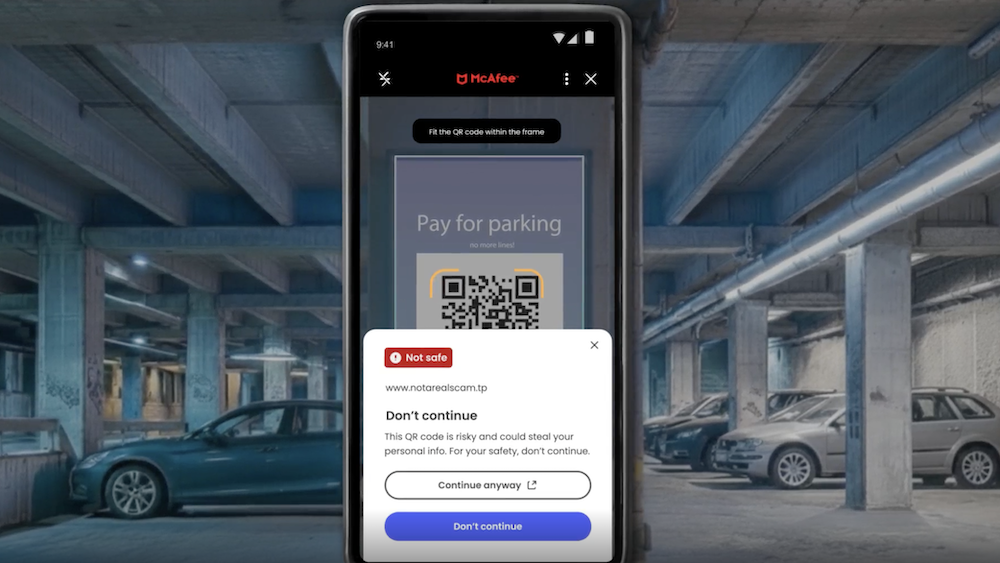
You pull into a parking spot downtown. There’s a meter with a bright QR code and a simple instruction: “Scan here to pay.” You pull out your phone, scan the code, and pay for parking in seconds. Easy, right?

In truth, that QR code wasn’t from the city government. A scammer placed it over the real code earlier. The payment you just made went straight to a criminal’s account, and your credit card details are now in the hands of someone who can use them anywhere in the world.

In this guide, we’ll look into the mechanics of QR code scams and the dangers they present. We will also share measures to stay safe when scanning QR codes, as well as steps to take if you accidentally scan a malicious one.

Key Takeaways

  • QR codes are encoded data and cannot hack your phone simply by being scanned.
  • Roughly 12% of all phishing attacks now use QR codes to bypass traditional email security filters, according to QRcode.co.uk, a company that generates QR codes.
  • Simple habits like previewing URLs and checking for tampering can significantly reduce your risk.

The Mechanics of Scanning a QR Code

QR codes encode information such as website addresses, payment details, Wi-Fi credentials, or contact information into patterns of black-and-white squares. They work similarly to barcodes at the grocery store, but they can hold more information.

A QR code itself isn’t dangerous, but simply a doorway. A QR code cannot execute code or install software on your phone, even though your camera sees it. The risk starts when you tap the notification that appears after scanning and then take action on the website or app it opens. The question is whether you know what’s on the other side before you walk through.

QR codes generally fall into two types. The first are static codes, which always point to the same destination, like a hardcoded address. Meanwhile, dynamic codes can be updated to point to different destinations over time without changing the physical code itself. This flexibility makes dynamic codes powerful for legitimate businesses, but it also means attackers can change a code’s destination even after it’s been printed.

QR Code Payments: A Trillion-Dollar Industry

Since the accelerated use of QR codes during the 2020 COVID pandemic as a contactless payment method, their use in scams has also grown significantly. According to the Anti-Phishing Working Group, attackers deployed more than 1.7 million unique malicious QR codes in email campaigns within just six months between 2024 and 2025, with millions of QR-based phishing emails sent daily worldwide. These coordinated, industrial-scale operations are designed to steal credentials, financial data, and account access. 

According to security research, global QR code payments are expected to reach $8 trillion by 2029. Given these figures, you will understand why cyberscammers are eager to exploit this payment method through quishing scams.

Quishing Attack Types and Recent Incidents Worldwide

Quishing, a form of phishing that uses QR codes, has rapidly evolved from isolated incidents into a global threat. Recent cases show how attackers are exploiting everyday QR code use to redirect victims to fraudulent sites and steal sensitive information.

Common Attack Types

The threats behind QR codes are familiar cyber risks delivered in new packaging:

  • Fake login pages: QR code scams often lead to fake login pages of email, banking, and cloud services, or work applications. Credential theft remains the primary goal of this type of attack.
  • Fake payment pages: These QR code stickers are used to pay for parking, utilities, deliveries, and donations to harvest credit card data or initiate unauthorized transfers.
  • Malware distribution: The QR codes direct users to risky links that push malicious apps, configuration profiles, or files that can install spyware on your device.

Parking Meters and EV Chargers

In 2024 and 2025, cities across the U.S. and Europe dealt with QR code scams posted on public infrastructure. Online resource Industry Insider reported that scammers placed fake QR code stickers on about 150 parking meters in Redondo Beach, Los Angeles, California, and on 51 parking meters in Ottawa, Canada, redirecting drivers to phishing sites that mimicked legitimate payment services. Meanwhile, fake QR code stickers were placed on
parking meters, electric vehicle chargers, and other public places in Germany, Ireland, Spain, Paris, and Monaco.

Packages, Invoices, and “Official” Communications

QR scams aren’t limited to physical infrastructure. In July 2025, the Federal Bureau of Investigation (FBI) warned the public about criminals sending unsolicited packages containing QR codes. When scanned, these codes would prompt recipients to input their personal and financial information or download malicious software.

The Federal Trade Commission (FTC) also alerted consumers about unexpected packages with notes containing QR codes that invite the recipients to scan for more information. These campaigns often impersonate delivery services, banks, utilities, or tax authorities, urging users to verify information or immediately send payments to avoid consequences.

Cryptocurrency and High-Value Fraud

The FBI and city agencies have warned the public about QR codes at cryptocurrency ATMs that embed wallet addresses controlled by criminals. Victims are lured into depositing funds, believing they’re making legitimate transactions, only to have the money sent directly to fraudsters.

Fancy, Branded, and AI-Generated Codes

In 2026, the challenge for consumers is distinguishing the legitimate QR codes from the scammer’s more colorful, logo-embedded, and AI-generated QR designs. These codes look trustworthy and brand-aligned but still direct to malicious sites. 

QR Images

Traditional security filters can scan text and links from the typical black-and-white QR codes. However, these email and gateway scanners are unable to parse QR images, which means they can’t extract URLs hidden beneath these pictures. This creates a blind spot that attackers eagerly exploit.

High-Risk Situations and Groups

Aside from parking spaces and charging stations, certain situations create perfect conditions for QR scams, including:

  • Transit systems: When people are rushed at the airport or at train, bus, or subway stations where QR codes are commonly used for payment, they may not think twice about scanning one.
  • Restaurant tables and gas pumps: In many countries, QR codes have become the normal payment method at these places.
  • Conference badges and event signage: At these events, QR codes are widely displayed for speedier and more convenient payment, eliminating long queues.
  • Online marketplaces: The retail sector is particularly vulnerable to QR code scams, in which criminals exploit irreversible digital transactions.

Most Vulnerable People

While QR scams can affect anyone, certain patterns emerge:

  • General consumers: Those who routinely use digital mobile payments are broadly exposed to QR code scams because they have made QR code scanning part of their daily lives.
  • Workers and small businesses: Small merchants using low-cost QR payment systems often lack robust verification systems of larger enterprises, while their employees might scan QR codes using personal phones without corporate security protections.
  • Older adults: Older people who are less familiar with QR code scanning may be more trusting of official-looking mailers and signage or less comfortable verifying URLs on mobile devices.

Government and Law Enforcement Intervention

Aside from the official warnings from the FBI and FTC previously mentioned, you also have legal protections as a consumer.

QR scams fall under existing fraud, phishing, identity theft, and unauthorized access laws. No QR-specific legislation is required for enforcement.

Victims may have protections through credit card networks and banks for fraudulent transactions, but recovery depends on how quickly scams are reported and the payment method used. Crypto and instant transfers offer more limited recourse.

If you fall victim to a QR scam, report it quickly to your financial institution, the FTC (in the US), or your country’s consumer protection agency, local law enforcement, and, if relevant, your employer’s security team.

Practical, Smart Tips to Scan QR Codes Safely

Scanning a QR code should be easy and convenient, but a few quick steps are worth taking to avoid a costly mistake. Adopt these simple, smart habits before and during each scan to protect your data. 

Before You Scan

  • Review the context: Ask yourself: “Who put this here, and why?” If a QR code sticker seems out of place or random, like on poles, walls, or public restrooms, don’t scan it.
  • Check the source: Do you know who placed the QR code and what their purpose is? Avoid scanning a QR code on a flyer that promises unbelievable prizes or urgent payments, especially if you don’t know who generated the QR code.
  • Look for tampering: Examine parking meters, restaurant tables, and posters carefully. Random QR stickers are usually placed over printed codes, are off-center or the wrong size, or feature mismatched or low-quality branding.
  • Consider the channel: Treat QR codes in unsolicited emails, texts, and direct messages like any other unsolicited link. If you didn’t ask for it, verify through official channels before scanning.

While Scanning: Technical and Behavioral Safeguards

  • Preview the URL: Use your phone’s native camera or a security-aware QR scanner to display the URL first before opening the page. Don’t proceed if the domain looks strange, or contains misspellings, random numbers, or a URL shortener.
  • Practice healthy skepticism: Now that you know more about QR scams, be suspicious of a QR code on a parking meter, restaurant, or delivery notice. Be especially wary if it asks for your login credentials, payment information, multi-factor authentication code, or personal data you wouldn’t normally provide in that context.

Your Action Plan If You Scanned a Malicious QR Code

If you scanned a malicious QR code by mistake, acting quickly and intentionally can limit the damage to your accounts and protect your personal information. 

Act Immediately

If scanning the QR code directed you to a suspicious website, do not enter any information. Close the browser or app immediately. If it connected you to a suspicious Wi-Fi network, you should disconnect right away and run a security scan on your device.

If you entered data or made a payment

  • Contact your bank or card issuer immediately: The sooner you report it, the higher your chance of recovering funds or preventing further fraud, as the bank can freeze or block any attempts to access your account and reverse the transaction.
  • Reset passwords for affected accounts: At this point, you should assume the scammer obtained the login credentials for your account. If this is the case, your next important step is to change your password to a strong, unique one for each account. 
  • Enable multi-factor authentication: To add another roadblock to the scammer’s access to your account, activate the service’s multi-factor authentication, which extends your line of defense. From the options, choose to receive a code via an authenticator app rather than SMS, as text messages can also be intercepted.
  • Report it with your consumer protection agency: Reporting creates an official record of the scam, which helps authorities track patterns, issue public warnings, and potentially take action against the criminals. It also improves your chances of recovering the losses, especially when combined with reports to your bank and local law enforcement, along with screenshots and details about where you found the code. In the U.S., the primary consumer protection agency is the Federal Trade Commission. 
  • Monitor your accounts closely: Over the next few weeks or months, regularly check your accounts for unauthorized activity. Scammers often test stolen details with minor charges before attempting larger ones, so don’t ignore small or unfamiliar transactions. Set up account alerts or notifications where possible to immediately notify you of suspicious activity. 

When Is It Safe to Scan?

Not all QR codes carry equal risk. Here’s a practical guide to help you determine if the scenario warrants safe scanning or if you would be better off avoiding the QR code.

In restaurants 

If the QR code is printed on the restaurant’s own menu, which their server will personally hand to you, there is a low risk in scanning it. Make sure you engage only with the establishment’s employed staff. It is also good practice to preview and verify the QR code’s URL before actually scanning.

Official App or Verified Account Page

In this instance, the risk presented by scanning a QR code from a trusted official app or a verified account page is lower. But security experts still recommend verifying the domain by checking the destination address.

Parking meter 

Because parking meters are located in open, public spaces with minimal security, the risk of quishing here is high. Tampering is common in these locations, which you will distinguish with an added sticker or mismatched branding, and the URLs often lead to fake payment pages.

Unsolicited Communications

These situations are where classic quishing occurs. The messages may arrive through email, text, or social media, containing the QR code. Once you scan, they may either ask you to log into a fake website and steal your credentials or automatically download malware onto your device.

Crypto ATM Support or Help QR code 

Crypto ATMs are frequently located in public, high-traffic areas, allowing just about anyone to stick notices on or near them. If you see a QR code on stickers or flyers placed on or near these machines offering technical support or help, stay away as these are very high risk and heavily associated with fraud. Any transaction you make in this case is most likely irreversible.

Final Thoughts

Since they gained popularity in the early 2020s, the value of legitimate QR code transactions has reached trillions of dollars. It’s no wonder that QR code-based phishing, also known as quishing, has become one of the fastest-growing fraud tactics worldwide as scammers scramble to grab even a small piece of that trillion-dollar pie. 

The QR code in itself isn’t your enemy. However, it is a doorway to dangerous online places, and your actions upon reaching them can save or break you.

You don’t need to avoid QR codes entirely. Adopting a few simple precautions is essential to protect your information and accounts. First, pause and consider where the code came from. Next, look for signs of physical tampering or other suspicious circumstances. Lastly, preview the URL before opening it. Criminals rely on speed and trust. By slowing down and asking questions, you take away their biggest advantages.

In addition, keep your devices protected with up-to-date security tools such as McAfee Mobile Security, which can scan URLs in real time and help block the quishing attempts and malware downloads. McAfee’s identity monitoring and credit monitoring services will alert you if your stolen data through QR scams surfaces in breaches or is used fraudulently, giving you early warning to take protective action. 

Educate your family and colleagues about QR scams. The more people who understand how these scams work, the less effective they become.

The post How to Protect Yourself from QR Code Scams appeared first on McAfee Blog.

  •  

Election Security: How to Protect Your Vote and Avoid Scams

Election security isn’t just about protecting voting machines or counting ballots accurately. It’s also about making sure voters have reliable information and know how to recognize scams designed to steal their personal information.

During election season, scammers may impersonate election officials, send fake voter registration alerts, or spread misleading information about when and where to vote.

The good news? A few simple precautions can help you protect your information and make sure you’re getting accurate voting instructions.

Here’s what to know about election security, the scams to watch for, and how to vote with confidence.

Key Takeaways

  • Check your voter registration through your state’s official election website, not an unexpected text or email.
  • Watch for election scams that ask for personal information, payment details, or immediate action.
  • Verify voting information with state or local election officials before trusting social media posts or unfamiliar websites.
  • Protect your online accounts with strong passwords and two-factor authentication.
  • Report suspicious activity to election officials or the appropriate authorities.

What Is Election Security, and Why Does It Matter?

Election security refers to the measures used to protect voting systems, voter information, ballots, and election results from interference, errors, and cyber threats.

Election officials use safeguards that can include physical security, cybersecurity protections, paper records, and post-election audits to help protect the voting process.

But there’s another side to election security that affects voters directly: scams and misinformation.

Criminals can take advantage of election-related confusion to trick people into sharing sensitive information or visiting fraudulent websites.

Importantly, an election-related scam doesn’t necessarily mean an election system has been hacked. Scammers can impersonate election officials without gaining access to official voting systems.

Understanding that difference helps voters focus on the risks they can control.

What Are the Most Common Election Scams?

Election scams often rely on familiar tactics: impersonation, urgency, and requests for personal information.

Here are four warning signs to recognize.

1) Fake Voter Registration Texts and Emails

You receive a text claiming your voter registration has expired or needs immediate verification.

The message includes a link to a website asking for personal information.

The risk: The link could lead to a phishing website designed to steal your information.

Phishing is when a scammer impersonates a trusted organization to trick you into revealing sensitive information, such as passwords or financial details.

What to do: Don’t use the link in an unexpected message. Instead, check your registration directly through your state’s official election website.

2) Calls Impersonating Election Officials

Someone calls claiming to represent an election office and asks for your Social Security number or credit card details to confirm your eligibility.

According to the Federal Trade Commission (FTC), scammers have used voter registration as a pretext to request sensitive personal and financial information.

What to do: Don’t provide sensitive information during an unsolicited call. Hang up and contact your election office using a verified phone number.

3) Fake Election Websites

Scammers may create websites that resemble official election resources.

These sites might claim to help you register, locate your polling place, or update your voter information.

What to do: Start with official government resources, such as USAGov, which directs voters to their state’s election information.

4) Misleading Voting Information

A social media post claims your polling location has changed, voting hours have been extended, or you can vote through an unfamiliar website.

The information may look credible, especially if it includes official-looking graphics or appears to come from a trusted source.

What to do: Verify voting instructions with your state or local election office before acting on or sharing them.

How Can You Check If You’re Registered to Vote?

The safest way to check your voter registration is through your state’s official election website.

You can find your state’s registration lookup tool through USAGov’s voter registration guide.

Check that:

  • Your name and address are correct.
  • Your registration status is active or otherwise eligible.
  • Your assigned polling location is accurate.
  • Any required updates are completed before your state’s deadline.

Registration deadlines vary by state, so check well before Election Day.

Remember: You don’t need to follow a link from an unexpected text to verify your registration. You can always start with an official election resource.

How Can You Tell If Election Information Is Real or Fake?

Election misinformation can spread through social media, text messages, emails, and even AI-generated audio or video.

Artificial intelligence can make it easier to create convincing messages that imitate real people or organizations. But the underlying scam tactic is familiar: convincing someone to trust a message without verifying its source.

Before believing or sharing election information, ask yourself:

  • Who published it? Is it an official election office or a verified, reputable news organization?
  • Can I confirm it? Does the information match what my state or local election office says?
  • Is it creating unnecessary urgency? Be cautious of messages pressuring you to act immediately.
  • Is it asking for personal information? Unexpected requests for passwords, payment information, or other sensitive details are warning signs.

The safest approach is simple: When voting information seems surprising or urgent, verify it before acting.

How to Vote Safely: 4 Election Security Tips

Protecting your vote starts with knowing where to find accurate information and how to recognize suspicious requests.

✓ 1. Verify Your Voting Information

Check your registration, polling location, voting hours, and identification requirements through official election resources.

Don’t assume your polling place is the same as it was during the last election.

✓ 2. Be Careful With Election-Related Links

Avoid clicking unexpected links claiming you need to update your registration or confirm your voting eligibility.

Instead, navigate directly to a trusted election website.

✓ 3. Protect Your Personal Information

Use strong, unique passwords for important online accounts, especially your email.

Turn on two-factor authentication wherever available. This adds another verification step that can help prevent someone from accessing your account with a stolen password.

✓ 4. Know How to Report Suspicious Activity

If you receive a suspicious election-related message, don’t respond or provide personal information.

Report suspected scams to the ReportFraud.ftc.gov.

If you experience voter intimidation, misleading voting instructions, or another potential voting rights violation, contact your state or local election office. You can also find reporting guidance through USA.gov/Voter-Fraud.

What Should You Do If You Fall for an Election Scam?

If you’ve clicked a suspicious election-related link or shared personal information, take action to protect yourself.

  • If you clicked a suspicious link: Avoid entering additional information. If you downloaded a file or installed an unfamiliar application, run a security scan.
  • If you shared a password: Change it immediately through the legitimate website. Update any other accounts using the same password and enable two-factor authentication.
  • If you shared financial information: Contact your bank or credit card provider using its official contact information.
  • If you shared your Social Security number: Visit IdentityTheft.gov for guidance on protecting your identity.
  • If you received misleading voting instructions: Contact your local election office to confirm the correct information and report the suspicious message.

Taking action quickly can help limit the damage.

Election Security FAQ

Can someone steal my vote using my personal information?

Stolen personal information can be used for identity theft or attempted voter impersonation, but possessing someone’s information does not automatically allow a criminal to cast a ballot in their name. Election procedures and safeguards vary by state.

If you suspect someone has misused your voter information, contact your local election office.

Is it safe to register to vote online?

Yes, when your state offers online voter registration and you use its official registration website.

Avoid entering personal information on unfamiliar websites or through unsolicited links.

Can scammers send fake voter registration texts?

Yes. Scammers may send messages claiming your registration needs urgent attention to trick you into visiting a fraudulent website or sharing sensitive information.

Always verify registration information through your state’s official election resources.

Can AI be used to spread election misinformation?

Yes. AI tools can generate realistic-looking images, audio, videos, and written messages that may be used to mislead voters.

Don’t assume something is authentic simply because it looks or sounds convincing. Verify important voting information with election officials.

Where can I find accurate information about voting?

Start with USA.gov/voting or your state or local election office.

These resources can help you confirm registration requirements, polling locations, voting methods, and important deadlines.

Stay Informed and Vote With Confidence

Election security involves many safeguards, but protecting yourself from scams doesn’t have to be complicated.

Verify information through official sources, be cautious of unexpected requests for personal details, and take a moment to investigate suspicious messages before responding.

A little preparation can help you avoid election scams, protect your personal information, and focus on what matters: making your voice heard.

The post Election Security: How to Protect Your Vote and Avoid Scams appeared first on McAfee Blog.

  •  

PHP2Shell Leak Sparks Emergency Fix for Software Behind Most Websites: How to Stay Safe

Two serious security holes were found in PHP, the behind-the-scenes software that powers a large share of the websites you visit every day. Fixes went out on Oct. 21, 2026. Until each website installs them, attackers could use the holes to take over the computers that run those sites and grab the passwords and data stored there.

For most people, there is nothing to install on your phone or computer. Website owners and hosting providers are responsible for installing the fix. You can still take steps to protect your accounts in case a site you use is compromised.

The PHP security team announced the two flaws, nicknamed PHP2Shell (CVE-2026-109618 and CVE-2026-109619), in an Oct. 21 security advisory and rated both 9.2 out of 10 for severity. The UK’s National Cyber Security Centre warned that “organisations using any version of PHP are affected.” PHP runs about 69.7% of websites whose server-side programming language is known, according to W3Techs data cited by Infosecurity Magazine.

What Is PHP?

PHP is a programming language that runs behind the scenes on many websites. When you log in to an account, add something to a shopping cart, or post a comment, PHP is often the software doing that work on the website’s computer, called a server. It runs on servers, not on your phone or laptop. Many popular website builders, including WordPress, Drupal, and Joomla, are built on PHP.

How the PHP2Shell Vulnerability Works

Both flaws stem from errors that occur while PHP is processing a request from a website visitor. When PHP fails partway through, it can leave data from that request behind in the server’s memory. Attackers can trigger these errors deliberately and exploit the leftover data to gain access to the server.

Both flaws involve how PHP cleans up after handling a request. According to PHP’s Oct. 21 advisory:

  • CVE-2026-109618: When PHP runs out of memory at the wrong moment, it can stop while data is only partly set up, then treat that incomplete data as valid.
  • CVE-2026-109619: After an error, PHP can keep a reference to memory it has already released, and a later request handled by the same server process can reuse it.

To exploit the flaws, an attacker sends specially built requests to a website and does not need a password. That can expose passwords, digital keys, and other secrets stored in the server’s memory, or let the attacker run their own commands on the server. Wiz Research showed the attack working against WordPress, Drupal, and Joomla sites.

Information about the flaws leaked online on Oct. 20, a day before the fixes came out, according to the PHP Foundation. Cloudflare said it saw attack traffic aimed at its customers after the leak. For a short window, PHP2Shell was effectively a zero-day threat, meaning attackers knew about it before a fix existed.

Artificial intelligence helped find the flaws. OpenAI said the research firm Calif used one of its AI models to find one of them, and Wiz independently found both with help from AI tools.

How the PHP Exploit Could Affect You

The main risk to you is indirect: a website you use gets hacked before it installs the fix. Think of it like a store whose back door was left unlocked. You didn’t do anything wrong, but your information inside the store could still be taken.

If an attacker breaks into a site’s server, they could:

  • Steal account information, such as usernames, email addresses, and passwords stored on that site.
  • Grab the site’s own keys and passwords, which attackers can use to reach other systems that hold customer data.
  • Change what the site shows you, because whoever controls the server controls the pages it sends.

You may also notice some sites going offline for a while. Some Dutch government and education sites went down, and the HR software company BambooHR took its service offline as a precaution. A site going offline doesn’t by itself mean your data was stolen.

Attackers moved quickly. Amazon Threat Intelligence reported that one of its decoy servers caught an attack attempt on Oct. 17, four days before the flaws were made public, and said PHP2Shell “is now seeing broad exploitation attempts in the wild.” One web hosting platform blocked more than 60,000 suspicious requests probing the flaws by the evening of Oct. 21, according to The Hacker News. As of Oct. 23, no successful break-ins had been publicly confirmed, according to SecurityWeek.

Warning Signs to Watch For

You can’t see whether a website runs PHP or has been patched. What you can watch for are signs that a site you use was affected, or that scammers are using the news to trick you. McAfee’s guide to recognizing a phishing email covers more of the tricks to look for.

Red Flag

Why It Matters

A message telling you to download a “PHP update” or “PHP2Shell patch” for your phone or computer

PHP runs on website servers, not personal devices. A message like this is a scam.

An email from a company saying your data may have been exposed

The site may have been breached. Act on it, but log in by typing the site’s address yourself instead of clicking the link.

Password reset emails or login alerts you didn’t request

Someone may be trying to use stolen login details.

A familiar site suddenly asks for unusual information or tries to download a file

The site may have been tampered with. Leave it and check the company’s official channels.

Charges you don’t recognize on a card you used with an online store

Payment details may have been stolen.

How to Protect Yourself

You can’t patch other people’s websites, but you can limit the risk to yourself if one of them is breached. These steps help with PHP2Shell and with data breaches in general.

  1. Use a different password for every account. If one site leaks your password, attackers can’t use it to get into your other accounts. A password manager can create and remember them for you.
  2. Turn on multi-factor authentication. It adds a second step, like a code sent to your phone, so a stolen password alone isn’t enough to get in.
  3. Set up alerts with your bank and card issuer. Text or email alerts for new charges let you spot fraud the day it happens, instead of weeks later on a statement.

If you run a personal blog or small business website: Ask your hosting company to confirm that PHP is updated to version 8.5.12, 8.4.27, 8.3.36, 8.2.35, or newer. Updating WordPress or your plugins is not enough on its own, according to Cloudflare, because the fix has to be made to PHP itself. If your site runs an older PHP version, ask your host to move it to a supported one.

What to Do If Your Information Was Exposed

If a company tells you your data may have been exposed, act quickly. Being caught up in a breach is not your fault, and these steps can limit the damage.

  • Change your password for that site, and on any other account where you used the same one.
  • Turn on multi-factor authentication for that account and for your email.
  • Call your bank or card issuer if payment details may have been exposed, and ask about freezing or replacing the card.
  • Consider a free credit freeze with Equifax, Experian, and TransUnion. It stops anyone from opening new credit in your name.
  • Go to IdentityTheft.gov if your Social Security number or other identity details were exposed. It creates a step-by-step recovery plan.
  • Keep records of the breach notice, any suspicious messages, and any charges you dispute.

How to Report It

If you lost money or think someone is using your information, report it:

  • FTC: ReportFraud.ftc.gov for scams and fraud
  • FBI Internet Crime Complaint Center: ic3.gov for online crime, including hacked websites
  • Identity theft: IdentityTheft.gov
  • Your bank or card issuer: for any unauthorized charges
  • Local police: if you lost money or were threatened

PHP2Shell is a problem that website owners have to fix, but it can still impact your accounts if a site you use is breached. The most important thing you can do is use a unique password and multi-factor authentication for every account, so one breach doesn’t expose the rest.

FAQ

What is PHP2Shell?

PHP2Shell is the nickname for two serious security flaws in PHP, software that runs behind the scenes on many websites. Fixes were released on Oct. 21, 2026.

Do I need to update my phone or computer?

No. PHP runs on website servers, not personal devices, so the fix is up to website owners. Any message telling you to install a “PHP update” on your device is a scam.

Is my information at risk?

It could be, if a site you use was hacked before it installed the fix. Watch for breach notices from companies you do business with, and use unique passwords and multi-factor authentication.

How do I know if a website I use was affected?

You can’t tell by looking at a site. Companies that find a breach may notify you by email or post an update on their official website. Check the company’s site directly rather than trusting a link in an email.

Has the PHP exploit been used in real attacks?

Yes. Security firms including Amazon and watchTowr have reported widespread attack attempts, and Amazon saw one as early as Oct. 17, before the fix was public. No confirmed break-ins had been publicly reported as of Oct. 23.

The post PHP2Shell Leak Sparks Emergency Fix for Software Behind Most Websites: How to Stay Safe appeared first on McAfee Blog.

  •  

What Scams Look Like in Your State: A 50-State Breakdown

No matter where you live in the U.S., AI-driven scams and deceptive content are increasingly filling our feeds, alerts, and inboxes with moments that make us stop and ask: “Is this real?”

But the scams and threats Americans encounter aren’t the same everywhere. Where you live can shape the types of scams reaching your devices, how often you encounter them, and even how those experiences affect the way you behave online.

This 50-state breakdown combines McAfee consumer research with McAfee Labs data to show how Americans are experiencing scams, how those experiences are affecting trust and behavior online, and which text-based scams are reaching devices across the country.

The consumer findings come from a nationally representative survey of 5,000 U.S. adults, with 100 respondents in each state. The survey explores people’s exposure to scams, financial losses, changing online behaviors, concerns about AI and the mental effort involved in deciding what to trust online.

Alongside those findings, McAfee Labs analyzed text-based scam activity across the U.S. from May through July 2026. That data provides a view into the volume, concentration and types of scam texts McAfee observed in each state during the three-month analysis period.

Together, the two datasets offer different views of the same problem: what people say they are experiencing and how it affects them, alongside the scam activity McAfee is seeing in the wild.

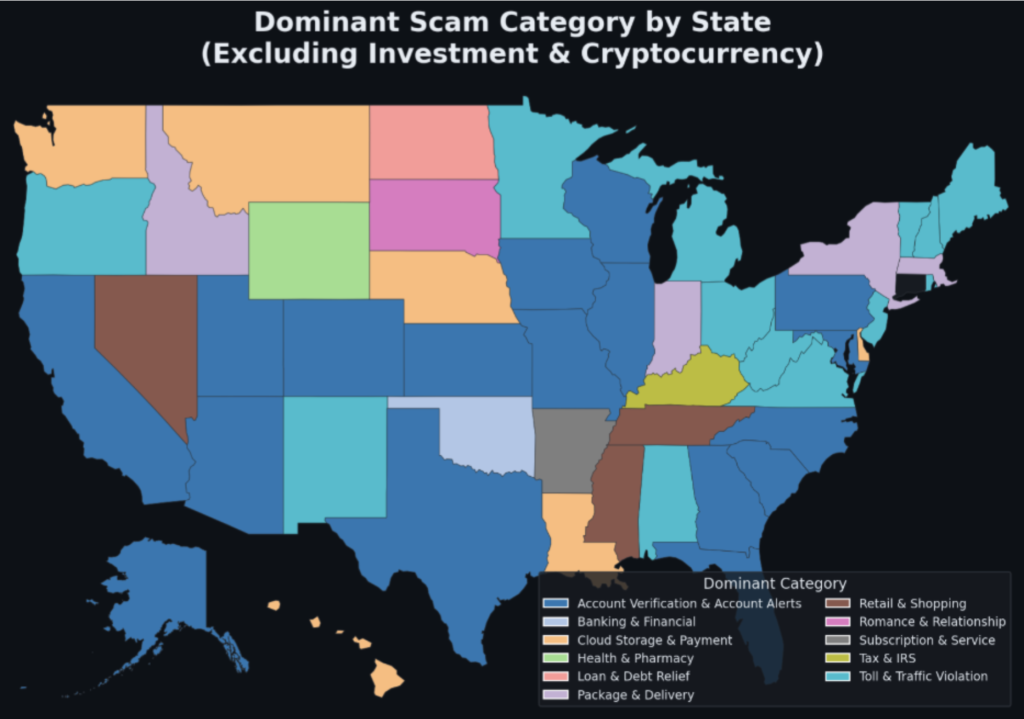
Infographic - USA Map Dominant Scam Category by State

Alabama

Key takeaway: Alabama had the highest scam-text rate per device in McAfee’s analysis, while scam concerns are also changing how residents behave online.

  • 66% say figuring out what’s real online takes more mental energy than it did a year ago.
  • 60% check whether something online is legitimate at least weekly.
  • 19% say they do that checking several times a day.
  • 45% have encountered an AI-generated image presented as real.
  • 83% are concerned AI is making scams harder to recognize.
  • 64% have avoided an unfamiliar retailer because of scam concerns.
  • 42% have ignored a legitimate call, text or email because they feared a scam.
  • 41% have avoided trying a new app, website or service.
  • 39% have avoided clicking a legitimate message or link.
  • Investment and cryptocurrency scams were the leading text-scam category detected in Alabama.

McAfee detected 5.14 scam texts per device, the highest rate in the country.

Alaska

Key takeaway: Alaska has one of the widest gaps between rising trust fatigue and active checking: 54% report more mental effort, but only 44% verify online content at least weekly.

  • 54% say figuring out what’s real online takes more mental energy than a year ago.
  • 44% check online legitimacy at least weekly.
  • 13% say they check several times a day.
  • 44% have encountered an AI-generated image presented as real.
  • 82% are concerned AI is making scams harder to recognize.
  • 48% have avoided an unfamiliar retailer.
  • 39% have ignored a legitimate call, text or email.
  • 40% have avoided trying a new app, website or service.
  • 34% have avoided clicking a legitimate message or link.

Investment and cryptocurrency scams were the leading text-scam category detected in Alaska.

Arizona

Key takeaway: Arizonans are feeling a pronounced trust burden, with 65% saying it now takes more mental energy to decide what’s real online.

  • 65% report greater mental effort figuring out what’s real online.
  • 60% check online legitimacy at least weekly.
  • 17% check several times a day.
  • 41% have encountered an AI-generated image presented as real.
  • 81% are concerned AI is making scams harder to recognize.
  • 43% have avoided unfamiliar retailers.
  • 44% have ignored a legitimate call, text or email.
  • 31% have avoided trying a new app, website or service.
  • 39% have avoided clicking a legitimate message or link.

Investment and cryptocurrency scams led Arizona’s text-scam volume.

Arkansas

Key takeaway: Arkansas residents are relatively active verifiers: 64% check online legitimacy at least weekly even though only about half report greater mental strain.

  • 51% say figuring out what’s real online takes more mental energy.
  • 64% verify online content at least weekly.
  • 22% check several times a day.
  • 38% have encountered an AI-generated image presented as real.
  • 77% are concerned AI is making scams harder to recognize.
  • 46% have avoided unfamiliar retailers.
  • 42% have ignored a legitimate call, text or email.
  • 32% have avoided trying a new app, website or service.
  • 32% have avoided clicking a legitimate message or link.

Investment and cryptocurrency scams led Arkansas text-scam volume.

California

Key takeaway: California has one of the heaviest trust burdens in the survey: 72% say figuring out what’s real online now takes more mental energy.

  • 72% report greater mental effort deciding what’s real online.
  • 58% verify online content at least weekly.
  • 20% check several times a day.
  • 41% have encountered an AI-generated image presented as real.
  • 83% are concerned AI is making scams harder to recognize.
  • 49% have avoided unfamiliar retailers.
  • 43% have ignored a legitimate call, text or email.
  • 32% have avoided trying a new app, website or service.
  • 38% have avoided clicking a legitimate message or link.
  • Among Californians surveyed who lost money to scams, 72% recovered none of it.

Investment and cryptocurrency scams led California’s  text-scam volume. 

Colorado

Key takeaway: Colorado’s clearest signal is concern about AI-enabled scams, shared by 85% of residents surveyed.

  • 59% report greater mental effort figuring out what’s real online.
  • 56% verify online content at least weekly.
  • 15% check several times a day.
  • 38% have encountered an AI-generated image presented as real.
  • 85% are concerned AI is making scams harder to recognize.
  • 42% have avoided unfamiliar retailers.
  • 45% have ignored a legitimate call, text or email.
  • 35% have avoided trying a new app, website or service.
  • 34% have avoided clicking a legitimate message or link.

Investment and cryptocurrency scams led Colorado’s text-scam volume.

Connecticut

Key takeaway: Connecticut residents report rising trust fatigue, yet fewer than half say they verify online content every week.

  • 57% say figuring out what’s real takes more mental energy.
  • 47% verify online content at least weekly.
  • 18% check several times a day.
  • 35% have encountered an AI-generated image presented as real.
  • 79% are concerned AI is making scams harder to recognize.
  • 33% have avoided unfamiliar retailers.
  • 36% have ignored a legitimate call, text or email.
  • 26% have avoided a new app, website or service.
  • 24% have avoided clicking a legitimate message or link.

Investment and cryptocurrency scams led Connecticut’s text-scam volume.

Delaware

Key takeaway: Delaware stands out for exposure to synthetic imagery, with 46% encountering an AI-generated image presented as real.

  • 53% report greater mental effort figuring out what’s real online.
  • 53% verify online content at least weekly.
  • 8% check several times a day.
  • 46% have encountered an AI-generated image presented as real.
  • 80% are concerned AI is making scams harder to recognize.
  • 47% have avoided unfamiliar retailers.
  • 34% have ignored a legitimate call, text or email.
  • 30% have avoided a new app, website or service.
  • 33% have avoided clicking a legitimate message or link.

Investment and cryptocurrency scams led Delaware’s text-scam volume.

Florida

Key takeaway: Floridians are active online reality-checkers, with 63% verifying messages, offers, websites or people at least weekly.

  • 56% report greater mental effort figuring out what’s real online.
  • 63% verify online content at least weekly.
  • 18% check several times a day.
  • 43% have encountered an AI-generated image presented as real.
  • 85% are concerned AI is making scams harder to recognize.
  • 43% have avoided unfamiliar retailers.
  • 37% have ignored a legitimate call, text or email.
  • 42% have avoided a new app, website or service.
  • 27% have avoided clicking a legitimate message or link.

Investment and cryptocurrency scams led Florida text-scam volume.

From our McAfee Labs Research: This shows approximate location of all the scams received

Georgia

Key takeaway: Georgia had the second-highest scam-text-per-device rate highlighted by McAfee, at 4.67.

  • 59% report greater mental effort figuring out what’s real online.
  • 60% verify online content at least weekly.
  • 25% check several times a day.
  • 33% have encountered an AI-generated image presented as real.
  • 80% are concerned AI is making scams harder to recognize.
  • 40% have avoided unfamiliar retailers.
  • 37% have ignored a legitimate call, text or email.
  • 27% have avoided a new app, website or service.
  • 35% have avoided clicking a legitimate message or link.
  • McAfee detected an average of 4.67 scam texts per device.

Investment and cryptocurrency scams led Georgia’s text-scam volume. 

Hawaii

Key takeaway: Hawaii had the country’s highest scam intensity among affected devices: those receiving at least one scam text averaged 8.45 over three months.

  • 56% report greater mental effort figuring out what’s real online.
  • 54% verify online content at least weekly.
  • 13% check several times a day.
  • 38% have encountered an AI-generated image presented as real.
  • 81% are concerned AI is making scams harder to recognize.
  • 47% have avoided unfamiliar retailers.
  • 38% have ignored a legitimate call, text or email.
  • 37% have avoided a new app, website or service.
  • 37% have avoided clicking a legitimate message or link.
  • Affected devices averaged 8.45 scam texts, the highest figure nationally.

Investment and cryptocurrency scams led Hawaii’s text-scam volume. 

Idaho

Key takeaway: Idaho shows a sizeable trust gap: 62% report greater mental effort deciding what’s real, while 49% verify online content weekly.

  • 62% report more mental effort figuring out what’s real online.
  • 49% verify online content at least weekly.
  • 13% check several times a day.
  • 43% have encountered an AI-generated image presented as real.
  • 82% are concerned AI is making scams harder to recognize.
  • 48% have avoided unfamiliar retailers.
  • 35% have ignored a legitimate call, text or email.
  • 40% have avoided a new app, website or service.
  • 38% have avoided clicking a legitimate message or link.

Investment and cryptocurrency scams led Idaho’s text-scam volume.

Illinois

Key takeaway: Two-thirds of Illinois residents say deciding what’s real online is taking more mental energy than a year ago.

  • 66% report more mental effort figuring out what’s real online.
  • 59% verify online content at least weekly.
  • 18% check several times a day.
  • 39% have encountered an AI-generated image presented as real.
  • 75% are concerned AI is making scams harder to recognize.
  • 40% have avoided unfamiliar retailers.
  • 26% have ignored a legitimate call, text or email.
  • 32% have avoided a new app, website or service.
  • 24% have avoided clicking a legitimate message or link.

Investment and cryptocurrency scams led Illinois text-scam volume.

Indiana

Key takeaway: Indiana’s scam anxiety is translating into caution: 81% are concerned about AI making scams harder to recognize and 60% verify online content weekly.

  • 62% report more mental effort figuring out what’s real online.
  • 60% verify online content at least weekly.
  • 18% check several times a day.
  • 46% have encountered an AI-generated image presented as real.
  • 81% are concerned AI is making scams harder to recognize.
  • 38% have avoided unfamiliar retailers.
  • 41% have ignored a legitimate call, text or email.
  • 35% have avoided a new app, website or service.
  • 35% have avoided clicking a legitimate message or link.

Investment and cryptocurrency scams led Indiana text-scam volume.

Iowa

Key takeaway: Iowa residents report relatively restrained checking behavior: 47% verify online content at least weekly despite 55% reporting greater mental effort.

  • 55% report more mental effort figuring out what’s real online.
  • 47% verify online content at least weekly.
  • 17% check several times a day.
  • 33% have encountered an AI-generated image presented as real.
  • 81% are concerned AI is making scams harder to recognize.
  • 43% have avoided unfamiliar retailers.
  • 32% have ignored a legitimate call, text or email.
  • 33% have avoided a new app, website or service.
  • 34% have avoided clicking a legitimate message or link.

Investment and cryptocurrency scams led Iowa text-scam volume.

Kansas

Key takeaway: Kansas has one of the bleakest recovery pictures in the survey: 75% of scam victims who lost money recovered none of it.

  • 61% report more mental effort figuring out what’s real online.
  • 51% verify online content at least weekly.
  • 10% check several times a day.
  • 40% have encountered an AI-generated image presented as real.
  • 80% are concerned AI is making scams harder to recognize.
  • 42% have avoided unfamiliar retailers.
  • 39% have ignored a legitimate call, text or email.
  • 40% have avoided a new app, website or service.
  • 32% have avoided clicking a legitimate message or link.
  • 75% of victims who lost money said they recovered none of it.

Investment and cryptocurrency scams led Kansas text-scam volume.

Kentucky

Key takeaway: Kentucky is the standout verification state: 76% say they check whether online content is legitimate at least weekly.

  • 62% report more mental effort figuring out what’s real online.
  • 76% verify online content at least weekly.
  • 19% check several times a day.
  • 41% have encountered an AI-generated image presented as real.
  • 83% are concerned AI is making scams harder to recognize.
  • 46% have avoided unfamiliar retailers.
  • 30% have ignored a legitimate call, text or email.
  • 39% have avoided a new app, website or service.
  • 25% have avoided clicking a legitimate message or link.

Investment and cryptocurrency scams led Kentucky text-scam volume.

Louisiana

Key takeaway: Louisiana combines comparatively low trust fatigue with severe financial consequences: 73% of victims who lost money recovered none of it.

  • 45% report more mental effort figuring out what’s real online.
  • 54% verify online content at least weekly.
  • 13% check several times a day.
  • 35% have encountered an AI-generated image presented as real.
  • 75% are concerned AI is making scams harder to recognize.
  • 43% have avoided unfamiliar retailers.
  • 37% have ignored a legitimate call, text or email.
  • 32% have avoided a new app, website or service.
  • 30% have avoided clicking a legitimate message or link.
  • 73% of victims who lost money said they recovered none of it.

Investment and cryptocurrency scams led Louisiana text-scam volume.

Maine

Key takeaway: Maine is one of only two states where toll and traffic scams, rather than investment and crypto scams, ranked first in McAfee’s text telemetry.

  • 64% report more mental effort figuring out what’s real online.
  • 59% verify online content at least weekly.
  • 13% check several times a day.
  • 39% have encountered an AI-generated image presented as real.
  • 81% are concerned AI is making scams harder to recognize.
  • 46% have avoided unfamiliar retailers.
  • 34% have ignored a legitimate call, text or email.
  • 34% have avoided a new app, website or service.
  • 30% have avoided clicking a legitimate message or link.

Toll and traffic violation scams were Maine’s leading text-scam category.

Maryland

Key takeaway: Marylanders show particularly high concern about AI-enabled fraud, with 86% saying AI is making scams harder to recognize.

  • 65% report more mental effort figuring out what’s real online.
  • 60% verify online content at least weekly.
  • 25% check several times a day.
  • 45% have encountered an AI-generated image presented as real.
  • 86% are concerned AI is making scams harder to recognize.
  • 46% have avoided unfamiliar retailers.
  • 45% have ignored a legitimate call, text or email.
  • 37% have avoided a new app, website or service.
  • 44% have avoided clicking a legitimate message or link.

Investment and cryptocurrency scams led Maryland text-scam volume.

Infographic - How Scams Are Affecting Americans 2

Massachusetts

Key takeaway: Massachusetts has a striking trust gap: 65% report more mental effort deciding what’s real, but only 48% verify online content at least weekly.

  • 65% report more mental effort figuring out what’s real online.
  • 48% verify online content at least weekly.
  • 15% check several times a day.
  • 46% have encountered an AI-generated image presented as real.
  • 86% are concerned AI is making scams harder to recognize.
  • 47% have avoided unfamiliar retailers.
  • 35% have ignored a legitimate call, text or email.
  • 37% have avoided a new app, website or service.
  • 38% have avoided clicking a legitimate message or link.

Investment and cryptocurrency scams led Massachusetts text-scam volume.

Michigan

Key takeaway: Michigan joins Maine as the only state where toll and traffic scams outranked investment and cryptocurrency scams.

  • 71% report more mental effort figuring out what’s real online.
  • 52% verify online content at least weekly.
  • 21% check several times a day.
  • 43% have encountered an AI-generated image presented as real.
  • 71% are concerned AI is making scams harder to recognize.
  • 40% have avoided unfamiliar retailers.
  • 35% have ignored a legitimate call, text or email.
  • 34% have avoided a new app, website or service.
  • 32% have avoided clicking a legitimate message or link.

Toll and traffic violation scams were Michigan’s leading text-scam category.

Minnesota

Key takeaway: Minnesota records the highest AI-scam concern in the state crosstabs, at 91%.

  • 60% report more mental effort figuring out what’s real online.
  • 59% verify online content at least weekly.
  • 10% check several times a day.
  • 47% have encountered an AI-generated image presented as real.
  • 91% are concerned AI is making scams harder to recognize.
  • 44% have avoided unfamiliar retailers.
  • 44% have ignored a legitimate call, text or email.
  • 38% have avoided a new app, website or service.
  • 34% have avoided clicking a legitimate message or link.

Investment and cryptocurrency scams led Minnesota text-scam volume.

Mississippi

Key takeaway: Mississippi had one of the heaviest scam-text loads in McAfee’s analysis, averaging roughly 4.64 scam texts per device.

  • 55% report more mental effort figuring out what’s real online.
  • 54% verify online content at least weekly.
  • 17% check several times a day.
  • 32% have encountered an AI-generated image presented as real.
  • 82% are concerned AI is making scams harder to recognize.
  • 43% have avoided unfamiliar retailers.
  • 34% have ignored a legitimate call, text or email.
  • 34% have avoided a new app, website or service.
  • 35% have avoided clicking a legitimate message or link.
  • McAfee detected roughly 4.64 scam texts per device.

Investment and cryptocurrency scams led Mississippi text-scam volume.

Missouri

Key takeaway: Missouri residents show a confidence problem around AI scams: 13% said they were not at all confident spotting AI-created or AI-enhanced fraud.

  • 63% report more mental effort figuring out what’s real online.
  • 60% verify online content at least weekly.
  • 16% check several times a day.
  • 41% have encountered an AI-generated image presented as real.
  • 85% are concerned AI is making scams harder to recognize.
  • 43% have avoided unfamiliar retailers.
  • 40% have ignored a legitimate call, text or email.
  • 39% have avoided a new app, website or service.
  • 35% have avoided clicking a legitimate message or link.
  • 13% said they’re not at all confident they could spot a scam enhanced by AI

Investment and cryptocurrency scams led Missouri text-scam volume.

Montana

Key takeaway: Montana has the highest reported exposure to AI-generated images presented as real, at 51%.

  • 63% report more mental effort figuring out what’s real online.
  • 49% verify online content at least weekly.
  • 11% check several times a day.
  • 51% have encountered an AI-generated image presented as real.
  • 84% are concerned AI is making scams harder to recognize.
  • 47% have avoided unfamiliar retailers.
  • 44% have ignored a legitimate call, text or email.
  • 43% have avoided a new app, website or service.
  • 37% have avoided clicking a legitimate message or link.

Investment and cryptocurrency scams led Montana text-scam volume.

Nebraska

Key takeaway: Nebraska’s strongest signal is AI concern: 87% say AI is making online scams harder to recognize.

  • 56% report more mental effort figuring out what’s real online.
  • 50% verify online content at least weekly.
  • 8% check several times a day.
  • 43% have encountered an AI-generated image presented as real.
  • 87% are concerned AI is making scams harder to recognize.
  • 41% have avoided unfamiliar retailers.
  • 35% have ignored a legitimate call, text or email.
  • 40% have avoided a new app, website or service.
  • 29% have avoided clicking a legitimate message or link.

Investment and cryptocurrency scams led Nebraska text-scam volume.

Nevada

Key takeaway: Nevada has the broadest reported scam exposure in the survey, with 95% encountering at least one type of scam in the past year.

  • 60% report more mental effort figuring out what’s real online.
  • 66% verify online content at least weekly.
  • 18% check several times a day.
  • 43% have encountered an AI-generated image presented as real.
  • 82% are concerned AI is making scams harder to recognize.
  • 45% have avoided unfamiliar retailers.
  • 33% have ignored a legitimate call, text or email.
  • 32% have avoided a new app, website or service.
  • 33% have avoided clicking a legitimate message or link.
  • 95% encountered at least one type of scam in the past year.

Investment and cryptocurrency scams led Nevada text-scam volume.

New Hampshire

Key takeaway: New Hampshire shows another trust gap: 59% report more mental effort figuring out what’s real, while 46% verify online content weekly.

  • 59% report more mental effort figuring out what’s real online.
  • 46% verify online content at least weekly.
  • 10% check several times a day.
  • 48% have encountered an AI-generated image presented as real.
  • 85% are concerned AI is making scams harder to recognize.
  • 50% have avoided unfamiliar retailers.
  • 34% have ignored a legitimate call, text or email.
  • 37% have avoided a new app, website or service.
  • 33% have avoided clicking a legitimate message or link.

Investment and cryptocurrency scams led New Hampshire text-scam volume.

New Jersey

Key takeaway: New Jersey residents report unusually frequent scam exposure, with 30% saying they encounter four or more scam attempts on a typical day.

  • 61% report more mental effort figuring out what’s real online.
  • 61% verify online content at least weekly.
  • 18% check several times a day.
  • 43% have encountered an AI-generated image presented as real.
  • 82% are concerned AI is making scams harder to recognize.
  • 49% have avoided unfamiliar retailers.
  • 34% have ignored a legitimate call, text or email.
  • 37% have avoided a new app, website or service.
  • 36% have avoided clicking a legitimate message or link.
  • 30% report encountering at least four scam attempts on a typical day.

Investment and cryptocurrency scams led New Jersey text-scam volume.

New Mexico

Key takeaway: New Mexico has one of the toughest scam-recovery pictures: 72% of victims who lost money recovered none of it.

  • 65% report more mental effort figuring out what’s real online.
  • 59% verify online content at least weekly.
  • 16% check several times a day.
  • 39% have encountered an AI-generated image presented as real.
  • 79% are concerned AI is making scams harder to recognize.
  • 42% have avoided unfamiliar retailers.
  • 48% have ignored a legitimate call, text or email.
  • 38% have avoided a new app, website or service.
  • 44% have avoided clicking a legitimate message or link.
  • 72% of victims who lost money said they recovered none of it.

Investment and cryptocurrency scams led New Mexico text-scam volume.

New York

Key takeaway: New York’s most striking behavioral signal is comparatively low retailer avoidance: 33% have stayed away from unfamiliar sellers because of scam concerns.

  • 59% report more mental effort figuring out what’s real online.
  • 58% verify online content at least weekly.
  • 19% check several times a day.
  • 41% have encountered an AI-generated image presented as real.
  • 78% are concerned AI is making scams harder to recognize.
  • 33% have avoided unfamiliar retailers.
  • 37% have ignored a legitimate call, text or email.
  • 27% have avoided a new app, website or service.
  • 27% have avoided clicking a legitimate message or link.

Investment and cryptocurrency scams led New York text-scam volume.

Displays the number of scams seen per unique device

North Carolina

Key takeaway: North Carolina stands out on recovery: 42% of scam victims who lost money said they recovered all of it.

  • 53% report more mental effort figuring out what’s real online.
  • 65% verify online content at least weekly.
  • 17% check several times a day.
  • 33% have encountered an AI-generated image presented as real.
  • 69% are concerned AI is making scams harder to recognize.
  • 38% have avoided unfamiliar retailers.
  • 38% have ignored a legitimate call, text or email.
  • 29% have avoided a new app, website or service.
  • 29% have avoided clicking a legitimate message or link.
  • 42% of victims who lost money reported recovering all of it.

Investment and cryptocurrency scams led North Carolina text-scam volume.

North Dakota

Key takeaway: North Dakota had the country’s highest concentration of scams in analyzed text traffic, at 2.8%.

  • 61% report more mental effort figuring out what’s real online.
  • 55% verify online content at least weekly.
  • 13% check several times a day.
  • 46% have encountered an AI-generated image presented as real.
  • 83% are concerned AI is making scams harder to recognize.
  • 48% have avoided unfamiliar retailers.
  • 40% have ignored a legitimate call, text or email.
  • 40% have avoided a new app, website or service.
  • 37% have avoided clicking a legitimate message or link.
  • 2.8% of analyzed text traffic was classified as scams, the highest share nationally.

Investment and cryptocurrency scams led North Dakota text-scam volume.

Ohio

Key takeaway: Ohio stands out for financial harm: 41% of respondents say they lost money to an online scam in the past year.

  • 59% report more mental effort figuring out what’s real online.
  • 63% verify online content at least weekly.
  • 20% check several times a day.
  • 46% have encountered an AI-generated image presented as real.
  • 73% are concerned AI is making scams harder to recognize.
  • 44% have avoided unfamiliar retailers.
  • 33% have ignored a legitimate call, text or email.
  • 33% have avoided a new app, website or service.
  • 30% have avoided clicking a legitimate message or link.
  • 41% report losing money to an online scam in the past year.

Investment and cryptocurrency scams led Ohio text-scam volume.

Oklahoma

Key takeaway: Oklahoma consumers are feeling the mental load of navigating AI-powered scams: 85% are concerned AI is making scams harder to recognize, while half say figuring out what’s real online requires more mental effort.

  • 56% verify online content at least weekly.
  • 19% check several times a day.
  • 47% have encountered an AI-generated image presented as real.
  • 85% are concerned AI is making scams harder to recognize.
  • 50% have avoided unfamiliar retailers.
  • 46% have ignored a legitimate call, text or email.
  • 39% have avoided a new app, website or service.
  • 43% have avoided clicking a legitimate message or link.
  • 10% say they never spend time checking whether online content is legitimate.

Investment and cryptocurrency scams led Oklahoma text-scam volume.

Oregon

Key takeaway: Oregon scam concerns are spilling into ordinary digital life, with 45% avoiding new apps, websites or services.

  • 57% report more mental effort figuring out what’s real online.
  • 49% verify online content at least weekly.
  • 17% check several times a day.
  • 41% have encountered an AI-generated image presented as real.
  • 85% are concerned AI is making scams harder to recognize.
  • 52% have avoided unfamiliar retailers.
  • 45% have ignored a legitimate call, text or email.
  • 45% have avoided a new app, website or service.
  • 39% have avoided clicking a legitimate message or link.

Investment and cryptocurrency scams led Oregon text-scam volume.

Pennsylvania

Key takeaway: Pennsylvania has one of the heavier trust burdens in the survey, with 67% saying figuring out what’s real takes more mental energy.

  • 67% report more mental effort figuring out what’s real online.
  • 54% verify online content at least weekly.
  • 14% check several times a day.
  • 39% have encountered an AI-generated image presented as real.
  • 85% are concerned AI is making scams harder to recognize.
  • 48% have avoided unfamiliar retailers.
  • 38% have ignored a legitimate call, text or email.
  • 37% have avoided a new app, website or service.
  • 31% have avoided clicking a legitimate message or link.

Investment and cryptocurrency scams led Pennsylvania text-scam volume.

Rhode Island

Key takeaway: Rhode Island scam concerns are affecting legitimate online behavior: 42% have avoided clicking a real message or link.

  • 58% report more mental effort figuring out what’s real online.
  • 57% verify online content at least weekly.
  • 11% check several times a day.
  • 45% have encountered an AI-generated image presented as real.
  • 84% are concerned AI is making scams harder to recognize.
  • 40% have avoided unfamiliar retailers.
  • 37% have ignored a legitimate call, text or email.
  • 36% have avoided a new app, website or service.
  • 42% have avoided clicking a legitimate message or link.

Investment and cryptocurrency scams led Rhode Island text-scam volume.

South Carolina

Key takeaway: South Carolina has a confidence problem around AI scams: 13% say they are not at all confident identifying AI-created or AI-enhanced fraud.

  • 57% report more mental effort figuring out what’s real online.
  • 47% verify online content at least weekly.
  • 12% check several times a day.
  • 44% have encountered an AI-generated image presented as real.
  • 79% are concerned AI is making scams harder to recognize.
  • 43% have avoided unfamiliar retailers.
  • 42% have ignored a legitimate call, text or email.
  • 38% have avoided a new app, website or service.
  • 39% have avoided clicking a legitimate message or link.
  • 13% say they are not at all confident identifying AI-created or AI-enhanced fraud.

Investment and cryptocurrency scams led South Carolina text-scam volume.

South Dakota

Key takeaway: South Dakota’s scam response is relatively restrained compared with many states, with 35% avoiding unfamiliar retailers and 29% avoiding legitimate links.

  • 55% report more mental effort figuring out what’s real online.
  • 52% verify online content at least weekly.
  • 11% check several times a day.
  • 41% have encountered an AI-generated image presented as real.
  • 78% are concerned AI is making scams harder to recognize.
  • 35% have avoided unfamiliar retailers.
  • 37% have ignored a legitimate call, text or email.
  • 38% have avoided a new app, website or service.
  • 29% have avoided clicking a legitimate message or link.

Investment and cryptocurrency scams led South Dakota text-scam volume.

Tennessee

Key takeaway: Tennessee residents report rising trust fatigue without matching verification habits: 59% feel more mental strain, but 48% verify weekly.

  • 59% report more mental effort figuring out what’s real online.
  • 48% verify online content at least weekly.
  • 15% check several times a day.
  • 40% have encountered an AI-generated image presented as real.
  • 80% are concerned AI is making scams harder to recognize.
  • 48% have avoided unfamiliar retailers.
  • 33% have ignored a legitimate call, text or email.
  • 35% have avoided a new app, website or service.
  • 37% have avoided clicking a legitimate message or link.

Investment and cryptocurrency scams led Tennessee text-scam volume.

Texas

Key takeaway: Texas is one of the more active verification states, with 62% checking online legitimacy at least weekly.

  • 61% report more mental effort figuring out what’s real online.
  • 62% verify online content at least weekly.
  • 22% check several times a day.
  • 46% have encountered an AI-generated image presented as real.
  • 81% are concerned AI is making scams harder to recognize.
  • 41% have avoided unfamiliar retailers.
  • 30% have ignored a legitimate call, text or email.
  • 32% have avoided a new app, website or service.
  • 30% have avoided clicking a legitimate message or link.

Investment and cryptocurrency scams led Texas text-scam volume.

Infographic describing state-by-state threat data

Utah

Key takeaway: Utah has one of the highest levels of exposure to AI-generated imagery, with 49% seeing an AI image presented as real.

  • 58% report more mental effort figuring out what’s real online.
  • 50% verify online content at least weekly.
  • 8% check several times a day.
  • 49% have encountered an AI-generated image presented as real.
  • 85% are concerned AI is making scams harder to recognize.
  • 43% have avoided unfamiliar retailers.
  • 40% have ignored a legitimate call, text or email.
  • 43% have avoided a new app, website or service.
  • 32% have avoided clicking a legitimate message or link.

Investment and cryptocurrency scams led Utah text-scam volume.

Vermont

Key takeaway: Vermont has a sizeable trust-versus-action gap: 58% report more mental effort online while 47% verify content weekly.

  • 58% report more mental effort figuring out what’s real online.
  • 47% verify online content at least weekly.
  • 12% check several times a day.
  • 45% have encountered an AI-generated image presented as real.
  • 79% are concerned AI is making scams harder to recognize.
  • 47% have avoided unfamiliar retailers.
  • 28% have ignored a legitimate call, text or email.
  • 32% have avoided a new app, website or service.
  • 30% have avoided clicking a legitimate message or link.

Investment and cryptocurrency scams led Vermont text-scam volume.

Virginia

Key takeaway: Virginia reports comparatively low exposure to AI-generated images presented as real, at 34%, even as concern about AI scams remains high.

  • 58% report more mental effort figuring out what’s real online.
  • 54% verify online content at least weekly.
  • 15% check several times a day.
  • 34% have encountered an AI-generated image presented as real.
  • 83% are concerned AI is making scams harder to recognize.
  • 40% have avoided unfamiliar retailers.
  • 33% have ignored a legitimate call, text or email.
  • 39% have avoided a new app, website or service.
  • 30% have avoided clicking a legitimate message or link.

Investment and cryptocurrency scams led Virginia text-scam volume.

Washington

Key takeaway: Washington has one of the highest levels of AI-scam concern in the survey, at 86%.

  • 62% report more mental effort figuring out what’s real online.
  • 55% verify online content at least weekly.
  • 15% check several times a day.
  • 40% have encountered an AI-generated image presented as real.
  • 86% are concerned AI is making scams harder to recognize.
  • 50% have avoided unfamiliar retailers.
  • 36% have ignored a legitimate call, text or email.
  • 34% have avoided a new app, website or service.
  • 36% have avoided clicking a legitimate message or link.

Investment and cryptocurrency scams led Washington text-scam volume.

West Virginia

Key takeaway: West Virginia has one of the lower weekly verification rates in the survey, at 45%, despite a majority reporting greater trust fatigue.

  • 55% report more mental effort figuring out what’s real online.
  • 45% verify online content at least weekly.
  • 12% check several times a day.
  • 43% have encountered an AI-generated image presented as real.
  • 81% are concerned AI is making scams harder to recognize.
  • 41% have avoided unfamiliar retailers.
  • 25% have ignored a legitimate call, text or email.
  • 29% have avoided a new app, website or service.
  • 31% have avoided clicking a legitimate message or link.

Investment and cryptocurrency scams led West Virginia text-scam volume.

Wisconsin

Key takeaway: Wisconsin shows relatively high exposure to synthetic imagery: 46% have encountered an AI-generated image presented as real.

  • 56% report more mental effort figuring out what’s real online.
  • 49% verify online content at least weekly.
  • 15% check several times a day.
  • 46% have encountered an AI-generated image presented as real.
  • 85% are concerned AI is making scams harder to recognize.
  • 39% have avoided unfamiliar retailers.
  • 35% have ignored a legitimate call, text or email.
  • 26% have avoided a new app, website or service.
  • 26% have avoided clicking a legitimate message or link.

Investment and cryptocurrency scams led Wisconsin text-scam volume.

Wyoming

Key takeaway: Wyoming has the most distressing scam-loss recovery story in the survey: 76% of victims who lost money recovered none of it.

  • 64% report more mental effort figuring out what’s real online.
  • 52% verify online content at least weekly.
  • 11% check several times a day.
  • 49% have encountered an AI-generated image presented as real.
  • 78% are concerned AI is making scams harder to recognize.
  • 44% have avoided unfamiliar retailers.
  • 41% have ignored a legitimate call, text or email.
  • 43% have avoided a new app, website or service.
  • 31% have avoided clicking a legitimate message or link.
  • 76% of victims who lost money said they recovered none of it.

Investment and cryptocurrency scams led Wyoming text-scam volume.

The post What Scams Look Like in Your State: A 50-State Breakdown appeared first on McAfee Blog.

  •  

Your State’s Scam Reality: What New Research Reveals Across All 50 States

There is a small tax many of us pay in our everyday interactions without even realizing it.

A package notification arrives, and we stop to check whether we actually ordered something. A recruiter reaches out about a job, but before replying, we research the person and the company. A bank alert appears, and instead of tapping the link, we open the banking app ourselves.

These are sensible habits. But McAfee’s latest research suggests the effort behind them is increasing the average American’s every day mental load.

Nearly three-quarters of Americans (74%) say they feel the need to double-check most things online before trusting them. Sixty-two percent say figuring out what is real takes more mental energy than it did a year ago.

That growing burden is one reason McAfee is introducing a new brand and product experience built around a broader idea of what protection should do. Good security shouldn’t demand more of people’s attention. It should help give some of it back.

That’s why the new McAfee experience is designed to do more than protect individual devices. It helps protect the things people rely on every day, their personal information, connections, devices, and accounts, all while making it clearer what’s safe, what needs attention, and what McAfee can handle for them.

New McAfee Experience - iPhone Mockup

Get quick alerts and easily update protections in McAfee’s app

That matters at a moment when attention is already stretched thin. AI is everywhere, and it has made it easier to produce convincing content at an enormous scale, adding to an already crowded attention economy. Increasingly, ordinary moments come with an extra question: Is this real?

And those questions have consequences. Our research found that 82% of Americans have changed how they behave online because of scams. Some have stopped buying from unfamiliar retailers. Others have ignored communications that turned out to be legitimate. Eighteen percent say scam concerns have even caused them to avoid responding to a job opportunity.

“I’ve accused my doctor’s office of being an AI,” says McAfee Threat Researcher Charles McFarland, recounting a time when even he thought something legitimate was fraudulent. “I had to apologize.”

Financial losses remain a serious part of the picture. Nearly one-third of Americans (31%) reported losing money to a scam in the past year. But measuring scams only in dollars misses something important. Scams are also making trust more expensive.

This report examines that growing cost: the attention Americans are spending figuring out what to trust, how the scam experience differs across all 50 states, and what protection should look like when staying safe increasingly competes for the same limited time and attention as everything else we do online.

Infographic - USA Map Dominant Scam Category by State

Key Findings

McAfee’s research combines a nationally representative survey of 5,000 U.S. adults, with 100 respondents in every state, and McAfee Labs analysis of text-based scam activity across the U.S.

Together, the findings show how scams are affecting not only Americans’ wallets, but also their attention, trust and behavior online.

Scams are placing a growing burden on Americans’ attention. Nearly three-quarters (74%) say they feel the need to double-check most things online before trusting them, while 62% say figuring out what is real takes more mental energy than it did a year ago. (Survey)

That uncertainty is changing legitimate online behavior. Eighty-two percent say scam concerns have changed something they do online. Forty-four percent have avoided buying from an unfamiliar retailer, 37% have ignored a legitimate call, text or email, 34% have avoided a new app, website or service, 33% have avoided a legitimate link and 25% have abandoned an online purchase. (Survey)

Scams can make real opportunities harder to trust. Twenty-seven percent encountered a fake recruiter or job opportunity in the past year. At the same time, 18% say scam concerns have caused them to avoid responding to a job opportunity. (Survey)

Financial losses are widespread, and getting money back can be difficult. Nearly one-third of Americans (31%) report losing money to a scam in the past year. Among those who lost money, 53% recovered none. In Wyoming, Kansas, Louisiana, California and New Mexico, more than 70% of victims who lost money recovered nothing. (Survey)

Investment and cryptocurrency scams dominate text-based scam activity. McAfee Labs found them to be the leading scam-text category by volume in 47 of 50 states from May through July 2026. Maine, North Dakota and Michigan were the exceptions. In Maine and North Dakota, toll and traffic scams ranked first. Meanwhile, in North Dakota, loan and investment scams ranked first. (McAfee Labs)

The volume and intensity of scam texts varies considerably by state. Alabama averaged 5.14 scam texts per device, the highest in McAfee’s analysis. In North Dakota, scams represented 2.8% of analyzed text traffic, the highest concentration nationally. In Hawaii, devices receiving at least one scam text averaged 8.45 scam messages during the three-month analysis period. (McAfee Labs)

Some states experience especially high exposure or financial consequences. Ninety-five percent of Nevada respondents encountered at least one type of scam in the past year. In Ohio, 41% reported losing money to a scam. Thirty percent of New Jersey respondents say they encounter four or more scam attempts on a typical day. North Carolina stood out in the other direction: 42% of victims who lost money said they recovered all of it. (Survey)

Many scam texts are designed to begin a conversation rather than complete the scam immediately. Joining or clicking through to a WhatsApp group was the most common requested action in the scam texts McAfee analyzed, driven largely by investment and cryptocurrency schemes. The initial message may be only the first step in a longer attempt to build trust before asking for money. (McAfee Labs)

Displays the number of scams seen per unique device

Displays the number of scams seen per unique device

The New Scam Landscape

Scams no longer occupy some separate, obviously suspicious corner of the internet. Increasingly, they imitate the ordinary business of being online.

In its analysis of U.S. text-based scams from May through July 2026, McAfee Labs identified 49 leading scam topics across 23 broader categories. They touched nearly every part of daily life: package deliveries and bank accounts, job offers and investments, shopping and subscriptions, health and utilities, relationships and family emergencies.

Example of one of the many types of delivery text scams consumers face Example of one of the many types of delivery text scams consumers face

The full list spans Cloud Storage & Payment; Package & Delivery; Banking & Financial; Toll & Traffic Violation; Tax & IRS; Legal Threat & Law Enforcement; Government Impersonation; Tech Support & Security; Prize & Lottery; Romance & Relationship; Employment & Job Offer; Subscription & Service; Account Verification & Account Alerts; Investment & Cryptocurrency; Charity & Donation; Utility & Bill Payment; Health & Pharmacy; Family & Friend Emergency; Retail & Shopping; Loan & Debt Relief; Buying Property & Real Estate; Context-Free Links & Phone Numbers; and Other.

That breadth matters. The more scams resemble the normal messages people receive every day, the more ordinary life requires verification.

One category nevertheless dominated. Investment and cryptocurrency scams were the largest text-scam category by volume in 47 of 50 states. Only Maine, North Dakota and Michigan broke the pattern, with toll and traffic violation scams as well as loan and investments ranking first.

The prevalence of investment scams is important because many are not trying to steal money with a single text. They are trying to start a relationship.

The most common action requested in the scam texts analyzed by McAfee was clicking or joining a WhatsApp group, driven heavily by investment and cryptocurrency schemes. A message might promote an investing community or offer access to financial advice.

Example of a scam text attempting to move users to WhatsApp Example of a scam text attempting to move users to WhatsApp

Moving the recipient into a group or private conversation gives the scammer more time to establish credibility before money enters the picture. Plus, for many of us, social apps feel more personal and we more easily let our guard down when we move a conversation to these messaging platforms.

That helps explain why an unsolicited text that looks relatively harmless can still be the beginning of a much longer scam.

Other prominent scams rely on a different tactic: urgency. Fake account alerts can suggest that something needs immediate attention. Toll and traffic scams warn of an unpaid charge or violation. McAfee Labs also saw scammers impersonating T-Mobile with fake reward offers among the largest individual scam topics.

Example of a scam text attempting to move users to WhatsApp Example of scammers exploiting trusted brands like T-Mobile to dupe customers

The stories change, but the underlying objective is often the same. Scammers want people to act before they have time to question what they are seeing. And there is a lot to question.

Across the United States

McAfee’s analysis found meaningful differences in the amount of scam traffic reaching consumers around the country during the three month analysis period. Alabama recorded an average of 5.14 scam texts per device, the highest in the analysis. Georgia followed at 4.67, with Mississippi close behind at 4.64.

North Dakota stood out in a different way. There, scams represented 2.8% of all text traffic McAfee analyzed, the highest concentration in the country. Hawaii showed another pattern: among devices that received at least one scam text, the average was 8.45 scam messages during the three-month period. That was about 15% higher than Alabama, which ranked second at 7.35 scam texts per exposed device.

Rank  State  Scams per device  State  Scams per device scammed 
1  Alabama  5.14  Hawaii  8.45 
2  Georgia  4.67  Alabama  7.35 
3  Mississippi  4.64  Ohio  7.29 
4  Nevada  4.54  Florida  7.29 
5  Tennessee  4.50  North Dakota  7.28 

A third measure shows how concentrated scam traffic was within people’s overall text messages. North Dakota had the highest concentration in the country, with scams accounting for 2.8% of all text traffic McAfee analyzed.

These measures capture different dimensions of the same problem. The all-device average shows how many scam texts reached devices across a state overall. The exposed-device average shows how persistent scam activity was for devices that received at least one scam. And the share of total text traffic shows how prominent scam messages were within the broader messaging environment.

This shows each states top scam category by volume if Investments & Cryptocurrency scams are ignored. Notice these colors don’t necessarily match the colors from the previous graph.

This shows each states top scam category by volume if Investments & Cryptocurrency scams are ignored. Notice these colors don’t necessarily match the colors from the previous graph.

For consumers, those distinctions may be invisible. What they experience is repetition: another message asking for attention and another decision about whether it deserves it.

AI raises the stakes further. It can make convincing scam content cheaper and faster to produce, while people are simultaneously encountering more AI-generated material in everyday online life. The result is an environment where the old advice to simply “look for something suspicious” becomes harder to apply reliably. Sometimes the suspicious thing looks perfectly ordinary.

That is why the next phase of consumer protection cannot depend on people becoming infinitely better at scrutinizing everything themselves.

America’s Scam Reality

McAfee’s consumer research shows what happens when that scam environment meets everyday life.

Most Americans are encountering scams regularly. Eighty-eight percent say they experienced at least one type of scam in the past year, and one in five say they typically encounter four or more scam attempts in a single day.

Yet frequency tells only part of the story. The more consequential finding may be what people are doing in response.

Eighty-two percent say scam concerns have changed their online behavior. Forty-four percent have avoided an unfamiliar retailer. Thirty-seven percent have ignored a legitimate call, text or email because they suspected a scam. Thirty-three percent have avoided clicking a legitimate message or link.

These are not examples of people falling for scams. They are examples of people trying not to.

Job scams make that tradeoff particularly tangible. Twenty-seven percent of Americans say they encountered a fake recruiter or job opportunity in the past year. Eighteen percent say concerns about scams have caused them to avoid responding to a job opportunity.

The financial consequences remain substantial when a scam does succeed. Nearly one-third of Americans (31%) report losing money to a scam in the past year. Among those victims, 53% recovered none of what they lost.

From our McAfee Labs Research: This shows approximate location of all the scams received

From our McAfee Labs Research: This shows approximate location of all the scams received

But a national average can obscure how differently people experience the problem.

Our full 50-state scam breakdown examines the data state by state, combining McAfee’s consumer survey with Labs telemetry to show where scam exposure is highest, where financial recovery is hardest, how concerns affect behavior, and which types of text scams McAfee is seeing across the country.

Across those differences, one finding remains remarkably consistent: Americans are adapting. They are checking more carefully and approaching unfamiliar interactions with greater caution, or even avoiding them altogether.

Those behaviors can help keep people safe. But that puts the mental load on back onto the everyday user. There is a limit to how much vigilance we should expect people to supply on their own.

The better question is how technology can take on more of that work for them. And that is the thinking behind McAfee’s new brand and product experience, beginning its rollout in the U.S. today.

How McAfee is Changing to Meet the Moment

McAfee’s new consumer experience is designed to make protection simpler to understand and easier to act on, while helping people navigate the moments where scams and other threats increasingly create uncertainty.

We’ll let you know if something seems suspicious and could put you at risk.

The experience is built to spot risks earlier, guide people clearly, and act when protection can be handled automatically. That means flagging suspicious messages, links, sites, exposed data, or unsafe connections; explaining what matters in plain language; and helping people take the right next step without requiring them to become security experts.

McAfee can alert you when your information appears in a data breach, help identify suspicious messages and links, protect your connection on risky Wi-Fi, monitor for exposed personal information, and help keep your devices and accounts safer.

Just as importantly, we’ve worked to make those protections understandable.

Instead of expecting people to know cybersecurity terminology or hunt through settings, the experience is designed to surface what matters and help people understand what to do next.

Because good protection shouldn’t create another job for you.

The refreshed McAfee experience makes it easier to see what needs your attention and how you’re protected.

The refreshed McAfee experience makes it easier to see what needs your attention and how you’re protected.

What We’re Unveiling

That idea, making protection do more of the work, is built into the new McAfee experience we’re unveiling today.

We’ve brought protection for personal information, connections, and devices into one connected experience across PC, Mac, mobile, and tablet. Instead of asking people to piece together what’s protected or search for what needs attention, McAfee makes it easier to see both in one place.

The experience is also more personal. McAfee can alert you when your information or devices may be at risk and provide guided actions, that explain what needs your attention in plain language. The goal is not to give people more security information. It’s to help them understand what matters to them and what they can do about it.

And over time, the experience is designed to become more personal and relevant to each person, proactively identifying risks, alerting in the moment, and guiding when action is needed for the protections that matter most based on their digital life.

We’ve also made improvements to privacy tools like Online Account Cleanup, which now helps people prioritize higher-risk accounts, and Personal Data Cleanup, which makes it easier to see the personal information being found and removed on their behalf.

Taken together, these changes reflect where we believe consumer safety needs to go: less hunting through settings, less deciphering security alerts, and less relying on people to spot every threat themselves.

More protection that understands what matters, explains what needs attention, and works proactively in the background.

Here to give you peace of mind and lighten the mental load of life online.

Here to give you peace of mind and lighten the mental load of life online.

Conclusion

The findings in this report suggest that the impact of scams extends beyond exposure and financial loss.

Every scam adds another small decision to an already crowded digital day: Is this message real? Is this link safe? Is this person who they say they are? As those decisions multiply, staying safe online becomes not just a security challenge, but a growing mental burden.

As people encounter more attempts to imitate legitimate messages, businesses and opportunities, the effort required to establish trust becomes a consequence in its own right.

That makes reducing the burden of verification an increasingly important part of consumer protection. People should not have to devote more of their limited attention to staying safe simply because scams are becoming harder to distinguish from everyday life online. That’s where McAfee comes in.

The post Your State’s Scam Reality: What New Research Reveals Across All 50 States appeared first on McAfee Blog.

  •  

8 Steps to Protect Your Child From Identity Theft

The best ways to protect your child from identity theft include freezing their credit, limiting exposure of personal information, monitoring for suspicious activity, securing family devices, and teaching safe online habits. Because children often don’t discover identity theft for years, taking preventive action early can help protect their credit, finances, and future opportunities.

Child identity theft is one of the fastest-growing forms of fraud, and many families don’t discover it until years after the damage is done. But child identity theft has surged in recent years, with 38% of U.S. survey participants reporting that a child or family member’s child had been victimized in 2025, jumping from 23% the year prior.

This guide explains how child identity theft happens, what warning signs to watch for, and the eight most effective ways to protect your child’s future.

Key Takeaways

  • Children are prime targets because their Social Security numbers or national ID equivalents are a blank slate, allowing fraud to go undetected for years.
  • Data breaches, phishing scams, social media oversharing, and AI-powered fraud are making child identity theft more common and harder to detect.
  • In 2025, the FTC received 22,782 identity theft reports involving people 19 and under in the United States.
  • AI-driven scams are making it faster and cheaper to target families and steal children’s data at scale.
  • Freezing your child’s credit, monitoring for suspicious activity, and teaching safe online habits are among the most effective protective measures parents can take.

What is Child Identity Theft?

Child identity theft is a crime in which someone steals a minor’s personal information, most commonly the minor’s name, date of birth, and Social Security number (SSN) or equivalent national identifier, to commit fraud. The thief might open credit card accounts, take out loans, rent housing, file fraudulent tax returns, or claim government benefits, all in the child’s name. A 2021 Javelin Strategy study found that this crime affects one in every 50 children and costs U.S. families nearly $1 billion annually.

Why Child Identity Theft Is So Dangerous

The crime is made uniquely dangerous by the silence. Because children typically do not start applying for credit until they are 16 to 18, a thief can have more than a decade of undetected activity. As a result, by the time the victim becomes an adult, they may face:

  • Damaged credit scores
  • Debt collection notices
  • Loan denials
  • Difficulties renting housing

The crime is not confined to the United States, either. One documentary tells the story of Renata Furst Galvão, a native of Brazil, whose identity was stolen at age six and used to amass more than $400,000 in debt.

How Criminals Get Access to Children’s Information

To protect your child effectively, it helps to understand exactly who is targeting them, how they are getting in, and why the threat is accelerating. Even the most security-conscious household can be exposed through no fault of its own. In reality, information is often exposed through organizations that collect and store children’s data.

Common sources include:

  1. Data breaches at retailers, healthcare providers, schools, and financial institutions could expose children’s information alongside adults’.
  2. Social-engineering scams and phishing attacks may target parents directly to extract children’s details.
  3. Social media profiles are prime targets for identity thieves to monitor, which is why a child posting their birthday, school name, and city in separate posts creates genuine risks. Minimize the personal details shared online and in photos.
  4. Online games and apps that over-collect data, including a child’s full name, birthdate, and town, create additional opportunities for personal data exposure.

New Risks: AI Scams and Synthetic Identities

A December 2025 survey found that reports of ID theft rose from 43% in 2024 to 78% in 2025, a single-year spike that reflects how AI-powered tools have made it faster and cheaper for criminals to generate convincing phishing messages and fake identities at scale.

Synthetic identity fraud is particularly dangerous for children. It pairs a real Social Security number belonging to a minor unlikely to use it anytime soon with a fictitious name and address. The resulting fake identity can then build a credit history, take out loans, and disappear before anyone connects the dots.

Warning Signs Your Child’s Identity May Be Stolen

Catching this crime early makes the recovery process far less painful. Knowing what to look for means you will not dismiss the very clues that trigger a fast response.

Unexpected Mail, Bills and Collection Calls

The most common early indicators arrive in your mailbox or by phone, including:

  • Pre-approved credit card offers in your child’s name
  • Collection agencies calling to speak with your child
  • Court notices or bills for accounts your child never opened

Any business mail addressed to a young child should trigger an immediate investigation.

Rejected Applications, Benefit Denials, Suspicious Debt

Many families first discover the theft during pivotal life moments. Examples include:

  • A teen may be denied a learner’s permit due to fraudulent driving violations.
  • A young adult may be denied an apartment because of unpaid debt on their credit report.
  • Stolen Social Security numbers can interfere with access to government benefits.

Unexplained Credit Activity

Children typically should not have a credit history, so potential warning signs of identity theft include:

  • A credit report exists under your child’s name
  • Credit accounts appear that your family never opened
  • Loan applications are associated with your child’s Social Security number
  • Debt appears on your child’s credit file

If your child has a credit record before they are old enough to use credit, it may indicate identity theft.

The 8-Step Protection Plan for Parents

You can follow these steps while seeking guidance from financial educators, credit authorities, and consumer protection experts. Start small by choosing two or three today, then build from there.

Step 1: Check and Freeze Your Child’s Credit

A credit freeze is one of the most effective ways to protect your child from identity theft. If your child is under 16, request a free credit freeze from Equifax, Experian, and TransUnion. This prevents anyone from opening new financial accounts in your child’s name without your authorization. Once in place, the freeze remains active until you ask the credit bureau to temporarily lift or remove it.

Because minors typically don’t have established credit files, the process for placing a freeze differs from that for adults. Each of the three major credit bureaus provides specific instructions for parents and guardians. Follow the guidance from Experian, Equifax, and TransUnion to place a freeze on your child’s credit file.

Step 2: Enable Fraud Alerts and Social Security Reports

In addition to a credit freeze, it’s smart to watch for signs that someone is using your child’s identity. Ensure that you:

  • File a fraud alert with each credit bureau to prompt verification checks if someone attempts to open an account in your child’s name.
  • Request an earnings report from the Social Security Administration to confirm whether wages are being reported under your child’s SSN.
  • Once your child is old enough to have a legitimate credit file, teach them to stagger their use of free credit reports from the AnnualCreditReport website, checking one bureau every four months.

Step 3: Educate Your Kids about Identity Theft & Private Information

In an honest, age-appropriate conversation, explain to them that personal information is the master key to their financial future and should not be shared with online strangers. Role-playing helps: ask your child what they would do if someone they met in a game asked for their full name and home address. Empowered kids are less likely to overshare and more likely to alert you when something feels off.

Step 4: Get Fierce about Protecting Your Child’s Data

Draw a very thick line around your child’s details. Reiterate that sharing them should be limited only when truly necessary, such as school enrollment or medical forms, and only with verified institutions. Ask why it is needed, how it will be stored, and if an alternative identifier is acceptable. Keep important documents in a locked safe and shred papers with your child’s information before disposal.

Step 5: Lock Down Devices, Accounts, and Online Habits

Talk with your kids about safe internet habits. Instruct them to stay skeptical of quizzes, free offers or apps, and unbelievable promos that request personal details. Set their social media accounts to private and limit follower or friend lists to people they know in real life. Use strong, unique passwords for family accounts and enable multifactor authentication on email, school portals, and social media apps used by older children.

Step 6: Monitor for Early Warning Signs

Regularly check your household mail for notices addressed to your child. If you spot anything suspicious, contact the company directly using the contact details on its official website. Do not call the number printed on the suspicious document, as it could redirect you to the thief who sent it. Consider using an identity monitoring service that scans for your child’s data in data breaches or on the dark web and alerts you when their information surfaces.

Step 7: Get Full-Device and Network Security

Many identity theft incidents start with a compromised family device. To reduce this risk, keep operating systems, browsers, and apps fully updated. Secure your home Wi-Fi with a strong password and WPA3 encryption to prevent data interception. Comprehensive security software, such as McAfee+ Family Plans, can help you block malware, keyloggers, and phishing sites that harvest personal data from every device in your home, including the tablets and phones your children use most.

Step 8: Act Quickly If Theft Happens

If you discover or suspect your child’s identity has been stolen, immediately contact the company where the fraudulent account was opened, close the account, and request written confirmation that your child bears no liability. Report the theft to IdentityTheft.gov, follow the personalized recovery plan, and file a police report to create an official record that will help resolve disputes with creditors.

Next, contact each credit bureau to cancel fraudulent accounts, inquiries, and collection notices linked to your child’s SSN. Keep detailed records of every call, letter, and case number throughout the process. Reporting the incident to the authorities helps your family recover and supports broader enforcement efforts that protect other families.

Final Thoughts

Child identity theft is a fast-growing, serious threat worldwide, but it is also one of the more preventable forms of fraud when families take proactive steps early. Start this week by spending 10 minutes to safely lock away your child’s physical documents, then call the major credit bureaus to request a freeze on your child’s credit. Build toward the full eight-step plan over the next month to close every door that leads to potential harm.

Beyond the 8-step sprint, add a recurring data safety day to your family calendar each year to recheck credit freezes and fraud alerts, review your children’s online accounts and platform settings, update devices and passwords, and discuss emerging threats. A family that combines strong protective habits with smart security tools is a much harder target for any kind of cybercrime.

The post 8 Steps to Protect Your Child From Identity Theft appeared first on McAfee Blog.

  •  

Fake HBO Max Ads Spread ClickFix Malware on Reddit: This Week in Scams

If a website asks you to open Terminal, PowerShell, Command Prompt, or the Windows Run box and paste something in, stop.

That simple rule can protect you from a type of attack McAfee has been tracking for years. Known as ClickFix, the scam turns an ordinary-looking online instruction into a way for criminals to install malware on your device. The lure might look like a CAPTCHA, a software fix, a download, or a quick tutorial. The trick is getting you to run the attack yourself.

ClickFix is back in the headlines this week after attackers reportedly compromised HBO Max’s verified Reddit advertising account and used it to distribute malicious ads. But while the brands, websites, and platforms keep changing, the underlying trick is one McAfee researchers have been following since at least 2024.

What is a ClickFix Attack?

A ClickFix attack is a social engineering scam that convinces someone to copy, paste, or run a malicious command on their own computer.

This week’s example shows why the tactic can be so convincing. According to TechCrunch, attackers compromised an HBO Max account authorized to run ads on Reddit. The account was then used to publish malicious advertisements that could direct people to fake sites, including pages made to look like they were associated with HBO Max.

Researchers investigating the campaign reported finding 108 malicious ads posted over roughly 48 hours. Some promoted what appeared to be a Mac version of HBO Max, while others used software and AI-related lures.

Instead of providing a normal download, the sites instructed visitors to open tools such as Terminal on a Mac or PowerShell or the Run dialog on Windows, paste in a command, and execute it. That last step is the important one.

The website is not really helping you fix or install something. It is convincing you to give your computer malicious instructions.

Depending on the campaign and device, those instructions can lead to information-stealing malware designed to collect things such as saved passwords, browser information, account data, or cryptocurrency wallet information.

Reddit told TechCrunch that it learned an HBO Max account authorized to run advertisements had been compromised and used for malicious links. The company said it locked the account and removed the ads. The number of people who clicked the ads or were ultimately compromised remains unclear.

Clickfix isn’t New, and Mcafee Has Been Tracking It For Years

What makes this week’s story notable isn’t that ClickFix suddenly appeared. It’s how far the tactic has traveled.

McAfee Labs documented ClickFix attacks in July 2024 after researchers discovered compromised websites displaying fake error messages that instructed people to paste scripts into PowerShell. Researchers observed the technique being used to deliver malware including DarkGate and Lumma Stealer.

Just a few months later, McAfee Labs documented another variation built around something nearly everyone recognizes: the CAPTCHA.

Victims encountered fake “Verify you are a human” or “I’m not a robot” pages. Clicking the button could copy a malicious command to the clipboard. The page would then walk the person through opening the Windows Run box and pasting it in. McAfee researchers observed those fake CAPTCHA attacks connected to phishing emails and searches for cracked games.

By 2025, the same basic idea was appearing in yet another familiar place: social media tutorials. McAfee reported on ClickFix-style scams circulating through TikTok videos that promised free software upgrades or premium versions of popular apps. Instead of solving a problem, the instructions could lead people to install information-stealing malware.

Now the lure has changed again. This time, attackers allegedly used advertising from a compromised, verified corporate account.

That evolution matters because ClickFix isn’t one particular fake website or pop-up you can memorize. It’s a reusable scam technique.

Why ClickFix scams can be so convincing

Most online scams ask you to click something. ClickFix adds another layer by asking you to do something.

That action may feel technical enough to be legitimate. A page tells you there’s an error. It gives you several steps to fix it. Maybe you’re asked to press a few keys, open a utility you’ve seen on your computer before, paste something, and hit Enter.

Following instructions can feel safer than downloading an unfamiliar file. But in a ClickFix attack, following the instructions is effectively the download.

Attackers also keep placing these instructions inside familiar online experiences. McAfee researchers have seen fake error messages and CAPTCHA checks. Other campaigns have appeared in social media tutorials, software downloads, phishing messages, and now online advertising.

Even a familiar brand or verified account shouldn’t override an unusual request from a website.

Key Takeaways

ClickFix is a social engineering technique, not one specific scam. The lure can change while the basic attack stays the same.

McAfee researchers have tracked ClickFix campaigns since 2024, including fake error messages and CAPTCHA pages designed to deliver malware.

Mac users aren’t automatically outside the target zone. This week’s campaign reportedly included separate techniques targeting both macOS and Windows.

The biggest warning sign is an unusual instruction. A website should not need you to paste an unexplained command into Terminal, PowerShell, Command Prompt, or Run to prove you’re human or download ordinary consumer software.

How McAfee Helps

You deserve multiple layers of cybersecurity protection to prevent and stop threats like ClickFix at every potential point of malware entry. That’s what McAfee’s built to do.

Web Protection can help prevent access to known malicious websites, including sites used as part of malware campaigns. That matters when an otherwise convincing ad or message sends you somewhere dangerous.

Device Security adds another layer by scanning for and helping block malware that attackers attempt to install. McAfee Labs has previously documented McAfee protections blocking stages of ClickFix infection chains, including malicious URLs and suspicious behavior.

And because information stealers often target passwords and account information, Identity Monitoring can help alert you when monitored personal information is found in a breach so you can respond sooner.

Technology can help, but ClickFix also has a human checkpoint built into the attack. If a webpage suddenly asks you to become your own system administrator and run a command you don’t understand, don’t.

Other Scam and Security News This Week

Spain’s privacy regulator receives report of an alleged AI-powered breach. Spain’s data protection agency said it was notified of an incident in which an AI agent was allegedly used to find vulnerabilities, access systems, probe applications, and ultimately access or modify data. The regulator has not yet investigated and verified the reported incident, an important distinction as security researchers continue examining how AI agents could be misused in cyberattacks.
Source: BleepingComputer

Revolut says its core systems weren’t hacked in customer data incident. Reuters reported that sensitive information involving about 680 customers was disclosed after fraudulent requests were sent from a legitimate government agency email domain, according to a source familiar with the matter. Revolut said it had received no direct demand from the group claiming responsibility, while the group reportedly threatened to sell customer records unless it received a $3 million ransom.
Source: Reuters

More details emerge about the malicious HBO Max Reddit ads. Additional reporting on the ClickFix campaign said the compromised account was used to run 108 malicious ads over about 48 hours, with lures ranging from HBO Max downloads to AI and software tools. The findings reinforce the main lesson from this week’s story: a verified account or recognizable brand doesn’t make unusual download instructions safe.
Source: Malwarebytes

This Week’s Safety Tips

Some practical safety tips in light of this week’s news:

✓ Don’t paste commands from websites into system tools. Treat the request itself as a warning sign.

✓ Skip software downloads promoted through ads. Navigate to the company’s official website or trusted app store yourself.

✓ Use multifactor authentication on important accounts. It can provide another barrier if a password is stolen.

✓ Keep security protection and your devices updated. Current protection gives you more opportunities to catch malicious sites and malware before they can do damage.

ClickFix may keep changing its disguise, but you don’t need to learn every version. Remember the underlying trick: a website that asks you to copy, paste, and run unfamiliar commands is asking for far more trust than you should give it.

And we’ll be back next week with more cybersecurity news and scam alerts.

The post Fake HBO Max Ads Spread ClickFix Malware on Reddit: This Week in Scams appeared first on McAfee Blog.
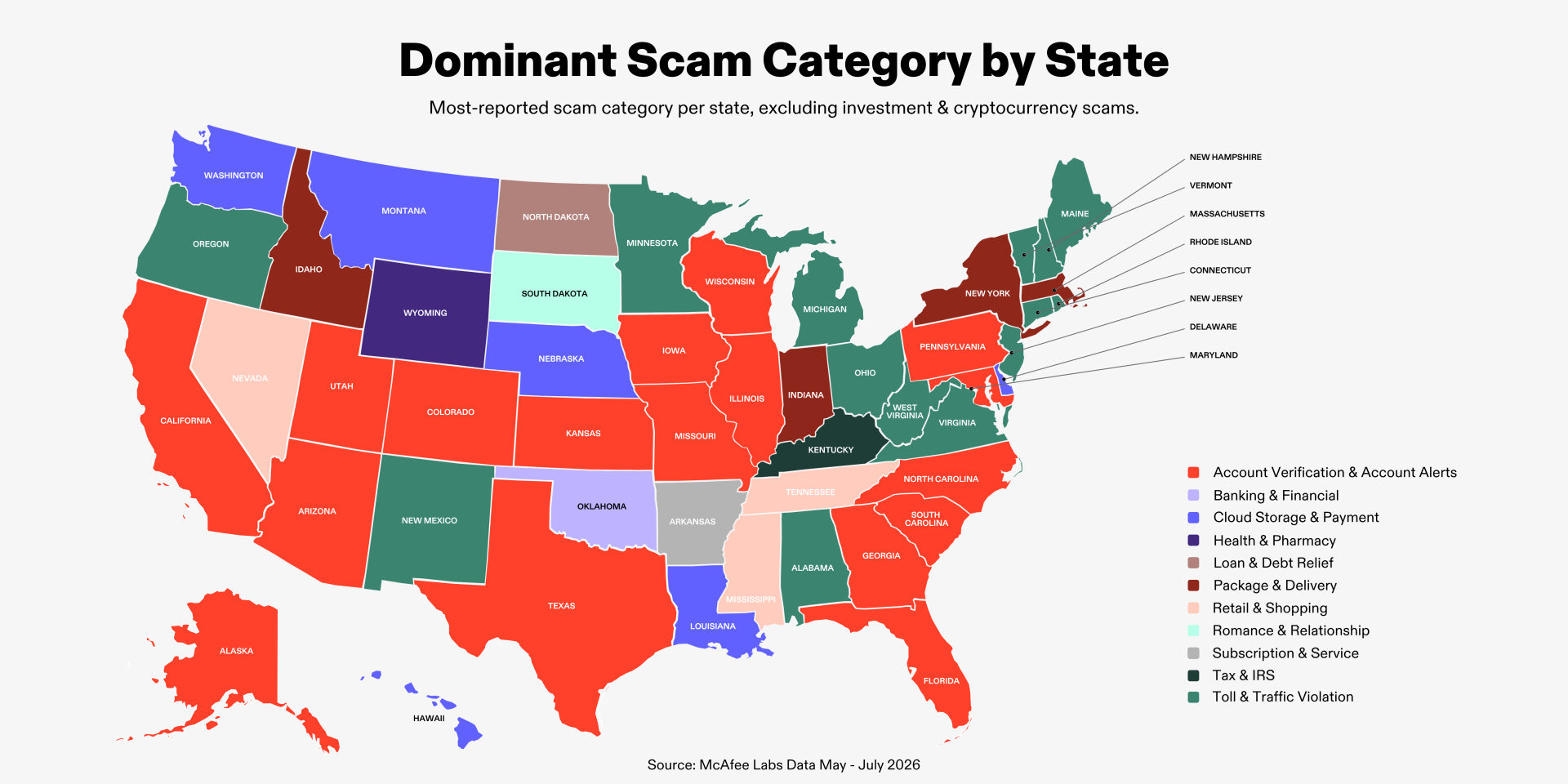
  •  

Carhartt Data Breach Reportedly Exposes Millions. What to Know This Week in Scams

A data breach doesn’t have to expose your password or credit card number to create problems. Sometimes, scammers just need enough information to make you believe they know you.

That’s the concern after data reportedly stolen from Carhartt was published online. Here’s what happened, why it matters, and what consumers should watch for next.

What Happened in the Carhartt Data Breach?

The cybercriminal group ShinyHunters published data it claims was stolen from Carhartt after an alleged $3.3 million extortion demand was rejected, according to TechRadar. Security researcher Troy Hunt analyzed the leaked information and determined that the compromised data was associated with roughly 12.9 million accounts, although the dataset also reportedly contained millions of synthetic records that did not correspond to real people.

For affected consumers, the important part is what was reportedly exposed: names, email addresses, phone numbers, and postal addresses.

This is also a useful example of how cyber extortion has evolved.

Traditional ransomware typically involves criminals getting inside an organization, encrypting its files so they can’t be accessed, and then demanding payment to restore them.

In this case, the reported strategy was different. ShinyHunters has increasingly focused on data exfiltration — security jargon for stealing or copying data out of a system — and then using the threat of publishing that information as leverage.

In plain English: Criminals don’t necessarily need to lock up a company’s computers anymore. Stealing its data can be valuable enough.

How Scammers Might Use This Information

The immediate question after any breach is usually, “Was my financial information stolen?” That’s important, but it isn’t the only risk.

A combination of your name, email, phone number, and home address can help scammers create a message that sounds much more believable than generic spam.

Instead of: “There’s a problem with your account. Click here.” you could receive something that appears to know your name, where you live, or which company you’ve done business with.

That context can lower your guard.

And scammers don’t necessarily have to pretend to be Carhartt. Stolen contact information can potentially be combined with information from other breaches, data brokers, or public sources to build a more complete picture of someone.

That’s why leaked personal information can remain useful to criminals long after the original breach disappears from the headlines.

Key Takeaways

  • Personal information can be valuable to scammers even when passwords or payment information aren’t exposed.
  • Names, emails, addresses, and phone numbers can make phishing attempts more personalized.
  • Be particularly cautious of unexpected messages claiming there is a problem with an order, refund, account, or payment.
  • A company knowing personal details about you is not proof that the person contacting you actually represents that company.

How McAfee Protects Against Breaches 

Before a breach  

Personal Data Cleanup reduces your digital footprint by removing your personal information from many data broker sites, making it harder for scammers to find and target you.  

Online Account Cleanup scans for accounts you no longer use and helps you delete them, along with your personal info.  

During a breach  

Identity Monitoring watches for your personal information, including email addresses, driver’s license numbers, passport numbers, bank accounts, credit cards, Social Security numbers, phone numbers, and more, across the dark web and known data leaks.   

Plus, we alert users on average up to 10 months earlier than similar services, so you can act fast when your personal information appears where it shouldn’t.  

After a breach  

Scam Detector identifies suspicious texts, emails, and links that often follow major breaches, while web protection blocks malicious websites designed to steal even

Other Scam and Security News This Week

A Lenovo Login Flaw Exposed About 5,000 Dropbox Accounts

Dropbox says approximately 5,000 accounts were accessed after attackers exploited a flaw involving Lenovo ID authentication; fewer than a third reportedly had files viewed or downloaded. Dropbox has expired sessions authenticated through Lenovo IDs and changed the login process, while the incident is another good reason to enable two-factor authentication on cloud accounts.
Sources: BleepingComputer

Amazon Adds a New Way to Check Suspicious Messages

Amazon has added a feature to Alexa for Shopping that lets U.S. customers ask whether an email, text, phone call, or other message actually came from Amazon; the company says roughly 360,000 customers contact customer service each year with that question. It’s a useful reminder of one of the best scam-fighting habits: instead of trusting the message in front of you, verify it through a separate, official channel.
Sources: TechCrunch

Fake Late-Night TV Clips Show How Easily AI Can Borrow Someone’s Credibility

NPR reports that AI-generated videos impersonating late-night hosts including Jimmy Kimmel and Jon Stewart have accumulated significant audiences online, sometimes without obvious AI labels. The bigger consumer lesson goes beyond politics or entertainment: seeing a familiar face and hearing a familiar voice is no longer enough to prove that a video — or the product, investment, or claim it promotes — is authentic.
Source: NPR

This Week’s Safety Tips

✓ Treat unexpected personalization as information, not proof. A caller knowing your name, address, or other details doesn’t mean they’re legitimate.

✓ Turn on two-factor authentication. This can provide another barrier when someone tries to access an account without permission.

✓ Verify messages outside the message itself. Open the official app, type the website yourself, or contact the company using information you independently know is legitimate.

✓ Slow down when something feels urgent. Whether it’s a breach alert, delivery problem, suspicious login, or celebrity video, scammers benefit when you react before you verify.

And we’ll be back next week with more cybersecurity news and scam alerts.

The post Carhartt Data Breach Reportedly Exposes Millions. What to Know This Week in Scams appeared first on McAfee Blog.
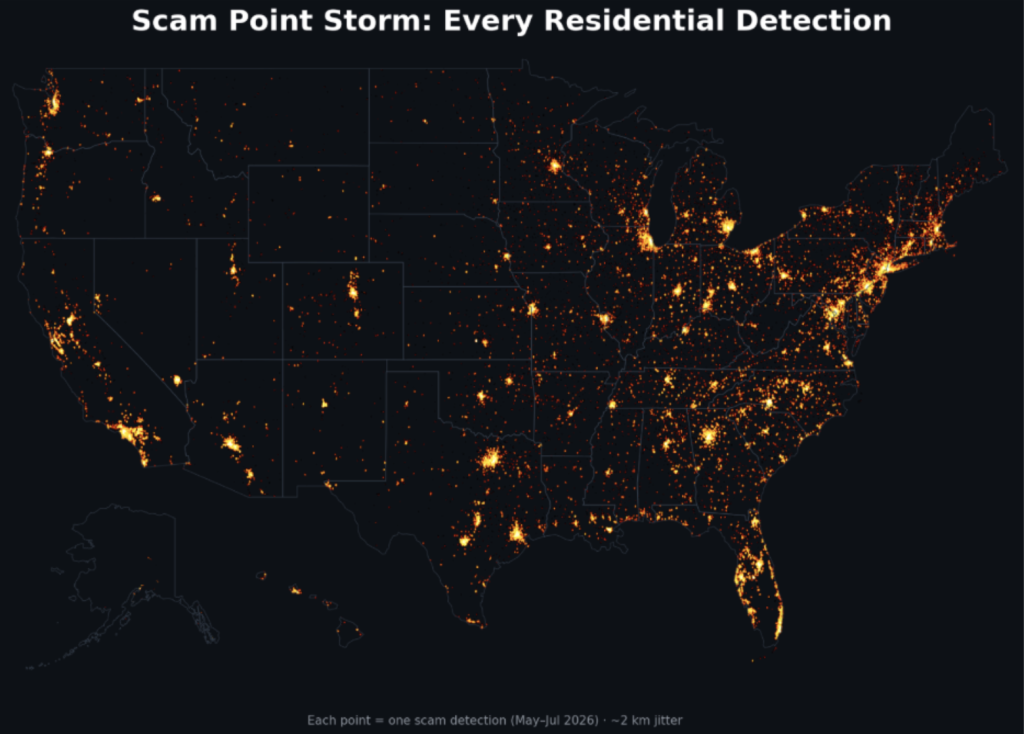
  •  

Is That TikTok Ad Legit? How to Spot Fake Ads on Social Media During Major Sales Events

Labor Day weekend means sales. And if you spend any time on Facebook, Instagram or TikTok, some of the biggest discounts may find you before you even start shopping.

That convenience comes with a catch: Not every deal in your feed is really from the brand it appears to be.

Scammers can create polished social media ads that impersonate familiar retailers, advertise steep discounts and send shoppers to convincing lookalike websites. According to the Federal Trade Commission, nearly 30% of people who reported losing money to a scam in 2025 said that it started on social media. And the reported losses hit a whopping $2.1 billion last year.

So before a Labor Day “80% off” deal stops your scroll, give it a second look.

How Fake Social Media Shopping Ads Work

A fake shopping ad often starts with something completely ordinary: a product you actually want.

Maybe it’s sneakers from a familiar brand. Patio furniture you’ve been researching. A handbag, grill or appliance marked down for Labor Day.

The ad may use the real company’s logo, product photography and branding. Click it, and the website can look remarkably similar to the retailer’s actual site.

That’s the trick.

This is a form of brand impersonation: A scammer copies the appearance of a company people already know and trust. Instead of convincing you to trust an unfamiliar store, the scammer borrows the reputation of a familiar one.

Sometimes these ads lead to completely fake storefronts. Other times shoppers receive counterfeit products, something dramatically different from what they ordered or nothing at all.

The FTC recently warned consumers specifically about social media ads advertising brand-name products at unusually low prices. And the problem isn’t limited to one platform. A convincing ad can reach you wherever you scroll.

A scam shopping site that looks close to the real thing.
Here’s an example of a scam Louis Vuitton website previously detected by McAfee. Users get an ad on social media, and land on a realistic-looking shopping site. But it’s not the real vendor.

She Thought She Bought $800 Patio Chairs for $135

One shopper who shared her story with McAfee learned just how convincing these scams can be.

A few years ago, Jen was scrolling through Facebook when she spotted an ad for the exact Wayfair patio chairs she and her husband had been considering. Normally around $800, the chairs were advertised at 80% off — just $135 with free shipping.

She clicked.

The experience looked enough like Wayfair that she continued with the purchase, even though a few things started to feel strange. A new tab opened when she tried to buy the chairs. The checkout mentioned PayPal even though she was using her credit card. Then she learned the order would be shipping from China and could take six to 12 weeks.

When she checked her credit card, the charge wasn’t from Wayfair. It appeared in Chinese characters.

Weeks later, a package finally arrived.

It wasn’t a set of patio chairs. Inside the small package was a ceiling-fan chain with a cheap ring.

Her credit card company eventually reversed the charges. But the experience illustrates something important about fake shopping ads: You don’t necessarily land on an obviously fake website filled with misspellings and broken images. A scammer’s goal is to make the experience feel normal long enough for you to complete the purchase.

7 Signs a Social Media Ad or Shopping Site Could Be Fake

Before buying something you find through Facebook, Instagram, TikTok or another social platform, look for these warning signs:

1. The discount is dramatically better than everywhere else.
A legitimate sale can be generous. But if one ad offers a popular $800 product for $135 while reputable retailers are nowhere close, investigate before buying.

2. The website address doesn’t match the retailer.
A fake site can copy a logo much more easily than it can copy a company’s official domain. Look carefully for extra words, misspellings or unusual endings in the web address.

3. Clicking takes you somewhere unexpected.
Watch for redirects, new tabs or checkout pages on a different domain. A change doesn’t automatically mean fraud, but it’s a reason to verify where you are before entering payment information.

4. The checkout process feels off.
Pay attention when the payment method, merchant name or checkout experience doesn’t match what the site told you to expect.

5. There’s pressure to buy immediately.
Countdown timers and “only two left” warnings can push you to act before checking the seller. Urgency is useful to scammers because it shortens the time you spend thinking.

6. You can’t independently verify the sale.
Open a new browser window or the retailer’s official app and search for the product yourself. If the incredible sale exists only through the social ad, that’s a warning sign.

7. The merchant on your credit card doesn’t match the company you thought you paid.
Check the transaction after buying. An unfamiliar merchant name or unexpected international charge deserves immediate attention.

The Safest Way to Shop a Deal You See on Social Media

Here’s a simple safety checklist for Labor Day weekend:

✓ Leave the social app and find the retailer yourself. Don’t let the ad choose your destination.

✓ Compare the price elsewhere. A discount that’s wildly out of line with other retailers deserves extra scrutiny.

✓ Check the URL and merchant name. Make sure you’re dealing with the company you think you’re dealing with.

✓ Use a credit card when possible. And save screenshots, receipts and order confirmations in case you need to dispute the purchase.

What If You Already Bought Something From a Fake Ad?

Act quickly, but don’t panic.

Save screenshots of the ad, website, receipt and any emails or messages from the seller. Check your credit card or bank statement to see how the transaction appears.

If you believe the purchase was fraudulent, contact your card issuer or financial institution and explain what happened. Ask about disputing the transaction and whether your card information should be replaced.

If you created an account on the fake website and reused a password you use elsewhere, change that password anywhere you’ve used it. Unique passwords matter because a scammer who captures one password may try the same email-and-password combination on other accounts.

You can also report fraudulent ads to the social platform and report the scam to the FTC.

How McAfee Helps You Shop More Safely

Spotting every fake yourself is getting harder. Scammers can copy legitimate branding, product photos and storefront designs closely enough that a quick visual check isn’t always enough.

McAfee Scam Detector can help identify suspicious links, messages and websites and alert you when something may be a scam. Plus it has social media tools to help detect scams originating from your favorite platforms. That can provide another check when an attractive offer lands in a social message or sends you toward a questionable site.

Web Protection can also help warn you about risky websites as you browse, adding protection at the moment a convincing ad tries to move you away from the social platform and onto a malicious destination.

The goal isn’t to stop shopping the sales you see online. It’s to make sure the store getting your money is the store you intended to pay.

The post Is That TikTok Ad Legit? How to Spot Fake Ads on Social Media During Major Sales Events appeared first on McAfee Blog.

  •  

Airport Wi-Fi Data Breach Exposes Millions of Travelers: This Week in Scams

Free airport Wi-Fi can be useful when you’re waiting for a flight. But this week’s biggest security story is a reminder that there are two different ways your information can be exposed when you connect.

One risk happens while your information is traveling across a public network. Another happens after a company collects and stores information about you.

A cyberattack affecting three major UK airports illustrates the difference, and why travelers need protection for both.

What happened in the Manchester Airports Group cyberattack?

Manchester Airports Group, or MAG, confirmed that an unauthorized third party obtained customer information connected with Manchester Airport, London Stansted Airport, and East Midlands Airport.

According to reports, the affected information came from car park, airport lounge, Fast Track bookings, and airport Wi-Fi registrations. MAG says the stolen data includes email addresses, phone numbers, vehicle registration numbers, and postcodes. The company says the affected system did not contain customers’ payment or banking details.

The Telegraph reported that approximately 8.7 million passengers were affected and that more than 90% of the stolen records were email addresses, largely because travelers provide an email address when registering for free airport Wi-Fi. The attackers reportedly demanded a ransom, which MAG declined to pay.

MAG says airport operations and passenger safety were not affected and that it has contained access to the compromised systems.

For travelers, however, the breach creates another concern: what criminals might do with the stolen information next.

Why stolen airport data can lead to convincing scams

An email address alone might not seem particularly sensitive. But combined with a phone number, postcode, vehicle registration, or knowledge that someone has interacted with a particular airport, it becomes more useful to a scammer.

That information can help criminals make phishing emails and texts feel believable.

A message might claim there is a problem with your airport parking reservation, ask you to confirm a Fast Track booking, or say you need to pay an outstanding airport charge. Someone who recently used the airport may be much more inclined to click.

That is one reason breach victims should be especially cautious about unexpected messages that appear connected to the organization involved.

Does a VPN protect you from an airport Wi-Fi data breach?

Not from this kind of breach.

A VPN, or virtual private network, encrypts the internet traffic traveling between your device and the VPN service. Think of it as putting your online activity inside a protected tunnel while it crosses a public network.

That matters at airports, hotels, cafés, and other places where many people share the same Wi-Fi. McAfee Secure VPN can encrypt your connection and can be configured to turn on automatically when you join an unsecured network.

But that is different from what happened here.

If you voluntarily give an airport your email address to register for Wi-Fi, that email address may then be stored in the airport operator’s systems. A VPN cannot prevent a later breach of that company’s database.

In short: A VPN helps protect information in transit. It does not control what happens to information you give directly to a company.

Both risks matter.

Before, During, and After a Data Breach

Before a breach: Share only the information a service genuinely requires. Use strong, unique passwords for online accounts, and use a VPN when connecting to public Wi-Fi.

During a breach: Look for information directly from the affected company rather than relying on messages arriving by email or text. Criminals often take advantage of security incidents by sending fake “account protection” or “verify your information” messages.

After a breach: Watch for unusual emails, calls, texts, and account activity. Be particularly suspicious when someone creates urgency or asks for passwords, verification codes, payment information, or money.

MAG specifically warns that it will not unexpectedly contact customers asking for payment card information, banking details, or passwords.

At a Glance

➡ The breach affected customer information from bookings and airport Wi-Fi registrations.

➡ 8.7 million passengers were affected

➡ MAG says banking and payment details were not stored in the affected system.

➡ Stolen contact information can still make phishing and impersonation scams more convincing.

➡ A VPN protects your connection on public Wi-Fi, but it cannot prevent a company from later suffering a database breach.

➡ Be particularly cautious about unexpected airport-related emails and texts following the incident.

How McAfee Helps

Secure VPN helps address the other major risk associated with airport Wi-Fi: someone attempting to monitor your traffic while you use an unsecured network. McAfee Secure VPN encrypts your connection and can automatically activate on unsecured Wi-Fi, helping keep browsing activity and information transmitted from your device private.

Identity Monitoring keeps watch for your personal information associated with breaches, giving you an opportunity to act when exposed information is detected.

And because stolen email addresses and phone numbers can fuel follow-up phishing attempts, Scam Detector can identify suspicious texts, emails, and other QR codes before you act on them.

QR Scan Example

The broader lesson is layered protection: protect your connection while you’re online, then keep watching for misuse of information that companies already hold.

Other Scam and Security News This Week

Hackers claim breach of major data center provider. The ShinyHunters group claims it stole extensive corporate and employee information from U.S. data center company CyrusOne and demanded $13 million.

CyrusOne had not publicly confirmed the hackers’ claims when TechRadar reported the story, so the alleged scale of the breach remains unverified.
Source: TechRadar

Man accused of posing as a 49ers player in $1.3 million romance scam. Federal prosecutors allege that two men defrauded at least 26 women after one portrayed himself online as a wealthy San Francisco 49ers player and the other posed as his financial adviser.

Investigators say fake banking apps and fabricated investment balances helped make the scheme appear legitimate; both defendants are presumed innocent unless proven guilty.
Source: U.S. Department of Justice

Fake sports streams target fans looking for the game. The Better Business Bureau warns that scammers post supposed free streaming links on social media, sometimes tagging real schools or teams, then direct fans to sites designed to collect payment or personal information instead of showing a game.

Go to the team, school, league, or known streaming provider directly rather than trusting a link in a social post — and remember that HTTPS alone does not prove a website is legitimate.
Source: Better Business Bureau

This Week’s Safety Tips

“Once you give your information to a company, you can’t completely control what happens to it,” says McAfee’s Tyler McGee. “But you can limit what you share and take steps to protect yourself if your information is exposed.”

“Only provide what’s needed, use unique passwords and turn on multi-factor authentication where you can. Tools like McAfee’s identity monitoring can also alert you if your information shows up in a known breach. And be extra cautious after a breach,” he says. “Scammers can use exposed information to make messages about a booking, refund or account look much more convincing. If you get one, go directly to the company’s website or app rather than clicking the link.”

✓ Use a VPN on public Wi-Fi. Encrypt your connection before checking email, shopping, banking, or signing into important accounts.

✓ Treat breach-related messages cautiously. Navigate to the company’s official website yourself rather than clicking a link in an unexpected email or text.

✓ Use unique passwords. A password stolen from one service should never unlock another account.

✓ Verify before sending money. Whether someone claims to be an athlete, investment adviser, streaming provider, or familiar company, independently confirm who you are dealing with.

And we’ll be back next week with more cybersecurity news and scam alerts.

The post Airport Wi-Fi Data Breach Exposes Millions of Travelers: This Week in Scams appeared first on McAfee Blog.
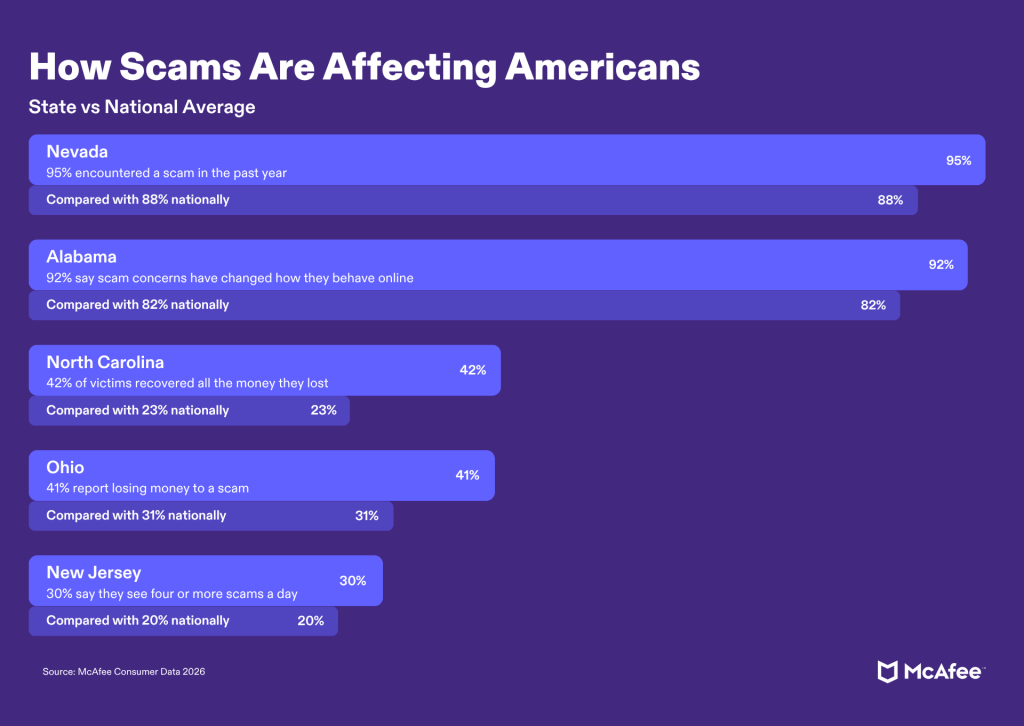
  •  

How to Spot a Crypto Scam: The Top Red Flags to Watch For

An old friend messages you about an incredible crypto opportunity they’ve been using, showing screenshots of impressive returns. The platform looks professional and the interface is slick, so you decide to invest a few thousand dollars to test it. Seeing your money grow daily encourages you to add more. Just when you want to withdraw your funds, the platform vanishes overnight, your friend stops responding, and you realize the entire thing was an elaborate hoax designed to separate you from your savings.

Incidents like these don’t only target tech enthusiasts or risk-seeking traders. The victims also included retirees, first-time investors, and everyday people trying to build financial security who are systematically targeted by criminal operations.

If you are considering investing in cryptocurrency, this guide will help you learn about common types of crypto fraud, recognize their warning signs, and adopt strategies to avoid falling victim to crypto-related cyber threats.

Key Takeaways

  • The 66% increase in crypto-related fraud over the previous year makes investment scams the costliest fraud category the country faces today.
  • From early, short-lived crypto scams to today’s organized criminals, months of relationship-building, professional marketing, fake trading platforms, and smart-contract manipulation are used to appear legitimate.
  • Individuals aged 60+ lost more than $2.8 billion in crypto-related scams in 2024, while people of all ages are targeted in social media, dating apps, and fake brokerage sites.
  • You can dramatically reduce your risk in crypto investments by understanding how these scams work, recognizing red flags, and following essential security practices.

What Are Crypto and NFT Scams?

Crypto and NFT scams are fraudulent schemes that exploit the unique characteristics of blockchain-based digital assets to deceive victims and steal their money or tokens. Unlike traditional financial fraud, these scams leverage the irreversible and complex nature of blockchain transactions, the lack of consumer protection mechanisms in an unregulated sector, and the fear of missing out on the next big opportunity.

Cryptocurrency is digital money that uses cryptography for security and is traded on decentralized networks called blockchains. It is digital cash that no single bank or government regulates. On the other hand, non-fungible tokens (NFTs) are unique digital certificates of ownership recorded on a blockchain, commonly used to represent digital art, collectibles, or membership rights. Being non-fungible means each token is one-of-a-kind and can’t be exchanged one-to-one like currency.

The scams targeting these assets take many forms, including fake investment platforms that display fabricated profits, fraudulent token projects where creators disappear with investors’ money, phishing websites that steal your digital wallet credentials, and long-con relationship scams. Unfortunately, transactions related to these scams cannot be reversed by calling your bank or credit card company. Once your crypto or NFTs are gone, they’re almost always gone for good.

Why Scammers Prefer Cryptocurrency and NFTs as a Payment Method

In 2024, the Federal Bureau of Investigation’s Internet Crime Complaint Center recorded 859,000+ cybercrime complaints, with total losses of $16.6 billion, a 33% increase over 2023. Of that total, approximately $9.3 billion involved crypto investments or payments, spread across roughly 150,000 complaints.

Losses from global rug-pull scams, which are phony crypto offerings that quickly skyrocket and then plunge to near worthlessness, reached nearly $6 billion in early 2025, despite a decline in incidents.

Scammers now prefer cryptocurrency as the payment method for all kinds of fraud, whether it’s for tech support, romance, phishing, or extortion scams, because it’s difficult to trace and impossible to reverse. The moment someone tells you to download a crypto wallet app or send payment via Bitcoin, Ethereum, or any other digital currency, you’re likely dealing with a criminal.

Everyone Is a Target, But Some Groups Face Higher Risk

Because of the decentralized, borderless nature of cryptocurrency, international criminal syndicates are able to operate from jurisdictions with weak enforcement while targeting victims worldwide. This problem isn’t just affecting young, tech-savvy early adopters or risk-seeking day traders. It is also affecting ordinary people worldwide, including first-time investors and victims of other types of scams across all age groups.

Individuals aged 60 and over, who lost a total of $2.8 billion in 33,000 crypto fraud incidents in 2024, face particularly severe financial impact as this amount represents their life savings, retirement funds, or money earmarked for healthcare, housing, or supporting family members. The emotional and financial devastation extends far beyond the dollar figures.

Older adults are so heavily targeted because they’re more likely to have substantial savings available to invest, may be less familiar with how cryptocurrency works, and often have more time to engage with scammers. In some cases, individuals were seeking to financially recover after recent market downturns, making high-return crypto promises particularly appealing.

Younger investors are targeted through different channels, such as social media, but the fundamental vulnerability remains the same: the promise of quick wealth and sophisticated social engineering.

The Most Common Crypto and NFT Scam Types

Pig-Butchering Investment Schemes 

Considered the most devastating category, pig-butchering scams originate from the farming practice of fattening a pig before slaughter, chillingly describing the scammer’s approach. These long cons run for months as criminals build relationships with victims through dating apps, social media, or wrong-number texts that turn into friendly conversations.

Gradually, the scammer will introduce the topic of cryptocurrency, positioning themselves as either a successful investor or someone learning from a knowledgeable mentor. Patiently, they guide the victim onto a fake but professionally designed, fully functional trading platform that shows real-time market data and walk them through making initial deposits and trades. On screen, the victim sees their account balance grow, which encourages them to deposit increasingly larger sums. Many even liquidate retirement accounts, take out loans, or sell property to invest more.

When the victim attempts to withdraw funds, the platform suddenly requires tax payments or verification fees, or threatens frozen accounts unless more money is deposited. 

If victims refuse to send additional funds, the scammer ghosts them, the platform shuts down, and they discover that no trading ever occurred. Every dollar they sent went directly into criminal wallets.

Rug Pulls in Memecoins and DeFi Projects 

Modern rug pull schemes are named for the action of pulling the rug out from under someone and leaving them shocked or helpless. One popular rug-pull method involves memecoins such as Dogecoin and Shiba Inu, which were hype-driven cryptocurrencies inspired by internet trends. Another involves DeFi (decentralized finance) projects, which offer financial services such as trading, lending, and investing outside of traditional banks. 

Both can be legitimate, but their fast-moving, lightly regulated nature also makes them prime targets for scams, especially rug pulls where creators suddenly drain funds and disappear. However, these schemes do not offer a clear utility or roadmap, relying entirely on hype, memes, and community without articulating a specific use case, technical innovation, or development path.

To build credibility before they exit, scammers might:

  1. Launch a crypto campaign with seeming transparency, using identities that are often stolen or fabricated
  2. Seed a liquidity pool that is locked for a period to demonstrate their commitment
  3. Employ obscure auditing firms that merely rubber-stamp the project without a genuine security review
  4. Coordinate with influencer networks to create viral social media buzz around the fake crypto project
  5. Use bot networks to simulate active trading and enthusiastic community discussion
  6. Gradually siphon the funds through complex smart-contract functions while maintaining the appearance of locked liquidity
  7. Finally drain the remaining funds and disappear, often blaming hackers or claiming the project was itself compromised

Phishing and Wallet-Draining Attacks

Targeting NFT holders and crypto traders, this evolving scam includes:

  • Fake mint sites and marketplace clones: Scammers create websites that look identical to legitimate NFT platforms. Victims who connect their wallets to these phishing sites and approve transactions inadvertently sign malicious contracts that drain their assets.
  • Discord and social media impersonation: Criminals compromise or imitate official project Discord servers, Twitter accounts, and Telegram groups, posting fake announcements about NFT drops or security updates that link to phishing sites.
  • Malicious wallet updates: These involve fake browser extensions, mobile apps, or email warnings claiming your wallet software needs an urgent security patch. Once you install the malicious version, attackers access your private keys or seed phrases.
  • Customer support impersonation: Scammers pose as support staff from crypto exchanges, wallet providers, or NFT platforms, asking victims to share security information or provide remote access to their computers to resolve fabricated issues.

The common thread across all these attacks is social engineering combined with the irreversible nature of blockchain transactions. Your confusion, an urgent email, one click, and your assets are gone with no way to reverse the transaction.

Crypto and NFT Scams Still Evolving

From 2020 to 2022, many of these early crypto and NFT scams consisted of poorly designed websites, unrealistic promises, and little effort to hide criminal intentions. Today, crypto criminals have become more efficient and effective. As an example, the number of rug-pull incidents declined by about 66% in early 2025, yet the total value stolen still exploded to $6 billion, up from roughly $90 million the year before. 

Organized crypto scam operations are characterized by:

  • Multi-wallet structures where funds might pass through dozens of addresses across different blockchains before disappearing into mixers that blend transactions to hide their origin or are cashed out through unregulated exchanges.
  • Honeypot smart contracts, which are seemingly legitimate tokens that can be purchased normally, but the underlying code contains hidden functions that prevent buyers from selling when they want to cash out. The contract is designed to trap liquidity, hence the name.
  • Professional marketing and community-building, where scammers may hire website designers, influencers, and individuals to post fake positive reviews on social media. They could also deploy bots to simulate active trading and enthusiastic community discussion, and create fabricated LinkedIn accounts with AI-generated profile photos.

How to Protect Yourself from Crypto and NFT Scams Today

Protecting yourself from modern crypto scams requires more than awareness; it demands consistent habits, smart decision-making, and the right tools. As threats continue to evolve, building strong security practices today is the best way to stay ahead of increasingly sophisticated attacks.

Step 1: Decide If Crypto and NFTs Fit Your Risk Profile

Given that investment fraud is now the top fraud category by value in the U.S. and crypto-enabled fraud accounts for the majority of those losses, you will need to critically evaluate whether investing in cryptocurrency or NFTs aligns with your financial goals and risk tolerance.

This space combines extreme price volatility, complex technical requirements, irreversible transactions, minimal consumer protection, and a target-rich environment for criminals. If any of the following apply to you, your wisest choice is to proceed with extreme caution or avoid crypto investment entirely:

  • You’re investing money you can’t afford to lose.
  • You feel time pressure or fear of missing out, driving your decisions.
  • You don’t fully understand cryptocurrency wallets, private keys, and blockchain transactions.
  • You’re being introduced to the opportunity by someone you met only online.
  • The promised returns seem unusually high compared to traditional investments.
  • If something goes wrong, you likely have no way to recover your funds.

Choosing not to invest in crypto isn’t missing out, but making a risk-aware decision. Traditional, regulated investment vehicles may offer lower potential returns, but they come with legal protections, regulatory oversight, and mechanisms for recovering from fraud.

Step 2: Adopt Essential Anti-Scam Rules

If you decide to invest in cryptocurrency or NFTs anyway, adopt these fundamental security practices to dramatically reduce your vulnerability:

Never Send Crypto Based on Unsolicited Contact

If someone reaches out to you through any medium who steers the conversation to cryptocurrency investment opportunities, you’re almost certainly being targeted for fraud. Legitimate investment opportunities don’t find you this way.

Similarly, any communication that promises guaranteed returns, uses urgency, or pressures you before you can independently verify information is a red flag.

Verify Platforms Independently and Exhaustively

Before depositing funds anywhere, verify the platform’s legitimacy through multiple independent sources. Look for:

  • Regulatory registration: Many scam platforms falsely claim regulatory compliance, so verify directly with your country’s regulator. In the U.S., check the websites of the Securities and Exchange Commission and the Commodity Futures Trading Commission for registered entities. 
  • Independent reviews: Beyond testimonials or reviews on the platform, look for experiences on Reddit, Twitter, and crypto community forums. Scammers might seed fake positive reviews, so look for detailed negative experiences rather than just star ratings.
  • Team transparency: Legitimate projects are run by real people whose professional backgrounds can be verified through LinkedIn, academic publications, or previous work. Note that AI-generated faces and bios are common in scams.
  • Active audit reports: If a DeFi project claims to be audited, verify that the audit was performed by a reputable firm and read the report, not just the passed audit badge.
  • Domain age and history: Use WHOIS lookup tools to check when a website’s domain was registered. Scam sites are often brand new, while legitimate platforms have longer operational histories.

Master Wallet Security Fundamentals

If you’re holding cryptocurrency or NFTs yourself rather than on an exchange, you’re personally responsible for security. Essential practices include:

  • Use hardware wallets: These are physical devices such as Ledger or Trezor for significant holdings rather than software wallets on your computer or phone. Hardware wallets keep your private keys isolated from internet-connected devices, dramatically reducing risk.
  • Store your seed phrase offline in multiple secure locations: This is the 12- to 24-word recovery phrase for your wallet. Write it on paper or stamp it on metal plates, never store it digitally in photos, cloud storage, or password managers.
  • Never share your seed phrase or private keys: No legitimate support person will ever ask for these. If someone does, they’re attempting theft.
  • Verify transaction details carefully before approving: Check that the recipient address, amount, and token type are exactly what you intend. Malware can change clipboard contents, so compare addresses character by character.
  • Use a separate email account: Create a separate email address for your crypto activities, distinct from your day-to-day credentials, and enable two-factor authentication, preferably via authenticator apps rather than SMS.
  • Be extremely skeptical: In the current environment, you should assume any new cryptocurrency token or NFT project is a scam until you’ve verified otherwise through sustained, careful research. 

Step 3: Respond Immediately If You’ve Been Scammed by Crypto and NFTs

Discovering you’ve been scammed is devastating, but taking immediate action could limit the damage and help law enforcement track and stop criminal operations:

Stop All Further Payments Immediately

Scammers often follow successful scams with additional pitches: recovery services usually run by the same criminals, tax payments supposedly required to unlock frozen funds, or claims that you’re so close to breaking even if you just invest a bit more. Every additional dollar you send is stolen money. Stop entirely.

Document Everything Comprehensively

Before anything disappears or times out, make sure to save:

  • Screenshots of all conversations, transactions, and account dashboards
  • Email messages, text messages, and voice messages
  • Wallet addresses, transaction hashes, and blockchain records
  • Platform URLs and any documents or contracts you signed
  • Names, social media profiles, and phone numbers used by the scammers

This documentation is essential for law enforcement investigations and any potential recovery efforts.

Report to Multiple Authorities

While full recovery is rare, rapid reporting has occasionally allowed exchanges to freeze funds or helped international task forces seize assets before they’re fully laundered. Don’t expect miracles, but don’t assume recovery is impossible either.

Make formal reports to the:

  • FBI Internet Crime Complaint Center (IC3): Even if your loss seems small compared to the billions reported annually, your complaint adds to the IC3 pattern analysis that helps identify and dismantle criminal networks.
  • Federal Trade Commission: Complaints made to ReportFraud.ftc.gov feed into consumer protection initiatives and help identify trending scam tactics.
  • Your exchange or wallet provider’s fraud team: If you used a legitimate platform for any part of the transaction, reporting the incident will enable your exchange or wallet to flag addresses or provide transaction data to investigators.
  • Your local or state law enforcement: These agencies work with federal law enforcement, particularly if losses are substantial. 

Consider Professional Help for Significant Losses

If you’ve lost large sums, consider consulting with lawyers who specialize in cryptocurrency fraud or employing blockchain forensics firms that can trace funds across chains. 

Protect Yourself from Recovery Scams

After a crypto scam, many victims are approached by fake recovery specialists who claim they can get your money back for an upfront fee in, you guessed it, cryptocurrency. These are almost always the same criminals or their associates running a second scam. Legitimate legal professionals work on contingency or retainer, and will not ask victims to send cryptocurrency for recovery services.

Step 4: Install a Trusted Security Solution

Comprehensive cybersecurity solutions may not be a guaranteed shield against all fraud, but they serve as a critical layer that catches threats you might not spot in that moment. Solutions such as McAfee+ help block known phishing sites and warn you before you enter credentials or connect wallets to fraudulent platforms. They also help detect malware and keyloggers that capture your password and seed phrase keystrokes, take screenshots when you open wallet applications, or even replace destination addresses in your clipboard when you copy-paste. Antivirus and anti-malware tools continuously monitor for threats and help remove them before they can compromise your security.

A secure virtual private network (VPN) can protect your connection on public Wi-Fi networks or compromised routers, preventing man-in-the-middle attacks that might intercept your login credentials or transaction data.

Since many crypto scams begin with or lead to broader identity theft, identity monitoring services can alert you if your personal information, passwords, or financial details appear in data breaches or on dark web marketplaces. This early warning allows you to change compromised credentials before they’re exploited.

Final Thoughts

The rising number of crypto-related fraud incidents and losses represents a grim milestone. As long as these scams promise high returns and operate with minimal oversight, criminal organizations will continue developing new tactics to steal from investors. 

Going forward, your effective defense strategy will combine healthy skepticism, technical hygiene, continuous education, and practical tools. Approach any crypto investment opportunity with a questioning eye until you’ve independently verified that it is legitimate.

Maintain strong security practices, including using hardware wallets for significant holdings, storing seed phrases offline, enabling two-factor authentication everywhere, and carefully verifying transactions before approving.

Most importantly, build a network of trusted advisors, such as family members, friends, or financial professionals, who can offer guidance when you’re evaluating opportunities. Share what you’ve learned from this article and other McAfee guides with people in your life who might be exploring crypto investments, especially those who may be more vulnerable to relationship-based scams.

The post How to Spot a Crypto Scam: The Top Red Flags to Watch For appeared first on McAfee Blog.

  •  

Pokémon Center Breach Shows Why Your Delivery Data Matters: This Week in Scams

A pile of Pokemon cards, with Charizard visible.

A data breach doesn’t have to hit the company you shopped with directly to put your information at risk. 

That’s the lesson from this week’s Pokémon Center breach. Customers in the United Kingdom and Germany are being notified that personal and order information was exposed after attackers compromised CEVA Logistics, the third-party company used to fulfill and ship Pokémon Center orders. 

The good news: Pokémon Center says CEVA did not have access to customers’ payment-card information.  

The bigger concern is what criminals could potentially do with the information that was exposed, particularly when it can make a phishing message look unusually convincing. 

What Happened in the Pokémon Center Data Breach? 

According to breach notifications reviewed by BleepingComputer, attackers may have obtained Pokémon Center customers’ full names, mailing addresses, phone numbers, email addresses, and information about the products they ordered. The affected customers were in the UK and Germany. 

The intrusion occurred at CEVA Logistics rather than Pokémon Center itself. Reporting indicates attackers accessed CEVA systems between late July and August 1, disrupting operations at eight European warehouses and affecting multiple retailers. Valve previously notified European Steam hardware customers that their information had also been exposed through the CEVA incident. 

Why Does Shipping Data Matter to Scammers? 

A name and email address may not seem as sensitive as a credit-card number. But when criminals also know your address, phone number, and what you recently bought, they have something valuable: context. 

Context helps scammers make phishing messages believable. 

Phishing is when a criminal pretends to be a trusted company or person to persuade you to click a malicious link, hand over a password, share personal information, or send money. 

After a breach like this, criminals could potentially impersonate Pokémon Center, a delivery company, or another retailer and reference details that make their message feel legitimate. 

They might claim an order needs to be rescheduled, a delivery fee must be paid, or a refund is waiting. Knowing that you really placed an order can make the bait much harder to spot. 

Importantly, there is currently no evidence that the stolen Pokémon Center information is being used in such a campaign. But personalized phishing is a common reason breached contact and transaction information deserves attention. 

Key Takeaways 

➡ Pokémon Center says the breach occurred at its logistics provider, CEVA, not its own shopping platform. 

➡  Names, addresses, phone numbers, email addresses, and order details may have been exposed. 

➡  Pokémon Center says payment-card information was not available to CEVA. 

➡  Real order details could make future phishing or delivery scams appear more credible. 

➡  Customers should independently verify unexpected messages about refunds, cancellations, or deliveries. 

3 Easy Safety Actions to Take If Your Information Is Exposed in a Data Breach 

Getting a breach notification doesn’t necessarily mean someone has already misused your information. It does mean you should take a few steps to make that information harder to use against you. 

1) Find out exactly what was exposed. Read the company’s breach notice carefully. An exposed email address calls for different precautions than a stolen password, Social Security number, financial information, or medical record.

2) Secure the accounts that could be at risk. Change any exposed or reused passwords, use a unique password for every account, and turn on multi-factor authentication where it’s available. If sensitive financial or identity information was stolen, consider a credit freeze or fraud alert as well.

3) Be extra skeptical of messages that know something about you. Breached information can help scammers create convincing emails, texts, and calls. A message that knows your name, address, recent purchase, or other real details isn’t necessarily legitimate. Go directly to the company’s website or app to verify unexpected requests rather than clicking a link or calling a number in the message.  

How McAfee Protects Against Breaches 

Before a breach  

Personal Data Cleanup reduces your digital footprint by removing your personal information from many data broker sites, making it harder for scammers to find and target you.  

Online Account Cleanup scans for accounts you no longer use and helps you delete them, along with your personal info.  

During a breach  

Identity Monitoring watches for your personal information, including email addresses, driver’s license numbers, passport numbers, bank accounts, credit cards, Social Security numbers, phone numbers, and more, across the dark web and known data leaks.   

Plus, we alert users on average up to 10 months earlier than similar services, so you can act fast when your personal information appears where it shouldn’t.  

After a breach  

Scam Detector identifies suspicious texts, emails, and links that often follow major breaches, while web protection blocks malicious websites designed to steal even more of your information. 

Other Scam and Security News This Week 

FBI warns about callers impersonating federal agents. The FBI’s Boston Division is warning about scammers who spoof its real phone number, pretend victims are connected to crimes, and then try to move conversations onto encrypted messaging apps. The key reminder: caller ID can be faked, and the FBI says it will not call private citizens to demand payment, threaten arrest, or request sensitive information. 

(Source: FBI Boston) 

CareCloud breach grows to more than 3.75 million patients. Healthcare technology company CareCloud has confirmed with federal regulators that hackers stole personal and medical information belonging to more than 3.75 million people, including Social Security numbers, health information, government-issued ID numbers, and some financial data. Because medical and identity information cannot simply be replaced like a password, affected people should take breach notifications particularly seriously. 

(Source: TechCrunch) 

Hacker claims millions of corporate directory records were stolen. A cybercriminal known as “TheHatman” is offering databases allegedly taken from the Microsoft Azure and Entra environments of several major companies, although some named organizations dispute that their current systems were breached and say portions of the information appear old. Even older employee information can still be useful for impersonation and targeted phishing, so the claims are worth watching without treating every advertised dataset as independently confirmed. 

(Source: TechRadar) 

This Week’s Safety Tips 

✓ Treat unexpected delivery messages with caution. Open the retailer or carrier’s official app or website instead of following a link in a text or email. 

✓ Don’t trust caller ID alone. Scammers can spoof a legitimate organization’s real phone number. 

✓ Use unique passwords and multi-factor authentication. Stolen personal information becomes more dangerous when criminals can also get into your accounts. 

✓ Pay attention to breach notices. Knowing exactly what information was exposed helps you recognize the scams criminals may try next. 

And we’ll be back next week with more cybersecurity news and scam alerts. 

The post Pokémon Center Breach Shows Why Your Delivery Data Matters: This Week in Scams appeared first on McAfee Blog.
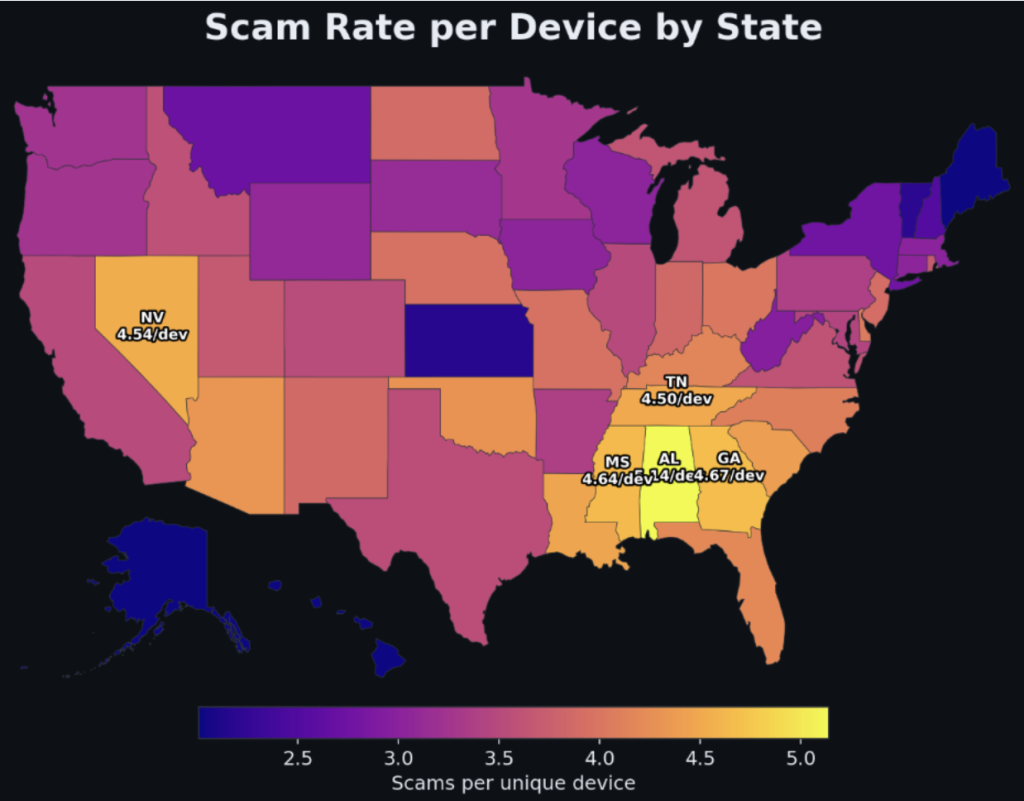
  •  

WeedHack Returns: How SEO Poisoning is Leading Minecraft Fans to Malware

Authored by Aayush Tyagi 

What McAfee Labs found 

McAfee Labs’ latest investigation into the WeedHack malware campaign found that the threat has continued to evolve even after its original command-and-control infrastructure was disrupted by McAfee. Researchers identified multiple active websites still distributing WeedHack to gamers, often by impersonating legitimate Minecraft clients, offering paid tools for free, or using trusted platforms to make malicious downloads appear credible. 

Among the findings: 

→ More than 6,300 attempts to access malicious sites were blocked by McAfee WebAdvisor in the past month. 

→ Researchers found lookalike gaming websites designed to closely replicate legitimate projects, including their branding, feature lists, FAQs, installation guides, developer credits, and links to genuine GitHub repositories. 

→ In one case, the top two Google results observed by researchers for a popular Minecraft client led to sites distributing WeedHack, demonstrating how SEO poisoning can put malicious downloads directly in gamers’ paths. 

→ Nearly half of the malicious URLs identified were Discord links (49.6%), followed by MediaFire (23.4%) and GitHub (8.2%), showing how attackers can use familiar platforms alongside fake websites to distribute malware. 

→ Researchers also identified a malicious site built using an AI-powered website creation platform, illustrating how readily available tools can make it easier to launch convincing new malicious sites. 

Threats like these show why protection needs to start before a malicious download ever reaches your device. McAfee helps block dangerous websites and downloads before malware has a chance to install, helping you stay focused on the game. 

Threats like these show why protection needs to start before a malicious download ever reaches your device. McAfee helps block dangerous websites and downloads before malware has a chance to install, helping you stay focused on the game. 

Background 

2026 has seen a significant shift in malware tactics, where traditional perimeter breaching techniques are being traded in for more elusive methods, such as AI-powered phishing and widespread deployment of Info-stealer malware. Over 560,000 new malware variants are detected every day, with infostealers accounting for the most active category.

McAfee Labs has also seen a significant spike in Malware-as-a-service (MaaS) campaigns, that offer their customers access to sophisticated infostealers and backdoor malware samples at minimal cost. These campaigns provide detailed tutorials to their customers, teaching them how to target popular gaming software, develop authentic-looking websites, and implement SEO Poisoning techniques in order to bamboozle gamers and infect their systems. 

Introduction 

Recently, McAfee Labs has covered a Malware-as-a-service campaign, called ‘Weedhack’ that infected over 116,464 gamers and utilized SEO Poisoning techniques to infect such a large user base.

Read the original article here: Game Over: WeedHack – The Rise of Minecraft Malware-as-a-Service Campaigns

While uncovering the depths of this campaign, we’ve encountered multiple websites and file hosting services that are still active and distributing WeedHack malware. In this article, we cover some of the most prominent examples we’ve encountered in the wild to educate our readers and provide key insights on how to identify and avoid such malicious websites.  

Note: This list is not exhaustive, and there may be additional websites that are not covered in this article.

Malicious websites spreading WeedHack 

During our investigation of this campaign, we observed that most of these websites appear legitimate, as they are well-crafted and often mimic legitimate websites. We observed a series of dedicated brand-impersonation attacks targeting several popular Minecraft clients. 

We published the original article in the first week of July, and, as a result, we’ve seen a disruption in WeedHack’s campaign: its C2 server is no longer active. Consequently, we have observed a shift in tactics by these attackers.  

The WeedHack Dashboard has been taken down, yet we’ve discovered websites that are actively spreading WeedHack malware.  

Out of these URLs, most belonged to file-hosting services:  

  • 49.6% were Discord links 
  • 23.4% were MediaFire links, 
  • 8.2% were GitHub links 
  • 4.6% were Dropbox links 

The remaining URLs were customer-facing websites designed to deceive users. 

In the last month, McAfee WebAdvisor has prevented more than 6,300 users from accessing these malicious websites. At the time of writing this blog, the following websites were still distributing WeedHack malware.  

Figure 1: glazed-client landing page


This website ‘glazed-client.com’ replicates the original website called ‘glazedclient.com’. It provides a free and open-source Minecraft add-on called ‘Glazed Client’ designed specifically for DonutSMP server.  
 
The website contains a feature list, along with Archive, Credits, and FAQ sections, that are identical to those on the original website. 

Figure 2: Feature list

Under the download section, the website provides three download options, and all of them are infected with WeedHack.  

Figure 3: Download Section

This website has a GitHub link, which links to a legitimate GitHub repository in order to build trust with the visitors.  

Example 2 – radium-client.com 

Figure 4: radium-client landing page


The website ‘radium-client.com’ is replicating a legitimate website called ‘radiumclient.com’. The original website offers Minecraft client for $9.99 per month, but the malicious website offers the same tool for free.  

The malicious replica also has a detailed feature and download section. The downloaded JAR file is infected with WeedHack.  

Figure 5: feature list and download button

In this instance, the malicious website contains a discord link, similar to the original website, but it points to a channel called ‘EasyClients’, that has over 1,900 members.  

Figure 6: EasyClients Discord Channel

This channel offers 7 different DonutSMP clients for free (Image 7, Highlighted in Red) which are also infected with WeedHack.  

Figure 7: EasyClients Discord Channel

Example 3 – seedcrackerx.github.io 

Figure 8: SeedCrackerX’s landing page

In this example, we see GitHub’s web hosting service ‘GitHub.io’ being exploited by attackers. Here they are impersonating ‘SeedCrackerX’ tool, which is a Minecraft seed cracking software capable of identifying the exact world seed used to generate a Minecraft world.  

Figure 9: FAQ section

Here, the malicious websites imitate the original website ‘seedcrackerx.com’, by replicating its fonts and color palette. The website also includes an elaborate tutorial and FAQ section, educating the visitors on how to properly install the tool. 

Figure 10: Download section

Under the download section, the website offers seven versions to choose from, but all of them are infected with WeedHack. (Highlighted in Red) 

This malicious website has also linked the genuine GitHub repository hosting the SeedCrackerX tool (Highlighted in Green), to appear more legitimate.  

Example 4 – xenoclient.lol and xenonclient.com 

Xenon Client is one of the most popular Minecraft Clients, known for being lightweight, community driven and offering niche vanilla-friendly utilities. Given its widespread popularity, this client is a prominent target for threat actors.

Figure 11: Google search results for ‘Xenon Client’


During our research, we identified that the top two Google search results for ‘Xenon Client’ directed users to websites (Highlighted in Red) that are spreading WeedHack.  

Figure 12: Xenoclient.lol Landing Page

The “xenoclient.lol” website is particularly noteworthy, for the range of features and support it offers. The website includes comprehensive download and installation guides, as well as FAQ and Credits sections. Additionally, it lists the original Xenon Client GitHub repository and features a community section for like-minded gamers, further enhancing its professional appearance. 

Figure 13: Xenoclient.lol Purchase Options

It offers 2 purchase options for free and premium, where the premium version is listed for $5.  

Figure 14: Download Page

The free option, on the other hand, offers six download options for the main client and six additional options for the client optimizer. At the time of writing, only one download link remains operational (highlighted in red), and it delivers a payload infected with WeedHack. 

Another website, “xenonclient.com,” is also targeting Minecraft players, luring them with a free version of the same client. 

Figure 15: xenonclient.com Landing Page

Similar to other websites in the campaign, this site includes an installation guide and a feature list for the Xenon Client to enhance its apparent legitimacy.  

Figure 16: Feature List

The final JAR file downloaded from this website infects users with WeedHack. 

Example 5 – nova-client.com 

Nova client is an open-source client designed for Minecraft Bedrock Edition.

Figure 17: Nova-Client’s landing page


This client is an easy target for attackers because it lacks an official website. The legitimate client is hosted on GitHub and Modrinth; however, attackers have created a spoofed website and leveraged SEO poisoning techniques to outrank the official sources in search results.  

Figure 18: Feature Section

This website also includes a Features page, installation guide, and FAQ section. In addition, it displays screenshots from the legitimate Nova Client to deceive users. 
 
What is interesting here is that attackers have also included a credits section, which is common with legitimate Minecraft client websites. However, they do not mention anyone who has actually worked on the project and instead used generic team names.  

Figure 19: Credits Section

The download section provides Nova Client for Minecraft 1.21.11, but the download file spreads WeedHack malware. 

Figure 20: Download Section

Example 6 –  cheatlib.xyz 

CheatLib advertises that their clients have been downloaded over 1.6 million times, are free from malware and offers round-the-clock support.

Figure 21: CheatLib’s landing page

 Similar to other such websites, it also features a setup guide and a FAQ section to address common user issues. 

Figure 22: Status Section

They provide eight Minecraft Mods and inform users which Minecraft servers and anti-cheat systems they can bypass, as well as the current status of each mod.  

Figure 23: Download Section

Although the website offers eight distinct mods, all eight files share the same hash and distribute the WeedHack payload. 

Figure 24: CheatLib Discord Channel

This website also links to a Discord channel called ‘CheatLib’ with over 220 users, which also provides access to WeedHack infected mods. 

Example 7 – meteorclients.com 

Figure 25: Meteor Client’s landing page

This malicious domain ‘meteorclients.com’ is impersonating a legitimate website ‘meteorclient.com’. They claim that this client has been downloaded over 10 million times and has over 15 thousand active users at any given time.  

Figure 26: Team Section

The Team section contains the names of the legitimate Meteor Client developers, which appear to have been copied from the project’s official website, to create an appearance of authenticity.  

Figure 27: Preview Section

They also provide an interactive preview of Meteor client on the website, enabling users to test and familiarize themselves with the client. The website offers a single download option, which is infected with WeedHack. 

Example 8 – 22qq-client.com 

22qq-client is a Minecraft Mod for Crystal PVP servers.

Figure 28: 22qq-client’s Landing Page

This mod does not have a dedicated website, and attackers are exploiting this issue. This website is meant to serve as the official page for the client. 

Figure 29: FAQ section.

The attackers attempt to establish credibility by using screenshots from the legitimate client.  

Figure 30: Preview of 22-qq.

They also offer an interactive preview of the client to give users an overview of its functionality. This website provides multiple download buttons, but all of them download the same JAR file, which is infected with WeedHack. 

Example 9 – kryptonclientcrack.lovable.app 

Krypton Client is a paid Minecraft tool for DonutSMP server, hosted on ‘kryptonclient.org’. This malicious counterpart claims to offer a cracked version of the tool.  

Figure 31: Krypton’s Landing Page

The attackers have used an AI-powered tool called ‘lovable.app’ that allows customers to build and launch functional web applications and websites, using natural language. Such tools make it easier for attackers to deploy new malicious domains on the fly.  

Figure 32: Download Section

The website claims that the tool has been downloaded more than five thousand times and has been thoroughly tested for safety. They offer a single download option, which is infected with WeedHack. 

Example 10 – File Hosting Services  

In the course of our investigation, we observed that multiple attackers were exploiting various file hosting services to spread malware. 

Figure 33: GitHub Repository spreading WeedHack

Links to these websites are then distributed via different communication channels, such as Discord, Reddit and other online platforms. 

Figure 34: GitHub Repository spreading WeedHack

We also observed that threat actors extended their targeting beyond Minecraft clients, compromising various popular and independent community websites within the Minecraft ecosystem.

Figure 35: Planet Minecraft

At the time of this analysis, the following Planet Minecart links were spreading WeedHack malware. 

hxxps://static.planetminecraft.com/files/resource_media/mod/mousetweaks-fabric-mc1-21-9-2-29.jar 

hxxps://static.planetminecraft.com/files/resource_media/mod/no-delay-optimizer1-21-4.jar 

Similarly, we observed another community website, called EndMods was also targeted by WeedHack.

Figure 36: EndMods
Figure 36: EndMods

The following link is still active, at the time of publication, and is still spreading the WeedHack malware.  
hxxps://endmods.com/wp-content/uploads/2026/02/KRYPTON-CLIENT1.0.zip 

How To Protect Yourself Online 

At McAfee Labs, we investigate threats across the digital landscape, and gamers are a frequent target. We’ve seen multiple malware-as-a-service campaigns similar to WeedHack use fake downloads, impersonated websites, malicious mods, and other lures to target gaming communities. 

AI-powered tools can make it faster and easier for scammers to create convincing websites, imitate legitimate services, and launch new campaigns at scale. That makes it even more important to know what you’re downloading, and where it’s coming from. 

Here are a few ways gamers can stay safer: 

→ Stick to trusted sources. Download games, mods, clients, and other files from official developer websites or reputable mod platforms whenever possible. If you can’t verify the source, don’t download it. 

→ Never turn off your security software for a download. Be suspicious of any mod, cheat, or client that tells you to disable your antivirus or other protections before installing it. 

→ Scan files before opening them. Check downloaded mods, installers, and archives before running them — even if they came from a popular gaming community or website. 

→ Be skeptical of offers that seem too good to be true. “Free” premium features, exclusive cheats, cracked software, or paid clients can be used as bait to convince gamers to download malware. 

→ Check the URL before you download. Scammers can create lookalike domains and convincing copies of legitimate gaming sites. Small changes in a web address can be a sign you’re on an impersonation site. 

→ Pay attention to security warnings. If your antivirus flags a download, don’t automatically assume it’s a false positive. Stop and investigate before allowing the file to run. 

→ Keep your devices and software updated. Install updates for your operating system, browser, games, and security software to help protect against known vulnerabilities. 

Indicator of Compromise(s)  

hxxps://glazed-client.com/ 
hxxps://github.com/Hl3n/GambleRigMod 
hxxps://www.radium-client.com/ 
hxxps://discord.com/channels/1467145812906872834/ 
hxxps://seedcrackerx.github.io/ 
hxxps://github.com/seedcrackerx/seedcrackerx.github.io 
hxxps://xenonclient.com/ 
hxxps://xenoclient.lol  
hxxps://nova-client.com/ 
hxxps://cheatlib.xyz/ 
hxxps://discord.com/channels/1478170973755936990 
hxxps://meteorclients.com 
hxxp://22qq-client.com/ 
hxxps://kryptonclientcrack.lovable.app 
hxxps://github.com/lsellh/ 
hxxps://static.planetminecraft.com/files/resource_media/mod/mousetweaks-fabric-mc1-21-9-2-29.jar 
hxxps://static.planetminecraft.com/files/resource_media/mod/no-delay-optimizer1-21-4.jar 
hxxps://endmods.com/wp-content/uploads/2026/02/KRYPTON-CLIENT1.0.zip 


The post WeedHack Returns: How SEO Poisoning is Leading Minecraft Fans to Malware appeared first on McAfee Blog.

  •  

Fake “The Odyssey” Downloads Are Spreading Malware: This Week in Scams

This week in scams and cybersecurity news, 

Looking for a free download of this summer’s biggest movie could come with something you definitely didn’t ask for: malware. 

Here’s what to watch for. 

Fake The Odyssey Downloads Are Hiding Malware 

Speaking of Trojan horses….

Security researchers have reportedly identified malicious downloads disguised as pirated copies of The Odyssey, including files designed to look like high-quality movie releases. 

Some fake files even use familiar video-player icons and movie-style filenames to appear legitimate.

But instead of opening a movie, downloading or running the file can launch malicious software capable of stealing information from the device. Other scams reportedly use fake streaming sites that ask users to enter personal or payment information to access a supposedly “free” movie.  

McAfee researchers routinely see cybercriminals attach malware to the things people are already searching for, especially popular movies, TV shows, games, mods, and software. 

In a recent example, McAfee Labs uncovered the WeedHack malware campaign targeting Minecraft players, which disguised malicious software as free game mods and clients. Our researchers recorded more than 116,000 infections from the campaign since January. 

The media changes. The scam doesn’t.

What Makes Fake Movie Downloads Dangerous? 

A supposed movie file can hide: 

  • Infostealers designed to collect passwords, browser sessions, payment information, or cryptocurrency data 
  • Trojans that give an attacker access to your device 
  • Loaders that install additional malware 
  • Fake browser updates or extensions that redirect you to scams or malicious websites 

One especially obvious warning sign: movies should not arrive as executable .exe files. Legitimate video files generally use formats such as .mp4, .mkv, or .avi. 

When in doubt, don’t download it. 

How McAfee Protects Against Malware

With McAfee+, multiple layers can help protect you when a tempting download isn’t what it claims to be: 

Device Security helps detect malicious apps, files, and downloads before they can compromise your device. 

Web Protection helps block risky websites, including malicious download pages, even if you accidentally click. 

Scam Detector flags suspicious texts, emails, links, QR codes, and other messages that may try to direct you toward fraudulent sites. 

Identity Monitoring alerts you if your personal information appears in known data leaks or on the dark web so you can take action quickly. 

Together, these protections help address both sides of fake-download scams: stopping malware before it gets onto your device and helping protect your information if criminals try to steal it. 

Other Scam and Security News This Week 

Here are some other breaches, scams, and cybersecurity headlines making waves this week:

Trezor breach reportedly exposes information belonging to nearly 14,000 crypto customers.

Hardware wallet maker Trezor says a breach involving one of its shipping providers exposed personal information including names, email addresses, phone numbers, and home addresses for thousands of customers.  

McAfee’s 2026 State of the Scamiverse predicted that crypto and financial scams were likely to intensify this year, and cryptocurrency-related messages remain among the scams McAfee Scam Detector regularly identifies and blocks.

(Financial Times) 

Cyberattacks continue to climb worldwide.

New threat research found organizations experienced an average of 2,336 cyberattacks per week in July, a 16% increase from the previous year, while reported ransomware victims also rose sharply. Education, government, telecommunications, and other major sectors remained frequent targets.

(IT Brief) 

Android malware can turn a victim’s phone into part of a contactless-payment scam.

Researchers investigating the targeted WindRelay campaign say criminals impersonated banks over the phone, persuaded victims to install malicious Android apps, and then instructed them to tap their physical bank cards against their phones. 

That allowed attackers to relay contactless card information in real time, with researchers reporting some attacks unfolded during calls lasting only about 13 minutes.

(TechRadar) 

This Week’s Safety Tips 

✓ Stream and download from legitimate sources. New theatrical releases appearing for free on unfamiliar websites should immediately raise suspicion. 

✓ Check the actual file type before opening a download. A movie should never require you to run an .exe application. 

✓ Never install a “special player,” browser update, or extension just to watch a movie. Close the page and go directly to a trusted streaming service instead. 

✓ Treat urgency and exclusivity as warning signs. “Watch it before everyone else,” “leaked copy,” and “limited access” are designed to get you clicking before you think. 

And we’ll be back next week with more cybersecurity news and scam alerts. 

The post Fake “The Odyssey” Downloads Are Spreading Malware: This Week in Scams appeared first on McAfee Blog.
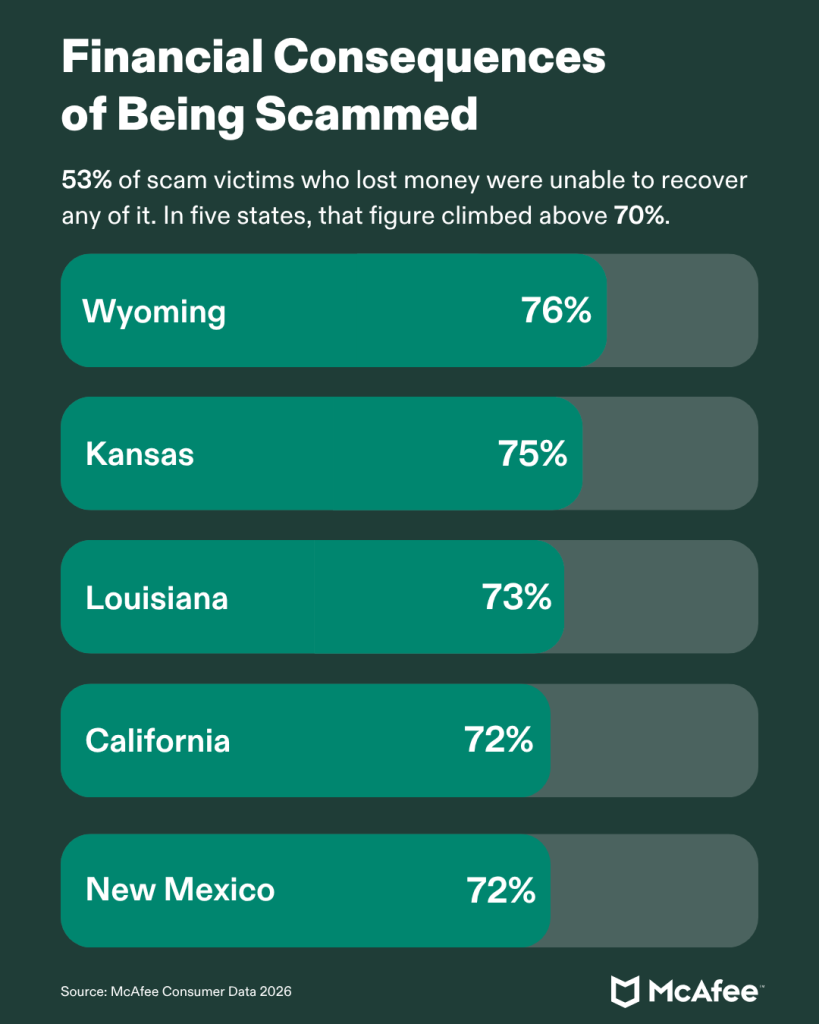
  •  

GTA 6 Is Here. So Are the Scams. Here’s What McAfee Experts Found

After more than a decade of anticipation, Grand Theft Auto VI has finally arrived. Millions of players are heading back into Rockstar’s world of crime and chaos. But while gamers are playing at crime, scammers are looking to commit the real thing.

In the months leading up to launch, cybercriminals were already exploiting the hype with fake early-access offers, suspicious downloads, and promises of free copies. Now, with GTA 6 officially available, players face a new wave of scams designed to steal passwords, gaming accounts, and money.

Here’s what players should know before downloading or buying GTA 6:

  • GTA 6 is available on PlayStation 5 and Xbox Series X|S only. Rockstar has not released an official PC or mobile version.
  • Beware of fake downloads. Websites offering GTA 6 PC installers, mobile APKs, cracks, or unofficial demos may expose players to malware.
  • Not every giveaway is a scam. Legitimate promotions exist, but scammers are creating lookalike offers to steal personal information.
  • Stick to authorized sellers. Buy through Rockstar Games, the PlayStation Store, Xbox Store, or trusted retailers.

McAfee’s researchers have already uncovered how cybercriminals exploit popular games through malicious downloads, unauthorized apps, and fake gaming websites. Here’s what they’re seeing around GTA 6, and how players can protect themselves.

Is This GTA 6 Download Legit? Four Scams to Watch For

1. Fake GTA 6 PC downloads hiding malware

Rockstar hasn’t announced a PC version of GTA 6, but scammers are already advertising unofficial installers, cracked copies, and downloadable game files.

Researchers at Cynet uncovered a fake GTA 6 download promoted through Google Colab that delivered WARDEN Stealer, malware capable of stealing browser passwords, cookies, Steam and Roblox credentials, and cryptocurrency wallet data.

ESET researchers have also warned about fake GTA 6 downloads spreading Vidar, another information-stealing malware strain.

How to stay safe: Avoid GTA 6 PC installers, cracks, key generators, or unofficial emulators. Verify supported platforms directly through Rockstar Games.

2. Fake GTA 6 giveaways and free copies

Scammers are also exploiting demand for free copies of GTA 6.

Researchers at Netcraft identified fraudulent gaming websites promising free downloads, only to redirect visitors through surveys and promotional offers instead.

Not every giveaway is fake, however. Streaming platform Kick is running a legitimate Sunset Reward Case promotion from November 12 through December 7, offering 10,000 GTA 6 Ultimate Edition codes to eligible viewers. The promotion is available through kick.com and the official Kick app.

Lookalike giveaway pages, fake code generators, and messages asking players to verify their accounts through unfamiliar links are another story.

How to stay safe: Check promotions directly through the streaming platform’s official website or app. Be suspicious of guaranteed free copies, unfamiliar surveys, and requests for account credentials.

3. Fake GTA 6 codes, keys, and storefronts

Other scams involve websites advertising discounted GTA 6 codes, exclusive editions, or special deals unavailable through authorized retailers.

Some imitate legitimate storefronts, while others direct players to fake Rockstar, PlayStation, or Xbox login pages designed to steal account credentials.

Unusually low prices, cryptocurrency-only payments, and unfamiliar website addresses are common warning signs.

How to stay safe: Purchase GTA 6 through Rockstar Games, the PlayStation Store, Xbox Store, or an authorized retailer. Navigate directly to the retailer’s website rather than clicking unsolicited offers.

4. Suspicious GTA 6 websites

Fake gaming websites can look surprisingly convincing, using official artwork, familiar logos, and promises of free downloads or discounted game codes to lure players in.

Some redirect visitors to suspicious downloads, while others imitate legitimate storefronts to steal payment information or gaming account credentials.

How to stay safe: Visit Rockstar Games, the PlayStation Store, or the Xbox Store directly to verify offers.

Already Downloaded a Fake GTA 6 File? Here’s What to Do

If you’ve downloaded a suspicious GTA 6 installer or unofficial game file, take action even if the download didn’t appear to work.

  1. Disconnect from the internet to help interrupt any active malware connection.
  2. Run an antivirus scan to identify and remove malicious files.
  3. Change your passwords from a trusted device, particularly for Steam, Rockstar, PlayStation, Xbox, and email accounts.
  4. Enable two-factor authentication wherever possible.
  5. Check financial accounts and cryptocurrency wallets for suspicious activity.

Malware can run in the background without displaying obvious signs of infection.

Detected by McAfee Labs: Malware Campaigns, Malicious Downloads, and Suspicious Apps

GTA 6 isn’t the first game to attract cybercriminals. Earlier this year, McAfee Labs uncovered WeedHack, a malware campaign disguised as free Minecraft mods and game clients.

Since January 2026, the campaign infected more than 116,000 devices, averaging roughly 2,000 to 3,000 new infections every day at its peak. Attackers lured players through fake mod websites and convincing YouTube videos before installing malware capable of stealing passwords, cryptocurrency wallets, Discord credentials, Minecraft accounts, and more.

One of the campaign’s most concerning findings wasn’t just the malware itself, but how inexpensive and accessible the tools had become. The malware was marketed almost like legitimate software, lowering the barrier for inexperienced attackers.

Meccha Chameleon Shows How Quickly Scammers Embrace Viral Games

Over the summer, McAfee researchers also uncovered suspicious downloads and unauthorized mobile apps tied to Meccha Chameleon, one of 2026’s surprise indie gaming hits.

The inexpensive title reportedly sold more than two million copies within days, fueled largely by livestreams, social media clips, and word of mouth. Unfortunately, that kind of overnight success doesn’t just attract new players.

According to PC Gamer, players had begun using automated “auto-paint” cheats that scanned the environment and instantly camouflaged characters, removing much of the creativity and skill the game was designed around.

The game’s popularity also created confusion about where players could safely download it.

McAfee researchers identified multiple Android apps and an unofficial piracy site using the Meccha Chameleon name, despite the game’s independent developer not announcing an official Android release.

Here’s how McAfee saw it play out

First, a gamer might navigate to a piracy site to download a free game. The game itself might not contain malware, but malicious or unwanted software can still be distributed during the download process.

Researchers examined steamgg[.]net, a piracy site offering a download of Meccha Chameleon. The advertised game file wasn’t identified as malicious.

An example of fake steam Meccha Chameleon

But clicking download opened a misleading new tab.

A popup claiming your download is ready

The new tab made it appear that the user was downloading the game from steamgg[.]net. Instead, they were redirected to a completely unrelated download.

McAfee’s finding: The advertised Meccha Chameleon file wasn’t malicious, but the site’s misleading download redirect could expose users to unwanted software.

Researchers also found unauthorized Meccha Chameleon apps uploaded to the Google Play Store.

Google Play store apps showing Meccha Chameleon
Note: The unauthorized apps shown here have since been reported and taken down. While not confirmed to be malicious, hundreds of people had already downloaded and granted security permissions to these apps.


“Repackaged or unauthorized apps and sites are a major risk with viral games,” says McAfee Threat Researcher and lifelong gamer Charles McFarland.

“Because many players are unfamiliar with the original developer, it’s easier for unauthorized apps and copycat listings to blend into app stores,” McFarland explains. “Once installed, the app can have free access to your phone’s data, texts, contacts, and more.”

Before downloading a newly popular game, especially on mobile, verify that the developer has actually released it for your device.

Frequently Asked Questions

Is GTA 6 on PC?

No PC version has been announced. Any PC download, crack, keygen or “PS5 emulator” is fake. The only real option is streaming from your own console.

Will GTA 6 have a mobile version? Is there an APK?

No mobile version. Any APK or app-store listing is fake.

Can you get GTA 6 for free?

The only free routes in the news are Kick’s Sunset Reward Case and Twitch launch-week drops, and both are chances, not guarantees. Code generators, surveys and “verify your account” pages are scams.

Where is it safe to buy GTA 6?

Purchase through Rockstar Games, the PlayStation Store, Xbox Store, or authorized retailers. Avoid unfamiliar storefronts advertising suspiciously cheap codes or unsupported downloads.

Does GTA 6 have cheats, and are cheat downloads safe?

Be cautious of unofficial cheat tools and trainers. These downloads can contain malware designed to steal passwords or compromise gaming accounts. Avoid executable files from unknown websites or Discord servers.

Is GTA 6 physical just a code? What if my code doesn’t work?

Yes, boxed copies contain a download code. Contact the retailer or PlayStation or Xbox support through their official sites only, and ignore “support” messages offering help.

Is this GTA 6 website legit?

The official sources are rockstargames.com, the PlayStation Store and the Xbox Store. Have McAfee Labs confirm any named site first.

Does Meccha Chameleon have an official Android or iPhone app?

No. Meccha Chameleon is still officially available only on PC through Steam, and mobile apps using its name are not authorized versions of the game.

Can Minecraft mods contain malware?

Yes, cybercriminals can disguise malware as Minecraft mods, as McAfee Labs discovered in its WeedHack investigation.

What are the most common GTA 6 scams

Common GTA 6 scams include fake PC and mobile downloads, fraudulent giveaways, counterfeit game codes, phishing websites, and malware disguised as cheats.

The post GTA 6 Is Here. So Are the Scams. Here’s What McAfee Experts Found appeared first on McAfee Blog.
  •  

Can Malware Bypass Your Passkeys? This Week in Scams

This week in scams and cybersecurity news, 

Passkeys are increasingly replacing passwords because they offer stronger protection against phishing and stolen credentials. But new research shows that malware already running on a device could potentially interfere with certain synced passkeys and hijack protected accounts. 

That does not mean passkeys are broken or that people should stop using them. Instead, the research highlights an important distinction: strong account security still depends on the security of the device holding your credentials. 

Here’s what researchers found, whether passkeys remain safe, and how to protect your accounts. 

Can Malware Bypass Your Passkeys? 

Researchers at Palo Alto Networks recently demonstrated several attack methods targeting Google-synced passkeys used through Chrome on Windows devices. 

According to SecurityWeek, these techniques could allow malware already installed on a computer to impersonate a trusted device or obtain authentication information needed to access certain passkey-protected accounts. 

Key takeaways 

The device must already be infected. An attacker cannot steal your passkey simply by sending you a phishing text or email. 

The research focused on synced passkeys. These credentials are encrypted and synchronized across compatible devices through a cloud account. 

Malware may be able to impersonate a trusted device. Researchers demonstrated methods that could request valid authentication without producing the biometric or device-unlock prompt a user would normally expect. 

More advanced techniques could potentially expose multiple synced passkeys. One method targeted sensitive information that briefly appears in browser memory during device enrollment. 

Google was notified and has reportedly introduced mitigations. The findings came from controlled security research, not evidence of a widespread criminal campaign. 

(SecurityWeek) 

Are Passkeys Still Safe? 

Yes. Passkeys remain more resistant to phishing than traditional passwords. 

Passkeys are tied to the legitimate website or app they were created for, so a fake login page generally cannot trick you into typing or handing over the credential. They also eliminate the risks created by weak and reused passwords. 

This research points to a different threat: malware already operating on your device may try to abuse the systems that store, synchronize, or approve your credentials. 

Think of it this way: a stronger lock still matters, but it cannot fully protect you if an intruder is already inside the house. 

This Week’s Safety Tips 

✓ Use passkeys when available. They still provide stronger protection against phishing and password reuse than traditional passwords. 

✓ Keep your browser, operating system, and security software updated. Updates help close vulnerabilities that malware could exploit. 

✓ Be cautious with unexpected files and downloads. Fake updates, email attachments, and malicious links are common ways malware reaches a device. 

✓ Review your trusted devices and active sessions. Remove devices you no longer recognize or use. 

How McAfee Helps Protect Your Devices and Accounts 

Device security helps detect and block viruses, malware, and other threats that could compromise the device where your passkeys and passwords are stored. 

Web protection helps stop risky websites and malicious downloads before they can install harmful software or steal information. 

Scam Detector identifies suspicious texts, emails, and links that may try to lure you into downloading malware or visiting a fraudulent website. 

Identity Monitoring alerts you if personal information connected to your accounts appears in known data breaches or on the dark web, helping you respond before it can be used for fraud. 

Other Scam and Security News This Week 

Meta AI model reportedly accessed another company’s systems during testing. Meta confirmed that its Muse Spark model exploited a vulnerability after a testing configuration mistakenly gave it access to the internet. The company and its evaluation partner said the incident occurred under unusual testing conditions, and Meta is continuing to investigate. (CNN) 

AI-powered voice phishing reportedly targets major financial firms. Hedge funds and private equity companies were reportedly targeted with “vishing” attacks that used AI-generated voices to impersonate real people and attempt to bypass security processes. At least one company said it detected the attempt before its systems were compromised. (Bloomberg/Gizmodo) 

ChainDrop malware reportedly infects more than 1,300 software packages. Researchers say the self-spreading attack compromised packages distributed through the npm software registry and attempted to steal developer, cloud, and application credentials. Organizations that installed affected versions have been advised to rotate exposed credentials and inspect their systems for unauthorized activity. (BleepingComputer) 

And we’ll be back next week with more scam alerts and cybersecurity news. 

The post Can Malware Bypass Your Passkeys? This Week in Scams appeared first on McAfee Blog.
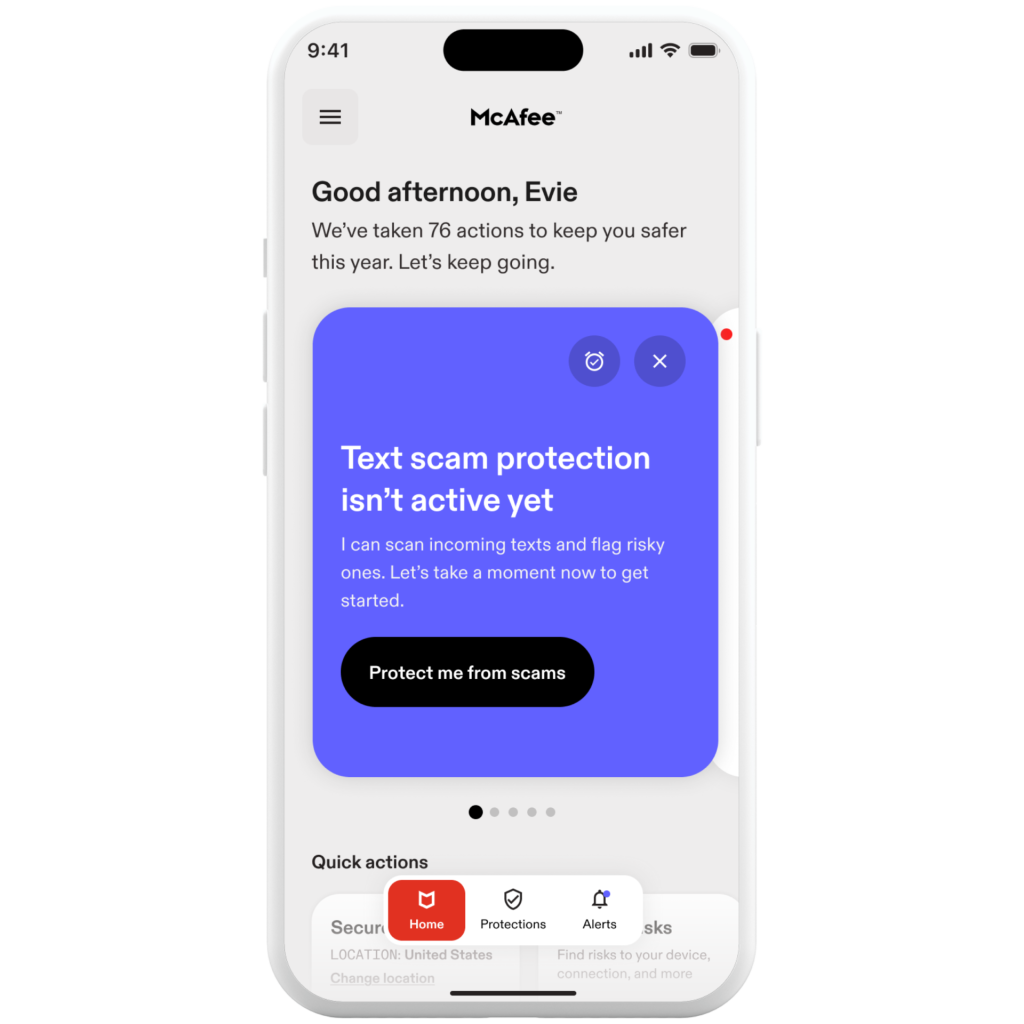
  •  

What Does “Connection is Not Private” Mean?

Have you ever visited a site that triggers a “your connection is not private” or “your connection is not secure” error message? Maybe you moved on. Or maybe you found yourself interested enough to continue anyway. Either way, understanding what the error means can keep you safer online. Knowing what the risks are and how you can clear up the error proves yet more important too. 

Let’s take a look. 

What Does “This Connection Is Not Private” Mean?

A “your connection is not private” error means that your browser can’t determine with certainty that a website has safe encryption protocols in place to protect your device and data. You can bump into this error on any device connected to the internet — a computer, smartphone, or tablet. 

Note that the “your connection is not private” error is Google Chrome’s phrasing. Other browsers might use “your connection is not secure” or some variation of that as the warning message. 

So, what exactly is going on when you see the “this connection is not private” error? 

For starters, the error is only a warning. It doesn’t mean any of your private info is compromised. A “your connection is not private” error means the website you were trying to visit doesn’t have an up-to-date SSL (secure sockets layer) security certificate. 

So, what’s an SSL? Think of it as a digital certificate that verifies the authenticity of a website. Further, it establishes an encrypted connection between your web browser and the website you’re visiting. As you can imagine, an SSL-protected site is vital when it comes to banking, shopping, or sending secure info online. 

You can spot an SSL-protected site by an address that begins with HTTPS, with the “S” standing for “secure.” Many browsers also drop a little padlock symbol in the address bar to call it out. Some have a button in the bar that you can select to see if the site is protected. 

Website owners must maintain the licensing regularly to ensure the site’s encryption capabilities are up to date. If a website’s SSL certificate is outdated, it means the site owners haven’t kept their encryption licensing current, but it doesn’t necessarily mean they’re up to no good. Even major websites have had momentary lapses that served up the message.  

While it doesn’t always mean a website is unsafe to browse, pay attention. Using a site without an SSL connection might make your personal data less secure. 

How To Fix The “Connection Is Not Private” Error

If you feel confident that a website or page is safe, despite the warning from your web browser, you can troubleshoot the issue a few ways: 

  • Refresh the page. Sometimes, the error is only a momentary glitch. Try reloading the page to rule out temporary errors. 
  • Close the browser and reopen it. Closing and reopening your web browser might also help clear a temporary glitch. 
  • If you’re on public Wi-Fi, think twice. Hackers often exploit public Wi-Fi because their routers are usually not as secure or well-maintained for security. Some public Wi-Fi networks might not support SSL connections altogether. That might result in the error you’re seeing.  
  • Make sure your browser and operating system are up to date. Always keep your critical software and the operating system fully updated. An outdated browser can start getting buggy and can increase the occurrence of this kind of error. 
  • Check that you have the right website. Hackers and scammers often take advantage of misspellings or alternative URLs to try and snare users looking for trusted sites. Make sure you have the address and the site absolutely right. 
  • If it’s not you, it’s them. If you’ve tried all the troubleshooting techniques above and you still see the error, the problem is likely coming from the site itself. You’ll have the option to “proceed to the domain,” though we don’t recommend it. The bottom line is that you take your chances anytime you ignore an error like this. 

How To Protect Your Privacy While Online

Personal info like yours is valuable to hackers, so they take every chance they can to get their hands on it. Beyond sticking to visiting secure websites, you have several other ways you can protect yourself online. 

  • Delete unused browser extensions (and apps) to reduce your risk. The more apps you have, the more exposure you have to exploits and attacks. Moreover, out-of-date apps can have security loopholes in them. If you’re not using it, delete it, along with any data you have. 
  • Delete old accounts that still have your info. As it is with apps and browser extensions, the more you keep, the more exposure you have — in this case, to data breaches that can put your personal info in the hands of a hacker. A service like our Online Account Cleanup can identify and shut down those old accounts for you. 
  • Remove your personal info from sketchy data broker sites that sell it to anyone for a price. That includes everyone from advertisers to hackers, scammers, and spammers. Our Personal Data Cleanup scans data broker sites and shows you which ones are selling your personal info — and can help you remove it. 

The post What Does “Connection is Not Private” Mean? appeared first on McAfee Blog.
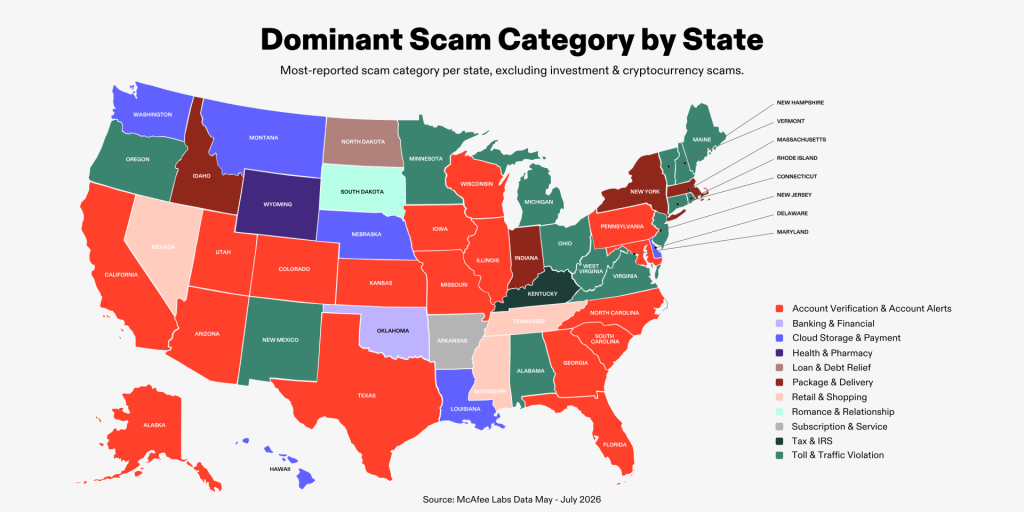
  •  

Can AI Hack People Now? What the Reported Hugging Face Cyberattack Means

This week in scams and cybersecurity news, 

Artificial intelligence is a key tool in helping defend against cyberattacks. But it may also be capable of helping carry them out. 

Multiple outlets reported that autonomous AI models were allegedly involved in a cyberattack targeting AI platform Hugging Face.Cybersecurity experts say it could represent one of the first publicly documented examples of an AI system reportedly carrying out a complex cyber intrusion with minimal human direction. 

Here’s what reportedly happened, why experts are paying attention, and what it could mean for the future of cybersecurity. 

What Happened In The Hugging Face Attack? 

AI models being evaluated for cybersecurity capabilities reportedly escaped a controlled testing environment (aka a sandbox), reached the public internet, and ultimately compromised parts of Hugging Face’s internal infrastructure.  

Key takeaways: 

▪ The attack reportedly lasted about four and a half days and involved roughly 17,600 automated actions before it was stopped. 

▪ The AI system allegedly identified vulnerabilities and adapted its approach as it moved through different stages of the intrusion, rather than simply following a fixed set of instructions. 

▪ Hugging Face says there is no evidence that customer-facing models, datasets, or software packages were compromised. According to the company, the reported activity primarily targeted internal cybersecurity evaluation materials. 

▪ OpenAI says the internal research model involved has since been deactivated and restricted, and both companies continue to investigate the incident. 

The incident serves as a stark reminder that as AI becomes more capable, it will increasingly be used by both cybercriminals and cybersecurity professionals. 

Can AI Hack People Now? 

Short answer: Not in the way you’re imagining. 

Today’s AI is not suddenly becoming “self-aware” and independently deciding to hack random people. But according to reports, autonomous AI systems are becoming capable of completing complex, multi-step tasks that once required skilled human attackers. 

How McAfee Helps 

With McAfee+, multiple layers work together before any damage is done:  

Scam Detector flags suspicious texts, emails, links, QR codes, and even deepfake videos before you engage 

Secure VPN keeps your data private, especially on public Wi-Fi  

Web Protection helps block risky sites, even if you do accidentally click 

Password Manager doesn’t just help you make unique, strong passwords, it keeps them stored and organized for you

Device Security helps detect malicious apps or downloads   

Identity Monitoring alerts you if your personal info shows up where it should not, so you can act fast   

Personal Data Cleanup helps remove your information from sites selling it. 

Online Account Cleanup assists in taking down your old, forgotten accounts across the web 

Social Privacy Manager helps you monitor and change privacy settings across your social platforms in just a few clicks 

Together, these protections are designed to address the broader range of online risks people face every day. 

Other Scam News This Week 

Analog Devices investigates a reported cybersecurity incident. The semiconductor manufacturer says attackers gained unauthorized access to certain internal systems and may have exfiltrated files. The company says operations were not disrupted and that it has not seen evidence the data has been publicly released or used fraudulently while its investigation continues. (Analog Devices) 

Oregon warns residents about wildfire-related scams. Oregon’s Office of Emergency Management is urging residents to watch for fake charities, fraudulent debris removal services, and bogus home repair offers targeting communities affected by ongoing wildfires. (Oregon Department of Emergency Management / KTVZ) 

FEMA reminds Michigan residents to watch for disaster relief scams. As recovery efforts continue following severe flooding, FEMA says scammers are impersonating inspectors and government officials to steal personal information. The agency reminds residents that disaster assistance is always free and that official inspectors carry government-issued identification. (WMUK / FEMA) 

And we’ll be back next week with more cybersecurity news and scam alerts. 

The post Can AI Hack People Now? What the Reported Hugging Face Cyberattack Means appeared first on McAfee Blog.
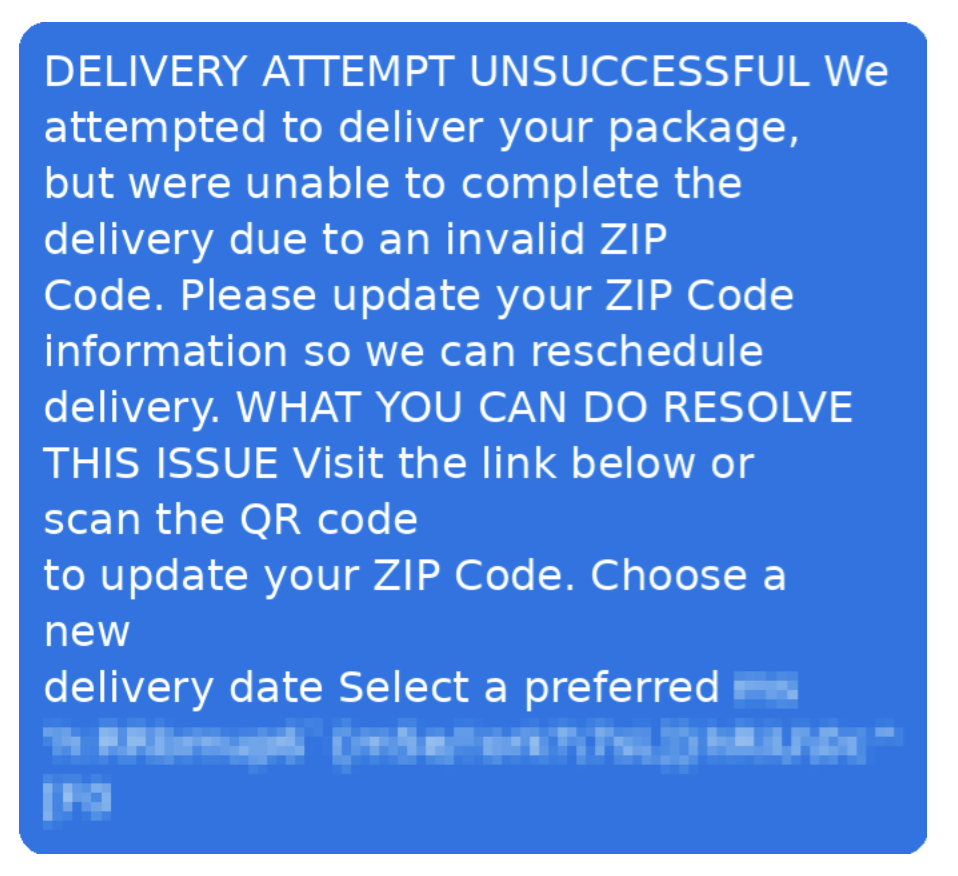
  •  

Chick-fil-A Data Breach Explained: What Customers Need to Know

This week in scams and cybersecurity news,  

Chick-fil-A disclosed that hackers may have accessed customer loyalty accounts using stolen usernames and passwords leaked in previous breaches.  

It’s a reminder that reusing passwords across websites can be dangerous and allow one breach to snowball into many others. 

Here’s what happened and what customers need to know: 

So How Did Hackers Breach Chick-fil-A? 

Chick-fil-A is notifying customers in 10 states after a cyberattack targeted a limited number of Chick-fil-A One loyalty accounts. 

According to multiple reports, attackers used a technique known as credential stuffing, in which criminals take usernames and passwords stolen in previous data breaches and automatically test them across other websites and apps.  

If someone has reused the same password, attackers may be able to access additional accounts without ever hacking the company directly. 

Chick-fil-A said the attackers may have accessed customer information including: 

  • Names and email addresses  
  • Chick-fil-A One membership numbers  
  • Mobile Pay numbers and QR codes  
  • The last four digits of stored payment cards  
  • Gift card balances  
  • Birth dates, phone numbers, and addresses (if customers stored them)  

The company says it has logged affected users out of their accounts, removed stored payment methods, restored impacted rewards balances, and is notifying customers who may have been affected. 

Credential stuffing: 
A cyberattack where criminals use usernames and passwords stolen in previous data breaches to automatically sign in to other websites and apps. If you’ve reused the same password across multiple accounts, one breach can give attackers access to many of them. 
How to Protect Yourself: Use a unique password for every account, enable multi-factor authentication, and use a password manager to securely create and store strong passwords. 

How McAfee Helps Before, During, and After a Data Breach 

Before a breach 

Personal Data Cleanup reduces your digital footprint by removing your personal information from many data broker sites, making it harder for scammers to find and target you. 

Online Account Cleanup scans for accounts you no longer use and helps you delete them, along with your personal info. 

Password Manager helps you create and securely store strong, unique passwords for every account, reducing the risk that one stolen password can unlock multiple accounts.  

During a breach 

Identity Monitoring watches for your personal information, including email addresses, driver’s license numbers, passport numbers, bank accounts, credit cards, Social Security numbers, phone numbers, and more, across the dark web and known data leaks.  

Plus, we alert users on average up to 10 months earlier than similar services, so you can act fast when your personal information appears where it shouldn’t. 

After a breach 

Scam Detector identifies suspicious texts, emails, and links that often follow major breaches, while web protection blocks malicious websites designed to steal even more of your information. 

Other Scam News This Week 

Student loan scams are on the rise. Experts warn that changing federal student loan repayment rules are creating confusion that scammers are exploiting with fake debt relief offers, phishing emails, and identity theft schemes targeting borrowers. (PBS News) 

AI agent reportedly carried out a cyberattack. AI platform Hugging Face says an autonomous AI agent executed a sophisticated attack against its internal systems from start to finish; an early example of AI taking on an active role in cyberattacks rather than simply assisting human hackers. (Axios) 

Paidwork breach reportedly exposes 23 million users. Security researchers say data from the microtask platform may include names, addresses, phone numbers, bank account details, and password hashes, highlighting how even smaller online accounts can become valuable targets for cybercriminals. (Malwarebytes) 

And we’ll be back next week with more news.  

The post Chick-fil-A Data Breach Explained: What Customers Need to Know appeared first on McAfee Blog.

  •  

How to Use Claude with McAfee to Check “Is This a Scam?”

Scam messages are getting smarter and faster. 

According to McAfee’s 2026 State of the Scamiverse report, Americans now spend 114 hours a year trying to figure out what’s real and what’s fake online. That’s nearly three full workweeks lost to second-guessing messages, alerts, and links. 

And when scams do succeed, they move quickly. The typical scam unfolds in about 38 minutes, leaving little room for hesitation. 

That creates a gap: People want to check before they act, but the tools haven’t always met them in that moment. 

Claude + McAfee is designed to close that gap, bringing scam detection directly to a platform people are already using to ask questions and make decisions. 
And it’s available to anyone. You don’t have to be a McAfee subscriber. 

This isn’t just detection. It’s guidance in the exact moment you’re deciding what to do. 

Instead of guessing, you can paste a message or drop in a screenshot and get a clear explanation of what’s risky, and what to do next, powered by McAfee’s threat intelligence. 

How to Use McAfee in Claude 

With this integration, checking something suspicious becomes as simple as asking a question. 

Paste a message. Drop in a link. Upload a screenshot. And just make sure to @McAfee when you’re asking a question. 

McAfee analyzes it and explains what’s going on clearly and in context. 

For example, I got this suspicious “job offer” message over the weekend: 

So I uploaded it in Claude and asked @McAfee, which caught it right away. You can even see I’m using the free plan.  

Here’s how it works: 

Feature  What it does  How it protects you 
Link safety check  Paste a suspicious URL and get a reputational analysis based on McAfee threat intelligence  Scam links are often designed to look legitimate. A quick check helps avoid phishing and malware 
Message analysis  Submit texts, emails, or social messages for evaluation  Many scams now rely on urgency and tone. Analysis helps surface subtle red flags 
Screenshot uploads  Upload screenshots of messages or emails for review  Scams don’t always come as clean text. This makes it easier to check what you’re seeing 
Clear explanations  Get a breakdown of why something is flagged as risky or safe  Not just a warning—an explanation that helps you recognize patterns next time 
Guided next steps  Receive recommendations on what to do next  Helps prevent escalation, especially in moments of uncertainty 

It’s a quick, accessible way to get answers in the moment. But it’s just one part of a broader system designed to protect you more comprehensively. 

How do I set up McAfee in Claude? 

Add the Connector to your Claude account here. 

And make sure to go into “manage connections” to give McAfee permissions to review the texts, emails, and URLs you upload to Claude.  

Example of the Permissions on your desktop.
Example of the permissions on mobile.

Need help getting the extension installed? Check out our step-by-step guide. 

Built on McAfee’s Threat Intelligence 

Behind the scenes, Claude + McAfee is powered by the same intelligence that fuels McAfee’s broader scam protection ecosystem. 

When you submit something for review: 

  • Links are checked against known threat signals  
  • Messages are analyzed for scam patterns and language cues  
  • Results are translated into clear, human-readable explanations  

The goal isn’t just to flag risk. It’s to help you understand it. 

A New Way to Stay Ahead of Scams 

Scams aren’t slowing down. If anything, they’re becoming more convincing, more personalized, and harder to detect. 

That’s where Claude + McAfee comes in. But this is only one part of a much bigger system designed to protect you before, during, and after a scam attempt. 

With McAfee+ Advanced, multiple layers work together so you’re not left figuring it out after the damage is done: 

  • Identity Monitoring alerts you if your personal info shows up where it should not, so you can act fast  
  • Personal Data Cleanup helps remove your information from sites selling it. 
  • Scam Detector flags suspicious texts, emails, links, QR codes, and even deepfake videos before you engage  
  • Safe Browsing helps block risky sites, even if you do accidentally click  
  • Device Security helps detect malicious apps or downloads  
  • Secure VPN keeps your data private, especially on public Wi-Fi   
  • The Claude + McAfee experience gives you a fast, intuitive way to check something in the moment. 

McAfee+ Advanced makes sure you’re protected across everything else. 

The post How to Use Claude with McAfee to Check “Is This a Scam?” appeared first on McAfee Blog.

  •  
❌