 Login
Login
GopherWhisper: A burrow full of malware
ESET Research has discovered a new China-aligned APT group that we’ve named GopherWhisper, which targets Mongolian governmental institutions


Looking back at this milestone video, it's the audience question towards the end I liked most: "are you happy"? Charlotte and I have chosen a path that's non-traditional, intense and at times, pretty stressful. There's no clear delineation of when work starts and ends, no holidays where we don't work, nor weekends, birthdays or Christmases. But we do so on our terms. It gives us a life of means and choices, one with excitement and adventure, and, above all, one with purpose, where we feel like we're doing something that makes a meaningful difference. I hope you enjoy this week's video, it's more personal than usual, but yeah, that's kinda what you do at milestones 😊





Co-Authored by Luiz Parente
Your data might be safe today. But that doesn’t mean it’s safe forever.
A growing number of sophisticated actors are collecting encrypted data now, with the goal of decrypting it later, when more powerful technology becomes available.
This strategy is known as Harvest Now, Decrypt Later (HNDL). And it’s not a future problem. It’s already happening, according to research from our McAfee VPN team.
For everyday people, that means private messages, financial records, and sensitive documents could be exposed years from now if protections don’t evolve today.
That’s why security teams, including McAfee’s VPN engineers, are already working on ways to strengthen encryption for both today and what comes next.
At its core, HNDL is simple: Attackers collect encrypted data now, store it, and wait until they have the tools to unlock it later.
Even though today’s encryption is incredibly strong, the strategy doesn’t rely on breaking it today. It relies on patience.
You put valuable belongings and documents in a safe at home that’s locked and secured. This works at preventing crimes of opportunity. But let’s say there’s a thief who steals the entire safe, knowing they have tools they can use later to access what’s inside. They wait, and once the tools are available, they break into your safe and access everything inside.
That’s one way to think of HNDL. The safe is the encryption. The quantum computing is the tool they can use later.
But in real life, you’d probably notice if your safe is gone. In the case of HNDL, if you’re not monitoring your data, you may not even notice encrypted information has been stolen to be decrypted.
| Term | What it means |
| Encryption | Scrambling data so others can’t read it |
| Quantum computing | A new type of computing that can break some encryption |
| HNDL | A strategy to collect encrypted data now and decrypt it later |
This isn’t about whether your data is valuable today. It’s about whether it might be valuable later.
Data with a long shelf life is especially at risk, including:
Even something that feels low-stakes today could become sensitive in the future.
And because the collection phase is already happening, the risk isn’t hypothetical. It’s already in motion.
VPNs remain one of the most effective ways to protect your data today. That hasn’t changed.
But HNDL introduces a new layer of complexity.
In simple terms: Your data is well protected today, but parts of how that protection is set up may need to evolve for the future.
Traditional computers process information in a linear way.
Quantum computers work differently. They can solve certain types of problems much faster, including the kinds of mathematical challenges that protect today’s encryption.
That’s why attackers are willing to wait.
Once quantum computing reaches a certain level, it could unlock data that was previously considered secure.
McAfee’s VPN team is already preparing for this shift.
This work builds on a broader privacy-by-design approach, where systems are designed to minimize risk from the start, not react after the fact.
Because with HNDL, waiting isn’t an option.
You don’t need to wait for quantum computing to take steps today.
These steps help protect your data now while the industry builds toward future-ready security.
McAfee+ Advanced gives you multiple layers working together so you are not left figuring it out after the damage is done:
| FAQ |
| Q: Is my data safe right now?
A: In most cases, yes—today’s encryption is extremely strong and is designed to protect your data from current threats. If you’re using trusted security tools like a VPN, safe browsing protections, and device security, your data is actively protected while it’s in transit and in use. However, no system is risk-free. Data exposed through phishing, weak passwords, breaches, or unsecured networks may still be vulnerable. And with “Harvest Now, Decrypt Later,” even properly encrypted data could be collected today and targeted for decryption in the future. |
| Q: What is quantum-safe encryption?
A: Quantum-safe (or post-quantum) encryption refers to new types of cryptography designed to remain secure even against future quantum computers. Today’s encryption relies on math problems that are extremely difficult for classical computers to solve, but quantum computers could eventually solve some of them much faster. Quantum-safe approaches use different mathematical foundations that are believed to resist those capabilities. In practice, many companies are moving toward hybrid encryption, combining today’s proven methods with newer quantum-resistant techniques to protect data both now and long-term. |
| Q: Should I still use a VPN?
A: Yes. A VPN remains one of the most effective ways to protect your data today, especially on public or unsecured networks. It encrypts your internet traffic and helps prevent interception by hackers, internet providers, or other third parties. While VPN protocols are evolving to address future quantum risks, they still provide strong, essential protection against today’s threats. |
| Q: When will this become a real threat?
A: The risk unfolds in two phases. The collection phase is already happening today, where sophisticated actors gather encrypted data and store it. The decryption phase depends on when quantum computing advances far enough to break certain types of encryption, which could take years but is actively progressing. This means data with a long lifespan, such as financial records, personal communications, and sensitive documents, is most at risk because it only needs to remain valuable until those capabilities exist. |
The post Why Hackers Are Collecting Data They Can’t Read Yet. And How to Stay Safe appeared first on McAfee Blog.
A 24-year-old British national and senior member of the cybercrime group “Scattered Spider” has pleaded guilty to wire fraud conspiracy and aggravated identity theft. Tyler Robert Buchanan admitted his role in a series of text-message phishing attacks in the summer of 2022 that allowed the group to hack into at least a dozen major technology companies and steal tens of millions of dollars worth of cryptocurrency from investors.
Buchanan’s hacker handle “Tylerb” once graced a leaderboard in the English-language criminal hacking scene that tracked the most accomplished cyber thieves. Now in U.S. custody and awaiting sentencing, the Dundee, Scotland native is facing the possibility of more than 20 years in prison.
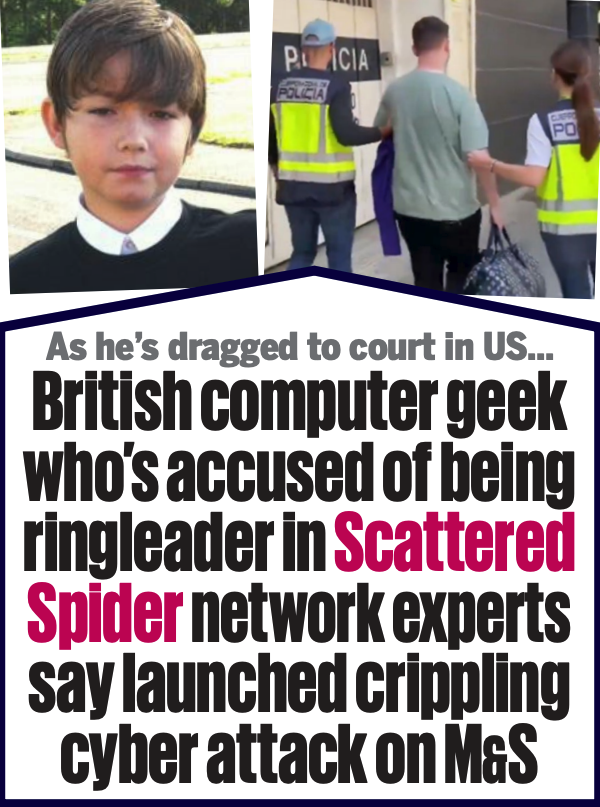
Two photos published in a Daily Mail story dated May 3, 2025 show Buchanan as a child (left) and as an adult being detained by airport authorities in Spain. “M&S” in this screenshot refers to Marks & Spencer, a major U.K. retail chain that suffered a ransomware attack last year at the hands of Scattered Spider.
Scattered Spider is the name given to a prolific English-speaking cybercrime group known for using social engineering tactics to break into companies and steal data for ransom, often impersonating employees or contractors to deceive IT help desks into granting access.
As part of his guilty plea, Buchanan admitted conspiring with other Scattered Spider members to launch tens of thousands of SMS-based phishing attacks in 2022 that led to intrusions at a number of technology companies, including Twilio, LastPass, DoorDash, and Mailchimp.
The group then used data stolen in those breaches to carry out SIM-swapping attacks that siphoned funds from individual cryptocurrency investors. In an unauthorized SIM-swap, crooks transfer the target’s phone number to a device they control and intercept any text messages or phone calls to the victim’s device — such as one-time passcodes for authentication and password reset links sent via SMS. The U.S. Justice Department said Buchanan admitted to stealing at least $8 million in virtual currency from individual victims throughout the United States.
FBI investigators tied Buchanan to the 2022 SMS phishing attacks after discovering the same username and email address was used to register numerous phishing domains seen in the campaign. The domain registrar NameCheap found that less than a month before the phishing spree, the account that registered those domains logged in from an Internet address in the U.K. FBI investigators said the Scottish police told them the address was leased to Buchanan throughout 2022.
As first reported by KrebsOnSecurity, Buchanan fled the United Kingdom in February 2023, after a rival cybercrime gang hired thugs to invade his home, assault his mother, and threaten to burn him with a blowtorch unless he gave up the keys to his cryptocurrency wallet. That same year, U.K. investigators found a device at Buchanan’s Scotland residence that included data stolen from SMS phishing victims and seed phrases from cryptocurrency theft victims.
Buchanan was arrested by Spanish authorities in June 2024 while trying to board a flight to Italy. He was extradited to the United States and has remained in U.S. federal custody since April 2025.
Buchanan is the second known Scattered Spider member to plead guilty. Noah Michael Urban, 21, of Palm Coast, Fla., was sentenced to 10 years in federal prison last year and ordered to pay $13 million in restitution. Three other alleged co-conspirators — Ahmed Hossam Eldin Elbadawy, 24, a.k.a. “AD,” of College Station, Texas; Evans Onyeaka Osiebo, 21, of Dallas, Texas; and Joel Martin Evans, 26, a.k.a. “joeleoli,” of Jacksonville, North Carolina – still face criminal charges.
Two other alleged Scattered Spider members will soon be tried in the United Kingdom. Owen Flowers, 18, and Thalha Jubair, 20, are facing charges related to the hacking and extortion of several large U.K. retailers, the London transit system, and healthcare providers in the United States. Both have pleaded not guilty, and their trial is slated to begin in June.
Investigators say the Scattered Spider suspects are part of a sprawling cybercriminal community online known as “The Com,” wherein hackers from different cliques boast publicly on Telegram and Discord about high-profile cyber thefts that almost invariably begin with social engineering — tricking people over the phone, email or SMS into giving away credentials that allow remote access to corporate internal networks.
One of the more popular SIM-swapping channels on Telegram has long maintained a leaderboard of the most rapacious SIM-swappers, indexed by their supposed conquests in stealing cryptocurrency. That leaderboard previously listed Buchanan’s hacker alias Tylerb at #65 (out of 100 hackers), with Urban’s moniker “Sosa” coming in at #24.
Buchanan’s sentencing hearing is scheduled for August 21, 2026. According to the Justice Department, he faces a statutory maximum sentence of 22 years in federal prison. However, any sentence the judge hands down in this case may be significantly tempered by a number of mitigating factors in the U.S. Sentencing Guidelines, including the defendant’s age, criminal history, time already served in U.S. custody, and the degree to which they cooperated with federal authorities.
You open your inbox and see it: Your cloud storage is full.
There’s a warning about photos being deleted, your account being suspended, or a renewal failing. There’s a button to “fix it now.” Or a warning to “act today.”
It looks routine. Maybe even urgent enough to click.
That’s exactly the point.
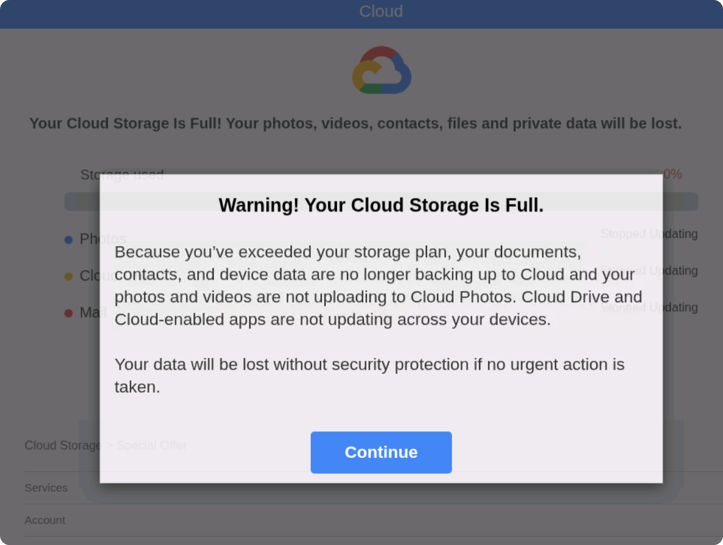
Cloud storage scams are making headlines again, building on patterns we flagged earlier this year in our State of the Scamiverse research.
These emails have circulated steadily since 2025, often impersonating trusted brands like Apple, Microsoft, and Google. Many are timed to moments when people are already thinking about storage, backups, or subscriptions.
The safest move is simple: pause and don’t click. If there’s a real issue, go directly to your account through the official app or website.
You can also protect yourself with McAfee’s Scam Detector, which flags suspicious links and messages, including cloud storage scams, and explains why they may be risky.
Cloud storage scams are phishing attacks designed to trick you into believing there’s an issue with your account so you’ll click a malicious link.
They often look like this, and include 3 key red flags:
| Step | What happens | What to do | How McAfee helps |
| 1. You receive a message | Email or text claims your storage is full or your account has an issue | Don’t click links directly from the message | Scam Detector flags suspicious messages before you interact |
| 2. Urgency is introduced | Warning that files or photos will be deleted if you don’t act | Pause. Urgency is a red flag | Scam Detector identifies pressure-based scam patterns |
| 3. You’re pushed to a link | Link mimics a real login or billing page | Go directly to the official website instead | Safe browsing tools help block malicious sites |
| 4. You’re asked for info | Login credentials or payment details requested | Never enter info from a link you didn’t verify | Scam Detector explains why a page or link is risky |
| 5. Data is captured | Scammers collect your data or payment | Monitor accounts and report suspicious activity | Identity monitoring alerts you if your data is exposed |
And that, my friends, is scam number one in this week’s This Week in Scams.
Let’s get into what else is on our radar.
New data from the FBI’s Internet Crime Complaint Center (ICC) shows just how large the scam economy has become.
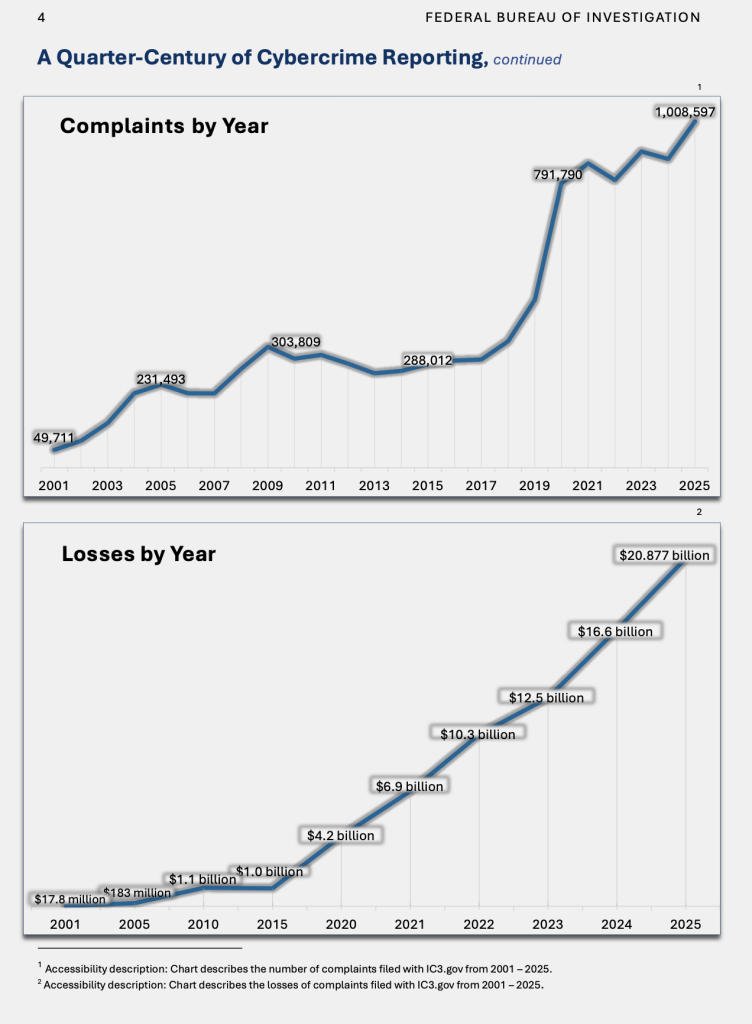
In 2025 alone:
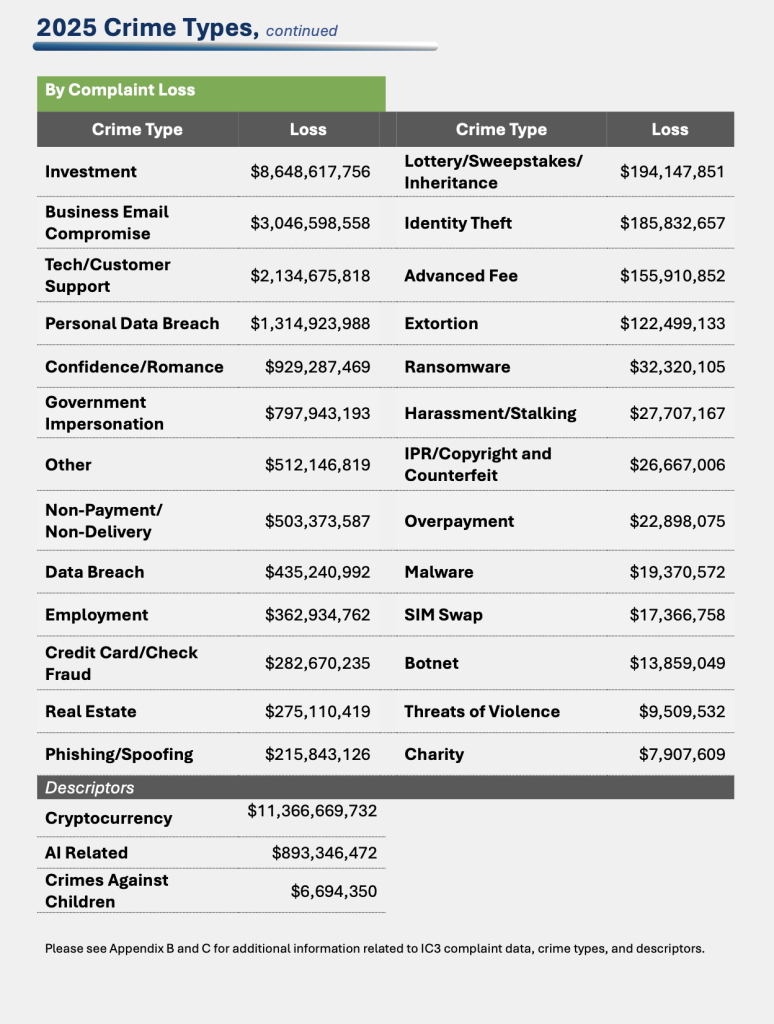
This is where layered protection matters. It’s not just about catching one bad link. It’s about recognizing patterns across messages, platforms, and moments when something feels slightly off.
McAfee+ Advanced gives you multiple layers working together so you are not left figuring it out after the damage is done:
As always, we have some best practices and safety tips for navigating life online:
And we’ll be back next week with more scams making headlines.
The post Cloud Storage Scam Emails and Record-Breaking Fraud Losses: This Week in Scams appeared first on McAfee Blog.

I love cutting-edge tech, but I hate hyperbole, so I find AI to be a real paradox. Somewhere in that whole mess of overnight influencers, disinformation and ludicrous claims is some real "gold" - AI stuff that's genuinely useful and makes a meaningful difference. This blog post cuts straight to the good stuff, specifically how you can use AI with Have I Been Pwned to do some pretty cool things. I'll be showing examples based on OpenClaw running on the Mac Mini in the hero shot, but they're applicable to other agents that turn HIBP's data into more insightful analysis.
So, let me talk about what you can do right now, what we're working on and what you'll be able to do in the future.
A quick MCP primer first: Anthropic came up with the idea of building a protocol that could connect systems to AI apps, and thus the Model Context Protocol was born:
Using MCP, AI applications like Claude or ChatGPT can connect to data sources (e.g. local files, databases), tools (e.g. search engines, calculators) and workflows (e.g. specialized prompts)—enabling them to access key information and perform tasks.
If I'm honest, I'm a bit on the fence as to how useful this really is (and I'm not alone), but creating it was a no-brainer, so we now have an MCP server for HIBP:
https://haveibeenpwned.com/mcpYou can't just make an HTTP GET to the endpoint, but you can ask your favourite AI tool to explain what it does:
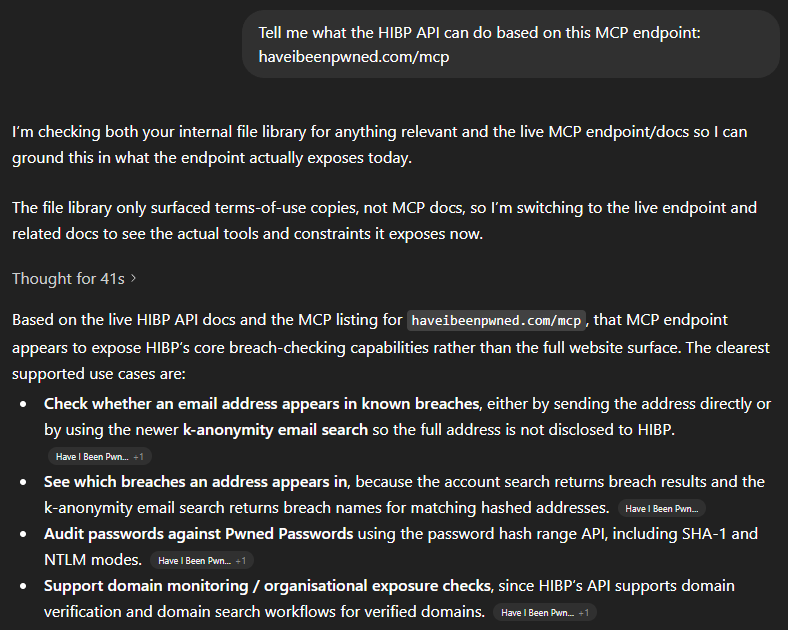
In other words, all the stuff we describe in the API docs 🙂 That's an overly simplistic statement, and there are many nuances MCP introduces beyond a computer reading docs intended for humans, but the point is that we've implemented MCP and it's there if you want it. Which means you can easily use the JSON below to, for example, extend GitHub Copilot:
"HIBP": {
  "url": "https://haveibeenpwned.com/mcp",
  "headers": {
    "hibp-api-key": "YOUR_STANDARD_HIBP_API_KEY"
  },
  "type": "http"
}
Now let's do something useful with it.
This is really the point of the whole thing - how can humans use it to do genuinely useful stuff? In particular, how can they use it to do stuff that was hard to do before, and how can "normies" (non-technical folks) use it to do stuff they previously needed developers for? I've been toying with these questions for a while now. Here's what I've come up with:
Firstly, I'm going to do all these demos on OpenClaw. I've been talking a lot about that on my weekly live streams over the past month, and the "agentic" nature of it (being able to act as an independent agent tying together multiple otherwise independent acts) is enormously powerful. Every company worth its AI salt is now focusing on building out agentic AI so whilst I'm using OpenClaw for these demos, you'll be able to do exactly the same thing in your platform of choice either now or in the very near future.
I'm using a Telegram bot as my interface into OpenClaw, let's kick it off:
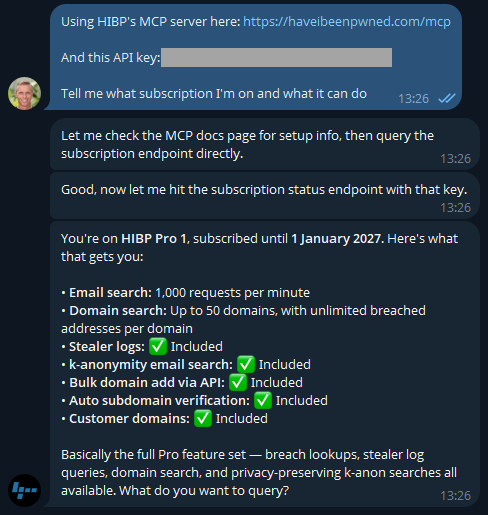
Easy, right? 🙂 There's a different discussion around how secrets are stored and protected, but that's a story for another time (and is also obviously dependent on your agent). But the key is easily rotated on the HIBP dashboard anyway. If you don't have a key already, go and take out a subscription (they start at a few bucks a month), and you'll be up and running in no time.
Now that I know I'm connected, let's learn about how I'm presently using the service:
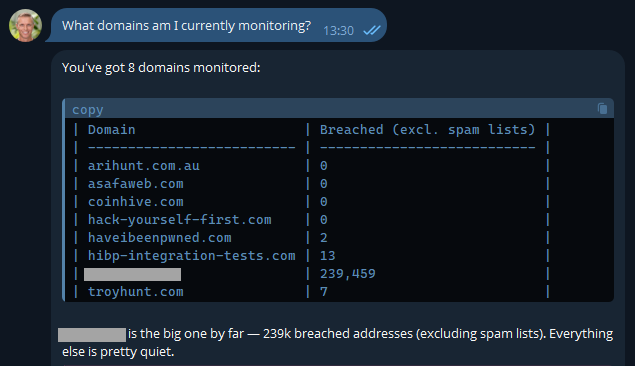
Most of these are pretty obvious, but I've also included another here that I use to monitor how the service is behaving with a large organisation. It's a real domain with real data, so I'm going to obfuscate it to preserve privacy, but it's a great demonstration of how useful AI is. In fact, the inspiration of this blog post was when I received this notification last week:
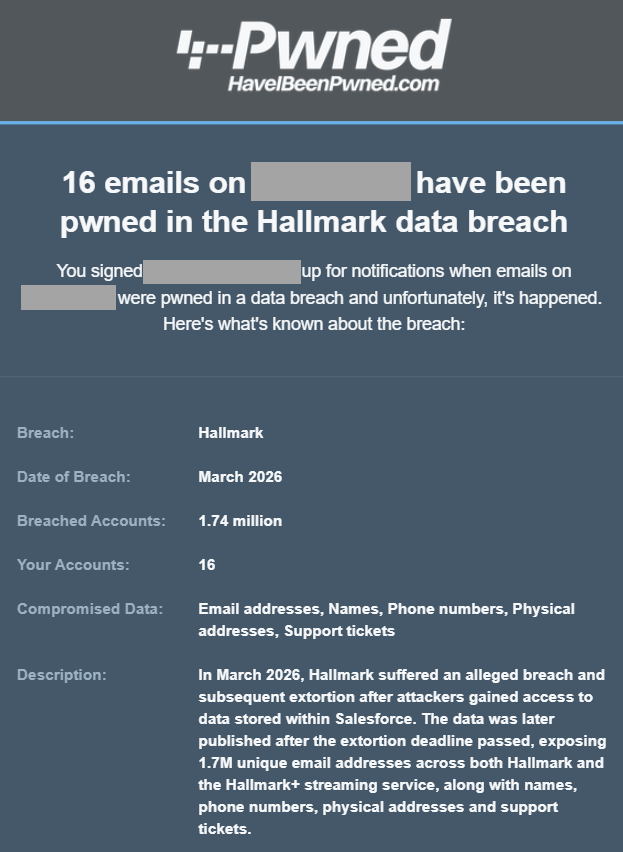
One of the most asked questions after someone in a large org receives an email like this is "who are those 16 people in the breach"? Because we can't reliably filter large domains in the UI, I'd normally suggest they either download the CSV or JSON format in the dashboard, then search for "Hallmark" in there or use the API and write some code. But now, there's a much easier way:
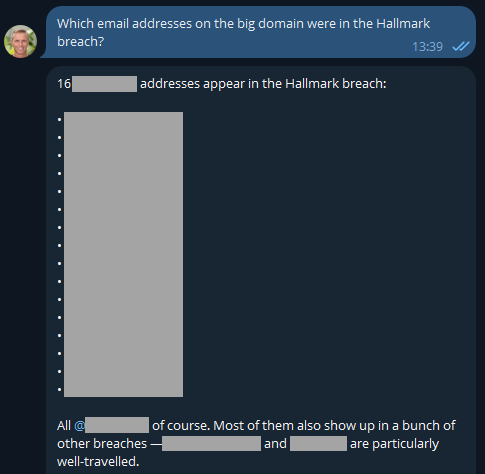
Well that was easy 😎 I like the additional context too, and now it has me curious: what have these people been up to?
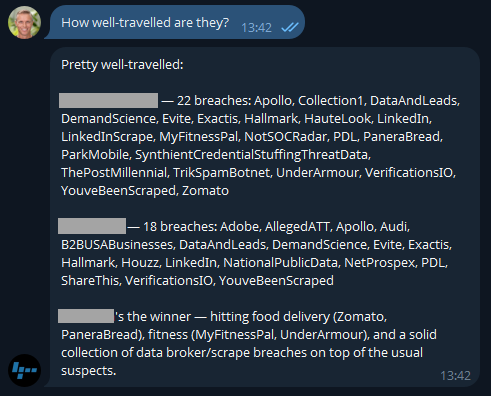
Because I'm on a Pro plan (or if you're still on the old Pwned 5 plan), I've also got access to stealer logs. Let's see what's going on there:
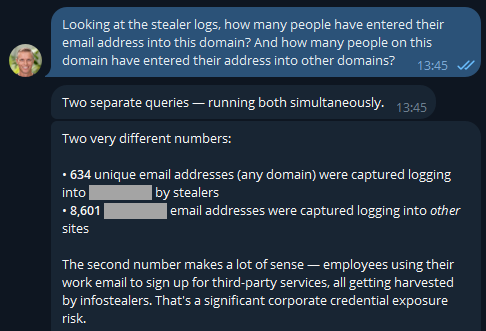
If you were running an online service, that first number would indicate compromised customers. But as OpenClaw has suggested here, the second number is the one that's interesting in terms of employees entering their data into other websites using the corporate email address. But they'd never reuse the same password as the work one, right? 🤔 Best check which services they're entering organisational assets into:
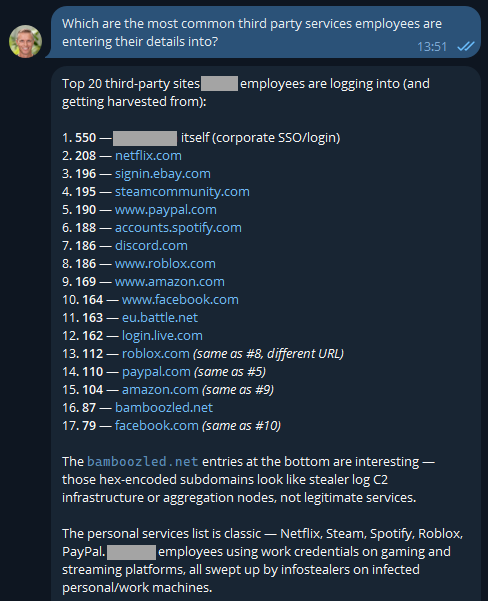
The first one makes sense and is extra worrying when you consider these are people infected with infostealers. That's not necessarily malware on a corporate asset; they could always be using an infected personal device to sign into a corporate asset... ok, that's also pretty bad! I was a bit surprised to see Steam in there TBH - who's using their corporate email address to sign into a gaming platform?! A quiet chat with them might be in order. And the bamboozled.net stuff is weird, I want to understand a bit more about that:
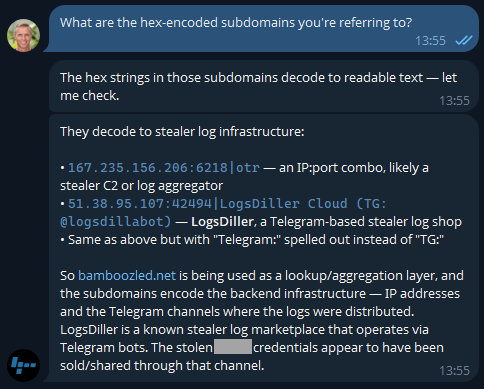
Now I'm losing interest in this blog post and am really curious as to what's actually in the data!
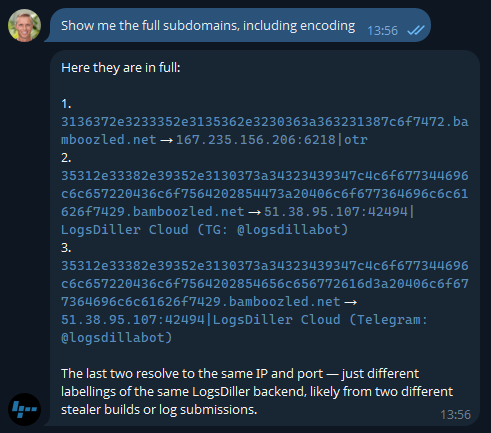
Ok, so there's an entire rabbit hole over there! Let's park that, but think about how useful information like this is to infosec teams when you can pull it so easily. Or how useful info like this is to HR teams 😬
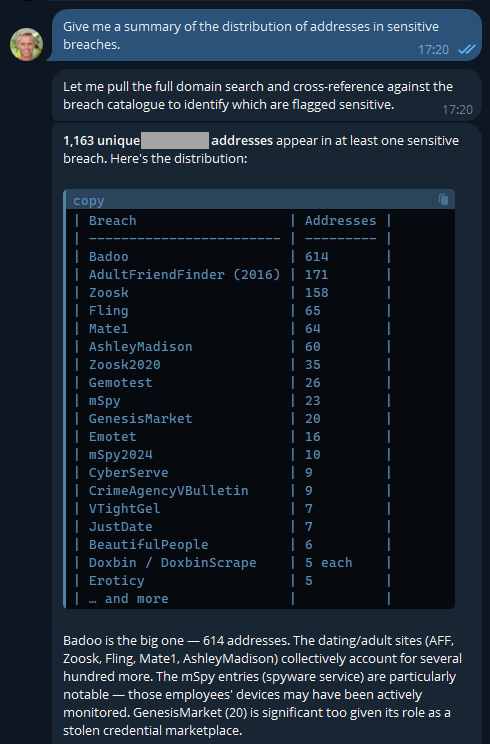
Keep in mind, these are corporate addresses tied to the company and are the company's property, so, yeah...
But remember the agentic nature of OpenClaw means we can ask it to go off and run tasks in the background, tasks like this:
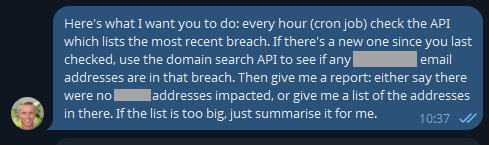
This was just a little thought experiment I set up a few days ago and forgot about until yesterday, when I loaded a new breach:
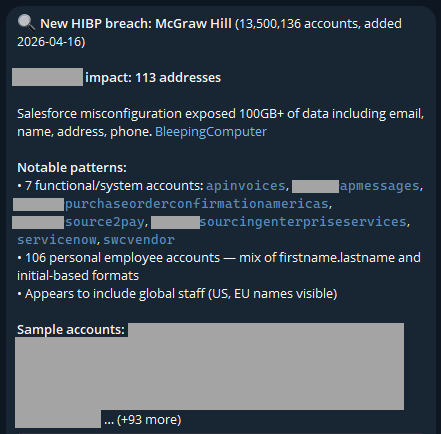
I never asked it to look for "functional/system accounts"; it just decided that was relevant. And it is - this breach clearly had a lot of data in it related to purchases of services, which is an interesting aspect.
The idea of running stuff on a schedule opens up a whole raft of new opportunities. For example, monitoring your family's email addresses: "let me know when mum@example.com appears in a new breach". From here, your creativity is the only limit (and even that statement is debatable, given how much stuff AI agents come up with on their own). For example, creating visualisations of the data:
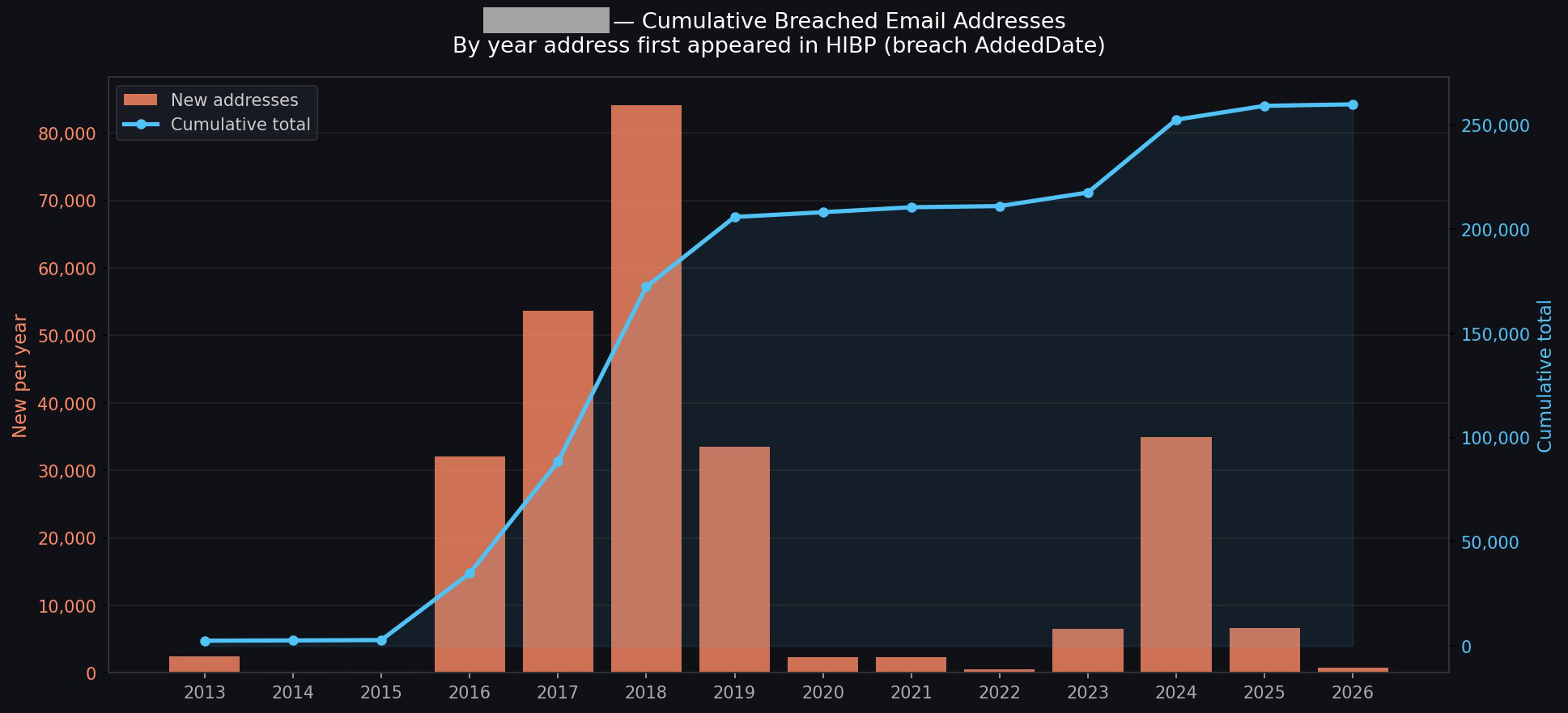
I could go on and on (I started going down another rabbit hole of having it generate executive-level reports with all the data), but you get the idea.
This is about what's in our pipeline, and the primary theme is putting tooling where it's more easily accessible to the masses. Creating a connector in Claude, an app in ChatGPT, and similar plumbing in the other big players' AI tools is an obvious next step. This will likely involve adding an OAuth layer to HIBP, allowing end users to configure the respective tools to query those HIBP APIs under their identity and achieve the same results as above, but built into the "traditional" AI tooling in a way people are familiar with.
A big part of this is about AI enabling more human conversations to achieve technical outcomes. I spotted this from Cloudflare just yesterday, and it's a perfect example of just this:
Cloudflare dashboard can now complete tasks for you.
— Brayden (@BraydenWilmoth) April 15, 2026
- "Create a Worker and bind a new R2 bucket to it"
- "Change my DNS records to 1.1.1.1"
- "How many errors have happened this week"
Not only do we tell you, but we show you with generative UI.
PROTIP: Use full-screen mode. pic.twitter.com/Q1o1vyoOwk
I've been pretty blown away by both how easy this process has been and how much insight I've been able to draw from data I've been sitting on for ages. We'll be building out more tooling and easily reproducible demos in the future, and I'm sure a lot of that will do stuff we haven't even thought of yet. If you give this a go and find other awesome use cases, please leave a comment and tell me what you've done, especially if you've cut through the hyperbole and created some genuinely awesome stuff 😎

Microsoft today pushed software updates to fix a staggering 167 security vulnerabilities in its Windows operating systems and related software, including a SharePoint Server zero-day and a publicly disclosed weakness in Windows Defender dubbed “BlueHammer.” Separately, Google Chrome fixed its fourth zero-day of 2026, and an emergency update for Adobe Reader nixes an actively exploited flaw that can lead to remote code execution.

Redmond warns that attackers are already targeting CVE-2026-32201, a vulnerability in Microsoft SharePoint Server that allows attackers to spoof trusted content or interfaces over a network.
Mike Walters, president and co-founder of Action1, said CVE-2026-32201 can be used to deceive employees, partners, or customers by presenting falsified information within trusted SharePoint environments.
“This CVE can enable phishing attacks, unauthorized data manipulation, or social engineering campaigns that lead to further compromise,” Walters said. “The presence of active exploitation significantly increases organizational risk.”
Microsoft also addressed BlueHammer (CVE-2026-33825), a privilege escalation bug in Windows Defender. According to BleepingComputer, the researcher who discovered the flaw published exploit code for it after notifying Microsoft and growing exasperated with their response. Will Dormann, senior principal vulnerability analyst at Tharros, says he confirmed that the public BlueHammer exploit code no longer works after installing today’s patches.
Satnam Narang, senior staff research engineer at Tenable, said April marks the second-biggest Patch Tuesday ever for Microsoft. Narang also said there are indications that a zero-day flaw Adobe patched in an emergency update on April 11 — CVE-2026-34621 — has seen active exploitation since at least November 2025.
Adam Barnett, lead software engineer at Rapid7, called the patch total from Microsoft today “a new record in that category” because it includes nearly 60 browser vulnerabilities. Barnett said it might be tempting to imagine that this sudden spike was tied to the buzz around the announcement a week ago today of Project Glasswing — a much-hyped but still unreleased new AI capability from Anthropic that is reportedly quite good at finding bugs in a vast array of software.
But he notes that Microsoft Edge is based on the Chromium engine, and the Chromium maintainers acknowledge a wide range of researchers for the vulnerabilities which Microsoft republished last Friday.
“A safe conclusion is that this increase in volume is driven by ever-expanding AI capabilities,” Barnett said. “We should expect to see further increases in vulnerability reporting volume as the impact of AI models extend further, both in terms of capability and availability.”
Finally, no matter what browser you use to surf the web, it’s important to completely close out and restart the browser periodically. This is really easy to put off (especially if you have a bajillion tabs open at any time) but it’s the only way to ensure that any available updates get installed. For example, a Google Chrome update released earlier this month fixed 21 security holes, including the high-severity zero-day flaw CVE-2026-5281.
For a clickable, per-patch breakdown, check out the SANS Internet Storm Center Patch Tuesday roundup. Running into problems applying any of these updates? Leave a note about it in the comments below and there’s a decent chance someone here will pipe in with a solution.

Wearable health devices are designed to give you more control over your body and your data.
But in 2026, the bigger risk isn’t someone spying on your smartwatch or smartring in real time. It’s what happens if the data connected to that device gets exposed.
Health data, login credentials, and behavioral patterns tied to wearables can become valuable signals for cybercriminals. And once that data is out, it can fuel everything from identity theft to highly targeted scams.
Here’s what’s actually at risk, and how to protect yourself.
Wearable health data refers to the personal information collected and stored by devices like fitness trackers, smartwatches, and connected medical monitors.
This can include:
On its own, this data may seem harmless. But combined, it creates a highly detailed profile of your habits, routines, and health status.
Early conversations around wearable security focused on device hacking or surveillance.
Today, the bigger concern is data exposure.
If wearable platforms, apps, or connected services are breached, your data could be:
And because this data is personal and specific, scams built from it can feel far more convincing than generic spam.
When cybercriminals gain access to personal data, they don’t just sit on it. They use it.
Here’s how that plays out:
| Scenario | What It Looks Like | Why It Works |
| Health-related phishing | “Your insurance claim was denied” or “Update your health profile” | Feels relevant and urgent |
| Account takeover attempts | Password reset emails tied to known apps | Uses real account signals |
| Personalized scams | Messages referencing routines, devices, or conditions | Builds trust quickly |
| Fake alerts or services | “Device security issue detected” | Mimics real product behavior |
This is where the risk shifts from data privacy → real-world financial and identity impact.
1)Install updates immediately
Security patches fix known vulnerabilities. Delaying updates leaves gaps open.
2) Use layered protection, not just device settings
A VPN and security software help protect data in transit and block threats before they reach you.
3) Strengthen your login credentials
Use strong, unique passwords and enable two-factor authentication wherever possible.
4) Limit what you share
Review app permissions and only connect devices to services you trust.
5) Verify every message or alert
If you receive a message tied to your device or health data, double-check the source before clicking.
6) Monitor your accounts regularly
Small signs of unusual activity can be early indicators of larger issues.
Protecting your wearable doesn’t stop at the device itself. It extends to what happens if your data is exposed or targeted.
McAfee helps track your personal information across known breach sources and alerts you if your data appears where it shouldn’t.
This gives you early warning if wearable-related accounts or associated data are compromised.
If your data is exposed, scammers often follow.
McAfee’s Scam Detector helps identify suspicious messages, links, and communications before you engage, and explains why something was flagged, so you can make informed decisions quickly.
Together, these tools help protect not just your device, but the chain reaction that can follow a data breach.
The post Can Your Wearable Health Monitors Be Compromised? appeared first on McAfee Blog.
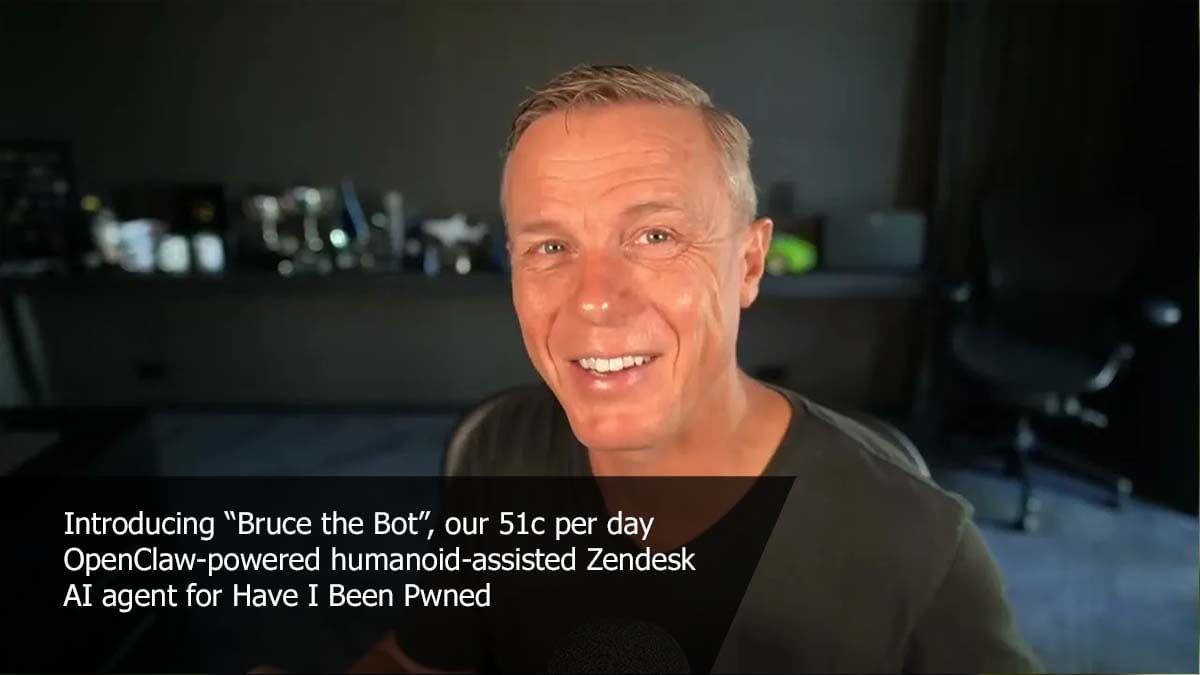
I'm starting to become pretty fond of Bruce. Actually, I've had a bit of an epiphany: an AI assistant like Bruce isn't just about auto-responding to tickets in an entirely autonomous manner; it's also pretty awesome at responding with just a little bit of human assistance. Charlotte and I both replied to some tickets today that were way too specific for Bruce to ever do on his own, but by feeding in just a little bit of additional info (such as the number of domains someone was presently monitoring), Bruce was able to construct a really good reply and "own" the ticket. So maybe that's the sweet spot: auto-reply to the really obvious stuff and then take just a little human input on everything else.


Emails claiming to be from Social Security are making the rounds right now.
They look official. They sound official. And they’re designed to get you to click before you think twice.
The Social Security Administration’s Office of Inspector General is warning about a spike in messages that claim your Social Security statement is ready to download. The goal is simple. Get you to click a link or open an attachment.
From there, things can go sideways fast.
Before interacting with anything like this, it’s worth pausing and running it through a tool like McAfee’s Scam Detector. This is exactly the kind of message it’s built to flag. Something that looks legitimate, but feels just slightly off.
The email mimics official government communication, using logos, formatting, and language that feels familiar. It might say your statement is ready, your account needs attention, or you need to review a document.
Once you click:
The biggest tell: Social Security does not send emails like this asking you to download statements or provide sensitive information.
And that, my friends, is scam number one in this week’s This Week in Scams.
Let’s get into what else is on our radar.
Healthcare data breaches don’t always make headlines the same way big tech breaches do, but they can be just as serious.
According to reporting from Fox News, CareCloud, a company that supports electronic health records for tens of thousands of providers, recently confirmed a security incident involving unauthorized access to one of its systems.
The access lasted several hours. And while it’s still unclear whether any data was taken, that uncertainty is exactly what makes situations like this risky.
Because even if you’ve never heard of the company, your doctor might use it.
Healthcare data is incredibly valuable. It can include:
Unlike a credit card, you can’t just cancel your medical history.
And when that kind of data is exposed or even potentially exposed, scammers often follow up with messages that feel highly specific and personal.
After incidents like this, scammers often move quickly:
These scams work because they’re timed perfectly and feel relevant.
This is another moment where Scam Detector can help flag suspicious links or messages before you engage, even when they reference real healthcare providers.
Scams today are layered.
A fake email leads to stolen credentials. A breach leads to targeted phishing. And those follow-ups are getting harder to spot.
McAfee+ Advanced gives you multiple layers working together so you are not left figuring it out after the damage is done:
Because the reality is, scams are designed to look legitimate. You shouldn’t have to figure it out on your own. We’re safer together.
We’ll be back next week with more scams making headlines.
The post Social Security Scam Emails and a Healthcare Data Breach: This Week in Scams appeared first on McAfee Blog.
We’re excited to share that McAfee’s Scam Detector has been named a finalist in the 2026 Webby Awards.
Recognized in the AI Experiences & Applications – Consumer Application category and named a Webby Honoree for Best Use of AI & Machine Learning, Scam Detector is being acknowledged for its effectiveness as an AI-driven consumer tool.
This recognition of Scam Detector validates something key in research findings. According to McAfee’s 2026 State of the Scamiverse report, Americans now spend 114 hours a year trying to decide what’s real and what’s fake online.
Scam Detector was built with this era of uncertainty in mind, designed to help people cut through confusion and identify scams as they appear. The Webby recognition reinforces to us that McAfee’s Scam Detector is doing exactly that.
The Webby Awards are presented by the International Academy of Digital Arts & Sciences and recognize excellence across the internet, including apps, software, AI, and digital experiences.
Each year, thousands of entries are evaluated, with finalists representing the top work in their category globally.
In addition to judged awards, the Webby Awards include a People’s Voice Award, which is decided by public vote.
Scam Detector is designed to help people identify scams where they’re most likely to happen, always ready to help you spot what’s real and what’s not when you least expect it.
It uses AI to analyze and flag suspicious:
Beyond detection, Scam Detector explains why something was flagged as risky. That transparency helps show how decisions are made, so people can quickly understand the risk and feel more confident trusting what’s flagged.
As scams become more personalized and harder to detect, this combination of automatic detection and clear guidance is critical to preventing financial loss and identity theft.
Scam Detector is eligible for the Webby People’s Voice Award, which is decided by public vote.
If you would like to support McAfee’s Scam Detector, you can vote here: https://vote.webbyawards.com/PublicVoting#/2026/ai/ai-experiences-applications/consumer-application
Voting is open through Thursday, April 16 at 11:59 pm PDT.
Winners will be announced on April 21, 2026.
And a big thank you to the McAfee teams who brought Scam Detector to life and who continuously improve how Scam Detector identifies new threats and adapts to the evolving world of AI-driven scams.
The post McAfee’s Scam Detector Named Webby Awards Finalist for AI Innovation appeared first on McAfee Blog.
Hackers linked to Russia’s military intelligence units are using known flaws in older Internet routers to mass harvest authentication tokens from Microsoft Office users, security experts warned today. The spying campaign allowed state-backed Russian hackers to quietly siphon authentication tokens from users on more than 18,000 networks without deploying any malicious software or code.
Microsoft said in a blog post today it identified more than 200 organizations and 5,000 consumer devices that were caught up in a stealthy but remarkably simple spying network built by a Russia-backed threat actor known as “Forest Blizzard.”
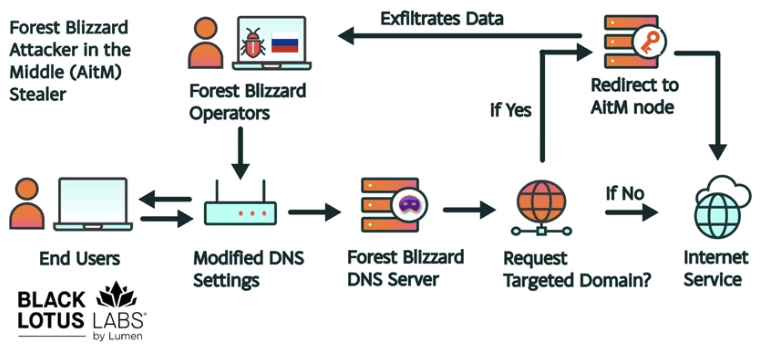
How targeted DNS requests were redirected at the router. Image: Black Lotus Labs.
Also known as APT28 and Fancy Bear, Forest Blizzard is attributed to the military intelligence units within Russia’s General Staff Main Intelligence Directorate (GRU). APT 28 famously compromised the Hillary Clinton campaign, the Democratic National Committee, and the Democratic Congressional Campaign Committee in 2016 in an attempt to interfere with the U.S. presidential election.
Researchers at Black Lotus Labs, a security division of the Internet backbone provider Lumen, found that at the peak of its activity in December 2025, Forest Blizzard’s surveillance dragnet ensnared more than 18,000 Internet routers that were mostly unsupported, end-of-life routers, or else far behind on security updates. A new report from Lumen says the hackers primarily targeted government agencies—including ministries of foreign affairs, law enforcement, and third-party email providers.
Black Lotus Security Engineer Ryan English said the GRU hackers did not need to install malware on the targeted routers, which were mainly older Mikrotik and TP-Link devices marketed to the Small Office/Home Office (SOHO) market. Instead, they used known vulnerabilities to modify the Domain Name System (DNS) settings of the routers to include DNS servers controlled by the hackers.
As the U.K.’s National Cyber Security Centre (NCSC) notes in a new advisory detailing how Russian cyber actors have been compromising routers, DNS is what allows individuals to reach websites by typing familiar addresses, instead of associated IP addresses. In a DNS hijacking attack, bad actors interfere with this process to covertly send users to malicious websites designed to steal login details or other sensitive information.
English said the routers attacked by Forest Blizzard were reconfigured to use DNS servers that pointed to a handful of virtual private servers controlled by the attackers. Importantly, the attackers could then propagate their malicious DNS settings to all users on the local network, and from that point forward intercept any OAuth authentication tokens transmitted by those users.
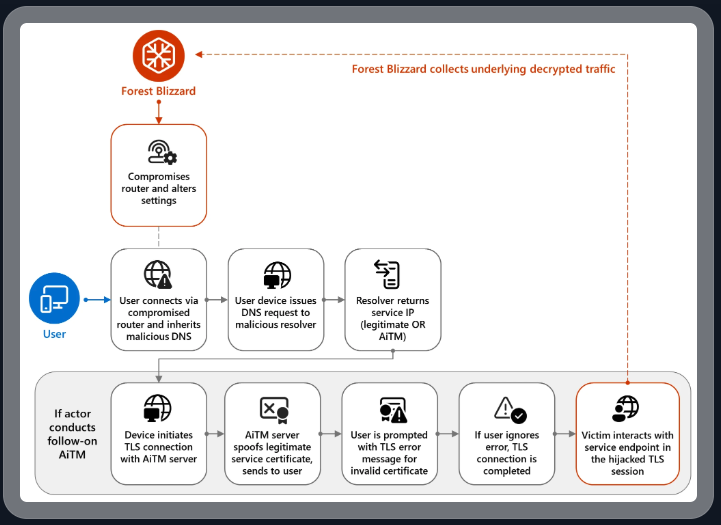
DNS hijacking through router compromise. Image: Microsoft.
Because those tokens are typically transmitted only after the user has successfully logged in and gone through multi-factor authentication, the attackers could gain direct access to victim accounts without ever having to phish each user’s credentials and/or one-time codes.
“Everyone is looking for some sophisticated malware to drop something on your mobile devices or something,” English said. “These guys didn’t use malware. They did this in an old-school, graybeard way that isn’t really sexy but it gets the job done.”
Microsoft refers to the Forest Blizzard activity as using DNS hijacking “to support post-compromise adversary-in-the-middle (AiTM) attacks on Transport Layer Security (TLS) connections against Microsoft Outlook on the web domains.” The software giant said while targeting SOHO devices isn’t a new tactic, this is the first time Microsoft has seen Forest Blizzard using “DNS hijacking at scale to support AiTM of TLS connections after exploiting edge devices.”
Black Lotus Labs engineer Danny Adamitis said it will be interesting to see how Forest Blizzard reacts to today’s flurry of attention to their espionage operation, noting that the group immediately switched up its tactics in response to a similar NCSC report (PDF) in August 2025. At the time, Forest Blizzard was using malware to control a far more targeted and smaller group of compromised routers. But Adamitis said the day after the NCSC report, the group quickly ditched the malware approach in favor of mass-altering the DNS settings on thousands of vulnerable routers.
“Before the last NCSC report came out they used this capability in very limited instances,” Adamitis told KrebsOnSecurity. “After the report was released they implemented the capability in a more systemic fashion and used it to target everything that was vulnerable.”
TP-Link was among the router makers facing a complete ban in the United States. But on March 23, the U.S. Federal Communications Commission (FCC) took a much broader approach, announcing it would no longer certify consumer-grade Internet routers that are produced outside of the United States.
The FCC warned that foreign-made routers had become an untenable national security threat, and that poorly-secured routers present “a severe cybersecurity risk that could be leveraged to immediately and severely disrupt U.S. critical infrastructure and directly harm U.S. persons.”
Experts have countered that few new consumer-grade routers would be available for purchase under this new FCC policy (besides maybe Musk’s Starlink satellite Internet routers, which are produced in Texas). The FCC says router makers can apply for a special “conditional approval” from the Department of War or Department of Homeland Security, and that the new policy does not affect any previously-purchased consumer-grade routers.
