Reading view

Here's What Agentic AI Can Do With Have I Been Pwned's APIs

Here's What Agentic AI Can Do With Have I Been Pwned's APIs

I love cutting-edge tech, but I hate hyperbole, so I find AI to be a real paradox. Somewhere in that whole mess of overnight influencers, disinformation and ludicrous claims is some real "gold" - AI stuff that's genuinely useful and makes a meaningful difference. This blog post cuts straight to the good stuff, specifically how you can use AI with Have I Been Pwned to do some pretty cool things. I'll be showing examples based on OpenClaw running on the Mac Mini in the hero shot, but they're applicable to other agents that turn HIBP's data into more insightful analysis.

So, let me talk about what you can do right now, what we're working on and what you'll be able to do in the future.

Model Context Protocol (MCP)

A quick MCP primer first: Anthropic came up with the idea of building a protocol that could connect systems to AI apps, and thus the Model Context Protocol was born:

Using MCP, AI applications like Claude or ChatGPT can connect to data sources (e.g. local files, databases), tools (e.g. search engines, calculators) and workflows (e.g. specialized prompts)—enabling them to access key information and perform tasks.

If I'm honest, I'm a bit on the fence as to how useful this really is (and I'm not alone), but creating it was a no-brainer, so we now have an MCP server for HIBP:

https://haveibeenpwned.com/mcp

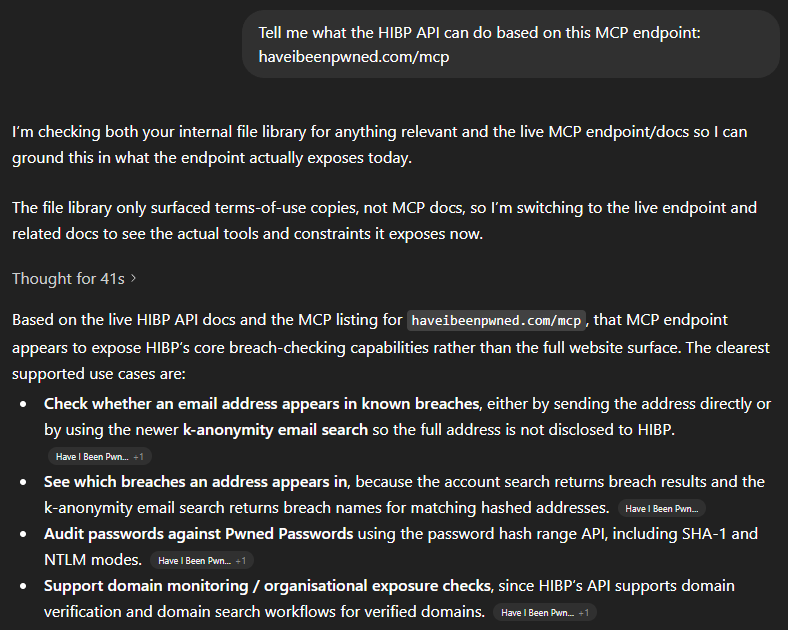
You can't just make an HTTP GET to the endpoint, but you can ask your favourite AI tool to explain what it does:
Here's What Agentic AI Can Do With Have I Been Pwned's APIs

In other words, all the stuff we describe in the API docs 🙂 That's an overly simplistic statement, and there are many nuances MCP introduces beyond a computer reading docs intended for humans, but the point is that we've implemented MCP and it's there if you want it. Which means you can easily use the JSON below to, for example, extend GitHub Copilot:

"HIBP": {
  "url": "https://haveibeenpwned.com/mcp",
  "headers": {
    "hibp-api-key": "YOUR_STANDARD_HIBP_API_KEY"
  },
  "type": "http"
}

Now let's do something useful with it.

Human Use Cases

This is really the point of the whole thing - how can humans use it to do genuinely useful stuff? In particular, how can they use it to do stuff that was hard to do before, and how can "normies" (non-technical folks) use it to do stuff they previously needed developers for? I've been toying with these questions for a while now. Here's what I've come up with:

Firstly, I'm going to do all these demos on OpenClaw. I've been talking a lot about that on my weekly live streams over the past month, and the "agentic" nature of it (being able to act as an independent agent tying together multiple otherwise independent acts) is enormously powerful. Every company worth its AI salt is now focusing on building out agentic AI so whilst I'm using OpenClaw for these demos, you'll be able to do exactly the same thing in your platform of choice either now or in the very near future.

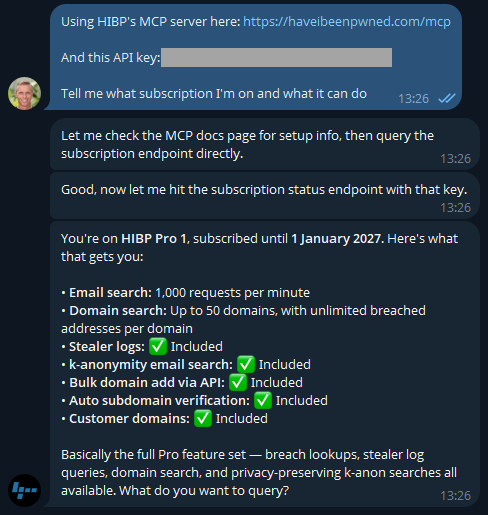
I'm using a Telegram bot as my interface into OpenClaw, let's kick it off:
Here's What Agentic AI Can Do With Have I Been Pwned's APIs

Easy, right? 🙂 There's a different discussion around how secrets are stored and protected, but that's a story for another time (and is also obviously dependent on your agent). But the key is easily rotated on the HIBP dashboard anyway. If you don't have a key already, go and take out a subscription (they start at a few bucks a month), and you'll be up and running in no time.

Now that I know I'm connected, let's learn about how I'm presently using the service:
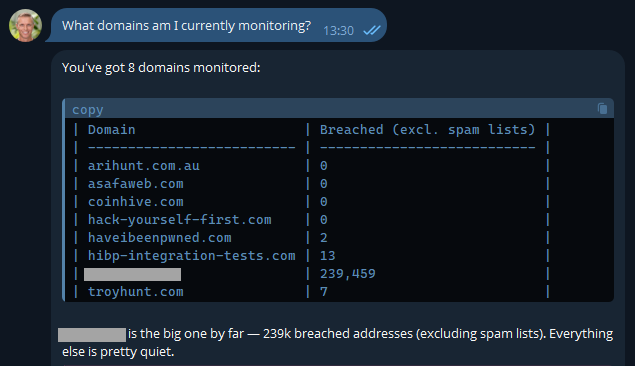
Here's What Agentic AI Can Do With Have I Been Pwned's APIs

Most of these are pretty obvious, but I've also included another here that I use to monitor how the service is behaving with a large organisation. It's a real domain with real data, so I'm going to obfuscate it to preserve privacy, but it's a great demonstration of how useful AI is. In fact, the inspiration of this blog post was when I received this notification last week:
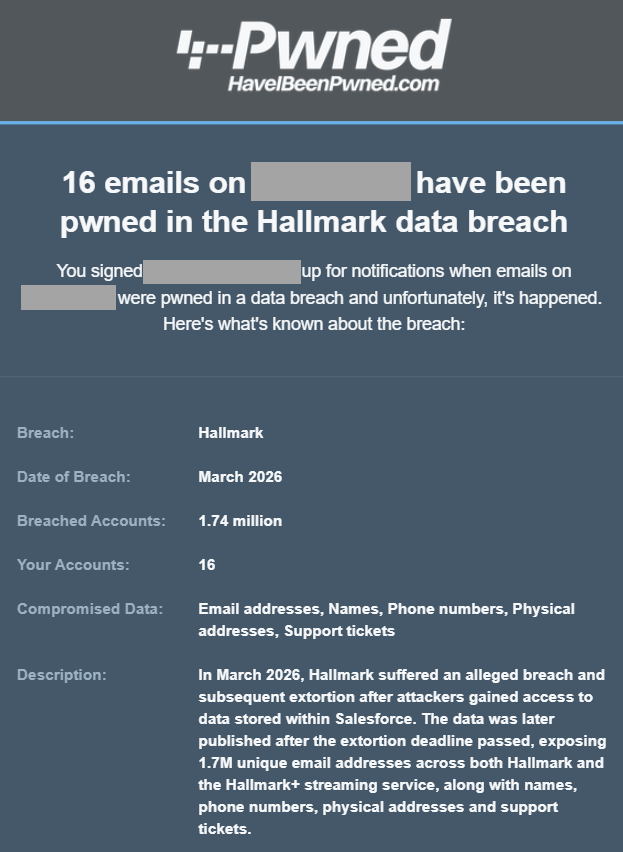
Here's What Agentic AI Can Do With Have I Been Pwned's APIs

One of the most asked questions after someone in a large org receives an email like this is "who are those 16 people in the breach"? Because we can't reliably filter large domains in the UI, I'd normally suggest they either download the CSV or JSON format in the dashboard, then search for "Hallmark" in there or use the API and write some code. But now, there's a much easier way:
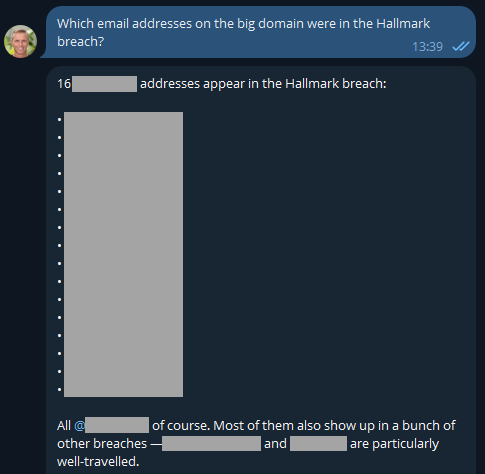
Here's What Agentic AI Can Do With Have I Been Pwned's APIs

Well that was easy 😎 I like the additional context too, and now it has me curious: what have these people been up to?
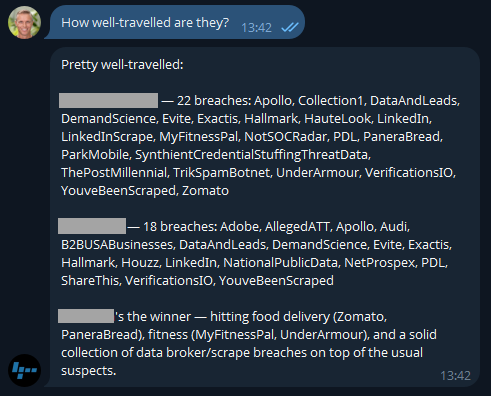
Here's What Agentic AI Can Do With Have I Been Pwned's APIs

Because I'm on a Pro plan (or if you're still on the old Pwned 5 plan), I've also got access to stealer logs. Let's see what's going on there:
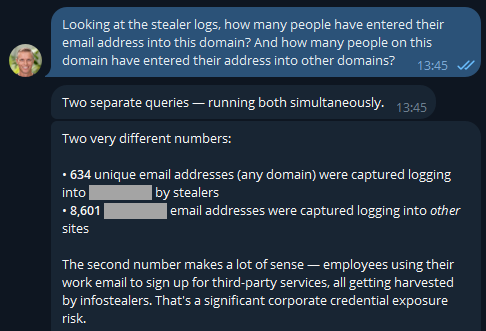
Here's What Agentic AI Can Do With Have I Been Pwned's APIs

If you were running an online service, that first number would indicate compromised customers. But as OpenClaw has suggested here, the second number is the one that's interesting in terms of employees entering their data into other websites using the corporate email address. But they'd never reuse the same password as the work one, right? 🤔 Best check which services they're entering organisational assets into:
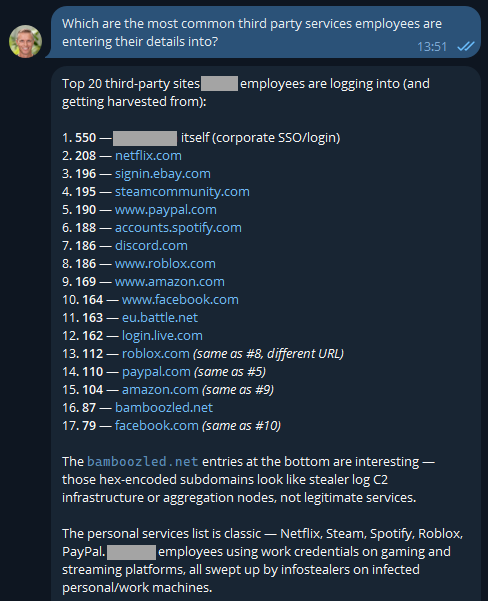
Here's What Agentic AI Can Do With Have I Been Pwned's APIs

The first one makes sense and is extra worrying when you consider these are people infected with infostealers. That's not necessarily malware on a corporate asset; they could always be using an infected personal device to sign into a corporate asset... ok, that's also pretty bad! I was a bit surprised to see Steam in there TBH - who's using their corporate email address to sign into a gaming platform?! A quiet chat with them might be in order. And the bamboozled.net stuff is weird, I want to understand a bit more about that:
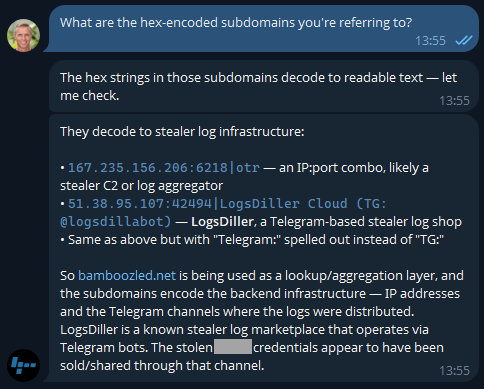
Here's What Agentic AI Can Do With Have I Been Pwned's APIs

Now I'm losing interest in this blog post and am really curious as to what's actually in the data!
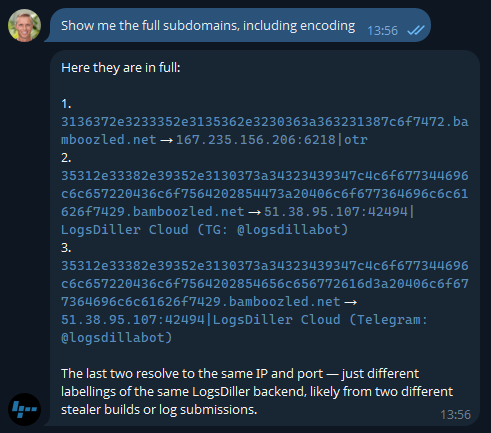
Here's What Agentic AI Can Do With Have I Been Pwned's APIs

Ok, so there's an entire rabbit hole over there! Let's park that, but think about how useful information like this is to infosec teams when you can pull it so easily. Or how useful info like this is to HR teams 😬
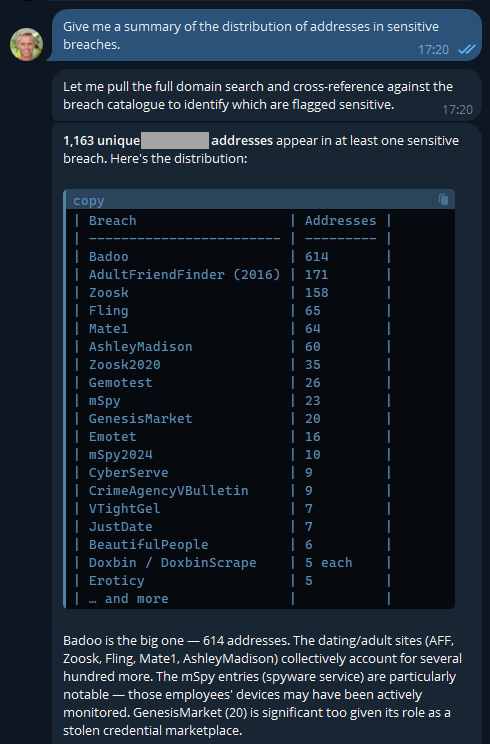
Here's What Agentic AI Can Do With Have I Been Pwned's APIs

Keep in mind, these are corporate addresses tied to the company and are the company's property, so, yeah...

But remember the agentic nature of OpenClaw means we can ask it to go off and run tasks in the background, tasks like this:
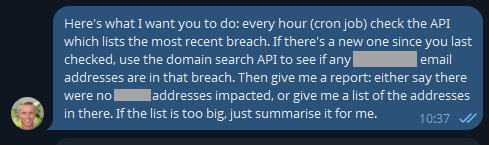
Here's What Agentic AI Can Do With Have I Been Pwned's APIs

This was just a little thought experiment I set up a few days ago and forgot about until yesterday, when I loaded a new breach:
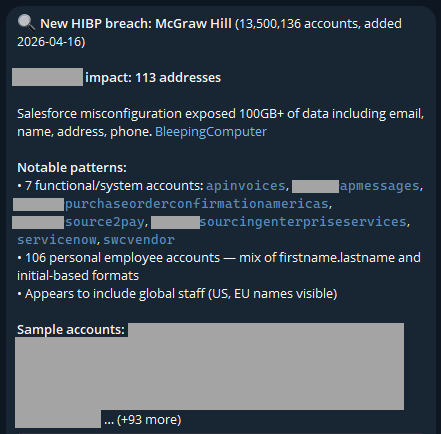
Here's What Agentic AI Can Do With Have I Been Pwned's APIs

I never asked it to look for "functional/system accounts"; it just decided that was relevant. And it is - this breach clearly had a lot of data in it related to purchases of services, which is an interesting aspect.

The idea of running stuff on a schedule opens up a whole raft of new opportunities. For example, monitoring your family's email addresses: "let me know when mum@example.com appears in a new breach". From here, your creativity is the only limit (and even that statement is debatable, given how much stuff AI agents come up with on their own). For example, creating visualisations of the data:
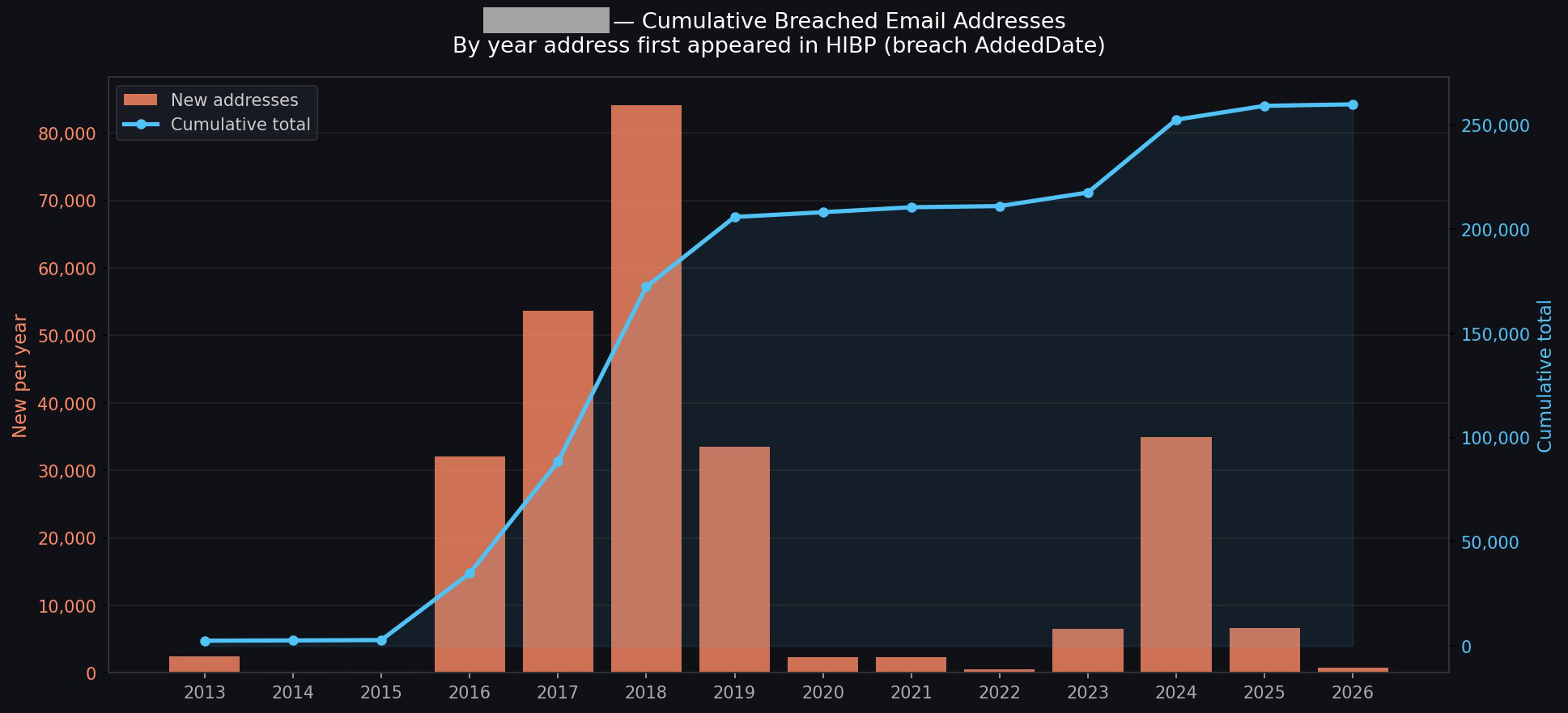
Here's What Agentic AI Can Do With Have I Been Pwned's APIs

I could go on and on (I started going down another rabbit hole of having it generate executive-level reports with all the data), but you get the idea.

The AI Pipeline

This is about what's in our pipeline, and the primary theme is putting tooling where it's more easily accessible to the masses. Creating a connector in Claude, an app in ChatGPT, and similar plumbing in the other big players' AI tools is an obvious next step. This will likely involve adding an OAuth layer to HIBP, allowing end users to configure the respective tools to query those HIBP APIs under their identity and achieve the same results as above, but built into the "traditional" AI tooling in a way people are familiar with.

Future

A big part of this is about AI enabling more human conversations to achieve technical outcomes. I spotted this from Cloudflare just yesterday, and it's a perfect example of just this:

Cloudflare dashboard can now complete tasks for you.

- "Create a Worker and bind a new R2 bucket to it"
- "Change my DNS records to 1.1.1.1"
- "How many errors have happened this week"

Not only do we tell you, but we show you with generative UI.

PROTIP: Use full-screen mode. pic.twitter.com/Q1o1vyoOwk

— Brayden (@BraydenWilmoth) April 15, 2026

I've been pretty blown away by both how easy this process has been and how much insight I've been able to draw from data I've been sitting on for ages. We'll be building out more tooling and easily reproducible demos in the future, and I'm sure a lot of that will do stuff we haven't even thought of yet. If you give this a go and find other awesome use cases, please leave a comment and tell me what you've done, especially if you've cut through the hyperbole and created some genuinely awesome stuff 😎


  •  

Designing for What’s Next: Securing AI-Scale Infrastructure Without Compromise

6100 Series is an ultra-high-end firewall, delivering exceptional performance, line-rate threat protection, and modular scalability at AI-ready data centers.
  •  

Patch Tuesday, April 2026 Edition

Microsoft today pushed software updates to fix a staggering 167 security vulnerabilities in its Windows operating systems and related software, including a SharePoint Server zero-day and a publicly disclosed weakness in Windows Defender dubbed “BlueHammer.” Separately, Google Chrome fixed its fourth zero-day of 2026, and an emergency update for Adobe Reader nixes an actively exploited flaw that can lead to remote code execution.

A picture of a windows laptop in its updating stage, saying do not turn off the computer.

Redmond warns that attackers are already targeting CVE-2026-32201, a vulnerability in Microsoft SharePoint Server that allows attackers to spoof trusted content or interfaces over a network.

Mike Walters, president and co-founder of Action1, said CVE-2026-32201 can be used to deceive employees, partners, or customers by presenting falsified information within trusted SharePoint environments.

“This CVE can enable phishing attacks, unauthorized data manipulation, or social engineering campaigns that lead to further compromise,” Walters said. “The presence of active exploitation significantly increases organizational risk.”

Microsoft also addressed BlueHammer (CVE-2026-33825), a privilege escalation bug in Windows Defender. According to BleepingComputer, the researcher who discovered the flaw published exploit code for it after notifying Microsoft and growing exasperated with their response. Will Dormann, senior principal vulnerability analyst at Tharros, says he confirmed that the public BlueHammer exploit code no longer works after installing today’s patches.

Satnam Narang, senior staff research engineer at Tenable, said April marks the second-biggest Patch Tuesday ever for Microsoft. Narang also said there are indications that a zero-day flaw Adobe patched in an emergency update on April 11 — CVE-2026-34621 — has seen active exploitation since at least November 2025.

Adam Barnett, lead software engineer at Rapid7, called the patch total from Microsoft today “a new record in that category” because it includes nearly 60 browser vulnerabilities. Barnett said it might be tempting to imagine that this sudden spike was tied to the buzz around the announcement a week ago today of Project Glasswing — a much-hyped but still unreleased new AI capability from Anthropic that is reportedly quite good at finding bugs in a vast array of software.

But he notes that Microsoft Edge is based on the Chromium engine, and the Chromium maintainers acknowledge a wide range of researchers for the vulnerabilities which Microsoft republished last Friday.

“A safe conclusion is that this increase in volume is driven by ever-expanding AI capabilities,” Barnett said. “We should expect to see further increases in vulnerability reporting volume as the impact of AI models extend further, both in terms of capability and availability.”

Finally, no matter what browser you use to surf the web, it’s important to completely close out and restart the browser periodically. This is really easy to put off (especially if you have a bajillion tabs open at any time) but it’s the only way to ensure that any available updates get installed. For example, a Google Chrome update released earlier this month fixed 21 security holes, including the high-severity zero-day flaw CVE-2026-5281.

For a clickable, per-patch breakdown, check out the SANS Internet Storm Center Patch Tuesday roundup. Running into problems applying any of these updates? Leave a note about it in the comments below and there’s a decent chance someone here will pipe in with a solution.

  •  

Can Your Wearable Health Monitors Be Compromised?

Wearable health devices are designed to give you more control over your body and your data. 

But in 2026, the bigger risk isn’t someone spying on your smartwatch or smartring in real time. It’s what happens if the data connected to that device gets exposed. 

Health data, login credentials, and behavioral patterns tied to wearables can become valuable signals for cybercriminals. And once that data is out, it can fuel everything from identity theft to highly targeted scams. 

Here’s what’s actually at risk, and how to protect yourself. 

What Is Wearable Health Data (and Why It Matters) 

Wearable health data refers to the personal information collected and stored by devices like fitness trackers, smartwatches, and connected medical monitors. 

This can include: 

  • Heart rate and activity levels  
  • Sleep patterns  
  • Location data  
  • Medical metrics (like glucose levels)  
  • Account credentials tied to apps and dashboards  

On its own, this data may seem harmless. But combined, it creates a highly detailed profile of your habits, routines, and health status. 

The Real Risk in 2026 Isn’t the Device. It’s the Data. 

Early conversations around wearable security focused on device hacking or surveillance. 

Today, the bigger concern is data exposure. 

If wearable platforms, apps, or connected services are breached, your data could be: 

  • Sold on the dark web  
  • Used to impersonate you  
  • Leveraged in targeted phishing or health-related scams  

And because this data is personal and specific, scams built from it can feel far more convincing than generic spam. 

How Exposed Wearable Data Can Lead to Scams 

When cybercriminals gain access to personal data, they don’t just sit on it. They use it. 

Here’s how that plays out: 

Scenario  What It Looks Like  Why It Works 
Health-related phishing  “Your insurance claim was denied” or “Update your health profile”  Feels relevant and urgent 
Account takeover attempts  Password reset emails tied to known apps  Uses real account signals 
Personalized scams  Messages referencing routines, devices, or conditions  Builds trust quickly 
Fake alerts or services  “Device security issue detected”  Mimics real product behavior 


This is where the risk shifts from data privacy → real-world financial and identity impact. 

6 Smart Ways to Protect Your Wearable Data 

1)Install updates immediately
Security patches fix known vulnerabilities. Delaying updates leaves gaps open.  

2) Use layered protection, not just device settings
A VPN and security software help protect data in transit and block threats before they reach you.  

3) Strengthen your login credentials
Use strong, unique passwords and enable two-factor authentication wherever possible.  

4) Limit what you share
Review app permissions and only connect devices to services you trust.  

5) Verify every message or alert
If you receive a message tied to your device or health data, double-check the source before clicking.  

6) Monitor your accounts regularly
Small signs of unusual activity can be early indicators of larger issues. 

How McAfee Helps Protect Your Data Beyond the Device 

Protecting your wearable doesn’t stop at the device itself. It extends to what happens if your data is exposed or targeted. 

Identity Monitoring 

McAfee helps track your personal information across known breach sources and alerts you if your data appears where it shouldn’t. 

This gives you early warning if wearable-related accounts or associated data are compromised. 

Scam Detector 

If your data is exposed, scammers often follow. 

McAfee’s Scam Detector helps identify suspicious messages, links, and communications before you engage, and explains why something was flagged, so you can make informed decisions quickly. 

Together, these tools help protect not just your device, but the chain reaction that can follow a data breach. 

The post Can Your Wearable Health Monitors Be Compromised? appeared first on McAfee Blog.

  •  

Weekly Update 499

Weekly Update 499

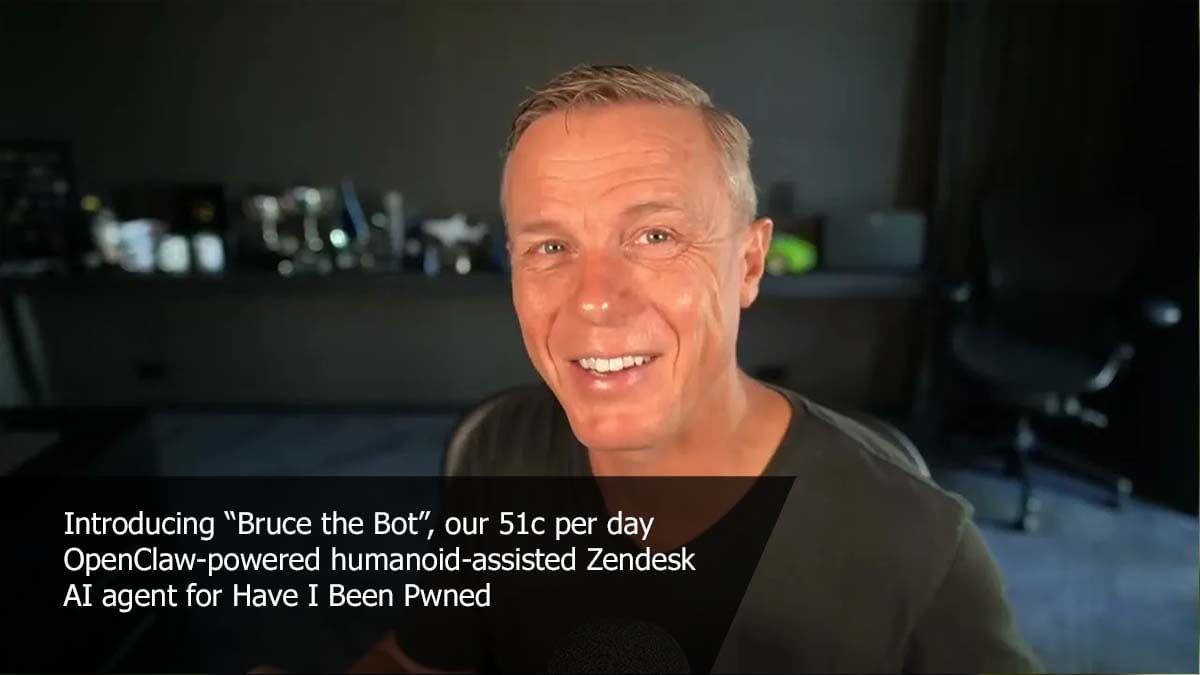
I'm starting to become pretty fond of Bruce. Actually, I've had a bit of an epiphany: an AI assistant like Bruce isn't just about auto-responding to tickets in an entirely autonomous manner; it's also pretty awesome at responding with just a little bit of human assistance. Charlotte and I both replied to some tickets today that were way too specific for Bruce to ever do on his own, but by feeding in just a little bit of additional info (such as the number of domains someone was presently monitoring), Bruce was able to construct a really good reply and "own" the ticket. So maybe that's the sweet spot: auto-reply to the really obvious stuff and then take just a little human input on everything else.

Weekly Update 499
Weekly Update 499
Weekly Update 499
Weekly Update 499
  •  

Social Security Scam Emails and a Healthcare Data Breach: This Week in Scams

Emails claiming to be from Social Security are making the rounds right now. 

They look official. They sound official. And they’re designed to get you to click before you think twice. 

The Social Security Administration’s Office of Inspector General is warning about a spike in messages that claim your Social Security statement is ready to download. The goal is simple. Get you to click a link or open an attachment. 

From there, things can go sideways fast. 

Before interacting with anything like this, it’s worth pausing and running it through a tool like McAfee’s Scam Detector. This is exactly the kind of message it’s built to flag. Something that looks legitimate, but feels just slightly off. 

How The Scam Works 

The email mimics official government communication, using logos, formatting, and language that feels familiar. It might say your statement is ready, your account needs attention, or you need to review a document. 

Once you click: 

  • You may be sent to a fake website designed to capture your personal information  
  • You may download malware without realizing it  
  • Or you may be prompted to enter sensitive financial details  
  • Either way, the goal is the same: get access to your identity. 

The Red Flags In These Emails 

  • Messages claiming your social security statement is ready to download  
  • Links or attachments labeled as official documents  
  • Urgency pushing you to act quickly  
  • Sender addresses that do not end in “.Gov”  

The biggest tell: Social Security does not send emails like this asking you to download statements or provide sensitive information. 

What To Do If You Get One 

  • Do not click links or download attachments  
  • Delete the email immediately  
  • Access your account by going directly to the official SSA website  
  • Report the message to the SSA Office of Inspector General  

If you already clicked: 

  • Stop communication immediately  
  • Contact your financial institutions  
  • Monitor your accounts closely  
  • Report the incident to the FTC or the FBI’s IC3  

And that, my friends, is scam number one in this week’s This Week in Scams. 

Let’s get into what else is on our radar. 

A Healthcare Data Breach That Could Lead to Follow-Up Scams 

Healthcare data breaches don’t always make headlines the same way big tech breaches do, but they can be just as serious. 

According to reporting from Fox News, CareCloud, a company that supports electronic health records for tens of thousands of providers, recently confirmed a security incident involving unauthorized access to one of its systems.  

The access lasted several hours. And while it’s still unclear whether any data was taken, that uncertainty is exactly what makes situations like this risky. 

Because even if you’ve never heard of the company, your doctor might use it. 

Why This Matters 

Healthcare data is incredibly valuable. It can include: 

  • Names and social security numbers  
  • Insurance details  
  • Medical history  
  • Billing information  

Unlike a credit card, you can’t just cancel your medical history. 

And when that kind of data is exposed or even potentially exposed, scammers often follow up with messages that feel highly specific and personal. 

What To Watch For Next 

After incidents like this, scammers often move quickly: 

  • Emails or texts pretending to be your provider  
  • Messages about billing issues or medical records  
  • Requests to “verify” your information  
  • Links to log in or update your account  

These scams work because they’re timed perfectly and feel relevant. 

This is another moment where Scam Detector can help flag suspicious links or messages before you engage, even when they reference real healthcare providers. 

How To Protect Yourself 

  • Review medical bills and insurance statements for unfamiliar activity  
  • Enable two-factor authentication on patient portals  
  • Use strong, unique passwords  
  • Avoid clicking links in unexpected healthcare-related messages  
  • Consider identity monitoring to catch misuse early  

Where McAfee Steps In (So You Don’t Have to Guess) 

Scams today are layered. 

A fake email leads to stolen credentials. A breach leads to targeted phishing. And those follow-ups are getting harder to spot. 

McAfee+ Advanced gives you multiple layers working together so you are not left figuring it out after the damage is done: 

  • Identity Monitoring alerts you if your personal info shows up where it should not, so you can act fast
  • Personal Data Cleanup helps remove your information from data broker sites, making you harder to target in the first place
  • Scam Detector flags suspicious texts, emails, links, and even deepfake videos before you engage
  • Safe Browsing helps block risky sites if you do click
  • Device Security helps detect malicious apps or downloads
  • Secure VPN keeps your data private, especially on public Wi-Fi  

Safety Tips To Carry Into Next Week 

  • Be cautious of emails that look official but create urgency  
  • Never trust unsolicited messages asking for personal or financial information  
  • Go directly to official websites instead of clicking links  
  • Stay alert after any breach or security incident makes headlines  
  • Use tools like McAfee that help you verify what’s real before you act  

Because the reality is, scams are designed to look legitimate. You shouldn’t have to figure it out on your own. We’re safer together. 

We’ll be back next week with more scams making headlines. 

The post Social Security Scam Emails and a Healthcare Data Breach: This Week in Scams appeared first on McAfee Blog.

  •  
❌