Reading view

How to Delete Your Browser History

Deleting your browsing history has its benefits. Firstly, it can improve the performance of your device. Secondly, it can help make you more private online to a point. In fact, clearing your history periodically is just one of several steps you can take to enhance your privacy. It won’t erase you from the internet, but it does reduce the data stored on your devices and in your accounts.

To help you understand the benefits of deleting your browser history, we’ll walk you through what your browsing history includes, how to clear it in popular browsers, the pros and cons of using incognito mode, as well as additional tips for enhancing your privacy and optimizing your device’s performance.

Clearing your browsing and search history matters

The two ways your browser uses to build your history are remembering the websites you visit and saving the topics that you search for. Together, they paint a comprehensive picture of your digital life. 

Over time, the cached browsing data, such as files, cookies, and stored history consume valuable storage space and slow down your computer, especially on older devices or those with limited storage capacity.

Although your browsing or search history may seem harmless, the bigger concern about this stored information goes deeper than device performance. They create detailed profiles of your interests, habits, and personal information that can impact your privacy in ways you might not expect.

Your search history directly feeds into the hidden processes that customize your online experience, allowing companies to build detailed profiles about the interests, relationships, health concerns, and financial situations that you research. What’s more, tracking technologies in the search engine follow you across websites, collecting more data about you.

Similarly, your browser saves your preferences and the sites you visit to load pages faster. That’s a convenience for you, but browsers also share this data with data brokers, advertising networks, and analytics companies, who use it to customize the ads displayed on your browser.

Additionally, data brokers frequently purchase and resell browsing and search data to create consumer profiles for marketing, insurance, and even employment purposes. Your search for health information might influence insurance rates, while your browsing patterns could affect loan approvals or job opportunities. Additionally, this aggregated data makes you vulnerable during security breaches, potentially exposing sensitive personal information to malicious actors.

Benefits of regularly clearing your browser history 

When you regularly delete your browsing and search history, you gain several immediate advantages, such as greater control over your digital footprint and online reputation by limiting data collection and profiling. You will also enjoy the improved performance of your device as a result of freeing up storage space, and you will receive fewer targeted advertisements, as algorithms have less data to work with. Most importantly, you reduce your risk of data exposure in the event of a security breach or device theft.

Taking control of your browsing and search history puts you back in charge of your digital privacy. 

Delete your internet history in the browser

There’s no fixed or recommended time for deleting your browsing history, cache, and cookies. It’s all relative to your system’s storage space and personal preferences. To get started, refer to this step-by-step guide when you believe it’s time to clear your browser.

Google Chrome

To delete your browser history on Google Chrome:

  • Open the Chrome browser on your laptop or computer.
  • Select the three vertical dots in the upper right corner.
  • Find an option that says “Clear browsing data.”
  • Select your preferred time range near the top of the screen. To delete all data since you first used your browser, select “All time.” If you want to delete history from the past hour, select “Last hour.”
  • Next, check the boxes saying “Cookies and other site data” and “Cache images and files,” and select “Clear data.”

Some of your settings may be deleted when you clear your browser history. For example, you might have to re-sign into your accounts. But that is a small price to pay for keeping your privacy. If you want to delete cookies and cache for a specific site, you can check out Google’s Chrome support page.

Microsoft Edge

Clearing your Microsoft Edge browsing data is similar to the process in Chrome. On your device, turn off sync before clearing the data, as the selected data will be deleted across all your synced devices if sync is turned on.

  • Open the Microsoft Edge browser on your device.
  • Select the three horizontal dots in the upper right corner.
  • Find the option that says “Delete browsing data.”
  • You will be prompted to select the time range from a dropdown list, ranging from “Last hour” to “All time.”
  • You’ll see an option to select which types of browsing data to clear. Select the data you want to delete, such as browsing or download history, cookies, and cached images and files. You may keep the saved passwords and autofill data unchecked.
  • Select the “Clear now” option.

Mozilla Firefox

To delete your browsing, search, and download history on Mozilla Firefox, follow these basic steps:

  • Select “Menu” and select “History.”
  • Select the “Clear recent history” option.
  • In “Time range to clear,” select “Everything” from the drop-down menu.
  • Select “Cache” and other items to delete in the options list.
  • Ensure the files you want to keep aren’t selected.
  • Select “OK.”

Safari

Here are simple steps to clear browser cache and cookies on Safari on the Apple macOS, but an iPad or iPhone might have slightly different steps.

  • Go to the Safari app on your Mac.
  • Choose Safari > Settings, then click Privacy.
  • Click Manage Website Data.
  • Select one or more websites, then click Remove or Remove All.

That’s all! You’ve now deleted your browser history on Safari.

Opera

To clear the cache and browser history in Opera:

  • On your Opera browser, go to Settings (Alt+P).
  • Select Privacy & Security on the left, then click “Delete browsing data.”
  • Select a time range and the data you wish to clear, and click “Delete data.”

Delete your history at the account level, across all devices

After clearing your browser and search history, you may also want to consider deleting your account-level history. While browser-level history encompasses the searches and websites stored locally on your device, your account-level history refers to the searches that are logged and stored when you’re signed into that account. 

Related to this, when you’re signed into accounts such as Google, Microsoft, or other services on several devices at once, your search and browsing activity is automatically synchronized across all the devices you are signed into. Deleting the search and browsing history on your phone won’t remove it from your laptop. To clear history on all your devices where you are signed in, you will need to delete it at the account level, where the syncing happens. In doing so, you are addressing the source of data collection that follows you across all your devices and online activities. This action provides genuine privacy protection, rather than just cleaning up individual browsers.

Here’s how to delete your search history so it disappears from every device where you’re signed in:

  1. Access your account activity center on Google or your Microsoft Privacy Dashboard. Other services have similar activity management pages.
  2. Look for “Web & App Activity” or “Search History” sections on the respective accounts. Choose to delete by time range (last hour, day, week) or select “All time” to delete search history from your account completely. The automatic synchronizing typically takes a few minutes to propagate across your devices.
  3. Verify on another device. To check another device where you’re signed in, type previous search terms to see if autocomplete suggestions appear. Also, check that your search history pages show no recent activity. You may need to refresh your browser or restart your search app.

Manage multiple accounts and profiles

Many people use multiple accounts or browser profiles for work, personal use, or family sharing. Each requires separate attention:

  • Make sure to clear your history for each account. Log into each Google, Microsoft, Yahoo, or other account you use and clear the search history separately. The deletion of one account doesn’t affect another.
  • Check browser profiles individually. If you use multiple browsers or browser profiles, each may be signed into different accounts. Clear the history for each profile separately.
  • Don’t forget your guest or incognito usage. While private browsing doesn’t save history locally, you might still be signed into accounts that track your activity.

Other accounts you need to wipe clean

Now you know that your browsers and search engines aren’t the only accounts you need to scrub, here is a short list of other online services that you will need to check and clear:

Bing

  1. Sign in to your Microsoft account and navigate to the Privacy dashboard to access all your account-level privacy settings across Microsoft services. This central hub controls how Microsoft collects and uses your data across all its services.
  2. Locate search history settings. In the Privacy dashboard, find the “Search history” section under your activity data to view all the search queries you’ve made while signed into your Microsoft account on Bing.
  3. Choose your deletion method.
  • Delete individual searches: Click the “X” next to each query you want to remove from your search history.
  • Clear all search history: Select “Clear all search history” to delete search history completely and start fresh
  • Delete by date range: Choose a specific time period to clear history from just that timeframe
  • Confirm your deletion. Microsoft will ask you to confirm your choice before permanently removing your search history. Remember, this action cannot be undone, so make sure you’re comfortable with losing this data.
  • Disable future personalization (optional). To prevent Bing from saving future searches, turn off the “Search history” collection in your privacy settings. 
  • To see the synchronized changes in your search history across all devices and all Microsoft accounts, including Windows PCs, Xbox, and mobile devices, you will need to refresh Bing. The caveat to deleting your Bing search history is that it prevents the engine from personalizing your search results and ads. You will notice fewer relevant suggestions and more generic search experiences until you build up new search patterns.

    Yahoo!

    1. Sign in to your Yahoo.com using your Yahoo email address and password, and navigate to your search history settings. Click on your profile icon or name and select “Account Info” from the dropdown menu. On the left sidebar, go to Privacy or Privacy Dashboard > Manage your data and activity.
    2. Find and select “Search History” or “Web Search History” to display all the search queries you’ve made while signed into your Yahoo account on different devices and browsers.
    3. To remove a specific search, click the “X” or “Delete” button next to the individual query. You can also use the search bar in your history to find specific terms you want to delete.
    4. To delete your entire Yahoo search history, choose the “Clear All” or “Delete All” option at the top of your search history page. 
    5. To review ad personalization settings in your privacy dashboard, navigate to “Ad Interest Manager” or “Advertising Preferences.” You can turn off personalized advertising or modify your ad interests.

    After the deletions, you may need to sign out and back in to see the changes reflected across all your devices. You can verify the deletion by rechecking your search history or noticing changes in your personalized search suggestions. However, it doesn’t affect data that Yahoo may have already collected and shared with advertising partners.

    Brave

    1. Open the Brave browser on your computer.
    2. Click on the menu icon (three horizontal lines) in the upper-right corner of the browser window.
    3. Select “History” from the dropdown menu, then choose “Clear browsing data” to see options for different time ranges from the dropdown menu.
    4. Check the boxes for the data you want to delete: Browsing history, cookies and other site data, and cached images and files
    5. Click on the “Advanced” tab to access more clearing options, including saved passwords, autofill data, and site settings.
    6. Click “Clear data” to delete your selected browsing information.

    Keep in mind that Brave’s built-in privacy settings, including Brave Shields, already block many trackers and ads by default. You can adjust these settings by clicking on the Brave Shields icon (lion logo) in the address bar. Brave offers a private browsing mode that doesn’t save your history automatically.

    Other Google accounts

    Google offers auto-delete features for three main types of activity data, each with flexible time intervals that let you balance convenience with privacy.

    Google auto-delete

    To enable auto-delete in your other Google services, visit myactivity.google.com, click “Web & App Activity,” then select “Auto-delete.” You can choose to remove activity older than 3 months, 18 months, or 36 months. The 18-month option strikes a good balance, retaining sufficient data for personalized use while preventing excessive accumulation.

    YouTube history

    YouTube watch and search history can be managed separately from your general web activity. In your Google Account settings under “YouTube History,” you’ll find auto-delete options for both the videos you’ve viewed and what you’ve searched for on YouTube. The same time intervals apply: 3, 18, or 36 months.

    Location history auto-delete

    Given the sensitive nature of location data, you can set Google to delete it automatically through your Google account’s “Location History” settings. You can choose the 3-month option for more frequent cleanup, although the 18-month option works well if you use location-based features regularly.

    Combine auto-delete with pausing

    For maximum control, combine auto-delete with the strategic pausing of history collection. When you’re researching sensitive topics, planning surprises, or conducting confidential work, you can pause your Web & App Activity in your Google Account settings to prevent those searches from being saved. Once you’re finished, turn the history collection back on and let your auto-delete selection handle the routine cleanup. This approach enables you to maintain your privacy protection while still receiving personalized search results for your regular online activities.

    Incognito history

    While incognito mode prevents your browser from storing your browsing history, cookies, and search history locally, it does not make you completely invisible online. Your internet service provider, workplace network administrators, and the websites you visit can still track your online activity. Additionally, any accounts you log into during private browsing will still have records of your activity. 

    Meanwhile, some types of data can remain on your device, such as the downloaded files. Your DNS cache may also keep records of your browsing activity, while websites and bookmarks may leave traces on your local storage data. To clear these completely, you’ll need to take a few additional steps. 

    • Delete downloads. Manually delete any files you downloaded during your private session. Don’t forget to clear your trash bin as well.
    • Clear your DNS cache. Clear your DNS cache by opening Command Prompt as an administrator and typing “ipconfig /flushdns” on Windows, or using “sudo dscacheutil -flushcache” on Mac. 
    • Check browser data and bookmarks. Clear your browser’s site data and local storage through your browser settings, even after using incognito mode. Finally, check and remove any bookmarks you may have accidentally saved.
    • Review stored site permissions and data. Some websites can still store permissions you granted during incognito sessions. Review your browser’s site permissions in Settings > Privacy and Security to see what data the websites collected.
    • Remove cached images and temporary files. Some cached images or temporary files might remain in system folders after your private sessions. Use disk cleanup tools or manually check your browser’s temporary file folders to remove them.

    Social media

    Most social platforms store search history in Privacy, Security, or Data settings sections of your account. Look for terms such as “Activity,” “Search History,” or “Personalization” to find these options. For specific social media, here are some quick instructions:

    • Facebook: Go to Settings & Privacy > Settings > Your Facebook Information > Activity Log. Filter by “Search” to find and delete individual search queries, or go to “Search History” to clear all searches at once.
    • Instagram: Go to your profile, tap the menu icon, select Settings > Security > Search History. You can delete individual searches or tap “Clear All” to remove your entire search history.
    • Twitter/X: Access Settings and Privacy > Privacy and Safety > Data Sharing and Off-Twitter Activity. Look for “Personalization and Data” settings where you can manage and delete your search history data.
    • TikTok: Open Settings and Privacy > Privacy > Personalization and Data. Select “Search History” to view and delete individual searches or clear your entire search history.
    • LinkedIn: Go to Settings & Privacy > Data Privacy > How LinkedIn uses your data. Look for “Search History” options to manage what you’ve searched for on the platform.

    Make your browsing more private

    Clearing your cache is only the first step. Preventing others from gathering info about you while you browse is the next. So keeping your browsing private from advertisers, websites, ISPs, and other third parties calls for extra measures:

    Use a VPN

    When you use a VPN, you can hide several things from your ISP and other third parties, like the websites and apps you use, the time spent on them, your search history, and downloads. As for websites and apps, a VPN can hide your IP address and your location, all of which can thwart ad tracking on those sites and apps.

    A strong VPN service offers yet another benefit. It protects you from hackers and snoops. Our VPN uses bank-grade encryption to keep your data and info secure. With a VPN, a snoop would only see garbled content thanks to your VPN’s encryption functionality.

    Clean up your info online

    One major privacy leak comes at the hands of online data brokers, companies that collect and resell vast amounts of personal information about millions of people. In fact, they make up a multibillion-dollar industry that spans worldwide. Additionally, there are so-called “White Pages” and “people finder” sites that post info like names, addresses, and other public records that anyone can access.

    With all this information collected in a central location that’s easily searchable and accessible, these sites can be an ideal resource for hackers, spammers, and thieves. McAfee Personal Data Cleanup can help you take control. It scans high-risk data broker sites and lets you know which ones are selling your data, and depending on your McAfee+ plan, it can remove it for you, too.

    Delete old accounts

    Consider all those dozens and dozens of old (and forgotten) online accounts you don’t use anymore. Several might have various pieces of personal info stored on them, even though it’s been ages since you used them. Deleting these accounts and the info linked with them can improve your privacy. What’s more, deleting them can help prevent identity theft if those sites get breached.

    Our Online Account Cleanup can save you hours and hours of time by cleaning things up with just a few clicks. It shows you which accounts are tied to your email address and what info is usually shared with each account. It also shows you which are riskiest to keep, helping you determine which ones to delete.

    One step closer to better online privacy 

    Deleting your browser history can give you a performance boost and delete tracking cookies used by third parties. To prevent others from collecting your information while you browse and to clean up the online places where it appears, get comprehensive online protection software like our McAfee+.

    It offers several features that can help you be safer and more private online:

    With all this data collection happening online, there’s still plenty you can do to take control. With the steps outlined above and strong online protection software at your back, you can keep your personal info more private and secure.

    Final Thoughts

    Taking control of your digital privacy only requires small actions to make a significant difference in protecting your personal information. By routinely clearing your search history and browser data, setting up auto-delete features, and combining these practices with privacy tools such as VPNs and data cleanup services, you’re building a stronger foundation for your online security. These simple steps you can take today will compound over time, giving you greater control over your digital footprint and reducing unwanted tracking. Staying private online is an ongoing journey. Continue to explore new ways to protect yourself and stay informed about emerging privacy practices that can benefit you.

    The post How to Delete Your Browser History appeared first on McAfee Blog.

    •  

    What to Do if Your Phone is Stolen or Lost: 10 Steps to Protect Your Identity

    Losing your phone or having it stolen can feel like a nightmare, especially when you consider the treasure trove of personal information stored on your device. From banking apps and email accounts to social media profiles and payment methods, smartphones contain virtually our entire digital lives. When a criminal or pickpocket gains access to your phone, they potentially have the keys to your identity, finances, and online presence. However, acting quickly and methodically can help minimize the risks and protect you from identity theft and financial fraud.

    Online safety advocate Amy Bunn emphasizes the scope of this vulnerability: “What many people don’t realize is how much information is stored or accessible through their phone — not just apps, but things like saved passwords, cloud backups, and multi-factor authentication codes. If someone gains access, they can move quickly to impersonate you or steal your identity. Features like remote wipe, app-specific PINs, and identity monitoring may not feel urgent until something goes wrong — but having them in place can make a big difference in how quickly you can recover and how much damage you can prevent.” The reality is sobering, criminals with access to your phone can make unauthorized purchases, hack into your accounts, and even steal your identity to open new credit lines in your name. But by following these nine critical steps immediately after discovering your phone is missing, you can significantly reduce the potential damage and protect your most sensitive information.

    1. Try to Locate Your Phone Using Built-in Tracking

    Before taking any drastic measures, start with the obvious: try calling your phone from another device. You might hear it ring nearby, or someone who found it might answer and be willing to return it. If this doesn’t work, turn to your phone’s built-in tracking capabilities.

    For iPhone users, Apple’s Find My service allows you to see your device’s location on a map, play a sound to help locate it, and even view its last known location if the battery has died. Android users can access Google’s Find My Device with similar functionality. Both services can be accessed from any computer or other device by logging into your Apple or Google account. These tracking tools not only help you locate your phone but also provide remote control options that become crucial if recovery seems unlikely.

    2. Lock Your Phone Remotely to Prevent Unauthorized Access

    If you can’t physically retrieve your phone or suspect it’s in the wrong hands, immediately lock it remotely. This creates an additional barrier between a potential thief and your personal information, preventing access to your apps, messages, emails, and saved payment methods.

    Both iPhone and Android devices offer remote locking capabilities through their respective tracking services. You can also set a custom message to display on the lock screen with your contact information, which could help if someone honest finds your phone and wants to return it. For iPhone users, this means accessing iCloud.com or using the Find My app on another Apple device, selecting your lost phone, and choosing “Mark as Lost.” Android users can visit android.com/find, select their device, and choose “Secure Device” to lock it and display a custom message.

    3. File a Police Report for Documentation

    While law enforcement may not actively search for your stolen phone, filing a police report creates an official record that can prove invaluable if you need to dispute fraudulent charges or deal with insurance claims. When you visit your local police department, bring as much information as possible about when and where your phone was lost or stolen.

    Having your phone’s IMEI number (International Mobile Equipment Identity) or serial number available will strengthen your report. You can usually find these numbers in your phone’s settings, on the original packaging, or through your carrier’s account portal. This documentation becomes particularly important if criminals use your phone to commit further crimes or if you need to prove to financial institutions that fraudulent activity resulted from theft.

    4. Contact Your Mobile Carrier Immediately

    Your next call should be to your mobile carrier to suspend service on your stolen or lost device. This prevents unauthorized calls, texts, or data usage that could result in unexpected charges on your bill. More importantly, it helps protect your account from being hijacked or used to access two-factor authentication codes sent to your number.

    Most major carriers can also blacklist your stolen device, making it much harder for thieves to use even if they manage to bypass the screen lock. When you contact your carrier, ask about temporary suspension options if you’re still hoping to recover your phone, or proceed with permanent cancellation if you’re ready to move to a replacement device. Many carriers also offer insurance programs that may help cover the cost of a replacement phone.

    5. Secure All Connected Accounts

    Even with remote locking enabled, sophisticated criminals may find ways to access your stored information. This makes securing your online accounts one of the most critical steps in protecting yourself from identity theft. Your phone likely has saved passwords, active app sessions, and stored payment information that could be exploited.

    Start by changing passwords for your most sensitive accounts, particularly email, banking, and financial services. Focus on creating strong, unique passwords that would be difficult for criminals to guess. McAfee’s Password Manager can secure your accounts by generating and storing complex passwords and auto-filling your info for faster logins across devices. Next, remotely sign out of all apps and services that were logged in on your stolen device. Most major platforms, including Google, Apple, Microsoft, and social media sites, offer account security settings where you can view active sessions and log out of all devices remotely. This step is crucial because it prevents thieves from accessing your accounts even if they bypass your phone’s lock screen.

    Consider this an opportunity to enable two-factor authentication on accounts that support it, adding an extra layer of security for the future. While you’re at it, monitor your online and financial accounts closely for any suspicious activity, unauthorized transactions, or login attempts from unfamiliar locations.

    6. Remove Stored Payment Methods from Mobile Apps

    Your stolen phone likely contains mobile payment apps like Apple Pay, Google Pay, or individual retailer apps with stored credit card information. Criminals can potentially use these payment methods to make unauthorized purchases, so removing them quickly is essential for protecting your finances.

    For Apple Pay users, marking your device as lost through Find My iPhone will automatically suspend Apple Pay on that device. Alternatively, you can manually remove payment methods by signing into your Apple ID account at appleid.apple.com, selecting your lost device, and choosing to remove all cards. Google Pay users should visit payments.google.com, navigate to payment methods, and remove any cards linked to the compromised device.

    Don’t stop there – contact your bank or credit card issuer directly to alert them about the potential for fraud. They can freeze or cancel the cards linked to your mobile payment apps and monitor for any suspicious transactions. Review your recent statements carefully and report any charges that weren’t made by you. Most financial institutions have straightforward fraud dispute processes and will work quickly to resolve unauthorized transactions.

    7. Erase Your Phone’s Data Remotely

    When all hope of recovering your phone is lost, remote data erasure becomes your final line of defense against identity theft. This nuclear option wipes all stored data, settings, media, and personal information from your device, ensuring that criminals can’t access your photos, contacts, passwords, financial information, or any other sensitive data.

    Both iPhone and Android devices offer comprehensive remote wipe capabilities through their respective tracking services. For iPhone users, this means accessing Find My and selecting “Erase iPhone,” which will restore the device to factory settings and remove all personal information. Android users can accomplish the same thing through Find My Device by selecting “Erase Device.”

    Keep in mind that once you erase your phone remotely, you’ll lose the ability to track it further, so make sure you’ve exhausted all other options first. However, the peace of mind that comes from knowing your personal information can’t be accessed often outweighs the slim chance of recovery.

    8. Alert Your Contacts About Potential Scams

    Criminals with access to your phone may attempt to exploit your personal relationships by impersonating you in messages or calls to your contacts. They might send urgent requests for money, ask for sensitive information, or attempt to trick your friends and family into various scams using your trusted identity.

    As Amy Bunn warns, “Unfortunately, a stolen or lost phone often triggers the next wave of problems — scams. Criminals may use your personal details to send convincing phishing messages or pose as you to friends and family. That’s why tools like scam detection, identity monitoring, and security alerts matter. They not only help people lock down their accounts quickly but also give them an early warning when fraudsters try to take advantage of the situation.”

    Reach out to your closest contacts through alternative communication methods to warn them that your phone has been compromised. Let them know to be suspicious of any unusual requests coming from your number and to verify your identity through a different channel if they receive anything questionable. This proactive step can prevent your loved ones from becoming secondary victims of the crime.

    9. Plan Your Replacement Device

    Once you’ve accepted that your phone is truly gone, it’s time to focus on getting back online securely. Check with your mobile carrier about replacement options, as some plans include insurance coverage that can significantly reduce the cost of a new device. Even if you don’t have insurance, carriers often offer payment plans for replacement phones.

    When you get your new device, you’ll be able to restore your data from cloud backups like iCloud or Google Drive. This is why maintaining regular automatic backups is so important – they ensure you don’t lose photos, contacts, app data, and other important information permanently. During the setup process, take the opportunity to review and strengthen your security settings based on what you’ve learned from this experience.

    10. How McAfee Can Help Protect Against Identity Theft

    The theft of your phone represents just one potential pathway to identity theft, but it’s often one of the most impactful because of how much personal information our devices contain. While following the steps above can help minimize immediate damage, comprehensive protection requires ongoing vigilance and professional monitoring services.

    McAfee’s Identity Protection offers multiple layers of defense that can alert you to potential identity theft before it becomes a major problem. Through comprehensive identity monitoring, McAfee identifies your personal information across the dark web and various databases, providing early warnings when your data appears in places it shouldn’t. This includes monitoring of social security numbers, government IDs, credit card numbers, bank account details, email addresses, and phone numbers – often alerting users up to 10 months earlier than similar services.

    The credit monitoring component keeps watch over changes to your credit score, reports, and accounts, sending timely notifications when new accounts are opened, credit inquiries are made, or suspicious activity is detected. This early warning system can help you catch identity thieves before they cause significant financial damage. Perhaps most importantly, if you do become a victim of identity theft in the U.S., McAfee provides up to $2 million in identity theft coverage and restoration support for select McAfee+ plans.

    Prevention Strategies for the Future

    While no one plans to have their phone stolen, taking preventive measures can significantly reduce the potential impact if it happens to you. Enable device tracking features like Find My or Find My Device before you need them, and make sure you know how to access these services from other devices. Use a strong passcode or biometric authentication that would be difficult for thieves to guess or bypass quickly.

    Consider adding a PIN to your SIM card to prevent thieves from removing it and using it in another device. Maintain regular automatic backups to cloud services so you won’t lose important data permanently if your phone disappears. Most importantly, review and limit the amount of sensitive information you store directly on your device and consider using additional authentication methods for your most critical accounts.

    Record your phone’s IMEI number and serial number in a safe place where you can access them if needed for police reports or insurance claims. These small preparatory steps can save significant time and stress if the worst happens.

    The Bigger Picture: Comprehensive Digital Protection

    Phone theft is just one of many ways criminals can gain access to your personal information and identity. In our interconnected digital world, comprehensive protection requires a multi-layered approach that goes beyond device security. Data breaches at major companies, phishing attacks, social engineering scams, and various online threats all pose risks to your identity and financial well-being.

    This is where integrated protection services like McAfee+ become invaluable. Rather than trying to manage multiple security concerns separately, comprehensive identity and device protection provides peace of mind through continuous monitoring, early warning systems, and professional restoration support when things go wrong. The goal isn’t just to react to problems after they occur, but to prevent them from happening in the first place and to minimize their impact when prevention isn’t enough.

    Having your phone stolen is stressful enough without worrying about the long-term consequences for your identity and finances. By following these nine essential steps quickly and methodically, you can significantly reduce the potential damage and protect yourself from becoming a victim of identity theft. Remember, the key is acting fast – every minute counts when it comes to protecting your digital life from criminals who might have gained access to your most personal information.

    The post What to Do if Your Phone is Stolen or Lost: 10 Steps to Protect Your Identity appeared first on McAfee Blog.

    •  

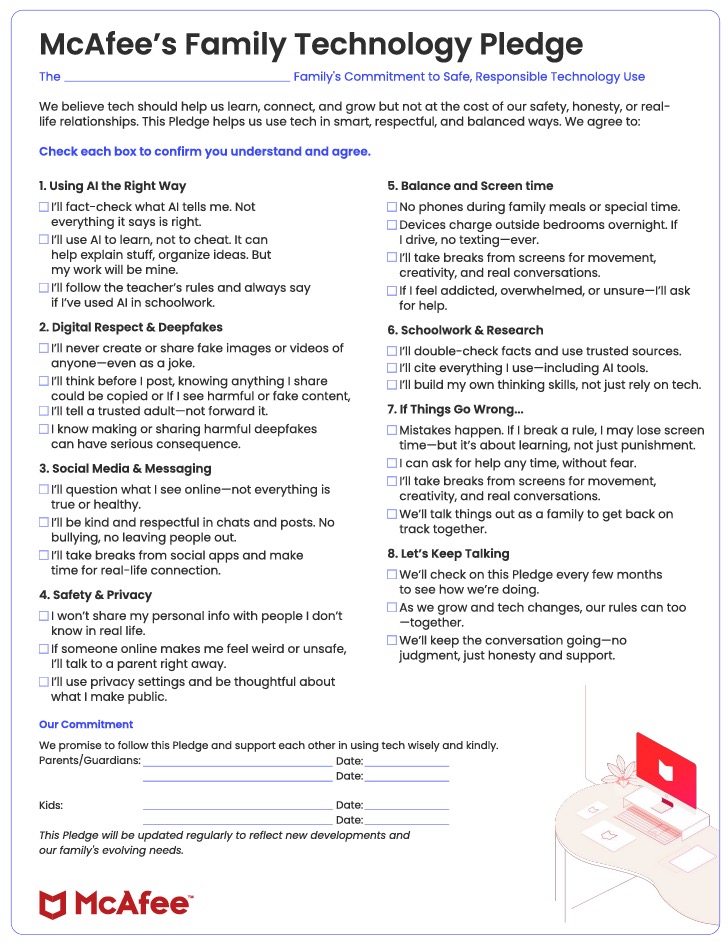
    How to Create a Family Technology Pledge

    As another school year begins, the digital landscape our children navigate has become increasingly complex. With artificial intelligence tools now readily available and social media platforms evolving rapidly, considering creating a family technology pledge has never been more crucial, or more challenging.

    Gone are the days when we simply worried about screen time limits. Today’s parents must address everything from AI-assisted homework to the growing threat of deepfake cyberbullying. The technology shaping our kids’ lives isn’t just about phones and social media anymore—it’s about preparing them for a world where artificial intelligence is reshaping how they learn, communicate, and express themselves.

    The New Digital Reality for Tweens and Teens

    Recent research from the Pew Research Center shows that 26% of students aged 13-17 are using ChatGPT to help with their assignments, double the number from 2023. Meanwhile, surveys reveal that between 40 and 50 percent of students are aware of deepfakes being circulated at school. These statistics underscore a reality many parents aren’t prepared for: our children are already immersed in an AI-powered world, whether we’ve given them permission or not.

    The key to successful digital parenting in 2025 isn’t necessarily about banning technology—it’s about having intentional, educational conversations that prepare our children to use these powerful tools responsibly. We need to acknowledge that technology is here to stay, so the best thing we can do is accept it’s here, educate our kids on how to use it safely, and introduce boundaries and rules to help keep them protected.

    Creating Your Family Technology Pledge: A Collaborative Approach

    For any pledge to be effective, lasting, and conflict-free, we need to shift the focus from simply setting rules to creating an open, constructive dialogue that helps all family members use technology in healthy ways. The most successful technology pledges are created collaboratively, not decided without collaboration. This ensures everyone feels included and that the guidelines reflect your family’s unique needs and values.

    The most important consideration in tailoring a pledge to your kids’ ages and maturity levels, and to your family’s schedule. There’s no point making pledges that don’t reflect your children’s actual technology use or your family’s realistic expectations. Remember, this is about starting conversations and creating a framework for ongoing dialogue, not a rigid set of rules that’s destined to fail.

    Responsible AI Use for Academic Success

    One of the biggest changes in recent years is the need to address AI tools like ChatGPT, Claude, and other learning platforms. Rather than trying to catch assignments written by AI, many schools are now launching programs that include AI Learning Modes, recognizing that these tools can be valuable when used appropriately.

    The benefits of AI assistance in education are significant and shouldn’t be ignored. AI can serve as a personalized tutor, explaining complex concepts in multiple ways until a student understands. It can help students with learning differences access the curriculum more effectively, and students working in a second language can use these tools to level the playing field. When used properly, AI can enhance critical thinking by helping students explore different perspectives on topics and organizing their thoughts more clearly.

    However, the risks of over-reliance on AI are equally real and concerning. New research has shown that overreliance on AI might erode our ability to think critically, and critical thinking skills are essential for success in the real world. Students may become dependent on AI for basic problem-solving, missing opportunities to develop their own analytical skills and unique voice. Academic integrity concerns arise when AI does the work instead of supporting learning, potentially undermining the entire educational process.

    Your family technology pledge should address these nuances.. Children should understand that they will use AI tools to enhance their learning, not replace it. This means always disclosing when they’ve used AI assistance on assignments, using AI to explain concepts they don’t understand while still working through problems themselves, and never submitting AI-generated work as their own original thinking. They should learn to ask AI to help with organizing thoughts, not creating them, and use AI to check their work for errors while ensuring the ideas and solutions remain their own.

    Digital Identity and Deepfake Prevention

    The rise of AI-generated content has created unprecedented risks for students, particularly regarding deepfake technology. Research shows that girls are most often targeted by deepfake images, and for victims, the emotional and psychological impact can be severe and long-lasting. What’s particularly alarming is that one photo posted online is all that’s needed to create a deepfake, making this a potential risk for every student.

    Parents should help their children become mindful of what photos they share on social media, understanding that any image could potentially be misused. Children must understand that they should never participate in group chats or conversations where deepfakes are being shared, even passively. They need to recognize that creating deepfakes of others, even as a “joke,” can cause serious psychological harm and that possession of manipulated sexual imagery involving minors is illegal.

    Helpful Tips for Parents

    Creating a family technology pledge isn’t about limiting your child’s potential—it’s about empowering them to navigate an increasingly complex digital world safely and ethically. The emergence of AI tools and deepfakes is forcing families to have important conversations about ethics, empathy, and responsibility that previous generations never had to consider.

    The goal isn’t to create a perfect document that anticipates every possible scenario. Instead, it’s to establish a foundation for ongoing dialogue about how technology can enhance rather than detract from your family’s values and your child’s growth into a thoughtful, responsible digital citizen. To help parents and guardians start discussions, we’ve created a first draft Technology Pledge that you can use to start a discussion with your family. Click here to download McAfee’s Technology Pledge

    The digital landscape will continue to evolve, but the fundamental principles of kindness, honesty, and critical thinking remain constant. By creating a thoughtful technology pledge and maintaining open dialogue about digital challenges, you’re giving your child the tools they need to thrive in whatever technological environment they encounter. Start the conversation today. Your child’s digital future depends on it.

    The post How to Create a Family Technology Pledge appeared first on McAfee Blog.

    •  

    Secure Your World This Cybersecurity Awareness Month

    October marks Cybersecurity Awareness Month, and this year’s message couldn’t be clearer: small actions can make a big difference in your online safety. As cyber threats continue to evolve and become more sophisticated, the importance of taking proactive steps to protect yourself, your family, and your personal information has never been greater.

    The 2025 theme, “Secure Our World,” focuses on simple yet powerful steps that anyone can implement to boost their digital security. At the heart of this year’s campaign are the “Core 4” essential practices that form the foundation of good cybersecurity habits. These four pillars represent the most impactful actions you can take to strengthen your digital defenses without requiring technical expertise or significant time investment.

    The Foundation: Understanding the Core 4

    The Core 4 principles serve as your digital security roadmap. Using strong passwords paired with a reliable password manager eliminates one of the most common vulnerabilities that cybercriminals exploit. When every account has a unique, complex password, a breach of one service doesn’t compromise your entire digital life.

    Enabling multifactor authentication adds a crucial second layer of protection that makes unauthorized access exponentially more difficult. Even if someone obtains your password, they would still need access to your phone or authentication app to breach your accounts. This simple step blocks the vast majority of automated attacks and significantly raises the bar for would-be intruders.

    Keeping your software updated ensures that known security vulnerabilities are patched as soon as fixes become available. Cybercriminals often target outdated software because they know exactly which weaknesses to exploit. By maintaining current versions of your operating system, apps, and security software, you close these doors before attackers can walk through them.

    The fourth pillar, recognizing and reporting scams, has become increasingly critical as fraudulent schemes grow more sophisticated and prevalent. Today’s scammers leverage artificial intelligence to create convincing fake emails, text messages, and even video content that can fool even cautious consumers.

    The Growing Scam Epidemic

    The statistics paint a sobering picture of today’s threat landscape. According to McAfee’s comprehensive Scamiverse Report, 59% of people globally say they or someone they know has been a victim of an online scam, with Americans facing an average of 14+ scams per day. Between February and March 2025 alone, scam text volumes nearly quadrupled, with almost half using cloaked links to disguise malicious intent.

    The burden on consumers is staggering. Americans spend an average of 93.6 hours per year – nearly two and a half work weeks, just reviewing messages to identify fakes. This represents 1.6 hours per week spent verifying whether communications are legitimate, a significant drain on time that could be spent on productive activities. The emotional toll is equally concerning, with 35% of people globally experiencing moderate to significant distress from scams, and two-thirds of people reporting they are more worried about scams than ever before.

    What makes modern scams particularly dangerous is their increasing sophistication and alarming success rates. When scams do succeed, 87% of victims lose money, with financial losses often being substantial. According to the Scamiverse Report, 33% of scam victims lost over $500, while 21% lost more than $1,000, and 8% lost over $5,000. Most troubling is the speed at which these crimes unfold – 64% of successful scams result in money or information theft in less than one hour.

    Young adults face particularly high risks, with 77% of people aged 18-24 having been scam victims – significantly higher than the global average. This demographic encounters an average of 3.5 deepfake videos daily, compared to 1.2 daily for Americans over 65. The pattern suggests that digital nativity doesn’t necessarily translate to better scam detection abilities.

    The Evolution of Digital Deception

    Today’s cybercriminals have embraced artificial intelligence as a force multiplier for their fraudulent activities. The accessibility of deepfake creation tools has democratized sophisticated fraud techniques that were once available only to well-funded criminal organizations. For just $5 and in 10 minutes, scammers can create realistic deepfake videos using any of the 17 different AI tools tested by McAfee Labs.

    The scale of this threat has exploded exponentially. North America has seen a staggering 1,740% increase in deepfakes over the past year, with over 500,000 deepfakes shared on social media in 2023 alone. Americans now encounter an average of 3 deepfake videos per day, yet confidence in detection abilities remains concerning – while 56% of Americans believe they can spot deepfake scams, 44% admit they lack confidence in their ability to identify manipulated content.

    The platform distribution reveals where consumers are most at risk. Among Americans, 68% report encountering deepfakes on Facebook, followed by 30% on Instagram, 28% on TikTok, and 17% on X (formerly Twitter). Older adults appear particularly vulnerable on Facebook, with 81% of those 65+ encountering deepfakes on the platform.

    Understanding these evolving threats requires more than awareness—it demands tools that can keep pace with rapidly changing criminal tactics. Traditional approaches that rely solely on user education and manual verification are no longer sufficient when facing AI-generated content that can fool even security-conscious individuals. The challenge becomes even greater when considering that repeat victimization is common, with 26% of scam victims falling victim to another scam within 12 months.

    People are developing some detection strategies, but these manual methods have limitations. According to the Scamiverse Report, 40% of people look for over-the-top claims like unrealistic discounts, while 35% watch for distorted imagery or suspicious website links. Other detection methods include identifying images that seem too perfect (33%), generic audio (28%), and audio-lip sync mismatches (28%). However, only 17% use more advanced techniques like reverse image searches to verify content authenticity.

    Technology Fighting Back: The Rise of AI-Powered Protection

    The same artificial intelligence that enables sophisticated scams can also serve as our defense against them. Advanced security solutions now use machine learning algorithms to analyze patterns, context, and content in real-time, identifying threats that would be impossible for humans to detect quickly enough. This technological arms race requires consumers to leverage AI-powered protection to match the sophistication of modern threats.

    McAfee’s Scam Detector represents a significant advancement in consumer protection, using AI-powered detection to identify and alert consumers of scam texts, emails, and AI-generated audio in deepfake videos across multiple platforms and devices. This technology addresses the reality that manual detection methods, while useful, aren’t sufficient against the volume and sophistication of current threats. When people are spending nearly 94 hours per year just trying to identify fake messages, automated protection becomes essential for reclaiming both time and peace of mind. With scam detector, you can automatically know what’s real and what’s fake.

    Comprehensive Scam Protection in Action

    McAfee’s Scam Detector works across three critical communication channels: text messages, emails, and video content. For text message protection, the system monitors incoming SMS communications and alerts users to potentially dangerous content before they open suspicious messages. This proactive approach prevents the curiosity factor that often leads people to engage with scam content—total protection with no guesswork.

    Email protection extends to major providers, including Gmail, Microsoft, Yahoo Mail, and more, with lightning-fast background scanning that identifies suspicious messages and provides clear explanations of the risks involved. This educational component helps users understand the specific tactics scammers employ, from urgency language to impersonation strategies.

    The scam detection capability represents a unique advancement in consumer protection, using AI to detect deepfake audio and other manipulative media designed to impersonate trusted individuals or spread disinformation. This feature addresses the growing threat of fake celebrity endorsements, manipulated political content, and fraudulent investment pitches that leverage realistic-sounding audio content and is trained to identify AI-generated audio.

    In February 2025, McAfee Labs found that 59% of deepfake detections came from YouTube, more than all other domains combined, reinforcing the platform’s role as a primary source of deepfake content. This data underscores the importance of having protection that works across the platforms where people naturally consume video content.

    Building Comprehensive Digital Protection

    Effective cybersecurity extends beyond scam detection to encompass all aspects of digital life. Password management remains fundamental, as weak or reused passwords continue to be primary attack vectors. A quality password manager not only generates strong, unique passwords for every account but also alerts users when their credentials appear in data breaches.

    Virtual private networks (VPNs) such as Secure VPN provide essential protection when using public Wi-Fi networks, encrypting internet traffic to prevent eavesdropping and man-in-the-middle attacks. This protection is particularly important for remote workers and travelers who frequently connect to untrusted networks.

    Identity monitoring services watch for signs that personal information has been compromised or is being misused. McAfee’s Identity Monitoring services scan for data breach databases, monitor credit reports, and alert users to suspicious activity across various financial and personal accounts. Select plans of McAfee+, can provide up to $2M of identity theft coverage. Early detection of identity theft can significantly reduce the time and effort required for recovery. Our identity monitoring service can notify you up to 10 months sooner than similar services.

    Device protection through comprehensive antivirus and anti-malware solutions remains crucial as cyber threats continue to target endpoints. Modern security suites use behavioral analysis and machine learning to identify previously unknown threats while maintaining system performance.

    The Human Element in Online Protection

    While technology provides powerful tools for protection, human judgment remains irreplaceable in maintaining security. Understanding common social engineering tactics helps consumers recognize when they’re being manipulated, even when automated systems might not detect a threat immediately.

    Scammers frequently exploit emotions like fear, urgency, and greed to bypass rational decision-making. Messages claiming immediate action is required to avoid account closure, unexpected windfalls that require upfront payments, or urgent requests from family members in distress all follow predictable patterns that become easier to recognize with awareness and practice.

    Verification through independent channels remains one of the most effective defense strategies. When receiving unexpected requests for money or personal information, contacting the supposed sender through a known, trusted method can quickly expose fraudulent communications.

    Creating a Culture of Security Awareness

    Cybersecurity is most effective when it becomes a shared responsibility within families and communities. Parents can model good digital hygiene practices for their children while teaching age-appropriate lessons about online safety. Regular family discussions about recent scam trends and security practices help create an environment where everyone feels comfortable reporting suspicious activity.

    Workplace security awareness programs extend protection beyond individual households to encompass professional environments where data breaches can have far-reaching consequences. Employees who understand their role in organizational security are more likely to follow proper protocols and report potential threats promptly.

    Community education initiatives, often supported by local law enforcement and cybersecurity organizations, provide valuable resources for groups that might be particularly vulnerable to certain types of fraud, such as seniors targeted by tech support scams or small business owners facing ransomware threats.

    Looking Forward: The Future of Consumer Protection

    The cybersecurity landscape will continue evolving as both threats and defenses become more sophisticated. Artificial intelligence will play an increasingly central role on both sides of this digital arms race, making advanced protection tools essential for ordinary consumers who lack specialized technical knowledge.

    Integration between different security tools will likely improve, creating more seamless protection that works across all devices and platforms without requiring separate management interfaces. This consolidation will make comprehensive security more accessible to consumers who currently find managing multiple security solutions overwhelming.

    Regulatory initiatives may also shape the future of consumer protection, potentially requiring stronger default security measures on devices and platforms while establishing clearer responsibilities for organizations that handle personal data.

    Taking Action This Cybersecurity Awareness Month

    Cybersecurity Awareness Month provides an excellent opportunity to evaluate and improve your digital protection strategy. Start by implementing the Core 4 practices: use strong passwords with a password manager, enable multifactor authentication on all important accounts, keep your software updated, and learn to recognize and report scams.

    Consider comprehensive protection solutions that address multiple threat vectors simultaneously rather than relying on piecemeal approaches. Look for services that combine device protection, identity monitoring, scam detection, and privacy tools in integrated packages that work together seamlessly.

    Remember that cybersecurity is an ongoing process rather than a one-time setup. Threats evolve constantly, requiring regular updates to both your tools and your knowledge. Stay informed about emerging threats through reliable sources and adjust your protection strategies accordingly. McAfee delivers smarter protection against evolving threats.

    The digital world offers tremendous benefits for communication, commerce, education, and entertainment. By taking proactive steps to protect yourself and your family, you can enjoy these advantages while minimizing the risks that come with our increasingly connected lives. Small actions today can prevent significant problems tomorrow, making cybersecurity one of the most valuable investments you can make in your digital future.

    The post Secure Your World This Cybersecurity Awareness Month appeared first on McAfee Blog.

    •  

    “If You’re Real, Prove Me Wrong”: Beth’s Romance Scam Story

    Beth Hyland never imagined love would cost her $26,000. At 53, she considered herself cautious and financially aware. But when she matched with someone calling himself “Richard Dobb”, the whirlwind connection, late-night conversations, and promises of a future together felt genuine. What she didn’t realize was that she was being drawn into one of the most devastating and personal scams out there—romance fraud.

    The Beginning of the Scam

    Beth and Richard’s connection quickly escalated. They weren’t “officially” engaged, but in her mind, they were planning a future together. Richard told her he had just completed a project in Qatar and needed to pay a translator to finalize things. The catch? He claimed he couldn’t access his funds unless he went in person to a bank branch in England.

    That’s when the requests for money began.

    How the Fraud Unfolded

    Richard framed it as a temporary problem. If Beth could just help him raise the money, they’d be set. Wanting to support her partner, she took out a $15,000 loan and added another $5,000 in cash advances from her credit card.

    When she asked how to send the money, he directed her to a cryptocurrency site.

    Beth’s financial advisor became concerned. “I think you’re in a romance scam,” he told her. But Beth didn’t want to believe it.

    “No,” she thought, “we’re in love. He wouldn’t do this to me.”

    Her last message to Richard was desperate: “If you’re real, prove me wrong. Bring me my money, and maybe we’ll talk.”

    She never heard from him again.

    Why Beth Shared Her Story

    Romance scams are uniquely painful because they prey on trust, hope, and human connection. Beth said, “People would be surprised at how much this happens, how much it goes on.”

    Like many victims, she wishes there had been a tool to fact-check the links, the stories, and the too-good-to-be-true excuses. That’s where technology like McAfee’s Scam Detector could have made all the difference, flagging suspicious links and warning her before thousands of dollars vanished.

    Protect Yourself from Romance Scams

    • Be cautious with requests for money. Love should never come with a price tag.
    • Watch for excuses. Scammers often create urgent, dramatic reasons why they can’t access funds.
    • Fact-check with technology. Tools like McAfee’s Scam Detector analyze suspicious links and help you avoid falling for fake websites or fraudulent requests.
    • Trust your gut and outside voices. If friends, family, or advisors raise concerns, listen.

    Beth’s Final Word

    Romance scams thrive on silence. Victims often feel embarrassed, but Beth wants her story out there.

    “It would have been really good if there was technology where I could have checked these links to fact-check all of that,” she reflected.

    Her experience is a reminder that scammers aren’t just after money—they target trust. By sharing her story, Beth hopes others will pause before sending money to someone they’ve never met in person. And with tools like McAfee’s Scam Detector, more people can spot the lies before love turns into loss.


    The post “If You’re Real, Prove Me Wrong”: Beth’s Romance Scam Story appeared first on McAfee Blog.

    •  

    A Fake Delivery Text Nearly Cost Deshawn Hundreds: His Scam Story

    Deshawn never thought he’d be the kind of person to fall for a scam. At 30, he was tech-savvy, careful, and always aware of the world around him. But one busy afternoon, a single text message changed everything. What looked like a routine delivery notification turned into a $420 lesson that convenience can be a scammer’s greatest weapon.“I thought this stuff only happened to older people.” That’s what Deshawn, 30, told us after a fake delivery text nearly drained his bank account. It all started on what he thought was just a busy day.

    How the Scam Hooked Him

    Deshawn was juggling errands when a text came through: a delivery company said his package was being held at a facility. To recover it, all he had to do was click the link.

    Since he really was expecting packages, it felt routine. He tapped the link, entered his information, and moved on.

    The next day, his bank flagged a transaction: $420 spent—in Jamaica. Deshawn had never been there. That’s when it clicked. The delivery text was a scam, and the fraudsters had his financial info.

    The Aftermath

    “When I saw purchases hitting my card, I felt like an idiot,” Deshawn admitted. “I thought things like this only happened to older people.”

    But scams don’t discriminate. Deshawn realized the very convenience he relied on—quick taps, fast responses—was exactly what scammers exploit.

    “Even if you’re detail-oriented, even if you check all the boxes, it can happen to you,” he said.

    Why His Story Matters

    Scammers count on assumptions. They count on younger people thinking they’re “too smart” or “too aware” to get tricked. But as Deshawn’s story shows, anyone can fall for a scam—especially when it looks like an everyday task, like recovering a package.

    “It’s crazy how a device in your pocket and one tap can take your money,” Deshawn reflected. He wishes more people his age would share their experiences, so others wouldn’t let their guard down.

    How to Stay Safe from Fake Delivery Scams

    • Don’t click links in unexpected texts. Go directly to the retailer’s or delivery service’s official site or app to track packages.
    • Double-check the sender. Scammers often spoof numbers or use odd-looking email addresses.
    • Watch for urgency. Messages that push you to act fast are classic scam red flags.
    • Use security tools. McAfee’s Scam Detector can help identify and block suspicious links before you click.

    Final Word from Deshawn

    “I used to laugh at the idea of being a scam target. Now I know it can happen to anyone. Sharing my story means maybe the next person will pause before they tap.”

    The post A Fake Delivery Text Nearly Cost Deshawn Hundreds: His Scam Story appeared first on McAfee Blog.

    •  

    How Do You Remove Your Information From the Internet?

    While you can’t delete your personal info from the internet entirely, you can take strong steps to remove it from risky places where others could exploit it for profit or harm.

    Why is it so important to take control of our personal info? Because so much of business, finance, healthcare, and life in general runs on data, your personal info has a dollar value attached to it.

    For instance, personal info fuels targeted advertising and marketing campaigns, just as it helps adjusters set insurance rates and healthcare providers make projections about our well-being. Businesses want it for employment background checks. Law enforcement uses it to investigate persons of interest. Banks and credit card companies base their approvals on it. Of course, hackers, scammers, and thieves want to steal it too—to drain your accounts and wage other attacks on you.

    The high value of your personal info makes a strong argument for controlling, as much as possible, what and where you share. In this article, we’ll show how easy it is to do by giving you tips on how to reduce your digital footprint on the internet and keep your identity private.

    Key Takeaways

    • Personal data is widely collected and exploited for advertising, identity verification, and criminal activity, making it essential to limit how much of it is publicly accessible.
    • While you can’t fully erase yourself from the internet, you can significantly reduce your digital footprint by removing data from social media, public records, and people‑search sites.
    • The first step is understanding your “digital shadow”, the active and passive trails you create through posts, tags, records, and online tracking.
    • Conduct a full audit of your online presence to identify accounts to delete, data‑broker opt‑outs to submit, and platforms where removal requests can reduce your exposure.
    • Reducing your footprint lowers your risk of identity theft, scams, and harassment while strengthening both personal privacy and reputation management.

    Why delete yourself from the internet?

    Taking steps to delete yourself from the internet is one of the most powerful moves you can make to protect your privacy and security.

    Every day, data brokers and people-search websites scrape public records and online activity to build a detailed profile of you that they can sell to anyone. This exposure increases your risk of identity theft, being targeted for scams, and even online harassment. For instance, a scammer could use your leaked address and phone number from a data broker site to target you with phishing attacks. Similarly, an old, embarrassing social media post could surface during a background check, impacting your career.

    By removing your information from the internet, you reclaim control and empower yourself to manage your reputation, prevent your data from being misused, and significantly reduce unwanted digital noise.

    Understand your digital shadow

    Taking control of your personal info starts with a look at your digital shadow, also known as a digital or electronic footprint, which is the trail of data that you leave behind while engaging in online activities. This information includes your posts in forums and social media profiles, other people’s posts that mention you, your pictures in an online newsletter, your name listed in the standings of your co-ed soccer league, your bio on the company’s “About Us” page, and even online reviews you write. Your digital shadow grows larger as you say more things, and as others mention you online.

    With the addition of public records, your shadow grows yet more. That might include your home mortgage payments, who lives there with you, your age, children, driving record, education, occupation, and estimated income. It all depends on where you live and what data regulations are in place there.

    Some regions have stricter privacy rules than others when it comes to public records. For example, in the U.S., California, Virginia, Connecticut, Colorado, Utah, Iowa, Indiana, Tennessee, Oregon, Montana, Texas, and Delaware have strong data privacy laws. The European Union has the General Data Protection Regulation (GDPR).

    Then there’s the hundreds of data points about you gathered and sold by online data brokers from private sources like supermarket club cards that track your shopping history, app developers and websites that sell info to anyone who’ll pay, including hackers, scammers, and spammers.

    Finally, a sizable portion of your shadow comes from the deep web, which forms the 95% of the internet that’s not searchable. Any time you go through a paywall or use a password to access internet content, such as logging into your bank account, accessing medical records through your healthcare provider, using corporate web pages as part of your workday, or streaming a show—you’re entering the deep web. All the info that forms the basis of your credit score, health history, financial info, and the data that websites and advertisers capture about you online.

    A subset of the deep web is the dark web. It’s not searchable as well, and requires a special browser to access. Some of the sites and data stores found there are entirely legitimate, questionable, or outright illegal. You’ll find dark marketplaces here where bad actors put up personal info for sale, even yours.

    Everyone online indeed has a digital shadow, and some shadows are longer than others.

    The importance of taking control

    So, what’s the big deal? That’s how the internet works, right? That’s a fair question. Part of the answer comes down to how much you value your privacy. More importantly, keeping a lower online profile offers better protection from cybercrime.

    Consider research published by the science journal National Library of Medicine in 2019, where the abstract states that:

    “Using our model, we find that 99.98% of Americans would be correctly re-identified in any dataset using 15 demographic attributes. Our results suggest that even heavily sampled anonymized datasets are unlikely to satisfy the modern standards for anonymization set forth by GDPR [Europe’s General Data Protection Regulation] and seriously challenge the technical and legal adequacy of the de-identification release-and-forget model.”

    This means that even though that data has been scrubbed to make the people in it anonymous, a hacker needs only 15 pieces of info to identify you for certain. From there, they could pinpoint any health conditions linked to you. That further strengthens the argument for taking control of your personal info.

    Step-by-step guide: How to delete yourself from the internet

    Now that you understand the importance of deleting your personal information from the internet, here is a detailed guide on how to go about this process:

    1. Conduct a digital footprint audit: Start by searching your name, email addresses, and phone numbers in various search engines. This initial audit helps you understand your public exposure and creates a baseline for your cleanup efforts.
    2. Delete or secure social media: Permanently delete accounts you no longer use. For those you keep, tighten privacy settings to limit what the public and search engines can see. McAfee Social Privacy Manager simplifies this by adjusting over 100 settings across platforms with just a few clicks.
    3. Be choosy about app permissions on your phones. Fewer apps mean fewer avenues of potential data collection. If you have old, unused apps, consider deleting them, along with the accounts and data linked with them.
    4. Purge old online accounts: Forgotten accounts on shopping sites, forums, and old web services are prime targets for data breaches. Tools like McAfee Online Account Cleanup can scan the web for your old accounts, show their risk level, and delete these liabilities.
    5. Target data broker and people-search sites: This is the most critical step for privacy. Manually sending opt-out requests is tedious and often temporary. Services like McAfee Personal Data Cleanup automate this process by finding your data, and sending removal requests on your behalf, with ongoing scans to ensure your personal information stays off these sites.
    6. Submit legal removal requests: With new privacy laws emerging, leverage your rights. Use official processes like Google’s “Results about you” tool and submit formal takedown notices under regulations like GDPR or California Consumer Privacy Act (CCPA) where applicable.
    7. Adopt proactive privacy tools: Prevent future data collection by making a bank-grade VPN encryption your default. A VPN encrypts your traffic and masks your IP address, making you harder to track.
    8. Establish continuous monitoring: Erasing yourself from the internet is an ongoing process. Regularly repeat these steps and use automated tools to monitor for new exposures to ensure your digital footprint stays minimal over the long term.

    To give you a deeper understanding, here is a more detailed explanation of the impact of following the steps above:

    Deleting or deactivating your social media accounts

    Facebook

    • Deactivation: Your profile becomes invisible, but Facebook retains your data. You can reactivate anytime. Find this in Settings > Your Facebook Information > Deactivation and Deletion.
    • Deletion: This is permanent. After a grace period (usually 30 days), your data is removed and unrecoverable. You can download a copy of your information before deletion via Settings > Your Facebook Information > Download Your Information.
    • Privacy Impact: Deletion significantly reduces your discoverable footprint; deactivation is a temporary measure.

    X (formerly Twitter):

    • Deactivation: Your account is hidden for 30 days. If you don’t log in during this period, it’s permanently deleted. Go to Settings and privacy > Your account > Deactivate your account.
    • Data download: You can request your archive via Settings and privacy > Your account > Download an archive of your data.
    • Privacy Impact: Permanent deletion removes your tweets and profile information from X’s active servers.

    Instagram (owned by Meta/Facebook):

    • Deactivation: Hides your profile, photos, comments, and likes until you reactivate. This action is accessible through Edit Profile > Temporarily disable my account, usually done via a web browser.
    • Deletion: Permanently removes your profile and all content. Use the dedicated “Delete Your Account” page in Instagram’s Help Center or within the app: Settings > Account > Delete account. There’s a 30-day period before permanent removal.
    • Data download: Request your data via Settings > Your activity > Download your information.
    • Privacy impact: Deletion is a strong step towards removing your visual and personal data from this platform.

    TikTok:

    • Deactivation/Deletion: TikTok combines these. You request deletion, and there’s a 30-day deactivation period during which you can reactivate. After 30 days, deletion is permanent. Go to Profile > three-line icon (Menu) > Settings and privacy > Account > Deactivate or delete account.
    • Data Download: Available under Settings and privacy > Account > Download your data.
    • Privacy Impact: Removes your videos and profile from the platform. Given TikTok’s data collection practices, deletion is advisable if you’re concerned about privacy.

    LinkedIn:

    • Hibernation: Temporarily deactivates your profile. Go to Settings & Privacy > Account preferences > Account management > Hibernate account.
    • Close account: Permanently deletes your profile and data. Go to Settings & Privacy > Account preferences > Account management > Close account. There’s a short grace period of usually a few days.
    • Data download: Request an archive under Settings & Privacy > Data privacy > Get a copy of your data.
    • Privacy impact: Closing your account removes your professional profile from public view and LinkedIn’s network.

    Snapchat:

    • Deletion: Snapchat primarily offers deletion. Your account is first deactivated for 30 days, then permanently deleted. Access via the Snapchat accounts portal and select “Delete My Account,” or within the app: Settings > Account Actions > Delete Account.
    • Data Download: Available through the accounts portal or in-app under “My Data.”
    • Privacy Impact: Removes your snaps, stories, and account data from the platform.

    After attempting to delete yourself from internet social media platforms, tools like McAfee Social Privacy Manager can be invaluable. It helps audit your social media accounts, identifying residual information or settings that might still compromise your privacy, ensuring your cleanup is as thorough as possible. It can personalize your privacy settings across multiple platforms with just a few clicks.

    Opt out of people search and data broker websites

    People search sites and data broker websites are entities that collect, compile, and sell your personal information to businesses and individuals. This information can include addresses, phone numbers, relatives, employment history, and even more sensitive data. Removing yourself from the internet heavily involves addressing these sites. Some of the most prominent sites include Spokeo, BeenVerified, Whitepages, ZoomInfo, Intelius, MyLife, and Radaris. To manually opt out of these sites, you can follow this tedious process:

    • Visit each data broker’s website.
    • Search for their opt-out page or privacy policy, which usually contains removal instructions. This can sometimes be hidden in footers or FAQs.
    • You’ll often need to find your specific listing on their site first.
    • Follow their specific procedure, which might involve filling out an online form, sending an email, or even mailing a physical letter. Some may require you to provide identification to verify you are the person whose data you’re requesting to remove.
    • Keep records of your requests and their confirmations.

    Manually opting out is time-consuming, often confusing, and your information can reappear later as brokers continually update their databases. This is a significant challenge when trying to delete yourself from the internet. Automated services, like McAfee Personal Data Cleanup, streamline this by scanning for your information on numerous data broker sites and automate the opt-out requests on your behalf. More importantly, it provides ongoing monitoring and removal, as data brokers frequently re-acquire and re-post information, making one-time manual removals often insufficient. This continuous service is vital for maintaining a reduced digital footprint.

    Requesting removal from Google search results

    When removing your information from the internet, tackling Google search results is a significant step. Google offers a tool to request the removal of certain personally identifiable information (PII) or doxxing content from its search results. To begin:

    • Visit Google’s “Results about you” tool in your Google account or search for “Google remove personal information.” Prerequisites usually involve submitting URLs of the pages displaying your information and screenshots of the specific content.
    • Qualifying content for removal includes personal contact info like phone numbers, email or physical addresses when they appear as part of doxxing content, non-consensual explicit imagery, and certain financial or medical information.
    • When Google reviews each request, removal timelines can vary. It may take several days or weeks.
    • For image takedowns, the process is similar, but ensuring the image is also removed from the source website is crucial, as Google only removes it from search results.
    • If content is removed from a website but still shows in search results, it’s likely a cached version. You can use Google’s “Remove outdated content” tool to request an update to the cached result.
    • Using a VPN when submitting these sensitive removal requests can add a layer of privacy by masking your IP address, preventing your location and online activity from being directly linked to the removal process.

    Benefits of deleting your info from the internet

    Shortening your so-called digital shadow helps improve everyday life in several ways. It can:

    • Reduce the number of sketchy texts, emails, and calls you get. If a hacker, scammer, or spammer can’t track down your contact info, they can’t reach you on your computers and phones. Removing info from data broker sites, old accounts you no longer use, and even social media can make it harder for them to reach you.
    • Reduce the risk of identity crimes. Bad actors turn your info against you such as taking out loans in your name, filing bogus insurance claims, and even impersonating you for employment or criminal purposes. When you have less info online, they have less info to work with.
    • Keep snoops out of your business. Tracking and monitoring are simple facts of going online. Sites and businesses do it for performance and marketing purposes. Hackers and bad actors do it for outright theft. Taking steps to mask and outright hide your activities online benefits your privacy and your security.
    • Take control of your info’s movement. Increased privacy largely gives you—not someone else—the power to share your info. The fact is that many companies with loose data privacy and data security measures share your info with third parties. Increased privacy gives you far more control of where your info does and doesn’t go.

    Can you completely remove yourself from the internet?

    Realistically, it’s virtually impossible to erase every trace of your existence online. Certain data, like public records such as property ownership, court records, or voter registration cannot be removed as they are legally required to be public.

    Technical limitations that enable your data to persist include cached pages on search engines, which can take time to update even after original content is removed, digital archives like the Wayback Machine, and information stored on the immutable blockchain. Legal requirements may also compel organizations to retain data for specific periods.

    The goal isn’t total erasure, which is largely unattainable, but rather significant minimization of your digital footprint. Focus on removing sensitive personal information from as many sources as possible and controlling what new data is generated. This is where continuous monitoring becomes crucial.

    Some online security software providers assist in this ongoing effort by regularly scanning for and requesting the removal of your discoverable data from data broker sites, a more practical approach than trying to scrub yourself off the internet entirely.

    You have the right to be forgotten

    The “right to be forgotten,” formally known as the Right to Erasure, is a significant privacy principle under the General Data Protection Regulation (GDPR) in the European Union. It allows individuals to request that organizations delete their personal data under specific circumstances, such as when the data is no longer necessary for the purpose it was collected, consent is withdrawn, or the data was unlawfully processed.

    While GDPR is an EU law, its global influence inspired similar legislation such as the California Consumer Privacy Act (CCPA) and other U.S. state-level privacy laws in Virginia and Colorado. Eligibility typically requires the organization holding the data to have no overriding legitimate grounds for retaining the data. Geographical limitations are key: GDPR primarily protects individuals within the EU, while U.S. laws apply to residents of specific states.

    To submit a request, you need to contact the organization directly, clearly stating your request for erasure and the grounds for it. EU citizens can use Google’s GDPR removal request form to petition for the delisting of search results containing your name if they are inadequate, no longer relevant, or excessive.

    In California, CCPA request forms can often be found on businesses’ privacy pages. To submit a request to remove your personal information, you must:

    1. Identify the data controller.
    2. Clearly articulate your request for erasure, citing the relevant legal basis.
    3. Provide sufficient information for the organization to identify you and the specific data.
    4. Keep records of your request and any responses.

    You should also check the websites of other relevant data protection authorities such as the ICO in the UK for the GDPR or the California Attorney General for the CCPA.

    To complement these efforts, you could consider using McAfee tools like Personal Data Cleanup, which proactively finds and helps remove your data from sources that might not be directly covered or are cumbersome to address individually.

    Pro tips to prevent future data collection

    When apps, websites, and even devices constantly gather your personal information, protecting your privacy requires more than just basic settings. There are smart ways to take control of your data. We’ve put together some tips to help you minimize or avoid unwanted data collection, stay under the radar, and make more informed choices about who gets access to your digital life.

    • Use throw-away email addresses: Create disposable email accounts for one-time sign-ups or services you don’t trust. This keeps your primary inbox clean and reduces the amount of personal data associated with it.
    • Install browser privacy extensions: Employ extensions that block trackers, scripts, and ads. Tools like ad blockers and anti-tracking add-ons can significantly reduce the amount of data websites collect about your browsing habits.
    • Utilize encrypted messaging apps: Opt for messaging services that offer end-to-end encryption, such as Signal or WhatsApp to protect your communications from being intercepted.
    • Switch to privacy-focused search engines: Search engines like DuckDuckGo or Startpage do not track your search history or profile you, offering a more private way to find information online.
    • Maintain consistent VPN usage: A virtual private network encrypts your internet connection and masks your IP address, making it harder for websites, internet service providers, and snoopers to track your online activities and location.
    • Review app permissions regularly: Scrutinize the permissions requested by mobile apps. Grant only necessary permissions and revoke excessive permissions.
    • Secure IoT devices: Change default passwords on all Internet of Things devices like smart speakers, cameras, and thermostats. Keep their firmware updated and, if possible, connect them to a separate, isolated network to limit their access to your primary network.
    • Quick privacy checklist: Log out of accounts when not in use. Clear your browser cookies and cache regularly. Be cautious when using public Wi-Fi—use a VPN. Think before clicking on links or downloading attachments. Limit the personal information you share online. Do a monthly cleanup of unused online accounts. Use strong, unique passwords and enable two-factor authentication.
    • Use automated tools: McAfee Personal Data Cleanup automates the removal process from data brokers, making this essential task much more manageable.

    FAQs about removing your data from the internet

    How long does it take to remove my info?

    The timeline varies. Some removals are instant, while data broker opt-outs can take weeks. In addition, removing your information is an ongoing process, as data can reappear. Continuous monitoring is key to keeping your information off the internet.

    Will data brokers relist my information?

    Yes, frequently. Data brokers constantly scan for new information, so your data can reappear after removal. This is why automated, ongoing services like McAfee Personal Data Cleanup are essential for lasting privacy.

    Is it free to remove myself from the internet?

    Manual methods are free but extremely time-consuming and repetitive. Paid services offer a more effective, automated solution that saves you hundreds of hours and provides continuous protection.

    What information can I not remove?

    Certain public records, such as property ownership, court documents, and voter registration information, are legally required to be accessible and generally cannot be removed by an individual.

    Do I have a “right to be forgotten” in the US?

    There is no federal law, but individual states like California and a few others offer residents the right to delete their data. You must check your specific state’s laws and submit requests directly to companies.

    How do I find all my forgotten online accounts?

    Manually searching for every old account is nearly impossible. McAfee Online Account Cleanup helps by scanning the internet to find accounts linked to your email, assessing their risk, and helping you delete them.

    Final thoughts

    While the goal to completely erase yourself from the internet is not fully achievable, you can take significant control over your identity by minimizing your digital shadow or footprint.

    Once you have successfully reduced your digital footprint, your privacy is an ongoing commitment, not a one-time task. By staying vigilant and using the right tools, you can dramatically decrease your exposure to risks like identity theft and scams.

    Online security software providers like McAfee offer comprehensive privacy services, including Personal Data Cleanup and a secure VPN, to support your need to manage your online presence confidently and safeguard your digital life for the long term.

    The post How Do You Remove Your Information From the Internet? appeared first on McAfee Blog.

    •  

    Scammers Take Advantage of Back-to-School Shopping Scams.

    Scammers didn’t take a summer break. They kept busy, ramping up a fresh wave of back-to-school shopping scams. As busy families rush to get kitted out for a new school year, scammers are ready with a glut of phony shopping sites, bogus offers, and fake delivery notifications designed to steal your money and personal info. Let’s get a rundown of what scams are out there this year and how you can avoid them.

    What back-to-school shopping scams are out there?

    Scammers look to cash in on all the spending that tends to peak in July and August. According to the National Retail Federation, the average U.S. family spends nearly $860 per child to prep them for school—which includes supplies, clothing, and shoes for the new school year. So, like any time of year where a holiday or seasonal event drives a spike in online shopping, we see a rise in scam shopping sites.

    The scammers behind these sites promote them in several ways, such as through sponsored search links, email offers, and through social media ads (more on that in a moment). Typically, these sites fall into two categories:

    • Bogus shopping sites where shoppers pay for goods and never receive them. Not only are victims charged for the non-existent goods, but the scammers also have their payment info to use moving forward.
    • Sites that sell counterfeit or cheap knockoff goods. Shoppers get less than they pay for, and they potentially unwittingly support sweatshops and child labor in the process.

    While scammers use the lure of low-priced classroom staples like pens, notebooks, backpacks, and the like, they also crank out non-existent deals everything from clothing and shoes to big-ticket items like laptop computers. Also popular are phony shopping sprees and giveaways, which also lure shoppers into handing over their account and personal info. In all, with online shopping hitting another seasonal peak, it’s time for shoppers to give those ads and deals a particularly closer look. Scammers are out there in force.

    How are scammers using social media for back-to-school scams?

    Fake social media ads remain a mainstay of the scammer arsenal, and scammers most certainly put them to use during back-to-school time. Scammers love social media ads because they offer precise audience targeting. With a convincing-looking ad created using AI tools, they can reach vast numbers of interested buyers—people who are on the lookout for back-to-school deals. With these ads, they point potential victims to the sites mentioned above, all with the hope that unsuspecting shoppers will impulsively click on the deal. From there, the scam works much the same as above. Shoppers end up on a scam site that often looks convincing (thanks again to AI tools that help scammers spin them up quickly) where they enter their personal and account info, only to end up getting scammed.

    Three ways you can avoid back-to-school shopping scams.

    1. Look up retailers you’re not familiar with. When you’re shopping online and come across a retailer you haven’t seen before, do some quick research on the company. How long have they been around? Have any complaints been recorded by your attorney general or local consumer protection agency? Also a quick search of “[company name] scam” can help. You might come across posts and reports about a scam related to that company. One extra resource comes courtesy of the Better Business Bureau (BBB) at BBB.org. There you can look up a company, verify its info, and see a list of any complaints against it.
    2. When shopping, pay with a credit card instead of your debit card. In the U.S., the Fair Credit Billing Act offers the public protection against fraudulent charges on credit cards. Citizens can dispute charges of over $50 for goods and services that were never delivered or otherwise billed incorrectly. (Note that many credit card companies have their own policies that improve upon the Fair Credit Billing Act as well.) However, debit cards don’t get the same protection under the act. Avoid using a debit card while shopping online and use your credit card for extra assurance.
    3. Get a scam detector to spot bogus links and offers for you. Even with these tips and tools, spotting bogus links with the naked eye can get tricky. Some look “close enough” to a legitimate link that you might overlook it. Yet a combination of features in our McAfee+ plans can help do that work for you. Our Scam Detector helps you stay safer with advanced scam detection technology built to spot and stop scams across text messages, emails, and videos. Likewise, our Web Protection will alert you if a link might take you to a sketchy site. It’ll also block those sites if you accidentally tap or click on a bad link.

    Also watch out for phony delivery message scams during back-to-school season.

    Another popular scammer ploy involves shipping notifications. Scammers know that with lots of online shopping comes a lot of online shipping notifications. They send phony delivery messages by the thousands, all with the aim of catching a few victims who have real packages on the way.

    They pose as legitimate shippers and retailers, do their best to look and sound like them, and use urgency to get people to act. “Your package can’t be delivered. Please click this link within the next 24 hours to get your shipment.” And so on. In some cases, those links lead to phishing and malware sites. In others, the notification contains an attachment that installs malware if clicked.

    With these scams in the mix, here’s how you can stay safe:

    1. Don’t tap on links in text messages: If you follow one piece of advice, it’s this. Companies use their standard addresses and phone numbers to contact customers. Follow up on their websites to see what they are. The USPS, UPS, FedEx, and Amazon each have pages dedicated to sharing that info.
    2. Confirm directly: If you have concerns, get in touch with the company you think might have sent it. Manually type in their website and enquire there. Again, don’t click or tap any links.
    3. Use the shipping company’s or retailer’s app: the USPS, UPS, FedEx, and Amazon all have legitimate apps available in Apple’s App Store and Google Play. You can also count on those to track packages and verify info about your shipments.


    The post Scammers Take Advantage of Back-to-School Shopping Scams. appeared first on McAfee Blog.

    •  

    Data Breach Exposes 3 Billion Personal Information Records

    News of a major data breach that could affect nearly three billion records comes to light from a somewhat unusual source — a class-action complaint filed in Florida. Even as details come to light, we advise people to act as if this is indeed a large and significant breach and thus will need to take precautions. In this case, we will guide you on what to do if your sensitive personal information has been exposed in a data breach and how you can stay protected in the future.

    The National Public Data breach

    First, the details. The filed complaint concerns the National Public Data (NPD), a public records data provider that offers background checks and fraud prevention services. Per their website, “[NPD obtains] information from various public record databases, court records, state and national databases, and other repositories nationwide.” The complaint alleges that NPD was hit by a data breach in or around April 2024. The complaint filed in the U.S. District Court further alleges that:

    • The company had sensitive information breached, such as full names, current and past addresses spanning at least the last three decades, Social Security numbers (SSNs), info about parents, siblings, and other relatives including some who have been deceased for nearly 20 years, and other personal info.
    • The company “scraped” this information from non-public sources. This info was collected without the consent of the complainant and the billions of others who might qualify to join in the class action complaint.
    • The company “assumed legal and equitable duties to those individuals to protect and safeguard that information from unauthorized access and intrusion.”

    When combined, these data points create a comprehensive profile of an individual, significantly increasing the risk of sophisticated identity theft. With this information, criminals could open new lines of credit, file fraudulent tax returns, or access other sensitive accounts in your name. While details of the NPD breach are still emerging, the potential scope of this personal data breach means it’s wise to act now to protect your identity.

    Unreported data breach discovered by McAfee

    In the United States, there is no single federal law governing data breach notifications. Instead, a patchwork of laws across all 50 states, the District of Columbia, and U.S. territories requires companies to notify consumers if their personal information is compromised. These laws specify who must be notified, when, and how.

    Typically, companies self-report these breaches, thanks to regulations and legislation that require them to do so in a timely manner. Consumers then receive notifications via email or physical mail. However, as this alleged National Public Data breach shows, information about an incident can sometimes surface through other channels, such as court filings, security researcher reports, or identity theft protection alerts, occasionally even before a formal announcement from the affected company.

    That way, initial word of breaches may reach customers through emails, news reports, and sometimes through notifications to certain state attorney generals. In this case, it appears that no notices were sent to potential victims. Further, we were unable to find any filings with state attorneys general.

    The primary plaintiff discovered the breach when he “received a notification from his identity theft protection service provider notifying him that his [personal info] was compromised as a direct result of the ‘nationalpublicdata.com’ breach …”

    Further, in June, The Register reported that a hacker group by the name of USDoD claimed it hacked the records of nearly 3 billion people and put them up for sale on the dark web. The price tag—U.S. $3.5 million. The group further claimed that the records include information about U.S., Canadian, and British citizens.

    From an online protection standpoint, this alleged breach could contain highly sensitive information that, if true, would put three billion people at risk of identity theft. The mere possibility of breached Social Security numbers alone makes it something worth acting on.

    Data breaches and how they happen

    A data breach is a security incident where sensitive, protected, or confidential data is copied, transmitted, viewed, stolen, or used by an individual unauthorized to do so.

    The main goal for attackers is often financial gain; they can sell vast datasets of personal information on the dark web or use it directly for identity theft and fraud. Large, aggregated records like those allegedly exposed in the NPD breach are especially valuable because they provide a complete picture of an individual, making fraudulent activities easier to execute.

    Data breaches happen in several ways:

    • Phishing and social engineering: Criminals trick employees or individuals into revealing sensitive information, like passwords or account details, through deceptive emails, texts, or calls.
    • Stolen or weak credentials: Hackers use passwords and usernames exposed in previous breaches (a technique called credential stuffing) to gain access to other systems. Using simple or reused passwords makes this easy.
    • Software vulnerabilities: Cybercriminals exploit security flaws in outdated software, applications, or operating systems to gain unauthorized access to a company’s network.
    • Misconfigured databases and cloud services: Sometimes, sensitive data is left on servers that are not properly secured, making them publicly accessible to anyone who knows where to look.
    • Insider threats: A data breach can be caused intentionally or unintentionally by a current or former employee with access to sensitive information.

    Data breach impact on Social Security numbers

    The legal complaint against National Public Data explicitly alleges that Social Security numbers were part of the compromised information. An SSN is one of the most critical pieces of personal data because it is a unique, lifelong identifier used for employment, banking, credit, and government benefits.

    Unlike a credit card number, an SSN cannot be easily changed. If your SSN is exposed in a data breach, it puts you at a much higher risk for serious financial and legal fraud that can be difficult to resolve. Given the severity of this allegation, it is essential to take immediate preventative actions as if your SSN has been compromised.

    Check if your Social Security data is exposed

    It’s natural to want to know immediately if your information was part of a data breach. However, you should be extremely cautious. Never enter your Social Security number or other sensitive data into an unknown website that claims to have the capability to check for breach exposure.

    Many of these are scams designed to steal your information. The safest approach is to use a trusted identity monitoring service, which scans the dark web and breach databases for your information without requiring you to share sensitive details insecurely. Be wary of phishing emails that pretend to be official notifications about the breach. Instead of clicking links, go directly to the company’s official website for information.

    Follow these steps if your Social Security number is exposed

    1. Place a security freeze on your credit. Contact all three major credit bureaus (Equifax, Experian, and TransUnion) to freeze your credit. A freeze restricts access to your credit report, making it much harder for identity thieves to open new accounts in your name.
    2. Set up fraud alerts. A fraud alert requires potential creditors to verify your identity before issuing new credit. You can place an initial one-year alert for free by contacting just one of the credit bureaus, which will then notify the other two.
    3. Change your passwords: Secure your online accounts, starting with your email, financial, and government accounts. Use strong, unique passwords for each one and enable two-factor authentication (2FA) wherever possible.
    4. Monitor your financial accounts and credit reports. Keep a close eye on your bank accounts, credit card statements, and credit reports for any suspicious activity. You are entitled to free weekly credit reports from all three bureaus at AnnualCreditReport.com.
    5. File a report if you see fraud. If you find evidence of identity theft, file a report immediately with the Federal Trade Commission (FTC) at IdentityTheft.gov. This report is crucial for disputing fraudulent charges and accounts.
    6. Consider an IRS Identity Protection PIN (IP PIN). This is a six-digit number known only to you and the IRS, which provides an extra layer of protection against tax refund fraud.
    7. Check your Social Security benefits. Create a “my Social Security” account on the Social Security Administration’s website to check your statement for any unauthorized activity.
    8. Document everything: Keep detailed records of all calls, emails, and correspondence related to the theft. Note dates, times, and the names of people you speak with.

    Protect yourself against data breaches moving forward

    The NPD breach shows the risks and frustrations that we, as consumers, face in the wake of such attacks. It often takes months before we receive any kind of notification. And of course, that gap gives hackers plenty of time to do their damage. They might use stolen info to commit identity crimes, or they might sell it to others who’ll do the same.

    Either way, we’re often in the dark until we get hit with a case of identity theft ourselves. Indeed, word of an attack that affects you might take some time to reach you. With that, a mix of measures offer the strongest protection from data breaches. To fully cover yourself, we suggest the following:

    Check your credit, consider a security freeze, and get ID theft protection

    With your personal info potentially on the dark web, strongly consider taking preventive measures now. Checking your credit and getting identity theft protection can help keep you safer in the aftermath of a breach. Further, a security freeze can help prevent identity theft if you spot any unusual activity. You can get all three in place with our McAfee+ Advanced or Ultimate plans. Features include:

    • Credit monitoring keeps an eye on changes to your credit score, report, and accounts, providing timely notifications and guidance so you can take action to tackle identity theft.
    • Security freeze protects you proactively by stopping unauthorized access to existing credit card, bank, and utility accounts or from new ones being opened in your name. And it won’t affect your credit score.
    • ID Theft & Restoration Coverage gives you $2 million in identity theft coverage and identity restoration support if it is determined that you’re a victim of identity theft.​ This way, you can cover losses and repair your credit and identity with a licensed recovery expert.

    Monitor your identity and transactions

    Breaches and leaks can lead to exposure, particularly on dark web marketplaces where personal info gets bought and sold. Our Identity Monitoring can help notify you quickly if that happens. It keeps tabs on everything from email addresses to IDs and phone numbers for signs of breaches. If spotted, it offers advice that can help secure your accounts before they’re used for identity theft.​

    Also in our McAfee+ plans, you’ll find several types of transaction monitoring that can spot unusual activity. These features track transactions on credit cards and bank accounts, along with retirement accounts, investments, and loans for questionable transactions. Finally, further features can help prevent a bank account takeover and keep others from taking out short-term payday loans in your name.

    Keep an eye out for phishing attacks

    With some personal info in hand, bad actors might seek out more. They might follow up a breach with rounds of phishing attacks that direct you to bogus sites designed to steal your personal info — either by tricking you into providing it or by stealing it without your knowledge. So look out for phishing attacks, particularly after breaches.

    If you are contacted by a company, make certain the communication is legitimate. Bad actors might pose as authorized services to steal personal info. Don’t click or tap on links sent in unsolicited or unexpected emails, texts, or messages. Instead, go straight to the appropriate website or contact them by phone directly.

    For even more security, you can use our new Scam Detector. It puts a stop to scams even before you click by detecting any suspicious links and sending you an alert. If you accidentally tap a bad link, it blocks the sketchy sites they can take you to.

    Update your passwords and use two-factor authentication

    Changing your password is a strong preventative measure. Strong and unique passwords are best, which means never reusing your passwords across different sites and platforms. Using a password manager helps you keep on top of it all, while also storing your passwords securely.

    While a strong and unique password is a good first line of defense, enabling two-factor authentication across your accounts helps your cause by providing an added layer of security. It’s increasingly common to see nowadays, where banks and all manner of online services will only allow access to your accounts after you’ve provided a one-time passcode sent to your email or smartphone.

    Remove your personal info from data broker sites

    According to the filed complaint, National Public Data “scrapes” personal info from non-public sources. Further, the home page of the website mentions that it gathers info “from various public record databases, court records, state and national databases, and other repositories nationwide.” While we can’t confirm this ourselves, we can cautiously call out that these sources might include data broker sites.

    While any damage here has already been done, we recommend removing your personal info from these data broker sites. This can prevent further exposure in the event of future breaches elsewhere. Our Personal Data Cleanup can do this work for you. It scans data broker sites and shows you which ones sell your personal info.

    From there, it shows how you can remove your data. McAfee+ Advanced and Ultimate plans come with full-service Personal Data Cleanup, and automatically sends removal requests on your behalf..

    Additional steps to help prevent future data breaches

    • Minimize data sharing: When signing up for new services or apps, provide only the minimum information required. The less data you share, the less can be exposed in a breach.
    • Set up account alerts: Enable notifications for your financial and credit card accounts to get real-time alerts for transactions or login attempts.
    • Keep software updated: Regularly update your operating system and applications to patch security vulnerabilities.
    • Limit your digital footprint: Use a service like McAfee’s Personal Data Cleanup to find and request the removal of your personal info from data broker sites that collect and sell it.

    Final thoughts

    News of a massive personal data breach can be unsettling, but it’s important to respond with calm, proactive steps rather than panic. The best defense is a strong offense: actively monitor your financial accounts and credit reports, consider placing a security freeze on your credit as a powerful preventative measure, and strengthen your online account security with unique passwords and two-factor authentication. By using identity monitoring services and taking these incremental actions today, you can significantly reduce your risk and stay ahead of potential threats, empowering you to live your digital life more confidently.

    The post Data Breach Exposes 3 Billion Personal Information Records appeared first on McAfee Blog.

    •  

    You Have a Right to Delete Your Data—But Dozens of Data Brokers Hide How to Do It

    You can request data brokers to remove your personal info from their databases. But finding their request forms is another challenge entirely, especially when they’re hidden. Recent reporting from CalMatters and The Markup found that 35 data brokers injected code into their websites that hid their opt out pages from search, making it more difficult for people to delete their data.If you don’t like the idea of your sensitive personal info being collected, bought, and sold without your knowledge, this is important news for you.
    And these brokers collect plenty of it. They compile often exacting profiles of people, which can include things like purchasing habits, health data, financial info, real-time location data (gathered from smartphone apps), and even inferred info like political leanings, lifestyle choices, and religious beliefs.
    As you can see, this level of data collection can get entirely personal.

    Moreover, practically anyone can purchase this sensitive info. That ranges from advertisers to law enforcement and from employers to anyone on the street who wants to know a lot more about you.
    This report stands as a good reminder that data collection on this level is an everyday fact of life—and that you can still take some control of it.
    With a quick look at the report, we’ll then show you what’s going on with all this data collection and what you can do about it.

    Data brokers making it tougher to remove personal data from their sites

    As part of the article, reporters analyzed 499 data broker sites registered in the state of California. Of them, 35 had search-blocking code. Additionally per the article, many opt out pages “required scrolling multiple screens, dismissing pop-ups for cookie permissions, and newsletter sign-ups and then finding a link that was a fraction the size of other text on the page.” Once the publications contacted the data brokers in question, multiple companies halted the practice, some responding that they were unaware their site had search-blocking code. Several others didn’t respond by the time the article was published and kept their practices in place.

    Where do data brokers get such personal info?

    There are several ways information brokers can get information about you…

    Sources available to the public: Some of your personal records are easily available to the public. Data brokers can collect public records like your voter registration records, birth certificate, criminal record, and even bankruptcy records. By rounding them up from multiple sources and gathering them in one place, it takes someone seconds to find out all these things about you, rather than spending hours poring over public records.

    Search, browsing, and app usage: Through a combination of data collected from internet service providers (ISPs), websites, and apps, data brokers can get access to all kinds of activity. They can see what content you’re interested in, how much time you spend on certain sites, and even your daily travels thanks to location data. They also use web scraping tools (software that pulls info from the web), to gather yet more. All this data collecting makes up a multi-billion-dollar industry where personal data is gathered, analyzed, sold, and then sold again and again—all without a person’s knowledge.
    Online agreements: As it is with smartphone apps, you’ll usually have to sign an agreement when signing up for a new online service. Many of these agreements have disclosures in the fine print that give the company the right to collect and distribute your personal info.

    Purchase history: Data brokers want to know what products or services you’ve purchased, how you paid for them (credit card, debit card, or coupon), and when and where you purchased them. In some cases, they get this info from loyalty programs at places like supermarkets, drugstores, and other retailers. Kroger, one of the largest grocery chains, is a good example of how purchasing insights end up in the hands of others. According to Consumer Reports, the company draws 35% of its net income from selling customer data to other companies.
    “What can I do about companies collecting my data?”

    For starters, there aren’t any data privacy laws on the federal level. So far, that has fallen to individual states to enact. As such, data privacy laws vary from state-to-state, with California having some of the earliest and strongest protections on record, via the California Consumer Privacy Act (CCPA) and the California Privacy Rights Act (CPRA).

    In all, 20 states currently have comprehensive privacy laws in place, with five others that have put narrower privacy protections in place, covering data brokers, internet service providers, and medical/biometric data.
    States with Comprehensive Data Privacy Laws

    • California
    • Virginia
    • Colorado
    • Connecticut
    • Utah
    • Iowa
    • Indiana
    • Tennessee
    • Texas
    • Florida
    • Montana
    • Oregon
    • Delaware
    • New Hampshire
    • New Jersey
    • Kentucky
    • Nebraska
    • Rhode Island

    For specific laws in your state and how they can protect you, we suggest doing a search for “data privacy laws [your state]” for more info.
    Even if your state has no or narrow data privacy laws in place, you still have several ways you can take back your privacy.

    How to protect your data from data brokers

    The first thing you can do is keep a lower profile online. That can limit the amount of personal info they can get their hands on:

    Be selective about what you share online. Don’t overshare personal info on social media. Avoid things like online quizzes and sweepstakes. And be aware that some data brokers indeed scour the web with scraping tools that gather up info from things like forum posts.

    Go private. Even better, lock down your privacy on social media. Social media platforms like Facebook, Instagram, and others have several settings that keep your profile from being scraped in the ways mentioned above. Features like our Social Privacy Manager can make quick work of this by adjusting more than 100 privacy settings across your accounts in a few clicks.

    Use a virtual private network (VPN) whenever possible. A VPN hides your IP address and encrypts your data while you surf the web. McAfee’s Secure VPN protects your personal data and credit card information so you can browse, bank, and shop online without worrying about prying eyes, like data brokers and internet service providers (ISPs) that collect info about what you do online.

    Remove your info from data brokers quickly with McAfee

    The list of data brokers is long. Cleaning up your personal data online can quickly eat up your time, as it requires you to reach out to multiple data brokers and opt out. Rather than removing yourself one by one from the host of data broker sites out there, you have a solution: our Personal Data Cleanup.
    Personal Data Cleanup scans data broker sites and shows you which ones are selling your personal info. It also provides guidance on how you can remove your data from those sites. And if you want to save time on manually removing that info, you have options. Our McAfee+ Advanced and Ultimate plans come with full-service Personal Data Cleanup, which sends requests to remove your data automatically. If the thought of your personal info getting bought and sold in such a public way bothers you, our Personal Data Cleanup can put you back in charge of it.

    The post You Have a Right to Delete Your Data—But Dozens of Data Brokers Hide How to Do It appeared first on McAfee Blog.

    •  

    Going Lacoocoo over Labubu: How Viral Toy Trends Are Becoming Scams

    Scammers are exploiting the massive popularity of Labubu collectible toys through fake websites and social media ads, resulting in consumers losing hundreds of dollars to counterfeit “Lafufu” dolls or receiving nothing at all. Here’s how to protect yourself from becoming their next victim.

    The Viral Phenomenon That Caught Cybercriminals’ Attention

    If you haven’t heard of Labubu dolls yet, you’re about to understand why they’ve become both a cultural obsession and a cybersecurity nightmare. These small, mischievous-looking plush toys with distinctive sharp teeth have exploded in popularity thanks to celebrity endorsements from Rihanna, Dua Lipa, and BLACKPINK’s Lisa, plus viral TikTok unboxing videos.

    Created by Hong Kong artist Kasing Lung and sold exclusively by Pop Mart since 2019, these $20-$30 “blind box” collectibles have generated such intense demand that rare “secret” versions are reselling for thousands of dollars. Fans line up for hours at Pop Mart stores and even travel internationally to get their hands on authentic Labubus. Where there’s viral demand and limited supply, cybercriminals inevitably follow.

    The Anatomy of a Modern Scam Operation

    The Scale of the Problem

    The Better Business Bureau has received over 76 reports from consumers who thought they were purchasing authentic Labubu dolls but instead received counterfeit versions dubbed “Lafufus” – or worse, nothing at all. Some victims report losses of nearly $500 from a single fraudulent transaction.

    How the Scam Works

    The attack vector is disturbingly familiar yet devastatingly effective:

    1. Social Media Infiltration: Scammers flood TikTok and Instagram with sponsored ads featuring “limited edition” Labubu dolls at discounted prices
    2. Fake Website Creation: Professional-looking e-commerce sites mimic Pop Mart’s official branding and use urgent language like “limited stock” and countdown timers
    3. Payment Harvesting: Once victims enter payment information, scammers either ship low-quality counterfeits or disappear entirely
    4. Digital Vanishing Act: When complaints mount, the entire operation disappears overnight, only to resurface under a new domain name

    The Most Dangerous Platforms

    The BBB has specifically flagged these scam operations:

    • Kawaii Room
    • Cult Neo
    • Bubulands
    • Bears R Us
    • Labubu Fantasy

    Additionally, TikTok live streams claiming to be “Pop Mart USA” have been particularly problematic, using high-pressure sales tactics and fake countdown timers to rush buyers into immediate purchases.

    Red Flags To Recognize

    Website Warning Signs

    • Prices significantly below retail ($20-30 for authentic Labubus)
    • Domains that slightly misspell official brand names
    • Lack of verifiable contact information or customer service
    • No official Pop Mart branding or licensing information
    • Generic order confirmation emails without proper company details

    Sponsored Ads on TikTok or Instagram Promoting “Exclusive Deals”

    These fraudulent advertisements are designed to look legitimate and often feature professional product photography stolen from Pop Mart’s official channels. The ads frequently claim unrealistic discounts such as “50% off limited edition Labubu” or similar offers that seem too good to be true. Promotional copy emphasizes false urgency with phrases like “Last 24 hours!” or “Only 100 left!” to pressure consumers into making immediate purchases without proper consideration.

    Warning signs include links that redirect to domains other than popmart.com or Pop Mart’s official Amazon store, indicating fraudulent operations. These ads typically originate from accounts with generic names or recently created profiles that have little post history, suggesting they were established specifically for scamming purposes. The comments sections are either disabled entirely or filled with obviously fake positive reviews designed to create an illusion of satisfied customers.

    Scammers often use unofficial terminology or deliberate misspellings of “Labubu,” sometimes intentionally using variations like “Lafufu” to avoid detection by platform algorithms designed to identify and remove fraudulent content related to official brand names.

    Live Streams with Urgent Countdowns Creating Artificial Scarcity

    TikTok live streams have become a particularly dangerous vector for Labubu scams, operating as sophisticated psychological manipulation campaigns. These streams claim to be “Pop Mart USA” and run for up to 12 hours daily, using countdown timers that reset repeatedly to create false urgency. The hosts make claims of “restocks” or “newly available inventory” that never actually existed, giving viewers only seconds to purchase once items “drop” to prevent careful consideration.

    The manipulation extends to chat features filled with fake comments from bot accounts expressing excitement, while QR codes displayed on stream appear authentic but lead to fraudulent websites. Many hosts wear Pop Mart merchandise or display authentic products while selling counterfeits, using stream titles with official-sounding language like “Official Pop Mart Restock Event” to enhance their credibility.

    Multiple Similar Accounts Claiming to be Official Retailers

    Scammers create networks of interconnected fake accounts to build credibility and reach wider audiences. These profiles use variations of names like “Pop Mart USA” or “Official Labubu Store,” copying official Pop Mart language and contact information in their bio sections. They use profile pictures featuring Pop Mart’s logo or official product photography without permission, engaging in cross-promotion between fake accounts to create an illusion of legitimacy.

    These fraudulent accounts maintain artificially inflated follower counts through bot networks and post histories that are either very recent or filled with stolen content from official accounts. The posting patterns appear inconsistent, suggesting automated or outsourced management, while comments and engagement seem coordinated rather than organic.

    QR Codes and Fabricated “Proof of Authenticity”

    Visual “proof” elements appear legitimate but are actually fabricated to deceive consumers. QR codes redirect to fake verification websites rather than Pop Mart’s official system, while authenticity certificates or stamps use similar but not identical branding to official materials. Scammers use photos of authentic Labubu products to “prove” legitimacy while shipping counterfeits, providing serial numbers or batch codes that don’t match Pop Mart’s actual numbering systems.

    The deception includes holographic stickers or security features that look similar but lack proper verification methods, screenshots of “authentication apps” that are actually fake applications created by scammers, and references to verification through third-party services that don’t actually authenticate Pop Mart products. Authentic packaging may be displayed while the actual shipped products come in generic or counterfeit boxes.

    Payment Red Flags

    Several warning signs indicate fraudulent operations. Scammers often request payment through peer-to-peer apps like CashApp or Venmo, avoid implementing secure checkout processes or SSL certificates, and make it impossible to cancel orders immediately after placement. Customer service typically becomes unresponsive after payment is received, leaving consumers with no recourse.

    Spotting Authentic vs. Counterfeit Labubus

    Authentic Labubu Characteristics

    Genuine Labubu toys have exactly nine pointed teeth, which serves as the key identifier for authenticity. They feature a pale peach complexion with specific color consistency and display the official Pop Mart logo stamped on the bottom of one foot. Authentic products come in proper packaging with legitimate QR codes and holographic stickers, including authenticity stamps that can be verified through Pop Mart’s official system.

    Counterfeit “Lafufu” Warning Signs

    Counterfeit versions exhibit several telltale signs of fraudulent manufacturing. These fake toys have more or fewer than nine teeth, different facial colors or expressions, and missing or fake Pop Mart branding. The materials and construction quality are noticeably poor, and packaging lacks verifiable QR codes that connect to official authentication systems.

    Your Cybersecurity Action Plan

    Protecting yourself from these scams requires a multi-layered approach starting with shopping exclusively through official channels. Purchase only from Pop Mart’s official website at popmart.com or their verified Amazon store to ensure authenticity. Before making purchases from unfamiliar retailers, always search for “[website name] + scam” to verify their legitimacy.

    Use secure payment methods that offer fraud protection and dispute capabilities, particularly credit cards rather than peer-to-peer payment apps. Maintain extreme skepticism toward social media ads, especially those creating artificial urgency or pressure to purchase immediately.

    If You’ve Been Targeted

    If you discover you’ve been scammed, document everything immediately by saving screenshots, emails, and transaction records. Contact your credit card company or bank without delay to dispute charges and report the scam to the Better Business Bureau’s Scam Tracker. File complaints with the Federal Trade Commission to help authorities track these criminal operations.

    Financial Recovery

    Request chargebacks through your credit card provider and provide all documentation showing misrepresentation of goods. Avoid using peer-to-peer payment apps for future purchases as they offer limited fraud protection and fewer options for recovery when scams occur.

    The Broader Cybersecurity Implications

    The Labubu scam represents a troubling evolution in cybercriminal tactics, demonstrating how quickly bad actors can weaponize viral trends to create sophisticated fraud networks. These operations exploit consumer psychology around FOMO (fear of missing out) and artificial scarcity to pressure victims into making hasty financial decisions.

    Several factors make this particularly dangerous for consumers and cybersecurity professionals alike. The speed of adaptation allows scammers to create convincing fake operations within days of a trend emerging, while social media amplification means platforms struggle to quickly identify and remove fraudulent sponsored content. The international scope of many operations makes law enforcement cooperation challenging, and the target demographics often include Gen Z consumers who may be early adopters of trends but lack experience with sophisticated scams.

    Industry Response and Future Outlook

    Pop Mart has been working to combat counterfeiting, but the distributed nature of online fraud makes this an ongoing challenge. Social media platforms are slowly improving their ad verification processes, though scammers continue finding workarounds to exploit system vulnerabilities.

    International customs officials have begun seizing shipments of counterfeit Labubu toys, with hundreds of thousands of fake units confiscated in recent operations. However, the profit margins on these scams remain attractive enough that new operations continue launching regularly, adapting their tactics to avoid detection.

    Protecting the Next Generation of Consumers

    As cybersecurity professionals and informed consumers, we have a responsibility to educate others about these evolving threats. The Labubu scam won’t be the last time cybercriminals exploit viral cultural phenomena – it represents the most recent example of an increasingly sophisticated playbook that targets consumer psychology and cultural trends.

    Consumer protection requires constant vigilance and education. Always verify the authenticity of sellers before providing payment information, maintain suspicion of deals that seem too good to be true, and use payment methods that offer fraud protection and dispute capabilities. Report suspected scams to relevant authorities to help protect other consumers from similar harm.

    The intersection of viral culture and cybercrime is only going to become more complex as digital trends accelerate and criminal operations become more sophisticated. By staying informed about these tactics and sharing knowledge with our communities, we can help reduce the success rate of these operations and protect consumers from financial harm.

    Remember that when it comes to viral trends and online shopping, a healthy dose of skepticism isn’t cynicism – it’s cybersecurity best practice. The cost of verification is always less than the cost of victimization.


    The post Going Lacoocoo over Labubu: How Viral Toy Trends Are Becoming Scams appeared first on McAfee Blog.

    •  

    Fortnite Impersonation Scams: A No-Nonsense Parent Guide

    Even years after its release, Fortnite still stands as the online “battle royale” game of choice, with millions of younger gamers packing its servers every month—along with fair share of scammers who want to target them both in and out of the game. What makes Fortnite such a proverbial hunting ground for scammers? The answer lies in an in-game economy—one fueled with its own virtual currency that’s backed by real dollars. As to how all that plays out, that calls for a closer look at the game. Fortnite’s in-game currency, V-Bucks, has become a prime target for cybercriminals. One of the most prevalent threats is the so-called “free V-Bucks generator” scam—a fraudulent scheme that promises players free or discounted V-Bucks in exchange for completing online forms, providing account credentials, or downloading software. These offers are entirely illegitimate. No third-party service can generate V-Bucks, and engaging with such sites puts users at significant risk of credential theft, malware infection, and financial fraud.

    What is Fortnite?

    Fortnite is player-versus-player game where up to 100 players fight as individuals, duos, or squads of up to four, battle on a cartoon-like island where the playable area increasingly shrinks as the game goes on. Along the way, players gain weapons and items that by rummaging through “loot boxes” or through bundles of loot left behind by eliminated players. Fortnite has several game modes, yet the most popular is the “battle royale” mode described here, where the last player, or team, left standing wins.

    Is Fortnite free to play?

    On the surface, Fortnite is free to play. However, money quickly enters the picture with Fortnite’s in-game currency known as V-Bucks. Players pay real money to purchase different amounts of V-Bucks through the Fortnite Item Shop or through official Fortnite V-Bucks gift cards available in stores and online.

    Players use V-Bucks for all kinds of in-game purchases, notably outfits and game avatars known commonly as “skins” based on pop-culture icons like Marvel superheroes and popular singers, along with other game weapons and items. Further, players use V-Bucks to purchase “Battle Passes” that give them access to further in-game purchases and rewards. Finally, players can also purchase “Loot Llamas,” which are bundles of items, skins, and weapons as well (which players can also acquire these through gameplay to some degree).

    And that’s where scammers enter the picture. Because wherever money changes hands online, scammers are sure to crop up. And with Fortnite in particular, players are more than willing to pay for V-Bucks, which can turn unwary kids into targets.

    What are Fortnite scams, and what do they look like?

    In all, players love spending V-Bucks because it lets them create custom avatars loaded with unique items. This makes up a big part of the game’s appeal above and beyond the gameplay itself, to the point where players sporting rarer skins and items take on the air of status symbols.

    Bad actors out there do their best to capitalize on this mix of customization, status, and money with several types of scams designed to lure in young gamers. Put plainly, the game’s economy gives scammers a powerful emotional hook they can set—the drive to stand out on the battlefield is high.

    Three of the most common Fortnite scams include:

    Phishing scams

    Just like shopping scams, fake ticket scams, and the like, these scams lure children into clicking links to phishing sites that promise in-game rewards, items, and discounted V-Bucks—but steal credit and debit card info. Young gamers might come across these links in search, yet YouTube has been rife with links to Fortnite scams as well. An examination of domains such as 750ge.com and ggfn.us reveals the use of established phishing methodologies coupled with malware delivery systems. These sites leverage Fortnite’s widespread appeal to attract users seeking free premium content, employing social engineering techniques that mirror those seen in Roblox-related scams and other forms of online fraud.

    Social engineering scams

    Scammers pose as friendly gamers and build up trust over time, only to betray that trust by asking children to share personal info, passwords, or credit card numbers for “discounted” V-Bucks or items. Some also get children to download malware, promising that the (harmful) app “generates” V-Bucks or gives them “upgrades” of some kind.

    Account takeovers and ransoms

    Also under the guise of providing items, upgrades, or V-Bucks, scammers persuade children into handing over their login info. This can give them access to personal and financial info contained in the Epic Games Launcher. Further, because some players have spent a great deal of time and money on their account, some scammers hold hijacked accounts for ransom—demanding payment for the return of the account. As it is with any kind of ransomware or ransom attack online, payment is no guarantee that the scammer will return the account.

    How to Secure Your Epic Games Account

    When it comes to protecting your Fortnite and Epic purchases, a few disciplined habits go a long way. Follow the guidance below to significantly reduce account-takeover risk and streamline recovery if something goes wrong.

    Use Unique Passwords

    Use a password that you don’t use anywhere else. Credential-stuffing attacks rely on recycled passwords from other breaches; a unique, long passphrase (ideally 14+ characters) blocks that common tactic. Consider a reputable password manager to generate and store complex credentials safely.

    Enable Two-Factor Authentication (2FA)

    Turn on 2FA so a one-time code is required at sign-in, stopping most unauthorized logins even if a password leaks. Epic supports email, SMS, and authenticator-app methods—use an app whenever possible for stronger protection. Note: 2FA is required for certain programs (e.g., tournaments, Support-A-Creator) and is strongly recommended for all players.

    Secure and Verify your Email Address

    Your email is the recovery backbone for your Epic account. Use an email you’ll keep long-term, enable that mailbox’s own 2FA, and verify the address within Epic. A verified, secured email makes account recovery faster and helps Player Support confirm ownership if there’s suspicious activity.

    Link Your Social Accounts for Extra Security

    Linking trusted single-sign-on options (e.g., Google) can simplify logins without creating yet another password—provided those social accounts are themselves protected with unique passwords and 2FA. Treat your SSO accounts as keys: if they’re well-secured, they reduce friction without sacrificing safety.

    Keep Your Devices Secure

    Good account security starts with healthy devices. Keep operating systems and browsers up to date, use reputable antivirus/anti-malware, and avoid installing unknown software or extensions. A compromised device can capture keystrokes and tokens regardless of how strong your password is.

    Don’t Buy or Share Accounts

    Buying, selling, or sharing accounts violates policy and exposes you to scams, chargebacks, and permanent loss of access. If someone else knows your password—or if ownership is disputed—support may not be able to help. Keep your credentials private and your account strictly personal.

    Don’t Trust Suspicious Offers

    Ignore sites and messages promising free or discounted V-Bucks, skins, or creator perks. These are common phishing and malware lures that mimic Epic branding to steal credentials or install harmful software. Only transact through official Epic channels and in-game menus.

    If You Suspect Compromise

    If you can still log in: immediately reset your email password, then your Epic password, and enable 2FA. Review recent logins and unlink unknown devices. If you can’t log in: work through Epic’s recovery steps starting with your email account and Epic password reset. Have purchase details handy to verify ownership.

    What are the parental controls for Fortnite?

    With many Fortnite scams, scammers need a way to speak with your child, ideally in the game itself. Fortunately, Fortnite has several parental controls that make it far more difficult for scammers to approach them and that give you further control over payments made through the platform.

    Here are a few of the things you can manage from Fortnite’s parental controls:

    Social permissions

    This lets you manage your child’s online social interactions across Epic’s experiences and games by setting permissions for friend requests, voice and text chat, and mature language filtering.

    Purchasing settings

    Here you can set permissions to help prevent unauthorized payments while using Epic Games payment services.

    Age-rating restrictions

    You can manage which experiences your child can access in Fortnite, and which games your child can access in the Epic Games Store based on age ratings.

    Time limit controls & time reports

    Set time limits and view the total time your child spends in Fortnite and Unreal Editor for Fortnite (UEFN) each week. Choose if you want to receive email reports for your child’s time spent in Fortnite and UEFN.

    Should I trust a website that’s offering free V-Bucks?

    As Epic Games states, avoid trusting any offers for Epic Games products—such as free titles or V-Bucks that come from external or unverified sites, as they are likely scams. Legitimate promotions are only shared through the Epic Games Store, the official Epic Games website, or their verified social media channels, so if you don’t see it there, it’s not real.

    Additionally, for parents of younger players …

    Fortnite offers what Epic Games calls “Cabined Accounts,” a safer space that disables voice and text chat, while also disabling the ability to pay for items with real money. (In the U.S., Cabined Accounts are for children under 13 years old. Elsewhere, under that country’s age of digital consent.) Players with Cabined Accounts can still play titles from Epic Games like Fortnite, Rocket League or Fall Guys, but won’t be able to access certain features such as voice chat until their parent or guardian provides consent.


    Source: Epic Games

    What other parental controls can you set to keep your kids safe on Fortnite?

    Be aware, though. The parental controls listed above only apply to games on the Epic Games platform. That means your child may still be able to access voice chat using the chat system built into the gaming console or device they’re playing on. So you’ll want to check out the parental controls on their console or device as well, which we’ve listed below:

    PlayStation

    PlayStation® 5 parental controls and PlayStation® 4 parental controls

    Xbox

    Xbox parental controls

    Nintendo Switch

    Nintendo Switch™ parental controls

    Windows

    Windows parental controls

    iOS

    iOS parental controls

    Google Play

    Google Play parental controls

    More ways you can protect your kids from Fortnite and online game scams

    Make sure your kids know that virtual money is often real money.

    Whether it’s Fortnite V-Bucks or many of the other virtual currencies used in online games, many are tied back to real dollars. It costs real money to buy them. Ultimately, the same goes for the in-game purchases they make. Younger gamers don’t always make this connection, which is how we get the occasional headline story about a grade-school child who racks up a multi-thousand-dollar credit card bill. Have a sit-down with your child and help them understand this connection between “virtual” money and “real” money. And with that, you can have a follow-on chat about an allowance for online game purchases (which you can often set using a game’s parental controls). Do note, Epic Games does not offer legitimate V-Bucks generators outside their official platforms. Any site claiming otherwise is operating a fraud scheme that poses significant security risks to users.

    Set the parental controls for the games they play.

    We’ve outlined what Fortnite offers by way of parental controls, as well as the parental controls offered on several top gaming platforms. Once more, note that you’ll want to set parental controls on the any of the games your children play that include online chat or purchases. Granted, the controls vary from game to game, but a quick web search will let you know what your options are. In some cases, as with Fortnite, gaming companies have entire websites dedicated to parental controls and overall child safety.

    Help your kids know the difference between “friends” in games and friends in real life.

    As we outlined above, many scammers try to trick young gamers into thinking they’re a friend—when in fact any kind of “friendship” is part of a scam. Make sure you let them know it’s always okay to speak with you or another trusted adult if a “friend” asks them for personal info or anything that has to do with money. The same goes for asking them to chat on other apps outside the game, such as Whatsapp, or to meet up in person. Understandably, the answer to questions like these is always “no.” Note that some games and platforms let you report accounts for behavior like this. Use those tools as needed.

    Use a credit card to pay for online games.

    In the U.S., the Fair Credit Billing Act allows you to dispute charges. Additionally, some credit cards offer their own anti-fraud protections that can help you dispute a billing. Further, if your credit card offers online account alerts for when a purchase is made, set that up so you can track what your children are spending online. Lastly, use credit monitoring to track any unusual purchases. Credit monitoring like ours provides timely notifications and guidance so you can take action to tackle identity theft.

    Get a scam detector working for you.

    Phony sites, emails, texts, and on and on and on—scammers put them all into play. Yet a combination of features in our McAfee+ plans can help you and your children spot them.

    McAfee’s Scam Detector helps you stay safer with advanced scam detection technology built to spot and stop scams across text messages, emails, and videos. Likewise, our Web Protection will alert you if a link might take you to a sketchy site. It’ll also block those sites if you accidentally tap or click on a bad link.


    The post Fortnite Impersonation Scams: A No-Nonsense Parent Guide appeared first on McAfee Blog.

    •  

    Instagram’s New Tracking Feature: What You Need to Know to Stay Safe 

    mobile apps on a phone

    Meta has unleashed a groundbreaking feature that transforms Instagram from a photo-sharing platform into a real-time location broadcaster. While the company promises enhanced connectivity, cybersecurity experts are sounding alarm bells about potential dangers lurking beneath this seemingly innocent update. 

    Understanding the Digital Surveillance Landscape

    Instagram’s freshly minted “Map” functionality represents a seismic shift in social media architecture. Unlike traditional posting where you deliberately choose what to share, this feature operates as an always-on location transmitter that continuously broadcasts your whereabouts to selected contacts whenever you launch the application. 

    The mechanism mirrors Snapchat’s infamous Snap Map, but with Instagram’s massive user base—over 2 billion active accounts—the implications for personal security amplify exponentially. This feature enables users to share their real-time location with friends and view theirs on a live map, but it also raises serious privacy concerns from targeted advertising to potential stalking and misuse in abusive relationships. 

    McAfee’s Chief Technology Officer Steve Grobman provides crucial context: “Features like location sharing aren’t inherently bad, but they come with tradeoffs. It’s about making informed choices. When people don’t fully understand what’s being shared or who can see it, that’s when it becomes a risk.” 

    The Hidden Dangers Every Consumer Should Recognize 

    Stalking and Harassment Vulnerabilities 

    Digital predators can exploit location data to track victims with unprecedented precision. Relationship and parenting experts warn location sharing can turn into a stressful or even dangerous form of control, with research showing that 19 percent of 18 to 24-year-olds think it’s reasonable to expect to track an intimate partner’s location. 

    Steve Grobman emphasizes the real-world implications: “There’s also a real-world safety concern. If someone knows where you are in real time, that could lead to stalking, harassment, or even assault. Location data can be powerful, and in the wrong hands, dangerous.” 

    Professional and Personal Boundary Erosion

    Your boss, colleagues, or acquaintances might gain unwanted insights into your personal activities. Imagine explaining why you visited a competitor’s office or why you called in sick while appearing at a shopping center. 

    The Social Network Vulnerability

    The danger often comes from within your own network. Grobman warns: “It only takes one person with bad intentions for location sharing to become a serious problem. You may think your network is made up of friends, but in many cases, people accept requests from strangers or someone impersonating a contact without really thinking about the consequences.” 

    Data Mining and Commercial Exploitation

    While Instagram claims it doesn’t use location data from this feature for ad targeting, the platform’s history with user data suggests caution. Your movement patterns create valuable behavioral profiles for marketers. 

    The Mosaic Effect: Building Detailed Profiles

    Cybercriminals employ sophisticated data aggregation techniques. According to Grobman: “Criminals can use what’s known as the mosaic effect, combining small bits of data like your location, routines, and social posts to build a detailed profile. They can use that information to run scams against a consumer or their connections, guess security questions, or even commit identity theft.” 

    Immediate Action Steps: Protecting Your Digital Territory

    Step 1: Verify Your Current Status 

    For iPhone Users: 

    • Launch Instagram and navigate to your Direct Messages (DM) inbox 
    • Look for the “Map” icon at the top of your message list 
    • If present, tap to access the feature 
    • Check if your location is currently being broadcast 

    For Android Users: 

    • Open Instagram and go to your DM section
    • Locate the map symbol above your conversation threads
    • Select the map to examine your sharing status 

    Step 2: Disable Location Broadcasting Within Instagram

    Method 1: Through the Map Interface 

    • Access the Map feature in your DMs
    • Tap the Settings gear icon in the upper-right corner 
    • Select “Who can see your location” 
    • Choose “No One” to completely disable sharing 
    • Confirm your selection 

    Method 2: Through Profile Settings 

    • Navigate to your Instagram profile 
    • Tap the three horizontal lines (hamburger menu) 
    • Select Settings and Activity 
    • Choose “Privacy and Security” 
    • Find “Story, Live and Location” section 
    • Tap “Location Sharing” 
    • Set preferences to “No One” 

    Step 3: Implement Device-Level Protection

    iPhone Security Configuration: 

    • Open Settings on your device 
    • Scroll to Privacy & Security 
    • Select Location Services 
    • Find Instagram in the app list 
    • Choose “Never” or “Ask Next Time” 

    Android Security Setup: 

    • Access Settings on your phone 
    • Navigate to Apps or Application Manager 
    • Locate Instagram 
    • Select Permissions 
    • Find Location and switch to “Don’t Allow” 

    Step 4: Verify Complete Deactivation

    After implementing these changes: 

    • Restart the Instagram application 
    • Check the Map feature again 
    • Ensure your location doesn’t appear 
    • Ask trusted contacts to confirm you’re invisible on their maps 

    Advanced Privacy Fortification Strategies

    Audit Your Digital Footprint 

    Review all social media platforms for similar location-sharing features. Snapchat, Facebook, and TikTok offer comparable functionalities that require individual deactivation. 

    Implement Location Spoofing Awareness 

    Some users consider VPN services or location-spoofing applications, but these methods can violate platform terms of service and create additional security vulnerabilities. 

    Regular Security Hygiene 

    Establish monthly reviews of your privacy settings across all social platforms. Companies frequently update features and reset user preferences without explicit notification. 

    Grobman emphasizes the challenge consumers face: “Most social platforms offer privacy settings that offer fine-grained control, but the reality is many people don’t know those settings exist or don’t take the time to use them. That can lead to oversharing, especially when it comes to things like your location.” 

    Family Protection Protocols 

    If you’re a parent with supervision set up for your teen, you can control their location sharing experience on the map, get notified when they enable it, and see who they’re sharing with. Implement these controls immediately for underage family members. 

    Understanding the Technical Mechanics 

    Data Collection Frequency 

    Your location updates whenever you open the app or return to it while running in the background. This means Instagram potentially logs your position multiple times daily, creating detailed movement profiles. 

    Data Retention Policies 

    Instagram claims to hold location data for a maximum of three days, but this timeframe applies only to active sharing, not the underlying location logs the platform maintains for other purposes. 

    Visibility Scope 

    Even with location sharing disabled, you can still see others’ shared locations on the map if they’ve enabled the feature. This asymmetric visibility creates potential social pressure to reciprocate sharing. 

    Red Flags and Warning Signs 

    Monitor these indicators that suggest your privacy may be compromised: 

    • Unexpected visitors appearing at locations you’ve visited 
    • Colleagues or acquaintances referencing your whereabouts without your disclosure
    • Targeted advertisements for businesses near places you’ve recently visited
    • Friends asking about activities they shouldn’t know about 

    The Broader Cybersecurity Context

    This Instagram update represents a concerning trend toward ambient surveillance in social media. Companies increasingly normalize continuous data collection by framing it as connectivity enhancement. As consumers, we must recognize that convenience often comes at the cost of privacy. 

    The feature’s opt-in design provides some protection, but user reports suggest the system may automatically activate for users with older app versions who previously granted location permissions. This highlights the importance of proactive privacy management rather than reactive protection. 

    Your Privacy Action Plan

    Immediate (Next 10 Minutes): 

    • Disable Instagram location sharing using the steps above
    • Check device-level location permissions for Instagram 

    This Week: 

    • Audit other social media platforms for similar features
    • Review and update privacy settings across all digital accounts
    • Inform family members about these privacy risks 

    Monthly Ongoing: 

    • Monitor Instagram for new privacy-affecting features 
    • Review location permissions for all mobile applications 
    • Stay informed about emerging digital privacy threats 

    Expert-Recommended Protection Strategy:

    Grobman advises a comprehensive approach: “The best thing you can do is stay aware and take control. Review your app permissions, think carefully before you share, and use tools that help protect your privacy. McAfee+ includes identity monitoring, scam detection. McAfee’s VPN keeps your IP address private, but if a consumer allows an application to identify its location via GPS or other location services, VPNs will not protect location in that scenario. Staying safe online is always a combination of the best technology along with good digital street smarts.” 

    Remember: Your location data tells the story of your life—where you work, live, worship, shop, and spend leisure time. Protecting this information isn’t paranoia; it’s fundamental digital hygiene in our hyper-connected world. 

    The choice to share your location should always remain yours, made with full awareness of the implications. By implementing these protective measures, you’re taking control of your digital footprint and safeguarding your personal security in an increasingly surveilled digital landscape. 


    The post Instagram’s New Tracking Feature: What You Need to Know to Stay Safe  appeared first on McAfee Blog.

    •  

    UK’s New Online Safety Act: What Consumers Need to Know

    The UK’s digital landscape underwent its most significant transformation yet on Friday, July 25, 2025. The Online Safety Act 2023, seven years in the making, is now being fully enforced by Ofcom (the UK’s communications regulator). These new rules fundamentally change how British citizens access and interact with online content, with the primary goal of protecting children from harmful material.

    What Is the Online Safety Act?

    The Online Safety Act is comprehensive legislation designed to make the UK “the safest place in the world to be online.” The law places legal responsibilities on social media companies, search engines, and other online platforms to protect users—especially children—from illegal and harmful content.

    The Act applies to virtually any online service that allows user interaction or content sharing, including social media platforms, messaging apps, search engines, gaming platforms, dating apps, and even smaller forums or comment sections.

    Origins of the Online Safety Act

    The journey to the UK Online Safety Act was a long and complex one, beginning with the Government’s 2019 Online Harms White Paper. This initial proposal outlined the need for a new regulatory framework to tackle harmful content. The draft Online Safety Bill was published in May 2021, sparking years of intense debate and scrutiny in Parliament. Public pressure, significantly amplified by tragic events and tireless campaigning from organizations like the Molly Rose Foundation, played a crucial role in shaping the legislation and accelerating its passage. After numerous amendments and consultations with tech companies, civil society groups, and child safety experts, the bill finally received Royal Assent on October 26, 2023, officially becoming the Online Safety Act.

    Who Must Comply with the Online Safety Act?

    This new UK internet law applies to a vast range of online services accessible within the UK. The core focus is on platforms that host user-generated content (known as user-to-user services) and search engines. Ofcom, the regulator, has established a tiered system to apply the rules proportionally. Category 1 services are the largest and highest-risk platforms like Meta (Facebook, Instagram), X (formerly Twitter), and Google, which face the most stringent requirements. Category 2A covers search services, and Category 2B includes all other in-scope services that don’t meet the Category 1 threshold. This includes smaller social media sites, online forums, and commercial pornographic websites. Notably, services like email, SMS, and content on recognized news publisher websites are exempt from these specific regulations.

    The Changes That Started July 25, 2025

    Mandatory Age Verification for Adult Content

    The most immediate change for consumers is the replacement of simple “Are you 18?” checkboxes with robust age verification. As Oliver Griffiths from Ofcom explained: “The situation at the moment is often ridiculous because people just have to self-declare what their birthday is. That’s no check at all.”

    There are three main ways that Brits will now be asked to prove their age:

    Age Estimation Methods:

    • Facial age estimation using approved third-party services like Yoti or Persona
    • Email-based age verification that checks if your email is linked to household utility bills

    Information Verification:

    • Bank or mobile provider checks where these institutions confirm your adult status
    • Simple computer verification that gives websites a “yes” or “no” without sharing personal details

    Document Verification:

    • Official ID verification requiring passport or driver’s license, similar to showing ID at a supermarket

    Important Dates and Compliance Deadlines

    • October 2023: The Online Safety Act receives Royal Assent and becomes law.
    • November 2023 – May 2025: Ofcom undertakes three phases of consultation, developing the detailed rules and codes of practice needed to enforce the Act.
    • July 25, 2025: The first key enforcement date for the Online Safety Act 2025. Ofcom begins enforcing rules on illegal content, with a primary focus on services hosting pornography to implement robust age assurance measures.
    • Late 2025: The deadline for all in-scope services to complete their first illegal content risk assessments.
    • Early 2026: Expected deadline for larger platforms (Category 1) to comply with duties related to protecting children from legal but harmful content.
    • Beyond 2026: Ongoing compliance cycles, with platforms required to submit regular transparency reports to Ofcom detailing the safety measures they have in place.

    Stricter Content Controls for Children

    Platforms must now actively prevent children from accessing content related to suicide, self-harm, eating disorders, pornography, violent or abusive material, online bullying, dangerous challenges or stunts, and hate speech.

    Social media platforms and large search engines must keep harmful content off children’s feeds entirely, with algorithms that recommend content required to filter out dangerous material.

    Enhanced Platform Responsibilities

    Online services must now provide clear and accessible reporting mechanisms for both children and parents, procedures for quickly taking down dangerous content, and identify a named person “accountable for children’s safety” with annual reviews of how they manage risks to children.

    How to Comply with the Online Safety Act

    1. Conduct Detailed Risk Assessments: Platforms must proactively identify and evaluate the risks of illegal and harmful content appearing on their service, paying special attention to risks faced by children.
    2. Practice “Safety by Design”: This principle requires companies to build safety features directly into their services from the start, rather than treating safety as an afterthought. This includes systems to prevent harmful content from being recommended by algorithms.
    3. Implement Robust Age-Assurance: For services that host pornography or other age-restricted content, this means selecting and deploying effective age verification technologies to prevent children from gaining access. This is a key part of the porn law change UK citizens are now seeing.
    4. Publish Transparency Reports: Companies must regularly report to Ofcom and the public on the steps they are taking to manage risks and comply with the Online Safety Act.
    5. Appoint a UK Representative: Companies based outside the UK that are in scope of the Act must appoint a legal representative within the country to be accountable for compliance.

    Ofcom’s enforcement will follow a proportionality principle, meaning the largest platforms with the highest reach and risk will face the most demanding obligations. Platforms are strongly advised to seek early legal and technical guidance to ensure they meet their specific duties under the new law.

    The Scale of the Problem

    The statistics that drove this legislation are shocking:

    • Around 8% of children aged 8-14 in the UK visited an online porn site or app in a month
    • 15% of 13-14-year-olds accessed online porn in a month
    • Boys aged 13-14 are significantly more likely to visit porn services than girls (19% vs 11%)
    • The average age children first see pornography is 13, with 10% seeing it by age 9

    According to the Children’s Commissioner, half of 13-year-olds surveyed reported seeing “hardcore, misogynistic” pornographic material on social media sites, with material about suicide, self-harm, and eating disorders described as “prolific.”

    Major Platforms Already Complying

    Major websites like PornHub, X (formerly Twitter), Reddit, Discord, Bluesky, and Grindr have already committed to following the new rules. Over 6,000 websites hosting adult content have implemented age-assurance measures.

    Reddit started checking ages last week for mature content using technology from Persona, which verifies age through uploaded selfies or government ID photos. X has implemented age estimation technology and ID checks, defaulting unverified users into sensitive content settings.

    Privacy and Security: What You Need to Know

    Many consumers worry about privacy implications of age verification, but the system has built-in protections:

    • Adult websites don’t actually receive your personal information
    • Age-checking services don’t learn what content you’re trying to view
    • The process is compliant with data protection laws and simply gives websites a “yes” or “no”
    • You remain anonymous with no link between your identity and online habits

    Best Practices for Privacy:

    • Choose facial age estimation when available (supported by over 80% of users)
    • Avoid photo ID verification when possible to minimize data sharing
    • Understand that verification status may be stored to avoid repeated checks

    Enforcement: Real Consequences for Non-Compliance

    Companies face serious penalties for non-compliance: fines of up to £18 million or 10% of global revenue (whichever is higher). For a company like Meta, this could mean a £16 billion fine.

    In extreme cases, senior managers at tech companies face criminal liability and up to two years in jail for repeated breaches. Ofcom can also apply for court orders to block services from being available in the UK.

    Ofcom has already launched probes into 11 companies suspected of breaching parts of the Online Safety Act and expects to announce new investigations into platforms that fail to comply with age check requirements.

    The VPN Reality Check

    While some might consider using VPNs to bypass age verification, Ofcom acknowledges this limitation but emphasizes that most exposure isn’t from children actively seeking harmful content: “Our research shows that these are not people that are out to find porn — it’s being served up to them in their feeds.”

    As Griffiths explained: “There will be dedicated teenagers who want to find their way to porn, in the same way as people find ways to buy alcohol under 18. They will use VPNs. And actually, I think there’s a really important reflection here… Parents having a view in terms of whether their kids have got a VPN, and using parental controls and having conversations, feels a really important part of the solution.”

    What This Means for Different Users

    For Parents

    You now have stronger tools and clearer accountability from platforms. Two-thirds of parents already use controls to limit what their children see online, and the new rules provide additional safeguards, though about one in five children can still disable parental controls.

    For Adult Users

    You may experience “some friction” when accessing adult material, but the changes vary by platform. On many services, users will see no obvious difference at all, as only platforms which permit harmful content and lack safeguards are required to introduce checks.

    For Teens

    Stricter age controls mean more restricted access to certain content, but platforms must also provide better safety tools and clearer reporting mechanisms.

    The Bigger Picture: Managing Expectations

    Industry experts and regulators emphasize that this is “the start of a journey” rather than an overnight fix. As one tech lawyer noted: “I don’t think we’re going to wake up on Friday and children are magically protected… What I’m hoping is that this is the start of a journey towards keeping children safe.”

    Ofcom’s approach will be iterative, with ongoing adjustments and improvements. The regulator has indicated it will take swift action against platforms that deliberately flout rules but will work constructively with those genuinely seeking compliance.

    Impact of the Online Safety Act on Users and Industry

    The UK Online Safety Act is set to have a profound impact, bringing both significant benefits and notable challenges. For users, the primary benefit is a safer online environment, especially for children who will be better shielded from harmful content. Increased transparency from platforms will also empower users with more information about the risks on services they use. However, some users have raised concerns about data privacy related to age verification and the potential for the Act to stifle free expression and lead to over-removal of legitimate content.

    For the tech industry, the law presents major operational hurdles. Compliance will require substantial investment in technology, content moderation, and legal expertise, with costs potentially running into the billions across the sector. Smaller platforms may struggle to meet the requirements, potentially hindering innovation and competition. The key takeaway is that the Online Safety Act marks a paradigm shift, moving from self-regulation to a legally enforceable duty of care, the full effects of which will unfold over the coming years as Ofcom’s enforcement ramps up.

    Criticism and Future Developments

    Some campaigners argue the measures don’t go far enough, with the Molly Rose Foundation calling for additional changes and some MPs wanting under-16s banned from social media completely. Privacy advocates worry about invasive verification methods, while others question effectiveness.

    Parliament’s Science, Innovation and Technology Committee has criticized the act for containing “major holes,” particularly around misinformation and AI-generated content. Technology Secretary Peter Kyle has promised to “shortly” announce additional measures to reduce children’s screen time.

    Looking Ahead

    This week’s implementation represents “the most significant milestone yet” in the UK’s bid to become the safest place online. While the changes may not be immediately visible to all users, they establish crucial foundations for ongoing child safety improvements.

    The Online Safety Act is designed to be a living framework that evolves with technology and emerging threats. Expect continued refinements, additional measures, and stronger enforcement as the system matures.

    The Online Safety Act represents a fundamental shift in how online platforms operate in the UK. While it may introduce some inconvenience through age verification processes, the legislation prioritizes protecting children from genuine harm.

    The success of these measures will depend on consistent enforcement, platform cooperation, and ongoing parental engagement. As one Ofcom official noted: “I think people accept that we’re not able to snap our fingers and do everything immediately when we are facing really deep-seated problems that have built up over 20 years. But what we are going to be seeing is really big progress.”

    Stay informed about these changes, understand your verification options, and remember that these new safeguards are designed to protect the most vulnerable internet users while preserving legitimate access for adults.


    The post UK’s New Online Safety Act: What Consumers Need to Know appeared first on McAfee Blog.

    •  

    New TikTok App on the Horizon: What US Users Need to Know About the Risks

    As reports emerge of a new TikTok app known internally as “M2” specifically designed for US users, McAfee warns that the transition period could create perfect conditions for cybercriminals to exploit unsuspecting consumers – including by distributing fake or malicious TikTok apps disguised as the real thing. Here’s what you need to know about the potential risks and how to stay protected.

    A New App is Coming

    According to reports from The Information, TikTok is reportedly building a new version of the app just for the United States that could launch as soon as September 5. This development comes as ByteDance faces pressure to sell TikTok’s US operations or face a ban under federal legislation. The existing TikTok app will be removed from US app stores on the same day the new US app launches, although Americans may be able to continue using the current app until March of next year.

    The transition won’t be seamless. Transferring the profiles and content of current users to the new app could pose practical challenges, and such a move could also make it harder for American TikTok users to see content from users in other countries. This disruption period presents significant cybersecurity risks that users must be aware of.

    Why This Transition is Happening

    ByteDance has been on the clock to find a new owner for TikTok’s US operations since then-President Joe Biden signed the sale-or-ban law last year over national security concerns. The Chinese government has indicated it would block any transfer of TikTok’s algorithm, meaning any new, separate American TikTok would need its own algorithm, possibly built from the ground up. President Trump has stated there are wealthy buyers ready to purchase TikTok’s US operations, though ByteDance currently has until September 17 to sell the app or face a US ban.

    The Cybercriminal Opportunity: Fake Apps in the Wild

    The announcement of a new TikTok app creates a perfect storm for cybercriminals looking to exploit confused users during the transition period. Based on McAfee’s recent research into Android malware campaigns, we can expect to see a surge in fake TikTok apps appearing across various distribution channels.

    How Criminals Will Likely Exploit the Transition

    Drawing from our analysis of current malware trends, cybercriminals will likely leverage several tactics:

    1. Timing Confusion: During the transition period when users are uncertain about which app is legitimate, scammers will capitalize on this confusion by distributing fake “new TikTok” apps through unofficial channels and app stores.

    2. Sophisticated Impersonation: Cybercriminals are getting smarter, using development toolkits like .NET MAUI to create fake apps that look and feel like the real thing. Expect to see convincing fake TikTok apps that mirror the official design and functionality.

    3. Advanced Evasion Techniques: These fake apps hide their code in binary files so it can’t be easily detected, letting them stay on your phone longer—stealing quietly in the background. The new TikTok transition provides perfect cover for such sophisticated malware.

    Distribution Channels and Unofficial App Stores to Watch

    These apps aren’t in the Google Play Store. Instead, hackers will likely share them on fake websites, messaging apps, and sketchy links in texts or chat groups. During the TikTok transition, be especially wary of:

    • Links claiming to offer “early access” to the new US TikTok app
    • Messages from friends or contacts sharing “leaked” versions of the new app
    • Social media posts advertising alternative download sources
    • Websites claiming to host the “official” new TikTok before its actual release

    What These Fake Apps Could Steal

    Based on recent malware campaigns we’ve analyzed, fake TikTok apps could potentially:

    • Steal contacts, photos, and texts from the phone
    • Request sensitive information like full name, phone number, birthdate, and even financial information
    • Use encrypted channels to send stolen data so even if someone intercepted it, they couldn’t read it
    • Install persistent malware that continues operating even after the legitimate app becomes available

    Protecting Yourself During the Transition

    To stay safe during this vulnerable period, follow these essential guidelines:

    • Download Apps only from Official App Stores: Download apps only from official app stores like Google Play or the Apple App Store. When the new TikTok app launches, wait for official announcements and download only from these verified sources.
    • Be Skeptical of Early Access Claims: Any app claiming to offer early access to the new TikTok before the official launch date should be treated with extreme suspicion.
    • Verify Before You Click: Avoid clicking on links from strangers or untrusted sources. Even if the link appears to come from someone you know, verify through another communication channel before downloading.
    • Use Comprehensive Mobile Security Software: Install security software like McAfee Mobile Security to catch threats in real-time and protect against malicious apps that might slip through other defenses.
    • Check App Permissions Carefully: If a flashlight app wants access to your texts, that’s a red flag. Similarly, be suspicious if a social media app requests excessive permissions unrelated to its core functionality.

    Staying Ahead of Evolving Threats

    Hackers are getting creative, but you can stay one step ahead. These recent .NET MAUI-based threats are sneaky—but they’re not unstoppable. The key is maintaining vigilance and using comprehensive security tools that evolve with the threat landscape.

    As we navigate the transition to a new TikTok app for US users, remember that cybercriminals will attempt to exploit every opportunity for confusion and uncertainty. By staying informed, using official download sources, and leveraging tools like McAfee’s Mobile Security, you can continue enjoying social media safely.

    The digital landscape is constantly evolving, but with the right knowledge and tools, you can stay protected while enjoying the platforms you love. Whether you’re transitioning to a new TikTok app or simply want better control over your social media privacy, McAfee+ provides the comprehensive protection you need in today’s connected world.

    The post New TikTok App on the Horizon: What US Users Need to Know About the Risks appeared first on McAfee Blog.

    •  

    Bitcoin Security: Mining Threats You Need to Know

    Working from home

    The value of Bitcoin has had its ups and downs since its inception in 2013, but its recent skyrocket in value has created renewed interest in this virtual currency. The rapid growth of this alternative currency has dominated headlines and ignited a cryptocurrency boom that has consumers everywhere wondering how to get a slice of the Bitcoin pie. For those who want to join the craze without trading traditional currencies like U.S. dollars (i.e., fiat currency), a process called Bitcoin mining is an entry point. However, Bitcoin mining poses a number of security risks that you need to know.

    What Is Bitcoin Mining?

    Mining for Bitcoin is like mining for gold—you put in the work and you get your reward. But instead of back-breaking labor, you earn the currency with your time and computer processing power. Miners, as they are called, essentially maintain and secure Bitcoin’s decentralized accounting system. Bitcoin transactions are recorded in a digital ledger called a blockchain. Bitcoin miners update the ledger by downloading a special piece of software that allows them to verify and collect new transactions. Then, they must solve a mathematical puzzle to secure access to add a block of transactions to the chain. In return, they earn Bitcoins, as well as a transaction fee.

    What Are Bitcoin Security Risks?

    As the digital currency has matured, Bitcoin mining has become more challenging. In the beginning, a Bitcoin user could mine on their home computer and earn a good amount of the digital currency, but these days the math problems have become so complicated that it requires a lot of expensive computing power. This is where the risks come in. Since miners need an increasing amount of computer power to earn Bitcoin, some have started compromising public Wi-Fi networks so they can access users’ devices.

    One example of this security breach happened at a coffee shop in Buenos Aires, which was infected with malware that caused a 10-second delay when logging in to the cafe’s Wi-Fi network. The malware authors used this time delay to access the users’ laptops for mining. In addition to public Wi-Fi networks, millions of websites are being compromised to access users’ devices for mining. When an attacker loads mining software onto devices without the owner’s permission, it’s called a cryptocurrency mining encounter or cryptojacking.

    It’s estimated that 50 out of every 100,000 devices have encountered a cryptocurrency miner. Cryptojacking is a widespread problem and can slow down your device; though, that’s not the worst that can happen. Utility costs are also likely to go through the roof. A device that is cryptojacked could have 100 percent of its resources used for mining, causing the device to overheat, essentially destroying it.

    What Are Some Bitcoin Privacy Tips?

    Now that you know a little about mining and the Bitcoin security risks associated with it, here are some tips to keep your devices safe as you monitor the cryptocurrency market:

    • Avoid public Wi-Fi networks: These networks often aren’t secured, opening your device and information up to a number of threats.
    • Use a VPN: If you’re away from your secure home or work network, consider using a virtual private network (VPN). A VPN is a piece of software that gives you a secure connection to the Internet, so that third parties cannot intercept or read your data. A product like McAfee+ can help safeguard your online privacy no matter where you go.
    • Secure your devices: New Bitcoin threats, security concerns, and malware are emerging all of the time. Protect your devices and information with comprehensive security software

    The post Bitcoin Security: Mining Threats You Need to Know appeared first on McAfee Blog.

    •  

    My email has been hacked! What should I do next?

    If you find that your email has been hacked, your immediate reaction is probably wondering what you should do next. Take a deep breath before jumping into action. In this guide, we will take a look at the signs of a hacked email account, the steps to take to reclaim your email, and some proactive guidelines you can follow to keep it from getting hacked in the first place.

    Hackers’ motivation for targeting your email

    Hackers target your email accounts because they are treasure troves of information, containing years of correspondence with friends and family. Not to mention more emails from banks, online retailers, doctors, contractors, business contacts, and more. In all, your email packs a high volume of personal info in one place, making it a top prize for hackers.

    Once a cybercriminal is in, they can cause personal chaos or obtain financial gain. Using the information they extract from your emails, they can scan your messages for sensitive information like bank account details, and commit identity theft. They can also take over your online accounts by using the forgot password feature, locking you out of your own social media, shopping, and financial profiles. Another common tactic is to send phishing emails to everyone in your contact list, exploiting your reputation to spread malware or scams. 

    If you think, “my email has been hacked, how do I fix it?” understand that because many people reuse passwords, a single compromised email can give criminals the key to unlock numerous other services. This is precisely why a comprehensive service for identity theft monitoring is so crucial; it acts as a vigilant watchdog, alerting you to suspicious activity across your accounts so you can act fast.

    Signs your email account is hacked

    You can’t log into your email account

    You go to check your email and find that your username and password combination has been rejected. You try again, knowing you’re using the right password, and still no luck. There’s a chance that a hacker has gotten hold of your log-in credentials, logged in, then changed the password, locking you out and gaining control of your account.

    One of your contacts asks, “Did you really send this email?” 

    Hackers compromise email accounts to spread malware on a large scale by blasting emails to everyone on your hacked contact list. If any one of your contacts opens that email attachment, that in turn shoots malware-riddled emails to dozens or hundreds of others. Some of those emails won’t sound or read like you at all, that your contacts might ask if this email really came from you. This is a good reason to never open attachments you weren’t expecting. If you get a strange email from a friend or business contact, let them know through another channel. You could be helping them flag their compromised email account.

    Email hacking methods

    • Phishing scams: Deceptive emails, texts, or messages trick you into revealing your login credentials on a legitimate-looking but fake website. These are designed to steal your password directly.
    • Data breaches: Your email and password are often stolen from a less secure company you have an account with. Cybercriminals then test those stolen credentials on high-value targets like email services.
    • Weak or reused passwords: Using simple, easy-to-guess passwords like “password123” or using the same password for multiple online accounts makes it easy for hackers to gain access once one account is breached.
    • Credential stuffing: This is an automated attack where bots take massive lists of stolen usernames and passwords from data breaches and “stuff” them into login forms across the web, looking for accounts that reuse passwords.
    • Malware infections: Malicious software, such as keyloggers or spyware, can infect your computer and secretly record your keystrokes, capturing your email password and other sensitive information as you type it.

    Recover your email & strengthen your defenses

    Your email is often the key to your digital life, so regaining control quickly is crucial. Below are the basic steps you can take to recover your email account safely and reinforce your defenses to prevent future takeovers.

    Use your email provider’s recovery service

    Many email providers have web pages dedicated to recovering your account in the event of a lost or stolen password. For example, Google provides this email recovery page for Gmail users and their other services. This is a good reason to keep your security questions and alternate contact info current with your provider, as this is the primary way to regain control of your account.

    Change your password

    Make it a strong, unique password and don’t reuse a password from another account. Next, update the passwords for other accounts if you use the same or similar passwords for them. Hackers count on people using simpler, less unique passwords across their accounts, or reusing passwords in general. A password manager that’s included with comprehensive online protection software can do that work for you.

    Enable two-factor authentication

    Several email services support two-factor authentication, which requires a PIN to log in aside from a username and password. If your service offers it, use it. This provides one of the strongest defenses against a hacked email account, and online accounts in general.

    Check your other accounts

    If someone has access to your email and all the messages in it, they might have what they need to conduct further attacks. Check your other accounts across banking, finances, social media, and other services you use and keep an eye out for any unusual activity. If these accounts offer two-factor authentication, use it on them as well.

    Reach out to your email contacts

    As quickly as you can, send a message to all your email contacts and let them know that your email was compromised. As well, let them know that you’ve reset your password so that your account is secure again. Instruct them not to open any emails or attachments from you during the time your account was compromised. This protects them from potential phishing scams and preserves your reputation.

    Alert your email provider and authorities to the incident

    Once you have re-secured your email account, you will need to report the incident to your email provider. This enables them to minimize the damage to you, investigate the attack, and protect others from suffering the same fate. Here are the steps you need to take:

    1. Contact your email provider: Go directly to your provider’s official support or account recovery page. Do not use links from suspicious emails. Report the unauthorized access to help them investigate.
    2. Reset security credentials: After regaining access, immediately review and reset your security questions and update your recovery phone number and alternate email address. This prevents the hacker from using them to get back in.
    3. File an official report: In the U.S., file a report with the Federal Trade Commission (FTC) at IdentityTheft.gov. This creates an official record of the incident and provides a personalized recovery plan.
    4. Activate restoration services: If you suspect your personal information has been stolen, professional help is invaluable. McAfee’s Restoration Experts can guide you through the complex process of securing your identity, disputing fraudulent activity, and restoring your name.

    Long-term email protection strategies

    Protecting it requires more than quick fixes; it calls for consistent, long-term security practices. Here’s a quick guide that outlines key strategies to keep your email secure for the long haul.

    • Set up smart email filters: Create rules within your email settings to automatically move suspicious-looking emails to your spam or trash folder. This reduces the chance you’ll accidentally click on a malicious link in a phishing attempt.
    • Leverage comprehensive protection: Use an all-in-one security solution like McAfee+, which combines identity monitoring, privacy protection, and powerful antivirus software to safeguard your data and devices from multiple angles.
    • Conduct regular account audits: At least once every few months, take a few minutes to review your account’s security settings, check connected third-party apps, and remove access for any services you no longer use or recognize. Also check for unauthorized changes to your signature or email filters.
    • Run a full scan. Make sure you use a reputable and comprehensive antivirus program that protects computers, smartphones and tablets from malware.
    • Monitor your credit reports: Regularly checking your credit report is a key way to spot a problem such as unauthorized accounts or financial inquiries immediately, before it becomes a bigger problem. In the U.S., you can check yours weekly at AnnualCreditReport.com.

    Final thoughts

    Your email account is one of the several pieces that make up the big picture of your online identity. Other important pieces include your online banking accounts, online shopping accounts, and so on. Without a doubt, these are matters you need to keep tabs on. Check your credit report for any signs of strange activity, or even if you don’t suspect a problem. Your credit report is a powerful tool for spotting identity theft. In many cases, it’s free to do so. 

    With McAfee+, you can check yours any time you like as part of our identity and credit monitoring service. McAfee+ is engineered with powerful capabilities such as real-time protection against viruses, hackers, and risky links. It also automatically alerts you from scams attempts in texts, emails, and videos, to keep you a step ahead of financial fraud and misinformation across all your devices. In case of identity theft, McAfee+ also offers identity theft coverage and restoration services of up to $2 million to help you cover legal and other fees in case you need assistance in the wake of an attack or breach. 

    Taking a step like this can help keep your email account safer from attacks, along with your other accounts.

    The post My email has been hacked! What should I do next? appeared first on McAfee Blog.

    •  

    When AI Voices Target World Leaders: The Growing Threat of AI Voice Scams

    If someone called you claiming to be a government official, would you know if their voice was real? This question became frighteningly relevant this week when a cybercriminal used social engineering and AI to impersonate Secretary of State Marco Rubio, fooling high-level officials with fake voice messages that sounded exactly like him. It raises a critical concern: would other world leaders be able to tell the difference, or would they fall for it too?

    The Rubio Incident: A Wake-Up Call

    In June 2025, an unknown attacker created a fake Signal account using the display name “Marco.Rubio@state.gov” and began contacting government officials with AI-generated voice messages that perfectly mimicked the Secretary of State’s voice and writing style. The imposter successfully reached at least five high-profile targets, including three foreign ministers, a U.S. governor, and a member of Congress.

    The attack wasn’t just about pranks or publicity. U.S. authorities believe the culprit was “attempting to manipulate powerful government officials with the goal of gaining access to information or accounts.” This represents a sophisticated social engineering attack that could have serious national and international security implications.

    Why Voice Scams Are Exploding

    The Rubio incident isn’t isolated. In May, someone breached the phone of White House Chief of Staff Susie Wiles and began placing calls and messages to senators, governors and business executives while pretending to be Wiles. These attacks are becoming more common because:

    • AI voice cloning is now accessible to everyone: What once required Hollywood-level resources can now be done with free online tools
    • Social media provides voice samples: Just a few seconds of someone’s voice from a video or podcast is enough
    • People trust familiar voices: We’re psychologically wired to trust voices we recognize
    • High-value targets are everywhere: From government officials to your own family members

    It’s Not Just Politicians – Nobody is Immune

    While the Rubio case involved government officials, these same techniques are being used against everyday Americans. A recent McAfee study found that 59% of Americans say they or someone they know has fallen for an online scam in the last 12 months, with scam victims losing an average of $1,471. In 2024, our research revealed that 1 in 3 people believe they have experienced some kind of AI voice scam

    Some of the most devastating are “grandparent scams” where criminals clone a grandchild’s voice to trick elderly relatives into sending money for fake emergencies. Deepfake scam victims have reported losses ranging from $250 to over half a million dollars.

    Common AI voice scam scenarios:

    • Family emergency calls: “Grandma, I’m in jail and need bail money”
    • CEO fraud: Fake executives asking employees to transfer money
    • Investment scams: Celebrities appearing to endorse get-rich-quick schemes
    • Romance scams: Building fake relationships using stolen voices

    From Mission Impossible to Mission Impersonated

    One big reason deepfake scams are exploding? The tools are cheap, powerful, and incredibly easy to use. McAfee Labs tested 17 deepfake generators and found many are available online for free or with low-cost trials. Some are marketed as “entertainment” — made for prank calls or spoofing celebrity voices on apps like WhatsApp. But others are clearly built with scams in mind, offering realistic impersonations with just a few clicks.

    Not long ago, creating a convincing deepfake took experts days or even weeks. Now? It can cost less than a latte and take less time to make than it takes to drink one. Simple drag-and-drop interfaces mean anyone — even with zero technical skills – can clone voices or faces.

    Even more concerning: open-source libraries provide free tutorials and pre-trained models, helping scammers skip the hard parts entirely. While some of the more advanced tools require a powerful computer and graphics card, a decent setup costs under $1,000, a tiny price tag when you consider the payoff.

    Globally, 87% of scam victims lose money, and 1 in 5 lose over $1,000. Just a handful of successful scams can easily pay for a scammer’s gear and then some. In one McAfee test, for just $5 and 10 minutes of setup time, we created a real-time avatar that made us look and sound like Tom Cruise. Yes, it’s that easy — and that dangerous.

    Figure 1. Demonstrating the creation of a highly convincing deepfake

    Fighting Back: How McAfee’s Deepfake Detector Works

    Recognizing the urgent need for protection, McAfee developed Deepfake Detector to fight AI-powered scams. McAfee’s Deepfake Detector represents one of the most advanced consumer tools available today.

    Key Features That Protect You

    • Near-Instant Detection: McAfee Deepfake Detector uses advanced AI to alert you within seconds if a video has AI-generated audio, helping you quickly identify real vs. fake content in your browser.
    • Privacy-First Design: The entire identification process occurs directly on your PC, maximizing on-device processing to keep private user data off the cloud. McAfee does not collect or record a user’s audio in any way.
    • Advanced AI Technology: McAfee’s AI detection models leverage transformer-based Deep Neural Network (DNN) models with a 96% accuracy rate.
    • Seamless Integration: Deepfake Detector spots deepfakes for you right in your browser, without any extra clicks.

    How It Would Have Helped in the Rubio Case

    While McAfee’s Deepfake Detector is built to identify manipulated audio within videos, it points to the kind of technology that’s becoming essential in situations like this. If the impersonation attempt had taken the form of a video message posted or shared online, Deepfake Detector could have:

    • Analyzed the video’s audio within seconds
    • Flagged signs of AI-generated voice content
    • Alerted the viewer that the message might be synthetic
    • Helped prevent confusion or harm by prompting extra scrutiny

    Our technology uses advanced AI detection techniques — including transformer-based deep neural networks — to help consumers discern what’s real from what’s fake in today’s era of AI-driven deception.

    While the consumer-facing version of our technology doesn’t currently scan audio-only content like phone calls or voice messages, the Rubio case shows why AI detection tools like ours are more critical than ever — especially as threats evolve across video, audio, and beyond – and why it’s crucial for the cybersecurity industry to continue evolving at the speed of AI.

    How To Protect Yourself: Practical Steps

    While technology like McAfee’s Deepfake Detector provides powerful protection, you should also:

    • Be Skeptical of “Urgent Requests”
    • Trust and verify identity through alternative channels
    • Ask questions only the real person would know, using secret phrases or safe words
    • Be wary of requests for money or sensitive information
    • Pause if the message stirs strong emotion — fear, panic, urgency — and ask yourself, would this person really say that

    The Future of Voice Security

    The Rubio incident shows that no one is immune to AI voice scams. It also demonstrates why proactive detection technology is becoming essential. Knowledge is power, and this has never been truer than in today’s AI-driven world.

    The race between AI-powered scams and AI-powered protection is intensifying. By staying informed, using advanced detection tools, and maintaining healthy skepticism, we can stay one step ahead of cybercriminals who are trying to literally steal our voices, and our trust.

    The post When AI Voices Target World Leaders: The Growing Threat of AI Voice Scams appeared first on McAfee Blog.

    •  

    How to Protect Yourself from Concert and Festival Ticket Scams

    concert crowd

    Summer festival season is upon us, and music lovers are eagerly anticipating everything from The Weeknd tickets to intimate local music festivals. But while you’re dreaming of unforgettable performances, scammers are plotting to turn your concert and festival excitement into their profitable payday. The sobering reality? UK gig-goers lost over £1.6 million to ticket fraud in 2024 more than double the previous year’s losses. With approximately 3,700 gig ticket fraud reports made to Action Fraud in 2024, and almost half originating from social media platforms, the threat to festival-goers has never been greater. A Lloyds Bank analysis of scam reports from its customers has revealed that Oasis Live ’25 tickets are a top target for fraudsters. In the first month following the reunion tour announcement, these fake ticket scams made up roughly 70% of all reported concert ticket fraud cases since August 27, 2024. According to Lloyds, the average victim lost £436 ($590), with some reporting losses as high as £1,000 ($1,303).

    Why Concerts Are a Scammer’s Paradise

    Concert tickets have become the ultimate playground for cybercriminals, and it’s easy to see why. The perfect storm of high demand, limited supply, and emotional urgency creates ideal conditions for fraud. When your favorite artist announces a tour, tickets often sell out in minutes, leaving desperate fans scrambling on secondary markets where scammers thrive. Unlike typical retail purchases, concert tickets are intangible digital products that are difficult to verify until you’re standing at the venue gate, often too late to get your money back. Scammers exploit this by creating fake ticketing websites with legitimate-sounding names, posting counterfeit tickets on social media marketplaces, and even setting up fraudulent “last-minute deals” outside venues.

    The emotional investment fans have in seeing their favorite performers makes them more likely to ignore red flags like unusual payment methods, prices that seem too good to be true, or sellers who refuse to use secure payment platforms. Add in the time pressure of limited availability, and scammers have found the perfect recipe for separating music lovers from their money. With the average concert scam victim losing over $400 according to the Better Business Bureau, what should be an exciting musical experience often becomes a costly lesson in digital fraud.

    Common Scammer Tactics to Watch For

    1. The Fake Ticket Factory

    How It Works: Scammers create convincing counterfeit tickets using stolen designs, logos, and QR codes from legitimate events. They may purchase one real ticket and then sell multiple copies to different buyers, knowing only the first person through the gate will succeed.

    The Digital Danger: With the rise of digital tickets and QR codes, scammers can easily screenshot, photograph, or forward ticket confirmations to multiple victims. Since many festival-goers don’t realize that QR codes can only be scanned once, multiple people may believe they own the same valid ticket.

    Red Flags:

    • Sellers offering only PDF tickets or photos of tickets
    • Reluctance to use official transfer systems
    • Multiple identical tickets being sold by the same person
    • Prices significantly below or above market value

    2. The Phantom Festival Scam

    How It Works: Fraudsters create entirely fictional festivals, remember the Fyre Festival? A complete fake lineups featuring popular artists, professional websites, and aggressive marketing campaigns. They invest heavily in making these events appear legitimate, sometimes even securing fake venues and promotional partnerships.

    The Impersonator: Some scammers specifically target popular festivals by creating fake events with slight name variations or claiming to offer exclusive “VIP experiences” that don’t exist.

    Warning Signs:

    • New festivals with suspiciously star-studded lineups
    • Limited information about venue logistics or infrastructure
    • Aggressive marketing with urgent “limited time” offers
    • Lack of official venue confirmation or local authority permits

    3. The Social Media Swindle

    How It Works: Scammers create fake profiles or hack legitimate accounts to advertise sold-out festival tickets. They often target popular festival hashtags and engage with desperate fans seeking last-minute tickets on TikTok, Instagram, and Facebook Marketplace.

    The FOMO Factor: These scammers exploit the fear of missing out by creating false urgency: “Only 2 tickets left!” or “Someone just backed out, quick sale needed!”

    4. The Payment Pirate Scam

    How It Works: Legitimate-seeming sellers request payment through untraceable methods like bank transfers, gift cards, or cryptocurrency. Once payment is sent, the “seller” disappears, leaving victims with no recourse for recovery.

    Common Payment Red Flags:

    • Requests for wire transfers or bank transfers
    • Demands for payment via gift cards or vouchers
    • Cryptocurrency-only payment options
    • Refusal to use secure payment platforms with buyer protection

    5. The QR Code Con

    How It Works: Fraudsters create fake QR codes that lead to malicious websites designed to steal your personal information or payment details. These might be disguised as “ticket verification” sites or fake festival apps.

    The Modern Twist: Some scammers send QR codes claiming they contain your tickets, but scanning them actually downloads malware or leads to phishing sites designed to harvest your personal information.

    McAfee’s Festival Protection Kit

    McAfee’s Scam Detector is your shield against concert and ticket scams this summer. This advanced scam detection technology is built to spot and stop scams across text messages, emails, and videos. Here’s how Scam Detector protects concert-goers:

    1. Smarter Text Scam Detection for Ticket Offers

    Scam Detector catches suspicious messages across apps like iMessage, WhatsApp, and Facebook Messenger—exactly where ticket scammers often strike.

    2. AI-Based Email Protection Against Phishing

    Flags phishing emails that appear to be from venues, ticketing companies, or resale platforms across Gmail, Outlook, and Yahoo. The system alerts you and explains why an email was flagged, helping you learn to spot concert scams as you go.

    3. Deepfake Detection for Social Media Scams

    Detects AI-generated or manipulated audio in videos on platforms like YouTube, TikTok, and Facebook—perfect for catching fake artist endorsements or fraudulent venue announcements that scammers use to promote fake ticket sales.

    4. On-Demand Scam Check for Ticket Purchases

    Found a great ticket deal but feeling uncertain? Upload a screenshot, message, or link for instant analysis. Scam Detector offers context so you understand exactly why a ticket offer might be fraudulent.

    5. Custom Sensitivity Settings

    Choose the level of protection that works for your concert-going habits:

    • High: Maximum caution for those buying from multiple sources
    • Balanced (default): Strong protection without interrupting legitimate purchases
    • Low: Flags only the most obvious ticket scams

    6. Safe Browsing Protection

    If you do click a suspicious ticket link, McAfee’s Scam Detector can help block dangerous sites before they load, protecting you from fake ticketing websites.

    Real Protection for Real Fans

    McAfee’s Scam Detector delivers reliable protection against the most common ticket scam tactics without false alarms that might block legitimate communications from venues or artists. Scam Detector uses on-device AI wherever possible, meaning your concert ticket searches and purchase communications aren’t sent to the cloud for analysis. Your excitement about seeing your favorite band stays between you and your devices.

    Make This Summer About Music, Not Scams. Don’t let fraudsters steal your summer concert experience. With McAfee’s Scam Detector, you can focus on what really matters: getting legitimate tickets to see amazing live music. The technology works in the background, identifying scams and educating you along the way, so you can make confident decisions about your concert purchases.Summer festivals, arena shows, and outdoor concerts are waiting—make sure you’re protected while you’re getting ready to rock.

    Learn more about McAfee’s Scam Detector at: https://www.mcafee.com/en-us/scam-detector.

    The post How to Protect Yourself from Concert and Festival Ticket Scams appeared first on McAfee Blog.

    •  

    Why Public Wi-Fi at Tourist Hotspots is a Goldmine for Hackers 

    Picture this: You’ve just arrived at a bustling airport, exhausted from your journey but excited for your vacation. While waiting for your connecting flight, you pull out your phone to share that first travel selfie or check your hotel reservation. You spot the airport’s free Wi-Fi network and connect without a second thought. What you don’t realize is that you may have just handed cybercriminals the keys to your digital life. 

    Tourist hotspots—airports, hotels, cafes, and popular destinations have become hunting grounds for hackers who exploit the very convenience that makes these locations attractive to travelers. The combination of rushed tourists, ubiquitous free Wi-Fi, and relaxed security awareness creates the perfect storm for cybercrime. 

    The Shocking Reality: You’re More Vulnerable Than You Think 

    The statistics paint an alarming picture of just how dangerous public Wi-Fi can be for travelers: 

    • 25% of travelers are hacked while using public Wi-Fi abroad 
    • 40% of people have had their information compromised while using public Wi-Fi networks 
    • One in four Wi-Fi hotspots are just waiting to be hacked 
    • 78% of people don’t use VPN protection while connected to public Wi-Fi during travel 

    These aren’t just numbers—they represent real people whose vacations turned into identity theft nightmares, drained bank accounts, and compromised personal information that can haunt them for years. 

    Why Tourist Hotspots Are Hacker Paradise

    Airport Wi-Fi is known to be a “hacker honeypot” due to typically lax security. Think about it: thousands of tired, distracted travelers pass hrough daily, each carrying devices loaded with personal and financial information. Just one airport network could hold hundreds to thousands of potential targets. 

    Hotels: Your Safe Haven Isn’t So Safe

    Unsecured hotel networks can be accessed by anyone near the hotel, allowing them to monitor traffic to connected devices. Many hotels prioritize convenience over security, offering open networks that make it trivially easy for cybercriminals to intercept your data. 

    Cafes and Tourist Attractions: Where Convenience Meets Vulnerability

    Popular cafes, restaurants, and tourist attractions often offer free Wi-Fi as a customer amenity. However, public Wi-Fi networks are typically unencrypted, meaning data transmitted over these networks can be intercepted by hackers. 

    The Hacker’s Playbook: How They Turn Your Connection Into Cash

    Evil Twin Networks: The Perfect Impersonation

    Cybercriminals are now updating an old cybercrime tactic called “evil twin” attacks. Here’s how it works: hackers create fake Wi-Fi networks with names that closely resemble legitimate ones. Instead of connecting to “Airport_WiFi,” you might accidentally connect to “Airport_Wi-Fi” or “Airport_Free_WiFi.” The miniaturization of digital twinning technology has made this kind of cyberattack more appealing to hackers, with the technology to pull it off available for less than $500. 

    Man-in-the-Middle Attacks: The Digital Eavesdropper

    The biggest threat to free Wi-Fi security is the ability for hackers to position themselves between you and the connection point. Instead of your data going directly to its intended destination, it first passes through the hacker’s system, giving them access to everything: emails, passwords, credit card information, and even business credentials. 

    Packet Sniffing: Reading Your Digital Mail 

    Hackers use packet sniffing tools to capture and analyze traffic, extracting personal information from unsuspecting users. This sophisticated technique allows cybercriminals to intercept and read data that isn’t properly encrypted, turning your private communications into an open book. 

    Malware Distribution: The Unwanted Souvenir

    Hackers can use an unsecured Wi-Fi connection to distribute malware. Some have even managed to hack connection points themselves, causing pop-up windows to appear offering fake software updates that actually install malicious code on your device. 

    The Psychology Behind Tourist Vulnerability

    Vacation Brain: When Guards Come Down

    When on vacation, people tend to forget about their online security,” said cybersecurity expert Daniel Markuson. The excitement of travel combined with the stress of navigating unfamiliar places creates a perfect storm where normal security awareness takes a backseat to convenience. 

    The Urgency Factor 

    “It is typical to scroll through your phone while waiting for a flight or train. However, when on vacation, people tend to forget about their online security. Hackers take advantage of that and use the public Wi-Fi network weaknesses in airports and train stations to get their hands onto sensitive personal or corporate data”. 

    McAfee Mobile Security: Your Digital Bodyguard for Every Journey

    Understanding these threats is the first step, but protection requires the right tools. McAfee Mobile Security, available on both the Google Play Store and iOS App Store for iPhones, provides comprehensive protection designed specifically for the challenges travelers face. 

    McAfee Secure VPN: Bank-Grade Protection in Your Pocket

    McAfee’s automatic VPN proxy ensures secure browsing and hides your IP address for added privacy, while the network scanner and Wi-Fi security verify connections, keeping you safe on public networks. 

    Key VPN Features:

    • Automatic Activation: McAfee unlimited VPN turns on automatically to protect your personal data and credit card info, so you can bank, shop, and browse online privately anywhere you go 
    • Bank-Grade Encryption: McAfee VPN for Android and iPhone gives you access to bank-grade Wi-Fi encryption so you can browse in confidence 
    • Global Server Network: Connect to different countries and change your location & IP address 

    Wi-Fi Security Scanner: Your Network Detective

    Receive alerts when connecting to an unsecured Wi-Fi network or hotspot. Wi-Fi scan analyzes networks for security and ensures a safer online connection. This feature acts as your personal network security expert, warning you before you connect to potentially dangerous networks. 

    Real-Time Threat Protection

    Safe Browsing Protection: Block malicious websites automatically so you can browse safely. Safe browsing alerts protect you from phishing and leaking personal info. 

    Text and Email Scam Detection: Text scam protection filters risky messages and phishing attempts, and blocks harmful sites. Identify risky emails and get scam warnings with email scam protection. 

    Getting Protected: Download McAfee Mobile Security Today

    For Android Users: McAfee Mobile Security is available on the Google Play Store. The app combines antivirus protection, VPN security, and identity monitoring in one comprehensive package. 

    For iPhone Users: iOS users can download McAfee Security from the App Store, providing the same robust protection optimized for Apple devices. 

    Beyond VPN: Additional Travel Security Best Practices

    While McAfee’s mobile security provides robust protection, combining it with smart travel habits creates an impenetrable defense: 

    Verify Network Names Always confirm the exact Wi-Fi network name with establishment staff. Hackers create fake Wi-Fi hotspots that have convincing names designed to trick travelers. 

    Use Mobile Hotspot When Possible “My favorite way to avoid evil twin attacks is to use your phone’s mobile hotspot if possible,” said cybersecurity expert Brian Callahan. This creates a secure, personal network that only you control. 

    Disable Auto-Connect Set your mobile device to ‘ask’ before it connects to a Wi-Fi network, rather than automatically connecting to an available network. This simple setting prevents your device from automatically connecting to malicious networks. 

    Keep Software Updated Updates often include security patches that address vulnerabilities and protect against emerging threats. Before traveling, ensure all your devices and security software are current. 

    The Cost of Complacency vs. The Value of Protection

    Consider the true cost of a security breach while traveling: 

    • Identity theft recovery can take months or years 
    • Fraudulent charges can drain bank accounts 
    • Compromised business credentials can affect your career 
    • Stolen personal photos and information can be used for extortion 

    Compare this to the minimal cost of McAfee Mobile Security, which provides comprehensive protection for less than the price of a coffee at most airport cafes. 

    Looking Ahead: The Evolving Threat Landscape

    As cyber threats evolve, traditional security measures like VPNs may no longer be sufficient on their own. However, McAfee’s mobile security suite evolves continuously, incorporating the latest threat intelligence and protection technologies to stay ahead of cybercriminals. 

    The integration of AI-powered threat detection, real-time network analysis, and behavioral monitoring means your protection improves automatically as new threats emerge. 

    Your Next Steps: Travel Smart, Stay Protected

    Don’t let cybercriminals turn your dream vacation into a digital nightmare. Before your next trip: 

    1. Download McAfee Mobile Security from the Google Play Store or iOS App Store 
    2. Enable automatic VPN protection for seamless security 
    3. Configure Wi-Fi scanning to alert you to unsafe networks 
    4. Review your travel security settings to ensure optimal protection 

    With the right cybersecurity tools, it’s easy to surf the web securely while exploring new destinations. McAfee Mobile Security ensures that your only worry while traveling is choosing which adventure comes next not whether your personal information is safe. 

    Your journey should be about creating memories, not dealing with the aftermath of cybercrime. With McAfee Mobile Security protecting your digital life, you can focus on what really matters: enjoying every moment of your travels while staying completely secure. Ready to protect your travels? Download McAfee Mobile Security today from the Google Play Store or iOS App Store and travel with confidence, knowing your digital life is secure no matter where your adventures take you. 


    The post Why Public Wi-Fi at Tourist Hotspots is a Goldmine for Hackers  appeared first on McAfee Blog.

    •  
    ❌