 Login
Login


China-based phishing groups blamed for non-stop scam SMS messages about a supposed wayward package or unpaid toll fee are promoting a new offering, just in time for the holiday shopping season: Phishing kits for mass-creating fake but convincing e-commerce websites that convert customer payment card data into mobile wallets from Apple and Google. Experts say these same phishing groups also are now using SMS lures that promise unclaimed tax refunds and mobile rewards points.
Over the past week, thousands of domain names were registered for scam websites that purport to offer T-Mobile customers the opportunity to claim a large number of rewards points. The phishing domains are being promoted by scam messages sent via Apple’s iMessage service or the functionally equivalent RCS messaging service built into Google phones.
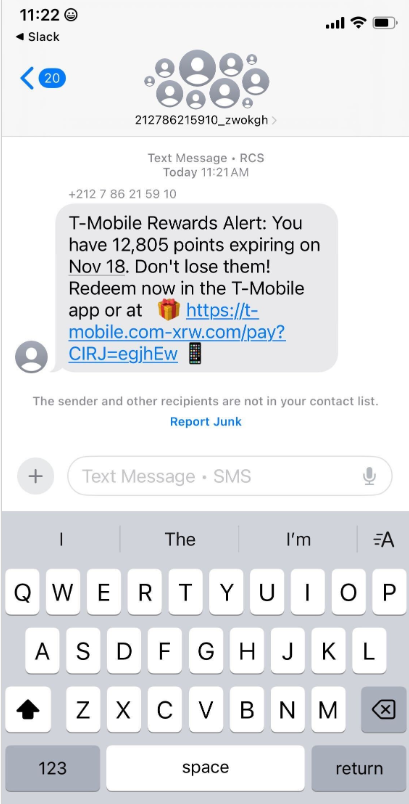
An instant message spoofing T-Mobile says the recipient is eligible to claim thousands of rewards points.
The website scanning service urlscan.io shows thousands of these phishing domains have been deployed in just the past few days alone. The phishing websites will only load if the recipient visits with a mobile device, and they ask for the visitor’s name, address, phone number and payment card data to claim the points.

A phishing website registered this week that spoofs T-Mobile.
If card data is submitted, the site will then prompt the user to share a one-time code sent via SMS by their financial institution. In reality, the bank is sending the code because the fraudsters have just attempted to enroll the victim’s phished card details in a mobile wallet from Apple or Google. If the victim also provides that one-time code, the phishers can then link the victim’s card to a mobile device that they physically control.
Pivoting off these T-Mobile phishing domains in urlscan.io reveals a similar scam targeting AT&T customers:
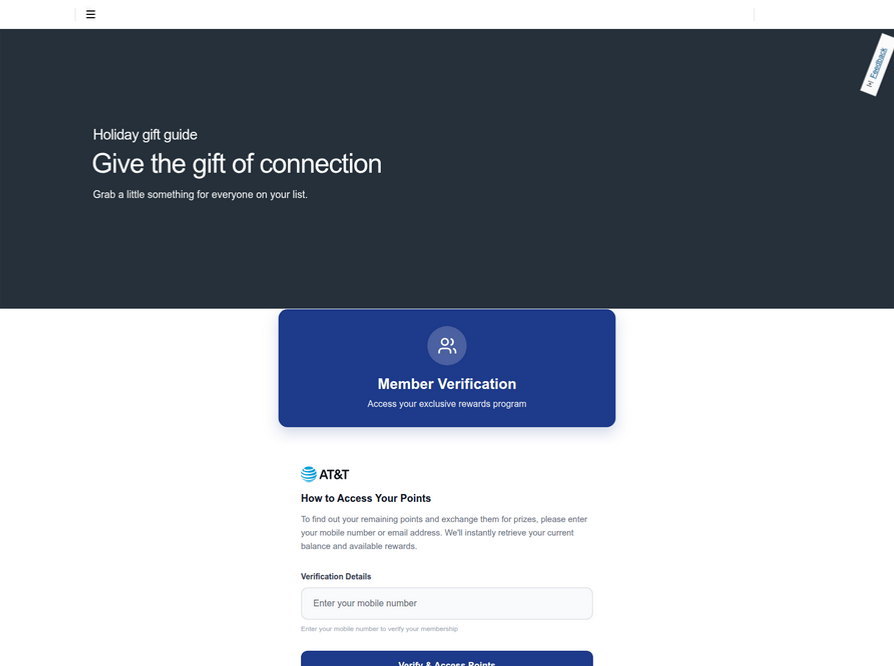
An SMS phishing or “smishing” website targeting AT&T users.
Ford Merrill works in security research at SecAlliance, a CSIS Security Group company. Merrill said multiple China-based cybercriminal groups that sell phishing-as-a-service platforms have been using the mobile points lure for some time, but the scam has only recently been pointed at consumers in the United States.
“These points redemption schemes have not been very popular in the U.S., but have been in other geographies like EU and Asia for a while now,” Merrill said.
A review of other domains flagged by urlscan.io as tied to this Chinese SMS phishing syndicate shows they are also spoofing U.S. state tax authorities, telling recipients they have an unclaimed tax refund. Again, the goal is to phish the user’s payment card information and one-time code.
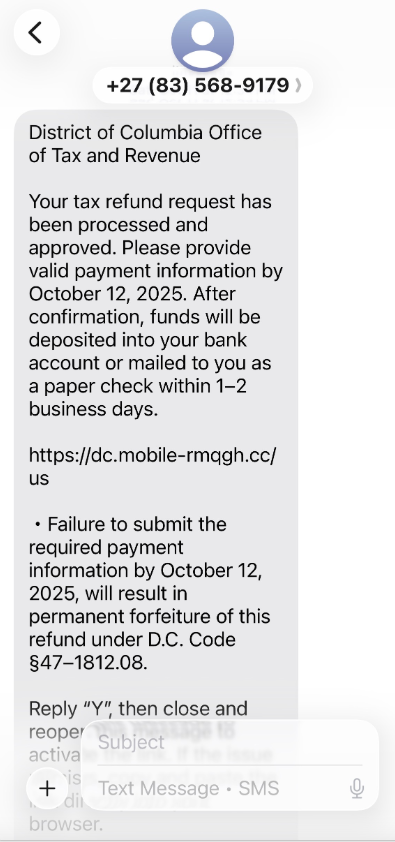
A text message that spoofs the District of Columbia’s Office of Tax and Revenue.
Many SMS phishing or “smishing” domains are quickly flagged by browser makers as malicious. But Merrill said one burgeoning area of growth for these phishing kits — fake e-commerce shops — can be far harder to spot because they do not call attention to themselves by spamming the entire world.
Merrill said the same Chinese phishing kits used to blast out package redelivery message scams are equipped with modules that make it simple to quickly deploy a fleet of fake but convincing e-commerce storefronts. Those phony stores are typically advertised on Google and Facebook, and consumers usually end up at them by searching online for deals on specific products.
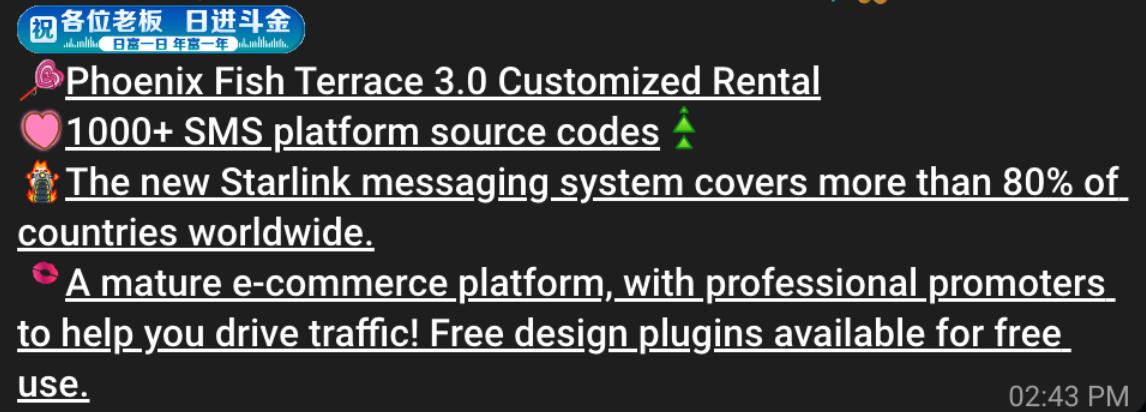
A machine-translated screenshot of an ad from a China-based phishing group promoting their fake e-commerce shop templates.
With these fake e-commerce stores, the customer is supplying their payment card and personal information as part of the normal check-out process, which is then punctuated by a request for a one-time code sent by your financial institution. The fake shopping site claims the code is required by the user’s bank to verify the transaction, but it is sent to the user because the scammers immediately attempt to enroll the supplied card data in a mobile wallet.
According to Merrill, it is only during the check-out process that these fake shops will fetch the malicious code that gives them away as fraudulent, which tends to make it difficult to locate these stores simply by mass-scanning the web. Also, most customers who pay for products through these sites don’t realize they’ve been snookered until weeks later when the purchased item fails to arrive.
“The fake e-commerce sites are tough because a lot of them can fly under the radar,” Merrill said. “They can go months without being shut down, they’re hard to discover, and they generally don’t get flagged by safe browsing tools.”
Happily, reporting these SMS phishing lures and websites is one of the fastest ways to get them properly identified and shut down. Raymond Dijkxhoorn is the CEO and a founding member of SURBL, a widely-used blocklist that flags domains and IP addresses known to be used in unsolicited messages, phishing and malware distribution. SURBL has created a website called smishreport.com that asks users to forward a screenshot of any smishing message(s) received.
“If [a domain is] unlisted, we can find and add the new pattern and kill the rest” of the matching domains, Dijkxhoorn said. “Just make a screenshot and upload. The tool does the rest.”
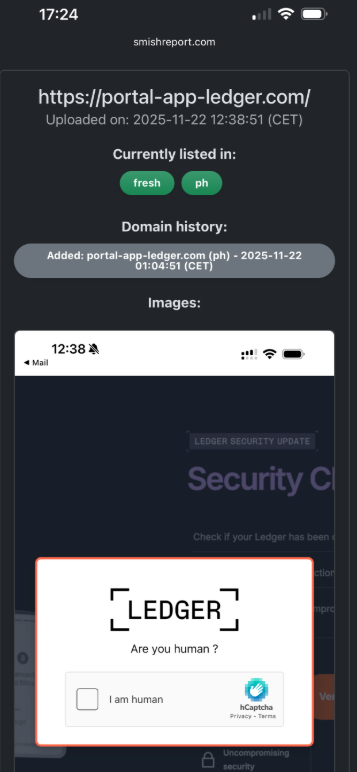
The SMS phishing reporting site smishreport.com.
Merrill said the last few weeks of the calendar year typically see a big uptick in smishing — particularly package redelivery schemes that spoof the U.S. Postal Service or commercial shipping companies.
“Every holiday season there is an explosion in smishing activity,” he said. “Everyone is in a bigger hurry, frantically shopping online, paying less attention than they should, and they’re just in a better mindset to get phished.”
As we can see, adopting a shopping strategy of simply buying from the online merchant with the lowest advertised prices can be a bit like playing Russian Roulette with your wallet. Even people who shop mainly at big-name online stores can get scammed if they’re not wary of too-good-to-be-true offers (think third-party sellers on these platforms).
If you don’t know much about the online merchant that has the item you wish to buy, take a few minutes to investigate its reputation. If you’re buying from an online store that is brand new, the risk that you will get scammed increases significantly. How do you know the lifespan of a site selling that must-have gadget at the lowest price? One easy way to get a quick idea is to run a basic WHOIS search on the site’s domain name. The more recent the site’s “created” date, the more likely it is a phantom store.
If you receive a message warning about a problem with an order or shipment, visit the e-commerce or shipping site directly, and avoid clicking on links or attachments — particularly missives that warn of some dire consequences unless you act quickly. Phishers and malware purveyors typically seize upon some kind of emergency to create a false alarm that often causes recipients to temporarily let their guard down.
But it’s not just outright scammers who can trip up your holiday shopping: Often times, items that are advertised at steeper discounts than other online stores make up for it by charging way more than normal for shipping and handling.
So be careful what you agree to: Check to make sure you know how long the item will take to be shipped, and that you understand the store’s return policies. Also, keep an eye out for hidden surcharges, and be wary of blithely clicking “ok” during the checkout process.
Most importantly, keep a close eye on your monthly statements. If I were a fraudster, I’d most definitely wait until the holidays to cram through a bunch of unauthorized charges on stolen cards, so that the bogus purchases would get buried amid a flurry of other legitimate transactions. That’s why it’s key to closely review your credit card bill and to quickly dispute any charges you didn’t authorize.

bash git clone https://github.com/your_username/status-checker.git cd status-checker
bash pip install -r requirements.txt
python status_checker.py [-h] [-d DOMAIN] [-l LIST] [-o OUTPUT] [-v] [-update]
-d, --domain: Single domain/URL to check.-l, --list: File containing a list of domains/URLs to check.-o, --output: File to save the output.-v, --version: Display version information.-update: Update the tool.Example:
python status_checker.py -l urls.txt -o results.txt
This project is licensed under the MIT License - see the LICENSE file for details.
Introducing Tiny File Manager [WH1Z-Edition], the compact and efficient solution for managing your files and folders with enhanced privacy and security features. Gone are the days of relying on external resources – I've stripped down the code to its core, making it truly lightweight and perfect for deployment in environments without internet access or outbound connections.
Designed for simplicity and speed, Tiny File Manager [WH1Z-Edition] retains all the essential functionalities you need for storing, uploading, editing, and managing your files directly from your web browser. With a single-file PHP setup, you can effortlessly drop it into any folder on your server and start organizing your files immediately.
What sets Tiny File Manager [WH1Z-Edition] apart is its focus on privacy and security. By removing the reliance on external domains for CSS and JS resources, your data stays localized and protected from potential vulnerabilities or leaks. This makes it an ideal choice for scenarios where data integrity and confidentiality are paramount, including RED TEAMING exercises or restricted server environments.
Download ZIP with latest version from master branch.
Simply transfer the "tinyfilemanager-wh1z.php" file to your web hosting space – it's as easy as that! Feel free to rename the file to whatever suits your needs best.
The default credentials are as follows: admin/WH1Z@1337 and user/WH1Z123.
:warning: Caution: Before use, it is imperative to establish your own username and password within the $auth_users variable. Passwords are encrypted using password_hash().
ℹ️ You can generate a new password hash accordingly: Login as Admin -> Click Admin -> Help -> Generate new password hash
:warning: Caution: Use the built-in password generator for your privacy and security. 😉
To enable/disable authentication set $use_auth to true or false.
zip, tar)150+ languages and a selection of 35+ themesPDF/DOC/XLS/PPT/etc. Files up to 25 MB can be previewed using the Google Drive viewerdatatable js for efficient file filtering
Facad1ng is an open-source URL masking tool designed to help you Hide Phishing URLs and make them look legit using social engineering techniques.
Your phishing link: https://example.com/whatever

Give any custom URL: gmail.com

Phishing keyword: anything-u-want

Output: https://gamil.com-anything-u-want@tinyurl.com/yourlink

# Get 4 masked URLs like this from different URL-shortener
URL Masking: Facad1ng allows users to mask URLs with a custom domain and optional phishing keywords, making it difficult to identify the actual link.
Multiple URL Shorteners: The tool supports multiple URL shorteners, providing flexibility in choosing the one that best suits your needs. Currently, it supports popular services like TinyURL, osdb, dagd, and clckru.
Input Validation: Facad1ng includes robust input validation to ensure that URLs, custom domains, and phishing keywords meet the required criteria, preventing errors and enhancing security.
User-Friendly Interface: Its simple and intuitive interface makes it accessible to both novice and experienced users, eliminating the need for complex command-line inputs.
Open Source: Being an open-source project, Facad1ng is transparent and community-driven. Users can contribute to its development and suggest improvements.
git clone https://github.com/spyboy-productions/Facad1ng.git
cd Facad1ng
pip3 install -r requirements.txt
python3 facad1ng.py
pip install Facad1ng
Facad1ng <your-phishing-link> <any-custom-domain> <any-phishing-keyword>
Example: Facad1ng https://ngrok.com gmail.com accout-login
import subprocess

# Define the command to run your Facad1ng script with arguments
command = ["python3", "-m", "Facad1ng.main", "https://ngrok.com", "facebook.com", "login"]

# Run the command
process = subprocess.Popen(command, stdout=subprocess.PIPE, stderr=subprocess.PIPE)

# Wait for the process to complete and get the output
stdout, stderr = process.communicate()

# Print the output and error (if any)
print("Output:")
print(stdout.decode())
print("Error:")
print(stderr.decode())

# Check the return code to see if the process was successful
if process.returncode == 0:
    print("Facad1ng completed successfully.")
else:
print("Facad1ng encountered an error.")Associated-Threat-Analyzer detects malicious IPv4 addresses and domain names associated with your web application using local malicious domain and IPv4 lists.
git clone https://github.com/OsmanKandemir/associated-threat-analyzer.git
cd associated-threat-analyzer && pip3 install -r requirements.txt
python3 analyzer.py -d target-web.com
You can run this application on a container after build a Dockerfile.
docker build -t osmankandemir/threatanalyzer .
docker run osmankandemir/threatanalyzer -d target-web.com
docker pull osmankandemir/threatanalyzer
docker run osmankandemir/threatanalyzer -d target-web.com
-d DOMAIN , --domain DOMAIN Input Target. --domain target-web1.com
-t DOMAINSFILE, --DomainsFile Malicious Domains List to Compare. -t SampleMaliciousDomains.txt
-i IPSFILE, --IPsFile Malicious IPs List to Compare. -i SampleMaliciousIPs.txt
-o JSON, --json JSON  JSON output. --json
https://github.com/OsmanKandemir/indicator-intelligence
https://github.com/stamparm/blackbook
https://github.com/stamparm/ipsum

xurlfind3r is a command-line interface (CLI) utility to find domain's known URLs from curated passive online sources.
robots.txt snapshots.Visit the releases page and find the appropriate archive for your operating system and architecture. Download the archive from your browser or copy its URL and retrieve it with wget or curl:
...with wget:
wget https://github.com/hueristiq/xurlfind3r/releases/download/v<version>/xurlfind3r-<version>-linux-amd64.tar.gz...or, with curl:
curl -OL https://github.com/hueristiq/xurlfind3r/releases/download/v<version>/xurlfind3r-<version>-linux-amd64.tar.gz...then, extract the binary:
tar xf xurlfind3r-<version>-linux-amd64.tar.gzTIP: The above steps, download and extract, can be combined into a single step with this onliner
curl -sL https://github.com/hueristiq/xurlfind3r/releases/download/v<version>/xurlfind3r-<version>-linux-amd64.tar.gz | tar -xzv
NOTE: On Windows systems, you should be able to double-click the zip archive to extract the xurlfind3r executable.
...move the xurlfind3r binary to somewhere in your PATH. For example, on GNU/Linux and OS X systems:
sudo mv xurlfind3r /usr/local/bin/NOTE: Windows users can follow How to: Add Tool Locations to the PATH Environment Variable in order to add xurlfind3r to their PATH.
Before you install from source, you need to make sure that Go is installed on your system. You can install Go by following the official instructions for your operating system. For this, we will assume that Go is already installed.
go install ...go install -v github.com/hueristiq/xurlfind3r/cmd/xurlfind3r@latestgo build ... the development VersionClone the repository
git clone https://github.com/hueristiq/xurlfind3r.git Build the utility
 cd xurlfind3r/cmd/xurlfind3r && \
 go build .
Move the xurlfind3r binary to somewhere in your PATH. For example, on GNU/Linux and OS X systems:
sudo mv xurlfind3r /usr/local/bin/NOTE: Windows users can follow How to: Add Tool Locations to the PATH Environment Variable in order to add xurlfind3r to their PATH.
NOTE: While the development version is a good way to take a peek at xurlfind3r's latest features before they get released, be aware that it may have bugs. Officially released versions will generally be more stable.
xurlfind3r will work right after installation. However, BeVigil, Github and Intelligence X require API keys to work, URLScan supports API key but not required. The API keys are stored in the $HOME/.hueristiq/xurlfind3r/config.yaml file - created upon first run - and uses the YAML format. Multiple API keys can be specified for each of these source from which one of them will be used.
Example config.yaml:
version: 0.2.0
sources:
    - bevigil
    - commoncrawl
    - github
    - intelx
    - otx
    - urlscan
    - wayback
keys:
    bevigil:
        - awA5nvpKU3N8ygkZ
    github:
        - d23a554bbc1aabb208c9acfbd2dd41ce7fc9db39
        - asdsd54bbc1aabb208c9acfbd2dd41ce7fc9db39
    intelx:
        - 2.intelx.io:00000000-0000-0000-0000-000000000000
    urlscan:
- d4c85d34-e425-446e-d4ab-f5a3412acbe8To display help message for xurlfind3r use the -h flag:
xurlfind3r -hhelp message:
                 _  __ _           _ _____
__  ___   _ _ __| |/ _(_)_ __   __| |___ / _ __
\ \/ / | | | '__| | |_| | '_ \ / _` | |_ \| '__|
 >  <| |_| | |  | |  _| | | | | (_| |___) | |
/_/\_\\__,_|_|  |_|_| |_|_| |_|\__,_|____/|_| v0.2.0

USAGE:
  xurlfind3r [OPTIONS]

TARGET:
 -d, --domain string              (sub)domain to match URLs

SCOPE:
     --include-subdomains bool    match subdomain's URLs

SOURCES:
 -s,  --sources bool              list sources
 -u,  --use-sources string        sources to use (default: bevigil,commoncrawl,github,intelx,otx,urlscan,wayback)
      --skip-wayback-robots bool  with wayback, skip parsing robots.txt snapshots
      --skip-wayback-source bool  with wayback   , skip parsing source code snapshots

FILTER & MATCH:
 -f, --filter string              regex to filter URLs
 -m, --match string               regex to match URLs

OUTPUT:
     --no-color bool              no color mode
 -o, --output string              output URLs file path
 -v, --verbosity string           debug, info, warning, error, fatal or silent (default: info)

CONFIGURATION:
 -c,  --configuration string      configuration file path (default: ~/.hueristiq/xurlfind3r/config.yaml)
xurlfind3r -d hackerone.com --include-subdomains# filter images
xurlfind3r -d hackerone.com --include-subdomains -f '`^https?://[^/]*?/.*\.(jpg|jpeg|png|gif|bmp)(\?[^\s]*)?$`'# match js URLs
xurlfind3r -d hackerone.com --include-subdomains -m '^https?://[^/]*?/.*\.js(\?[^\s]*)?$'Issues and Pull Requests are welcome! Check out the contribution guidelines.
This utility is distributed under the MIT license.

EndExt is a .go tool for extracting all the possible endpoints from the JS files
When you crawll all the JS files from waybackruls for example, or even collecting the JS files urls from your target website's home source page .. If the website was using API system and you wanna look for all the endpoints in the JS files, cuz u may find something hidden here or there .. That's why i made this tool .. I give it the JS files urls .. It graps all the possible endpoints or urls or paths in the submitted JS files for me ..
Just need to install go, run:
▶ brew install go
▶ git clone https://github.com/SirBugs/endext.git
or download from https://go.dev/dl/
▶ go run main.go urls.txt


               /$$$$$$$$                 /$$ /$$$$$$$$             /$$
              | $$_____/                | $$| $$_____/            | $$
              | $$       /$$$$$$$   /$$$$$$$| $$       /$$   /$$ /$$$$$$
              | $$$$$   | $$__  $$ /$$__  $$| $$$$$   |  $$ /$$/|_  $$_/
              | $$__/   | $$  \ $$| $$  | $$| $$__/    \  $$$$/   | $$
              | $$      | $$  | $$| $$  | $$| $$        >$$  $$   | $$ /$$
              | $$$$$$$$| $$  | $$|  $$$$$$$| $$$$$$$$ /$$/\  $$  |  $$$$/
              |________/|__/  |__/ \_______/|________/|__/  \__/   \___/

                       EndPointExt Tool By @SirBugs .go Version
                             V: 1.0.2 Made With All Love
                  For Extracting all possilbe endpoints from Js files
                         Twitter@SirBagoza -- GitHub@SirBugs
                           Run : go run main.g   o jsurls.txt

endpoints/users/password
sign-in
endpoints/sign-out
endpoints/billing/update-billing-info
endpoints/billing/get-account
endpoints/billing/create-account
endpoints/billing/list-subscriptions
endpoints/billing/create-new-subscription-purchase
endpoints/billing/create-one-time-payment
endpoints/billing/get-account
endpoints/billing/create-account
endpoints/billing/list-subscriptions
endpoints/billing/create-new-subscription-purchase
endpoints/billing/create-one-time-payment
▶ echo 'target.com' | waybackurls | tee waybackresults.txt; cat waybackresults.txt | grep "\.js" > js_files.txt; go run main.go js_files.txt
// You can use Gau, HaKrawler, Katana, etc...
This tool was written in Golang 1.19.4, Made with all love in Egypt! <3
Twitter@SirBagoza , Github@SirBugs


 FreshRSS


