FreshRSS

🔒
❌ Secure Planet Training Courses Updated For 2019 - Click Here
There are new available articles, click to refresh the page.
☐ ☆ ✇ /r/netsec - Information Security News & Discussion

A common denominator in AI agent framework CVEs: Validation

By: /u/Impossible_Ant1595 — January 12th 2026 at 19:03

Been researching LangChain/LlamaIndex vulnerabilities. Same pattern keeps appearing: validation checks the string, attacks exploit how the system interprets it.

CVE Issue
CVE-2024-3571 Checked for .. but didn't normalize. Path traversal.
CVE-2024-0243 Validated URL but not redirect destination. SSRF.
CVE-2025-2828 No IP restrictions on RequestsToolkit.
CVE-2025-3046 Validated path string, didn't resolve symlinks.
CVE-2025-61784 Checked URL format, didn't resolve IP. SSRF.

Regex for .. fails when path is /data/foo%2f..%2f..%2fetc/passwd. Blocklist for 127.0.0.1 fails when URL is http://2130706433/.

The fix needs to ensure we are validating in the same semantic space as execution. More regex won't save us.
Resolve the symlink before checking containment. Resolve DNS before checking the IP.

Full writeup with code examples: https://niyikiza.com/posts/map-territory/

submitted by /u/Impossible_Ant1595
[link] [comments]
☐ ☆ ✇ WIRED

GoFundMe Ignores Own Rules by Hosting a Legal-Defense Fund for the ICE Agent Who Killed Renee Good

By: Dell Cameron — January 12th 2026 at 18:48
The fundraiser for the ICE agent in the Renee Good killing has stayed online in seeming breach of GoFundMe’s own terms of service, prompting questions about selective enforcement.
☐ ☆ ✇ /r/netsec - Information Security News & Discussion

Game-theoretic feedback loops for LLM-based pentesting: doubling success rates in test ranges

By: /u/Obvious-Language4462 — January 12th 2026 at 18:16

We’re sharing results from a recent paper on guiding LLM-based pentesting using explicit game-theoretic feedback.

The idea is to close the loop between LLM-driven security testing and formal attacker–defender games. The system extracts attack graphs from live pentesting logs, computes Nash equilibria with effort-aware scoring, and injects a concise strategic digest back into the agent’s system prompt to guide subsequent actions.

In a 44-run test range benchmark (Shellshock CVE-2014-6271), adding the digest: - Increased success rate from 20.0% to 42.9% - Reduced cost per successful run by 2.7× - Reduced tool-use variance by 5.2×

In Attack & Defense exercises, sharing a single game-theoretic graph between red and blue agents (“Purple” setup) wins ~2:1 vs LLM-only agents and ~3.7:1 vs independently guided teams.

The game-theoretic layer doesn’t invent new exploits — it constrains the agent’s search space, suppresses hallucinations, and keeps the agent anchored to strategically relevant paths.

PDF: https://arxiv.org/pdf/2601.05887

Code: https://github.com/aliasrobotics/cai

submitted by /u/Obvious-Language4462
[link] [comments]
☐ ☆ ✇ /r/netsec - Information Security News & Discussion

Microsoft Bug Bounty.

By: /u/Orange2194 — January 12th 2026 at 16:23

I’ve managed to get my way to inject a dll into ppl without any kernel level access. and it works with all kinds of windows security such as HVCI.

Currently one flaw which is required to have Admin privileges but i think i can figure out a way to do it without that.

what do you think?

submitted by /u/Orange2194
[link] [comments]
☐ ☆ ✇ /r/netsec - Information Security News & Discussion

Client-side encrypted file sharing with Argon2id and AES-256-GCM

By: /u/Necessary_Bed8732 — January 12th 2026 at 01:49

Built a disposable file transfer tool with a focus on minimising server-side trust. Wanted to share the architecture and get feedback from people who break things for a living.

burnbox.au

Crypto stack:

AES-256-GCM for file encryption. Argon2id (32MB memory, 3 iterations) for password-protected files. PBKDF2 fallback for devices that choke on WASM. 96-bit unique IV per encryption. Key derived client-side, stored in URL fragment (never transmitted to server).

Threat model:

Server compromise returns only encrypted blobs. No plaintext filenames (encrypted and padded to 256 bytes). No key material server-side. Burn-after-reading enforced atomically in Postgres (prevents race conditions). Database stores: encrypted blob, padded filename, approximate size, expiry timestamp.

Not protected against:

Compromised endpoints. Link interception (share via secure channel). Malicious browser extensions. Coercion.

Architecture:

Static frontend on Netlify. Supabase backend (Postgres + Edge Functions). Retrieve requests proxied through Netlify (Supabase sees CDN IP, not user IP). Row Level Security blocks direct storage access. Downloads only via Edge Function with service role.

Source: gitlab.com/burnbox-au1/Burnbox-au

Interested in feedback on the implementation. What am I missing?

submitted by /u/Necessary_Bed8732
[link] [comments]
☐ ☆ ✇ McAfee Blogs

This Week in Scams: Explaining the Fake Amazon Code Surge

By: Brooke Seipel — January 9th 2026 at 19:34
blogging on social media

This week in scams, the biggest threats showed up as routine security messages, viral consumer “warnings,” and AI-generated content that blended seamlessly into platforms people already trust. 

Every week, we bring you a roundup of the scams making headlines, not just to track what’s happening, but to explain how these schemes work, why they’re spreading now, and what you can do to stay ahead of them.  

Here are scams in the news this week, and safety tips from our experts at McAfee: 

Amazon One-Time Passcode Scam: How Fake Security Calls Hijack Real Accounts 

Scammers are increasingly impersonating Amazon customer support to take over accounts using real one-time passcodes (OTPs), not fake links or malware. 

Here’s how the scam works in practice. 

What is the Amazon one-time passcode scam? 

Victims receive an unsolicited phone call from someone claiming to work for Amazon. The caller says suspicious activity has been detected on the account and may reference expensive purchases, often items like smartphones, to make the threat feel credible. 

The call usually comes from a spoofed number and the scammer may already know your name or phone number, which helps lower suspicion. 

How scammers use real Amazon security codes 

While speaking to you, the scammer attempts to access your Amazon account themselves by entering your phone number or email address on the login page and selecting “forgot password” or triggering a login from a new device. 

That action causes Amazon’s real security system to send a legitimate one-time passcode to your phone or email. 

If you read that code aloud or share it, the scammer can immediately: 

  • Complete the login process 
  • Change your account password 
  • Access saved payment methods 
  • Place fraudulent orders or lock you out of the account 

The scam works precisely because the code is real—and because it arrives while the caller is convincing you it’s part of a routine security check. 

Key red flags to watch for 

  • Unsolicited calls claiming to be from Amazon 
  • Requests to share a one-time passcode 
  • Pressure to act quickly “to secure your account” 

Important to remember: Amazon will never contact you first to ask for your password, verification codes, or security details. If you receive a one-time passcode you didn’t request, do not share it with anyone. 

AI Deepfake Scam on TikTok Uses Fake Princess to Steal Money 

A growing scam on TikTok shows how AI-generated deepfake videos are now being used not just for misinformation, but for direct financial fraud. 

This week, Spanish media and officials warned that scammers are circulating fake TikTok videos appearing to show Princess Leonor, the 20-year-old heir to Spain’s throne, offering financial assistance to users.  

According to The Guardian, the videos show an AI-generated version of Leonor promising payouts running into the thousands of dollars in exchange for a small upfront “fee.”  

Once victims send that initial payment, the scam doesn’t end. Fraudsters repeatedly demand additional fees before eventually disappearing. 

This case highlights how deepfakes are moving beyond novelty and into repeatable, high-reach fraud, where trust in familiar public figures is weaponized at scale. 

Viral Reddit “Whistleblower” Scam: When AI-Generated Posts Fool Millions 

A viral post on Reddit this week shows how AI-generated text can convincingly impersonate whistleblowers, and even mislead experienced journalists. 

The post claimed to come from an employee at a major food delivery company, alleging the firm was exploiting drivers and users through opaque AI systems. Written as a long, confessional screed, the author said he was drunk, using library Wi-Fi, and risking retaliation to expose the truth. 

The claims were believable in part because similar companies have faced real lawsuits in the past. The post rocketed to Reddit’s front page, collecting over 87,000 upvotes, and spread even further after being reposted on X, where it amassed tens of millions of impressions. 

As Platformer journalist Casey Newton later reported, the supposed whistleblower provided what appeared to be convincing evidence, including a photo of an employee badge and an 18-page internal document describing an AI-driven “desperation score” used to manage drivers. But during verification attempts, red flags emerged. The materials were ultimately traced back to an AI-generated hoax. 

Detection tools later confirmed that some of the images contained AI watermarks, but only after the post had already gone viral. 

Why AI-generated hoaxes like this are dangerous 

  • They mimic real whistleblower behavior and language 
  • They exploit existing public distrust of large platforms 
  • They can mislead journalists, not just casual readers 
  • Debunking often comes too late to stop spread 

This incident underscores a growing problem: AI-generated misinformation doesn’t need to steal money directly to cause harm. Sometimes, the damage is to trust itself — and by the time the truth surfaces, the narrative has already taken hold. 

McAfee’s Safety Tips for This Week 

As scams increasingly rely on a combination of realism and urgency, protecting yourself starts with slowing down and verifying before you act. 

If a message or video promises money or financial help: 

  • Be skeptical of any offer that requires an upfront “fee,” no matter how small. 
  • Remember that public figures, charities, and foundations do not distribute money through social media DMs or comment sections. 
  • If an offer claims to come from a well-known individual or organization, verify it through official websites or trusted news sources. 

When content appears viral or emotionally convincing: 

  • Pause before sharing or acting on posts framed as warnings, whistleblower revelations, or exposés. 
  • Look for confirmation from multiple reputable outlets — not just screenshots or reposts. 
  • Be cautious of long, detailed posts that feel personal or confessional but can’t be independently verified. 

When AI may be involved: 

  • Assume that realistic images, videos, and documents can be generated quickly and at scale. 
  • Don’t rely on appearance alone to determine authenticity, even high-quality content can be fake. 
  • Treat unsolicited financial requests, account actions, or “inside information” as red flags, regardless of how credible they seem. 

If you think you’ve engaged with a scam: 

  • Stop responding immediately. 
  • Secure your accounts by changing passwords and enabling multi-factor authentication. 
  • Monitor financial statements and account activity for unusual behavior. 

Final Takeaway 

The scams making headlines this week share a common theme: they don’t look like scams at first glance. Whether it’s an AI-generated video of a public figure or a viral post posing as a consumer warning, today’s fraud relies on familiarity, credibility, and trust. 

That’s why McAfee’s Scam Detector and Web Protection help detect scam messages, dangerous sites, and AI-generated deepfake videosalerting you before you interact or click. 

We’ll be back next week with another roundup of the scams worth watching, the stories behind them, and the steps you can take to stay one step ahead. 

The post This Week in Scams: Explaining the Fake Amazon Code Surge appeared first on McAfee Blog.

☐ ☆ ✇ WIRED

ICE Can Now Spy on Every Phone in Your Neighborhood

By: Lily Hay Newman, Matt Burgess — January 10th 2026 at 11:30
Plus: Iran shuts down its internet amid sweeping protests, an alleged scam boss gets extradited to China, and more.
☐ ☆ ✇ /r/netsec - Information Security News & Discussion

Browser based tech support scam abusing full screen, input lock, and fake BSOD

By: /u/anuraggawande — January 10th 2026 at 08:48

Analyzed a browser-only tech support scam that relies entirely on client side deception and no malware dropped.

The page abuses full screen and input lock APIs, simulates a fake CMD scan and BSOD, and pushes phone based social engineering.

submitted by /u/anuraggawande
[link] [comments]
☐ ☆ ✇ WIRED

X Didn’t Fix Grok's ‘Undressing’ Problem. It Just Makes People Pay for It

By: Matt Burgess — January 9th 2026 at 15:19
X is allowing only “verified” users to create images with Grok. Experts say it represents the “monetization of abuse”—and anyone can still generate images on Grok’s app and website.
☐ ☆ ✇ /r/netsec - Information Security News & Discussion

Threat Road - A modern Vulnerability Database

By: /u/Big-Engineering-9365 — January 9th 2026 at 13:24

Hi, after my last post, most of you said that you had no more need for another Newsletter. So I thought of other ways to use the content and now put it into a directory.

You can use it 100% for free.

Just tell me what you want adjusted or added.

Site is still in Beta

Thank you

submitted by /u/Big-Engineering-9365
[link] [comments]
☐ ☆ ✇ /r/netsec - Information Security News & Discussion

DVAIB: A deliberately vulnerable AI bank for practicing prompt injection and AI security attacks

By: /u/setsuid — January 9th 2026 at 13:10

I built DVAIB (Damn Vulnerable AI Bank) - a free, hands-on platform to practice attacking AI systems in a legal, controlled environment.

Features 3 scenarios: Deposit Manipulation (prompt injection), eKYC Document Verification (document parsing exploits), and Personal Loan (RAG policy disclosure attacks).

Includes practice and real-world difficulty tiers, leaderboard, and achievement tracking.

submitted by /u/setsuid
[link] [comments]
☐ ☆ ✇ WeLiveSecurity

Credential stuffing: What it is and how to protect yourself

— January 8th 2026 at 10:00
Reusing passwords may feel like a harmless shortcut – until a single breach opens the door to multiple accounts
☐ ☆ ✇ /r/netsec - Information Security News & Discussion

Side-channel via delivery receipt timing on Signal and WhatsApp (Careless Whisper research)

By: /u/Unicorn_Pie — January 9th 2026 at 05:58

Following up on the Careless Whisper research from University of Vienna / SBA Research (published late 2024, proof-of-concept public as of December 2025):

Protocol-level vulnerability:

Both Signal and WhatsApp use the Signal Protocol for E2EE, which is cryptographically sound. Both platforms, however, emit unencrypted delivery receipts—protocol-level acknowledgements of message delivery.

The research demonstrates a side-channel where RTT characteristics of delivery receipts leak recipient behavioural patterns. This is not a cryptographic issue. This is an information-leakage issue where an auxiliary channel (delivery receipt timing) reveals what the primary channel (encrypted messages) is supposed to conceal: who's communicating, when, and from where.

Attack surface:

  • Delivery receipts are unencrypted, per-message acknowledgements
  • RTT measurements (even with jitter) remain correlated with device state
  • Repeated probing builds statistical fingerprints of behavioural patterns
  • Victims experience no notifications or evidence of probing

Platform architectures:

  • Signal: Sealed sender + metadata encryption makes this harder but not impossible. Server doesn't know sender identity, but receipt timing still correlates with recipient availability.
  • WhatsApp: Server-side metadata handling more permissive. Receipt timing correlates with both sender and recipient state.

Signal's architecture mitigates this better but doesn't eliminate it. WhatsApp's architecture provides less protection.

Current mitigation status:

  • Rate limiting: Signal implemented (Dec 2025), WhatsApp has not
  • Protocol fixes: Neither platform has implemented substantive changes
  • User-level controls: Disabling receipts helps, but attacks work at lower frequencies

Why this matters for protocol design:

This is a good case study in why you can't evaluate messaging security through encryption alone. You need to think about:

  • What metadata signals does the system emit?
  • Can those signals be correlated to reveal patterns?
  • What does the threat model assume about these signals?

For detailed technical analysis, research citations, mitigation strategies, and threat model implications.

submitted by /u/Unicorn_Pie
[link] [comments]
☐ ☆ ✇ WIRED

ICE Agent Who Reportedly Shot Renee Good Was a Firearms Trainer, per Testimony

By: Matt Giles, Tim Marchman — January 9th 2026 at 03:19
Jonathan Ross told a federal court in December about his professional background, including “hundreds” of encounters with drivers during enforcement actions, according to testimony obtained by WIRED.
☐ ☆ ✇ /r/netsec - Information Security News & Discussion

“The Conscience of a Hacker” is 40 today

By: /u/posthocethics — January 9th 2026 at 02:52

40 years to the random, brilliant, insightful, demented masterpiece that hackers for the past forty years, and for a thousand years to come, would identify themselves in.

“The Conscience of a Hacker”, also known as The Hacker Manifesto.

Happy birthday!

submitted by /u/posthocethics
[link] [comments]
☐ ☆ ✇ /r/netsec - Information Security News & Discussion

67% of AI usage is through unmanaged personal accounts. IT has literally no visibility.

By: /u/heromat21 — January 8th 2026 at 23:35

Came across this post claiming 67% of AI usage happens through unmanaged personal accounts. Got me thinking about our own dumpster fire.

We rolled out SSO and identity controls, but employees just bypass everything. CRM, AI tools, you name it, all accessed like consumer apps.

The implications are terrifying. Zero visibility into what data is being fed to these tools. No audit trails.

What’s your take here?

submitted by /u/heromat21
[link] [comments]
☐ ☆ ✇ Security – Cisco Blog

Three Benefits of Segmentation

By: Aamer Akhter — January 8th 2026 at 13:00
The successful implementation of segmentation enables organizations to contain breaches, protect high-value assets, and meet compliance requirements.
☐ ☆ ✇ WIRED

Grok Is Generating Sexual Content Far More Graphic Than What's on X

By: Matt Burgess, Maddy Varner — January 7th 2026 at 21:47
A WIRED review of outputs hosted on Grok’s official website shows it’s being used to create violent sexual images and videos, as well as content that includes apparent minors.
☐ ☆ ✇ /r/netsec - Information Security News & Discussion

Ni8mare - Unauthenticated Remote Code Execution in n8n (CVE-2026-21858)

By: /u/we-we-we — January 7th 2026 at 15:48

I discovered a critical vulnerability (CVE-2026-21858, CVSS 10.0) in n8n that enables unauthorized attackers to take over locally deployed instances, impacting an estimated 100,000 servers globally.

This vulnerability is a logical bug, which I call - a (Content-)Type Confusion.
Let me know what you think!

submitted by /u/we-we-we
[link] [comments]
☐ ☆ ✇ WIRED

Grok Is Pushing AI ‘Undressing’ Mainstream

By: Matt Burgess, Maddy Varner — January 6th 2026 at 22:20
Paid tools that “strip” clothes from photos have been available on the darker corners of the internet for years. Elon Musk’s X is now removing barriers to entry—and making the results public.
☐ ☆ ✇ Security – Cisco Blog

Why your organization needs a Cisco Talos Incident Response Retainer

By: Yuri Kramarz — January 6th 2026 at 13:00
Every day, new ransomware and data breaches dominate the headlines, reminding us that it’s a matter of when, not if, your organization may be next. Having a well-prepared response plan and a team of forensic professionals ready to act at a moment’s notice can mean a world of difference between swift incident recovery or a […]
☐ ☆ ✇ /r/netsec - Information Security News & Discussion

A practical guide to finding soundness bugs in ZK circuits

By: /u/Rude_Ad3947 — January 6th 2026 at 06:23

Hi everyone, I wrote a practical guide to finding soundness bugs in ZK circuits. It starts out with basic Circom examples, then discusses real-world exploits. Check it out if you are interested in auditing real-world ZK deployments.

submitted by /u/Rude_Ad3947
[link] [comments]
☐ ☆ ✇ McAfee Blogs

7 Types of Hacker Motivations

By: McAfee — November 16th 2025 at 18:19

Hackers are not created equal, nor do they have the same purpose. Some hackers are paid to scrutinize security systems, find loopholes, fix weaknesses, and ultimately protect organizations and people. Others exploit those same gaps for profit, power, or disruption. What separates hackers isn’t just skill level or tactics; it’s intent. 

The purpose behind an attack changes everything about how hackers shape their tactics and how the hacking process unfolds: who is targeted, which methods and tools are used, how patient the attacker is, and the kind of damage they want to cause.

The primary motivations behind these cyberattacks fall into several categories, from financial gain to recognition, and sometimes even coercion. Each driver creates different risk scenarios for your digital life, from your home banking sessions to your workplace communications. Understanding a hacker’s motivations will enable you to better protect yourself and recognize potential threats in both your personal and professional life. 

In this article, we’ll look at the main types of hackers you might encounter, the core motivations and mindset that drive these cyberattacks, and finally, how you can protect yourself against these attacks.

Good and bad hackers

From its beginnings as an intellectual exploration in universities, hacking was driven by curiosity, learning, and the thrill of solving complex problems. Today, it has become industrialized with organized criminal groups and state-sponsored actors entering the scene. 

Modern hacking has seen the emergence of advanced persistent threats and nation-state campaigns targeting critical infrastructure and combining traditional techniques with artificial intelligence. To better understand the types of hackers, here is a window into what they do and why:

White hat hackers

These are the good guys, typically computer security experts who specialize in penetration testing and other methodologies to ensure that a company’s information systems are secure. These IT security professionals rely on a constantly evolving arsenal of technology to battle hackers.

Black hat hackers

These are the bad guys, who are typically referred to as just plain hackers. The term is often used specifically for hackers who break into networks or computers, or create computer viruses. Unfortunately, black hat hackers continue to technologically outpace white hats, often finding the path of least resistance, whether due to human error or laziness, or with a new type of attack. Hacking purists often use the term “crackers” to refer to black hat hackers, whose motivation is generally to get paid.

Script kiddies

This is a derogatory term for black hat hackers who use borrowed programs to attack networks and deface websites in an attempt to make names for themselves. Script kiddies, sometimes called script kitties, might be beginners, but don’t be fooled by their newbie status. With the right tools and right targets, they can wreak as much havoc as a seasoned hacker.

Hacktivists

Some hacker activists are motivated by politics or religion, while others aim to expose wrongdoing or exact revenge. Activists typically target government agencies, public services, and organizations involved in controversial issues related to defense, elections, wars, finance, or social movements. They also attack high-profile individuals, such as executives, public figures, journalists, and activists.

State-sponsored hackers

State-sponsored hackers have limitless time and funding to target civilians, corporations, other governments, or even prominent citizens connected to a larger objective. Their motivations are driven by their government’s strategic goals: gathering intelligence, stealing sensitive research or intellectual property, influencing public perception, or disrupting critical infrastructure. Because they are playing a long game, state-sponsored hackers are stealthy and persistent, quietly embedding themselves in systems, mapping networks, and waiting for the right moment to act.

Spy hackers

Corporations hire hackers to infiltrate their competitors and steal trade secrets, including product designs, source code, pricing plans, customer lists, legal documents, and merger or acquisition strategies. They may hack from the outside or gain employment in order to act as a mole, impersonating recruiters, partners, or vendors to get insiders to share access. They also take advantage of weak internal controls, such as excessive permissions, unsecured file-sharing links, or poor offboarding practices. Spy hackers may use similar tactics as hacktivists or state-sponsored espionage on a smaller scale: stealthy entry, careful privilege escalation, and long-term persistence to avoid triggering alarms. The stolen data is often not leaked publicly but delivered directly to the client and used behind the scenes.

Cyber terrorists

These hackers, generally motivated by religious or political beliefs, attempt to create terror, chaos, and real-world harm by disrupting critical infrastructures such as power grids, water systems, transportation networks, hospitals, emergency services, and government operations. They combine cyber operations with propaganda campaigns and physical attacks on the systems people rely on to live safely to create turmoil far beyond the screen. 

Understand hackers’ motivations

Cybercriminals aren’t just faceless entities; they’re driven by specific goals that shape their tactics and targets. Understanding their motivations empowers you to recognize potential threats and better protect yourself, your family, and colleagues.

Financial gain

Money remains the most common motivator. These profit-driven attacks directly impact your personal finances through methods such as ransomware, credit card fraud, and identity theft. In your home, financially motivated hackers target your banking apps, shopping accounts, and personal devices to steal payment information or hold your data hostage. In the workplace, they focus on payroll systems, customer databases, and business banking credentials.

Ideological motivations

Ideologically driven hackers, called hacktivists, pursue political or social causes through cyber means. These attacks can disrupt services that you rely on daily, from public utilities to private organizations that provide essential services or take public stances on divisive issues. Your best defense involves staying informed about potential disruptions and maintaining backup communication methods for essential services.

Curiosity and learning

Many hackers begin their journey with genuine curiosity about how systems work. They might probe your home network, test website security, or experiment with app vulnerabilities, not necessarily for malicious purposes, but their activities can still expose your data or disrupt services. In professional environments, these individuals might target systems or databases simply to see if they can gain access.

Recognition and reputation building

Some hackers seek fame, respect within hacker communities, or professional advancement rather than immediate financial benefit. They often target high-profile individuals, popular websites, or well-known companies to maximize the visibility for their exploits. If you have a significant social media following, your accounts could become targets for these attacks. They might also focus on defacing company or government websites, or leaking non-sensitive but embarrassing information.

State and corporate intelligence

Nation-state and corporate espionage are some of the most sophisticated threats in cyberspace, making it a top national security concern for both government and private sector. These operations compromise daily services and infrastructure such as internet service providers, email platforms, or cloud storage services to gather intelligence such as intellectual property, customer lists, or strategic planning documents. 

Coercion and extortion

Some hackers use cyber capabilities to intimidate or coerce victims into specific actions. In the FBI’s Internet Crime Complaint Center report for 2024, extortion was the 2nd top cybercrime by number of complaints, demonstrating the growing prevalence of coercion-based attacks. Coercion might involve compromising personal photos, social media accounts, or private communications to demand payment or behavioral changes. Workplace coercion could target executives with embarrassing information or threaten to leak sensitive business data unless demands are met. 

The intersection of motivations

Many real-world attacks combine multiple motivations—a financially driven criminal might also seek recognition within hacker communities, or an ideological hacker might generate revenue through ransomware. The contrast between ethical hacker motivations and malicious ones often lies in the permission, legality, and intent. Understanding why people become hackers helps you recognize that not all hacking activity is inherently malicious, although all unauthorized access ultimately poses risks to your security and privacy.

The psychology behind cyberattacks

Understanding the psychology behind cyberattacks gives you a powerful advantage in protecting yourself. When you know what drives hackers, you can better spot their tactics and stay one step ahead.

High reward, low risk

Many hackers operate with the goal of achieving high reward for perceived low risk. This risk-reward imbalance motivates attackers because they can potentially access valuable personal or financial information while remaining physically distant from their victims. This means hackers often target easy opportunities, such as when you click on suspicious links or download questionable attachments, to gain access with minimal effort. For instance, a hacker would rather send 10,000 phishing emails hoping for a few bites than attempt one complex, risky attack.

Exploiting normal human responses 

Hackers exploit well-known psychological shortcuts your brain takes. They understand that you’re more likely to trust familiar-looking emails, act quickly under pressure, or follow authority figures without question. These aren’t weaknesses, these are normal human responses that attackers deliberately manipulate. For example, urgent messages claiming your account will be closed create an artificial time pressure, making you more likely to click without thinking.

The power of group dynamics

Many successful cyberattacks leverage the human tendency to follow what others are doing. Hackers create fake social media profiles, forge customer reviews, or impersonate colleagues to make their requests seem legitimate and widely accepted. In ransomware attacks targeting businesses, criminals often research company hierarchies and communication styles to make their demands appear to come from trusted sources within the organization. 

The gamification of cybercrime

Modern hacking has elements that make it feel like a game to perpetrators. Some online forums award points for successful attacks, creating competition and recognition among criminals. This helps explain why some hackers target individuals rather than large corporations, as every successful phishing attempt becomes a score, and why attacks continue to evolve. 

Common hacking methods

Hackers don’t all use the same tricks, but most successful attacks rely on a familiar toolkit of methods that exploit common technical gaps and human habits. Recognizing these common techniques will help you avoid danger earlier on.

  • Phishing and smishing. These attacks trick you into revealing sensitive information through fraudulent emails or text messages, respectively known as phishing and smishing. Modern attackers increasingly use AI-generated content and sophisticated social engineering techniques that make these messages appear more legitimate than ever before. 
  • Credential stuffing. Cybercriminals use automated tools to test stolen username and password combinations across multiple websites, exploiting the fact that many people reuse passwords. This attack method has become more efficient with attackers leveraging large-scale data breaches and improved automation tools.
  • Multi-factor authentication (MFA) fatigue. Attackers repeatedly send multi-factor authentication requests until overwhelmed, frustrated, and confused users approve one. This technique has gained prominence as more organizations adopt MFA, with attackers finding ways to exploit user behavior around security notifications. 
  • Malvertising. Malicious advertisements on legitimate websites can install malware or redirect you to harmful sites without requiring any clicks. Recent trends show attackers using sophisticated techniques to bypass ad network security filters. 
  • Remote desktop attacks. Hackers exploit weak or default passwords on remote desktop services to gain unauthorized access to systems, particularly targeting businesses with remote work setups. The rise of hybrid work environments since 2023 has made this attack vector increasingly attractive to cybercriminals. Disable remote desktop services when not needed and use VPNs with strong authentication for legitimate remote access.
  • USB baiting. Attackers leave infected USB devices in public places, hoping curious individuals will plug them into their computers, automatically installing malware. Modern USB attacks can execute within seconds of being connected, making them particularly dangerous in today’s fast-paced work environment.
    • Unsecured Wi-Fi networks. Unsecured public Wi-Fi and home networks create opportunities for hackers to gain access to your devices or intercept your sensitive information, such as passwords, emails, and banking details. Sometimes, cybercriminals create fake Wi-Fi hotspots with legitimate-sounding names to trick users into connecting.
    • Unsafe downloads. Hackers disguise malicious software as legitimate programs, games, documents, or updates to trick users into installing them. These malicious downloads may come from infected email attachments, fake or pirated software, or even compromised websites. Once installed, the malware can steal your information, lock your files for ransom, or give hackers access to your computer.
    • Tech support scams. Tech support scams rely on social engineering rather than technical exploits, where scammers typically contact you by phone and insist your computer has been infected or compromised. They create urgency and fear to convince you to install remote access software that gives them complete control of your computer. Once they have access, they can steal personal information, install malware, or hold your files hostage.
    • Outdated software. Running outdated software creates security vulnerabilities that hackers actively leverage. When software developers discover security vulnerabilities, they release patches to fix these problems. If you don’t install these updates promptly, your system remains vulnerable to attacks. Hackers maintain databases of unpatched systems and use automated tools to find and exploit them.

    Defensive tips to protect yourself from hack attacks

    Your strongest defense against hacking combines technical safeguards, security awareness, and some consistent habits that shut down the most common paths attackers use. Here’s how to put those defenses in place and make your digital life a much harder target.

    • Install comprehensive security software. The Cybersecurity and Infrastructure Security Agency recommends a layered security approach to prevent multiple types of threats simultaneously. Choose a reputable security suite that offers real-time protection, anti-malware scanning, and web browsing safety features. 
    • Enable MFA everywhere. Add an extra security layer to all your important accounts: email, banking, social media, and work platforms. Only approve MFA requests that you initiated yourself, and report any unexpected authentication prompts to your IT team or service provider immediately.
    • Use a password manager. Create complex, unique passwords using a trusted password manager for every account you own. The National Institute of Standards and Technology recommends passwords that are at least 12 characters long and completely unique across all your accounts to prevent credential stuffing attacks.
    • Keep all software updated. Enable automatic updates for your operating system, apps, and security software, as many successful cyberattacks exploit known weaknesses that could have been prevented with timely updates.
    • Secure your internet connections. Avoid using public Wi-Fi for sensitive activities, and use a reputable VPN when you must connect to untrusted networks. Unsecured public networks make it easy for attackers to intercept your data and credentials.
    • Implement the 3-2-1 backup strategy. Regular, tested backups are your best defense against ransomware and data loss incidents. Keep three copies of important data—on your device, on an external drive, and in secure cloud storage. 
    • Develop scam-spotting skills. Scammers continuously adapt their tactics to current events, so staying informed about the latest schemes and learning to recognize phishing emails, suspicious links, and social engineering tactics will help you stay one step ahead.
    • Practice good digital hygiene. Regularly review your account permissions, remove unused apps, and monitor your financial statements for unauthorized activity to lessen your exposure to identity theft and privacy breaches.
    • Monitor your accounts regularly. Check bank statements, credit reports, and account activity monthly. Set up account alerts for unusual activity when available.
    • Limit personal information sharing. Only provide the necessary information to companies or service providers to reduce your digital footprint. In addition, review privacy settings and avoid oversharing on social media as scammers and hackers regularly prowl these platforms. 

    Final thoughts

    Now that you understand hackers’ motivations and psychological drivers, you can flip the script and turn it to your advantage. Instead of being the target, become the informed defender who recognizes manipulation tactics and responds thoughtfully rather than reactively. This knowledge empowers you to spot potential threats earlier, choose stronger protective measures, and navigate the digital world with greater confidence.

    When someone pressures you to act immediately, that’s your cue to slow down and verify the request. Question familiar-looking messages, even if they look official. Check the sender’s address and contact the company through official channels. Trust your instincts and investigate before acting. Stay curious and keep learning from reputable cybersecurity resources that publish current research and threat intelligence. Share these tips with your family members and friends, especially those who might be less technologically savvy. 

    McAfee+ includes proactive identity surveillance to monitor subscribers’ credit and personal information, as well as access to live fraud resolution agents who can help subscribers work through the process of resolving identity theft issues.

    The post 7 Types of Hacker Motivations appeared first on McAfee Blog.

    ☐ ☆ ✇ /r/netsec - Information Security News & Discussion

    tailsnitch: A security auditor and configuration checklist for Tailscale configurations

    By: /u/ok_bye_now_ — January 5th 2026 at 21:44

    The tool is more important than the blog post; it does everything automatically for you: https://github.com/Adversis/tailsnitch

    A security auditor for Tailscale configurations. Scans your tailnet for misconfigurations, overly permissive access controls, and security best practice violations.

    And if you just want the checklist: https://github.com/Adversis/tailsnitch/blob/main/HARDENING_TAILSCALE.md

    submitted by /u/ok_bye_now_
    [link] [comments]
    ☐ ☆ ✇ WIRED

    8 WhatsApp Features to Boost Your Security and Privacy

    By: Kate O'Flaherty — January 4th 2026 at 11:00
    Meta’s end-to-end encrypted messaging app is used by billions of people. Here’s how to make sure you’re one of the most locked-down ones out there.
    ☐ ☆ ✇ /r/netsec - Information Security News & Discussion

    HardBit 4.0 Ransomware Evolution

    By: /u/AriannaLombardi76 — January 3rd 2026 at 21:02

    The HardBit ransomware family’s fourth iteration exhibits elevated operational security with mandatory operator-supplied runtime authorization, blurring forensic attribution. Its dual interface models, leveraging legacy infection deployment alongside contemporary hands-on-keys techniques, and an optional destructive wiper mode, represent hybrid malware design converging extortion and sabotage.

    Lateral movement enabled through stolen credentials and disablement of recovery vectors reflects targeting of high-value networks for durable control. The absence of data leak websites limits external visibility into victimology, complicating response efforts. This evolution spotlights the intensifying sophistication and malice of ransomware operations.

    submitted by /u/AriannaLombardi76
    [link] [comments]
    ☐ ☆ ✇ WIRED

    How to Protect Your iPhone or Android Device From Spyware

    By: Kate O'Flaherty — January 3rd 2026 at 10:00
    Being targeted by sophisticated spyware is relatively rare, but experts say that everyone needs to stay vigilant as this dangerous malware continues to proliferate worldwide.
    ☐ ☆ ✇ /r/netsec - Information Security News & Discussion

    Looking for fitting mystery guest certification

    By: /u/Joepus16 — January 2nd 2026 at 20:08

    Hi everyone,

    I’m a 24-year-old cybersecurity and information security consultant working for a company in the Netherlands. I hold an HBO-level education and my main area of expertise is social engineering, with a strong focus on mystery guest and physical security assessments for clients.

    Currently, I’m the only employee performing these types of projects. Our team was reduced from six people to just me, mainly to move away from multiple individual working styles and to allow the others to focus on long-term projects such as (C)ISO-related work.

    Regarding physical security, my goal is to move toward an approach where I not only perform the physical tests (such as mystery guest or intrusion-style assessments), but also expand into providing advisory input on the theoretical and organizational side based on the findings. At the moment, my role is limited to executing the assessments and delivering the final report.

    I’d like to further develop my skills and deepen my expertise by obtaining a certification this year (or however long it realistically takes). However, I’m finding it difficult to identify certifications that truly fit this niche. I’ve broadened my search beyond mystery guest and physical security to certifications focused on social engineering, ideally including the psychological or human-factor aspects, while still remaining rooted in security testing. OSINT certs like added aren’t relevant enough, since there isn’t enough interest from clients.

    Most psychology-oriented certifications are unfortunately not an option for me, as they require an HBO diploma with a psychology background. My background is in cybersecurity, and I’d prefer something that builds on that.

    Practical constraints: • Budget: ~€5,000 (with some flexibility if there’s a strong case) • Time: I work full-time (40 hours), run my own business on the side, and have a private life, so anything requiring extreme workloads (e.g. 100+ hours/week) is not realistic • Format: Online is preferred unless the training is located in the Netherlands or nearby regions in Belgium or Germany • Language: English or Dutch

    I don’t currently hold any certifications in this specific area.

    Does anyone have experience with certifications related to social engineering, human factors, or physical security testing that would fit this profile? Any recommendations or insights would be greatly appreciated.

    submitted by /u/Joepus16
    [link] [comments]
    ☐ ☆ ✇ /r/netsec - Information Security News & Discussion

    Technical Analysis - MongoBleed (CVE-2025-14847): Memory Corruption in MongoDB

    By: /u/Diligent-Side4917 — January 2nd 2026 at 16:59

    Spent few days analysing MongoDB, please summarize the analysis and findings.

    MongoBleed, tracked as CVE-2025-14847, an unauthenticated memory disclosure vulnerability affecting MongoDB across multiple major versions. It allows remote clients to extract uninitialized heap memory from the MongoDB process using nothing more than valid compressed wire-protocol messages.

    This is not native RCE. This is not an issue on the library zlib, is more on the compression-decompression and It is a memory leak. It does not leave a lot of traces, It is silent, repeatable, and reachable before authentication.

    TL;DR for engineering teams

    • What broke MongoDB’s zlib decompression path trusts attacker-controlled length metadata.
    • Impact Unauthenticated heap memory disclosure.
    • What leaks Raw process memory fragments including credentials, tokens, config strings, runtime metadata, and recently processed data.
    • Auth required None.
    • Noise level Low. No crashes. No malformed packets. Minimal logs.
    • Exposure 213,490 publicly reachable MongoDB instances observed via Shodan on 29 Dec 2025.
    • Fix Upgrade immediately or disable zlib compression.
    • Reality check Public PoC exists. Scanning is trivial. Exploitation effort is low (links below on the exploit lab, explaination and scanners if you want to find yours

    Links

    - Full Detailed Blog: https://phoenix.security/mongobleed-vulnerability-cve-2025-14847/

    - Exploit explanation and lab: https://youtu.be/EZ4euRyDI8I

    - Exploit Description (llm generated from article): https://youtu.be/lxfNSICAaSc
    - Github Exploit for Mongobleed: https://github.com/Security-Phoenix-demo/mongobleed-exploit-CVE-2025-14847/tree/main
    - Github Scanner for web: https://github.com/Security-Phoenix-demo/mongobleed-exploit-CVE-2025-14847/tree/main/scanner
    - Github Scanner for Code: https://github.com/Security-Phoenix-demo/mongobleed-exploit-CVE-2025-14847/tree/main/code-sca

    (Note I spend more time writing exploits, have dyslexia, and I'm not a native English, an LLM proofreads some sections, if this offends you, stop reading)

    Affected versions

    MongoDB Server Vulnerable versions Fixed versions
    8.2.x 8.2.0 – 8.2.2 8.2.3
    8.0.x 8.0.0 – 8.0.16 8.0.17
    7.0.x 7.0.0 – 7.0.27 7.0.28
    6.0.x 6.0.0 – 6.0.26 6.0.27
    5.0.x 5.0.0 – 5.0.31 5.0.32
    4.4.x 4.4.0 – 4.4.29 4.4.30
    4.2.x All EOL
    4.0.x All EOL
    3.6.x All EOL

    SAAS version of MongoDB is already patched

    Technical anatomy

    MongoDB supports network-level message compression.

    When a client negotiates compression, each compressed message includes an uncompressedSize field.

    The vulnerable flow looks like this:

    1. Client sends a syntactically valid compressed MongoDB wire-protocol message
    2. Message declares an inflated uncompressedSize
    3. MongoDB allocates a heap buffer of that declared size
    4. zlib inflates only the real payload into the start of the buffer
    5. The remaining buffer space stays uninitialized
    6. MongoDB treats the entire buffer as valid BSON
    7. BSON parsing walks past real data into leftover heap memory

    Memory gets leaked out, not a lot of IOC to detect

    Root cause (code-level)

    The vulnerability originates in MongoDB’s zlib message decompression logic:

    src/mongo/transport/message_compressor_zlib.cpp

    In the vulnerable implementation, the decompression routine returned:

    return {output.length()}; 

    output.length() represents the allocated buffer size, not the number of bytes actually written by ::uncompress().

    If the attacker declares a larger uncompressedSize than the real decompressed payload, MongoDB propagates the allocated size forward. Downstream BSON parsing logic consumes memory beyond the true decompression boundary.

    The fix replaces this with:

    return length; 

    length is the actual number of bytes written by the decompressor.

    Additional regression tests were added in message_compressor_manager_test.cpp to explicitly reject undersized decompression results with ErrorCodes::BadValue.

    This closes the disclosure path.

    Why is this reachable pre-auth

    Compression negotiation occurs before authentication.

    The exploit does not require:

    • malformed compression streams
    • memory corruption primitives
    • race conditions
    • timing dependencies

    It relies on:

    • attacker-controlled metadata
    • valid compression
    • Incorrect length propagation

    Any network client can trigger it, hence is super easy to deploy

    Exploitation reality

    A working proof of concept exists and is public, more details:

    The PoC:

    • negotiates compression
    • sends crafted compressed messages
    • iterates offsets
    • dumps leaked memory fragments to disk and saves it locally

    No credentials required.

    No malformed packets.

    Repeatable probing.

    What actually leaks

    Heap memory is messy. That is the point.

    Observed and expected leak content includes:

    • database credentials
    • SCRAM material
    • session tokens
    • API keys
    • WiredTiger config strings
    • file paths
    • container metadata
    • client IPs and connection details
    • fragments of recently processed documents

    The PoC output already shows real runtime artifacts.

    This is not RCE, but steals pieces of memory, which is not as bad as RCE but still very dangerous (Heartbleed anyone)

    MongoBleed does not provide native remote code execution.

    There is no instruction pointer control. No shellcode injection. No crash exploitation.

    What it provides is privilege discovery.

    Memory disclosure enables:

    • credential reuse
    • token replay
    • service-to-service authentication
    • CI/CD compromise
    • cloud control plane access

    A leaked Kubernetes token is better than RCE.

    A leaked CI token is persistent RCE.

    A leaked cloud role is full environment control.

    This is RCE-adjacent through legitimate interfaces.

    How widespread is this

    MongoDB is everywhere.

    Shodan telemetry captured on 29 December 2025 shows:

    213,490 publicly reachable MongoDB instances

    Version breakdown (port 27017):

    Version Count Query
    All versions 201,659 product:"MongoDB" port:27017
    8.2.x 3,164 "8.2."
    8.0.x (≠8.0.17) 13,411 "8.0." -"8.0.17"
    7.0.x (≠7.0.28) 19,223 "7.0." -"7.0.28"
    6.0.x (≠6.0.27) 3,672 "6.0." -"6.0.27"
    5.0.x (≠5.0.32) 1,887 "5.0." -"5.0.32"
    4.4.x (≠4.4.30) 3,231 "4.4." -"4.4.30"
    4.2.x 3,138 "4.2."
    4.0.x 3,145 "4.0."
    3.6.x 1,145 "3.6."

    Most are directly exposed on the default port, not shielded behind application tiers.

    Core behaviors that matter

    • Unauthenticated Any client can trigger it.
    • Remote and repeatable Memory offsets can be probed over time.
    • Low noise No crashes. Logs stay quiet.
    • Data agnostic Whatever was on the heap becomes fair game.

    This favors patient actors and automation.

    Detection guidance

    IOC Identification Network-level signals

    Look for:

    • Inbound traffic to port 27017
    • compressed MongoDB messages
    • Repeated requests with:
      • large declared uncompressedSize
      • small actual payloads
    • high request frequency without auth attempts

    Process-level signals

    Watch for:

    • elevated CPU on mongod without query load
    • repeated short-lived connections
    • memory allocation spikes
    • abnormal BSON parsing warnings

    Post-leak fallout

    Check for:

    • new MongoDB users
    • role changes
    • admin command usage anomalies
    • auth attempts from unfamiliar IPs
    • API key failures
    • cloud IAM abuse
    • new outbound connections

    If you see filesystem artifacts or shells, you are already past exploitation.

    Temporary protections

    If you cannot upgrade immediately:

    • Disable zlib compression Remove zlib from networkMessageCompressors
    • Restrict network access Remove direct internet exposure Enforce allowlists

    These are stopgaps. The bug lives in the server - hence patch

    Tooling and validation

    A full test suite is available, combining:

    • exploit lab (vulnerable + patched instances)
    • network scanner
    • code scanner for repos and Dockerfiles

    Repository:

    https://github.com/Security-Phoenix-demo/mongobleed-exploit-CVE-2025-14847

    This allows:

    • safe reproduction
    • exposure validation
    • pre-deployment detection

    Why this one matters

    MongoBleed does not break crypto it breaks data and memory

    The database trusts client-supplied lengths.

    Attackers live for that assumption.

    Databases are part of your application attack surface.

    Infrastructure bugs leak application secrets.

    Vulnerability management without reachability is incomplete.

    Patch this.

    Then ask why it was reachable.

    submitted by /u/Diligent-Side4917
    [link] [comments]
    ☐ ☆ ✇ Krebs on Security

    The Kimwolf Botnet is Stalking Your Local Network

    By: BrianKrebs — January 2nd 2026 at 14:20

    The story you are reading is a series of scoops nestled inside a far more urgent Internet-wide security advisory. The vulnerability at issue has been exploited for months already, and it’s time for a broader awareness of the threat. The short version is that everything you thought you knew about the security of the internal network behind your Internet router probably is now dangerously out of date.
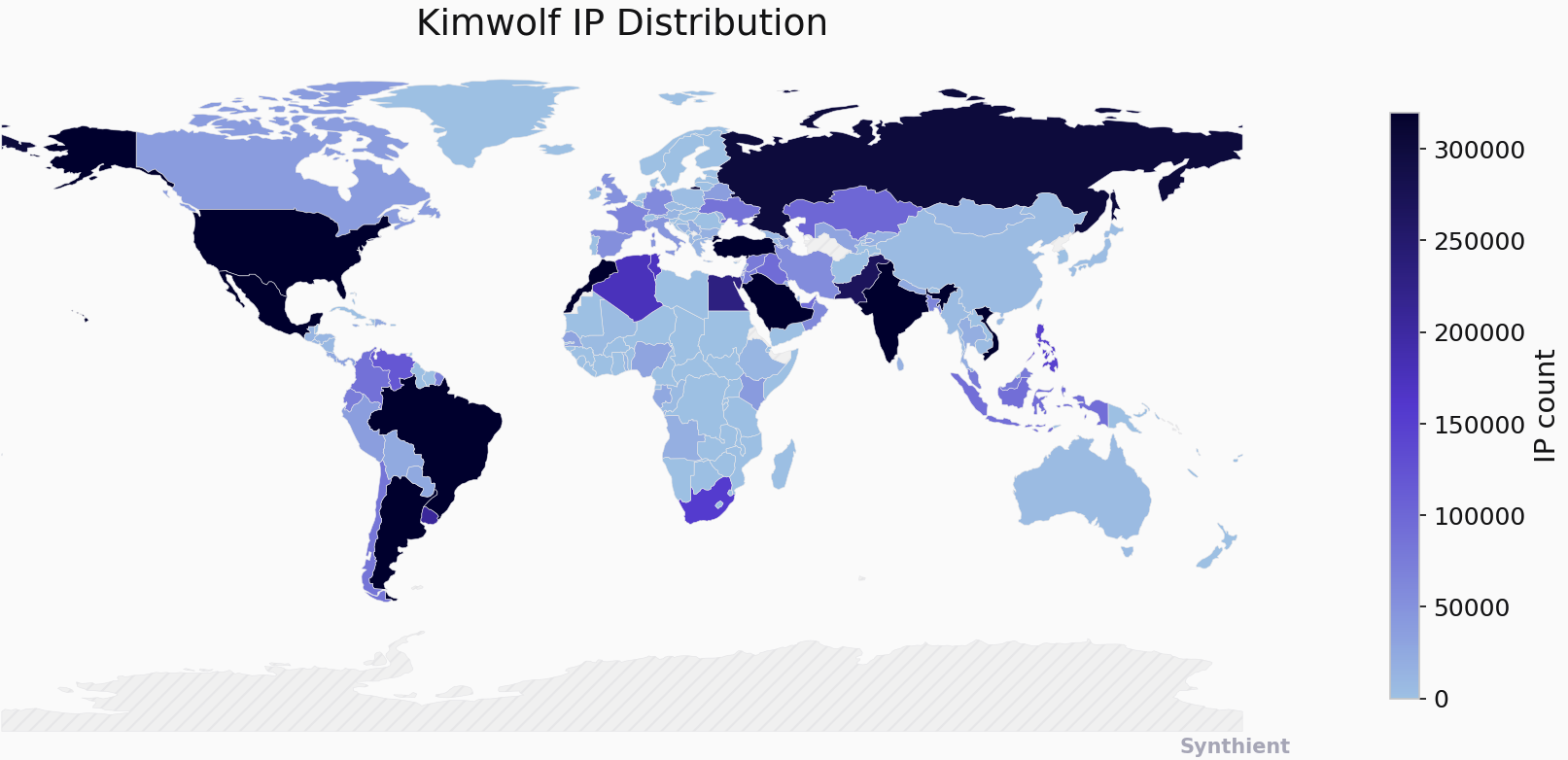
    The security company Synthient currently sees more than 2 million infected Kimwolf devices distributed globally but with concentrations in Vietnam, Brazil, India, Saudi Arabia, Russia and the United States. Synthient found that two-thirds of the Kimwolf infections are Android TV boxes with no security or authentication built in.

    The past few months have witnessed the explosive growth of a new botnet dubbed Kimwolf, which experts say has infected more than 2 million devices globally. The Kimwolf malware forces compromised systems to relay malicious and abusive Internet traffic — such as ad fraud, account takeover attempts and mass content scraping — and participate in crippling distributed denial-of-service (DDoS) attacks capable of knocking nearly any website offline for days at a time.

    More important than Kimwolf’s staggering size, however, is the diabolical method it uses to spread so quickly: By effectively tunneling back through various “residential proxy” networks and into the local networks of the proxy endpoints, and by further infecting devices that are hidden behind the assumed protection of the user’s firewall and Internet router.

    Residential proxy networks are sold as a way for customers to anonymize and localize their Web traffic to a specific region, and the biggest of these services allow customers to route their traffic through devices in virtually any country or city around the globe.

    The malware that turns an end-user’s Internet connection into a proxy node is often bundled with dodgy mobile apps and games. These residential proxy programs also are commonly installed via unofficial Android TV boxes sold by third-party merchants on popular e-commerce sites like Amazon, BestBuy, Newegg, and Walmart.

    These TV boxes range in price from $40 to $400, are marketed under a dizzying range of no-name brands and model numbers, and frequently are advertised as a way to stream certain types of subscription video content for free. But there’s a hidden cost to this transaction: As we’ll explore in a moment, these TV boxes make up a considerable chunk of the estimated two million systems currently infected with Kimwolf.

    Some of the unsanctioned Android TV boxes that come with residential proxy malware pre-installed. Image: Synthient.

    Kimwolf also is quite good at infecting a range of Internet-connected digital photo frames that likewise are abundant at major e-commerce websites. In November 2025, researchers from Quokka published a report (PDF) detailing serious security issues in Android-based digital picture frames running the Uhale app — including Amazon’s bestselling digital frame as of March 2025.

    There are two major security problems with these photo frames and unofficial Android TV boxes. The first is that a considerable percentage of them come with malware pre-installed, or else require the user to download an unofficial Android App Store and malware in order to use the device for its stated purpose (video content piracy). The most typical of these uninvited guests are small programs that turn the device into a residential proxy node that is resold to others.

    The second big security nightmare with these photo frames and unsanctioned Android TV boxes is that they rely on a handful of Internet-connected microcomputer boards that have no discernible security or authentication requirements built-in. In other words, if you are on the same network as one or more of these devices, you can likely compromise them simultaneously by issuing a single command across the network.

    THERE’S NO PLACE LIKE 127.0.0.1

    The combination of these two security realities came to the fore in October 2025, when an undergraduate computer science student at the Rochester Institute of Technology began closely tracking Kimwolf’s growth, and interacting directly with its apparent creators on a daily basis.

    Benjamin Brundage is the 22-year-old founder of the security firm Synthient, a startup that helps companies detect proxy networks and learn how those networks are being abused. Conducting much of his research into Kimwolf while studying for final exams, Brundage told KrebsOnSecurity in late October 2025 he suspected Kimwolf was a new Android-based variant of Aisuru, a botnet that was incorrectly blamed for a number of record-smashing DDoS attacks last fall.

    Brundage says Kimwolf grew rapidly by abusing a glaring vulnerability in many of the world’s largest residential proxy services. The crux of the weakness, he explained, was that these proxy services weren’t doing enough to prevent their customers from forwarding requests to internal servers of the individual proxy endpoints.

    Most proxy services take basic steps to prevent their paying customers from “going upstream” into the local network of proxy endpoints, by explicitly denying requests for local addresses specified in RFC-1918, including the well-known Network Address Translation (NAT) ranges 10.0.0.0/8, 192.168.0.0/16, and 172.16.0.0/12. These ranges allow multiple devices in a private network to access the Internet using a single public IP address, and if you run any kind of home or office network, your internal address space operates within one or more of these NAT ranges.

    However, Brundage discovered that the people operating Kimwolf had figured out how to talk directly to devices on the internal networks of millions of residential proxy endpoints, simply by changing their Domain Name System (DNS) settings to match those in the RFC-1918 address ranges.

    “It is possible to circumvent existing domain restrictions by using DNS records that point to 192.168.0.1 or 0.0.0.0,” Brundage wrote in a first-of-its-kind security advisory sent to nearly a dozen residential proxy providers in mid-December 2025. “This grants an attacker the ability to send carefully crafted requests to the current device or a device on the local network. This is actively being exploited, with attackers leveraging this functionality to drop malware.”

    As with the digital photo frames mentioned above, many of these residential proxy services run solely on mobile devices that are running some game, VPN or other app with a hidden component that turns the user’s mobile phone into a residential proxy — often without any meaningful consent.

    In a report published today, Synthient said key actors involved in Kimwolf were observed monetizing the botnet through app installs, selling residential proxy bandwidth, and selling its DDoS functionality.

    “Synthient expects to observe a growing interest among threat actors in gaining unrestricted access to proxy networks to infect devices, obtain network access, or access sensitive information,” the report observed. “Kimwolf highlights the risks posed by unsecured proxy networks and their viability as an attack vector.”

    ANDROID DEBUG BRIDGE

    After purchasing a number of unofficial Android TV box models that were most heavily represented in the Kimwolf botnet, Brundage further discovered the proxy service vulnerability was only part of the reason for Kimwolf’s rapid rise: He also found virtually all of the devices he tested were shipped from the factory with a powerful feature called Android Debug Bridge (ADB) mode enabled by default.

    Many of the unofficial Android TV boxes infected by Kimwolf include the ominous disclaimer: “Made in China. Overseas use only.” Image: Synthient.

    ADB is a diagnostic tool intended for use solely during the manufacturing and testing processes, because it allows the devices to be remotely configured and even updated with new (and potentially malicious) firmware. However, shipping these devices with ADB turned on creates a security nightmare because in this state they constantly listen for and accept unauthenticated connection requests.

    For example, opening a command prompt and typing “adb connect” along with a vulnerable device’s (local) IP address followed immediately by “:5555” will very quickly offer unrestricted “super user” administrative access.

    Brundage said by early December, he’d identified a one-to-one overlap between new Kimwolf infections and proxy IP addresses offered for rent by China-based IPIDEA, currently the world’s largest residential proxy network by all accounts.

    “Kimwolf has almost doubled in size this past week, just by exploiting IPIDEA’s proxy pool,” Brundage told KrebsOnSecurity in early December as he was preparing to notify IPIDEA and 10 other proxy providers about his research.

    Brundage said Synthient first confirmed on December 1, 2025 that the Kimwolf botnet operators were tunneling back through IPIDEA’s proxy network and into the local networks of systems running IPIDEA’s proxy software. The attackers dropped the malware payload by directing infected systems to visit a specific Internet address and to call out the pass phrase “krebsfiveheadindustries” in order to unlock the malicious download.

    On December 30, Synthient said it was tracking roughly 2 million IPIDEA addresses exploited by Kimwolf in the previous week. Brundage said he has witnessed Kimwolf rebuilding itself after one recent takedown effort targeting its control servers — from almost nothing to two million infected systems just by tunneling through proxy endpoints on IPIDEA for a couple of days.

    Brundage said IPIDEA has a seemingly inexhaustible supply of new proxies, advertising access to more than 100 million residential proxy endpoints around the globe in the past week alone. Analyzing the exposed devices that were part of IPIDEA’s proxy pool, Synthient said it found more than two-thirds were Android devices that could be compromised with no authentication needed.

    SECURITY NOTIFICATION AND RESPONSE

    After charting a tight overlap in Kimwolf-infected IP addresses and those sold by IPIDEA, Brundage was eager to make his findings public: The vulnerability had clearly been exploited for several months, although it appeared that only a handful of cybercrime actors were aware of the capability. But he also knew that going public without giving vulnerable proxy providers an opportunity to understand and patch it would only lead to more mass abuse of these services by additional cybercriminal groups.

    On December 17, Brundage sent a security notification to all 11 of the apparently affected proxy providers, hoping to give each at least a few weeks to acknowledge and address the core problems identified in his report before he went public. Many proxy providers who received the notification were resellers of IPIDEA that white-labeled the company’s service.

    KrebsOnSecurity first sought comment from IPIDEA in October 2025, in reporting on a story about how the proxy network appeared to have benefitted from the rise of the Aisuru botnet, whose administrators appeared to shift from using the botnet primarily for DDoS attacks to simply installing IPIDEA’s proxy program, among others.

    On December 25, KrebsOnSecurity received an email from an IPIDEA employee identified only as “Oliver,” who said allegations that IPIDEA had benefitted from Aisuru’s rise were baseless.

    “After comprehensively verifying IP traceability records and supplier cooperation agreements, we found no association between any of our IP resources and the Aisuru botnet, nor have we received any notifications from authoritative institutions regarding our IPs being involved in malicious activities,” Oliver wrote. “In addition, for external cooperation, we implement a three-level review mechanism for suppliers, covering qualification verification, resource legality authentication and continuous dynamic monitoring, to ensure no compliance risks throughout the entire cooperation process.”

    “IPIDEA firmly opposes all forms of unfair competition and malicious smearing in the industry, always participates in market competition with compliant operation and honest cooperation, and also calls on the entire industry to jointly abandon irregular and unethical behaviors and build a clean and fair market ecosystem,” Oliver continued.

    Meanwhile, the same day that Oliver’s email arrived, Brundage shared a response he’d just received from IPIDEA’s security officer, who identified himself only by the first name Byron. The security officer said IPIDEA had made a number of important security changes to its residential proxy service to address the vulnerability identified in Brundage’s report.

    “By design, the proxy service does not allow access to any internal or local address space,” Byron explained. “This issue was traced to a legacy module used solely for testing and debugging purposes, which did not fully inherit the internal network access restrictions. Under specific conditions, this module could be abused to reach internal resources. The affected paths have now been fully blocked and the module has been taken offline.”

    Byron told Brundage IPIDEA also instituted multiple mitigations for blocking DNS resolution to internal (NAT) IP ranges, and that it was now blocking proxy endpoints from forwarding traffic on “high-risk” ports “to prevent abuse of the service for scanning, lateral movement, or access to internal services.”
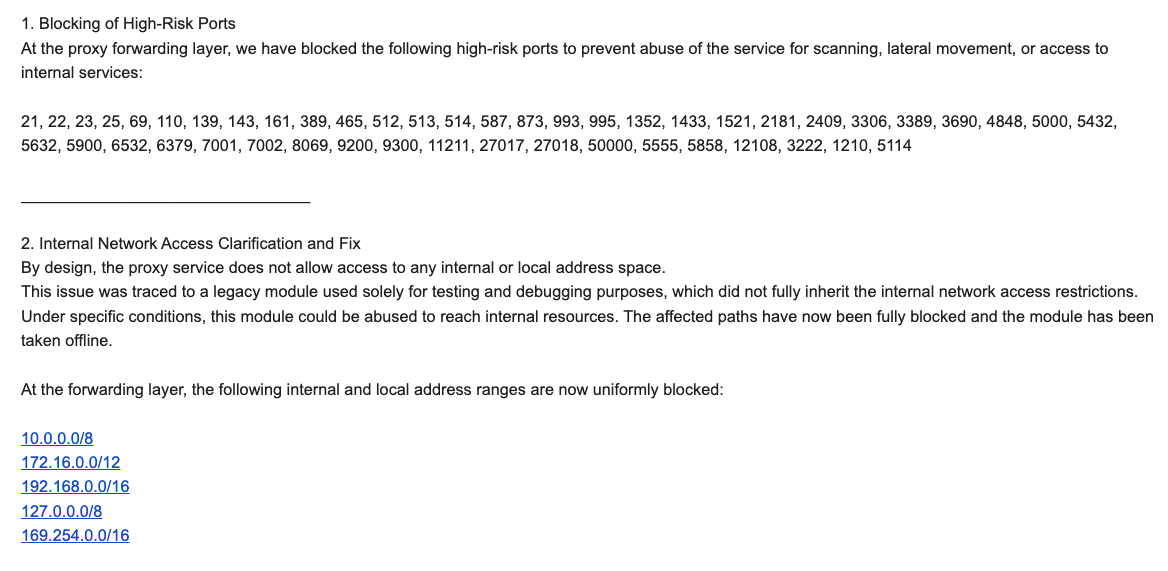
    An excerpt from an email sent by IPIDEA’s security officer in response to Brundage’s vulnerability notification. Click to enlarge.

    Brundage said IPIDEA appears to have successfully patched the vulnerabilities he identified. He also noted he never observed the Kimwolf actors targeting proxy services other than IPIDEA, which has not responded to requests for comment.

    Riley Kilmer is founder of Spur.us, a technology firm that helps companies identify and filter out proxy traffic. Kilmer said Spur has tested Brundage’s findings and confirmed that IPIDEA and all of its affiliate resellers indeed allowed full and unfiltered access to the local LAN.

    Kilmer said one model of unsanctioned Android TV boxes that is especially popular — the Superbox, which we profiled in November’s Is Your Android TV Streaming Box Part of a Botnet? — leaves Android Debug Mode running on localhost:5555.

    “And since Superbox turns the IP into an IPIDEA proxy, a bad actor just has to use the proxy to localhost on that port and install whatever bad SDKs [software development kits] they want,” Kilmer told KrebsOnSecurity.
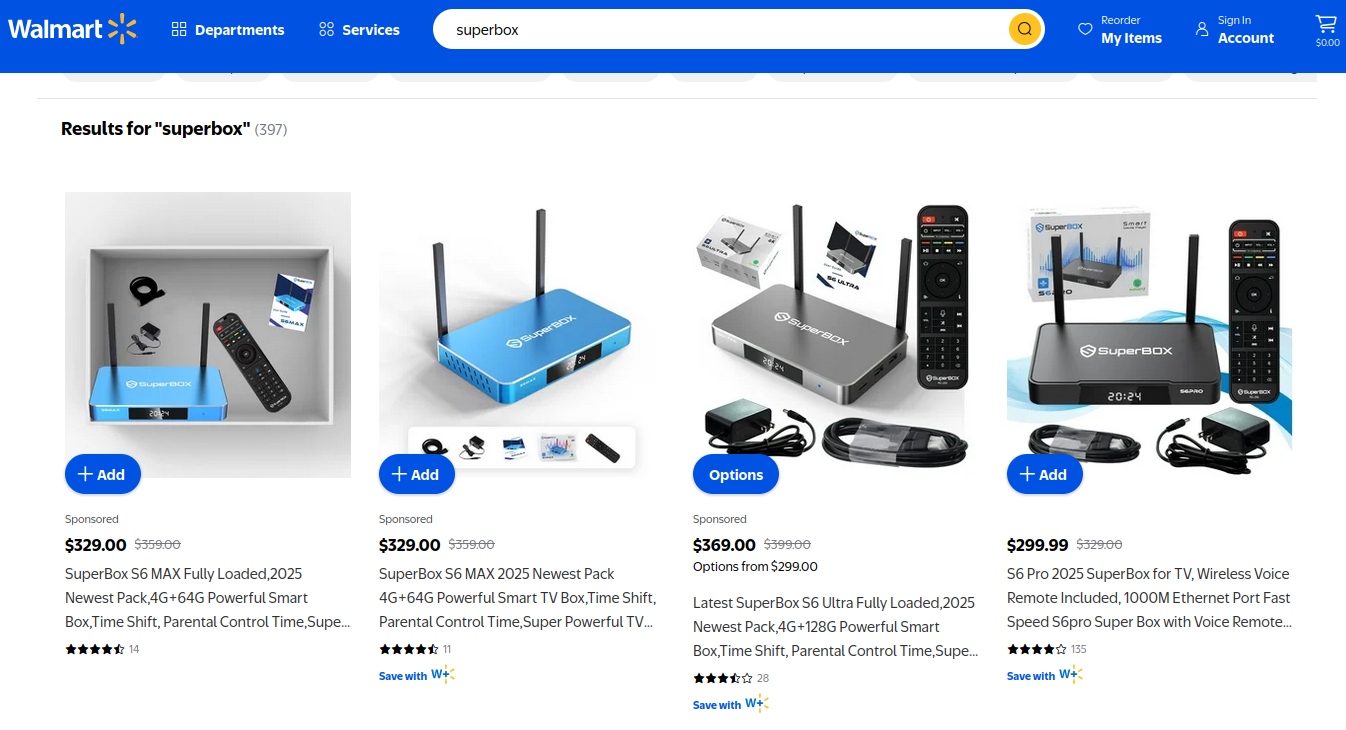
    Superbox media streaming boxes for sale on Walmart.com.

    ECHOES FROM THE PAST

    Both Brundage and Kilmer say IPIDEA appears to be the second or third reincarnation of a residential proxy network formerly known as 911S5 Proxy, a service that operated between 2014 and 2022 and was wildly popular on cybercrime forums. 911S5 Proxy imploded a week after KrebsOnSecurity published a deep dive on the service’s sketchy origins and leadership in China.

    In that 2022 profile, we cited work by researchers at the University of Sherbrooke in Canada who were studying the threat 911S5 could pose to internal corporate networks. The researchers noted that “the infection of a node enables the 911S5 user to access shared resources on the network such as local intranet portals or other services.”

    “It also enables the end user to probe the LAN network of the infected node,” the researchers explained. “Using the internal router, it would be possible to poison the DNS cache of the LAN router of the infected node, enabling further attacks.”

    911S5 initially responded to our reporting in 2022 by claiming it was conducting a top-down security review of the service. But the proxy service abruptly closed up shop just one week later, saying a malicious hacker had destroyed all of the company’s customer and payment records. In July 2024, The U.S. Department of the Treasury sanctioned the alleged creators of 911S5, and the U.S. Department of Justice arrested the Chinese national named in my 2022 profile of the proxy service.

    Kilmer said IPIDEA also operates a sister service called 922 Proxy, which the company has pitched from Day One as a seamless alternative to 911S5 Proxy.

    “You cannot tell me they don’t want the 911 customers by calling it that,” Kilmer said.

    Among the recipients of Synthient’s notification was the proxy giant Oxylabs. Brundage shared an email he received from Oxylabs’ security team on December 31, which acknowledged Oxylabs had started rolling out security modifications to address the vulnerabilities described in Synthient’s report.

    Reached for comment, Oxylabs confirmed they “have implemented changes that now eliminate the ability to bypass the blocklist and forward requests to private network addresses using a controlled domain.” But it said there is no evidence that Kimwolf or other other attackers exploited its network.

    “In parallel, we reviewed the domains identified in the reported exploitation activity and did not observe traffic associated with them,” the Oxylabs statement continued. “Based on this review, there is no indication that our residential network was impacted by these activities.”

    PRACTICAL IMPLICATIONS

    Consider the following scenario, in which the mere act of allowing someone to use your Wi-Fi network could lead to a Kimwolf botnet infection. In this example, a friend or family member comes to stay with you for a few days, and you grant them access to your Wi-Fi without knowing that their mobile phone is infected with an app that turns the device into a residential proxy node. At that point, your home’s public IP address will show up for rent at the website of some residential proxy provider.

    Miscreants like those behind Kimwolf then use residential proxy services online to access that proxy node on your IP, tunnel back through it and into your local area network (LAN), and automatically scan the internal network for devices with Android Debug Bridge mode turned on.

    By the time your guest has packed up their things, said their goodbyes and disconnected from your Wi-Fi, you now have two devices on your local network — a digital photo frame and an unsanctioned Android TV box — that are infected with Kimwolf. You may have never intended for these devices to be exposed to the larger Internet, and yet there you are.

    Here’s another possible nightmare scenario: Attackers use their access to proxy networks to modify your Internet router’s settings so that it relies on malicious DNS servers controlled by the attackers — allowing them to control where your Web browser goes when it requests a website. Think that’s far-fetched? Recall the DNSChanger malware from 2012 that infected more than a half-million routers with search-hijacking malware, and ultimately spawned an entire security industry working group focused on containing and eradicating it.

    XLAB

    Much of what is published so far on Kimwolf has come from the Chinese security firm XLab, which was the first to chronicle the rise of the Aisuru botnet in late 2024. In its latest blog post, XLab said it began tracking Kimwolf on October 24, when the botnet’s control servers were swamping Cloudflare’s DNS servers with lookups for the distinctive domain 14emeliaterracewestroxburyma02132[.]su.

    This domain and others connected to early Kimwolf variants spent several weeks topping Cloudflare’s chart of the Internet’s most sought-after domains, edging out Google.com and Apple.com of their rightful spots in the top 5 most-requested domains. That’s because during that time Kimwolf was asking its millions of bots to check in frequently using Cloudflare’s DNS servers.

    The Chinese security firm XLab found the Kimwolf botnet had enslaved between 1.8 and 2 million devices, with heavy concentrations in Brazil, India, The United States of America and Argentina. Image: blog.xLab.qianxin.com

    It is clear from reading the XLab report that KrebsOnSecurity (and security experts) probably erred in misattributing some of Kimwolf’s early activities to the Aisuru botnet, which appears to be operated by a different group entirely. IPDEA may have been truthful when it said it had no affiliation with the Aisuru botnet, but Brundage’s data left no doubt that its proxy service clearly was being massively abused by Aisuru’s Android variant, Kimwolf.

    XLab said Kimwolf has infected at least 1.8 million devices, and has shown it is able to rebuild itself quickly from scratch.

    “Analysis indicates that Kimwolf’s primary infection targets are TV boxes deployed in residential network environments,” XLab researchers wrote. “Since residential networks usually adopt dynamic IP allocation mechanisms, the public IPs of devices change over time, so the true scale of infected devices cannot be accurately measured solely by the quantity of IPs. In other words, the cumulative observation of 2.7 million IP addresses does not equate to 2.7 million infected devices.”

    XLab said measuring Kimwolf’s size also is difficult because infected devices are distributed across multiple global time zones. “Affected by time zone differences and usage habits (e.g., turning off devices at night, not using TV boxes during holidays, etc.), these devices are not online simultaneously, further increasing the difficulty of comprehensive observation through a single time window,” the blog post observed.

    XLab noted that the Kimwolf author shows an almost ‘obsessive’ fixation” on Yours Truly, apparently leaving “easter eggs” related to my name in multiple places through the botnet’s code and communications:
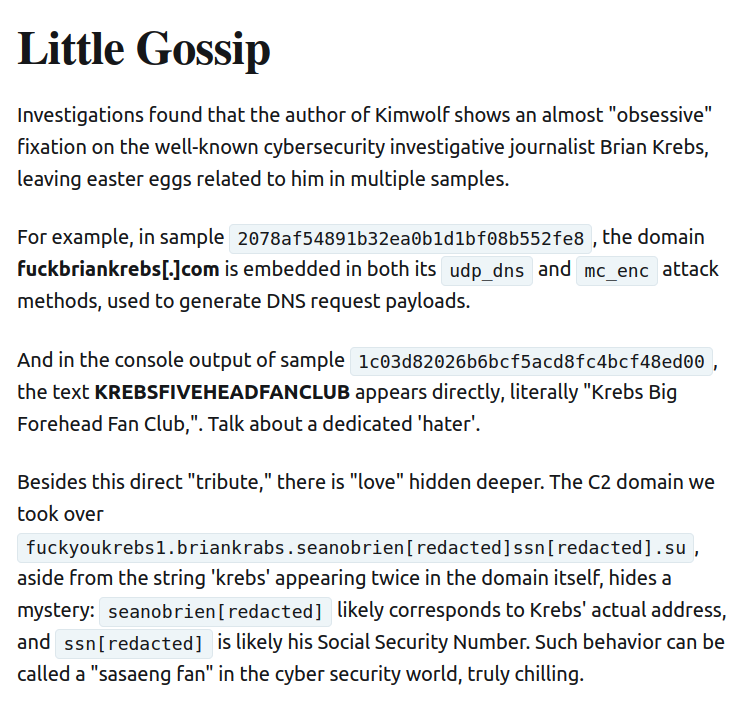
    Image: XLAB.

    ANALYSIS AND ADVICE

    One frustrating aspect of threats like Kimwolf is that in most cases it is not easy for the average user to determine if there are any devices on their internal network which may be vulnerable to threats like Kimwolf and/or already infected with residential proxy malware.

    Let’s assume that through years of security training or some dark magic you can successfully identify that residential proxy activity on your internal network was linked to a specific mobile device inside your house: From there, you’d still need to isolate and remove the app or unwanted component that is turning the device into a residential proxy.

    Also, the tooling and knowledge needed to achieve this kind of visibility just isn’t there from an average consumer standpoint. The work that it takes to configure your network so you can see and interpret logs of all traffic coming in and out is largely beyond the skillset of most Internet users (and, I’d wager, many security experts). But it’s a topic worth exploring in an upcoming story.

    Happily, Synthient has erected a page on its website that will state whether a visitor’s public Internet address was seen among those of Kimwolf-infected systems. Brundage also has compiled a list of the unofficial Android TV boxes that are most highly represented in the Kimwolf botnet.

    If you own a TV box that matches one of these model names and/or numbers, please just rip it out of your network. If you encounter one of these devices on the network of a family member or friend, send them a link to this story and explain that it’s not worth the potential hassle and harm created by keeping them plugged in.
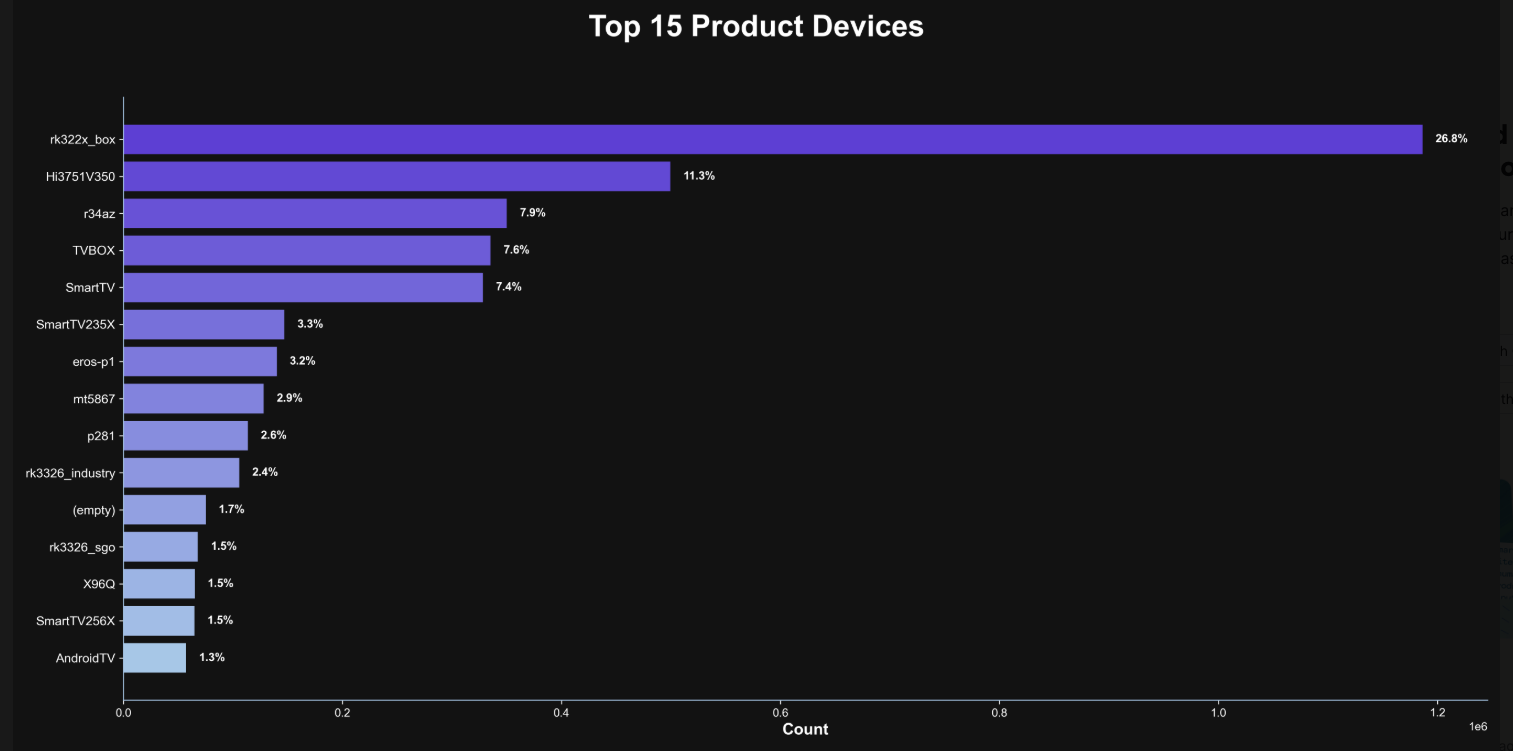
    The top 15 product devices represented in the Kimwolf botnet, according to Synthient.

    Chad Seaman is a principal security researcher with Akamai Technologies. Seaman said he wants more consumers to be wary of these pseudo Android TV boxes to the point where they avoid them altogether.

    “I want the consumer to be paranoid of these crappy devices and of these residential proxy schemes,” he said. “We need to highlight why they’re dangerous to everyone and to the individual. The whole security model where people think their LAN (Local Internal Network) is safe, that there aren’t any bad guys on the LAN so it can’t be that dangerous is just really outdated now.”

    “The idea that an app can enable this type of abuse on my network and other networks, that should really give you pause,” about which devices to allow onto your local network, Seaman said. “And it’s not just Android devices here. Some of these proxy services have SDKs for Mac and Windows, and the iPhone. It could be running something that inadvertently cracks open your network and lets countless random people inside.”

    In July 2025, Google filed a “John Doe” lawsuit (PDF) against 25 unidentified defendants collectively dubbed the “BadBox 2.0 Enterprise,” which Google described as a botnet of over ten million unsanctioned Android streaming devices engaged in advertising fraud. Google said the BADBOX 2.0 botnet, in addition to compromising multiple types of devices prior to purchase, also can infect devices by requiring the download of malicious apps from unofficial marketplaces.

    Google’s lawsuit came on the heels of a June 2025 advisory from the Federal Bureau of Investigation (FBI), which warned that cyber criminals were gaining unauthorized access to home networks by either configuring the products with malware prior to the user’s purchase, or infecting the device as it downloads required applications that contain backdoors — usually during the set-up process.

    The FBI said BADBOX 2.0 was discovered after the original BADBOX campaign was disrupted in 2024. The original BADBOX was identified in 2023, and primarily consisted of Android operating system devices that were compromised with backdoor malware prior to purchase.

    Lindsay Kaye is vice president of threat intelligence at HUMAN Security, a company that worked closely on the BADBOX investigations. Kaye said the BADBOX botnets and the residential proxy networks that rode on top of compromised devices were detected because they enabled a ridiculous amount of advertising fraud, as well as ticket scalping, retail fraud, account takeovers and content scraping.

    Kaye said consumers should stick to known brands when it comes to purchasing things that require a wired or wireless connection.

    “If people are asking what they can do to avoid being victimized by proxies, it’s safest to stick with name brands,” Kaye said. “Anything promising something for free or low-cost, or giving you something for nothing just isn’t worth it. And be careful about what apps you allow on your phone.”

    Many wireless routers these days make it relatively easy to deploy a “Guest” wireless network on-the-fly. Doing so allows your guests to browse the Internet just fine but it blocks their device from being able to talk to other devices on the local network — such as shared folders, printers and drives. If someone — a friend, family member, or contractor — requests access to your network, give them the guest Wi-Fi network credentials if you have that option.

    There is a small but vocal pro-piracy camp that is almost condescendingly dismissive of the security threats posed by these unsanctioned Android TV boxes. These tech purists positively chafe at the idea of people wholesale discarding one of these TV boxes. A common refrain from this camp is that Internet-connected devices are not inherently bad or good, and that even factory-infected boxes can be flashed with new firmware or custom ROMs that contain no known dodgy software.

    However, it’s important to point out that the majority of people buying these devices are not security or hardware experts; the devices are sought out because they dangle something of value for “free.” Most buyers have no idea of the bargain they’re making when plugging one of these dodgy TV boxes into their network.

    It is somewhat remarkable that we haven’t yet seen the entertainment industry applying more visible pressure on the major e-commerce vendors to stop peddling this insecure and actively malicious hardware that is largely made and marketed for video piracy. These TV boxes are a public nuisance for bundling malicious software while having no apparent security or authentication built-in, and these two qualities make them an attractive nuisance for cybercriminals.

    Stay tuned for Part II in this series, which will poke through clues left behind by the people who appear to have built Kimwolf and benefited from it the most.


    ☐ ☆ ✇ /r/netsec - Information Security News & Discussion

    Windows Registry Persistence Techniques without Registry Callbacks

    By: /u/radkawar — January 2nd 2026 at 13:15

    A blog post on a technique I've been sitting on for almost 18 months that is wildly succesful against all EDRs. Why? They don't see anything other than the file write to %USERPROFILE% (NTUSER.MAN) and not the writes to HKCU.

    Ultimately making it incredibly effective for medium integrity persistence through the registry/without tripping detections.

    submitted by /u/radkawar
    [link] [comments]
    ☐ ☆ ✇ WIRED

    How Protesters Became Content for the Cops

    By: Dell Cameron — January 2nd 2026 at 11:00
    The tactics behind protest policing are changing—from one of cooperation to intentional antagonism for political marketing purposes.
    ☐ ☆ ✇ /r/netsec - Information Security News & Discussion

    r/netsec monthly discussion & tool thread

    By: /u/albinowax — January 1st 2026 at 14:29

    Questions regarding netsec and discussion related directly to netsec are welcome here, as is sharing tool links.

    Rules & Guidelines

    • Always maintain civil discourse. Be awesome to one another - moderator intervention will occur if necessary.
    • Avoid NSFW content unless absolutely necessary. If used, mark it as being NSFW. If left unmarked, the comment will be removed entirely.
    • If linking to classified content, mark it as such. If left unmarked, the comment will be removed entirely.
    • Avoid use of memes. If you have something to say, say it with real words.
    • All discussions and questions should directly relate to netsec.
    • No tech support is to be requested or provided on r/netsec.

    As always, the content & discussion guidelines should also be observed on r/netsec.

    Feedback

    Feedback and suggestions are welcome, but don't post it here. Please send it to the moderator inbox.

    submitted by /u/albinowax
    [link] [comments]
    ☐ ☆ ✇ /r/netsec - Information Security News & Discussion

    built an SSRF prevention library

    By: /u/Inner-Combination177 — January 1st 2026 at 12:56

    nullspace - ssrf protection for node.js

    • blocks private ips, cloud metadata, loopback

    • handles encoding tricks (0x7f000001 = 127.0.0.1)

    • dns rebinding protection built-in

    • zero deps

    github : [ https://github.com/bymehul/nullspace ]

    submitted by /u/Inner-Combination177
    [link] [comments]
    ☐ ☆ ✇ McAfee Blogs

    New Year Reset: A Quick Guide to Improving Your Digital Hygiene in 2026

    By: Brooke Seipel — December 31st 2025 at 11:00

    Scams didn’t slow down in 2025—and all signs point to the problem getting worse in 2026.

    While the final numbers aren’t in yet, reported losses are already on track to break records. Through just the first half of 2025, the Federal Trade Commission (FTC) cited nearly $6.5 billion in scam-related losses, putting the year on pace to surpass 2024’s total. And it’s not just isolated incidents: 73% of Americans say they’ve experienced at least one scam or online attack.

    As scams become more convincing, often powered by AI and designed to blend into everyday digital life, basic “spot the red flag” advice isn’t enough anymore. Protecting yourself now means tightening up your digital hygiene: how you manage passwords, personal data, online accounts, and the everyday tools you rely on to stay safe.

    The good news is that modern protection has evolved just as quickly as the threats. Many of the most effective safeguards can be set up quickly and then work in the background over time.

    Below, we’ll walk through practical steps you can take to improve your digital hygiene for 2026, using protections included with McAfee+ to help reduce your exposure to scams, data misuse, and identity theft.

    1) Replace every weak password, starting with your email. 

    Think about your passwords and everything they give you access to … your finances, online shopping accounts, banking, and of course every important thing in your email account. 

    Now are any of those passwords weak, re-used, or highly similar? Don’t worry if the answer to that is “yes.” You can switch them over to strong, unique passwords across all your accounts. Using a password manager like ours helps you create strong, unique while also storing them securely. Quickly. 

    Q&A   Q: Should I use a password manager? 

    A: Yes. It’s the easiest way to create strong, unique passwords for all your online accounts, which protects you from data breaches and hacks.  


    So, what makes up a “strong and unique” password? 

    It contains a mix of 16 uppercase and lowercase letters, numbers, and symbols while never reusing that password elsewhere. That makes the password incredibly tough to crack and protects your other accounts if that password gets caught up in a breach (it won’t work on any other account). 

    Yes, creating strong and unique passwords for your dozens and dozens of accounts can be … demanding. But that’s where a password manager comes in. It does that work for you. 

    2) Delete those old accounts and protect yourself from data breaches. 

    Speaking of all the accounts you have, how many of them do you really need? And how many of them have you forgotten about altogether? It’s time to track them down and close them up. Why? Data breaches of various sizes hack into an estimated 3.5 million accounts on average each day, so the odds of an old account of yours getting compromised are better than you might think. But where do you even start? 


    Q&A 

     Q: Should I delete my old accounts? 

    A: Yes. When you delete old accounts, you reduce your digital footprint and lower the risk of exposure to data breaches, both of which help protect your personal info.  


    Our Online Account Cleanup can track down those old accounts for you. It scans for accounts you no longer use and helps you delete the ones you choose, along with your personal info. In our McAfee+ Advanced and McAfee+ Ultimate plans, you get full-service Online Account Cleanup, which sends the data deletion requests for you. 

    3) Keep spammers and scammers at bay by removing personal info from the internet. 

    Data brokers sell all kinds of info that power all kinds of spam and scams. It’s one way spammers and scammers get contact info like emails and phone numbers, and it’s yet another way they get detailed info to target their ads and their attacks. 

    For example, beyond your full name, home address, phone numbers, email addresses, and date of birth, many also have info about your family members, employment, and past purchases. Data brokers might gather and sell other info like religious and political leanings, health conditions, and employment history. Simply put, this detailed profile makes it easier for spammers and scammers to target you. 


    Q&A 


     Q: Can people find my detailed personal info online?  

    Yes, and some of the easiest places to find it are on data broker sites. They collect and analyze up to hundreds of bits of personal info, often without your knowledge or consent. Further, they’ll sell it to any buyer, including scammers. 


    Where do they harvest this info? From public records, shopper loyalty programs, and even from app data—all kinds of sources. And that underscores the problem, some data brokers keep exhaustive amounts of data about people, all in one place.  

    And they’ll sell it to anyone who pays for it. You can help reduce those scam texts and calls by removing your info from those sites. A service like our Personal Data Cleanup can do that work for you. It scans some of the riskiest data broker sites, shows you which ones are selling your personal info, and helps you remove it. 

    4) Protect privacy with a VPN (it’s not just for travel anymore). 

    One of the first things that comes to mind about VPNs is travel, a great way you can stay secure while using public Wi-Fi in airports and cafes. It works at home as well, giving you an extra layer of security when you bank, shop, or do anything that involves sensitive info. Yet it offers another big benefit. It helps make you more private, because it’s not just hackers who want to snoop on you online. 


    Q&A Block 


     Q: What is a VPN? 

     A: A VPN, or Virtual Private Network, hides your IP address and encrypts your internet connection in a secure “tunnel” that shields your online activity from snoops, advertisers, and your Internet Service Provider (ISP). 


    For example, some ISPs collect your browsing data. In the United States and many other countries, ISPs can legally monitor and record info about the websites you visit and the apps you use. They can use it for advertising and analytics purposes, and, in some cases, they may share it with third parties. 

    When you use a VPN, it encrypts all the data leaving your device and routes it through a secure server. As a result, your ISP can only see that you are connected to a VPN server, and it can’t track which websites you visit or the data you send and receive. Without a doubt, going online with a VPN makes you safer and keeps you more private.  

    5) As AI scams become the norm, get a scam detector working for you. 

    We saw big spikes in several types of scams over the year, and naturally a spike in reported losses followed. One reason for the jump is that AI tools have made it even easier for scammers to create convincing texts, emails, and deepfake videos designed to rip people off.   


    Q&A 

     Q: How bad are scams today? 

     A: According to a 2025 Pew Research Center survey, 73% of U.S. adults said they’ve experienced at least one online scam or attack, with 32% reporting an incident within the past year.iv  


    They’re getting tougher to spot too. In the earlier days of AI-created content, you could often spot the telltale signs of a fake. That’s not always the case anymore, and scams are looking more and more sophisticated as AI tools evolve. 

    But you have tools of your own. Our Scam Detector protects you across text, email, and video by spotting scams and detecting deepfake videos (like the one of a deepfaked Taylor Swift promoting a bogus cookware offer). You also have our Web Protection which detects links to scam sites and other sketchy corners of the internet while you browse. Both will alert you if a link might take you to a sketchy site. It’ll also block those sites if you accidentally tap or click on a bad link. 

    6) And just in case, get the reassurance of identity theft protection. 

    So, let’s say the unfortunate happens to you. You get scammed. Maybe it’s a few bucks, maybe it’s more. You’re faced with a couple issues. One, that money could be gone for good depending on how you paid the scammer. Two, also depending on the payment method, the scammer might have your financial info.   


    Q&A Block 


     Q: What is the cost of identity theft? 

    A: Based on reports to the FTC, the median loss was about $500 in 2024, with more than 10% of victims claiming they lost $10,000 or more. However, it levels an emotional cost as well. The time and stress involved in resolving identity theft can be significant. 


    This is where something like our ID Theft & Restoration Coverage comes in. It gives you up to $2 million in identity theft coverage and identity restoration support if it’s determined you’re a victim of identity theft.​ Further, it puts a licensed recovery pro on the case to restore your credit and your identity, which takes that time-consuming burden off your shoulders. 

    The post New Year Reset: A Quick Guide to Improving Your Digital Hygiene in 2026 appeared first on McAfee Blog.

    ☐ ☆ ✇ McAfee Blogs

    Learn to Identify and Avoid Malicious Browser Extensions

    By: McAfee Labs — November 20th 2025 at 20:00

    Browser extensions have become essential parts of how we browse, bank, work, and shop online. From password managers to ad blockers, these tools can significantly improve your digital life when chosen wisely. Chief among these are browser plug-ins, which extend its functionality. Almost all popular browsers support these extensions, unfortunately, making them one of the most commonly used malware attack vectors.

    In this guide, you will learn about the advantages and security risks of browser extensions, the role that permissions play in ensuring your privacy when using these extensions, and some best practices when using them.

    Browser extensions and their malicious counterparts

    Browser extensions are small software programs that enhance your web browser by adding new functionality or modifying existing ones. Think of them as helpful extra tools that can block ads, manage passwords, check prices while shopping, or customize how websites look and behave. Legitimate extensions make your browsing experience more efficient and enjoyable.

    Cybercriminals, however, have taken advantage of their popularity by creating malicious versions disguised as useful tools that secretly operate with harmful intentions. Some of these malicious browser extensions access and modify web pages, monitor your browsing activity, and interact with websites on your behalf.

    While legitimate extensions request only the minimum permissions necessary for their stated purpose, malicious extensions often request more permissions than they need to access your browsing data and history.

    Core tactics of malicious browser extensions

    Malicious browser extensions typically operate through specific methods that can significantly impact your daily online activities, from casual browsing to important financial transactions, including:

    • Permission abuse occurs when an extension requests far more access than it needs to operate. For example, a weather extension that claims to show local forecasts might request permission to track the websites you visit, allowing it to monitor everything you do online and capture sensitive information such as passwords and credit card numbers without your knowledge.
    • Ad injection is where malicious extensions insert unwanted advertisements into web pages you’re viewing, appearing as pop-ups, banner ads, or even replacing legitimate advertisements with malicious ones. These injected ads disrupt your browsing experience, can lead to scam websites, or attempt to trick you into downloading additional malware.
    • Data theft is one of the most serious threats posed by malicious extensions. These programs can silently capture everything you type, including usernames, passwords, credit card information, and personal details, exposing your personal information to cybercriminals. When you log into your online banking or online shopping account, the malicious extension might record your login credentials and account information.
    • Traffic redirection involves redirecting your legitimate web traffic to scam websites designed to steal your information or trick you into making fraudulent purchases. This is particularly dangerous when you’re trying to access your bank’s website or other financial services, but are redirected to a convincing fake site that could capture your login credentials.
    • Drive-by downloads can be triggered by these ill-intentioned browser extensions when you visit specific websites, click on seemingly innocent links or files, or even during routine browsing activities. The links and files are disguised as legitimate software updates, media files, or useful applications that, in fact, could infect your device with ransomware, keyloggers, or other types of malware.
    • Cryptocurrency mining extensions secretly use your computer’s processing power to mine cryptocurrency for the extension creator, running resource-intensive calculations in the background without your knowledge or consent. This unauthorized mining activity causes your device to run more slowly, drain your laptop battery faster, consume more electricity, generate excess heat, and potentially shorten your hardware’s lifespan.

    The impact of malicious browser extensions

    If not caught, malicious extensions can disrupt your daily life and compromise your personal security.

    Malicious extensions violate your privacy when they monitor your online behavior and track the websites you view, build a profile of your habits and preferences, and even obtain your home address and other personal details. These details can be used for identity theft, social engineering attacks, or sold to data brokers, ultimately compromising your privacy and potentially affecting your real-world safety and financial security.

    When it comes to online shopping, some malicious extensions could pressure you into hasty purchase decisions, intercept your checkout process, and capture your payment information. Once cybercriminals have your shopping account credentials, they can impersonate you to make unauthorized purchases.

    Similar incidents could happen with your banking and financial accounts. Malicious browser extensions can steal your login credentials, account numbers, transaction details, and eventually your money. Some cybercriminals have gone as far as opening new accounts and applying for loans using your stolen information.

    The most insidious aspect of malicious browser extensions is their ability to operate silently in the background while maintaining the appearance of legitimate functionality. A malicious extension might continue providing its advertised service—such as weather updates or price comparisons—while simultaneously conducting harmful activities, making them effective at avoiding detection.

    On top of the higher electricity bills, degraded device performance and browsing experience, and wasted network bandwidth, malicious extensions violate your values by turning your device into an unwitting money-making tool for cybercriminals while you bear the operational costs. Furthermore, malicious extensions could potentially expose you to additional malware or scams, and involve you in fraudulent advertising schemes.

    Their impact extends beyond your own device and could affect your entire household. On the shared networks and devices, malicious extensions can spread and compromise other users.

    Guidelines to stay safe with browser extensions

    Chrome extensions can absolutely be safe to use when you approach them with the right knowledge and precautions. The vast majority of extensions on the official Chrome Web Store undergo Google’s review process and are built by legitimate, reputable developers who aim to enhance your browsing experience and follow security best practices.

    Additionally, the Chrome Web Store’s rating system and user reviews provide valuable insights into an extension’s reliability and performance. When you stick to well-established extensions with thousands of positive reviews and regular updates, you’re generally in safe territory.

    However, the extension ecosystem does present a few security challenges. The primary risks come from two main areas: permission abuse and post-installation behavior changes. When you install an extension, you give it permission to access various aspects of your browsing data and your device. Some extensions may request more permissions than they actually need, creating potential privacy and security vulnerabilities. Even more concerning, some extensions start with benign functionality but later receive updates that introduce malicious features or get sold to malicious actors who update them with data-harvesting capabilities, turning a once-safe extension into a potential threat.

    To help you navigate these challenges safely, here’s a practical risk assessment framework you can use before installing any Chrome extension. This systematic approach takes just a few minutes but can save you from potential headaches down the road.

    Step 1: Evaluate the source’s reputation

    Start by examining who created the extension. Look for extensions developed by well-known companies or developers with established track records. Check the developer’s website and other extensions they’ve created. Extensions from companies like Google, Microsoft, or other recognized tech firms generally carry lower risk profiles. For individual developers, look for those who maintain a professional online presence and have created multiple successful extensions.

    Step 2: Analyze user reviews and ratings

    Don’t just glance at the overall star rating. Read the actual reviews, look for patterns in user feedback, and pay special attention to recent comments that might indicate changes in the extension’s behavior. Be wary of extensions with suspiciously perfect ratings or reviews that seem artificially generated. Legitimate extensions typically have a mix of ratings with detailed, specific feedback from real users.

    Step 3: Examine permission requests carefully

    This is perhaps the most critical step in your assessment. When you click “Add to Chrome,” pay close attention to the permission dialog that appears. Question if the requested permissions make sense for the tool’s functionality and be particularly cautious of extensions requesting broad permissions such as “Read and change all your data on the websites you visit.”

    Step 4: Check installation numbers and update history

    Extensions with millions of users and regular updates are generally safer bets than those with just a few hundred installations. However, don’t let high installation numbers alone convince you. Look for extensions that receive regular updates, which indicates active maintenance and ongoing security attention from developers.

    Step 5: Research recent security issues

    Before installing, do a quick web search for the extension name with terms like “security,” “malware,” or “removed.” This will reveal any recent security incidents or concerns that other users have reported. Security researchers and tech blogs often publish warnings about problematic extensions, information that can be invaluable in your decision-making process.

    Ongoing browser security

    The security landscape changes constantly, and extensions that are safe today might develop problems in the future. This is why ongoing vigilance is just as important as your initial assessment.

    • Install only as needed: Adopt a minimalist approach to installing extensions, as every browser extension you add increases your attack surface. Only install those you absolutely need.
    • Regularly audit your installed extensions: Set a reminder to review your extensions every few months, removing any that you no longer use or that haven’t been updated recently. This reduces your attack surface and helps keep your browser running efficiently.
    • Be wary of unrealistic benefits: When adding new browser extensions, be cautious of those that promise fantastic functions such as dramatically increasing internet speed or providing access to premium content for free. Extensions that require you to create accounts with suspicious email verification processes or that ask for payment information outside of Google’s official channels should also raise red flags.
    • Be cautious of duplicate functions: Be suspicious if the extension is replicating functionality already built into Chrome, as these often exist primarily to harvest user data. Extensions with generic names, poor grammar in their descriptions, or unprofessional-looking icons and screenshots indicate lower development standards and potentially higher security risks.
    • Install only from official stores: While not perfect, official browser stores offer significantly more security oversight than third-party sources or direct installation methods. Their layers of security screening include automated malware detection, manual code reviews for popular extensions, continuous monitoring for suspicious behavior, review systems, and developer verification processes.
    • Enable automatic updates and smart monitoring: Browser updates often include enhanced extension security and additional protection mechanisms that help detect and prevent malicious extension behavior. In addition, implement a monitoring system to identify extensions that update unusually frequently or at suspicious times, such as during periods you’re less likely to notice behavioral changes.
    • Deploy comprehensive protections: Integrate your browser extension security with broader security measures that can monitor extension behavior and detect suspicious activities such as unauthorized data access, unexpected network connections, or attempts to modify system files. These tools use behavioral analysis and machine learning to identify malicious patterns that might not be apparent through manual observation.
    • Secure your shopping and banking accounts: Your financial transactions and shopping activities represent high-value targets that need specialized protections. Consider using a dedicated browser for financial activities to isolate your transactions or temporarily disable extensions not related to security or privacy. Enable multi-factor authentication to prevent unauthorized access even if a malicious extension captures your primary login credentials.
    • Create a positive security routine: Establish straightforward security routines that include the measures listed above to ensure that your shopping, banking, and general browsing activities remain secure while still allowing you to benefit from the enhanced functionality that well-designed extensions provide.

    Thankfully, Google continues to improve its security measures for the Chrome Web Store by implementing stricter review processes for extensions and enhancing its ability to detect and remove malicious extensions after they’ve been published. For additional protection, enable Chrome’s Enhanced Safe Browsing, under the browser’s Privacy and Security section.

    Malicious browser extensions also pose similar threats across all major browser ecosystems, with attackers targeting the same vulnerabilities: excessive permissions, post-installation payload updates, and social engineering tactics.

    Safari’s extension model, while more restrictive, still allows extensions to access browsing data and modify web content when you grant permissions. Microsoft Edge, built on Chromium, shares Chrome’s extension architecture and therefore inherits many of the same security challenges, though Microsoft has implemented additional screening measures for their Edge Add-ons store. Regardless of which browser you use, the fundamental protection strategies remain consistent.

    Action plan if you’ve installed a malicious extension

    If you suspect you’ve installed a malicious browser extension by mistake, speed matters in the race to protect your accounts. Follow this clear, step-by-step guide to remove the extension, secure your accounts, and check for any signs of compromise.

    1. Immediately disconnect sensitive accounts: Sign out of all banking, shopping, and financial accounts you’ve accessed recently. Malicious extensions can capture session tokens and credentials in real-time, making immediate disconnection critical to prevent unauthorized access.
    2. Remove the malicious extension completely: Open your browser settings and navigate to the Extensions or Add-ons section. Locate the suspicious extension and click “Remove” or “Uninstall.” Don’t just disable it. Check for related extensions that may have been installed simultaneously, as malicious extensions often come in bundles.
    3. Clear all cookies and site data: Go to your browser’s privacy settings and clear all stored cookies, cached data, and site data to remove persistent tracking mechanisms or stored credentials the malicious extension may have accessed or modified. Pay special attention to clearing data from the past 30 days or since you first noticed suspicious activity.
    4. Change all your passwords immediately: Start with your most sensitive accounts—banking, email, and work credentials—followed by all other accounts. Use strong, unique passwords that will make it difficult for the malicious extensions to attempt to access your accounts again. As mentioned earlier, enable multi-factor authentication.
    5. Run a comprehensive security scan: Use reputable security software such as McAfee+ to perform full system scans on all devices where you’ve accessed sensitive accounts. Because malicious extensions can download additional malware or leave traces, it is best to schedule follow-up scans over the next few days to catch any delayed payloads.
    6. Review all account activity thoroughly: Many malicious extensions operate silently for weeks before executing their primary payload. So keep monitoring your login history, transaction records, and changes in account settings across all your accounts, and look for any unauthorized transactions.
    7. Set up account alerts: Set up automated account alerts for all transactions and closely monitor your bank and credit card statements for the next 60-90 days. Place fraud alerts with major credit bureaus if you suspect identity information may have been compromised.

    Final thoughts

    Browser extensions offer great functionality and convenience, but could introduce cybersecurity risks. With the right combination of smart browsing habits, regular security audits, and comprehensive protection tools, and staying informed, you can safely explore the web, manage your finances online, and shop without worry.

    Make it a habit to question your intent to install a new extension, and download only from official browser stores. Review your installed extensions monthly—determine if each one still serves your needs. These practices, combined with keeping your browser and operating system updated, and employing trusted security software, reinforce your defense against evolving online threats. Remember to research any new browser extensions thoroughly before installation, checking developer credentials and reading recent user reviews to identify which browser extensions to avoid.

    The post Learn to Identify and Avoid Malicious Browser Extensions appeared first on McAfee Blog.

    ☐ ☆ ✇ McAfee Blogs

    Verify Secure Wireless Networks to Prevent Identity Theft

    By: McAfee — November 7th 2025 at 21:23

    The ability to connect wirelessly is indispensable in our lives today. Wireless internet is available in our homes, offices, cafes, restaurants, parks, hotels, airports, cars, and even airplanes. The mobility factor allows us to work anytime, anywhere, on numerous devices. “Being connected” is at an all-time high.

    Wireless internet is amazing and convenient. Sadly, unsecured, unprotected wireless is everywhere. When a device connects to unprotected Wi-Fi, all the data stored on that device becomes accessible to a hacker using the proper sniffing tools.

    It is, however, possible to protect your Wi-Fi from being hacked. In this article, we’ll walk you through some practical steps to stay protected when you connect, from recognizing dangerous networks to securing your home Wi-Fi. We’ll also show you what to do if you think you’ve been targeted.

    What is a wireless network attack?

    Wireless network attacks happen when cybercriminals target your Wi-Fi connection to steal your personal information. It it’s equivalent to digital eavesdropping, where attackers exploit weaknesses in your wireless connection to intercept all the information you send and receive online.

    Criminals can intercept your login credentials as you type them, redirect you to legitimate-looking but fake websites, or even impersonate you online using stolen information. The goal is often wireless identity theft, that is, using your compromised data for financial fraud or other malicious purposes.

    The risks of unprotected Wi-Fi are particularly high because many wireless networks lack proper security measures. When you connect to an unsecured network, your data travels in a way that skilled attackers can capture and decode. This puts your banking information, social media accounts, work credentials, and personal communications at risk.

    Common wireless attacks include creating fake hotspots that mimic legitimate networks, known as evil twins, intercepting data on public Wi-Fi, and using specialized software to crack network passwords.

    Wi-Fi security weaknesses that enable hacking

    Cybercriminals usually circumvent wireless network security in several ways, including:

    • Outdated Wi-Fi encryption: Networks still using WEP or older WPA/WPA2 protocols without security updates create easy targets for wireless identity theft. For more stringent security, your router settings should indicate the more current WPA3 or the latest WPA2-AES encryption.
    • Weak default passwords: Many routers ship with simple default passwords like “admin” or “password123.” When you set up your home Wi-Fi router, make sure to change the router’s default network name and password to at least 12 characters that combine words, numbers, and symbols.
    • Default network names: Keeping your router’s default network name broadcasts your device model to potential attackers. Rename your network to something that doesn’t identify your router brand and model, nor your address or family name.
    • Rogue access points and evil twins: Cybercriminals can set up fake Wi-Fi networks that mimic legitimate ones to intercept your data and steal your identity.
    • Poorly configured guest networks: Guest networks without proper isolation can expose your main network and connected devices to hacking risks.
    • Outdated router firmware: Router manufacturers regularly release firmware updates to patch security vulnerabilities. Running outdated firmware leaves your network exposed to known threats.
    • Unsecured Internet of Things (IoT) devices: IoT home devices such as smart TVs, security cameras, voice assistants, and other smart appliances often have weak security settings and can serve as entry points for attackers seeking to compromise your network, especially if not isolated on a separate network.

    What hackers can do after hacking your Wi-Fi

    Once scammers gain access to your home or an unsecured public Wi-Fi network, they can launch several types of wireless attacks that directly put your personal information and financial security at risk.

    Credential theft and account takeovers

    One of the most common dangers is credential theft, where attackers intercept your login information as it travels over unsecured networks. When you check your email, log into social media, or access work accounts on a compromised Wi-Fi network, cybercriminals can capture your usernames and passwords. This wireless identity theft often leads to unauthorized access to your bank accounts, credit cards, and personal profiles.

    Session hijacking and traffic sniffing

    In session hijacking, attackers take over your current online activities on public Wi-Fi, then impersonate you on websites and services you’re logged into. This tactic is called the man-in-the-middle attack. They might apply for credit cards in your name, make purchases, or even commit crimes while pretending to be you. Through traffic sniffing, they can monitor all data flowing through the compromised networks, capturing everything from personal messages to financial information.

    Traffic redirection to fake sites

    Cybercriminals will also reroute your internet traffic to malicious websites that look similar to legitimate ones. You think you’re logging into your real bank website, but you’re actually entering your credentials into a scammer’s fake site. This technique, known as DNS poisoning, makes it nearly impossible to detect the deception until it’s too late.

    Malware installation

    The attackers will push malicious software directly onto your devices, enabling them to log every keystroke you make, steal stored passwords, access your files, and even quietly activate your camera or microphone without your knowledge.

    Device surveillance

    Hackers can monitor not only your device but all connected devices on your network. That means they can access your entire family’s browsing habits, private messages, stored photos and documents, and online activities, giving them detailed personal information for their identity theft schemes.

    These attacks directly affect your daily activities, from online banking to e-commerce shopping to working from home. Even simple tasks, such as checking social media, can result in identity theft when conducted over compromised networks.

    Actions to verify a secure wireless network

    You don’t have to avoid public Wi-Fi entirely. By being aware of these risks and taking appropriate precautions, you can significantly reduce your exposure to wireless identity theft. The protective measures we’ll explore in the following sections will show you how to recognize dangerous networks, browse safely, and maintain your privacy even when using public connections.

    • Look for the missing lock icon: In your Wi-Fi settings, secure networks display a lock symbol next to the network name. Networks without this icon are open and unencrypted, making your data vulnerable to anyone within range.
    • Avoid generic or suspicious network names: Be wary of networks with names like “Free WiFi,” “Public,” “Guest,” or random combinations of letters and numbers. Legitimate businesses typically use their brand name in their network identifier.
    • Question misspelled business names: If you’re at a Starbucks cafe but see a network called “Starbuckz” or “Starbucks_Free,” it could be a fake network designed to steal your information. Always verify the correct network name with the staff.
    • Check for HTTPS on captive portals: When connecting to public Wi-Fi that requires you to accept terms or log in through a web page, ensure the login page URL starts with “https://” and shows a lock icon in your browser’s address bar.
    • Be cautious in unfamiliar locations: Networks appearing in unexpected places, such as “Coffee Shop WiFi” in a residential area or multiple networks with similar names in one location may indicate malicious hotspots.
    • Verify encryption type: Right-click the network in your Wi-Fi list and navigate to Properties > Security type. A secure network will use WPA2 or WPA3 encryption, while “Open” or “WEP” indicates weak or no protection.
    • Heed certificate warnings: If your device displays security certificate errors or warnings when connecting to public Wi-Fi, make sure to follow them. These alerts could indicate security risks or man-in-the-middle attacks.

    Recognize and respond to a Wi-Fi hacking incident

    If you suspect your Wi-Fi network has been compromised, don’t panic. Recognizing the warning signs early and taking decisive action can protect your identity and restore your network security.

    The most common indicators of a compromised network include unexpected slowdowns in your internet speed, unfamiliar devices appearing on your network, and settings that have changed without your knowledge. You might also notice unusual data usage patterns, your router admin password no longer working, or being redirected to suspicious websites when browsing. When you detect these signs, take quick action.

    Immediate steps to take

    1. Immediately disconnect affected devices: As soon as you suspect a compromise, disconnect all devices from your Wi-Fi network to prevent further unauthorized access and limit potential damage from identity theft attempts.
    2. Change your router admin password first: Access your router’s admin panel and immediately update the administrator password to something strong and unique to block attackers from regaining access to your network settings.
    3. Update your Wi-Fi network password. Create a new, complex Wi-Fi password using a combination of letters, numbers, and symbols. Use at least 12 characters for wireless networks.
    4. Install the latest firmware updates: Check your router manufacturer’s website for recent firmware updates that patch security vulnerabilities.
    5. Review and remove unknown devices. Use your router’s device management features to identify and remove any unauthorized devices from your network’s allowed devices list.
    6. Enable WPA3 security if available: Upgrade to WPA3 encryption if your router supports it for enhanced protection from the wireless exploits that commonly affect older security protocols.
    7. Perform a factory reset if necessary: If you cannot identify the source of the compromise or if multiple security indicators persist, reset your router to factory defaults and reconfigure it with strong security settings.

    Ongoing safeguards against Wi-Fi hacking

    1. Change your router’s admin and Wi-Fi passwords regularly: Your router’s default credentials are often publicly available online, making them easy targets for wireless identity theft. Create strong, unique passwords for both your router’s admin panel and Wi-Fi network. Update them every 3-6 months and immediately if you suspect any unauthorized access.
    2. Disable WPS (Wi-Fi Protected Setup) on your router: WPS creates a convenient backdoor that hackers can exploit through brute-force attacks. Access your router’s admin panel and turn off WPS completely. This simple step closes a major vulnerability that wireless exploits often target.
    3. Set up a separate guest network for visitors and IoT devices: Isolating your main devices from guest access and smart home gadgets reduces the risks of unprotected Wi-Fi spreading throughout your network. Configure guest network access with time limits and bandwidth restrictions to maintain better control over your network security.
    4. Turn off SSID QR code sharing and disable automatic network sharing: Many modern devices offer convenient network sharing through QR codes or automatic syncing, but these features can inadvertently expose your credentials. Disable these options in your device settings and share Wi-Fi access manually when needed.
    5. Properly wipe devices before selling, donating, or disposing of them: Your old devices store Wi-Fi passwords and network configurations that could compromise your security long after disposal. Perform factory resets and use secure wiping tools to ensure all saved network credentials are completely removed from the device’s memory.
    6. Review and manage your cloud backup settings: Cloud services often sync Wi-Fi passwords and network settings across devices, which can create unexpected security risks. Check your iCloud, Google, or Microsoft account settings to control which network information gets backed up and shared between your devices.
    7. Keep your router firmware updated and monitor connected devices: Manufacturers regularly release security patches to address newly discovered vulnerabilities. Enable automatic firmware updates when possible, and regularly review your router’s connected devices list to spot any unauthorized access attempts that could lead to wireless identity theft.
    8. Monitor your network regularly: Set up ongoing monitoring through your router’s logging features or third-party network monitoring tools to detect future unauthorized access attempts and maintain awareness of your network’s security status.

    If you must connect to public Wi-Fi

    • Use your cellular hotspot instead: Your phone’s mobile data connection is far more secure than any public Wi-Fi network. Enable hotspot mode and connect your laptop or tablet to avoid the risks of unprotected Wi-Fi entirely.
    • Enable HTTPS-only mode in your browser: In Chrome, go to Settings > Privacy and Security > Security and enable “Always use secure connections.” For Firefox, visit Settings > Privacy & Security and check “HTTPS-Only Mode.” This prevents wireless attacks that intercept unencrypted traffic.
    • Configure DNS encryption: Use secure DNS services like Cloudflare (1.1.1.1) or Quad9 (9.9.9.9) in your device settings. On Windows, go to Settings > Network & Internet > Advanced network settings > Change adapter options, then configure DNS servers in your connection properties.
    • Disable automatic Wi-Fi connections: On iOS, go to Settings > Wi-Fi and turn off “Auto-Join” for public networks. On Android, navigate to Settings > Network & internet > Wi-Fi > Wi-Fi preferences and disable “Connect to open networks.” This prevents automatic connecting to potentially dangerous networks.
    • Enable multi-factor authentication and use passkeys: Protect your accounts with MFA through apps like Google Authenticator or Microsoft Authenticator. When available, choose passkeys over passwords, which are more resistant to phishing and man-in-the-middle attacks.
    • Avoid sensitive tasks on public Wi-Fi: Never access banking, make financial transactions, or log into administrative accounts while connected to public networks. Save these activities for your secure home network or use your cellular data connection instead.
    • Forget networks after use: Always remove public Wi-Fi networks from your saved connections when you leave. On your device’s Wi-Fi settings, select the network and choose “Forget” or “Remove” to prevent automatic reconnection to potentially compromised networks.
    • Verify network authenticity: Before connecting, confirm the exact network name and password with venue staff. Attackers often create fake networks with similar names, such as “Free_WiFi” or “Hotel_Guest,” to capture your data.
    • Keep your device updated: Install security updates promptly on all devices. These patches often fix vulnerabilities that could be exploited on public networks, helping you stay protected.
    • Use a reputable VPN service: When you must use public Wi-Fi, connect through a trusted virtual private network to encrypt all your traffic and create a secure tunnel that protects your data even on compromised networks.

    Final thoughts

    To guard your network or device from hacking attempts, take action today by updating your router’s firmware and passwords, reviewing and removing unnecessary saved networks from your devices, and enabling multi-factor authentication on all your important accounts. These small, but consistent steps will deliver tangible benefits to your daily digital activities.

    For better security, subscribe to an identity theft protection service such as McAfee+, which offers proactive identity surveillance, lost wallet protection, and alerts when suspicious activity is detected on your accounts. All things considered, the investment in these security measures is minimal compared to the peace of mind they provide.

    The post Verify Secure Wireless Networks to Prevent Identity Theft appeared first on McAfee Blog.

    ☐ ☆ ✇ WIRED

    Fears Mount That US Federal Cybersecurity Is Stagnating—or Worse

    By: Lily Hay Newman — December 31st 2025 at 11:00
    Government staffing cuts and instability, including this year’s prolonged shutdown, could be hindering US digital defense and creating vulnerabilities.
    ☐ ☆ ✇ WIRED

    Discovering the Dimensions of a New Cold War

    By: Michael McFaul — December 31st 2025 at 10:00
    The United States’ plan for dealing with Putin’s Russia and Xi’s China remains ill-defined among a shifting global order. That must change.
    ☐ ☆ ✇ McAfee Blogs

    Guard Your Android Phones Against Loss of Data and Infected Apps

    By: McAfee — November 20th 2025 at 00:11
    mobile spyware affecting battery

    Because Android uses an open source operating system, it usually gets a bad rap for being vulnerable to data loss and compromised apps as a result of malware, insecure app coding, unprotected cloud storage, outdated software, sideloading from untrusted sources, and even specific website vulnerabilities. Suffice it to say that any of these risks can be destructive and costly.

    While Google addresses specific vulnerabilities, cyberthreats continue to evolve as criminals become more scheming or desperate. For these reasons, it is still best to exercise caution to protect the data on your device. In this article, we will share vital tips on how you can secure your device.

    Essential tips for Android security

    Determining if you’re vulnerable isn’t always easy. There are, however, some measures you can take to protect your device.

    Keep your Android OS and security patches updated

    Your first line of defense against Android vulnerability threats is maintaining current software. Android security patches fix security weaknesses that cybercriminals actively take advantage of to access your personal data, install malware, or take control of your device. When you delay updates, you leave known security gaps open for attackers to exploit.

    To enable automatic updates, navigate to Settings > System > System update > Advanced settings, then toggle on “Automatic system updates.” For Google Pixel devices, security updates typically arrive monthly, while other manufacturers may have varying schedules.

    On top of this, set your Google Play Store to auto-update apps by opening the Play Store, tapping your profile picture, going to Settings > Network preferences > Auto-update apps, and selecting “Over any network” if you have unlimited data or “Over Wi-Fi only” to preserve your data plan.

    Install apps only from Google Play Store and verify developer permissions

    One of the most effective Android phone security best practices is restricting app installations to the Google Play Store. Sideloading apps from unknown sources significantly increases your risk of installing malware, spyware, or apps with hidden malicious functionality.

    Before installing any app, examine the permissions it requests. Apps asking for excessive permissions should raise your suspicions. Navigate to Settings > Apps > Special app access > Install unknown apps and ensure all toggles are disabled.

    In addition, choose apps with consistent positive ratings and active developer responses to user concerns. Google’s Play Console policies provide guidelines for safe app development, but your vigilance remains essential.

    Enable Google Play Protect and Safe Browsing in Chrome

    Google Play Protect scans over 125 billion apps daily for malware and policy violations. While not perfect, this automated screening catches the majority of malicious apps before they reach your device, and even detects them after installation. In contrast, apps outside this ecosystem lack this protection layer.

    Activate Play Protect by opening Google Play Store, tapping your profile picture, selecting “Play Protect,” and ensuring both “Scan apps with Play Protect” and “Improve harmful app detection” are enabled. This service runs automatic security scans and can remove or disable harmful apps even after you’ve installed them.

    For comprehensive, real-time protection against phishing sites, malware downloads, and suspicious web content, enable safe browsing Android features in Chrome. Open Chrome, tap the three dots menu, go to Settings > Privacy and security > Safe Browsing, and select “Enhanced protection.” This setting checks URLs against Google’s constantly updated database of dangerous sites.

    Use strong screen lock, biometric authentication, and 2FA

    Modern Android devices offer multiple authentication methods, and using them strategically provides layered security for your most sensitive information. Set up a strong screen lock by going to Settings > Security > Screen lock and choosing either a complex PIN with at least 6 digits, a pattern with at least 6 points, or a password that combines letters, numbers, and symbols.

    Enable biometric authentication, whether fingerprint and/or facial recognition, as an additional layer, but always maintain a strong backup PIN or password since biometrics can be circumvented.

    For critical applications containing sensitive data such as banking apps, password managers, email clients, and social media, enable two-factor authentication (2FA) where possible for extra security.

    Enable automatic cloud backups and device encryption

    Android’s built-in backup and encryption features provide essential protection against data loss from device theft, hardware failure, malware attacks, or accidental deletion, forming a crucial part of your Android incident response strategy.

    Enable automatic backups of your app data, call history, and device settings by navigating to Settings > System > Backup, then toggle on “Back up to Google Drive.” You can set the frequency to daily. For photos and videos, enable Google Photos backup with high-quality or original quality settings based on your storage plan.
    Device encryption can be activated through Settings > Security > Encryption & credentials > Encrypt phone. Modern Android devices (Android 6.0+) typically have encryption enabled by default, but you will need to verify this setting. Google’s Android backup service documentation provides detailed information on what data is protected and how to manage your backup settings effectively.

    Set up Google account recovery options

    Your Google account serves as the master key to most Android functionality, so having an account recovery system can be invaluable to restore access to your device when local authentication methods fail. To ensure your recovery information is current, visit Security settings on your account profile, add a secondary email address that you can access independently, but avoid using another Gmail account as your backup. Include a mobile phone number for SMS verification, and consider adding multiple phone numbers if you frequently travel or change devices.

    Google also provides one-time-use back-up codes that can restore account access when other methods fail. Download these codes and store them securely offline. Consider using a password manager like Google’s built-in option or a reputable third-party solution. Never store recovery codes in easily accessible digital formats like unencrypted text files or photos on the same device.

    Configure Find My Device for remote management

    Google’s Find My Device service provides powerful remote management capabilities that can prevent permanent data loss during Android vulnerability situations or lockout scenarios. This service allows you to locate, lock, or completely erase your device remotely.

    To enable this feature, navigate to Find My Device through Settings > Security > Find My Device. Ensure that your location services remain active for this feature to function properly.

    Take note that when you decide to remotely erase your data from your device, this feature completely wipes all local data but preserves the information you backed up to Google’s cloud services. Only use this option when you’re certain your back-up systems are current.

    Implement comprehensive backup strategies

    Android offers multiple backup solutions that transform potential data disasters into minor inconveniences. To store your photos, videos, SMS messages, and call logs, you can go to Settings > System > Backup and choose the frequency that matches your usage patterns, daily backups for heavy users, weekly for lighter usage.

    For sensitive information that you would like to access even when offline, you might want to consider periodic local backups by connecting your device to a computer monthly and copying important files manually. Test your systems regularly by attempting to restore a small amount of data to ensure your backups work when needed and identify any gaps in your protection strategy.

    Mobile incident response for Android

    A mobile security incident can escalate from a nuisance to real damage in minutes, especially if an attacker can access your accounts, intercept messages, or install persistent apps. Speed matters when you respond, especially when prioritizing the high-impact steps that will stop the bleeding, regain control, and protect your data before you move on to cleanup and recovery. The actions below follow that order, so you can respond calmly and effectively even under stress.

    1. Disconnect from untrusted networks immediately: Turn off Wi-Fi and mobile data instantly to prevent unauthorized access to your accounts or further data theft. Switch to airplane mode if you suspect active malware communication. Once disconnected, you can assess the situation and secure your device and accounts.
    2. Use Find My Device to secure your device remotely: From a trusted computer or another device, go to Google’s Find My Device and lock your smartphone with a new passcode, display a message with contact information, or completely erase the device if necessary.
    3. Change critical account passwords and enable MFA: From a trusted device, immediately update your passwords for critical accounts linked to your phone such as email, banking, social media, and other services containing personal or financial information. Add authentication methods where available and document which passwords were changed to avoid confusion later.
    4. Review and remove suspicious apps and permissions: Check your device’s app installation history by going to Google Play Store > Menu > My apps & games > Installed and remove any you don’t recognize or trust. Next, review app permissions by going to Settings > Apps & notifications > Permission manager and revoke unnecessary permissions for location services, camera, microphone, contacts, messages, and administrative privileges.
    5. Update your operating system: Ensure your device is running the latest version of its operating system by going to Settings > System > System update and enable automatic updates. Also update your installed apps by downloading new versions on your device’s app store. If your device is older and no longer receives security updates, consider upgrading to a supported model.
    6. Restore from a known-good backup: Consider restoring your device to a trusted version, before the security incident occurred. A word of caution: this will remove any data created after the backup date, so weigh the security benefits against potential data loss.
    7. File appropriate reports with relevant authorities: Document the incident and report it to appropriate authorities. If you suspect SIM swapping or carrier-related fraud, contact your mobile carrier immediately. Report identity theft to the Federal Trade Commission and Internet Crime Complaint Center. For incidents involving financial accounts, contact your bank, credit card company, and the major credit bureaus.
    8. Monitor accounts and set up security alerts: Continue monitoring your accounts to detect any lingering effects of the security incident and prevent future compromises. Enable account activity notifications for all critical services, consider using a credit monitoring service, and review your credit reports regularly for unauthorized accounts or inquiries. Set up Google Alerts for your name and other personal information to catch potential identity theft attempts.
    9. Get a mobile security solution: As Android devices become increasingly central to our lives, protecting them with a comprehensive mobile security solution has become essential. A robust mobile security app works continuously to identify and neutralize threats before they can compromise your device or steal your data.

    Key capabilities of a reliable mobile security solution

    When evaluating mobile security solutions for your Android device, focus on apps that offer comprehensive protection across multiple threat vectors. The most effective solutions combine several key capabilities into a single, user-friendly platform that doesn’t slow down your device or drain your battery.

    • Web protection and safe browsing: Safe browsing protection has become increasingly important as cybercriminals focus on phishing attacks and malicious websites that exploit smartphone vulnerabilities. Your mobile security solution should work seamlessly with your preferred browser, whether that’s Chrome, Firefox, or another popular option.
    • Wi-Fi security and network protection: Your security app should be able to monitor and check for signs of compromise and malicious hotspots, and alert you to networks attempting to intercept your data. It should also have virtual private network capabilities, encrypting your internet traffic even when connected to potentially unsafe networks to ensure that even if your connection is intercepted, your actual data remains unreadable to attackers.
    • Identity monitoring and privacy protection: A trusted security solution will include robust identity monitoring features that detect signs of unauthorized use of your personal information. Comprehensive identity monitoring encompasses credit monitoring and surveillance of the dark web, social media platforms, and data broker sites.

    Final thoughts

    Your Android device holds your most precious digital memories, important work files, and personal information, making it a prime target for cybercriminals who continue to exploit new vulnerabilities. While threats like remote factory resets and malicious web attacks can disrupt your daily digital routine, you do have the power to protect yourself against them by keeping your OS and security patches current, enabling Google Play Protect and built-in safe browsing features, maintaining regular backups of your essential data, and considering a comprehensive mobile security solution that provides real-time protection. For additional steps to safeguard your Android mobile life, visit McAfee’s security best practices.

    The post Guard Your Android Phones Against Loss of Data and Infected Apps appeared first on McAfee Blog.

    ☐ ☆ ✇ McAfee Blogs

    App Locks Can Improve the Security of Your Mobile Phones

    By: McAfee — November 19th 2025 at 17:26
    mobile apps on a phone

    The practice of locking our possessions is relevant in every aspect of our modern lives. We physically lock our houses, cars, bikes, hotel rooms, computers, and even our luggage when we go to the airport. There are lockers at gyms, schools, amusement parks, and sometimes even at the workplace.

    Digitally, we lock our phones with passcodes and protect them from malware with a security solution. Why, then, don’t we lock the individual apps that house some of our most personal and sensitive data?

    From photos to emails to credit card numbers, our mobile apps hold invaluable data that is often left unprotected, especially given that some of the most commonly used apps on the Android platform such as Facebook, LinkedIn and Gmail don’t necessarily require a log in each time they’re launched.

    Without an added layer of security, those apps are leaving room for nosy family members, jealous significant others, prankster friends, and worst of all thieves to hack into your social media or email accounts at the drop of a hat. In this article, we will discuss what an app lock is, everyday scenarios you may need it, and how to set it up on your smartphone.

    Your apps hold details of your life

    Your mobile phone is more than just a gadget. It’s your wallet, camera, diary, and connection to the world. You likely keep photos, messages, social media, payment apps, and even confidential work files on it. To protect these bits of personal information, we use PINs, patterns, or biometrics to lock our devices, but once the phone is open, every app is fair game.

    I f someone were able to go beyond your phone’s lock screen and gain access to the information in your phone, how much of your life could they see? A friend could scroll through your photos. Your child could open your shopping app and make purchases. Or a thief could get into your banking and social media accounts in seconds.

    One way to avoid this from happening is by applying an app lock, a digital padlock that adds an authentication step such as a password, pattern, or biometric before an application can be launched.

    Device locks aren’t enough

    In your home, a locked front door keeps strangers out. But what happens if you unwittingly leave the front door unlocked and someone walks in? Without interior locks, your bedroom, office, and safe are now accessible to anyone.

    This same concept applies to your device with unprotected apps. Once unlocked, apps like Gmail, Facebook, or mobile banking don’t always require you to log in every time. It’s convenient, until it’s not.

    An app lock serves as an indoor lock, protecting your sensitive data even after an unauthorized person has accessed it, and maintaining privacy boundaries.

    When you or another person attempts to open an app on your device, the system first triggers an authentication screen. After verifying your PIN, fingerprint, or face, the app will open, ensuring that your personal information stays off-limits to people who do not know your authentication step. In Android, app locks work seamlessly in the background without slowing performance.

    This layered defense mirrors the cybersecurity approach used on enterprise systems, but scaled down for consumers. Each layer handles different threats, so if one fails, the others still protect you:

    • Your phone’s screen lock guards the device.
    • Your antivirus protects against malware.
    • Your app lock safeguards the personal data inside.

    Everyday scenarios where app locks matter

    • Family and shared devices: If you are a parent, you might lend your phone to your child for a game. Within minutes, they’ve opened your email app or shopping account. With app lock, you can hand over your device without worrying they’ll see or purchase something they shouldn’t.
    • Friends and social moments: You’re showing photos to a friend, and they accidentally swipe into your text or social media messages. An app lock keeps your private conversations private, no explanations needed.
    • Traveling and public use: Whether you’re going through airport security or connecting to public Wi-Fi, app locks ensure that even an unlocked device doesn’t expose your sensitive apps if your phone is stolen or misplaced.
    • Work and personal boundaries: Many professionals use personal phones for work. App locks separate business and personal data, securing email, document-sharing apps, and collaboration tools from family members or friends who borrow your device.

    The risks of unprotected apps

    Leaving apps unprotected can do more than just embarrass you. Here are some examples of how unprotected apps could lead to lasting harm:

    • Email access lets intruders reset passwords for your other accounts and eventually lock you out. This applies not only to your personal email, but also to your corporate email account if you have a work profile on your phone.
    • Social media enables hackers to impersonate you, violate your privacy or that of the people around you, or post malicious content that could damage your reputation and personal relationships.
    • Banking and finance apps provide direct access to your money and accounts. Aside from the financial loss, cybercriminals who gain access to your accounts could apply for loans in your name or commit financial fraud in your name.
    • Photo galleries reveal personal images, family details, or screenshots containing sensitive data.

    Even just one unauthorized session could cascade into identity theft or financial fraud. That’s why security experts recommend app-level protection as part of a layered, reinforced mobile defense strategy.

    Your guide to setting up your app locks on Android

    While many Android phones include some app-locking capabilities, dedicated mobile security apps provide more robust options and better protection. Here’s how to set up app locks effectively:

    1. Choose a strong authentication method

    Use a 6-digit or longer PIN, complex pattern, or biometric such as fingerprint or face unlock. Avoid using the same PIN as your main device.

    2. Select which apps to protect

    Choose the priority mobile apps that you want to protect. Start with your most sensitive apps, such as:

    • Banking and finance
    • Email and messaging
    • Cloud storage
    • Photo gallery
    • Shopping apps with saved payment info

    3. Adjust lock timers for convenience

    Set timeouts based on app sensitivity:

    • Banking and shopping: Lock these immediately after you finish using them. This gives prying eyes zero chances to intercept your information.
    • Messaging: You can be more lenient here. Allow for a 30- to 60-second delay in case you have additional thoughts to communicate.
    • Work apps: For continuity, you can permit short delays in locking work apps during business hours. But once you leave work, you can set up the app locks to immediately activate.

    4. Manage notifications and privacy

    Hide notification content for locked apps. This keeps private messages or bank alerts from showing up on your lock screen.

    The advantage of dedicated app locks

    Most Android manufacturers now offer convenient, built-in app locking features. However, they are limited, often lacking biometric integration, cloud backup, or smart settings.

    Dedicated solutions go further, providing:

    • Seamless biometric access
    • Anti-tampering protection
    • Stealth mode to hide locked apps from view
    • Remote access controls if your phone is lost or stolen
    • Integrated alerts for suspicious log-in attempts

    With an app lock, your mischievous friends will never be able to post embarrassing status updates on your Facebook profile, and your jealous partner won’t be able to snoop through your photos or emails. For parents, you can keep your kids locked out of the apps that would allow them to access inappropriate content without having to watch their every move.

    Most importantly, app locks protect you from thieves and strangers in case of a stolen or lost device.

    Final thoughts

    Your phone carries more than just apps. It holds the details of your daily life. From private conversations and family photos to financial information and work data, much of what matters most to you lives behind those app icons. While a device lock is an important first step, it isn’t always enough on its own.

    App locks give you greater control over your privacy by protecting individual apps, even when your phone is already unlocked. They help prevent accidental access, discourage snooping, and reduce the risk of serious harm if your device is lost or stolen. Most importantly, they allow you to use and share your phone, without worrying about who might see what they shouldn’t.

    By adding app-level protection to your mobile security routine, you’re taking a simple but meaningful step toward safeguarding your personal information.

    The post App Locks Can Improve the Security of Your Mobile Phones appeared first on McAfee Blog.

    ❌