 Login
Login


Microsoft today pushed updates to fix at least 56 security flaws in its Windows operating systems and supported software. This final Patch Tuesday of 2025 tackles one zero-day bug that is already being exploited, as well as two publicly disclosed vulnerabilities.
Despite releasing a lower-than-normal number of security updates these past few months, Microsoft patched a whopping 1,129 vulnerabilities in 2025, an 11.9% increase from 2024. According to Satnam Narang at Tenable, this year marks the second consecutive year that Microsoft patched over one thousand vulnerabilities, and the third time it has done so since its inception.
The zero-day flaw patched today is CVE-2025-62221, a privilege escalation vulnerability affecting Windows 10 and later editions. The weakness resides in a component called the “Windows Cloud Files Mini Filter Driver” — a system driver that enables cloud applications to access file system functionalities.
“This is particularly concerning, as the mini filter is integral to services like OneDrive, Google Drive, and iCloud, and remains a core Windows component, even if none of those apps were installed,” said Adam Barnett, lead software engineer at Rapid7.
Only three of the flaws patched today earned Microsoft’s most-dire “critical” rating: Both CVE-2025-62554 and CVE-2025-62557 involve Microsoft Office, and both can exploited merely by viewing a booby-trapped email message in the Preview Pane. Another critical bug — CVE-2025-62562 — involves Microsoft Outlook, although Redmond says the Preview Pane is not an attack vector with this one.
But according to Microsoft, the vulnerabilities most likely to be exploited from this month’s patch batch are other (non-critical) privilege escalation bugs, including:
–CVE-2025-62458 — Win32k
–CVE-2025-62470 — Windows Common Log File System Driver
–CVE-2025-62472 — Windows Remote Access Connection Manager
–CVE-2025-59516 — Windows Storage VSP Driver
–CVE-2025-59517 — Windows Storage VSP Driver
Kev Breen, senior director of threat research at Immersive, said privilege escalation flaws are observed in almost every incident involving host compromises.
“We don’t know why Microsoft has marked these specifically as more likely, but the majority of these components have historically been exploited in the wild or have enough technical detail on previous CVEs that it would be easier for threat actors to weaponize these,” Breen said. “Either way, while not actively being exploited, these should be patched sooner rather than later.”
One of the more interesting vulnerabilities patched this month is CVE-2025-64671, a remote code execution flaw in the Github Copilot Plugin for Jetbrains AI-based coding assistant that is used by Microsoft and GitHub. Breen said this flaw would allow attackers to execute arbitrary code by tricking the large language model (LLM) into running commands that bypass the user’s “auto-approve” settings.
CVE-2025-64671 is part of a broader, more systemic security crisis that security researcher Ari Marzuk has branded IDEsaster (IDE stands for “integrated development environment”), which encompasses more than 30 separate vulnerabilities reported in nearly a dozen market-leading AI coding platforms, including Cursor, Windsurf, Gemini CLI, and Claude Code.
The other publicly-disclosed vulnerability patched today is CVE-2025-54100, a remote code execution bug in Windows Powershell on Windows Server 2008 and later that allows an unauthenticated attacker to run code in the security context of the user.
For anyone seeking a more granular breakdown of the security updates Microsoft pushed today, check out the roundup at the SANS Internet Storm Center. As always, please leave a note in the comments if you experience problems applying any of this month’s Windows patches.
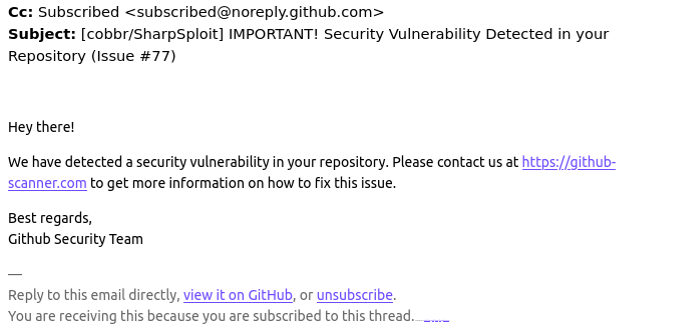
Many GitHub users this week received a novel phishing email warning of critical security holes in their code. Those who clicked the link for details were asked to distinguish themselves from bots by pressing a combination of keyboard keys that causes Microsoft Windows to download password-stealing malware. While it’s unlikely that many programmers fell for this scam, it’s notable because less targeted versions of it are likely to be far more successful against the average Windows user.
A reader named Chris shared an email he received this week that spoofed GitHub’s security team and warned: “Hey there! We have detected a security vulnerability in your repository. Please contact us at https://github-scanner[.]com to get more information on how to fix this issue.”
Visiting that link generates a web page that asks the visitor to “Verify You Are Human” by solving an unusual CAPTCHA.
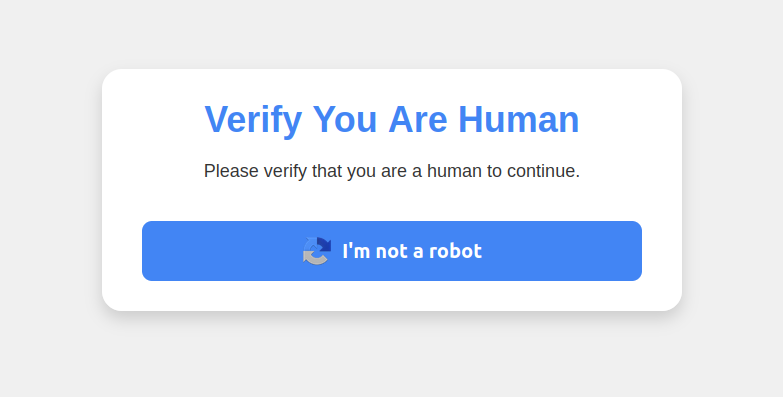
This malware attack pretends to be a CAPTCHA intended to separate humans from bots.
Clicking the “I’m not a robot” button generates a pop-up message asking the user to take three sequential steps to prove their humanity. Step 1 involves simultaneously pressing the keyboard key with the Windows icon and the letter “R,” which opens a Windows “Run” prompt that will execute any specified program that is already installed on the system.
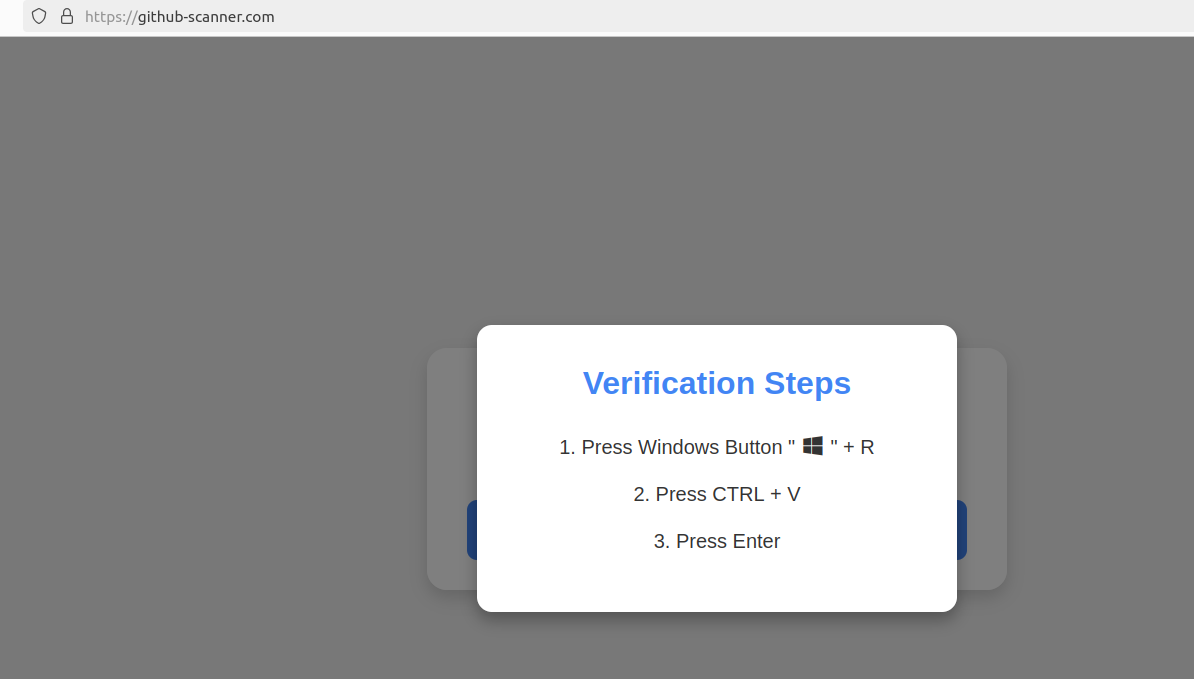
Executing this series of keypresses prompts the built-in Windows Powershell to download password-stealing malware.
Step 2 asks the user to press the “CTRL” key and the letter “V” at the same time, which pastes malicious code from the site’s virtual clipboard.
Step 3 — pressing the “Enter” key — causes Windows to launch a PowerShell command, and then fetch and execute a malicious file from github-scanner[.]com called “l6e.exe.”
PowerShell is a powerful, cross-platform automation tool built into Windows that is designed to make it simpler for administrators to automate tasks on a PC or across multiple computers on the same network.
According to an analysis at the malware scanning service Virustotal.com, the malicious file downloaded by the pasted text is called Lumma Stealer, and it’s designed to snarf any credentials stored on the victim’s PC.
This phishing campaign may not have fooled many programmers, who no doubt natively understand that pressing the Windows and “R” keys will open up a “Run” prompt, or that Ctrl-V will dump the contents of the clipboard.
But I bet the same approach would work just fine to trick some of my less tech-savvy friends and relatives into running malware on their PCs. I’d also bet none of these people have ever heard of PowerShell, let alone had occasion to intentionally launch a PowerShell terminal.
Given those realities, it would be nice if there were a simple way to disable or at least heavily restrict PowerShell for normal end users for whom it could become more of a liability.
However, Microsoft strongly advises against nixing PowerShell because some core system processes and tasks may not function properly without it. What’s more, doing so requires tinkering with sensitive settings in the Windows registry, which can be a dicey undertaking even for the learned.
Still, it wouldn’t hurt to share this article with the Windows users in your life who fit the less-savvy profile. Because this particular scam has a great deal of room for growth and creativity.

 FreshRSS