Now available for all Windows users, Chrome's security feature will thwart attackers who try to impersonate you by using your stolen browser cookies on their own devices.
Grand Theft Auto cheat users have discovered that even the people selling ways around the rules struggle to follow some basic security ones. According to breach notification site Have I Been Pwned, the operators of Atlas Menu, a cheat service for Grand Theft Auto V and Counter-Strike 2, suffered a data breach in May that exposed information belonging to tens of thousands of users after an attacker allegedly gained access to the service's systems and dumped its database online. The breach exposed 64,000 unique email addresses, according to HIBP. The leaked data also included usernames, IP addresses, support tickets, and passwords stored as bcrypt hashes. The individual who claimed responsibility for the breach published the stolen database to a public GitHub repository, claiming to have gained access to "all Atlas systems" before extracting customer records, support conversations, menu license keys, signup dates, and Rockstar Games account identifiers. The data, reviewed by The Register, also appears to include lists of thousands of banned users, administrator logs, and other internal records. Posts discussing the breach on Reddit suggest this was not Atlas Menu's first security incident, but users said the latest leak appears to contain significantly more sensitive information than previous disclosures. Anyone signing up for a GTA cheat service probably wasn't expecting privacy guarantees. Even so, having your email address leaked is one thing. Having support tickets, account identifiers, and purchase records dumped onto GitHub is another. The Atlas breach comes weeks after Rockstar Games was pulled into a separate data leak claimed by ShinyHunters. In that case, the extortion crew alleged it had accessed Rockstar data through cloud cost-monitoring platform Anodot and threatened to publish the information unless its demands were met. Atlas users now have their own security headache to deal with. Whether they're more concerned about the leaked database or the screenshot-spying allegation will likely depend on what they were doing while the software was running. ®
Monday hit like a cron job with anger issues.
A busted auth path here, a repo-side faceplant there, some "patched-ish" thing already getting chewed on in the wild, and then the usual bonus round: poisoned dev tools, sketchy forum chatter, phishing kits pretending to be productivity, and AI lowering the bar for people who already thought 'curl | sh' had a personality.
The vibe is simple: old
Whether you’re planning a once-in-a-lifetime trip or just hoping to catch a match while it’s in your city, the 2026 FIFA World Cup is already driving a surge in ticket searches, travel bookings, and last-minute plans.
But where there’s high demand and big money, scammers aren’t far behind.
New McAfee Research Finds a Gap Between Awareness and Risk
New research from McAfee shows that while most fans are aware of World Cup-related scams, many are still willing to take risks to secure tickets.
In fact, 40% say they would consider buying from an unofficial source if they can’t get tickets through the official FIFA site, as many expect tickets to sell out and hope to find affordable resale options.
That tension is what makes events like the World Cup especially vulnerable for scams.
With limited ticket availability, rising prices, and the pressure to act quickly, even informed fans can find themselves making decisions they normally wouldn’t, like buying tickets from a reseller on TikTok.
And scammers are counting on it.
Survey takeaways:
76% of fans are interested in getting World Cup tickets
35% have already started searching online
43% are willing to spend over $500 on tickets
66% say they’re aware of World Cup-related scams
66% say they’re concerned about being scammed
40% would consider buying tickets from unofficial sources
The Most Common World Cup Scams to Watch For
Below is a comprehensive breakdown of the most common scams tied to major global sporting events like the World Cup, including how they work and what to look for.
McAfee’s Scam Detector,Safe Browsingtools, VPN, and Password Manager work together to help you spot scamslike these as they happen by flagging suspicious messages, blocking risky websites, and helping you make safer decisions before you click, pay, or share information.
Scam Type
What It Is
How It Works
Red Flags
Fake Ticket Resale Scam
Fraudulent tickets sold through unofficial sites or individuals
Scammers create fake listings or duplicate real tickets and sell them to multiple buyers
Prices far below or above market, refusal to use official transfer systems, pressure to act fast
Social Media Ticket Scam
Tickets sold through platforms like Instagram, Facebook, TikTok, or X
Fake or hacked accounts post “last-minute” ticket offers and move conversations to DMs
Urgent language (“only 2 left”), new or suspicious profiles, requests to pay outside the platform
Duplicate QR Code Scam
One legitimate ticket is resold multiple times
Multiple buyers receive the same QR code, but only the first scan works
Screenshots instead of official transfers, identical tickets sold repeatedly
Fake Ticket Website Scam
Websites designed to look like official ticket platforms
Victims enter payment info or purchase tickets that don’t exist
Slightly misspelled URLs, unfamiliar domains, lack of official branding verification
Travel & Accommodation Scam
Fake hotels, rentals, or travel packages
Listings appear legitimate but either don’t exist or are already booked
Prices that seem unusually low, requests for upfront payment, lack of verified reviews
Booking Impersonation Scam
Fraudsters pose as airlines, hotels, or booking platforms
Victims receive messages about “issues” with bookings and are asked to click links or provide info
Unexpected messages, requests for login or payment details, links that don’t match official sites
Public Wi-Fi & Phishing Scam
Data theft through unsecured networks while traveling
Scammers intercept data or create fake login portals on public Wi-Fi
Open networks with no password, login pages asking for unnecessary information
Fake Giveaway Scam
Promotions claiming free tickets or VIP access
Victims are asked to enter personal data, click links, or pay “processing fees”
“You’ve won” messages you didn’t enter, requests for payment to claim prizes
Betting & Prediction Scam
Fake betting tips or “guaranteed wins” tied to matches
Scammers sell fake predictions or direct users to malicious betting sites
Claims of guaranteed outcomes, requests for upfront payment, unfamiliar platforms
Merchandise Scam
Counterfeit World Cup gear sold online
Buyers receive low-quality or no product at all
Unverified sellers, poor site quality, deals that seem too good to be true
How AI is Making These Scams More Convincing
Unfortunately, with the continued improvement of AI, these scams are becoming more convincing.
AI tools allow scammers to create:
More realistic websites and messages
Personalized outreach that feels legitimate
Fake endorsements, images, or promotions
That means traditional advice like “look for typos” is no longer enough on its own.
Today’s scams often look polished, professional, and believable.
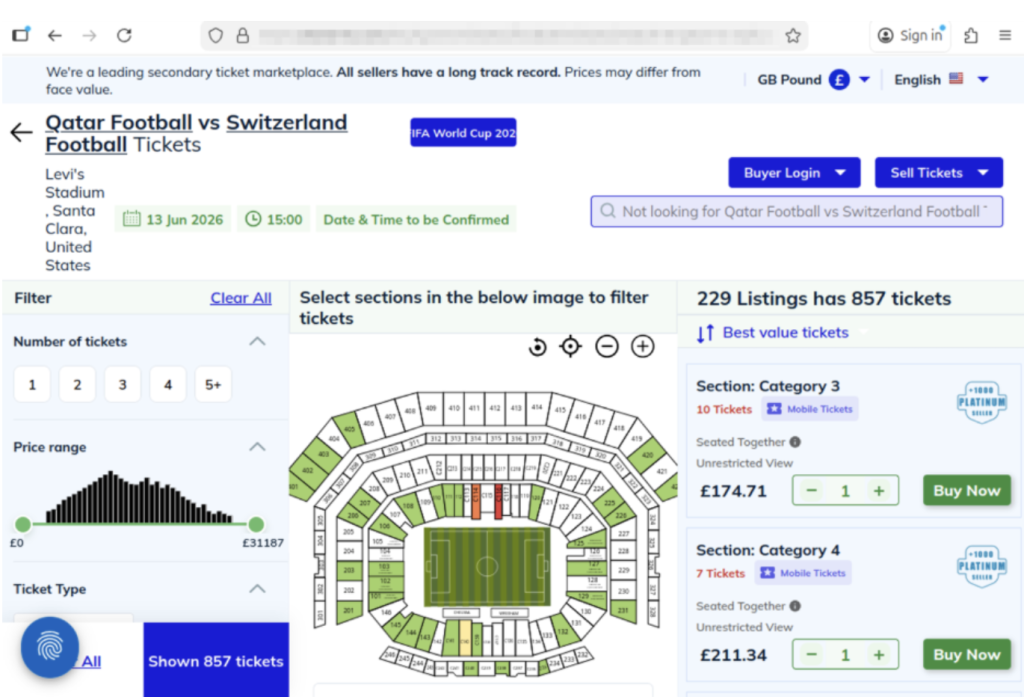
The website above shows a scam operation detected by McAfee Labs. It has incredibly realistic seat-selection options and ticket-buying features. But it’s fake.Here you can see just how realistic the website looks. But these tickets are not actually for sale.
What “Official” Actually Means (and Why It Matters)
Use strong passwords and enable two-factor authentication. Consider a password manager like McAfee’s.
Verify before you buy
If something feels off, pause and check before sending money
What to Do If You Think You’ve Been Scammed
If you think you may have purchased a fraudulent ticket, clicked a suspicious link, or shared information with a scammer, acting quickly can help limit the impact.
Immediate steps to take
Stop communication immediately Do not send additional money or information, even if the sender claims you need to “complete” a transaction. It’s also a good idea to take screenshots of messages in case the scammer disappears.
Contact your bank or payment provider Report the transaction as soon as possible. Many institutions can help reverse charges or flag fraudulent activity if caught early.
Secure your accounts Change passwords for any accounts that may be affected, especially email, banking, and ticketing platforms. Our password manager and free password generator help create unique passwords every time.
Enable two-factor authentication (2FA) Adding an extra layer of security can help prevent unauthorized access, even if your password was exposed.
Scan your device for threats If you clicked a suspicious link or downloaded a file, run a security scan to check for malware or malicious software. Check out our free security scan.
Monitor for unusual activity Keep an eye on financial accounts, email logins, and any services tied to your personal information. Our free WebAdvisor helps protect you from malware and phishing attempts while you surf.
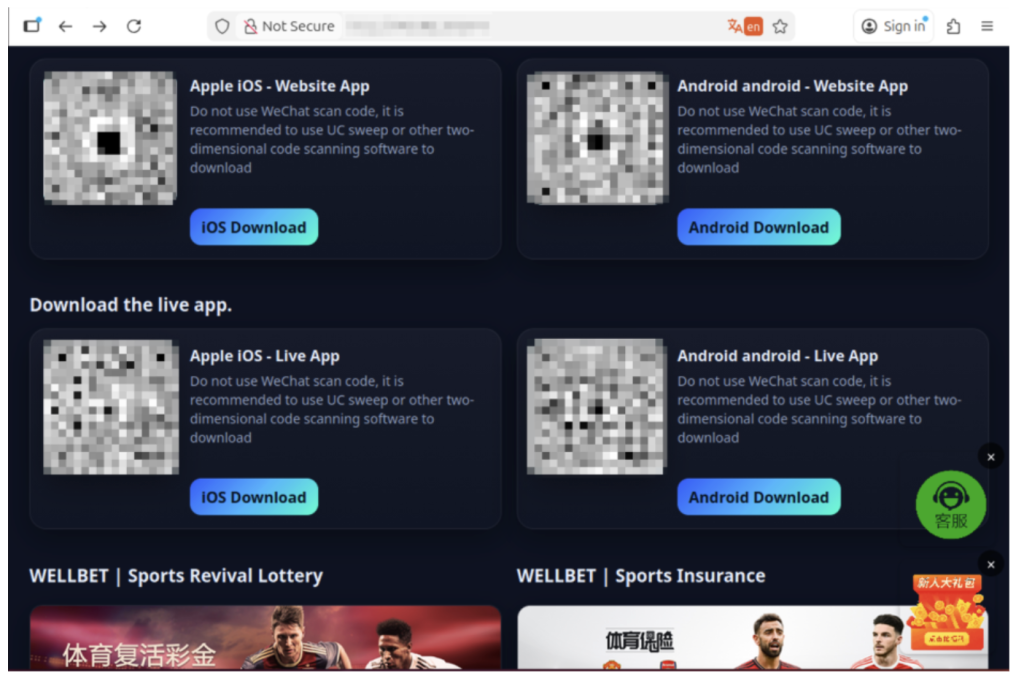
The image above shows malicious apps masquerading as sports betting sites or promising unique World Cup coverage. But when users download, their devices are infected.
How McAfee Helps You Spot Scams in the Moment
McAfee offers more than traditional antivirus, combining multiple layers of digital protection in one app to help you stay safer while searching, clicking, and buying online.
Scam Detector helps flag suspicious texts, emails, and videos automatically, so you can spot a scam before it hits you and your wallet
Safe Browsing tools help block risky websites, alert you to phishing attempts, and guide you away from malicious links
VPN helps keep your connection private on public Wi-Fi, protecting your personal and payment information
Password Manager helps create and store strong, unique passwords to reduce the risk of account takeover
Identity Monitoring and Alerts notify you if your personal information appears where it shouldn’t, so you can quickly take steps to fix it
Personal info removal helps find and remove your personal info from data broker sites and close out old forgotten accounts
The World Cup isn’t just another event, it’s a moment when millions of people are making fast decisions involving real money, travel plans, and personal information.
What McAfee’s research makes clear is that the biggest risk isn’t a lack of awareness. Most fans already know scams exist. The risk is what happens next.
When tickets are scarce, prices are high, and the pressure to act is real, even informed consumers may take chances they normally wouldn’t. That’s where scammers succeed: not by tricking people who aren’t paying attention, but by catching people in moments of urgency.
As demand continues to build toward the tournament, more fans will be searching, comparing, and purchasing online.
The takeaway is simple: Staying safe isn’t just about knowing scams exist. It’s about slowing down, verifying before you buy, and using tools that help you make informed decisions in the moment.
*McAfee is not affiliated with or endorsed by FIFA.
Palo Alto customers are being been told to patch yet another internet-facing security flaw after researchers caught attackers bypassing GlobalProtect authentication and gaining unauthorized VPN access. The flaw, tracked as CVE-2026-0257, affects PAN-OS deployments using GlobalProtect authentication override cookies under specific configurations. Palo Alto disclosed the bug on May 13 and initially assigned it a medium-severity rating, saying it was aware of attempts to exploit it but had not observed any malicious exploitation. That assessment has not aged well. Security boffins at Rapid7 said they observed successful exploitation across multiple customer environments dating back to at least May 17 and validated the attack technique using its own proof-of-concept testing. Attackers established unauthorized VPN sessions on vulnerable systems, potentially granting access to internal corporate networks without legitimate credentials, it added. Rapid7's analysis suggests the flaw comes down to how PAN-OS trusts authentication override cookies. In certain deployments, hackers can create their own cookies and have the firewall accept them as legitimate. The risk is highest where the same certificate is used for both HTTPS services and authentication override cookies, giving the baddies access to the information needed to generate convincing fakes. Rapid7 said it observed multiple waves of activity targeting vulnerable devices. In some cases, cybercrims successfully obtained VPN IP addresses and network access, but the company said it didn’t observe evidence of successful lateral movement following initial access in the incidents it investigated. The flaw has now landed in CISA's Known Exploited Vulnerabilities catalog, with federal agencies given until June 1 to patch or otherwise secure affected systems. Palo Alto has also revised its advisory, elevating the severity rating and attaching its highest urgency label. Fixes are available for supported releases. "Palo Alto Networks has become aware of limited exploit attempts on unpatched PAN-OS devices without mitigations applied," the firm said in an update. The latest PAN-OS headache arrives less than a month after another Palo Alto emergency. In May, state-backed attackers were found exploiting CVE-2026-0300, a critical remote code execution flaw in the PAN-OS User-ID Authentication Portal, before patches became widely available. Organizations running vulnerable GlobalProtect gateways now face a familiar choice: patch quickly or find out whether someone else gets there first.®
Announcing the new integration between Cisco Secure Access and Microsoft Purview designed to provide unified DLP based on Purview policies that can be enforced locally and in the cloud within Cisco Secure Access.
The integration between Cisco Secure Access and Island enterprise browser improves the user experience while reducing risk by connecting and protecting user access to private applications from unmanaged devices.
Cisco is bringing more detailed visibility into Splunk across Cisco Firewall and Isovalent, helping teams act across hybrid environments with greater speed and confidence.
A new cyber espionage campaign codenamed Operation Dragon Weave has been observed targeting officials and citizens in the Czech Republic and Taiwan to deliver an AdaptixC2 agent.
According to Seqrite Labs, targets of the campaign include government, research, academic, technology, and financial services sectors. The activity entails distributing spear-phishing emails containing ZIP attachments
Three years ago, the practical question for an MSP building a cybersecurity practice was which "vCISO platform" to buy. The term was good shorthand for the work at the time: assessments, advisory, reporting, maybe a compliance module bolted on the side. The work has since outgrown the descriptor.
A Security Growth Platform is the more precise name for what MSPs and MSSPs need from the software
Password manager Dashlane has disabled a number of user accounts as a precaution amid a spate of brute force attacks. It didn't specify the scale of the attack, although scores of users have queried the reason for receiving emails informing them of account suspensions. “Your account has been temporarily suspended for security reasons as someone has attempted to register a new device and didn't enter the correct token after several tries,” the emails read, along with instructions to contact customer support to restore access. The attacks began on Sunday afternoon and the Dashlane team said it had finished investigating the matter later that evening, restoring all affected user accounts in the process, according to its status page. In a copy-paste statement sent to a number of users via social media, Dashlane also confirmed there was no compromise of internal systems. Dashlane posted an update to its status page on Monday morning, repeating the same statement from a day earlier, but changing the incident status from "resolved" to "monitoring." Several users reported unauthorized login attempt notifications from various countries - the common culprits being Korea and Russia. Dashlane did not specify whether any attempts on customer accounts were successful. Dashlane’s interventions involved suspending accounts and its two-factor authentication (2FA) service. Some users reported trying to access Dashlane’s 2FA one-time passcodes, but when entering them, all that returned was an error. Some criticised the company for a lack of public comms about the attacks. Aside from the direct account suspension emails and some replies to users on social media, Dashlane has not disclosed the attack through any high-visibility channels. Users also queried whether the initial account suspension emails were a phishing attempt. But the emails showed no hallmarks of phishing as they contained no suspicious links, no attachments and were sent from a real Dashlane domain. However, the nature of the message and the fact that the emails contained an old Dashlane logo only exacerbated some customers’ fears. The Register has contacted Dashlane for more information. ®
The British government wants stronger protection for subsea internet cables following a surge in Russian activity near UK waters, but its latest proposals lean heavily on fines and prison sentences rather than direct defensive action. Plans - outlined in a speech by Baroness Liz Lloyd, Minister for Digital Economy ahead of a consultation - include tougher penalties for recklessly damaging undersea cables, operator security obligations and emergency powers allowing government to compel businesses to better protect their infrastructure. In April, the Royal Navy and Royal Air Force tracked Russian submarines on a covert reconnaissance near critical undersea infrastructure. According to reports, Russia deployed an Akula-class attack submarine as a decoy while two specialist vessels from Directorate of Deep Sea Research - known as Glavnoye Upravlenie Glubokovodnikh Issledovanii (GUGI) - surveyed the UK's cable routes. “Their mission was to survey our cables in peacetime, so they could more easily sabotage them in a conflict,” Lloyd said in a speech delivered at the Royal United Services Institute (RUSI). “They wanted this operation to be secret, but they failed." In light of this, the government is reviewing whether the UK’s security and resilience arrangements are strong enough, the Defence, Science and Technology Laboratory said. UK Parliament's Joint Committee on National Security Strategy (JCNSS) last year told the government it is "too timid" in its approach to protecting Britain’s cable connections, and must do a better job. Measures proposed include tightening the law so ship owners and operators that recklessly damage subsea internet cables face tougher penalties. Cable operators could be landed with extra obligations to ensure they take steps to prevent, detect and respond to security incidents in a consistent and timely manner. “The UK already has strong protections in place for our subsea cables, but in a more uncertain world we cannot stand still,” said Lloyd. "As hostile activity by Russia and others grows, protecting these cables matters more than ever for our economy, security and daily lives.” Some 64 cables connect Britain to the global internet, and when one breaks, repair vessels are typically on scene within eight days. Historically, most cable faults have stemmed from fishing activity or dragging anchors, not sabotage. The Royal Navy unveiled its Atlantic Bastion program last year to supplement its sub-hunting ships with a force of uncrewed, autonomous vessels. The aim is that enemy submarines in the North Atlantic have nowhere to hide. This is in its early stages, with £14 million committed so far for testing and development. The latest proposals will be outlined a white paper published later this year. Separately, the UK, US, and Australia announced this weekend that their AUKUS partnership will jointly develop sensor and weapons payloads for uncrewed underwater vehicles, which is another building block for protecting seabed infrastructure. ®
Cybersecurity researchers have disclosed details of a new malicious supply chain campaign that's targeting developers using OpenAI Codex through a legitimate-looking remote web UI.
The tool, named codexui-android, is advertised on GitHub and npm as a remote web UI for OpenAI Codex, attracting over 29,000 weekly downloads. The package is still available for download from the repository.
What

 Login
Login



 Scam Type